RSS
 

Archive for March, 2015

10 Quick Lightroom Tips and Shortcuts

21 Mar

Lightroom is a powerful and complex program. It’s great to have shortcuts and fast ways to do things you do often. Here are ten Lightroom tips to help you out:

#1 Check RBG values

Did you know that you can check the RGB value of the pixels for an selected image in Lightroom? When you are working in the Develop module press S on the keyboard which will show you the soft proofing for the image. Hover the cursor over the image area, and it will display the RGB values (not percentages) of the pixel where your mouse is being located, look just below the histogram. (See the screenshot below)
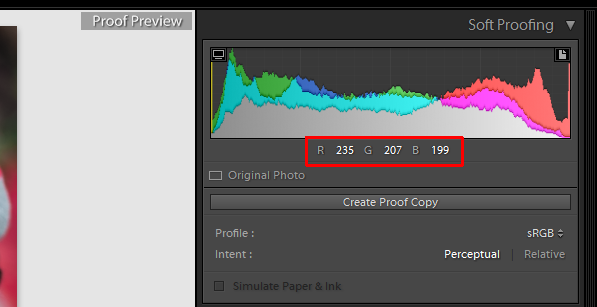
Smarttips Lightroom 01

#2 Full screen mode

2. Making a clutter free workspace will not only provide you more working area but it will be distraction free as well. To enable full screen (without even the menu bar and the window frame )- press Shift+F (in LR4 and earlier just hit F). Pressing that combination repeatedly will give you another two options. Try it out for yourself. I use this all the time.
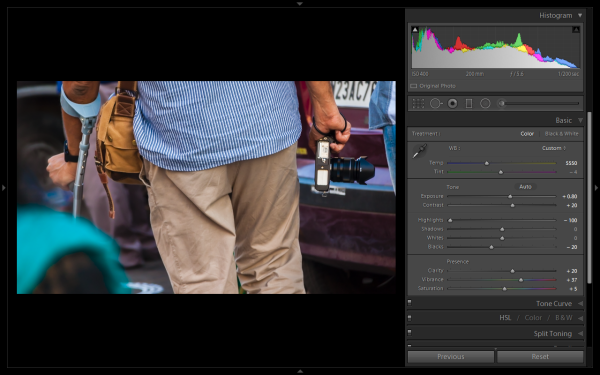
Smarttips Lightroom 02

#3 Preview effects by panel

You can turn off one particular sub-panel’s effect on the image. Click that little button to see the effect of that particular panel on the image toggle off and on.
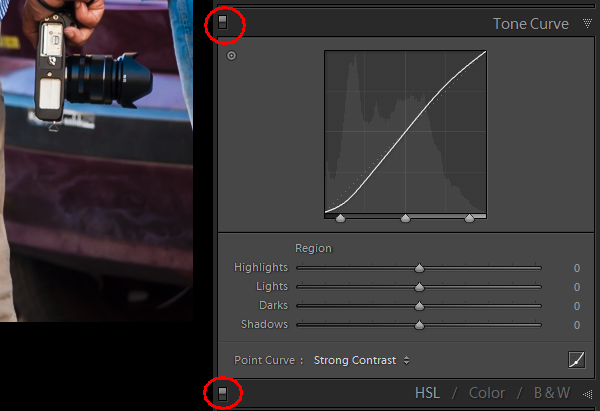
Smarttips Lightroom 03

#4 Work with the histogram

4. If you are person who works based on the histogram, you can work directly on the image’s histogram itself inside Lightroom. Once hover your cursor over on the histogram, it will change into a double-sided arrow on specific areas. Then you only have to click and drag to the right or left, as you wish based on what values you want to change (Black, Shadows, Exposure or mid tones, Highlights, or Whites).
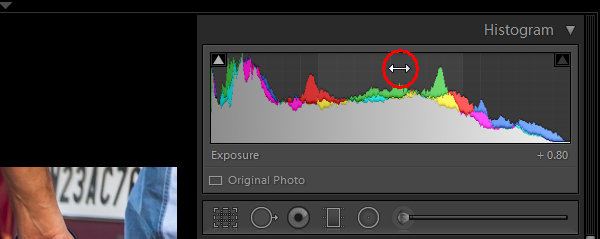
Smarttips Lightroom 04

#5 View file properties

If, while working on your photograph, for whatever reason you want to check the image’s properties including size, format, you can do so by pressing I (it will display the size of the file, file type, date taken, lens model). Pressing I one more time will provide you another set of properties, clicking I again will remove all the details from displaying.
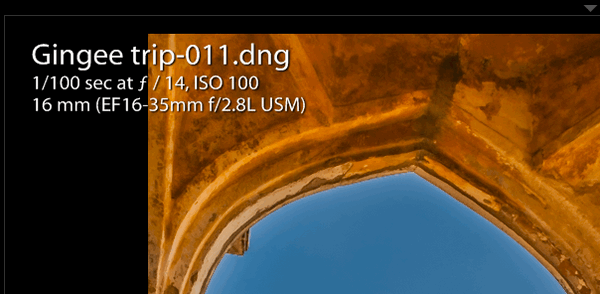
Smarttips Lightroom 05

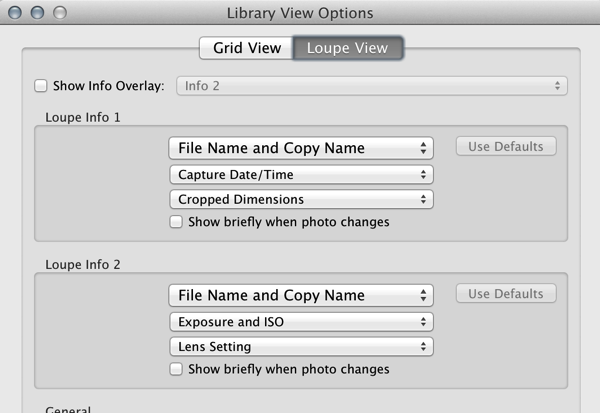
If you do not see all of those options go to View > View Options (Cmd+J) where you can customize what is displayed in the Louse overlay mode using this pop-up dialog box.
Screen Shot 2015 03 14 at 5 35 25 PM

#6 Clipping warnings

To avoid processing outside of your image’s dynamic range, while working in develop module clicking J (keyboard shortcut) will activate the clipping warnings for highlights and shadows. If you push exposure towards the right far more, a red colour warning will be displayed on the region of the photograph where it is overexposed, Conversely if you bring down the exposure (for whatsoever reason) a blue colour warning will be displayed on the region of the photograph where it is underexposed. (Below screenshot is an example of overexposure)
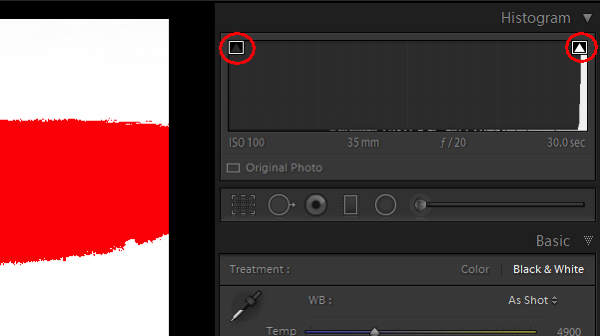
Smarttips Lightroom 06

#7 Unflagging

In Library module, when you are flagging photographs for sorting purposes, if you mistakenly press pick (p) instead of rejecting (x), stay calm and press (u) for unpick or unflag. It will remove the flag, now you can mark it as you originally wished.

#8 Lesser known Develop keyboard shortcuts

If you are in the habit of using your keyboard, in Develop module the complete basic panel can be controlled by keyboard. Press period (.) or comma (,) for selecting a slider (e.g., Exposure) and then press plus (+) to increase the value and press minus (-) to decrease the value of the same. Now press period (.) to go the next. Repeat, enjoy.

#9 Shift key to lock

While applying a graduated filter, if you want to make it straight – press and hold Shift the key to make the filter locked into perfectly horizontal or vertical position. You can also hold Shift when applying the crop tool on your image (if required), to avoid changing the image proportions.

#10 Saving local adjustment tool presets

You can save any of the local adjustment tool settings as a preset which can be used for any of the tools. For example, if you are a portrait retoucher, you may want to save your favorite skin-softening settinsg as a preset. You can do that by clicking save as a preset at the bottom of the local correction tool set. Likewise you can save any kind of settings which you may use often.
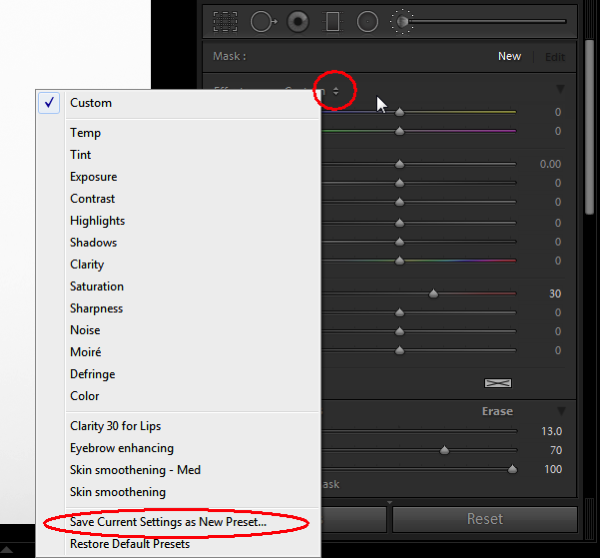
Smarttips Lightroom 10

Do you have any others you’d like to add to this list of Lightroom quick tips?

googletag.cmd.push(function() {
tablet_slots.push( googletag.defineSlot( “/1005424/_dPSv4_tab-all-article-bottom_(300×250)”, [300, 250], “pb-ad-78623” ).addService( googletag.pubads() ) ); } );

googletag.cmd.push(function() {
mobile_slots.push( googletag.defineSlot( “/1005424/_dPSv4_mob-all-article-bottom_(300×250)”, [300, 250], “pb-ad-78158” ).addService( googletag.pubads() ) ); } );

The post 10 Quick Lightroom Tips and Shortcuts by Navan Viswa appeared first on Digital Photography School.

Digital Photography School

 
Comments Off on 10 Quick Lightroom Tips and Shortcuts

Posted in Photography


Namibia entschleunigt – ein Reisebericht

21 Mar

Namibia 1 © Daniel Krüger

Ein Beitrag von: Daniel Krüger

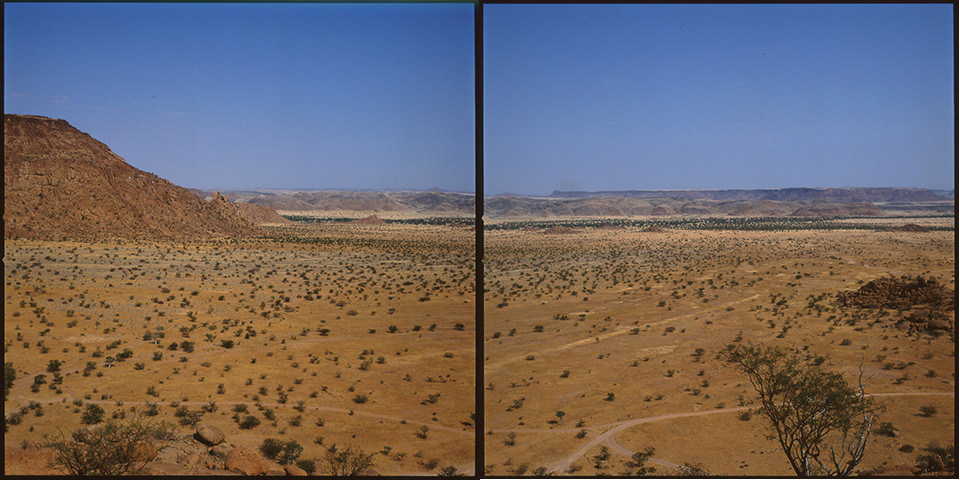
Es sind Eindrücke, die man schwer in Worte fassen kann. Du musst es mit eigenen Augen sehen, diese Weite, diese unbeschreibliche Natur, sagte Kai, ein guter Freund von mir, im Vorfeld der Namibiareise. Er selbst war bereits zwei Jahre zuvor dort gewesen. Einige Monate später stehe ich auf der 170 Meter hohen Dune 45, die am Rande der Straße bei Sesriem in Namibia liegt.
kwerfeldein – Fotografie Magazin | Fotocommunity

 
Comments Off on Namibia entschleunigt – ein Reisebericht

Posted in Equipment


Weekly Photography Challenge – Emotions

21 Mar
Brett Davies

By Brett Davies

Image which show emotions or evoke them are powerful. But what kinds of emotions can be captured or portrayed in a photograph? How about these, just to get started:

  • Anger
  • Sadness
  • Fear
  • Love
  • Loneliness
  • Confusion
  • Pride
  • Jealousy
  • Fatigue
  • Dispair

What others can you think of?

Illusive Photography

By Illusive Photography

[AndreasS]

By [AndreasS]

Weekly photography challenge – emotions

Your challenge this week is to take a photo, or series of them, that pull at the emotions. It might be a person and their expression, or an inanimate object. Lighting, lens selection, and camera angle can all affect mood in an image, so choose carefully and purposefully to create emotional images.

This does not mean images of people pretending to cry or be angry – no real emotions. A baby’s giggling face when it’s tickled, the pleasure of a great meal or coffee, genuine real emotion. Include a person or not – it’s your choice.

Jelly Dude

By Jelly Dude

Andi Campbell-Jones

By Andi Campbell-Jones

Luke Andrew Scowen

By Luke Andrew Scowen

Brett Davies

By Brett Davies

Share your emotional images here:

Simply upload your shot into the comment field (look for the little camera icon in the Disqus comments section) and they’ll get embedded for us all to see or if you’d prefer upload them to your favourite photo sharing site and leave the link to them. Show me your best images in this week’s challenge. Sometimes it takes a while for an image to appear so be patient and try not to post the same image twice.

googletag.cmd.push(function() {
tablet_slots.push( googletag.defineSlot( “/1005424/_dPSv4_tab-all-article-bottom_(300×250)”, [300, 250], “pb-ad-78623” ).addService( googletag.pubads() ) ); } );

googletag.cmd.push(function() {
mobile_slots.push( googletag.defineSlot( “/1005424/_dPSv4_mob-all-article-bottom_(300×250)”, [300, 250], “pb-ad-78158” ).addService( googletag.pubads() ) ); } );

The post Weekly Photography Challenge – Emotions by Darlene Hildebrandt appeared first on Digital Photography School.


Digital Photography School

 
Comments Off on Weekly Photography Challenge – Emotions

Posted in Photography


Adobe Camera Raw 8.8 and DNG Converter 8.8 now available

21 Mar

Adobe has released its Camera Raw 8.8 final release for Photoshop CC/CS6, the company has announced. Support for several additional Canon, Panasonic, and Fujifilm cameras have been added, as well as the Hasselblad Stellar II, Nikon D5500, and Olympus OM-D E-M5 II, among others. Read more

Articles: Digital Photography Review (dpreview.com)

 
Comments Off on Adobe Camera Raw 8.8 and DNG Converter 8.8 now available

Posted in Uncategorized


Danny MacAskill leaps from Skye to eclipse other action shots

21 Mar

The weather spoiled today’s solar eclipse for many would-be watchers in the UK but it was visible in some parts of the country. Dutch photographer Rutger Pauw teamed up with trials biking genius Danny MacAskill to get a rather different shot. Using a long telephoto lens and shooting from over 300m away, Pauw had to communicate with MacAskill by radio to time the shot precisely, a process complicated by only having enough battery power to fire their super-powerful strobe once. Read more

Articles: Digital Photography Review (dpreview.com)

 
Comments Off on Danny MacAskill leaps from Skye to eclipse other action shots

Posted in Uncategorized


Where Did I Put That? Tips for Organizing Your Photos

21 Mar

In the interest of full disclosure, I must admit something. My photos are unorganized. By that, I mean terribly unorganized. Over the years, I’ve taken thousands and thousands of photos, all the while dumping them in folders automatically created and named by my computer’s default importing program. As such, I’d be hard-pressed to quickly find photos from a specific shoot Continue Reading

The post Where Did I Put That? Tips for Organizing Your Photos appeared first on Photodoto.


Photodoto

 
Comments Off on Where Did I Put That? Tips for Organizing Your Photos

Posted in Photography


20. März 2015

21 Mar

Das Bild des Tages von: Jan Gottweiß

Nine-Dragon-Road-©-Jan-Gottweiß-16607509628

Im Ausblick: Techniken in der Streetfotografie, japanische Tattookunst und der Wert von Prints.
kwerfeldein – Fotografie Magazin | Fotocommunity

 
Comments Off on 20. März 2015

Posted in Equipment


B-grip launches Uno holster for compact system cameras

20 Mar

Italian accessory maker CPtech has launched a new holster in its B-Grip range that is designed for smaller cameras. The company says that its Uno holster will be suitable for compact system users, as well as those who own bridge and compact cameras. Read more

Articles: Digital Photography Review (dpreview.com)

 
Comments Off on B-grip launches Uno holster for compact system cameras

Posted in Uncategorized


28 Emotional Images That Make You Feel

20 Mar

Photography, like any art, when done well can really express and show emotions. This week I went searching for images that do just that.

See what emotions you feel when you view these images:

Photograph ...have you seen my chew bone? by Christoph Oberschneider on 500px

…have you seen my chew bone? by Christoph Oberschneider on 500px

Photograph Dies, Nox et Omnia by Mathieu Degrotte on 500px

Dies, Nox et Omnia by Mathieu Degrotte on 500px

Photograph Standing in the rain... by Sham Jolimie on 500px

Standing in the rain… by Sham Jolimie on 500px

Photograph Angry Boy by J.J. Taylor on 500px

Angry Boy by J.J. Taylor on 500px

Photograph My thougths are anchors and I'm drowning at sea. by Romana Kreider on 500px

My thougths are anchors and I'm drowning at sea. by Romana Kreider on 500px

Photograph Dove Love by Jon Rista on 500px

Dove Love by Jon Rista on 500px

Photograph Enjoy solitude by Isabel Membrado on 500px

Enjoy solitude by Isabel Membrado on 500px

Photograph The Chair by Phil Grieve on 500px

The Chair by Phil Grieve on 500px

Photograph A.W. by davide mezzalira on 500px

A.W. by davide mezzalira on 500px

Photograph Fog Invasion - Original WB by Craig Fraser on 500px

Fog Invasion – Original WB by Craig Fraser on 500px

Photograph Window Into Infinity by Ken Lee on 500px

Window Into Infinity by Ken Lee on 500px

Photograph Road to Home by Vince Ha on 500px

Road to Home by Vince Ha on 500px

Photograph Fantasia by tvurk  on 500px

Fantasia by tvurk on 500px

Photograph The Dreamy Island by Ratul Maiti on 500px

The Dreamy Island by Ratul Maiti on 500px

Photograph ~The flood~ by Christian Wig on 500px

~The flood~ by Christian Wig on 500px

Photograph Dreamy by Dheny Patungka on 500px

Dreamy by Dheny Patungka on 500px

Photograph Locked by Tracy Williams on 500px

Locked by Tracy Williams on 500px

Photograph Internal Thinking by Kevin Kent on 500px

Internal Thinking by Kevin Kent on 500px

Photograph Best Friend by chegu diman on 500px

Best Friend by chegu diman on 500px

Photograph Cloud Atlas by Meer Sadi on 500px

Cloud Atlas by Meer Sadi on 500px

Photograph ?????????? by Srinavin Kumar on 500px

?????????? by Srinavin Kumar on 500px

Photograph Eyjafjallajokull 2010 Iceland by Gunnar Gestur  on 500px

Eyjafjallajokull 2010 Iceland by Gunnar Gestur on 500px

Photograph I'll Be Black! by Ashley Vincent on 500px

I'll Be Black! by Ashley Vincent on 500px

Photograph The goofy goober by Elke Vogelsang on 500px

The goofy goober by Elke Vogelsang on 500px

Photograph The Roof ... by Yacine Edga Photography on 500px

The Roof … by Yacine Edga Photography on 500px

Photograph *** by Luis Valadares on 500px

*** by Luis Valadares on 500px

Photograph Unconditional Love by William Roberts on 500px

Unconditional Love by William Roberts on 500px

Photograph Sun Kissed by Ernie Manzano on 500px

Sun Kissed by Ernie Manzano on 500px

googletag.cmd.push(function() {
tablet_slots.push( googletag.defineSlot( “/1005424/_dPSv4_tab-all-article-bottom_(300×250)”, [300, 250], “pb-ad-78623” ).addService( googletag.pubads() ) ); } );

googletag.cmd.push(function() {
mobile_slots.push( googletag.defineSlot( “/1005424/_dPSv4_mob-all-article-bottom_(300×250)”, [300, 250], “pb-ad-78158” ).addService( googletag.pubads() ) ); } );

The post 28 Emotional Images That Make You Feel by Darlene Hildebrandt appeared first on Digital Photography School.


Digital Photography School

 
Comments Off on 28 Emotional Images That Make You Feel

Posted in Photography


Video: DPReview panel at CreativeLive’s Gear Day 2015

20 Mar

Recently we joined our friends at CreativeLive for a panel discussion as part of their 2015 Gear Day. Our live discussion centered on the continued rise of mirrorless cameras, 4K video and what it means for stills photographers, the benefits and pitfalls of high pixel sensors, and of course, lots of new and exciting gear. Watch the segment and nerd out with us all over again. See video

Articles: Digital Photography Review (dpreview.com)

 
Comments Off on Video: DPReview panel at CreativeLive’s Gear Day 2015

Posted in Uncategorized