RSS
 

Archive for January, 2015

Flowerworks: Pictures Capture Plants Exploding Like Fireworks

07 Jan

[ By WebUrbanist in Art & Photography & Video. ]

flower red starburst white

A novel take on a New Year’s staple, crafty photography and flower power, these bright botanical arrangements (set against dark night-like) backgrounds seem to burst in midair.

flower plant art photos

flower tracer arc light

flower orange purple explode

This Flowerwork photo series from Berlin-based artist Sarah Illenberger stemmed from her combined interest in art, photography and graphic design as well as a fascination with other dimensions of everyday options.

flower purple green explosion

flower green white buds

flower like firework art

Working together with photographer Sabrina Rynas, buds and blossoms were set against a faux night sky, appearing to be much larger fireworks shot from off-screen at first glance. In some cases the stems trail like streamers or one plant seems nested in another like some kind of grand finale.

flower burst light dark

flower fire photography shoot

More about the artist: “Sarah Illenberger is a multi-disciplinary artist based in Berlin working at the intersection of art, graphic design, and photography. With a focus on analog craftwork using everyday items, Sarah is renowned for creating vivid, witty images that open up new perspectives on seemingly familiar subjects.”

flower exploding firework botanical

flower draping falling sequence

flower grand finale art

“Her ability to transform ordinary materials into complex and unexpected visual experiences has been utilized to develop concepts for clients from the fields of culture and business in several countries. In her aim to explore the fertile overlap between art and design, she’s collaborated with numerous photographers and artists, and filled exhibition spaces with self-initiated projects in Paris, Tokyo, and Berlin.”

Share on Facebook


[ By WebUrbanist in Art & Photography & Video. ]

[ WebUrbanist | Archives | Galleries | Privacy | TOS ]


WebUrbanist

 
Comments Off on Flowerworks: Pictures Capture Plants Exploding Like Fireworks

Posted in Creativity


Zwei Schwestern

07 Jan

Zwei Schwestern unterhalten sich.

Ich bin mir ziemlich sicher, dass jeder Geschichten mag. Früher war es meine Mutter, die sich zu mir ans Bett setzte, mich lange anschaute und mit dem Satz begann: „Einst vor vielen Jahren …“

Und ich wollte gar nicht einschlafen, weil die Wesen, die sie erschuf, in meinem Kopf so lebendig wurden. Sie erhielten ein Eigenleben und wann immer die Realität zu grau, zu traurig oder sogar grausam wurde, schlüpfte ich in mich und setzte mich mit meinen alten Bekannten aus Kindertagen an einen Tisch zum Kaffeekränzchen.

Heute trage ich meine Kamera mit mir herum und kann die Wesen aus meinem Kopf nach draußen holen. Und eine dieser Geschichte möchte ich Euch heute erzählen:

Im Sommer des letzten Jahres hatten wir das Glück, einen Garten zu bekommen. Also einen echten, mit fruchtbarem Boden, Kirsch- und Apfelbäumen und einem kleinen Haus darauf. Ich war sofort verliebt in dieses Stück Land. Die Hecken wuchsen über den alten Zaun und Wildblumen hatten sich im gesamten Garten selbst ausgesät.

Von außen konnte man kaum das Innere des Gartens erblicken. Die Menschen aus den anderen Gärten erzählten uns von den Vorbesitzern. Keiner hielt den Garten ein halbes Jahr, immer wieder kam es zum Zank zwischen den Paaren, die sich ebenfalls in diesen Garten verliebten und keiner schaffte es, die Wildheit des Gartens zu zähmen.

zwei Mädchen hinter einer Gardine.

Zwei Mädchen sitzen auf einem Sessel und schlafen.

Erst unsere direkte Nachbarin rückte dann eines Nachmittags mit der Wahrheit heraus, als wir gerade versuchten, den Girsch aus dem Boden zu ziehen. Es war die Geschichte eines jungen Paares, das sich sehr liebte und diesen Garten erschuf, es muss so Anfang der 1920er Jahre gewesen sein, als die Welt noch nichts wusste vom kommenden Krieg. Sie bauten das Haus und zogen ihre beiden Töchter hier auf, wie Sämlinge aus dem Boden.

Nun aber stand das Haus schon lange leer, die Bäume waren ungepflegt und auch der Boden war voller Unkraut. Den Menschen war das Haus und der Garten schon längst nicht mehr geheuer. Einige wollten Bewegungen gesehen und andere sogar Geräusche gehört haben. Und auch die Äpfel und die Kirschen verschwanden manchmal einfach von den Bäumen.

Aber mal ehrlich, so hinter vorgehaltener Hand, in welche Mägen die Äpfel und Kirschen tatsächlich wanderten, das kann sich jeder mit hochgezogener Augenbraue selbst beantworten. Ich glaubte jedenfalls nur die Hälfte von dem Geschwätz.

Doch mit einem hatten sie Recht, irgendetwas stimmte mit diesem Garten ganz und gar nicht. Denn wann immer ich mit meinem Freund beriet, ob wir diese oder jene Pflanze aus dem Garten verbannen sollten, um Land für unser Gemüse zu gewinnen, begannen wir kurze Zeit nach der Arbeit, uns zu streiten. Sobald wir aber Schaufel und Hacke fallen ließen, verschwand der Zorn aus unseren Augen.

Zwei Mädchen stehen in einem Raum und erzählen sich etwas.

Ein Mädchen füttert das andere Mädchen mit einem Apfel.

Eines Mittags, als die Sonne am höchsten stand und ich allein im Garten war, machte ich ein Nickerchen auf dem alten Sessel im Haus. Die Fenster waren geöffnet und der warme Südwind ließ die Gardine auf und ab tanzen.

Ich träumte von dem alten Ehepaar und den beiden Schwestern. Ungewöhnlich war das nicht, denn immerhin hatten uns die Nachbarn beständig mit Geschichten über dieses Haus gefüttert. Doch in diesem Traum war alles dunkel. Die Farben waren von den Wänden gewichen und ein mulmiges Gefühl breitete sich in mir aus.

Ein Mädchen sitzt und ein anderes steht draußen vor dem Fenster.

Jemand steht in der Ecke.

Ich fühlte mich beobachtet und starrte in die Ecken. Das einzige, was ich sah, waren die ausgehöhlten Körper von Insekten. Und doch, da war doch etwas. Ein leises Flüstern hinter mir. Ich schloss die Augen und da – plötzlich – eine kalte Hand auf meinem Arm. Sie schloss sich immer fester!

Ich erschrak aus meinem Traum. Mein Arm war kalt, doch keine Hand auf ihm.

Nun haben wir bereits Winter. Dem Garten haben wir seine Pflanzen gelassen. Nur die Bäume bekamen im Herbst einen neuen Schnitt. Wir haben uns arrangiert.

Im Frühling bauen wir Hochbeete für unser Gemüse, ansonsten bleibt alles so, wie es ist. Der Schnee hüllt das Haus nun in ein weißes Gewand und damit auch seine Geschichten. Es ist noch vieles vorgefallen nach meinem Traum, doch dies zu erzählen würde hier nun den Rahmen sprengen. Nur soviel: Die Schwestern lebten hier noch bis zu ihrem Tode, versteckt vor den Menschen und man sagt, sie wären nie gegangen.

Eine Frau kämmt der anderen Frau die Haare.

Der Kristall ist zerbrochen.

Ich hoffe, meine kleine Geschichte hat Euch gefallen. Danken möchte ich den vielen Geschichtenerzählern an unserem Gartenzaun, aber vor allem Gloria Endres de Oliveira und Julia Feige, die mich inspirierten, diese Geschichte zu erzählen.


kwerfeldein – Fotografie Magazin | Fotocommunity

 
Comments Off on Zwei Schwestern

Posted in Equipment


Toshiba offers FlashAir III wireless SD card

07 Jan

Toshiba has announced a third generation of its FlashAir wireless SD cards. Like the previous version, the Toshiba FlashAir III acts as its own wireless LAN point for sharing to smartphones, tablets and computers. The newly introduced card boasts ‘enhanced photo sharing and management features,’ and maintains the same Class 10 rating as its predecessor. Read more

Articles: Digital Photography Review (dpreview.com)

 
Comments Off on Toshiba offers FlashAir III wireless SD card

Posted in Uncategorized


Waste-Free Future: 5 Package Redesigns for Everyday Products

07 Jan

[ By WebUrbanist in Design & Products & Packaging. ]

packaging redesigns

Starting with name-brand versions of popular products found in virtually any home, this designer has come up with a series of clever solutions to eliminating the waste from each package system on a case-by-case basis.

waste free bag roll

Aaron Mickelson took on this challenge as a master’s thesis project at the Pratt Institute, asking (and answering) the question: can any product be truly garbage-free, leaving little or nothing unused in its wake? The strategies employed here are also potentially versatile – each could be applied to a type or category of packaging (and would-be trash).

wasteless bag design concept

waste free garbage bags

The bag of garbage bags design for GLAD products is fairly straightforward, to the point where one has to wonder why they are not using this strategy already: the last bag contains the rest of the bags, both to make it functional as a bag itself but also to leave it as a reminder to buy more bags (which you can see coming thanks to it being partially transparent as well).

waste free packaging concept

no waste consumer pods

wasteless dishwasher pods package

wasteless pod washing machine

The laundry (or dish) pods for Tide are designed to dissolve in water, leaving nothing behind that you need to take out of the wash, obviating the need for a container entirely.

waste free food boxes

waste free container design

waste free pop containers

The OXO pop containers feature soap-soluble ink that breaks down when you wash it, taking the branding materials with it and leaving you with an all-purpose container. As a bonus: these could also come pre-loaded with food rather than simply sold as containers, too, allowing you to buy products then keep the plastic boxes for other uses.

wasted packaging milk bar

waste free soap box

The Nivea bar of soap comes in a septic-safe dissolving paper wrapper that you can bring into the shower or bath with you and not have to worry about throwing out, eliminating a step as well as reducing landfill.

no consumer packing waste

no waste tea bags

Finally, this Twining tea bag variant eliminates the wax lining that typically prevents composting and instead integrates each tea packet directly into the compost-friendly packaging design that unfolds like an accordion for use.

Share on Facebook


[ By WebUrbanist in Design & Products & Packaging. ]

[ WebUrbanist | Archives | Galleries | Privacy | TOS ]


WebUrbanist

 
Comments Off on Waste-Free Future: 5 Package Redesigns for Everyday Products

Posted in Creativity


Hands-on with Fujifilm’s new XF 16-55mm F2.8 R LM WR lens

07 Jan

It’s been on Fujifilm’s X-series roadmap for a while, but now it’s real – the XF 16-55mm F2.8 R LM WR is a 24-83mm equivalent, weather-sealed standard zoom for Fujifilm’s high-end X-series interchangeable lens cameras, which offers a fast maximum aperture of F2.8 throughout its zoom range. As CES gets started in Las Vegas, we grabbed a few minutes with the new zoom. Click through for some images

Articles: Digital Photography Review (dpreview.com)

 
Comments Off on Hands-on with Fujifilm’s new XF 16-55mm F2.8 R LM WR lens

Posted in Uncategorized


Gear Envy: Five Things to Consider Before Buying Your First Camera

07 Jan

GearEnvy 1

1. The Ol’ Gear versus Photographer Chestnut

What’s the best camera and lens you can buy when you’re starting out?

  • Anything by Nikon
  • Anything by Canon
  • Nikon and Canon are overrated; Pentax is what all the cool kids are using
  • Do the best you can with what you can afford right now

A photographer went to a socialite party in New York. As he entered the front door, the host said “I love your pictures – they’re wonderful; you must have a fantastic camera.” He said nothing until dinner was finished, then: “That was a wonderful dinner; you must have a terrific stove.” – Sam Haskins

Believing a great camera will make you a great photographer is like thinking Roger Federer’s tennis racquet will make you a world champion tennis player. Um, it won’t – I’ve tried. I’ve also worn the same jeans as Gisele Bundchen and they didn’t make me a supermodel. Cooking with Wolfgang Puck’s saucepans didn’t make me a master chef either.

Great gear won’t make you a great photographer. Great lenses, however, can improve the sharpness of your images, and great lights and accessories can improve their quality. But all of that can be undone with poorly executed or sloppily composed images.

Just because something’s technically perfect doesn’t necessarily make it great or even good. A good photo should inspire an emotional reaction, and no camera or lens available today can achieve that for you.

I’m blown away daily by evocative photos on Instagram, 500px, and Flickr. Eighty percent or more of these images are taken with smart phones or entry-level cameras with kit lenses. When I share my images online, I get just as big a response from images taken with my iPhone as I do from images taken with pro gear. Because of the Internet, there’s never been a greater time in history to have your work seen and loved, or to inspire a reaction.

The best first camera you can buy is the one you can afford right now.

2. What are you shooting?

GearEnvy 2

Next, you should ask yourself what your your gear is for? Where will you use it and how often?

  1. I only take my camera to church on Sundays.
  2. I’m going to document my trek to the summit of Mount Everest, rodeo rides and my next Tough Mudder event.
  3. I photograph sixty weddings a year.
  4. I’m still learning, but I love to take photographs every opportunity I get.

Are you planning on taking your camera to rugged subzero locations? Will you be shooting thousands of images a day or only taking photos on special occasions? This is the first question to consider before purchasing any new gear – what will you use it for?

If your answer is #2 or similar, you may want to consider a heavy duty pro body that’s built to take rough and tumble handling and extreme weather conditions; a cheaper lightweight camera may not withstand the wear and tear or hold up to the elements.

If you plan on taking thousands of frames daily or weekly, it may be more cost effective to invest in a mid-range camera that’s built to shoot more frames. The shutter on a cheap camera usually rolls over and dies after about 100,000 frames, so spending a few hundred extra may give you more longevity.

The subject matter you’ll be shooting will also influence your choice of lens. For example, if you’re planning on shooting a lot of portraits and head shots, many fashion and portrait photographers use long fixed focal lenses or zoom lenses. If you’ll be doing a lot of weddings, professionals stock their kits with wide and long lenses and lenses that are somewhere in-between. If you’ll be shooting a lot of scenery, landscape photographers get more use out of wider lenses. And lastly, if you plan on shooting a lot of food or products, you may want to consider adding a macro lens to your kit.

3. Brand loyalty. Which brand should you buy and why?

With cameras there’s no definitive answer to this question. Nikon appears to have a slight edge over all the other SLR brands, but there are advantages and disadvantages to each.

I spent the first 15 years of my career shooting with Nikon because both my brother and my first mentor used them. I loved my Nikon and never dreamt of swapping over. I initially invested in secondhand bodies and prime lenses and after I had saved enough coin to buy new, I stayed loyal to Nikon. Later when I switched over to digital, I continued my Nikon love affair.

The decision to convert to Canon was made for me by the lack of decent Nikon upgrades on the market in 2004-2005 and by the fact that Canon’s 1DS MKII blew anything Nikon made that year out of the water. I switched to Canon and invested in two new camera bodies, new lenses, speedlights and accessories.

Fast forward 10 years and you could argue that Nikon now makes better bodies than Canon, and that Canon makes slightly better lenses. For better or worse, I’ve made a commitment to Canon, and I’m sticking to that – for now. I still suffer the occasional bout of gear envy, but hey, I’m only human.

My advice is to test out each camera on offer in your price range. You’ll find that some cameras are more comfortable to use than others. Also factor in the warranty, general after-sales service, and how easy it is to have the brand you’re looking at serviced or repaired in your area. Another good indication of quality is the camera’s resale value. If your potential camera is flooding the low-end of the secondhand market, it may be a good indication you’re about to buy a lemon. Finally, check out camera reviews and look up discussions about the model you want to buy on forums. The photography community is incredibly thorough and generous with information.

4. Holy crop! Does size matter?

GearEnvy 3

I bought my first digital Nikon 13 years ago and paid $ 17,000 AUD (approx. $ 14,000 USD) just for the body. It took 256 MB memory cards and produced raw image files that were around 6 MB. I used that camera to shoot hundreds of covers, poster shots, magazine spreads and advertising campaigns, and nobody ever questioned the file size.

Today my iPhone takes 8 MB photos. So, does that mean my iPhone camera is better? Umm – no. It’s not the quantity of the megapixels that count; it’s the quality of the megapixels and the size of the sensor. Cramming lots of megapixels onto a tiny sensor decreases image quality, making grainier looking files.

So how big are the sensors in the various cameras on the market today? A camera phone sensor is the size of a tic tac, a compact camera sensor is the size of an M&M, an entry-level SLR sensor is the size of postage stamp, and a pro level camera sensor is the size of a 35mm film frame.

So how many megapixels are enough and what’s the best size sensor for you? Well again, the answer comes down to what the output is going to be.

If you plan on shooting images that are going to end up on billboards or really large wall prints, then a full frame sensor that produces raw image files that are larger than 20 MB is ideal. An entry-level camera can produce large enough files to create billboard size images; they just won’t look anywhere near as good.

If you plan on printing midsize images — A4 (8.5×11″) or smaller — then an entry-level to mid-range camera will achieve really good results.

Finally, if you’re mostly going to share your images online, you can get away with a smart phone or compact camera, but any of the above will do the job, as well.

5. Physical size and weight
GearEnvy 4

Does this camera make my bum look big?

This factor is often overlooked until you get home and pull your new camera out of the box and use it a few times. You may think you want the biggest, heaviest camera and the longest lens, but four hours into an eight-hour mountain hike, you may change your mind.

I currently use two different bodies: the 1DS MKIII and the 5D MKIII. My 1DSIII weighs twice as much as my 5D and produces better quality images, but I’m prepared to take a hit in quality when I’m travelling because I know I’ll shoot more if I’m carrying a lighter camera. Having to schlepp a heavy camera around makes me think twice about bringing it out in the first place.

A good camera should feel comfortable and be like a natural extension of your body. Test out how easy it is to change settings with one hand; believe me, this will get frustrating if it’s a difficult process.

Have I missed anything you feel is worth considering? Do you have anything to add to the discussion or have any questions? I’d love to hear from you.

googletag.cmd.push(function() {
tablet_slots.push( googletag.defineSlot( “/1005424/_dPSv4_tab-all-article-bottom_(300×250)”, [300, 250], “pb-ad-78623” ).addService( googletag.pubads() ) ); } );

googletag.cmd.push(function() {
mobile_slots.push( googletag.defineSlot( “/1005424/_dPSv4_mob-all-article-bottom_(300×250)”, [300, 250], “pb-ad-78158” ).addService( googletag.pubads() ) ); } );

The post Gear Envy: Five Things to Consider Before Buying Your First Camera by Gina Milicia appeared first on Digital Photography School.


Digital Photography School

 
Comments Off on Gear Envy: Five Things to Consider Before Buying Your First Camera

Posted in Photography


Asus announces Zenfone Zoom smartphone with 3x optical zoom

06 Jan

At its CES press conference in Las Vegas Asus has announced the ZenFone Zoom, a smartphone with 3x optical zoom lens that is only 12mm thin. The ZenFone Zoom runs Android 5.0 and features a 5.5-inch 1080p IPS screen and up to 128GB of built-in storage. Read more

Articles: Digital Photography Review (dpreview.com)

 
Comments Off on Asus announces Zenfone Zoom smartphone with 3x optical zoom

Posted in Uncategorized


6. Januar 2015

06 Jan

Das Bild des Tages von: Rebekka Plies

Ein Wasserfall

Fotolinks des Tages

1. Die schönste Fotobuch-Idee

Eine neue Fotobuch-Idee hatte der in Paris lebende Fotograf Kosuke Okahara. Seine Models sind keine klassischen Models, sondern sechs an schweren Depressionen leidende Frauen. Diese begleitete er über lange Zeit und machte sechs Fotobücher. Jedes für je eine der Frauen. Sechs Exemplare gehen nun um die Welt. Sie beinhalten neben den Fotos auch leere Seiten, in denen die Betrachter ihre Gedanken schreiben können. Zum Schluss gehen sie als Geschenke zurück zu den Frauen. Ist das nicht toll? → ansehen

2. Der Film und die Zukunft

Wie mag die Zukunft der analogen Fotografie im 21. Jahrhundert aussehen? Und was ist es eigentlich, dass tausende Menschen dazu bringt, Film dem digitalen vorzuziehen? Financial Times hat sich dieser Fragen angenommen und dazu mehrere Leute vom Fach interviewt – das ganze im Rahmen eines schön anzusehenden Videos, das keine acht Minuten lang ist. Und oh, Matt Stuart ist auch dabei. → ansehen

3. Was sehe ich, wenn ich in den Spiegel schaue?

Geht es Euch auch so? Jedes Mal, wenn ihr ein Foto von Euch selbst seht, das jemand gemacht hat, denkt ihr „ich sehe aber nicht gut aus“ und würdet es am Liebsten sofort wieder vergessen. Woran das liegt hat Nick Stockton von Wired dank wissenschaftlicher Untersuchungen recherchiert. Herausgefunden hat er spannende Tatsachen über Eigenwahrnehmung und Schönheitsideale. → ansehen


kwerfeldein – Fotografie Magazin | Fotocommunity

 
Comments Off on 6. Januar 2015

Posted in Equipment


Nikon introduces lightweight FX 300mm f/4 and updated DX 55-200mm f/4.5-5.6 ED zoom

06 Jan

Nikon has taken the wraps off of two new versions of existing lenses in its NIKKOR lineup. The AF-S DX NIKKOR 18-55mm f/3.5-5.6G ED VR II and AF-S NIKKOR 300mm f/4E PF ED VR are introduced for the Consumer Electronics Show 2015, underway tomorrow in Las Vegas. Read more

Articles: Digital Photography Review (dpreview.com)

 
Comments Off on Nikon introduces lightweight FX 300mm f/4 and updated DX 55-200mm f/4.5-5.6 ED zoom

Posted in Uncategorized


3…2…1…Actions!! A Guide to Using Photoshop Actions to Speed-Up Your Workflow

06 Jan

Do you find yourself doing the same processes in Photoshop over and over again? Do you wish you knew a way to quickly do amazing things to your photos without going through a bunch of steps? If you haven’t entered the world of ACTIONS yet, let me be your guide! I’m going to teach you how to install Photoshop Actions that you purchase or download on the web, and even better, how to create your very own Actions.

197

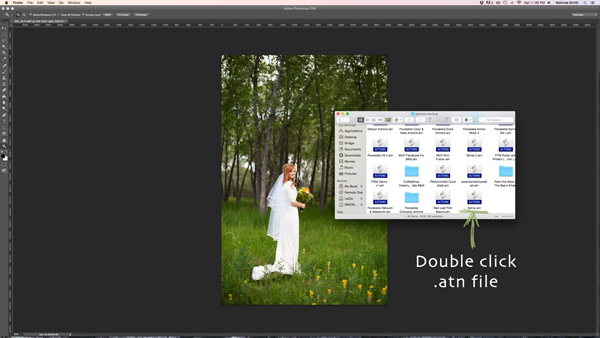
Find the “.atn” file and double-click it.

There are tons of places to find Actions on the web. Some cost a lot, some are free. There are a lot of great ones, and a lot that aren’t really worth using. I look for Actions that fit my style, and are fully adjustable. Which means that I can turn every layer off or on, adjust the opacity of each layer, and customize to fit my style and each individual photo.

Installing Photoshop Actions

Once you’ve purchased and downloaded your Action, make a backup file somewhere, just in case. Then, open the folder, find your Action (it will be a file with .atn extension), and double click it.

(You do not need to have a photo of a gorgeous bride open in Photoshop as you do this, but it never hurts!)

198

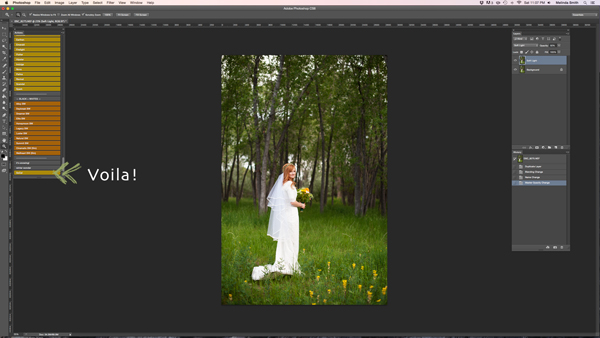
This might seem too easy to be true, but most of the time this works. It’s automatically installed into Photoshop when you double click. Easy as that! If for some reason that doesn’t work, or you like to do things the hard way, you can use the following method.

199

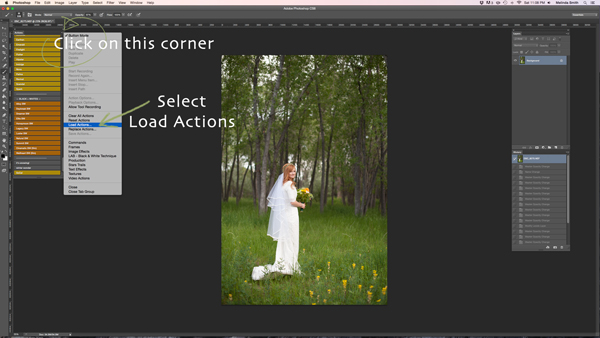
Make sure your Actions Palette is open. You can do this by clicking “Window” at the top of Photoshop, and making sure the check mark next to “Actions” is on. If you don’t see a check mark, just click on “Actions” and your Action Window will appear.

Click on the upper right hand corner of your Actions palette, and a drop down menu will appear. Select “Load Actions”.

200

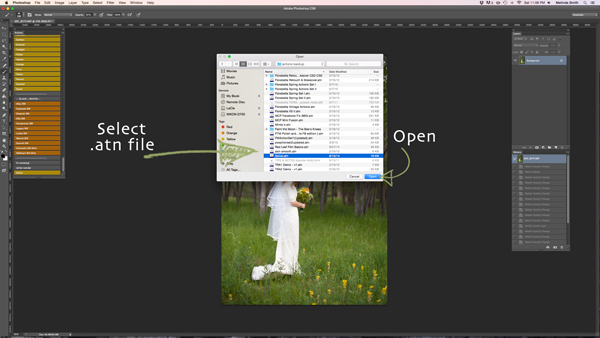
Then, you’ll navigate to find and select that .atn file, click “Open”, and it will be installed. Now your Action is ready to be used. All you have to do is open a photo, click on your Action, and it will run through a bunch of steps in a very short amount of time (running times may vary based on the number of steps in the Action and the speed of your computer). Be aware that not every Action will look great on every photo, and many times Actions need to be adjusted before they look right. Be careful not to overuse Actions. They are great tools, but can ruin a photo quickly if you don’t practice adjusting and learning what Actions work with different types of photos.

How to create Photoshop Actions

Now that you know how to install someone else’s Actions, I want to teach you how to be a Photoshop rock star and create an Action of your own. You can create Actions for so many different things, from a simple sharpening Action, to a complex multi-step stylized Action.

184

For this demonstration I’m going to show you how to make a simple “soft light” layer to add a boost to your photos. Go ahead and open Photoshop and make this Action along with me. Once you see how the steps work, you can experiment with making more Actions for all the things that you find yourself doing over and over again. You will need to have a photo open when creating your Action, so choose a beautiful bride, or any photo you’d like.

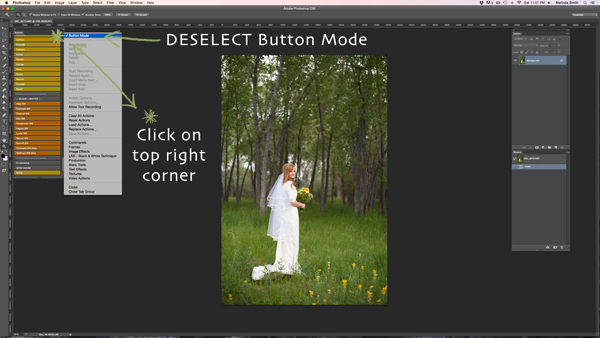
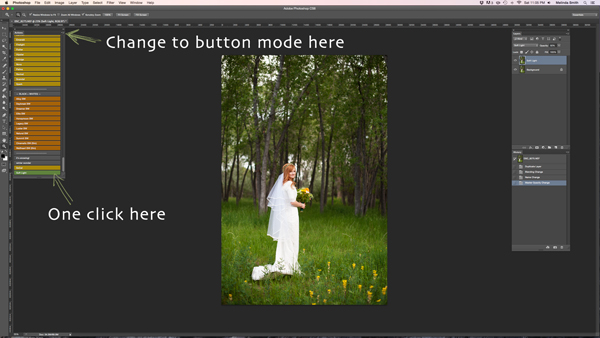
Your Actions palette may be in button mode, or it may not. I like mine in button mode for normal use, but you have to change out of button mode to create Actions. Click on the top right corner in your Actions palette, and make sure that the check mark next to “Button Mode” is deselected.

185

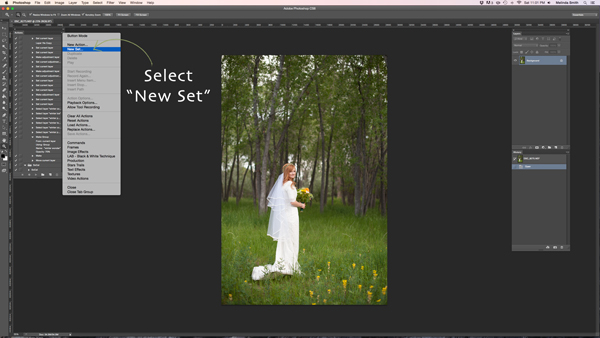
Before you create an Action, you will want to make your own Action folder set, so that everything stays organized. Select “New Set” from your drop-down menu.

186

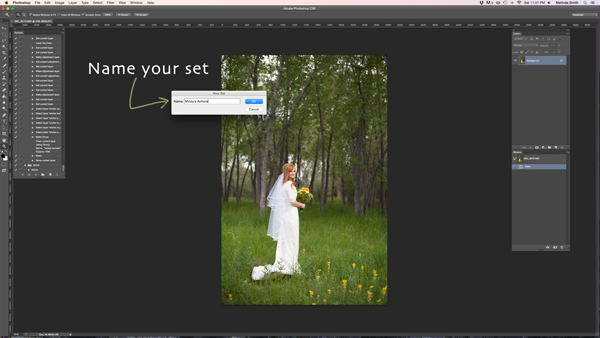
You can name your set anything you’d like. A great set to start with would be a simple “My Actions”, so you will know which ones you created. Later you can divide them into multiple categories if you’d like.

187

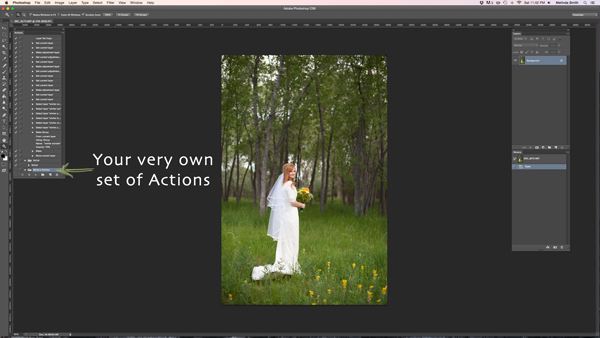
Right in the Actions palette is your very own set of Actions. You are now that much closer to Photoshop rock star status! Make sure your set is selected for the next step. If it’s highlighted, you’re ready to go.

188

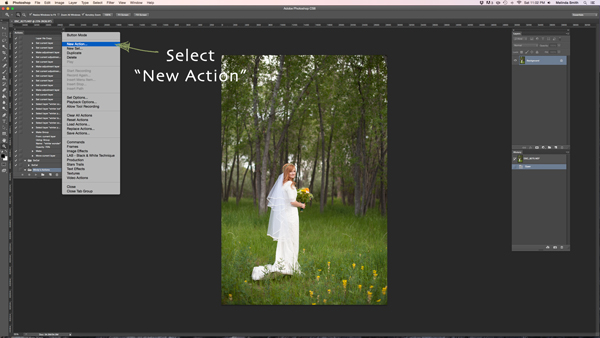
Select “New Action” from the menu. We are going to create an Action inside your Action set.

189

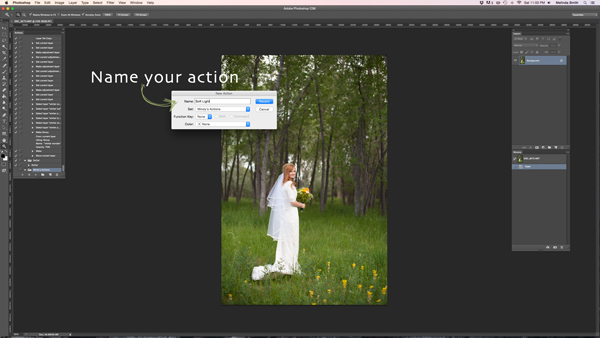
Now you’re going to name your Action. It’s good to pick a name that lets you know exactly what it does, or describes the results of the Action well, so you won’t be wondering later. Since this Action will be a “Soft Light” layer, I just named it “Soft Light”.

190

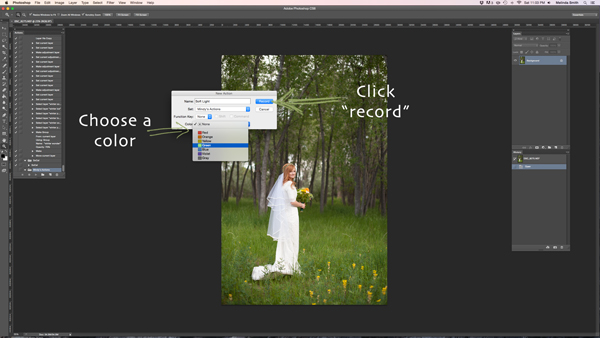
If you’d like to, you can also choose a color for your Action, this only applies if you are in Button Mode. This helps with Action organization. You can make all of your Actions within your set the same color, so you can easily find different sets of Actions, or you could only choose a color for your frequently used actions, so they are quick to find. Now you’re ready to start recording. Just click record. Don’t worry, you can go as slow as you need to. It just records the process that you are going through, but doesn’t record the time it takes you to do it. It will play much faster than it takes you to record it.

191

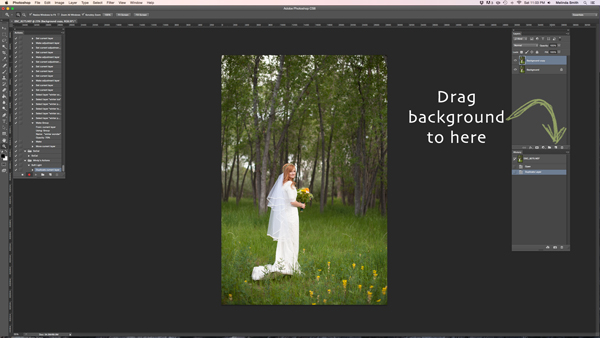
We are going through the steps of making a Soft Light layer right now. It’s super simple, but it’s a great one to make for your very first Action. Just drag your background to the “create a new layer” icon (the square with a corner folded over), and it will make a duplicate of your background.

192

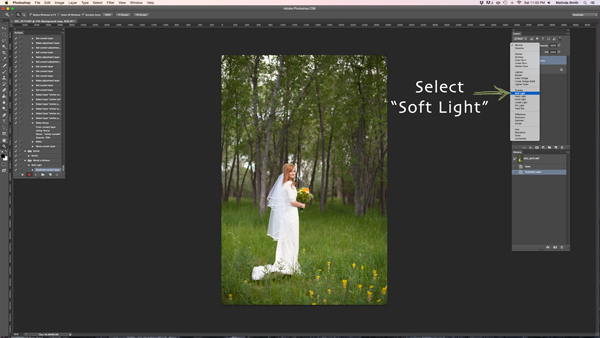
Make sure your “background copy” layer is selected, then click on the Blending Mode menu. (It will say “normal” on the button. It’s at the top left of your Layers Palette.) Find “Soft Light” and select that blending mode.

193

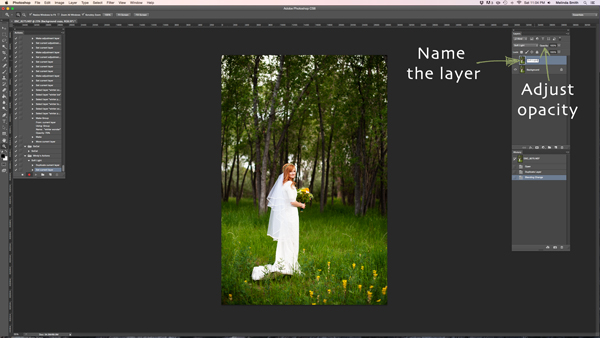
I like to name the layer when I make Actions, so that I can easily know what each layer does when I run the Action later. Just double click on the name of that background copy and type in a new name for that layer. I went with “Soft Light” because I’m very original and creative.

I also adjusted the opacity to around 50%, just because I know that on most photos I won’t want it 100% strong (adjust to your own taste and style). When you run the Action, you can always adjust the opacity to suit the individual photo, but I suggest you put the opacity at a level that you use most, because often that will save a step when you run it later.

194

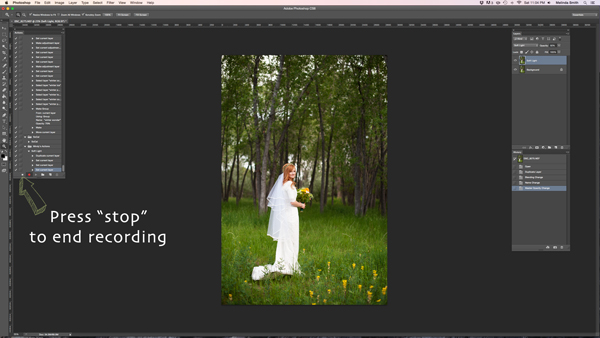
Now we are done with our Action and we just need to press “stop” to end the recording. It is the square just to the left of the red recording button.

195

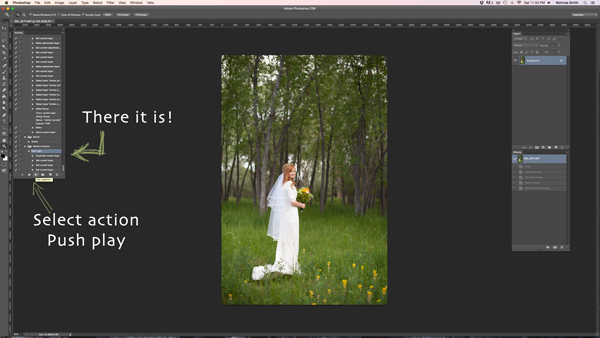
There’s your Action. Pretty exciting, isn’t it? You can try it out by making sure your Action is selected, and pushing “play” at the bottom of the actions palette. You’ll be amazed how quickly your “soft light” action goes through those steps. It doesn’t take long to do all those steps without an Action, but it’s almost instantaneous with one. Once you get a lot of your regular go-to steps turned into Actions, you’ll find that it takes a lot less time to edit each photo.

196

If you want to change back to button mode, it will really streamline things. All you have to do is click once on the Action. You don’t have to push play, or scroll a lot through open steps to find your Action. Give it a try.

Let me know how you did creating your first Action along with me. If you’re an Action-creating enthusiast, I’d love to hear what Actions you have made, and which Actions have been most helpful to your workflow.

googletag.cmd.push(function() {
tablet_slots.push( googletag.defineSlot( “/1005424/_dPSv4_tab-all-article-bottom_(300×250)”, [300, 250], “pb-ad-78623” ).addService( googletag.pubads() ) ); } );

googletag.cmd.push(function() {
mobile_slots.push( googletag.defineSlot( “/1005424/_dPSv4_mob-all-article-bottom_(300×250)”, [300, 250], “pb-ad-78158” ).addService( googletag.pubads() ) ); } );

The post 3…2…1…Actions!! A Guide to Using Photoshop Actions to Speed-Up Your Workflow by Melinda Smith appeared first on Digital Photography School.


Digital Photography School

 
Comments Off on 3…2…1…Actions!! A Guide to Using Photoshop Actions to Speed-Up Your Workflow

Posted in Photography