RSS
 

Archive for January, 2015

5 Tips to Cut Your Portrait Editing Time in Half

12 Jan

Editing is the bottleneck part of the workflow for many portrait photographers. We can shoot a great picture in mere seconds, but when it comes to editing dozens of images, it often feels like it takes forever. The biggest editing time saver is of course to get it right when shooting. There are countless things that can’t be “fixed” in Photoshop, but editing images isn’t meant to be the main part of a photographer’s job anyway.
lynseymattingly3

I am always hesitant to talk about editing because I think it gets taken way too far, way too often and in those cases we aren’t talking about photo editing, but rather imagery manipulation (which is an art in and of itself, but an art completely different than portrait photography). All of that said, oh how I wish someone had taught me some tricks, and gave me some tips when I first started. You can learn to pose people, find good light and the ins and outs of your camera in time, but learning to edit is a frustrating and lengthy process that used to make me want to go pick-up an application at McDonalds.

Professional photographers who have had great success are often so hesitant to tell their secrets and explain what they have learned. I have never understood that. I could tell you everything I do, exactly how I do it, and if you went about it the exact same way, you would still end up with a completely different image of your own. So here it is, my five best portrait editing tips (along with a bonus extra five tips below) to make your editing process more productive and hopefully much quicker. Because I use Photoshop, these are all geared in that direction, though there should be equivalents for nearly all image editing software.
lynseymattingly11

#1 – Learn shortcuts and use actions

All editing software offer keystroke shortcuts and actions (or similar) to make the things you do often easier and quicker. I could have a four year degree in Adobe and still likely just be scratching the surface of what can be done with photo editing software like Photoshop and Lightroom. Luckily I don’t have to store all of that in my brain (which is already pretty crowded with song lyrics and useless trivia), because I have memorized the keyboard shortcuts for the tools I use most often and have set up all of my customized actions to run on my F keys. Not only does this make editing ridiculously quick, it also means that I give 100% of my attention to a shoot and when it comes time to be an editing machine, I can sing-along to my terrible music and multi-task straight through it.
lynseymattingly4

#2 – Have one black and white and one color process

Converting an image to a fun vintage or using your skills to cross-process is tempting, and maybe here and there, it’s fun. But the easiest way to scale back the amount of time you sit staring at editing software is to streamline your process and this means doing all of your images in the same manner.
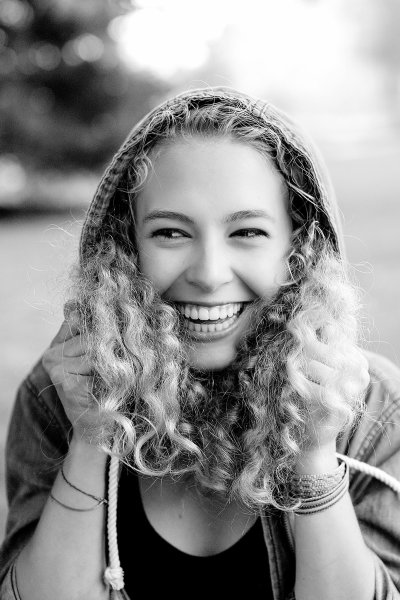
lynseymattingly10I have one way that I do black and white images that I have programmed into a single action. Same with my color shots. I do whatever basic touch-up I’m going to do first, then I hit play for either my color or black and white action. Because I always photograph people, this simple task works for every photo I need to edit. It also has the added bonus of giving my images continuity and a signature look.

My color images look different than yours – and they should! You should have a color process that gives people a hint that you took the image. Same for monochrome; I want someone to look at a black and white photo I took and know “that’s one of Lynsey’s photos”. This not only cuts down on editing time, but also helps define your brand.

#3 – Run auto options

When I get tired because I’ve been editing for hours on end, I can stare at an image forever and know that it needs something but I have no idea what. This is when it’s time for two things: to change the music you’re listening to and to run an “auto” function – auto color, auto tone, or the auto RAW image editor – not typically to use it, but to see what your software, in all its brilliance, thinks you should do. Sometimes it will have good ideas and sometimes it won’t, but it will always gives you a look at the image in a different way, which can be extremely helpful.

lynseymattingly2

#4 – Accept a few universal truths

Everyone has one eye that is larger than the other. Kids will always have a scratch or scab somewhere. Double chins can happen to anyone. Most adults have a physical feature they aren’t 100% happy with.

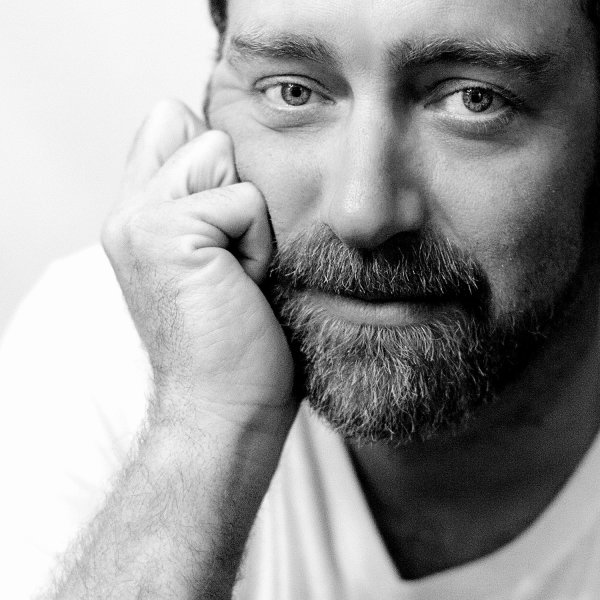
My husband has a gorgeous head of hair. At an age when many men are shaving their heads to supersede a bald spot, my husband gets asked if he does shampoo commercials. (He should, if only so we can become millionaires already, and get a pool.) You would think this would make for great pictures – not having to work with a shiny head reflecting everywhere – but you’d be wrong; you see, he hates his forehead. Which I think is ridiculous as it’s perfectly proportioned to his head and glorious hairline. But, even though he is my husband and knows I am always right, there is no convincing him on this issue. Nor is it my place to try when taking his picture.
lynseymattingly9

The best thing I can do for anyone who expresses concern for a facial or body feature is give them a picture where they aren’t going to see their perceived flaw immediately. Pull out the great features so that you aren’t trying to both, take good pictures, and also change their mind.

#5 – Aim for people to look exactly like themselves, turned up ONE notch

You are not a plastic surgeon. We all want our clients to love photos of themselves but that shouldn’t come at the cost of you having to spend a great deal of time manipulating an image. My rule is simple: I don’t edit permanent features or make massive changes to faces or bodies. If you have a mole, I’m not going to touch it. But if you happen to have a pimple on picture day, fixing that is the least I can do for you. I sometimes dodge eyes lightly (keyboard shortcut O), but never in an obvious way. I may whiten teeth a bit (using the magnetic lasso and hue/saturation levels), smooth out a chin line (clone stamp and healing brush), or pull in a lumpy bit at the waist or otherwise (liquify and clone stamp), but only in a way that is more flattering and looks the way I know they usually would if they didn’t have a giant camera in their face, uncomfortable clothes on, and were running around after kids, or just generally feeling awkward like people tend to when someone is taking their picture.

lynseymattingly8

Like many other portrait photographers, I use a retouching tool (Totally Rad Pro Retouch action is my preference) that I apply liberally with the brush tool to all faces and then scale back by lowering the opacity. This allows for skin to look natural – normal skin has lines and freckles and areas rosier than others, but takes care of the small bumps and spots that cameras have a way of highlighting and putting on display.

What happens when you blow it? You took shots that no amount of editing could make great? You vow to do it right next time, that’s what. Here is a little lagniappe from me to you:

My five best quick portrait tips for getting it right in camera

1.) Shoot from above

Always have your subject lower than you so you are shooting downward. This can prevent double chins, unflattering angles, and in my husbands case, imaginary big foreheads. Unflattering portraits are most often due to bad camera angles and that is something that can’t be changed in any editing process.

2.) Avoid “dead light”

Shade is a wonderful thing for natural light photography, but large patches of shade, particularly in the morning hours, can often be very cold for color temperature. Everyone looks better with a little warmth, so strive to shoot in shady area that feel more warm in tone (think orange, yellow, red) than cool (blue).

3.) Suggest solid clothing or large scale prints. Small prints on a shirt tend to make people look larger.

4.) Photograph people doing something….anything. Avoid a boring portrait that is “all face” by having moment or action—this can be as small as involving their hands to frame their face or something more significant like leaning on wall or, my favorite, spinning.

5.) Talk honestly with your subjects beforehand. Find out what features they feel most comfortable with and anything they would like you to avoid or watch out for. I’ve heard it all, from people swearing they have tiny heads to people who felt their large feet would throw off the entire photo. The single best thing you can to ensure they will like their photo is listen to them before you even take one. It is not your job to tell them they are wrong about their insecurities–it’s your job to try and show them they are likely being over-critical. Hear their words so you will be mindful of their concerns and photograph them looking beautiful. Or handsome. Or at least like they don’t have a big forehead.

googletag.cmd.push(function() {
tablet_slots.push( googletag.defineSlot( “/1005424/_dPSv4_tab-all-article-bottom_(300×250)”, [300, 250], “pb-ad-78623” ).addService( googletag.pubads() ) ); } );

googletag.cmd.push(function() {
mobile_slots.push( googletag.defineSlot( “/1005424/_dPSv4_mob-all-article-bottom_(300×250)”, [300, 250], “pb-ad-78158” ).addService( googletag.pubads() ) ); } );

The post 5 Tips to Cut Your Portrait Editing Time in Half by Lynsey Mattingly appeared first on Digital Photography School.
Digital Photography School

 
Comments Off on 5 Tips to Cut Your Portrait Editing Time in Half

Posted in Photography


Winter Wedding Photography Tips: All You Need to Know

12 Jan

Winter weddings bring a lot of photography challenges because of weather, chilly winds and dark skies even in the day time. But still, many couples decide to have a winter wedding to enjoy the special discount on venues, catering and inexpensive honeymoon. The first thing that comes to our mind with winter weddings is bad weather– snowfall, temperatures below zero Continue Reading

The post Winter Wedding Photography Tips: All You Need to Know appeared first on Photodoto.


Photodoto

 
Comments Off on Winter Wedding Photography Tips: All You Need to Know

Posted in Photography


Is Your Tripod Sturdy Enough? Let’s Test it

12 Jan
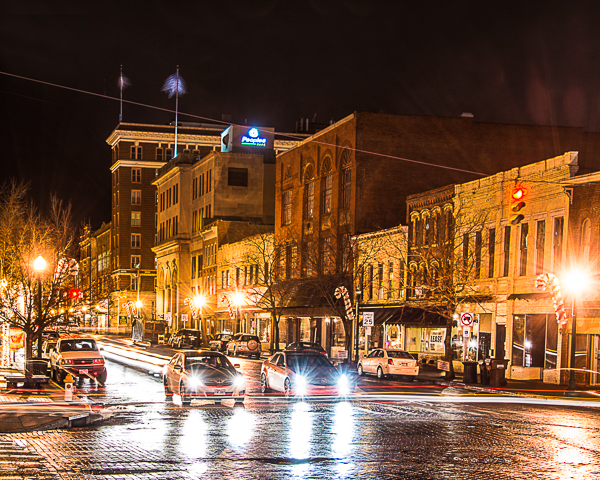
If you are looking to take long exposure night shots like this 10 second exposure of downtown Marietta, Ohio, you'll need a quality tripod to give your camera a stable base.

If you are looking to take long exposure shots like this 10 second night image of downtown Marietta, Ohio, you’ll need a quality tripod to give your camera a stable base.

One of the most important pieces of equipment for a photographer to have access to is a sturdy tripod. You might be tempted to purchase just any tripod without regard to whether or not it is up to the job you are asking it to do, but a strong and stable tripod can be the difference between a great image and a blurry one.

Warning: a high-quality tripod is not cheap! If you want a really functionable tripod, be prepared to invest more than a few dollars. However, in this article we are going to look at some ways you can test the tripod you are currently using to see just how effective it is. To begin, let’s examine a couple of tips that can make any tripod a little more stable.

Tips for making your tripod stable

  • Tip #1 – If you are using your tripod for a long exposure, avoid extending the center column with the mount above the fulcrum.
  • Tip #2 – When setting the height of your tripod, make use of the thicker top sections of the legs before the thinner, less stable lower sections.
  • Tip #3 – If your tripod has different types of feet available, use the spiked feet to secure the ground for outdoor landscape shooting. When shooting indoors, use the rubber feet to prevent skidding on smooth flooring.
  • Tip#4 – When shooting outdoors on windy days, be sure to secure your camera strap. If the strap is blowing in the wind it will cause your tripod to move.

Many photographers can be observed with their cameras mounted to tripods extended beyond their intended specifications. You may have heard that your tripod should be strong enough to hold a bowling ball. While this sounds funny, it’s a good idea to have a tripod that is rated for more weight than the combined weight of your camera and largest lens. For example, a tripod having no movement with a mounted camera and a 28mm lens may allow unacceptable movement with the same camera and a 300mm or larger lens.

Regardless, even the best tripod will have some movement. Approximately 80% of the movement will most likely come from the head and the Quick Release mount, and very little actually from the tripod legs. There are many potential sources of vibrations, so let’s look at a series of tests that can help you determine if your tripod is up for the job you are giving it to do.

Test Method #1

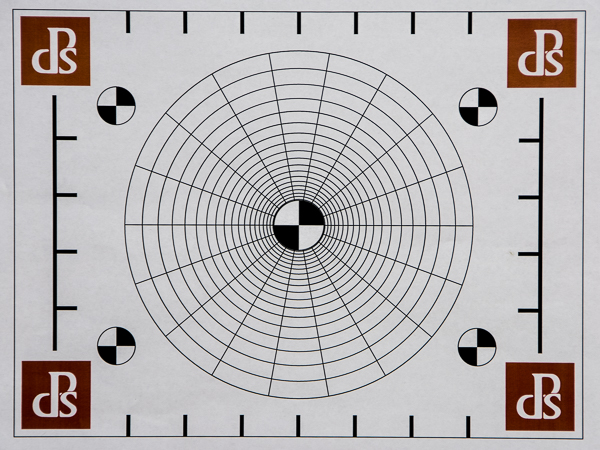
Make a test pattern similar to the one below, or download the one I used here.

Create a test pattern similar to this one.

Create a test pattern similar to this one.

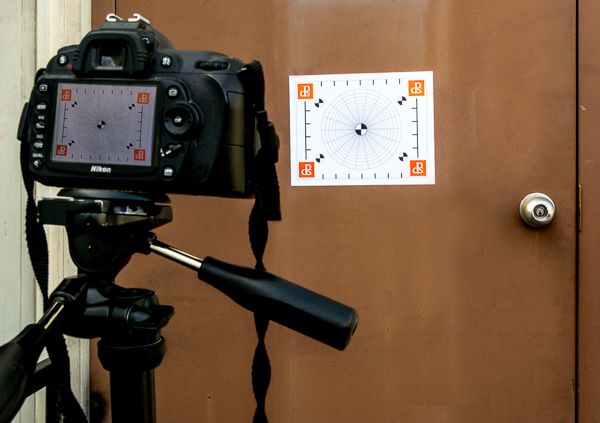
Mount your print on a stable object with no movement. It’s important that the print has no movement at all. Mount your camera and heaviest lens combo on your tripod. Set up your tripod close enough to the target so that it fills the frame.

What's wrong with this picture?  The center post is extended and the camera strap is hanging loose

This setup has some problems. Can you spot them? Refer to the tips above.

First, take a series of shots with a variety of different exposure speeds ranging for 1/100th of a second down to 1/2 a second. Use a remote or cable release to start the exposures. It’s also a good idea to use your mirror lockup feature to remove any camera vibration from the process.

After completing this series of exposures, open the images in your choice of image software and check your target for any doubled or blurry lines which would indicate that your camera was moving during the exposures. If the faster shutter speeds are sharper than the slower ones, your tripod is not stable enough to use for shooting at slower shutter speeds.

If your images show that you are getting movement during your exposures, the next step is to determine what part of you tripod is causing the problem.

Shrink your tripod to its smallest height and repeat the test. If the results are not better, then your problem may be caused by your tripod head.

Your problem could also be caused by your tripod’s leg locks, so test again with legs extended to different lengths, extending one, two or three sections and taking the same series of test shots.

Repeat the process indoors, outdoors, and in windy conditions or with other camera and lens combinations.

Test Method #2 – Multiple Exposures

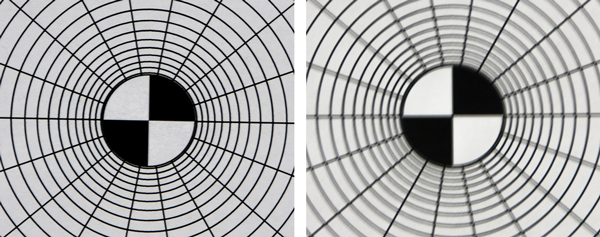
Many digital cameras have a setting for taking multiple exposures. If yours does, set your camera to take two or three exposures. Again using the test pattern, shoot a series of different shutter speeds ranging from 1/100th down to 1/2 a second.

If your camera doesn’t have the multiple exposure feature, you can still use this method by simply taking two or three different images, then layering them over top of each other in Photoshop, and adjust the blending method of each layer so that all layers are visible. If your tripod is doing its job, all three images will be right on top of each other.

The image on the left was created with a three shot multiple exposure set with a  1/2 second exposure on each. The fairly sharp image indicates that this tripod is up to the task. The image on the right was created with the same setting as the one on the left with another tripod, if you preview looks like this your tripod is not doing its job.

Both of these image were created with a three shot multiple exposure with a 1/2 second exposure on each. The sharp image on the left indicates that this tripod is up to the task. The image on the right was created with another tripod. If your preview looks like this, your tripod is not doing its job.

Test Method #3 – Live View

Use the same test pattern as in the ones above. Focus your camera on the center of the target. Turn on Live View and zoom the preview to show the center of the target as large as possible.

Remove your hands from the camera and tripod and see if the target remains still in your preview.  If the target in your preview continues to move, your tripod is not providing a sturdy enough base for your camera to produce sharp images at a slow shutter speed.

Also in this method, try just touching and moving your camera strap. You may be surprised to see the preview move from just the slightest touch.

Test Results

If your tripod did not pass these tests, it is probably time to start looking for a better one. Be sure to check that the tripod is rated to support the weight of your camera and your largest/heaviest lens. If the tests show that your problem is in your tripod head, the solution might be as simple as replacing the head. If you have any other tips to enhance your tripod’s stability, please post in the comments below.

googletag.cmd.push(function() {
tablet_slots.push( googletag.defineSlot( “/1005424/_dPSv4_tab-all-article-bottom_(300×250)”, [300, 250], “pb-ad-78623” ).addService( googletag.pubads() ) ); } );

googletag.cmd.push(function() {
mobile_slots.push( googletag.defineSlot( “/1005424/_dPSv4_mob-all-article-bottom_(300×250)”, [300, 250], “pb-ad-78158” ).addService( googletag.pubads() ) ); } );

The post Is Your Tripod Sturdy Enough? Let’s Test it by Bruce Wunderlich appeared first on Digital Photography School.

Digital Photography School

 
Comments Off on Is Your Tripod Sturdy Enough? Let’s Test it

Posted in Photography


Helen Sobiralski gewährt uns Einblicke

12 Jan

Helen Sobiralski

Ein Beitrag von: Helen Sobiralski

Helen Sobiralskis Arbeiten können fantasiereich und überladen, aber auch still und zurückhaltend sein. Ihr Handwerk hat sie ganz klassisch mit einer Ausbildung zur Fotografin erlernt. Aber der Grundstein hierfür lag im Keller des elterlichen Hauses, wo sie die Dunkelkammerausrüstung und Spiegelreflexkamera ihres Vaters entdeckte.

Nach ihrer Handwerksausbildung folgte ein Studium des Kommunikationsdesign, in dem sie sich immer mehr auf konzeptionelle Inszenierungen und Portraits spezialisierte. Heute lebt sie in Berlin und arbeitet als freiberufliche Fotografin in den verworrenen Gefilden zwischen angewandter und künstlerischer Fotografie.

Drei ihrer Serien – „Cockaignesque“, „Intimacy“ und „Sophie“ fand ich besonders spannend und aufwühlend. Ich wollte mehr darüber erfahren und freue mich, dass sie mir dafür Rede und Antwort stand.

Helen, ich habe mir Deine Arbeiten alle etwas genauer angeschaut und die Serie „Cockaignesque“ hat bei mir die meisten Fragen aufgeworfen. Sie ist opulent, seltsam, anmaßend und so grausam wie ein Roman von John Irving. Erzählst Du uns ein bisschen was darüber?

„Cockaignesque“ entstand im Rahmen meiner Diplomarbeit an der Fachhochschule Dortmund, an der ich 2012 mein Fotodesign-Studium abgeschlossen habe. Insgesamt habe ich circa ein halbes Jahr, von der ersten Idee bis hin zur fertigen Strecke, daran gearbeitet.

Da alles von mir selbst, also low-budget, produziert wurde, war die Planung, Organisation und Umsetzung der einzelnen Motive sehr aufwändig und zeitintensiv. Das Shooting an sich dauerte insgesamt zwei wundervoll intensive Wochen. Soweit erst einmal zum Hintergrund der Produktion.

An einem Baum hängen Wurst und Enten.

Jetzt etwas mehr zum Inhaltlichen: Der Titel „Cockaignesque“ verweist auf den englischen und französischen Begriff für das Utopia Schlaraffenland, Cockaigne bzw. Cacogne. Ursprünglich erzählte man sich die Legende dieses „Landes, in dem Milch und Honig fließen“ schon im Mittelalter, um sich von den Entbehrungen und der harten Arbeit des damaligen Alltags Ablenkung und Hoffnung zu verschaffen.

Im Kontext unserer heutigen, verschwenderisch-ignoranten Zeit ergibt sich für das Thema natürlich wieder eine andere, neue Relevanz. Inspiriert wurden meine Motive von bekannten Szenen dieser Legende und ich verpaarte sie mit der opulenten Ästhetik des Barock, seinen Stillleben-Motiven und dem damit einhergehenden Vanitas-Gedanken.

Es ging nicht um das Kopieren historischer Gemälde oder ihrer Ästhetik, sondern viel mehr um das Aufgreifen und Uminterpretieren einzelner Sinnbilder und das Verbinden visueller Epochen.

Eine junge Frau verschüttet Milch und schaut in die Kamera.

Eine fülligere Frau liegt und berührt mit einer Hand ein Mädchen, das vor ihr liegt.

Innerhalb dieses Rahmens erzähle ich die Geschichte eines Mädchens, das sich im sinnlichen Überfluss dieser Welt und seiner Gestalten verliert. Die einzelnen Motive stehen im Zusammenhang miteinander und begründen sich gegenseitig. Wer möchte, kann sich aber auch auf die Suche nach seiner eigenen Geschichte in den Bildern machen, das ist mir immer am liebsten.

Ich bin gespannt, was Du über Deine Serie „Intimacy“ zu sagen hast; das Katzenbild und das Rückenbild finde ich bezaubernd. Wobei das Rückenbild auch ein seltsames Gefühl auslöst. Was steckt hinter den Bildern, welche Geschichte verbirgt sich hier?

„Intimacy“ entstand auch als eine Studienarbeit während eines Modefotografie-Seminars. Ich beschloss, mich dem Thema kritisch anzunähern und beschäftigte mich mit der Art und Weise, wie wir konsumieren, wie wir uns von der alles beschönigenden Werbung beeinflussen lassen und wie groß der Stellenwert unserer äußeren Erscheinung in unserer Gesellschaft wiegt. Das Thema ist ja so verquer.

Eine Frau liegt, mit dem Rücken zu uns. Auf ihrem Rücken erkennt man Schmuck, der unter der Haut liegt.

Aus diesem Hintergrund heraus entstand die Idee, die Modelle sehr zart und zerbrechlich darzustellen und sie ihren Schmuck wie Implantate direkt unter der Haut tragen zu lassen. Hauttöne dominieren und unterstützen die Thematik; die nackt gezüchtete Katze tritt als skurriles Spiegelbild des Ganzen in Erscheinung und Interaktion.  

Aber auch hier gilt: Eigentlich ist es für mich nur wichtig, was jeder Einzelne in diesen Bildern findet. Ich mag diese Serie immer noch sehr, obwohl sie mittlerweile schon einige Jahre auf dem Buckel hat. Ich freue mich, dass Du sie ausgewählt hast!

Eine Frau und eine Nacktkatze.

Eine nackte Katze schaut dich an.

Die Serie mit dem Titel „Sophie“ ist im Vergleich zu den anderen Serien sehr still. Ich liebe die Poesie in den Bildern.

Ja, Sophie. Diese Strecke ist für mich tatsächlich etwas Neues, ich habe vorher noch nie so gearbeitet. Sie ist irgendwie ein Zwitterwesen zwischen einer inszenierten, fiktiven und der wahren Geschichte einer Person.

Die Bildideen für diese Strecke entstanden eigentlich ziemlich schnell, nachdem ich Sophie das erste Mal getroffen und fotografiert hatte. Die Motive ersponnen sich um das Bild, das ich damals von ihr gewonnen hatte. Sie hat auf mich etwas intensiv Trauriges und Zeitloses ausgestrahlt, das mich irgendwie inspirierte und berührte.

Eine Frau schaut in die Kamera und weint.Eine Frau steht an der Wand.

Als ich sie schließlich fragte, ob sie diese Bilder mit mir machen würde und ich ihr meine Motivideen vorstellte, sagte sie zwar direkt zu, später erzählte sie mir aber, dass sie kurz unsicher gewesen sei, weil sie privat tatsächlich gerade in einer sehr schwierigen, melancholischen und unsicheren Phase war.

Wir schlossen uns also einen Tag lang zusammen in einer leeren Wohnung ein, fotografierten den ganzen Tag über und machten zwischendurch immer wieder lange Pausen, während denen wir einfach nur redeten. Es war ein sehr intensiver und bitterschöner, irgendwie intimer Tag. Die vorherrschende Stimmung spiegelt sich tatsächlich auch in den entstandenen Bildern wider.

Eine Frau liegt auf dem Bauch. Du kannst ihren Rücken sehen.

Vielen Dank, Helen, für den Einblick in Deine Arbeitsweise und die Entwicklung Deiner Konzeptideen.


kwerfeldein – Fotografie Magazin | Fotocommunity

 
Comments Off on Helen Sobiralski gewährt uns Einblicke

Posted in Equipment


World’s Largest Indoor Farm is 100 Times More Productive

12 Jan

[ By WebUrbanist in Architecture & Offices & Commercial. ]

indoor farm japan interior

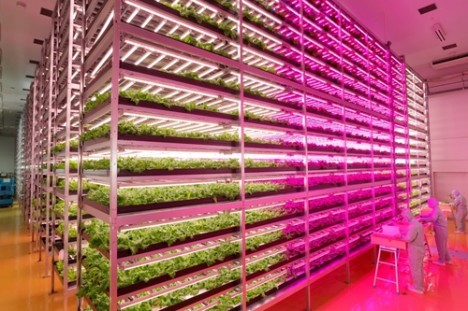
The statistics for this incredibly successful indoor farming endeavor in Japan are staggering: 25,000 square feet producing 10,000 heads of lettuce per day (100 times more per square foot than traditional methods) with 40% less power, 80% less food waste and 99% less water usage than outdoor fields.

indoor factory lettuce farm

indoor farm high yield

Customized LED lighting developed with GE helps plants grow up to two and half times faster, one of the many innovations employed in this enterprise by Shigeharu Shimamura, the man who helped turn a former semiconductor factory into the planet’s biggest interior factory farm.

worlds largest indoor farm

Shimamura has shortened the cycle of days and nights in this artificial environment, growing food faster, while optimizing temperature, lighting and humidity and maximizing vertical square footage in this vast interior space (about half the size of a football field).

indoor future led farming

With a long-standing passion for produce production, he “got the idea for his indoor farm as a teenager, when he visited a ‘vegetable factory’ at the Expo ’85 world’s fair in Tsukuba, Japan. He went on to study plant physiology at the Tokyo University of Agriculture, and in 2004 started an indoor farming company called Mirai, which in Japanese means ‘future.’”

indoor farm interview detail

The beauty of this development lies partly in its versatility – since it deals in climate-controlled spaces and replicable conditions, a solution of this sort can be deployed anywhere in the world to address food shortages of the present and future. Saving space, indoor vertical farms are also good candidates for local food production in crowded and high-cost urban areas around the globe. Aforementioned strides in waste and power reduction also make these techniques and approaches far more sustainable and cost-efficient.

Share on Facebook


[ By WebUrbanist in Architecture & Offices & Commercial. ]

[ WebUrbanist | Archives | Galleries | Privacy | TOS ]


WebUrbanist

 
Comments Off on World’s Largest Indoor Farm is 100 Times More Productive

Posted in Creativity


11. Januar 2015

12 Jan

Das Bild des Tages von: Corinna Dumat

© Corinna Dumat

Fotolinks des Tages

1. Mikhailow erhält Kaiserring

Boris Mikhailow erhält den Kaiserring der Stadt Goslar. Der undotierte Preis ist einer der wichtigsten, den zeitgenössische Künstler erhalten können. Der ukrainische Fotograf wurde vor allem durch seine Bilder von Obdachlosen in seiner Heimatstadt Charkow bekannt. Bisherige Preisträger waren zum Beispiel Joseph Beuys, Christo, Gerhard Richter oder David Lynch. → ansehen

+ Einen schon etwas älteren Artikel mit Infos zum Künstler und seinen Bildern haben wir auf Spiegel Online entdeckt.

2. Junge Mutterschaft

Jendella Benson interviewte und fotografierte Frauen, die Kinder hatten, bevor sie 20 wurden. Eine der wichtigsten Erkenntnisse des Projektes fasst sie wie folgt zusammen: „Die Mütter, die ich interviewte, fühlten sich oft abgeschrieben. Muttersein ist in jedem Alter schwer genug, aber das Schwerste für diese Frauen war nicht das Baby, sondern in einer Gesellschaft zu leben, die sie von Anfang an verurteilt.“ → ansehen

+ Die Webseite zum Projekt findet Ihr hier.

3. Rorschach-Fotografie

Mathieu Piranda ist inspiriert vom Rorschach-Test und spielt mit Symmetrien in der Natur. Seine Schwarzweiß-Aufnahmen sind surreal und man beginnt unweigerlich, Monster und andere Kreaturen darin zu sehen. → ansehen


kwerfeldein – Fotografie Magazin | Fotocommunity

 
Comments Off on 11. Januar 2015

Posted in Equipment


That’s No Moon: Artists Launch Huge Human Head Balloon

11 Jan

[ By Steve in Art & Installation & Sound. ]

ojisora_human_head_balloon_Japan_main
A bizarre art installation based on a dream saw a 50-ft tall balloon become a bizarre “Man In The Moon” as it rose above the streets of Utsunomiya, Japan.

ojisora_human_head_balloon_Japan_1

ojisora_human_head_balloon_Japan_2

Residents of Utsunomiya, a smallish city roughly 60 miles (100 km) north of Tokyo, Japan, experienced the shock of their lives on the evening of December 13th, 2014 when they espied the full moon rising over the horizon.

ojisora_human_head_balloon_Japan_19

ojisora_human_head_balloon_Japan_20

ojisora_human_head_balloon_Japan_21

No doubt dozens of necks suddenly snapped in a group double-take as residents suddenly realized that’s no moon… it’s the enormous inflated head of one of their neighbors!

ojisora_human_head_balloon_Japan_3

ojisora_human_head_balloon_Japan_4

Give credit to Japanese art trio Me (in collaboration with the Utsunomiya Museum of Art) for the uniquely unusual “Ojisora” project, an artistic effort spanning over two years from conception to realization. Its origin rests with one of the three artists, Haruka Kojin (above, right), who as a junior high school student dreamed of an old man’s grossly enlarged and disembodied head floating over town and country .

ojisora_human_head_balloon_Japan_6

ojisora_human_head_balloon_Japan_5

Upon awakening from her dream, Kojin quickly sketched her recollection and then just as quickly forgot about it. Many years later, she came across her sketch and wondered… was there some way to recreate her dream in real life? After consulting with her two co-artists and with the support of the Utsunomiya Museum of Art, Kojin took the first step towards realizing – and sharing on a mass scale – her odd dream from so many years before.

Next Page – Click Below to Read More:
Thats No Moon Artists Launch Huge Human Head Balloon

Share on Facebook


[ By Steve in Art & Installation & Sound. ]

[ WebUrbanist | Archives | Galleries | Privacy | TOS ]


WebUrbanist

 
Comments Off on That’s No Moon: Artists Launch Huge Human Head Balloon

Posted in Creativity


11 January, 2015 – Hawaii – The Big Island

11 Jan


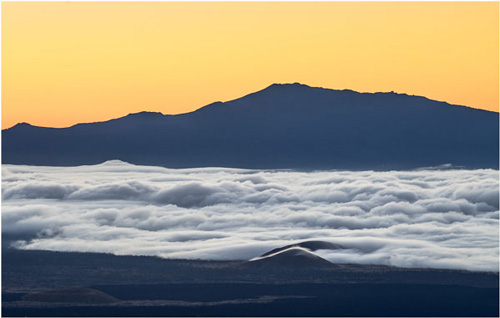
Michael goes on vacation, but is it really a vacation?  No, not with Michael.  Over the holidays Michael traveled to Hawaii for a vacation but like the rest of us he went loaded with numerous cameras and was looking for an adventure.  Seems he found one.  Enjoy Michael Reichmann’s article on his vacation (adventure) as he chases the light in Hawaii – The Big Island


The Luminous Landscape – What’s New

 
Comments Off on 11 January, 2015 – Hawaii – The Big Island

Posted in News


How a Step Ladder is Useful for your Photography

11 Jan
An-assistant

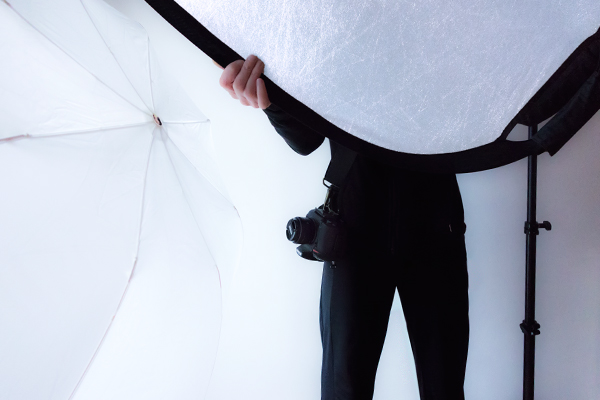
The invaluable photography assistant

Normally assistants play a key role on commercial shoots. They are integral to the team effort that is required to ensure a photo shoot goes as planned. They do a lot of the donkey work; moving lighting gear from one position to another; lugging camera gear around in general, and much more. The work of an assistant is unglamorous, tedious, and the hours are long.

Assistants salaries will vary according to their level of skill, experience and employer, and they generally work freelance.

When you are starting out in your photography career/hobby, a lot of time you are working solo trying build a nice portfolio, be it portraits, stock, etc. You don’t need to hire an assistant but an extra pair of hands is always welcome.

I’ll paint a scenario. You have enlisted a family member or friend to volunteer for some portrait shots outdoors. You’ve also got another friend to help out as you need that extra pair of hands to hold a reflector. This is great way to keep costs down.

However, such is life, your friend can’t make it on the day planned for the shoot. He/she has been struck down with a tummy bug! Blast, now what do you do? I’ve yet to work out how to hold a reflector and press the shutter button at the same time.

Here are some of your options:

  1. You can still go ahead and work solo – you may not get the required lighting on your subject but you are getting the shooting practice which is always a good thing.
  2. Use your cell phone to call yet another friend.
  3. Ask a blank stranger who happens to be walking by.

The first option is probably the safest. The other two require potentially losing a friend and trusting a blank stranger is risky.

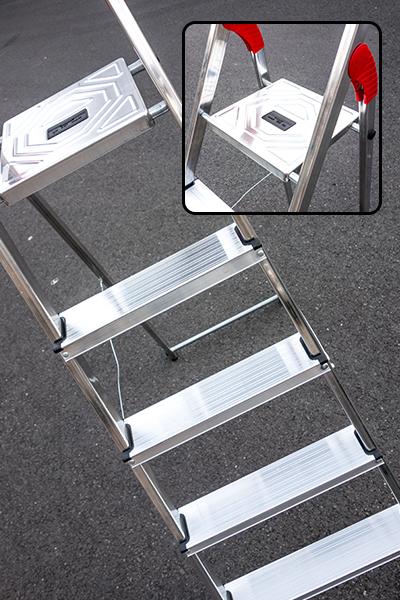
Let me introduce you to the 5-step aluminium ladder. This is by no means a replacement for an actual pair of hands. But I have found it quite useful, and anything that helps is better than nothing at all.

5-Step-Aluminium-ladder

This 5-step aluminium ladder is very versatile and extremely lightweight.

 5 tips for using a step ladder in photography

  1. Portability – This particular ladder that I have weighs only 4.2kg/9.2Ibs. It can fit into my Volkswagon Golf car on the inside. If you have a roof rack, this is a better option, as it is so light to put it up and take it down. It is extremely easy to move it around with one hand.
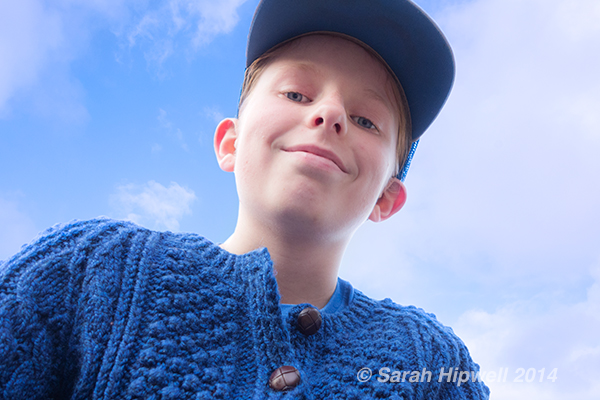
  2. Point of view – Getting that extra height for an overhead shot by standing on the fourth step and resting your knee on the top platform gives you more stability. A small child could sit on the top shelf and you could get a nice shot from underneath with a blue sky as the background.
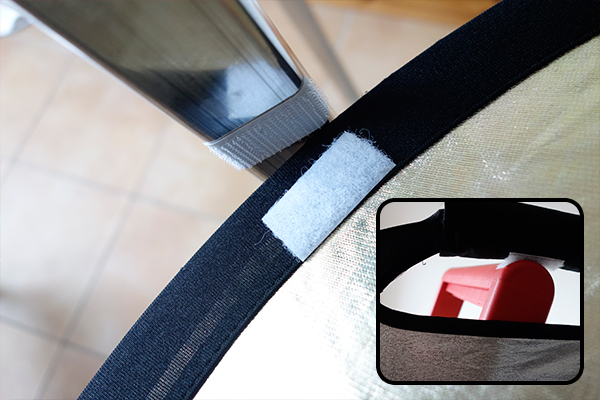
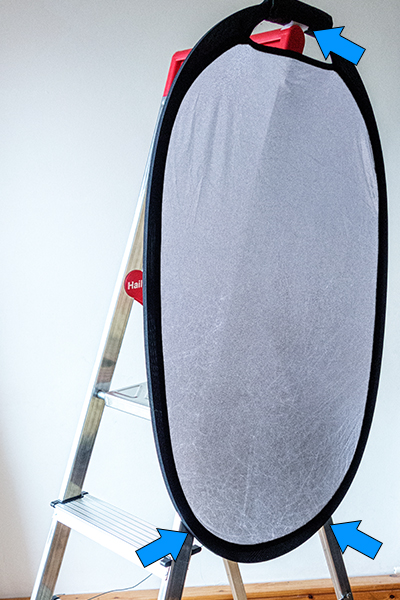
  3. Reflector holder – I find using reflectors for taking portrait shots indispensable, especially outdoors. For my reflector, I cut three self-adhesive velcro strips and attached them to the reflector and to the corresponding areas on the ladder. Once in place, you can then direct your subject from behind the camera on how far or near they stand next to the reflector. I tried it out on a really windy day. The day was overcast and I chose a spot under a tree to really test out the reflector. The reflector was securely attached using the velcro strips but as the ladder is so light, it was inclined to take off in the wind. I placed my camera bag on the top rung of the ladder which acted like a sandbag to stabilize it. Although crude, it did work.
  4. Helps eliminate camera shake – Hand holding your camera and resting your elbows on the top platform helps to reduce camera shake and provides added stability when holding your camera.
  5. As a make-shift light stand – You want to use one of your flashes off-camera but you have forgotten your light stand. Light stands can topple over if there is a gust of wind. Although, you could use sand bags arranged around the base of the stand to make it more stable. But, that is assuming you have such an item(s) or thought to bring them in the first place! This is where the extra pair of hands is great to hold the light stand.
POV_worm_eye_view

The top rung of this ladder is quite narrow, so there is only room for a small child.

Velcro_strips_on_reflector_and_ladder

Velcro self-adhesive strips on the reflector and on one of the ladder legs.

Shot_reflector-in-place

The reflector is attached to the ladder on left of the subject.

reflector_ladder_self-adhesive_velcro-tape

The reflector is attached to the ladder using three self-adhesive velcro strips.

The design of this ladder is very stable considering how light weight it is.

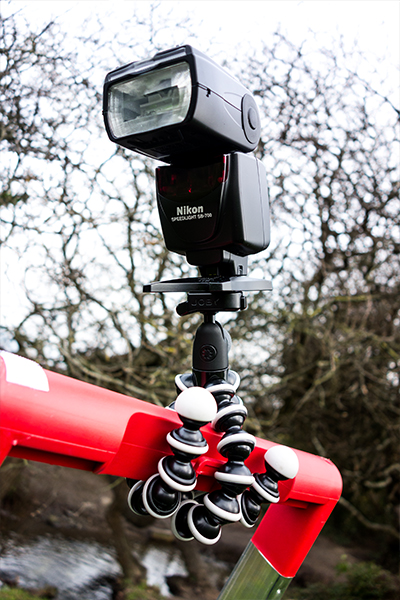
I really love this Joby tripod where you pop on your flash and wrap it around the top part of the ladder. It is then easy to move the head of the flash in the direction you want.

Flash_on_ladder

Flash attached to the ladder using a Joby tripod.

This type of ladder can be found in most people’s garages. Even if you don’t use it for your photography, it is still a very useful item to have. At this time of year, if you buy fir trees to decorate with baubles, tinsel and fairy lights, a step ladder is handy to put that star or whatever on top. In a few weeks time, you’ll need that step-up to take it down.

googletag.cmd.push(function() {
tablet_slots.push( googletag.defineSlot( “/1005424/_dPSv4_tab-all-article-bottom_(300×250)”, [300, 250], “pb-ad-78623” ).addService( googletag.pubads() ) ); } );

googletag.cmd.push(function() {
mobile_slots.push( googletag.defineSlot( “/1005424/_dPSv4_mob-all-article-bottom_(300×250)”, [300, 250], “pb-ad-78158” ).addService( googletag.pubads() ) ); } );

The post How a Step Ladder is Useful for your Photography by Sarah Hipwell appeared first on Digital Photography School.


Digital Photography School

 
Comments Off on How a Step Ladder is Useful for your Photography

Posted in Photography


Wild Things: Marsel van Oosten’s landscape and wildlife photography

11 Jan

“Simplicity is the ultimate sophistication,” says wildlife and nature photographer Marsel van Oosten. A talented landscape and wildlife photographer, his imagery has been featured in a number of publications like National Geographic. Check out more of his work and peek inside his camera bag. See gallery

Articles: Digital Photography Review (dpreview.com)

 
Comments Off on Wild Things: Marsel van Oosten’s landscape and wildlife photography

Posted in Uncategorized