RSS
 

Archive for January, 2015

Wearable Cities: 15 Urban-Patterned Outfits & Accessories

15 Jan

[ By Steph in Drawing & Digital. ]

subway map tights main

Wear your love for your city on your sleeve – and your t-shirt, tote bag, necklace, cuff bracelet and bandanna. Aerial maps, transit maps, city skylines, notable architecture and even the abstracted colors of a certain neighborhood are printed onto all manner of urban wearables in this collection of city-themed clothes and accessories.

New York City Subway Map Tights
cityscape subway map

Display your love for your hometown as a relocated New Yorker with these Manhattan subway map tights, or be prepared for fellow transit riders to peer at your legs trying to figure out which stop to get off at if you decide to don them in the city.

Handscape City Rings

cityscape zlda 1

cityscape zlda 2

Turn your fingers into a ‘handscape’ with these rings by Studio ZLDA, designed to be worn together to create a personal collection of buildings, trees and tiny figures.

Cityscape Clothes Valet

cityscape valet 3

Start your day off getting dressed next to this cityscape clothes valet by Andrea Brugnera for Formabilio, a simple geometric structure held together with small leather straps.

City Grid Dog Tags

cityscape dog tags 1

cityscape dog tags 2

This dog tag IDs where you come from in a more abstract and visual way, with a cut-out of an urban grid pattern. The collection from A Minimal Studio includes over 120 major cities from 32 countries around the world, and can be used as a functional map.

Neighborhood Scarves

cityscape neighborhood scarves

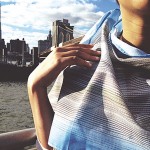
The visuals of a particular spot are captured on video, stretched out and processed to create an abstracted motion of the place in visual form. The Brooklyn Block then prints this image on scarves so you can wear the colors and patterns of your favorite neighborhood.

Next Page – Click Below to Read More:
Wearable Cities 15 Urban Patterned Outfits Accessories

Share on Facebook


[ By Steph in Drawing & Digital. ]

[ WebUrbanist | Archives | Galleries | Privacy | TOS ]


WebUrbanist

 
Comments Off on Wearable Cities: 15 Urban-Patterned Outfits & Accessories

Posted in Creativity


14. Januar 2015

15 Jan

Das Bild des Tages von: Bassam Allam

Bassam Allam

Fotolinks des Tages

1. Über die Pressebilder des „Charlie Hebdo“-Trauermarsches

Das Foto der aktuellen Machthaber in Paris, die Arm in Arm scheinbar den Trauermarsch anführen, wird vielleicht in die Geschichte eingehen. Es ist jedoch in einer Nebenstraße für den angekündigten Pressetermin aufgenommen wurden. Obwohl dies nicht verschwiegen wurde, stößt die Inszenierung auf Kritik. Ebenfalls für starke Kritik sorgt die ultraorthodoxe Zeitung „Hamodia“ in Israel, die aus religiösen Gründen keine Abbilder von Frauen abdruckt und kurzerhand Frau Merkel und andere Machthaberinnen aus dem Foto retuschierte. → ansehen

2. Gotham City aus dem Hubschrauber

Wie muss es sich wohl anfühlen, sich in tausenden Metern Höhe mitten in der kalten Nacht aus dem Hubschrauber zu lehnen? Man kann nicht fallen, dafür ist der Fallgurt zu sicher, aber furchteinflößend ist eine solche Erfahrung garantiert. Der Filmemacher und Fotograf Vincent Laforet ließ es drauf ankommen und fotografierte New York City in bisher ungesehener Art und Weise aus der Vogelperspektive. Diese besten Aufnahmen präsentiert er nun auf Storehouse – und zwar in groß. Prädikat „unerreicht“. → ansehen

3. Eine geklaute DSLR, 10 Millionen Menschen und ein Start-Up

Das Foto-Startup EyeEm macht in den letzten Monaten immer wieder auf sich aufmerksam. Zwar halten wir die Vermutung, dass EyeEm nun auch Instagram zur Konkurrenz werden könnte, für warme Luft, doch von nix kommt nix. So werden die 10 Millionen Nutzer, mit denen das Unternehmen wirbt, nicht die Foto-App fürs Smartphone nutzen, weil ihnen langweilig wird. Warum der Gründer von EyeEm dem Dieb seiner DSLR dankbar ist und was die App von anderen unterscheidet, ist im Handelsblatt zu lesen. → ansehen

+ Falls Ihr nun Lust habt, EyeEm auszuprobieren, bitte hier entlang: iPhone | Android.


kwerfeldein – Fotografie Magazin | Fotocommunity

 
Comments Off on 14. Januar 2015

Posted in Equipment


14 January, 2015 – Reaching Your Goals In 2015

14 Jan


It’s a new year and many people start a new year with resolutions.  Things they want to change or accomplish, but by the end of January most of those are forgotten or given up on.  Alain Briot a regular contributor here on Luminous-Landscape shares with us some step by step suggestions to achieve our goals in 2015 and keep them alive in his essay Reaching Your Goals In 2015.


The Luminous Landscape – What’s New

 
Comments Off on 14 January, 2015 – Reaching Your Goals In 2015

Posted in News


The No-Fuss Way to Straighten Your Horizons in Photoshop

14 Jan

No matter what type of photography you create, nothing screams “snapshot” more than an off-kilter horizon. This is especially true for landscape images where sloping horizons, even if just a few degrees off, distract from all your painstaking composition and patience for the right light. Unless your viewers can tell that you’ve shot at an extreme angle on purpose, the horizons in your images need to be horizontal.

An off kilter horizon, not a pretty sight.

An off-kilter horizon, not a pretty sight.

If you weren’t able to get your horizon straight in camera, when you shot (because the ferry chain jerked big time right as I clicked the shutter in this shot!) you can relax – there is an easy ,and accurate way to do this in Photoshop.

The One-click Tool for Straightening the Horizon

The Photoshop Toolbox palette is a wondrous and often confusing place. Just like your old grandpa’s toolbox, it contains many mysterious things, many that rarely get used. But let me introduce you to the simple Ruler Tool. What would a tool box be after all, without a ruler?

The Ruler is “conveniently” hidden in the Eyedropper fly-out menu in the Tool Box Palette.

Untitled-1 ruler

Now let’s see how easy this horizon straightening job is with the right tool. With your image open, and the Ruler Tool selected, drag the ruler along the crooked horizon.

rulertoolinaction

No go to the Image>Image Rotation menu and select Arbitrary. Accept the default angle and hit OK.

rotate

You’ll see your horizon is now straight. All you need to do now is crop.

straight

Here’s a short video of this in action so you can see how quick and easy it is:

Have you got any other super quick methods?

googletag.cmd.push(function() {
tablet_slots.push( googletag.defineSlot( “/1005424/_dPSv4_tab-all-article-bottom_(300×250)”, [300, 250], “pb-ad-78623” ).addService( googletag.pubads() ) ); } );

googletag.cmd.push(function() {
mobile_slots.push( googletag.defineSlot( “/1005424/_dPSv4_mob-all-article-bottom_(300×250)”, [300, 250], “pb-ad-78158” ).addService( googletag.pubads() ) ); } );

The post The No-Fuss Way to Straighten Your Horizons in Photoshop by Alex Morrison appeared first on Digital Photography School.


Digital Photography School

 
Comments Off on The No-Fuss Way to Straighten Your Horizons in Photoshop

Posted in Photography


Manueller Fokus im Zeitalter der DSLR

14 Jan

Ein mann in der Natur

Ein Beitrag von: Christopher Wesser

Kennt Ihr das auch? Ihr habt Hunger, geht in eines der berühmt-berüchtigten Systemgastronomie-Restaurants à la Burger-Donalds, Sub-Piano oder Dunkin Fried Chicken und blickt voller Ehrfurcht und Vorfreude auf diese talentierten Meister der Gaumenfreuden, die voller Inspiration und Leidenschaft ein Gourmet-Essen zaubern. Nein? Ich auch nicht. Mal ehrlich: So ziemlich jeder gönnt sich diese ungesunden Zwischenspeisen hin und wieder, weil sie schlicht einfacher und schneller sind.

Trotzdem läuft uns doch erst dann der Saft im Mund zusammen, wenn wir uns aus einer Speisekarte etwas aussuchen, von dem wir wissen, dass es von einem Koch zubereitet wird, der liebt, was er tut. Der das beste Stück Fleisch heraussucht, es nach seinem ganz persönlichen Bauchgefühl auf den Punkt brät und nochmal eine Prise Salz dazu gibt, weil er das Gefühl hat, dass genau das dem Gericht noch fehlt.

Warum sollte es sich beim Fotografieren anders verhalten? Klar, als ich zum ersten Mal eine Spiegelreflexkamera in der Hand hielt, stand der Programmregler auf „P“ und ich war begeistert, als meine Katze vor einem unscharfen Hintergrund freigestellt war. Als ich dann merkte, welche unglaublichen kreativen Möglichkeiten mir die einzelnen Einstellungen boten, befand sich meine Kamera bald nur noch im M-Modus.

Das Einzige, was ich mir noch vorkauen ließ, war der Fokus. Aber ich dachte mir irgendwann: „Warum eigentlich?“ Wenn die manuelle Veränderung von Blende, Verschlusszeit und ISO-Leistung ein Bild so ausschlaggebend verändern kann, dann sollte das doch beim Fokus nicht anders sein.

Also los, ist ja nichts dabei. Ich stellte einfach den Schalter von AF auf MF und ab ging die Post. Raus in den Garten, die Blumen ins Visier nehmen, Blende auf 1.4 (soll ja schön freigestellt sein) und am Fokusring drehen, bis es scharf aussieht. Pustekuchen.

Die Sichtung meiner ersten manuell fokussierten Bilder auf einem Computerbildschirm ergab folgende Erkenntnis: Ich hatte keine Ahnung, was ich da eigentlich tat. Aber andere schaffen’s doch auch, oder nicht? Manche Objektiv-Schmieden machen sich noch nicht einmal die Mühe, überhaupt ein Autofokus-System in ihre Linsen zu bauen, irgendwie muss es also möglich sein.

Portrait einer jungen Frau

Früher, als die Leute noch auf Film fotografierten, gab es lange Zeit überhaupt keinen Autofokus, wie hat das denn da funktioniert? Da gab es verschiedene Mattscheiben, die dem Nutzer das Fokussieren erleichterten. Die wohl am meisten genutzte war die sogenannte Schnittbild-Mattscheibe. Diese Scheibe hat einen Kreis in der Mitte, der horizontal geteilt ist. Das Bild in der oberen Hälfte des Kreises wird versetzt zum Bild in der unteren Hälfte des Kreises dargestellt.

Würde man eine Person in diesem Kreis sehen, dann würde es so aussehen, als wäre diese Person in der Mitte durchgesägt und Ober- und Unterkörper etwas nach links bzw. rechts versetzt. Dreht man jetzt den Fokus auf die Person, dann passen obere und untere Kreishälfte perfekt zusammen, der Fokus „sitzt“. Klingt jetzt kompliziert, aber wenn man einmal durch den Sucher schaut, versteht man sofort, was man tun muss. Das klang jedenfalls genau nach dem, was ich suchte.

Leider hatte Canon für meine EOS 550D nicht vorgesehen, dass die Mattscheibe gewechselt wird. Dennoch gab es für ca. 25 € auf dubiosen Hong-Kong-Webseiten Schnittbild-Mattscheiben für dieses Kameramodell zu kaufen. Okay, den Preis war es mir wert, auch wenn ich ewig darauf warten musste.

Stolz wie Oskar befreite ich mein Wohnzimmer so weit es eben ging vom Staub und meine arme Kamera musste eine 30-minütige Operation über sich ergehen lassen, in der ich mit filigranen und teils wirklich komplizierten Bewegungs-Kombinationen meine alte Mattscheibe aus- und die neue einbaute.

Ein junger MannEine junge Frau

Es war ganz schön viel Aufwand für so ein kleines Stück Glas, aber ich war endlich soweit. Ich brachte die Kamera an mein Gesicht, schaute durch den Sucher und tatsächlich, da war er: Der Kreis mit den zwei Hälften, die ich perfekt übereinander setzte, abdrückte und… unscharf? Wie jetzt? Nochmal… unscharf! Ich hatte tatsächlich so viel Aufwand und Schweiß investiert, nur um am Ende festzustellen: Kaufe keine komplizierten Kamerateile für kleines Geld aus Hong Kong.

Damit stand es 2:0 für den manuellen Fokus. Meine nächste Herangehensweise erwies sich allerdings als wesentlich fruchtbarer. Moderne Digitalkameras bieten alle die Möglichkeit des sogenannten Live-View-Modus und der eignet sich tatsächlich super, um manuell zu fokussieren. Normalerweise hat man die Möglichkeit, den Bildausschnitt auf dem Display nochmal heranzuzoomen, was das Scharfstellen zusätzlich erleichtert.

Genau so sah dann auch lange Zeit mein Fokus-Workflow aus: Ich schaltete meine Kamera auf Live View um, rückte den Bildausschnitt zurecht und zoomte dann an die Stelle, an der ich den Fokus haben wollte. Jetzt ließ sich das Bild wunderbar und ohne große Probleme scharfstellen und ich hatte es endlich geschafft, erfolgreich manuell zu fokussieren. Zu dieser Zeit fotografierte ich sowieso hauptsächlich Natur- und sehr ruhige, unbewegte Motive, wofür sich diese Methode wunderbar eignete.

Zwei Personen und eine Laterne

Bis ich anfing, Menschen vor meine Kamera zu stellen und mit Live View zu fokussieren. Habt Ihr das schon einmal probiert? Irgendwie peinlich, oder? Ihr habt eine super Location, super Licht, Euer Modell ist in Pose geworfen und wartet nur noch darauf, dass Ihr den Auslöser drückt. Und was macht Ihr? „Warte…“ – Bildausschnitt heranzoomen – „Warte…“ – am Fokusring drehen – „Warte, hab’s gleich…“ – Bildausschnitt wieder rauszoomen und die Komposition nochmal korrigieren – „Ahhh, Mist, jetzt hast Du Dich aus dem Fokus rausbewegt…“ – alles wieder von vorn.

Dieser ewige Fokus-Prozess hat mir bei der Portraitfotografie wirklich viele Dinge zerstört. Die Stimmung, die Spontaneität und vor allem die Kommunikation zwischen Modell und Fotograf. Außerdem kann man eine Tatsache nicht abstreiten: Ein Fotograf, der sich die Kamera ca. 15 cm vor sein Gesicht hält und wie gebannt auf das Display starrt, erinnert einfach wesentlich mehr an einen nervigen Touristen als an einen Künstler.

War es das also mit dem manuellen Fokussieren? Mein Schwerpunkt verlagerte sich immer weiter auf die Portraitfotografie und für mich war klar, dass ich auf keinen Fall weiterhin mit dem Live View Menschen fotografieren wollte. Es war aber noch etwas anderes klar: Ein Upgrade auf Vollformat musste demnächst durchgeführt werden. Das hat mir in vielerlei Hinsicht die Augen geöffnet.

Eine Frau und ein Cello

Habt Ihr schon einmal direkt hintereinander durch den Sucher einer Vollformat- und dann durch den einer Crop-Kamera geschaut? Ich musste eine halbe Stunde lang lachen, als mir klar wurde, was ich die letzten Jahre alles verpasst habe. Der Sucher meiner neuen 5D Mark II war einfach größer, heller und formatfüllender als alles, was ich bisher gesehen hatte. Na also, das sollte mir doch auch beim Fokussieren neue Möglichkeiten bieten!

Etwas Recherche brachte mich dann bald darauf, dass Canon extra für diese Kamera (und übrigens auch für die 6D) eine Mattscheibe mit dem Namen „EG-S“ verkauft, die speziell für das manuelle Scharfstellen gebaut wurde. Konkret heißt es in der Produktbeschreibung: „Erhöht die Kontraste und erleichtert dadurch das manuelle Fokussieren.“

Klingt jetzt etwas weit hergeholt, funktioniert aber tatsächlich! Die Mattscheibe hebt scharfe von unscharfen Bereichen viel stärker ab, was die Trefferquote beim Fokussieren extrem erhöht. Allerdings erfordert diese Methode einiges an Übung. Ich fühlte mich anfangs ein wenig wie beim Augenarzt. Ich stellte scharf, vertraute aber noch nicht genug auf meine Fähigkeiten, deshalb drehte ich noch etwas weiter am Fokusring und fragte mich dann innerlich: Besser oder schlechter?

Eine Person im Wald

Es war immer noch ein extrem langsamer und unbeholfener Prozess, aber mit mehr Übung und Erfahrung wurde ich immer schneller. Bis ich irgendwann sogar den Autofokus übertreffen konnte. Während bei anderen Fotografen noch der kleine Motor im Objektiv summte, hatte ich schon drei Bilder geschossen. Bei schlechten Lichtverhältnissen sogar fünf.

Zudem war mein Ausschuss aufgrund fehlfokussierter Bilder praktisch bei null. Der „Käfig“, der durch die wenigen Fokusfelder meiner Kamera früher bestand, war ebenfalls aufgebrochen. Ich konnte scharfstellen, was immer ich wollte und musste dafür nicht einmal die Kamera bewegen.

Als ich mir kürzlich die Fujifilm X100s als Reisekamera zulegte, lernte ich eine vollkommen neue Methode der Fokushilfe kennen, das sogenannte „Focus Peaking“. Dabei werden die Kanten von fokussierten Bereichen durch überspitzte weiße Linien hervorgehoben, was wirklich wunderbar funktioniert. Bei der X100s lässt sich das Ganze sogar im digitalen Sucher darstellen, wodurch man sich wiederum mehr als Fotograf fühlen kann und nicht ständig auf das Display an der Rückseite starren muss.

Manueller Fokus bedeutete für mich Beschleunigung und Entschleunigung zugleich. Mittlerweile fotografiere ich ganze Hochzeiten zu 100 % manuell und treffe auch bewegte Motive ohne Probleme. Nach so viel Übung und Schweiß drehe ich einmal am Fokusring und weiß ganz genau, wann die Schärfe getroffen ist und wann nicht.

Gleichzeitig heißt es aber auch, dass ich mir, wenn ich genug Zeit habe, viel mehr Gedanken über mein Bild machen und die Schärfe millimetergenau dort setzen kann, wo es das Bild am meisten bereichert. Egal ob es kleine Äste sind oder sogar Haare. Ich hatte sehr schnell das Gefühl, das manuelle Fokussieren bringt mich dem Bild noch ein ordentliches Stück näher und zwingt mich vor allem dazu, mir intensiver Gedanken darüber zu machen, was scharfe und unscharfe Elemente in meinen Fotos bedeuten.

Eine junge Frau mit Wunderkerzen

Wenn Ihr das manuelle Fokussieren selbst ausprobieren wollt, kann ich Euch ein paar Tips geben, die ich vor einigen Jahren selbst gern bekommen hätte:

Startet mit Tele-Festbrennweiten, also alles ab 85 mm. Zum Einen ist der Sucher durch die offene Blende schön hell, zum Anderen lässt sich aufgrund der hohen Freistellung der Fokus sehr leicht erkennen. Geht erst mit etwas Übung auf weitwinkligere Brennweiten. Ab 35 mm wird es verdammt schwierig und erfordert schon einiges an Erfahrung. An einer Vollformatkamera ist es zudem noch um einiges einfacher, da der Sucher wesentlich größer und heller ist als an Crop-Kameras.

Habt Ihr „nur“ eine Crop-Kamera und wollt trotzdem manuell fokussieren, dann versucht es entweder mit der Live-View-Methode oder recherchiert mal, ob es für Euer Kamera-Modell eine Mattscheibe mit Mikroprismen gibt. Diese hatte ich kurz vor meinem Upgrade auf Vollformat ausprobiert und war sehr angetan.

Einfach war mein Weg nicht und vor allem nicht kurz. Aber gelohnt hat es sich definitiv. Ich bin in der Anfangszeit teilweise von Shootings ohne ein einziges scharfes Bild nach Hause gekommen, aber ich habe es immer weiter versucht und fühle mich dadurch mehr mit der Fotografie und meinen Bildern verbunden als jemals zuvor.

Zugegeben, es ist mittlerweile schon viel Arbeit: Manuelles Belichten, Bildkomposition, Kommunikation mit den Modellen, manuelles Fokussieren. Aber dafür fühlt sich jedes Bild an wie ein handgemachtes Unikat, bei dem ich volle Kontrolle über jede Einzelheit habe.


kwerfeldein – Fotografie Magazin | Fotocommunity

 
Comments Off on Manueller Fokus im Zeitalter der DSLR

Posted in Equipment


Fashion Photography Lighting Is Overrated

14 Jan

Fashion Photography Lighting


 Hi FashionPhotograhyBlog.com readers, 

We have a contributed post by fashion photographer, Per Zennstrom on FPBlog today. Based in Berlin Per had worked for recognizable brands such as Absolut Vodka, Bentley, Bon Magazine, Dior, Elle, Guy Laroche, H&M, Marie Claire, Porsche, Rolling Stone, Schwarzkopf and Toni & Guy. Per shares his thoughts about lighting and how dramatic affects can be created through simple techniques and by understanding the basics of lighting. Let’s not keep you waiting! Here’s Per…


Fashion Photography Lighting – I’m going to stick my neck out a bit here – Drum roll… Fashion Photography Lighting is overrated!


This might sound like blasphemy, especially since this article is a basic introduction to fashion photography studio lighting, but bear with me just for a moment. In photography, circles we’re inundated with statements and ideas such as “a photographer is a painter using only light” or blatantly cheap flattery such as “your light is beautiful” (If you really want to get on a photographers good side just tell him/her that his/her light is beautiful).


I actually don’t buy any of this and I say it again, I believe lighting is overrated (especially if you come at it from a fashion photography perspective) and in this article I will tell you why.


If you’re a fashion photographer I believe speed and flexibility are much more important than lighting. What really matter is not the lighting but what is in front of the camera. Well, after this preamble let me jump straight into the basics of studio lighting because even after having said all that I believe you need to know the basics of lighting. Learn it and then unlearn it. Make lighting become part of your photographic reflexes.


There are only 3 things you need to understand to really get lighting. If you master this you can reverse engineer any images to understand how they were lit. Any changes to these three things will change the character of your lighting, so pay attention please:


– Relative size of Light source

– Ambient Light

– Color of Light source


And even if you do become a master of lighting there is something very important that I’d like to underline – If it looks good, just shoot! 


That sounds pretty simple but you would not imagine how many photographers that drag on the session, endlessly making minuscule adjustments to the lighting that don’t actually make a difference and, in the process, losing what’s in front of the camera; the model. So again, if it looks good, just shoot it!


Relative Size Of Light Source


The relative size of the light source is the most important aspect of the character of the light. By character, I mean that we say “that’s a really hard light” or “that is very soft and flattering light” and “the relative size of the light source determines how the edge of the shadow will look”.  


It is the relative size of the light source that will decide this. Look at the edge of the shadow; if the edge is sharp and hard we have what we call a hard light if the edge of the shadow is soft we have a soft light. It is the relative size of the light source that gives us a either hard or soft light. A big light source gives a soft light. A small relative light source gives a hard/sharp light.


Character of Light – Hard Light

A good example to use is the sun on a cloudless day. The size of the sun is enormous but because of the distance the sun appears very small in the sky, ergo a hard light!


Character of Light – Soft Light

Now think of the same scenario, but this time on an overcast day with clouds filling the entire sky. In this case, the relative size of the light source is very big; the overcast sky (which takes up 50% of your total field of vision). The light on a day like this is very soft and the edges of the shadows are super soft – in fact, there are no real shadows actually. An even softer light would be inside a white room with all white walls, ceilings and floor.


Ambient Light


Ambient light is any light that you don’t actually control. You can also think of it as “junk light” – the unintended light which is left over or just bouncing around in the studio. Examples of ambient light are reflections off studio walls or floor or ceiling, or stray light creeping out from umbrellas or soft boxes. Ambient light is very important because it fills in the shadows and decreases the contrast of the image; it makes the shadows brighter. 


Learn to control the ambient light. In a studio situation, this is typically done by using black & white polystyrene flats “killing” off reflections from walls and ceilings; usually with the intention to darken and deepen the shadows. “The ambient light determines the “fill” in the shadows… If the ambient light is strong enough = no shadows”.


Color of Light


This is easy, no need to really talk about it actually… 


Fashion Photography Is Overrated


I also would like to give you a tip on an interesting studio lighting simulation software – set.a.light 3d by Elexxier. I used this software to build the 3D models to illustrate this video and article. If you’re interested in taking it for a test spin it’s free to use for 15 days – pretty good!


Thank you very much,

Per


Did you find this lighting post by Per Zennstrom useful? Leave your comments below in the comment section. We would like to know what you thought about the post.


MEDIA SOURCE: 

Feature image, video & image 1: contributed by Per Zennstrom. To view more of his work visit his website.


Fashion Photography Blog

 
Comments Off on Fashion Photography Lighting Is Overrated

Posted in Uncategorized


How to Create Dark Moody Low-Key Portraits with Minimal Gear

14 Jan

To paraphrase Samuel L. Jackson in Jackie Brown, “Grids: when you absolutely, positively got to kill every lumen in the room, accept no substitutes.” Do you have a room or environment that you want to appear black? You don’t even need a black backdrop or the dark cover of night to create a dark, dramatic scene. All you need is a flash, a grid and enough space to allow your subject to be at least 5-10 feet away from any walls. As long as you can keep your strobe light from falling on the ground, background or other objects in the scene, only the subject will be illuminated.

1

The scene: If you want to black out your environment to create dark moody low-key images, look for shaded areas with enough space to allow at least 5-10 feet between your subject and the background. The darker the background wall is, the better.

2

The raw file: If you look closely, you will see that there is a bit of background detail, which can be easily eliminated in Lightroom.

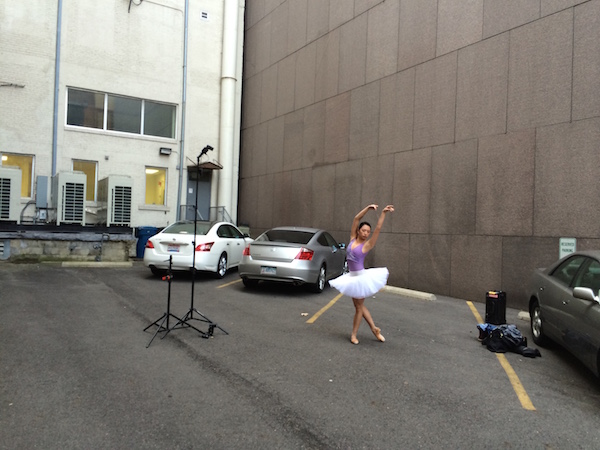
It was a particularly windy day that I photographed ballerina Kristie Latham. Since I didn’t have an assistant, and sandbags were too heavy to lug around by myself (I was already pulling my case and carrying two light stands), I would have to shoot without light modifiers. Note, if I had added an umbrella to the light stand without it being sandbagged or held by an assistant, it would have blown over onto a nearby car within five seconds. Though an un-modified flash on a light stand can still be blown over by the wind, it’s much less likely to happen. That said, I still made sure that it wasn’t too close to any nearby cars.

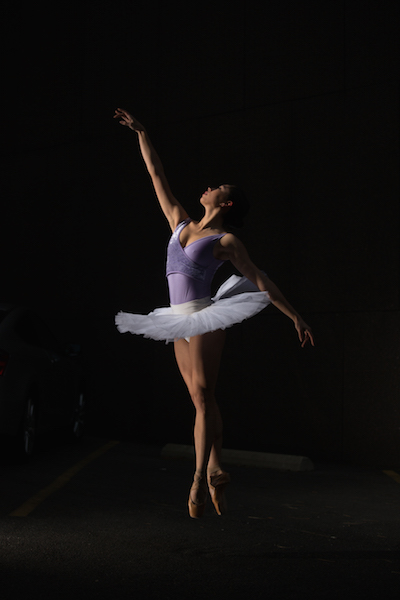
I wanted to highlight her form and the details of her outfit – specifically the tutu – so even though the light was going to be hard without modifiers, it would actually work out to my advantage. I began by setting up the main light. I placed it high – about 8 feet – in order to create dramatic, directional light. After taking a test shot, I saw that the light fell off below her tutu, since it came out about a foot from her body, causing her legs to go into shadow. To remedy this, I added a second light, placing it on the ground, aimed slightly up, to avoid lighting the ground. The second light worked at illuminating the lower half of her body (image above). By zooming the flashes in to a medium setting of 70mm, it allowed just enough light spread to cover her, while not spilling on too much of the environment around her. While a bit of background detail can be seen in the raw file, it can easily be removed in Lightroom in post-production.

3

The final shot: Kristie is now completely isolated in the void. Poetic.

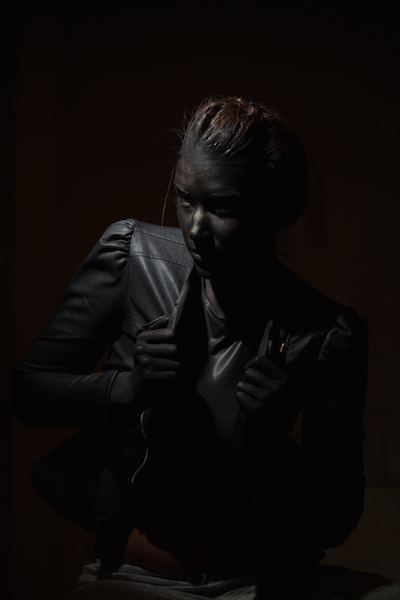
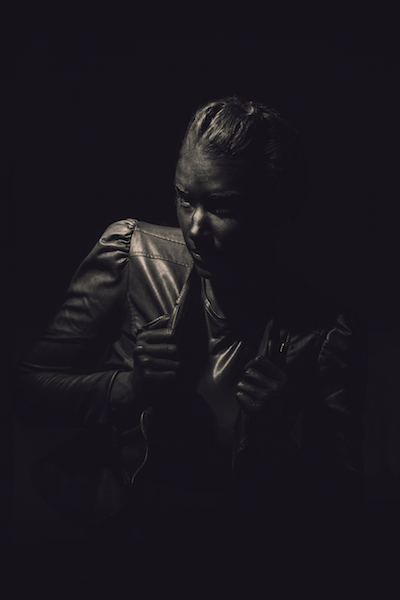
In a slightly different environment, I was doing a shoot with model Dani Dikeman, in a basement. She was in black body paint, wearing all black above the waist. I wanted the whole scene to appear black, save for the highlights on Dani and the textures of her outfit. It was a conceptual portrait shoot, this portion being the Hell portion of a Heaven/Hell-themed shoot. (The as-yet-to-be-shot Heaven scenario will, fittingly, be all white.)

4
The setup: This scenario took place in a basement.

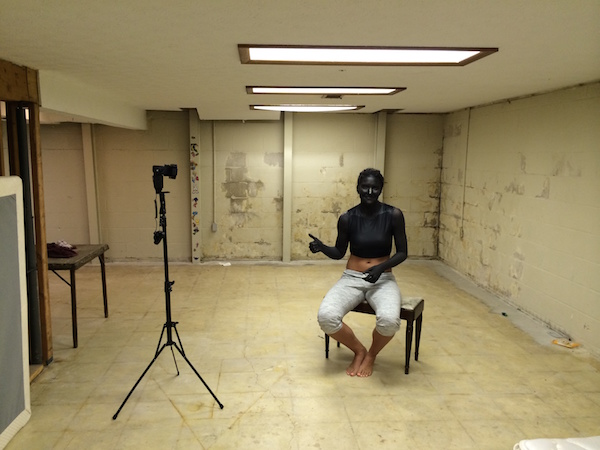
I met Dani at the makeup artist’s house, about an hour after they got started on the makeup, in order to give them a head start on the lengthy application. I knew that the basement was going to be an optimal shooting space because it was not only windowless, but wide open and barren. I quickly set up the sole flash, see above, and then waited while they put the finishing touches on the makeup and hair.

5
The raw file: Though a bit of Dani’s unpainted abdomen and sweatpants are visible in the shot, a quick Lightroom adjustment would have the image ready to go.

The shoot actually went rather quickly (15 minutes), which is ironic since the makeup application took two hours. Though the basement wasn’t especially large, by using a grid on my light to contain light from spilling on the nearby walls, the environment read pretty close to black in the raw files, as seen above. Although Dani’s unpainted abdomen and sweatpants visible in the shot, this wasn’t too big of an issue. Because the light falloff was so dramatic from her bust to her torso, a quick adjustment in Lightroom, lowering the exposure and it went easily to black.

6
The final shot. All black everything.

Have you done all dark or low key images before? Have any other tips or comments to share?

googletag.cmd.push(function() {
tablet_slots.push( googletag.defineSlot( “/1005424/_dPSv4_tab-all-article-bottom_(300×250)”, [300, 250], “pb-ad-78623” ).addService( googletag.pubads() ) ); } );

googletag.cmd.push(function() {
mobile_slots.push( googletag.defineSlot( “/1005424/_dPSv4_mob-all-article-bottom_(300×250)”, [300, 250], “pb-ad-78158” ).addService( googletag.pubads() ) ); } );

The post How to Create Dark Moody Low-Key Portraits with Minimal Gear by Nick Fancher appeared first on Digital Photography School.


Digital Photography School

 
Comments Off on How to Create Dark Moody Low-Key Portraits with Minimal Gear

Posted in Photography


Shooting Winter Wonderland: How to Take Great Snow Images

14 Jan

Shoot what you love. The Amazing Images Will Follow. That’s my motto. Above, you can see a shot of my daughters, Zoe and Tenley, on their first day of snow ever. Zoe wanted to hold the snow in her hands and blow it, Tenley agreed, and just as Zoe was blowing, Tenley reached up and whitewashed her face with the Continue Reading

The post Shooting Winter Wonderland: How to Take Great Snow Images appeared first on Photodoto.


Photodoto

 
Comments Off on Shooting Winter Wonderland: How to Take Great Snow Images

Posted in Photography


13. Januar 2015

14 Jan

Das Bild des Tages von: Moni Bergauf

Ein karger Feldweg im Schnee

Fotolinks des Tages

1. Der Fotograf von Auschwitz

Spiegel Online hat einen sehr lesenswerten Artikel über Wilhelm Brasse veröffentlicht, der als Häftling in Auschwitz fotografieren musste. Tagsüber portraitierte er andere Häftlinge zur Dokumentation: Im Profil, von vorne, mit Kopfbedeckung. Nach Feierabend kamen die Aufseher in sein Studio, um hübsche Abzüge von sich für die Familie zu Hause anfertigen zu lassen. Dank seines Könnens überlebte er Auschwitz, konnte danach jedoch nie wieder eine Kamera in die Hand nehmen, ohne erneut das Grauen zu sehen. → ansehen

” target=”_blank” title=”Link zum Artikel auf Boston Globe” >2. „Je suis Charly“

Etwa 3 Millionen Menschen gingen in Paris auf die Straße, um an die Opfer des Terrorangriffs zu erinnern. Auch in anderen Städten gedachten die letzten Tage viele den 17 Menschen, die ihr Leben verloren haben. The Boston Globe zeigt aktuelle Nachrichtenbilder der Solidaritäts­bekundungen.
” target=”_blank” title=”Link zum Artikel auf Boston Globe” >→ ansehen

+ Auch 500px zeigt die besten Fotos seiner Nutzer zum Thema.

3. Kannst Du sehen, was ich sehe?

Die UNHCR, oder auch UNO-Flüchtlingshilfe genannt, veranstaltet in unterschiedlichsten Flüchtlingscamps Foto-Workshops für Kinder. Diese dokumentieren dann ihren Alltag und präsentieren das Leben fernab der eigenen Heimat auf unerschrockene Weise. Ein gutes Beispiel dafür ist die vierzehnjährige Rhagda aus Damaskus, die den Wunsch hat, einmal Rechtsanwältin zu werden. Rhagda zeigt mit einprägsamen Fotografien, was in ihrem Leben wichtig ist, und was fehlt: Zum Beispiel Wasser. → ansehen


kwerfeldein – Fotografie Magazin | Fotocommunity

 
Comments Off on 13. Januar 2015

Posted in Equipment


Photography Will Sell Anything Except For Photography

14 Jan

Photography Network Economy

Per Zennstrom Photography Network Economy

  Hi FashionPhotograhyBlog.com readers, 

Today, we have a contributed post by, Berlin-based fashion photographer, Per Zennstrom on FPBlog. Per had worked on campaigns for recognized brands like Absolut Vodka, Bentley, Bon Magazine, Dior, Elle, Guy Laroche, H&M, Marie Claire, Porsche, Rolling Stone, Schwarzkopf and Toni & Guy. In this post, Per shares his thoughts about the photography network economy and surviving the changes in the digital age. Let’s get started! Here is Per…


IMGembed recently launched a project on Kickstarter attempting is to end the “war” between image owners and image users.


“Image owners are having their online content infringed without attribution, permission or payment 85% of the time. Content users are liable for up to $ 30,000 per infringed use, according to US Copyright Law. IMGembed can solve that! With our proprietary technology, IMGembed helps owners control where/how their images are being used and lets content users embed images for free, or at affordable impression based rates, with peace of mind!”


This is a really interesting project and an even more interesting problem. How are we to approach IP rights in the Digital Network Economy? We all are on both sides of this (who hasn’t had their images used online without permission?) and at the same time I’m very sure that most of us has engaged in unauthorized use of copyrighted material right?


We are at a crossroads here. Should we embrace the older pay-for usage-model or should we go for a use-your-content-to-sell-other-things model?


Using images (or other content) as a platform to sell other products


Here is an excerpt from a great article by Kwindla Hultman Kramer on what on the surface seems to be about Apple acquiring Beats by Dre, but in reality it’s really about content in the cloud and how artists (and consumers) can finally get to some sort of agreement on how to use and pay for digital content.


Just replace the word “music” with “images”:


“I’m old, so I still think about music as something I want to buy and own. For a century, we’ve lived in a technological and economic “moment” where it made sense for us to own copies of recorded music for personal use. Before about 1890, this was impossible. After about 2010, it was no longer necessary. People younger than I am expect to be able to access any music, instantly, from anywhere, and listen to it however they want. They don’t expect to pay for it, generally speaking. They don’t care about “owning” a copy of it, generally speaking. The ramifications of these changes in technology and in peoples’ expectations are enormous. So how, in this new world, do artists get paid for making music? How do people find music they want to listen to? How do artists get exposure to people who might like what they’re doing?”


And as I proofread this I wonder maybe this question is too narrow? Shouldn’t the question rather be “how do we adapt to a situation where everything is upside down and no one knows what really works”


It’s in this context You have to consider the news of how fashion photography duo Ineez & Vinoodh just launched a jeans capsule collection in collaboration with Frame Denim.

Ineez & Vinoodh fashion shoot for jeans capsule collection with Frame Denim

Photography will sell anything!


OK, Ineez & Vinoodh are extremely successful as photographers but don’t you agree that this is an interesting thought experiment? Looking at your images as a platform to launch other-than-photography-businesses. This could be information products, webinars, marketing courses, Photoshop tutorials – the list goes on and on.


IMGembed is trying to “fix” the problem by improving on the older model slightly, by harnessing the power of big data but I’m not sure that this is the solution. Why not just go ahead and accept the inevitable; stuff that has been let loose out there will get copied and used by people and we photographers have to roll with the punches and become smarter, more lean and switch from looking at this as a problem to looking for opportunities!


Thank you very much,

Per


Did you find this article by Per Zennstrom interesting? Leave your comments below in the comment section. We would like to know what you thought about the post.


MEDIA SOURCE: 

Feature image, image 1 & 2: contributed by Per Zennstrom. To view more of his work visit his website.


Fashion Photography Blog

 
Comments Off on Photography Will Sell Anything Except For Photography

Posted in Uncategorized