RSS
 

Archive for August, 2014

Readers’ Showcase: Nature and Wildlife

03 Aug

In all the talk about new gear, it’s easy to overlook the end result of our shared passion – the pursuit of stunning images. Among our large community there are some incredibly talented photographers who share their work in our forums, galleries and photo challenges, and from time to time we like to showcase some of the best work on our homepage. This week we asked users of our Nature and Wildlife forum to submit their favorite shots and as usual, the submissions were excellent. See gallery

Articles: Digital Photography Review (dpreview.com)

 
Comments Off on Readers’ Showcase: Nature and Wildlife

Posted in Uncategorized


Speedy Prefab: How a 9-Story Apartment Was Built in 5 Days

03 Aug

[ By WebUrbanist in Architecture & Houses & Residential. ]

prefab building hoist unit

We see conceptual modular designs of this kind all of the time, but rarely such exquisite real-world proof of how fast construction can be in the age of prefabrication.

prefab building lift process

prefab building crane decks

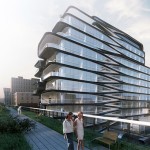
The recently-completed One9 building in Melbourne, Australia, using the Hickory Group’s Unitized Building system to install 34 units in less than 1 week around a prefab-paneled concrete core.

prefab building 5 days

prefab building construction photo

Created by architect Nonda Katsalidis, this approach allows each one-or-two-bedroom dwelling to be built almost entirely offsite then stacked like a puzzle piece onto the site, completed with decks and fenestration in place.

prefab structure unit interior

Utility connections are also built in, making it easy to hook up electrical and plumbing systems. In theory, the process can be used to build up to 70-story structures.

The building boasts a number of sustainable materials and strategies, making its speed of construction all the more impressive. Per JetsonGreen, “The units in the building are all fitted with double glazed windows that offer superior thermal protection and acoustic performance. The building is also equipped with a grey water recycling system. There is also a rainwater harvesting system in place.

prefab finished apartment building

As for green energy, “Rooftop mounted solar panels provide enough energy to heat the water used up by the residents, while the building is also equipped with a H.W.S system that provides highly efficient water circulation. Energy efficient lighting is installed throughout the building, to conserve energy expenditure. The One9 building also has a 6 Star energy rating.”

Share on Facebook


[ By WebUrbanist in Architecture & Houses & Residential. ]

[ WebUrbanist | Archives | Galleries | Privacy | TOS ]


WebUrbanist

 
Comments Off on Speedy Prefab: How a 9-Story Apartment Was Built in 5 Days

Posted in Creativity


Demystifying White Balance

03 Aug

White Balance (WB) is one of the most challenging camera settings for beginners to learn. White Balance can also be difficult to fix later when you are shooting in JPG format. In this post I’m going to discuss what WB is and how to use it properly when shooting JPGs. I am a food photographer, but keep in mind the WB principals apply the same way, to anything you are shooting.

01White Balance Eggs

The image on the left has a cooler, or bluer, color temperature than the image on the right.

White Balance is one of the most important camera settings because it hugely affects how the colors look in your photos. The White Balance setting is used to tell the camera what type of lighting you are using for your shot, or in what type of scenario you are shooting. White Balance, also known as color temperature, is measured in degrees Kelvin, so I will be referencing that as well. The main reason White Balance is so hard to grasp is because our eyes are so good at filtering light, and our eyes make everything look “normal” under almost any lighting condition. We don’t see the blue or yellow sunlight. It just looks like white light. As you learn more about light and its color temperature, you will start to actually see these slight differences throughout the day.

Where to find the White Balance camera setting

Not all cameras access the WB setting in the same way. Some have a little button on the body of the camera with a “WB” under it, while other cameras make you access this setting in the camera menu. Below is how to find the WB menu for the Canon 5D Mark II. In most Canons the WB menu is located here.

02White Balance camera menu 1

The White Balance is inside the camera settings menus on most cameras.

03White Balance Menu

Here are all the WB settings available for the Canon. Yours make looks slightly different.

If you can’t find your White Balance setting, look it up in your manual or google it for your camera model. If you are having a hard time finding it, make sure you are on the “Manual” camera mode setting, or one of the other modes that your camera will allow you to adjust the WB. Depending on your camera, certain modes will lock you out of the WB menu.

What the WB setting icons represent

To make things easier, camera manufacturers have come up with some standard icons that represent the most common lighting scenarios. When you set your camera to one of these settings, you are setting it to a specific color temperature, or degrees Kelvin. Depending on your camera, you might only have the first six settings. Advanced cameras have settings 8 and 9.

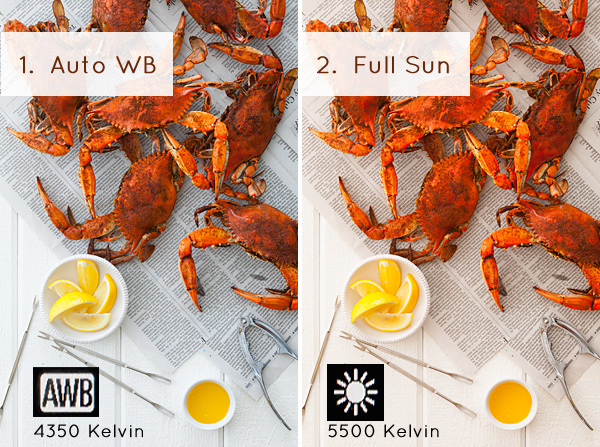
  1. Auto White Balance (AWB) – the camera will analyze the light in the scene that you are shooting, and pick a setting for you. Depending on your camera it will be set anywhere between 2,000 and 10,000 degrees Kelvin.
  2. Full Sun – this is for a bright sunny day, hardly any clouds, with a blue sky, and you are shooting in direct sunlight. Degrees Kelvin will be in the 5000-5500 range.04White Balance 1
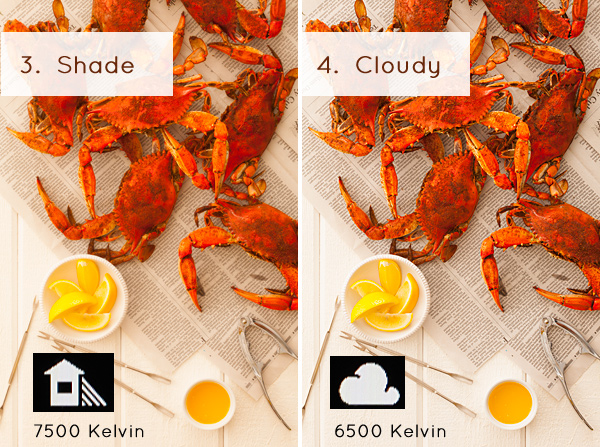
  3. Open Shade – the icon is showing a house with shade on the right side. This setting is for when you are taking a picture in the shade, no direct sun, and the sky is blue. This blue sky is actually color contaminating your shot. This setting will “warm” up your shot to counteract the blue light that is coming into your scene. Degrees Kelvin will be 7000-7500.
  4. Cloudy Day – this setting is for when you are shooting on a day when the sky is white with cloud coverage – no blue sky is coming through, the light is very neutral so you don’t need to counteract any blue light contamination. Degrees Kelvin will be 6000-6500.05White Balance 2
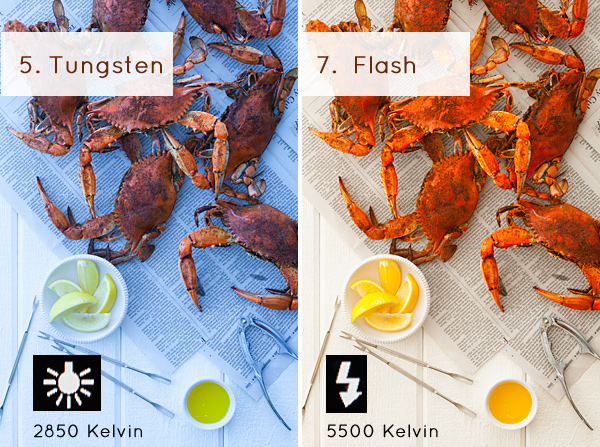
  5. Tungsten Light – this is your standard household light bulb, or studio hot lights. Degrees Kelvin will be 2800-3200.
  6. Fluorescent – this type of light is generally found in commercial spaces. It has a wild array of different colors and temperatures, and some cameras will have multiple choices in this category. Fluorsescent light also makes images look very green so this setting counteracts that by adding a magenta (pinkish) color to balance the shot. Degrees Kelvin is around 3400-3800 – please note – I did not take a shot with the Fluorescent setting because it would just be flaming magenta.
  7. Flash or Strobe Light – this type of light is emulating daylight so usually this setting is the same as full sun and sets the camera to 5000-5500 degrees. If you have a pop-up flash, your camera might change to this setting automatically.06White Balance 3
  8. Custom White Balance – this option is for creating a custom setting for your scene by photographing a white card (or a grey card), having the camera analyze the light on that card, and then setting your camera to this new custom color temperature number.
  9. Manually Set Degrees Kelvin – this setting is for the shooter who fully understands WB and wants to manually control the color temperature in camera.

Numbers 8 and 9 are more advanced, for those shooters who are making custom WB settings to either neutralize light that might be mixed colors, or to use the WB setting creatively. I use number 9 all the time to warm up my food images. I always like to set this to a “warm” setting. So if I am shooting in daylight (and depending on the time of day), I might put my setting at 7000 or 7500 degrees Kelvin to really warm up the shot, as I am always shooting in open shade, using natural light at my studio.

For those of you who are just starting out here in Digital Photography School, it’s very important to learn about your camera’s White Balance setting when shooting only JPGS. As I’ve mentioned above, adjusting the White Balance on JPG images can be challenging and not nearly as easy as RAW files. It simply doesn’t look as nice as when you tweak RAW files. Below you can see the difference in Lightroom between the White Balance adjustments for JPG versus RAW files. It’s on the very top with “Temp” and “Tint”. When you shoot JPGS, you are limited to a slider (left image below) that goes from blue to yellow with a scale range that does not relate to the actual color temperature in degrees Kelvin. On the right side, you can see that the “Temp” scale has degrees Kelvin right next to it so you can easily customize your images.

07Lightroom WB Setting

The image on the left is the editing tab for JPG files and the one on the right is the editing tab for RAW files.

Your assignment, should you choose to accept it

If you are still shooting JPGS, I suggest you give yourself an assignment to really get a feel for White Balance. This assignment is going to be called:

Natural Light White Balance Bracket Test

A bracket is a range of images of the same subject where each image has a setting that has changed. Figure out a shot you can take, preferably on a tripod to make this easier, when you have some time to do this. It doesn’t have to be a studio shot. This could be a landscape or a portrait taken outside. Figure out what your exposure should be. Then find where your White Balance setting is in your camera and take the same shot several times, each time changing the WB setting on your camera – TAKE NOTES. The point here is to learn what each setting looks like. Make notes of where you are shooting, the time of day, and your camera exposures.

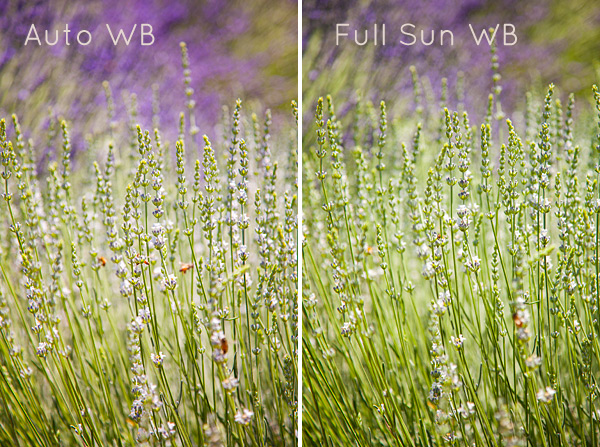
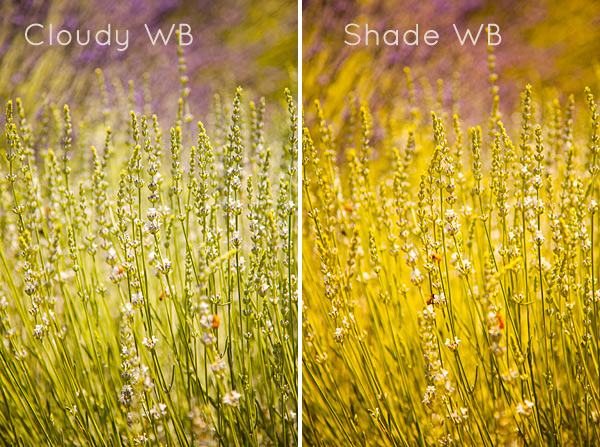
Now, for your bracket test – shoot in the following WB settings: Auto, Full Sun, Shade, and Cloudy. Download your files and have a look – which color do you like the best? Make a note of that for future reference. Try to bracket with different shots too. While you are learning photography, if you are shooting a scene that has mixed lighting or it’s just a moment you are capturing at an event or something, then the Auto WB setting will probably be fine for that. I do use Auto a lot if I’m shooting at a farm or something similar where I just don’t have time to fiddle with it.

A few precautions

I have to mention something here – when shooting outside it can be extremely hard to see your camera’s LCD screen, so you might not even see the difference on the LCD when you take the pictures with the different WB settings. You HAVE to look at these on the computer you edit your files on. Here’s the other thing that’s a total drag. Your camera’s LCD screen is very inaccurate for color and many times for exposure too, especially when you are looking at it outside in daylight. It’s very hard to know if you have the correct exposure or not. I’m assuming that you haven’t learned about your camera’s histogram yet for judging exposure, so until then, for this assignment, try to do this in a situation where you can download your files right away to make sure your exposures are good.

Do some test shots, download, adjust if needed, then shoot your bracket. After downloading your image, name each shot the WB setting it was taken in so you don’t get confused. This is why you took your notes. Some software will tell you what your settings are. If you don’t know whether yours does this or not – write down your info so you can just look up your shot number with your notes. Your assignment should look something like this:
08Lav Test 1

09Lav Test 2

When I took these shots above, it was a bright sunny day with a blue sky and white billowy clouds. Time of day was about 2:45 P.M. I prefer the “Full Sun”, or daylight WB. Now, keep in mind that with shots like these, the “correct” color balance can be very subjective and some people might like the warmer shots and some people might like the cooler shots. I think we can all agree that the shot taken in “Shade” is way too yellow for this scene. Until you learn how to edit RAW files, here is what I suggest you do. Set your WB to Auto if you are still nervous about this, OR match the WB to the lighting condition of your scene. If you have time with the shot, take a bracket of your settings.

What I always suggest to new students is to set your camera, if possible, to shoot in JPG and RAW files. The camera will actually create two images of the same exact shot, one as a JPG and the other as a RAW file. They will have the same image number, with a different file extension. Work on the JPG for now, then when you learn how to edit RAW files, you will have these to go back to, and you will be so happy that you did that. On Canon bodies, the menu settings to change the file format look like these below. Notice I am also picking the largest file size I can for each file type. I always do that in case I ever want to print anything.


Canon Quality Menu

Canon Quality Menu

Alright, now go out there, play with the White Balance and see what it does. Get control of that camera and take your photography to the next level.

The post Demystifying White Balance by Christina Peters appeared first on Digital Photography School.


Digital Photography School

 
Comments Off on Demystifying White Balance

Posted in Photography


2. August 2014

02 Aug

Ein Beitrag von: Weronika Izdebska

© Weronika Izdebska


kwerfeldein – Fotografie Magazin | Fotocommunity

 
Comments Off on 2. August 2014

Posted in Equipment


Bird Photography Tips – How to Make Your Bird Photographs Stand Out

02 Aug

Have you ever been disappointed when browsing through the bird photographs in your own portfolio? I was, in fact many times! Even today I get disappointed to see several of my own bird photographs and keep thinking why did I take that photograph in the first place?

In most cases, the reason for failure of not appealing bird photographs is the boring or distracting background.

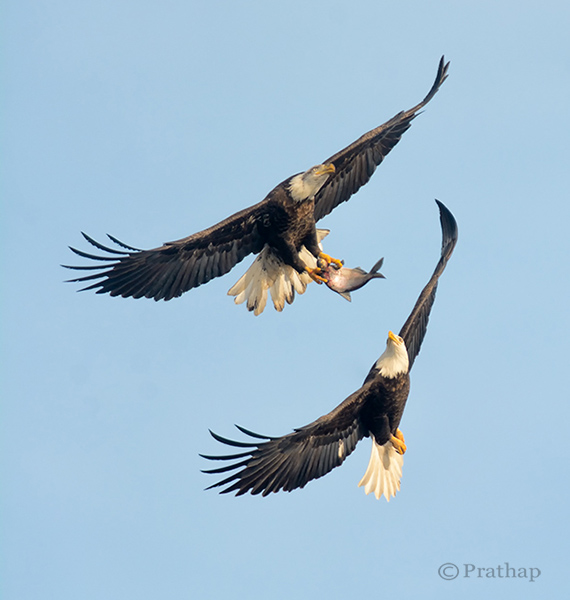
Nature Photography Simplified Bird Photography Bald Eagle Fight In Flight

Take a look at your portfolio again and see if the culprit is the background. You will be surprised, shocked, and probably start thinking why did I take this photograph? What was in my mind?

The reason is very simple. It’s our natural behaviour. We are accustomed seeing only what we want to see. Imagine a situation like this. You have your camera and a decent telephoto lens, when you see a magnificent bird like a Bald Eagle perching on a lone tree.
What do you do? You will most likely start capturing photographs in burst mode. Don’t you? We all do! The urge to capture the beauty, and the fear of losing that opportunity doesn’t allow us to think. Unless. . .

By following these very simple bird photography tips, and making a few changes before you press the shutter, you will be able to create bird photographs that stand out.

Your Background Makes the Picture

Remember that we see our world different than the Camera. We tend to see only what we want to see. Meaning, we are so tuned to looking at the world using filters. Our brain passes only the information which is very important to us filtering out all the unimportant things. So, we see only the bird and its beauty, but don’t see the background, or the distracting elements in the background.

But the camera doesn’t filter, it records everything that it sees.

No matter how beautiful the bird is, you have to make sure that the background is either clean, or interesting enough that it will complement the bird, which is your main subject of interest.

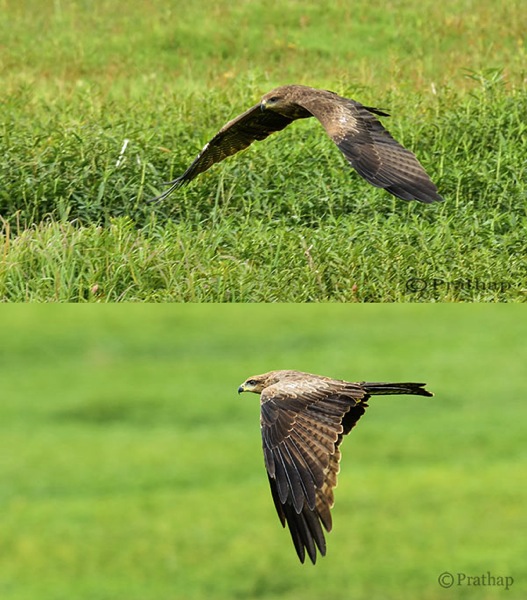
Nature Photography Simplified Bird Photography Eagle Flight Distracting vs Clean Background

Use Your Legs

Do you use your legs when you are photographing? Does this question sound crazy? Think again. Once you get to see the bird, it is a common tendency to capture it immediately. In that urge to capture, you generally forget to move around.

In order to get a clean and appealing background you have to move around sometimes, or rather most of the time. But remember to move very slowly. Most of the time moving just few feet to the left, right, forward or backward will give wonderful results.

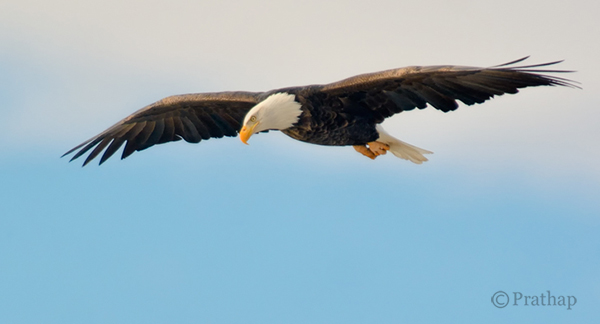
Nature Photography Simplified Bird Photography Bald Eagle Flight

After all you are not a tripod!

Patience Always Pays Off

There is no substitute for patience when it comes to achieving anything worthwhile in your life. It is no different in the case of bird photography.

Why do we want to always move? Why can’t we sit in one place for several minutes to hours?

If you think deeper about it, you will understand that we are almost always restless. Also, we believe in the future or something that is non-existent. Learn to live in the present. Learn to embrace what is there in front of you. Rather than moving on in search of the next bird, spend time with the bird in front of you.

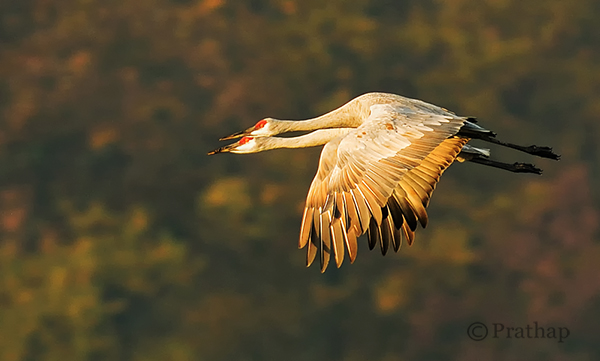
I would recommend you to spend hours to days in succession. You will fall in love with the bird and ultimately with nature. Patience is the key to making great photographs of any bird.

Nature Photography Simplified Sandhill Cranes Pair In Flight Jasper Pulaski Fish And Wildlife Refuge Indiana

Use Depth of Field (DOF) to Your Advantage

Depth of Field plays a major role in making your bird photographs look beautiful. By using DOF you can either isolate the subject from its background by using shallow DOF, or give importance to both the bird and its background by using deep DOF.

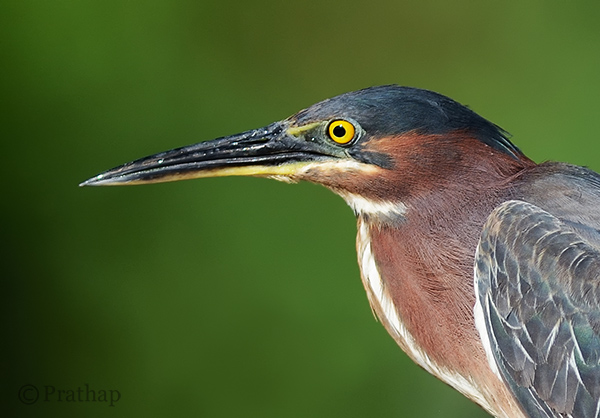
If the background does not convey anything about bird’s habitat, then using larger apertures like f/2.8, f/4, f/5.6 yields a pleasing bokeh in the background helping the bird to stand out in the frame.

Nature Photography Simplified Bird Photography Green Heron Portrait Bokeh Effect

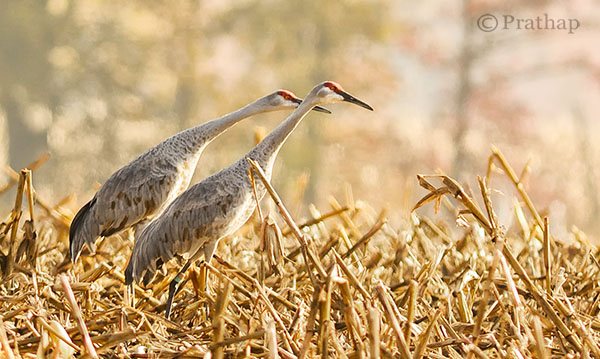
Otherwise, including the habitat by using smaller apertures like f/8, f/11, etc., helps to narrate a story to the viewer.

Nature Photography Simplified Sandhill Cranes In Jasper Pulaski Fish And Wildlife Refuge Medaryville Indiana

Fill the Frame

If you go through the bird photographs across the net, you will find that the majority of bird photographs will have the bird filling the frame.

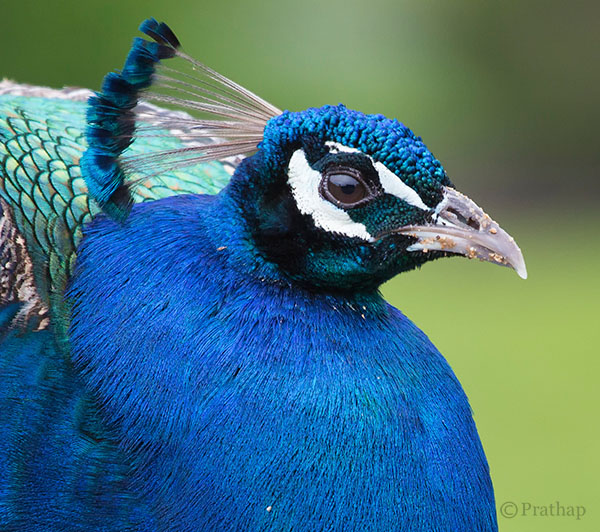
Nature Photography Simplified Bird Photography Peacock Portrait

There are three main reasons for filling the frame with the bird:

  1. Most of the times, it’s all about the bird and its beauty. So, there is no reason why something else should be occupying the frame.
  2. The bird will be lost in the frame if it occupies only a part of the frame. Unless it is in its habitat, or there is a directional light illuminating it more than anything else in the frame.
  3. Filling the frame with the bird avoids any distractions in the background which is usually the case.

Remove Distractions in Post-Processing

This is a debatable topic for sure. Is it ethical or unethical? It depends really.

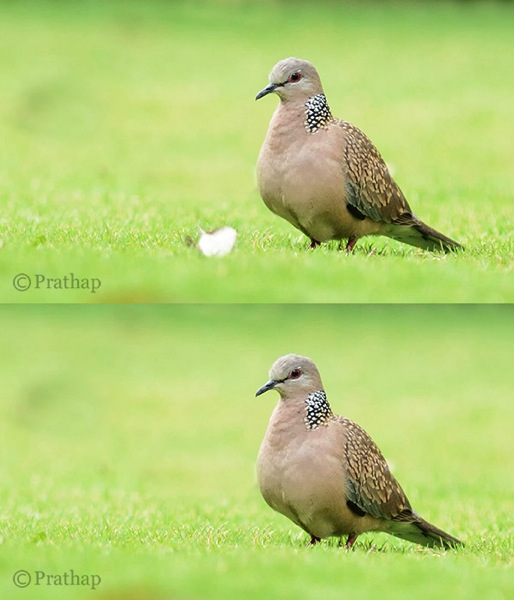
Are you sharing it only on social media sites? It shouldn’t bother you much. If you feel that removing distraction makes it a more pleasing image, it should be fine. However, it should not be overdone. Also, you should never do that if you are submitting your images to competitions or bird ID sites or any other place where it is not allowed.

You should always try to achieve a distraction free image in the field. But, that is not always possible. My suggestion is to remove only the distractions that are by no means possible to remove in the field. Things like a tiny branch running across the bird, bright elements like aluminum foils, papers, etc., could be removed as they don’t contribute to the final result.

Nature Photography Simplified Bird Photography Beautiful Dove Background After Removing Distraction In Background

Cropping is another way to remove distractions and recompose the scene. It is an essential tool for the bird photographer since it is not always possible to have the longest telephoto lens.

Conclusion

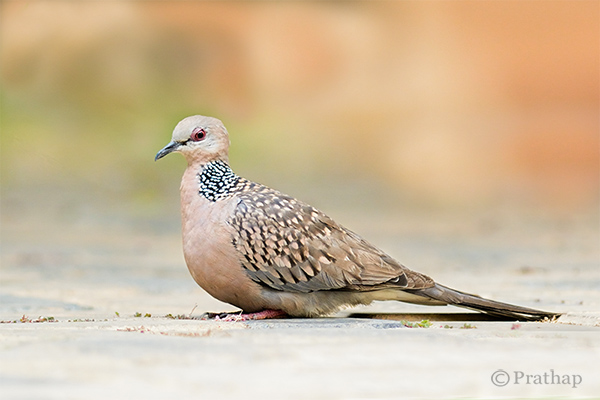
Keep the background clean and make the bird stand out in the frame

Nature Photography Simplified Bird Photography Dove Clean Background

You will make excellent photographs by following the above simple tips on bird photography. Now go out and shoot. That’s the best tip I can give if you want to seriously improve you bird photography, enjoy!

The post Bird Photography Tips – How to Make Your Bird Photographs Stand Out by Prathap DK appeared first on Digital Photography School.


Digital Photography School

 
Comments Off on Bird Photography Tips – How to Make Your Bird Photographs Stand Out

Posted in Photography


Lebenslänglich

02 Aug

Ein Beitrag von: Chris Grodotzki

Lebenslänglich hinter Gittern. Was für Menschen in Deutschland die Höchstrafe für ein Verbrechen bedeutet, ist für Tausende Zootiere von Geburt an unausweichliche Realität. Trotzdem wird diesem Aspekt der Tierhaltung wenig Aufmerksamkeit und noch weniger Kritik zuteil, wenn nicht gerade, wie kürzlich in Kopenhagen, eine Giraffe öffentlich geschlachtet wird.

Und auch dann wird nur an den Symptomen herumgemäkelt, das Konzept Zoo bleibt unangetastet. Schließlich ist’s gute Unterhaltung. Ein paar Gedanken über Haltung von Tieren und Haltung im Fotojournalismus.

Ein Pinguin wird mit Wasser bespritzt

Zwei Eisbären auf wenigen hundert Quadratmetern, hinter Glaswänden in einer Welt aus Beton und Wasser gefangen. In der freien Wildbahn sind sie Einzelgänger und die Tiere, die das größte Territorium unter allen Landlebewesen für sich beanspruchen. Artgerecht sieht anders aus. Trotzdem sehen die meisten Menschen, die einen Zoo besuchen, kaum ein Problem in der menschengemachten Situation der beiden Bären.

Es dient der Aufklärung, dem Artenschutz, so heißt es. Und putzig sind die weißen Riesen allemal, wie sie so auf ihrer Pseudo-Eisscholle hin und herlaufen und mit dem Kopf nicken. Stereotypie heißt das in der Verhaltensforschung: Immer wiederkehrende Bewegungsabläufe als Auswirkung von Langeweile und eingeschränkter Bewegungsfreiheit.

Mit meinem Fotoessay „Lebenslänglich“ wollte ich dem allgemeinen, positiven Bild von Zoos ein anderes gegenüberstellen: Die seelische Härte eines Lebens hinter Glaswänden. Die Erniedrigung, als Zwangs-Modell im Schaukasten herhalten zu müssen.

Der Rüssel eines Elefanten hängt über eine Mauer

Es gibt kaum eine Tierart, deren Bedürfnissen in einer menschengemachten, eng begrenzten Scheinwelt wirklich genüge getan werden könnte. Das Bild, das wir in Zoos von der Tierwelt erhalten können, ist verzerrt: Natürliches Verhalten von Tieren kann man nicht in einer unnatürlichen Umgebung beobachten. Es ist das Bild von der gezähmten – besser: gebrochenen – Natur.

Respekt vor dem nichtmenschlichen Gegenüber? Fehlanzeige. Und auch der Beitrag zum Artenschutz, den die Zoobetreiber so gern vor sich hertragen, ist mehr als umstritten. Gerade Fälle wie der der Kopenhagener Giraffe Marius zeigen: Eher wird im Zoo geschlachtet als ausgewildert. Der Hauptzweck eines Zoos ist und bleibt die Belustigung der Besucher.

Zwei Papageien sitzen in einem Käfig

Über mehrere Wochen habe ich 2011 für die Kontext:Wochenzeitung in der Stuttgarter Wilhelma versucht, das zu dokumentieren, was das Leben der Zoo-Insassen wirklich ausmacht. Grautönige Tristesse und Langeweile statt buntem Kitsch. Stahl, Glas und Beton statt purzelbaumschlagenden Tierbabys. Es war nicht allzu schwer. Sobald man seinen Blick für diese Aspekte öffnet, springen sie einem in jedem Gehege ins Auge. Und loswerden wird man diese Perspektive danach nicht mehr.

Manche mögen mir vorwerfen, „Lebenslänglich“ sei eine sehr subjektive Betrachtung des Themas. Ich werde nicht widersprechen. Jedes Foto ist subjektiv, jeder Fotograf beeinflusst das, was auf seinen Bildern zu sehen ist, wählt eine bestimmte Perspektive, einen Ausschnitt der Wirklichkeit und lässt diesen so erscheinen, wie er ihn wahrgenommen hat oder wahrgenommen sehen will.

Trotzdem wird einem – fast ausschießlich Leuten, denen nicht gefällt, was man erzählt – immer wieder ein Objektivitäts-Dogma, das aus oben genannten Gründen kaum noch ein (Foto-)Journalist für sich beansprucht, unter die Nase gerieben.

Zwei Papageien sitzen in einem Käfig

Ich habe nicht versucht, objektiv zu sein. Im Gegenteil: Ich habe bewusst versucht, den Ausschnitt zu finden, der das subjektive Erleben der Tiere widerspiegelt – ohne die Vermessenheit, zu glauben, dass ich mich wirklich in sie hineinversetzen könnte. Nichts anderes als das, was jeder Kriegsfotograf versucht, bei dem der Anspruch, das Leiden der Zivilbevölkerung im Krieg zu verbildlichen, mehr als schöne Fassade ist: Der Versuch, die Situation des Gegenübers zu verstehen.

Ein Orang-Utan sitzt alleine hinter einer Scheibe

Die Tiere dieser Erde existieren aus ihren eigenen Gründen. Sie wurden nicht für den Menschen gemacht, genauso wenig wie Schwarze für die Weißen gemacht wurden oder Frauen für Männer.

– Alice Walker

Auch die Betrachtung der Zoobesucher, die mit einer Ladung „süßer“, bunter Tierbilder nach Hause gehen, zeigt nur einen kleinen Ausschnitt der Situation. Die Zoobesucher sitzen der Illusion auf, die die Zoo-Industrie ihnen vorsetzt – die Realität und das Erleben des nichtmenschlichen Gegenüber bleibt dabei völlig außen vor. Ich glaube, das politischer Fotojournalismus die Aufgabe hat, solche oberflächlichen Betrachtungen zu hinterfragen und wenn nötig, aufzubrechen.


kwerfeldein – Fotografie Magazin | Fotocommunity

 
Comments Off on Lebenslänglich

Posted in Equipment


Photographing Thailand with the Nokia Lumia 1020

02 Aug

It would seem that a trip somewhere as exotic as Thailand would require a pro camera and a heavy bag of lenses. Photographer Jan Ras took a lighter approach on a recent trip to Thailand, photographing some of the native inhabitants of a village (monkeys, to be precise) with a Nokia Lumia 1020. He captures their expressive, curious nature in a documentary style, all while forgoing traditional photographic equipment. See gallery

Articles: Digital Photography Review (dpreview.com)

 
Comments Off on Photographing Thailand with the Nokia Lumia 1020

Posted in Uncategorized


10 Things Google Should Consider in Launching a Standalone Photo Sharing Service

02 Aug

Google used to have a standalone photo sharing service. It was called Picasa. I never really liked it. It wasn’t a very social site. I thought Flickr was a lot better.

Today’s news out of Bloomberg is that Google is looking to spin off Google Photos from Google+. Maybe it’s true, maybe it’s not. You never know. The timing of Friday afternoon stories and leaks always makes you wonder. Usually when companies want to push something they release it more like Tuesday mornings or make a big deal about it at I/O or something.

Whatever the case, photos has been one of the highlight use cases for G+. Many photographers have flocked to the site and I think it’s done a pretty good job with photos overall.

*If* Google is going to launch a standalone photo service though, they should really go all out. I worry that they’ll launch something less than fully baked — it will generate a bit of initial excitement and then lack stickiness.

With that in mind, here are 10 suggestions that I’d give Google in launching a standalone photo sharing service.

1. Flickr has raised the bar by giving everyone a full terabyte of high res photos. Flickr made one big mistake with this offering though. *Private* high res photos are of very little value to a photo social network. Public photos are *very* valuable to a photo social network. Public photos are worth more to a social network than the cost to store the photos. Flickr just gave everyone a terabyte without distinguishing the visibility of the photos. Google should offer at the launch either unlimited or 2TB of high res public photo storage with every account. This will get great press and attention.

Go big or go home I say. Nobody can maintain cheaper enterprise storage than Google, and it’s only going to get cheaper in the future. Don’t be blinded by the open-ended liability of high storage limits. Public photos on the web are only going to get more valuable in the future and storage is only going to get cheaper.

2. Partner with photographers to sell their photos. Flickr just leaked something like this earlier this week. Partnering with photographers to sell photos is not just about stock photos as revenue (although the stock photography market is in fact a multi-billion dollar market ripe for disruption). This is about attracting the sorts of high quality photographers to your network because they will be *paid* for participating through photo sales. By providing photographers an avenue to sell their stuff and make real money, you endear them to your network. Tie the visibility of their work, in part, to their level of activity on the network — not directly, but just float that out there so that photographers feel like the more active they are on the network, the more $ $ $ they may make.

3. Create a super light weight mobile client like Instagram. Make it so simple. Tap/tap to +1, like, fave, whatever. Really dumb it down. Just something to follow your friends’ stuff and favorite it without all the other clutter of G+/Facebook getting in the way.

4. Build an intelligent way to organize albums by keywords. Manual album management sucks big time. Let me build albums by keywords (this will also encourage more keywording which is valuable organizational metadata for Google to have). Study what Jeremy Brooks has done with SuprSetr and build something like that but even more intuitive and easy to understand and use.

5. Build intelligent groups for photographers to hang out in on the photo network. Unfortunately Google got one thing very wrong with communities in G+, which is why communities never took off. They refused to bump threads based on new comments. This ensures that all threads die quickly. It’s the longevity of conversations that fuel community interaction. Refusing to bump threads based on comments makes large groups completely chaotic and unusable. Why invest in a conversation that will be completely buried and dead in 24 hours and that I’ll never be able to find again? Let me mark conversations as favorites and feed all my favorite conversations to me in a feed ordered by recent comments/activity.

6. Go mosaic big time. On the web, give users a huge wall of photos with infinite scroll to just scroll through and +1. Code the site so that if you are hovering over any photo and press the “f” key it +1s it. Lubricate social activity on the web. Social activity begets social activity. The more you make it easy for people to like/fave/+1 stuff and the faster you make it, the more you get. The more people get, the better they feel about the network.

7. Spend some serious money the first year on community management / evangelism. Hire a whole bunch of photo community managers and partner with influencers all over the world. Require community managers to host at least 2 photowalks a month in their geographic region. Require them to spend 10 hours a week inside of social groups interacting with photographers on the new site. Bombard your users with interaction from Google Community Managers. Make sure Googlers are using the site to share their photos, especially visible senior management. Keep track of how many +1s, comments and other interactions Googlers have with photos on the network and make sure Googlers know that this matters.

8. Open some fine art physical galleries. These can be used to host meetups and gallery shows for G+ photographers. You can also sell physical prints and DVDs of photo series from these galleries. Social photographers love doing shows with their work. Digital displays make doing temporal shows easier than ever. The ego boost a photographer gets when they are showing their work in a group show is substantial. Capitalize on this to draw the finest photographers in the world to your network.

9. The Nik Software stuff from Google is really good. Snapseed is the best mobile photo editing software out there. Analog Efex Pro 2 really is some of the best photo processing software I’ve used in years. Google could create something as good as Lightroom, maybe even better. Build this into the site for processing but also give people the ability to download the software to their computers for when they don’t want to work in the cloud and want to work locally. Sell this software for $ 99 with a six week free trial. Users who upload at least 5 photos on different days to the new photo network for six weeks should be given a promotion code to get the software for free.

10. Prioritize Google Photos photographs in Google Image Search. Create a button that photo buyers can click in Google Image Search to show photos available for licensing. Leverage the power of Google Image Search to both drive traffic back to photos in the social network and sales through the social network.

That’s all for now.


Thomas Hawk Digital Connection

 
Comments Off on 10 Things Google Should Consider in Launching a Standalone Photo Sharing Service

Posted in Photography


Weekly Photography Challenge – Golden

02 Aug

The collection of images this week that I rounded up were on the theme “golden”.

That is a bit open for interpretation. So let’s do just that, shall we, and make it this week’s photography challenge as well.

Weekly Photography Challenge – Golden

So what does that mean to you? What do you imagine in your head at the mention of the word? Do you take it literally and think of the color gold? How about an award or trophy? There’s so many ways to go with this – let’s see where you take it.

Here’s a few more ideas to get you started:

By Hartwig HKD

By Justin Brown

By Daniel Stark

By dorena-wm

By Ansel Edwards

By luz rovira

By Justin Hee

By Mark Freeth

By Nick Kenrick

By Clint McMahon

Show use your Golden photos

Simply upload your shot into the comment field (look for the little camera icon in the Disqus comments section as pictured below) and they’ll get embedded for us all to see or if you’d prefer upload them to your favourite photo sharing site and leave the link to them. Show me your leading lines using pathways and roads in this week’s challenge.

The post Weekly Photography Challenge – Golden by Darlene Hildebrandt appeared first on Digital Photography School.


Digital Photography School

 
Comments Off on Weekly Photography Challenge – Golden

Posted in Photography


What The Duck #1330

02 Aug

We’ve come to the end of another week here at dpreview, and as our thoughts drift to weekend shooting opportunities, it’s time to take things a little less seriously. Aaron Johnson’s comic strip ‘What the Duck’ is just the thing, taking a gently satirical look through the lens of a photographically inclined waterfowl. You can find it published here (and in our newsletter) every week; we hope you enjoy it, and your weekend.

Articles: Digital Photography Review (dpreview.com)

 
Comments Off on What The Duck #1330

Posted in Uncategorized