RSS
 

Archive for May, 2014

20 May, 2014 – Post Processing Panoramas

21 May


As a follow up to Kevin Raber’s recent article on Having Fun With Panoramas today we present an article by Tom Legrady on Post Processing Panoramas.  This article for the most part focuses on the use go the Adaptive Wide Angle Filter in Photoshop.  The use of this filter especially in panoramas corrects for much of the distortion that is introduced during the stitching. 

Michael and I (Kevin) will be in Buffalo June 5-8 as part of the Silo City Workshop.  This workshop conducted by Mark Maio will be photographing one of Michael’s and my favorite things; abandoned buildings.  In this case these will be the abandoned Buffalo Childs Street grain elevators.  If you are free and want to have a great few days shooting these amazing structures inside and out then go to the Silo City Web Page and register today.  There are only a few spots left.  Another bonus is Capture Integration will have a rep there with Leica Gear as well as Medium format digital gear if you are so inclined to try this gear out.  Hope to see you there.


The Luminous Landscape – What’s New

 
Comments Off on 20 May, 2014 – Post Processing Panoramas

Posted in News


Street Smart: Solar Roadway Lights Up & Feeds Power Grid

21 May

[ By WebUrbanist in Conceptual & Futuristic & Technology. ]

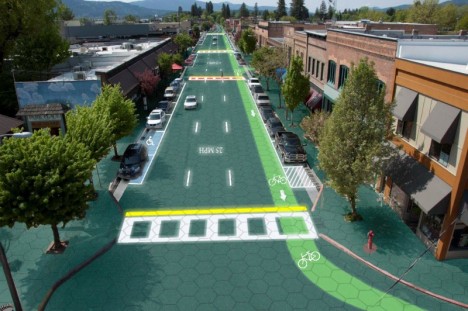
solar roadway graphic design

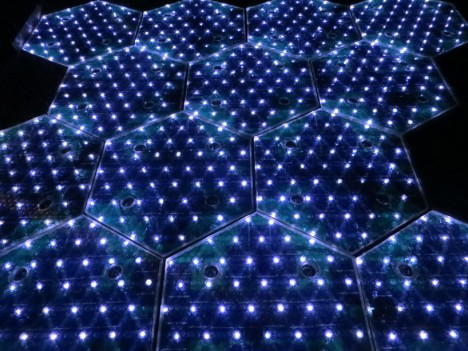
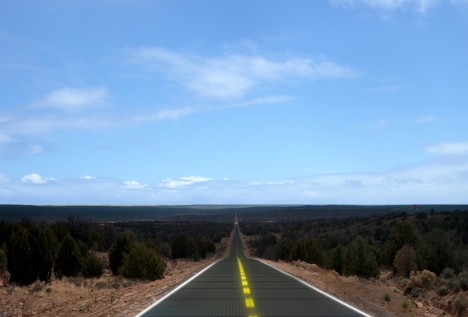
Currently in crowdfunding, these hexagonal pavers can provide energy, melt accumulated snow and ice, light up with LEDs, all while being tough enough to support trucks weighing 250,000 pounds.

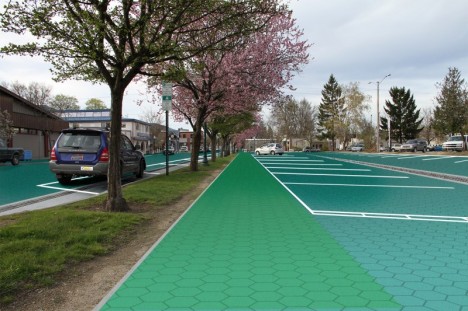
solar roadway parking sidewalk

Designed by American electrical engineer Scott Brusaw to work everywhere from roads, parking lots and driveways to sidewalks, bike paths and playgrounds, you can walk, drive or park on these hexagrams with ease. They have been extensively tested for load-bearing capacity as well as traction and impact resistance.

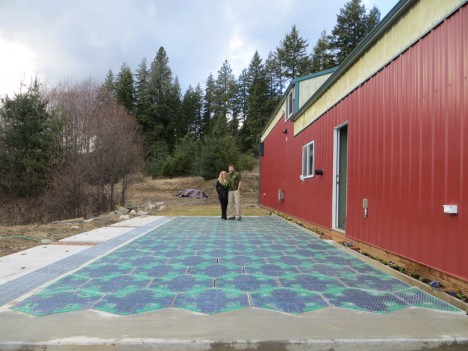
solar road test panels

solar roadway led lights

More about the project from IndieGoGo (graphics by Sam Cornett): “Solar Roadways is a modular paving system of solar panels that can … pay for themselves primarily through the generation of electricity, which [in turn] can power homes and businesses connected via driveways and parking lots.”

solar roadway rural highway

solar roadway system sketch

Current working prototypes are already powerful, as demonstrated above. Beyond existing capabilities there are many possibilities for further development, including mutual induction technologies that would allow charging while driving and more complex LED systems to create changing road displays on demand.

Share on Facebook


[ By WebUrbanist in Conceptual & Futuristic & Technology. ]

[ WebUrbanist | Archives | Galleries | Privacy | TOS ]


WebUrbanist

 
Comments Off on Street Smart: Solar Roadway Lights Up & Feeds Power Grid

Posted in Creativity


DPReview exclusive: Lytro Illum in the hands of five leading photographers

21 May

Lytro-Kyle.jpg

In conjunction with the announcement of what Lytro is calling its ‘professional-grade light field camera’, the Illum, the company put its new product in the hands of five leading photographers. Today, Lytro has exclusively released a promotional video to DPReview that takes us behind the scenes as five ‘creative pioneers’ discover what they can do with this innovative new technology. See the video

News: Digital Photography Review (dpreview.com)

 
Comments Off on DPReview exclusive: Lytro Illum in the hands of five leading photographers

Posted in Uncategorized


Microsoft unveils Surface Pro 3 tablet to replace laptops

21 May

mssurface1.jpg

Microsoft has announced the latest member of its Surface tablet family, the Surface 3 Pro, at a press event in New York. According to Microsoft, the new model is designed to be a replacement for both your iPad and laptop. With 5MP front and rear cameras, the Pro 3 doesn’t look like a particularly competent capture device but its specifications make it look like a decent option for image editing on the go. Learn more

News: Digital Photography Review (dpreview.com)

 
Comments Off on Microsoft unveils Surface Pro 3 tablet to replace laptops

Posted in Uncategorized


The Bus Stops Here: 7 Transit Shelters by Famous Architects

21 May

[ By WebUrbanist in Architecture & Public & Institutional. ]

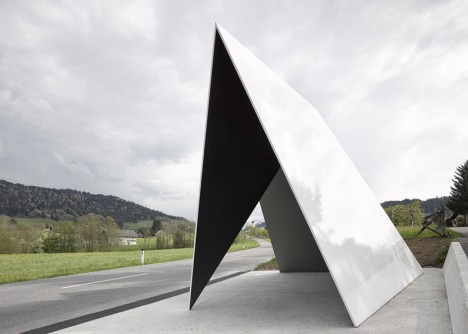
angled bus shelter

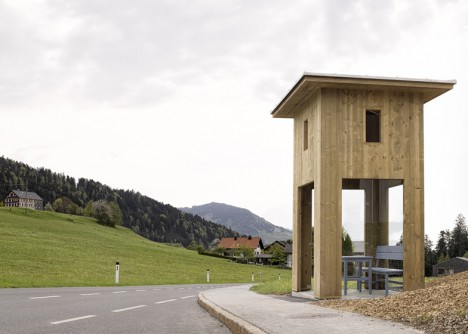
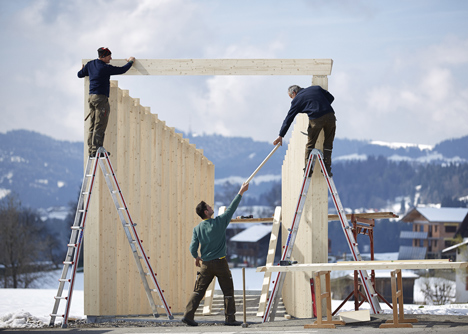
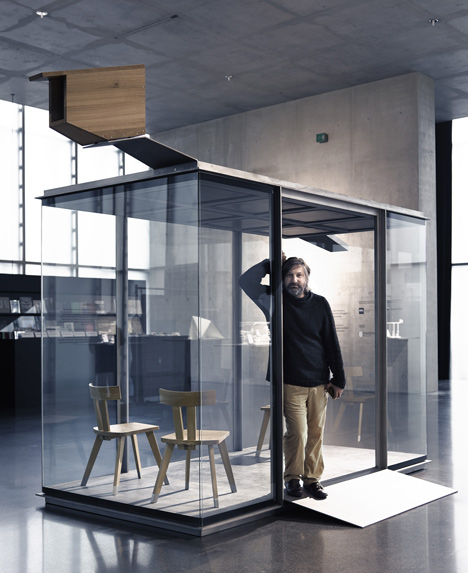
Trading a free vacation for their design input, a series of world-renowned designers each contributed their vision of a bus shelter to a tiny town of just 1,000 residents in Austria.

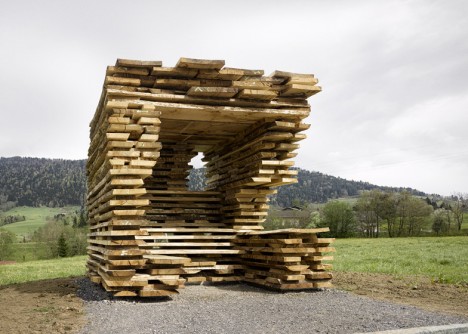
wood remix bus seat

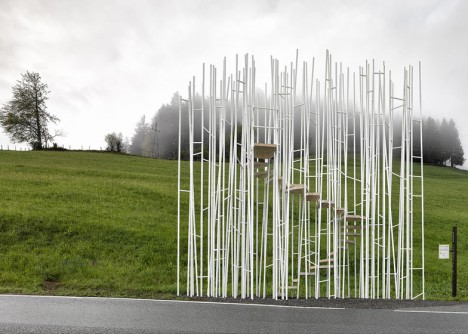
stepped bus shelter design

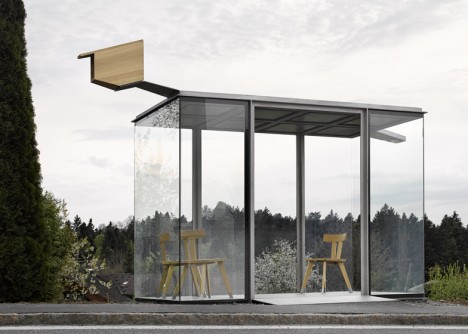
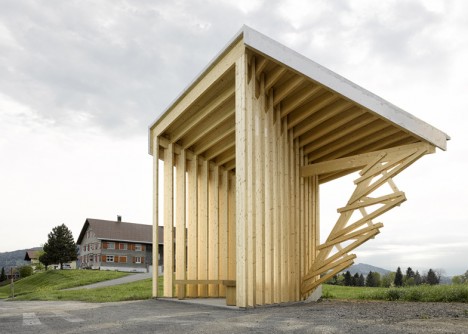
Each structure within the Bus:Stop project is unique and dramatic, aimed at creating a new attraction for the area in addition to the existing natural and resort amenities of Krumbach and its surroundings.

architect bus stop project

tall top bus stop

All provide differing degrees of refuge from the elements, with some drawing on regional building typologies (stacked raw wood) or directing attention to site-specific views within and around the town (angled indicators pointing to sights).

teired wood bus stop

interior exterior bus stop

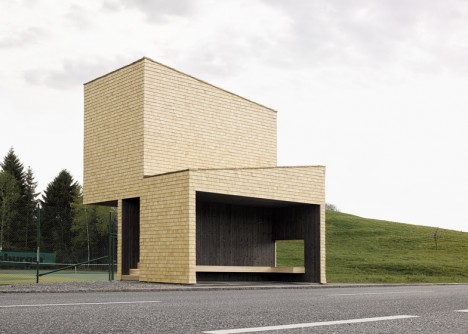
The last example above is the largest, providing both a bus shelter as well as a second-story viewing platform for a local tennis court.

bus stop design build

bus stop construction

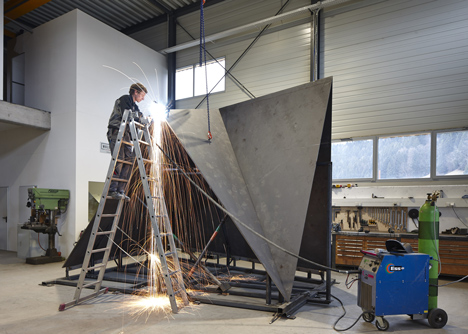
Together with a local architecture firm and craftspeople, theses diverse shelters reflect both international design approaches and boast the capabilities of regional creatives and builders.

bus stop finished

The list of contributors includes: “Japanese architect Sou Fujimoto, Wang Shu’s Amateur Architecture Studio from China, Norwegian studio RintalaEggertsson Architects, Ensamble Studio from Spain, Chilean architect Smiljan Radic, Architecten de Vylder Vinck Taillieu from Belgium and Russian architect Alexander Brodsky. The project was overseen by Dietmar Steiner, the director of Vienna architecture museum Architekturzentrum Wien. Local private sponsors including hotel and inn owners, craft workers and business people provided the majority of the funding and services to support the process. The bus stops were inaugurated on 1 May and an exhibition documenting the design and construction process is currently on show at the Vai Vorarlberger Architektur Institut in the city of Dornbirn.”

Share on Facebook


[ By WebUrbanist in Architecture & Public & Institutional. ]

[ WebUrbanist | Archives | Galleries | Privacy | TOS ]


WebUrbanist

 
Comments Off on The Bus Stops Here: 7 Transit Shelters by Famous Architects

Posted in Creativity


Save Tons of Editing Time with Lightroom Presets

21 May

On now at SnapnDeals you can get 100 of my custom Presets 50% off. Deal ends soon, don’t miss out so grab it here. 

before-after-lightroom-presets

Photographers don’t have a lot of extra time to edit. As a full-time photographer myself, I rely heavily on any tools that save me time in the editing process. One of the tools I use is Lightroom presets.

What are Lightroom presets?

A preset is a pre-determined position all (or some) of the of sliders in Lightroom (they are pre-set, get it?) In other words, you can edit a photo to your liking, and then save that exactly combination of slider positions for future use on another image.

First things first: how do you create a Lightroom preset?

Very easily! Once you have a photo edited the way you want it you need to save those settings.

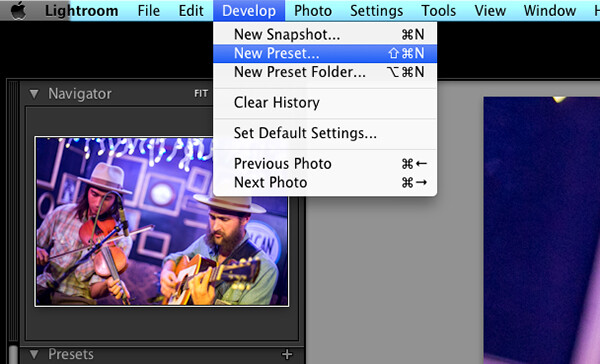
Step 1:  Click “Develop” then “New Preset”

presets-step-0

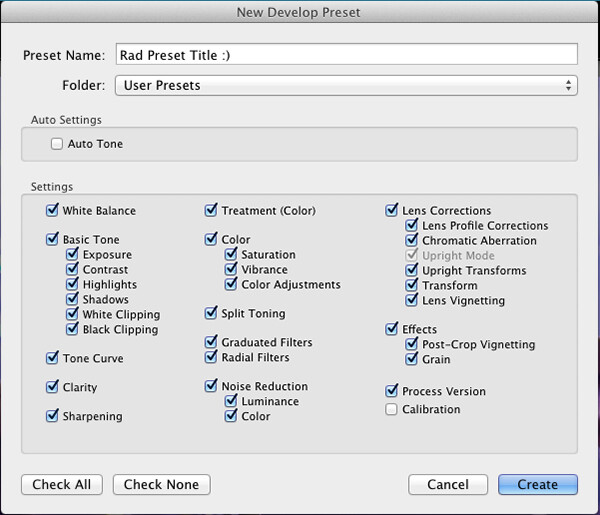
Step 2: Give your preset a title

Lightroom Presets Tutorial

Name your new Preset

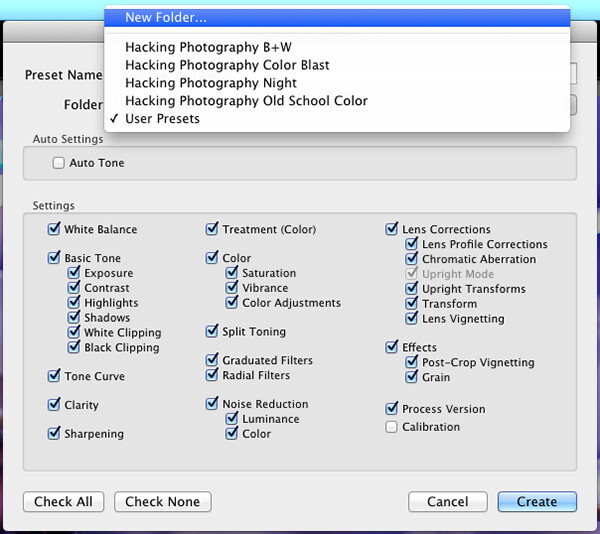
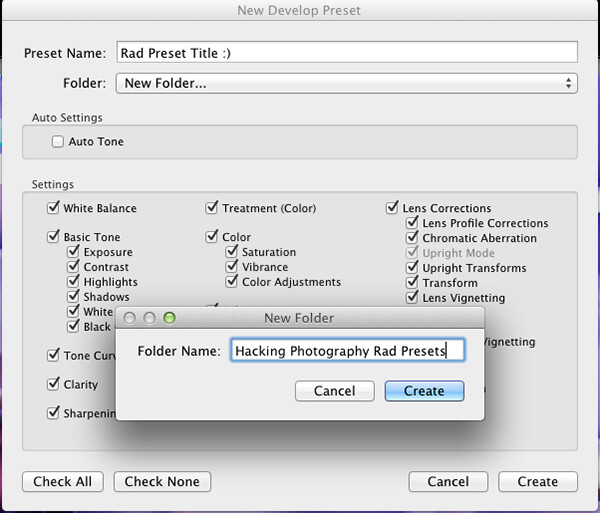
Step 3: Choose the folder you want the preset stored in, or create a new folder.

This is a good idea to separate your presets by type. You would be surprised how many random presets you end up with over a few years. Consider creating folders based on the type of edits they are.

Lightroom Presets Tutorial 3

Choose the folder to save it in

You can see I’ve named my presets by color blast (big colors), night, old school color, and black and white. Now I can quickly find the preset I’m looking for based on what type of edit I want to do.

preset-step-3-web

Or make a new folder and give it a name

Step 4: Click the boxes you want applied to this preset and click “create” to create your preset

Sometimes you don’t want every box checked when you create a preset. Imagine you just edited an underexposed photo and had to increase the exposure two full stops (+2 on the exposure slider) to get it correct. This preset would look great on underexposed photos in that set, but would overexpose photos that had the correct exposure.

Another scenario is that you create a preset that only applies a slight vignette to your photos. Unchecking every box except the “vignetting” box would create a preset that would keep the ‘look’ of any photo you are editing and only apply that vignette to it. Pretty cool!

Step 5: You’re done, the preset is complete.

preset-step-4-web

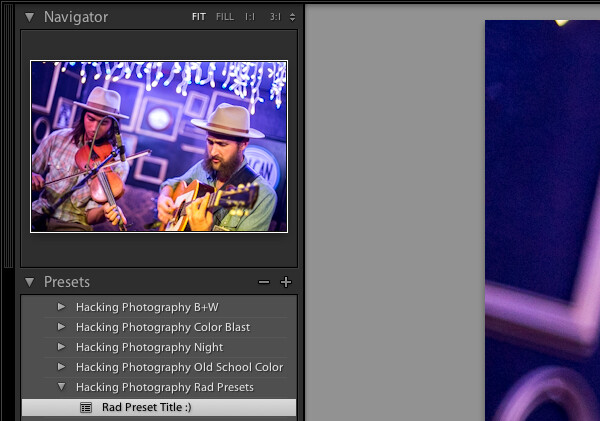
There’s your new Preset

The preset is complete and waiting in the folder you just created. Just open the folder and click the preset title to apply it to future photos.

Lightroom presets save time by enabling batch editing

Imagine shooting 300 images in an area where the lighting isn’t changing and stays consistent. You edit the first image to your liking and save the settings as a preset. Instead of individually editing the remaining 299 images one by one, you can apply that preset and achieve the same ‘look’ as the previous photos. 

The next time you want that type of ‘look’ on a photo with a similar lighting setup you can just apply a preset in one click. It will move all the sliders to those exact positions so the edit style stays the same.

The best part about this is batch editing your photos all at once. You can edit a single image and then apply that preset directly to as many photos as you would like in just one click.

How do you batch edit photos?

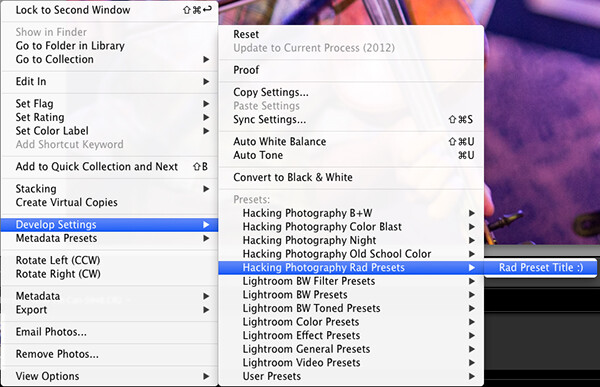
Select all the photos you want to apply the preset to, right-click the any of the photo thumbnails, and follow this path:

Lightroom Presets Tutorial 5

That will apply the preset automatically to all the images you selected in one click.

For a walk through on how to do this watch this video as I go through all the steps:

Lightroom presets also save time with the live preview feature

When you hover over the preset names the image thumbnail in the top left corner will give you a preview of what that image will look like with that preset. As you scan your mouse over the list you will be able to tell if a certain preset will look good or not. If it does, you can click once and be done with the image.

Lightroom presets give you a great starting point

Instead of manually editing a photo from scratch, you can apply a preset to make a big change and edit from there. It’s like getting a big head start.

Lightroom presets can do a one-click edit

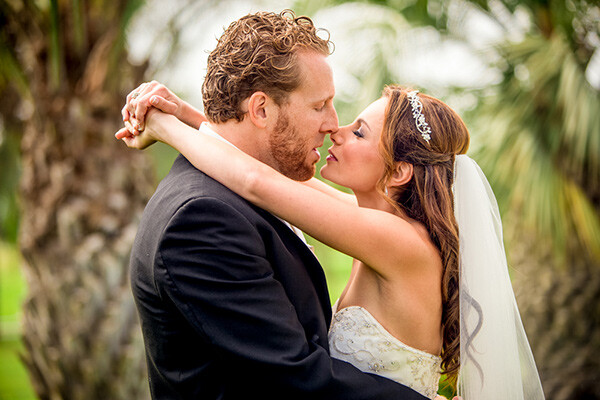
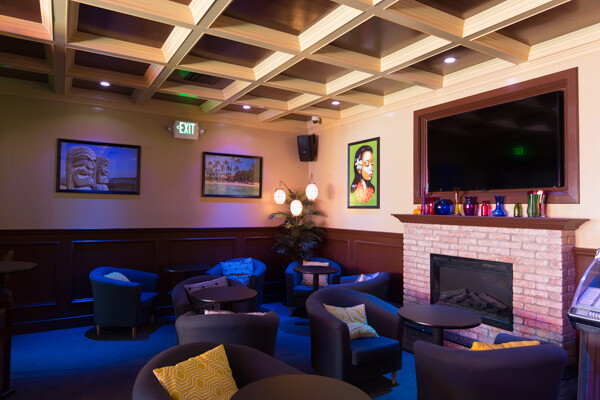
If I’m hitting a blank spot on where I want to take an image I will hover over my presets and see if I like any of the previews. Sometimes I love it and it’s a one-click edit.  Sometimes I like the look but know it needs a little tweaking. Either way it can save a lot of time. Check out a few one-click edits below from some of my presets.

Straight out of camera

Straight out of camera

After one-click Preset

After one-click preset

before-5968

Straight out of camera

After one-click Preset

After one-click preset

Hacking-Photography-Color-Pop-Presets---Fill-Light-Smooth-Pre

Straight out of camera

After one-click Preset

After one-click preset

I hope you’ve seen how much Lightroom presets can help speed up your editing time and supply you with some very creative edits. I’d love to hear your thoughts in the comments below.

For more information on Lightroom presets check out these:

  • A Concise Guide to Lightroom Develop Presets
  • 4 Quick Tips For Getting The Most Out of Lightroom Presets
  • How to Add an Opacity Slider to Lightroom Develop Presets with The Fader Plug-In

Don’t want to make your own presets? On now at SnapnDeals you can get 100 of my custom Presets 50% off. Deal ends soon, don’t miss out so grab it here. 

The post Save Tons of Editing Time with Lightroom Presets by Mike Newton appeared first on Digital Photography School.


Digital Photography School

 
Comments Off on Save Tons of Editing Time with Lightroom Presets

Posted in Photography


20. Mai 2014

20 May

Ein Beitrag von: Arne Piepke

Ein Mann von hinten in nebliger Landschaften


kwerfeldein – Fotografie Magazin | Fotocommunity

 
Comments Off on 20. Mai 2014

Posted in Equipment


Sanges Indecent Eye & Lyubimkin’s City Lights

20 May

Marco Sanges' The Indecent Eye Exhibition - Fashion Photography Blog (FashionPhotographyBlog.com)Readers based in London may be interested in hearing that the Hay Hill Gallery, who represent a selection of internationally recognized contemporary artists, will be presenting a double exhibition from the 26th May to the 21st June, showcasing the photographic works of fashion photographer, Marco Sanges, entitled “The Indecent Eye”, and the architectural images of Alexey Lyubimkin, called “City Lights”.

Marco Sanges' The Indecent Eye Exhibition - Fashion Photography Blog (FashionPhotographyBlog.com)

Marco Sanges and possess a matchless photographic eye that creates alluring photography echoing the works of art from the Byzantine, Surrealist and Gothic periods. Not only are his images reminiscent of art paintings but he has ability to transmute and infuse each subject matter with its own and distinctive vibrancy and energy.

Marco Sanges' The Indecent Eye Exhibition - Fashion Photography Blog (FashionPhotographyBlog.com)

From developing and printing black and white photos in his uncle’s photographic lab, Sanges went on, in the pursuit of fashion, to become a photographer for Vogue Italia, before relocating to London where he presently resides. He has been exhibited worldwide, worked with clients such as Cutler and Gross, Agent Provocateur, Sunday Telegraph, Vogue, Trace, Elle, Dolce & Gabbana, and there is even a permanent collection of his work held in the Virginia Museum of Fine Arts, in the United States.

Marco Sanges' The Indecent Eye Exhibition - Fashion Photography Blog (FashionPhotographyBlog.com)

With his exhibition, Marco Sanges invites the public to visit and open their imaginations. As a storyteller, Sanges photographs appear to look more like cinematic narratives, as though we are looking through the lens as the photographer tells his tale. Having been influenced by the silent films of the 1920’s and 30’s, his dark and enchanting images portray the frailty and strength of humanity, confronting the viewer with the conclusion that there can be a funny side to our own mistakes if you choose to see it. Magician, puppet master and photographer, Sanges takes you on a journey of mystique and romantic intrigue in “The Indecent Eye” exhibition.

Marco Sanges' The Indecent Eye Exhibition - Fashion Photography Blog (FashionPhotographyBlog.com)

Having been provoked into deep thought by “The Indecent Eye”, you may wish to proceed through the “City Lights” exhibition in the same venue, displaying the architectural works of photographer, Alexey Lyubimkim. What can be described as love letter to the cities he shoots, revealing the tree and building lines as though they were part of the original city’s design blue-print. With a camera in hand, the lens is like a magnifying glass under Lyubimkim’s scrutinising eye that reveals what our naked eyes can’t see – an ever changing landscape.

Alexey Lyumbimkin's City Lights Exhibition - Fashion Photography Blog (FashionPhotographyBlog.com)

Born in Novosibirsk, Russia in 1963, Lyubimkim has worked as a professional architect, published the “Russian Gallery” art magazine, developed the growth of the Moscow’s Artist Center at Tretyakov Gallery and Savvinskaya Arts Center, was a founding member of London’s Hay Hill Gallery (where the exhibitions are held), and holds memberships in both the Russian Photo Artists Union and the International Journalist Union. His works have been sought after in private collections across the globe, including Russia, UK, Germany, Mexico and USA.

Alexey Lyumbimkin's City Lights Exhibition - Fashion Photography Blog (FashionPhotographyBlog.com)

How does architecture apply to fashion photography you may ask? Well, according to Alex Lyubimkin he says that “Architecture is the most stylish way of culture representation, and… like many people, I like to make my own discoveries. In this variety of city landscapes and cultural traditions no creative person can remain indifferent. I often carry my camera with me, which becomes my interpreter and even my partner… London is one of the most beautiful cities in the world for me.” Be inspired by the lines, shapes and bold use of color in Lyubimkin’s courtship of the cities he has photographed.

Lyubimkin pays homage to the old technique of tinting images but incorporates a variety of contemporary solero hues. This artist’s colour fascination embodies the double take turn of the head towards beauty in amidst the bustle of a metropolitan city, encouraging the viewer to take notice of their surroundings next time they step outside. He brings to the surface the sense of home and belonging, while making conscious of the world around us at a local scale.

Marco Sanges' The Indecent Eye Exhibition - Fashion Photography Blog (FashionPhotographyBlog.com)

To visit or find more information for both Marco Sanges’ “The Indecent Eye” & Alexey Lyubimkin’s “City Lights” exhibitions, the contact details for the Hay Hill Gallery are below:

Hay Hill Gallery

Address: 35 Baker Street, London W1U 8EN

Phone: 020 7486 6006

Opening hours: Monday – Friday 10.30-6, Saturday 11-5

Website: www.hayhillgallery.com

Email: info@hayhillgallery.com

Marco Sanges' The Indecent Eye Exhibition - Fashion Photography Blog (FashionPhotographyBlog.com)

PHOTO CREDITS:

Pictures 1, 2, 3, 4, 5, 8 & 9: from Marco Sanges’ “The Indecent Eye” Exhibition

Pictures 6 & 7: from Alexey Lyubimkin’s “City Lights” Exhibition


Fashion Photography Blog

 
Comments Off on Sanges Indecent Eye & Lyubimkin’s City Lights

Posted in Uncategorized


Tips for Photographing Birds in Flight

20 May

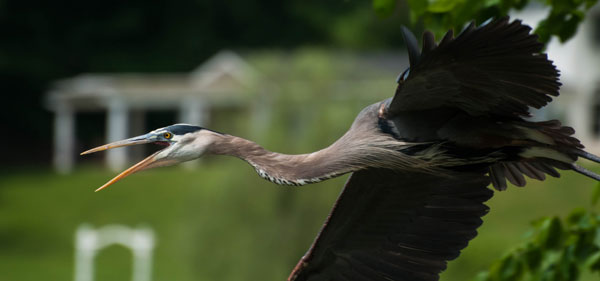
This article introduces some key concepts to photographing birds in flight. One of the most necessary ingredients is patience; you may often photograph an entire day and not get one usable image. In most cases there is some luck involved to being in the right place at the right time. Hopefully this article will provide some information to help you improve your luck.
heron3

Choosing a Location

Let’s begin with choosing the best location for your birds in flight shoot. Near rivers or lakes are great locations, because of the abundant food sources for the birds. Find a position on a hill that will put you at eye level with the birds.  Check out the position of the sun, because you should not be shooting into it. Light coming from behind you or from the left or the right of your position is preferred. Also, birds will generally take off and land into the wind, so knowing the wind direction of your location will help you predict the flight direction of the birds you are photographing.
canadians

Lighting

Good lighting plays an important part in successful birds in flight photography. As in any other kind of outdoor photography, the golden light of morning and evening are best; however, because you are shooting at birds in the sky, these times can be extended and still have nice lighting on your subject.

Make Yourself Invisible

Some birds will not venture near a human presence, so you need to make yourself the least visible as possible.  In some cases it might be as simple as not wearing brightly colored clothing, but avid bird photographers may also want to set up some kind of blind. These can be purchased inexpensively from most hunting stores. Also, sitting will make you less noticeable to the birds than if you are standing.

Study Your Subject

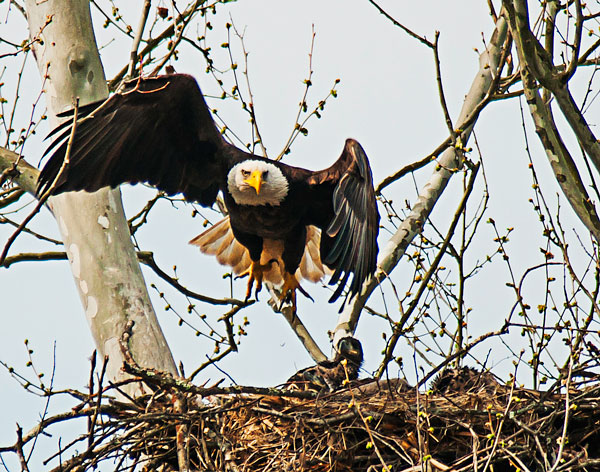
Study the birds you enjoy photographing to learn their habits. This can help you predict their movements. For instance, many birds, especially the larger species like herons or eagles, will relieve themselves just before they fly. Knowing this can help you be ready to shoot when they take off.

fall-heron

Lens

Choosing your lens can be a challenge so be advised that you should use the fastest and largest mm lens you can afford. For your best chance at a great shot, you would want at least a 300mm lens, but a 500mm to 600mm prime lens is preferable. Unfortunately, these lenses don’t come cheap.

Tripods

A great tripod head for birds in flight, especially if you are using a large lens, is the Gimbal head. It balances your camera and lens and requires very little force to pan left and right, and up and down. A less expensive option is a Pan head, which also allows for movement in all directions on two different axes. The more common Ball head can be used with effect for birds in flight photography, but is not a very stable solution for very large lenses.
sparrows

Exposure

When you consider setting up your camera to shoot birds in flight, keep in mind how  the “exposure triangle” of shutter speed, aperture, and ISO each play an important part in the getting the perfect exposure.

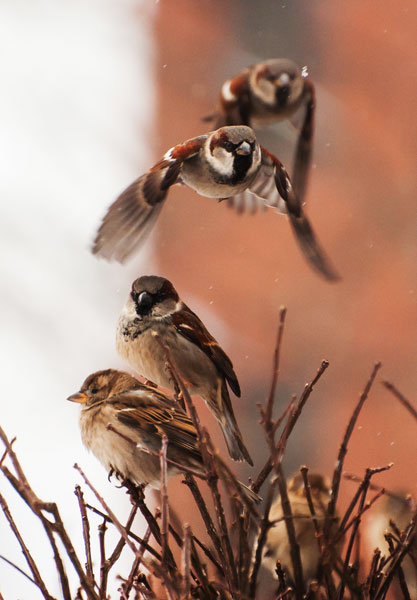
  • Shutter speed – You need the shutter speed to be fast enough to “freeze” the bird’s wings in your photo. While small birds’ wings may flap approximately 40 beats per second, larger birds like herons and eagles flap around 2 beats per second. Many species of duck are fairly fast flappers at around 5 to 10 beats per second. So the question remains, how fast should you set your shutter speed to freeze the wing motion? Go for at least 1/1000th of a second to 1/2000th of a second. Even faster is better, if possible!
  • Aperture – In order to gain as much depth of field as possible, you want to use the smallest aperture possible. Select your F-Stop (the aperture number) based on your lens’s sweet spot (where your lens focuses most clearly), probably around f/8.
  • ISO – You want to keep your ISO setting as low as possible to avoid digital noise (graininess) in your photos, although most of the latest models of digital SLR cameras these days do a decent job with higher ISO allowing very little noise.

heron2

So how do you bring all three elements of your exposure triangle together to find the best exposure? You may consider simply using your camera’s Shutter Priority Mode feature in which you set the shutter speed and the camera sets the aperture (and ISO on some models) but try this alternative method.

  1. Set your camera on Aperture Priority
  2. Set your aperture to f/8 (the sweet spot) to capture the sharpest image for your lens
  3. Next, using your camera’s light meter, check the exposures in the space you hope to photograph your birds in flight. You will probably find that you have some areas that are darker than others.
  4. Using the exposure you get in the darkest area, adjust your ISO to bring your shutter speed up to at least 1/1000. It follows that when your bird flies by and you are panning your camera into a lighter area, your shutter speed will increase to above 1/1000, and when your subject is in the darker area your exposure will still be appropriate.

Now, one final step to tweak your exposure. Have you ever noticed how when photographing birds in flight your image will seem dark and missing detail, especially to those dark feathers? To bring out more detail in those dark areas, change your EV (exposure compensation) setting to +0.3 to add a little more light. Depending on the lighting, you may need to add more. On the other hand, what if you are photographing a white bird, perhaps a swan? The white bird’s image will tend to get “blown out”, also missing  detail, so adjust your EV value to -1.0 to -2.0 to pick up the detail in those white feathered birds. (If you are thinking your background will be underexposed, well, yes, it will be, but you are photographing the swan, not the background.)

Focusing

To keep your flying bird in focus, set your camera’s focusing mode to continuous focus. In this mode, as long as you have the shutter button depressed halfway and are focused on the bird, the camera will continuously focus with the movement of the bird. Canon calls this function “Al Servo”, while Nikon calls it “Continuous Servo” or AF-C. Also both Nikon and Cannon will allow expanding your focal points to look at adjacent points for movement to help you keep the moving subject in focus. Nikon also offers two additional options of Auto Focus – Area Modes that might work for birds in flight. Its 51-point Dynamic Area Auto Focus and 3D Tracking Mode will both search at all 51 focal points looking for the movement of your subject, though these methods may be a little too slow in focusing.
eagle-nest

Composition

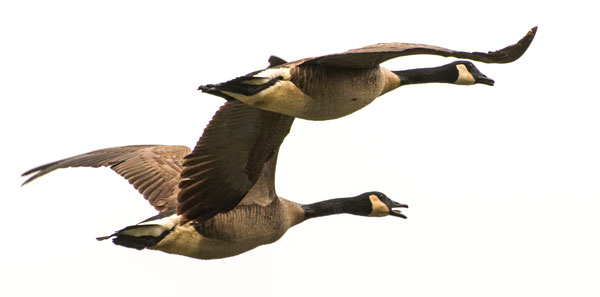
Composition can sometimes be the most difficult aspect of photographing birds in flight. Not only are you occupied with keeping your bird in sharp focus, you are also trying to make a pleasing composition. All the rules of composition applying to any photo remain valid here. You always want to have more space in front of the bird than behind; a good rule is to have a least two to three times the space in front of the bird. One practice that helps maintain this space is to place your focus point in the center and try to keep it on the bird’s eye. This method works really well on large beaked birds like the heron. While most birds in flight images are just one bird, look for those occasions where you may capture two or three birds for a great image.

gull

Technique

As the bird is flying toward you, quickly get your focus lock. When the subject is close and in the position you like, fire away and keep panning even after you have stopped shooting. This follow-through motion will keep your last image in focus better than an abrupt stop. While panning as the bird flies by, you want to match your panning speed to that of the bird, and depending on your shutter speed, this will help keep the bird in focus while the background may be blurred.

It’s a wildlife photography principle that you want to keep the bird’s eye in focus and sharp. If you are handholding your camera, try to keep your left hand under the barrel of your lens and your elbows close to your body, as this will help you maneuver the camera as steadily as possible. If you are standing, keep your legs spread out to give you a good sturdy base. If you are planning to hold your location and position for a time, using a tripod is recommended to help keep you steady, especially if you are using a very heavy lens.

duck

So stay alert, and look for opportunities to capture great birds in flight images. It will take lots of practice to get that perfect image, but when you do you will be hooked.

Have you tried bird photography before? Want more bird tips, try these:

  • 10 Incredible Bird Photography Tips for Beginners
  • A Turn of the Head – Creating More Compelling Bird Portraits
  • An Introduction to Bird photography


The post Tips for Photographing Birds in Flight by Bruce Wunderlich appeared first on Digital Photography School.


Digital Photography School

 
Comments Off on Tips for Photographing Birds in Flight

Posted in Photography


EyeEm announces festival and photo competition
20 May

c_27820526_EyeEm.com_AlexandraSmart_1.jpg

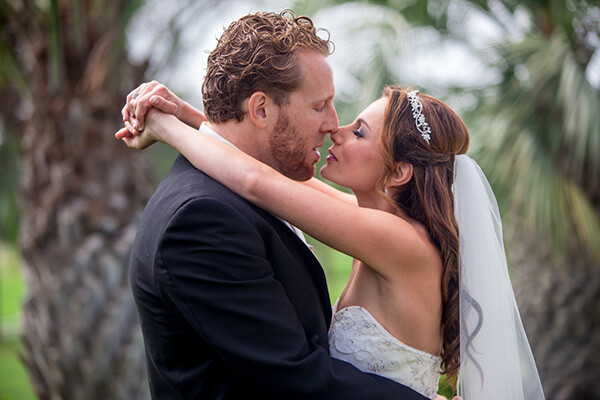
The mobile imaging platform, community and stock image marketplace EyeEm has announced the 2014 EyeEm Festival & Awards. The festival takes place in September in Berlin and the world-wide photo competition is now accepting submissions. Contributions are not limited to mobile photography and the awards are open to professionals and amateurs alike. Learn more

News: Digital Photography Review (dpreview.com)

 
Comments Off on EyeEm announces festival and photo competition

Posted in Uncategorized