RSS
 

Archive for April, 2014

How to Charge What You are Worth as a Photographer and Why

13 Apr

bambi-cantrellBambi Cantrell may not be a name you recognize unless you are a wedding photographer. She’s been doing photography since about 1982 and was someone who I followed early on in my career in photography. She’s a frequent speaker at the popular WPPI conference every year and was a recent teacher on Creative Live. These videos are segments of that talk that discuss that area of value of yourself as a photographer and pricing so make a profit and a good living.

In this video below Bambi talks about many extremely important aspects to being a photographer including:

  • How important what you do as a photographer is to documenting the lives of your clients, not just what they look like but who they are as people
  • How you need to follow your dreams and to never take no for answer, but to always keep moving forward no matter what anyone else says
  • Doing what it takes to make it, and perseverance is key to success
  • If you can afford yourself you are too inexpensive
  • How to charge what you are worth confidently and to value yourself as an artist and photographer
  • Perceived value and when it’s okay to spend more money on something

The second video below covers some of the same concepts again and more in depth on the topic of valuing yourself and your work, and charging enough to take enough money home at the end of the day.

So if you are an aspiring photographer hoping to make it as a pro, or maybe you’ve been doing it for a while and just can’t seem to turn a profit – give these a listen!

You might also want to learn about creating relationships to help you grow your business, how to make your next big decision be the right one, and the Ultimate Guide to Going Pro – all right here on dPS.

The post How to Charge What You are Worth as a Photographer and Why by Darlene Hildebrandt appeared first on Digital Photography School.


Digital Photography School

 
Comments Off on How to Charge What You are Worth as a Photographer and Why

Posted in Photography


13. April 2014

13 Apr

Ein Beitrag von: Roland Willinger

© Roland Willinger


kwerfeldein – Fotografie Magazin | Fotocommunity

 
Comments Off on 13. April 2014

Posted in Equipment


Versteckt am Rand zwischen Traum und Realität

13 Apr

Manchmal, wenn ich mit Künstlern in Kontakt stehe, um sie Euch hier vorzustellen, ist es spannend, zu sehen, welche Informationen sie über sich selbst preisgeben und welche verschwiegen bleiben. So wie bei der jungen polnischen Fotokünstlerin, die unter dem Pseudonym Inpluvia Tenebrae im Netz auftritt.

Ihren echten Namen verrät sie nicht, aber viel über sich selbst und ihr Leben außerhalb der Fotografie. Sie ist Jahrgang ’93 und studiert an der Elektronischen Fakultät der Technischen Universität von Breslau, nachdem sie im letzten Jahr ihr Musikdiplom (sie spielt Violine) abgeschlossen hat.

Die Fotografie betreibt sie als Hobby, nur für sich selbst. Sie hilft ihr, aus der Realität auszubrechen. Sie ist eine Träumerin. Fasziniert und gleichzeitig verängstigt von der sie umgebenden realen Welt. In der Fotografie kann sie alles anders aussehen lassen als es in der Wirklichkeit ist.

Ich sehe sehr leicht fantastische, märchenhafte Elemente. Meine Bilder zeigen die Welt am Rande, die sich zwischen Traum und Realität versteckt. Dinge, die die Menschen nicht sehen, weil sie zu beschäftigt sind und zu müde, um darüber nachzudenken, wie außergewöhnlich die Welt ist.

In ihren Arbeiten geht es oft um die Themen Einsamkeit, Anders- und Fremdsein. Sie versucht, in die dunklen Nischen der menschlichen Natur vorzudringen. Wie man sieht, unternimmt sie oft Ausflüge in verschiedene experimentelle Techniken, um Bilder mit ungewöhnlichen Effekten zu erzielen.

Mit dieser Philosophie erschafft sie eine eigene, fast schwarzweiße Welt aus Portraits, Straßenaufnahmen, surrealen Waldszenen und geradezu ätherischen Aufnahmen von namenlosen Heiligen und Details im Dunkel.

a sad song of the tall trees © Inpluvia Tenebrae

potwory nie ludzie © Inpluvia Tenebrae

alewdomunajlepiej © Inpluvia Tenebrae

beauty can't be seen © Inpluvia Tenebraemy favorite things © Inpluvia Tenebrae

© Inpluvia Tenebrae

still haunting me © Inpluvia Tenebrae

from distant worlds © Inpluvia Tenebrae

his house © Inpluvia Tenebraejourney © Inpluvia Tenebrae

who we are © Inpluvia Tenebrae

kosmki © Inpluvia Tenebrae

prelude in c minor © Inpluvia Tenebrae

ideulicami © Inpluvia Tenebraedotwarzyci © Inpluvia Tenebrae

between dream and reality © Inpluvia Tenebrae

white spaces © Inpluvia Tenebrae

wietrznie niespokojny © Inpluvia Tenebrae

Inpluvias Bilder findet Ihr bei deviantART sowie auf ihrem Tumblr und Blogspot. Außerdem betreibt sie zwei weitere Blogspots mit interessanten Eindrücken aus den polnischen Städten Brzeg und Breslau.


kwerfeldein – Fotografie Magazin | Fotocommunity

 
Comments Off on Versteckt am Rand zwischen Traum und Realität

Posted in Equipment


Blood moon eclipse: Night of April 14-15

13 Apr

5280605799_1c821fa4d7_o.jpg

Photographers and astronomy fans in North America are gearing up for a rare meteorological event the night of April 14-15. According to Sky and Telescope magazine, on April 15th, the lunar eclipse will begin around 1:20am ET. While astronomers race to observatories, many photographers will take to the outdoors to capture this unique event. Here are a few tips for those looking to capture a good image of the moon. Learn more

News: Digital Photography Review (dpreview.com)

 
Comments Off on Blood moon eclipse: Night of April 14-15

Posted in Uncategorized


browserFruits April, Ausgabe 2

13 Apr

Seit einigen Tagen bringen wir nun jeden Tag zwei statt nur einen Artikel und hoffen, Ihr habt unsere Vollbild-Artikel schnell schätzen gelernt. Habt Ihr auch eine schöne Fotoserie, die super ins Vollbild passen würde? Dann schlagt sie uns doch vor! Wir freuen uns immer über neue Entdeckungen. Natürlich könnt Ihr auch ganz normale Artikel bei uns einreichen. Wie und wo erfahrt Ihr hier.


Fotospecial: Peace!

Flickr

500px


Deutschsprachig

• Die Fotografie entwickelt sich rasant weiter – Wissenschaft und Medizin profitieren ungemein davon. Konkret? So.

• DDR-Bürger auf verbotenen Fotoreisen. Auf Spiegel Online gibt es einen Bericht mit Fotos.

• Austin Tott kreierte die Serie „Tiny Tattoos“, in der kleine handgemalte Körperverzierungen in engem visuellen Zusammenhang zu ihrem Hintergrund stehen.

• Wir haben auf Facebook gefragt, welchen Bildband Ihr Euch zuletzt gekauft habt. Eure Kommentare sind super und wir daher bald arm.


International

• Cat Lane hat sich vor einem Jahr mit der Fotografie selbstständig gemacht. Nun reflektiert sie und erzählt, was sie in den letzten 12 Monaten gelernt hat. Teil 1 und Teil 2.

• Ben Hopper bricht mit den aktuellen Schönheitsstandards und fotografiert Frauen mit stolz präsentierter Achselbehaarung.

• Der australische Fotograf Bill Gekas stellt mit seiner kleinen Tochter berühmte alte Gemälde nach.

• Fotogeschichte: Lee Friedlander bezahlte Madonna 1979 nicht mehr als 25 Dollar für ein Akt-Shooting. Madonna war damals 20 Jahre alt.

• Documenting Afghanistan ist eine Sammlung der Arbeiten von 7 NOOR-Fotografen, die in den vergangenen 15 Jahren nach dem 11. September Kämpfe, soziale Themen und Alltag in Afghanistan dokumentiert haben. Beeindruckende Arbeiten, die teils erschütternde, bewegende und wunderschöne Bilder zeigen.

• Ruanda gedachte dem Genozid vor 20 Jahren. The Big Picture zeigt, wie aufwühlend so ein Gedenktag sein kann.

• Aufschlussreich: Selfiecity sammelt Daten von #Selfies in 5 unterschiedlichen Städten und bietet umfangreiche Analysen an.

• Infrarot-Sportfotografie geht nicht? Geht doch. Und es sieht… interessant aus.

• Die Adobe-Photoshop-Familie hat ein neues Baby: Lightroom für’s iPad.


Neuerscheinungen und Tipps vom Foto-Büchermarkt

Buchtipps

• DÉJÀ-VU heißt das erste Magazin von Nujolie. Zu sehen sind die besten Bilder aus 9 Serien. Empfehlenswert für alle, die erotische Fotografie mit Anspruch mögen. Es kostet momentan noch 15 €.

• Kennt Ihr Theo Gosselin? Seine Bilder erzählen vom Reisen und der Freiheit. Im kleinen Verlag Éditions du LIC ist jetzt sein erstes Buch erschienen. Es kostet 45 €.


Zitat der Woche

Ultimately photography is about who you are. It’s the seeking of truth in relation to yourself. And seeking truth becomes a habit.

Leonard Freed –

Mehr Zitate


Videos

Brooke Shaden über ihre Unterwasserportraits und einige kleine Tipps dazu.


kwerfeldein – Fotografie Magazin | Fotocommunity

 
Comments Off on browserFruits April, Ausgabe 2

Posted in Equipment


Five Tips for Special Event Photography

13 Apr

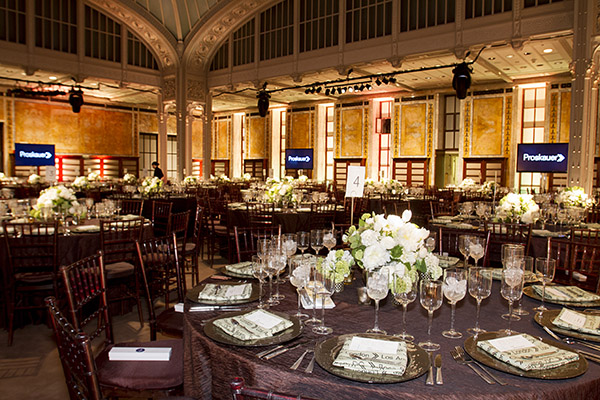
Often times shooting special events is not the most glamorous gig in photography, but when a client calls you up looking for a photographer to shoot an event, you take the job.  Sometime’s you end up somewhere great like the trading floor of the New York Stock Exchange, other times you’re in a small, dark, dull event space with only 20 people making the best of the situation.  Regardless of the size or location of the event, you’re job is to make some great images.  There are a lot of little things that can make diving into special event photography much easier or much harder on yourself, below are a few ideas of how to prepare and execute the photography at your next event.

Event photography tips 01

#1 Dress Like You Belong There

As a photographer, there are plenty of times when you can go to work in jeans and a t-shirt, after all clients aren’t watching you do post production.  When photographing a special event however, you should dress like you belong there and blend in with the crowd.  This doesn’t necessarily mean a suit and tie every time for men, or that a blazer is necessary for women, but slacks/dressy pants, comfortable, low key, black shoes and a nice shirt/blouse usually are a must.  If it is a higher end event you men should be sure to wear a suit coat and tie while women should wear a blazer if they feel it is necessary.  If you’re unsure of the appropriate attire, always air on the side of safety if you’re over dressed you can always take the coat off and stick the tie in your pocket.

Event photography tips 02

#2 Take Pre-event Shots

While it may be an afterthought for your client at the event, the event planner responsible for dotting the i’s and crossing the t’s will love that you captured shots of the room prior to the guests arrival. Not only will it be something they can use to sell their services in the future, it will also allow them to catalog the set-up in case they have a very similar type of event in the space again. This will prove invaluable to the client and should be the way you start any event.

#3 Don’t Over Shoot (but don’t undershoot either)

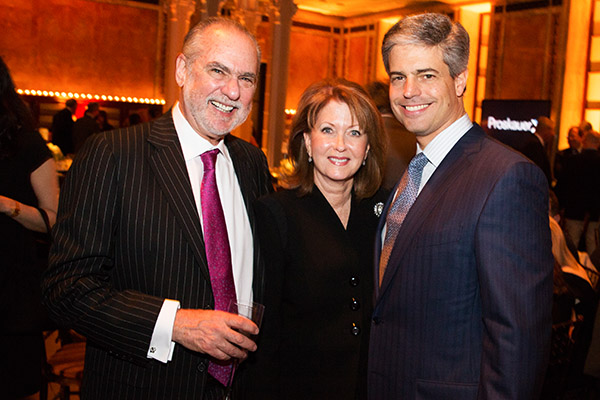
The divide on Over vs Under shooting seems like it would be quite blurry, it really isn’t. If you are photographing a special event, you have to remember that even though great photos are key, the attendees having a good time is the top priority. While it is completely acceptable to photograph the attendees, both candidly and posed, be sure to make mental notes of who you have photographed so that you aren’t going to the same groups of people over and over again. Along with posed shots, if the lighting allows for it, bump up your ISO and shoot candids with ambient light. Once you move past a cocktail hour and into a reception, keep your focus to the stage. Candid audience or crowd shots are nice here and there, but a good rule of thumb is that once plates go down and people are eating, keep the camera pointed away from the tables and onto the stage and shoot conservatively.

Event photography tips 03

#4 Be Quick

Wether it’s a panel discussion or candids at a cocktail hour, no one is at the event to be with you. Accept it. While shooting candids, be ready to go, take a step back, click off three frames and move on, any more than that (unless it’s a VIP or there is a glaring, non-camera related, issue) and you might be intruding on the attendee’s time. When shooting a panel discussion, or anything on a stage, shoot a lot with a long lens. While close, intimate shots from a wide lens look awesome, the people who are paying, or are invited to the event aren’t there to look at the back of their head. If you do have the opportunity to shoot from up close, be quick, quiet and stay as low as possible.

Event photography tips 04

#5 Edit Hard and Deliver Quickly

I find that no matter how hard I try to not over shoot an event, I still end up trashing about half of what was shot. It usually isn’t because the shots aren’t good, but because there is something very similar and slightly better in the edit. If you shoot three frames each of every group you photograph at an event(which is pretty typical) and have hundreds files, there’s no reason you can’t cut at least one of the frames for each group, if not two. Your client only needs the cream of the crop since there is only be a limited amount of use for event photos. If there are any VIP’s you might want to leave an extra frame or two in if they are also good, but for the general attendees the top frame of three works best every time. The same rule applies to shots of speakers or the panel at a discussion, edit hard and give the client the cream of the crop.

Once you get your edit down to the best images, bring your files into your editing software (I am still a diehard Photoshop guy) and crank out the images. The best thing about corporate events is that for the most part everything should be consistent and can be batch processed out in no time. From here, deliver your files, unless a disc is requested, we deliver everything via our PhotoShelter page online.

Event photography tips 05

Special Event Photography may not be the most fulfilling form of photography in the world, but when it comes time to pay the bills, you will be glad that you learned how to execute the photography aspect of them.  There are always events going on and opportunities to find work, just remember to dress the part, get photos before the event as well as during it, not over shoot, be in and out of groups and to edit hard with a quick turnaround to keep clients happy.

Event photography tips 06

The post Five Tips for Special Event Photography by Patrick Nugent appeared first on Digital Photography School.


Digital Photography School

 
Comments Off on Five Tips for Special Event Photography

Posted in Photography


Large Library Management with Lightroom and Daminion [for Advanced LR Users]

13 Apr

daminion-opener

If you have Lightroom you might assume that you have all you need for managing your images. That may not be the case and many professional and keen amateur photographers benefit from combining Lightroom with the image management software Daminion.

Daminion is an image management solution which helps you do large library management with Lightroom. You can think of it as being the rough equivalent of the Lightroom Library module operating on steroids. Daminion’s biggest advantage is that it is true multiuser software so, with Daminion server installed, multiple users can access a single catalog. This is something that Lightroom is notoriously poor at doing and which Adobe has so far failed to address despite multi-user/multi-computer access being one of the top ten feature requests for Lightroom.

You can download a version of Daminion here using the Download link. At the time of writing the current release version is 2.5 and version 3 is still in beta. Daminion comes as both a standalone and a server version. The Daminion standalone Free version handles up to 15,000 images per catalog. The paid versions are Basic, Standard and Pro which give you 25,000, 75,000 and unlimited images in a catalog respectively. There are also multiple Daminion server versions, one for non-commercial use and others for individual professionals and small teams.

NOTE: Daminion is available for PC only and not currently available for Mac.

You can install both the server and client versions on the same computer – the server version will run faster than the client version so it has value when you have a lot of images in a catalog. When you consider that some Daminion users have catalogs of a million or more images, speed of accessing and filtering these images becomes important.

Setting up Daminion

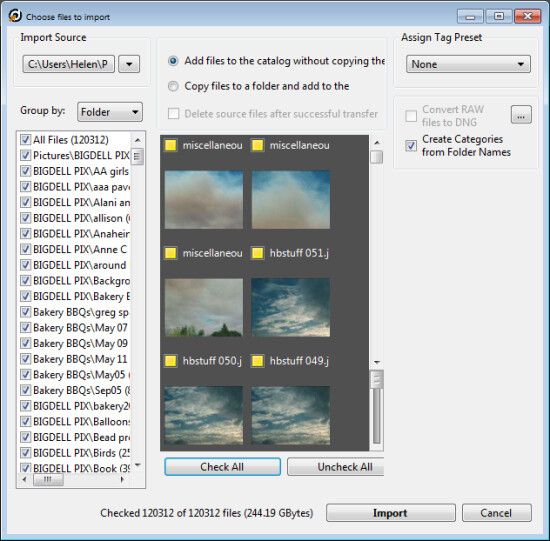
Once you have downloaded and installed Daminion, launch it and you can create a catalog. Like Lightroom you must import the images you want to manage with Daminion into the catalog. If the Add Files dialog doesn’t open automatically you can find it by choosing File > Add Files and then select the folders to import from.
daminion-import

While you can create and manage multiple catalogs in Daminion, like Lightroom, you can’t search across multiple catalogs so you should be careful about how you organize your images in catalogs. What makes sense in terms of catalog organization will depend on how you work with your images and if it makes sense to have them all in one catalog or in separate ones.

Daminion will recognize and manage a wide range of file types including common raster and vector formats as well as camera RAW images, video, music, and PDF formats. This gives it a broader scope as a management tool for digital media collections than Lightroom which is limited to photo and video formats only.

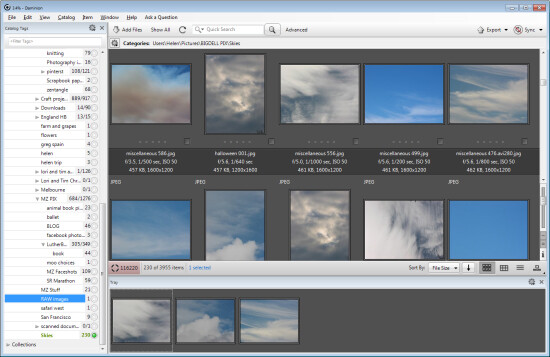
You can copy the images to another location on import or import them from their current locations. You can also group images by folder, date or file type on import. As the images are being imported you can begin to work with those already imported.
daminion-work-while-importing

daminion-catalog-tags

Organizing and tagging

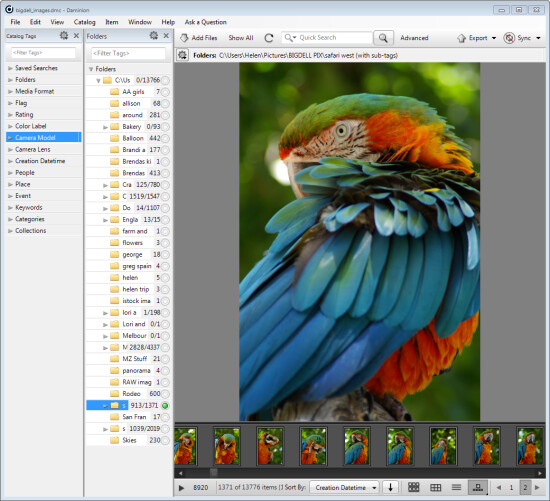
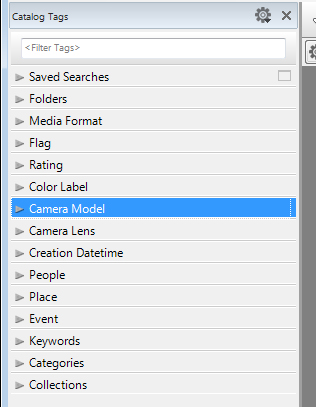
When you have some images imported into Daminion you can investigate the tools you have for managing and organizing them. The Catalog Tags panel on the left of the screen (see image on the right) is pre-populated with tags. Some of these are created from the image metadata, such as Camera lens and Camera Model, and others are those that you may have applied to the images in other programs such as keywords, ratings and color labels.

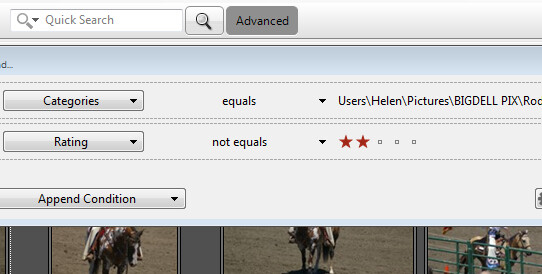
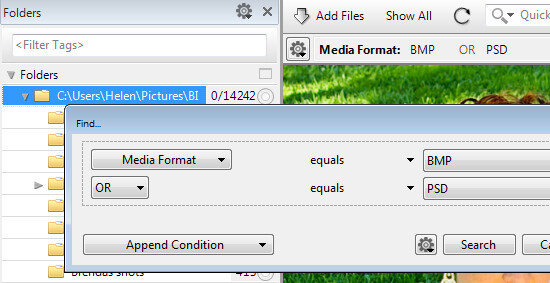
To filter the images by any catalog tag click the tag group and the tag to view and click the circle icon to view images that match that tag. You can perform AND and OR filtering using the Find dialog which you can find by clicking the Advanced link immediately to the right of the search box on the toolbar (see image below).
daminion-searches

You can also add tags and keywords to your images using the Catalog Tags panel. These can be written to the image XMP metadata so they will be accessible not only within Daminion but also in other applications such as Lightroom and Bridge.

There are benefits to using Daminion for image management and filtering in preference to Lightroom. Daminion provides multiple ways to categorize your images including Categories, Collections, Events, Places, People and more. It also supports hierarchical tags, with no limitation on nesting levels. So you can configure hierarchical tags for categories, people, places, keywords, events and so on whereas in Lightroom you can create hierarchical keywords only. You can also create your own custom user defined tags in Daminion to categorize images by criteria that are meaningful to you. Daminion can write metadata directly into the RAW images rather than needing to do so to sidecar .xmp files, and it makes it easy for you to filter your image collection by writing complex searches using Boolean (AND/OR) operators.
daminion-boolean

Viewing your images

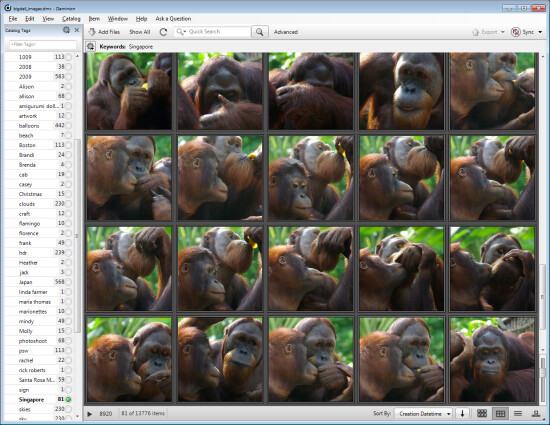
You can view your filtered images in one of a number of ways. You can sort them using a range of sort options including by shutter speed, file size, file name and so on. You can also view the images as thumbnails, using a compact view, details or filmstrip view.
daminion-compact

In Thumbnail view you can customize the information displayed above and below the image so it is easy to see the image properties that are meaningful to you. At any time you can view an image full screen by pressing Enter or click View.

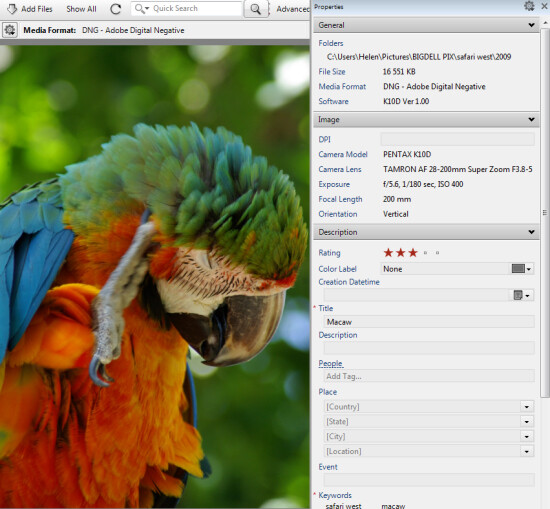
You can select any image and view and edit its properties using the Properties panel. While Daminion is not an editor you can use it to rotate your images.
daminion-properties

As you work through your images you can drag images you want to do something with into the Tray. The Tray stores these images until you are ready to work with them such as by sending them to an external editor or using the multiuser checkout feature. The checkout feature helps you manage multiple people working with the same catalog, it maintains an audit history and gives you the ability to undo changes if, for example, a newer version of an image is replaced by an older version.

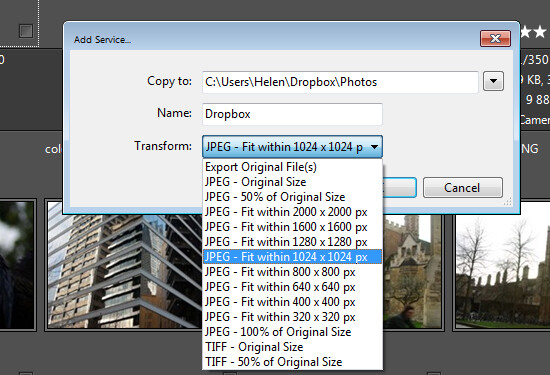
One handy feature of Daminion is the ability for you to publish images from Daminion direct to Dropbox so they are viewable on your iPad or other device. The Publish panel can be set up to convert and resize images including raw format images and then export them to a Dropbox folder on your computer. When this folder syncs to Dropbox the uploaded images can then be viewed on other devices.
daminion-publish

Is Daminion for you?

If you’re looking for a way to allow multi-user access to your image collection then Daminion is a great tool. It can be used along-side Lightroom for managing and organizing images which you then develop in Lightroom. The metadata changes made in either program can be easily viewed in the other program and the two work in tandem very well.

Do you also need some Lightroom organizational help? Try these:

  • Use Lightroom Collections to Improve your Workflow
  • 8 Important Things to know about Lightroom Collections
  • Why Lazy Photographers Should Use Lightroom Smart Collections
  • Organizing Images in Lightroom 5
  • Seven Pieces of Advice for New Lightroom Users

The post Large Library Management with Lightroom and Daminion [for Advanced LR Users] by Helen Bradley appeared first on Digital Photography School.


Digital Photography School

 
Comments Off on Large Library Management with Lightroom and Daminion [for Advanced LR Users]

Posted in Photography


Floor-to-Wall Books: Dizzying Sideways Cafe Design in NYC

12 Apr

[ By WebUrbanist in Design & Fixtures & Interiors. ]

finished space interior design

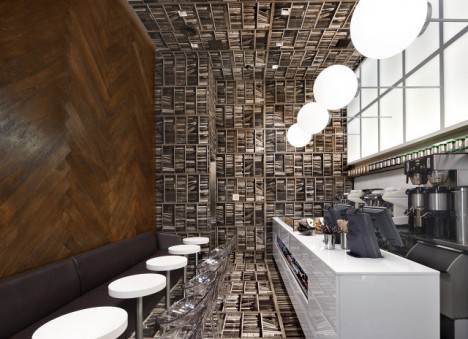
Looking like a bookshop flipped ninety degrees, this coffee shop was stands out even in Manhattan, a world of off-the-wall spaces and strange conceptual designs.

exterior shop storefront

This new location for D’espresso was crated by Nemaworkshop, “a team of architects, designers and thinkers who create spaces which are conceptually bold yet highly sensitive to cultural and social contexts.”

interior dual views

Referencing the historical combination of cafes and bookstores as well as the nearby New York Public Library, the book photographs wrapping the floor, back wall and ceiling above become conversation pieces as well as a wraparound backdrop for sipping lattes. Meanwhile, the ‘floor’ on the left wall provides a backdrop for seating and contrasts with the functional ‘ceiling’ lighting on the right, which illuminates and differentiates the service space behind the counter.

concept floor side

About Nemaworkshop: “The studio approaches projects through research and collaborative brainstorming wherein ideas are discussed and reworked until a team emerges with a single cohesive concept.” Like its results, “the process is a non-linear approach, adhering to the conviction that good ideas can come from unlikely places. Ultimately, the designs challenge architectural typologies, demonstrate acute cultural awareness and propose original spatial concepts.

concept drawing interior

About this particular project itself, the designers write: “The client approached nemaworkshop with a single espresso bar existing and the ambition to build an espresso empire. For the location for the second shop, on Madison and backs up to Grand Central Terminal, Nemaworkshop and the client agreed that the design needed to be immediately striking to the goal-oriented suits and wandering tourists alike.”

Share on Facebook


[ By WebUrbanist in Design & Fixtures & Interiors. ]

[ WebUrbanist | Archives | Galleries | Privacy | TOS ]


WebUrbanist

 
Comments Off on Floor-to-Wall Books: Dizzying Sideways Cafe Design in NYC

Posted in Creativity


12. April 2014

12 Apr

Ein Beitrag von: Iris Reichel

Iris Reichel


kwerfeldein – Fotografie Magazin | Fotocommunity

 
Comments Off on 12. April 2014

Posted in Equipment


Prototype battery fully charges in under 30 seconds

12 Apr

storedot.jpg

While smartphone processing power, screen resolutions and camera performance have all improved significantly over the last few years, one area of development is seemingly standing still. Under heavy use most smartphone batteries still won’t make it through the day, and once plugged in, devices take a long time to charge. Faster charging batteries are certainly welcome news to smartphone and tablet users but could also reduce the need for carrying spare batteries on longer photographic excursions. Learn more

News: Digital Photography Review (dpreview.com)

 
Comments Off on Prototype battery fully charges in under 30 seconds

Posted in Uncategorized