RSS
 

Archive for March, 2014

How to Straighten a Crooked Image in Photoshop

16 Mar
Straighten an image in Photoshop

Straighten an image in Photoshop

While most photo editing programs have a dedicated and easily discoverable Straighten tool, Photoshop does not and never has had. Instead, prior to Photoshop version CS6, it was notoriously difficult to straighten a photo.

This all changed with the new Crop tool in Photoshop CS6 and CC, and it is now much easier to straighten an image – even if it isn’t easy to determine that the Crop tool is how you do it.

I’ll show you how to straighten a crooked image in Photoshop, but before we look at Photoshop CS6 & CC let’s take a trip back in time to see how to straighten an image in Photoshop CS5 and earlier. Of course this process still works in later versions of Photoshop as well.

Straighten an image prior to Photoshop CS6 & CC

With an image open in Photoshop locate the Ruler tool which shares a toolbar position with the Eyedropper tool.
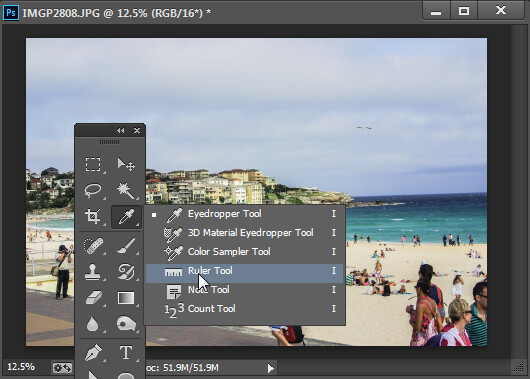
The Ruler tool shares a toolbar position with the Eyedropper tool.

The Ruler tool shares a toolbar position with the Eyedropper tool.

Click and drag along some element in the photo that should be either truly horizontal or vertical. The longer the line you make, the more accurate the adjustment will be.
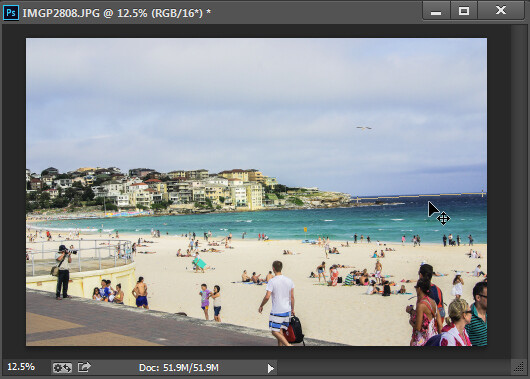
Drag along an element in the image which should be horizontal or vertical using the Ruler tool.

Drag along an element in the image which should be horizontal or vertical using the Ruler tool

Once you have the ruler line positioned along the line you wish to straighten, choose Image > Image Rotation > Arbitrary and the dialog will show the angle of that ruler line – in other words the angle to rotate the image to straighten it. Press Ok to rotate the photo and straighten it.
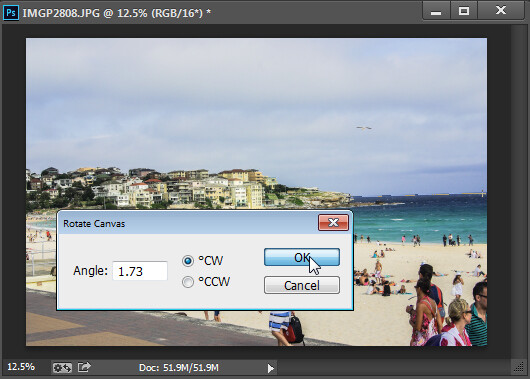
Choose Rotate Canvas to rotate the canvas to the selected angle.

Choose Rotate Canvas to rotate the canvas to the selected angle.

In Photoshop CS5, the process was streamlined slightly by the addition of a Straighten Layer option which appears when you select the Ruler tool. Once you mark out the line to straighten to you can then click this icon to straighten the image (see image below).
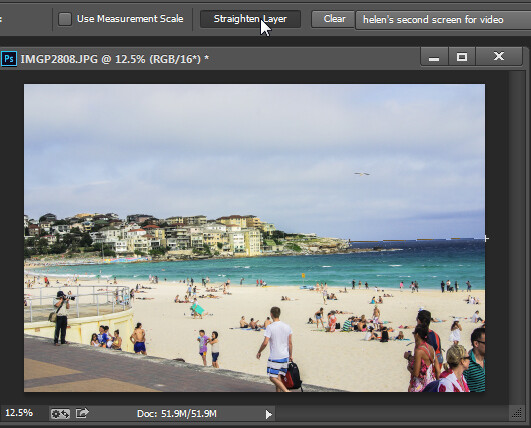
Click Straighten Layer in Photoshop CS5 and later to straighten using the Ruler tool.

Click Straighten Layer in Photoshop CS5 and later to straighten using the Ruler tool.

Straighten using the Crop tool

In Photoshop CS6 and CC the Crop tool now has a Straighten tool built into it. So, to straighten a photo, click the Crop Tool (or press C) and click the Straighten icon on the toolbar.

Click Crop and then click the Straighten icon on the Tool Options bar

Click Crop and then click the Straighten icon on the Tool Options bar

Now drag a line across the photo, along an element which should be horizontal or vertical.
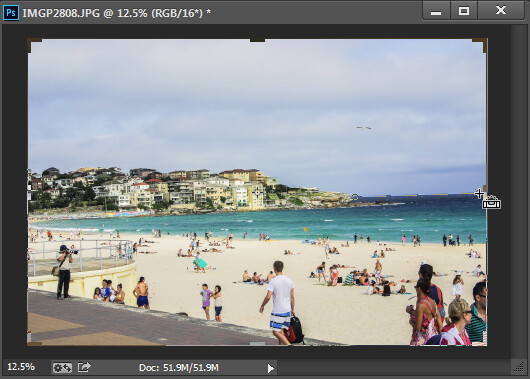
Drag along an element which should be horizontal or vertical

Drag along an element which should be horizontal or vertical

When you let go the mouse the image will be rotated automatically using the line as a guide and the resulting uneven edges of the image will be cropped away.
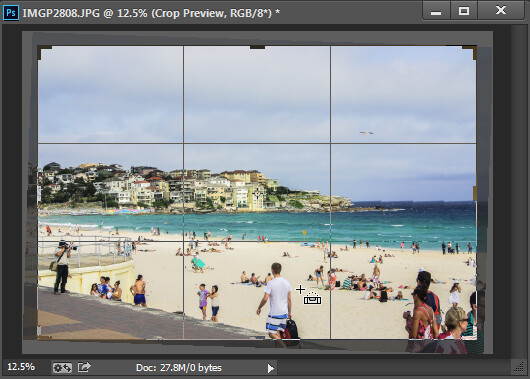
Press Enter to confirm the crop

Press Enter to confirm the crop

Press Enter to confirm the crop. If you have the Delete Cropped Pixels checkbox enabled then the excess image will be permanently removed.
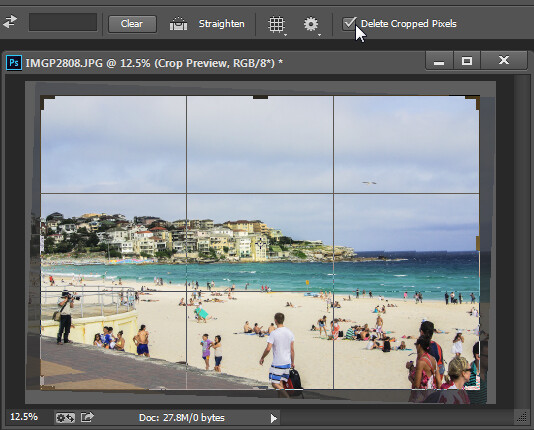
The Delete Cropped Pixels setting lets you choose whether cropped pixels are deleted or not

The Delete Cropped Pixels setting lets you choose whether cropped pixels are deleted or not

If the Delete Cropped Pixels option is unchecked, the canvas will be reduced in size to match the crop rectangle and the extra image pixels will disappear from sight but will still be accessible.

At any time you can reinstate these hidden areas of the image which lie outside the canvas by choosing Image > Reveal All.
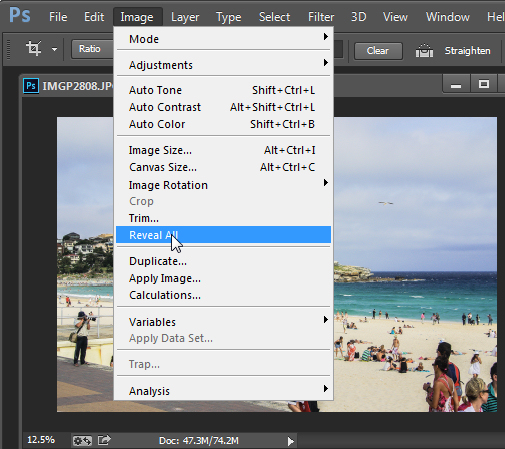
Use Reveal All to display contend hidden when  you crop

Use Reveal All to display contend hidden when you crop

For more Photoshop tips try these:

  • 5 Easy Photoshop Tips for Beginners
  • Photoshop Tips – Using the Blend If Feature
  • Adobe Camera Raw (ACR) as a Photoshop Filter
  • What’s new in Photoshop CC for Photographers

The post How to Straighten a Crooked Image in Photoshop by Helen Bradley appeared first on Digital Photography School.


Digital Photography School

 
Comments Off on How to Straighten a Crooked Image in Photoshop

Posted in Photography


browserFruits März, Ausgabe 3

16 Mar

Wir haben uns wieder etwas Neues überlegt. Neben unseren gewohnten täglichen Artikeln zeigen wir ab kommender Woche zusätzlich an einigen Tagen noch weitere Artikel in unserer Kategorie „Vollbild“, bei der ganz die Fotos im Vordergrund stehen. Es lohnt sich also, bald noch öfter als gewohnt ins Magazin zu schauen. Wir sagen Euch aber selbstverständlich auf allen Kanälen bescheid, damit Ihr nichts verpasst.


Fotospecial: Teezeit

Flickr

500px


Deutschsprachig

• Fotograf Jedediah Johnson trägt dick Lippenstift auf und küsst seine Modelle. Dann macht es klick und heraus kommen diese Bilder.

• Leica versteigert den Presseausweis von Elliott Erwitt und seine Kamera. Der Schätzwert liegt bei 30.000 €.

• Sagt Euch der Name Robert Lebeck etwas? Uns war er bisher auch unbekannt, aber auf Stern.de sind wir über die Aufnahmen des Chronisten gestolpert.

• Am 14. Juni startet die zweite Wiener Schnitzeljagd, bei der vor allem der Spaß an der Fotografie im Vordergrund steht. Anmelden könnt Ihr Euch hier.


International

• Fotos des Malers Monet mit seinen Bildern aus den Jahren 1910 bis 1926.

• Chuck Close erstellte von 20 Hollywood-Stars großformatige Polaroids – ganz natürlich, ganz ohne Make-Up und Styling.

• So sieht es aus, wenn tolle Hochzeitsfotografen heiraten und das Ganze von tollen Hochzeitsfotografen festhalten lassen. Herzlichen Glückwunsch, Carmen und Ingo!

• 500px hat gleich fünf tolle Fotografinnen interviewt und stellt ihre Arbeiten vor.

• Daniel Milnor aka Smogranch schrieb einen langen, aber sehr persönlichen Liebesbrief an die alten Tage des (Foto-)Journalismus. Nehmt Euch die Zeit, ihn zu lesen, es lohnt sich.

• Ihr erinnert Euch an unsere Vorstellung von Carsten Witte? Seine Akt-Fotos „Psyche“ sind nun auch bei Trendland zu bestaunen.

• Der ungarische Fotograf Ban Sarolta lässt sich Fotos von verlassenen Tieren aus Tierheimen schicken und macht aus ihren surreale Portraits, in der Hoffnung, so Interesse zu wecken und neue Besitzer für die Tiere zu finden.

• Das Euphorie-Magazin stellt die Berliner Portraitfotografin Maria Geithner mit ihren Bildern vor.

• Und Langweiledich.net zeigt die Serie „Beast“ von Gerwyn Davies, der etwas absurde Portraits erschafft, indem er seine Modelle mit Alltagsgegenständen überdeckt.

• Die NASA hat großartige Aufnahmen der Erde, des Sonnensystems und des Universums in ein Set auf Flickr gepackt.

• Aktfotografie: Ruslan Lobanov fotografiert Frauen in der Öffentlichkeit. Schwarzweiß. Leger. Und sehr unaufgeregt.


Neuerscheinungen und Tipps vom Foto-Büchermarkt

Buchtipps

• Im Coffeetable-Format und bester Druckqualität präsentiert das „Autoalbum 03“* 100 der besten Auto-Fotografen auf 300 Seiten. Erschienen im Verlag seltmann+söhne, kann man es für 39 € erwerben.

• Kubrick war nicht nur irgendein Hund, er war der treue Begleiter des Fotografen Sean Ellis. Dieser hat die schönsten Bilder im Fotoband „Kubrick The Dog“* zusammengefasst. Er kostet 24,80 €.


Wettbewerbe

• Seid Ihr auf der Luminale in Frankfurt? Dann könnt Ihr mit Eurem schönsten Bild der Veranstaltung beim Fotowettbewerb von Designstraps mitmachen. Die Bewerbungsphase läuft vom 30. März bis zum 11. April 2014.


Zitat der Woche

If I could tell the story in words, I wouldn’t need to lug around a camera.

Lewis W. Hine –

Mehr Zitate


Videos

Die „Framed Show“ begleitet den Werbefotografen Erik Almas bei verschiedenen Shootings. Das Video ist 48 Minuten lang und lohnt sich!


* Das ist ein Affiliate-Link zu Amazon. Wenn Ihr darüber etwas bestellt, erhalten wir eine kleine Provision, Ihr bezahlt aber keinen Cent mehr.


kwerfeldein – Fotografie Magazin | Fotocommunity

 
Comments Off on browserFruits März, Ausgabe 3

Posted in Equipment


Behind the scenes: Garry Winogrand at work

16 Mar

13575701.jpg

Filmed as part of a larger documentary, Michael Engler’s ‘Contemporary Photography in the USA’ features photographer Garry Winogrand just two years before his death in 1984 at the age of 56. Although the Bronx-born photographer is often referred to as a street photographer – perhaps one of the best of his generation – he hated the expression, explaining in the video ‘I think it’s a stupid term. Street photographer. It doesn’t tell you anything about the photographer or [the] work.’ Watch video

News: Digital Photography Review (dpreview.com)

 
Comments Off on Behind the scenes: Garry Winogrand at work

Posted in Uncategorized


Oscar Levcovich: Eine Frage des Instinktes

16 Mar

Ein Beitrag von: Oscar Levcovich

Als ich vor 55 Jahren in Argentinien auf die Welt kam, waren importierte Waren (Kameras mit eingeschlossen) sehr, sehr teuer und für mich nicht zu haben. Jedoch hatte ich in meinen frühen Lebensjahren nicht das Bedürfnis, mich selbst außersprachlich auszudrücken und somit gab es auch kein Problem. Die Fotografie war nichts, was mich interessierte.

Doch das sollte sich ändern.

Ich erinnere mich daran, wie ich als Teenager ein Foto-Magazin mit einigen Aktbildern darin kaufte. Zu meiner Überraschung sah ich ein Bild, das ich niemals vergessen werde: Zu sehen war ein alter Mann, der ein Kind umarmte. Der Ausdruck ihrer Gesichter war jedoch so schwierig zu deuten, dass ich unmöglich erkennen konnte, ob sie lachten oder weinten.

© Oscar Levcovich

Immer wieder schlug ich das Magazin auf, um nachzusehen, ob ich ein entscheidendes Detail übersehen hatte. Ein Detail, das mir endlich offenbaren würde, was zwischen den beiden geschehen war. (Die Antwort stand übrigens auf der Rückseite des Magazins.)

Nach diesem Ereignis geschah 40 Jahre lang nichts von fotografischer Bedeutung.

Als die digitale Fotografie zunehmend an Popularität gewann, wurde ich neugierig. Monate später entdeckte ich Doisneau und Cartier-Bresson. Jedoch waren es die humorvollen Arbeiten von Elliot Erwitt und Martin Parr, die mich völlig in den Bann zogen.

Inspiriert von den beiden begann ich, auf den Straßen zu fotografieren.

© Oscar Levcovich

Heute vergleiche ich Straßenfotografen mit Leuten, die mit einem Metall-Detektor in die Felder ziehen. Manchmal finden sie etwas, aber meistens gehen sie mit gar nichts nach Hause.

Weil ich noch nicht lange genug fotografiere, bin ich nicht in der Position, um mit schlauen Ratschlägen um die Ecke zu kommen. Jedoch möchte ich den Lesern, die viele Fragen und Zweifel haben, empfehlen, ein Dokument von den Meistern selbst – den Magnum-Fotografen – herunterzuladen.

Diese schrieben einen langen Artikel mit dem Titel „Wear good shoes: advice to young photographers“. Ältere Fotografen sollten das übrigens auch lesen.

© Oscar Levcovich

Dazu noch ein Buch-Tipp: „Magnum Landscapes“*. Ich nehme an, dass ich nicht länger verbergen kann, dass die Fotoagentur Magnum für mich das Größte auf der Welt ist.

Lange Zeit dachte ich, dass dies das einzige Buch wäre, das ich jemals brauchen würde. Natürlich habe ich meine Meinung inzwischen geändert, jedoch ist das Buch wirklich großartig.

Warum? Weil es die Landschaftsfotografie mit Elementen der Straßenfotografie und die Straßenfotografie mit Elementen der Landschaftsfotografie verbindet. Es ist außerdem sehr günstig zu haben und somit einen Versuch wert.

Ganz ehrlich: Bisher hat mir die Fotografie viele frustrierende Momente beschert, jedoch habe ich sehr viele nette Menschen (und exzellente Fotografen) kennengelernt, von denen schon einige in diesem Magazin hier vorgestellt wurden.

© Oscar Levcovich

Derzeit nehme ich Foto-Unterricht mit jungen Fotografen, die Fotojournalismus an der „Danish School of Media and Journalism“ studieren – einer der besten ihrer Art auf der Welt.

Letzten Dezember gingen wir als Teil des Unterrichts auf die Straße und unser Professor machte ein Bild von drei jungen Männern, die wir als „Störenfriede“ einstuften. Wir liefen weiter, aber zwei von ihnen kamen direkt zu mir und meinten, ich hätte das Foto gemacht. Falls ich das Bild nicht sofort löschen würde, sei mir eine gebrochene Nase sicher.

© Oscar Levcovich

Ich blieb ruhig und zeigte ihnen auf dem Kameradisplay, dass das Bild nirgendwo zu finden sei. Irgendwann sagte einer von beiden: „Gehen wir!“ So blieb ich unversehrt. Hundert Meter weiter machte unser „Lehrer“ ein weiteres Bild von einem Mann, der uns wütend anschrie, dass er die Polizei rufen würde, wenn das Foto nicht gelöscht würde.

Ich war sehr erfreut über die Möglichkeit, denn es hätte großartig werden können.

© Oscar Levcovich

Die Polizei hätte ein für alle Mal in meiner Stadt klären können, was in der Straßenfotografie legal ist und was nicht – ich bezweifle jedoch, dass die dänische Polizei Zeit für solche „Verbrechen“ hat. Letztendlich löschten wir das Foto.

Obwohl ich es bevorzuge, nicht in solche Diskussionen verwickelt zu werden, bin ich froh, dass ich diese unerfreulichen Episoden erlebt habe. Denn eigentlich haben sie mich sehr gestärkt.

Über Equipment zu sprechen ist nicht wirklich mein Ding. Wie möchtest Du fotografieren? Wie Cartier-Bresson eine Szene betreten, fotografieren und dann – ohne eine Spur zu hinterlassen – wieder gehen? Dann brauchst Du eine kleine, leise Kamera. Oder willst Du lieber mit offenen Karten spielen, so wie Bruce Gilden? Dann hast Du natürlich mehrere Möglichkeiten.

© Oscar Levcovich

Meine kleine Sony RX100* habe ich immer bei mir. Ich hatte eine kleine Affäre mit der Fuji X100S*, jedoch nutzte ich sie selten, da sie langsam, inkonsistent und sprunghaft beim Fokussieren war.

Außerdem haben die Leute immer darauf geschaut, um herauszufinden, was für eine Art Kamera das ist. Das ist nicht von Vorteil, da ich versuche, so unsichtbar wie möglich zu bleiben.

Da die Sache mit Fuji für mich nun vorbei ist, habe ich eine kleine Ricoh GR IV* gekauft, jedoch haben schlechtes Wetter und mein noch schlechterer Gesundheitszustand mich daran gehindert, sie einzusetzen. Ich weiß also noch nicht, ob die Ricoh ein kluger Kauf war oder nicht.

© Oscar Levcovich

Ich kann nicht immer gleich beurteilen, ob ein Bild ein Treffer ist oder nicht – was auch immer das bedeutet. Deshalb bringe ich meine Bilder zur Arbeit mit, zeige sie meinen Kollegen und anhand ihrer Reaktion bekomme ich einen guten Eindruck von der Qualtität der Bilder.

Jedoch: Letztendlich ist alles eine Frage des persönlichen Instinktes. Das Gute ist ja, dass die Fotografie nur ein Hobby ist und nichts passiert, wenn man eine „falsche“ Entscheidung trifft. Versprochen!

PS: Vielen Dank fürs Lesen! Ich wünsche Deutschland viel Glück bei der nächsten Weltmeisterschaft.

Dieser Artikel wurde von Martin Gommel aus dem Englischen ins Deutsche übersetzt.

* Das ist ein Affiliate-Link zu Amazon. Wenn Ihr darüber etwas bestellt, erhält kwerfeldein eine kleine Provision, Ihr zahlt aber keinen Cent mehr.


kwerfeldein – Fotografie Magazin | Fotocommunity

 
Comments Off on Oscar Levcovich: Eine Frage des Instinktes

Posted in Equipment


15. März 2014

16 Mar

Ein Beitrag von: Andy Aydt

Shanghai, Regen, Verregnet, Langzeitbelichtung, Andy Aydt


kwerfeldein – Fotografie Magazin | Fotocommunity

 
Comments Off on 15. März 2014

Posted in Equipment


Tips for Photographing Snow

16 Mar

Some of may still be in the throws of some nasty weather that Mother Nature can surprise us with like an early spring snow storm. Assuming of course it’s not completely freezing, why not get out there and do some winter photography!

In this short video you will get 8 tips for photographing snow; things like proper exposure, capturing falling flakes, what lens to use, and white balance.

Need more help with winter or snow photography?

  • Winter Photography Tips | Bendy straws and Ziploc bags?
  • Tips to Protect your Gear in Harsh Weather Conditions
  • 5 Uncommon Snow Photography Tips That Can Transform Your Winter Scenes.

The post Tips for Photographing Snow by Darlene Hildebrandt appeared first on Digital Photography School.


Digital Photography School

 
Comments Off on Tips for Photographing Snow

Posted in Photography


Window Sketches: Minimalist Landscapes of Steam & Glass

16 Mar

[ By WebUrbanist in Art & Drawing & Digital. ]

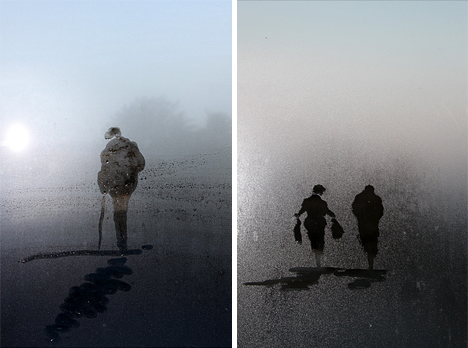
steam glass sketch photos

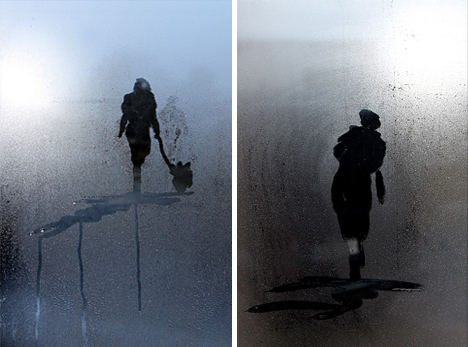
No smoke-and-mirrors or post-production here, just fleeting vignettes swiftly staged on steamed windows and set against natural outdoor backgrounds.

steam water walking alone

Jim Osborne is a self-taught landscape artist who typically works in watercolor, acrylic and oils. He describes himself as being inspired by his surroundings, light and the weather. Recently, however, he has begun working in a new direction with water condensation on glass window surfaces.

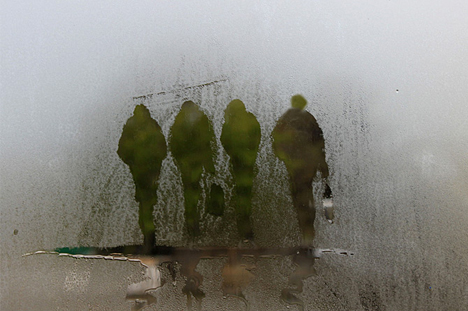
band of brothers art

His Steamy Windows Collection represents a bit of a departure for him in terms of tools and approach – the work is necessarily fast, drawing on organic backdrops, lighting conditions and perceptual cues. Each piece is shot quickly as well, and prints can be found for sale on his website.

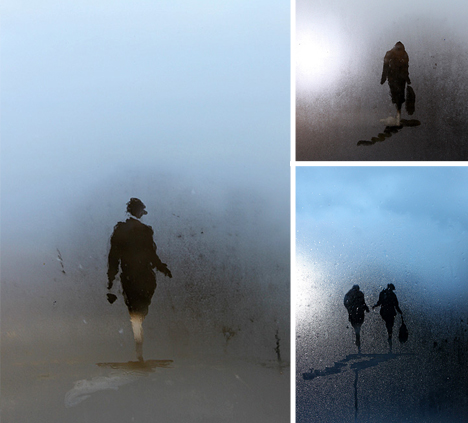
steam water window drawing

With the need for speed, every little gesture counts – the results are simultaneously planned but ultimately uncontrolled, a mixture of simple figures and hasty grounds that somehow manages to look like more than the sum of its parts. The approach seems like a a great way to train oneself to think in an agile fashion and be nimble in execution.

Share on Facebook


[ By WebUrbanist in Art & Drawing & Digital. ]

[ WebUrbanist | Archives | Galleries | Privacy | TOS ]


WebUrbanist

 
Comments Off on Window Sketches: Minimalist Landscapes of Steam & Glass

Posted in Creativity


How to Use a Light Tent for Small Product Photography

15 Mar

Many crafters, cooks, and artists want to take high quality photographs of their own creations, whether to feature them in a blog post, offer them for sale online, or just share them with friends. The trick to getting these kinds of product shots easily and reliably is to use a light tent. This article will cover the fundamentals of shooting with a light tent to help you capture bright, high quality product photographs every time.

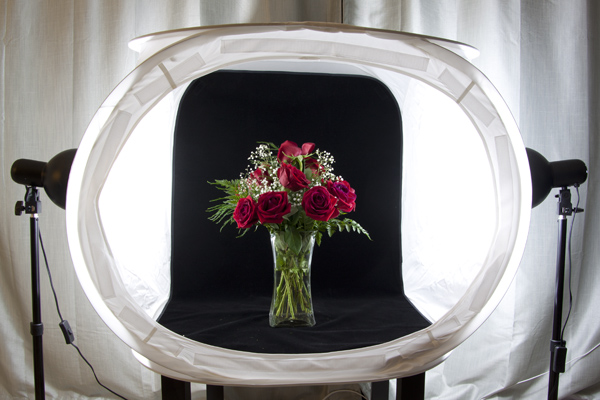
McEnaney-light-tent-roses-new-vase

What is a Light Tent?

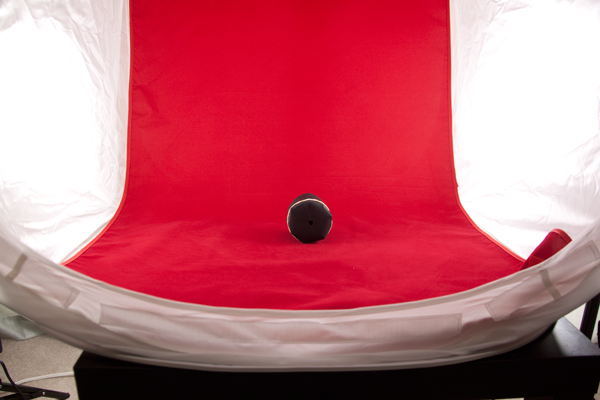
A light tent or light box is a contraption with translucent sides that diffuses light coming from multiple sources. This allows for even, nearly shadow-less lighting against a simple, solid background.

light tent, photography, DIY, product photography

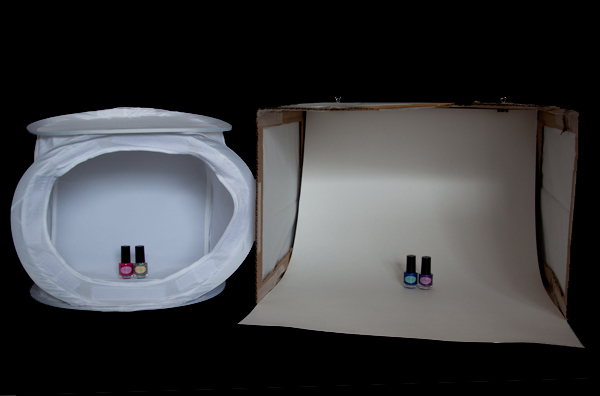
You can purchase a light tent as part of a kit or you can build your own DIY light tent. If you choose to purchase a light tent kit, it will usually come with one or more light tents, two light bulbs, two light stands, a tripod, and fabric backdrops in various colors. If you build your own light tent, you will also need to purchase two posable light sources, light bulbs, and poster board or fabric for the backdrops. Unsure of which to choose? In a future article I will offer a head-to-head comparison of a popular light tent kit and a DIY tent.

Shooting with a Light Tent

The standard set-up for light tent photography is to place the tent on some kind of table or end table, with the light sources directly opposite each other on each side and the tripod centered in front. Placing the tent up on a table makes it easier to see and maneuver, as well as easier to use your tripod for shooting.

The backdrop is attached at the top inside the tent and should fall freely down into a gentle curve at the back and then across the bottom of the tent. You want to be sure that you backdrop is clean and free of debris and wrinkles. If using a fabric backdrop, be sure to iron it for a completely smooth look. (If you roll your backdrops up on a cardboard tube after shooting, you should be able to keep them wrinkle-free for next time.) Consider keeping a lint roller or small blower handy for dealing with the inevitable dust and debris.

light tent, photography, how to, product photography

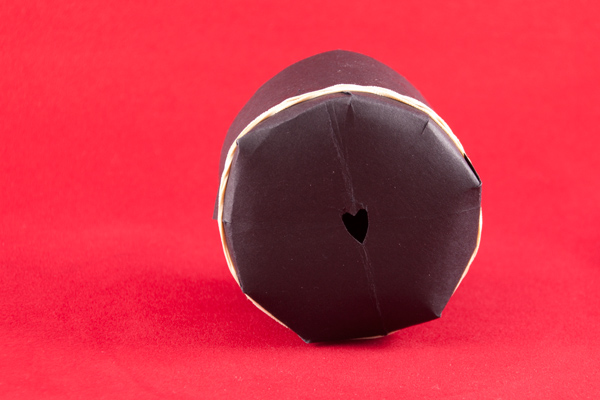
Now you are ready to start photographing! Place your subject carefully inside the tent, and start with it in the exact center. Moving your subject forward or backwards relative to the light can change the lighting and shadows. Experiment to get the look you want. You can also experiment with pointing the lights slightly at an angle, rather than straight on at the tent. Be sure to leave space between your subject and the walls, so that you can zoom in or position your camera to see only the backdrop and not any edges.

Consider the ambient lighting and adjust as needed. I have found very little difference between shooting midday in diffused indoor light and shooting at night with only the lights themselves for light. You do want to avoid direct sunlight shining in or at your tent, as it will be difficult to balance such a powerful light source.

light tent photography, how to, bokeh heart

Camera Set-up

Set your camera securely on the tripod and use either the 2-second timer or a remote shutter release to ensure that you tripod remains steady. (If you are using a lens with image stabilization, vibration reduction, or vibration control, turn the switch to off.) The tripod will allow you to use longer shutter speeds with crisp results.

Begin by shooting in aperture priority mode with an ISO of 100 (or the lowest value for your camera). Choose your aperture based on the look that you want to achieve in the image (a wide aperture like f/1.8 for a narrow depth of field and a lot of blur or a narrow aperture like f/22 for a wide depth of field and crisp focus across the entire subject). Food photographs often utilize wide apertures and selective blur to make food look more appealing, while product shots of crafts and handmade goods look best with a narrow aperture to keep the entire item into focus. IF you want to avoid blur in the foreground (the bit directly in front of your object) – set your focus using the part of your subject that is closest to the camera.

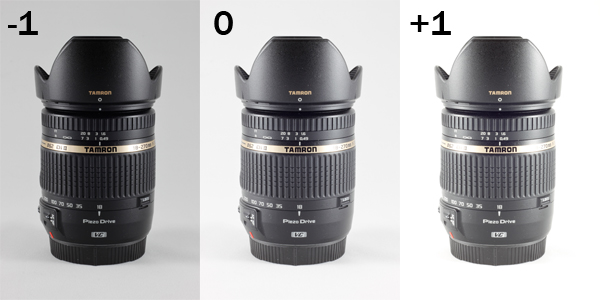
Consider also using exposure compensation to shoot a series of three shots, bracketed at -1, 0, and +1 exposure, so you can see which gives you the best results. (For white backgrounds, you may get better results around +1; while for black backgrounds, you will get better results around -1. If a full stop is too dark or too light, try a half or a third of a stop.)

light tent photography, exposure compensation, camera lens, Tamron, Tamron 18-270mm, light tent, product photography

Post-Processing Considerations

It can be difficult to get the background of your shots perfectly white or perfectly black while also keeping your subject properly exposed. In those situations, you may want to do some additional post-processing to ensure that your whites stay white and your blacks stay black. The following description relies on tools available in Adobe Photoshop, but you should be able to do many of these same procedures using other software products.

If you are shooting in RAW, adjust the white balance of your image first so that your whites look white and not yellow. Most light bulbs will list the color temperature of the light they produce, which you can use as a guide for setting the white balance. You can also set the white balance manually by shooting a white card and calibrating from that image (or if you know your background is pure white or black use the color picker in the RAW processor to neutalize any tint).

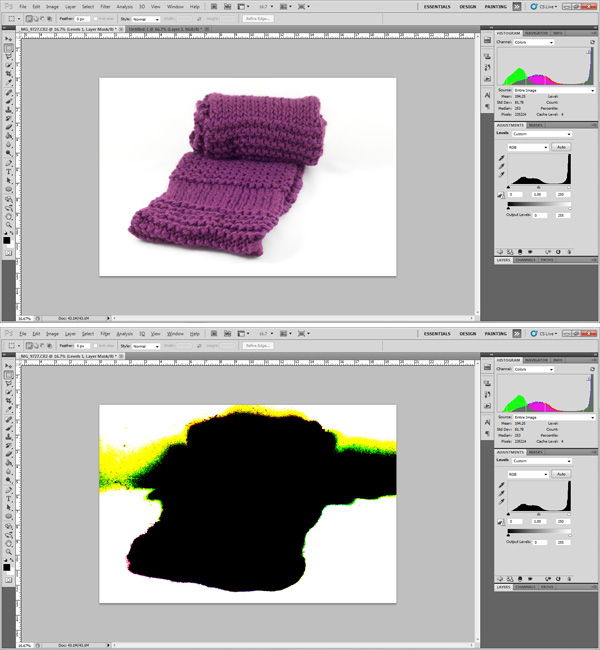
Use your histogram as a guide when processing. While standard photography advice recommends against having your histogram touch the edges of the scale (clipping), this is what you want to achieve in product shots. Clipping your background (whether on the left for black, or on the right for white) will create an entirely homogenous look to your background and focus all attention on your subject.

scarf, photography, Photoshop, post-processing, highlight clipping,

In Photoshop you can use the Levels tool to adjust either end of the histogram. Holding down the Alt (Option for Mac) key while adjusting the sliders allows you to see which areas of the photograph are being clipped, as shown in the image above. Move the slider in towards the center until the background is uniformly clipped but the subject is not. If your subject is too affected by this action, then you may need to scale back your adjustment.

If you are having trouble achieving a uniformly white background on your product shots, consider adding a thin border to your final image. While a not-quite-white background, on a shot displayed against a pure white background on a web page runs the risk of looking dingy. However, a slightly grey background with a black border can make the background shade appear intentional.

photography, bourbon, product photography, light tent, how to

Cheers! Do you use a light tent in your photography? Have a helpful tip for shooting with one? Share your thoughts and photographs in the comments below.

McEnaney-roses-closeup

Here’s a final image from the vase of flowers in the first image at the top of the article.

For more on product photography check these out:

  • DIY Seamless White Background for Product Shots
  • Tabletop Photography Walkthrough or How to Create an Eye-Catching Product Shot
  • How To Photograph Your Product to Enhance Your Online Sales in 4 Easy Steps
  • How to Create Simple Seamless Background Product Shots

The post How to Use a Light Tent for Small Product Photography by Katie McEnaney appeared first on Digital Photography School.


Digital Photography School

 
Comments Off on How to Use a Light Tent for Small Product Photography

Posted in Photography


Engineering a Dream: Benjamin Von Wong profile, part 2

15 Mar

Von_Wong.jpg

In part 1 of our interview with Montreal-based photographer Benjamin Von Wong we asked him about his transition from mining engineer to full-time photographer. In part 2, Von Wong talks about how some of his more famous images were created. Follow the links below to read the concluding part of our interview and take a look at more of Von Wong’s dramatic photographs. Learn more

News: Digital Photography Review (dpreview.com)

 
Comments Off on Engineering a Dream: Benjamin Von Wong profile, part 2

Posted in Uncategorized


What The Duck #1456

15 Mar

wtdlogo_big.jpg

We’ve come to the end of another week here at dpreview, and as our thoughts drift to weekend shooting opportunities, it’s time to take things a little less seriously. Aaron Johnson’s comic strip ‘What the Duck’ is just the thing, taking a gently satirical look through the lens of a photographically inclined waterfowl. You can find it published here (and in our newsletter) every week; we hope you enjoy it, and your weekend.

News: Digital Photography Review (dpreview.com)

 
Comments Off on What The Duck #1456

Posted in Uncategorized