RSS
 

Archive for January, 2014

Fujifilm FinePix S1 is ‘world’s first’ weather-resistant superzoom

12 Jan

S1_Black_Front_Left.png

CES 2014: Amid a string of pre-CES compact announcements, Fujifilm unveils the FinePix S1, the ‘world’s first’ weather-resistant superzoom. It offers a 16 megapixel CMOS sensor and an F2.8-5.6, 24-1200mm equivalent zoom lens. With an articulating 3.0-inch LCD its specifications line up with the FinePix SL1000 in Fuji’s current lineup, though with a slightly faster lens and the addition of Wi-Fi connectivity. While not a fully ruggedized camera, the S1 offers protection against dust and rain exposure.

News: Digital Photography Review (dpreview.com)

 
Comments Off on Fujifilm FinePix S1 is ‘world’s first’ weather-resistant superzoom

Posted in Uncategorized


Fujifilm to release X100S in solid black

12 Jan

X100S_Black_Front_High_angle.png

CES 2014: Fujifilm has announced a black version of the X100S. It’s a more discreet-looking variant that’s in all other ways identical to the original X100S – including the price tag. It uses the same 16 megapixel APS-C X-Trans CMOS and fixed 23mm F2 lens that helped earn the X100S a dpreview gold award and recognition as one of our personal Gear of the Year favorites in 2013.

News: Digital Photography Review (dpreview.com)

 
Comments Off on Fujifilm to release X100S in solid black

Posted in Uncategorized


The 3Pod P5CFH Fold-Flat Tripod – A Review

12 Jan
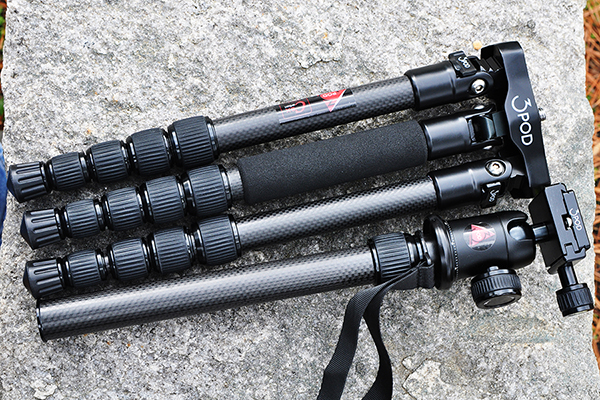
The 3Pod P5CFH tripod folds flat, providing an innovative and reliable option for photographers looking for an affordable carbon-fiber tripod system.

The 3Pod P5CFH tripod folds flat– providing an innovative and reliable option for photographers looking for an affordable and compact carbon fiber tripod system

In a recent review of another tripod, I pointed out that writing a tripod review is actually more difficult than it sounds. The primary reason is that not much seems to change. The concept is simple, right? Legs. Head. Plate. On the surface, there’s not much new to write about. Companies like Manfrotto, Induro, 3 Legged Thing, and others are constantly coming up with new ideas for materials, colors, and other cosmetic features, but to the casual observer, innovations to the actual setup are seemingly few and far between. That’s why I got excited about test-driving this new 3Pod fold-flat travel tripod from Flashpoint. A recent newcomer to the Tripod Thunderdome, Flashpoint has a new line of six different tripods, designed around the needs of professional and hobbyist photographers and videographers. For this review, we’ll be getting up close and personal with the P5CFH Flat-folding Tripod with the K2 BallHead.

The Legs

A new flat design makes the P5CFH easier to pack.

A new flat design makes the P5CFH easier to pack.

This tripod offers full-featured camera support, balancing an innovative new design with carbon fiber construction, to provide a great combination of strength and stability. Being able to fold a tripod flat makes it easier to pack, and therefore increases its portability– as well as your chances of actually taking it out on location when you need it. The high cost of light-weight, carbon fiber construction is usually the factor that keeps many photographers from purchasing carbon fiber legs. A comparable tripod from one of the big-name companies could set you back up to $ 400, dropping it down a notch or two on your list of priorities. The P5CFH from 3Pod, however, cashes out at only $ 150, including the K2 BallHead.
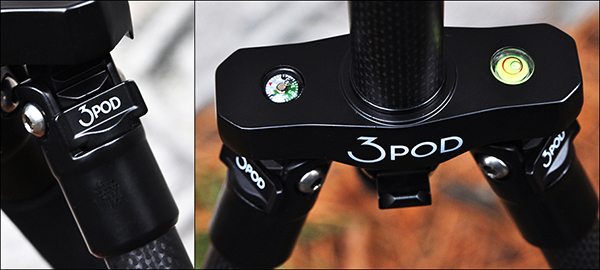
On the left, legs that adjust to three different angle positions. On the right, an integrated bubble level and compass for nature photographers, as well as a ballast hook for adding weight and extra stability.

On the left, legs that adjust to three different angle positions. On the right, an integrated bubble level and compass for nature photographers, as well as a ballast hook for adding weight and extra stability.

As I pointed out in the earlier review, the low cost had me a bit skeptical. Something had to be wrong with it. What kind of carbon fiber rejects were they using, anyway? Thankfully, I didn’t let my skepticism get in the way of giving these tripods a fair shot. Let’s take a look at some of the specs and what comes in the box:

  • Carbon fiber construction
  • Double-jacketed, wear-resistant leg locks
  • Three independently adjustable/lockable leg angles
  • Height 56.5″ fully extended, 13.5″ folded
  • Capacity: holds up to 20 lbs.
  • Extendable/detachable dual-section center column
  • Outdoor-ready spiked feet with removable rubber grip covers
  • Hook for adding stabilizing weight
  • Integrated bubble level and compass on tripod legs
  • K2 hydraulic ball head with built-in bubble level
  • Allen wrench set for tightening connections
  • Padded carrying case
3pod-fold-flat-tripod-review-dps-004

The fold-flat design means the center column has to be removed to get it down to its compact and packable 13.5″.

Because of the fold-flat design, the center column cannot slide down through the hub between the legs. In order for it to break down to its 13.5″ packable size, the two-section center column actually detaches by unscrewing it from the rest of the assembly. This could be a negative, since it means keeping track of two pieces, rather than one. The trade-off, however, comes in the form of a tripod that takes up significantly less room than its traditional counterparts. I put it through its paces with several different Think Tank camera bags, and I was able to pack it comfortably inside a wide variety of backpacks and shoulder bags.

The Head
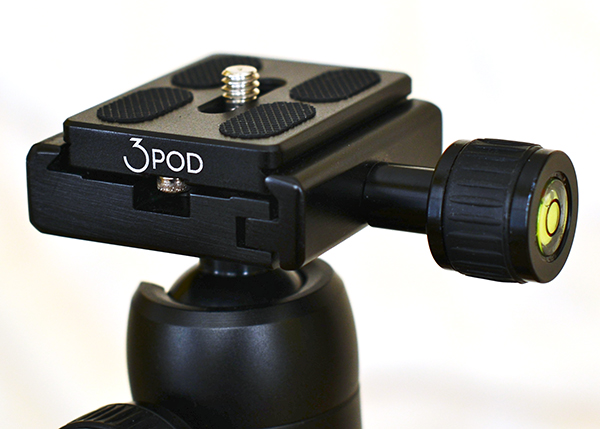
The K2 ball head provides a secure, sturdy platform for mounting your camera.

The K2 ball head provides a secure, sturdy platform for mounting your camera.

The K2 ball head is an Arca-Swiss compatible tripod head with a sliding quick release plate and universal 1/4″ mounting screw. It’s got a solid design, and handled weight distribution very well with various camera configurations (i.e., with and without battery grip). It’s made of scratch-resistant carbon, with a hard, protective finish for a (hopefully) wear-free appearance. Landscape and panoramic photographers will find the smooth, 360-degree rotation helpful, as well as two separate bubble levels.

Wrap-up and Recommendations

I’ve only been using  this tripod for a couple of weeks, but so far it’s been sturdy, secure, light-weight, and convenient. With built-to-last, high-quality construction, it’s tough to find much in the way of fault. What we ask of our tripods is both very basic and incredibly important. While you may be hesitant to trust a $ 150 tripod with your $ 2,000 camera, if you’ve been looking for a reliable, affordable, and compact, carbon fiber tripod, the 3Pod P5CFH is a great place to start.

3pod-fold-flat-tripod-review-dps-007

On the left: Think Tank Airport Commuter backpack. On the right: Think Tank City Walker 30 shoulder bag.

The post The 3Pod P5CFH Fold-Flat Tripod – A Review by Jeff Guyer appeared first on Digital Photography School.


Digital Photography School

 
Comments Off on The 3Pod P5CFH Fold-Flat Tripod – A Review

Posted in Photography


Panasonic Lumix DMC-LZ40 budget superzoom offers 42x optical zoom

12 Jan

LZ40_slant.png

CES 2014: Panasonic has unveiled the Lumix DMC-LZ40, a budget superzoom with an F3.0-6.5 22-924mm equivalent zoom lens. It has a 20 megapixel CCD sensor, fixed 3-inch 460k dot LCD, and can record video at 720/30p. The LZ40 is also equipped with optical image stabilization, 13 filter effect modes, and a lithium-ion battery rated to 320 shots.

News: Digital Photography Review (dpreview.com)

 
Comments Off on Panasonic Lumix DMC-LZ40 budget superzoom offers 42x optical zoom

Posted in Uncategorized


20-Hour House: How to 3D-Print 2,500 Square Feet in 1 Day

12 Jan

[ By WebUrbanist in Conceptual & Futuristic & Technology. ]

3d printing building day

Combining ancient earthen-architecture approaches and cutting-edge robotic technologies, this contour crafting process promises a revolution in how we address one of our most basic and universal human needs: shelter.

Inventor and teacher Dr. Behrokh Khoshevis of University of Southern California points out that residential construction is labor-intensive, inefficient and hazardous. In short: it is overdue for a paradigm shift, one that not only automates and speeds up processes but also allows for mass customization and individualization.

3d printed architecture model

His Counter Crafting system “is a fabrication process by which large-scale parts can be fabricated quickly in a layer-by-layer fashion. The chief advantages of the Contour Crafting process over existing technologies are the superior surface finish that is realized and the greatly enhanced speed of fabrication” in part through the use of additives for faster hardening times.

3d building prototype printer

Steel reinforcement, plumbing and electrical can all be installed by robotic attachments as the concrete walls are poured. In turn, conventional shape and style limitations need not apply – curves are as simple to program as right angles. Part of the beauty of this system is that it cuts out the middle man – designs can go straight from the digital drawing board (CAD software) to the on-board computer.

3d printing on moon

Nor is this simply one man’s fantasy: “Contour Crafting has been under development under support from the National Science Foundation and the Office of Naval Research. Also, the application of CC in building adobe structures using inexpensive materials is being pursued in conjunction with the CalEarth organization.” Contour Crafting is also working with NASA to explore possibilities for 3D-printing structures in space.

Share on Facebook


[ By WebUrbanist in Conceptual & Futuristic & Technology. ]

[ WebUrbanist | Archives | Galleries | Privacy | TOS ]


WebUrbanist

 
Comments Off on 20-Hour House: How to 3D-Print 2,500 Square Feet in 1 Day

Posted in Creativity


11. Januar 2014

12 Jan

Ein Beitrag von: Danny Busch

© Danny Busch


kwerfeldein – Fotografie Magazin

 
Comments Off on 11. Januar 2014

Posted in Equipment


Techniques for Working Textures Into Your Photography

12 Jan

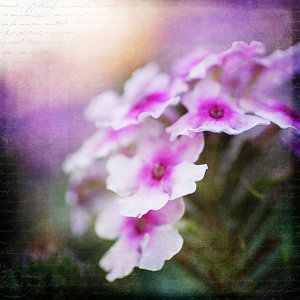
Textured-purple-flower-600Where do you begin when you are considering using textures in your photography? I suggest you begin with the absolute best photo possible. Adding a texture to a bad photo does not make it a good photo. You want to make sure you have it exposed correctly, composed well, have a clear subject and not too much in the competing in the background competing. Textures work best with photos that are not too busy to start. Once I have chosen the photo I am going to work with, I do all of my edits before I add the texture, including adjusting the colors and sharpening.

In this article I’ll share some of my techniques for working textures into your photography.

Sharpening your image

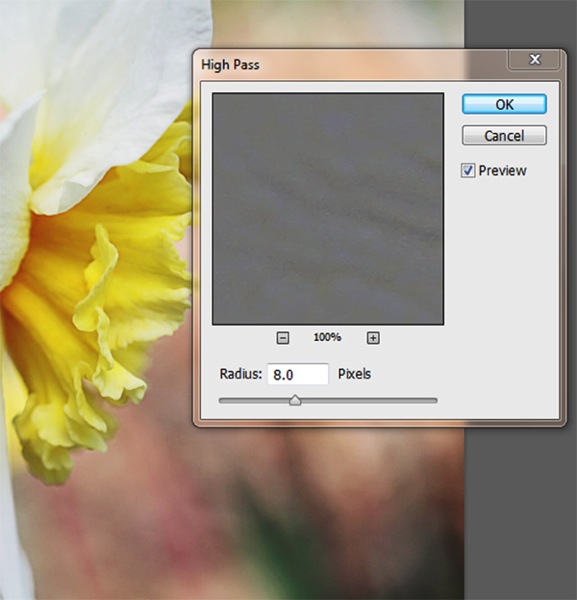
You want to sharpen your photo before you add the texture. This is so that your subject is sharp and the texture isn’t over sharpened compared to the subject. You want the texture to enhance your photo, not compete with it. When I sharpen the photo I use the high pass filter as opposed to the unsharp mask. I like this method best because it defines and clears up all the edges of your subject without over-sharpening all the fill areas. Below is how I do this and the settings:

  1. Duplicate your background layer and while that duplicate copy is still highlighted, go up to the Filter menu and select: Other > Highpass filter
  2. Set the filter radius between 6 and 10 pixels (or higher) depending upon how sharp you need to have your photo, but be careful not to over sharpen.
    Sharpening highpass pop up
  3. Next change the blending mode of this layer to “Softlight” or “Overlay”. Overlay is stronger than Softlight, so test out each option to see what works best for your image.
Textured-yellow-flower-600

Finished image with texture and vintage paper applied

Once I am finished adding my textures to the photo I might do a final sharpen at the end if needed.

How to erase texture and still retain tone, plus a few extras

Once you are finished with your edits and sharpening, you are ready to add the texture. One concern people have in adding texture is how to erase the texture from the subject without it being obvious. You wouldn’t want to have the face of a baby be texturized, for instance, but you would want the face to match the rest of the photo in color and tone.

5 Steps:

  1. Place the selected texture on your photo. Do this by going to: “File > Place” in the top menu. Then select the texture image you want to use. It opens up as a new layer on top of your photo, ready to resize. Do that, then I right click the texture layer and choose “rasterize”, so it will no longer be a Smart Object. Change the blend mode and opacity of the texture layer to suit your image, such as “Softlight” or “Overlay”. At this point you are just manipulating the texture and not worrying about erasing it yet.
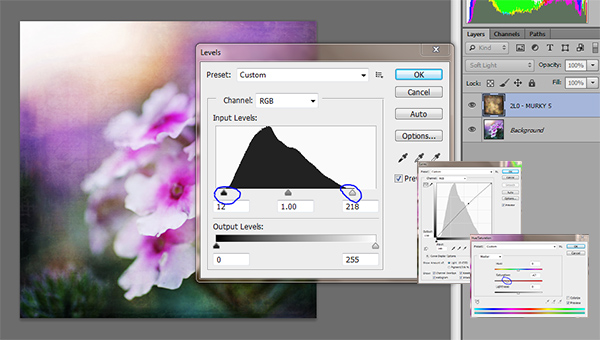
  2. While the texture layer is still highlighted, there are a few techniques you can do to the layer before you move on. Adjust the levels, curves, and the saturation of the texture layer to make the texture more vivid or pronounced, but not more opaque. I work in Softlight mode a lot as it brings out some of the texture without changing the mode.Levels curves saturation
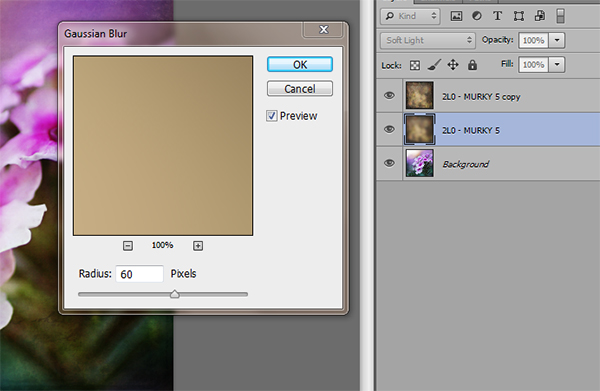
  3. Once you are happy with the way the texture is working with the image, duplicate the texture layer and apply a Gaussian blur set to about 60 pixels to the bottom texture layer so it gives you the exact tones of the texture. Get to the Gaussian blur box by going to “Filter > Blur > Gaussian blur”. Next, turn off the bottom layer that you just added the blur to.
    Gaussian blur
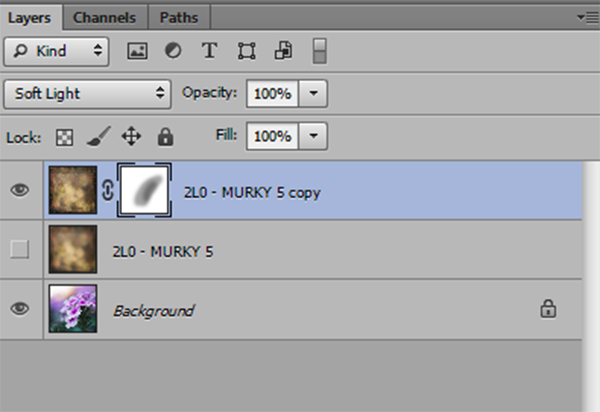
  4. Add a mask to the top layer. With a soft black brush, set to about 30% opacity, ybegin to brush off the texture in any areas where you don’t want it. By using a low opacity you can slowly build up the amount you are removing. If you remove too much simply change the brush to white ,and wipe some of the texture back on. Make sure while you are doing this that you have the mask box selected (it will have square brackets around it) not the image itself.Sharpening mask
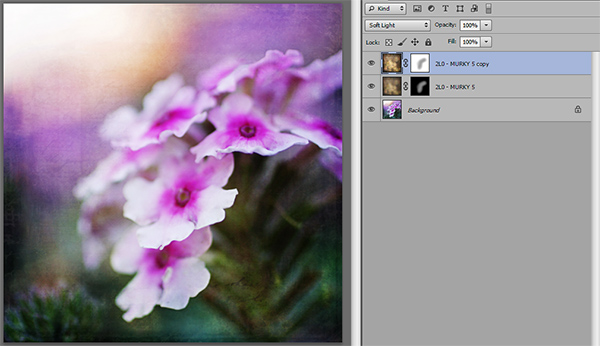
  5. Once you are happy that the texture is removed from all the important areas – select the mask box, hold down “Shift + Alt” and drag the mask box from the top texture layer to the bottom texture layer. Now you have applied the mask to the blur layer, and you have inverted it at the same time. Turn that layer back on and you will notice the tone where you erased the texture has the same coloring as the rest of your photo.Sharpening finished

Using vintage papers in your photography

Working with vintage papers is another fun aspect of textures that you can use in your photography. I get vintage papers from several great sources including my own family documents from the mid 1800’s, flea markets, online searches, Etsy, etc. I have curated several collections on my website for sale if you don’t want to go through the trouble of searching for them yourself. I especially love vintage French papers because of their wonderful scripts, markings, and fancy headers.

Part One

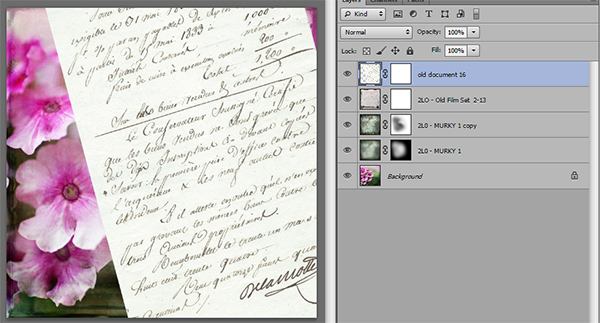
Working with the vintage papers is the same as working with textures. Place the paper on your photo in the approximate location that you want to use it. You will notice in the sample that I have placed it on the top of the many textures I have used in this photo, but you can place it on any layer that you want, to get the look you are trying to achieve.

Textures vintage paper

Part Two

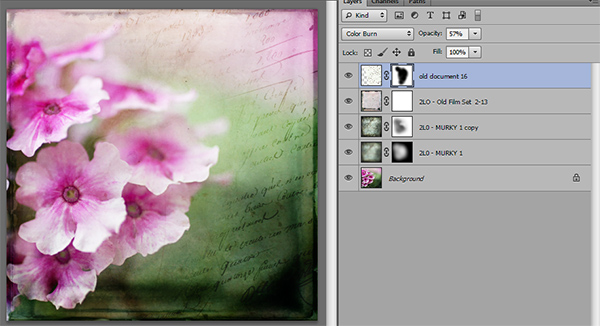
Next, adjust the layer using the darkening blending modes: darken, darker color, color burn, linear burn, and multiply. Experiment with them all to see which one works best on the photo. The goal is to make the paper part of the document disappear, and have just the writing remain. Then just adjust the opacity to suit your taste. You can add a mask to this layer if you want to strategically erase some of the text which I do quite often.

Vintage paper texture

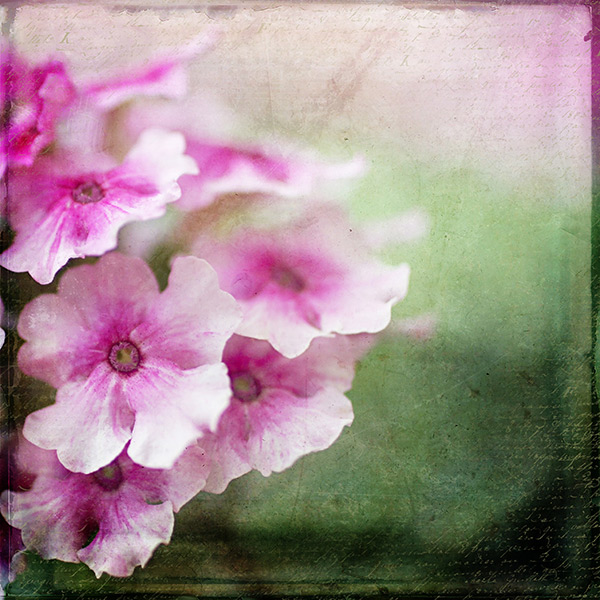
Finished image

Finished image

I hope you will give some of these techniques a try whether you are new to textures or have been doing them for years. If you do, please share in the comments below!

Further reading on using textures in your photography:

  • How To Create Your Own Unique Textures and Apply Them To Your Photography
  • Textures Made Simple
  • How To Apply Textures To Your Photographs

The post Techniques for Working Textures Into Your Photography by Denise Love appeared first on Digital Photography School.


Digital Photography School

 
Comments Off on Techniques for Working Textures Into Your Photography

Posted in Photography


Compact Panasonic Lumix DMC-SZ8 offers 12x zoom and Wi-Fi

11 Jan

SZ8_slant.png

CES 2014: Panasonic keeps the emphasis on zoom and connectivity with the introduction of the Lumix DMC-SZ8, a lower-end alternative to its ZS/TZ travel zooms. It covers a 24-288mm equivalent range and uses a 16 megapixel CCD sensor (a step down from the ZS-series’ CMOS chips) and a top video resolution of 720/30p. Wi-Fi connectivity is included, as is a 3.0-inch 460k-dot LCD.

News: Digital Photography Review (dpreview.com)

 
Comments Off on Compact Panasonic Lumix DMC-SZ8 offers 12x zoom and Wi-Fi

Posted in Uncategorized


Panasonic Lumix DMC-ZS35 and ZS40 travel zooms unveiled

11 Jan

ZS40_slant.png

CES 2014: Panasonic has introduced the Lumix DMC-ZS40 travel zoom, also known as DMC-TZ60 in some markets. Equipped with Wi-Fi and NFC, it provides a 30x zoom range (24-720mm equiv), an 18.1MP sensor, and a built-in electronic viewfinder. Its enthusiast-leaning feature set includes a control ring around the lens, Raw shooting, and focus peaking. Also introduced is a lower-cost model, the Panasonic Lumix DMC-ZS35 (TZ55), with Wi-Fi connectivity (though no NFC). The ZS35 covers a 28-560mm equivalent 20x zoom range, uses a 16MP sensor, and lacks a viewfinder. 

News: Digital Photography Review (dpreview.com)

 
Comments Off on Panasonic Lumix DMC-ZS35 and ZS40 travel zooms unveiled

Posted in Uncategorized


Exposé: Zeig Dein wichtigstes Foto 2013

11 Jan

Na, habt Ihr schon drauf gewartet? Man kann ja von Traditionen halten, was man will. Einige langweilen und auf andere freut man sich immer wieder diebisch. Wir uns zum Beispiel darauf, nun wie jedes Jahr Eure wichtigsten Fotos zu sehen zu bekommen!

Nachdem unser Herausgeber Martin bereits einen Rundumschlag in Sachen Best-of veranstaltet hat, indem er die wichtigsten Fotos aus Artikeln und aus dem Ausblick für das vergangene Jahr zusammengestellt hat, seid nun Ihr gefragt.

Was war Euer wichtigstes Foto 2013? Vielleicht ein Schnappschuss, auf dem aber alles stimmt. Vielleicht das Bild, für das Ihr wochenlange Vorbereitungen und Recherchen betrieben habt, um es dann – endlich – genau so wie geplant in die Tat umzusetzen. Vielleicht zur richtigen Zeit am richtigen Ort gewesen?

Vieles kann dazu beitragen, ein Foto zu dem Bild eines ganzen Jahres zu machen. Auf jeden Fall möchten wir nun mit Euch ein letztes Mal auf 2013 schauen bzw. Euch bitten, das zu tun, falls Ihr es nicht ohnehin schon getan habt: Sucht das Foto heraus, das für Euch das wichtigste in 2013 war.

Teilnahmebedingungen

  • Suche Dein wichtigstes Foto heraus, das Du 2013 veröffentlicht hast.
  • Poste den Link dazu in einem Kommentar.
  • Beschreibe in ein paar Sätzen, warum Dir dieses Bild wichtig ist und wie es entstanden ist. Achtung: Fotos ohne Beschreibung werden nicht berücksichtigt.
  • Mit dem Kommentar stimmst Du einer möglichen Veröffentlichung auf kwerfeldein zu.
  • Einsendeschluss ist am Montag, den 13. Januar um 20 Uhr.

Wer schon länger hier liest, kennt das anschließende Prozedere bereits: Unsere Redaktion klickt und liest sich durch alle Eure Einsendungen und sucht ganz subjektiv ihre Lieblingsfotos und -geschichten dazu aus. Die Auswahl der Bilder, die die meisten Fans bei uns finden konnten, präsentieren wir am nächsten Samstag, den 18. Januar 2014 an dieser Stelle.

Wie immer lohnt es sich schon ob der schieren Masse an Einsendungen, auch hier in den Kommentaren mitzulesen, weil wir einfach nicht alle tollen Fotos im Anschluss präsentieren können. Und Geschmäcker sind ja auch verschieden. Also, auf geht’s! Welches ist Dein wichtigstes Foto 2013?


kwerfeldein – Fotografie Magazin

 
Comments Off on Exposé: Zeig Dein wichtigstes Foto 2013

Posted in Equipment