RSS
 

Archive for October, 2013

Google+ reaches out to photographers with new imaging features

30 Oct

hdr_scape.png

Google is reaching out to photographers once again by announcing a bevy of forthcoming features on its social networking site Google+ that will be a boon to photographers: full-resolution photo backups for iOS users, improved search through advanced photo recognition software, and better image editing tools. See what else is new on connect.dpreview.com.

News: Digital Photography Review (dpreview.com)

 
Comments Off on Google+ reaches out to photographers with new imaging features

Posted in Uncategorized


A Day At The Beach: Photographing Seaside Landscapes

29 Oct
Photographing Seaside Landscapes

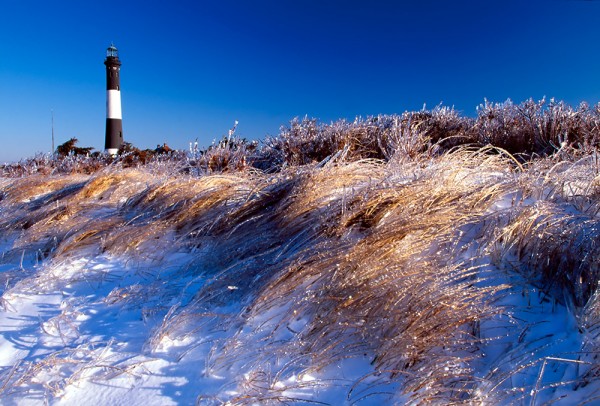
This shot was taken just after a January snow storm. The ice glistening on the dune grass made for an excellent foreground while the lighthouse towered in the background. A polarizer was used to help darken the sky. Taken with the EOS 5D Mark II and EF 16-35mm f/2.8L II. ISO 100, 1/250 at f/16.

Living on the east coast of the United States, I have easy access to any number of beaches to use as subjects for my photographic purposes. While many of these beaches may not be as dramatic as those on the west coast, they offer many photographic opportunities and shouldn’t be overlooked.  Most people think of the beach as being a summer destination, but I’ve found it to be an excellent location all year round for a variety of reasons.

Photographing Seaside Landscapes

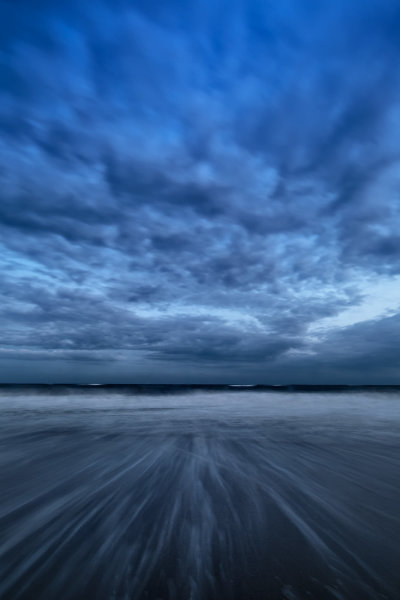
Dramatic skies and rushing water can make even the simplest composition interesting. I used a low point of view and a slower shutter speed to capture the water rushing straight at the camera, ready to grab the tripod if the water knocked the tripod over. The clouds eliminated any bright sunlight and created an almost monochromatic image.  EOS 5D Mark III with EF 14mm f/2.8L II. Exposure was 8 seconds, f/20, ISO 100.

Photographing Seaside Landscapes poses a number of problems for the photographer. There’s wind, sand, and water to contend with, and keep out of your equipment.  There are some precautions you can take to minimize the chances of disaster striking. 

First, I usually spread a blanket out and put my camera bag down on that. It helps prevent sand from getting the seams of the bag, and it also lets the flap of my backpack rest somewhere other than sand.  I speak from experience when I say that resting that lid on the sand and then flipping it up to close it is a good way to get sand inside the bag.

The next issue is the water. Obviously, the most basic rule is to keep your bag as far away from the water as possible. Pay attention to the tides and watch that the waves aren’t coming closer to where you’ve stashed your gear. But that’s only half the issue. Generally when I’m at the beach, water is at the very least a major part of what I’m shooting.  I tend to take a few chances here.  I like low angles, and dramatic shots.  That tends to put my camera right in harm’s way.  If I’m not on a tripod, I ensure that the strap is always around my neck to keep it from falling.  If I’m on a tripod, I tend to keep my hand ready at all times to grab it and move if a big wave comes. If it helps you feel more secure, you can always use a rain cape to protect from splash, or if submersion may be possible, an underwater housing might be called for.  I don’t personally use any of these items and just use a lot of care when near the water, but I have heard many horror stories of cameras that went swimming.

Sunrise and sunset are my favorite times for the soft warm light they provide.  I use graduated neutral density  filters when they are called for, depending on the light, as well as standard neutral density filters to help control my shutter speed to determine how I render water.

I find myself going back to the same beaches over and over. By their nature, they change often, as weather erodes them, tides build them back up, and secrets beneath the sand are revealed.  Often after a storm is the best time, as the combination of wind and rain will create patterns in the sand and pools of water which create beautiful reflections.

Where do you find yourself visiting over and over to fulfill your photographic urges?

Photographing Seaside Landscapes

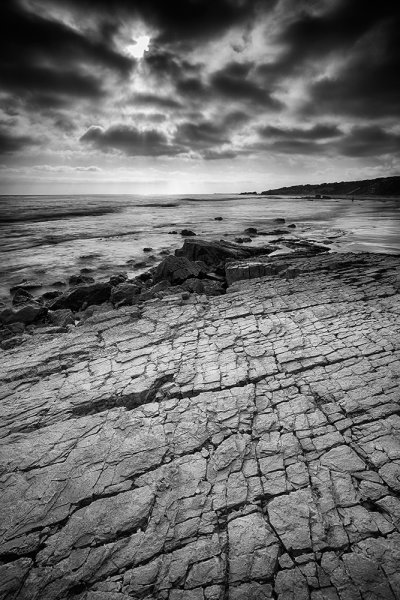
This shot is actually a west coast beach- Pelican Point in Laguna, California. A 4 stop ND grad was used to darken the sky. The foreground is a large rock with a beautiful pattern of cracks for interest. EOS 5D Mark III with EF 16-35mm f/2.8L II. 1 second at f/16, ISO 400.

Photographing Seaside Landscapes

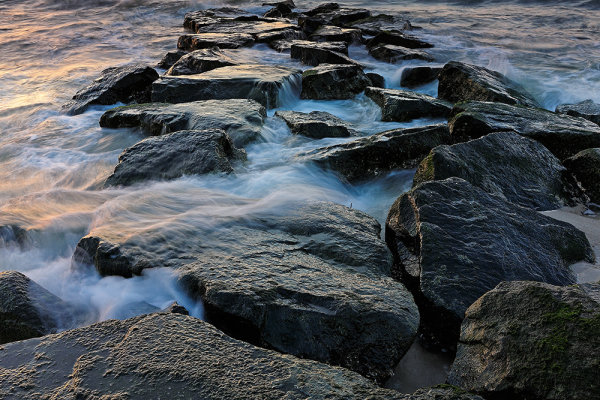
This shot was taken at sunrise, as the tide was coming in. Water continually washed over the jetty, and the light playing on the water and rocks captured my interest. EOS-1D X with EF 16-35mm f/2.8L II. Exposure was .4 seconds at f/16, ISO 100. A 3 stop neutral density filter was also used.

Have you had any success with Photographing Seaside Landscapes? Share your images and tips in comments below.

Post originally from: Digital Photography Tips.

Check out our more Photography Tips at Photography Tips for Beginners, Portrait Photography Tips and Wedding Photography Tips.

A Day At The Beach: Photographing Seaside Landscapes

The post A Day At The Beach: Photographing Seaside Landscapes by Rick Berk appeared first on Digital Photography School.


Digital Photography School

 
Comments Off on A Day At The Beach: Photographing Seaside Landscapes

Posted in Photography


One-of-a-Kind Dollhouses Designed by 20 Famous Architects

29 Oct

[ By WebUrbanist in Design & Products & Packaging. ]

dollhouse competition designers

Some of the world’s best and brightest architects and designers, including Zaha Hadid, have come together to create a series of unique custom dollhouses to be auctioned for a disabled children’s charity KIDS.

dollhouses flashy weird design

The array of approaches is as impressive as the collection of contributors (a full list of the latter to follow). Some designs are flashy and playful, others abstract and metaphorical, and still others practical and innovative.

dollhouse concrete modular inserts

Starting on the more rigid and straightforward side of things, one concrete creation features plug-and-play rooms that fit into a framework, acting as a learning tool as well as a toy.

dollhouse stackable room variants

Another puzzle-inspired arrangement features stackable spaces that be configured in an innumerable variety of possible ways, creating a game out of iterating spatial relationships.

dollhouse inflatable playspace surprise

One of the more surprising design, at least in terms of thinking outside the (jack in the) box, is shown above before and after deployment.  It has faux facades that open to reveal a full kid-sized inflatable playspace. But it is not the only design with a surprise inside.

Next Page:
One Of A Kind Dollhouses Designed By 20 Famous Architects

Share on Facebook


[ By WebUrbanist in Design & Products & Packaging. ]

[ WebUrbanist | Archives | Galleries | Privacy | TOS ]


WebUrbanist

 
Comments Off on One-of-a-Kind Dollhouses Designed by 20 Famous Architects

Posted in Creativity


The Ultimate Guide to Halloween Photography

29 Oct

Halloween. You know it for its pumpkins, ghosts, spooks, the color orange, annoying trick-or-treaters, costumes, masks and, of course, a plethora of candy to make your tummy hurt like crazy. You know it less for Halloween photography, but it turns out that this celebration is a wonderful opportunity for specialized photography. The absolute, best aspect of Halloween is the sheer Continue Reading

The post The Ultimate Guide to Halloween Photography appeared first on Photodoto.


Photodoto

 
Comments Off on The Ultimate Guide to Halloween Photography

Posted in Photography


Moon Photography: 6 Tips for Better Moon Photos

29 Oct

The moon is something so familiar to us, and yet so strange that it’s mesmerizing. It’s at once commonplace and extraordinary. As photographers, we are drawn to it in an attempt to convey the intrigue we feel when we look at it.

But moon photography can be tricky.
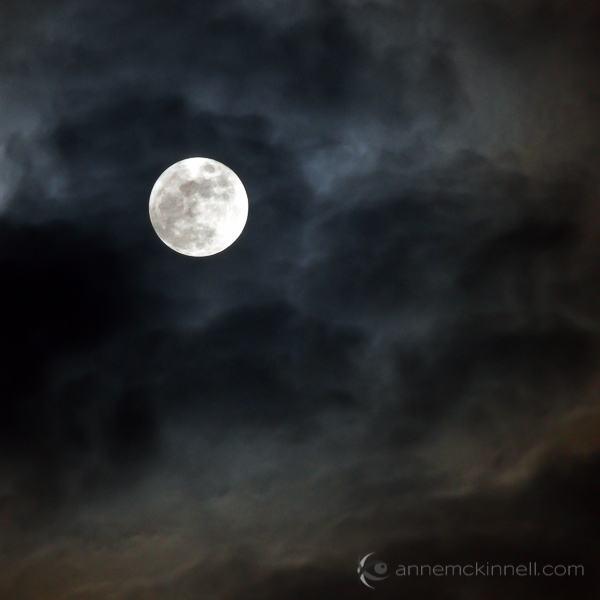
Moon Photography: Just the Moon, by Anne McKinnell

A bright full moon creates one of the most high contrast situations there is, posing a difficult challenge for photographers. Often photos of the moon appear like a spotlight in the sky that looks more like the sun than the moon.

Moon Photography Tips

To get the best possible pictures of our one-and-only moon, it’s important to know a few things about it first.

1. Learn the Phases of the Moon

The moon itself emits no light, it’s simply a huge rock being lit up by the sun. As it orbits the earth, and as the earth orbits the sun, how much we see of that reflection changes from a bright, full moon to no apparent moon at all.

Moon Photography: By Tomruen [Public domain], via Wikimedia Commons

By Tomruen [Public domain], via Wikimedia Commons

Because of our counter-clockwise trajectory around the sun, the shadow it casts on the moon is always moving to the left; after a new moon (no moon), the illuminated side starts to creep in from the right edge, expanding towards the left side each night. As the moon’s apparent size gets bigger, we call it “waxing”.

Once the moon is full, the shadow starts to reappear – again on the right side – and grow leftwards, shrinking the visible moon until it is dark again. This is called “waning”. Therefore, any time you want to know what the moon will look like tomorrow, look at it tonight; if it is lit on its right side, it is waxing towards fullness. But if it’s lit on the left, it is waning, and will soon be gone.

The twilight sky also holds clues to the lunar phases. If the moon is visible before sundown, it is waxing, but if you can see it before sunup, it’s waning. Alternatively, you can always look up a calendar online, or download a moon phase app that will do the calculations for you.

2. Use the Right Equipment

To maximize the success of your moon photography, there are a few bits of a gear that will come in handy.
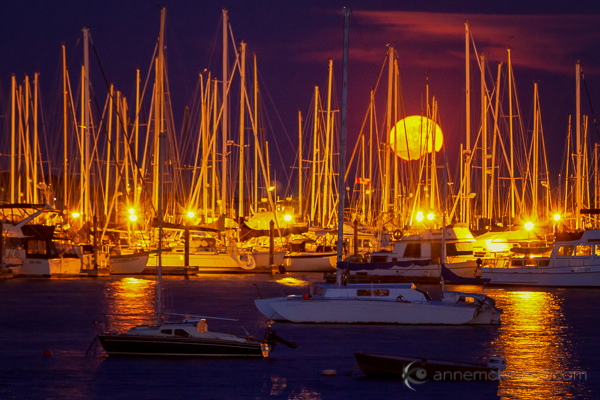
Moon Photography: Moonrise over the Oak Bay Marina, in Victoria, British Columbia, by Anne McKinnell

  • A zoom lens.
    If you’ve ever taken a shot of the moon and been disappointed by the tiny white blob that results, you’re probably using too short of a focal length. A standard wide-angle lens makes everything appear smaller, particularly things that are far in the distance. To get a close-up shot, use a focal length of at least 200mm or more. Longer lenses will result in greater magnification and detail.
  • A tripod.
    To support the weight of this large lens, and to allow the slow shutter speeds that may be necessary to get a good exposure, mount your camera securely on a sturdy tripod.
  • A shutter release.
    These come in both wireless and wired options and will allow you to fire the shutter without having to depress the shutter button and risk camera shake. If you don’t have one, use your camera’s self-timer to achieve the same benefit.

3. Get a Good Exposure

The moon is very intricate and detailed, with craters, channels, and mountains dotting its surface. If the moon in your photo turns out bright white, it is overexposed. This happens frequently because the blackness of the surrounding sky throws the light meter off.

To fix this, turn down your exposure compensation (+/-), or use your camera’s spot metering mode to expose for the moon alone. Check your camera’s manual for information about how to do this on your specific model.
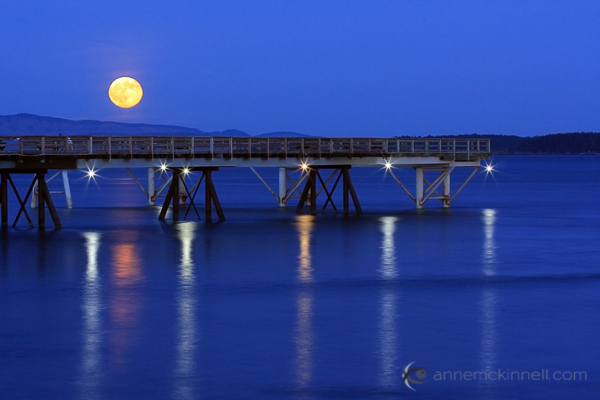
Moon Photography: Long Nights Moon by Anne McKinnell

For best moon photography results, bracket your shots. Some cameras will have an automatic bracketing feature, but if yours doesn’t, you can simply do it manually. First, take one shot at the automatically-determined settings. Then, using exposure compensation, take the same shot at -0.5EV, and one at +0.5EV. Do the same at -1EV and +1EV, and continue to +/-1.5EV and beyond if necessary. Later, you can choose the best exposure when you view them on your computer.

4. Find the Best Times and Places to Shoot

Unless the city is a part of your scene, you probably don’t want a lot of urban light pollution spilling into the sky when you’re trying to photograph a pristine moonlit night. You’ll get the cleanest shots outside of dense civilization. Explore backcountry roads, or take a hike into the nearby mountains to find truly dark night skies.

That said, a common problem photographers run into with moon photography is the harsh difference between a brilliantly lit moon and a pitch-dark sky. To avoid this, consider shooting during the “blue hours”, when the sky glows faintly after the sun goes down, or before it comes up. There is less contrast at this time, though the moon is still bright.

A moon phase app can help you determine when there will be a full moon during twilight.

5. Create an Interesting Composition
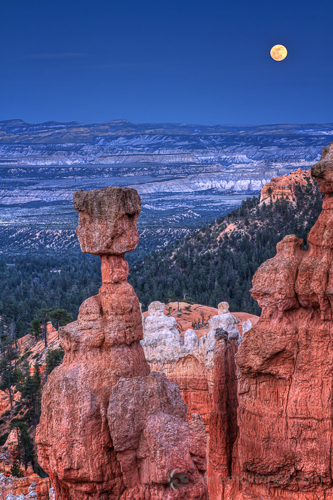
Supermoon at Bryce Canyon National Park, Utah, by Anne McKinnellAs compelling as a beautifully sharp, detailed image of a lonesome moon is, once you’ve seen one, you’ve seen them all. Getting that perfect close-up is excellent practice, but try to get creative by placing the moon within a more complex composition.

For instance, you could try framing it behind trees and buildings, or reflecting it off the surface of a still lake. Placing other objects in the foreground gives the moon context and scale that it lacks on its own. Think of the moon as a single element which should be incorporated along with other compositional elements and techniques to make a great final photograph.

6. Combine Multiple Exposures

Incorporating other objects can complicate things though, and you may find that the perfect exposure for the moon doesn’t match that of the rest of the scene. Sometimes natural light doesn’t cooperate, and the camera doesn’t see things the way our eyes do. This is where digital photography comes in really handy, allowing you to play with your images to create the scene the way you saw it, even if the camera saw it a little differently.

To do this, take several shots at different exposures by bracketing, as mentioned above. When you open the files on your computer, choose two: the one with the best exposure on the moon (‘Image 1′), and the one with the best exposure on the rest of the scene (‘Image 2′). Using an image editing program, select the moon from Image 1 and copy it, then paste it into Image 2, covering the moon in that picture. Use the eraser tool with a heavily feathered edge to remove any imperfections and blend the edges together. This method may take some trial and error to get it just right, so try it several times with several different shots to get the hang of it.
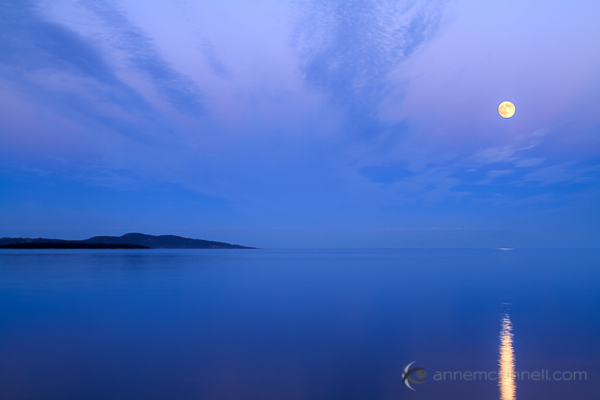
Moonrise over the ocen in Sidney, British Columbia, by Anne McKinnell

When performing this technique, try not to stretch or enlarge the size of the moon. The goal of image editing is to faithfully recreate a scene that the camera simply can’t capture all at once, so beware of any visual exaggerations that make the composition look unnatural or inauthentic.

Share Your Moon Photography Tips and Moon Photos

Got any more moon photography tips to add? We’d love to see them in comments below. Also feel free to share any photos you’ve taken of the moon.

Post originally from: Digital Photography Tips.

Check out our more Photography Tips at Photography Tips for Beginners, Portrait Photography Tips and Wedding Photography Tips.

Moon Photography: 6 Tips for Better Moon Photos

The post Moon Photography: 6 Tips for Better Moon Photos by Anne McKinnell appeared first on Digital Photography School.


Digital Photography School

 
Comments Off on Moon Photography: 6 Tips for Better Moon Photos

Posted in Photography


The Ancients – Bristlecone Pine Forest, California

29 Oct

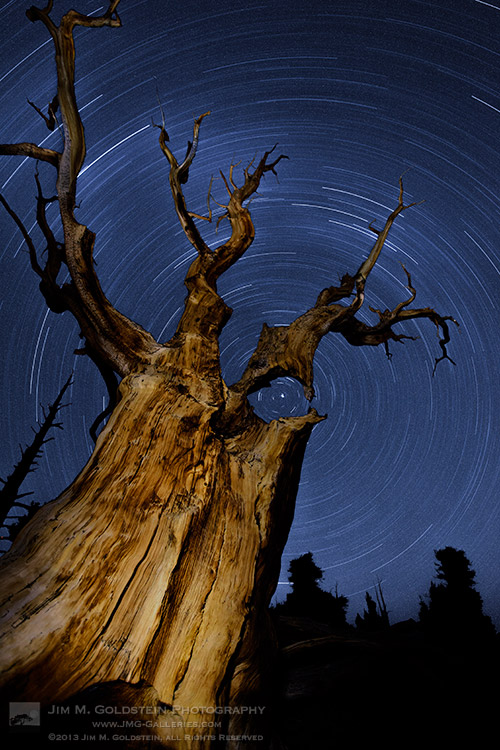
Atop the White Mountains, along the eastern border of California, lies the Ancient Bristlecone Pine Forest. This area is known as the home of the worlds oldest trees including the oldest tree, Methuselah, whose age is 4,750 years.  The last time I took the time to visit this remote area I was a dedicated film shooter. On a recent visit I took advantage of the latest DSLR technology to photograph astro-landscapes while still using old film techniques, namely conducting single long exposures (not multiple image stacking). Cold weather on the order of 10-20 degrees Fahrenheit aided in keeping my camera sensor cold enough to avoid any amplifier glow or amp glow, noise caused by the circuitry heating up under extended exposures). Interestingly I found out that for similar long exposures the Canon 5D Mark II did better than the Canon 5D Mark III. The Canon 5D Mark III suffered notable amp glow while the 5D Mark II had none. Results I found quite surprising.

Photo Details

Canon 5D Mark II, Canon 16-35mm f/2.8 at 16mm, f/22, ISO 800, 91 minutes

Foreground painted with my headlamp

Copyright Jim M. Goldstein, All Rights Reserved

The Ancients – Bristlecone Pine Forest, California

The post The Ancients – Bristlecone Pine Forest, California appeared first on JMG-Galleries – Landscape, Nature & Travel Photography.


Related Stories

  • The Ancients – Bristlecone Pine Forest, California – Enclosure
  • Sky Rock Under the Stars
  • Sky Rock Under the Stars – Enclosure
Feed Ads by FeedBlitz
powered by ad choices


JMG-Galleries

 
Comments Off on The Ancients – Bristlecone Pine Forest, California

Posted in Equipment


28. Oktober 2013

29 Oct

Ein Beitrag von: Felix Pacholleck

Darkroom Print © Felix Pacholleck


kwerfeldein – Fotografie Magazin

 
Comments Off on 28. Oktober 2013

Posted in Equipment


Olympus Stylus 1 puts high-end superzoom features into OM-D body

29 Oct

stylus1_front_cap_open.png

Olympus has thrown its hat into the premium superzoom ring with the Stylus 1. It combines a larger-than-average 1/1.7″-type BSI-CMOS sensor with a 28-300mm equivalent, F2.8 zoom lens, high resolution EVF, ‘hybrid’ control ring, and Wi-Fi – and packs it all into a compact body that strongly resembles the OM-D EM-5. Other notable features include a built-in ND filter, tilting touchscreen LCD, in-camera Raw processing, and 1080p movie recording.

News: Digital Photography Review (dpreview.com)

 
Comments Off on Olympus Stylus 1 puts high-end superzoom features into OM-D body

Posted in Uncategorized


Hands-on with the Olympus Stylus 1

29 Oct

stylus1_4.jpg

The Stylus 1 is Olympus’s latest high-end compact camera. With ‘mini-DSLR’ styling and a constant-aperture F2.8 28-300mm (equivalent) zoom lens, the 12MP Stylus 1 has a lot to offer the amateur and enthusiast photographer. While our Seattle and London teams were busy preparing a detailed preview, editor Barnaby Britton got his hands on the new model at last week’s Photo Plus Expo show in New York. Click through for a gallery of hands-on pictures and his initial impressions. 

News: Digital Photography Review (dpreview.com)

 
Comments Off on Hands-on with the Olympus Stylus 1

Posted in Uncategorized


Super zoom? Olympus Stylus 1 First Impressions Review

29 Oct

stylus1-editorial.jpg

Up until recently, the only ‘real’ premium superzoom camera was the Panasonic DMC-FZ200. Two weeks ago Sony made a big splash with their pricey Cyber-shot RX10, which features a 1″-type sensor. The Olympus Stylus 1 slots in nicely somewhere between the two, offering a 1/1.7″-type sensor and constant F2.8, 28-300mm equivalent lens in an OM-D-style body. If that sounds appealing, then follow the link to read our First Impressions Review of the Stylus 1.

News: Digital Photography Review (dpreview.com)

 
Comments Off on Super zoom? Olympus Stylus 1 First Impressions Review

Posted in Uncategorized