Month: October 2013

  • Ricoh GR firmware version 2.03 now available

    ricohgr.png

    Ricoh has released firmware v2.03 for its GR enthusiast compact. The list of updated features includes support for Raw file transfer via Eye-Fi card, the ability to use 1/2500 sec shutter speed with maximum aperture and a 47mm-equivalent crop mode. Also new is a ‘Maximum Aperture Priority’ setting available in Program and Manual exposure modes. Click through for a link to download the latest firmware version.

    News: Digital Photography Review (dpreview.com)

  • Photo Magnetism: Super Simple Photo Magnets


    Extra photos for bloggers: 1, 2, 3

    Simple is the name of the game with these photo magnets.

    Using only a few ingredients you can turn small photos into awesome pieces of refrigerator art.

    They are fun to make, easy on the brain and cute as all get out. Once you make the first one you’ll want to start an assembly line of relaxation. A very productive assembly line of relaxation.

    Simple, short and sweet. Score!

    Make Super Simple Photo Magnets

    Why It’s Cool

    Sometimes it’s nice to have a project to do that doesn’t take much set up or clean up… AND that makes a super cute finished product!

    These photo magnets fit the easy bill and dazzle like special little gems showcasing your memories.

    Ingredients:

    • Photos
    • Scissors
    • A Quarter
    • A Pen
    • Glue that will adhere to glass and metal (we used “Liquid Fusion”)
    • Small circular magnets (.75 inch in size)
    • Clear glass circles – they look like large squished down marbles and are usually labelled “decorative fillers” at the craft store

    STEP 1: Ring Around the George Washington

    before

    Use a quarter to trace a circle around the part of your photo that you want to turn into a magnet.


    STEP 2: Cut a circle

    before

    Cut out the circle you just traced.

    Make sure you cut off the pen marks because those will be magnified if ya don’t get rid of them.

    STEP 3: A light layer of glue

    before

    Place glue on the flat side of a glass circle.

    Get a nice thin even layer on the entire back of the circle. A little goes a long way.

    STEP 4: Make it permanent

    before

    Place your circular photo face down in the glue.

    Hold the image down in the glue for 30 seconds to make sure the photo doesn’t drift around.

    STEP 5: Glue the magnet

    before

    Place a light layer of glue on one side of the magnet.

    Adhere the magnet to the back of the the photo you just glued down.

    Let the glue dry for a couple of hours, and you’re all set (cuz so is the glue)!

    Taking It Further

    • Place a set of the photo magnets in a mint tin for a sweet and simple little photo gift.
    • Words and phrases look cool under the glass circles…take photos of text you’d like to have magnified up on your fridge.
    • Cut all of your circles from the same photo. When they’re on the fridge they’ll be a tiny photo puzzle.

    Related posts:

    1. DIY Speech Bubble Photo Fridge Magnets Sticking your photos under refrigerator magnets is old hat. Making…
    2. The DIY CanFrame: Transform a Tin Can into a Simple Photo Frame in 15 Minutes Beautiful! Simple! Cylindrical! All the qualities you look for in…
    3. Magnetic Photo Rope: The Perfectly Simple Photo Frame That Isn’t a Photo Frame We’ll admit it: when we first saw this thing, we…


    Photojojo

  • Is the Apple iPhone 5s’ photo quality rotten or ripe?

    TS1600x1200~sample_galleries-6257125045-8226324209.jpg

    The camera on Apple’s iPhones are well-known for their excellent photo quality. The new iPhone 5s features a larger sensor, faster lens, and new ‘True Tone’ flash. Head on over to connect.dpreview.com to see if the improvements have made the iPhone 5s a top choice for mobile photographers.

    News: Digital Photography Review (dpreview.com)

  • The Fallen: 9000 Figures Hand-Drawn in the Sand for D-Day

    [ By WebUrbanist in Art & Installation & Sound. ]

    fallen beach art project

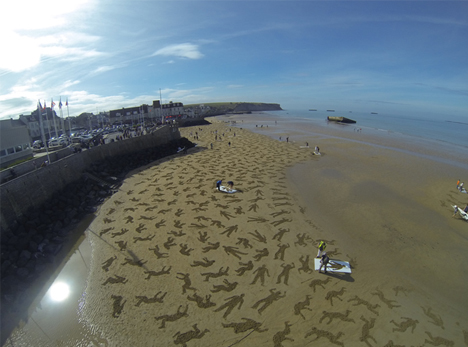
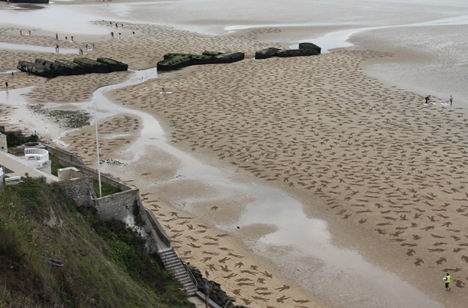
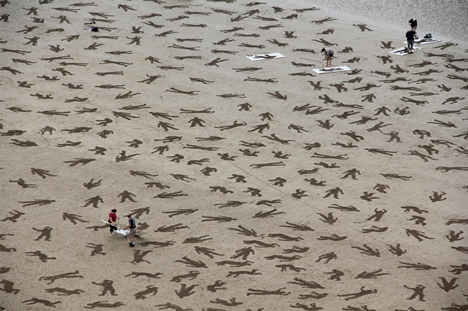
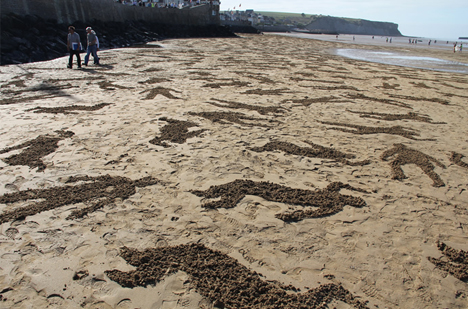
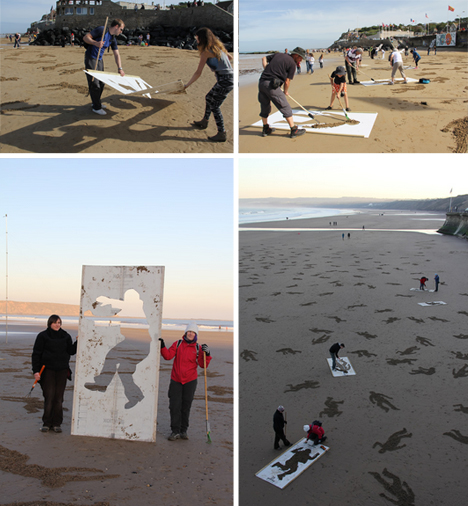
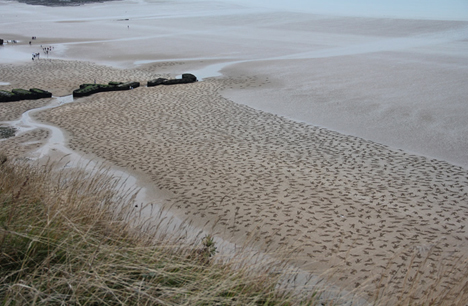
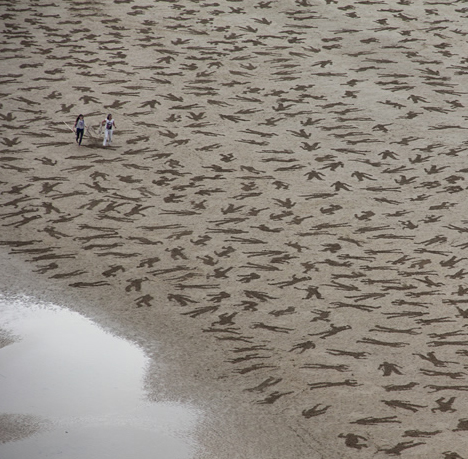
    To commemorate those fallen on D-Day in France – civilians, Axis and Allies alike – a pair of sand artists used stencils and solicited volunteers to create a highly temporary art installation, destined and designed to be washed away by the incoming tide.

    fallen beach peace day

    fallen art d day

    fallen d day detail

    On September 21st, the pair and their helpers, given stencils and quick instructions, had to work quickly to make The Fallen a reality. At one point, it looked like they would not have even assistance to finish before the water came in to erase their creation.

    fallen beach stencil volunteers

    Thankfully, hundreds of additional people turned out on top of the dozens who had agreed to help … together these, “people took stencils and rakes in hand and embarked on drawing the 9000.  The Peace Day project had finally begun in earnest represented by the people of the world.”

    fallen commemorative world war

    Jamie Wardley and Andy Moss (images by Sandinyoureye) developed the idea of The Fallen as a project for Peace Day well in advance. They created stencils in preparation, but were surprised by the people who turned up from around the world (drawn together, as it were) to commemorate those lost in World War II and otherwise.

    fallen art beach detail

    Among those participants in attendance, “Monika Kershaw was there remembering her son and his colleagues that died in Afganastan and even wrote in their names beside them. George, a veteran who was on the D-Day beaches was also there and embraced the importance of the project as demonstrating the result of conflict. There were a group from Israel that drew together, people from Germany, Finland and as far as Chili.”

    Next Page:
    The Fallen 9000 Figures Hand Drawn In The Sand For D Day

    Share on Facebook


    [ By WebUrbanist in Art & Installation & Sound. ]

    [ WebUrbanist | Archives | Galleries | Privacy | TOS ]


    WebUrbanist

  • Über Freiheit

    Ein Beitrag von: Fabian Rüther

    Die letzten 13 Monate arbeitete ich an einem Bildband über Freiheit. Das Ergebnis ist eine Sammlung aus sehr grafischen und surrealistischen Portraits von Menschen, die unterschiedlicher nicht sein könnten.

    Mit Menschen aus über 35 verschiedenen Nationen arbeitete ich zusammen. Darunter waren Länder wie Korea, Taiwan, China, Vietnam, Weißrussland, die Türkei, Saudi Arabien und viele mehr.

    Natürlich konnte ich nicht die Geschichte der Deutschen außen vorlassen und so fotografierte ich unter anderem die Politikerin Vera Lengsfeld, die von ihrem Mann während der Stasi-Zeit 30 Jahre lang bespitzelt wurde. Doch nicht nur politische Themen im Hinblick auf Freiheit sollten behandelt werden.

    Tu?rkei - Fatih © Fabian RütherWeißrussland - Zhenya © Fabian Rüther

    Wir reden hier von einem Wort, einem Begriff, der viel elementarer ist, als die Politik. Es geht vor allem um den Menschen und seine Geschichte.

    Die Welt hat nie eine gute Definition für das Wort „Freiheit“ gefunden.
    (Abraham Lincoln)

    Eine zutreffende Definition für Freiheit zu ermitteln, ist womöglich ebenso schwierig, wie das Rad neu zu erfinden. Ich kann und möchte somit auch nicht meine Interpretation von Freiheit aufdrücken. Würden Umfragen zur Hilfe gezogen, um zu definieren, was Freiheit eigentlich ist, würden die Antworten mehr Auskunft über den Probanden als Individuum geben, als Auskunft zur Definition.

    USA - Abigal © Fabian RütherGriechenland - Errikos © Fabian Rüther

    Im Ausschlussverfahren nähern wir uns der Lösung, denn wir haben durch unser kultur- und geschichtlich geprägtes Wertesystem erlernt, was Freiheit zumindest nicht sein kann: Gesetze, Zensuren, Diktaturen und Zwänge. Alles Begriffe, die wir konträr zur Freiheit assoziieren. Jedoch vergessen wir dabei, dass Gesetze (zwar nicht immer und überall) Stützen unserer Freiheit sind. Was passiert, wenn diese nicht vorhanden sind, können wir nahezu monatlich in den USA verfolgen …

    Doch wie wichtig ist uns Deutschen das Thema? Denn ist es nicht so, dass wir erst verstehen, wie elementar etwas ist, wenn es uns weggenommen wird? Zumindest ist das ein Eindruck, der mich während meiner Arbeit immer begleitet hat durch den einfachen Fakt, dass vor allem mehr Menschen aus Ländern wie China, der Türkei und Ostdeutschland sich für das Projekt gemeldet haben als Menschen aus der Schweiz oder aus Holland oder eben Westdeutschland. Dennoch, die Bereitschaft eine Message in die Welt zu tragen, war riesig und hat mich einfach überwältigt. Über 200 Anfragen, von denen es letztendlich 70 ins Buch geschafft haben.

    Ein Blick ins Buch

    Vietnam – Julia – Boat People.

    Vietnam - Julia © Fabian Rüther

    In der Folge des Vietnamkrieges 1970 in Südostasien versuchten über 1,6 Millionen Menschen aus Angst um das eigene Leben über den Seeweg ins Ausland zu fliehen. An Land war Vietnam ausschließlich von Staaten umgeben, die sich kaum als Zuflucht eigneten. Aus diesem Grund versuchten viele die Flucht über das Südchinesische Meer. Man nannte diese Menschen „Boat People“.

    Die meisten Boote trugen zwischen 150 und 600 Personen. Der Zustand der Boote war unzureichend, viele Menschen starben auf dem Seeweg durch Nahrungsmangel, Wasserknappheit und Krankheiten. Deshalb erreichten über 250.000 Menschen nicht die Küste und fanden ihren Tod im Meer.

    Viel Glück hatten dabei die Eltern von Julia Nhi. Sie gehörten zu den damaligen Bootsflüchtlingen und konnten durch ein Rettungsboot in Sicherheit gebracht werden. Mit der Rettung wurde nicht nur ihr eigenes Leben, sondern auch der Weg für Julia und ihre Geschwister gesichert.

    ~

    Deutschland – Falk – Wer ist mehr?

    Falk © Fabian Rüther

    Ich habe mich im Osten nicht wirklich unfrei gefühlt. Ich konnte aus meinem Klassenzimmer Häuser sehen, die in Westberlin standen. Dass ich dort nicht hingehen durfte, war genauso, wie die Tatsache, dass ich nicht so viel Schokolade essen durfte, wie ich gerne wollte und das meine Eltern immer recht haben, auch wenn ich glaube, dass sie manchmal nicht recht hatten. Man darf als Kind nicht alles und muss lernen mit Grenzen umzugehen.

    Das finde ich auch heute noch so und ich finde Leute lächerlich, die glauben, dass sie frei sind oder die glauben, dass sie freier sind als jemand anderes. Freiheit hat viel mit Selbstverständnis zu tun. Wenn in Amerika die Freiheit propagiert wurde, sich vom Tellerwäscher zum Millionär hocharbeiten zu können und es tatsächlich Leute gibt, denen das gelingt, so wurde in der DDR propagiert, sich als Arbeiter frei von Ausbeutung zu fühlen und es gibt tatsächlich Leute, die das empfunden haben.

    Der Spruch: „Ich bin Bergmann, wer ist mehr!“ Symbolisiert für mich dieses Selbstverständnis. Ich bin in diesem Land großgeworden. Es ist auch mein Selbstverständnis, auch wenn ich nicht aus einer Arbeiterfamilie stamme. Ich sehe Freiheit grundsätzlich kritisch und empfinde Freiheitskämpfer wie Männer, die mit allen Frauen schlafen wollen, alle Autos fahren wollen, alle Schokolade essen wollen und ihre Eltern nicht achten.

    ~

    USA – Abigal – Zu viel Freiheit?

    Abigal - Buchblick

    Das Massaker von Denver bei der Premiere von „The Dark Knight“ hat wieder einmal die Diskussion um schärfere Waffengesetze in Amerika angeheizt. Doch, wie nach jeder Tragödie die mit einem zu liberalen Waffengesetz ihren Anfang hat, verlief sich auch diese schnell im Sand.

    „Ein Sturmgewehr, zwei Glock Pistolen, ein Jagdgewehr, mehr als 6000 Kugeln. Erlaubte Shopping-Tour eines 24-jährigen Studenten“ betitelte die Bild Zeitung den Irrsinn. Die sogenannte liberale Gesetzgebung schafft die Grundlage, dass Bürger Waffen zum Selbstschutz besitzen dürfen – doch die Frage, die sich hier stellt ist eher, warum solche Möglichkeiten derartig ausgenutzt werden. Ein Zeichen dafür was geschehen kann, wenn dem Menschen zu viel Freiheit gelassen wird?

    Die blanken Zahlen sind eindeutig – die USA hatte 2010 mehr als 15-mal so viele Opfer durch Schusswaffendelikte im eigenen Land, als durch ihre Auslandseinsätze und Kriege zusammen:

    „Zahl der 2010 im Irak gefallenen
    oder verunglückten US-Soldaten: 60

    Zahl der 2010 in Afghanistan gefallenen
    oder verunglückten US-Soldaten: 499

    Zahl der 2010 in den USA durch
    Schusswaffen getöteten Menschen: 8775“

    Quelle: Band Eins – Thomas Schmelzer

    ~

    Dies sind nur drei von insgesamt 70 Beispielen aus dem Buch. Wer sich für mehr interessiert, bekommt auf Behance einen weiteren Einblick.


    kwerfeldein – Fotografie Magazin

  • Abandoned Intervention: Sliding Facade Reveals Decay

    [ By Steph in Abandoned Places & Architecture. ]

    Sliding Facade Abandoned Building 1

    A brand new brick facade slides off the front of a building in Kent, UK to reveal the derelict mess just beyond. Abandoned for 11 years, the four-story structure that stood as an eyesore along a residential street of this seaside town is now an intriguing work of art that makes a statement about what may lie behind the superficiality of seemingly perfect appearances.

    Sliding Facade Abandoned Building 3

    The crumbling top story remains exposed, giving a glimpse of what is inside only to those who can get high enough to see it. The Cliftonville district of the city, where the installation is located, was once affluent, but struggled as the whims of vacationers turned to other places. With increased crime and poverty came the decay of once-grand architecture.

    Sliding Facade Abandoned Building 4

    The Thanet District Council of Kent gave artist Alex Chinneck permission to create the installation, entitled ‘From The Knees of My Nose To The Belly Of My Toes’, which will stand for a year before the building is brought back into public use.

    Sliding Facade Abandoned Building 5

    Ten companies donated materials, manufacturing labor and professional surfaces to get the project off (or rather, on) the ground. “I was aware of this idea that people have a choice whether or not they go through the doors of an art gallery, and often they don’t because they feel intimidated, so I think public art is important,” Chinneck told The Daily Mail.

    Share on Facebook


    [ By Steph in Abandoned Places & Architecture. ]

    [ WebUrbanist | Archives | Galleries | Privacy | TOS ]


    WebUrbanist

  • 2. Oktober 2013

    Ein Beitrag von: Christian Beirle González

    kreise, frau, treppe, aufgang, rolltreppe, weiß, architektur, street, interaktion, Christian Beirle González, Interaction of Circles


    kwerfeldein – Fotografie Magazin

  • Make Lightroom Faster by Using DNG

    Using DNG in Lightroom

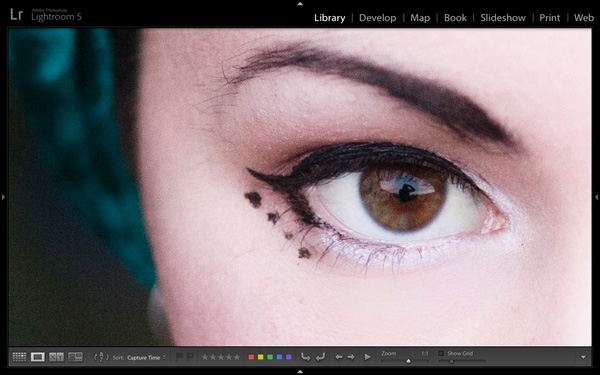
    A question about Lightroom that often arises is how to make it run faster. On my computer the biggest bottleneck comes when I’m looking at images in the Library module’s Loupe view or in the Develop module. Even images for which Lightroom has created 1:1 previews can take a few seconds to render properly. This may not sound much, but it’s annoying when flicking through images trying to decide which ones to process. It’s even more frustrating when zooming in 100% to check details which are important to me, such as that the eyes are in focus in portraits (above).

    Luckily, there’s a relatively easy fix – and it doesn’t involve upgrading your computer or adding RAM (although those things may help). You can put it into action without spending money, and you should see a benefit regardless of how low- or high-spec your computer is.

    Fast Load Data

    The key is to convert your Raw files to the DNG format. You may not like the sound of it (I’ll explore some of the pros and cons later on the article) but it really does help. Why? It’s all to do with something called Fast Load Data – a partially processed preview of the image that enables Lightroom to render previews faster than it can from a non-DNG Raw file or a DNG file without Fast Load Data.

    The net result of converting your Raw files to DNG and including Fast Load Data is that it enables Lightroom to rapidly display previews of your images. That means less time waiting and less frustration for you.

    Converting to DNG

    Using DNG in Lightroom

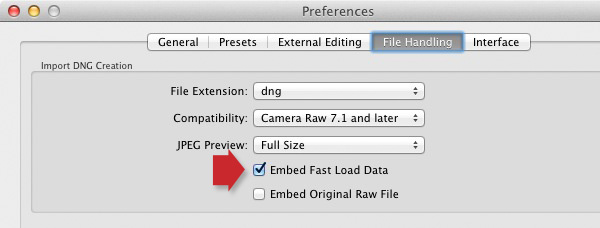
    The best time to convert your Raw files to DNG is when you import them from your camera’s memory card. To ensure you get the full benefit of using DNG, make sure you go to the File Handling tab in Preferences and tick the Embed Fast Load Data box (above). Do this before you convert any Raw files to DNG, otherwise you will miss out on the speed increase that DNG can give you.

    These are the key steps to follow during the import:

    Using DNG in Lightroom

    • Select the Copy as DNG option in the Import window (above). This tells Lightroom to copy the Raw files from the memory card to the specified folder on your hard drive, converting them to DNG as it does so.

    Using DNG in Lightroom

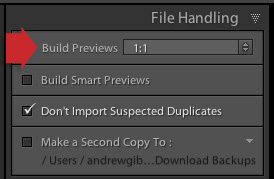
    • Set Build Previews to 1:1 in the File Handling panel (above).

    Using DNG in Lightroom

    • After the import, go to the Catalog panel and select Previous Import. Then go to Library > Validate DNG files. Lightroom checks the files you have just imported and converted to DNG to ensure they are not corrupted. Any corrupted files are placed in a Temporary Collection that appears in the Catalog panel. I’ve yet to see a corrupted DNG file, so I don’t think it happens often.

    Other pros and cons of DNG

    If you read around on the topic of DNG you will find that opinion varies widely as to whether it is good idea to convert your Raw files to the format.

    Note that some Leica and Hasselblad cameras use the DNG format already – so if you are lucky enough to own one of those then the discussion is irrelevant. There’s also at least one Pentax camera that gives you the option of using either DNG or Pentax’s own Raw format (.PEF). If you own one, selecting DNG saves you having to do it at the import stage (if you choose to use DNG).

    Bear in mind that camera generated DNG files don’t contain Fast Load Data – only DNG files created by Adobe software do so.

    First, the case against using DNG:

    • It takes longer to convert your Raw files to DNG than it does to simply copy them. This is true – but as long as you’re happy to go away and do something else while your computer gets on with it, it won’t be much trouble. I often leave mine running overnight, especially if I have a lot of images to import and convert.
    • Not all applications open DNG. If you ever use, or think you may use, your camera maker’s proprietary Raw conversion software (such as Canon’s Digital Photo Professional) you should probably stick with your camera’s native Raw format, as the majority of these programs don’t recognise DNG. Check the documentation if you are unsure.

    Using DNG in Lightroom

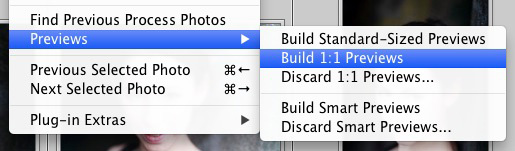
    Using DNG purely to increase Lightroom’s speed is little use if you don’t use 1:1 previews. By default Lightroom discards 1:1 previews after 30 days (you can change that under the File Handling tab in Catalog settings), so even if you tell Lightroom to create 1:1 previews when you import your images, they will eventually be deleted by Lightroom. Not sure if an image has a 1:1 preview? Just select the image (or images) and go to Library > Previews > Build 1:1 Previews (above). Lightroom will build 1:1 previews for any selected images that don’t currently have them.

    Now, some other benefits of DNG:

    • DNG files are smaller than other Raw formats. Converting your Raw files to DNG upon import reduces the amount of space they take up on your hard drive by up to 20 percent. That could be useful, especially for high volume shooters.
    • You may own a new camera with Raw files that aren’t recognised by your version of Lightroom or Adobe Camera Raw (ACR) if you are using Photoshop (not all readers will have upgraded to the latest versions). In this situation you can use Adobe’s free DNG Converter application to convert them to DNG. Adobe usually updates the DNG Converter to work with files from new cameras before Lightroom and ACR.
    • Embedded file verification. A DNG file contains a checksum that enables Lightroom to check if the original source data is corrupted. DNG is the only Raw file format that does so. It means that you can check your images after you have converted them to DNG to make sure there are no issues with corruption.

    Mastering Lightroom Book One: The Library Module

    Using DNG in Lightroom

    My latest ebook Mastering Lightroom Book One: The Library Module is a complete guide to using Lightroom’s Library module to import, organise and search your photo files. You’ll learn how to tame your growing photo collection using Collections and Collection Sets, and how to save time so you can spend more time in the Develop module processing your photos.

    Post originally from: Digital Photography Tips.

    Check out our more Photography Tips at Photography Tips for Beginners, Portrait Photography Tips and Wedding Photography Tips.

    Make Lightroom Faster by Using DNG


    Digital Photography School

  • 3 October, 2013 – Black Magic Pocket Cinema Camera Review

    Whereas the rate of change in the still camera industry seems to have reached something of a plateau, video is rife with developments. A small Australian company called Black Magic has just started shipping the Blackmagic Pocket Cinea Camera which is shaking up the video marketplace.

    I have just spent the past week working in the field with it and my review is now online. Also published today is an article titled The Making of Algonquin Autumn, which describes the process of making a short film with the BMPCC over this past weekend.


    "Having been to Antarctica with Michael and Kevin, I would say after having traveled the world and shot nearly my entire life as an exhibiting photographer,  it was one of my highlights in my life and I talk about it, all the time.  The images and experience of seeing something visionary and nearly extinct from the world, to see and experience the wildlife and scenery that does not fear humans is amazing.  The images I shot there won me two Smithsonian awards and nearly 18 other international awards". – Tim Wolcott

     Find Out More Now
    These Expeditions Will Sell Out Quickly. They Always Do

    …
    The Luminous Landscape – What’s New

  • New dPS Design Launching Soon

    The next 24 hours is an exciting time for the team at dPS as we’re about to show you something we’ve been busily working on for months – our brand new site design.

    The brief for our design and development team was huge – we wanted a fresh new look, a more readable design, a better mobile experience, easier ways for readers to share our content, better ways to find the best posts in the archives and more.

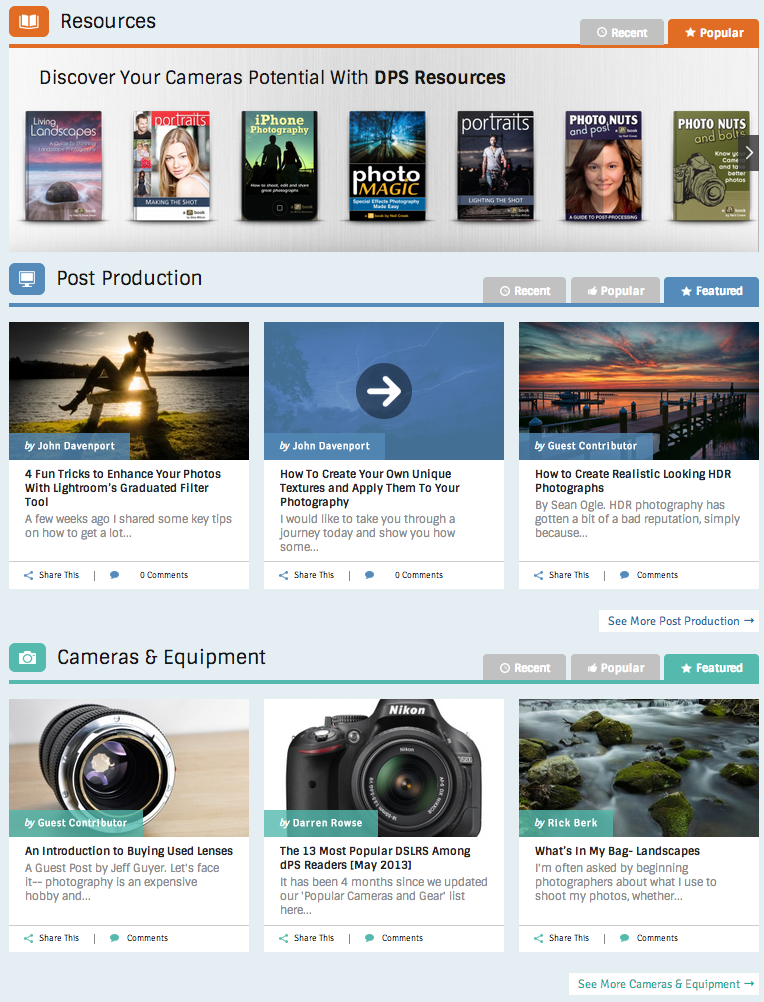
    Later today we’ll show you what our team came up with (there’s a sneak peak of part of our new front page below). But before we do dPS will be down for several hours for maintenance while we make that switch.

    new-dps

    dPS will be down for maintenance for several hours beginning at 6am on Thursday in Melbourne Australia (4pm US Eastern time and 9pm London time on Wednesday). Please bear with us during this period – while we hope it’ll be a smooth transition these things do take time and we’ll be sure to have a few little bugs to fix once the site goes live!

    While you’re waiting please check in with our Twitter, Facebook and Pinterest accounts for updates and photographic distractions!

    Post originally from: Digital Photography Tips.

    Check out our more Photography Tips at Photography Tips for Beginners, Portrait Photography Tips and Wedding Photography Tips.

    New dPS Design Launching Soon


    Digital Photography School