Month: October 2013

  • Nikon Coolpix P7800 Real-world Samples

    p7800thumb.jpg

    Nikon’s new Coolpix P7800 arrived in our Seattle office a few days ago and we’ve been doing our best to get as many sample images as possible on it, despite the unpredictable autumn weather. We’ve managed to create a small gallery of samples, taken in a range of different conditions to show off what the camera can do. There’s more on the way, but for now, check out our gallery of pictures from Nikon’s newest zoom compact flagship. 

    News: Digital Photography Review (dpreview.com)

  • Site update: two new forums

    shared:DPRlogo.png

    Just a quick update on a couple of new forums we’ve added over the weekend. The first is Feedback and Suggestions, a place for your questions, feedback and suggestions for the DPReview team (both technical and editorial). We hope this will be a more efficient and more effective method than the feedback form / email system we had previously, and will ensure we don’t miss bugs, suggestions and feedback that until now has been spread over dozens of forums. The second new forum is Photographic Science and Technology: a home for those wishing to discuss  advanced technical matters related to imaging science outside the brand-specific forums. It’s also intended to be the place for less technically-minded readers to pose questions of our community’s smartest eggheads.

    News: Digital Photography Review (dpreview.com)

  • Multi-Building Murals: Repainting a 100-Home Neighborhood

    [ By WebUrbanist in Art & Street Art & Graffiti. ]

    mural project neighborhood rio

    Previous efforts of Favela Painting transformed 34 buildings in Rio de Janeiro via huge rainbow-colored community mural, creating jobs and beautifying an area often feared by outsiders. This time they are raising funds on Kickstarter to head back to Brazil and paint an entire favela with over 100 hillside homes.

    mural town square

    mural project creators context

    The results of work by Haas&Hahn to date have been multifaceted, including international recognition for dilapidated and under-served neighborhoods and positive attention to these as destination landmarks rather than faceless slums. Using a spectrum of colors, each building receives a distinctive and unique design, yet a sense of unification is achieved across an area at the same time.

    mural art project

    mural finished color spectrum

    mural hillside from above

    mural city streets

    This ongoing project has a series of parallel goals – it both empowers and employs locals, and provides an opportunity to shore up and plaster shanty-style structures to make them more energy efficient and safer. “Visual beautification, job creation and positive attention boost pride and self esteem and help bridge social gaps in a creative and artful manner. The projects create a voice for the inhabitants, influence public opinion and media, and can help to change perception and remove stigma.”

    Next Page:
    Multi Building Murals Repainting A 100 Home Neighborhood

    Share on Facebook


    [ By WebUrbanist in Art & Street Art & Graffiti. ]

    [ WebUrbanist | Archives | Galleries | Privacy | TOS ]


    WebUrbanist

  • Leica announces Elmarit-S 45 mm f/2.8 ASPH wide-angle lens

    leica-45mm_90.png

    Leica has announced the Elmarit-S 45 mm f/2.8 ASPH lens for its medium format S system. With an angle of view equivalent to a 35mm lens on full frame, it offers a classic moderate wide-angle field of view. Like several of the other S lenses it’ll be available in two versions, either with or without an in-lens ‘Central Shutter’ (that allows flash sync at all shutter speeds). At the same time, Leica is offering firmware updates for its S, S2 and S2-P cameras to give ‘optimum functionality’ with the lens. The Elmarit-S 45 mm f/2.8 ASPH will be in dealers this month at a price of £4650, or £5500 for the CS model.

    News: Digital Photography Review (dpreview.com)

  • PopMask: Photomasks So Realistic It’s Spooky


    Don’t just steal your roommate’s jacket to go as them for Halloween. Transform yourself more convincingly. Steal their face!

    We’re not talking skin-suit levels of creep here…

    Thanks to the good folks at PopMask all it takes is a photo of their smiling face to get your very own roommate mask.

    Upload a photo of a face, any face, and they’ll send you a high quality mask.

    PopMask – Get the Face You’ve Always Wanted

    p.s. Hey San Francisco! Have you tried Google Shopping Express? It’s FREE same-day delivery and you can get Photojojo stuff.

    Related posts:

    1. How to Photograph a Ghost — A Spooky Photographic Trick (That’s Quite a Treat)! ~Have a cool photo product or site? Reach 270,000 photo…
    2. Glow-in-the-Dark Photograms: Turn Your Photos into Spooky Glow-in-the-Dark Wonders Extra photos for bloggers: 1, 2, 3 All Hallow’s Eve:…
    3. How to Turn a Flatbed Scanner into a Handheld Camera for Spooky Photos! Extra photos for bloggers: 1, 2, 3 Pumpkins, witches and…


    Photojojo

  • Fashion photography with the 41MP Nokia Lumia 1020

    lumia.jpg

    We all know that smartphones are being equipped with better and better cameras, but few of us would ever consider using one for ‘serious’ photography except in an emergency. Nokia’s ‘conversations’ blog is featuring an interesting project by its own ‘camera expert’, Ari Partinen and colleague Marko Saari, who wanted to see whether the new Nokia Lumia 1020, which features a 41 megapixel ‘PureView’ sensor, could hold its own in a studio fashion shoot. The results might surprise you. 

    News: Digital Photography Review (dpreview.com)

  • Farben und Licht

    Ein Beitrag von: Maria Plotnikova

    Ich wurde 1984 in Moskau geboren und habe dort Sprachwissenschaften an der Pädagogischen Universität studiert. Während des Studiums fing ich an, als Fotografin zu arbeiten, was mich zur Sportfotografie führte. 2006 bis 2010 arbeitete ich exklusiv für Moskaus Medien („Izvestia“, „Novaya Gazeta“, „TASS“, „Sport day by day“).

    2007 schloss ich den Fotojournalismus-Kurs an der Staatsuniversität Moskau ab. Das Ergebnis meiner Arbeit als Sportfotografin waren verschiedene Awards, die ich bei russischen Fotojournalismus-Wettbewerben gewann.

    Von der Sportfotografie zur Straßenfotografie

    2010 zogen mein Mann und ich nach Buenos Aires und anschließend nach Sao Paulo in Brasilien. In Lateinamerika angekommen, arbeitete ich zunächst als freie Künstlerin und interessierte mich sehr für das Genre der Straßenfotografie.

    Nachdem wir nach Südamerika gezogen waren, verliebte ich mich Hals über Kopf in die Straßenfotografie. Ich denke, dass es dafür mehrere Gründe gibt.

    2012, Riobamba, Ecuador © Maria Plotnikova

    Der wichtigste ist wohl, dass ich nun sehr viel freie Zeit habe. Ich fotografiere oft und weil das Genre kein kommerzielles ist, kann es nicht einfach jeder machen. Der zweite Grund ist die Verfügbarkeit des „Materials“, um die Straßenfotografie auszuüben. Du kannst einfach rausgehen und anfangen. Keine Barrieren.

    Die Emotion, die ich empfinde, wenn ich ein gutes Foto mache, kann man Glück nennen. Meine Hände zittern, der Puls steig an. Das ist schon sehr, sehr cool.

    Ich glaube, dass der eintretende Effekt, wenn man einen neuen Ort besucht, ebenfalls einen Einfluss auf meine Wahl hatte. Als wir nach Südamerika zogen, glaubte ich, komplett durchzudrehen. Diese Vielfältigkeit von Farben und Licht!

    Aktuell arbeite ich weiter selbstständig als Sportfotografin, jedoch ist die Straßenfotografie das Sujet, in dem ich mich als Künstlerin verwirklichen kann.

    2011, Buenos Aires, Argentina ©  Maria Plotnikova

    Inspiration
     
    Lange Zeit bevor ich ich mich für die Fotografie auf der Straße interessierte, war Gueorgui Pinkhassov mein Favorit unter den Fotografen. Ich bewundere seine Arbeit und betrachte ihn als meinen virtuellen Lehrer.

    Es ist nicht sonderlich originell, wenn ich zwei weitere Fotografen nenne, die mich sehr stark beeinflusst haben, ich möchte es aber trotzdem tun: Alex Webb und Harry Gruyaert.

    Dank diesen drei Fotografen habe ich gelernt, Licht und Farbe zu sehen, im entscheidenden Augenblick abzudrücken und mit Elementen im Bild zu spielen. Und Sebastião Salgado ist mein Favorit unter den Schwarzweiß-Fotografen.
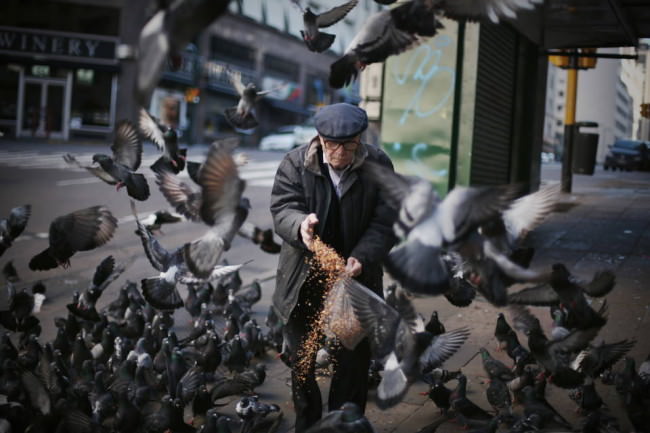
    2012, Buenos Aires, Argentina © Maria Plotnikova

    Ich bin jeden Tag auf Flickr und schaue dort meine Timeline durch, da ich vielen zeitgenössischen Straßenfotografen folge. Es inspiriert mich jeden Tag, die Arbeiten von verschiedenen Fotografen anzusehen.

    Unter den Straßenfotografen, denen ich folge, möchte ich die Arbeit folgender „Meister“ hervorheben: Jesse Marlow, Paul Russell und Shin Noguchi.

    Dazu noch ein paar russische Dokumentarfotografen, die auf meine Entwicklung einen starken Einfluss hatten: Vladimir Semin, Igor Gavrilov und Valery Schekoldin.
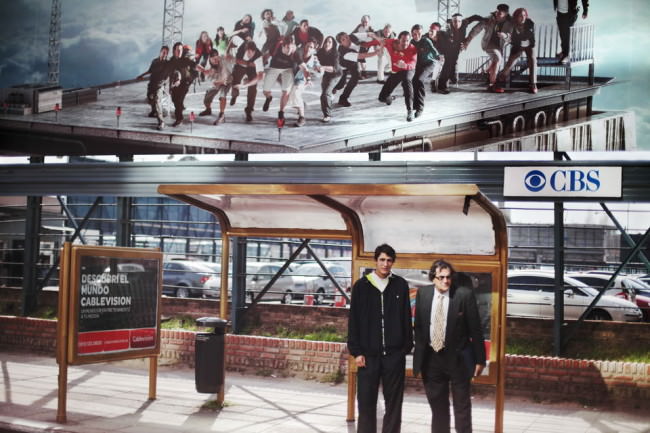
    2011, Buenos Aires, Argentina © Maria Plotnikova

    Den eigenen Stil finden

    Das Rezept dafür ist recht einfach. Es ist notwendig, viel zu fotografieren und eine automatische Reaktion auf unterschiedliche urbane Situationen zu entwickeln. Ich glaube, dass diese Reaktion bei jedem Fotografen anders ausfällt und die ganze Essenz des Stiles bildet.

    Der Moment, die Komposition, das Spiel von Licht und Schatten, der Gesichtsausdruck von Menschen und Tausende weitere Mikroelemente: All das provoziert einen elektrischen Impuls, der dazu führt, dass ich den Auslöser drücke.

    2013, Barretos, Brazil © Maria Plotnikova

    Es ist wie ein Reflex und die Verfeinerung dieses Reflexes ist das Upgrade meines Stiles in der Straßenfotografie. Ich sehe die Farben, das Licht und komplexe Kompositions-Elemente. Das Spiel mit bestimmten Elementen im Bild ist es, was mich interessiert.

    Um meinen eigenen Stil zu finden, ist es zusätzlich wichtig, die Arbeiten anderer Fotografen zu zu sehen. Hunderte und nochmals Hunderte Bilder pro Woche.

    * Dieser Artikel wurde von Martin Gommel aus dem Englischen übersetzt.


    kwerfeldein – Fotografie Magazin

  • Guerrilla Wayfinding: User-Powered Signs Aid Exploration

    [ By Steph in Gaming & Computing & Technology. ]

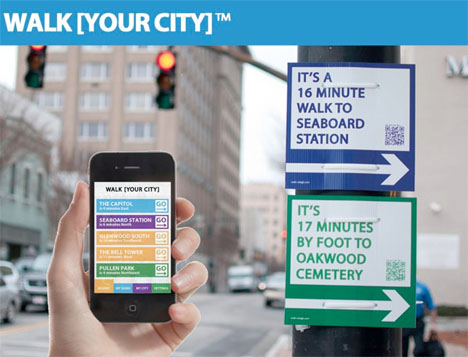
    Walk Your City 1

    What are you missing out on in your own city by sticking to your established routes each day, or driving instead of walking? Sometimes it’s easy to forget how close any number of interesting locations are to the places you visit on a regular basis, even by foot – and walking can be the best way to truly experience any given city. Walk [Your City] aims to encourage that kind of exploration with a combination of user-powered custom street signs and online tools.

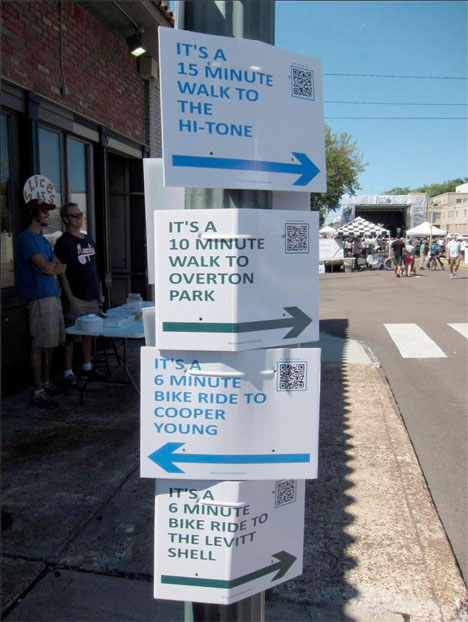
    Walk Your City 2

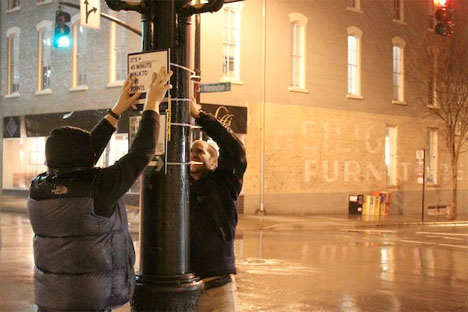
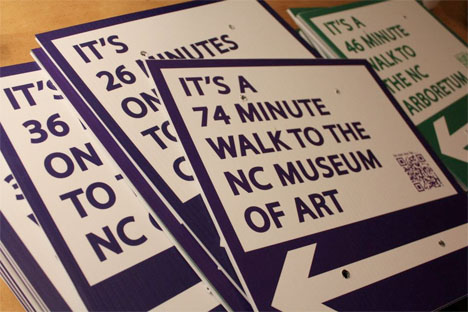
    The signs tell pedestrians how close certain attractions are by foot. Scan the QR code, and you’ll get an entire walking route that gives you the walk or cycle minutes to points of interest along your path. You can join in the process by ordering your own custom-made sign and putting it up yourself.

    Walk Your City 4

    The project started in North Carolina with Walk Raleigh, a guerrilla wayfinding operation that posted 27 signs at three major intersections throughout the city in January 2012. The signs weren’t legally sanctioned by the city, so they were taken down – but the project caught the attention of officials, who are now making Walk Raleigh a permanent feature.

    Walk Your City 3

    New York City has gotten behind the project officially, too. WalkNYC kicked off in June 2013 and aims to be “the citywide standard for pedestrian wayfinding.” Other cities around the nation and in Canada are following suit. If you’re interested in implementing Walk [Your City] in  your own community, you can simply go ahead and make your own signs at WalkYourCity.org.

    Share on Facebook


    [ By Steph in Gaming & Computing & Technology. ]

    [ WebUrbanist | Archives | Galleries | Privacy | TOS ]


    WebUrbanist

  • Photoshop Keyboard Shortcuts

    By Lori Peterson

    Recently I was helping a photographer who had just switched from Elements to Photoshop 6. She was looking to streamline her editing and asked about keyboard shortcuts. At that moment it dawned on me that not everyone knew about keyboard shortcuts, what the most commonly used ones are, and even why you should teach yourself to use them.

    Once you learn the keyboard shortcuts that you use most, you will be able to do them without really thinking. It will speed up what you are doing in Photoshop and enable you to move effortlessly through your editing processes. There are shortcuts for virtually everything you could want to do in Photoshop.

    The most used shortcut I use is one of the simplest. When you click X on your keyboard it switches your foreground and background colors. When you are working with masks this shortcut is invaluable. If you are using a mask and want to make sure that you aren’t going outside the area you want to be or want to clean it up more you can click on the mouse and hit your ALT button and that will show you where you are working and how it looks. Just click it again to go back.

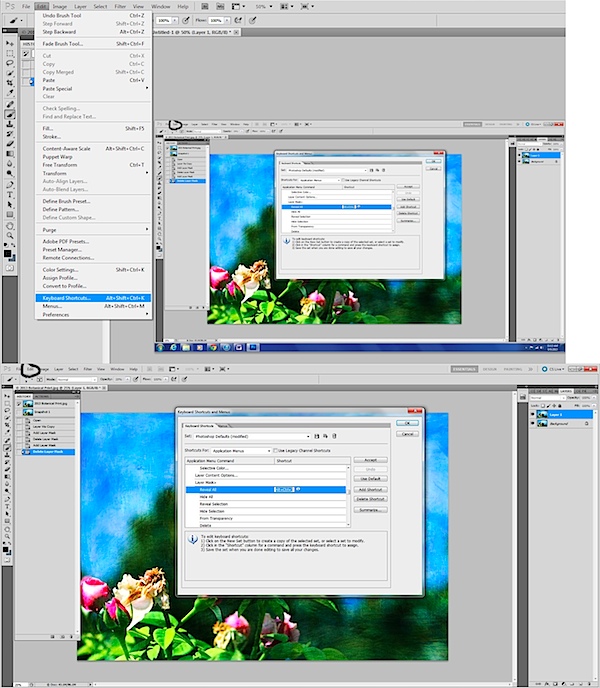
    Another common shortcut is for duplicating your layer and that is CTRL +J. This simply duplicates the layer you are working on. There is not a shortcut for adding a layer mask but you can easily create your own by going to Edit > Keyboard Shortcuts > Layer Mask > Reveal All and then assigning a shortcut for your layer masks to be added.

    layer mask.jpg

    If you hit the B on your keyboard it will take you to your brushes and then you can use your number pad to pick the opacity of the brush. If you hit the number 1 it makes your opacity 10%, if you hit 2 it makes it 20%, and so on.

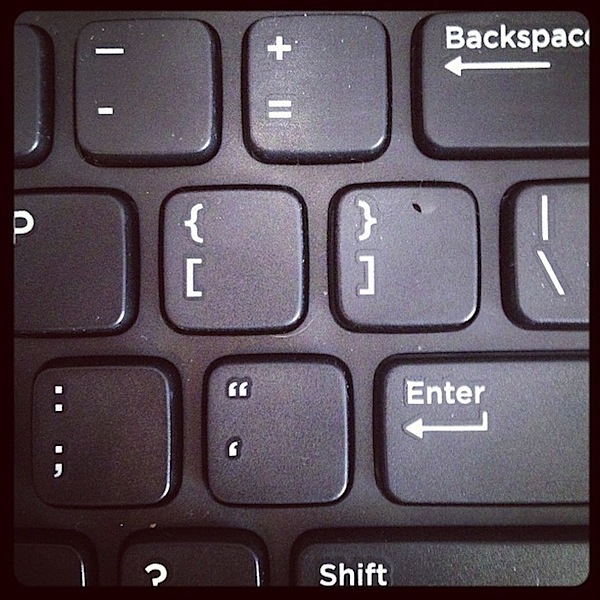
    When using brushes you sometimes need to fine tune them and make them larger and smaller and that’s when you use your brackets. The brackets are located just above your enter key. [ makes your brush smaller and ] makes your brush larger. You can toggle back and forth between them to keep changing the size of your brush. If you need to zoom in or out to look at what you are doing then you simply hit CTRL + to zoom in or CTRL – to zoom out.

    brackets.jpg

    If you make a mistake while editing you can use CTRL + Z to undo what you just did. If you need to go back multiple times then using CRTL +ALT + Z will help you undo multiple changes that you have done.

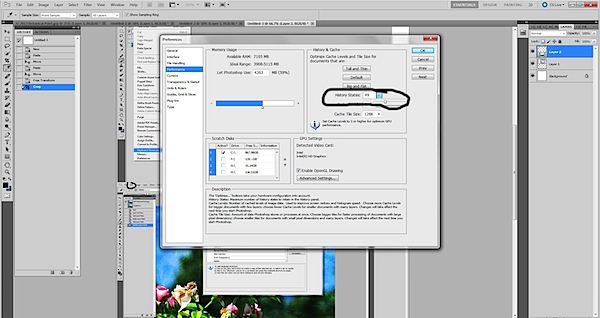
    I use my history folder and take snapshots of my work as I am doing things so that if I need to go back to a point before I did a certain part of an edit that it’s easier. Using your history folder and taking a snapshot is simple and an easy way to make sure that you can get back to the point where you were happy with your image. There is a default number of history states that you can revert back to. If you want to increase those numbers just go to Edit > Preferences > Performance and then change the number of history states to fit what you want. (This is not a shortcut, but oh so helpful!)

    image states.jpg

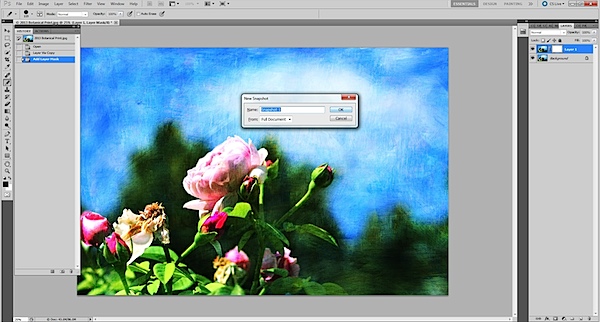
    You can easily just go to your history and take a snapshot by clicking the little camera icon. But if you hold down ALT and then click the camera icon you can name the snapshot of the image that you just took. That makes it easier than going back and having to click around to figure out which image was the one you liked. It’s like learning to change the names of your Layers as you are working. It sometimes seems pointless, but when you need to know which one to go to, it’s very important!

    alt and new snapshot.jpg

    Photoshop is not something you can learn in one sitting. There are so many pieces and components to it that it requires a lot more than that. Finding the pieces that you need and the ones that work for you are what counts. If you don’t do any 3D animation then the tools for that particular part of Photoshop are not going to be of any interest to you. Learn your basic shortcuts and take it from there. Don’t overwhelm yourself with trying to learn everything at once. You can find links to shortcuts from Adobe and from many other places. You can even post the ones you think you will use at your desk and practice using them. Once you add a few to your editing, then learn a few more. Keeping everything short and simple and easy is sometimes what works best.

    Lori Peterson is an award winning photographer based out of the St. Louis Metro Area. Her dynamic work ranges from creative portraits to very unique fine art photography. Lori’s work can be seen at www.loripetersonphotography.com and also on her blog at www.loripetersonphotographyblog.com. You can follow her on Facebook at https://www.facebook.com/LoriPetersonPhotography.

    Post originally from: Digital Photography Tips.

    Check out our more Photography Tips at Photography Tips for Beginners, Portrait Photography Tips and Wedding Photography Tips.

    Photoshop Keyboard Shortcuts


    Digital Photography School