Month: October 2013

  • Reflectors: Your Secret Weapon for Amazing Portrait Photography

    By: Oded Wagenstein

    There is no doubt that using natural light in portrait photography can get you the best results.

    However sometimes, as you all probably know, natural light does not do what he’s told. So here comes into action what I like to call my secret weapon in outdoor Portrait Photography.

    It is cheap, easy to carry and especially does not frightens my subjects, who themselves can be a little intimidating at times.

    Reflector

     
    It is just that! It reflects light. There are hundreds of different types of reflectors, which differ in sizes and colors (i.e. white, silver, gold, etc.). A reflector is usually a reflective fabric, stretched over a bendy ring, allowing it to fold, and easy to carry.

    With so many types of reflectors on the market, I cannot review them all. This mini-guide will focus on the main reflector I use for my work.

    12 ” in size, and costs less than a movie theatre ticket.

    I sometimes use other larger reflectors (mainly in cinematography productions), but this 12? reflector suits my needs in travel photography; mainly because it is small enough, allowing me to hold it with one hand and the camera with the other.

    To Fill up Shadows:

    We all love taking pictures at sunrise and sunset. But when dealing with the harsh mid-day light, a reflector is almost a must.

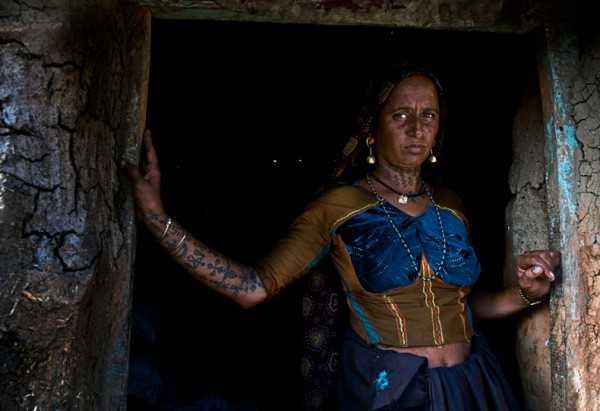
    Fstop of 2.8, shutter speed@ 1/100 and ISO 200

    Fstop of 2.8, shutter speed@ 1/100 and ISO 200

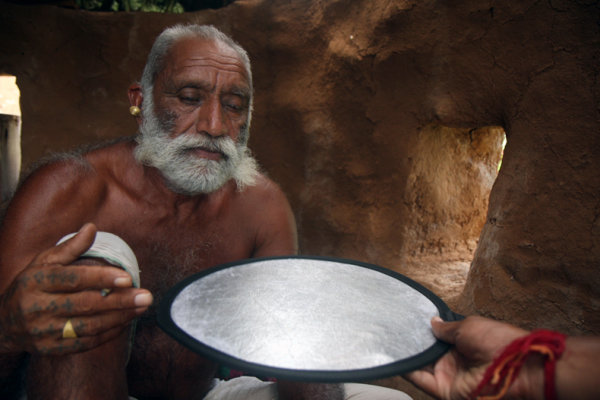
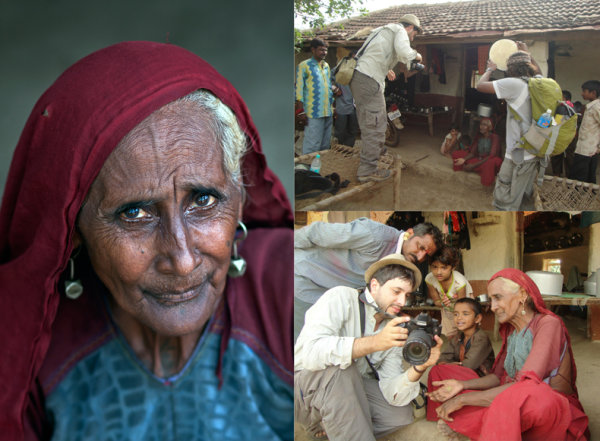
    In the above picture, taken in the western Indian Rabari tribe, for the National Geographic Traveler magazine (Israeli edition), our model was sitting in a dark mud house. He was sick; therefore it was not an option to move him outside.  On the left wall of the house, there was a small window (as can beautifully seen illuminating in the background), My trusty camera assistant Hardik Pandaya, held a silver colored reflector below the subject ‘s face in order to fill any shaded areas such as under the eyes.

    reflectors portraits 2

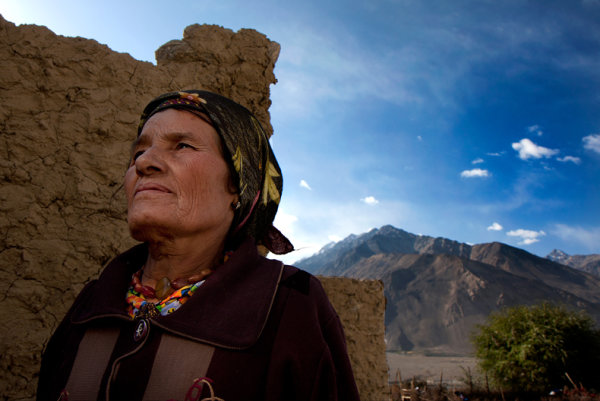
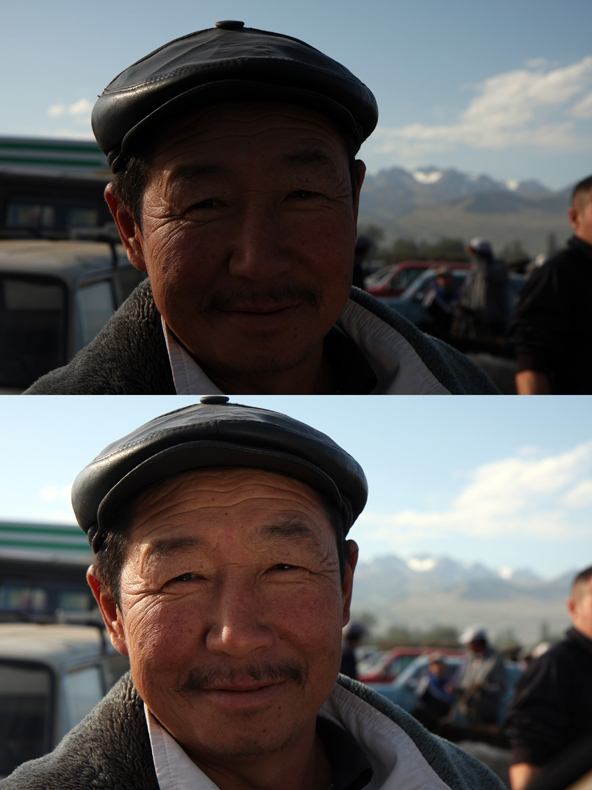
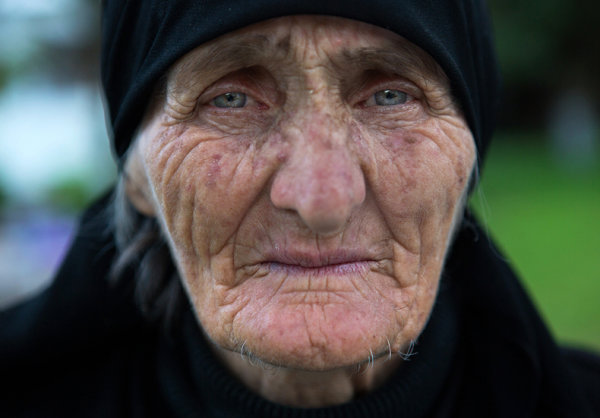
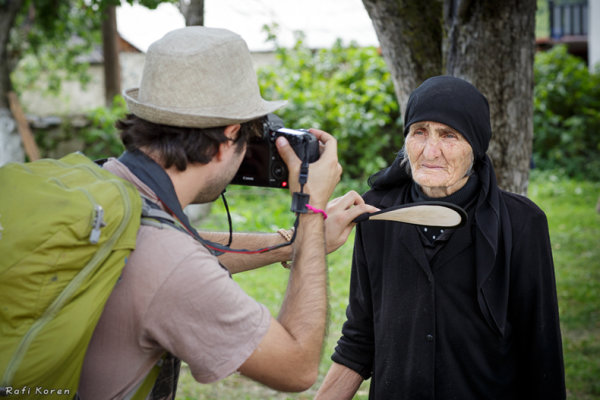
    The above picture was taken on the border of Afghanistan and Tajikistan. Please note that although the woman is standing in the shade and the background is bright, the woman is not a black silhouette and the background is not burned out.  I measured the light from the background (using spot metering). In such a situation, without using a reflector, the character will turn out completely black (silhouette) but with a reflector held on my left hand, I was able to light up her face.

    Fstop of 8, shutter speed@ 1/250 and ISO 100

    Fstop of 8, shutter speed@ 1/250 and ISO 100

    reflectors portraits 4

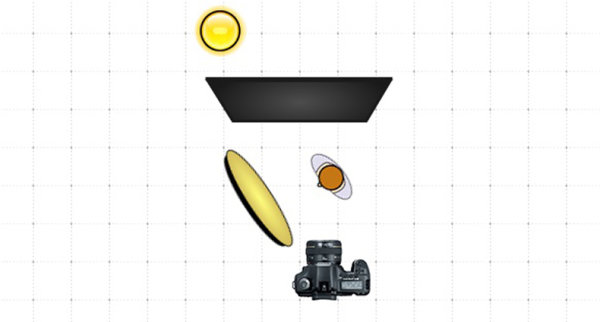
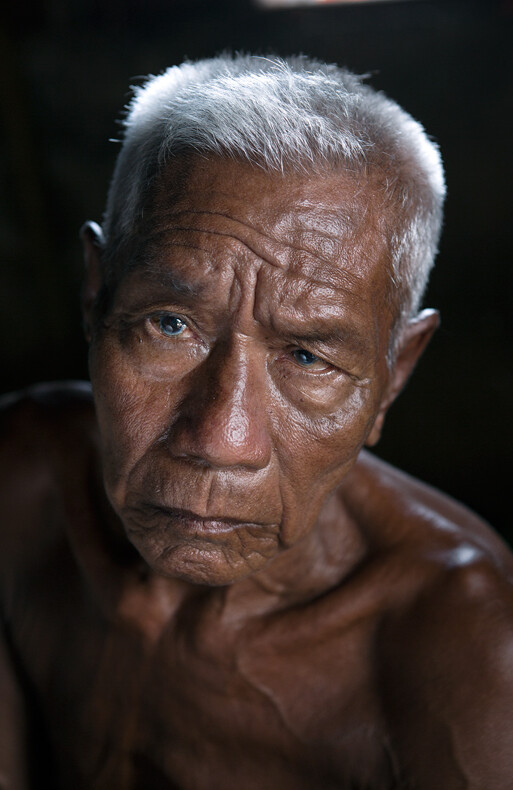
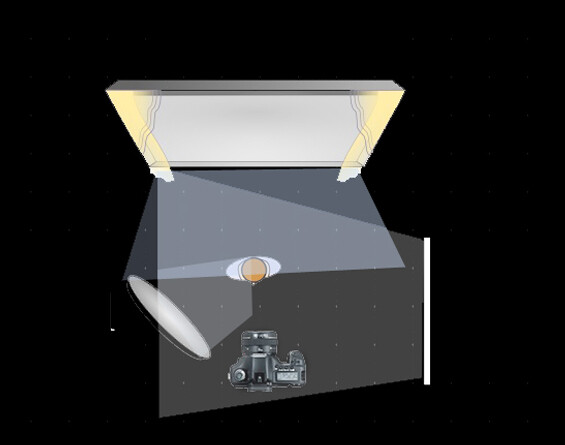
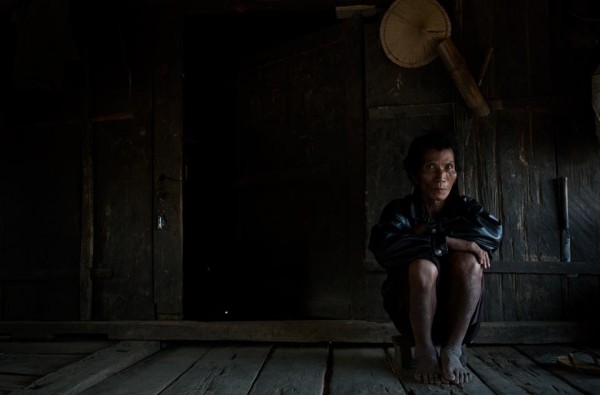
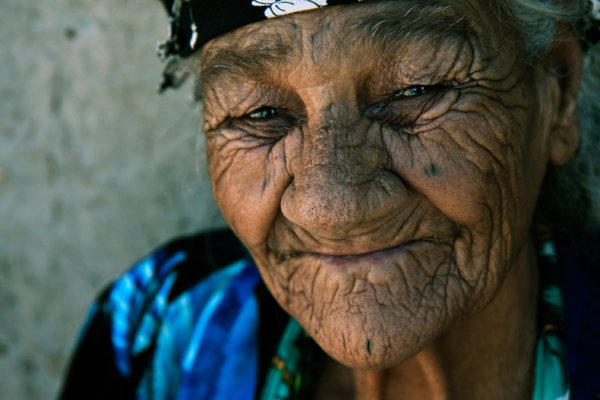
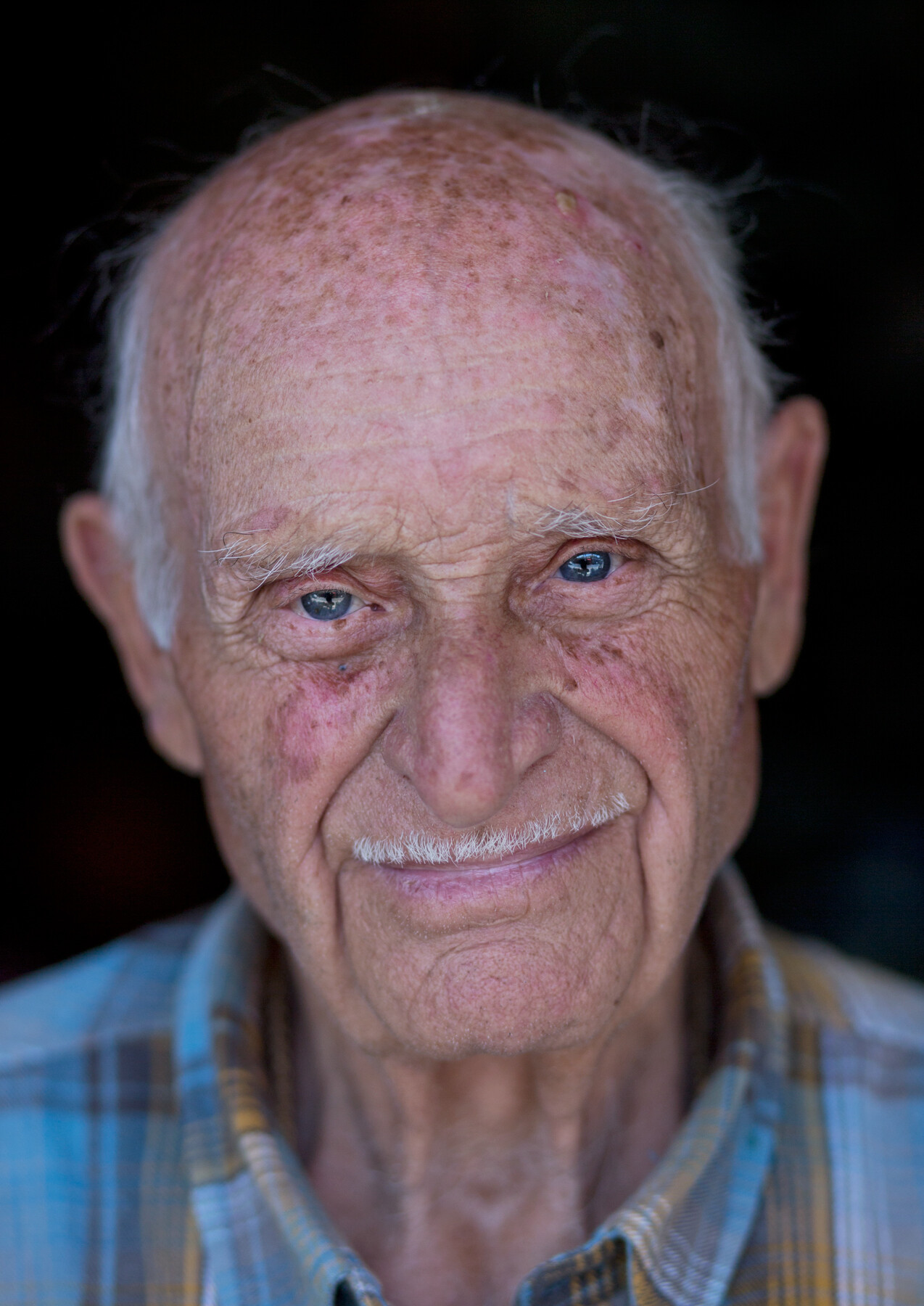
    Below is 80 years old Getho. A fisherman from the small community of Sea Gypsy living in, Thailand. This image is a little bit complex in terms of lighting, because there are three sources of lighting here. Just like in the studio, my main light source (key light) was the house door (right side of the frame). The light was coming from a 45 degree angle, creating this dramatic volume on Getho’s face (you can read more about “sculpturing” with 45 degrees light in this post here).

    In my left hand I held the small Silver color reflector, filling the shadows (fill light) on his face? and behind him was an open window for additional  light on his beautiful white hair (back light).

    Fstop of 4, shutter speed@ 1/100 and ISO 320

    Fstop of 4, shutter speed@ 1/100 and ISO 320

    refectors portraits 6

    Sometimes a reflector is the only option to shoot under strong sunlight, as you can see in this picture.

    reflectors portraits 7

    Choose the Right Color

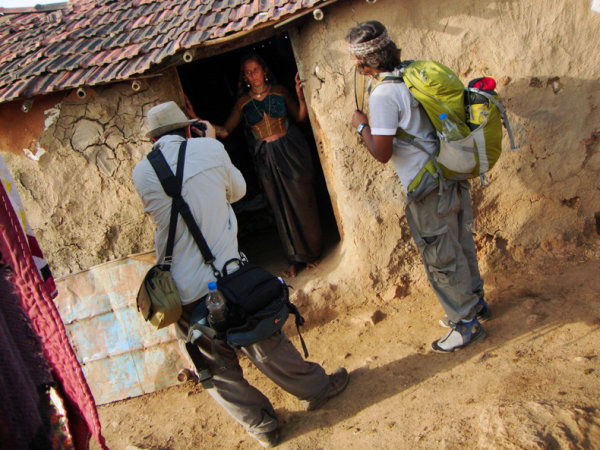
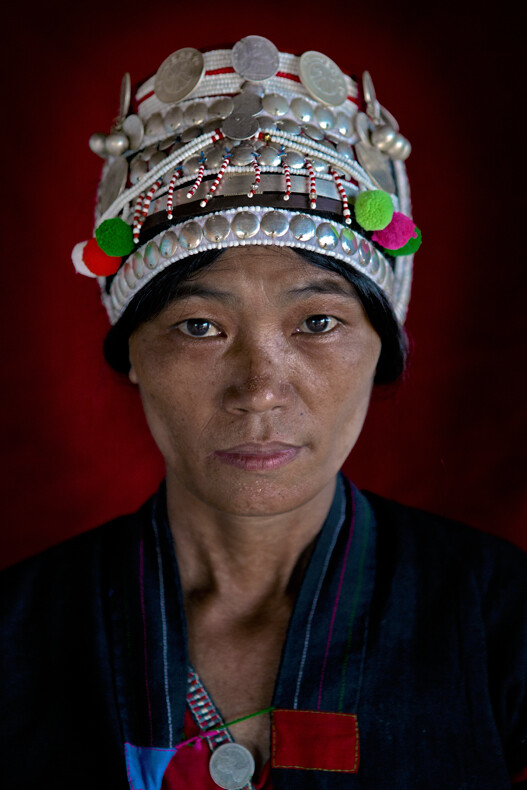
    Most reflectors come in multiple colors. In this picture, taken in Western India for the National Geographic Traveler magazine (Israeli Edition), I wanted to preserve the golden- brown color which was dominate in this scene. So I asked Hardik to hold the reflector on its golden side giving the woman’s face a golden glow.

    Fstop of 4.5, shutter speed@ 1/80 and ISO 100

    Fstop of 4.5, shutter speed@ 1/80 and ISO 100

    reflectors portraits 9

    Choosing the right distance

    It is important to keep in mind that the closer the light source is to the photographed subject, the stronger and less soften it will appear. Thus, a small reflector is easier to carry and hold; however it will be not as soft as a large reflector.

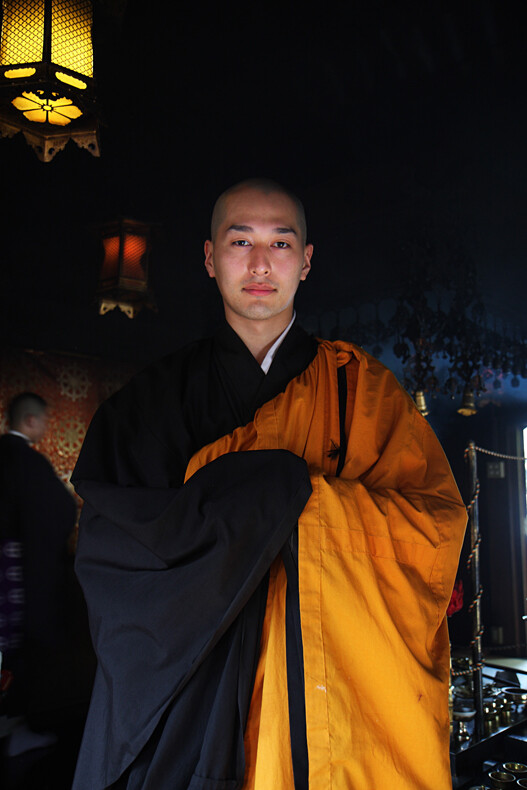
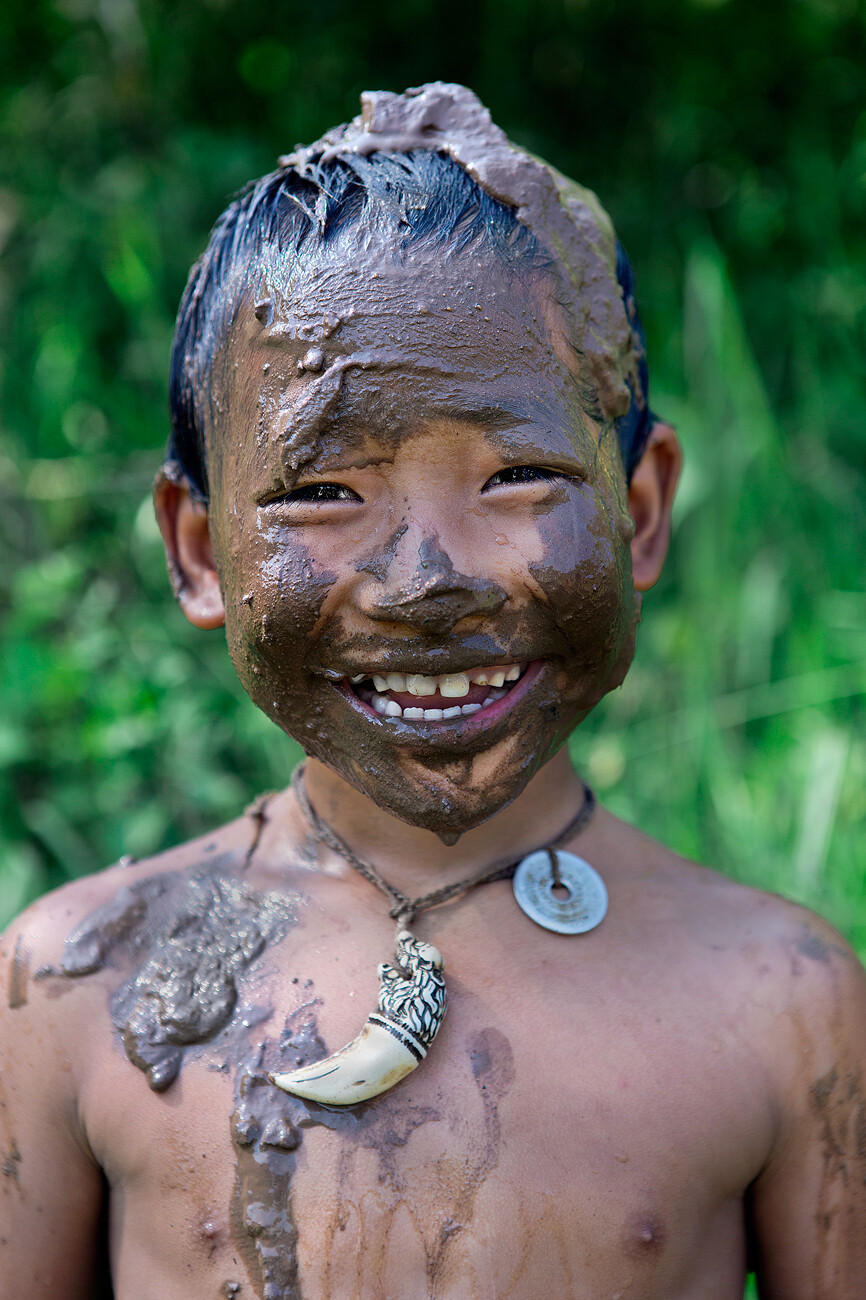
    A “catch light” is an interesting spark in the eyes of the subject, “pulling” the audience to look straight at them. There are lots of methods to create a catch light in the subject’s eyes. For example using a flash or a flashlight. However, as we are discussing on the usage of natural light, a reflector can become a great tool for creating a catch light. Just place the reflector under the person’s face.

    You can see some catch light examples here:

    Fstop of 3.5, shutter speed@ 1/640 and ISO 250

    Fstop of 3.5, shutter speed@ 1/640 and ISO 250

    reflectors portraits 11

    Fstop of 2.8, shutter speed@ 1/200 and ISO 100

    Fstop of 2.8, shutter speed@ 1/200 and ISO 100

    One of the most useful techniques, in order learn how to work with natural light in my opinion, is by observing the images of other photographers. Try to guess the direction of the light and the position and color of the reflector in the images below:

    Fstop of 2.8, shutter speed@ 1/320 and ISO 3200

    Fstop of 2.8, shutter speed@ 1/320 and ISO 3200

    Fstop of 4.5, shutter speed@ 1/160 and ISO 100

    Fstop of 4.5, shutter speed@ 1/160 and ISO 100

    Fstop of 3.5, shutter speed@ 1/320 and ISO 1000

    Fstop of 3.5, shutter speed@ 1/320 and ISO 1000

    Fstop of 2.8, shutter speed@ 1/15 and ISO 200

    Fstop of 2.8, shutter speed@ 1/15 and ISO 200

    Fstop of 3.5, shutter speed@ 1/320 and ISO 160

    Fstop of 3.5, shutter speed@ 1/320 and ISO 160

    Fstop of 2.5, shutter speed@ 1/1000 and ISO 250

    Fstop of 2.5, shutter speed@ 1/1000 and ISO 250

    The diagrams were created by http://www.lightingdiagrams.com

    Oded Wagenstein is a Travel photographer and writer. He is a regular contributor to the National Geographic Traveler magazine (Israeli Edition) and he is known for his intimate portraits from around the world. You can join his Portrait & Travel Photography Facebook page and continue to discuss on travel and people photography and get more amazing tips! –

    Post originally from: Digital Photography Tips.

    Check out our more Photography Tips at Photography Tips for Beginners, Portrait Photography Tips and Wedding Photography Tips.

    Reflectors: Your Secret Weapon for Amazing Portrait Photography

    The post Reflectors: Your Secret Weapon for Amazing Portrait Photography by Guest Contributor appeared first on Digital Photography School.


    Digital Photography School

  • An All-Nighter at The Vista: Greg Heisler’s 50 Portraits

    As cool as Gulf Photo Plus is in Dubai is every year, perhaps the very best part of the experience is the late-night conversation over beers at the nearby rooftop bar, the Vista. There, people leave the classes (and instructor/student roles) behind and simply talk photo until the wee hours of the morning.

    An assumption is made that all at the table are just photographers. So the f/stops and shutter speed stuff is dispensed with in favor of everything that is the tapestry of photography. The resulting conversations are long, in-depth, very Inside Baseball and often funny as hell.

    And a night at the Vista what Heisler's new book, 50 Portraits: Stories and Techniques from a Photographer's Photographer, feels like.

    Read more »
    Strobist

  • DxO Labs introduces Optics Pro 9 with ‘PRIME’ noise reduction

    opticspro9-news.png

    DxO Labs has released Optics Pro 9.0, a major update to its RAW conversion and image correction software. It offers improved highlight recovery, adds creative visual presets known as ‘Atmospheres’, and includes all-new ‘PRIME’ noise reduction technology that claims to offer significant image quality gains at high ISOs. The software is available to download now, with special a introductory price to November 20th. Click through for full details.  

    News: Digital Photography Review (dpreview.com)

  • Olympus UK teases new ‘premium compact’ in photo competition launch

    olycompact.jpg

    Olympus UK has teamed up with exhibtr.com to launch a completion for student photographers, and in the process teased an upcoming ‘premium compact’ as one of the prizes. The Student Photography Competition 2013/14 has a theme of ‘People & Portraits’, and the overall winner will receive an OM-D E-M5 12-50mm lens kit, while two runners-up will receive the soon-to-be-announced camera. UK-based photographers will be able to get an ‘exclusive preview’ of the new model at London’s Covent Garden from November 2nd to 9th. Click through for more details. 

    News: Digital Photography Review (dpreview.com)

  • Herbstzeit ist Waldzeit

    Ein Beitrag von: Kilian Schönberger

    Herbstzeit ist Waldzeit. Der Herbst ist vielleicht der beste Zeitpunkt des Jahres, um mit der Kamera in heimischen Wäldern auf Motivjagd zu gehen. Derzeit begegnen einem bei Besuchen im Wald ständig wechselnde visuelle Eindrücke: Das rasch umschlagende Wetter, morgendliche Nebelstimmungen und durch das bunte Blätterdach einfallendes Licht entführen den Besucher in eine verzauberte Welt.

    Es scheint so, als würde der Wald im Herbst ein bisschen mehr zu jenem verwunschenen Sehnsuchtsort werden, den wir aus den Märchen unserer Kindheitstage kennen. Ob „Hänsel und Gretel“ oder „Rotkäppchen“ – die Reihe der Märchen, die im Wald spielen, ist lang. Was ist da verlockender, als selbst mit der Kamera loszuziehen, um sich auf die Suche nach dem herbstlichen Zauber heimischer Waldgebiete zu begeben?

    Tatsächlich gibt es im Herbst kaum einen Tag, an dem sich der fotografische Blick in den Wald nicht lohnen würde: An sonnigen Tagen bietet die gelbrote Färbung des Herbstlaubes herrliche Lichtspiele und der sprichwörtliche „goldene Oktober“ lockt die Wanderer in Scharen in die Laubwälder deutscher Mittelgebirge.

    Aber gerade auch wenn das Wetter weniger einladend scheint, ist der Wald ein exzellentes Fotorevier. Traumhafte Bedingungen findet man so zum Beispiel nach dem Abklingen nächtlicher Regenfälle, wenn der Himmel zum Tagesanbruch hin aufklart.

    Die hohe Luftfeuchtigkeit und die niedriger werdenden Temperaturen führen dann oft zur Bildung von mächtigen Nebelbänken, die selbst alltäglichen Wirtschaftswald in mystisch anmutende Lichtstimmungen entrücken. Wenn der Blick auf den Wetterbericht im Oktober gute Bedingungen für den folgenden Morgen verspricht, erfasst mich bereits am Vorabend das Fotofieber.

    Herbstwald © Kilian Schönberger

    Auf morgendlicher Fotopirsch

    Zwei Stunden vor Sonnenaufgang klingelt der Wecker. Ein kurzer Blick aus dem Fenster bestätigt die erwartet guten Bedingungen: Die Regenfront des Vortrags ist weiter in Richtung Osteuropa abgezogen und unter klarem Himmel liegt der Nebel gleichmäßig verteilt in den Tälern der ostbayerischen Mittelgebirgslandschaft.

    Dank des späten Sonnenaufgangs sind die Schlafphasen vor fotografischen Morgenunternehmungen im Herbst zum Glück länger als im Sommer. Dennoch habe ich bereits am Vorabend Ausrüstung und Proviant bereitgelegt – die Kaffeemaschine muss nur noch eingeschaltet werden und im Rückraum des Autos liegt mein Mountainbike, um die Anfahrt auch bei unwegsamem Gelände verkürzen zu können.

    In Gedanken habe ich mir einige mögliche Waldpartien zurechtgelegt, die an diesem Morgen das fotografische Ziel sein könnten. Die endgültige Entscheidung fällt erst, nachdem ich vor Ort die Wetterbedingungen eingehend geprüft habe. Gemeinhin denkt man bei Landschaftsfotografie an eher gemächliches Fotografieren – der Herbst im Wald verlangt dahingehend eine vergleichsweise hohe Arbeitsgeschwindigkeit. Doch dazu später mehr.

    Zunächst fahre ich mit dem Auto einen Aussichtspunkt an, um mir im weiteren Umkreis ein Bild von der Wetterlage machen zu können. Die genaue Verteilung des Nebels ist relativ schwer vorherzusagen und dennoch ist er eine der wichtigsten Zutaten für beeindruckende herbstliche Waldbilder.

    Daher ist es gut, gegebenfalls vorbereitet zu sein und für bessere Bedingungen an eine andere Location ausweichen zu können. Auch die Nebelobergrenze sollte im Blick behalten werden, denn der Übergang von dichtem Nebel zu gleißendem Sonnenlicht verspricht in wenigen Stunden tolle Lichtstimmungen.

    Bayerischer Wald © Kilian Schönberger

    Nachdem ich mich für eine Location endgültig entschieden habe und nach mehreren Kilometern Wanderung mein Ziel erreiche, finde ich vor Ort auch tatsächlich eine perfekte herbstliche Morgenstimmung im Wald vor.

    Noch ist es relativ dunkel und der dichte Nebel hängt bläulich zwischen den schemenhaften Bäumen. Eine eigenartige Stille liegt über dem Wald und der angenehme Geruch von feuchtem Laub steigt mir in die Nase. Häufig begegnet man zu dieser Uhrzeit Wildtieren – mit Hirschen oder Rehen kommt man fast immer in Kontakt.

    Der Nebel scheint den Witterungsradius einzugrenzen und wenn sich Mensch und Tier dann auf kurze Distanz entdecken, sind beide wohl gleichermaßen erschrocken. Respekt habe ich vor Wildschweinrotten, die sich durch ihr Grunzen und den charakteristischen beißenden Geruch aber zum Glück frühzeitig bemerkbar machen.

    Und im Wald sind Bäume im Notfall auch nicht so weit weg. Mit einer Telelinse würde man also auch als Naturfotograf auf seine Kosten kommen, aber da ich oft längere Wege zu Fuß oder mit dem Rad vor mir habe, bin ich mit gewichtsreduzierter Ausrüstung unterwegs.

    Nachtwald - © Kilian Schönberger

    Wandererwald © Kilian Schönberger

    Bereits auf dem Hinweg habe ich schon die eine oder andere Aufnahme des bläulichem Nebels in der Dämmerung gemacht. 40 Minuten vor Sonnenaufgang erreiche ich schließlich mein eigentliches Ziel: Zwischen wie von Titanenhand durcheinander geworfenen Granitfelsen wachsen mächtige Buchen und erschaffen so ein beinahe surreales Szenario.

    Vermutlich sind sie aufgrund des unzugänglichen Terrains von der Kettensäge verschont geblieben. Eine dichtes, grün leuchtendes Moos überzieht Buchen und Felsen. Solch einen Platz würde man eher in den bemoosten Wäldern an der nördlichen amerikanischen Pazifikküste vermuten – aber auch alle deutschen Mittelgebirge bieten solche versteckten kleine Paradiese.

    Das Gute liegt manchmal näher als man denkt und man hat dadurch den Vorteil, dass man bei optimalen Bedingungen flexibel arbeiten kann.

    Wald © Kilian Schönberger

    Burgruine © Kilian Schönberger

    Bildkomposition im Wald

    Unter dem golden schimmernden Blätterdach hält sich noch dichter Nebel, während von weiter oben helleres Licht durchdringt. Das 24mm TSE ist mein Objektiv der Wahl – die Shiftoption ermöglicht nicht nur bei der Architekturfotografie, sondern auch im Wald Kompositionen ohne stürzende Linien, was bei der Bildgestaltung äußerst hilfreich ist.

    Überhaupt ist die oft chaotische Struktur von Wäldern eine fotografische Herausforderung. Der Nebel hilft dahingehend, dass er die räumliche Tiefe reduziert und einzelne vordergrundnahe Elemente hervorhebt. Dennoch ist es stets ein kleines Kunststück, überzeugende Kompositionen zu erkennen und festzuhalten.

    Man sollte versuchen, die Waldszene nicht räumlich, sondern auf eine zweidimensionale Ebene reduziert wahrzunehmen. Ein Stativ ist essentiell und die Blende sollte bei Beachtung der Hyperfokaldistanz möglichst klein gewählt werden.

    Um den Vordergrund zu gestalten, empfehle ich, kleine bis mittelgroße Naturobjekte einzubeziehen. Das kann ein Felsbrocken, ein Farn oder bei entsprechender Perspektive sogar ein Pilz sein. An der Bildgestaltung mit umgestürzten Bäumen scheitere ich selbst regelmäßig, da diese bei Weitwinkelaufnahmen zu einseitig dominanten, führenden Linien werden.

    Die fotografischen Protagonisten des mittleren Bereichs sind die Bäume. Eine zentrale Komposition bietet sich nur bei charakervollen, weit ausladenden Baumgestalten an – typisch hierfür sind knorrige Buchen, Bergahorne oder Eichen. Häufiger bietet sich ein Bildaufbau mit zwei ähnlich breiten Baumstämmen als Framing an. Dominante Waldriesen können auch nach der klassischen Drittelregel oder im goldenen Schnitt zur Strukturierung der Aufnahme beitragen.

    Für die Hintergrundgestaltung bieten sich Waldwege oder Bachläufe an, um dem Bild Tiefe und Blickführung zu geben. Wenn man nur mit Bäumen arbeitet, ist darauf zu achten, dass selbst winzige Standortveränderungen darüber entscheiden können, ob sich wichtige Bildelemente wie etwa markante Zweige überschneiden oder gegenseitig verdecken. Der LiveView-Modus der Kamera mit seiner Lupenfunktion hilft, dahingehend die Komposition zu perfektionieren.

    Herbst | Laub | Wald © Kilian Schönberger

    Naturwald © Kilian Schönberger

    Hier kommt die Sonne

    Plötzlich durchbricht das Licht der aufgehenden Sonne den Nebel. Wenn man ein Freund klassischer, lichtdurchfluteter Waldszenen ist, heißt es, jetzt schnell zu arbeiten: Denn wenn das Sonnenlicht erstmals auf den Nebel trifft, dann bleibt einem oft nur ein Zeifenster von fünf Minuten, um die Lichtstimmung festzuhalten, bevor der sich Nebel auflöst.

    Dennoch lohnt sich das beschleunigte Arbeiten: Die Sonnenstrahlen in Kombination mit Nebel wirken wie eine riesige Softbox mit wunderbar weichem Licht. Schnell muss die Entscheidung für optimale Komposition und Blickwinkel gefällt werden, denn das Licht ist selten für mehr als ein halbes Dutzend Auslösungen stabil.

    Weiter ist zu beachten, dass das gleißende Sonnenlicht den Kontrastumfang vor Ort stark erhöht. Bei dichtem Nebel reicht meist eine einzelne Aufnahme aus, um gut durchgezeichnete Tiefen und Lichter zu erhalten. Bei sonnendurchflutetem Nebel geraten gegenwärtige Kamerasensoren beim Kontrastumfang dagegen an ihre Grenzen.

    Mehrfachbelichtungen können der nötige Puffer sein, um in der Nachbearbeitung auch in Tiefen und Lichtern eine Detaildurchzeichnung zu erzielen. Der Einsatz von Verlaufsfiltern ist dagegen schwierig, da sich selten ein klar abgegrenzter Übergangsbereich zwischen Hell und Dunkel findet.

    Prinzipiell ist es gut, zu wissen, aus welcher Richtung das Licht der Herbstsonne zu erwarten ist. Oft ist der Wald noch von Nebel erfüllt, während die Baumkronen bereits vom Sonnenlicht erfasst werden: Durch Lichtungen und Öffnungen im Blätterdach beginnt der Nebel, im weichen Licht strahlend hell zu leuchten.

    Die Farben der umgebenden Blätter treten intensiv hervor und die hellen Lichtakzente optimieren die Bildgestaltung. Gerade auch im Hintergrund bieten sich solche lokalen Lichtkonzentrationen als die Bildtiefe vergrößerende Gestaltungselemente an.

    Sonne | Wald © Kilian Schönberger

    Auch das typische, konzentrische Spiel von Sonnenstrahlen im Nebel ist durch Lücken im Blätterdach am eindrucksvollsten. Dennoch sollte man versuchen, zum Beispiel einen Ast bei der Komposition vor die Sonne zu legen, um einerseits den Kontrastumfang zu verringern und andererseits ausgehend von der Silhouette des betreffenden Astes einen schönen Strahlenfall zu erzielen.

    Grundlegend ist es so, dass jene Bilder mit Sonneneinfall eher stimmungsvoll sind und solche mit reinem Nebel dagegen eher minimalistisch reduziert. Welchen Stil man bevorzugt, ist vermutlich eine persönliche Geschmacksfrage.
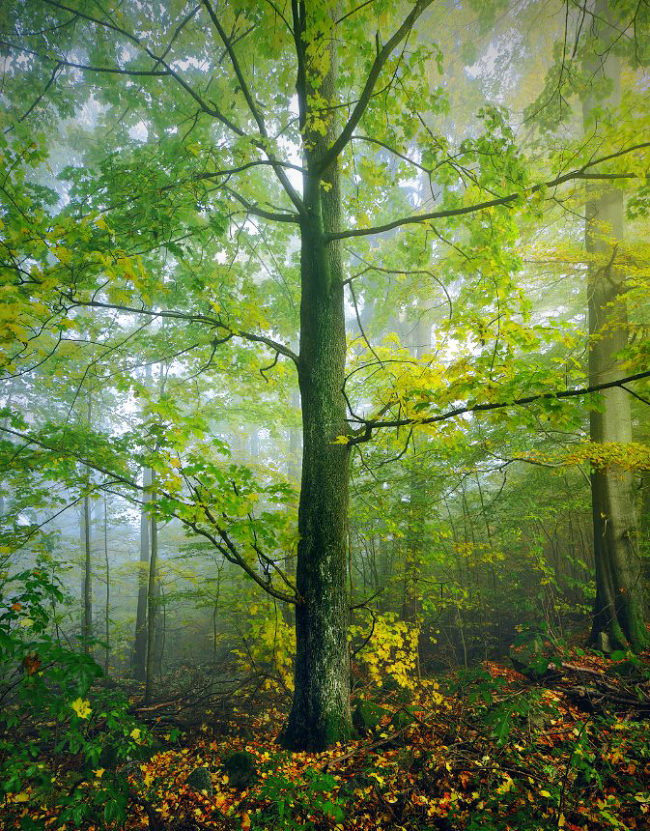
    Wald © Kilian Schönberger

    Die Nachbereitung

    Spätestens zwei Stunden nach Sonnenaufgang hat sich der Nebel meist komplett aufgelöst und das Licht fällt hart und kontrastreich auf den Waldboden. Es ist Zeit, sich auf den Heimweg zu machen. Zu Hause wartet zunächst eine Tasse heißer Tee, bei der die Ergebnisse des Morgens begutachtet werden.

    Ich denke, dass man versuchen sollte, einen eigenständigen Zugang zum Thema Wald in der Bildbearbeitung zu finden. Erst die persönliche Sichtweise auf das Motiv – von der Aufnahme bis hin zur Nachbearbeitung – erschafft meiner Meinung nach authentische Bilderwelten, die den Betrachter faszinieren und in ihren Bann ziehen können.

    Ich selbst verfolge bei meinen Waldbildern meist einen eher plakativen Look, mit dem ich versuche, mein subjektives Erleben der Stimmungen vor Ort widerzuspiegeln. Licht, Farben und Bildelemente sind als Grundzutaten bereits in der Aufnahme vorhanden. Durch Kontrast-, Farb- und Helligkeitsanpassungen verändere ich das Foto hingehend meiner Vorstellungen und Erinnerungen an die Lichtstimmung während der Aufnahme.

    Das Stichwort Luminanzmasken ist eine gute Grundlage, auf der man einen weitergehenden Bearbeitungsstil aufbauen kann. Da ich relativ komplex farbenfehlsichtig bin und neben der Unterscheidung von rot und grün auch Probleme mit magenta – grau und blau – violett habe, sind meine Aufnahmen immer eine Interpretation der Realität und niemals ein reines Naturdokument.

    Meinen Bildstil sehe ich irgendwo zwischen moderner Werbeästhetik und der Tradition deutscher romantischer Malerei im Stile Caspar David Friedrichs angeordnet. Dennoch sollte man immer auch den Blick über den Tellerrand des eigenen Bearbeitungstils wagen: Auch minimalistische Darstellungen mit reduzierten Farben bieten sich bei den von mir beschriebenen Bedingungen an.

    Allee © Kilian Schönberger

    Abschließend kann ich nur nochmals empfehlen, mit der Kamera am frühen Morgen ein naheliegendes Waldgebiet aufzusuchen: Neben tollen Fotomotiven wird man von einer faszinierenden Stille und Stimmung umgeben, die meditativ der hektischen Alltagswelt entgegenwirken.


    kwerfeldein – Fotografie Magazin

  • Busy Banksy: New Street Art Spans All 5 Boroughs of NYC

    [ By WebUrbanist in Art & Street Art & Graffiti. ]

    banksy ghetto for life

    Banksy’s artwork is all over the map this month, both literally and metaphorically, showing up in Manhattan, Brooklyn, Queens, The Bronx and Staten Island – some of it is even traveling in between. So far, his pieces ranged from mobile installations and mixed-material sculptures to old-fashioned graffiti tags and signature Banksy-style stencils. Here are some of the fresh highlights from his work over the past two weeks of his Better In Than Out residency work.

    banksy meatpacking district truck

    banksy mobile animal art

    The Sirens of the Lambs is a dark buffet of faux livestock that started its citywide tour aptly in the Meatpacking District. A slaughterhouse delivery truck packed with screaming animatronic stuffed animals, it was tagged by a fan with a tracking device, to which Banksy responded on his website: “Please note: If you’re the person who stuck a tracking device on the garden truck you’re now following a car service in Queens.”

    banksy painted car scene

    Murals and installations like the truck-and-car art above have been shown from the Upper West Side to the Lower East Side and beyond. “People ask why I want to have an exhibition in the streets, but have you been to an art gallery recently? They’re full,” writes Banksy on his blog, which has featured a flurry of updates as he has made his way daily to different parts of town.

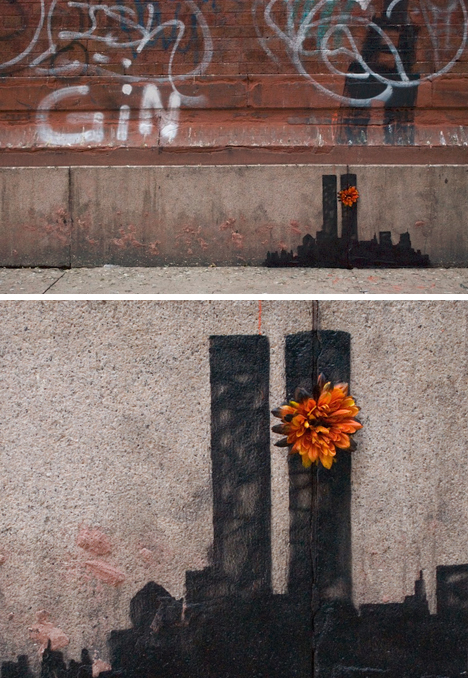
    banksy 911 tribute art

    Some days he comments or quips about briefly on his site, but others he stays silent on, letting them speak for themselves – particularly the more potentially-controversial works like his 911 tribute in Tribeca. A stencil and single flower says all he wants to say on the subject.

    banksy famous plato quote

    banksy profane quote lettering

    Meanwhile, about the above, spray-painted on a wall in Queens, he snarks: “Some people criticize me for using sources that are a bit low brow (this quote is from ‘Gladiator’) but you know what? ‘I’m just going to use that hostility to make me stronger, not weaker’ as Kelly Rowland said on the X Factor.”

    Next Page:
    Busy Banksy New Street Art Spans All 5 Boroughs Of Nyc

    Share on Facebook


    [ By WebUrbanist in Art & Street Art & Graffiti. ]

    [ WebUrbanist | Archives | Galleries | Privacy | TOS ]


    WebUrbanist

  • Making Sense of Lightroom’s Grid View

    Using Lightroom's Grid View

    In last week’s article about Lightroom you learnt how to use Collections and Smart Collections to organise your images. Today, I’m going to take a closer look at the Grid View (part of the Library module) and show you how to customise the display.

    If you’re not in Grid view, just press the ‘G’ key. It’s a keyboard shortcut that will take you to the Grid view from any part of Lightroom.

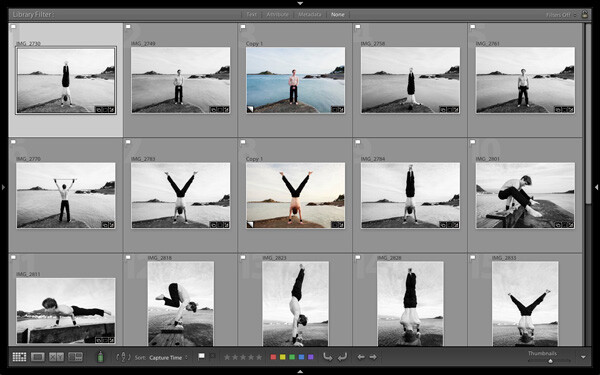
    The Grid View displays thumbnails of photos contained in the currently selected Folders, Collections or search results. Here, I used the Shift+Tab shortcut to remove the left-and right-hand panels, the filmstrip and the module picker button panels from the view:

    Using Lightroom's Grid View

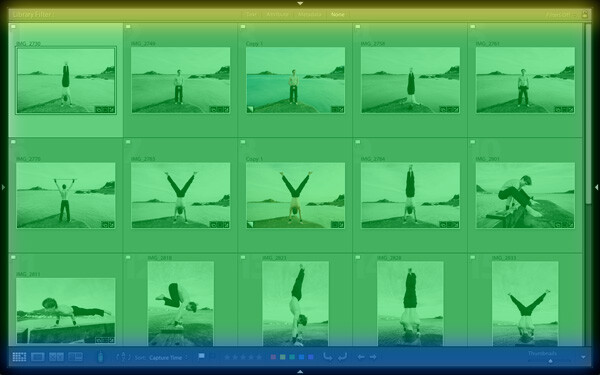
    These are the three main sections of the Grid View:

    Using Lightroom's Grid View

    The Filter bar: marked in yellow. Press the backward slash (‘\’) key to reveal the Filter bar if you don’t see it. You can use the same key to hide it.

    The Content window: marked in green. This is where Lightroom displays the image thumbnails.

    The Toolbar: marked in blue. Press ‘T’ to reveal it if you don’t see it. The same key also hides the Toolbar.

    The Toolbar

    There are several items on the Toolbar of immediate interest:

    Using Lightroom's Grid View

    These icons represent the four view modes of the Library module. From left to right they are Grid View, Loupe View, Compare View and Survey view. The Grid view icon is highlighted to indicate that it is the active view mode (I will look at the other view modes in future articles).

    Using Lightroom's Grid View

    The Thumbnails slider is on the right-hand side of the Toolbar. Use it to set the size of the thumbnails in the Content window.

    Using Lightroom's Grid View

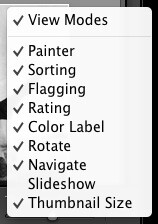
    Finally, if you click the white arrow on the very right of the Toolbar, you’ll see the above menu. Each menu item corresponds to an item on the Toolbar. The ticks indicate which items are displayed on the Toolbar. Click on any of the menu items to add or remove them.

    The Content window

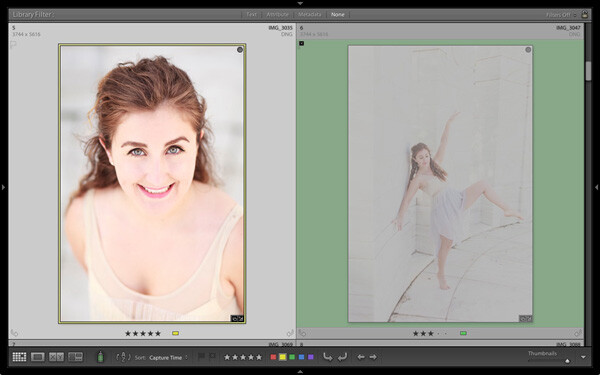
    The Content window is where Lightroom displays thumbnails. Each thumbnail, plus the grey border around it, is called a cell. There are two types of display: Compact cells and Expanded cells.

    Compact cells

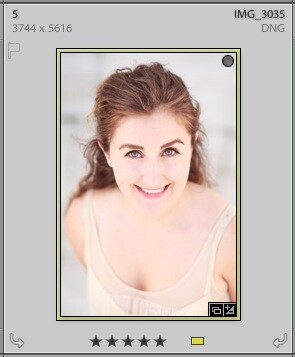
    This is what the Compact cell display looks like:

    Using Lightroom's Grid View

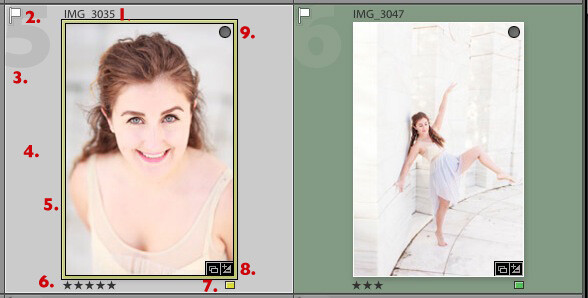
    I’ve numbered the important parts:

    1. The filename of the photo.

    2. The white flag indicates this photo has been flagged as a pick.

    3. The big number 5 shows this image is the fifth in the sequence in the currently selected folders or Collections.

    4. The light grey border means this photo is selected.

    5. The yellow border shows that the yellow colour label has been applied to this image. This photo is selected, so Lightroom displays a thin border. If the image is not selected, Lightroom applies the colour label to the entire border. That is why the thumbnail on the right is surrounded by a thick green border.

    6. These stars show that the image has a five star rating.

    7. The yellow square also indicates the colour label.

    8. There are two icons at the bottom right of the photo (you may see different icons depending on what you have done to the image). The icon on the left indicates that the photo has been added to at least one Collection. The icon on the right tells you that the photo has Develop adjustments.

    Tip: If you hover the mouse over an icon and keep it still, Lightroom will display a label telling you what the icon means. It appears after about two seconds.

    9. The grey circle in the top right indicates that the photo has been added to at least one Collection.

    Tip: To see what Collections the photo has been added to right-click on the thumbnail and go to the ‘Go to Collection’ option. Click on a Collection name to open that Collection in Grid View.

    Expanded cells

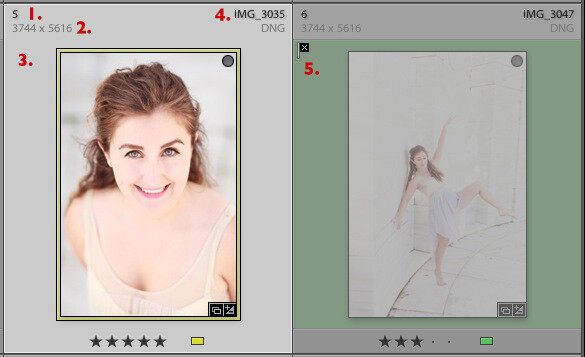
    Here is the Expanded cell display. The cells are larger than the Compact cells, and contain a little more information. I’ve marked the parts that are different:

    Using Lightroom's Grid View

    1. The size of the number indicating that this is the fifth photo in the currently selected folders or Collections has changed.

    2. These figures show the dimensions of the photo in pixels.

    3. There is no flag here, indicating that this photo hasn’t been flagged as a pick or flagged as a reject.

    4. The filename of the photo, with the file type (in this case, DNG) underneath.

    5. The black flag indicates that this photo has been flagged as a reject. Lightroom fades out the thumbnail so you can see it has been rejected.

    View Options

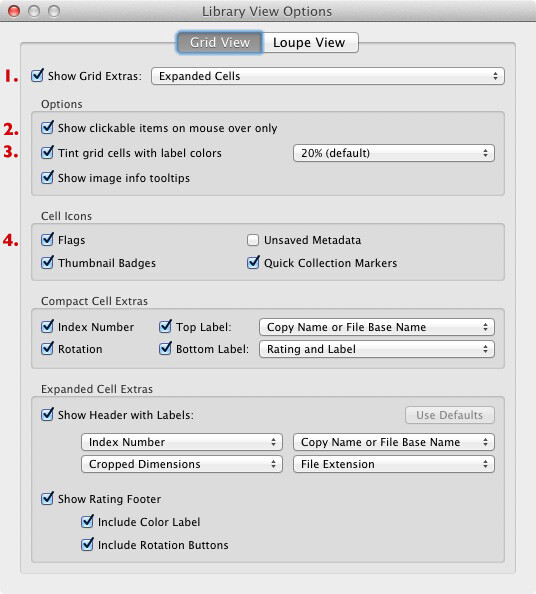
    Lightroom lets you customise the layout of the cells so the display shows as much or as little as you wish. Go to View > View options (or use the keyboard shortcuts PC: Ctrl+J, Mac: Cmd+J) to bring up the Library View Options window. Again, I’ve marked some of the interesting menu options:

    Using Lightroom's Grid View

    1. Show Grid Extras. This is where you chose between Compact Cells and Expanded Cells. Untick the Show Grid Extras box if you want to simplify your display. Doing so removes the information displayed around the thumbnails in Grid View.

    2. Show clickable items on mouseover only. If you untick this box every thumbnail is displayed with arrows in the bottom corners that you click to rotate the image, and a grey flag if the image is unflagged. With this box ticked, these icons are only displayed when you move the mouse over the image:

    Using Lightroom's Grid View

    3. If the colour labels annoy you, or you just don’t use them, untick this box to turn them off. The menu on the right lets you adjust the intensity of the colour tint.

    4. The rest of the View Options let you customise what icons and information are displayed alongside the thumbnails.

    Your thoughts

    How do you customise Lightroom? I’d be interested to hear your thoughts, whether they are about the Grid View or another part of Lightroom. Leave a note in the comments if you have anything to share.

    Mastering Lightroom Book One: The Library Module

    Using Lightroom's Grid View

    My latest ebook Mastering Lightroom Book One: The Library Module is a complete guide to using Lightroom’s Library module to import, organise and search your photo files. You’ll learn how to tame your growing photo collection using Collections and Collection Sets, and how to save time so you can spend more time in the Develop module processing your photos.

    Post originally from: Digital Photography Tips.

    Check out our more Photography Tips at Photography Tips for Beginners, Portrait Photography Tips and Wedding Photography Tips.

    Making Sense of Lightroom’s Grid View

    The post Making Sense of Lightroom’s Grid View by Andrew Gibson appeared first on Digital Photography School.


    Digital Photography School

  • Apple’s iPad Air and iPad mini feature Retina display

    features_hero.jpg

    At its hotly anticipated press event today in San Francisco, Apple announced two new iPads. The iPad Air is Apple’s thinnest yet, while the iPad mini with Retina display offers faster computing and a better display in Apple’s tiny tablet. See what else Apple had to share today on connect.dpreview.com.

    News: Digital Photography Review (dpreview.com)

  • Explore Everything: Epic Book Shows How to Hack Cities

    [ By WebUrbanist in Global & Urbex & Parkour. ]

    urban exploration guide book

    Combining harrowing first-hand experiences, vivid images and historical context, urban explorer and photographer Bradly L. Garrett takes his readers on a stunning in-depth tour through the hidden world of urban exploration and building infiltration. This trip passes through the sewers and subway tunnels of London, over bridges and skyscrapers of New York, and slip you in between derelict buildings and abandoned places around the world.

    urban crane tower climb

    Explore Everything: Place-Hacking the City (from Verso Books) is more accessible than a manifesto yet more revealing than a manual. In highly readable and engaging prose, it manages to combine personal storytelling and thoughtful reflection with factual urban histories and practical tips for exploring secret spaces.

    urban tunnel vertical view

    If you are looking for a coffee-table book of eye candy to flip through, this is not the one for you, but there are plenty of those already. Instead, this is a rarer sort of volume that goes far deeper, drawing on meticulous notes, handmade maps, diligent research and many years of direct experience.

    urban paris rooftop

    urban deserted building structure

    urban derelict building decay

    urban tunnel graffiti art

    urban subway tunnel

    Like something from a China Miéville or Neil Gaiman novel, this author reveals that there truly is a layer of fantastic mystery behind, between or below the surfaces of any city. With stories of personal adventures, from climbing skyscrapers under construction to descending into derelict subway tunnels, Garrett conveys the hot sweat and cold fear experienced in his travels. At the same time, he manages to provide commentary that goes beyond the level of an explorer and into the realm of researcher and philosopher. His combination of first-hand and historical knowledge make this a book worth reading.

    urban abandoned interior

    urban detroit interior volume

    The heavy volume may have travel anecdotes and photographs, but it is also not lacking in powerful insights and revealing opinions. Discussing Detroit, Garrett reveals the complexities of a city that is known for its abandonments but is simultaneously in many ways and places a “light, bright, vibrant, beautiful place” that is “full of life, events, politically active citizens, great places to go out” as well as “a plethora of sites ripe for infiltration.” He notes that “as images of decay had become culturally ubiqituitous in this city” many photographers have focused too hard on “sharp, vibrant, long-exposure photography” that produces stylized and idealized imagery that “look uncomfortably similar to traditional photos of colonial explorers, evoking images of white men sticking flags in the soil.” Detroiters sick of their city being seen as a one-sided wasteland will appreciate the author’s even-handed and open-minded approach to and appreciation of their home – and this is just one of many such examples.

    Next Page:
    Explore Everything Epic Book Shows How To Hack Cities

    Share on Facebook


    [ By WebUrbanist in Global & Urbex & Parkour. ]

    [ WebUrbanist | Archives | Galleries | Privacy | TOS ]


    WebUrbanist