RSS
 

Archive for August, 2013

Beautifully Simple: School Bus Turned Minimal Mobile Home

26 Aug

[ By WebUrbanist in Technology & Vehicles & Mods. ]

bus home finished project

You could make a strong case for this vehicle being barely recognizable as such. The dimensions, fenestration and over spatial configuration give good clues that this space may have once been a school bus, but the finishes, furnishings and built-ins go above and beyond bare-bones adaptive reuse.

bus converted exterior retrofit

Architecture student Hank Butitta was sick of drafting imaginary buildings in studio courses destined never to be built, and sought (with help from his younger brother Vince) to steer his education in a more hands-on direction.

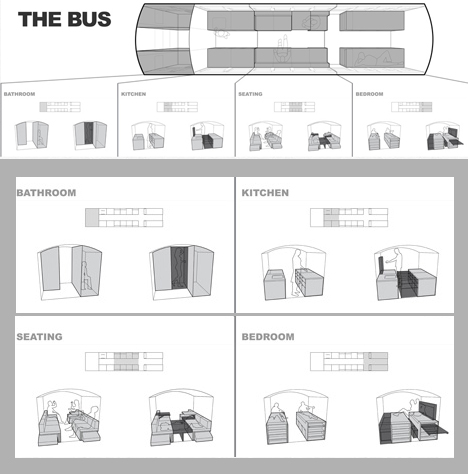
bus conversion program diagram

For his final thesis project at the University of Minnesota, Hank bought a bus for $ 3,000, added $ 6,000 to improve it, and spent fifteen weeks creating this amazing multifunctional mobile home.

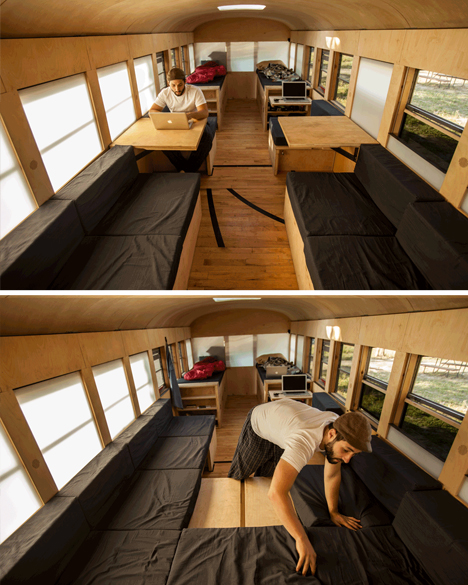
bus adjustable seating area

We should start with the evolution of the programmatic diagram, described and illustrated in simple terms: “The even spacing of the window bays allow for the volume to be broken down into modular units of 28 inches square, leaving an aisle that is also 28 inches wide. The modular units are then grouped to create four primary zones: Bathroom, Kitchen, Seating, and Sleeping.”

bus multifunctional sleeping space

From there, a series of rules and strategies evolved, like: keep the space as open as possible, so the 225 square feet available area does not get broken down into cramped compartments.  The result is a limitation of objects built above the bottom edge of each window and an open-feeling floor plan. Hank also “developed a thin wall system integrating structure, insulation, electrical, lighting, and facing, leaving the interior open for occupation. The ceiling is covered in plywood flexed by compression, and the floor is reclaimed gym flooring, complete with 3-point line.”

bus cab storage space

Throughout the project, there are clever and deceptively simple ways to redeploy structure to address different needs on demand, like a bed system that allows for different sleeping configurations, and seats that with secret flip-up and slide-out panels to allow for further lounging or additional overnight guests. Storage is tucked and hidden throughout, integrated into other built-ins wherever spare space was available. The detailing throughout is minimal and consistent, but don’t let that fool you: a great deal of thought and work went into that apparent simplicity.

Share on Facebook


[ By WebUrbanist in Technology & Vehicles & Mods. ]

[ WebUrbanist | Archives | Galleries | Privacy | TOS ]


WebUrbanist

 
Comments Off on Beautifully Simple: School Bus Turned Minimal Mobile Home

Posted in Creativity


ioSafe N2 – Your own Private Muscly Cloud

26 Aug

I wrote recently about the Synology NAS, I will write more about it soon as I’ve added to it! But there are, as they say, two sides to every story and here’s the other side to that story!

Introducing the ioSAFE N2 NAS

ioSafe-n2-review-simon-pollock

Having (had!) an IT background and experiencing first hand a number of times people losing their data – sometimes LOTS of data – and being completely overwhelmed at the thought of not knowing what they had saved somewhere else and what was “gone forever*” I wanted to make sure that wasn’t the case for me.

At the same time, I wanted to be able to get to “stuff” from wherever I was. I do use multiple “online” storage things, Dropbox is my main online storage space, I’ve also just started using COPY who give much more free space.. Why multiples? Who puts all of their eggs in one basket? But we’re talking 20gb here and 30gb there… If I wanted to have an entire copy of my computer online just incase something really shoddy happened like theft, flood, fire, or something else… The ability to get to my digital life (as I like to call it) is crucial. I work from home, I have client data (As a photographer, I have photographs obviously, but they’re covered with my other NAS, the DS1512+) and I need to be able to access that data at all time.

There’s also the whole “would I walk up to someone in the street and hand them all the photos of my kid, all of my important business data” that Robb touches on in the video below… I’m sure you’ve heard of businesses folding – well, it has happened to online storage companies too [READ THIS this is from 2009, but there’s nothing to say it can’t happen today] and with this firmly in mind, I smile about my N2 sitting securely in a cupboard in my house, out of line of sight, quietly backing up all of my precious digital stuffs…

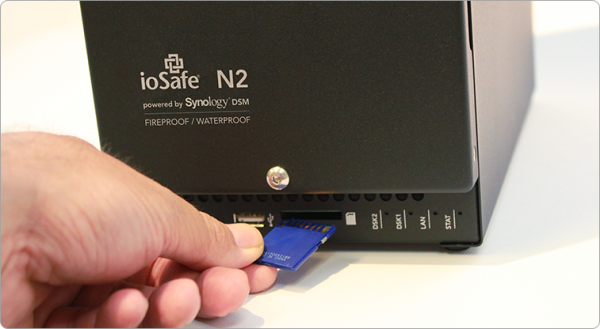
That said, having this NAS packed in a cupboard out of harms way, I don’t get to use the SDXC slot on the front of the unit, but it is there if you want to use it – simply take photographs on an SD card, pop the card into the front of your NAS and it mounts up like a little external drive and you can copy all of the images across. Very handy.

3

Lets hop around a little.. I run my own business, but it isn’t large and I don’t have co-located servers with my data replicating across multiple sites – if I wanted to make sure I was 100% safe, I’d do that, but it is cost restrictive for me right now, so I needed to be able to trust what I could afford** The ioSAFE N2 is sort of like a baby army tank that stores data.. It can withstand fire, water, three year olds etc… 1500 degrees f. for half hour – you’d want to hope the fire brigade had put your house out in that time!, Under ten feet of water for 72 hours… This is no ordinary NAS (Network attached storage) device. There’s also the included one time data recovery service – ioSAFE will recover your data up to $ 5K worth of DRS included with every ioSAFE product… that is pretty rad if you ask me! (read more on that here)

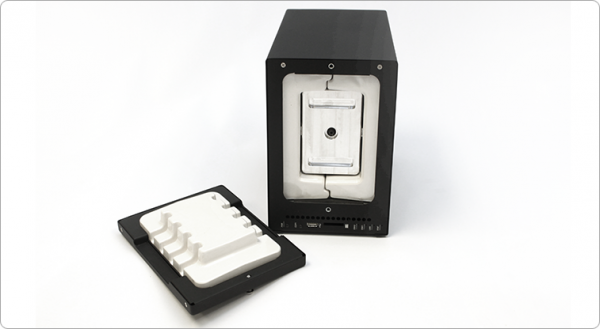
ioSafe-n2-internal-photo-simon-pollock-review-dps

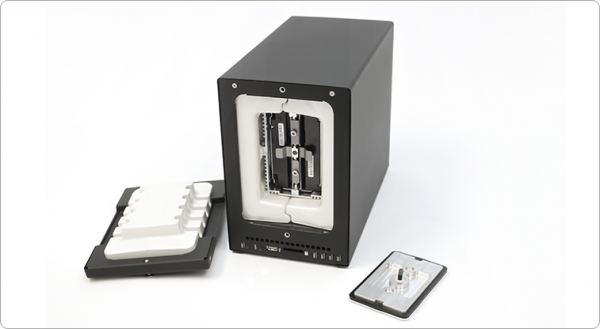
You can see above (and below) where your data is stored, on those two disks in the middle… Then there’s a solid metal plate that goes on the front of the disk bay, then a plug that is the front of the unit… There is airflow around the sealed unit that has heat dispersion wings on it, so your disks maintain a normal working temp, too.

ioSafe-fire-water-proof-nas-simon-pollock

Lets jump back to where I was talking about accessing my data remotely shall we… The ioSafe runs Synology DSM (I’m currently running the 4.3 Beta on my ioSafe with great success) DSM pretty much turns the N2 into a fully fledged cloud (cloud simply means server that can be accessed remotely in this case.. sort of) and there are some very handy iPhone and Android and (even haha) Windows phone apps that you can use to get to your data.. You can log into your server via FTP too.. (It also works as a web server, print server, ftp server, media server… this thing can’t make a decent espresso, but then I can, so we’re good!)

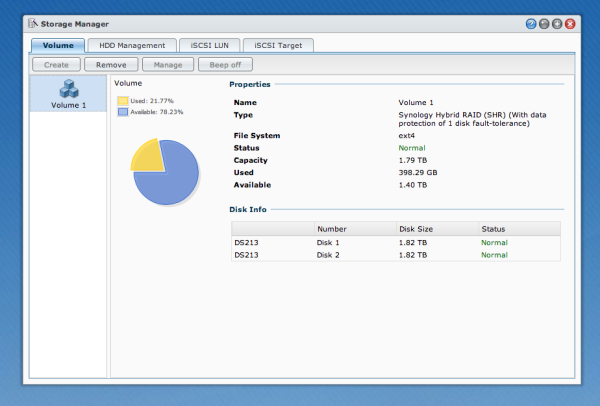
My ioSafe N2 is setup using the Synology Hybrid Raid, I use two 2TB disks in (basically) raid one so I have a one disk fault tolerance.. My stuff is essentially safe unless Godzilla comes along and eats my N2..

DSM-Synology-disk-manager-simon-pollock-review-iosafe-n2

I use my N2 in conjunction with my other ioSAFE drives.. I have a Solo G3 and a Rugged Portable (That my brother has borrowed to take around the world!!)

Who is the N2 for? 

Anyone that is serious about keeping their data safe but maybe not quite ready to buy a serve in a datacentre. (You can also bolt the N2 to your floor / hide it in a cupboard and access it wirelessly!)

Pros

  • Life proof.
  • Connectivity.
  • Massive feature set via DSM.
  • Small footprint by comparison.

Cons

  • Errr? For the market this beast is aimed at, there are none.

I want to leave you with a video from Robb Moore, he’s the guy that started ioSafe when nothing else would suit his needs… I’m very glad he did because right now, for me, nothing else does what this N2 does.


I was provided with the N2 for review, I was already an ioSafe user… I use product I love, I don’t have time for rubbish that doesn’t work – who does. I give this N2 a total of 10 out of 11 gold stars, I only deduct one because I know I’m going to need more space soon and there’s not a 4 disk model – yet.

Please feel free to ask any questions in the comments below.

–Sime


Post originally from: Digital Photography Tips.

Check out our more Photography Tips at Photography Tips for Beginners, Portrait Photography Tips and Wedding Photography Tips.

ioSafe N2 – Your own Private Muscly Cloud


Digital Photography School

 
Comments Off on ioSafe N2 – Your own Private Muscly Cloud

Posted in Photography


Soak in the season with these vivid summer photos

25 Aug

isac_goulartinvincible_2.jpeg

Summer’s fast on its way out, something we’re acutely aware of in the Pacific Northwest. We’re trying to make the most of our sunny days before the clouds and drizzle set in. For a healthy dose of Vitamin D any time of year, take a look at photographer Isac Goulart’s sun-soaked images. The Brazilian photographer’s colorful beach photos aim to capture the very essence of long summer days. Check them out – and maybe take a few of your own before the weather’s gone.

News: Digital Photography Review (dpreview.com)

 
Comments Off on Soak in the season with these vivid summer photos

Posted in Uncategorized


Color Portraiture with Retouch and Enhancement in Lightroom 4 and 5

25 Aug

The Following is an excerpt from the SLR Lounge Lightroom Preset System v5, a preset system designed to take you from Ordinary to Extraordinary photos in just a few seconds and clicks.

In this article, we have a beautiful bride who designed an amazing red dress with a lot of great details and jewelry. We want to edit this photo so that she has a nice soft portrait look and the details in her dress remain sharp and crisp. To do this, we’re going to be utilizing similar techniques in production as we covered in the previous Soft Flattering Color Portrait tutorial. But, we are going to go through the added step this time of utilizing our brush presets to make the image details pop. The written article is below, and if you like, you can also watch the original video tutorial towards the end of the article.

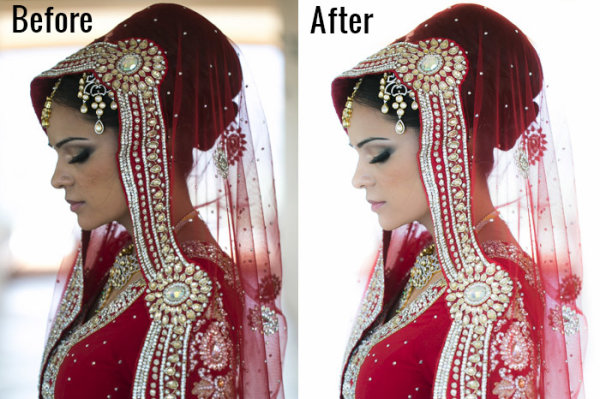
Here’s a quick sneak peak of our image before and after we’re done with our edit.

beforeafter copy

Read the Written Tutorial

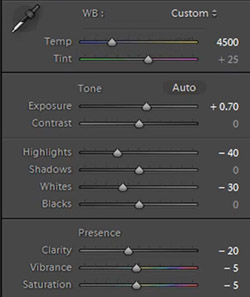
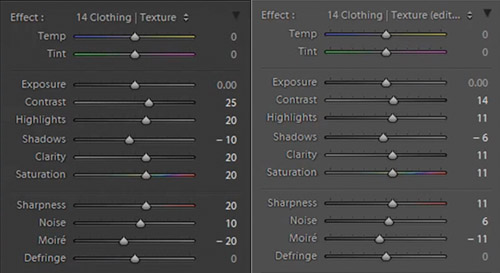
Since this is a portrait, we have a preset that gets us to a nice soft portrait look quickly which we discussed in detail in the previous Soft Flattering Color Portraits tutorial. This preset adjusts the develop settings so that portrait skin tones looks nice and soft, and it also desaturates skin tones via a slight modification to Vibrance and Saturation to help even out skin tone colors. We also increased our exposure to +0.70 because an overall brighter image will look more flattering on our bride. Personally, I want to go with a more neutral/white look for the image, so that the red in the dress truly pops. So we’re going to adjust our Temperature to 4500. Here’s what our develop settings look after our preset and manual adjustments are applied.

developesettings

In the HSL our Red and Orange have been decreased slightly because once again, we want to subtly even out skin tone colors.

HSL

  • Red: -20
  • Orange: -10

In the Details our preset gave us the perfect amount of Sharpening and Noise Reduction. The Sharpening settings are doing a great job of showing the intricate details in the dress, while using a little bit of Noise Reduction to smooth out pores and fine detail in our subjects skin.

Sharpening

  • Amount: 70
  • Radius: 1.5
  • Detail: 10
  • Masking: 30

Noise Reduction

  • Luminance: 15
  • Detail: 70
  • Contrast: 0
  • Color: 25
  • Detail: 50

Our preset also adjusted our Lens Vignetting to +30, because we want a nice even edge to edge toning.

Lens Vignetting

  • Amount: +30
  • Midpoint: 30

Now we’re going to do some more post processing with our Brush. The first thing we want to focus on is the beautiful red dress. We’re going to set our Brush settings for Clothing and Texture and apply it everywhere but her skin. If you press “O” you can bring up the brush mask overlay and see where the brush is being applied. (See video tutorial below for reference)

When you apply a brush onto your image, a “pin” will appear on your image (Press “H” on your keyboard to hide/reveal pins). If you click on the pin you can decrease or increase the strength of the brush settings by left-clicking and dragging to the left (weaken) or right (strengthen). We want our adjustments to be a little more subtle so we slightly decreased the strength of the brush.

bothclothingbrushsettings

Original Brush Settings on Left, Lowered Brush Strength Settings on Right

We like the window in the background because it helps compose our frame, but there’s a distracting bar in the middle. For this particular image, we could keep the frame since it does a great job framing our subject. But, just to illustrate how capable Lightroom is, we’re going to remove the window entirely, making this a high key image with a nice bright background. To do this we’re going to use our Brush with strong dodge settings and apply it to the window.

Screen Shot 2013-08-21 at 1.12.48 PM

If you have additional questions, watch the video tutorial below to see exactly how this affect was applied.

Dodge Brush Settings

  • Exposure: 4.00
  • Contrast: 1.00
  • Highlights: 1.00

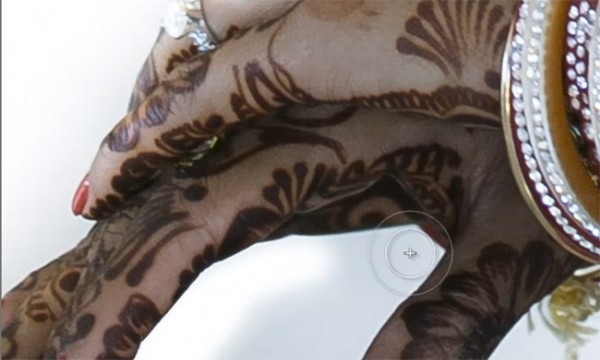
We want to apply the brush to the inside of her hands, but it’s a tough spot to reach because the area is very small. This is a great place to use Lightroom’s Auto Mask function.

automask

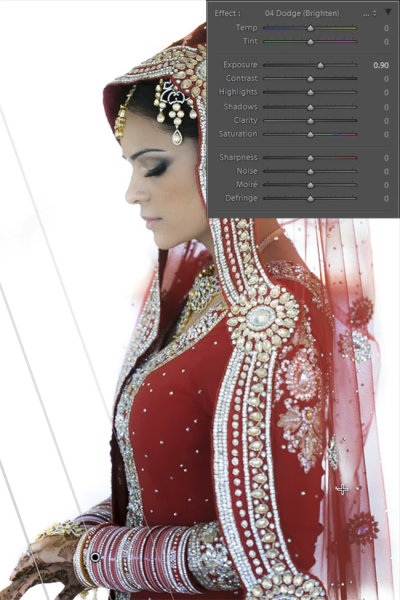
Her hands are slightly underexposed so we’re going to add a graduated filter and set the exposure to +0.90. We are then going to drag the filter from the bottom left of the image to her bracelets.

firstgraduatedfilter

We also want another subtle graduated filter for the back of her veil, so we’re going to set the exposure on this filter to +0.30. We want to drag this up from the bottom right of the image to her bicep area just as we did for the previous graduated filter shown above.

Now that we’re done with the dress, we’re going to go back and touch up some details on our bride. The first thing we’re going to do is select our “Hair and Lashes” preset. This will give some nice contrast and sharpness in her eyes and eyebrows.

Hair and Lashes Brush Settings

  • Contrast: 10
  • Highlights: 20
  • Shadows: -10
  • Clarity: 15
  • Saturation: 10
  • Sharpness: 25

After the eyes, we’re going to move onto the lips. We’re going to select our Brush preset for lips which will give us some nice color and contrast on the lips.

Lip Brush Settings

  • Contrast: 15
  • Clarity: 15
  • Saturation: 20
  • Sharpness: -10
  • Noise: 10

And now we are left with our final image. Here’s a before and after of our portrait.

Before

lightroom-5-tutorial-high-key-retouch-0001

After

lightroom-5-tutorial-high-key-retouch-0002

Watch the Video Tutorial

If you would like to see exactly how all of the settings and adjustments were applied, please watch the video below from the SLR Lounge YouTube Channel.

Conclusion and Learn More

We hope you all enjoyed this tutorial. If you are interested in learning more or purchasing the SLR Lounge Lightroom Preset System v5

Post originally from: Digital Photography Tips.

Check out our more Photography Tips at Photography Tips for Beginners, Portrait Photography Tips and Wedding Photography Tips.

Color Portraiture with Retouch and Enhancement in Lightroom 4 and 5


Digital Photography School

 
Comments Off on Color Portraiture with Retouch and Enhancement in Lightroom 4 and 5

Posted in Photography


Trouble Feature: 10 Abandoned Drive-In Movie Theaters

25 Aug

[ By Steve in Abandoned Places & Architecture. ]

abandoned drive-in movie theaters
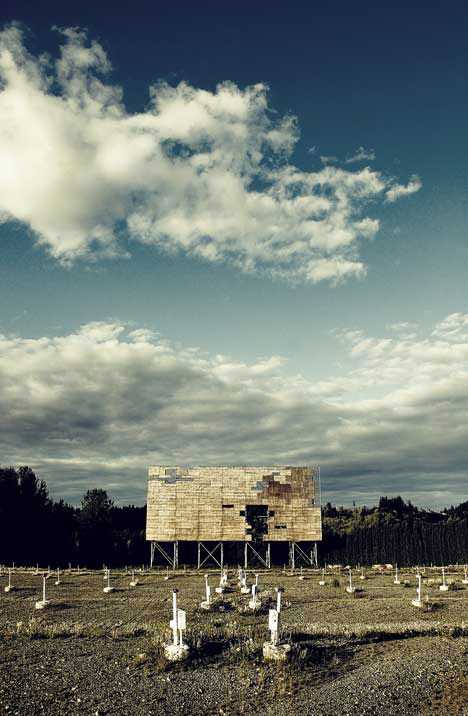
Drive-in movie theaters stand for the great American auto-centric suburban dream, though as time goes by fewer and fewer of the outdoor screens remain standing.

Driven Out

abandoned drive-in theater Washington(image via: WebUrbanist)

On June 6th, 1933, as many as 400 New Jersey motorists looking to escape the harsh realities of the Great Depression for a while enjoyed Wives Beware, starring Adolphe Menjou, from the comfort of their automobiles. Though the 40 by 50 ft screen at Park-In Theaters in Camden is long gone (it operated for only three years), other relics of the Drive-In Theater Age still stand, if just barely.

The Drive-In Project

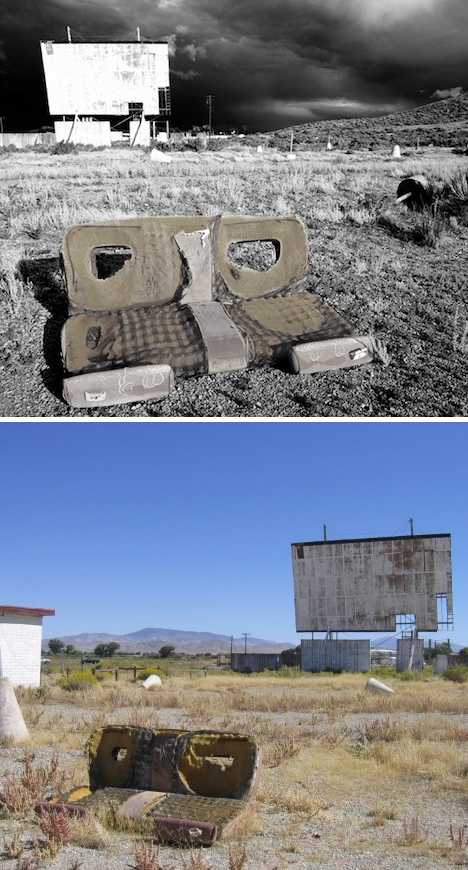
abandoned drive-in movie theater(images via: Gadling and Ego-TV)

According to travel photographer Craig Deman, “approximately 90 percent of drive-ins are closed from their peak in the late 1950s.” Deman is somewhat of an expert on the topic, having authored the hauntingly illustrated The Drive-In Project which documents the current state of abandoned drive-in movie theaters from coast to coast.

After The Last Picture Show

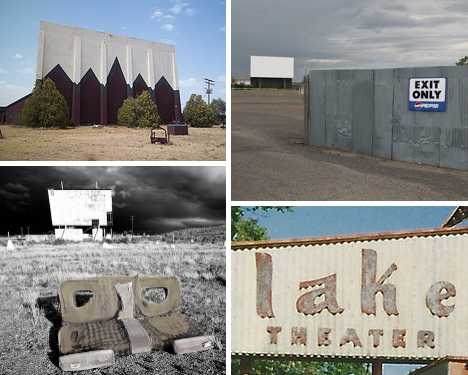
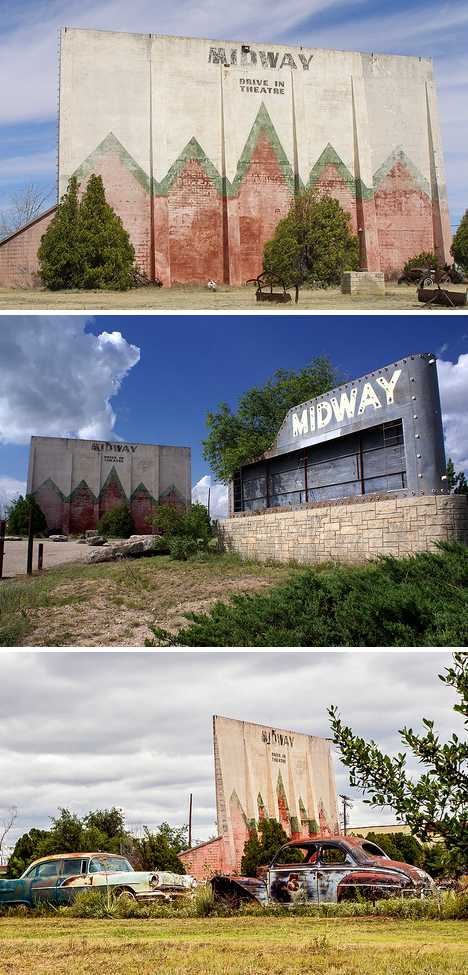
abandoned Midway drive-in theatre Sweetwater Texas(images via: Debra Jane Seltzer, robert e weston jr and Paul A. Valentine)

They say “Life Is Sweet In Texas” but since the Midway Drive-In Theatre in Sweetwater, Texas closed things just haven’t been the same. The 230-car capacity drive-in was opened in the 1950s and like many drive-ins of the era, provided a large playground for kids and an outdoor seating area for families in front of the screen.

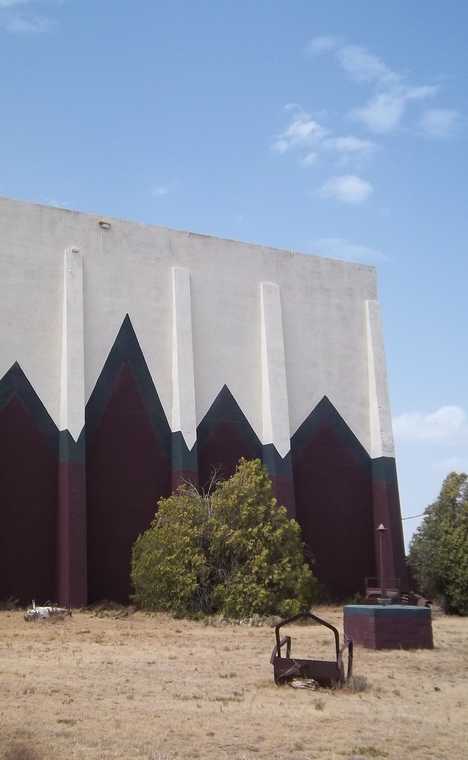
abandoned Midway drive-in theatre Sweetwater Texas(image via: Nicholas Henderson)

The jagged faux mountain range painted in bold Indian red & forest green on the back of the Midway Drive-In Theatre‘s screen make it an easily identified landmark, even from far across the windswept plains of north-central Texas. Flickr user Nicholas Henderson captured the screen-back backdrop’s eerie essence above, looking little the worse for wear, on a bright summer’s day in 2011.

Lake Woe Begone

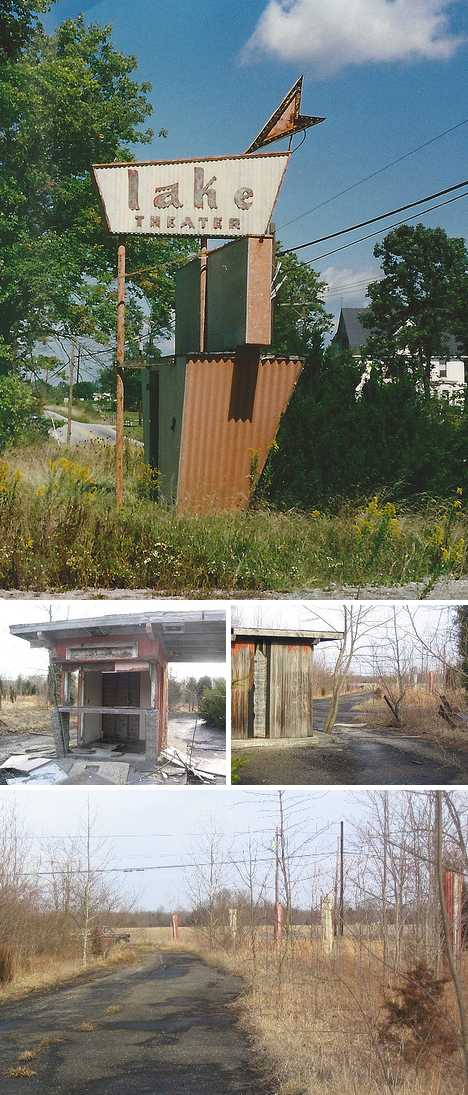
abandoned Lake drive-in Mt. Orab Ohio (images via: Darren Snow and Lowand77)

There’s not much left of Mt. Orab, Ohio’s Lake Drive-In besides its inimitable Fabulous Fifties main sign and the moldering wooden ticket shack. Indeed, the theater’s Happy Days indeed have long since faded though Richie, Potsie, Ralph and the Fonz still likely have fond memories of many a moonlit night… hey Arthur, don’t you think it’s about time you let those guys out of the trunk?

Next Page:
Trouble Feature 10 Abandoned Drive In Movie Theaters

Share on Facebook


[ By Steve in Abandoned Places & Architecture. ]

[ WebUrbanist | Archives | Galleries | Privacy | TOS ]


WebUrbanist

 
Comments Off on Trouble Feature: 10 Abandoned Drive-In Movie Theaters

Posted in Creativity


25. August 2013

25 Aug

Ein Beitrag von: Sina Sohn

© Sina Sohn


kwerfeldein – Fotografie Magazin

 
Comments Off on 25. August 2013

Posted in Equipment


browserFruits August #4

25 Aug

Und langsam verabschiedet sich auch der August. Wir halten noch etwas am Sommer fest und zeigen Euch im Fotospecial all die schönen Regenbogenfarben, die unsere Welt zu bieten hat. Genießt unsere sonntägliche Linksammlung und danach die schönen warmen Tage, den letzten Freibadbesuch und ein leckeres Eis in der Sonne.


Fotospecial: Regenbogenfarben

Flickr

500px


Deutschsprachig

• Eine kleine Geschichte von dem Fotografen, der eine Goldmedaille rettete.

• Martin Wolf hatte vorab die Panasonic Lumix GX7 im Test und berichtet hier, wie seine Erfahrungen mit der Kamera sind.

• Uns empört gar nicht so sehr, dass sich Herr König (CSU) von Steuergeldern eine Leica im Wert von etwa 6.000 € holt, aber dass er sie dann als „zu schwer und zu unhandlich“ bezeichnet, ist schon erstaunlich.

• Langweiledich.net zeigt die wirklich großartigen Fotos der spanischen Fotografin Silvia Grav.


International

• Ein Jahr in einem Bild hat Fotograf Eirik Solheim festgehalten.

• Eine junge Frau und ihre Großmutter im Alter von 20 Jahren. Sehr schöner Vergleich.

• Wie ein geklautes Bild einen Fotowettbewerb von Samsung gewann. Wir finden es abbsolut unverständlich, wie dreist manche Menschen sind und ernsthaft glauben, es käme nicht heraus.

• Wer auf surreal-verrückt anmutende Composings steht, sollte Fredrik Ödmans Portfolio (insbesondere seine Tierkompositionen) ansehen.

• Huffington Post berichtet über eine höchst amüsante Serie des Fotografen Harry Griffin, der das Leben von Rentnern portraitierte.

• Magda Mis stellt eine unangenehme Frage: Müssen wir Blut sehen, um Krieg zu verstehen?

• Nichts für schwache Nerven: Marco Valli dokumentiert Känguruhs, die durch Verkehrsunfälle starben.

• Was passiert, wenn wilde Tiere ein verlassenes Haus erobern? Das hat der Finne Kai Fagerström herausgefunden.


Neuerscheinungen und Tipps vom Foto-Büchermarkt

buchtipp

• Todd McLellan haben wir mit seinen Projekt bereits vor zwei Jahren vorgestellt. Nun ist aus seiner tollen Fotoserie ein Buch entstanden: Ganz schön zerlegt: Die Kunst, Dinge neu zu ordnen*.

• Die Bilder der Journalistin, Fotografin und Schriftstellerin Marie Goslich gibt es im Fotobuch „Marie Goslich 1859-1938: Die Grande Dame des Fotojournalismus“* zu bewundern. Für 39,95 € nicht das günstigste Buch, dafür aber auch gebunden und ganze 256 Seiten stark.


Wettbewerbe

• Liebe Foodfotografen, kennt Ihr schon den Wettbewerb von Pink Lady? Foodfotographer of the Year 2014 gibt’s als Titel, sowie Geldpreise. Einsendeschluss ist erst Anfang nächsten Jahres, Ihr habt also genug Zeit, Bilder in eine oder mehrere der vielen Kategorien des Wettbewerbs einzureichen.

• Die iPhone Photography Awards 2013 wurden vergeben. Die Gewinner findet Ihr hier. Wenn Ihr auch mit der Kamera Eures iPhones unterwegs seid, dann reicht doch Bilder für den Award 2014 ein. Dies kostet allerdings eine kleine Teilnahmegebühr.


Videos

Robert E. Jackson sammelt alte Schnappschüsse. Und was für tolle er da gefunden hat!


Reisefotograf Gavin Gough hat ein Zeitraffer-Video des Chao Phraya in Bangkok erstellt. Bemerkenswert, was sich auf dem Fluss so alles tummelt.


Blick über den Tellerrand: Die Geschichte der Typografie. Prädikat: Unterhaltam, liebenswert gemacht und äußerst sehenswert.


Ausstellungen

Das Vergessen vergessen
Zeit: 8. August – 22. September 2013
Ort: F2 – HALLE FüR KUNST, Halle-Salle
Link

Künstlerinnen im Dialog
Zeit: 22. August – 6. Oktober 2013
Ort: das verborgene Museum, Berlin
Link

der schein – glanz, glamour, illusion
Zeit: 23. August – 3. November 2013
Ort:Kestner Gesellschaft, Goseriede 11, Hannover
Link

Mehr aktuelle Ausstellungen


* Das ist ein Affiliate-Link zu Amazon. Wenn Ihr darüber etwas bestellt, erhalten wir eine kleine Provision, Ihr bezahlt aber keinen Cent mehr.


kwerfeldein – Fotografie Magazin

 
Comments Off on browserFruits August #4

Posted in Equipment


Alligator steals DSLR, kindly returns it eight months later

25 Aug

photo-2-1024x755.jpg

During a holiday party at the Everglades Alligator Farm last year, employee and budding wildlife photographer Mario Aldecoa was setting up his camera to capture the glowing eyes of the local residents. It wasn’t long after he mounted his Canon DSLR to a tripod when, in a flash, one of the gators grabbed the whole thing as if it was lunch. After a fruitless search the next morning, Aldecoa had all but given up on finding his camera. Eight months later, he was in for a surprise.

News: Digital Photography Review (dpreview.com)

 
Comments Off on Alligator steals DSLR, kindly returns it eight months later

Posted in Uncategorized


Retro-styled Mini 90 takes Fujifilm’s Instax Line Back to the Future

25 Aug

instax90.png

Fujifilm has updated its venerable line of Instax instant film cameras with the new ‘Neo Classic’ Mini 90, which takes its styling cues from recent X-series digital cameras like the X100S and X-E1. As well as an updated (or rather backdated) design, the Mini 90 includes a lithium-ion battery and features several shooting modes including a macro focus mode, double exposure and bulb – where the shutter can be held open for very long exposures or creative effects. Click through for more details and a link to Fujifilm’s (Japanese) Mini 90 microsite.

News: Digital Photography Review (dpreview.com)

 
Comments Off on Retro-styled Mini 90 takes Fujifilm’s Instax Line Back to the Future

Posted in Uncategorized


Documenting Poverty Brings a Career and Recognition for Bangladeshi Photojournalist

25 Aug

photojournalists

Photography: GMB Akash

Few photographers will have started with the odds stacked so highly against them as GMB Akash. Born in Bangladesh, Akash had no access to photography galleries or darkrooms when he was growing up. There were no opportunities for him to work as an assistant to a well-known professional, learn the trade and begin to build a name for himself. The simplest image-making practiced today by any child with access to their parent’s smartphone was not a part of his childhood.

“In my surroundings and the place I brought up no one can ever thought a boy can devote himself to photography,” he recalls. “Throughout my childhood I did not have access to photographers, their work, or even a camera.”

The closest Akash came to being able to take pictures, experiment with compositions and f stops, and play with light was holding his father’s old camera, closing his eyes and imagining himself taking pictures.

His imagination seems to have worked. Today, GMB Akash travels the world taking photos that have appeared in more than 80 major international publications including National Geographic, Vogue, Time, and the  New York Times. He was the first Bangladeshi selected for the World Press Photo Joop Swart Masterclass in the Netherlands and the first to receive the Young Reporters Award from the Scope Photo Festival in Paris. In 2006, the same year he released his first book “First Light,” he received the World Press Photo award. He’s been named Travel Photographer of the Year and Nikon have selected him as one of their eight influencers in the Asia Pacific region.

“I Have No Time to Play.”

It helps that what Bangladesh lacks in opportunities for photographic training it more than makes in opportunities to tell powerful photographic stories. Akash specializes in the kind of photojournalism that makes a difference. His projects have included Bangladesh’s shipbuilders, its sex workers and its child laborers. It’s those stories that have inspired him to build a career as a photographer.

“Once an eight-year old balloon maker told me: ‘I took some damaged balloons for my little sister. I have no time to play. I have only time to support my parents,’” Akash recalls. “It was at that point that I realized I should turn my lens on lives like hers.”

Akash’s most recent project, “Survivors,” focuses on the people at the bottom of society and spans ten years and seven countries: Bangladesh, India, Nepal, Sri Lanka, Philippines, Pakistan and Bhutan. In addition to the sex workers and child laborers with whom Akash has worked over the last decade, the project also includes people coping with the results of climate change as well as the homeless.

The project was funded on Emphas.is, a crowdfunding site for photojournalists. Aiming for $ 9,250 to produce a book made up of the images of people living on the edge of society that Akash has collected over the last decade, he managed to collect $ 10,450 from 94 backers.

That’s an even bigger achievement than it sounds. Bangladesh has no Paypal connection so Akash was unable to collect funds from local friends and family, the first stop for most crowdfunding campaigns.

The success of the campaign he puts down to transparency. Emphas.is users should make a plan, says Akash, identify the project’s strengths and weaknesses, use social networking to build contributions and offer good rewards. (In addition to copies of the book for those donating $ 65 or more, Akash’s rewards included signed thanks from the subjects of the book, a private workshop and a three-day tour of Dhaka.)

“Most importantly if one can evince true dedication for the project, ‘success’ will come,” says Akash.

Giving Back

There may be more to it than that, though. Akash also donated a quarter of the book’s sales price to projects that he runs with friends and well-wishers to help the poor in South Asia escape the cycle of poverty. A portion of the pledges made to the campaign on Emphas.is went to buy rickshaws and sewing machines, as well as education for children. The opportunity not just to see poverty and injustice depicted dramatically in a book of images but, in viewing those photographs, to be able to do something about it, is likely to be a far more effective benefit than any of the rewards offered on the campaign page.

photoreportage

Photography: GMB Akash

But while Akash’s backers are able to enjoy both wonderful photography and contribute to a good cause, Akash himself has been able to build a rewarding career taking pictures of subjects that are both meaningful and important. He says that he only ever photographs the subjects that he finds interesting and inspiring, and never with the aim of winning an award or landing a job with a publication.

He concedes, though, that the awards and recognition do help to land good assignments. The jobs tend to come in directly from magazines, agencies and organizations whenever they need help with a project or want to assign a commission. Ultimately, he argues, it’s his choice of topics to document and shoot, the injustice and poverty that he can see in his native Bangladesh, that have allowed him to build his career.

“Taking photos to feed my passion may be the most important invisible factor to win competitions/publications,” he says.

For most people today, the first steps towards a career as a photographer aren’t difficult to make. The cheapest digital cameras now cost less than the price of an electronic toy and with over a billion smartphones now sold, few children are far from the chance to point at a lens at a flower, a friend or the family pet. The satisfaction that comes with framing, shooting and making an image are now available to everyone.

Turning those first shots into a career, though, may now be harder than ever. It requires determination and talent but it’s also possible to do it with an eye for a story and the determination to use a camera to document injustice and help those who need it.


Photopreneur – Make Money Selling Your Photos

 
Comments Off on Documenting Poverty Brings a Career and Recognition for Bangladeshi Photojournalist

Posted in Equipment