RSS
 

Archive for May, 2013

Gregory Crewdson: Brief Encounters is Now Available on DVD, and Netflix Streaming

23 May

©Gregory Crewdson

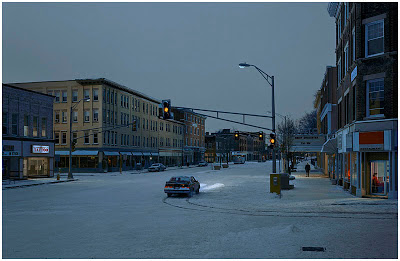
Netflix have acquired the rights to stream Ben Shapiro’s excellent 77-minute documentary, Gregory Crewdson: Brief Encounters. You can also buy it outright on DVD for $ 24.

Sadly, the Netflix access this is US-only (maybe Canada? nope!) and only for Netflix streaming subscribers. But this is still far and away the biggest audience to have had access to the film.

There’s no telling how long it will be up to stream. Netflix is notorious for having, then not having, the rights to a movie. So just in case, don’t wait too long. You can stream it here.

(Many thanks to reader Tim Kamppinen for the heads-up!)

-30-


Strobist

 
Comments Off on Gregory Crewdson: Brief Encounters is Now Available on DVD, and Netflix Streaming

Posted in Photography


Meet The Deluxe Pop-Up Flash Bounceand His Light Perfecting Pals

23 May

You’ve got the Camera and the Action — now, about those Lights.

We’ve rounded up our favorite easy to use lighting gadgets. And we’ve even added a new one … The Deluxe Pop-Up Flash Bounce that bounces light from any angle.

Grab up these gizmos and give your photos pro-quality lighting, just the special sparkle you’ve been looking for.

     
Deluxe Pop-Up Flash Bounce

The Deluxe Pop-Up Flash Bounce redirects the harsh light from your pop-up flash.

It swivels around so you can bounce your flash’s flash off of a wall or ceiling and make the light fall more evenly.

Deluxe Pop-Up Flash Bounce
$ 37 at the Photojojo Store


Ring Flash Adapter

Get the soft glowing look of a ring flash with the Ring Flash Adapter.

It works with your external flash to surround your subject with light, for a fraction of cost of a pro ring flash.

Ring Flash Adapter
$ 40 at the Photojojo Store


White Balance Lens Caps

Nothing ruins great lighting like crumby white balance.

The White Balance Lens Cap helps you set the perfect custom white balance every time, even in mixed light where the presets just won’t cut it.

White Balance Lens Caps
From $ 45 at the Photojojo Store


Related posts:

  1. The Pop-Up Flash Bounce – Perfect Lighting with Your Camera’s Own Flash! Your pop-up flash’s measly spurt of light and shadowy results…
  2. No light? No hot shoe? No problem. The Metz 28 CS-2 Digital Slave Flash to the Rescue! Nothing will ruin a shot quicker than on-camera flash. Unless…
  3. The Ring Flash Adapter Ever wonder how photographers get that glowing halo in their…


Photojojo

 
Comments Off on Meet The Deluxe Pop-Up Flash Bounceand His Light Perfecting Pals

Posted in Equipment


The Hangout Where We Review the New Flickr

23 May

Last night I recorded a special hangout show with nine other Flickr users where we talk about the new changes at Flickr. In the show we give a tour of the new Flickr, discuss/debate the changes, and provide Pro Tips on how to make the best of the new design.

We also review the recent changes in your account options and discuss the differences between Free, Paid and the old Pro account.

To get a look at what some of Flickr’s active users think of the new changes check it out.

What do YOU think of the New Flickr?


Thomas Hawk Digital Connection

 
Comments Off on The Hangout Where We Review the New Flickr

Posted in Photography


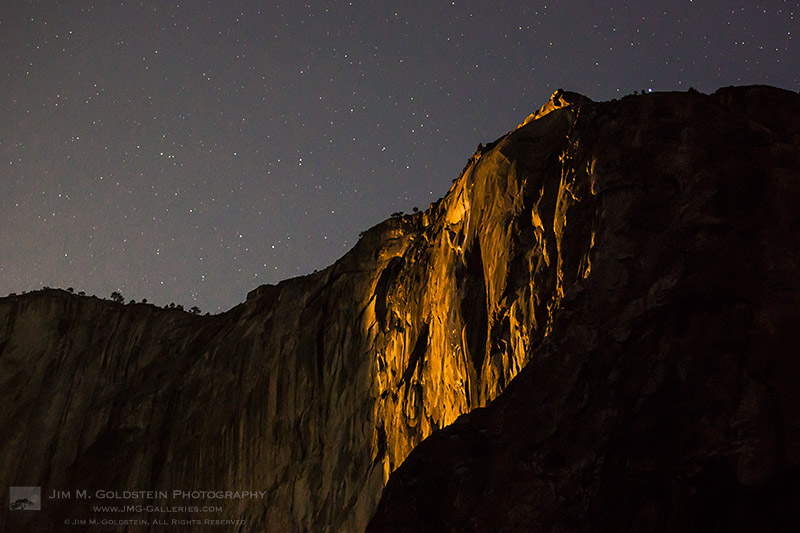
Horsetail Falls Moonset Light, Yosemite National Park

23 May
Horsetail Falls Moonset Light, Yosemite National Park

Horsetail Falls Moonset Light, Yosemite National Park

Much is said about light in landscape photography, especially golden hour, blue hour and moonlight. While most associate these lighting conditions with the end of the day it’s important to note they happen at the beginning of the day too and not just sourced from the sun. It’s a little bit rarer to see, as fewer photographers actually want to stay up or wake up to see golden moonlight. Case and point was my last visit to Yosemite National Park as I ran into 2 people photographing Horsetail Falls at 4am. I’m not complaining by any means as the view was spectacular and the golden moonlight was great. Granted the human eye can’t see the color of moonlight nearly as well due to human night vision being somewhat limited.  Something to consider the next time you’re sleeping in… what great moonlight are you missing?


Copyright Jim M. Goldstein, All Rights Reserved

Horsetail Falls Moonset Light, Yosemite National Park

The post Horsetail Falls Moonset Light, Yosemite National Park appeared first on JMG-Galleries – Landscape, Nature & Travel Photography.


JMG-Galleries – Landscape, Nature & Travel Photography

 
Comments Off on Horsetail Falls Moonset Light, Yosemite National Park

Posted in Equipment


Those Abusing Marissa Mayer’s Personal Flickrstream Should Be Ashamed of Themselves

23 May

Dear Marissa Mayer

As one of Flickr’s most active users, I’ve been watching intensively over the past 48 hours as the new Flickr design has been released. Personally speaking, I’m a fan. I think the new Flickr is the best version I’ve seen yet and agree with almost every design change that they made. That’s not what this post is about though; I’ve already given my opinion on the new Flickr here.

This post is about respect and civility.

As the drama of the new Flickr has unfolded, an element of what I consider to be the worst of the internet has taken to Yahoo CEO Marissa Mayer’s *PERSONAL* Flickr stream to express their disdain. Sure, Flickr (the company, not the person) has a dedicated Forum for users to discuss the new designs, which is way more than many companies provide, btw, but for some people this isn’t enough. They need to take their displeasure out personally on Mayer.

Even worse, many of the attacks on Mayer’s *PERSONAL* Flickr stream are crude, classless, vulgar personal attacks of the worst kind.

This is just absolutely awful.

Whatever people may think about the new design, there is a way to go about talking about change. It saddens me to see the lowest element of the web react this way. It saddens me to see people in the help forum egging others on to go post on Mayer’s personal page.

Ironically, it was “the internet” that asked Mayer to “make Flickr awesome again” when she first started up as CEO of Yahoo. Flickr had been neglected for years and finally Mayer would be our savior.

Then, she goes and actually DOES make Flickr awesome again and people freak the fcuk out. Gee, thanks a lot! At least the page that asked her to make Flickr awesome again gets it right.

Now, whether or not you love the new Flickr or hate it is your own opinion; design can sometimes be subjective — but to post images of excrement on someone’s personal Flickr page over that design opinion? Really? Watching people in the Help Forum encourage the trashing of someone’s personal Flickrstream is disturbing.

Mayer is the first ever CEO of Yahoo to have a public Flickr page. She goes out on a limb and participates in the community and this is what people do? They trash her *personally* over design decisions?

These people should be ashamed of themselves.

I am all about healthy debate. I’ve probably been more vocal and critical of Flickr than just about anyone over the years. I’ve also been a huge cheerleader for Flickr when I feel like they’ve done well. I love Flickr and want to see it be the best place it can possibly be. I may get emotional and heated in my opinions sometimes, but there is a way that debate should go on on the internet, and trashing someone’s personal stream is not it.

Mayer is the youngest CEO in the S&P 500. Whatever your opinion on her and her work, every intention she has with the new Flickr design is to make it BETTER. Being a highly visible CEO means taking a lot of flak. I understand that — but Marissa Mayer is also a human being, and deserves basic respect and civility — like EVERY OTHER HUMAN BEING.

One of the reasons why I’ve largely quit Flickr Groups is because you can’t block people in Flickr Groups. I encountered some of the worst human beings I’ve ever met online in some Flickr Groups. Some of the folks who live on Flickr really are the worst of the worst. It’s disappointing seeing some of these same types take to someone’s personal Flickr stream.

Let’s try to show the world that there are still people on Flickr who can discuss and debate with dignity and respect. I think it’s fine to debate the new Flickr design. I think it’s fine to be strongly opinionated about it. I think it’s fine to attack the design itself and share why you dislike it. Attacking employees, though, is way over the line.

I have made my own mistakes on the web over the years. I, too, have, in the past, let my emotions get the best of me. It’s easy to get angry sometimes and I’m certainly capable of overreacting. I’ve tried to learn from these mistakes, though. It’s so much better to attack ideas than individuals. Hate is so ugly.

We are better than this.


Thomas Hawk Digital Connection

 
Comments Off on Those Abusing Marissa Mayer’s Personal Flickrstream Should Be Ashamed of Themselves

Posted in Photography


Fujifilm updates X-Pro1 and X-E1 to improve AF with 55-200mm lens

23 May

xf55-200-xe1-34-news.png

Fujifilm has updated the firmware for its X-Pro1 and X-E1 mirrorless cameras, to improve the autofocus speed with the recently-launched XF 55-200mm F3.5-4.8 R LM OIS telephoto zoom lens. Versions 1.05 for the X-E1 and 2.04 for the X-Pro1 are available to download from the Fujifilm website. Click through for the links.

News: Digital Photography Review (dpreview.com)

 
Comments Off on Fujifilm updates X-Pro1 and X-E1 to improve AF with 55-200mm lens

Posted in Uncategorized


Laser-Cut Record: Music Etched Onto Slices of Wood

23 May

[ By Steph in Art & Installation & Sound. ]

Laser Cut Wood Records 1

We already know what kind of music trees make when left to their own devices, and now we can make them sound the way we want. After developing a method for converting digital files into 3D printable records, designer Amanda Ghassaei has laser-cut records onto pieces of wood. While vinyl may be cheaper and provide sharper sound, it’s hard to deny that these hand-crafted records are works of beauty.

Laser Cut Wood Records 2

Ghassaei created digital wavelength forms of songs by Radiohead and Joy Division, converted them into PDFs and used an Epilog 120 Watt Legend EXT laser cutter to etch about three minutes of sound onto each side of a slice of wood. The resulting wood records, which are twice as thick as vinyl, can be played on an ordinary turntable.

Laser Cut Records 3

“With this project I wanted to try to extend the idea of digitally fabricated records to use relatively common and affordable machines and materials so that (hopefully) more people can participate, experiment, and actually use all this documentation I’ve been writing,” says Ghassaei.

Laser Cut Wood Records 3

Ghassaei has also cut audio onto acrylic and paper. Music with good midtones tend to sound best with this technique. Listen to more samples and get more details about the project at Instructables.

Share on Facebook


[ By Steph in Art & Installation & Sound. ]

[ WebUrbanist | Archives | Galleries | Privacy | TOS ]


WebUrbanist

 
Comments Off on Laser-Cut Record: Music Etched Onto Slices of Wood

Posted in Creativity


Learn How to Use the Sharpening Tools in Lightroom

23 May

There’s no question that Lightroom is a powerful piece of photo processing software, but due to that power sometimes it’s not as easy to wrap our heads around everything it has to offer, that’s in part why I started my Let’s Edit YouTube series a weekly segment in which I share my own editing workflow for viewers to learn from.

After starting this series one of the most commonly asked questions was to go into more detail on how the sharpening tools in Lightroom work. Sharpening in Lightroom is broken down into four different sliders – Amount, Radius, Detail and Masking – and they each work together to help you achieve the perfect amount of sharpness in your photograph. Today, rather than simply answer this question to the comparatively small group of people over on my site, I thought I’d bring these tips to the dPS community as a whole. I know there are a lot more people out there looking to master the art of sharpening images and I’m happy to help explain them.

Before We Get Started

There is one thing I’d like to mention before we dive into the tutorial and that is that these tools are designed to help improve an image that is sharp to begin with. They won’t fix camera shake, missed focus points, or poor DOF choices, but rather improve upon an already sharp image. So with that said if you’re struggling to get your image tack sharp you might want to check out this great DPS article on five tips to achieve sharper images first and then head back here to learn how you can make them even better.

The Amount Slider

As the name implies the amount slider is a broad and general addition or subtraction of the amount sharpening applied to your image. The more you slide to the right the sharper your image will become. It works by increasing the contrast between different pixels in a fairly general way. The next three sliders can help us refine how the amount of sharpening is applied throughout the image.
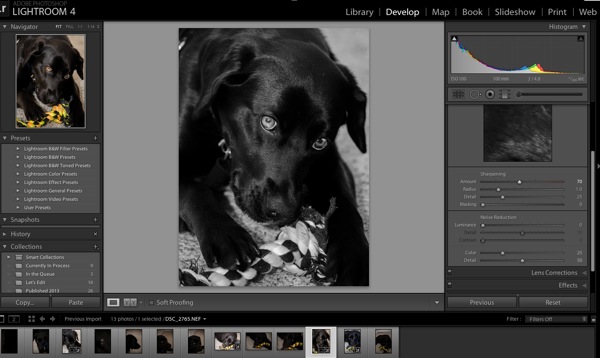
Amount

Before we get into those other sliders though I do want to mention that each of these four tools has an extra option attached to it. By using the Alt (windows) or Option (Mac) key on your computer you will be shown an overlay that will help aid you in making better decisions with your sharpening.

For the amount slider this option removes the color from the image letting us use a simple gray scale image for sharpening. This is important because some colors can give false sense of sharpness when placed next to each other and can make it difficult to determine the true level of sharpness in the image.

The Radius Slider

Next in the detail panel is the Radius Slider which lets you control how far away from the center of each pixel the sharpening effect occurs. This is great for determining if you’d prefer a more airy feel (smaller radius) or a more hard edge feel (larger radius).
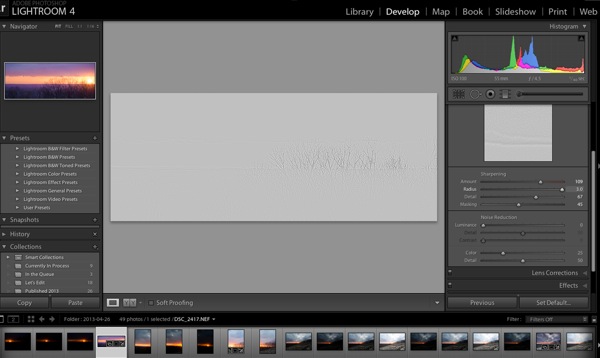
Radius

Each photograph is different and often times in portraiture the radius is left rather small, while in architecture or landscape, the radius can be made a bit larger to truly define the edges of your scene.

With the radius slider the option key will create an overlay that allows you to see the effect of the edge sharpening in a visual and easy to understand way. The edges that are being effected become clearly defined and the areas of the photograph where this effect is not being applied will be left hidden behind a gray overlay. In the screen-capture above you’ll see with the radius slider maxed out the trees along the horizon are clearly defined in the overly.

The Detail Slider

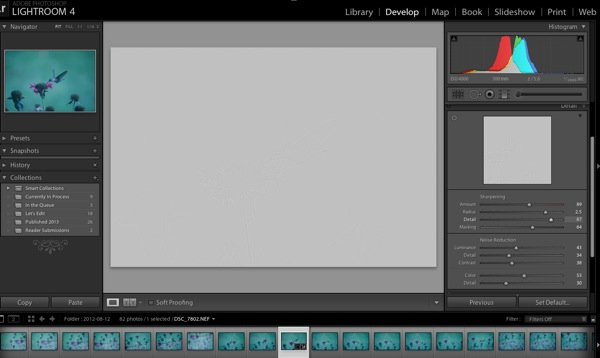
I like to think of the detail slider as a fine-tuning slider or even just simply as picking up from where the radius slider left off. Rather than focusing on the hard edges of the image the detail slider is designed more for bringing out the finer textures of the images.
Detail

It does this by controlling how the high frequency data is displayed.

The further you push the detail slider to the right the more high frequency data will be displayed resulting in more textures in your image. Be warned, if you push it too far in some cases the outcome will be overly sharp or you may start sharpening unwanted noise. These negatives are things you’ll want to watch out for as they can start to make your photograph too harsh for your viewer and distract from the overall story you’re trying to tell.

To help you determine the optimum positioning of the detail slider the option overlay available works in much the same way as the radius slider showing you where your detail is being applied by showing you the areas effected by your changes.

The Masking Slider

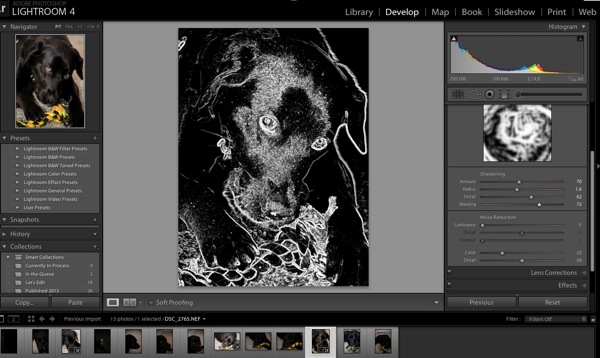
Finally we’re down to the last one of the four. The masking slider allows you to in a sense control where your sharpening is to occur. By sliding it to the right you reduce the areas of the photograph that sharpening will occur by ignoring less important edges and only sharpening the more obvious ones.
Masking

Again with the alt or option key held down you are presented with an overlay for this slider which shows you where everything is occurring The areas in black are being masked out, while the areas in white are where the sharpening will take effect. As you can see above here the hard edges of the dog around her ears, muzzle and eyes are being sharpened where as the areas in black are not. It’s a great way to keep you background filled with creamy bokeh, but sharpen the face or focal point of your subject.

Well that’s it – I hope this quick look into Lightroom’s detail sliders has helped you learn a bit about how to sharpen your photographs, if you’d like to see it in action check out this video where I go through the above steps while sharpening a Macaw from a recent trip to the local zoo.

John Davenport is an avid amateur photography who shares his photography on Facebook. He also runs a weekly series called “Let’s Edit” which focuses on editing photos in Lightroom.

Post originally from: Digital Photography Tips.

Check out our more Photography Tips at Photography Tips for Beginners, Portrait Photography Tips and Wedding Photography Tips.

Learn How to Use the Sharpening Tools in Lightroom


Digital Photography School
 
Comments Off on Learn How to Use the Sharpening Tools in Lightroom

Posted in Photography


DxOMark Mobile Report: Samsung Galaxy S4

23 May

title2.jpg

We just published the DxOMark Mobile Report for Samsung’s new flagship smartphone, the Galaxy S4 on connect.dpreview.com. DxO’s imaging experts have analyzed 14 aspects of mobile imaging including detailed image quality assessment, flash performance, autofocus reliability and more to calculate a final score. This report will be integrated into our full review once it is finished but for now click through to find out how the Samsung Galaxy S4’s camera performed in the DxOMark lab tests.

News: Digital Photography Review (dpreview.com)

 
Comments Off on DxOMark Mobile Report: Samsung Galaxy S4

Posted in Uncategorized


Studio scene comparison pages added to Pentax MX-1 preview

23 May

pentax_mx1.png

We’ve just added three studio comparison pages to our previously-published preview of the Pentax MX-1. The MX-1 is Pentax’s flagship compact camera, and something of a departure for the manufacturer, offering a fast F1.8-2.5 zoom lens, full manual control and a high-class, metal body, to compete with more established peers like Panasonic’s LX7. Click through to go to the new pages in our preview, and see for yourself how the MX-1 compares to its rivals.  

News: Digital Photography Review (dpreview.com)

 
Comments Off on Studio scene comparison pages added to Pentax MX-1 preview

Posted in Uncategorized