RSS
 

Archive for April, 2013

Lichtexperimente im Schnee

24 Apr

Ein Beitrag von: Carsten Faobam

Ein Faible für Langzeit-Belichtungen besteht bei mir schon länger. Das in Kombination mit meiner Experimentierfreude produziert manchmal sogar vorzeigbare Bilder. Diese möchte ich Euch hier vorstellen.

Auslöser des Ganzen war der Bau eines Quadrocopters, mit dem ich ein wenig Luftfotografie betreiben und in die FPV-Welt hineinzuschnuppern möchte. Was ist ein Quadrocopter?

Dabei handelt es sich um ein Fluggerät mit vier fest montierten, nach unten gerichteten Propellern. Diese werden über eine elektronische Lageregelungen so angesteuert, dass ein stabiler Flug möglich ist. Der Vorteil gegenüber einem herkömmlichen Hubschrauber ist die Tatsache, dass keine komplizierten mechanischen Komponenten nötig sind.

© Carsten Faobam

Bei der von mir eingesetzten Steuerung handelt es sich um eine DJI – NAZA, die mit einem Barosensor sowie einem GPS-Modul ausgestattet ist. Somit ist die Steuerung in der Lage, den Quadrocopter eigenständig auf einer Position sowie in der Höhe zu halten. Weiterhin ist es auch möglich, den Quadrocopter eigenständig zum Startplatz zurückfliegen zu lassen.

Als Zugabe kann der Quadrocopter noch mit einem Videosender ausgestattet werden, was in Verbindung mit einer Videobrille ermöglicht, den Quadrocopter aus der Ich-Perspektive zu fliegen. Genannt FPV: „first person view“.

Ein weiteres Ziel ist es, den Quadrocopter reisetauglich zu machen, was heißt, dass er in meinem Standard-Fluggepäck Platz finden soll. Aus diesem Grunde ist er möglichst kompakt bzw. klappbar gebaut. Als Kamera kommt eine leichte GoPro Hero 3 zum Einsatz.

© Carsten Faobam

Nach der Fertigstellung wollte der Quadrocopter natürlich auch getestet werden, was in der Winterzeit nach Feierabend mangels Tageslicht nicht einfach ist. Da ich keine Geduld hatte, bis zum Wochenende zu warten, wurden fix die Arme des Quadrocopters mit LEDs ausgestattet.

Der Test des Quadrocopters war schnell abgeschlossen und so war noch Zeit für ein paar Bilder. Dank des eingebauten GPS wartete der Quadrocopter geduldig in ca. vier Metern Höhe, während ich die Kamera aus dem Auto holte und selbige auf ein Stativ montierte.

Soweit die Vorgeschichte. Die eigentliche Entstehung der Bilder ist relativ einfach, nur das benötigte Flugequipment ist etwas aufwändiger. Jeder, der sich schon einmal mit Lightpainting beschäftigt hat, wird das Vorgehen kennen:

  • Kamera auf ein Stativ
  • Automatikprogramme ausschalten
  • ISO möglichst niedrig einstellen
  • Fokus manuell auf den Bereich einstellen, in dem das Lightpainting erscheinen soll

© Carsten Faobam

Dazu kann man als Fokushilfe eine kleine LED-Leuchte oder alternativ einen mit GPS, Beschleunigungssensoren, Barosensor und Kompass ausgestatteten Quadrocopter nutzen. Was man halt gerade zur Hand hat – ich entschied mich für letzteres.

Das erste Bild entstand bei einer Brennweite von 10mm und einer Belichtungszeit von 5 Sekunden unter Einsatz eines externen Blitzes. Die Kamera war etwa 40° nach oben geschwenkt und der Quadrocopter schwebte in etwa 40 cm Entfernung zur Kamera, nach der Auslösung flog ich den Quadrocopter von der Kamera weg.

Das Ergebnis ist ein durch den Blitz eingefrorenes Bild des Quadrocopters. Durch die weitere Belichtung wurden die Lichtpuren sichtbar, das Ganze erzeugt den Anschein eines anfliegenden Quadrocopters, der die Spuren hinter sich herzieht. Dieses Bild war geplant, das nächste purer Zufall.

Die Einstellung waren bis auf eine andere Ausrichtung der Kamera identisch, nur die Belichtungszeit wurde verlängert, dieses Mal auf 25 Sekunden. Der Quadrocopter wurde mit einer langsamen Drehbewegung, einmal von unten nach oben und wieder zurück, gesteuert. An diesem Bild gefällt mir persönlich der gleichmäßige Wechsel der Farben, sowie die Tatsache, dass der Quadrocopter selbst nicht zu erkennen ist. Dieses Bild ist als erstes einer Serie entstanden.

© Carsten Faobam

Bei Nachflugaufnahmen mit Modellen kommt es darauf an, sich vorstellen zu können, in welchem Bereich das Modell bewegt werden kann, ohne aus dem Bild zu fliegen. Weiterhin sollte man versuchen, die Figuren möglichst gleichmäßig zu fliegen, da es sonst zu unschönen Zacken kommen kann. Das ist zum Beispiel im nächsten Bild links zu sehen – es war aber auch nicht einfach, den Quadrocopter halbwegs dynamisch zwischen den Baumstämmen zu bewegen.

© Carsten Faobam

Ich versuche, mir vor dem Flug vorzustellen, was in der gewählten Belichtungszeit fliegerisch zu bewältigen ist und wie das Ergebnis aussehen könnte. Realistisch muss ich aber zugeben, dass eine gehörige Portion Zufall mitspielt.

Die Bilder selber sind alle im Raw-Format aufgenommen und in Adobe Lightroom entwickelt. Außer Beschnitt und einer leichten Erhöhung der Farbsättigung wurden nichts weiter verändert. Ein paar Ideen schwirren mir noch durch den Kopf, somit wird es auf jeden Fall eine Fortsetzung geben.

Hier war es schwierig, nicht in an den Ästen hängen zu bleiben. Bei dem Bild ist der Wunsch aufgekommen, die Beleuchtung noch schaltbar auszuführen, um dadurch noch mehr Gestaltungsspielraum zu haben.

© Carsten Faobam

Während ich diese Zeilen schreibe, bin ich nördlich des Polarkreises in Kipisjärvi unterwegs und der Quadrocopter ist auch mit dabei. Nachdem wir jetzt schon einige Tage hier sind und auch einige Polarlichter fotografieren konnten, wollte ich den Quadrocopter zu Einsatz bringen. Leider ist die Kamera beschädigt, somit bleibt nur die Möglichkeit, ein paar Nachtflugaufnahmen zu machen.

Diese Bilder sind unter extrem widrigen Bedingungen entstanden. Es fing schon damit an, dass der Quadrocopter sich bei einem Testflug am Tage nicht wie gewohnt verhielt. Ein Blick in die Anleitung offenbarte, dass der GPS/Kompass am Polarkreis nicht funktionsfähig ist, also bleibt nur die manuelle Steuerung.

Am letzten Abend am Kipisjärvi warteten wir wieder auf die Polarlichter und – endlich! – um kurz vor 23Uhr war es soweit. Also schnell den Quadrocopter, die Kamera sowie das Stativ bei -30°C zum zugefrorenen See geschleppt.

© Carsten Faobam

Leider waren die Polarlichter nicht so extrem wie an den Vorabenden. Trotzdem versuchte ich, einige sinnige Figuren zu fliegen, was sich bei den Bedingungen als nicht wirklich einfach erwies.

Der inzwischen eingebauter Schalter zum Ein- und Ausschalten der LED verweigerte den Dienst, auch der Akku war bei den niedrigen Temperaturen wenig motiviert. Aber für ein paar Beweisfoto hat es dennoch gereicht.


kwerfeldein – Fotografie Magazin

 
Comments Off on Lichtexperimente im Schnee

Posted in Equipment


Sony launches Cyber-shot DSC-HX50V 30x compact superzoom

24 Apr

sony_dschx50v.png

Sony has announced the Cyber-shot DSC-HX50V, a 30x compact superzoom camera that includes both Wi-Fi and GPS. It’s built around a 20.4MP 1/2.3″ BSI CMOS sensor, sitting behind a 24-720mm F3.5-6.3 lens. It includes 3-axis SuperSteady Shot image stabilization and can shoot at up to 10 frames per second for 10 frames. Its battery is rated at around 400 shots-per-charge and the Wi-Fi can be used for both file transfer and remote control. It will be available from May at a recommended price of $ 450.

News: Digital Photography Review (dpreview.com)

 
Comments Off on Sony launches Cyber-shot DSC-HX50V 30x compact superzoom

Posted in Uncategorized


Lunar Power: Solar Spheres Energized by Both Sun & Moon

24 Apr

[ By WebUrbanist in Gadgets & Geekery & Technology. ]

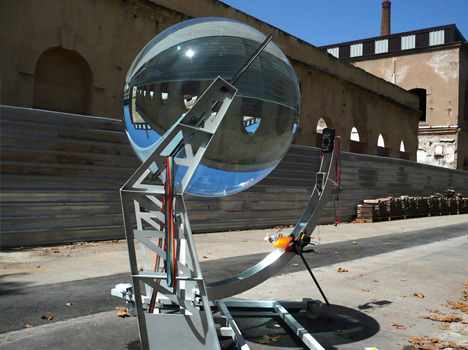
lunar energy orb

This liquid-filled glass sphere design is so powerful (no pun intended) in its ability to turn light into heat that it can not only harvest the rays of the sun, but even draw on energy reflected from the moon.

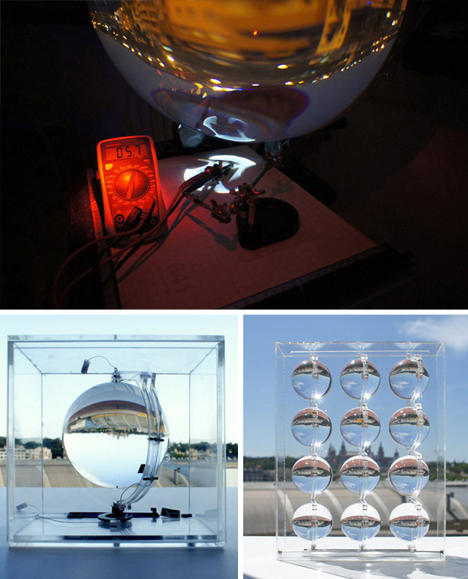
lunar energy thermal concentration

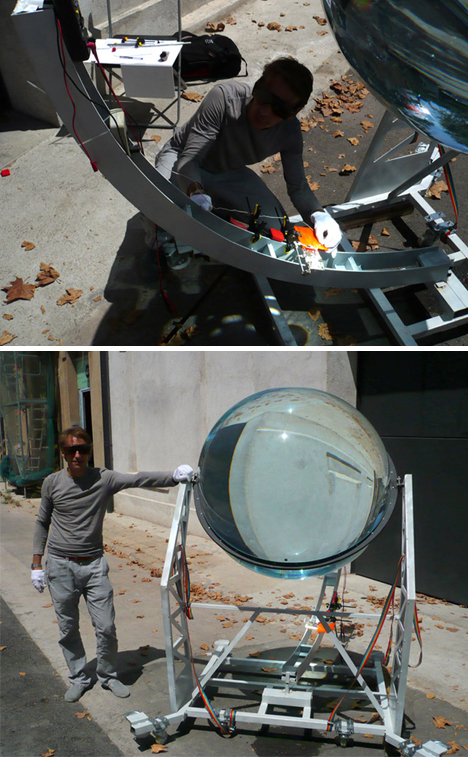
André Broessel is the European architect and engineer behind this weatherproof harvesting system. It is in many regards more robust, efficient and versatile than traditional photovalics, concentrating available light sources and multiplying their thermal effect more than 10,000-fold.

lunar solar collecting ball

Made to be mounted on buildings individually or in arrays, a computerized control system passively tracks available illumination in the day, but can even follow and be fueled by moonlight.

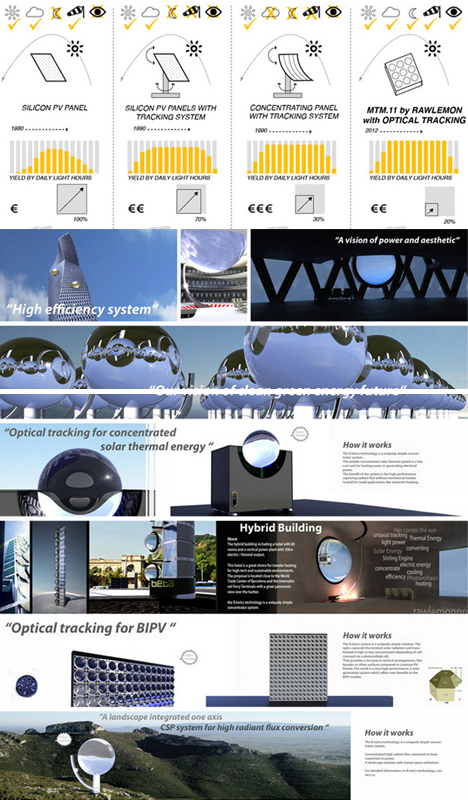
lunar power architectural applications

The balls can work both to generate power and as replacements to traditional window apertures, creating a wide variety of potential hybrid architectural applications as well.

Share on Facebook


[ By WebUrbanist in Gadgets & Geekery & Technology. ]

[ WebUrbanist | Archives | Galleries | Privacy | TOS ]


WebUrbanist

 
Comments Off on Lunar Power: Solar Spheres Energized by Both Sun & Moon

Posted in Creativity


23. April 2013

24 Apr

Ein Beitrag von: mazell24

shower © mazell24


kwerfeldein – Fotografie Magazin

 
Comments Off on 23. April 2013

Posted in Equipment


Panasonic develops Lumix G Vario 14-140mm F3.5-5.6 ASPH. Power OIS

24 Apr

panasonic_14-140_3p5-5p8.png

Panasonic has created the Lumix G Vario 14-140mm F3.5-5.6 ASPH Power OIS, a second-generation 10x zoom for Micro Four Thirds cameras. The lens offers a smaller, lighter, less-expensive alternative to the original G Vario HD 14-140mm F3.5-5.8 ASPH Mega OIS. The latest version features three aspheric and two ED elements and an internal focus design with linear stepper motors to make the most of the faster focus processing of the latest Micro Four Thirds bodies.

News: Digital Photography Review (dpreview.com)

 
Comments Off on Panasonic develops Lumix G Vario 14-140mm F3.5-5.6 ASPH. Power OIS

Posted in Uncategorized


Panasonic unveils Lumix DMC-G6 16MP mid-level mirrorless camera

24 Apr

panasonic_dmcg6.png

Panasonic has announced the Lumix DMC-G6 – the latest in its mass market series of DSLR-styled mirrorless cameras. The G6 gains considerably improved movie capabilities, including full exposure control, an external mic socket and the sensor from the GH2. It also adds the NFC-aided Wi-Fi for simple remote control and image download that we first saw in the GF6.

News: Digital Photography Review (dpreview.com)

 
Comments Off on Panasonic unveils Lumix DMC-G6 16MP mid-level mirrorless camera

Posted in Uncategorized


Panasonic announces Lumix DMC-LF1 Wi-Fi-enabled enthusiast compact

24 Apr

panasonic_dmclf1.png

Panasonic has announced the Lumix DMC-LF1, the first in a new line of Raw-shooting enthusiast compacts. The LF1 marries the sensor from the LX7 to a longer, slower lens and adds an electronic viewfinder. The camera combines a 12MP 1/1.7″ CMOS sensor with a 28-200mm equivalent F2.0-5.9 lens and finds room for a 202k dot-equivalent electronic viewfinder. It becomes the fifth Panasonic model to offer Wi-Fi for remote control and wireless communication that can be set up using NFC.

News: Digital Photography Review (dpreview.com)

 
Comments Off on Panasonic announces Lumix DMC-LF1 Wi-Fi-enabled enthusiast compact

Posted in Uncategorized


Just Posted: Panasonic Lumix DMX-G6 Preview

24 Apr

G6previewblock.jpg

We’ve just posted our Panasonic Lumix DMC-G6 preview, covering Panasonic’s newest Micro Four Thirds mirrorless interchangeable lens camera. The G6 comes barely a year after the G5, and offers several updates, including a 1.44 million-dot OLED electronic viewfinder and the same sensor as the GH2. Its body has also been restyled and the touch-sensitive technology of its fully-articulated screen has been upgraded. Like its little brother the GF6, the G6 also includes built-in Wi-Fi connectivity with Near Field Communication (NFC). Click through for our hands-on preview.

News: Digital Photography Review (dpreview.com)

 
Comments Off on Just Posted: Panasonic Lumix DMX-G6 Preview

Posted in Uncategorized


3 Minutes with Photographer John Paul Caponigro

24 Apr

Inspiration comes in many forms and fine art photographers can be a great source of inspiration. While fine art photography can often make a new photographer scratch there head wondering what the big deal is, if you take the time to look at the photographers body of work or better  yet read articles written by the photographer the work can take on much more meaning. One photographer who is an excellent source of inspiration via his visual work and numerous articles is John Paul Caponigro, an Environmental Fine Art Landscape Photographer, who is today’s guest on “3 Minutes with…”

1. Describe your photography in 100 words or less.
My life’s work is both a call to connection with nature and a call for conscientious creative interaction in our environment during a time of rapid change. My artist’s statements will tell you much more.

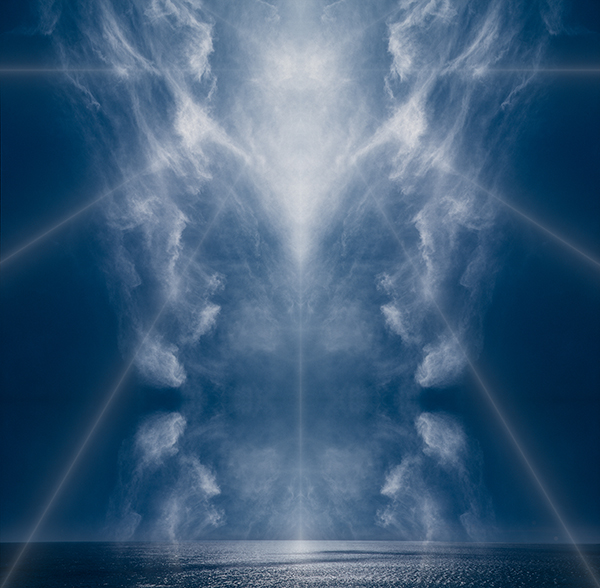
ExhalationIV_2006_5_1

2. What gear/software do you use?
Canon 1DS MKIII and 5DMK II and iPhone 4. Lightroom 4 and Photoshop CS6. But that will change soon, won’t it? I list all the equipment I use on my website.

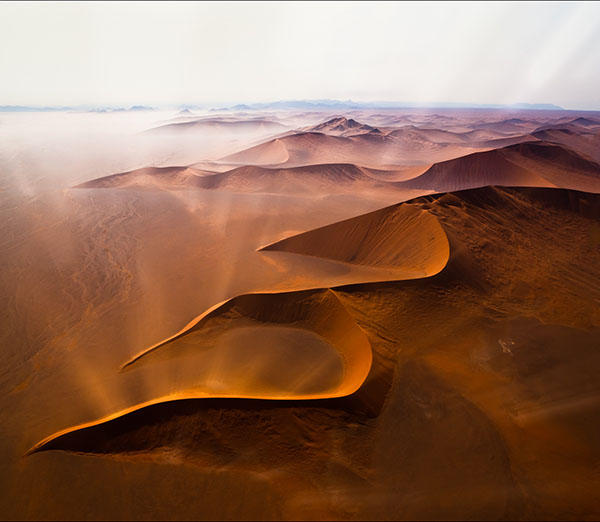
20100924_AFRNamibiaSossusvlei_0479-Edit_1

3. What’s one quick tip that you’d give people interested photography?
It’s not about tools and techniques, it’s about vision. Uncover the unique contribution you have to make and pursue developing it as well as you possibly can. It helps to make a personal plan for your creative life. I’ve written a number of articles on this that are available online.

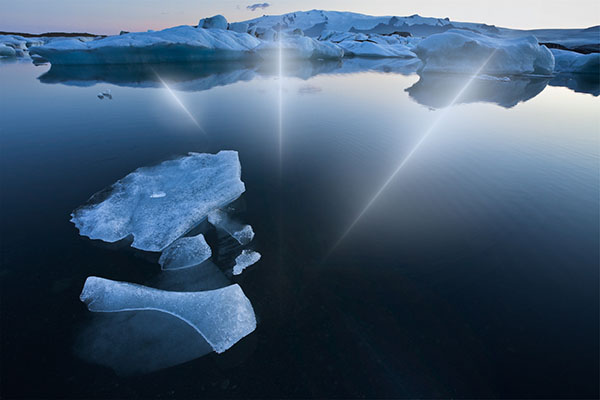
refraction_LXXIV_5_1

4. What 3 Photography Sites or Photo blogs do you recommend?
Julianne Kost’s Adobe TV episodes (How To)
Luminous-Landscape.com (Tech)
Pixelatedimage.com (Soul)
TED.com (Inspiration) [bonus]

To view more of John Paul’s photography visit his web site: johnpaulcaponigro.com

Post originally from: Digital Photography Tips.

Check out our more Photography Tips at Photography Tips for Beginners, Portrait Photography Tips and Wedding Photography Tips.

3 Minutes with Photographer John Paul Caponigro


Digital Photography School

 
Comments Off on 3 Minutes with Photographer John Paul Caponigro

Posted in Photography


How To Photograph Star Trails

24 Apr

Photographing star trails can be challenging but also rewarding. If you’ve never tried it, these tips will help you get started.

Choosing the Place and Time

To make a striking photograph of the stars, there are a few requirements when it comes to choosing the right place and time.

  • You must be far away from any city lights since any ambient light will make the stars less visible. If you live in a big city, this could mean traveling some distance. Recently I was in Nevada, about an hour’s drive away from Las Vegas, and I couldn’t believe the amount of light in the sky from the city.
  • For the photograph to have a sense of place, you will need something interesting in the foreground. It must be something that doesn’t move like a mountain or a building.
  • Plan your star photography adventure for a moonless night. Or at least the moon cannot be above the horizon while you are photographing. Similar to what happens with city lights, the stars are not as visible when the moon brightens the sky.
  • It should also be a clear night with no clouds.
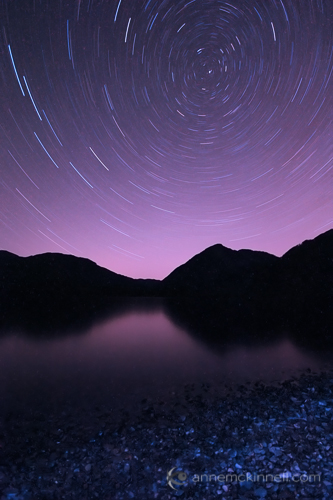
Cowichan Lake Star Trails by Anne McKinnell.

Star trails at Cowichan Lake, British Columbia.

Method

The best way to go about making an image of star trails is to take multiple exposures and combine them in post processing.

While it is possible to take one very long exposure, often the heat coming from the sensor will cause hot spots in your final image.

I usually use a 30 second shutter speed and make 60 images.

Gear You Will Need

The most important thing you will need is a tripod to stabilize your camera during the long exposures.

A cable release or intervalometer is extremely handy but not essential.

You can use the 2 second timer on your camera and manually click the shutter continuously for half an hour. It can be done. But, with a cable release you can set your camera to continuous shooting and lock the cable release and your camera will continue to make images until you unlock it.

If you have an intervalometer, you can program it to take a specific number of images of a particular shutter speed. This is the easiest but most expensive way to go about it.

Finally, make sure you have a fully charged battery since the cold night may cause your battery life to be shorter than usual.

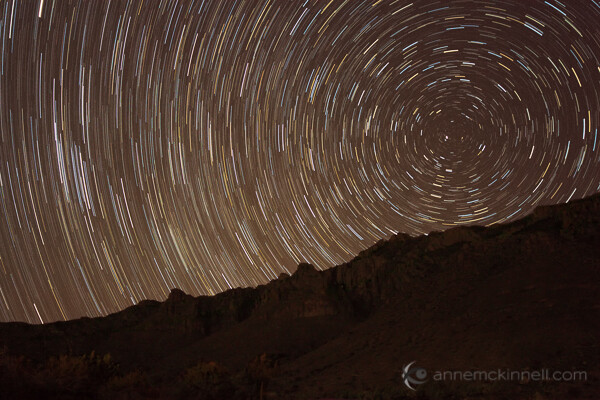
Star trails at Guadalupe National Park, Texas, by Anne McKinnell.

Star trails in Guadalupe National Park, Texas.

Taking the shots

Once you are on location and the gear is ready to go, you can set up your composition.

If possible, go one night ahead of time and locate polaris, the north star, in the sky.  If you can manage to get polaris in the frame, all the stars will circle around it.  If polaris is not in the frame, the stars will appear to travel in a semi-circle.  If you can’t go a day ahead of time, use your compass and try to get as much sky in the frame as possible.

I like to set up my composition during the day so I get just the right amount of foreground in the frame and set the focus so that the foreground is sharp. This is much easier to do during the day than it is once it is dark outside.

Remember once you have set the correct focus to turn your auto-focus off so your camera does not attempt to re-focus at night. Also, your image stabilization should be off anytime your camera is on a tripod.

When it’s dark and you are ready to begin, which will probably be a couple of hours after sunset at least, you can do some tests to make sure you are getting good exposures. You will want to use a large aperture (small F stop number) to ensure you have the greatest amount of light entering the camera as possible. If you try to use a smaller aperture, the star trails we be very dim. So, since you need a 30 second shutter speed and a small aperture, such as f/4, proper exposure will be determined by the ISO. Try taking a test shot at ISO1600 and see if you can see the stars in the image. If not, increase the ISO to 3200.

Also, make sure you turn your in-camera noise reduction off because it will require an additional 30 seconds after you make your exposure to do the noise reduction and you will end up with little gaps in your trails.

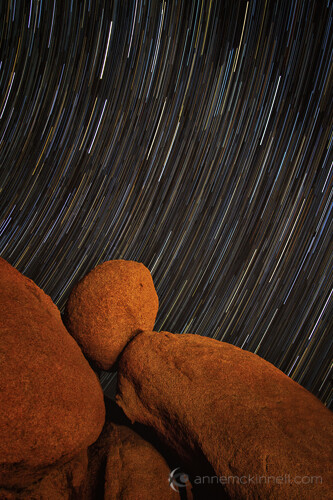
Star Trails at Joshua Tree National Park by Anne McKinnell.

Star trails at Joshua Tree National Park, California.

Processing the Image

To combine your images, I recommend a free program I have been using called StarStaX which is easy to use and it does a great job. Just point StarStaX to the folder that contains all the exposures, selected “lighten” as the blend mode, and let it go to work.

This can be the most exciting part of the whole experience since you finally get to see what you have created!

Once you have the stacked image, you might find you have some UFO’s in it that look like straight lines crossing your curved star trails. Those can be caused by comets or airplanes. I usually use the healing brush in Photoshop to remove them.

You might have to invest a bit of time in planning, making the exposures, and processing the images, but the final result will be well worth the investment. All you really need is a bit of patience.

Post originally from: Digital Photography Tips.

Check out our more Photography Tips at Photography Tips for Beginners, Portrait Photography Tips and Wedding Photography Tips.

How To Photograph Star Trails


Digital Photography School

 
Comments Off on How To Photograph Star Trails

Posted in Photography