Video Producer: Najwa Marfie – Gear: Nikon D3X Lens: 24-70 mm f/2.8, Nikon 600mm f/4, Sigma 120-300mm f/2.8 – Nikon 70-200mm f/2.8 – N-Studio Official website: www.n-studio.com.kw © all rights Reserved 2010
Video Producer: Najwa Marfie – Gear: Nikon D3X Lens: 24-70 mm f/2.8, Nikon 600mm f/4, Sigma 120-300mm f/2.8 – Nikon 70-200mm f/2.8 – N-Studio Official website: www.n-studio.com.kw © all rights Reserved 2010
Wahrscheinlich bekommt jeder irgendwann im Leben ein ganz spezielles Foto von sich. Eines, das sichtbar macht, was man so nicht sehen kann: Ein Röntgenbild. Diese Strahlen sind nicht nur wissenschaftlich interessant, sondern finden auch in der Kunst Verwendung.
Aber fangen wir beim Anfang an, ein Blick in die Geschichte: Im Januar 1896 präsentierte Wilhelm Conrad Röntgen die Entdeckung dieser Strahlen. Er durchleutete die Hand von Albert von Kölliker und hielt mit Hilfe von Fotoplatten das Schattenbild für die Ewigkeit fest. Die Entdeckung war eine Sensation und wurde zu einem Meilenstein in der Medizin.

Albert von Köllikers Hand; 23. Januar 1896
Auch die wissenschaftlichen Aufnahmen der beiden Österreicher Josef Maria Eder und Edward Valenta faszinieren noch heute. Sie zeigen verschiedene Fische, Schlangen und Amphibien unter Röntgenstrahlen. Diese Bilder entstanden ebenfalls schon im Jahr 1896.
Bereits im März desselben Jahres entdeckte man erste Strahlenschäden wie lokalen Haarausfall und Hautrötungen. Der Begeisterung tat dies jedoch kaum einen Abbruch. 1904 wurde das erste Buch zum Strahlenschutz veröffentlicht, fand jedoch damals kaum Beachtung.
Man entdeckte viel eher den künstlerischen Reiz dieser surreal wirkenden Bilder. Während die Wissenschaft neue Erkenntnisse aus den Röntgenfotografien zog, begannen zunehmend auch Künstler und Fotografen, sich mit dem neuen Medium auseinander zu setzen.

Foto: Josef Maria Eder und Edward Valenta (1896)
Einer der bekanntesten unter ihn nist wahrscheinlich der Bauhaus-Maler und -Fotograf László Moholy-Nagy, der sich 1940 ausgiebig mit dieser Technik beschäftigte. Aber auch heute noch gibt es Menschen, auf die Röntgenstrahlen eine Faszination ausüben und die mit ihnen experimentieren.
Diese Experimente werden immer aufwändiger und größer. Nick Veasey röntgte zum Beispiel 2003 eine Boeing 777 vollständig. Aber auch Unterwäsche und Bagger samt Fahrer sind vor ihm nicht sicher. In seinem Buch „X-Ray. Die Schönheit des Verborgenen“* zeigt er eine Auswahl seiner Bilder.

Foto: Nick Veasey (2003)
Auf Flickr wurde ich auf Surfactant und seine Bilder aufmerksam. Er arbeitet seit 18 Jahren als medizinisch-technischer Radiologieassistent und hatte die Möglichkeit, für seine Fotos Röntgengeräte zu verwenden, die nicht länger für die menschliche Diagnostik genutzt werden konnten.
Ich kann mir mittlerweile vorstellen, welche radiologischen Schatten Menschen, Tiere und unbelebte Objekte werfen werden. Ich finde diesen Teil besonders interessant. Ich glaube, es ist wie bei einem Fotografen, der alles um sich herum genau studieren muss, um sich dann zu überlegen, wie das Licht am besten auf sein Motiv fallen wird.

Foto: Surfactant
Auch latitegeraldine entdeckte ich bei meiner Suche auf Flickr. Die 28-jährige Französin arbeitet ebenfalls als technische Assistentin in einem Krankenhaus.
Ich mag die Idee, ins Innere der Dinge sehen zu können. Ich verwende besonders gern Objekte mit verschiedenen Dichten und Dicken, das macht viel Spaß. Objekte, die ich röntge, zeigen meistens das, was ich im Leben gern habe.

Foto: latitegeraldine
Beim Betrachten der Bilder entsteht bei mir der Wunsch, selbst Objekte zu durchleuchten. Wie sieht wohl meine Kamera im Inneren aus? Oder das Kaleidoskop, das hier auf meinem Schreibtisch steht? Es ist schon schade, dass Röntgenstrahlen gefährlich sind und dadurch nicht mehr Menschen die Möglichkeit haben, ihre Neugierde auf diese Weise auszuleben.
* Das ist ein Affiliate-Link zu Amazon. Wenn Ihr darüber etwas kauft, erhalten wir eine kleine Provision, Ihr zahlt aber keinen Cent mehr.
kwerfeldein – Fotografie Magazin
Some cool visual art images:
Mapping Privacy in Public Spaces – Jan 12, 2013

Image by BMW Guggenheim Lab
Mapping Privacy in Public Spaces Project: Findings by KRVIA Design Cell
BMW Guggenheim Lab
January 12, 2013
Dr. Bhau Daji Lad Museum
Mumbai, India
Where do Mumbaikars find privacy in their city? The KRVIA Design Cell talked about their findings from the Mapping Privacy in Public Space research project, conducted through the Lab’s run. They discussed their methodology and their experience in data collection across the Lab’s six sites, and shared the visual imagery and maps they created from their research from over 200 participants.
Photos: UnCommonSense © 2013 Solomon R. Guggenheim Foundation, New York
Mapping Privacy in Public Spaces – Jan 12, 2013

Image by BMW Guggenheim Lab
Mapping Privacy in Public Spaces Project: Findings by KRVIA Design Cell
BMW Guggenheim Lab
January 12, 2013
Dr. Bhau Daji Lad Museum
Mumbai, India
Where do Mumbaikars find privacy in their city? The KRVIA Design Cell talked about their findings from the Mapping Privacy in Public Space research project, conducted through the Lab’s run. They discussed their methodology and their experience in data collection across the Lab’s six sites, and shared the visual imagery and maps they created from their research from over 200 participants.
Photos: UnCommonSense © 2013 Solomon R. Guggenheim Foundation, New York
Questions? Go here: www.youtube.com Step by step tutorial on how to create time lapse videos from scratch using a Nikon DSLR. Part 4 of 4. See below for option availability. INTERVAL TIMER AVAILABLE: • Nikon D5000 • Nikon D5100 • Nikon D7000 • Nikon D200 • Nikon D300-Series…
Video Rating: 0 / 5
Prosumer DSLR cameras offer high resolution capture, advanced autofocus, fast burst rates, and tough, pro-grade construction. Canon EOS 7D bit.ly Sony Alpha A550 bit.ly Nikon D300s bit.ly Pentax K-7 bit.ly
Video Rating: 4 / 5
The following is an excerpt from the SLR Lounge Lightroom Workflow System Workshop on DVD, a system designed to increase your post production speed by 5 to 10 times. Click here to learn more.
I was attending a workshop last year in Los Angeles where the instructor talked about the importance of having backup gear for an important shoot. His mantra was that during a shoot, “something always goes wrong.” Gear redundancy is important, especially when you are on the client’s clock. Without a doubt, not having a backup to your gear can potentially derail a photoshoot if something were to break.
However, the most important and expensive component of your photoshoot is indeed not your camera gear. Unlike your gear, which you carry insurance for and can be replaced, the images from the shoot may not be replaceable and are therefore the most critical component of a paid photoshoot.
Not only would it be far more expensive to setup a reshoot, for photojournalists shooting a wedding or a Presidential inauguration, a reshoot is simply impossible.
So just like your gear, it is important to have duplicate copies of your client’s images from the shoot to your computer. Here are four tips that you can integrate into your shooting workflow.
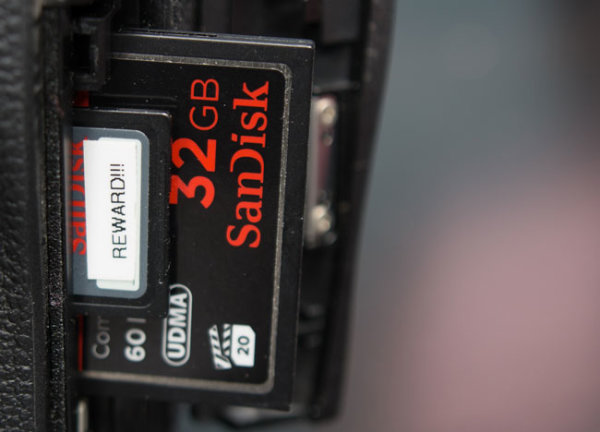
Ideally, when you are working professionally, it is best to shoot with a DSLR that can record onto two cards on the fly. It is the most convenient and most portable method of creating backups of your images as you can simply set the camera to “duplicate” the images onto each card as they are recorded. If you are in need of frequent high speed burst shooting for action/sports, this may not be possible since using dual cards can often fill your cameras buffer too quickly. But, wherever possible, using two cards in camera will automatically add an additional level of security to your workflow.
The majority of the full-frame DSLRs such as the Nikon D600, Sony A99, Canon 5D mkIII, Canon 1D Series, Nikon D800 and the Nikon D4 Series have this capability already. Currently, the Nikon D7000 is the only APS-C DSLR that has two card slots.
Additionally, we recommend that for your most important shoots to only use memory cards from established manufacturers such as Sandisk and Lexar. There are also many fake Sandisk and Lexar cards out there, so be wary of them. For Amazon shoppers, be sure to buy directly from Amazon itself and not a third-party seller on Amazon. Often times these counterfeit cards are virtually impossible to differentiate from packaging alone. For those that want the extra peace of mind there are also “zero failure” memory card brands out there such as Hoodman. However, in sticking with the major name brands, I have never had a card failure and thus never really felt like it was worth the 5x-10x premium price for zero failure memory.
It is also a good idea to have a standardized system of storing your cards in order to know which memory cards have been used. An example of a straightforward system is to place any used card face down in the wallet.
Another method of backing up your images during the shoot is by backing up the images to either a laptop or a portable media storage drive such as the Sanho Hyperdrive Colorspace UDMA. This is especially useful when you are shooting with a single-card camera or if you have a second shooter with you
The laptop is easier if you are in a controlled environment such as a studio or a private photoshoot, but it is not recommended when you have to be in a less-secure environment such as a wedding where you may be running around everywhere. This is where a portable media drive can attract less attention, while also being far more portable than a laptop.
The trip from the shoot is another part of the day where having a contingency plan can keep the client’s images safe in case something happens on the way home or to the studio.
One way to ensure the safety of the images is to keep both copies of the images in two separate places. I usually carry the primary cards in my card wallet which is attached to my belt loop and kept in my pocket. The back-up cards, laptop, hard drive, or portable media storage stays in the trunk.
If someone rear ends the car and damages the gear, or if someone breaks into the car while I’m eating at a restaurant, I still have at least one set of the images with me. Additionally, if the memory cards in my pocket somehow fall out, I still have the backup in the trunk.
Once you returned to your studio or home, be sure to back up your images to your computer and into the backup hard drive. For additional security, you can also upload the images as either the original RAW or the finished images on to an online storage site like Amazon’s Glacier or Crashplan.
Thankfully, hard drives are relatively cheap nowadays, and additionally, there are plenty of online storage options as well. It pays to research the brand names and websites to know which hard drives and online storage sites are the most reliable. I personally use 1TB Silicon Power Rugged Armor A80 portable hard drives because they can take a beating (literally). The current online storage solution that I use is Crashplan.
Remember, gear can be replaced, but the client’s images may not be replaceable, so it is important to work image redundancy into your shooting workflow. The good news is that it does not take that much more effort to safeguard your images, just good habits and awareness.
The SLR Lounge Workflow System Workshop on DVD takes everything that we taught in the Lightroom 4 A to Z Workshop on DVD and builds by teaching you how to maximize your shooting and post processing efficiency and workflow. This 7 hour DVD covers data safety procedures, file management, culling standards and overall develop techniques to increase your post production efficiency by up to 15x! In fact, using this Workflow System we can cull and edit over 1,500 images per hour! Don’t believe us, watch the teaser video! The Workflow System is also available as a part of the Lightroom 4 Workshop Collection. To learn more click this link.
Post originally from: Digital Photography Tips.
Check out our more Photography Tips at Photography Tips for Beginners, Portrait Photography Tips and Wedding Photography Tips.
Four Tips on Your Image Data Safety Procedures
Men who can’t have children. Scientists are on the hunt to find out why on this special episode of 16X9: The Bigger Picture.
Over the last couple of years we’ve seen a rise in interest by many dPS readers (and around the web) in the topic of street photography and street portraiture.
While I love the idea of documenting what’s going on in a neighbourhood there are times when I view some street photographers work that I can’t help but feel a little… uncomfortable at what is being presented.
By no means is it in all street photography but there are times where what is presented is very confronting – not only to those viewing the images but sometimes the act of taking some street photography seems quite confronting, intrusive and even at times exploitative to the subjects of photos.
While I think there’s certainly a place for using photography to document our culture (both the good and the bad) I’ve increasingly been worrying that some photographers might be overstepping the mark of late and in the process are almost exploiting the people and neighbourhoods that they photograph.
Today I came across the following video which tells the story of two street photographers taking a different approach as they photograph the Tenderloin neighbourhood in San Fransisco – an area that is often known for being a rough and dangerous part of the city.
Photographers Brad Evans and Travis Jensen share in the video about how some street photographers have photographed that neighbourhood in a way that focuses upon the negative aspects of the area and that exploit the people there in the way that they go about their photography – but with their project they wanted to photograph the neighbourhood in a way that respected everyone that they photographed.
The other aspect of this book and magazine project that emerged from this is that profits were shared with a community group to put something back into the neighbourhood.
I love the philosophy of street photography expressed in this video – it’s well worth watching.
More than photography from sidewalktalk.dk on Vimeo.
I’d love to hear what you think on this topic. By no means am I arguing against street photography or even using photography to document some of the challenges and hardships that some people face – rather I’m wondering if this can be done in a more respectful and caring way – a way that not only highlights the issues but which also treats people with respect and dignity through the process.
Over to you – what do you think?
Post originally from: Digital Photography Tips.
Check out our more Photography Tips at Photography Tips for Beginners, Portrait Photography Tips and Wedding Photography Tips.
Street Photography: Exploitative vs Respect
Halo Combat Evolved Walkthrough: The Library – Mission 7 Part 16 of my Let’s Play series from Halo Combat Evolved This is going to be the last upload of this series for a couple of days now due to the fact I have uploaded 4 Episodes in three days, that is unless you guys want me to continue to release this on a daily basis? Let me know in the Comments. Follow me on Twitter – www.twitter.com Playlist – www.youtube.com
www.Berger-Bros.com Learn how to fine tune your camera’s metering. The camera doe NOT behave like your eye. The camera needs YOU to tell IT what to do. Every camera has a built in default metering mode, which is the way the camera sees the available light, and adjusts to that light. Yvonne Berger, an instructor with Berger Bros Camera in Amityville and Syosset Long Island, New York explains various metering modes, such as matrix and evaluative metering, center weight meter spot metering She explains when to use each type of metering depending on what type of photograph you are taking.
Flares and overexposure with the prototype. Moving on from test charts, this is how the lens looks stopped down to f4 with the prototype.
some pictures from my trip to western australia
Halo 2: Walkthrough – Part 8 [Mission 6] The Arbiter – How you no see me?(Gameplay & Commentary)
Halo 2 Walkthrough: The Arbiter [Mission 6] Part 8 of my Lets Play series from Halo 2 Me and my advernture with the solotary Grunt remaining from my Squad briefly continues! Let me know if you would like to see a Gears of? War 3 Walkthrough and whether you would watch it, I already have recorded a few Episodes of it so if you do want to see it expect it to launch on Monday! As always please don’t forget to leave this video a Rating! Playlist – www.youtube.com Follow me on Twitter – www.twitter.com
Video Rating: 4 / 5
Posted in Nikon Videos