JPEGmini is a company that has a unique approach to optimizing your JPEG format images in an effort to help you save storage space. I took a quick look at their offering and shared my thoughts on it with Sarah Perez in a recent TechCrunch article New Startup JPEGmini Reduces Photos’ Size, Not Their Quality. I thought I would share a little more about my take on the service in the event it’s something you feel is worthy of trying or using.
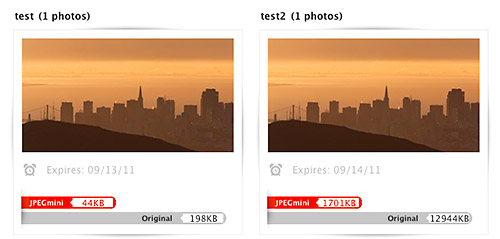
Test1 – Web sized image (800 px x 500 px)
Test2 – Full size image (5616 px x 3744 px)
What is JPEGmini?
- JPEGmini is NOT a new file format.
- JPEGmini is a re-compression engine with a twist:
JPEGmini works by analyzing the input image using a unique quality detector which imitates the human visual system, and based on this analysis applying the maximum amount of compression which will not cause visible artifacts. For further details, see the technology section
- JPEGmini is an online service… for now
Does It Work?
The quick answer is yes and no. JPEGmini excels at compressing larger images versus smaller images. Compression gains are also made most significantly on “first-generation photos created by digital cameras”. In other words if you’ve edited a photo already in photo editing software you may not see huge file size reduction namely because the file has already undergone some level of compression.
I was a skeptic when I learned about this site. I ran a quick test to compare the following:
I tested two images of different types.
- An image with not a lot of detail and similar tones. Such images have a lot of similar data that is easily compressed resulting in higher compression savings.
- An image with a lot of detail and varied tones. Such images do not have a lot of similar data to compress resulting in less compression savings.
I also tested two different files sizes for each image:
- Web sized image (800 px x 500 px)
- Full size image (5616 px x 3744 px)
The results were notable with file size saving from 67% to 87%. But I also ran each image through Photoshop’s “Save for Web & Devices” at 60% quality to attain savings from 71% to 85%. Bottom line Photoshop reduces file size for web sized images better in this simplified test by 4-7%. On the other hand larger images attained greater file size reduction with JPEGmini over Photoshop by 4-7%.
Note: Photoshop is not optimized for compressing very large images with their “Save for Web & Devices” function and JPEGmini states they perform better with larger images.
Full Test Details
Pros, Cons & Thoughts
The pros clearly are that you can reduce the size of your large image files with the JPEGmini. In scale this could help you save money by reducing your demand for new hard drives. You can compress images without buying expensive software like Photoshop. All metadata is preserved. Image quality suffered very little when comparing the original image and the JPEGmini version of the image at 100%. In fact most people would not notice a difference. That being said I did not run print comparisons of each file before and after JPEGmini compression.
On the other hand the service is only available online requiring you to upload images, wait for the compression engine to process your files (can range from minutes to hours) and then spend the time to download them. It’s also important to note that the service only works with JPEGs. The significance of this is that you’re compressing your image files multiple times and each compression ultimately results in loss of data. Compress an image repeatedly and you can impact image quality. For more on this refer to my previous article (pre-blog) guest written by Oskar Breuning JPEG Compression: Data Loss & Image Impact. Lastly the biggest concern I have surrounds the JPEGmini Terms of Service (TOS) namely the following User Submission section:
You hereby grant ICVT and our designees a worldwide, non-exclusive, sublicenseable (through multiple tiers), assignable, royalty-free, fully paid-up, perpetual, irrevocable right to use, host, store, index, reproduce, distribute, create derivative works of, and display and perform your Content on the web and on mobile devices, solely in connection with our provision of the Service
Uploading an image places the image on their server. While files are only kept for roughly 1 week, images can be used by JPEGmini’s parent company to market their service. Personally the broad nature of this section makes me too uncomfortable to use the service beyond testing. Of specific concern is the right claimed to sublicense images that they deem irrevocable. Not very photographer friendly in my eyes. Note: Dror Gill the CTO of the company has stated that photos are not used for promotion without confirmation from the owner in a comment on the TechCrunch article.
My hope is two fold for JPEGmini…
- Clarify Modify the ToS to be more photographer friendly and less JPEGmini-centric
- License their technology so it can be utilized in established programs and mobile applications or launch their own desktop & mobile applications.
Technorati Tags: photography, technology, JPEGmini, Photoshop, compression, JPEG
.gif)
Copyright Jim M. Goldstein, All Rights Reserved
Review: JPEGmini – Reducing Photo File Size, Not Quality


JMG-Galleries – Jim M. Goldstein Photography


 Model is Jillian
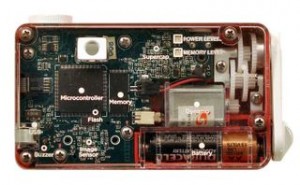 In keeping with the theme of learning, here’s an interesting program I hope expands in the future. Bigshot is currently only running workshops in the New York City area but it looks like they might reach other cities soon. The Bigshot workshops allow kids to build their own camera from a set of Bigshot click-together camera parts. The idea is to teach engineering and science concepts while building a working camera, which can then be used to teach photography.
You must be logged in to post a comment.