Category: Uncategorized

  • Google I Love You So Much I’d +1 That

    Google

    Great news today from Google. They’ve opened up Google+ to everyone. It’s no longer invite only. Along with opening it up to the entire world they finished up eight other new features as well — including SEARCH! :) Danny Sullivan has a great wrap up on the new search feature here.

    They also added the ability to broadcast and record hangouts which is super cool as well. I’ve done a number of hangouts and they are a fun way to hang out at the end of the day online with a group of 9 of your friends. Because hangouts only accomodate 10, alot of people were left out and not able to watch them. Now that you can broadcast and record them people who can’t get in can at least still watch.

    100 features since launching less than three months ago. AMAZING! Why can’t other sites do this?

    I’m not sure I’ve ever seen a team innovate so quickly around a product. It’s refreshing and exciting to see something so innovating going on and it’s been so fun for me being a part of it all as well. I love being able to say that I signed up for Google+ on the first day that it was open as invite only to the public.

    I’m especially proud of the vibrant photography community that has emerged out of Google+. So many amazing photographers coming together to share their work visually. I’ve also been so pleased seeing Google embrace and help nurture this new community on their site. Dell and Google+ cosponsored our photowalk this past weekend in Austin and both came through with great prizes for a photo contest. Congratulations btw to our grand prize winner Emma Hollingsworth who took the winning photo with an iPhone! More on that here.

    Klout also announced today that they are integrating G+ into their product as well. I hooked mine up a few minutes ago.

    I took the above photo of Dave Cohen, Lotus Carroll and Vincent Mo at the Austin City Limits Music Festival this past weekend. It was great to see Google+ out at the festival with a big presence (they even sponsored a stage!). The message was accidental, but I love it.

    Are you a photographer not on Google+? What are you waiting for? Sign up today. You can add me to your circle here. :)


    Thomas Hawk Digital Connection

  • If You Build This Fulgurator-on-the-Cheap, Use it for Good

    I totally missed this on DIYPhotography.net until Alim Kassim clued me via Twitter.

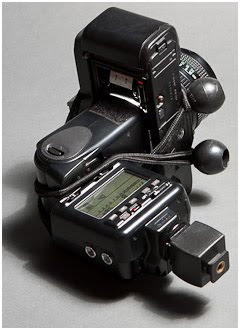
    A little bit of quick and easy DIY (and ball bungees!) turns an old film camera into a focusing strobe projector. You can actually buy these things for some models of big lights, but they will cost you some serious coin.

    I’d probably use one differently than did the photog on DIYP. Like maybe painting numbers or something three-dimensionally onto someone’s face or something. Great idea to keep in the back pocket, tho.

    If it looks familiar, it is a simplified version of the “Image Fulgurator” created by photographer Julius von Bismark. But he used his for public mischief…

    -30-


    Strobist

  • Sony Alpha SLT-A35 Review

    You’ll find this model on Sony’s Web site by looking in the DSLR department. But a DSLR it ain’t!

    Sony SLT-A35.jpg

    The entry level Sony Alpha A35 has no flipping mirror! Instead, it has a fixed, semi-reflective mirror placed in the light path that transmits 66.66 per cent of the light to the CMOS sensor in the back of the camera — and 33.33 per cent of it to a tiny electronic display built into the camera’s roof. When you move your eye from the large LCD at the camera’s rear to the eye level viewfinder you view the action via the smaller LCD. What you get is full time live view.

    Sony A35 front.JPG

    Remove the lens and you can see how it works, with the mirror in place whenever you shoot. If you need to, the mirror can be tilted up in order to clean the sensor, but normally remains in place at a 45 degree angle.
    For what it’s worth, the 35 can use any of the A-mount interchangeable lenses Sony make as well as six Carl Zeiss lenses and the earlier Konica/Minolta AF glass.

    Sony SLT-A35-2.jpg

    Sony Alpha SLT-A35 Features

    The review camera arrived with one of the kit lenses: the f3.5/18-55mm zoom … OK for general shooting but not much use for the more advanced photographer.

    Two people 2.JPG

    What did not arrive with the camera was any form of documentation such as a manual, neither printed nor PDF! Which made life writing a review fairly difficult.

    Oh well. The A35’s CMOS sensor has 16.2 effective pixels and a 4912×3264 pixel maximum image size.

    The sweep panorama feature can account for 3D panos up to 4912×1080 pixels or ‘flat’ panos up to 8192×1856 pixels.

    Video-wise, the A35 can shoot a Full HD resolution of 1920×1080 pixels. Although you’re using an interchangeable lens, you can still shoot video with full AF and auto exposure in play. It won’t shoot stills during video shooting tho’.

    Sony-Alpha-SLT-A35-Back-View.jpg

    Menu 1.jpg

    Menu 2.jpg

    The LCD screen status is quite useful, showing chosen exposure mode (P, A, S, M etc), battery charge, image quality and a graphic display of lens aperture and shutter speed.

    An on-screen Help Guide gives a graphic explanation of selected functions and how they’re used.
    A top panel button lets you call up any of 14 often-used functions and frequently used features can now be custom-assigned to the D-RANGE button for rapid access.

    Picture Effect.jpg

    There is a Picture Effect (above) setting that can be previewed on the LCD screen, giving you preview of the effect. This includes ‘artistic’ treatments such as Posterisation, Pop Color, Retro effect, etc.

    There is also a bunch of scene modes (portrait, sports, macro etc). In this section is found a bunch of Partial Colour effects (below), which lets you isolate and record a single colour, with the remainder of the scene picked out in monochrome.

    Partial colour.JPG

    The continuous shooting speed rises from 5.5fps (full size) to 7fps (reduced).

    Sony Alpha SLT-A35 ISO Tests

    Sony SLT-A35 ISO 100.jpg

    Sony SLT-A35 ISO 400.JPG

    Sony SLT-A35 ISO 800.JPG

    Sony SLT-A35 ISO 1600.JPG

    Sony SLT-A35 ISO 3200.JPG

    Sony SLT-A35 ISO 6400.JPG

    From ISO 100 to 400 no probs. At ISO 800 noise began to appear. At ISO 1600 noise is still on the rise, although not objectionably. AT ISO 3200 even more noise and at this level you would have to select your subjects carefully. At ISO 6400, echo the latter comments.

    Wall mural 2 2.JPG

    Sony Alpha SLT-A35 Verdict

    Quality: picture quality was OK but not brilliant.

    Why you’d buy it: access to A-mount lenses.

    Why you wouldn’t: LCD screen is fixed, doesn’t tilt; card slot in camera’s base;

    So what did I think of the semi-reflective mirror viewfinder arrangement? Frankly, I found it awful: flat in contrast, noisy, with poor colour rendering. In a word: ‘useless’.

    In bright light, you’ll experience flare in the viewfinder with a double image possibly arising from the internal mirror.

    Solution: I used the LCD screen instead!

    A nice, well-priced camera but the eye level viewfinder lets it down.

    Sony Alpha SLT-A35 Specifications

    Image Sensor: 16.2 million effective pixels.
    Metering: 1200 zone multi-segment, centre-weighted metering and spot.
    Effective Sensor Size: 23.4×15.6 — APS-C sized — CMOS.
    35 SLR Lens Factor: 1:5x.
    Compatible lenses: Sony and Minolta A-mount, Konica Minolta Alpha/Maxxum/Dynax.
    Exposure Modes: Auto, Program AE, shutter and aperture priority, manual, scene selection, sweep panorama.
    Shutter Speed: 30 to 1/4000 second, Bulb. Flash sync: 1/160 sec.
    Memory: SD/SDHC/SDXC/Memory Stick Pro Duo cards.
    Image Sizes (pixels): 4912×3264 to 2448×1376.
    Movies: 1920×1080 to 640×480 at 25/29.97 fps.
    Continuous Drive: 7 frames.
    Turret Viewfinder: 1.2cm LCD (1,440,000 pixels).
    LCD Screen: 7.6cm LCD (921,600 pixels).
    File Formats: RAW, RAW+JPEG, MPEG4, AVCHD, Dolby Digital (AC-3).
    Colour Space: Adobe RGB, sRGB.
    ISO Sensitivity: Auto, 100 to 25,600.
    Interface: USB 2.0, mini HDMI, microphone, remote, external microphone, DC input.
    Power: Rechargeable lithium ion battery, AC adaptor.
    Dimensions: 124.4x92x84.7 WHDmm.
    Weight: Approx. 415 g (body only).
    Price: The Sony Alpha SLT-A35 comes in a few configurations. Get a price on it at Amazon with:

    • Sony Alpha SLT-a35 with 18-55mm Lens (also at B&H Photo)
    • Sony Alpha SLT-a35 – Body Only (also at B&H Photo)

      Post originally from: Digital Photography Tips.

      Check out our more Photography Tips at Photography Tips for Beginners, Portrait Photography Tips and Wedding Photography Tips.

      Sony Alpha SLT-A35 Review


      Digital Photography School

    • new portfolios

      been doing a lot of personal work lately, a good amount of new portfolio shooting.   Felt it was about time for a portfolio overhaul… check the galleries for new work…

      Tweet This Post Stumble This Post


      F/1.0

    • lighting essentials advanced workshop – a brief review

      For those not familiar, Lighting Essentials are a series of workshops put on by Don Giannatti (you may know him as “Wizwow” on flickr).   I am a big fan of Don, not only is he an excellent photographer, with years of commercial experience under his belt, but he is also a fantastic teacher – which is just as difficult a skill unto itself.  He’s also a really down to earth guy with a low tolerance for BS and fools, which I find refreshing, particularly in the online photo community which can often turn into a bit of a hive-mind circle-jerk at times (you know what I’m talking about)…

      Anyway, I got to go to his workshop in Philly in ’08 and it was awesome – definitely kicked my work up a couple of notches.   At the time I was already somewhat experienced with lighting, so I wasn’t sure what to expect, but I was blown away; it was amazing to watch Don demonstrate things that I already “knew” lighting wise, and still be able to pick up something new – a new way of thinking about it, new ways of analyzing and constructing and deconstructing light.

      A few weeks back, I had the opportunity to attend the advanced lighting essentials ‘shop down in Baltimore.  Different than the standard workshop, this one assumed a baseline familiarity with lighting to begin with – getting a baseline exposure, balatncing flash/ambient, ratios etc… This was fantastic, as we were able to jump right into working with little “catch up” required.  The format was well done. Don split us up into groups, with various assignments/challenges – in the morning we worked “in studio” talking about and working on precision lighting techniques for still life/objects.  I gained a whole new respect for product photographers – it’s a lot more difficult than you’d think.  One light, and lots of carefully placed white/black cards/diffusers etc…  I particularly appreciated this as it  really made you focus on analyzing and constructing light carefully rather than the “throw some strobes on it till it looks good” approach which many lighting novices seem to take.

      In the afternoons we worked with models,  but instead of the standard “how to light/balance” we focused more on creating a mood or complex lighting schemes – sometimes using 4, 5 or more lights – little accents and subtleties to construct a meaningful lighting scheme.   Now I tend to be more minimalist in terms of my own lighting (I tend to favor zero, one or two lights – rarely more) but even so it was valuable to concentrate on the subtleties of the lighting scheme as a whole.

      One of the things I like the best about Don’s workshops is that it’s all hands-on.  There’s no “sit around and listen to the instructor talk about how great he is” for 6 hours, as is the case with many “workshops” – Don has everyone jumping right in and shooting right off the bat.  It’s simply “talk about technique -> apply technique”.   Good stuff.   We also spent quite a bit of time talking business.  Don has been a full time photographer as well as designer and creative director for many years, so he has a fantastic amount of the experience in the industry and shares freely.  There are few things more valuable for a new photographer than the lessons of experience from someone who has “been there and done that”.   It’s like going through the school of hard knocks without having to take the knocks.

      To sum up, aka the TL;DR version:  if you get a chance to attend one of Don’s workshops, go for it – it’s worth every penny.  What boggles my mind is that folks who will drop thousands on a new camera body or lens, are so hesitant to spend money on education or workshops.  I can say without reservation that the couple of hundred bucks for the LE workshops improved my work far more than any gear purchase I have made (and yeah, I’m also guilty of chasing the latest and greatest toys when it comes to gear).

      finally some shots from the ‘shop:

      Tweet This Post Stumble This Post


      F/1.0

    • Nikon Announces Nikon 1 Mirrorless Cameras


      …with a proprietary hot shoe. Oh, and a teeny tiny chip, too. It’ll take your DSLR lenses, with only a 2.7x crop factor.

      Really, Nikon? Clearly this thing is not a replacement for a DSLR. But what does it compete with? I use an iPhone (and a Canon G-series) for everything else.

      Really hard to understand what they were thinking on this. My thoughts pretty much echo those of Charlie Sorrel at Gadget Lab.

      -30-


      Strobist

    • Nikon Announce New 1 System Cameras (J1 and V1)

      There’s lots of buzz going around the photography blogosphere today as Nikon enter the mirrorless interchangeable lens camera market – a growing segment in the digital camera game.

      Nikon J1

      With growing popularity of similar cameras from Sony, Panasonic, Olympus and Samsung over the last year or so Nikon have jumped into the game with their new ’1 System’ line. They are launching with two camera bodies (the J1 and the V1), four lenses and a couple of accessories.

      The new ‘CX’ sensor is a smaller sensor than what other brands are going with (about a third the size of Nikons DX DSLR sensor) which is getting critiqued around the blogosphere already but it could have some other advantages – at least in terms of specifications it is going to be a fast shooting camera (full resolution shots can be shot at up to 60 frames per second…. not sure what you’d want to shoot at that rate but sounds impressive) and has an interesting auto-focusing system that uses Contrast Detection (135 focus points) AND Phase focusing (73 focus points) methods.

      Nikon V1

      Video is also pretty good – full HD movies and the ability to shoot high res shots while shooting video.

      The two cameras are largely the same with a few differences.

      The J1 seems to be more aimed at the compact camera market – it has a pop-up flash, no view finder, electronic shutter and an aluminium alloy body. It’s already available on Amazon for Pre-Order with a 10-30mm Lens for $ 649.

      The V1 is aimed more at someone wanting a little more of a DSLR like experience – it has a view finder (electronic), accessory port for flash and GPS device, mechanical shutter and an aluminium/magnesium alloy body. It is available on Amazon with a with the same 10-30mm lens for $ 899.

      Nikon J1 and V1 News Release

      Built From The Ground Up: The Nikon 1 System Balances Speed, Style And Simplicity To Creatively Capture All Of Life’s Spontaneous Moments

      The New Nikon J1 and V1 Cameras as Well as Four New Ultra-Portable Lenses are Engineered for Expressive Living
      MELVILLE, N.Y. (Sept 21, 2011) — Nikon Inc. today announced a revolutionary new digital imaging system built from the ground up to empower users with new ways to tell stories through photography, driven by imaginative next-generation technology. The iconic new Nikon 1 system is designed to become one with the user and their lifestyle, providing a unique form of expression with amazing image quality, speed and portability.

      From Nikon, a company with more than 75 years in imaging excellence, the Nikon 1 J1 is an advanced camera with interchangeable lenses that opens the door to a fresh way to capture pictures and High Definition (HD) movies. This Nikon 1 system represents a new category of camera that challenges conventional thinking, emphasizing a pocketable form factor with unbelievable speed, combined with the high image quality that only Nikon could create. Thanks to a wealth of innovative technologies, the Nikon J1 camera is a simple to use conduit for creativity, seemingly anticipating a consumer’s needs in any situation. Moments are instantly captured using amazingly fast new hybrid Autofocus (AF), and blazing fast speed with continuous AF. Users can also shoot with confidence knowing that the Smart Photo Selector will automatically capture the best possible image without a second thought. Furthermore, just a touch of the shutter button instantly captures a high quality image while simultaneously recording Full HD 1080p movies, and the exciting new Motion Snapshot mode captures fleeting moments like never before with a combination of moving and still images, bringing memories to life. To accompany this exciting new form factor, Nikon created the entirely new 1 NIKKOR lens system that seamlessly integrates powerful precision optics into a camera platform to capture more of the world around the user.
      “The needs of the consumer are changing and the world is becoming one of visual conversation, which paves the way for the next chapter in image capture devices. The new Nikon 1 system is the culmination of more than 75 years of optical excellence and relentless pursuit to the unrivaled technological advancements in camera technology,” said Bo Kajiwara, Director of Marketing, Nikon Inc. “Nikon’s new 1 J1 camera allows consumers to have confidence in a new way to express themselves, with amazing speed, versatility, ease of use and portability.”

      One Purpose: A Revolutionary New System

      The new Nikon 1 system is a completely original concept, engineered specifically to strike the ultimate balance of performance, intuitive simplicity and portability to chronicle life like never before. This breakthrough platform lays the foundation for future technologies, and the Nikon 1 system has been created for the consumer who wants to capture, share and connect to life. The fully electronic lens system enables the camera to keep pace with an active lifestyle and delivers amazing images and Full HD 1080p movies to connect with friends and family. Whether it’s a spontaneous outing or a planned trek abroad, the versatility of interchangeable lenses in a convenient form factor will allow a consumer to take the camera with them wherever life leads. Furthermore, the J1 camera makes a personal style statement with a variety of matching colored camera bodies and lenses.

      The heart of the new J1 camera is the new Nikon developed CX-format, 10.1 megapixel High-Speed AF CMOS sensor that helps make this camera the pinnacle of portable performance. The newly developed CMOS sensor has been engineered for amazing image quality in a variety of lighting conditions, with a native ISO range of 100-3200 (6400 Hi-1) for maximum versatility. Images captured with this new sensor exhibit striking colors, vivid hues and rich detail so lifelike, it’s the next best thing to being there as memories unfold.

      Nikon’s exclusive new EXPEED 3™ image processing engine drives the system and is the catalyst behind the camera’s rapid response, fast AF and high-speed performance. In addition, the new dual core EXPEED 3 processor works to maximize battery efficiency while yielding images and movies with low noise and vibrant tones. The Nikon J1 is engineered for maximum ease of use, featuring a clean button layout and intuitive graphical interface. Distractions and menus are minimized; creating a clear path to the camera’s advanced functions, further unleashing creative potential.
      The Fastest One

      From first steps to first date, life moves fast and the Nikon J1 is the camera to keep pace. The camera seemingly anticipates action with amazing autofocus, response time and operation. The new advanced hybrid AF system is the world’s fastest autofocus1, allowing consumers to capture more of their world than ever before. The Nikon J1 features new focal plane phase detection AF that reacts instantly to deliver incredibly fast, split-second response. Wherever action is happening in the frame, the 73-point AF system will get the shot. This newly developed hybrid system continuously evaluates the scene at hand for optimal results, and can switch between phase detection and contrast detect AF to best suit the scene. Whether shooting in low-light conditions like a late night block party, or a fast moving pick-up game, photographers can capture details with confidence.

      When the action is happening, users can also shoot at a fast 10 frames per second (fps), with full adaptive AF for frame after frame of images with incredible sharpness and detail. Additionally, the scene can be captured at full resolution up to a staggering 60 fps (AF locked), which is the world’s fastest continuous shooting speed2. So go ahead and capture a best friend’s high dive at the next pool party, and then confidently share every aspect of the leap with stunning detail.

      The One That Inspires a New Way to Capture with Motion Snapshot

      Motion Snapshot is a new approach to capturing images that will dramatically alter the way we perceive digital photography. By selecting the Motion Snapshot icon from the Mode Dial at the back of the camera, consumers can capture fleeting moments with staggering depth and emotion like never before. The result unites a frozen still image with a slow-motion movement set to a built-in audio soundtrack to create a portrayal of an occurrence with maximum impact. With Motion Snapshot, users are now able to relive memories in stunning detail, as real movement and depth are included in the image. Motion Snapshot provides a way to once again experience someone’s hair flowing in the breeze or relaxing scenes like waves crashing or rustling leaves that evoke an emotional response.

      Consumers are also able to create masterpieces of moving images from multiple files using the included Short Movie Creator software. This easy-to-use, intuitive software works in conjunction with Nikon’s View NX2 to make managing photos and movies fun and easy. With these programs, users are empowered to organize, share and edit photos, Motion Snapshots and HD movies. Users are also able to connect and share Motion Snapshot files using Nikon’s my Picturetown, an online resource at www.mypicturetown.com.

      The One to Set Trends

      Both the camera technology and exterior design were inspired by the pursuit of balance, as a device that lives in perfect accord with any lifestyle. The lines are clean and minimalist, the colors are vibrant, creating a stylish accessory for every personality. The design is meant to inspire creativity, with a simple interface and easy-to-use camera controls, intuitively placed for any user. Switching from modes and accessing advanced features is easy, enabling the user to further push creative boundaries, whether trusting the smart automatic settings or creatively exploring the full manual control modes.

      Control highlights include a Mode Dial, with the four main common functions readily available, in addition to a Command Dial with common camera settings. The new “F” (feature) button is a new design element to Nikon cameras, which automatically brings up relevant menus and options based on what mode the camera is set.
      The Nikon 1 system is further complemented by fashionable, premium accessories tailored to perfectly fit a user’s lifestyle. These accessories include a custom fit body case set available in a variety of colors, as well as fashionable, color coordinated leather neck and hand straps.

      The Smart One: Nikon’s Smart Photo Selector

      The new Nikon J1 is an advanced camera with interchangeable lenses that features new technologies aimed at creating better pictures, easier. Nikon’s new Smart Photo Selector feature strives to deliver a perfect image every time. When a “can’t miss” photo opportunity arises, users can switch to the Smart Photo Selector mode which uses the camera’s pre-cache to start shooting and storing images. All of these images are analyzed within the camera, and the best photo is selected based on a number of factors including exposure, focus and advanced facial recognition. While the camera suggests the best image, five frames are recorded, providing the user a choice of their favorite photo. What’s more, the J1 also includes favorite core Nikon technologies, such as Active D-lighting, Auto Scene Selector and Picture Controls.

      One Device That Also Captures HD Movies

      The new CX-format CMOS sensor produces breathtaking Full HD movies at 1080p (30 fps). Users can also shoot at a rapid 60 fps (1080i), or elevate the production with additional 30/60/400 and 1200 fps modes for super slow motion effects. The J1 is made to be flexible, and can capture both HD movies and high resolution images simultaneously. Simply press the shutter while recording to freeze the action with a high quality image file with sharp focus.
      Additionally, the Nikon J1 applies noise reduction to movie files, giving the user amazingly sharp, crisp movies with deep black levels. This feature makes this the ideal camera for shooting movies when light is less than ideal, such as indoors or at night. A full HD movie can record a full 29 minutes, while the senses are further treated to sound sampled in full stereo for lifelike reproduction.

      One Vision, Two Distinct Cameras

      The Nikon J1 is the model designed for those consumers who use a camera as part of their connected lifestyle; always carrying it to bring passion and depth to visual storytelling. Both the camera and the lenses come in a variety of matching stylish colors, including white, pink, red, silver and black. Photos and movies are easily composed and shared on the bright 3.0-inch high-resolution LCD monitor. With the aid of the concealed pop-up flash, consumers can easily add fill flash as needed or shoot in most conditions including low-light.

      The Nikon 1 V1 is for photo enthusiasts who value interchangeable lens versatility and desire a small form factor. In fact, it’s the world’s smallest and lightest camera in the world with interchangeable lens versatility and an electronic viewfinder (EVF)3. Aimed at the user excited about creating amazing images and movies, the Nikon V1 has added features including a 1.4 million dot high resolution EVF that automatically activates when the user raises the camera to their eye. In addition to the high-speed electronic shutter, the magnesium alloy body conceals a high performance mechanical shutter that affords tactile feedback and expanded shooting options.

      The V1 camera also features Nikon’s new Multi-Accessory Port for attaching options such as the new SB-N5 compact speedlight, or the GP-N100 GPS module. For those making movies, the V1 has a stereo microphone input for professional quality audio.

      1 NIKKOR Lenses and Accessories

      Building upon a 75 year legacy of NIKKOR lenses and optical excellence, the new 1 NIKKOR lens system has been developed to push the boundaries of what’s possible. Experience as the world leader in optical engineering has driven Nikon to create a compact, lightweight lens system that provides users with stunning image quality. New technology in these lenses includes a Silent Stepping Motor (STM) for whisper quiet AF and zoom during operation and while shooting movies. Additionally, this high performance system places Nikon’s VR II image stabilization technology inside lenses to minimize instances of camera shake. The result is sharp images in a variety of challenging lighting conditions, even while handheld.

      The new system offers a lens for every occasion. The camera kit includes a color-matched 1 NIKKOR VR 10-30mm f/3.5-5.6 lens (27-81mm 35mm equivalent) for optimal focal range in a small lens. For those needing maximum versatility, a 1 NIKKOR VR 30-110mm f/3.8-5.6 lens (81-297mm equivalent) is available, or users can explore their creative side with a color matched 1 NIKKOR 10mm f/2.8 pancake lens (27mm equivalent). For the movie enthusiast, a new 1 NIKKOR VR 10-100mm f/4.5-5.6 (27-270mm equivalent) power zoom lens will be available. This new lens is Nikon’s first powered zoom, and provides smooth and silent changes in focal length while recording movies. Additionally, the FT-1 F-mount adaptor for legacy NIKKOR lenses will be available in the future, so that photographers can utilize their collection of quality NIKKOR lenses.

      Price and Availability

      The Nikon J1 and V1 will be available throughout the United States beginning October 20th. The Nikon J1 camera with 10-30mm lens kit will be available at a suggested retail price4 of $ 649.95. The Nikon V1 camera with 10-30mm lens kit will be available for a suggested retail price4 of $ 899.95. For more information, please visit www.nikonusa.com.

      # # #

      1. Based on performance with shooting using a standard zoom lens (10-30) at the maximum wide-angle position with AF-area mode set to Single-point (results based on Nikon test conditions)
      2. The world’s fastest continuous shooting speed: 60 fps (while the AF is locked in the first frame) (shot at full resolution (10M)). Among cameras with interchangeable lenses
      3. Among cameras with interchangeable lenses with a built-in electronic viewfinder (EVF).
      4. Suggested retail price listed only as a suggestion. Actual prices are set by dealers and are subject to change at any time
      • Comparison models include the Nikon D3100, Sony NEX-5, NEX-2 NEX-C3 NEX-5N, Olympus E-PL1s, E-PL2, E-P3, E-PL3, Panasonic G10, GF-2, GH2, G3 Samsung NX-10, NX100

      Key Features — Nikon Advanced Camera with Interchangeable Lenses

      • The new Nikon 1 system is a revolutionary system, built from the ground up – Engineered specifically to strike the balance of performance, intuitive simplicity and portable design to enable users to capture and share their world like never before. This system is a platform for the future and targeted towards the expressive user who is connected to their world socially. The new 1 Mount is fully electronic, allowing for amazing speed and response
      • High Speed AF CMOS Sensor – New 10.1 megapixel CX-format High Speed AF CMOS sensor engineered for this new system to deliver amazing image quality. Overall, it is one of the major components attributing to the optimally balanced package which was engineered to deliver the ultimate balance of portable form factor and image quality
      • New EXPEED 3 image processing engine – Dual core image processor helps drive amazing performance and speed
      • The Nikon 1 system has the worlds fastest AF – the cameras use a new advanced hybrid autofocus system that enables fast AF with 73 focus points. The advanced hybrid autofocus system combines phase detection AF, which enables faster focusing and superior subject tracking performance with moving subjects, while contrast-detect AF performs well in low-light conditions
      • Fast continuous shot – Users can also shoot at 10 fps, while frame after frame the full adaptive AF system will yield sharp photos. It also has the worlds fastest full resolution continuous shooting speed at 60 fps (AF locked)
      • It’s simple and intuitive – Thanks to smart technologies, the camera and interface are intuitive, and the user will want to capture more of their world
      • Motion Snapshot – By selecting the Motion Snapshot icon from the command dial at the back of the camera, consumers can capture fleeting moments with staggering depth and emotion like never before. The result unites a frozen still image with a slow-motion movement set to a built-in audio soundtrack to create a portrayal of an occurrence with maximum impact (Works in conjunction with bundled Short Movie Creator Software and my Picturetown)
      • Smart Photo Selector – When a “can’t miss” photo opportunity arises, users can switch to the Smart Photo Selector mode which uses the camera’s pre-cache to start shooting and storing images. All of these images are analyzed within the camera, and the best photo is selected based on a number of factors including exposure, composition, focus and advanced facial recognition
      • Design and style – Both the camera technology and exterior design were inspired by the pursuit of balance of form factor and performance. The Minimalist interface inspires creativity, while an intuitive GUI makes users want to delve into advanced features
      • Full HD 1080p movies – Users can capture Full HD 1080p movies, along with simultaneous capture of high quality still and movie. Users can also enjoy slow motion effects, and select from a variety of frame rates.
      • The Nikon J1 – Designed to become a part of a lifestyle, and color choices with matching kit lenses include White, pink, red, silver, black. The Nikon V1 camera adds features such as a High Res EVF, mic jack, high endurance mechanical shutter, Multi-Accessory Port for accessories like new GPS and flash

      Available Lenses include a new Silent Stepping Motor for whisper quiet operation (All prices suggested retail price)

      • Kit lens — 1 NIKKOR VR 10-30mm f/3.5-5.6 lens (kit lens)
      • Pancake lens – 1 NIKKOR 10mm f/2.8 lens ($ 249.95)
      • Zoom lens – 1 NIKKOR VR 30-110mm f/3.8-5.6 lens ($ 249.95)
      • Nikon’s first power zoom (ideal for recording movies) — 1 NIKKOR VR 10-100mm f/4.5-5.6 ($ 749.95)
      • SB-N5 Speedlight is $ 149.95
      • GP-N100 GPS unit is $ 149.95.
      • Price and availability (suggested retail price)
      • Product availability October 20th. Suggested retail price is $ 649.95 for the J1 lens kit, and $ 899.95 for the V1 lens kit.

      Post originally from: Digital Photography Tips.

      Check out our more Photography Tips at Photography Tips for Beginners, Portrait Photography Tips and Wedding Photography Tips.

      Nikon Announce New 1 System Cameras (J1 and V1)


      Digital Photography School

    • Mike Kelley: Two-Speedlight Architectural Photography

      Photos ©Michael Kelley

      Two years ago, Los Angeles-based architectural photographer Michael Kelley was 21 years old and working retail for $ 8.25 an hour. Today, he shoots images like the one above — using just two Canon speedlights.

      Health Warning: If you were one of the "yeah, but is it photography?" purists who hated on the Lionel Messi post, this piece will probably give you an aneurysm… Read more »


      Strobist

    • DSLR 101 – Auto Exposure Bracketing

      Do you own a DSLR but use it mostly as a very expensive point-and-shoot? Time to take off the training wheels! Join us for DSLR 101! Don’t worry we’ll take it slow, and the little green rectangle of the auto setting will always be there for you to run back to if you find yourself in over your head!

      Welcome to class, first up; auto exposure bracketing.

      What?
      Auto exposure bracketing allows you to automatically take a series (usually three but sometimes up to seven) of photos, each at different exposures. Basically the camera takes one image at what it perceives to be the correct exposure, one underexposed, and one overexposed.

      Why?
      What your camera views as the correct exposure may not necessarily be the exposure that suits a particular image best. You may find that you like your photos slightly overexposed, or that for a particular shot the underexposed version appeals to you more.

      Auto bracketing allows you to take the different exposure shots in one quick succession, meaning it’s almost as fast as just taking the correct exposure shot. Especially for beginner photographers this is a great way to get shots in different exposures, and learn which ones you like best in which situations.

      Overexposure is not always a bad thing, it can make for some interesting effects.

      How?
      Most DSLRs will let you choose the brackets you want (usually anywhere from a third-stop (not much variation in exposure) to two stops (lots of variation)), and the number of images you want to take.  How you set auto exposure bracketing varies from camera to camera so you’ll need to check your camera’s manual (look for AEB), it’s often found as a menu setting but some cameras have a specific button for bracketing.

      Extra tip
      Auto exposure bracketing works differently, depending on if you have the camera in Aperture Priory Mode or Shutter Priority Mode. Basically the camera will change the setting that is not in priority to control the exposure (e.g. if you’re in shutter mode the aperture will be changed).  Therefore if you want to maintain a certain shutter speed or aperture make sure you put the camera in the priority mode for the setting you want to keep set.

      That’s it in a nutshell, get out and play! If you like you can add the results to the Photodoto Flickr group here.


      Photodoto

    • How to Take Gorgeous Photos of Your Kids: New dPS eBook

      Today on dPS I’m excited to announce an eBook that is for parents, grandparents or anyone else with kids in their lives – an eBook that is all about helping you to take Gorgeous Photos of Kids. It’s called ‘Click!‘ and you can read all about it here.

      My Motivation for Publishing this eBook

      It’s an eBook that I have always wanted to publish, and I wanted to share with you personal story that I think explains why…

      Recently I was invited to a kids party of a family friend. As usual I took along my digital camera to capture the event. I didn’t take a lot of shots that day but did take a few candid shots of the 3 year old birthday girl enjoying her big day – which I later emailed to the family.

      I didn’t think much of it at the time – the shots were not my finest work.

      However a couple of days later I received a call from the girls mother. She was obviously moved by the photos – shots that she described as the best ones they had of their daughter and images that would help them remember that day forever.

      At first I thought she was being a little overly generous with her compliments but as we spoke I realised that the photos I’d taken had had a profound impact upon this mother. The reality was that not only were they the ‘best’ photos she had of her daughter – they were among only a handful of shots she’d taken in 3 years.

      She had some good reasons – she was busy, she didn’t feel she had a good enough camera and her early attempts didn’t produce results that motivated further attempts.

      The shots she did have were largely either the backs of her daughters head as she ran away, tantrums as a result of her daughter not wanting to pose for shots or overly staged and obviously posed shots that didn’t really capture anything of her daughter.

      As a result – she was feeling guilty about the lack of shots she’d taken and feared not having anything to look back on when her daughter was grown up.

      I could never take photos like yours of my kids!” was a statement that has really stuck with me since that day.

      I’ve heard that comment so many times from friends and family members but the reality is that you don’t need years of training or expensive gear to take beautiful photos of children.

      I was moved by the story – photographing my kids is such a big part of my life. While I relate to the challenges my friend faced I also know the joy taking photos can bring.

      And that’s why I always wanted to publish a guide to kids photography.

      Gorgeous Kids Photos Are Not Out of Your Reach

      Great photos of kids don’t just happen – but they’re not out of reach your reach.

      So when Commercial children’s photographer – Rachel Devine – offered to write an eBook guide to Kids Photography with dPS I jumped at the chance.

      Rachel is all about photographing kids in a way that captures their emotion, personality and story.

      She teaches how to not only take photos of your kids – but how to take photos that you’ll treasure forever because they communicate something that transports you back to that moment in time through the stories they tell.

      The resulting eBook – Click is a resource that puts gorgeous images of your kids well within your reach.

      Inside: Beautifully Illustrated and Practical Advice

      7 Reasons ‘Click’ is the Kids Photography eBook for You

      1. because it is about taking images that reflect the personality of children
      2. because it is comprehensive – Click covers every stage of photographing kids – from preparation, to shooting through to post production
      3. because it is not about the gear it is about working with what you have and improving your technique
      4. because it is practical – you’ll not just learn theory, you’ll be encouraged to put it into action with practical questions to consider and projects to try
      5. because it has variety – featuring case studies and interviews with a 5 other photographers – you’ll be exposed to a number of approaches to kids photography
      6. because it is inspiring – this eBook is full of stories and images that will motivate you to explore the possibilities
      7. because it isn’t just about how to ‘make’ kids ‘pose’ and stay still – its about creating images with meaning that tell your kids story

      Who is Click for?

      If you have kids in your life – this is an eBook you’ll want whether you be a parent, grand parent, uncle, aunt, friend or child care giver.

      Written with all levels of photographers in mind – Click is for anyone who points a camera of any kind at the children around them.

      What Does it Cover?

      Click is a 100 page resource that is broken down into 7 chapters:

      • Think – a challenge to rethink how you approach photographing kids
      • Prepare – some of the practical things to consider before you start shooting including gear, settings, exposure, styling, light, composition, color and more
      • Smile – tips and tricks on working with kids
      • Refine – post-production, editing, printing and sharing your images
      • Research – seeking new inspiration and styles (includes project ideas to try)
      • Push – 7 photo setups you can try to help you push your own boundaries
      • Look – case studies, interviews and photos with 5 amazing kids photographers

      Download Your Copy Today – 30% Off

      I’m very excited about this eBook and know it will help many in capturing the important moments memories that all families have.

      To celebrate the launch of this exciting new eBook we’re releasing it for a limited time with a 30% discount. Normally $ 29.99 USD today you can download your PDF copy for just $ 19.99 – just hit the ‘download it now’ button below or check out the eBook information page here.

      download_it_now_click-1.jpeg


      // < ![CDATA[ // < ![CDATA[ function EJEJC_lc(th) { return false; }

      // ]]>

      As with all our eBooks – Click comes with a 60 day money back guarantee. If you don’t find it helpful for your situation, just let us know and we’ll refund the purchase price.

      Post originally from: Digital Photography Tips.

      Check out our more Photography Tips at Photography Tips for Beginners, Portrait Photography Tips and Wedding Photography Tips.

      How to Take Gorgeous Photos of Your Kids: New dPS eBook


      Digital Photography School