Introduction
High on a ridge in the Brooks Range of Northern Alaska, I had an epiphany. It had to do with photography, sort of. Really, it had to do with the world in which we live. You see, I was climbing this steep slope on a little-forgotten drainage in the western portion Gates of the Arctic National Park. There was no sign that anyone had been this way before, and really, there was no reason that anyone would have.
When I eventually topped out on the ridge, late on an August evening, the sun still shining from the northern sky, I found a pillar of stone.

The rock stood 15 or 20 feet high, a narrow obelisk that looked as though it had been planted, or perhaps grown from the earth itself. It hadn’t of course. The stone had been pushed into its delicate position by the constant slow shift of the thawing and freezing ground below.
It struck me, in that moment next to the standing stone, that I was about to be the first person to photograph these rocks. Ever.
In one fell swoop; I realized exactly what it is about photography that I love. It’s seeing things in a way that others have not. Seeing things for the first time. Not just stones on a wild mountaintop, but viewing frequently photographed scenes in a new way. The most photographed landscapes still hold potential for novelty. And creating that novelty in images is one of the great pleasures of the art of outdoor photography.

And here is the rub; good outdoor photography is about creating new images, not just copying what has already been done. If there is one message in this article to remember, that’s it.
A Note on Ethics
Below, you’ll find many of the tips I’ve learned over the years as an outdoor pro; landscape techniques, macro tips, and an introduction to wildlife photography. From exposure to composition, I’ll cover a lot. But one thing I want to note first, and it’s probably the most important thing I’ll mention is this:
Do No Harm!

Outdoor photography is extremely popular. We landscape and wildlife photographers travel across the planet to make images, and our presence is having an impact on the places we visit. It’s our job to ensure that our actions do not damage the resources we photograph.
Here are some guidelines:
Respect other users: What we are doing is no more important than the activities of others. Be respectful of other photographers and non-photographers alike. In some parts of the world, photographers are becoming disliked because of our actions. We cannot allow this to happen. Be kind to others. Your long lens does not give you the right to be a jerk.
Don’t harass wildlife: I once watched a pair of photographers, quite literally, chase a herd of caribou around the edge of a lake in the Alaska Range. The best images of wildlife are natural images, not shots of caribou fleeing across the landscape. If your presence or actions are impacting the behavior of the animals, it’s time to back off.
Note: it may also be dangerous! Animals like elk and moose may look harmless but can do a lot of damage. Likewise, too many tourists have gotten too close to bears (with no barrier) and then if the bear attacks a human it could be put down. Don’t endanger yourself or the animals – keep a safe distance.

Follow the rules: Most of the refuges, parks, and other lands we photograph have rules in place for a reason. As photographers break those for the sake of an image, it hurts the reputation and possible future access for all of us. Know the regulations and follow them.
Leave no trace: The next visitor to your location should have no idea you were they before them.
Landscape Photography
Above, I related the story of finding the bizarre standing stone in Alaska’s Brooks Range. Those kinds of photography opportunities are by far my favorite. I love shooting someplace where few if any others have been or photographed.
But mostly, I like the way a piece of dramatic topography under beautiful light looks. I like how it appears to my eye, and I like how it looks through the viewfinder of a camera. When I manage to make an image that brings back all those feelings of the experience, and when I can relive those moments of outdoor beauty over and over again, then I feel very successful indeed.

Equipment
Landscape photography does not need to be equipment heavy. On many excursions, I may carry only a single camera equipped with a wide-angle zoom lens. But when I really want to work a scene, or my sole mission is to make images, then I’ll carry a few more things. Here is my camera equipment list, and some notes on each item:
- Full frame DSLR: Though not vital, the full frame sensor is useful for taking advantage of wide-angle opportunities.
- Wide-Angle Zoom: The 17-40mm f/4 and 16-35mm f/2.8 are probably my most-used lenses for landscape photography.
- Mid-Range Telephoto Zoom: Like the 70-200mm f/2.8. I like the way this lens and those of similar focal length can isolate parts of the landscape.
- A Compact or Mirrorless Camera: In my case, this is a Panasonic Lumix GX85. This is a great second camera and when I’m traveling light, it’s my only camera.
- Wide-Angle, and Mid-Range Zoom Lenses for the Mirrorless Camera: To cover similar focal lengths as my full-frame DSLR (minus the extremely wide, sadly).
- Tripod: Rarely do I leave this behind.
- Polarizing Filter: Great for removing glare and reflections.
- Variable Neutral Density Filter: For long exposure work, a neutral density filter is great. The variable filters allow you to adjust the amount of light coming through into the camera.
Throw in a bag or backpack to carry it all, and this kit will cover about every landscape opportunity you might encounter. While I’m sure each landscape photographer has their own suggestions, additions, or subtractions, these are my necessities.
See an article I wrote recently for another approach to taking less: How to Find More Creativity Through Using Less Gear. Also read: How to Decide What Gear to Pack for a Wilderness Trip.
Composition and Exposure
I always have a difficult time writing about composition and exposure because this is where art becomes a part of the photographic process. Sure, there is a “proper” exposure, in which the highlights aren’t blown out and the shadows retain detail, but a world in which every image was “properly” exposed would be a very boring place.

Instead of what is right, it’s better to understand how your settings will impact your image. Then you can decide for yourself what is best for your situation.
Shutter Speed
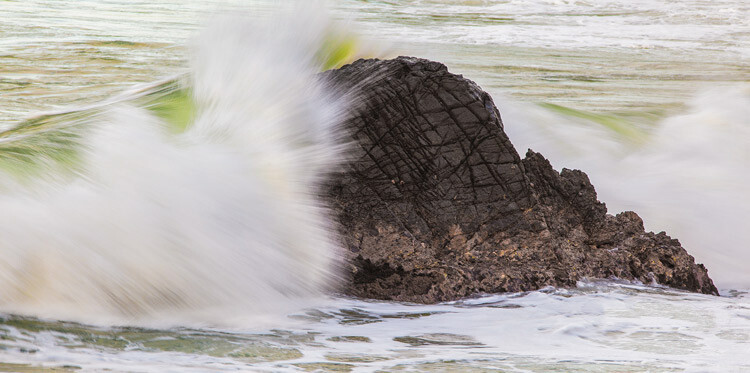
The speed of your shutter indicates how long your sensor is exposed to the light coming from your scene. A fast shutter speed will halt motion, while a long one will blur moving objects.
In landscape photography, you may want to freeze the motion of a splashing river or leaves blowing in the wind. Or you may prefer them to blur, providing a sense of that motion. The important thing is to understand how your shutter speed choice will either blur or freeze the subject, so you don’t end up in that dreaded (but all too frequent) in-between.

Aperture
Your aperture plays two roles. It controls how much light is allowed into the camera, and it controls the depth of field.
At a wide aperture, say f/2.8, your lens will allow a lot of light to enter the camera, meaning you can use a faster shutter speed (see above), but it also means you have less depth of field (DOF). Which is to say, that only a narrow portion of your image, from front to back, will be in focus.
A small aperture like f/16 will mean that a longer shutter speed is required to attain the exposure you want, but more of your image will be in focus.

If you want to isolate your subject from your background or foreground then a wide aperture will help you achieve that. However, if you want your image sharp from the foreground to the background, then you need to select a narrow aperture.

Most lenses are sharpest a stop or two down from wide open, so for maximum overall sharpness, consider an aperture around f/8 to f/11.
ISO
The ISO controls the apparent sensitivity of your sensor to light (I say “apparent” because for a bunch of technical reasons that I really don’t care about, raising the ISO doesn’t actually increase the actual sensitivity, just how the camera’s algorithms report the light in the final image – blah, blah, blah). So, in practice, increasing your ISO will allow you to use shorter shutter speeds at higher apertures. Got that?

The drawback is that using a high ISO also tends to create digital noise. However, cameras are getting exceedingly good at controlling noise. With my current equipment, I regularly shoot at ISO 3200, 6400, and occasionally higher without a second thought.
Coming Together – The Exposure Triangle
Those three factors (shutter speed, aperture, and ISO) control the brightness, depth of field, and sharpness of your image. They interact with one another, and you can’t change one without adjusting at least one of the others. If you aren’t familiar with how each of these settings impacts the final shot, then go out and spend a few hours experimenting so you understand the exposure triangle.
Exercise:
Spend an hour shooting in Manual Mode. Adjust the ISO, aperture, and shutter speed. Assess how each change impacts the final image. Did it get brighter? Darker? Sharper? Did moving subjects blur or freeze?
Composition

The Classic
The classic landscape shot entails an interesting foreground object that leads your eye back to a dramatic background. It’s classic because it works. But it’s also a formula that is very easy to get wrong.

In a simplistic form, a landscape image is composed of a combination of lines, layers, and planes. A line can be a visual element, like the trunk of a tree or a winding stream, or it can be implied, in a way that two interrelated elements cause your eye to move back and forth. Either way, lines are the viewer’s path through the frame.

Layers are elements that occur through the depth of the image. These can be any element in the image, grass stems, trees, rocks, rivers, mountains, etc. But they stand alone in successive layers, each a bit further back in the image.

Finally, planes are elements that provide a clear sense of depth. Say, a road disappearing into the horizon, or a river winding away up a mountain valley.

The ways these things interact are what cause an image to be pleasing to the eye, or to fail. In a classic composition, the foreground element and the dramatic background are tied together through these elements and interact in some way. Perhaps this is color, form, juxtaposition, or some other aspect of interest to the viewer.
All these aspects of an image become a pleasurable maze for photographers. With practice, you will begin to understand how to make them relate to one another in a pleasing way.
Landscape Details
Any natural view will have a number of interesting elements held within such as; a flower, a stone, a shadow, splashing water, or distant peaks. A long lens will allow you isolate those details from the surrounding clutter.
I use this technique often with mid-range telephoto lenses. Think of this technique as simplifying an image down to its most fascinating component.


A Note on Focal Length
The focal length of your lens will impact the depth of field of your image. The longer your lens, the shallower your depth of field will be. This makes it very difficult, if not impossible to keep an image sharp from foreground through the background when using a long lens.
That’s why isolating distant details is a great use of a telephoto lens. Compositions with no foreground generally won’t suffer from the compressed depth of field.

With the use of a wide-angle lens, on the other hand, it is much easier to attain a deep depth of field. An aperture that is a stop or two lower will often bring an entire image from foreground to background into focus.

Exercise:
Starting with a mid-range telephoto like a 70-200mm or similar lens, focus on the details of a landscape. Make some photos of these details, moving around to see how the light changes with your angle. Experiment with each.
Once you are comfortable with the details before you, change to a wide-angle and see if you can find pleasing compositions that incorporate the details you just photographed, but also include the surroundings. As you back up to a wide-angle view, think about the lines, planes, and layers within the image and how they interact. Is the result pleasing or chaotic? What can you do to improve it?
Macro Photography: The World Up Close
Through the 100mm f/2.8 macro lens this bright green beetle looked monstrous and surprisingly beautiful. The iridescent carapace practically glittered in the soft light of the overcast day, while the purple highlights of the antennae and around the eyes stood out from the leaf background.

It was a rainy day in the rainforest of southeast Mexico, and my fieldwork had been called off due to the weather. I spent my rare morning off gathering some of the many insects that had congregated overnight on the porch, and a menagerie of beetles, spiders, and katydids now sat beneath upturned jars on the windowsill next to me. One by one, I placed them on a clean green background of a Heliconia leaf and made images.


Equipment
Close-up and macro photography is a specialized discipline, requiring a suite of its own equipment including lenses, flashes, tripod heads, and more. For photographers that specialize in this type of photography, it is a serious investment.
Fortunately, there are a few shortcuts, which can save you from investing hundreds or thousands in macro-specific equipment.
Lenses
Macro lenses allow for a very close focusing distance and are usually equipped with some moderate magnification. 50mm, 100mm, 150mm, and even 200mm are common focal lengths of macro lenses. They tend to be fast, usually around f/2.8 and are pricey pieces of glass.
If you have the budget for it, by all means, invest in a high-end macro lens, but for those of us with more limited funds here are two alternatives:
Extension Tubes
These are exactly what they sound like, simple tubes that go between your camera and the lens. Extension tubes increase the distance between the lens and your sensor allowing a closer minimum focus (but preventing the lens from focusing on distant objects). When applied to a good quality lens, some amazing images are possible.
Lens Reversal
Have you ever turned a pair of binoculars around backward and used them as a magnifying glass? If so, this is the exact same principle.
You take an old, manual lens (focus and aperture), standard or wide-angle lens (never a telephoto), buy a cheap adapter that allows you to attach the front of the lens to your camera, and you get an instant macro. For fifty bucks at a used camera store you can often find a suitable lens, and for another $ 10 or $ 15, you can buy an adapter from Amazon that fits the filter threads on the front of the lens and allows you to click it into your camera. Bingo! Reverse-lens macro created!

Lights
Embrace natural light if you are just starting out in macro photography. Find a place with bright, diffused light, and start there. Once you have a strong grasp on working up close, you may choose to add artificial light.
From ring lights to external flashes, many macro photographers will use artificial light to cleanly illuminate their tiny subjects with studio-like lighting. If you have a flash, and either a remote cable or wireless triggers, you probably have what you need to get started.
Start off by attaching your flash near, or directly onto your lens, so the light falls just a few inches in front of the glass. Shadows are emphasized up close, so you want to minimize the distance between the flash and your lens.
Tripod Heads
A very useful accessory is the macro tripod head. These allow you to move your camera forward and backward very smoothly and precisely without having to adjust the tripod. With a simple twist of a knob, you can slide your camera forward or backward a couple of inches (or millimeters).
In the narrow depth of field world of macro photography, this allows you to focus by changing the camera position rather than the focus on the lens. If you get serious about this kind of photography, it is probably a worthwhile investment.
Read Equipment for Macro Photography – Video Tips.
Beginning Macro Field Techniques

The easiest place to begin with macro photography is a subject that doesn’t move around much, like flowers. Starting with fast-moving insects will be a very frustrating way to learn the process.
Start out in soft, natural daylight, and forget the flashes for now. Choose a cloudy day, or pick a subject you can easily move into a shady spot. Direct sunlight, just as in human portraiture, is often too harsh and contrasty, resulting in burnt-out highlights or blacked out shadows. Once you’ve figured out the process under steady, natural light, you can integrate flash.
Composition
Macro lenses, reversed lenses, and extension tubes all share one common feature: an extremely narrow depth of field. Even with the aperture stopped down, the amount of the image in focus will be measured in millimeters. Because of this limitation, you need to choose your focal point very carefully, it will, after all, be the only thing in focus on your image.

Many times I’ve made images of small subjects only to find out later find later that my focal point was off. By all means, compose creatively, but make sure the important part of your image is in focus. For insects or other small creatures, that almost always means the eye. For flowers, you’ll likely want to focus on the stamens and pistils. Be aware, and focus carefully.
Note on Post-Processing Macro Images
While a full post-processing tutorial of macro photography is outside the scope of this article, be aware there are focus-stacking techniques. Think of this like HDR for depth of field.
In essence, you create a series of images in which you steadily move the focus point through the scene so you end up with a series of photos, each with a different slice in focus. Focus stacking then brings those all together into a single image providing otherwise unattainable depth of field. There are more resources available online about this technique if you’d like to learn more.
Read A Beginner’s Guide to Focus Stacking.
Wildlife Photography
More than any other discipline of outdoor photography, wildlife is the place where we as photographers need to be responsible, cautious, and respectful. Earlier, I related the story of watching a group of photographers chase a herd of caribou.
I dearly wish that had been the only occasion I’ve had to see wildlife photographers acting stupidly, but sadly, my list goes on: a photographer purposely flushing flocks of Sandhill cranes at a wildlife refuge to get flight shots, the abuse of call-back recordings of song-birds which results in nest failures, dangerously close approaches to bears and moose, and on and on.

I just can’t write about wildlife photography without saying this: Good wildlife photography is a game of patience. You cannot make shortcuts by chasing, flushing, baiting, or otherwise harassing your subject and expect to get decent images. So please, please, three times, please! Take the time required to make the image, it will be easier on the wildlife, and I promise your results will be far, far superior.
Equipment
Though lovely images of animals can, and have been, made with every focal length (some of my favorite images are wide-angles), most wildlife photography involves long lenses. My most frequently used lenses for wildlife photography are Canon’s 500mm f4L (often with a 1.4x teleconverter), 100-400mm zoom, and the 70-200mm f/2.8. None of those are cheap, though.
Fortunately, there are a growing number of alternatives on the market. Brands like Tamron and Sigma have introduced big telephotos that, although still pricey, come in way under the prices offered by Canon and Nikon. A year or two ago, out of curiosity, I rented Sigma’s 150-600mm Sport lens and was extremely impressed.

Come to think of it, I strongly recommend you try lenses out before you buy them. Renting is a great, and reasonably priced, option to try out a variety of lenses. Or, if you don’t shoot wildlife often, you can rent a high-end piece of glass for a single trip, without having to dole out thousands on your own lens.
Anyway, back to equipment, here is my wildlife kit:
- DSLR (or 2)
- 500mm f/4 lens
- 100-400mm lens
- 70-200mm lens
- 1.4x teleconverter
- A sturdy carbon-fiber tripod with a gimbal head

Techniques
There is a saying in photography: “If your image isn’t good enough, you aren’t close enough.” This is nonsense. However, getting close to animals, either physically, or by using a long lens, is often the easiest way to create a compelling image. There are many exceptions (see composition below), but proximity does help.

Getting close requires patience. If you approach an animal on foot, your subject will almost always feel threatened and move away. Humans, after all, are predators, and for most species, nothing good happens from getting close to a predator. That leaves a few options.
Go where the animals are accustomed to people
At many wildlife refuges, back gardens, national parks, etc., the animals are used to seeing people or vehicles and will allow you to get much closer (you still need to be cautious particularly around large, or dangerous animals). In such areas, cars can make a great mobile photography blind.
Animals are also often familiar with people around popular trail systems and will pay little attention to passing walkers. You can use these areas to your advantage.


Use a blind
Many wildlife refuges are equipped with photography blinds where you are hidden from view of the wildlife. These are great, pre-established places to shoot. You may even consider building your own backyard blind for photographing your local birds and other wildlife.
Camouflage
I have a sheet of camo fabric that I’ve cut holes into for my camera lens. I sit on the ground, or a low stool, and throw this over my head and tripod. This portable blind serves well, as long as I have the patience to stay still for extended periods of time. It keeps my form obscured, and animals more willing to approach.
Patience
Most of the above techniques also require patience, but simply waiting for the right opportunity is the most straightforward approach to wildlife photography. Find a promising location with good light, and simply wait to see what happens. I bet most of my best images of wild animals have been made this way.

Exposure
I strive for the “proper” exposure in the field. Which, means (if I’m honest) that I leave it up to the camera. Capturing the action, the expression, posture, and the setting are the most important parts of wildlife photography.
I can fiddle with brightness later in the post-processing, but not if I didn’t capture the image from the start. So I recommend, particularly as a beginner, that you do what I do and let your camera do most of the work.

My settings under most conditions with a long lens are something like this: Shutter priority (see below for more on this), ISO 800 (or so), and auto everything else. If for some reason the images aren’t coming out how I want them, I’ll adjust things around, but this is my standard starting point.
Shutter Speed
As with any moving subject, you may opt to strive for sharpness, freezing the motion of the animal, or you may be aiming for a more creative motion blur. I often mix it up, shifting from sharp to blur in just a few seconds. This is why I shoot wildlife primarily in Shutter Priority mode, so I can make that change easily on the fly.
During a recent shoot of a migrating caribou herd, my workshop participants and I had a couple of thousand animals pass by in a single file line. I was constantly changing the shutter speed to get different effects as the caribou trotted past 25 yards away.
I ended up with a huge variety of shots, from crazy blurs to tack-sharp detail. Variety is important.


Composition
Get low! Next time you see a wildlife image that you like, take a look at the position from which it was made. I’ll bet you that the perspective is low, probably at eye level of the subject or below. When I’m photographing birds or small mammals, I’ll often lay flat out on my stomach.

Humans see the world most often from a standing position; it’s how we are accustomed to viewing things. Photos from that perspective, looking down on our subject, aren’t any different than how we normally see the world. In other words, boring.
When you drop down, however, you are now seeing the world in an atypical, and therefore far more interesting way. So get low!

Portraits
The simplest of images is the portrait, with a clean background and a sharp subject. Often these will be under flattering front-light. Many wildlife photographers strive for this type of image, and this type of image alone.
The secret to success in wildlife portraiture is getting close to your subject, and having a setting where the animal can be cleanly separated from its background. A large aperture, like f/4, will help blur the background cleanly. Overcast, soft light or front light is ideal.

Action and Motion
No doubt, a good, clean portrait of a wild animal is a lovely thing and a pleasure to make, but after a time, I find the formulaic view of wildlife rather boring. I like to see behavior, action, and motion in images. These tell a better story, and to me at least, are far more compelling. These kinds of images also require a lot more time in the field.
Let’s face it; wild animals spend a lot of time just chilling out. Birds perch for extended periods bears sleep or graze, and big cats climb trees and lounge. Action is uncommon, which means you have to spend a lot of time waiting for it.

I was photographing at a famous bear-watching spot in Alaska a number of years ago. It was early in the season and the salmon had not yet arrived, but there were bears about, waiting for the fish. I was standing on a viewing platform, watching a single, young Brown Bear standing below a waterfall. There were no fish, and I got the impression he was as bored as I was.
Tourists and other photographers arrived around me, watched for a few moments, took a photo, and then ambled off after a few minutes with nothing happening. I waited.
After more than an hour, another bear appeared down the river and waded up toward the falls. It was of similar age, and size, they might have even been siblings that had been separated for a time. But when the second bear appeared, the bored demeanor of the first changed completely. He grew alert, staring at the intruding bear. Then, almost without warning, the first bear charged the second, throwing sprays of river water into the air as it splashed. The second stood its ground and for a few brief seconds, the two fought. They swatted each other with powerful blows and snapped jaws down on shoulders. It was over in 20 seconds, but I was breathless. No damage had been done to either bear and afterward, the two actually stood side by side, rather companionably, for a long while as they waited for salmon to arrive.

In those 20 seconds, I captured a series of images missed by dozens of photographers who had come and gone, unwilling to be patient.
Wide Angles
When you have a cooperative or curious subject, few techniques will yield a more compelling result than getting close, and low, with a wide-angle lens. A few years ago, when I was guiding on an expedition cruise through the Southern Ocean and Antarctica, I had several such opportunities.
In the Falkland Islands, a curious Striated Caracara hopped up to have a look at me, while on South Georgia I had a great encounter with a South Polar Skua. The images I made of these two birds are some of my favorites of that journey and perhaps some of my favorite wildlife images.

Wide angles show off not only your subject but also the surroundings and can be extremely effective story-telling images.
The drawback, of course, is that such opportunities are rare indeed. You’ve got to have your subject very close, and that takes time and effort while being prepared when the right opportunity arrives.
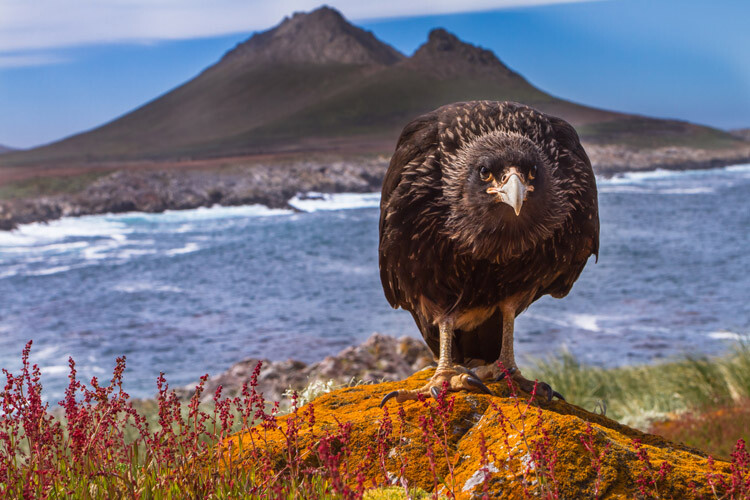
To maximize your chances, keep a second camera with a wide-angle lens (heck, even your phone will work) available while out shooting. That way, when a critter draws close and the opportunity for these unique images arrives, you won’t have to fumble with swapping lenses.
Conclusion
As I wrote this lengthy piece on outdoor photography, I felt I could have gone on and on about every single aspect of this discipline. There is just so much to know, and to learn; so many subjects to study, understand, and practice.

It is daunting, but outdoor photography is as much about the journey as anything else. I love making images that work, don’t get me wrong, but I love even more the process of being outside. I love the way a camera makes me more aware of the play of light, and the movement of animals across a landscape.
Photography can be a tool toward a better understanding of the world, but we have to use our cameras with respect and caution. Be mindful of your actions, be careful of our impact, and make beautiful photos. Along the way, you may find your experiences, rather than the final images, to be the most rewarding part. Now go explore.
The post dPS Ultimate Guide to Nature and Outdoor Photography by David Shaw appeared first on Digital Photography School.

Digital Photography School