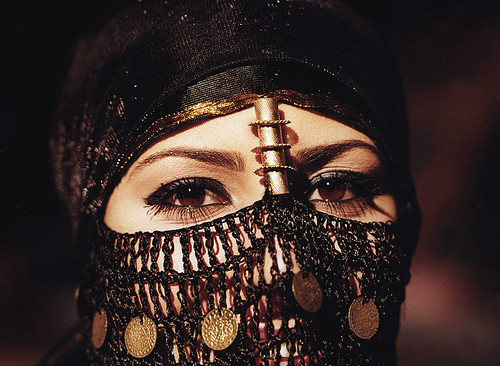
Arabian Eyes, originally uploaded by mnadi.
Dies ist ein Artikel von Nicolas Henri. Nach seinem Film-Studium in Toronto, hat er sich der Fotografie verschrieben. Seither fotografiert er für schweizer Fashion Labels und Bands, arbeitet an Ausstellungsprojekten und übt sich in der Portrait-Fotografie. Daneben bloggt und twittert er und ist auch auf Facebook zu finden.In Teil 2 zum Thema Mittelformat für Alle haben wir uns mit der Belichtung und Handhabung von Mittelformat-Film beschäftigt. Einige von Euch sind vielleicht in der Zwischenzeit das Wagnis eingegangen und haben jetzt eine belichtete Rolle, die sehnlichst auf ein Chemie-Bad wartet! Ganz davon abgesehen, dass ihr jetzt auch endlich sehen wollt, was ihr da produziert habt.
Entwicklung
Ich nehme es gleich vorweg: Ich bin nicht der Dunkelkammer-Typ. Wer S/W-Film belichtet, mag sich mit etwas Aufwand und Know-How im heimischen Badezimmer einrichten und seine Filme selbst entwickeln. Bei Farbnegativen ist der Aufwand für eine Einzelperson aber nicht mehr verhältnismässig. Ich trage meine Filme zum lokalen Fachlabor. In Basel, wo ich wohne, gibt es momentan 3 Labore, die die Entwicklung von 120er Farbnegativ anbieten. Beim Günstigsten und meines Erachtens Besten kostet das dann um die €4.- pro Rolle.
Schaut Euch in Eurer Region um, geht mal in ein Fachgeschäft und fragt, ob sie 120er entwickeln. Wenn nein, kann man Euch bestimmt nen Tipp geben wer das in der Nähe noch macht. Und sonst hilft Google weiter oder schaut Euch mal diese nach Postleitzahlen sortierte Liste von photonews.de an.
Bei der Entwicklung kann eigentlich wenig schief gehen. Im Gegensatz zur Entwicklung von Kleinbildfilm via dem lokalen Supermarkt werden Eure Bilder im Fachlabor nicht interpretiert. D.h. kein indifferenter Operator, der am Entwickler sitzt und mal eben überall den Kontrast hochschraubt und irgendeinen Sonnenschein-Weissabgleich macht, damit Otto-Normalverbraucher mit seinen Ferienfotos ja zufrieden ist. Im Fachlabor, wenn man Mittelformat-Negative abgibt, wird davon ausgegangen, dass Ihr wisst was Ihr tut; Eure Negative werden wirklich “nur” gemäss einem Standard-Prozedere entwickelt – so, wie sie eben sind.
Ihr könnt natürlich auch Abzüge anfordern, aber in aller Regel wird man erstmal nur die entwickelten Negative zwecks späterem Scannen und Bearbeiten haben wollen. Bei der Abgabe könnt Ihr sagen, dass Ihr nur “Entwickeln und Schneiden” wollt. Das bedeutet, dass der lange Streifen des 120er-Negativs im Labor in sinnvoll grosse Stücke geschnitten wird (meistens 3 Bilder pro Segment). So können sie dann später in den Scanner eingespannt werden.
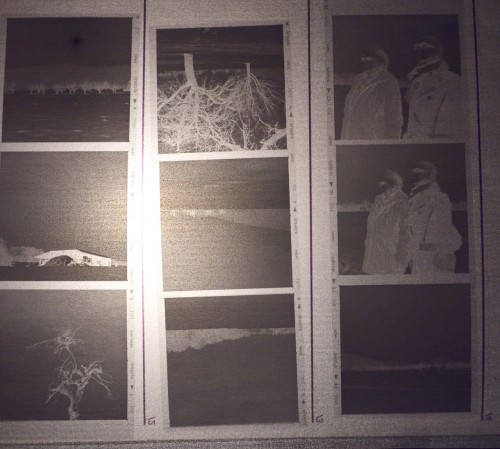
Geschnittene Negativstreifen
Auswertung: Scannen
Jetzt kommt der Moment der Wahrheit. Entwickelte Negative nach der Arbeit noch schnell beim Labor geholt… und nun? Spätestens jetzt braucht man einen Negativscanner. Zwar kann auch das Scannen im Fachlabor mitbestellt werden, ist aber auf Dauer zu teuer. Im sinnvollen Preissegment gibt es momentan 2 Varianten.
Gut und günstig ist der CanoScan 9000F* von Canon. Das Teil ist neu so um die €200.- zu haben und besitzt Durchlichteinheiten für 35mm- und 120er-Film. Für die meisten Anwender reicht dieses Gerät völlig aus. Als ich damals vor der Entscheidung stand, hab ich mich für eine leicht teurere Variante, den Epson Perfection V700 Photo entschieden.
Für ca. €600.- bekommt man einen qualitativ hochwertigen Scanner, der sogar mit Grossformat-Negativen klarkommt und ein umfassendes Softwarepaket inkl. automatischer Staub- und Kratzerentfernung mitgeliefert. Wie immer sind auch beim Scannen keine Grenzen nach oben gesetzt. Wer nach mehr sucht landet bald beim Flextight X5 von Hasselblad (Kostenpunkt um die €15’000 !!!)
Aber wie gesagt, der CanoScan ist völlig ausreichend um sinnvolle Scans anzufertigen. Wer etwas mehr rauskitzeln will ist mit dem Epson V700* schon sehr gut bedient. Ich habe von den Espon-Scans schon wunderschöne Fine Art Prints im Format 1m x 1m drucken lassen. Ausserdem hat man immer noch die Möglichkeit, nach der Sichtung der Negative ins Fachlabor zu gehen und sich einen High-End-Scan seines Lieblingsbildes anfertigen zu lassen.
Auf das Scannen im Einzelnen wollen wir hier nicht gross eingehen – vielleicht ist das auch einen extra Artikel wert (bei Bedarf bitte per Kommentar melden – d. Red.). Mit den Automatik-Einstellungen des Scanners kommt man schonmal ohne grosses Vorwissen zu akzeptablen Resultaten. Der Rest ist Fine Tuning, je nachdem was man mit den Bildern später noch machen will. Einige Eckpfeiler möchte ich Euch aber trotzdem auf den Weg geben:
Die geschnittenen Filmstreifen werden in eine Halterung montiert, die den optimalen Abstand zum Scanner, sowie eine gerade Ausrichtung gewährleistet. Das sieht dann etwas so aus:
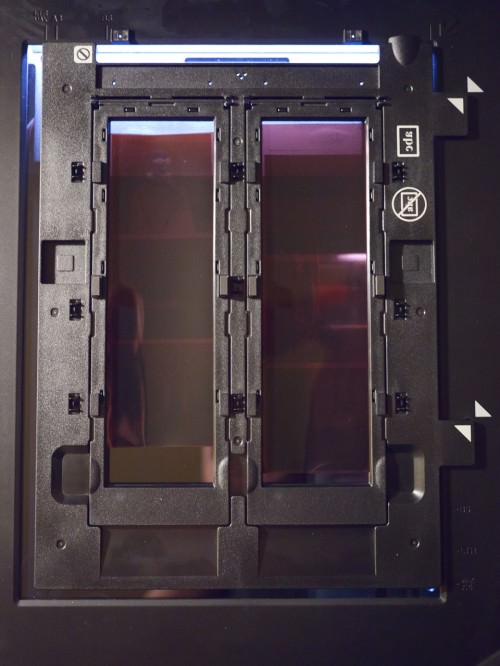
Negative im Filmhalter des EPSON V700 montiert
In der Software stellen wir ein, dass es sich um Negative handelt, womit die Durchlichteinheit aktiviert wird. Ein solcher Scanner hat nämlich im Deckel auch noch mal eine Lampe, die Licht durch das Negativ schickt und es quasi auf den Scan-Kopf darunter belichtet. In Sachen Auflösung bieten die meisten Geräte immens hohe Auflösungswerte.
In der Realität ist aber eine Auflösung von ca. 3200 dpi sinnvoll. Bis zu dieser Auflösung werden zusätzliche Details im Negativ erfasst. Geht man über diesen Wert erzeugt man nur noch mehr Pixel ohne dabei tatsächlich mehr Details aus dem Negativ zu kitzeln. Mit 3200dpi erhält man so bei einem 6×6 Negativ (z.B. aus einer Hasselblad) ein etwa 50 MegaPixel grosses Bild! Die Scans speichert man am besten als 16-Bit Tiffs und importiert sie anschliessend in Lightroom oder Photoshop für die weitere Bearbeitung…
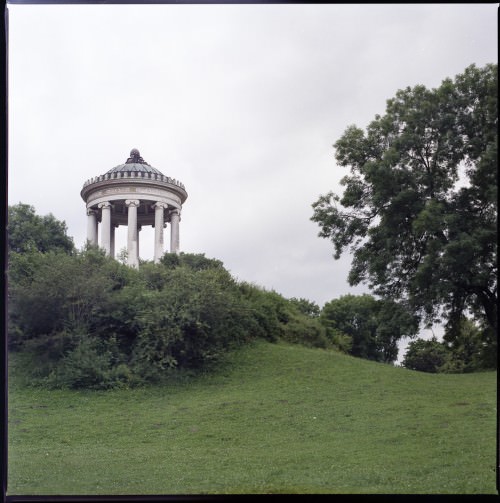
Englischer Garten, München – Hasselblad 500c/m auf Fuji Pro H 400 – unbearbeitet
Das Wichtigste dabei
Nachdem das jetzt alles eher technisch war, möchte ich nochmal auf das Wichtigste zurückkommen: Neben oder gerade wegen des grösseren Aufwands gegenüber der Digitalfotografie im Kleinbildformat, wird man immer wieder belohnt. An einem schönen Herbstmorgen in der Natur sitzen, sich in aller Ruhe Gedanken über die Belichtung machen und sich fragen wie der Nebel wohl vom Film eingefangen wird, der erwartungsvolle Gang zum Labor um die Negative abzuholen, der verstohlene Blick auf den Filmstreifen im Gegenlicht der Neonbeleuchtung in der S-Bahn auf dem Heimweg sind solche Momente.
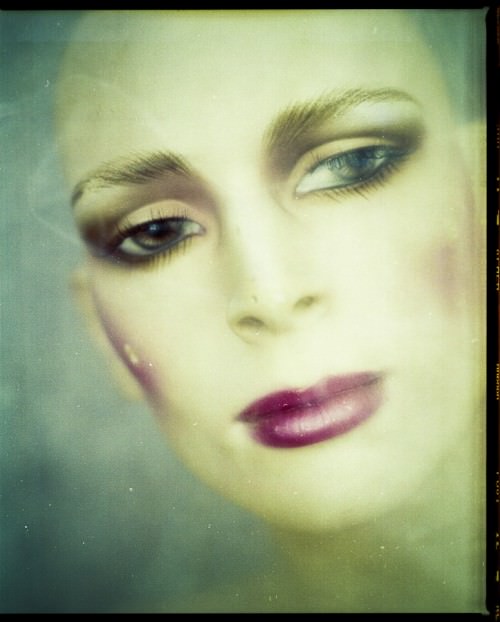
Test Shot mit der Mamyia RZ67 – fälschlicherweise zu lang belichtet. Hat aber trotzdem seinen Reiz…
Und dann mit einem Glas Rotwein vor dem Rechner – während man wartet, dass der Scanner sich Zeile für Zeile an den Negativen abarbeitet – bis dann Bild für Bild endlich am Bildschirm sichtbar wird. Manchmal wird man enttäuscht, bekommt seine Fehlüberlegungen vorgeführt. Manchmal freut einen, dass alles genauso rausgekommen ist, wie erwartet; manchmal wird man überrascht, weil alles ganz anders kam als man dachte – nicht besser oder schlechter einfach anders und irgendwie wunderbar!
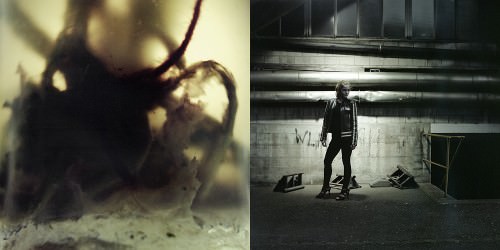
Diptych aus der Serie “Urban Vampire” – links Mamyia RZ67, rechts Hasselblad 500c/m mit Blitzlicht.
Ich hoffe, ich habe beim einen oder anderen die Lust geweckt, sich auf das Mittelformat einzulassen. Und behaltet Eure digitalen Kameras, es ist kein Ersatz, sondern eine poetische Erweiterung, die einen zwischendurch die Fotografie mit anderen Augen sehen lässt!
Werbung > 2TB Western Digital externe Festplatte für nen knappen Hunni 😉
KWERFELDEIN | Fotografie Magazin
There is no canvas more beautiful than that of the ocean at sunset or sunrise. To the untrained eye it may all seem to be the same, but upon closer examination no one view is ever the same. I consider myself lucky in that every evening, barring the presence of fog, I’m treated to a view of a new sunset.
Land's End Sunset – San Francisco, California
While the view from home is nice, it’s never as nice as the cliffside view from Lands End here in San Francisco. In this photo a bank of fog burned off in the waning minutes of light. The remaining hints of fog turned purple framing golden lit surf swirling around coastal rock formations. Definitely a view worth waiting for before hiking back to my car in the dark.
Technorati Tags: photography, Lands End, San Francisco, California, stock photo, stock picture, seascape, landscape, nature
.gif)
Copyright Jim M. Goldstein, All Rights Reserved
Land’s End Sunset
JMG-Galleries – Jim M. Goldstein Photography
J. Henry Fair's work is made up of aerial photographs, taken from planes and helicoptors. The images he captures are of the earth's destruction. The particular damages he documents are caused by mainly manufacturing companies and factories. A paper mill polluting the nearby water, fertilizer factories and even oil spills. The way in which the chemicals and other pollutants collect on the earth's surface create visible patterns and compositions. Some have said they are reminiscent of Abstract Expressionists paintings.
Next month, his book "The …
© ssh
Social media monitoring can be great, but if you love taking pictures and are thinking of making it your career, you might want to consider a degree in photography.
First, you want to decide which area of photography you would most likely be interested in. You can choose from styles such as photojournalism, commercial photography, or even portrait photography. Study up on the many different types and pick one that you think would be best for you.
Next, look for schools …
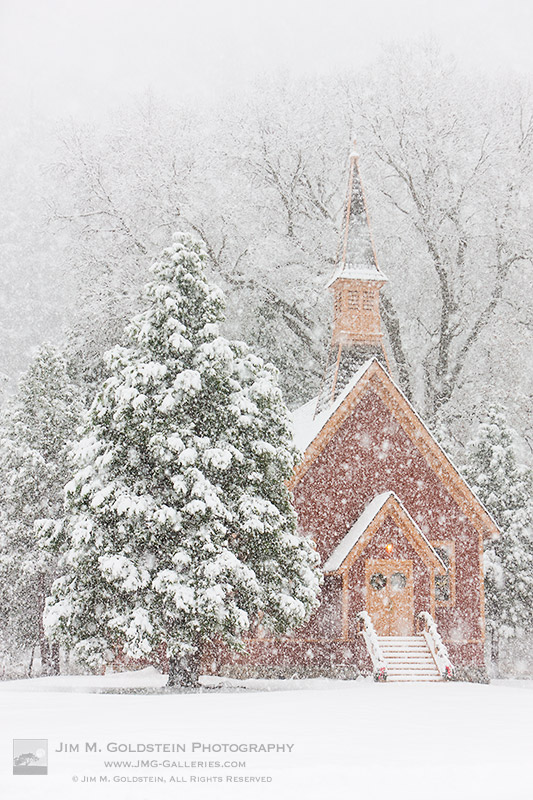
It’s not often I’ve watched snowfall and by that I mean “watch” snow fall. As a child I’ve waited for snowfall to end in order to be let out to play and as an adult I’ve darted from point A to B in a car while it has started to snow, but in both of these instances my mind was elsewhere preoccupied on other goals and activities. To simply watch snow fall is amazing, and to rediscover it behind a camera is an experience everyone should enjoy.
Yosemite Valley Chapel in Snow Storm
Last year I was very fortunate to time a visit to Yosemite valley to witness the first snowfall of the year. Much to my surprise it was also the storm of the season dropping 11 inches of snow and transforming a golden brown valley into a white winter wonderland overnight. It also made for a very interesting time in a small tent, but that is another story.
While photography is all about light, it is as much about how you see the world. To that end you have to be in the right mindset and position to observe the world before you. My time in Yosemite on this trip was first and foremost to experience nature at its best, second to hone my skills to see it and third to photograph it. To each of these ends here are 3 tips that helped me get the photo featured here today.
Also featured on PhotoAdvent.org
Technorati Tags: Yosemite, Yosemite Valley Chapel, snow, pictures, photography, stock photo, nature
.gif)
Copyright Jim M. Goldstein, All Rights Reserved
Yosemite Valley Chapel in Snow Storm
JMG-Galleries – Jim M. Goldstein Photography
In 2010 I had a great time behind the camera and I was fortunate to have been present for some amazing moments including the birth of my son (the ultimate experience). While I’ve ranked my best photos in years past (best photos of 2009, best photos of 2008 and best photos of 2007) this year I’m finding it impossible to do. In fact by doing so I may just end up in the dog house as you’ll soon discover. So in no particular order here are my 10 favorite photos taken in 2010. Enjoy!
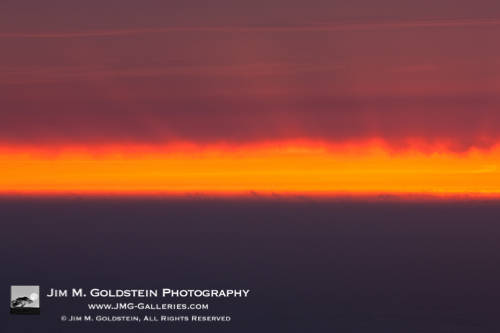
Untitled Color Study
Just a photo that resonates with me and my exploration of light and color. This is part of a larger collection of work that I’ll be releasing so stay tuned to see more. Taken at sunset not far from my home.
Untitled Color Study
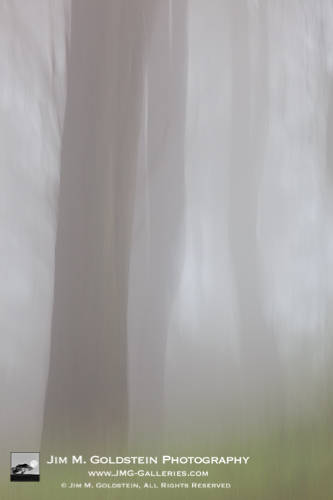
Foggy Forest
Since moving to San Francisco I’ve embraced the days the fog rolls in while most curse it. I really enjoy seeing how the fog adds atmosphere to a scene whether I’m photographing it or just walking through. Of all things San Francisco, strangely, the fog is what I enjoy most.
Foggy Forest
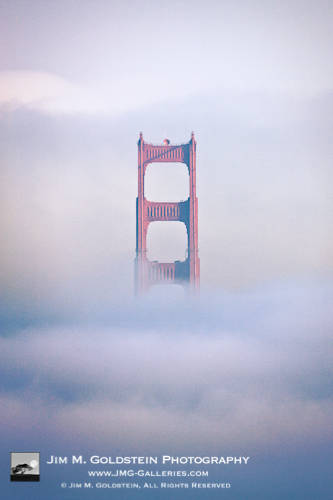
Golden Gate Bridge Sunrise
The morning I took this photo I drove over 70 miles to catch a unique view of the Golden Gate Bridge at sunrise. Thinking my morning was a bust after being fogged in I returned home to find this view waiting for me. Why did this photo make the top 10 of the year? It’s a rare and nearly impossible view of the south tower of the Golden Gate Bridge enveloped by fog. I say “nearly impossible” not because the bridge was 4 miles away, but because San Francisco is normally under fog when the bridge appears like this.
Golden Gate Bridge Sunrise
Taken with a Canon 1Ds Mark III and Canon 800mm f/5.6
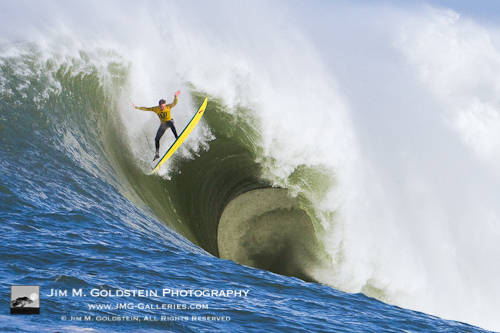
Ion Banner Wipeout at the 2010 Mavericks Surf Contest
As you’d imagine witnessing the huge waves of Mavericks is quite a rush, but nothing compares to what the surfers actually experience. I’m not sure people realize exactly how athletic these guys are. Most just think of them as crazy, but they’re incredibly fit. Anyhow photographing this event was an incredible experience made easy with a Canon 7D. Having photographed this event in years past with my Canon 1D Mark II I decided to try out the latest and greatest. No complaints.
Ion Banner Wipeout at the 2010 Mavericks Surf Contest
Zen – White Sands National Monument
Exploring the pristine beauty of the dunes with in White Sands National Monument was one of the best experiences of the year. New Mexico has some of the most impressive light in the lower 48 and the white sand mirrors that light in amazing ways. Amazing things happen in White Sands. I look forward to returning again in 2011 (join me on my White Sands by Moonlight photo tour).
Zen – White Sands National Monument, New Mexico
Taken with a Canon 1Ds Mark III and Canon 24mm tilt-shift lens
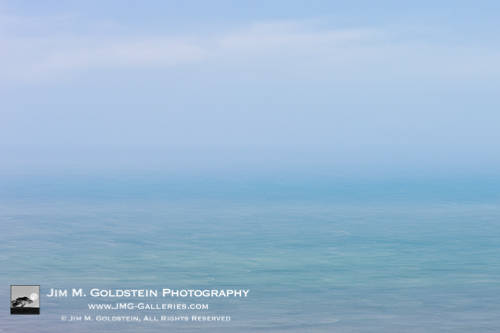
Untitled Color Study
Just a photo that resonates with me and my exploration of light and color. This is part of a larger collection of work that I’ll be releasing so stay tuned to see more. Taken on a trip down the California coast near Santa Barbara.
Untitled Color Study
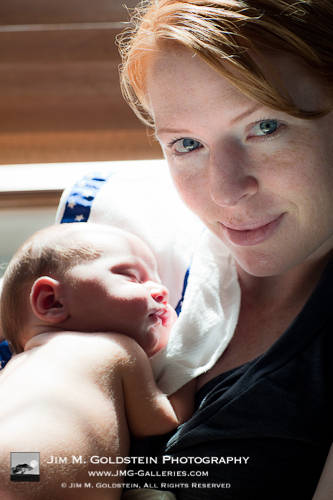
New Addition to the Family
Being there for the delivery of my son is by far the most amazing experience of my life. Portrait photography has quickly become a regular activity. For the first 6 weeks I made constant use of a Canon 85mm f/1.2 and it paid off with photos like this.
New Addition to the Family
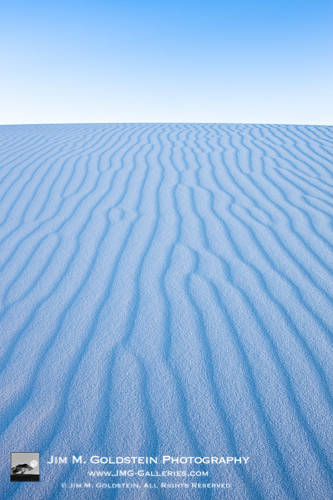
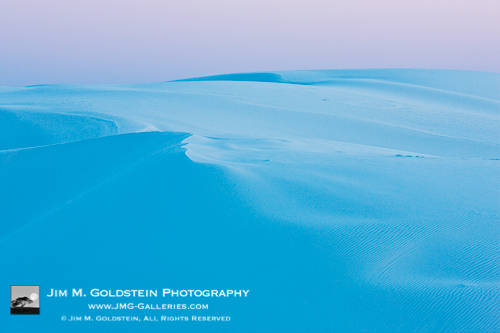
Serenity – White Sands National Monument
I can’t say enough about White Sands National Monument. Standing atop a 60 foot dune and witnessing this scene took my breath away. The dunes are so complex in shape and the randomness at which the light falls across them makes finding exceptional compositions a real challenge. No location challenges my eye like White Sands and I can never get enough of it.
Serenity – White Sands National Monument, New Mexico
Taken with a Canon 1Ds Mark III and Canon 70-200mm USM IS f/2.8
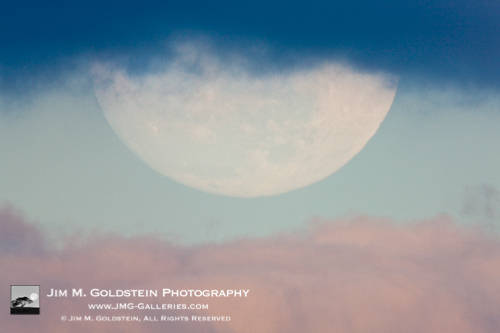
Lunar Layers
This was a photo that almost never happened. Unpredictably clouds moved in the weekend I was reviewing a Canon 800mm f/5.6 lens, but Mother Nature gave me a 45 second reprieve on this particular evening to compose 3 images of a full moon veiled behind clouds kissed with sunset light. It pays to be patient and prepared. As to what attracted me to this image in my year end review of work… its the abstract nature of it. Even still I see an eye in the sky when I view this photo.
Lunar Layers
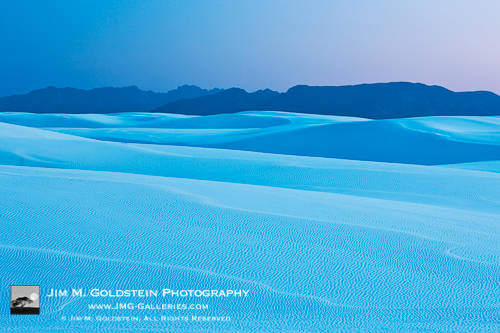
Dusk at White Sands National Monument
Some things just have to be experienced and this was one of those moments. No focal length lens or camera sensor could do this scene justice.
Dusk at White Sands National Monument, New Mexico
Taken with a Canon 1Ds Mark III and Canon 70-200mm USM IS f/2.8
Technorati Tags: best photos, best of 2010, photography, pictures, fine art, stock photo, white sands national monument, Mavericks, landscape, nature
.gif)
Copyright Jim M. Goldstein, All Rights Reserved
JMG-Galleries Best Photos of 2010
JMG-Galleries – Jim M. Goldstein Photography
![]() |
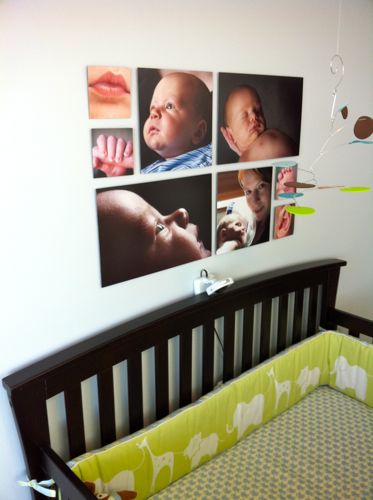
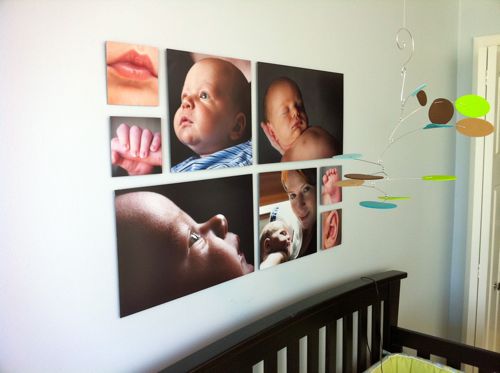
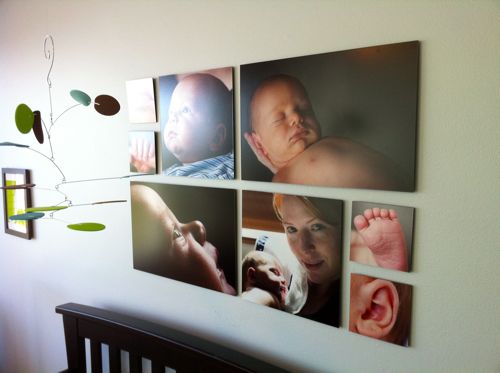
Collagewall is an all-in-one printing service that allows you to easily configure and order photo collage prints to hang on your wall. A friend, Josh Norem, tipped me off to the existence of Collagewall.com not that long ago and I was instantly intrigued by the possibilities. After a quick review of the site and their demo videos I knew I had to try it.
First and foremost I have to say Collagewall is the best print service and product I’ve used all year. The online configuration and ordering system is amazingly simple and the unique peg and paper socket mounting system makes installation simple.
How Does It Work?
After creating an account on Collagewall.com and logging in you can create photo collage project from nearly 200 layout templates or create your own. Next you upload your photos and assign them to an image location in the template. The online system allows you to zoom in/out of and pan with in your photos. Once your design template is populated with images you finalize your order and with in days your images and an installation kit arrives at your door.

Installation
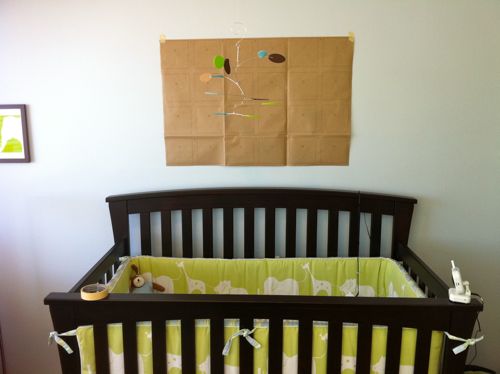
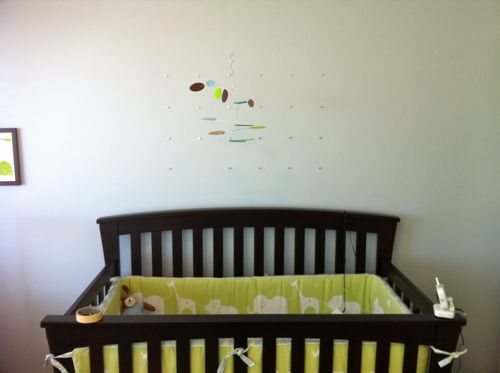
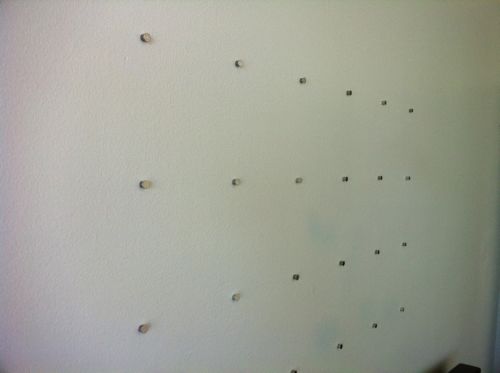
Collagewall utilizes a foolproof means of installation. A paper template is provided that assists you in placing each mounting peg in exact location for a symmetrical and evenly spread display of your photos. The back of each photo then has a grid of paper sockets that attaches to each peg. There really isn’t a way you can mess up an installation and it removes any need to measure or calculate placement of your images. In my case I have plaster walls so I had to utilize a drill bit (that was provided) to prime the wall before I hammered in my pegs. I was warned about this during the configuration process online, but in my infinite wisdom ignored that warning when I tried my first install. I quickly found out that the pegs bend when hammered into an unprimed plaster wall. Lesson learned heed the warnings provided.
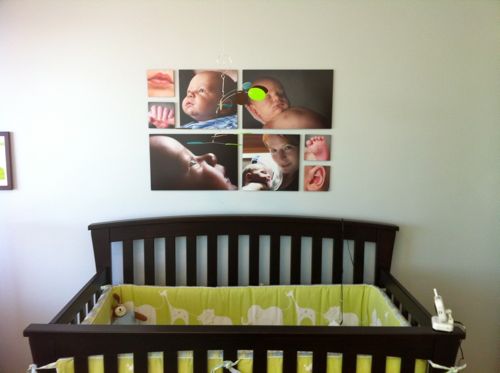
Ultimately the installation of my photo collage took 20 minutes. I was originally going to surprise my wife with a canvas wrap triptych of our son’s baby photos, but ditched the idea when I found out about Collagewall. While she was out on an errand I quickly installed the photos and had time to spare while I awaited her return.

Print Quality
As easy as the configuration and installation was the bottom line as to whether I would ever use Collagewall again depended on the print quality. Having looked at ink jet prints until I’m blue in the face I was extremely pleased with the silver-halide prints that were part of the delivered package. Each photo is printed at a high-resolution of 320 dpi on Fuji Archival Paper and they look incredibly sharp. I expected the photos from my Canon 1Ds Mark III to look great, but I was blown away that even my iPhone 4 photos came out looking incredible. In the end print quality exceeded expectation.
Final Thoughts
As you’d imagine I am really happy with my Collagewall experience and I would certainly recommend using the service. Unfortunately its available only to those in the United States at the moment. My experience wasn’t perfect as the drill bits provided did not hold up well and broke easily. All-in-all that hardly impacted my experience negatively and I later learned that additional drill bits can be requested for free. Price seemed a little high when I placed my order, but after seeing the quality of the material and prints I think you get what you pay for. That being said I do hope the pricing comes down as I’d still like to get more bang for my buck. Ultimately I’d love to be able to present large prints in this fashion and not just be confined to photo collages.
In the even you missed my earlier giveaway of a 0 gift certificate to Collagewall be sure to take advantage of the 15% discount that is good for my blog readers through January 15th.
After the jump you can see the photos of the installation…
Collagewall Paper Template
Collagewall Wall Pegs Installed
Collagewall Wall Pegs Installed Closeup
Collagewall Final Install I
Collagewall Final Install II
Collagewall Final Install III
.gif)
Copyright Jim M. Goldstein, All Rights Reserved
Review: Collagewall
JMG-Galleries – Jim M. Goldstein Photography
You must be logged in to post a comment.