Blog

  • 10 Pro Tips to Design a Killer Mood Board to Present Your Work

    When you’re working on a design or photography project for a client, a mood board can be one of the best ways to get your vision across. A mood board is essentially a collage of things that inspired you for this particular project. They can help you really nail down the look and feel of your work, and make sure Continue Reading

    The post 10 Pro Tips to Design a Killer Mood Board to Present Your Work appeared first on Photodoto.


    Photodoto

  • Canon warns against use of SanDisk CFast cards with EOS-1D X Mark II

    Canon has issued a warning to EOS-1D X II owners, noting a problem with file corruption that can occur when certain SanDisk CFast cards are used. The issue occurs with the last few images recorded just before the camera is powered off, so Canon’s suggested workaround is to capture a number of extra shots when turning the camera off. 

    These are the problematic cards named in Canon’s advisory: 

    The “xxx” at the end of the product number varies depending on the sales region.

    • SanDisk Extreme PRO CFast2.0 64GB (SDCFSP-064G-xxx)
    • SanDisk Extreme PRO CFast2.0 128GB (SDCFSP-128G-xxx)
    • SanDisk Extreme PRO CFast2.0 64GB (SDCFSP-064G-xxxA)
    • SanDisk Extreme PRO CFast2.0 128GB (SDCFSP-128G-xxxA)
    • SanDisk Extreme PRO CFast2.0 64GB (SDCFSP-064G-xxxB)
    • SanDisk Extreme PRO CFast2.0 128GB (SDCFSP-128G-xxxB)

    Both Raw and JPEG files are affected, but the number of corrupted images varies according to the compression mode used. When shooting Raw, Canon recommends recording just one extra shot, but shooting small sized JPEGs will require 8 extra shots to protect other images on the card.

    The statement makes very clear that the problem is caused by SanDisk’s cards, not by the camera. Canon says it may issue a firmware update in early July to address the problem.

    Articles: Digital Photography Review (dpreview.com)

  • App review: Full Frame is a quick, easy JPEG viewer, EXIF editor

    Full Frame is a Mac-based image viewer, photo importer and metadata editor that centers around an incredibly clean and intuitive user interface. Released by California-based Inland Sea and available now in the App Store, its potential to speed up one’s workflow caught our attention.

    Of course, there are a lot of different photo viewing, ingesting and sorting programs available on market, many of which are geared toward casual users. Full Frame, on the other hand, is targeting more toward high-end users like photo enthusiasts.

    In Use

    Having spent some time trying out using Full Frame in my own workflow, it seems its closest competitors are Photo Mechanic, a time-honored program with a cult-like following from photojournalists world-wide, as well as Adobe Bridge.

    Unlike Adobe Bridge, which I find frustratingly sluggish and cluttered in design, Full Frame comes across as exceptionally lean in terms of speed (except when working with un-supported Raw files) and design. It has much more in common with Photo Mechanic like quick startup and image load times. Of course the spectrum of its functionality is much more limited than that of Adobe Bridge.

    I took Full Frame for a spin while sorting images to post to one of my personal sites. Specifically,  I used it to move and rename selects from one drive, to a folder on another.

    Once you have Full Frame fired up, users simply select the source folder and destination (assuming you are copying files) in the upper-left of the screen. The above screenshot represents the entire window when the program is open. There is literally nothing to get in your way of viewing images and deciding which to keep and which to trash.

    To select an image to copy, simply click on it and a checkmark appears. Alternatively you can select all by hitting ‘Command A’ and uncheck the ones you don’t want. In the upper-left portion of the window you’ll find a slider to zoom in the grid view as well as options to view metadata and delete files from their source.

    With your mouse hovering over an image, a small plus sign will appear in the upper left of the photo. Click on it to expand the view. Once in the single image viewer, users can use the slider at the top to zoom the image in and out, to check for critical focus. Unfortunately, when zooming in and out, there is no display of the percentage you are zoomed to, unlike in Photo Mechanic.

    One of the best features of Full Frame is the metadata/EXIF viewer. It offers an incredibly detailed list that goes above and beyond what a lot of other programs show, including Photo Mechanic.

    Users can also add EXIF info to any imported files from within the preferences panel. One thing I’ve always really liked about Photo Mechanic is how simple it is to add copyright warnings and contact info to my files. In Full Frame, it is just as painless. From within the preference panel users can also assign rules for renaming files on import, which is very handy. 

    In many ways, Full frame comes across as a utilitarian program, built to accomplish several specific tasks related to moving and organizing images. However it also doubles as an outstanding way to show off your work to clients, friends or families. The grid view is frankly gorgeous, and once in the single image view, users can simple use the arrow keys to move from image to image. It also starts up very fast, which is a plus.

    Things to consider

    While I found a lot to like about Full Frame, there are some things to consider before purchasing it: First and foremost, despite the claims of Raw support, I found numerous files, from varying manufacturers, to be unsupported. For instance, Raw files from the Nikon D750 are unsupported, as are those from the Sony a7 II. However, if you have Raw+JPEG files, load times will slow significantly but you can at least view and import your images.

    This is really quite unfortunate. Sure, app updates could bring about Raw support but who has time to wait around? On the other hand you could always covert to DNG first, but if the whole point of this program is to speed your workflow, that also makes little sense. Photo Mechanic on the other hand does not have this problem, it can display a JPEG rendering from any Raw file, and loads quickly regardless.

    Another beef I have with Full Frame is that there is only one option for sorting/rating images. In Photo Mechanic and Bridge, there are numerous ways to rate and sort images. For instance, when choosing my selects, I first do an initial sweep and check mark all of the ones I like, I then assign color or star ratings until I’ve got the images sorted down to a manageable amount.  At that point I copy the selects to a separate drive to be imported into Lightroom for processing.

    The Takeaway

    Full Frame is not a program that can do it all, but the things it can do, it does well. If you need a quick, easy way to view JPEGs or edit/view EXIF info, it might be your cup of tea.

    Full Frame is an outstanding option for photographers seeking a powerful EXIF viewer/editor or a quick and easy way to import and rename files. Its spotty Raw support is the main thing holding it back. But at $ 30, Full Frame is a major bargain compared to Photo Mechanic, which will set you back $ 150. It is also a much faster way to quickly view and sort JPEG files than Adobe Bridge.

    What we like:

    • Intuitive user interface
    • Very clean, simple design
    • Powerful EXIF viewer and editor
    • JPEGs load very quickly
    • Can be used to import, sort, batch rename files
    • Support for video files

    What we don’t:

    • Despite claims of Raw support, many Raw files not supported
    • No percentage shown on zoom slider
    • Not as many options for rating photos as competition

    Rating:

    Articles: Digital Photography Review (dpreview.com)

  • Correct name of mis-identified Iwo Jima flag raiser revealed after 70 years

    Photo By: Office of U.S. Marine Corps Communication, Headquarters Marine Corps

    One of the officers in Joe Rosenthal’s iconic ‘Rasing the Flag on Iwo Jima’ has been mis-identified for over 70 years, according to a statement by the U.S. Marine Corps. The man (highlighted in the image above) was previously believed to be John Bradley, but a review panel considering ‘all available images, film, statements and previous investigations’ found the man to be Private First Class Harold Schultz.

    How did this case of mistaken identity come about? According to his son James, John Bradley remembered raising a flag on Mount Suribachi, and was later told as he lay recovering in a hospital bed that he was one of the men in the photo. He was believed to be the sixth man in the Pulitzer Prize winning photo for more than 70 years.

    When a Smithsonian Channel research team approached the Marine Corps with a theory that Bradley was not the man in the photo, an investigation was launched. A panel led by retired general officer Jan Huly started looking over evidence in April, and released its findings late last week.

    Articles: Digital Photography Review (dpreview.com)

  • Zig-Zagging Cantilevered Shipping Containers Create a Dynamic Pavilion

    [ By SA Rogers in Architecture & Cities & Urbanism. ]

    cantilevered shipping crates 1

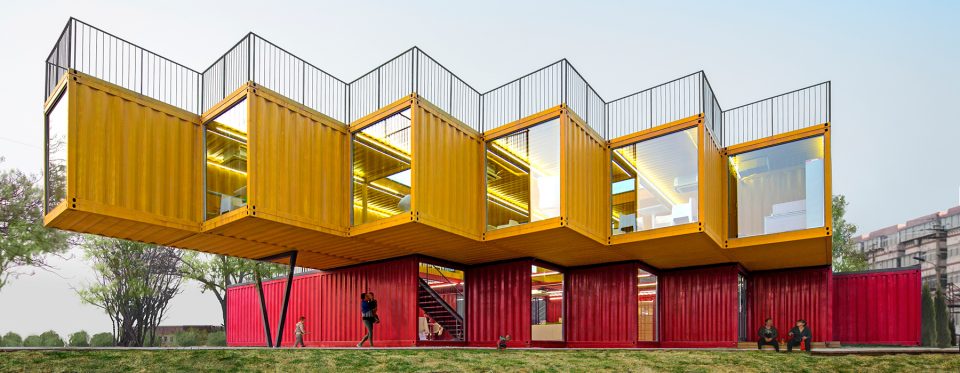
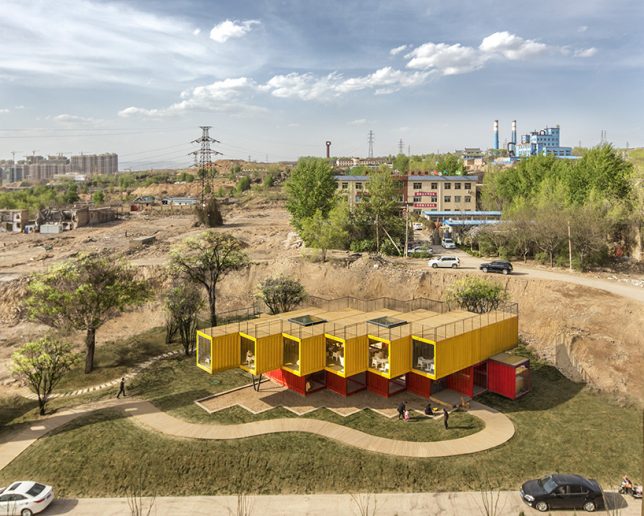
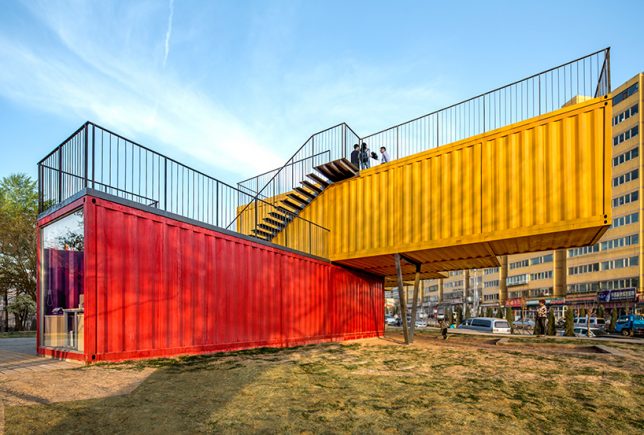
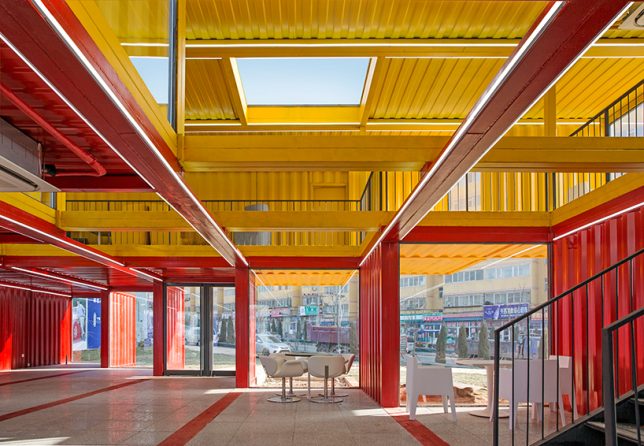
    Recognizable in their original form, twelve shipping containers form a two-story recreational pavilion for the Chinese city of Shanxi, stacked and set at an angle with the top units cantilevered over the bottom ones. People’s Architecture Office (PAO) capped the ends of each container in glass and removed sections of the walls, floors and ceilings to create a surprisingly bright and open interior that carries natural daylight into every corner.

    shipping crate architecture

    shipping container building

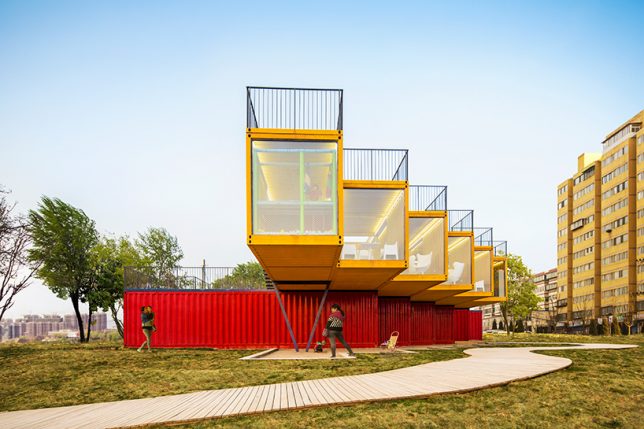
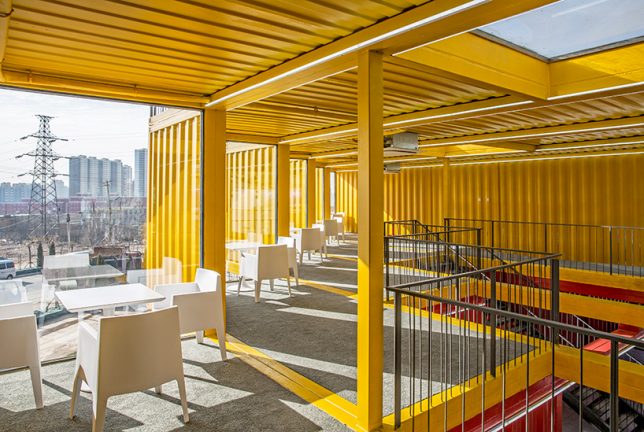
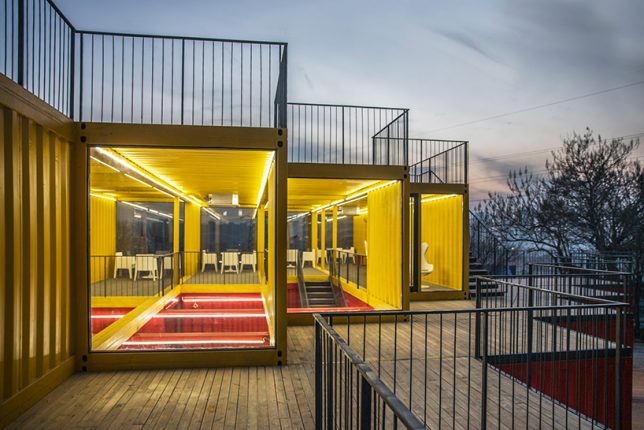
    The containers are staggered, which not only creates a terrace on the open ceilings of the lower red crates, but also produces a dynamic floor plan with lots of nooks and crannies for seating overlooking the surrounding city. This clever arrangement effectively multiplies the space without having to add additional containers, and each container acts like a viewfinder stretching out toward the skyline.

    shipping container building 2

    shipping container building 3

    shipping container building 4

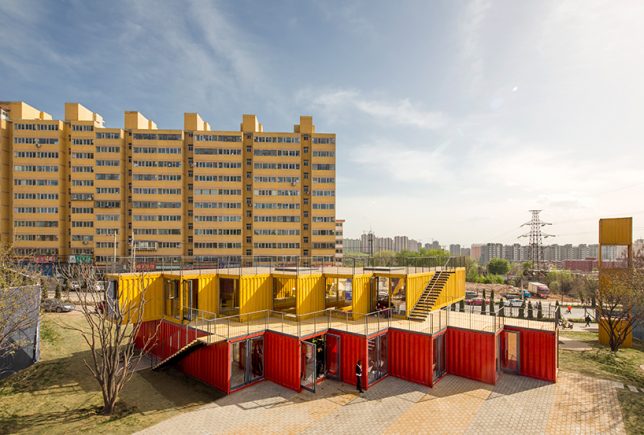
    Exterior stairs offer easy access to both rooftop terrace levels, providing residents with even more views. Perpendicularly set on top of the red containers, the yellow cantilevered units cast shadows on the ground to create sheltered spaces outside. Inside, there’s plenty of room to congregate, making it a convenient meeting space for people who live in the adjacent housing developments.

    shipping container building 5

    shipping container building 6

    shipping container building 7

    Since the containers have barely been modified, it would also be a breeze to pack the whole thing up and transport it to a new location when necessary, or replace individual containers if they get damaged. While other architectural projects reclaiming used shipping containers often take pains to disguise them (and at least insulate the interiors, which seems like a budget-friendly but potentially uncomfortable oversight in this case), this one stands as a highly visible example of affordable alternative architecture making use of widely available portable materials.

    Share on Facebook


    [ By SA Rogers in Architecture & Cities & Urbanism. ]

    [ WebUrbanist | Archives | Galleries | Privacy | TOS ]


    WebUrbanist

  • Reflecting on a Master Architect: 10 Water-Centric Works by Tadao Ando

    [ By SA Rogers in Architecture & Public & Institutional. ]

    tadao ando fort worth

    Tadao Ando’s work consists of more than just the tangible architectural materials making up each structure, masterfully utilizing reflection, simple palettes and negative space to incorporate wind, water and light into the carefully designed compositions. The self-taught yet Pritzker Prize-winning Japanese architect infuses these elements – most notably in the form of reflecting pools and ponds – into almost all of his creations, yet it always seems fresh, each structure standing firm in its own identity.

    Water Temple, Awaji, Japan, 1991

    tadao ando water temple 1

    tadao ando water temple 2

    tadao ando water temple 3

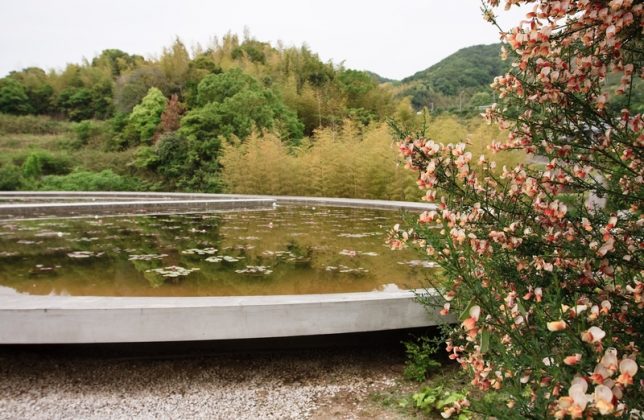
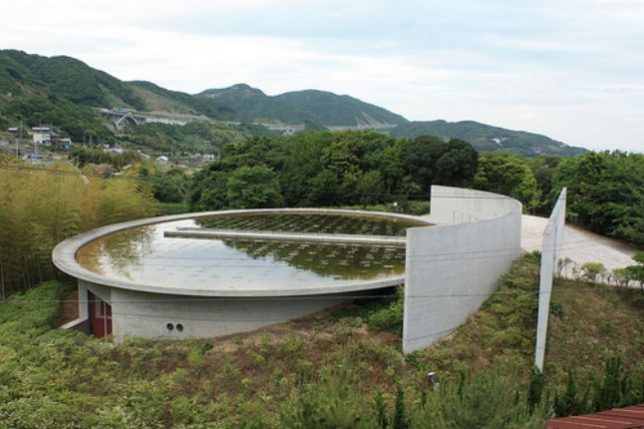
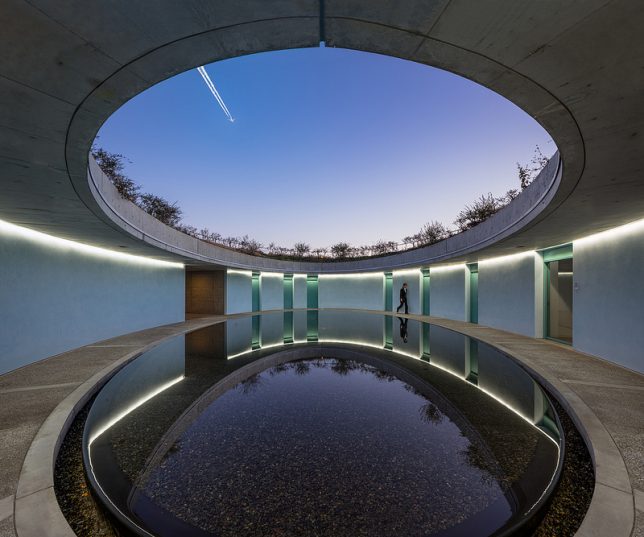
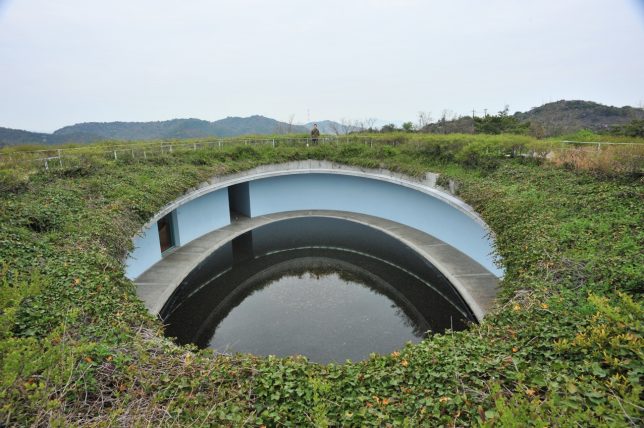
    Serving as the residence for the oldest sect of Tantric Buddhism in Japan, the Water Temple is considered one of Tadao Ando’s most striking achievements. An oval of concrete encloses a lake of lotus flowers, which are symbols of heaven, with a set of stairs leading to its reflective surface. The journey from the gravel path outside up to this pinnacle symbolizes successive places of initiation.

    The Oval at Benesse Art Museum Naoshima, Japan, 2004

    tadao ando oval 1

    tadao ando oval 2

    tadao ando oval 3

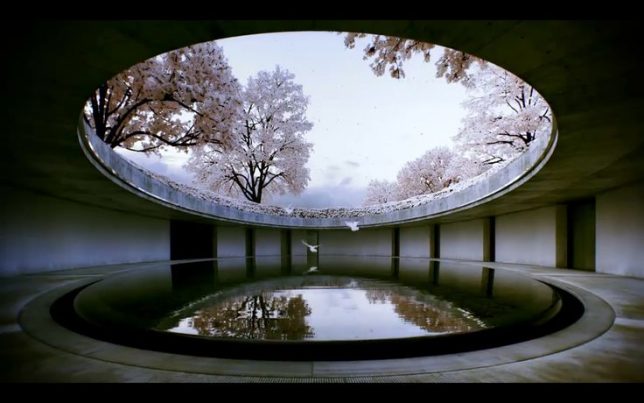
    Says the architect of this space serving as a museum for the town of Naoshima and his own work, “In the ANDO MUSEUM, I nestled a concrete box within the old mink house. The box has a gently curved ceiling. One of its walls aligns with the main axis of the house and is tilted towards the ridge-beam to generate a feeling of openness that extends dynamically into the space above. Sunlight descends down through the deep space from a skylight opening at the top of the wooden roof. My aim was to create a space that conjures a rich sense of depth despite its small size, where oppositional elements such as the past and present, wood and concrete, and light and shadow clash intensely as they are superimposed against each other.”

    Casa Monterrey, Mexico, 2011

    tadao ando monterrey 1

    tadao ando monterrey 2

    tadao ando monterrey 3

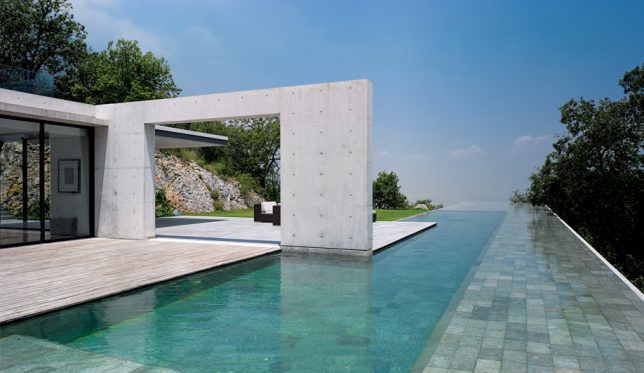
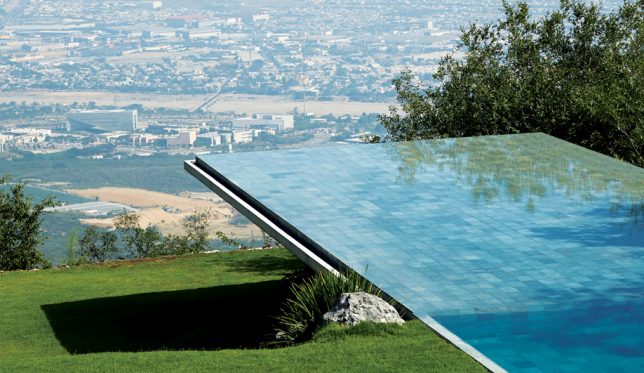
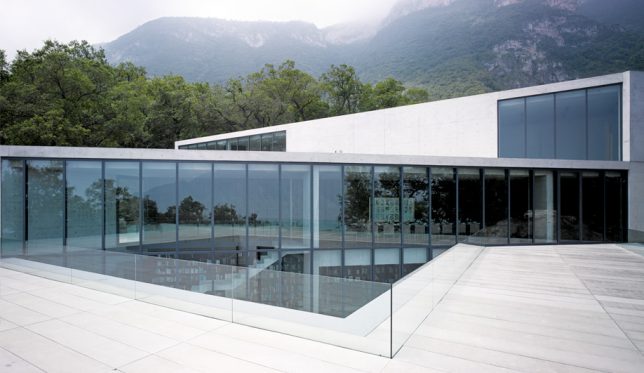
    Nestled into a hillside in Mexico, Casa Monterrey’s defining feature is the swimming pool that cantilevers out over the slope, punctuated with concrete walls that strategically frame views of the rocky Cumbres de Monterrey National Park. Designed to accommodate a family, the three-story house is built around a double-height library. A rooftop terrace provides gorgeous views of the landscape as well as that pool, which seems to extend the sky right into the yard.

    Modern Art Museum of Fort Worth, Texas, 2002

    tadao ando fort worth

    tadao ando fort worth 2

    tadao ando forth worth 3

    tadao ando fort worth 4

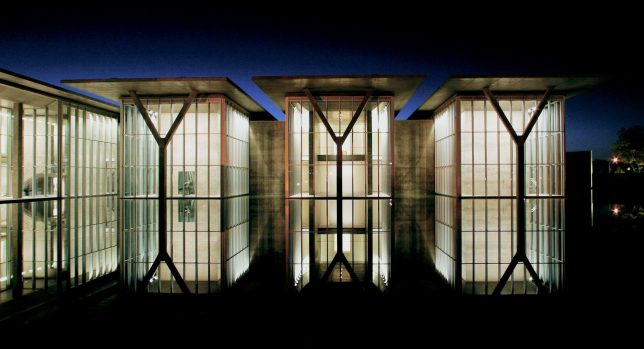
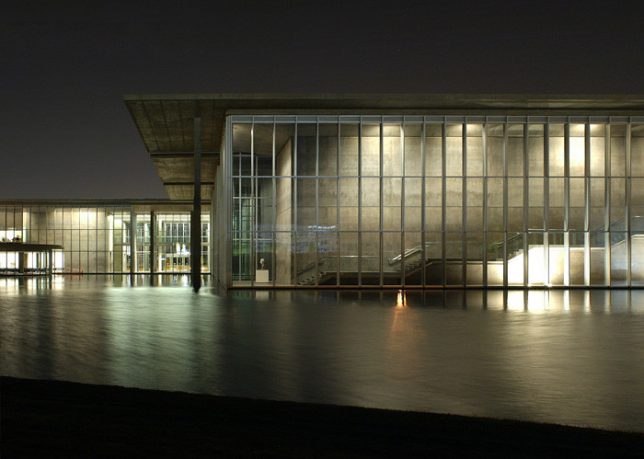
    One of Ando’s most iconic structures, the Modern Art Museum of Fort Worth incorporates Y-shaped concrete supports that are doubled by the 1.5-acre reflecting pool that comes right up to the building’s exterior walls. Five flat-roofed pavilions seem to rise up out of the water, constructed in a limited palette of simple materials that make the landscape and the art inside the main focus but still come together into an elegant whole. “By using glass as a wall, physically there is a barrier, protection from the outside, but visually there is no boundary between outside and inside,” says Ando. “There is also the light that comes off the water through the glass that indicates a lack of boundary an can make its presence felt on the wall.”

    Church on the Water, Hokkaido, 1988

    tadao ando church on the water 3

    tadao ando church on the water 1

    tadao ando church on the water 2

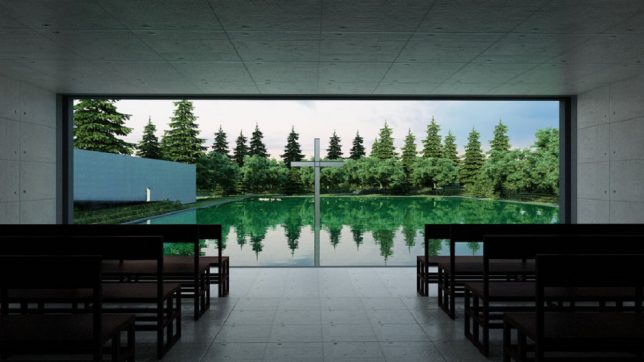
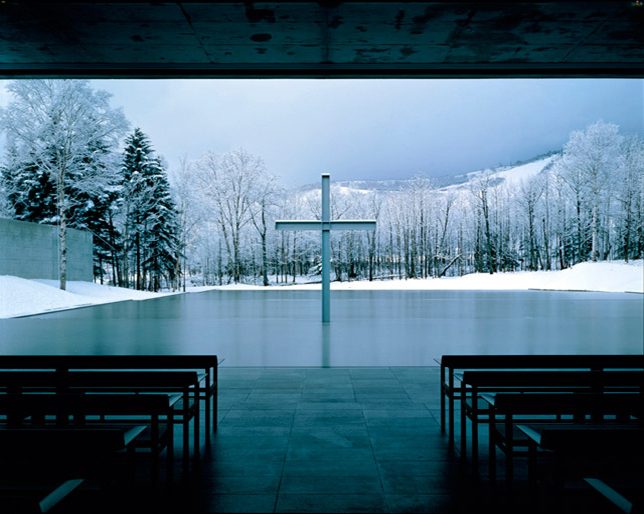
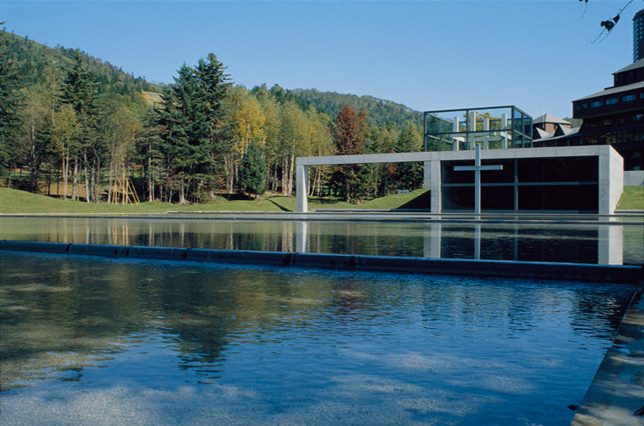
    This classic Tadao Ando work faces seated congregants inside a minimalist church building so they’re gazing out at a cross in the middle of a pond. The church consists of two overlapping cubes, a steel-and-glass entrance structure and the main volume serving as the chapel. The glass wall overlooking the pond can be opened or closed depending on the weather. Unsurprisingly, Church on the Water is one of Japan’s most popular wedding destinations.

    Next Page – Click Below to Read More:
    Reflecting On A Master Architect 10 Water Centric Works By Tadao Ando

    Share on Facebook


    [ By SA Rogers in Architecture & Public & Institutional. ]

    [ WebUrbanist | Archives | Galleries | Privacy | TOS ]


    WebUrbanist

  • Fujifilm launches Instax SP-2 with faster printing speeds

    Fujifilm has announced a new and improved version of its Instax printer. The SP-2 follows on the SP-1 and comes with improved Wi-Fi connectivity and faster printing speeds, producing a print in 10 seconds rather than the previously required 16 seconds. Fujifilm says the SP-2 is also quieter than its predecessor. It prints a card-sized format at a 800 x 600 resolution and 320 dpi and uses 256 levels per color. The battery is charged via a microUSB port and the printer supports JPEG and PNG files. 

    Fujifilm has also improved the accompanying SHARE app which is available for iOS and Android devices and now comes with custom filters as well as collage and split templates. It also allows for image transfer from social networks and the overlay of geographic and climate information onto your printed image. 

    The Fujifilm SP-2 printer comes in Silver or Gold body colors and will start shipping in mid-July. The printer is priced at $ 200 and the Instax Mini film that is used as printing media will set you back $ 20 per pack of 20 sheets. More information is available on the Fujifilm website.

    Articles: Digital Photography Review (dpreview.com)

  • Street style chronicler Bill Cunningham passes away at 87

    Bill Cunningham at Fashion Week photographed by Jiyang Chen. May 2012.

    Over the weekend, the photography and fashion communities lost a living legend when Bill Cunningham passed away at age 87. He chronicled New York City street fashion trends – from fanny packs to designer bags – for almost 40 years for the New York Times.

    ‘I never bothered with celebrities unless they were wearing something interesting.’ Cunningham’s 2002 article on his own body of work for the Times explains his approach. He took as much interest in what people were wearing in Harlem and downtown as he took when photographing New York’s elite at countless galas and runway shows. Cunningham was known by his signature plain blue jacket and bicycle, and was named a ‘living landmark’ by the New York Landmarks Conservancy.

    Cunningham was hospitalized recently after a stroke, and the news of his passing came not long after this Saturday. 

    Articles: Digital Photography Review (dpreview.com)

  • Improve Your Photography by Getting the Right Feedback on Your Images

    Have you ever felt that your photography isn’t improving as much as it once was? Do you feel that the level of your work is stagnating and not progressing much more?

    Improve Your Photography

    Yet you keep reading article after article, either on the web or in magazines. You hope that one of them will provide the next breakthrough for your work and help you rip through the barrier that will bring your photography to the next level. You show off your work to friends and family, and you hear the resounding praises of, “That’s a beautiful photograph” or, “You nailed it”, or any other form of overly positive, loving feedback. The people that you show your work to love it, but you feel that it’s just becoming a little boring, and the next image isn’t really any different from the last.

    Justin

    By Justin

    Do this one thing to improve your photography

    If this sounds like you, don’t panic; you’re very likely not alone! Even better, there is a very simple remedy for this. This remedy will not only help you now, but also continue to help you well into the future, and at all stages of your photographic journey. You won’t need to read anything extra for it, nor will you have to buy any equipment. To break through this barrier you need to do one thing: be more selective with the feedback you listen to.

    The trouble with feedback from people like friends and family is that, unless they are photographers themselves, they won’t tell you want you need to hear. Rather, they will tell you what you want to hear – which is generally positive reinforcements – however, when you come to think of it, no one really wants to hear that their latest photo is rubbish!

    But it’s this honest, yet brutal truth, that will ultimately help you take better photos. Sure, I’ll be the first to admit that it wasn’t the best feeling in the world when I was once told a collection of my photos weren’t that great. To make things worse, this came from a photographer whom I greatly admired and respected. It shook me up a little. It made me feel a little inadequate. It made me question if this was indeed the career for me, and if I actually had what it took to succeed.

    Arileu

    By arileu

    But I needed to hear it. I needed to know what my work was actually like. Being continually told that my work was great and amazing wasn’t really helping with anything other than inflating my ego. I needed to hear exactly how a seasoned photographer viewed my work, and I needed to hear it honestly and clearly. This feedback set me on the direction that I needed to take to improve my game, and because it wasn’t sugar coated, I had no ambiguity about any of the feedback I had received.

    Finding good feedback

    This kind of feedback is not something that you will get from friends and family. You have to go out there and find a third party. A person that not only has no emotional connection with you, but also who knows one or two things about photography. By removing the emotional connection, you open the door for truth and honesty.

    Quinn Dombrowski

    By Quinn Dombrowski

    How it’s delivered, however, is a variable you cannot control. This means you also need to bring something to the table; a thick skin. Some photographers, just like doctors, are fantastic at delivering bad news in a nice subtle, even positive, way. Others will tell you how it is, warts and all, without the sugar coatings. But where do you find this third party?

    There are many avenues you can take to find the right third party for getting feedback on your work. Social media, such as Instagram and Facebook, can be great. Facebook in particular has many useful groups where you can seek feedback and critique on your work. But if keeping it in person and face-to-face is more your thing, looking around at camera clubs is another option. The feedback you get at camera clubs may not always be accurate, but it is a useful tool to network with other photographers.

    S3aphotography

    By s3aphotography

    Just keep in mind exactly who your third party will be. You ideally would like your mentor to be involved in the genres you’re most interested in – there’s no point showing a wedding photographer, for example, a body of sport or landscape images. Also keep an open mind to having multiple people. This will help you smooth out any personal preferences each photographer may have, and find a more common denominator to look out for.

    Being more selective with who you seek for feedback will help improve your photography immeasurably. It won’t always be easy to hear your work being torn apart, but if you keep at it and keep your chin up, you will come out the other side a stronger photographer and perhaps even a stronger person.

    googletag.cmd.push(function() {
    tablet_slots.push( googletag.defineSlot( “/1005424/_dPSv4_tab-all-article-bottom_(300×250)”, [300, 250], “pb-ad-78623” ).addService( googletag.pubads() ) ); } );

    googletag.cmd.push(function() {
    mobile_slots.push( googletag.defineSlot( “/1005424/_dPSv4_mob-all-article-bottom_(300×250)”, [300, 250], “pb-ad-78158” ).addService( googletag.pubads() ) ); } );

    The post Improve Your Photography by Getting the Right Feedback on Your Images by Daniel Smith appeared first on Digital Photography School.


    Digital Photography School

  • Cactus promises 1/8000sec flash sync with V6 II transceiver, new version for Sony users

    Hong Kong-based flash and flash trigger manufacturer Cactus has upgraded its V6 wireless transceiver system to allow flash sync speeds of up to 1/8000sec. The company, claiming its transceivers can apply TTL control to multiple brands of flash at the same time, says that the V6 ll will be compatible with units from Canon, Nikon, Olympus, Panasonic and Pentax. Cactus also plans to bring high speed flash to Fujifilm X cameras even though Fuji doesn’t support the feature with its own flash units. Cactus has, at the same time, announced a V6 lls for Sony users with the same capabilities, but offers a Sony-compatible hotshoe foot.

    The Cactus V6 ll offers an LED AF-assist light and remote control of the flash’s power output and zoom head position, as well as the features of the previous version. Also new is the ability to detect the on-camera flash in the network and to assign an automatic profile to that flash on start-up. This should make the system easier to work with.

    The Cactus V6 ll will be available from July priced at $ 95. The Sony version is scheduled for an August release. For more information and a list of pre-installed flash profiles visit the Cactus website.


    Press release:

    Go high-speed sync! Cactus launches the V6 II, a newest version of its popular Wireless Flash Transceiver to add cross-brand HSS and the V6 IIs, a dedicated Sony version.

    After two years in the making, Cactus V6 II & IIs – the second generation of the World’s First cross-brand wireless flash transceiver, NOW supports high-speed synchronisation (HSS)!

    Besides the revolutionary remote power control of Canon, Fujifilm, Nikon, Olympus, Panasonic and Pentax flashes all at the same time, the new models now support HSS / FP mode in the same cross-brand environment.1 This unique function gives photographers flexibility undreamed of. Matching flashes with same camera system for off-camera flash photography is over.

    Two High-Speed Sync Modes
    1. Normal HSS: Supports shutter speed up to 1/8000s.
    2. Power Sync: Boosts flash contribution above camera’s x-sync speed, perfect for extreme conditions where Normal HSS is not powerful enough. 2

    Cactus also extends HSS capabilities to Fujifilm cameras despite them not yet
    supporting high-speed sync at the time of writing.

    AF-assist
    Both the V6 II and IIs now has an automatic LED AF-assist light that makes autofocusing in dark environments possible – even in pitched-black!3 Besides the camera-mounted V6 II/IIs, off-camera units will also activate the AF-assist light, which helps focusing even when camera is far from the subject.

    V6 IIs for Sony
    The dedicated Sony version – V6 IIs, embodies all the desirable functions of its sibling V6 II but with a Sony compatible hot shoe on the transceiver body, ensuring a seamless and secured connection with Sony cameras and flashes. Mounting the V6 IIs on a Sony Alpha camera allows the photographer to shoot above camera’s maximum x-sync speed and control power and zoom of Sony, including those with a Minolta/Sony hot shoe via an adapter, and other V6 II compatible flashes. 4 It is the perfect wireless flash trigger for existing and new users of Sony Alpha cameras, especially those who may still have non-Sony system flashes in their camera bags.

    Highly Intelligent
    V6 II and IIs can now auto-detect the on-camera portable flashes at device start-up by selecting the system the flash belongs to and assigning an Auto flash profile. Similarly, the V6 II will auto-detect the camera and selects the system accordingly. 5 This simple plug-and-play makes the setting up extremely quick and easy that both amateurs and professionals appreciate.

    Expands Flash Compatibility
    Remote zoom control now applies to all compatible TTL flashes, gives the photographer much quicker controls. Better still, previously unsupported digital TTL flash models on the V6 are now being supported.

    Features at a Glance
    1. Cross-brand wireless manual power and zoom control with HSS support of Canon, Fujifilm, Nikon, Olympus, Panasonic, Pentax and Sony flashes;

    2. Two cross-brand high-speed sync modes:
    •?Normal HSS supports shutter speeds up to 1/8000s;
    •?Power Sync boosts flash contribution above camera’s x-sync speed;

    3. Multi-master supports up to 20 photographers firing the same set of flashes at their own power settings;

    4. AF-assist light assists focusing in low light environment;

    5. Flash profile customization ensures accurate power output;

    6. Work seamlessly with the RF60 series to support HSS and Power Sync;

    7. Other useful features inherited from the V6 including:

    • Lo Power
    • Absolute Power
    • TTL Pass-through
    • Group Sequence
    • Sport Shutter
    • Remote Shutter
    • Relay Mode
    • Delay Mode
    • Firmware Update support

    Price and Availability
    Cactus V6 II and IIs are currently scheduled to be available in 2016 July and August respectively and both are priced at US$ 95.00 (ex VAT).

    Articles: Digital Photography Review (dpreview.com)