Blog

  • EyeEm opens web uploader tool to everyone

    Photography community and marketplace EyeEm is making it easier for photographers to join its service by opening up its Web-based image uploading tool to all new and existing users. The uploader tool first launched last year for Market users looking to sell their photos through EyeEm. Using the tool, photographers can transfer images from services like Flickr and Google Drive to EyeEm, the latter of which auto-suggests tags based on an analysis of each image.

    EyeEm supports uploading images from a local computer and the Web services Flickr, Dropbox, Google Drive, and Picasa. After a photo is uploaded, users can add the photo location, manually add tags, and choose from auto-suggested tags. Users can also opt in to EyeEm Market, where they may sell photos and receive 50% of the sale price.

    It’s no coincidence that EyeEm’s announcement comes on the heels of the news that Yahoo-owned Flickr will soon be owned by Verizon. A post on EyeEm’s blog appeals to those who are ‘concerned about the unclear future of Flickr’, and stresses that easy importing and auto-tagging should ease the pain of making the transition from another photo sharing community. 

    Articles: Digital Photography Review (dpreview.com)

  • Don’t Delete Your Failed Images – Instead Learn from Your Mistakes with These Tips

    I know you’ve done it. It’s okay to admit it. I’ve done it too! We all have! You’ve shot some terrible photographs.

    Perhaps you shot the whole time in the wrong white balance, or you didn’t pay attention to shutter speed and everything is blurry. When this happens it’s incredibly disappointing. Frustrated and angry with yourself, you consider the experience a write-off, and delete the images. Then you head for the snack cupboard searching for some kind of solace.

    But, everyone makes mistakes when they shoot, even professionals. There are times when we get excited and forget to check our settings, or make sure we are using the right lens for the right moment. It happens.

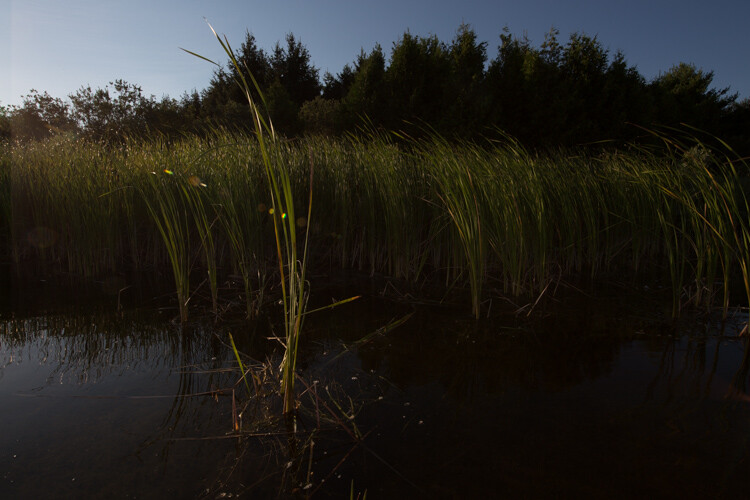
    Image 1

    We were canoeing and in my rush to get an image of a small bird I underexposed the shot.

    These failures don’t have to be a complete waste though. There’s nothing negative about making mistakes. Willie Nelson once said, “Once you replace negative thoughts with positive ones, you’ll start having positive results.”

    So with that in mind, start looking at every photograph you take, as a step forward. Don’t delete those mistakes right away. You can learn a lot about taking good photographs from the missteps you make. I’ve met some photographers who have created a special file for all of their failures. Then when they have a little bit of time, they peruse through the collection and reflect upon them. This type of exercise can help you grow as a photographer.

    There are lots of ways to reflect on your images. Some people make mental notes about their images. Others like to use a written journal format. I know of a few photographers who use the keyword section in Lightroom to make notes. I’ve even seen a detailed scrapbook in which the photographer printed out his failures and scribbled notes beside each. Just be sure to pick a format that works for you. Regularly reflecting on your work is important.

    To start you down the path here’s a list of questions that you can use to help you reflect on your images.

    Reflection Tips

    • In the first few seconds of viewing the photograph, what was the first emotion you experienced? Why? Now let it go. Detach from the emotion and be critical.
    • Why do you consider this image a failure? Don’t analyze too much just scribble down the first thought that comes to your mind. Try to make this part of the analysis a stream of consciousness.
    • What were your goals or intentions when you shot this image? Why were you unable to meet those goals?
    • If you could turn back time and reshoot the image what would you do differently?
    • Think carefully about the image and come up with one key piece of learning that you can take away from this experience.

    Now let’s practice your reflection skills. It’s not easy to analyze your own photographs; it can take some time to perfect. Let’s analyze some of my failures, and some successes.

    View each image, and really look at it in a critical sense. You can use the guiding questions from above to help you. After you’ve finished your reflection, scroll down and take a look at my notes, see if you agree with my thoughts. Perhaps you noticed something different then I did.

    Image 2

    What did you come up with? Keep in mind there’s no right or wrong to this whole process. Some people might argue the image isn’t a failure. I personally, hate it.

    Notes about the image

    • I cut off the hockey stick, it’s bad framing.
    • She’s looking down at the puck, there is no eye contact.
    • Loss of impact or connection with the viewer.
    • The edge vignette makes it too dark.

    Ways to improve

    • Mark out the ice and give players a guideline for where to stop.
    • Remind players to look at the camera at all times.
    • Remove one complication by having kids skate without the puck (Photoshop the puck into the image in post-processing).

    Image 3

    Compare the shot above, with the previous image. It was taken in the same arena a few months later. Do you think there’s a difference? The framing is certainly better and he makes eye contact with the camera. Have I improved over the first shot?

    Let’s consider another mistake. This image was shot for a magazine article. Can you tell why it’s a fail?

    Image 4

    Notes about the image

    • Her face is slightly out of focus.
    • The client wanted a unique angle for the shot but the focus is on the ball.
    • The houses behind in the background don’t suggest or support that we are on a soccer field.

    Ways to improve

    • Ensure the focus is on the correct part of the scene by using back button focus.
    • Always take the time to set up the scene. Remember that the background is as important as the foreground.
    • Direct the player more to remain in a certain area.

    Here’s the image the magazine chose to use for the article. You can see how the background gives this image more context than the previous shot.

    Image 5

    The more you reflect upon your images, the more you will grow as a photographer. If you find you are stuck in a rut, this kind of activity may just be a way to move forward. Coming back to images after a few days, or weeks, is always a good idea. By separating yourself from the image it will help you to analyze it more carefully.

    I’ve posted a few more images here for you to reflect upon below. Once you’ve finished analyzing my work, try it on some of your own shots. Leave some examples in the comments below, and include your reflections.

    Image 6

    Image 7

    Image 8

    This is an opportunity to grow and become a stronger photographer. I expect that everyone who shares will be heartened by the fact that they are not the only ones to have taken a bad photograph. If you choose to reply to other people’s posts, please be kind and be constructive. This is all in the name of learning, we are not here to criticize each other.

    Keep in mind, even geniuses have some failures!

    “I have not failed. I’ve just found 10,000 ways that won’t work.” – Thomas Edison

    googletag.cmd.push(function() {
    tablet_slots.push( googletag.defineSlot( “/1005424/_dPSv4_tab-all-article-bottom_(300×250)”, [300, 250], “pb-ad-78623” ).addService( googletag.pubads() ) ); } );

    googletag.cmd.push(function() {
    mobile_slots.push( googletag.defineSlot( “/1005424/_dPSv4_mob-all-article-bottom_(300×250)”, [300, 250], “pb-ad-78158” ).addService( googletag.pubads() ) ); } );

    The post Don’t Delete Your Failed Images – Instead Learn from Your Mistakes with These Tips by Erin Fitzgibbon appeared first on Digital Photography School.


    Digital Photography School

  • Xiaomi Redmi Pro offers dual-cam and OLED technology at budget price point

    Chinese electronics manufacturer Xiaomi has today announced the latest model in its affordable Redmi line of smartphones. Looking at the device’s body materials and specifications it would not look out of place in the company’s flagship Mi series, though. 

    In the imaging department the Redmi Pro features a dual-camera setup that combines a 13MP Sony IMX258 1/3.06″ sensor with a 5MP Samsung depth sensor. The dual-cam does not offer any optical zoom capability, like on the LG G5, nor does it combine the captured image information from both sensors for improved image quality, like on the Huawei P9. Instead, it uses the dual-camera to simulate the bokeh of a fast lens on a large-sensor camera, something we first saw on the HTC One M8. Like on the HTC and several other dual-cam devices, you can change the focus point of the image post-capture in the gallery app. 

    There is also a dual-tone LED flash and at the front the Xiaomi comes with a 5MP selfie-camera. Images can be viewed and composed on a 5.5″ 1080p OLED display with full NTSC gamut. A fingerprint reader is on board for increased security and all the electronics are provided with power by a beefy 4050mAh battery that supports quick charging via a USB Type-C port.

    The components are wrapped up in a gold or silver brushed metal unibody that gives the device a premium look. The Redmi Pro comes comes in several versions that differ in terms of processor power and memory. Pricing starts at approximately $ 225 for the deca-core Helio X20 chipset, 32GB of storage and 3GB RAM and go up to approximately $ 300 for the faster Helio X25 chipset with 128GB storage and 4GB of RAM.

    Articles: Digital Photography Review (dpreview.com)

  • Straight Outta the Batcave: The BMW Titan Concept Motorcycle

    [ By SA Rogers in Technology & Vehicles & Mods. ]

    bmw titan main

    Batman’s motorcycle in The Dark Knight Rises was cool and all, but the BMW Titan concept actually looks like a better fit for the caped crusader (albeit lacking in weaponry.) Turkish designer Mehmet Erdem actually took inspiration for the Titan from the sleek profile of a shark, with fins along the sides, a front wheel hidden within the body, and an exposed back wheel echoing the shape of a tail.

    bmw titan 2

    The design is envisioned as a competitive vehicle for ‘Speed Week’ at the Bonneville Salt Flats in Utah, in which land speed racers show off just how fast their racing vehicles of all shapes and sizes can go. The pale, glittering natural surfaces of the flats offer a dramatic setting for annual races and has seen a number of records set, with some vehicles reaching top speeds of over 600 miles per hour.

    bmw titan main

    The Titan is one of seven BMW motorcycle concepts created by the Istanbul-based designer in addition to creations inspired by Alpha Romeo, Mercedes Benz, Maserati and other automotive brands. Each one reflects the aesthetics of the brand, but elevating them to a place that’s bolder and more futuristic.

    Share on Facebook


    [ By SA Rogers in Technology & Vehicles & Mods. ]

    [ WebUrbanist | Archives | Galleries | Privacy | TOS ]


    WebUrbanist

  • Microsoft Pix aims to capture better people pictures

    Microsoft has released a new camera app that puts its focus on taking better pictures of people. The Pix app is now available for iPhone and iPad, and Microsoft says an Android version is in the works. When active the app is constantly recording and saves 10 frames before and after its shutter button is pressed. A series of algorithms then analyzes the recorded images, evaluating technical quality characteristics, such as sharpness or exposure, but also looking at facial expressions of human subjects.

    Based on those characteristics among others, the app then selects three best shots and presents them to the user. The filtered shots are discarded to save space, but not before the image information contained in them is used to enhance the selected shots. For example, the app can brighten app images that have been captured in very dark conditions. 

    Additionally, Pix converts a bunch of similar images into a moving Live Image, but only if it thinks the motion in the scene is interesting. The app also integrates Microsoft’s Hyperlapse feature. In addition to recording stabilized time-lapses, in its latest incarnation it also allows you to turn existing images into time-lapses or simply stabilize previously recorded video footage. 

    One of the most interesting aspects of Pix is that we can expect the app to get better with time. Anonymized settings data and information on what pictures users delete or favorite is sent back to Microsoft where developers look at the data and fine-tune the app’s algorithms accordingly. Microsoft Pix for iOS can now be downloaded from the Apple App Store.

    Articles: Digital Photography Review (dpreview.com)

  • Tips for Taking Candid Portraits of People

    Get Andrew’s ebook The Candid Portrait at 43% off, now over at Snapndeals, for a limited time only (August 9, 2016 AUS time).

    A candid portrait is often defined as one which you take without the subject being aware that you have done so. The idea is to capture a natural moment, that shows the person’s character or something interesting about them.

    A candid portrait

    Wedding and portrait photographers often strive to capture candid portraits, so do street photographers. It is the latter form of candid portrait photography that I will concentrate on in this article.

    I prefer to take candid portraits when I am travelling, it is rare that I do so at home. There is something about the excitement of travelling and seeing a new place with fresh eyes, that makes me want to take photos that capture life in the streets.

    The question is, how do you take photos of other people safely when you are travelling, and how do you create evocative images that capture the spirit of that place? Good photos aren’t taken, they are made by the photographer. The following tips will help you create candid portraits.

    All the photos in this article were taken while I was traveling, but you’ll find the principles hold true when you are working close to home as well.

    1 – Think about your equipment

    Part of the craft of photography is selecting the most appropriate tool for the job. There are two approaches you can take here. One is to use a telephoto lens and take photos from distance. You are unlikely to be spotted by your subject, especially if you are quick, but your photos may also have a lack of involvement in the scene as they are taken from some distance away. Having said that, you can use a telephoto lens to create a cinematic look that pulls the background in closer to the subject, or throw it out of focus.

    A candid portrait

    I took this photo with a 50-150mm Sigma lens. It’s an enormous lens that I no longer own, but it enabled me to take photos like this from a distance, without being noticed.

    The second approach is to use a small camera with a small lens, and get in much closer to the action. The idea here is that the small camera gives you the perception that you are less intimidating, than somebody using a large digital SLR and lens setup. You are much more likely to be able to take photos without being noticed, or to be ignored if you are.

    A candid portrait

    I used a small 35mm lens on a Fujifilm camera to take this photo. The smaller size of this gear lets me get much closer to people than I ever could with the Sigma 50-150mm lens.

    The ideal small camera could be a small digital SLR (such as the Canon EOS 100D), a mirrorless camera (such as the Fujifilm X-T1, my personal favorite), a compact camera (like the Ricoh GR II) or a smartphone.

    If you are using an interchangeable lens camera, then a prime lens may be a good choice. Primes are usually smaller than zooms, and the wide apertures come in handy in low light.

    2 – Slow down and explore

    Become an observer of life. Go somewhere interesting and just watch what happens. Every city and town have their own rhythms. The tide of people ebbs and flows as the hours pass by. Where are the most interesting parts of the city? The most picturesque? Where is life lived on the streets?

    What are the unique aspects of that city? A photo of somebody taken in front of a shop could be created almost anywhere, but a photo taken with a well known landmark or typical building in the background (such as the Eiffel Tower in Paris, or the Forbidden City in Beijing) has the potential to be much more evocative.

    The key is to relax, take things slowly, and enjoy yourself. A small camera helps because it is easier to carry around all day than a large system.

    A candid portrait

    This photo could only have been taken in Beijing. The ancient buildings in the background are unique to this city.

    3 – Enjoy the process

    Don’t put too much pressure on yourself. An empty memory card can be as terrifying for a photographer as a blank piece of paper (or empty computer screen) is for a writer.

    One way to get started is to take a photo of anything remotely interesting. It doesn’t really matter what it is, but I find that taking the first photo gets my creativity going and puts me in the right frame of mind to start seeing other images. Remember that you are there to enjoy the day, the sights, and the process of exploration and meeting new people, as well as photography.

    4 – Don’t be afraid to talk to people

    Talk to people, not necessarily only the people that you want to photograph, but anybody, particularly in shops, markets or working in cafes, who may be open to a conversation. You may have to forget about this option if you don’t speak the language. But don’t let that stop you from using non-verbal communication. Smile, and be open and friendly.

    Talking to people lets you get to know the area, and the people who live there. Afterwards, you may be able to ask the person you spoke to if you can take a photo of them, or if there is anywhere that is a good place to take photos. Local people often like to make recommendations, especially if they are proud of their city.

    If you can’t speak the language don’t let that put you off even rudimentary attempts at communication. Last year in China, I came across a group of men playing a game of Xiangqi (Chinese chess). I stopped to watch, and held up my camera with a questioning look. One of them nodded to say yes, and I took a few photos before saying thank you and moving on. This is my favorite photo from the set.

    A candid portrait

    5 – Use a wide-angle lens

    The beauty of wide-angle lenses is that you can get in close and photograph somebody, without them even being aware that you are doing so. How? Simply place them at the edge of the frame, or on one of the thirds. The camera will point away from them and they may not even be aware that they are being photographed.

    As long as you don’t look at them or make eye contact they will think you are photographing whatever is behind them. This works best when there is something interesting there that a tourist would naturally take a photo of.

    A candid portrait

    I was taking a photo of the church when I noticed the man was about to walk in front of me. The wide-angle focal length (14mm, APS-C camera) meant that he became part of the photo without realizing it.

    6 – Find a rich environment

    Sometimes all you have to do is find an interesting location, and observe how the local people behave as they pass through. While in Beijing last year, I became fascinated at the different ways that the local people interacted with the city’s historical buildings. All I had to do was wait, observe, and take photos of interesting moments.

    A candid portrait

    While visiting Prince Gong’s mansion, a historical building in Beijing, I noticed that people like to walk by these Tibetan style prayer wheels. I stayed there for a while and took photos as people passed by. The incongruous message on the woman’s bag adds a little extra to this photo.

    7 – Go when the light is beautiful

    Beautiful light is key to creating evocative portraits that capture the spirit and atmosphere of a place. You’ll increase your chances of creating beautiful images exponentially by going out when the light is beautiful. That means getting out at the end of the day during the golden hour. There is also lots of potential during dusk, especially with the mix of artificial and natural light that you find in urban environments.

    A candid portrait

    The orange light cast by tungsten light bulbs adds atmosphere to this photo taken in Xi’an, China.

    Can you think of any other tips for taking candid portraits of people in the street? Please let us know in the comments, I’d like to hear your thoughts.

    Get Andrew’s ebook The Candid Portrait at 43% off, now over at Snapndeals, for a limited time only (August 9, 2016 AUS time).

    googletag.cmd.push(function() {
    tablet_slots.push( googletag.defineSlot( “/1005424/_dPSv4_tab-all-article-bottom_(300×250)”, [300, 250], “pb-ad-78623” ).addService( googletag.pubads() ) ); } );

    googletag.cmd.push(function() {
    mobile_slots.push( googletag.defineSlot( “/1005424/_dPSv4_mob-all-article-bottom_(300×250)”, [300, 250], “pb-ad-78158” ).addService( googletag.pubads() ) ); } );

    The post Tips for Taking Candid Portraits of People by Andrew S. Gibson appeared first on Digital Photography School.


    Digital Photography School

  • Time for New Technology: 13 Modern Wristwatch Designs

    [ By SA Rogers in Gadgets & Geekery & Technology. ]

    smartwatch darth vader

    Apple Watch’s failure to catch on tells us most people probably don’t want to wear full-on smartphones on our wrists, but that doesn’t mean standard analog watches couldn’t use a bit of modernization. These concepts for technology-augmented timepieces include hybrid digital-analog designs, watches that communicate with your car, wrist-launched camera drones and a smartwatch Darth Vader would love. Some are cool ideas, some need work and others are downright terrible, but they might give us an idea of what’s to come in terms of wearable technology.

    Nixie Wearable Camera Drone

    smart watch nixie 3

    smart watch nixie 2

    smart watch nixie 1

    Launch a camera zone from your wrist anytime you want with ‘Nixie,’ which uses motion-prediction algorithms and sensors to guide itself along four pre-programmed paths to capture full HD photos or video from the air. Weighing less than 0.1 pounds, it can connect with a smartphone for easy data transfer. Th idea is that the camera can capture whatever you’re doing and then fly right back, whether you want to take a quick selfie or record some kind of stunt. Mimicking the look of a wrist watch, it’s an interesting piece of wearable tech for sure, with one problem: it doesn’t tell the time, so if you like wearing a watch, you’ll have to double up.

    Luxury Smart Strap for Analog Watches by Montblanc

    smart watch strap

    If you can’t bear to part with your analog watch, but wish you could upgrade it somehow, this one’s for you: the Montblac e-Strap, which adds a 14.2-millimeter-wide OLED screen to the inside of your wrist. Connecting to a smartphone via Bluetooth, it works as a remote camera trigger, controls for a music player, incoming text and call alerts and physical activity data collection. It also has a ‘find me’ function in case you’re prone to misplacing your phone.

    Simple, Elegant Watch Tells Time with Color Gradient

    smart watch gradient

    smart watch gradient 2

    This watch needs no hour hand, using a color gradient to indicate the time. ‘Hidden Time’ by Jiwoong Jung has a minimalist look that’s constantly shifting as the minute hand makes its rounds, with the hard line between black and white telling you what hour it is.

    Darth Vader’s Watch by Devon

    smartwatch darth vader

    smartwatch darth vader 2

    What would Darth Vader wear? Los Angeles watchmaker Devon answers that question with its Star Wars watch, with a silhouette calling to mind the villain’s helmet, a strap modeled after his Sith gloves and a stand that makes it look like a TIE fighter. If you want one for yourself, you might have to do something villainous to get it: the price tag is a hefty $ 28,500.

    Smell the Time with ‘Scent Rhythm’

    smartwatch scent

    smartwatch scent 2

    ‘Scent Rhythm’ doesn’t care exactly what time it is so much as it wants to help your body ease into each phase of the day naturally, aiding your circadian rhythms through the release of four different fragrances. Detecting a certain scent will give an a general “feel” of the time every six hours, activating our natural sense of time, called chronoception. The smells were specifically selected and timed to amplify the rhythms that help govern our sleep and waking cycles. First comes coffee, then a library-like smell of paperback books, then whiskey and tobacco, and finally chamomile. Like the idea? Designer Aisen Caro Chacin offers plans to build your own.

    Next Page – Click Below to Read More:
    Time For New Technology 13 Modern Wristwatch Designs

    Share on Facebook


    [ By SA Rogers in Gadgets & Geekery & Technology. ]

    [ WebUrbanist | Archives | Galleries | Privacy | TOS ]


    WebUrbanist

  • Fear, Laziness & Change

    Fear Laziness Change – Lazy, slow and un-imaginative industries , companies and people


    Fashion Photography Blog

  • Nikon introduces ultra-fast AF-S 105mm F1.4E ED prime lens

    $ (document).ready(function() { SampleGalleryV2({“containerId”:”embeddedSampleGallery_8415058717″,”galleryId”:”8415058717″,”isEmbeddedWidget”:true,”standalone”:false,”selectedImageIndex”:0,”startInCommentsView”:false,”isMobile”:false}) });

    Nikon has unveiled the AF-S Nikkor 105mm F1.4E ED, the fastest full-frame lens of its kind with autofocus. Resistant to dust and moisture, the lens uses 14 elements in 9 groups, including 3 ED elements, along with Nano Crystal and fluorine coatings. The lens has 9 rounded aperture blades, and the aperture is electronically controlled, which keeps exposure consistent while shooting high-speed bursts. As you might expect, this is a heavy lens, weighing in at 985g/2.1lbs.

    The 105mm F1.4 is expected to ship in late August with a $ 2,199.95 MSRP.

    Press release:

    GLAMOROUS GLASS: NIKON CELEBRATES 100 MILLION NIKKOR MILESTONE AND THE INTRODUCTION OF THE AF-S NIKKOR 105mm f/1.4E ED LENS

    MELVILLE, N.Y. (July 27, 2016 AT 12:01 A.M. EDT) – Today, Nikon Inc. is celebrating a momentous NIKKOR production milestone as well as the announcement of the AF-S NIKKOR 105mm f/1.4E ED, a premium lens for the most discerning photographers. This luxurious new medium-telephoto lens is engineered to help create flattering images with gorgeous bokeh, while delivering impressive sharpness and beautiful color rendition. As a testament to a lasting legacy of high-caliber lenses, Nikon has also announced that NIKKOR lens production has reached the landmark achievement of 100 million units produced worldwide.

    “Surpassing the 100 million lenses produced milestone is a great honor and a testament to the photographers who both love and rely on NIKKOR glass to get the job done,” said Kosuke Kawaura, Director of Marketing and Planning, Nikon Inc. “The AF-S NIKKOR 105mm f/1.4E ED represents the embodiment of the NIKKOR line of high-quality lenses, giving photographers a robust, well-balanced lens that provides intense sharpness, astounding image quality and background bokeh that is sure to be a favorite among portrait photographers.”

    Captivating Image Quality
    The AF-S NIKKOR 105mm f/1.4E ED is a fast, full-frame (FX-format), medium-telephoto prime lens and is the world’s first1 to strike the impeccable balance of 105mm focal length and large f/1.4 aperture for a truly outstanding optic. This new NIKKOR lens is ideal for professional and advanced enthusiast photographers, especially those capturing portraiture, from in-studio fashion to a golden hour engagement session on the beach. These users will love the precise sharpness from this fantastic glass, which provides a flattering compression to subjects with a sensational, sultry bokeh. Beyond the gorgeous image quality lies stellar resolving power, especially when used with Nikon DSLRs such as D5, D810 or D750.

    The 105mm f/1.4E is a fast lens with endearing character, providing stellar optical performance, even in the peripherals. Sharp rendering is attained for shooting distant subjects throughout the aperture range – from maximum aperture to being stopped down by several stops. Gradual alteration from the focal plane helps render subjects in high-fidelity with a natural depth, giving colorful portraits and landscapes that little bit of extra “pop” to help create a truly distinct image. The AF-S NIKKOR 105mm f/1.4 is also an excellent choice for low-light photography, as its large maximum aperture allows photographers to shoot at the fastest possible shutter speeds. Additionally, this lens can reproduce point light sources faithfully without sagittal coma flare, even on the edges of the frame.

    Masterful Lens Construction
    Decades of precision, knowledge and experience are put forth into every NIKKOR lens, and the AF-S NIKKOR 105mm f/1.4E ED is an exceptional example of brilliant craftsmanship and Nikon technologies merging. Packed with the latest advanced optical innovations, the 105mm f/1.4 features Nikon’s electromagnetic aperture control technology for consistent exposures, even during high speed continuous shooting.2

    On the outside, solid build quality is well-balanced for all-day shooting, while the lens is sealed and gasketed to resist dust and moisture. Additional Fluorine coatings are used on the front and rear elements, so that smudges, dirt or moisture are easily removed. Inside the lens, the optical formula consists of 14 elements in nine groups, which include three ED glass elements. A 9-blade diaphragm further helps to create a circular, pleasing out of focus area. The lens also features Nikon’s Nano Crystal Coat technology to significantly reduce instances of ghosting and flare.

    The new AF-S NIKKOR 105mm f/1.4E ED joins other NIKKOR f/1.4 lenses in the Gold Ring Series, which include only premium primes with Nano Crystal Coat and pro-grade build quality. These other lenses include the AF-S NIKKOR 24mm f/1.4G, AF-S NIKKOR 35mm f/1.4G, AF-S NIKKOR 58mm f/1.4G, AF-S NIKKOR 85mm f/1.4G.

    A Landmark in the NIKKOR Legacy
    Nikon is also pleased to announce that the total production of NIKKOR lenses for Nikon interchangeable lens cameras reached the landmark 100 million milestone in mid-July 2016.

    With a robust line-up of high-quality lenses for all types of photographers, the NIKKOR name has become synonymous with a rich history of superior lenses. Nikon continues to introduce new NIKKOR lenses that further optical technology, utilizing cutting-edge techniques and knowledge from experience cultivated over its long history. Such revolutionary advancements include Nano Crystal Coat, which acts as a powerful anti-reflection coating, and significantly reduces instances of ghosting and flare. More recently, NIKKOR lens technologies such as the use of Phase Fresnel (PF) and Fluorite elements have helped to create smaller and lighter lenses with superb balance and handling. Many NIKKOR lenses now also feature a Fluorine coat that helps repel a variety of contaminants such as dust, dirt, water, oils and grease. The introduction of an electromagnetic diaphragm has also helped to create lenses that provide consistently crisp exposures, even during high-speed shooting.

    Pricing and Availability
    The AF-S NIKKOR 105MM f/1.4E ED will be available in late August for a suggested retail price (SRP) of $ 2,199.953. For more information on Nikon’s latest products including their newest NIKKOR lenses, please visit www.nikonusa.com.

    1: Among AF lenses for digital SLRs compatible with FX-format image sensor; as of July 27, 2016; statement based on Nikon research

    2: The lens incorporates an electromagnetic diaphragm mechanism. The following cameras are compatible with this lens: D5, D4 series, D3 series, Df, D810, D810A, D800 series, D750, D700, D610, D600, D500, D300 series, D7200, D7100, D7000, D5500, D5300, D5200, D5100, D5000, D3300, D3200, D3100, Nikon 1 J1, J2, J3, J4 with FT-1, Nikon 1 V1, V2, V3 with FT-1, Nikon 1 S1, S2 with FT-1 

    3: SRP (Suggested Retail Price) listed only as a suggestion. Actual prices are set by dealers and are subject to change at any time.

    Nikon AF-S Nikkor 105mm F1.4E ED specifications

    Principal specifications
    Lens type Prime lens
    Max Format size 35mm FF
    Focal length 105 mm
    Image stabilization No
    Lens mount Nikon F (FX)
    Aperture
    Maximum aperture F1.4
    Minimum aperture F16
    Aperture ring No
    Number of diaphragm blades 9
    Aperture notes Rounded blades
    Optics
    Elements 14
    Groups 9
    Special elements / coatings Three ED elements + Nano Crystal and fluorine coatings
    Focus
    Minimum focus 1.00 m (39.37)
    Maximum magnification 0.13×
    Autofocus Yes
    Motor type Ring-type ultrasonic
    Full time manual Yes
    Focus method Internal
    Distance scale Yes
    DoF scale No
    Focus distance limiter No
    Physical
    Weight 985 g (2.17 lb)
    Diameter 95 mm (3.72)
    Length 106 mm (4.17)
    Sealing Yes
    Filter thread 82.0 mm
    Tripod collar No

    Articles: Digital Photography Review (dpreview.com)

  • Adobe Lightroom launches for Apple TV

    Adobe has announced the launch of Lightroom for Apple TV. The app is available now from the App Store, and is compatible with all fourth-generation Apple TV devices. Users must have an Adobe Creative Cloud subscription to log in and access their photos. Once logged in, photos can be accessed as collections and showcased in slideshows. You can’t do any actual editing in the app – it’s for viewing photos only.

    Via: Adobe Blog

    Articles: Digital Photography Review (dpreview.com)