Blog

  • Gear of the year: Allison’s choice – Fujifilm Instax mini 90

    Let’s get a few things out of the way first: yes, the Fujifilm Instax mini 90 is a three-year-old camera. No, it is not a digital camera. Yes, it was my favorite camera of the year. Now let’s proceed.

    I bought the Instax mini 90 in March, but I spent almost two years up until then talking myself out of buying one. It was hard to justify the expense to myself. I have access to many nice digital cameras, and I always have a phone on hand, why buy a little plastic film camera that costs about a dollar per exposure? I put it to the back of my mind, but a little pang of jealousy struck every time I saw someone else carrying one. 

    The mini 90 isn’t my first instant camera. I bought a Polaroid at Best Buy during college, which must have been during the very last days that anyone could buy a Polaroid at Best Buy. It was sort of cumbersome and it definitely wasn’t cool-looking, but there was something about it that got everyone excited about when I brought it out. I took plenty of snapshots of friends, but eventually ran out of film and didn’t buy more. Now it sits in a drawer at my parents’ house.

    One of many ridiculous baseball game instant photos taken this year.

    It was spring when I finally realized I should just buy the mini 90. After that, it was with me for pretty much every milestone event of the year. It was there when my sister visited and we went to one of the first baseball games of the season. I brought it to North Carolina where my boyfriend and I caught up with friends and met their babies. It came along to a tennis tournament with my family, when friends visited and to more baseball games than I want to admit to attending.

    I can easily retrace my year in instant photos because they’re arranged on the wall by my desk. For every photo that made the wall, though, there were a lot of terrible photos – overexposed, underexposed, blurry, group selfies with somebody cut right out of the frame. But I guess I like the trial and error part of the process too. You work within the constraints of the system, learn what works and what doesn’t and gradually get better results. Even a bad instant photo is one that I feel like I actually made, and I learned something from the process. And when they come out looking just right, well that feels pretty good.

    This goofy shot is probably my favorite photo of 2016 and I had a horrendous head cold when it was taken.

    Obviously, one of the main joys of instant photography is that you get something you can hold at the end of the process. I don’t print many photos lately, so having it built into the process by the nature of the thing is kind of a treat in itself.

    And I think that’s one of my favorite things about an instant photo – you can physically give the photo to someone else. You don’t get to text someone a copy, or tag them on Facebook, or email it to them later. I mean, you can snap a picture of it with your phone and do all that, but handing someone a photo that doesn’t exist anywhere else is pretty special. I gave away a lot of photos this year, and by that measure, it was a pretty good year indeed.

    Articles: Digital Photography Review (dpreview.com)

  • Architectural Polychrome: Vintage Interactive Color Guidebook by Le Corbusier

    [ By WebUrbanist in Design & Products & Packaging. ]

    corbusierbook

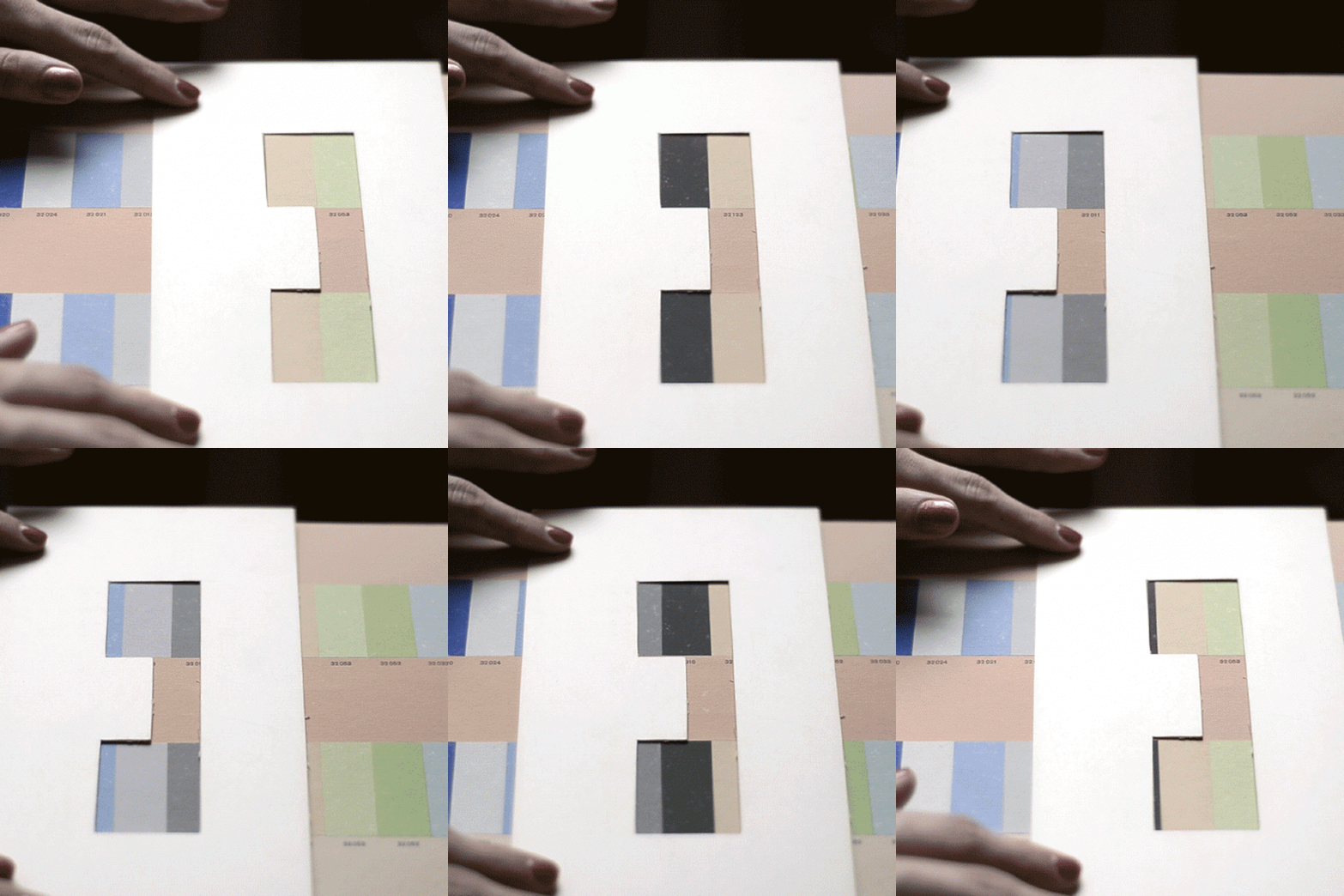
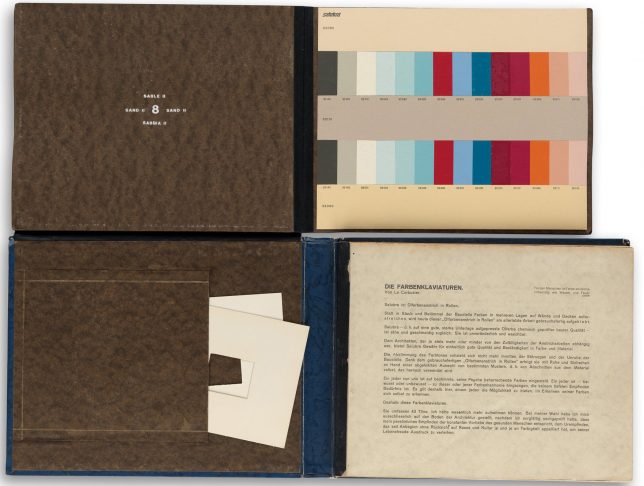
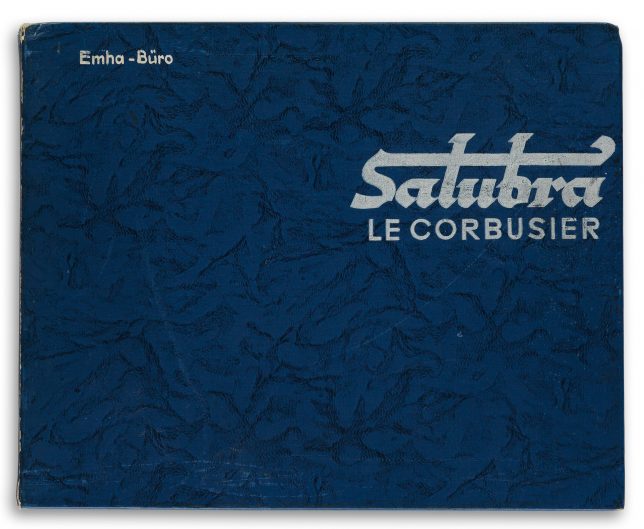
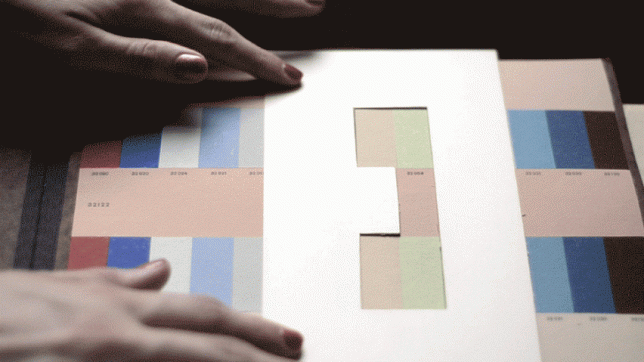
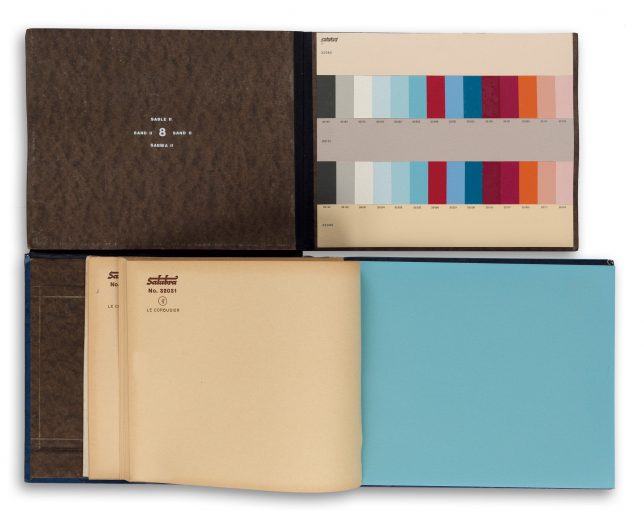
    Created by Le Corbusier, one of the most famous architects of the Modern movement, this vintage Polychromie Architecturale: Die Farbenklaviaturen book features interactive pop-up and pull-out pages to illustrate ideal color combinations for architectural and interior designers.

    color-book-interiors

    Developed for and published by a Swiss wallpaper company, a rare first edition of the 1931 original volume is being auctioned in New York, its paper sliding elements and color sample storage pockets still functional and intact.

    color-book-cover-le-corbusier

    Like much of his work, which treated architecture as “machines for living in,” Le Corbusier saw color as something that could be systematized for the modern era. These, in turn, could effect the health and happiness of building occupants. His polychromatic custom color systems included a “color keyboard” for matching hues and shades across the spectrum.

    interactive-pallette-color-book

    Also as with his other systematic efforts, Corbu boiled down color selection to key components like mental effects, weight and depth, perception and unity – these parallel the logical and reductive approach of his “five points” for designing architecture. Color combinations were designed to take advantage of the positive potential in mixing and matching.

    interactive-book-auction

    Lighter and more natural colors could warm rooms while darker shades could camouflage parts of a space. He also designed wallpapers that took his color theories into account, combining them with rational geometries to form modern patterns. Despite the rarity of the volume and fame of its author it is expected to sell for only a few thousand dollars at the Swann Auction Galleries.

    Share on Facebook


    [ By WebUrbanist in Design & Products & Packaging. ]

    [ WebUrbanist | Archives | Galleries | Privacy | TOS ]


    WebUrbanist

  • Gionee M2017 comes with 2x optical zoom and 7,000 mAh battery

    Gionee is a relatively new name in the smartphone world but the Chinese brand has already established itself in Asian markets and is growing quickly in the Western hemisphere as well. With a price tag of approximately $ 1,000, its latest model, the M2017, places itself firmly at the luxury end of the mobile device spectrum; but looking at the specifications, that seems justified.

    The M2017’s headline feature is its battery. The engineers have combined two 3500mAh units to create a massive 7000mAh battery that rivals those on some tablets. Gionee claims the device offers  32 hours of talk time or 26 hours video playback on a full charge. Quick Charge 3.0 is supported as well.

    The camera specs sound very interesting, too, although Gionee has not provided too much detail. For now we know that the device features a dual-cam with a 12 and a 13MP sensor. This combination allows for 2x optical zoom, like on the iPhone 7 Plus, or a 8x digital zoom. The front-facing camera comes with an 8MP resolution. 

    The rest of the specification reflect the luxury price point as well. Images can be viewed and composed on a 5.7-inch dual curved QHD AMOLED display. In terms of memory, there are 6GB of RAM and 128GB of storage. Unfortunately though there is no microSD-card slot, and for some strange reason, Gionee decided to use the mid-range Snapdragon 653 chipset to power the M2017.

    The device is made from premium materials, weighs in at 238 grams and, despite the massive battery, is 10.78mm thin. There is no information yet on international availability, but we’d certainly like to have closer look at that dual-camera.

    Articles: Digital Photography Review (dpreview.com)

  • Apple rumored to work on 5-inch iPhone with vertical dual-cam

    According to the Japanese blog Mac Okatara, Apple might introduce a new smartphone model in 2017 with a 5″ display to slot in between the existing 4.7″ and 5.5″ variants. The report, which originates from a Taiwanese supplier, also says the new mid-size iPhone would use an iPhone 7 Plus-like dual-camera, albeit with a vertical lens alignment rather than a horizontal one.

    This rumor is in line with multiple other reports which have stated that in 2017 Apple will launch three rather than two new iPhone models. Alongside updated versions of the current models with 4.7″ and 5.5″ LCD displays, a new premium model with OLED display technology is expected. This device could also feature Apple’s dual-camera technology. 

    As always, this kind of rumor is best taken with a pinch of salt but we were quite impressed with the iPhone 7 Plus dual-camera in our full review and would love to see the technology integrated into a smaller form factor. We should know more by September 2017.

    Articles: Digital Photography Review (dpreview.com)

  • Happy Holidays 2016 from the dPS Team

    happyholidays2016

    Merry Christmas from the team at dPS! It’s Christmas day already in Australia where most of the team is based, and we’d like to wish you the happiest of days from all of us here at dPS.

    Thank you for being a regular reader and fan of dPS and for helping us to be able to continue to provide photography education for you and other photography enthusiasts. However you celebrate this holiday season, we hope you have a good one.

    Cheers!

    Jake Vince

    By Jake Vince

    googletag.cmd.push(function() {
    tablet_slots.push( googletag.defineSlot( “/1005424/_dPSv4_tab-all-article-bottom_(300×250)”, [300, 250], “pb-ad-78623” ).addService( googletag.pubads() ) ); } );

    googletag.cmd.push(function() {
    mobile_slots.push( googletag.defineSlot( “/1005424/_dPSv4_mob-all-article-bottom_(300×250)”, [300, 250], “pb-ad-78158” ).addService( googletag.pubads() ) ); } );

    The post Happy Holidays 2016 from the dPS Team by Darlene Hildebrandt appeared first on Digital Photography School.


    Digital Photography School

  • Global digital photography market value to grow to $110.79 billion by 2021

    The digital photography market, including cameras, software and processing equipment, is expected to grow to $ 110.79 billion by the year 2021, according to a new report from Zion Market Research. The research firm valued the digital photography market at $ 77.66B USD in 2015, and anticipates a 6.1-percent growth rate between 2016 and 2021. Asia Pacific is expected to represent the greatest regional market growth during this time frame.

    According to the report, Asia Pacific is estimated to hold a ‘significant’ share of the digital photography market due to growing economies, with North America coming in second. The research firm anticipates an increased demand for replacement devices among consumers in Europe and North America, while Asia Pacific countries have seen digital photography market growth due to, among other things, ‘steady income’ in select countries. Also contributing to expected market growth in coming years is ‘strong product penetration’ throughout Latin America.

    Social networks including Instagram, Facebook, and Tumblr are helping drive digital photography market growth, as well as software including Photoshop and other photo editors. ‘Digital photography allows consumers to take professional quality photos themselves,’ the study notes as one driving force, as well as digital photography’s suitability for a variety of industries beyond the scope of traditional photography, including surveillance, science, machine vision, and more.

    Via: Globalnewswire

    Articles: Digital Photography Review (dpreview.com)

  • Don’t Miss Out: These 12 Photography Deals Will Disappear With 2016

    Over the last 12 days we’ve presented you with some amazing daily deals on photography training resources in our 7th annual 12 days of Christmas.

    12 days

    The savings this year were our biggest yet and we had a lot of really positive feedback from readers who picked up some fantastic deals.

    As in previous years we did get a few sad messages from readers who missed deals along the way asking if there was any way to get them.

    As a result – today we’re opening all 12 deals back up again for one last chance. You can find them all here or listed below.

    So if there’s a deal you regret missing or you might have missed one of our emails – you’re in luck. Here they are!

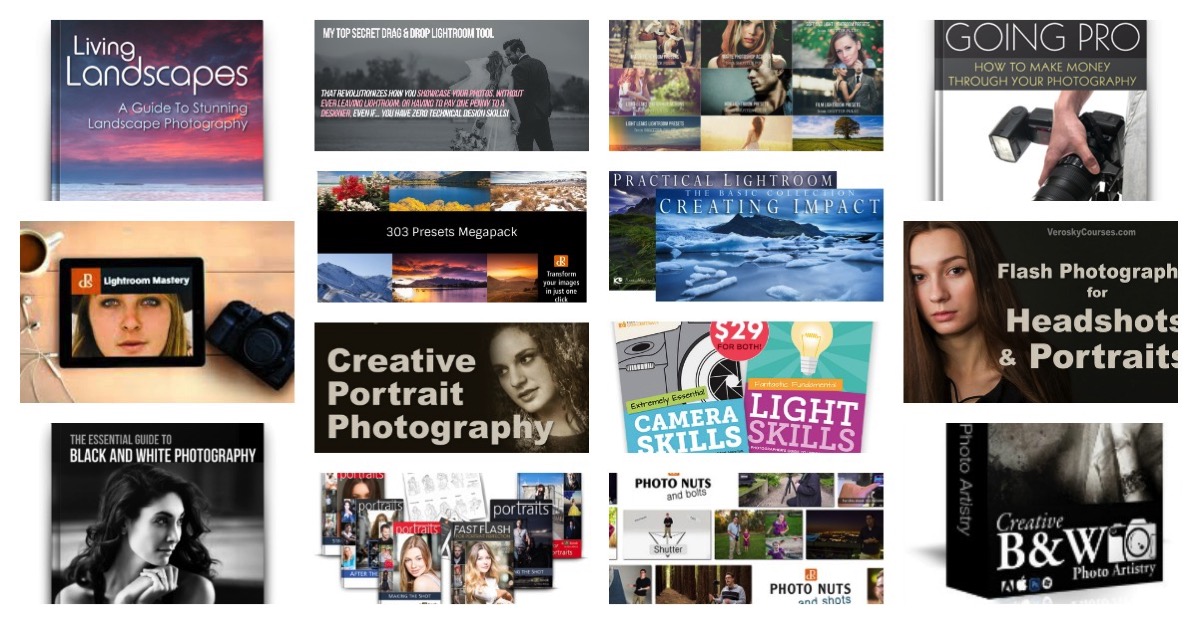
    • Deal 1: Save 50% on this Trade Photography Guide (it’s just $ 5)
    • Deal 2: Save 76% on this Mega Portrait Photography Bundle (course, eBooks and more)
    • Deal 3: Save 70% on our Lightroom Mastery Course (hottest deal of the 12 days)
    • Deal 4: Save 67% on our Lightroom Presets (transform your images in a click)
    • Deal 5: Save 60% on these Professional Photoshop Actions and Lightroom Presets
    • Deal 6: Save 60% on these Landscape Photography Courses (from two of our favorite photographers)
    • Deal 7: Save 85% on this Drag and Drop Lightroom Collage Tool (includes bonus)
    • Deal 8: Save 65% on this Camera Skills and Light Skills Training (satisfaction guaranteed)
    • Deal 9: Save 77% on this Portrait Photography Training (includes 4 exclusive bonuses)
    • Deal 10: Save 85% on our Our Photo Nuts Courses (PERFECT for beginners)
    • Deal 11: Save 60% on Black and White Photo Artistry Course (this was very popular)
    • Deal 12: All dPS eBooks – just $ 9 (there’s 23 to choose from)

    All these will be available until midnight US Eastern time on 31st of December, after that they will be gone for ever (just like 2016) – so get to it and grab yours today!

    googletag.cmd.push(function() {
    tablet_slots.push( googletag.defineSlot( “/1005424/_dPSv4_tab-all-article-bottom_(300×250)”, [300, 250], “pb-ad-78623” ).addService( googletag.pubads() ) ); } );

    googletag.cmd.push(function() {
    mobile_slots.push( googletag.defineSlot( “/1005424/_dPSv4_mob-all-article-bottom_(300×250)”, [300, 250], “pb-ad-78158” ).addService( googletag.pubads() ) ); } );

    The post Don’t Miss Out: These 12 Photography Deals Will Disappear With 2016 by Darren Rowse appeared first on Digital Photography School.


    Digital Photography School

  • dPS 2016 Holiday Schedule

    I hope you’re knee deep in festivities and good food by now. With the holiday season in full swing, I just wanted to send you a quick note about what to expect here at dPS over the next week. The dPS team is taking a little down time so we can give our writers a break and time with their families too. This is what will:

    Sean MacEntee

    By Sean MacEntee

    From the next week – the best of dPS 2016

    It’s time again for me to go through last year’s articles and find the best, most popular ones, for you. Starting off tomorrow with the hottest landscape articles, we’ll have a new topic each day, with several articles for you to read or review on each one.

    dps-2016-best-of-the-1

    Starting off 2017

    After all the parties are over, we’ll get back to our regular schedule of two articles a day on January 2nd (Australia time). For the first couple days you’ll see the wrap-up of the Best Of series, and just one post per day from us, then it’s back to business as usual.

    So expect some good reading coming up. If you have some time you can catch up on a few articles you may have missed or focus on learning a new, specific technique.

    Also remember to keep an eye out for our 12 Days of Christmas sale for some great photography deals.

    googletag.cmd.push(function() {
    tablet_slots.push( googletag.defineSlot( “/1005424/_dPSv4_tab-all-article-bottom_(300×250)”, [300, 250], “pb-ad-78623” ).addService( googletag.pubads() ) ); } );

    googletag.cmd.push(function() {
    mobile_slots.push( googletag.defineSlot( “/1005424/_dPSv4_mob-all-article-bottom_(300×250)”, [300, 250], “pb-ad-78158” ).addService( googletag.pubads() ) ); } );

    The post dPS 2016 Holiday Schedule by Darlene Hildebrandt appeared first on Digital Photography School.


    Digital Photography School

  • So you got a brand new camera? Here’s what you need next

    So you got a camera for Christmas?

    If you’re an experienced shooter with more gear than you know what to do with, then this article isn’t for you. But if you just got your first camera, then welcome!

    Getting your first camera is an exciting experience, but it can also be a bit overwhelming. This helpful starter guide will answer some of your questions and give you a pretty good idea of what accessories you should buy next to make the most of your new kit.

    Cards

    Most cameras don’t ship with a memory card, but even if you have one it’s a good idea to get an extra as a backup, or to store more photos. SD cards, which are about the size of a postage stamp, are the most common variety. Some higher end cameras may use CF cards, so verify what type your camera uses. How much space do you need? 16GB or 32GB cards are normally a safe bet, though 64GB might be better if you plan to shoot a lot of video.

    Speaking of video…. Video recording generally requires faster cards than shooting still photos. In most cases an SD card with a UHS Class 3 rating should be sufficient, though some newer cards also include a ‘V’ rating for video, such as V30 or V60. Your camera’s manual should tell you what speed you need.

    Finally, stick with a reputable company such as SanDisk, Lexar, Kingston, PNY, or Transcend. Every photographer has a had a card fail at some point, and it’s a bit scary, but you can minimize the risk by sticking with companies that have a reputation for producing excellent quality cards.

    Batteries

    Most cameras only come with one battery and some don’t even come with a wall charger, so we recommend investing in an extra battery or two. USB charging is handy sometimes, but the addition of a spare battery and a wall charger lets you charge two batteries at once. This is a smart purchase if one is available for your camera as an accessory. 

    Tripod

    You’ll definitely want a tripod if you want to create long exposures, star photography or time-lapses. They’re also great for that family self-portrait in front of the Christmas tree!

    Tripods are generally constructed of composite plastic, aluminum, carbon fiber or a combination of those materials. Carbon fiber tripods are the lightest option, but they’re also the most expensive, so an aluminum tripod is an excellent option. 

    Tripod legs normally collapse down in two different ways; lever locks and screw locks. Lever locks tend to stay the cleanest and are the easiest to use, so we would recommend sticking with that option. The most common tripod heads (the point where your camera connects to the tripod) are ball-heads, pistol grip and pan-and-tilt heads. Ball-heads are our go-to choice because they allow for a great deal of flexibility with respect to positioning the camera in a number of different orientations.

    A tripod we like for all-around use and travel is the MeFoto Classic series. If you want to go super lightweight and flexible, check out Joby’s line of GorillaPods, or read our comparison of tabletop-sized tripods.  

    Phone app

    Almost every new camera now includes Wi-Fi, so make sure to download the mobile app that works with yours. Mobile apps make it easy to transfer JPEG files to your phone for easy sharing on Facebook, Instagram or your favorite social media outlet. Some apps even allow you to control your camera’s settings and to take photos remotely. Keep in mind that turning on these features could impact your camera’s battery life. Many cameras have a dedicated button to activate Wi-Fi, but if not, your manual will tell you how.

    Remote control or cable release

    Many modern cameras offer nearly full control wirelessly through a mobile app, but you can also purchase a remote control or cable release to take photos. A remote control gives you a wireless way to snap the shutter and take an image, something that will come in handy for those who love to take selfies, family portraits or photograph events.

    A cable release is connected to your camera via a cord. It’s an excellent option if you plan to shoot landscapes or long exposures (like stars) because it gives you the freedom to take your hands off of your camera to reduce the risk of vibration during slow shutter speeds. It will also give you the option to use the camera’s ‘Bulb’ mode which will allow for exposures that are longer than 30 seconds to be taken with ease. 

    Card reader

    Although most cameras today offer file transfer via Bluetooth, Wi-Fi, or a USB connection to a computer, we still recommend picking up an external card reader. Technology like Wi-Fi is great when you’re just transferring a few photos to your phone, but a card reader is much faster when it comes time to transfer photos of your entire vacation to the computer. Using a card reader will also allow you to keep using your camera while you copy photos.

    The majority of card readers on the market offer both CF and SD compatibility in one unit, and you can even find some readers that offer three or even four card format options in one compact unit. Another option is to get a card reader that attaches directly to your tablet or smartphone, making it easy to share pictures with your friends quickly.

    Strap

    This may sound like a small upgrade, but it can make your shooting experience a lot more comfortable. Most cameras include a basic neck strap, but you can buy straps made from more comfortable materials, such as neoprene or leather, as well as straps that go beyond hanging around your neck, such as shoulder or wrist straps.  

    A comfortable camera strap can make all of the difference in the world when you’re carrying around your camera for long periods of time, and gives you the opportunity to customize your kit and make it your own. Peak design and Black Rapid are two companies that make quality, versatile straps, and the Cecilia strap pictured here is a great option for comfort and style.

    Camera bag

    Need to carry your camera around? You’ll probably want a bag. But don’t just choose any bag; you’ll want one that’s specifically designed to provide padding for cameras and lenses.

    Bags come in all shapes and sizes, ranging from backpacks and messenger bags, to bags specifically designed to not look like camera bags. Figure out what type of bag will best meet your needs and go from there. Some of our favorites include, Mindshift, Crumpler, Peak Design, Kelly Moore, Lowepro and Tamrac. 

    Maintenance items

    The list of accessories that you can buy for your camera is a mile long, but there are a handful of items that will be really useful for maintaining your camera:

    • A blower is great for removing dust particles and for drying your lens in wet or rainy conditions
    • A lens brush can help you to remove fine particulate such as dust from the front of your lens without leaving residue 
    • Microfiber cloths can be a life-saver if you happen to leave a finger print on your lens or viewfinder while you’re out shooting
    • A small bottle of lens cleaner is a great item to have on hand if your lens should happen to get dirty
    • Q-tips can also be useful for cleaning your camera and/or lens should they get dirty

    A microphone

    Are you planning to use your camera for video in addition to still images? If so, you may want to pick up an accessory microphone. All cameras that shoot video have built-in microphones, but in most cases sound quality is average at best (and likely won’t measure up to the quality of your camera’s video). Models such as the Røde Video Mic GO or the Sennheiser MKE 400 fit into your camera’s flash mount for easy use while shooting.

    Editing and organization software

    How will you store your photos? You’ll probably want some software on your computer to do things like organize your photos, do some basic editing, or even create fun projects such as collages. The good news is that the built in Photos apps on both Windows and Mac computers can do most of this already. If you want to get a bit more adventurous, consider either Adobe Photoshop Elements or Adobe Lightroom, which provide much more advanced photo editing tools. Don’t feel like you need the full version of Adobe Photoshop, however. It has great name recognition, but you really only need it for very advanced editing.

    Another option is to sign up for a cloud storage account, such as Amazon Prime Photos, Google Photos, Apple iCloud or Dropbox. Cloud storage gives you a safe way to store all your photos in one place, accessible from anywhere, and you won’t lose them if your computer crashes. Some services, like Google Photos, also make it very easy to share your photos across social media. 

    Articles: Digital Photography Review (dpreview.com)

  • Book and Bed Hostel: Your Dream to Sleep in a Library Came True

    [ By SA Rogers in Boutique & Art Hotels & Travel. ]

    book-and-bed-hostel-7

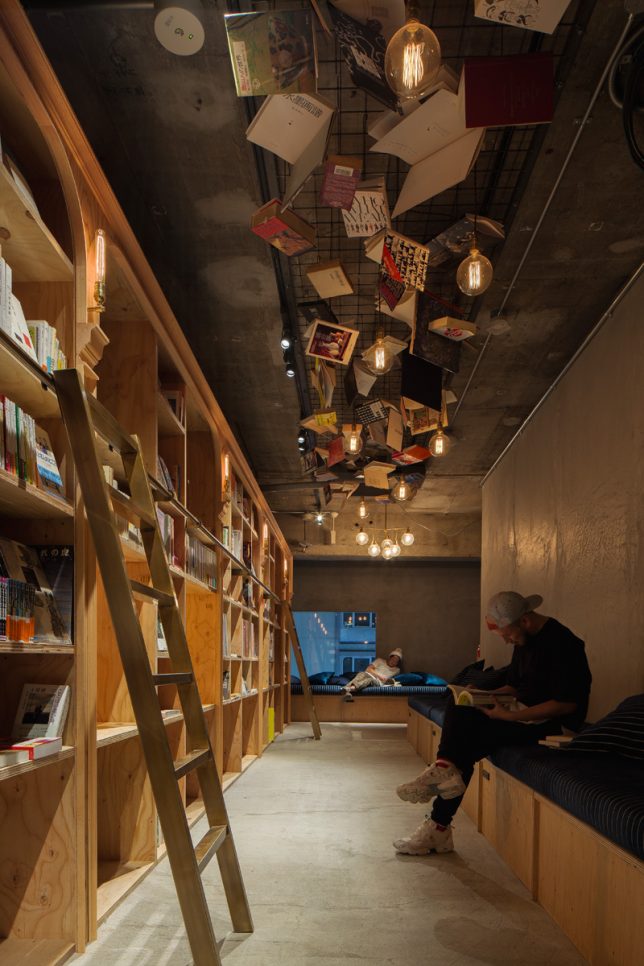
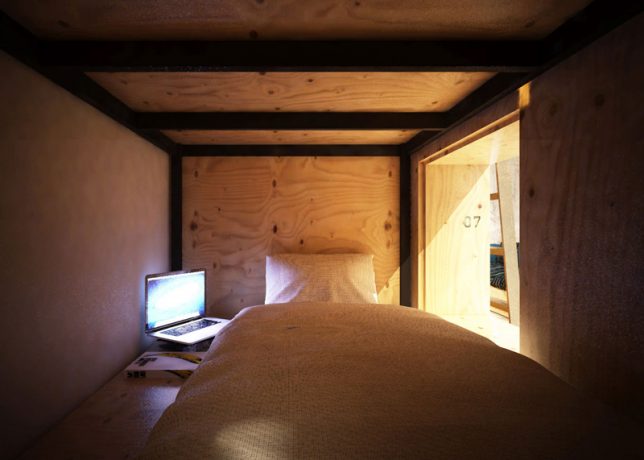
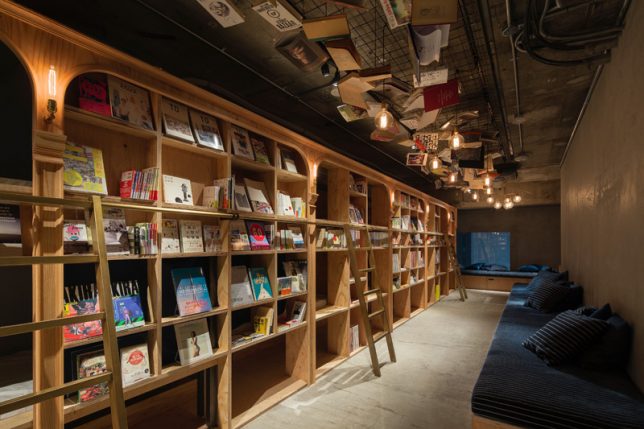
    Every true bibliophile has gazed up at the seemingly endless shelves of books in a good bookstore or library and imagined gathering up a stack, finding a quiet nook and turning in for the night. In Japan (where else?) you can actually do just that in a library-themed hostel, though you might be too excited about your reading materials to get much sleep. The Book and Bed Hostel by Suppose Design Office features semi-private sleeping nooks built right into the bookshelves, so you can climb out and look for more books as often as you want.
    book-and-bed-hostel-3

    book-and-bed-hostel-6

    The hostel has two locations – Tokyo and Kyoto – with rates starting at just $ 40 (4,445 yen) per night. In the true spirit of a hostel, everything is set up dorm style with shared bathrooms and nothing but curtains separating you from your neighbors, but considering the theme of the place, you probably don’t care. Book and Bed isn’t really about enjoying privacy or getting a good night’s sleep.

    book-and-bed-hostel-1

    The Tokyo location features over 1,700 titles to choose from, stacked on floor-to-ceiling shelves. Climb the library ladders to reach the highest ones, and check out the featured books that have been hung from the ceiling as decor. Each sleeping nook is fitted with a backlight and an outlet, and there’s wifi, though you’ll probably be too busy reading to use it.

    book-and-bed-hostel-2

    The Kyoto hostel is located just steps from many popular local attractions, like the Yasaka Shrine and the Nanzenji Temple. There’s a special selection of Kyoto-centric books in both English and Japanese. Both hostels offer striped robes and totes reading ‘Have a Book Day’ for purchase as souvenirs. You can see more photos on the Book and Bed Tokyo Instagram account.

    book-and-bed-hostel-4

    “Book and Bed is an ‘accommodation bookshop.’ The perfect setting for a good nights sleep is something you will not find here. There are no comfortable mattresses, fluffy pillows nor lightweight and warm down duvets. What we do offer is an experience while reading a book (or comic book.) An experience shared by everyone at least once: the blissful ‘instant of falling asleep.’ It is already 2am but you think just a little more… with heavy drooping eye lids you continue reading only to realize you have fallen asleep.”

    book-and-bed-hostel-9

    “Dozing off obliviously during your treasured pastime is the finest ‘moment of sleep,’ don’t you agree?”

    Share on Facebook


    [ By SA Rogers in Boutique & Art Hotels & Travel. ]

    [ WebUrbanist | Archives | Galleries | Privacy | TOS ]


    WebUrbanist