RSS
 

Posts Tagged ‘Save’

Discover the Secrets of Lightroom: 48 Hours Left to Save 50% Off Our Lightroom Mastery Course

31 Aug

dps-lightroom-mastery-hero-v1b-large

If you’ve ever wanted to learn more about Adobe Lightroom, now’s your chance to do it with our brand new Lightroom Mastery Course – and if you act fast you can save 50%!

Over the last few years here at dPS we’ve noticed that the most common tool that our readers use to process their photos is Lightroom.

Along with this rise in the use of Lightroom we’ve noticed that many of our readers are coming to us with questions about how to use it most effectively and the feeling of being overwhelmed by how to get started with it.

So earlier this year we approached Pro Photographer and Lightroom Expert Mike Newton to create a course for our readers on how to Master Lightroom.

Mike went above and beyond and created Lightroom Mastery – a course that we’ve had some fantastic feedback on.

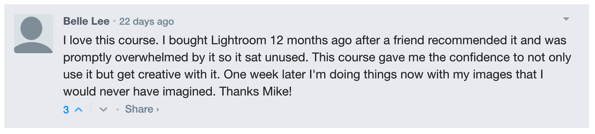
Here’s what one of our readers said about the course a few days after it launched.

Lightroom mastery course review

Belle wasn’t the only one – much of the feedback was along similar lines with readers reporting that they finally felt like they knew how to take control over Lightroom and to develop a workflow to help them take their photos to the next level and create beautiful images.

Early Bird Special: Ends in 48 Hours

Over the last 4 weeks we’ve offered Lightroom Mastery at an Early Bird discount of 50% off. We’ve also been putting everyone who purchases a copy in the draw to win $ 1000 USD toward new camera gear.

Many of you have taken up this offer already but we wanted to let you know today that there are just 48 hours left to take advantage of it.

At midnight (US EDT) the competition closes off and we’ll be reverting the course to its full price so now is your last chance to take advantage of this Early Bird Offer.

Discover How to Transform Your Images Today

This online course includes 16 modules and just over 3hrs of video tutorials.

Here are some of the things you’ll learn:

  • Editing – How to use the crop tool, basics panel, tone curve panel, color panel, split toning, details panel, and lens corrections panel, all while improving the image.
  • Tools – Using the spot removal brushes (cloning/healing), red eye correction tool, graduated filter, radial filter, and adjustment brushes!
  • Workflow – Lightroom presets, finding lost photos, stacking, the face finder tool, lights out mode, and more advanced topics!
  • Creative Techniques – How to Create Panoramas and HDR images.
  • How to Bring your Photos to Life – Full Photo Edit Workflow.

… and much much more.

And remember – when you order before midnight EDT this Friday, not only will you save a whopping 50%, you’ll also go into the draw to win USD $ 1,000 to spend on your photography.

So don’t wait – grab Lightroom Mastery here – or you might miss out!

googletag.cmd.push(function() {
tablet_slots.push( googletag.defineSlot( “/1005424/_dPSv4_tab-all-article-bottom_(300×250)”, [300, 250], “pb-ad-78623” ).addService( googletag.pubads() ) ); } );

googletag.cmd.push(function() {
mobile_slots.push( googletag.defineSlot( “/1005424/_dPSv4_mob-all-article-bottom_(300×250)”, [300, 250], “pb-ad-78158” ).addService( googletag.pubads() ) ); } );

The post Discover the Secrets of Lightroom: 48 Hours Left to Save 50% Off Our Lightroom Mastery Course by Darren Rowse appeared first on Digital Photography School.


Digital Photography School

 
Comments Off on Discover the Secrets of Lightroom: 48 Hours Left to Save 50% Off Our Lightroom Mastery Course

Posted in Photography


Circular Reasoning: How Rounded Homes Resist Storms & Save Lives

31 Aug

[ By WebUrbanist in Architecture & Houses & Residential. ]

modern round house

Combining the physical benefits of circular plans with the practicality of straight lines and corners, octagonal houses are uniquely positioned to resist hurricanes, tsunamis and earthquakes that threaten coastlines. Rounded habitats have a long history, from tipis and yurts through the geodesic domes of Buckminster Fuller. Indeed, round homes make sense for a lot of reasons. They have less surface area, which means they require less construction material and have greater energy efficiency, for instance.

round house avoids destruction

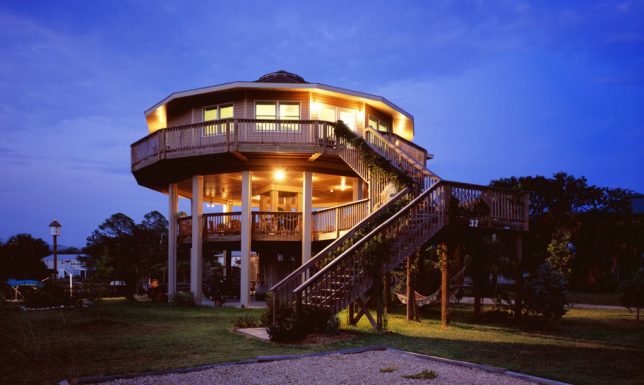
Critically, rounded homes are also ideal for resisting extreme weather (above: a regular home destroyed in a storm and a surviving semi-round house).

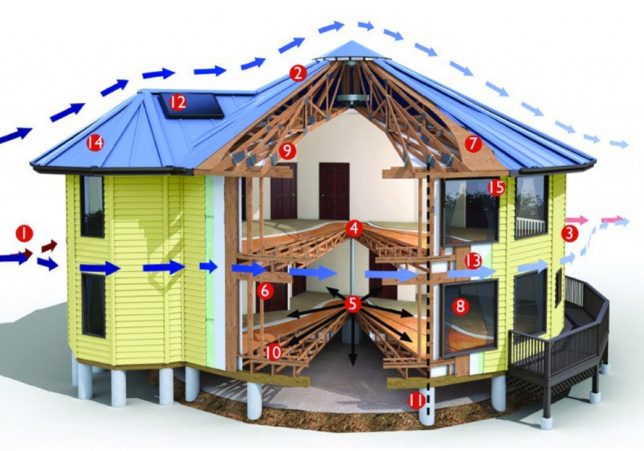
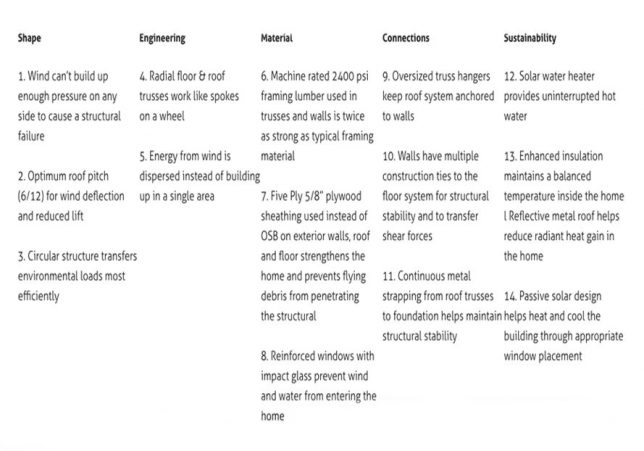
round house diagram

round house functionality

Flat sides pose a significant structural risk during hurricanes and tsunamis. It is much easier for wind and water to flow around a round house than a square or rectangular one.

round structural design

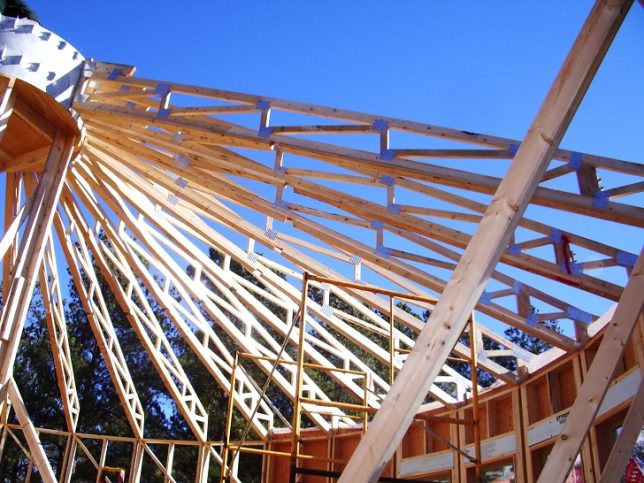
In modern rounded house designs, radial floor and roof trusses meet in a center ring like spokes on a wheel and thus lock the building in a constant state of compression, which further reinforces its structural integrity. This approach also helps them resist earthquakes.

round interior

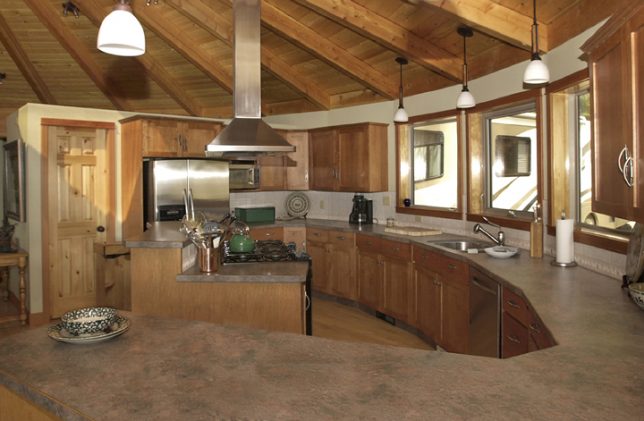
Of course, fitting furniture along the edges of a truly round house can be frustrating. The space and materials saved are nice, but the usability of the resulting spaces is diminished.

round house

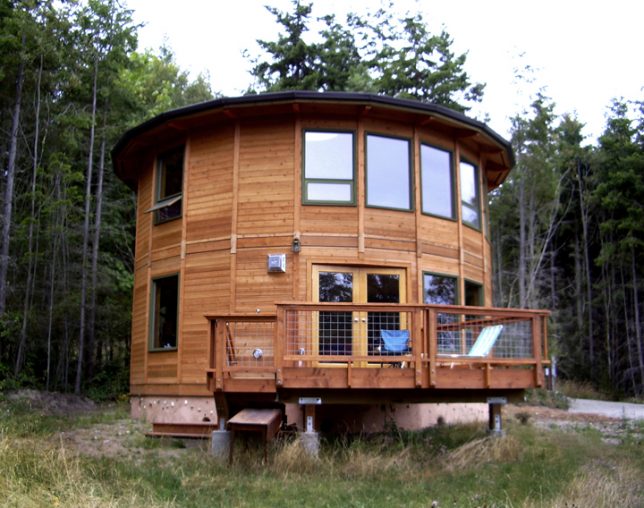
Today, many round-house makers opt for a middle ground and go with octagonal floor plans (or other variants with more than four sides). Doubling the number of walls, this represents the best of both worlds in many ways. These are easier to construct with contemporary materials and techniques, but still take advantage of wind- and water-resistance found in edge-less dwellings.

round edge house

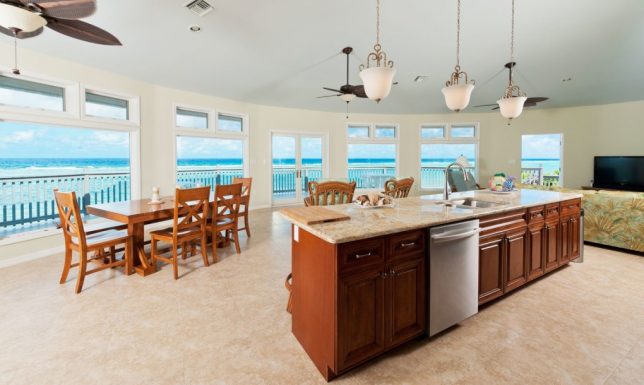
Deltac, one manufacturer of such semi-round structures, boasts that none of their 5,000 homes built to date has been knocked down by nature. These kinds of homes also have an added benefit for those living along coasts, where storms are a great thread: their shapes provide seaside dwellers with amazing panoramic views (images via Deltac and Cayman).

round houses surviv

Share on Facebook


[ By WebUrbanist in Architecture & Houses & Residential. ]

[ WebUrbanist | Archives | Galleries | Privacy | TOS ]


WebUrbanist

 
Comments Off on Circular Reasoning: How Rounded Homes Resist Storms & Save Lives

Posted in Creativity


How to Buy Camera Gear Wisely and Save Money

07 Aug

Many photographers have experienced lens-lust or gear envy, and know the thrill of playing with a new piece of camera gear. But gear can be expensive, and choosing the wrong equipment can be a costly mistake. So how do you know you are purchasing the correct gear, and ensuring that it won’t end up in a cupboard collecting dust?

Here are five tips to help you choose and buy camera gear wisely, and maybe save a little bit of money at the same time.

1. What do you really need?
WideAngle

If you often photograph in tight spaces, or want to explore landscape or architecture photography, a wide angle lens is perfect.

I always advocate working with your current gear until you start to feel its limitations. This way you will have a clearer idea of what specifications or items will help you grow further as a photographer.

If you feel that you’ve reached these limits, but are still confused about which piece of equipment you should buy as your first priority, try taking a few notes during your next shoot. Where do you get stuck? What frustrates you? What would make your photography life easier? What will you be photographing? And what is your next goal? Asking yourself these questions will help refine exactly what you need from your next purchase.

For example, do you wish that your lens would shoot wider, or zoom in closer? Perhaps you really want to try macro photography, or need a tripod to try slow shutter speed waterscapes?

Landscape

A zoom lens can be really useful, allowing you to use it across numerous photography genres from portraiture, events, and even landscapes.

If you shoot a lot of landscapes or architecture, a wide angle lens will be more useful than a telephoto lens. Alternatively, if you photograph families, children, or events, a zoom lens may make it easier to respond quicker to impromptu moments, rather than a prime fixed-focal length lens.

Also, will you fully understand and use all the wonderful aspects of the new equipment? Will it be beneficial to your photography, or will it be so complex that it will frustrate you?

For example, should you spend a lot of money on a professional level lens that shoots at f/2.8 if you do not know anything about depth of field? Do you like the effect of f/2.8? Will you use it regularly? Or would a less expensive lens that goes to f/5.6 do everything you need it to?
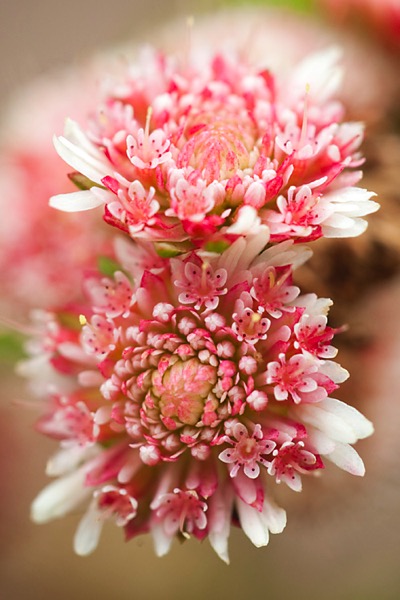
MacroShot

A macro lens won’t help with room interior photographs, but is perfect for capturing close up shots of flowers and insects.

Similarly, if you’ve only been shooting on auto-modes, purchasing a camera that has mostly manual options may not be the best choice. Instead, consider a mid-range camera that offers both auto and manual modes, so you can try more advanced techniques, as well as take it out just for fun.

Make a decision about what you really need from your gear, and remember – it’s okay to stick with the equipment you currently own until you are 100% sure of your choice.

2. Know your budget

Unfortunately we do not all have limitless bank accounts, and will have to make decision on how much we can spend. It is a balancing act between deciding on your budget, and researching the actual cost of items. You could choose to spend a bit more now on one item that will fulfil your needs for the long term, or spend less on an entry-level option to build up your experience.

Budgeting

It is important to stick within your budget. If you can’t stretch to afford your ideal gear, consider other options such as buying second-hand, less expensive options, renting, or waiting for the next sale.

Sometimes however what you really want is simply too expensive, so you can choose to wait for the next big sale or look at alternatives, and that’s perfectly okay too. Another option would be to buy the absolute necessities now, while saving for the next items. If you discover you need it sooner, and have not saved enough yet, you can choose to rent gear as needed.

Many stores now also offer payment plans that allow you to take the gear home and pay it off in weekly instalments. This can certainly help with cash flow, but always read the small print, and check the interest rate to see if it will suit your situation.

3. Do your research

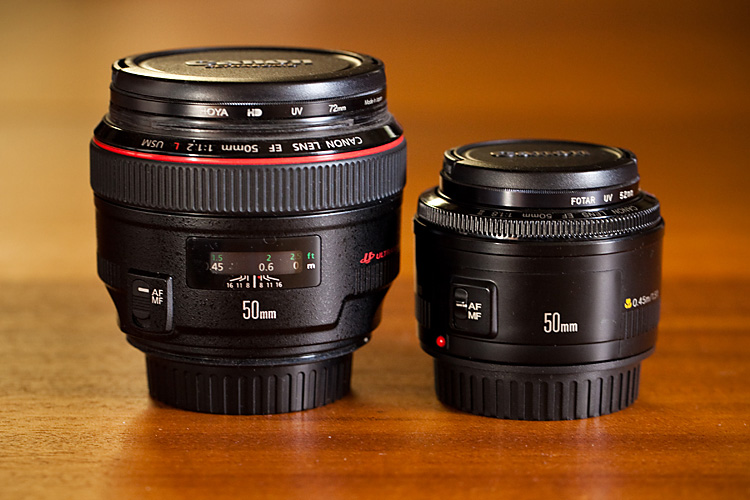
50mm apertures
The images above were shot with two different 50mm lenses, using their largest apertures. Do you think you would notice the difference in your own shots? Is it worth the price difference? Flickr can also be a great way to see examples of images taken using specific equipment.

There are so many opinions and reviews posted online that it is easier than ever to do your research. Read personal opinions, website reviews, as well as manufacturers’ specifications, to give you a well rounded opinion and compare them to what you are looking at purchasing. YouTube is a great resource for tutorials, reviews, and box openings. Flickr is also be a good place to find images that have been tagged as being shot with a specific lens or camera – it is a great way to see real-life results.

Your local camera store should not be overlooked either. Go in for a browse, play with the items, listen to advice, and go back a few times if you’re unsure and want to become more familiar with the item before buying it. You want to ensure you are comfortable with the gear you are purchasing, and that it does exactly what you want it to.
50mm lenses

Here are two different Canon 50mm lenses – one with a maximum aperture of f/1.2 on the left, and the other f/1.8 on the right. Both offer a shallow depth of field, but the prices are vastly different.

Editor’s note: Canon has three 50mm lenses: The f/1.8 version at $ 125 (shown above right), the f/1.4 version at about $ 349 (not pictured), and the f/1.2 monster (above left) which will run you a whopping $ 1349.

If you’re trying out new lenses or a flash, take your camera into the store with a fresh battery and memory card, attach the lens/flash and take a few photos. Test it out in store, see how it works, then go home and review the images. If you’re looking at a new camera body, take your favourite lens and a memory card and do the same. All gear has an adjustment period for becoming familiar with settings and button locations, so this will give you a head start, and an idea of the weight and shape of the item, something you can’t experience by online shopping.

Helpful and knowledgeable salespeople are also invaluable. Many camera store staff on a commission-based pay structure can often be motivated to make a higher-priced sale, so may push you toward the more expensive option. There are those, however, who will provide good advice and non-pushy service, with the hope you will come back to them when you’re ready to buy. If the price is right, it is always good to support your friendly local camera store, as they can be an invaluable resource, especially if something goes wrong.

4. Consider renting
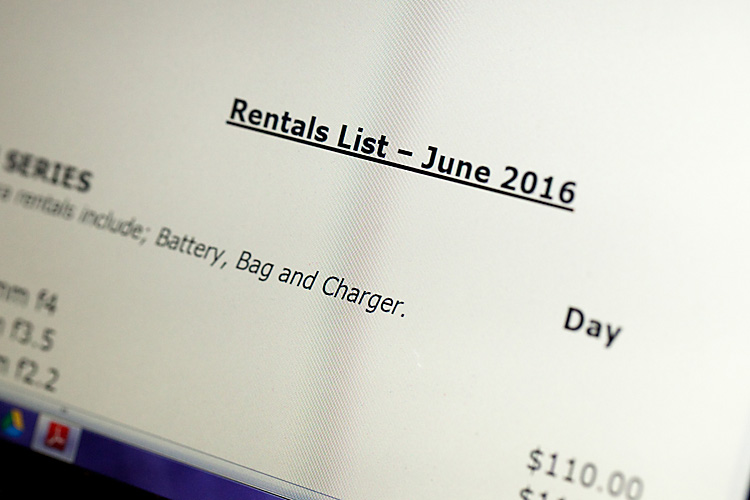
Rental List

Many camera stores and online services offer the opportunity to rent higher priced and specialist equipment. This can be a great way to try before you buy, or to hire gear for one-off assignments.

Did you know you can rent equipment such as lenses and camera bodies, as well as studio flash kits? Many professional photography stores offer this service, and there are several online camera rental services as well.

This option is great for when you are considering professional level gear, or something for a special technical application. You have the opportunity to rent the gear for a day, weekend, or a week, which is a great way to try before you buy.

It is not only a good option for researching a new purchase, but you can hire specialist equipment needed for one-off jobs (like a macro or tilt-shift lens for example), without the cost of purchasing it outright, and with the added advantage of claiming the hire expense as a business expense. A security bond is usually charged, so be sure to read the fine print for the rental terms and conditions.

5. Look for the less expensive option
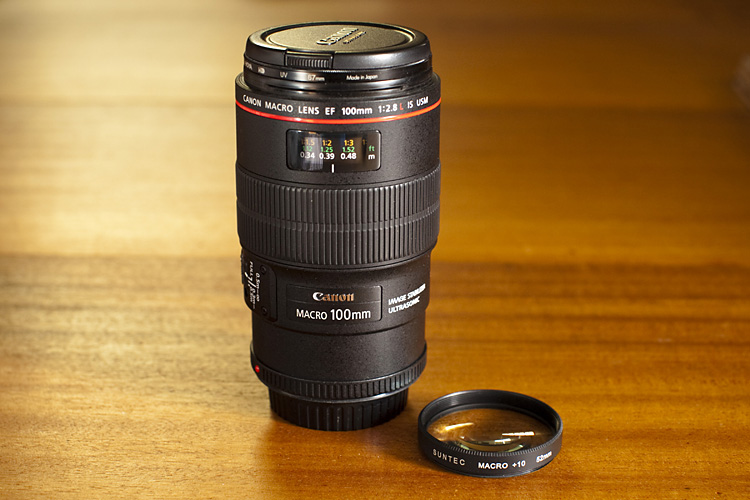
MacroLens Filter

The price difference between a close-up filter set and a dedicated macro lens is over $ 1,000. Each has its own effects, but both are capable of producing quality, and interesting photographs.

If you cannot afford your preferred brand or wish-list item, try searching for a less expensive option. This could mean waiting for a camera sale, purchasing second-hand, a lesser-known brand, or even an alternative method to achieve the same result. These options can be a great way to expand the gear in your camera bag and try new techniques, without spending quite as much money.

For example, we all agree that an f/1.2 lens is drool-worthy, but would the f/1.4 version do almost as good a job? Or instead of purchasing a special macro lens, would close-up filters work instead? Generic, or lesser known brands, are another less expensive option, although they may not have the same quality or life expectancy as the branded versions.

Purchasing second hand equipment may be risky, but with some research, and by asking the right questions, you can often find a bargain. Always consider how much wear and tear the item has had, who has owned it before, and how much life is still left in it. A wedding photographer, for example, will often upgrade their gear and sell off their old cameras. While it might look like a great deal, it’s worth keeping in mind that their gear may have been subject to a lot of wear and tear.
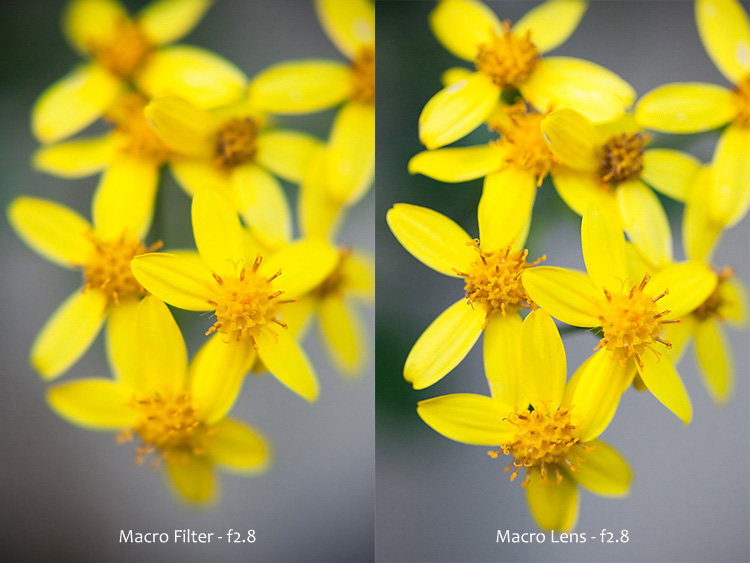
MacroOptions

The same subject, photographed using two different systems – a close-up filter, and a macro lens. Both images were photographed at f/2.8. Filters often create softer images, but are an inexpensive way to enter the world of macro photography.

Scratches and marks can be forgiven, provided they do not affect proper function, while some items have a limited lifetime. When considering a second-hand camera, ask about its shutter actuation, or shutter count, and then compare it to the camera’s life expectancy. This will give you an idea of how many more photos the camera can capture, before the shutter may fail. If photography is your hobby it may take you years to reach this limit, whereas if you’re shooting weddings every week you will reach this number sooner. Shutters are replaceable but it can be expensive, and often camera replacement is more cost effective.

Many of these alternative options are available to purchase in your local camera store, or online. In regards purchasing of second hand equipment, it is worth being cautious: ask lots of questions, request photographs, ask about any return policy, and if you do go ahead, purchasing insurance on postage.

Summary

Hopefully these tips will assist you in choosing your next purchase wisely, one that suits your needs perfectly, and may even help you save a little bit of money too – who knows, maybe just enough to afford that other item you want?

The most important thing, however, is that you use your new gear and enjoy your continuing journey in photography.

googletag.cmd.push(function() {
tablet_slots.push( googletag.defineSlot( “/1005424/_dPSv4_tab-all-article-bottom_(300×250)”, [300, 250], “pb-ad-78623” ).addService( googletag.pubads() ) ); } );

googletag.cmd.push(function() {
mobile_slots.push( googletag.defineSlot( “/1005424/_dPSv4_mob-all-article-bottom_(300×250)”, [300, 250], “pb-ad-78158” ).addService( googletag.pubads() ) ); } );

The post How to Buy Camera Gear Wisely and Save Money by Erinna Ford appeared first on Digital Photography School.


Digital Photography School
 
Comments Off on How to Buy Camera Gear Wisely and Save Money

Posted in Photography


Deal 3: Save $401 on The Complete Landscape Photography Pack

10 Jul

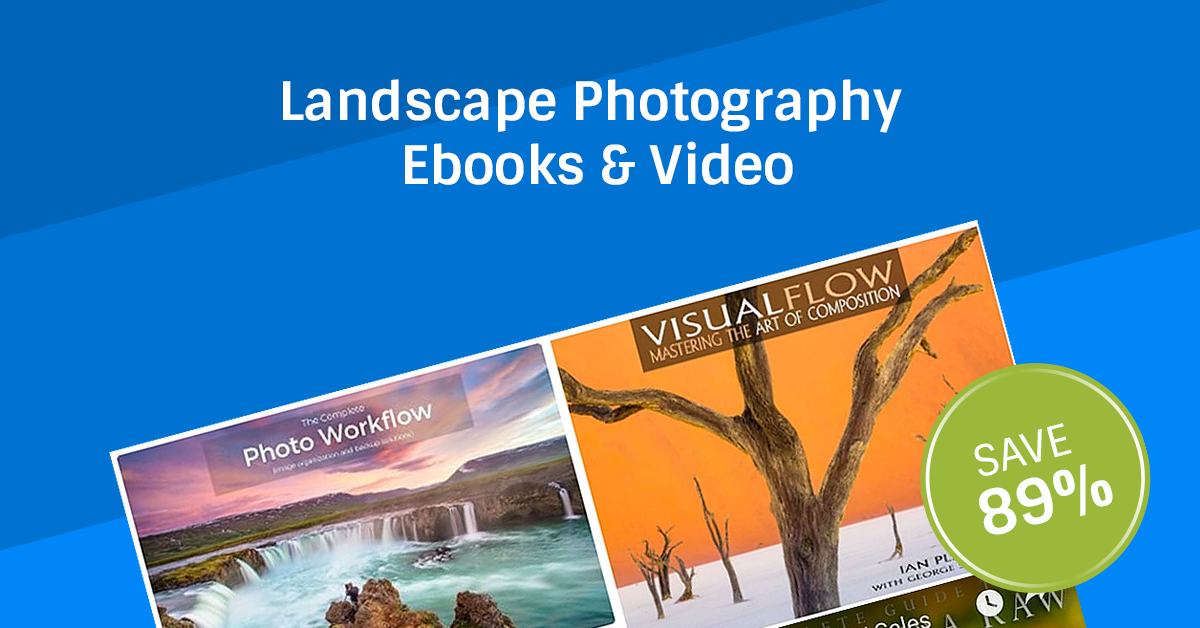
It’s Day 3 of our Summer Sale and if you’re interested in the art of landscape photography – this offer is for you!

Day 03 fb ad
InFocus Deals are offering dPS subscribers their Complete Landscape Photography Pack with a massive 89% discount!

For US$ 49 you’ll get US$ 450 worth of learning materials in The Complete Landscape Photography Pack – a mammoth savings of US$ 401!

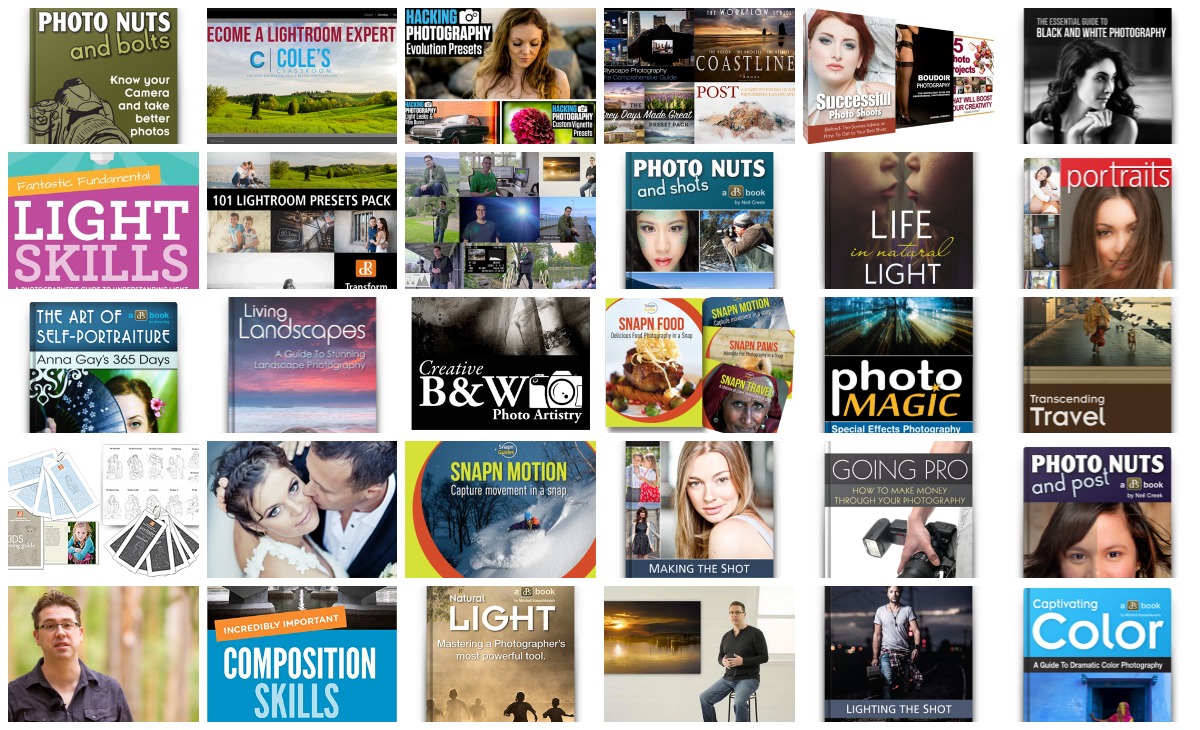
Take a look at what’s in this amazing Landscape Photography pack:

Get full details of the bundle over at the InFocus Deals Page

This bundle is huge and will help you improve your Landscape Photography for sure!

But of course, as with all our deals this week, an offer this fantastic can’t last forever.

So, don’t miss out. Lock in the unbeatable savings of US$ 401 today.

googletag.cmd.push(function() {
tablet_slots.push( googletag.defineSlot( “/1005424/_dPSv4_tab-all-article-bottom_(300×250)”, [300, 250], “pb-ad-78623” ).addService( googletag.pubads() ) ); } );

googletag.cmd.push(function() {
mobile_slots.push( googletag.defineSlot( “/1005424/_dPSv4_mob-all-article-bottom_(300×250)”, [300, 250], “pb-ad-78158” ).addService( googletag.pubads() ) ); } );

The post Deal 3: Save $ 401 on The Complete Landscape Photography Pack by Darren Rowse appeared first on Digital Photography School.


Digital Photography School
 
Comments Off on Deal 3: Save $401 on The Complete Landscape Photography Pack

Posted in Photography


DEAL: Save 72% off Lightroom Editing System for Travel Photography

08 Jul

Travel lightroom presetsIt’s day 2 of our Summer Sale and today we have a special Adobe Lightroom Presets Travel pack* for you with a 72% Saving.

This “system” normally sells for $ 176, but it’s being offered to dPS readers for the special price of $ 49 USD – a massive 72% saving.

One of the best parts about travelling is documenting your trip with pictures. But what’s not so great is pending hours weeding out the stinkers from the keepers. And editing them to look as awesome as possible.

What if you could systemize and cut the editing process in half?

And reduce the struggle, endless fiddling and overwhelm with all the features and options of Lightroom editing tools?

Well, now you can thanks to the Lightroom Rapid Editing System for Travel Photography.

Pro travel photographer Viktor Elizarov got tired of drowning in digital images. And spending more time processing pictures than taking them.

So he searched for a better way. And after a year testing different approaches and systems with lots of trial and error – the Rapid Editing System was born.

And he wants to share it with you.

Learn how to automate 80% of your editing process so you save time on repetitive tasks. And have more free time to spend on fun tasks (like taking pictures).

Viktor’s system features a large collection of Lightroom Presets specifically for travel photography. And will help take your photos from good to great – fast.

Viktor normally sells his system for $ 176, but he’s offering it to dPS subscribers for the special price of $ 49 – a 72% saving.

Here’s everything you get:

  • 90+ page eBook with step by step tutorial on how to use Lightroom Rapid Editing System
  • 20 1-Click LANDSCAPE Style presets
  • 20 1-Click CITYSCAPE Style presets
  • 20 1-Click PEOPLE Style presets
  • 10 1-Click Fall Colors Style presets
  • 10 1-Click Winter Colors Style presets
  • 10 1-Click Spring Colors Style presets
  • 10 1-Click Summer Colors Style presets
  • 41 TOOLKIT adjustment presets
  • “Reset All” preset that reverts your image to its original state
  • Documentation and Installation Instructions
  • Source RAW and JPEG photos used in the tutorials

If you love travel photography – or just want to speed up your post processing – don’t miss out.

But hurry! This valuable offer for the Lightroom Rapid Editing System for Travel Photography only lasts 24 hours – secure it for yourself and save 72% today only.

*Note: You’ll need a copy of Adobe Lightroom installed to use these presets.

googletag.cmd.push(function() {
tablet_slots.push( googletag.defineSlot( “/1005424/_dPSv4_tab-all-article-bottom_(300×250)”, [300, 250], “pb-ad-78623” ).addService( googletag.pubads() ) ); } );

googletag.cmd.push(function() {
mobile_slots.push( googletag.defineSlot( “/1005424/_dPSv4_mob-all-article-bottom_(300×250)”, [300, 250], “pb-ad-78158” ).addService( googletag.pubads() ) ); } );

The post DEAL: Save 72% off Lightroom Editing System for Travel Photography by Darren Rowse appeared first on Digital Photography School.


Digital Photography School
 
Comments Off on DEAL: Save 72% off Lightroom Editing System for Travel Photography

Posted in Photography


DEAL: Save 71% on our Complete Portraits Pack of eBooks

08 Jul

July is here, and do you know what that means?

It’s time for our dPS Summer Sale where for the next 7 days we’re going to be sharing 7 amazing deals on training resources for photographers!

While it may not be summer for all of us right now, we can guarantee the 7 deals we have lined up for you over the next 7 days are HOT.

Deal #1: 71% Off The Complete Portraits Pack

Photography deal portraits pack

If you want to transform your dull and lifeless portraits into works of art… whether you’re a beginner, enthusiast, or pro – this deals for you.

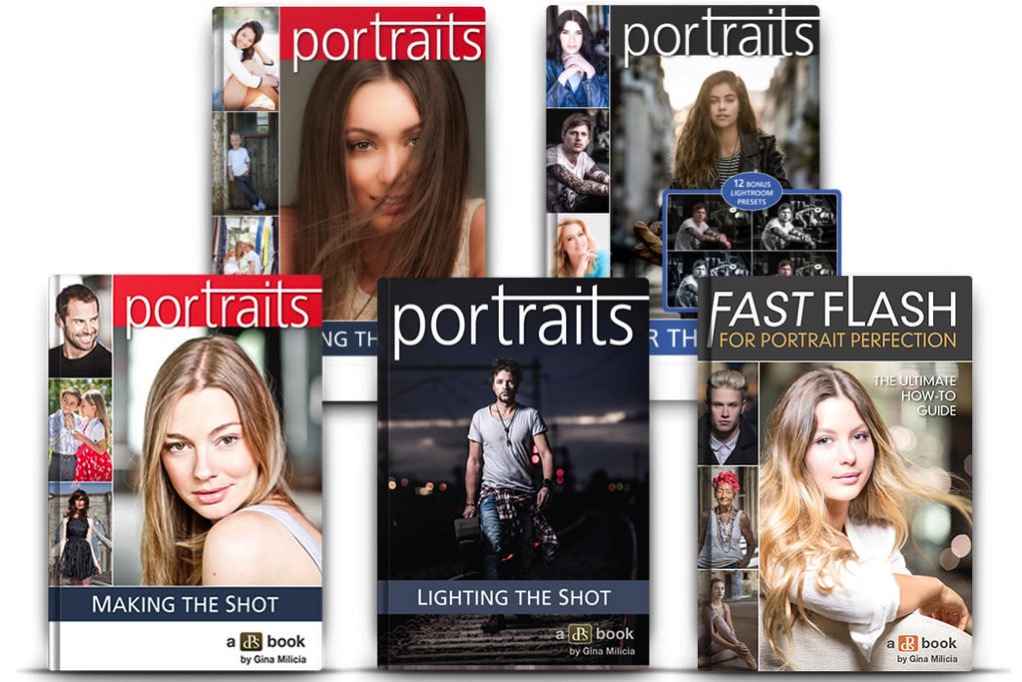
dSP favourite and world class photographer, Gina Milicia shares everything and more about portrait photography in 5 in-depth ebooks.

Get this ultra comprehensive Portraits pack for $ 29.

For just $ 29 (a staggering 71% off the regular price) you’ll learn how to take portraits with soul.

Here’s what you’ll get from one of the best in the biz with these exclusive dSP guides:

  • Portraits: Making the Shot – 84 pages of practical tips for bringing your portraits to life
  • Portraits: Lighting the Shot – 130 pages of the secrets to beautiful portrait lighting
  • Portraits: Striking the Pose – 119 pages and your go-to guide of natural posing positions
  • Portraits: After the Shot – 139 pages on master portrait post production and workflow
  • Fast FLASH For Portrait Perfection – 125 pages of Flash techniques & lighting set ups

These ebooks regularly sell for $ 19.99 each (dPS readers rave about them!) but when you buy today you’ll only pay $ 7 per ebook!

But here’s the deal – The Complete Portraits Pack only lasts for 24 hours.

So if you’ve ever been disappointed that your portraits didn’t capture the true spirit of your subject… or lacks the WOW factor… don’t miss out on this incredible deal.

Get your 5 ebooks today – they’re crammed with practical, easy to follow, step-by-step instructions, tips and tricks of portrait photography.

Not only is Gina Milicia one of the best photographers in the business – she’s one of the best teachers!

Subscribe to Get All 7 Deals the Moment they are Released

If you’re looking for more photography training deals you can subscribe over on our Summer Sale page here to get notified the moment all of the next 6 days of deals go live. There are some great ones still to come!

googletag.cmd.push(function() {
tablet_slots.push( googletag.defineSlot( “/1005424/_dPSv4_tab-all-article-bottom_(300×250)”, [300, 250], “pb-ad-78623” ).addService( googletag.pubads() ) ); } );

googletag.cmd.push(function() {
mobile_slots.push( googletag.defineSlot( “/1005424/_dPSv4_mob-all-article-bottom_(300×250)”, [300, 250], “pb-ad-78158” ).addService( googletag.pubads() ) ); } );

The post DEAL: Save 71% on our Complete Portraits Pack of eBooks by Darren Rowse appeared first on Digital Photography School.


Digital Photography School

 
Comments Off on DEAL: Save 71% on our Complete Portraits Pack of eBooks

Posted in Photography


JPEGmini Photoshop extension aims to top Adobe’s ‘save for web’

10 May

Beamr, the software company behind the content-aware JPEGmini image compression application, has introduced an extension for Adobe Photoshop. Dubbing it the ‘The Save For Web button Adobe should’ve made’, the company claims the extension will save users time and produce better results than Adobe’s default Save For Web settings.

JPEGmini is an image compression package that analyzes individual sectors of an image and applies different degrees of compression to each sector according to its content. The designers claim that its compression results in no visible degradation of the image, but that it can reduce file sizes by up to 80% while ‘preserving their full resolution and quality.’ The smaller files save space on a hard drive and are also lighter for emailing and web hosting, according to the company.

The Photoshop extension comes as part of the JPEGmini Pro bundle, along with a plug-in for Lightroom, which costs $ 99. Photoshop CC 2015.1 is required to use the extension. For more information visit the JPEGmini website and read our test of a previous version of the software. 

Articles: Digital Photography Review (dpreview.com)

 
Comments Off on JPEGmini Photoshop extension aims to top Adobe’s ‘save for web’

Posted in Uncategorized


Create a Photography Business Marketing Plan in 3 Days (+ Save $30 Instantly)

25 Apr

Starting a photography business these days is quite a challenge. It takes courage. You need to push yourself constantly to go out of your comfort zone and learn a whole pack of new things. While there are no shortcuts to success, there are accelerated ways. Read on to learn about one of them and build a photography business marketing plan Continue Reading

The post Create a Photography Business Marketing Plan in 3 Days (+ Save $ 30 Instantly) appeared first on Photodoto.


Photodoto

 
Comments Off on Create a Photography Business Marketing Plan in 3 Days (+ Save $30 Instantly)

Posted in Photography


48 Hours Left to Save up to 90% on These Great Photography Deals

30 Dec

photography deals

Over the past two weeks we’ve put together some great photography deals to help you improve your photography in the new year but as 2015 comes to a close so will the deals.

As this post goes live you have approximately 48 hours to take advantage of this promotion.

Each year at this time we announce the most popular deals so I thought I’d list them here in order of popularity.

Congratulations to Sebastian Michaels for topping the list again – this year with his new Black and White Photo Artistry course.

  1. Black and White Photo Artistry
  2. Cole’s Classroom Lightroom Course
  3. Landscape Photography Bundle
  4. Mike Newtons 104 Lightroom Presets Pack
  5. Phil Steele’s Event Photography Course
  6. Photography Concentrate Composition Skills and Light Skills Guides (or get the bundle)
  7. Photo Nuts Photography Courses
  8. Natural Light Photography eBooks
  9. Portraits eBook Bundle
  10. 101 dPS Lightroom Presets
  11. $ 10 eBooks Day (plus Ed Verosky eBook Bundle)
  12. Snapn Motion eBook (and Snapn Motion eBook Bundle)

Which deals did you snap up this year?

googletag.cmd.push(function() {
tablet_slots.push( googletag.defineSlot( “/1005424/_dPSv4_tab-all-article-bottom_(300×250)”, [300, 250], “pb-ad-78623” ).addService( googletag.pubads() ) ); } );

googletag.cmd.push(function() {
mobile_slots.push( googletag.defineSlot( “/1005424/_dPSv4_mob-all-article-bottom_(300×250)”, [300, 250], “pb-ad-78158” ).addService( googletag.pubads() ) ); } );

The post 48 Hours Left to Save up to 90% on These Great Photography Deals by Darren Rowse appeared first on Digital Photography School.


Digital Photography School
 
Comments Off on 48 Hours Left to Save up to 90% on These Great Photography Deals

Posted in Photography


Today Only: Get 4 Great Snapn Guides for just $10 (Save 73%)

21 Dec

It’s time for our 8th deal in our 12 Deals of Christas and today we have a fun one for you today – and cheap too!

Today we have two great deals on our must read Snapn guides.

Snapn guides

SnapnMotion for just $ 5

Capturing motion is no easy feat. With this never before released guide, you’ll learn all the techniques for snapping away with a memory card full of keepers, not blurry “what was that?” images.

Get SnapnMotion here.

Or Bundle Together ALL 4 SnapnGuides for $ 10 and Save 73%

Snapn Motion (our brand new guide to photographing ‘Motion’), along with Snapn Food (how to photograph Food), Snapn Paws (how to photograph Pets) and Snapn Travel (a guide to Travel Photography). This super Snapn bundle is just $ 10 today only.

That’s just $ 2.50 per guide and a real bargain at 73% off their normal retail price.

If it’s just one snapn, or a snapn frenzy, these handy mini-guides are worth every penny.

Grab them for a bargain whilst you can

Yesterdays Presets Deal Extended

Lastly – we’ve extended yesterdays deal because we had some real server issues and many of you missed out.

It seems more of you wanted the deal than the servers could handle so we’ve extended the $ 10 deal on Mike Newton’s 104 Lightroom Presets.

You can grab them here for the next 24 hours only. Our sincere apologies for those of you who had issues accessing the deal yesterday.

googletag.cmd.push(function() {
tablet_slots.push( googletag.defineSlot( “/1005424/_dPSv4_tab-all-article-bottom_(300×250)”, [300, 250], “pb-ad-78623” ).addService( googletag.pubads() ) ); } );

googletag.cmd.push(function() {
mobile_slots.push( googletag.defineSlot( “/1005424/_dPSv4_mob-all-article-bottom_(300×250)”, [300, 250], “pb-ad-78158” ).addService( googletag.pubads() ) ); } );

The post Today Only: Get 4 Great Snapn Guides for just $ 10 (Save 73%) by Darren Rowse appeared first on Digital Photography School.


Digital Photography School
 
Comments Off on Today Only: Get 4 Great Snapn Guides for just $10 (Save 73%)

Posted in Photography