Month: December 2013

  • How to Upload Photos to Flickr and 500px using Lightroom 5

    Lightroom 5 Publish Services

    The main benefit of Lightroom’s Library module is that it saves you time. It is much quicker, and ultimately simpler, to organize your photos using Lightroom Collections, than it is to search through the folders on your hard drive containing those photos when you need something.

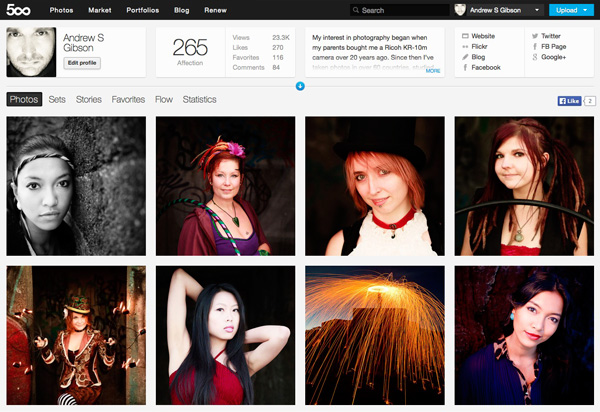
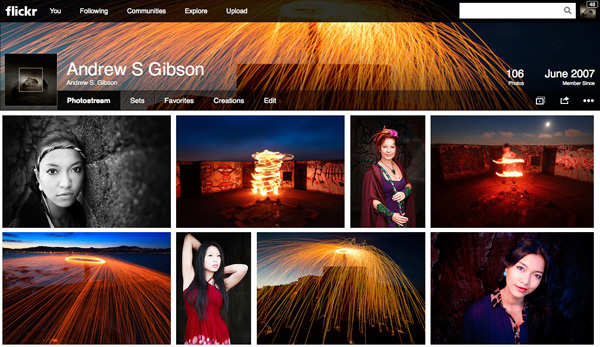
    The skills you’ve learned so far in this series (yes, there is a series – I’ll provide links to the relevant articles at the appropriate points) all come together with Lightroom’s Publish Services. You can use these to publish photos to photo sharing websites like Facebook, Behance, Flickr, 500px and more. Today I’ll concentrate on the two you are most likely to use for your best images: Flickr and 500px.

    How to Upload Photos to Flickr and 500px using Lightroom 5

    Publishing Collections
    Lightroom 5 Publish Services

    Lightroom’s Publish Services use a special type of Collection called Published Collections (there are also Published Collection Sets and Published Smart Collections). These are the same as regular Collections (which you can learn more about in my article Use Lightroom Collections to Improve Your Workflow) except for these key differences:

    • Published Collections have one purpose only:  to publish your images to either a hard drive location or a photo sharing website such as those listed above.
    • Published Collections are dynamic. They tell you if a photo has changed after you have published it, so you can re-publish it.

    Here’s how it works. You create a Published Collection containing the photos that you would like to upload to a website (for example, Flickr). Lightroom tells you which photos have already been uploaded, and which ones haven’t. But wait, there’s more: if you publish a photo to Flickr, then make changes to that photo in Lightroom’s Develop module, Lightroom’s Publish Service marks it and gives you the option of uploading it again.

    That’s clever, and very, very useful, as it enables you to see at a glance whether you have uploaded the most recent version.

    Setting up a new Flickr Publish Collection

    That’s the theory, let’s see how to put it into action:

    Step 1. Go to the Publish Services panel. It’s at the bottom of the left-hand panels in the Library module (see below)
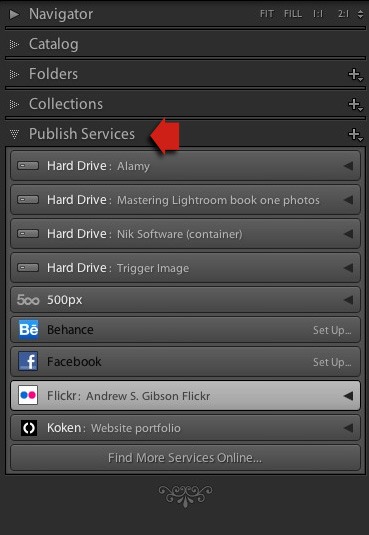
    Lightroom 5 Publish Services

    Step 2. Click the New Published Collection icon and select the Go to Publishing Manager option.

    Lightroom 5 Publish Services

    Step 3. Click the Add button in the bottom left of the Publishing Manager window.
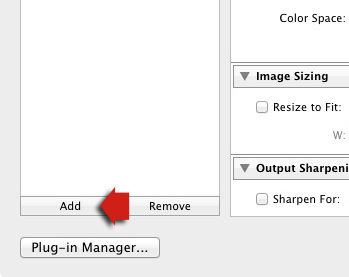
    Lightroom 5 Publish Services

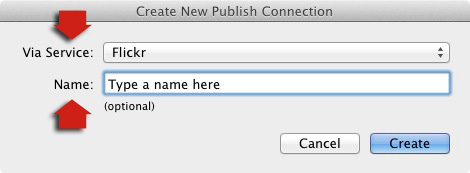
    Step 4. In the next window, select Flickr from the Via Service drop-down menu. Type a name for your service underneath.
    06

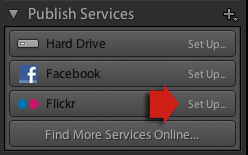
    Alternatively, if this is the first time you’ve done it, you’ll see something like the screenshot below. Click the words Set Up next to the Flickr icon to get started.
    05a

    Step 5. Start by clicking the Authorize button and entering your Flickr log-in details. This authorizes Lightroom to access your Flickr account.

    07

    Step 6. Now it’s just a simple matter of adjusting the settings to what you want. The most important ones are near the bottom of the Publishing Manager window. You can set things like image quality, image size and sharpening, add a watermark, set which metadata (if any) to include and select the appropriate privacy setting. Press the Save button at the bottom-right of the window when you’re done. The Flickr Publish Service is now set up.
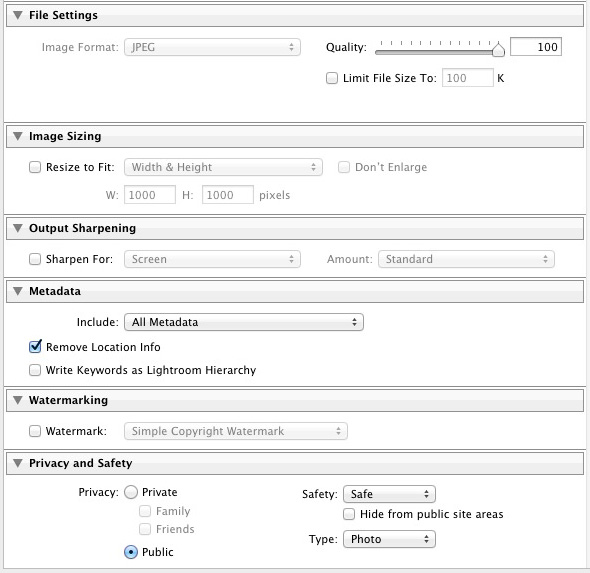
    08

    Using the Flickr Publish Service

    You’ll see that there is a Published Collection called Photostream in the Flickr Publish Service. Any photos you add to this Published Collection will be uploaded to your Flickr account using the size and quality settings you selected earlier.

    Lightroom 5 Publish Services

    Click on the Photostream Publish Collection and you’ll see something like the image below if you’re in Grid View – press ‘G’ on your keyboard if you aren’t. If you’re not familiar with how Grid View works, then see my article Making Sense of Lightroom’s Grid View.
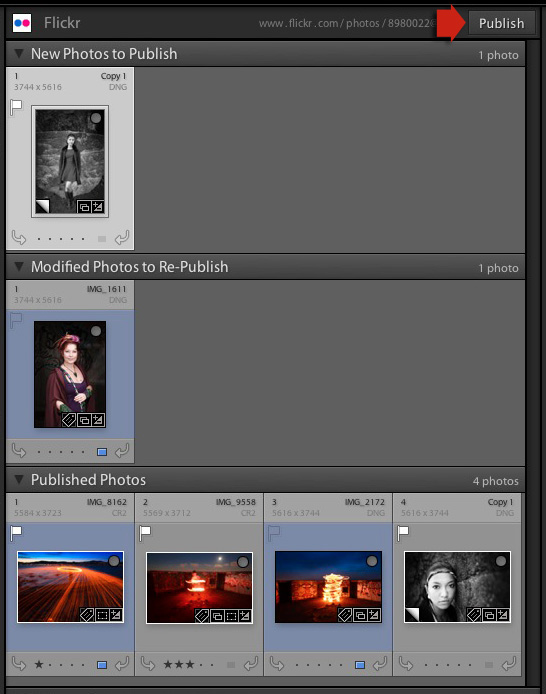
    09

    There are three sections:

    New Photos to Publish: photos added to the Published Collection but not yet uploaded to Flickr. Click the Publish button at the top right to publish them.

    Modified Photos to Re-Publish: these are photos already uploaded to Flickr that have changed since being published. Note that any change, however minor, will result in a photo appearing in this section. That includes things like adding keywords, or any tweaks you make in the Develop module. Modified photos are uploaded again when you press the Publish button. If you don’t want to upload the modified photo, right-click on the thumbnail and select the Mark as Up-to-Date option.

    Published Photos: Photos already published to Flickr.

    You can also manage Flickr Photosets from within Lightroom. Right-click the Flickr Published Collection heading and select Create Photoset from the menu. This lets you add photos to Sets as well as your photostream.
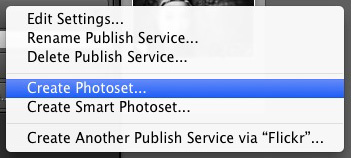
    10

    Finally, another benefit of using Lightroom’s Publish Services is that you can add keywords and a description to your images in Lightroom and these are populated automatically when you upload your photos to a photo sharing website. That means you only have to type in those details once, instead of multiple times. You can learn more about keywords in my article Creative Ways to Use Keywords in Lightroom 5.

    Publishing to 500px

    The 500px Publish Service works in a similar way to the Flickr Publish Service except that it is not built-in to Lightroom. You need to download the plug-in from the 500px website, which you can do here.

    Unzip the file and move it to your Programs folder (PC) or Applications folder (Mac). Go to the Lightroom Plug-in Manager (File > Plug-in Manager) and click the Add button to install the plug-in. Once installed, it works virtually the same way as the Flickr Publish Service. The main difference is that the 500px plug-in downloads any photos you have already uploaded to 500px and adds them to your Lightroom Catalog.

    Mastering Lightroom Book One: The Library Module
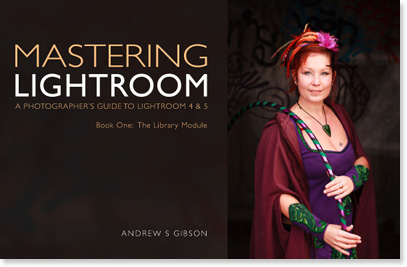
    Mastering Lightroom ebook

    My latest ebook Mastering Lightroom Book One: The Library Module is a complete guide to using Lightroom’s Library module to import, organize and search your photo files. You’ll learn how to tame your growing photo collection using Collections and Collection Sets, and how to save time so you can spend more time in the Develop module processing your photos.

    The post How to Upload Photos to Flickr and 500px using Lightroom 5 by Andrew Gibson appeared first on Digital Photography School.



    Digital Photography School

  • 14. Türchen: Datacolor

    14. Türchen

    Der beste Monitor nützt nichts, wenn er nicht richtig kalibriert ist. Das merkt man spätestens, wenn die Bilder aus dem Labor auf einmal ganz anders aussehen als am Rechner. So mancher vermeintliche Gelbstich liegt in einem nicht richtig eingestellten Monitor begründet.

    Richtig gut und einfach geht die Monitorkalibrierung mit einem Spyder von Datacolor. Er regelt Helligkeit, Weißpunkt und den Anstieg der Tonwerte – aber nicht nur auf dem Monitor, sondern auch dem iPad, iPhone und Android-Gerät mit der kostenlosen Spydergallery App.

    Der Spyder kommt zusammen mit einer Software, die man installieren muss. Der Spyder lässt sich dann ganz einfach über USB verbinden und misst eine Reihe von Farben auf dem Bildschirm. Am Ende lässt sich wunderbar vergleichen, wie das Bild vor und nach der Kalibrierung aussieht.

    Spyder4Elite

    In unserem Türchen liegt der Datacolor Spyder4ELITE mit einem Wert von 208 €. Falls Ihr Euren Monitor bereits nach dem Kauf kalibriert habt: Die Monitorfarben und -helligkeiten verändern sich im Laufe der Zeit und eine erneute Einstellung ist daher nach einiger Zeit ratsam.

    Um den Spyder zu gewinnen, schreibe einen Kommentar unter bürgerlichem Namen und gültiger E-Mail-Adresse bis heute um 24 Uhr. Danach verlosen wir ihn per Zufallsgenerator unter allen Kommentatoren. Die genauen Gewinnspielregeln findest Du hier. Viel Glück!


    kwerfeldein – Fotografie Magazin

  • Day 2 of 12 Days of Christmas…Great Deals from James Brandon

    On the 2nd day of Christmas dPS gave to me …

    A massive 75% saving on James Brandon’s fantastic video course, 2 eBooks and loads of presets — yours today only for just $ 19! (normally $ 76).

    Day2Bundle

    Yes you heard us right – today’s deal is pretty amazing – for under $ 20 you get some great photographic training and software.

    Click this link to check it out.

    Here’s what you get in this great investment in your photographic learning:

    1. Video course: Video Course: 10 Common Photography Mistakes and How to Fix them.
    2. eBook: Tack Sharp (a really popular book amongst dPS readers)
    3. eBook: 10 Tips For Improving Your Photography Today
    4. Lightroom Presets: All 80 of them! Fully customisable, yours forever.
    5. onOne Presets: His whole collection

    Usually sold for $ 76 – it is all yours for just $ 19.

    Regular dPS readers will know James Brandon’s work – he’s penned some of our most popular posts and has many fans. If you’re one of them you don’t want to miss this deal.

    It’s live for just a few more hours now so grab it now here.

    PS: if you already have James’ eBooks you can grab his brand new video course for just $ 12 (60% off). Details of this are here.

    The post Day 2 of 12 Days of Christmas…Great Deals from James Brandon by Darren Rowse appeared first on Digital Photography School.


    Digital Photography School

  • Want to remember something? Don’t take a photo

    Selfie.jpg

    Nowadays we snap photos of every detail of our lives — the food we eat, what our cat is doing, the quirky things we see, the places we go — and we do this in an effort document and remember those experiences. But a new study, published in Psychological Science, suggests it’s possible that the act of taking pictures may actually lessen our ability to recall details of a subject. Learn more

    News: Digital Photography Review (dpreview.com)

  • Sanft, zart und mit viel Gefühl

    Ein Beitrag von: Ljuba Gonchar

    Ich glaube, alles fing damals mit dem Film „Die fabelhafte Welt der Amélie“ an. Ich war so unglaublich beeindruckt von den Bildern und so verliebt in die Geschichte des Films (und natürlich auch ein kleines bisschen in den Hauptdarsteller).

    Die vielen liebevoll zusammengewürfelten Detailaufnahmen hatten es mir damals besonders angetan. Also kaufte ich mir eine billige Digicam und fing an, Selbstportraits zu machen. Andere zu fragen, ob sie nicht Modell vor meiner klapprigen Kamera stehen wollten, kam zunächst nicht in Frage. Zu groß war die eigene Unsicherheit.

    Über die Selbstportraits schmiss ich voller Begeisterung gelb-grüne Filter aus kostenlosen und simplen Programmen, um mir meine eigene „fabelhafte Welt“ zu zaubern – mit dem Ergebnis, dass ich heute beim Anschauen der damals entstandenen „Werke“ einen hysterischen Lachanfall bekomme.

    © Ljuba Gonchar

    Dann lernte ich 2009 Andrea Hübner kennen und durfte als Modell vor ihrer Kamera stehen. Ich war total fasziniert von den damals entstandenen Bildern und dem gesamten Prozess. Außerdem habe ich mir zum ersten Mal selbst auf Bildern gefallen.

    „Wow“, dachte ich, „der Wahnsinn. So etwas will ich auch können.“ Also habe ich angefangen, mehr zu fotografieren, Tonnen an Tutorials bei Youtube anzuschauen, bin manchmal nächtelang in Fotocommunitys hängen geblieben und habe vor Frust packungsweise Raffaello gegessen, weil meine Fotos nicht so wurden, wie ich sie im Kopf hatte.

    Irgendwann kam der Punkt, an dem ich merkte, dass eine einfache Kamera nicht mehr ausreicht und dass es viel spannender ist, andere Menschen zu fotografieren. Bis ich allerdings endlich das Geld für das nötigste Equipment und den Mut, andere anzusprechen, zusammengespart hatte, sind knapp zwei Jahre vergangen. Aber heute liebe ich es, andere Menschen zu fotografieren.

    © Ljuba Gonchar

    Ich mag es besonders, den Menschen in seiner Fragilität und seiner Besonderheit zu zeigen. Sanft, zart und mit viel Gefühl. Dabei spielt für mich immer der Blick der Person eine große Rolle. Ich glaube, mir geht es auch oft darum, die abgebildete Person so zu zeigen, wie ich sie sehe – nicht, wie sie sich selbst gern sieht. Ich liebe Detailaufnahmen, die Reduktion auf besondere Handhaltungen, auf die Füße, auf Schmuckstücke, auf Augen oder nur Lippen.

    Am liebsten fotografiere ich draußen in der Natur. Ja, gern auch bei Wind, Regen, Schnee und glühender Sommerhitze. Meine Vorgehensweise ist dabei unterschiedlich. Manchmal finde ich es spannend, nach besonderen Orten für Shootings zu suchen.

    Manchmal sehe ich ein Kleid, ein Bild im Internet, einen Film oder höre ein bestimmtes Lied, schaue bei einer Zugfahrt aus dem Fenster und entdecke dabei eine tolle Landschaft, lese einen wundervollen Satz auf Twitter und schon habe ich dazu Bilder im Kopf. Inspiration gibt es heutzutage ja genug. Man muss nur mit offenen Augen und Ohren durch den Tag laufen.

    ayelen © Ljuba Gonchar

    Gibt es dann eine konkrete Idee, suche ich mir für meine freien Arbeiten ein passendes Modell. Nicht selten läuft es auch anders herum: Ich sehe ein atemberaubendes Gesicht, das mich absolut umhaut und lasse mir dazu Ideen einfallen. Ab und an fotografiere ich auch im größeren Team, mit zwei Modellen und Visagisten und tausche mich gern mit anderen Fotografen aus.

    Manchmal liebe ich es auch, ganz allein mit dem Modell loszuziehen. Häufig fällt es den Menschen dann leichter, sich fallen zu lassen, Sachen auszuprobieren, ohne dass man Angst hat, jemand würde einen auslachen. Für mich ist es auch besonders wichtig, dass sich die fotografierte Person wohlfühlt und dass zwischen mir und dem Modell eine Verbindung entsteht. Nur dann können auch tolle Bilder geschaffen werden.

    © Ljuba Gonchar

    Nach dem Shooting bearbeite ich ausgewählten Fotos. Am meisten drehe ich dabei an den Farben, um die gewünschte Stimmung zu erreichen. Dabei nutze ich hauptsächlich Lightroom. Meiner Meinung nach ändere ich recht wenig an meinen Fotos. Bislang faszinierte mich sehr die Natürlichkeit und Einfachheit von Bildern ohne großen Schnickschnack. Vielleicht sieht das in einem Jahr ganz anders aus.

    Generell zaubere ich Pickelchen, Äderchen und große Augenringe weg, da diese ja nicht permanent zum Menschen gehören. Muttermale lasse ich da, wo sie sind. Diese kleinen Pünktchen am Körper, die individuellen Landkarten jedes Menschen, sollen meiner Meinung nach nicht retuschiert werden. Gleiches gilt bei Sommersprossen.

    © Ljuba Gonchar

    Ich glaube, irgendwann fängt jeder, der fotografiert an, alltägliche Dinge ganz anders wahrzunehmen. Man entwickelt mit der Zeit eine Art detaillierten Blick für seine Umwelt, erfreut sich sprichwörtlich an kleinen Dingen und versucht dann, diese festzuhalten.

    Ich habe gelernt, viel mehr zu beobachten, mehr auf Körperhaltung und die Mimik zu achten. Ehrlich gesagt habe ich lange Zeit nach etwas gesucht, das mich so sehr interessiert, erfüllt und meine Zeit bis tief in den frühen Morgen raubt. Die Fotografie hat sich genau zu solch einer Leidenschaft entwickelt.

    © Ljuba Gonchar

    Durch die Fotografie und den Kontakt zu unterschiedlichen, mir zunächst fremden Menschen bin ich mittlerweile ziemlich offen und kontaktfreudig geworden. Heute fällt es mir nicht schwer, auf Menschen zuzugehen und auch mit vollkommen fremden Menschen in der Bahn Gespräche anzufangen.

    Es klingt vielleicht unglaublich kitschig, aber durch die Fotografie bin ich erwachsen geworden. Ich habe mir selbst bewiesen, dass man durchaus etwas erreichen kann, solange man es auch wirklich will. Es ist unwichtig, wie viel Zeit, Wutanfälle und Tränen man für manche Dinge braucht. Das Wichtigste ist nur, dass man nicht aufgibt.


    kwerfeldein – Fotografie Magazin

  • What The Duck #1196

    wtdlogo_big.jpg

    We’ve come to the end of another week here at dpreview, and as our thoughts drift to weekend shooting opportunities, it’s time to take things a little less seriously. Aaron Johnson’s comic strip ‘What the Duck’ is just the thing, taking a gently satirical look through the lens of a photographically inclined waterfowl. You can find it published here (and in our newsletter) every week; we hope you enjoy it, and your weekend.

    News: Digital Photography Review (dpreview.com)

  • Weekly Challenge – Macro Photography

    By Pison Jaujip

    Earlier I posted several macro, or close-up images to give you some ideas. Now it’s time for you to get out and try it. If you don’t have a macro lens there are plenty of other methods you can use that are less expensive if buying a new lens isn’t an option.

    Here’s a few articles and resources on different options for doing macro photography:

    • Getting up close with close-up lenses – part one of four on macro photography
    • Extension tubes – part two of four on close-up photography
    • Reverse lens macro – part three on close-up photography
    • The wonderful world of macro lenses – part four of four
    • Up Close: A Guide to Macro & Close Up Photography – an eBook by dPS author Andrew S Gibson

    So there’s your reading material, now show us your macro images!

    Remember get creative with what you photograph. Try shooting everyday, ordinary things and see what they look like close up – even the dog! Make sure you still keep in mind all the other aspects of good photography like: composition, lighting, and camera settings.

    By Casey Myers

    By Sean Rogers

    By Martin Heigan

    By nick@

    Once you’ve taken your macro shots we’d love to see them in comments below. Simply upload your shot into the comment field (look for the little camera icon in the Disqus comments section as pictured below) and they’ll get embedded for us all to see or if you’d prefer upload them to your favourite photo sharing site and leave the link to them.

    The post Weekly Challenge – Macro Photography by Darlene Hildebrandt appeared first on Digital Photography School.


    Digital Photography School

  • SLR Magic announces 17mm T1.6 lens for Micro Four Thirds

    17mmT16-2.png

    Hong Kong-based lens maker SLR Magic has announced an addition to its family of video-oriented manual focus fast primes for Micro Four Thirds. The 17mm T1.6 offers an angle of view equivalent to 34mm on full frame, and has geared focus and aperture rings. It will be available at the end of December 2013.

    News: Digital Photography Review (dpreview.com)

  • 12 Photography Documentaries You Should Watch

    Everyone loves well-made, interesting photography documentaries that share secrets and allow us to take a glance behind the scenes of famous, influential photographers of the past. Similar videos possess magic to impress and inspire a person to work toward his own achievements. Black-and-white film gives documentaries a special charm and makes us feel the spirit of days gone by. A Continue Reading

    The post 12 Photography Documentaries You Should Watch appeared first on Photodoto.


    Photodoto

  • That’s Sketchy: Rough Sketches Turned Into Real Furniture

    [ By Steph in Design & Furniture & Decor. ]

    Rough Sketch Furniture 1
    These images may look like people photoshopped onto a background of sketches, but look again – those scribbles are actual, three-dimensional furniture. Art student Daigo Fukawa of Tokyo University for the Arts created a collection of chairs and benches that seem like they just magically popped up off the paper.

    Rough Sketch Furniture 2

    Made for his senior thesis, the series of optical illusion furniture appears to be made from welded metal, and while it’s probably not the most comfortable seating anyone has ever experienced, it’s definitely cool to look at, undoubtedly eliciting plenty of double-takes in person.

    Rough Sketch Furniture 3

    Rough Sketch Furniture 4

    See lots more unusual, creative and transforming furniture including convertible designs, flat-pack furniture, recycled pieces and brilliant bookcases.

    Share on Facebook


    [ By Steph in Design & Furniture & Decor. ]

    [ WebUrbanist | Archives | Galleries | Privacy | TOS ]


    WebUrbanist