Ein Beitrag von: luma photography


Samyang has announced that, as promised in October, five of its full frame lenses are now available in Sony E-mount, and are therefore the first third-party optics with native mounts for the Sony A7 and A7R. The lenses are the 14mm F2.8, 24mm F1.4, 24mm F3.5 tilt-and-shift, 35mm F1.4, and 85mm F1.4. All feature manual focus and aperture operation and, because they’re essentially SLR lenses with an adapter tube added, all are considerably more bulky than their Alpha mount counterparts. Click through for more information and images of the E-mount lenses.

Ein Schatz für alle Analogfotografen ist ein guter, schneller Scanner. In der Redaktion gibt es auch zufriedene Besitzer von Scannern aus der Reihe Epson Perfection, daher können wir diese ohne Wenn und Aber empfehlen. Keine Frage, dass wir deshalb unbedingt Epson für unseren Kalender gewinnen wollten. Mit Erfolg!
Epson hat in unser Türchen den gerade erschienen Epson Perfection V550 Photo gelegt und wir sind etwas neidisch auf den heutigen Gewinner, denn das neue Modell ist noch schneller und besser als seine Vorgänger. Ob Fotos, Kleinbildfilme, Mittelformatfilme oder Dias – der Epson verwandelt alles in klare Digitalbilder.

Der Epson Perfection V550 Photo hat eine optischen Auflösung von 6400 dpi. Dank einer besonderen Technologie gibt es praktisch keine Aufwärmzeit und Ihr könnt direkt mit dem Scannen beginnen. Das spart nicht nur Zeit, sondern auch Energie.
Eine weitere Besonderheit ist die Digital-ICE®-Technologie, die automatisch Staub, Mängel, Kratzer und Fingerabdrücke von gescannten Filmen entfernt und dadurch viel Retuschierarbeit einspart. Optimal, wenn Ihr Euer Archiv digitalisieren möchtet. Der Scanner kostet im Handel neu 269,99 €.
Um den Scanner zu gewinnen, schreibe einen Kommentar unter bürgerlichem Namen und gültiger E-Mail-Adresse bis heute um 24 Uhr. Danach verlosen wir ihn per Zufallsgenerator unter allen Kommentatoren. Die genauen Gewinnspielregeln findest Du hier. Viel Glück!
Ein Beitrag von: Aliza Razell
Mythologie und Märchen haben mich schon immer fasziniert. Die Sage der Büchse der Pandora hat meine folgende Fotoserie inspiriert. Mir gefällt die Idee, dass der Inhalt der Büchse nicht nur als böse, sondern auch als befreiend interpretiert werden könnte.
Ich wollte, dass es ein magisches Element in den Fotos gibt, das ganz klar von den realen Elementen unterscheidbar ist. Den Inhalt der Büchse habe ich deshalb mit Wasserfarben gemalt und dabei bewusst so gestaltet, dass sie nicht wirken, als wären sie wirklich in den Bildern, zum Beispiel durch das Hinzufügen von Schatten oder Ähnlichem.
Der Hintergrund ist, dass ich das Gefühl herstellen wollte, dass zwei Welten aufeinander treffen, kämpfen und schließlich nebeneinander existieren können. Für mich ist das eine Botschaft im Original-Mythos der Pandora.

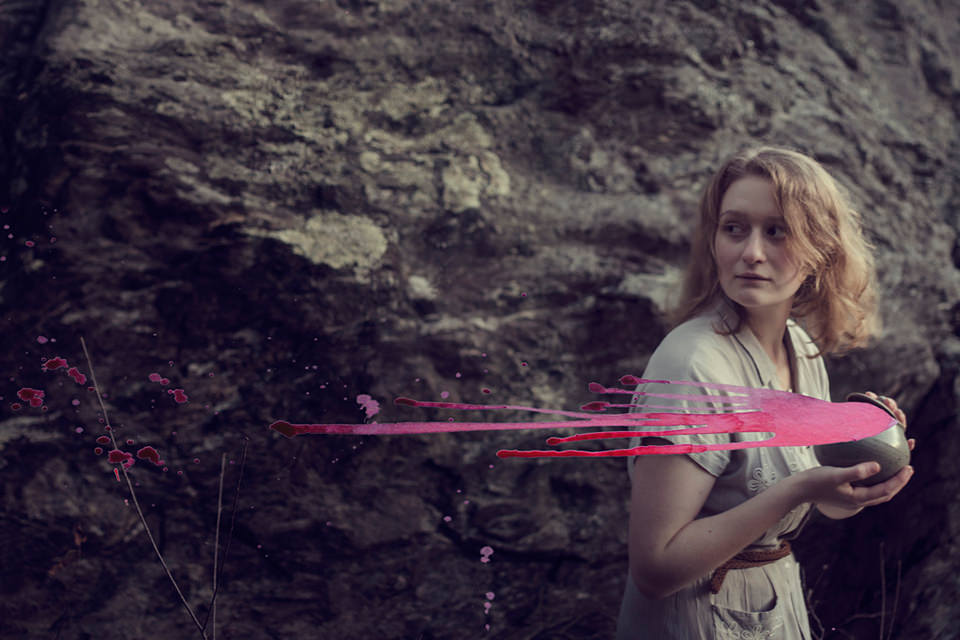
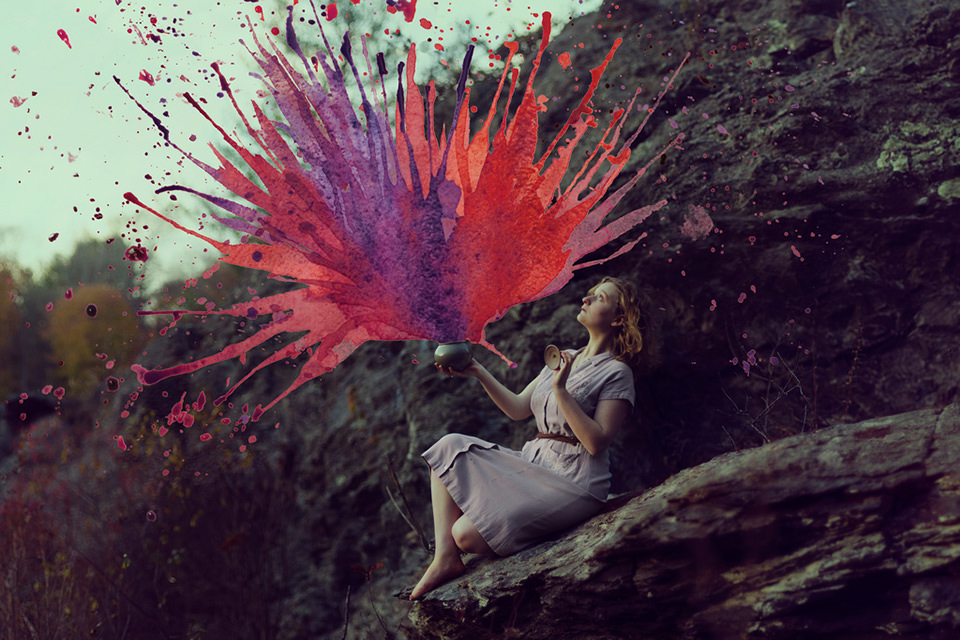


Ich liebe es, mit Farben auf Fotos zu arbeiten, denn ich habe das Gefühl, es zeigt, dass das Foto eben nur das ist: Ein Foto. Ein Bild von etwas Dreidimensionalem, aber das Foto selbst ist von Natur aus nur zweidimensional – wie Zeichnungen oder Malerei.
Wenn die Farbe mit den Menschen auf den Bildern interagiert, ist es, als würden sich zwei Wesen aus zwei unterschiedlichen Ebenen treffen. Ich mag den surrealen Aspekt, den es den Fotos verleiht. Es ist fast wie eine optische Täuschung.
Dieser Artikel wurde für Euch von Katja aus dem Englischen ins Deutsche übersetzt.
[ By Steph in Design & Products & Packaging. ]

Would you trust your skateboard to hold sensitive personal belongings, like your laptop or phone? The Briefskate has a built-in storage compartment designed to hold electronics, books, wallets and other small items in a lined interior compartment while you’re skating.


The idea is to eliminate the need to carry a backpack – though you’d better have a safe place to store your skateboard once you get to your destination. Designed by Alexei Novitzky, the Briefskate contains a padded, shock-resistant chamber to hold whatever you need to transport.

Of course, there’s always the chance you’ll wipe out and somehow manage to damage the items contained inside – but that’s a risk when you’re carrying them in a bag while skating, too. The Briefskate is available in long and mini versions, and they’re about to launch a Kickstarter campaign.

If you thought biking down stairs was hard, try skating a stairwell – or better yet: don’t. At least not without this nifty new hybrid board, that is.
Click Here to Read More »»
An eight-wheel mechanism allows the unusual Stair-Rover skateboard to descend flights of steps the way conventional skateboards never could. Designed by …
Click Here to Read More »»

These bold, graphic storage and organization solutions from Italian company AK47 don’t just put your stuff in order – they function as art pieces, too.
Click Here to Read More »»


[ By Steph in Design & Products & Packaging. ]
[ WebUrbanist | Archives | Galleries | Privacy | TOS ]
“Photoshop Actions” from ATNX Digital provides an affordable, user-friendly actions alternative for Photoshop users.
Let’s face it– Photoshop is a beast, and a tough one to tame. There are at least half a dozen “right” ways to do just about everything, and I think it’s safe to say that most of us don’t use it to anywhere near its full potential. I’ve lost track of how long ago I started using PS (version 4, maybe?), and I’ve yet to unlock all its secrets– which I think is a good thing. For me, the best Photoshop work is that which my clients never even notice. To that end, I strive to get it right in the camera, and to the extent that post-processing is necessary, I try to keep it to a minimum. Smooth a little skin. Bump some contrast. Open up the shadows. Darken the highlights. A few simple tweaks to help make sure that people notice the photo– not the editing.
Keeping the edits simple, though, is not always an option. Try as I might, I’m not always going to get it right in the camera. Keeping the sky nice and blue when properly exposing for the ground isn’t always easy. And don’t even get me started on the myriad of ways to run a black & white conversion. Learning how to tackle some of these editing challenges can be slow, meticulous work, and it can often feel like you’re re-inventing the wheel for every photo. Who wants to spend that kind of time in front of the computer? This is where Photoshop Actions come in handy.
A Photoshop action is basically a recorded set of steps which allows you to reduce any series of long, complicated, time-consuming steps to a single click of the mouse. What might ordinarily take minutes or even hours to achieve by going step-by-step, becomes a much more convenient, time-saving, automated process. Some actions provide a simple, global adjustment to the photo, while others will apply several customizable adjustment layers, allowing the user to fine-tune the action and target specific areas of the image.
While anyone can record their own actions in Photoshop, companies like Kubota Image Tools, Totally Rad Actions, MCP Actions, and others, have been creating action packs for years, allowing photographers to achieve editing results they might not otherwise have the time or Photoshop expertise to achieve on their own. Contrast adjustments, black & white conversions, sun flares, vintage filters– even teeth whitening– are all just a click or two away. Most action packs come with more than you will ever need (or want) to use, but if you’re lucky enough to find even just a few that help your workflow, you’ll find them to be well worth the cost.
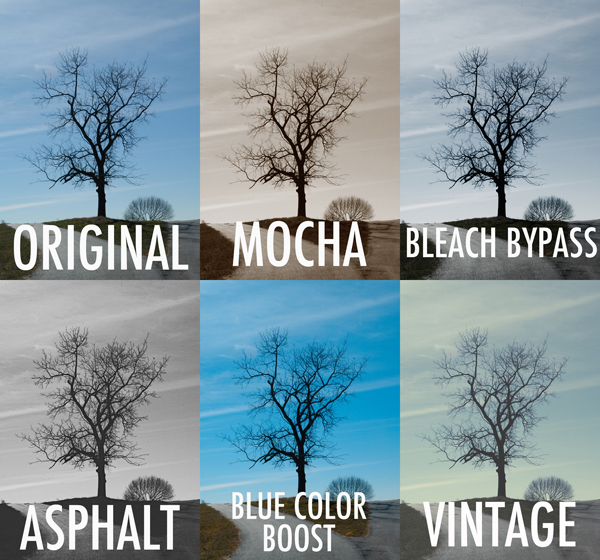
Set One – In this first set, “Lonely Tree” gets a sampling of actions from each of the four sets in the pack.
Photoshop Actions from ATNX Digital is a new option, providing users with 90 actions in four sets– Primary, Mono, Color, and Special. The Primary set consists of 20 actions, helping to automate tasks like boosting contrast, dodge & burn, noise reduction, and soft focus. Mono– as the name implies– consists of 26 different black & white conversion tools, while the Color set goes the other direction, using actions like Bleach Bypass, Color Boost, and Custom Toning to make color adjustments you could never achieve in-camera (see image above). Finally, the Special set brings effects like center lighting, selective focus, light leaks, and 17 different textures to your digital palette. It’s a pretty extensive selection, with a variety of options for many post-processing tasks.
What I like about these actions is that most are customizable and can be adjusted to the specific needs of the image. This is achieved in a variety of ways, depending on the selected action. Since most actions are applied by adding various types of adjustment layers, the original image (the Background layer) is left untouched on the bottom of the stack. By adjusting the opacity of the new layers, selecting which of them are even visible, or tweaking the layer masks, you open up a world of adaptable possibilities.
All of that sounds great, but it’s important to keep something in mind. The quality of any action is only as good as the Photoshop skills and aesthetic of the person who programmed it in the first place. Most actions are good starting points, but since every image– and every photographer– is different, you are hardly ever going to simply apply an action and walk away. You may have to tweak it, finesse it, and sometimes even bend it to get the right look. Hopefully, the structure of the action makes it easy– perhaps a final step in a relatively streamlined process. That’s why it’s so important to find actions that fit well with your workflow. If applying an action is only the first step of a 30-minute editing process, you’ve completely missed the point. They only save time and effort if you are off doing something else.
I haven’t tried all 90 of the actions yet, but I’ve gone through a good sampling from each set to have a pretty good feel for them. Of the 40 or 50 that I’ve put to the test, I’ve probably found five or six that I can see incorporating into my workflow. While that might sound like a bad review, I assure you that it’s actually pretty high marks coming from me. Of the hundreds of actions installed on my computer, I probably use a grand total of anywhere from six to ten of them with any regularity. While that may sound like a waste of money, if they get me away from my computer so I can spend more time with my family, it’s worth the price.
For purposes of this review, anything labeled “Original” is straight off the camera, with no edits other than resizing. Anything labeled with an action name has had the action applied, with no additional editing of the image or tweaking of the action. See Set One examples above.
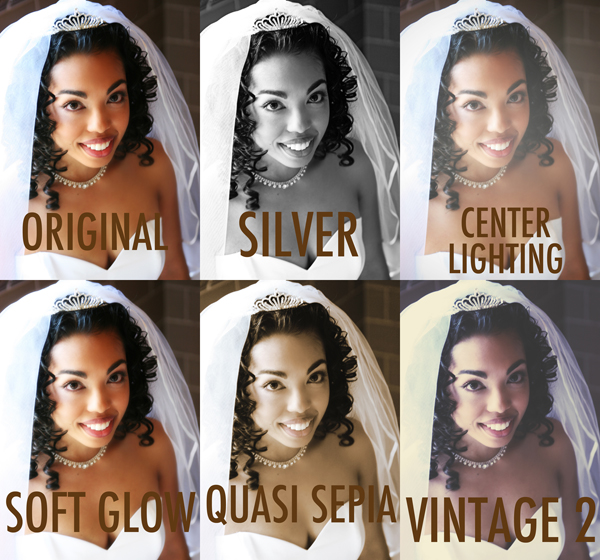
Set Two- not all actions are universal. What might work well with landscapes can fail miserably with portraits. Experimenting with how different actions affect different photos can lead to interesting and creative results.
Speaking of cost, this is where ATNX actions really shine. While some companies charge hundreds of dollars for smaller action packs, the complete set of 90 ATNX actions comes in at a very budget-friendly $ 25.00 (USD). This is particularly helpful for photographers who may be new to Photoshop actions and still aren’t quite sure how they’ll fit with their workflow. While you might hesitate to spend anywhere from $ 80.00 to $ 200.00 on a maybe from another company, at $ 25.00 you can afford to take a chance. That’s not to take anything away from higher priced sets, but if you’re still learning your way through the post-processing labyrinth and want to give actions a try, ATNX might just be a good place to start.
Anything negative that I might have to say would be based only on my own personal aesthetic, through no fault of the product. If an action’s initial output requires too much tweaking to get the look I want, then it’s not for me. Objectively speaking, though, Photoshop Actions from ATNX Digital combine strong, user-friendly editing tools with an affordable price tag– not an easy combination to find.
ATNX Digital Photoshop Actions are available for digital download on their website.
The post ATNX Photoshop Actions Review by Jeff Guyer appeared first on Digital Photography School.
 |
|||
OooOooo, the Ghost of Photojojo Christmases Past here.
I came to show you gifts that are guaranteed to be crowd pleasers. In fact, they already are (have been/will continue to be).
Our most popular gifts from Photojojo Christmases past!
To prove that I am a friendly ghost. I’m going to unlock *FREE USA SHIPPING* FOR EVERYONE! But, only if 1000 people visit the Shop at once, by noon PST. Visit Photojojo.com to boost the visitor count and see how close we are to free shipping.

|
|||||

|
|||||
|
|
||||
|
|
||||

|
|||||
|
|
||||
|
|
||||

|
|||||
|
|
||||
|
|
||||

|
|||||
|
|
||||
|
|
||||

|
|||||
|
|
||||
|
|
||||

|
||||||
|
|
See 100+ more amazing gifts… |
© laurel for Photojojo, 2013. |
Permalink |
No comment |
Add to
del.icio.us
Post tags:
[ By Steph in Global & Travel & Places. ]

In America we have a seemingly endless succession of near-identical cemeteries, filled with orderly rows of bland stones that tell us nearly nothing about the people buried underfoot. But in other parts of the world, the final resting places of the dead are far more interesting, exotic, decorative and strange. Some tribes of the Pacific bury their babies in trees, while others hang their coffins from cliffs. Solemn ossuaries deep beneath churches in Austria and Italy hold thousands of hand-painted skulls, and colorful cemeteries in Romania tell dirty jokes about loved ones who have passed on.
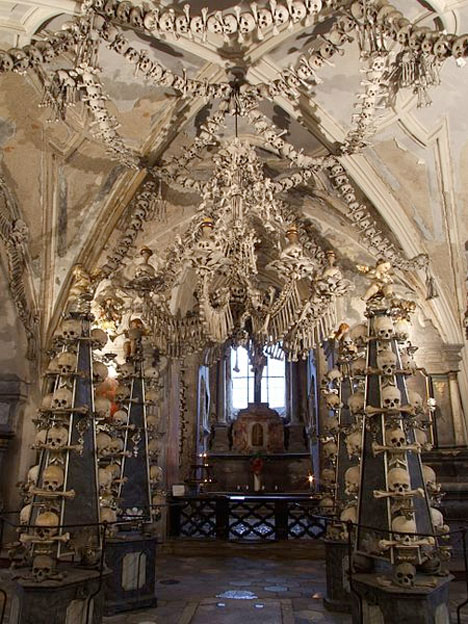
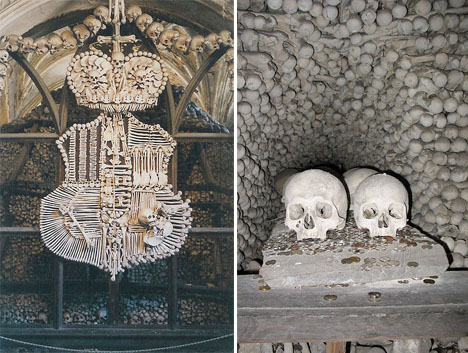
The skeletons of somewhere between 40,000 and 70,000 people are arranged in dazzling decorative patterns all over the walls and ceiling of the Sedlec Ossuary, a small Roman Catholic Chapel in the Czech Republic. Located beneath the Cemetery Church of All Saints, this subterranean ossuary attracts over 200,000 visitors per year who gape and gawk at garlands of skulls, a massive chandelier, ceiling patterns and other designs made of human bones.
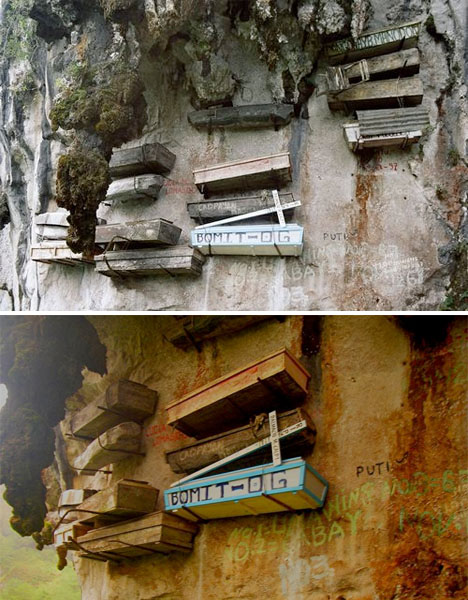
Coffins cling precariously to a cliffside at Sagada, on Luzon Island in the Philippines. Rebar is hammered into the limestone to support the coffins as part of a unique burial ritual; the coffins are typically made of hollowed-out logs. This tradition is thousands of years old, and some of the wooden coffins have begun to decay, providing glimpses of the skulls and other human remains held inside. Some of the coffins are in caves rather than clinging to the cliffs, making them more accessible. Unfortunately, not everyone is respectful of the customs, and there have been problems with tourists taking home bones as souvenirs.
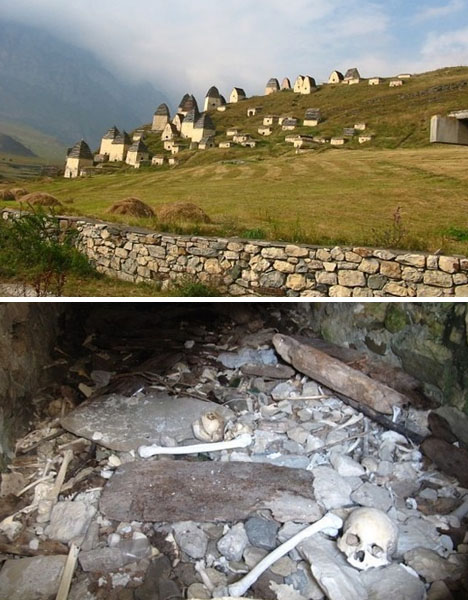
This looks like the remains of a medieval village, with small dwellings grouped together on a grassy hill. But go knocking on the doors, and you won’t find a living soul. That’s because this is the City of the Dead, an ancient cemetery near the village of Dargavs, Russia where residents have been burying their dead for hundreds of years. Legend has it that in the 18th century, a plague infected many of the townspeople. Those who didn’t have family to build quarantine houses for them and care for them simply went to the cemetery and waited to die.

The small thatched doors on this tree in Indonesia are, sadly, not entrances to some kind of mythical fairy land. They’re graves for the babies of the Toraja ethnic group. The Torajans have a number of unusual death rituals, including hanging graves from ricky cliffsides like those in the Philippines. They also have a ritual called Ma’Nene, wherein the bodies of the deceased are exhumed, washed, groomed, dressed in new clothes and paraded around the village before being reburied.
We typically see burial places as solemn and sorrowful, but these seven amazing collections of human bones artistically remind us to embrace life every day.
Click Here to Read More »»

This terraced structure is not the remains of some ancient amphitheater, but a metropolis of the dead that’s just as dense as that of the living city of …
Click Here to Read More »»

Our modern culture has made the physical process of burial little more than an afterthought, leaving us to numbly choose from a small assortment of wooden …
Click Here to Read More »»
[ By Steph in Global & Travel & Places. ]
[ WebUrbanist | Archives | Galleries | Privacy | TOS ]

DxOMark has just reviewed the Sigma 24-105mm f/4 DG OS HSM, a general-purpose zoom for full frame SLRs. As part of our ongoing collaboration we’ve added the test data to our lens widget, and looked to see how it compares to the Canon equivalent. We’ve also added test data for the Nikon mount version of Zeiss’s stellar Apo Sonnar T* 2/135. Click through for our full analysis, and a link to DxOMark’s own reviews.


