The post How to Create a Vignette in Photoshop appeared first on Digital Photography School. It was authored by Megan Kennedy.
Do you want to know how to create a vignette in Photoshop?
In this article, we’ll show you a step-by-step method to do just that.
And by the time you’re finished, you’ll be able to apply a vignette to any digital photograph quickly and easily.
Let’s get started.
A subtle vignette added in Photoshop. Canon 5D Mark IV | Canon EF 100-400mm f/4.5-5.6L IS II USM | 1/125s | f/5 | ISO 100
What is a vignette?
In photography, a vignette is any shadowy darkness that appears around the periphery of an image.
Like this:
An artificial, highly-exaggerated example of vignetting.
Now, vignetting can occur for a number of reasons.
For instance, optical vignetting is caused by the physics of wide-aperture lenses, which allows less light to reach the edges of the camera sensor.
But the type of vignetting we’re interested in for this article is artificial vignetting – where you create vignetting yourself using a program such as Photoshop.
Why create a Photoshop vignette?
Vignetting can be a contentious topic in photographic circles. Some photographers love vignettes, while others loathe them.
But as photography has evolved, applying artificial vignettes in Photoshop has become a useful compositional device. Vignettes are an enduring photographic technique that can add to the gravitas of an image by creating a sense of atmosphere, age, or depth.
How to create a vignette in Photoshop
There are quite a few ways to create a vignette in Photoshop, and in this article, I’m going to cover three of them.
These methods are simple, easy to apply, and will do a great job of creating a customizable vignette effect.
Method 1: The Lens Correction filter
If you’re looking for a quick way to create a vignette, then this method is a perfect choice.
To start off, open your image in Photoshop.
I’m going to use this lavender photo:
Step 1: Create a layer for your vignette
In Photoshop, it’s best to edit non-destructively; that way, you can always go back and adjust your original file if required.
So right-click on the Background layer in the Layers panel, then select Duplicate Layer.
In the pop-up window, rename the layer Vignette.
Step 2: Lens Correction filter
With the Vignette layer selected, click Filter in the Photoshop menu. Then select Lens Correction.
A new Lens Correction window will open. Click the Custom tab on the right-hand panel. Under the Vignette heading, adjust the Amount and Midpoint sliders until you’re happy with the vignette effect.
Then click OK.
If the image looks a little dull after applying the vignette, you can give it a contrast boost with a Curves adjustment layer. You can also adjust the intensity of the colors with a Vibrance adjustment layer. Make edits until you’re satisfied, then call it a day!
Keeping it subtle; the final result of the Lens Correction vignette method.
Method 2: The Gradient fill layer
This second method is a little more complex than the Lens Correction method, but it’s also more flexible.
Step 1: Set the foreground color to black
With your file open in Photoshop, the first thing to check is that the foreground color swatch is set to black.
To revert to the Photoshop default of a black foreground and a white background, press the D key.
Step 2: Add a Gradient fill layer
Next, click on the Layer menu and select New Fill Layer>Gradient. Click OK on the first pop-up window that appears.
There will be a second pop-up, the Gradient fill settings window. Make sure to tick the Reverse box. Set the Style to Radial and input the Scale to alter the intensity of the gradient (smaller numbers correspond to a more intense gradient). I usually enter around 300% to 350%.
Click OK.
The image after the Gradient fill layer has been applied.
Step 3: Experiment with opacity and blending modes
Once you’ve applied the Gradient fill layer, your image may look a little dark and flat. To blend the gradient effect more carefully, make sure the Gradient fill layer is selected and reduce the opacity of the layer via the Opacity slider.
Each image will be different, but I usually reduce the opacity of the Gradient Fill layer to around the 50% mark.
The vignette effect is more subtle with the opacity reduced.
To further blend the Gradient fill layer with the underlying image, you can also work with Photoshop blending modes.
Click on the blend mode dropdown menu and see what works best for your image.
Finally, if your image is still feeling a little flat, make some adjustments with a Curves layer to boost the contrast.
The final result, with a Hard Light blending mode applied to the Gradient fill layer and a contrast boost with a Curves adjustment layer.
Method 3: Using the Shape tool
Photoshop’s Shape tool has endless uses – including adding a vignette to a photograph.
And by working with an ellipse shape, you can easily create a versatile vignette.
Step 1: Create an ellipse
First, make sure your foreground color is set to black.
Then, with your image open in Photoshop, select an ellipse from the Shape Tool menu on the far left Photoshop toolbar. Check to make sure that the Fill swatch located toward the top of the screen in the Shape menu is set to solid black (if it’s not, then double-click and adjust the Fill color).
Once the color is set, drag the ellipse outline over your image to form an oval shape. When you release the mouse button, the shape will automatically fill with black.
Step 2: Invert the ellipse
With your Ellipse layer selected, click on the Properties window and select the Subtract front shape icon located under the Pathfinder heading (see below). The shape will reverse, creating a black border around a now-transparent ellipse.
Step 3: Adjust the vignette with masks
Make sure the Ellipse layer is selected, then refer back to the Properties menu.
This time, click the Masks icon; it looks like a gray circle on a dark background (see below). The Masks menu allows you to adjust the Density and Feather of the Ellipse layer. I usually leave the Density at 100%, but I push the Feather adjustment to its upper limits (which softens the vignette effect).
The Feather slider softens the edges of the vignette.
Step 4: Add finishing touches to your vignette
To increase the subtlety of the vignette, you can adjust the opacity of the Ellipse layer.
Experimenting with different blending modes is another effective way to adjust the impact of the artificial vignette.
And feel free to alter the dimensions of the vignette with the Transform options or tweak the contrast and saturation with layered adjustments.
The results of applying a vignette with the Shape tool in Photoshop.
How to create a vignette in Photoshop: Conclusion
As you can see, applying vignettes to your photos in Photoshop doesn’t have to be hard.
In fact, it’s really very simple!
So open some of your favorite images in Photoshop. See how they look with vignettes.
Because a subtle vignette can make a big difference!
Photoshop vignetting FAQs
What is a vignette?
A vignette is a darkening around the periphery of a photograph. It occurs for various reasons in many photographic circumstances.
How do I add a vignette in Photoshop?
There are several ways to create a vignette in Photoshop. The methods listed in this article are simple and effective ways to apply a vignette aesthetic.
Where can I find the vignette tool in Photoshop?
Unfortunately, Photoshop doesn’t offer a vignette tool. However, you can easily create a vignette with the Shape tool, a Gradient fill layer, or a Lens Corrections filter.
How do I remove in-camera vignetting?
The easiest way to remove vignetting in post-production is to open the image in Photoshop and – with the image layer selected – click Filter>Lens Correction. The Lens Correction window will present various options for reducing unwanted vignetting.
The post How to Create a Vignette in Photoshop appeared first on Digital Photography School. It was authored by Megan Kennedy.
The post Fine Art Landscape Photography: The Complete Guide appeared first on Digital Photography School. It was authored by Rick Ohnsman.
Perhaps you’ve heard the term fine art landscape photography.
But is fine art landscape photography something you should aspire to make? And what distinguishes a fine art photograph from a snapshot?
In this article, I’m going to explain everything you need to know about fine art landscape shooting. I’ll start by explaining what it actually is – and I’ll go on to give you plenty of tips you can use to improve your own landscape photos!
Let’s get started.
What is fine art landscape photography?
Some terms are hard to define, and fine art photography falls into that category.
“There are always two people in every picture: the photographer and the viewer.”
— Ansel Adams
That said, fine art photography is less about the subject and more about the photographer. Your goal in fine art landscape photography is not to simply to show your viewer what you saw; it’s to communicate how it felt to be there and how the scene made you feel.
It was subzero the morning I made this shot in Yellowstone National Park. I added a blueish tone to help the viewer experience the cold I felt when making the image.
“Photography for me is not looking, it’s feeling. If you can’t feel what you’re looking at, then you’re never going to get others to feel anything when they look at your pictures.”
— Don McCullin
So how do you communicate feelings through photographs?
Here are some tips to consider when capturing fine art landscape photography.
This image is a favorite because of how it “feels.” I think it does a nice job of conveying the cold, wet, foggy atmosphere of a morning in the Columbia Gorge of Oregon, a place where the fog often hangs thick.
1. Think about what would make your image unique
Have you ever been making a landscape photo at a location where other photographers are lined up next to you also working the scene?
Most of us have.
The question to be asked is:
How will your photo be different, unique, special? What is it about your image that will stand out? How can you put your unique signature on the shot?
The choices you make to create an image that is uniquely yours matter. Any cook can follow a recipe, and if a dozen cooks all work from that same recipe, the dishes will be essentially indistinguishable. The gourmet chef making their signature dish, however, will strive to make the meal unique.
And as a fine art landscape photographer, your objective ought to be the same.
Almost everyone loves a sunset photo, probably because of how they make us feel. Injecting feeling in your landscape photos is a large part of what takes an image into the “fine art” realm.
“Great photography is about depth of feeling, not depth of field.”
— Peter Adams
2. Be intentional and deliberate
When the light is rapidly changing, a landscape photographer might need to move quickly. However, most landscape photography can be done at a slow and thoughtful pace.
Rather than simply seeing a scene, positioning your tripod, shooting first and asking questions later, do the opposite. Before even touching your camera, thoughtfully observe the scene. Slow down.
Ask yourself what first attracted you to the scene. How does it make you feel? How can you best compose the shot? What if you moved higher, lower, to a different vantage point, used a different lens? What can you do to best capture your feelings in the frame?
The morning light, the fog, and the forest all combined to make it a magical morning when I had the opportunity to shoot in the Groton State Forest in Vermont.
Never be a one-and-done shooter. Take advantage of the instant playback capability of your camera, evaluate your image, and decide what might be better.
Then make a few more shots.
While he’s not a photographer and not talking about fine art landscape photography, famed hockey player Wayne Gretsky still offers advice photographers would do well to remember:
You miss 100 percent of the shots you never take.
Wayne Gretsky
3. Practice previsualization
You will know your skills are growing as a photographer when you can see your photograph before you even put your eye to the viewfinder.
Eventually, you should previsualize your finished image, have the vision, and then simply use the camera as an instrument to capture that vision.
It’s a beautiful loop:
The more you photograph, the better you become at seeing – and the better you become at seeing, the better your photographs will become.
I had been to this location many times, and so I had a good idea of what I wanted when I went there to make this blue hour image. I helped it a little more with a split-toned edit.
“The camera is an instrument that teaches people how to see without a camera.”
— Dorothea Lange
But while previsualization is important, fine art landscape photography should always be open to serendipity: those unexpected moments when the light changes, the angels sing, and the miraculous appears for a brief moment for you to capture.
There have often been times when I’ve previsualized a shot, got set up, and waited for the light, only to have something amazing appear behind me out of the blue.
Practice working with your camera controls so that, when such a moment occurs, you can respond quickly and get the shot.
I was busy making the first shot, which was nice and even had a rainbow. Then I turned around and there was a second great opportunity. Always be ready for that serendipitous moment.
4. Fine art landscapes aren’t just monochrome
Google “fine art photography,” and you will mostly see black and white (monochrome) images. Due, perhaps, to its long existence, as well as a good number of early photographers for whom black and white was the only option, monochrome photographs may outnumber color images in the world of fine art.
But that’s not to say that color images can’t also be considered fine art photographs.
Circle back to our definition: Fine art photography is more about the artist/photographer and their vision than the content of the photograph. Whether color or monochrome, the best way to portray a vision will depend on the maker’s intent.
I had already decided this photo of an old snag should be monochrome when I made it. You can see the color version is just okay. The split-toned monochrome shot better exemplifies a fine art image.
“What I love about black and white photographs is that they’re more like reading the book than seeing the movie.”
– Jennifer Price
Now, bear in mind the strengths of black and white photography. Without the addition of color, monochrome images rely more on the basics, the “bones” of a good photo: line, shape, form, tone, and texture.
Black and white images are typically simpler, with greater attention paid to the subject. Sometimes, a monochrome image can convey a look or mood better than its color counterpart.
I like both the color and black and white versions of this shot and think either could be classified as fine art landscape photography.
When deciding whether an image might be best in color or black and white, the fine art photographer needs to come back to the objective, and ask themselves:
Which version best conveys the feelings and vision I had when making the image?
That, and not some notion that fine art photographs are always monochrome, should dictate the direction the photographer takes.
One advantage of monochrome is that it can get down to the “bones” of a good image – line, shape, form, tone, and texture – while stripping away color that would distract from those basics.
5. Don’t be afraid to alter reality
We talked about fine art photography being less about an accurate interpretation of a subject and more about the photographer’s feelings and vision.
So who says you can’t completely change your image to better convey those things?
Techniques like long shutter speeds to blur moving objects and very fast shutter speeds to totally freeze rapidly moving objects are right at home in fine art photography.
Learn how to use long shutter speeds to take your images from simple snapshots to fine art photography.
So is purposely blurring scenes with intentional camera movement (ICM) and using special digital tools to give an image a “painterly” look.
Infrared photography or other techniques that shift colors? Sure!
Art is totally subjective, and so is fine art landscape photography.
How you choose to portray a scene is your prerogative, where the “right way” is whatever best communicates your feelings and message.
I wanted to do two things with this image: Emphasize the cold, which I did with a white balance skewed toward the blue tones, and emphasize the frozen, static ice against the flow of the river, which I did with a long shutter speed. Use your camera as a tool to capture your vision.
“I really believe there are things nobody would see if I didn’t photograph them.”
— Diane Arbus
Go abstract with your fine art photography and give abstract images a try. Intentional camera movement (ICM) can give you some beautiful results.
6. Experiment with interpretive editing
I’ve read much about the phrase “getting it right in camera,” something with which I both agree and disagree. Yes, I do believe one should master their camera controls so as to get the best possible exposure of an image while in the field.
I made this shot of Grand Fountain Geyser in Yellowstone National Park a little earlier in the evening. In post-processing, I took the color toward the cooler tones.
Yes, making the best possible image in the field is important. Never should an editing session be a rescue mission where you try to overcome mistakes made when shooting. Fixing an image in Photoshop is an option, but usually not a good one.
A little later in the evening, I made this second shot, and I edited it with warmer tones!
However, enhancing an image with dodging, burning, or any of dozens of other editing techniques is the mark of a skilled fine art photographer. Using editing skills to further interpret an image, to convey feelings and intent, is part of the craft.
People who like to brag that their images are unedited and straight-out-of-camera have likely never studied the work of perhaps the most renowned landscape photographer of all time, Ansel Adams. He didn’t have the advantage of digital editing software to edit his images, yet that didn’t deter him.
Take a look at some of his before and after images, and you will marvel at how much change there was between the camera-captured negative and the final print.
I was going for an Ansel Adams-like editing style with this shot of “Moonlight Over the Eastern Sierra.” How’d I do?
7. Put in the time
Fine art landscape photography isn’t done in a hurry.
I’ve seen software makers claiming their programs will allow you to work faster using artificial intelligence. While these programs have come a long way, I’m not convinced that they can yet equal the quality of old-school human intelligence and a more careful, though slower, style of editing.
You might be able to get some interesting results with a one-click preset, but will it result in an image that communicates your unique vision? If you replace a sky with something “canned,” it might be more dramatic, but is it still your photograph?
Artificial intelligence (AI) editing is making inroads, but what’s wrong with taking your time, using human intelligence, and learning to edit the old-school way?
I also have to ask: What’s the hurry?
I enjoy photo editing, seeing where I can take an image with some thoughtful work. I know there are those that don’t care for editing, and I guess that’s okay. I just believe that most carefully-crafted art takes time.
I have used such software on occasion, and so can you. But rather than just learn the tricks of the trade, how about putting in the time and effort to learn the trade itself?
If fine art landscape photography that has your own personal style and signature look is your objective, there are no shortcuts. One-click presets will only make your work look like everyone else’s!
“Once you learn to care, you can record images with your mind or on film. There is no difference between the two.”
— Anonymous
8. See(k)ing the light
I enjoy various kinds of photography, from table-top still life and macro photography to flash-lit work and especially landscapes. What differentiates landscape photography from many of these other genres is the lighting, the degree of control the photographer has over the scene, and the ease of creating the desired look.
I can previsualize the look I want for a tabletop still life shot, set it up on the kitchen counter, light it, make adjustments, and tweak until I get the shot I like.
Not so for landscape photography.
Instead, I must travel to the area I want to photograph, be there when the weather is cooperative, the light is right, the foliage is in season, and everything else (none of it in my control) all comes together. If it ever does.
But this is also the joy of fine art landscape photography.
Sometimes you just gotta wait…and wait…and wait some more. It had been overcast all day, but just a few moments before sunset, as the sun neared the horizon, the sky broke out with this unique light. I love the mood of this Oregon coast shot.
It might mean sitting patiently in the pre-dawn chill, hoping the clouds come in just right and the sunrise hits just so. You might hike miles to get to that overlook for a sunset that never comes, or get lucky and have a sudden thunderstorm come in over the canyon with dramatic clouds and lightning.
The lack of control is part of the attraction of landscape photography, the knowledge that luck really is when preparation meets opportunity.
“My life is shaped by the urgent need to wander and observe, and my camera is my passport.”
— Steve McCurry
So if you want to be a great fine art landscape photographer, then you’ll have to work at it. You’ll need to sacrifice a bit, get up before sunrise, stay well after the sun has set, hike into difficult spots, seek places drive-by photographers will never see, and strive to be different with your images, capturing not just what you see, but what you feel.
A stormy, moody sky and a weird, twisted tree reaching for the light. I like the feel of this shot, which I call “The Creature Rises.”
9. Shoot to a theme
Sometimes, a good way to stimulate your creative juices is to shoot to a theme. Rather than simply grabbing your gear and going to a location to do some landscape photography with whatever you see, decide that you’re going to make all of your images fit a theme.
Visually describe a concept or maybe make photos as if you were doing an article on a place or a single subject. Then, use the “visual vocabulary” that are your photographs to describe and define that subject.
Add your own style as a fine art landscape photographer to determine what you want your viewer to know and feel about your subject.
I like the serene feeling of these fallen autumn leaves floating in the still, dark waters of a river eddy. I spent over an hour working this theme and making many images.
“The whole point of taking pictures is so that you don’t have to explain things with words.”
— Elliott Erwitt
10. The print is the performance
Today, most photos that are made are probably never printed. Instead, they’re viewed only on monitors or LCD screens, and sometimes projected. In the film days, photographers had no such options. After shooting and developing their film, they were only halfway to being able to show their photograph to viewers. Prints were mandatory.
Ansel Adams viewed it this way:
The negative is the equivalent of the composer’s score, and the print the performance.
– Ansel Adams
When discussing fine art landscape photography, I must raise the question:
Can a photograph be considered fine art if it is only viewed on a monitor and never printed?
If you’ve spent any time at all in a photo gallery and closely looked at printed photographs, you will know there is no comparison between seeing a printed photograph and seeing that same image on a monitor. Prints can render so much more detail, color, and tone.
Even the type and texture of the paper or other substrate on which a photograph is printed can make a huge difference.
Finally, when viewing photographs on a screen, the light is produced by the screen itself, whereas when you view a print, the light is reflected. It changes the way you view the shot.
This is a nice image on-screen, but to really appreciate it, you’d have to see a print. Then, depending on the paper type, or maybe even as a print on acrylic or aluminum, it would really pop.
So to repeat my question in a different way:
Must a photograph be printed to be considered fine art?
I could argue either side, but I must confess that I’m a big proponent of printing. Yes, learning to make good prints yourself is a whole other skill, and not an easy one to learn. Simply getting the color and brightness of a printed image to approximately match what you see on your monitor is a challenge.
But I would argue that learning to print is part of the photographic craft.
You might also choose to hand off your photos to a professional printer whose specialty is knowing how to get the most from your image. That’s okay, too. I guess my point is that the difference between a printed fine art landscape photograph and the same image viewed on a monitor is almost as great as the difference between going to a concert and just watching one on TV.
“Fine art prints created by the artist, or the artist’s collaborator, are important because they best represent the artist’s vision. Images displayed on digital devices are subject to the non-uniform nature of different displays and they may appear radically different than the artist intended.”
– Mac Holbert
11. Your photos are about you
What you see, what attracts your eye and your camera, and how you choose to interpret a subject says a lot about you.
Even if you haven’t consciously defined a “photographic vision” for yourself, chances are good that, if you review your archives, you will be able to identify commonalities in your work.
Hopefully, you will have developed a rating system (perhaps color coding or star rating as can be done in Lightroom) so you can determine which photos you consider to be your favorites. Take some time to look through your best shots and perhaps make some notes about defining styles, features, or techniques.
What are you consistently doing that works, and what signature style do you have?
“Only photograph what you love.”
— Tim Walker
The predawn shot on the left required shivering in the cold of a mountain morning. The mist was hanging low over Little Redfish Lake in Idaho. In the shot on the right, I can still feel the crisp autumn air and the sound of the rustling leaves in the aspen grove. Hopefully, a viewer will get some sense of those moments in my images.
Focus specifically on your landscape images and look for commonalities. What has worked well? What hasn’t worked? How can you find ways to build on your successes and also further define and develop your personal style so that your images communicate with your viewer?
“We are making photographs to understand what our lives mean to us.”
— Ralph Hattersley
When considering the subject of fine art landscape photography, you may be asking, “Does my work measure up? Am I good enough that my photographs could be considered fine art? Do I belong in the elite club of fine art photographers?”
I would suggest that what constitutes a fine art photograph is less about the quality of the image, and much more about the photographer’s success communicating something to the viewer.
I know the backstory behind this image, but you, as a viewer, don’t. Does this image speak to you? What does it say? What do you think and feel when you see it? Good photographs speak to the viewer.
“Good photographs are like good jokes. If you have to explain them, they aren’t very good.”
Anonymous
If you want to be successful in fine art landscape photography, or any other genre of photography, for that matter, teach your photos to speak for themselves. If they were displayed in a gallery without you there to say a word, what would they say to a viewer? What would a person feel when viewing them?
Yes, a photo can be worth 1000 words, maybe more. But it has to speak for itself!
Fine art landscape photography: Conclusion
Now that you’ve finished this article, you know all about fine art landscape photography.
And you know how to create some beautiful fine art landscape shots of your own!
So get out and get shooting. Best wishes in your photographic endeavors!
The cold blue of an Idaho winter day with just a pop of red on a distant barn. This one says a lot about me, where I live, what I love, what images I like to make. What do your photos say about you?
Fine art landscape photography FAQs
What is fine art photography?
This Wikipedia description sums it up nicely: “Fine-art photography is photography created in line with the vision of the photographer as artist, using photography as a medium for creative expression. The goal of fine-art photography is to express an idea, a message, or an emotion.”
Must an image be black and white to be considered a fine art photograph?
While many photographers choose to use black and white when making fine art landscape photos, and while traditional images were made that way, it’s not a requirement. The photographer should choose whatever representation best conveys their intention for the image.
How can previsualization help me make fine art photographs?
Good photos are made in the mind, and the camera then becomes a tool for capturing what the photographer has already “seen.”
Must a photograph be printed to be considered “fine art?”
No, but a print can do much more to convey the photographer’s message to the viewer as a tangible, physical object with much greater subtlety of color, tone, and higher resolution. Further, while every display device will affect how the image is seen, a print retains the look of the image as the photographer intended. Printing is also part of the art and craft of photography.
If you could only give one tip about making fine art landscape photographs, what would that be?
Determine what you want your viewer to see, think, and feel when looking at your image, and imbue your photograph with those qualities such that it can speak on its own to the viewer.
The post Fine Art Landscape Photography: The Complete Guide appeared first on Digital Photography School. It was authored by Rick Ohnsman.
The post Is it Time to go Full Frame? Weigh These Pros and Cons Before You Decide appeared first on Digital Photography School. It was authored by Bruce Wunderlich.
Has anyone ever said to you, “That’s a nice photo; you must have an expensive camera”?
According to photography legend Ansel Adams, “The single most important component of a camera is the twelve inches behind it!”
Your camera is simply a tool, one that you use to create your vision of the scene in front of you. A camera can only do what you tell it to, so it’s not going to capture that “nice photo” all by itself.
But what if a camera doesn’t perform up to your expectations? Then it may be time for an upgrade – from APS-C to full frame.
Captured at ISO 6400 on a full-frame Nikon D750, this image shows great tonal range with acceptable noise levels.
I recently made the jump from a crop sensor camera to a full-frame body (a Nikon D750, used in all the images below). For this article, I am not going to get into a technical discussion about the differences between a crop sensor camera and a full-frame camera.
Instead, I want to talk about if and when upgrading to a full-frame camera is desirable, especially if you’re on the fence about purchasing a full-frame body.
Now let’s discuss some important full-frame pros and cons:
Advantages of full frame
Enhanced low-light performance: The larger sensor of a full-frame camera has bigger pixels, which create less digital noise at higher ISOs. In most cases, you will get a one- or two-stop improvement in high-ISO noise over crop sensor cameras, which allows you to shoot with faster shutter speeds in low light.
More control over depth of field: This is a commonly misunderstood benefit of full-frame cameras, because the larger sensor does not really affect the depth of field of an image. However, with the larger sensor of a full-frame camera, you can move closer to the subject while using an equivalent focal length, and this causes the depth of field to become narrower. Ultimately, you get smoother background bokeh.
Improved dynamic range and color depth: A full-frame sensor can record more tonal range within shadows and highlights. Detail and color are much improved at both ends of the spectrum.
Disadvantages of full frame
This heron in flight was captured at a high ISO to achieve the fast shutter speed needed to get a sharp wildlife image.
Expense: Not only is the cost of a full-frame DSLR or mirrorless camera higher than crop sensor alternatives, but you may also need to invest in full-frame lenses.
Size and weight: The overall size and weight of full-frame cameras is greater than their crop sensor counterparts. Full-frame lenses are also larger and heavier. This may not matter to many photographers, but if you frequently carry gear for long distances, it could be a factor to consider.
No crop factor: The telephoto reach of a full-frame camera is lessened by not having a crop sensor. A 200mm lens on a full-frame camera reaches to 200mm; a 200mm lens on a 1.5x crop sensor camera reaches to 300mm.
If you’ve made it this far and you still like the sound of a full-frame camera, it’s time to ask yourself a few key questions:
How much will it cost?
As mentioned above, the cost of buying a full-frame camera is significantly more expensive than a crop sensor one, plus you’ll likely need to purchase new lenses. There isn’t much use in changing to full frame if you are not going to use high-quality lenses designed for full-frame cameras. So if you plan to make the jump to full frame, you may want to begin by upgrading your lenses to those compatible with full-frame cameras.
What type of photography do you enjoy shooting?
Choosing a smaller aperture of f/22 produced enough depth of field to keep both the boys and the waterfalls in focus when using my full-frame Nikon D750.
Full-frame sensors offer advantages and disadvantages for different types of photography.
Landscape: Enhanced low-light performance and more detail are both key advantages of full-frame cameras for landscape photography. The only possible drawback here is the effectively shallower depth of field, but this can be compensated for by using a smaller f-stop.
Portraits: The larger size of a full-frame sensor will result in a shallower depth of field. For portraiture, this means the backgrounds can feature more blur and make the subjects stand out better.
Wildlife: A full-frame camera loses the telephoto reach that a crop sensor camera offers. Nevertheless, a lot of wildlife photography is shot in low-light situations, where a full-frame sensor gives a significant advantage.
Sports: As with wildlife photography, high-ISO capabilities are helpful for sports photography. However, the loss of increased reach may be a problem.
To summarize:
If you are a portrait or landscape shooter, there are many reasons to switch to full frame. But if you’re a sports or wildlife shooter, you’ll need to consider more carefully.
This scene was captured at 24mm on a full-frame Nikon D750. The white line shows how much of this image would be captured on a crop sensor camera from the same shooting location.
This image was captured at 600mm with a full-frame camera. The white line shows the reach advantage that a crop sensor camera would provide. Still, capturing this image in low-light conditions with an ISO of 2000 is possible thanks to my full-frame sensor.
Is your current camera holding you back?
Every camera has a limited number of shutter releases, so if your camera is nearing the end of its life cycle, it might be time to consider an upgrade. If your older crop sensor model is limiting your results in low light, and you are constantly frustrated by high levels of noise, you might benefit from an upgrade to full frame.
However, keep in mind that it’s convenient to blame a camera for taking poor images, but it may not be the camera that’s holding you back.
Many times, photographers don’t get the results they expect from high-end equipment simply because they struggle with more fundamental techniques. No matter what type of camera you shoot with, get to know it and how all of its features work before moving on to a different one.
This cityscape was captured with a full-frame camera in low light by increasing the ISO.
What is your level of photography experience?
A full-frame camera is probably not the best option for beginners.
So if you are a beginner, I’d recommend starting with an entry-level camera and working up to a full-frame model. In fact, if you are looking for a camera to take photos of family and friends, a crop-sensor model is a great choice.
Having a good handle on the exposure triangle (aperture, shutter speed, and ISO) and how its key components work together is essential if you’re going to take advantage of a full-frame sensor. You must also be comfortable shooting in Manual mode.
Do you make large prints?
A full-frame sensor has larger pixels, which will capture more light – and this results in high-quality large prints. If you never make any prints larger than 8×10″, then a full-frame model won’t help you much here.
Captured with a full-frame Nikon D750, this sunrise image reveals a nice range of tones, without any of the digital noise in the shadows that is likely to be present with some crop-sensor cameras.
Will purchasing a full-frame camera make you a better photographer?
You may have heard this quote, “Skill in photography is acquired by practice, not by purchase.”
Do you need a full-frame camera to capture great images? No, of course not! Most new crop sensor cameras on the market today are engineered to take beautiful images!
But if you’re an experienced photographer, you may benefit from switching to full frame.
The bottom line
If you are thinking of upgrading from a crop sensor camera, be sure to consider the price, lens compatibility, and type of photography you do before you make the change to full frame. Jumping to a larger sensor can be intense – but if you’re ready for that big step, the results are often rewarding.
Now tell me:
Are you ready to go full frame? Please leave your answer in the comments below!
The post Is it Time to go Full Frame? Weigh These Pros and Cons Before You Decide appeared first on Digital Photography School. It was authored by Bruce Wunderlich.
The post When NOT to use a Polarizing Filter appeared first on Digital Photography School. It was authored by Gavin Hardcastle.
There are times when a using a polarizing filter is a bad idea.
Yes, I just blasphemed against the gods of landscape photography. Not using a polarizing filter for landscape shooting could be considered sacrilegious in some circles, and indeed, I myself have written ad nauseam about the importance of this simple yet powerful photographer’s tool.
However, today I’m going to selectively contradict myself.
Because while a circular polarizing filter can hugely improve your photographs in most outdoor photography situations, there are times when leaving that shady piece of glass off the lens can actually give better results.
And that’s what this article is all about!
So if you’re ready to learn all about the times you should keep your polarizer packed away…
…let’s get started.
What does a circular polarizer do?
A polarizer reduces reflected light before it enters your lens.
Note that a polarizing filter can be turned by hand to engage or disengage the polarizing effect. This is useful for shooting reflective surfaces such as water, glass, wet rocks, and cars.
Most of the time, you want to control those reflective surfaces and reduce the glare of reflected light. But what if you like that super wet look and glare on certain surfaces?
Let me give you some examples where I felt that not using a polarizer actually made for a better image.
When the reflected light has color
For the image above, I decided to remove my polarizer.
And here’s why:
Because the reflected light on the wet rocks in the foreground had a distinct red color, which I really liked.
Using a polarizer would have reduced this red reflected light and would have made for a less dramatic image.
When you want that super wet look
When taking this image, I found that the wet rocks had lovely highlights that caused a soft glare from reflected sunlight.
Even though the highlights didn’t really have any dramatic color, I still felt that the wet look made for a better image, so I opted not to use the polarizer.
In very low light or when shooting totally shaded areas
This shot of a waterfall at Silver Falls State Park was a long exposure in very dim light, taken inside a canyon that had no direct sunlight at the time.
You see, when the sun has gone down and it’s starting to get dark, there’s little point in using a polarizer for a scene like this.
The only wet surfaces that could cause glare were the leaves in the foreground, and the light was so dim that there was no glare at all.
Night shooting
When you’re photographing at night, you want to get as much light as possible into your lens.
A polarizer is going to reduce the amount of light and force you to use a longer shutter speed or a higher ISO setting.
So if you’re shooting in the dark, do yourself a favor and remove the polarizer.
When capturing the full moon shot above, the polarizer would only have served to slow down my shutter speed.
When you want reflections in water
Here’s where you want the best of both worlds.
Let’s say you like the look of your image with the polarizer on. Your colors are nicely saturated and all of the glare has been reduced from the surfaces, but you’re annoyed to see that the lovely reflections in the water have either vanished or diminished.
What do you do?
The simple answer is to take two shots – one with the polarizer engaged and another without the polarizer.
Then you can blend the two exposures in Photoshop and take the best elements from each.
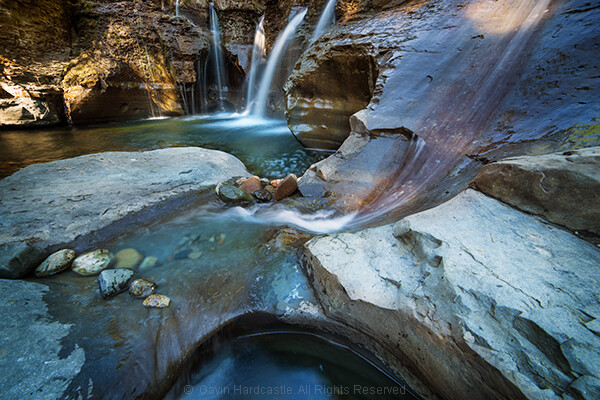
For the shot above, I really enjoyed the look of the reflected waterfall in the pool, so I took two shots with different polarizer settings and then combined them.
When you want to shoot rainbows
I’m sure I’ll be corrected by our more well-educated readers, but from a polarizer’s standpoint, a rainbow is reflected light.
So if your polarizer is engaged, the rainbow will perform a disappearing act in your photo.
Disengage or remove the polarizer and – presto! – the rainbow will be back in your photograph.
But still don’t forget your polarizer!
As I mentioned at the start of this article, a polarizer is a key landscape photography tool.
In fact, if I leave the house and forget my polarizers, I’ll actually turn around and drive home; they’re that important.
At the same time, I urge you to learn when conditions call for the removal of your polarizer.
And I hope this article helps you identify those golden moments so that you can get the best possible shots!
Now over to you:
Do you use a polarizing filter? How often? Are there times when you prefer to go without it? Share your thoughts in the comments below!
The post When NOT to use a Polarizing Filter appeared first on Digital Photography School. It was authored by Gavin Hardcastle.
The post Weekly Photo Challenge – Flowers appeared first on Digital Photography School. It was authored by Sime.
BEFORE you all rush to your archives to share that photo you’re thinking of, the ‘challenge’ part of our weekly challenges is that you get out and make a new photo for each challenge, and while we know that can be difficult, we would love to see you challenge yourselves and make a new, better than you’ve EVER done, image for the weekly challenges, rather than just grabbing one from the archives – if you can!
Need Inspo? Click Here or Here or Here
This week our theme is ‘Flowers‘ and while it has been done before, we want to see it done again, better than ever! From your garden, someone else’s garden, in the street, in the hills… What can you do with a simple flower? Work on your depth-of-field, eliminating distraction, or maybe make it part of a bigger scene, hidden beauty kind-of-thing.
Make sure you use the hashtag #dPSFlowers if you post your challenge entry on social media!
Not Always Alive – #dPSFlowers
Don’t forget, you can go back and try ALL of our CHALLENGES over HERE!
Fields of Gold #dPSFlowers
Great! Where do I upload my photos?
Simply upload your shot into the comments field (look for the little camera icon in the Disqus comments section) and they’ll get embedded for us all to see. Or, if you’d prefer, upload them to your favourite photo-sharing site and leave the link to them.
Share in the dPS Facebook Group
You can also share your images in the dPS Facebook group as the challenge is posted there each week as well.
The post Weekly Photo Challenge – Flowers appeared first on Digital Photography School. It was authored by Sime.
The post Tips for Buying Used Camera Gear appeared first on Digital Photography School. It was authored by Tom Mason.
If you’re shopping on a budget, then buying used camera gear is a great idea.
Modern digital cameras are updated on a regular basis, so the used market is full of cameras looking for a new home. Used cameras are a great way to upgrade your gear without breaking the bank (and they often offer fantastic value for the money, too).
But when looking at secondhand gear, not all of it will be up to scratch. Not everyone cares for their gear, so you must exercise consideration and caution.
Below are some pointers to make sure you get the best bang for your buck when buying used gear. That way, you can update your cameras, lenses, and accessories for a fraction of the original price!
Buying used cameras
Cameras are complex machines, so there are a few key indicators to look for when shopping for a secondhand body.
Shutter count
The shutter count of a camera is simply the number of times the shutter has been fired in its lifetime.
(The shutter count is also known as the number of shutter actuations.)
Generally, the shutter count will give you a great indication of the amount of use a camera has seen, similar to checking the mileage on a car. Cameras are rated for shutter durability, with enthusiast models often rated around the 150,000-shot mark, and professional models rated at 300,000 shots or higher.
When browsing, low shutter counts often indicate less heavily-used items. Fewer than 10,000 shots on a camera that is 2-5 years old is very low, with the normal amount being around 30,000-50,000.
If a camera has a very high count of 100,000 or more, it’s probably best avoided, especially because this number will also give you a little insight into the owner’s use of the camera. Higher-count cameras may have seen professional use (and a harder life), while lower counts indicate casual consumer use.
So how do you find out a camera’s shutter count?
The number is often provided when cameras are being sold secondhand. But if you’re not sure, you can find it out a few ways, depending on the model. Check out this article for guidance: Finding Your Camera’s Current Shutter Actuations.
Camera checks
When looking at a used camera, there are a few things you can check to get a better understanding of its condition.
First, remove the body cap and inspect the inside of the camera around the mirror, focusing screen, and lens contacts. Look for any signs of damage, oil, or gunk that has collected in these areas.
Inspect inside the camera, paying special attention to the mirror and focusing screen; look for any sign of oil or residue.
Oil can indicate that the mechanisms of the internal parts are not functioning correctly, sometimes due to the camera being bumped or dropped. Look for any oil around the sides of the internal section. A small flashlight can be a big help here.
Remember to hold the camera face-down as much as possible to reduce the risk of contamination from dust and dirt.
When inspecting a camera, try to hold it face down.
If you have a lens on hand, it’s worth taking a test shot to look for any issues with the sensor.
Set the camera to f/16 to f/22, point it at a bright subject (a white wall or the sky), and shoot a frame. Play the image back and zoom in on the LCD screen to look for any marks and scratches.
Dust spots are not a huge problem, as a simple sensor clean can take care of them. But lines can be evidence of a scratch on the sensor (which means that the camera is best avoided).
What to look for in the test shot.
General wear and tear
Of course, it’s also important to look for any external signs of damage. Small scratches, scuffs, and marks should be expected, but heavy blemishes can indicate that the camera has been dropped. Rubber grips often start to come off with heavy use, but these can be replaced at a low cost.
Outside grips often become worn and unglued. As long as there are no signs of a drop, these are a simple and cheap fix.
Remove any protective screens or filters to look at the true body and lens in order to assess the damage.
Look externally for any signs of bumps and scrapes. Often, cameras will have a few marks, but major dents may be evidence that the camera has been dropped.
Buying used lenses
Camera lenses are expensive, so secondhand options are a great alternative to buying new.
Once again, however, there are a few things to look for when making a purchase.
Lens blemishes
When inspecting a lens, you’ll want to check both the external and internal optics.
Externally, look for any scratches or chips on the glass. Tilting the lens toward the light can help you make sure the optics are in great condition.
Note that, even if a lens has a front filter, it may not be optically perfect. So unscrew the filter and check the true front element to be sure.
Often, lenses will show signs of wear on their focus or zoom ring and the external barrel. Simple rubbing is normal and isn’t usually a concern.
Moving on, inspect internally for dust and mold. Shine a small light inside the lens and look for any particles. Most lenses will have small dust spots, but look for any large patches or seemingly smeared areas, as these will indicate whether the lens has any fogging or other internal issues.
Look through the optics to ensure they are clear of dust and mold.
Heavy dust and mold in a lens are to be avoided. The hundreds of particles inside this lens offer a perfect example of what not to buy.
Using a small flashlight, inspect inside the lens, paying particular attention to the aperture blades. Any evidence of oil may indicate the lens is functioning less than perfectly.
Aperture blades
On the rear of the lens, you’ll find a small lever that you can push to open the aperture blades. Do this, and check if the blades are snappy and without any stickiness that could be a sign of collected oil.
Using the lever, you can manually operate the aperture for a better sense of the lens’s functionality. Check that the aperture blades are snappy when they open and close.
Look through the lens with the iris fully open, once again checking for any particles or oil spots.
Open up the lens’s aperture to aid inspection.
Sharpness
Check the lens sharpness using a test chart. These patterned charts are easy to find online, and they can be stuck on a wall and used to quickly evaluate a lens.
Here’s how it works:
Mount the lens on a camera, then put the camera on a tripod. Focus on the test chart, then fire the camera using a remote release or the self-timer (to make sure you don’t create any camera shake).
Check the shots on your camera LCD (or, if you can, on the computer). Zoom into 100% to be sure of focus. Of course, some cameras and lenses will need fine in-camera adjustments for perfection, but any wildly unsharp tests may indicate a lens has been dropped or is out of alignment.
It’s also a good idea to test the full aperture range and look for sharpness from edge to edge. Even at f/2.8, the center of your test image should be relatively sharp.
Additionally, it’s a good idea to look for any external marks or blemishes when performing these tests, turning the focus and zoom rings to check for any stickiness or grating sounds.
With those checks done, you’ll have a good indication of whether the lens is up to scratch (and worth purchasing!).
Here’s a lens sharpness target. You should use a large version of this type of chart to test a potential purchase.
Where to purchase used camera gear
If you’re struggling to find high-quality used camera gear, here are a few suggestions:
Camera shops
Lots of camera retailers offer some secondhand stock as well as new cameras. Buying from a dealer has its advantages, because items are often checked before being added to the inventory, plus they’re often serviced before they’re sold.
Also, most dealers will have a return policy, so if you find any faults, you can exchange the used gear for a full refund. Many of the better dealers offer warranties on used gear that range from three months to a year, which will give you excellent peace of mind when purchasing.
Of course, one of the downsides of buying from a dealer is the increased price. Used kit bought from outlets often costs more than gear bought from private sellers – so you must decide if it’s worth that added peace of mind!
Ebay and private sellers
Purchasing from private sellers directly offers the best chance to find a bargain. Some people sell their gear at far below the market value. If you know what to look for, and are confident about the quality and genuine nature of the sale, you can often get an excellent deal.
It pays to be wary when shopping for used camera gear, though. Be suspicious of any deal that looks too good to be true, or of buyers who will only accept cash in person. Using PayPal or PayPal alternatives offers an additional layer of protection (one that’s very important in online sales).
Of course, private sellers generally won’t offer a warranty, but that is a risk you take to get a bargain.
Buying used camera gear: Conclusion
Buying used camera gear is all about taking your time to search out a bargain. Carefully study the used gear you’re considering, whether it’s from a dealer or a private seller, and look out for the telltale signs of damage.
Assuming you use careful consideration and do a thorough inspection before buying, the used market is a fantastic way to trade up your gear at a fraction of the cost of buying new.
And this, in turn, gives you money to buy additional kit – or even better, a trip or two on which you can use it!
Now over to you:
Have you ever bought used camera gear? What was the experience like? Share your thoughts, as well as any tips or tricks for purchasing used gear, in the comments below!
The post Tips for Buying Used Camera Gear appeared first on Digital Photography School. It was authored by Tom Mason.
The post Frame Within a Frame Photography: A Guide appeared first on Digital Photography School. It was authored by Kevin Landwer-Johan.
Frame within a frame photography is a creative technique that works in many genres of photography. But what is it, and how can you use it for amazing photos?
In this article, we’re going to take a look at this composition “rule” – which you can apply very obviously or even very subtly in your photographs.
Frame within a frame photography is all about positioning your main subject so it’s framed by something else within the scene.
You can use anything you like for this. For instance, you might use a full rectangular frame, like a door or a window. You could even use an actual picture frame.
But frame within a frame photography is not limited to structures that completely surround your subject.
You can incorporate body parts and tree limbs as frames. Using rocks, plastic bags, or mannequins can be an effective way to add a frame within a frame. These things may occur naturally, or you can bring them in as props to include in your compositions.
In this first photo of the welder (above), I’ve used a hole cut in the steel to encircle the worker. There are also more holes in the panels behind him, though it’s the front hole that acts as the main frame.
In this second shot, however, while the gate pillars do frame the young monks, the contrast of the shadow on the wall also helps to frame the main subject.
Here’s a third example where I have used frames both in front of and behind my subject. By lining up the front and rear windows in the train carriage, I have managed to carefully frame the young woman.
Depth in frame within a frame photography
The woman on the train (above) is also an example of how using frames within a frame can help create an enhanced sense of depth in your compositions.
This becomes even more exaggerated when you use a shallow depth of field. Blurring the frame shows that the frame and the subject are at different distances from the camera (and it also helps draw the viewer’s eye to your subject!).
For instance, look at the photo below. The white pillars on either side of the dancer and the circular shape behind her head frame her well. And the shallow depth of field helps create actual depth in the image.
Take a look at the photo above. Are the people walking in front of or behind the large palm trees? The trees create a nice frame, but because the key elements are silhouetted, there’s no visual information to reference depth.
Composing with existing and created frames
Some frames are more obvious than others. Unfortunately, more obvious frames tend to be a bit too common in photographic compositions – to the point that they become clichéd.
So instead of using obvious frames, access your imagination. Look for unusual elements you can incorporate into your compositions. These can sometimes create interesting frames around your subjects.
Frames don’t have to be physical; you can always use light and shadow as a frame. Look for areas of contrast that surround what you’re focusing on. Carefully position yourself and your subject to maximize the effect.
Out-of-focus elements can also be used to create frames. When you have an object in the foreground that doesn’t form a complete frame around your subject, simply choose a wide aperture setting and make sure the foreground object is close enough to your camera. You’ll get a rather abstract form that can frame the subject and help lead the viewer’s eye into your picture.
Take a look at the image below. Do you see how the blurred vegetation creates a frame around my subject?
Practice looking for frames, and you’ll begin to see them everywhere. Study the work of other photographers and see how they work with frames. Do a quick image search online for examples, and you’ll soon see how imaginative some photographers are with frames!
Then go out with a camera. Like anything, the more you do frame within a frame photography, the easier it becomes. Set yourself the task of creating a frame within a frame every time you head out to shoot.
That way, you’ll begin to train yourself to see situations where you can incorporate this compositional technique into your work.
Frame within a frame photography: Final words
Frame within a frame compositions are a great way to focus the viewer’s eye on your subject – and a great way to add depth to your photos.
So make sure you get out and practice! As I explained, the more you practice, the sooner you’ll be creating stunning frame within a frame photos.
Now over to you:
Have you ever tried frame within a frame photography? Do you have any framing tips? What are your favorite frames? Share your thoughts in the comments below!
The post Frame Within a Frame Photography: A Guide appeared first on Digital Photography School. It was authored by Kevin Landwer-Johan.
The post Soft Proofing in Lightroom: The Essential Guide appeared first on Digital Photography School. It was authored by Charlie Moss.
If you’ve ever printed without first soft proofing in Lightroom, you might have been surprised to find that your print didn’t match the image that you saw on your screen. Your print may have included inaccurate colors or incorrect tones.
All because you didn’t soft proof!
But don’t worry. It’s not a complicated process to soft proof your photos.
And I guarantee:
If you start soft proofing images before printing them, you won’t end up with prints that turn out different from how you expect them to look.
So let’s discover all the key features of soft proofing, and how you can use it to get your prints looking beautiful.
What is soft proofing in Lightroom?
Soft proofing is the process of previewing an image prior to printing – in order to get a better idea of what that image might look like when actually printed. Soft proofing gives you the opportunity to make changes before sending along the digital file to be printed.
The result, after soft proofing in Lightroom, is that your print will match the image you created on your computer.
Taking this extra proofing step is the key to getting top-quality printed images.
Why is soft proofing important?
Without soft proofing, it’s almost impossible to tell what your printed photograph is going to look like.
Why?
Because every printer and printing surface will interact in a different way, meaning that your results will vary wildly from printer to printer and from printing medium to printing medium.
Now, if you consistently order from the same print lab or you have your own printer at home, you may learn to predict the adjustments you need to get your images looking right. But this will only come from experience with particular printer and printing surface combinations.
And as you can imagine, gaining this experience can be expensive, especially when you’re ordering premium prints and products!
Why you need a calibrated display
First things first:
Before you do any soft proofing at all, you need a calibrated display.
A calibrated display is essential if you want your prints to match the photographs you see on your computer monitor.
By calibrating your display, you ensure that the colors are accurate. Most monitors will not have perfect color reproduction out of the box (not even the expensive ones!). Monitors are often too blue or too magenta, too light or too dark.
Also, monitors don’t hold their color calibration for long periods of time – you need to keep calibrating them every three to four weeks.
What is a printer profile?
An ICC printer profile is a file that describes how a printing machine and paper will interact.
A printer has to convert your image file into instructions for how to put ink on the paper, and each printer will do this slightly differently.
But ICC printer profiles give you a way to predict how the printer will turn your digital file into a physical print.
In fact, a good print lab will offer custom ICC printer profiles for you to download on your own computer. This lets you soft proof your digital photographs before sending them to be printed.
How to load printer profiles into Lightroom
Soft proofing begins with downloading printer profiles.
Once you have downloaded the necessary printer profiles from your favorite print lab’s website, you’ll need to add them to your computer so that software such as Adobe Lightroom and Photoshop can find them.
Fortunately, this is very simple. You just move the files to the correct operating system folder as follows:
Mac: Library/ColorSync/Profiles/
Windows: Windows\system32\spool\drivers\color
Now the different profiles will be ready for use when you start soft proofing in Lightroom.
How to soft proof in Lightroom
Once a file is ready for printing (i.e., you’ve edited it to your heart’s content), head over to the Lightroom Develop module.
There, in the bottom left-hand corner of the main window, you’ll find an option labeled Soft Proofing. Tick that box.
Once you’ve activated the soft proofing option, you’ll find that your photograph moves onto a white background and some new options appear in the top right-hand corner of the screen (as indicated above).
If you click the Profile option in the new Soft Proofing panel, you’ll find a list of profiles to choose from. If your new ICC printer profiles haven’t yet appeared on the list, then select Other at the bottom of the dropdown menu.
A window will pop up, and you can select from the different ICC print profiles that are installed on your computer. Each option you pick will appear in Adobe Lightroom for soft proofing.
Once you’ve selected your profiles and closed the window, pick the profile you want to use and make sure the Simulate Paper & Ink box is checked.
Soft proofing challenges
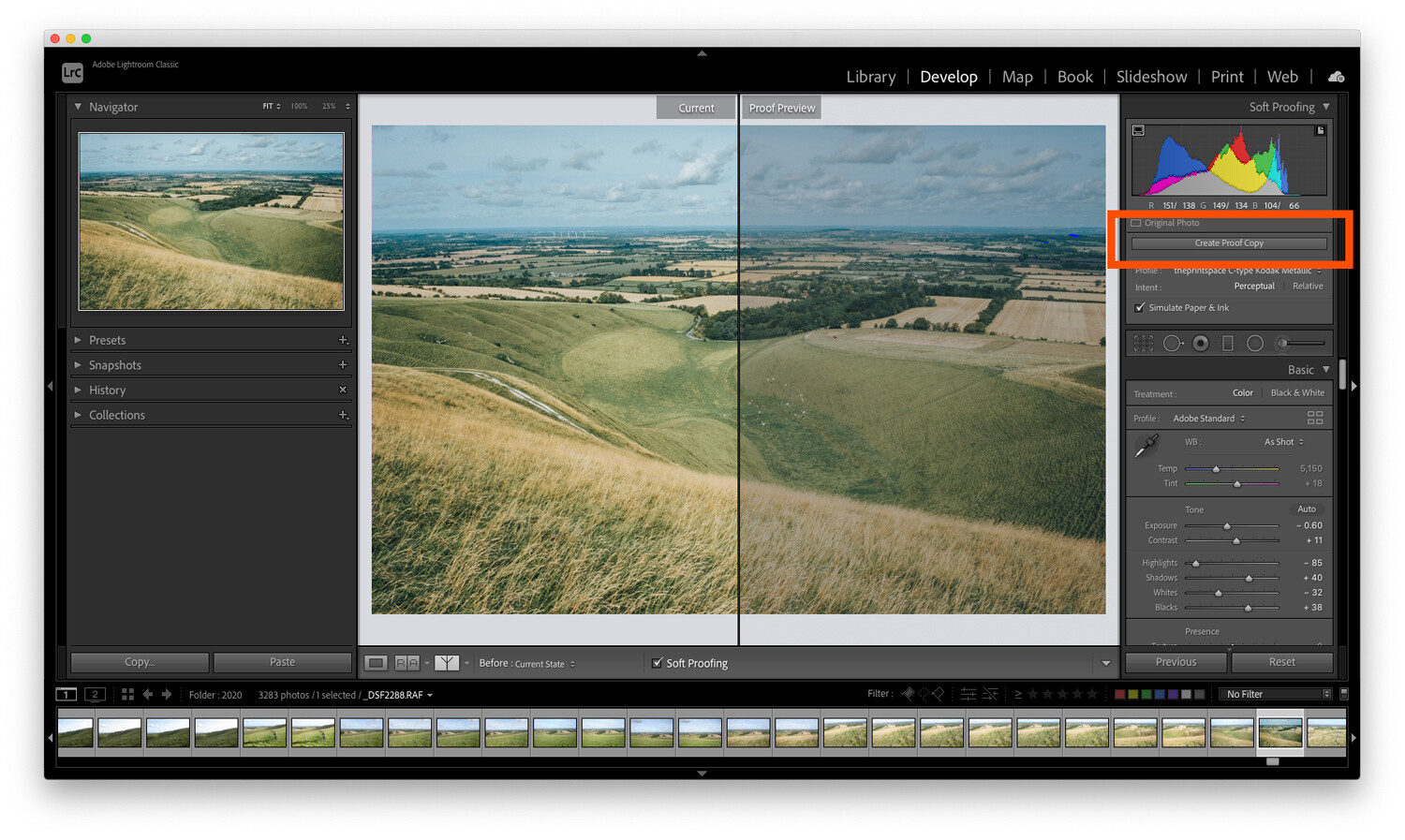
The challenge with soft proofing is that, as you can see below, the image won’t look the same as the original file once you’ve applied the soft proofing ICC print profile.
In the example below, I’ve applied a profile for a metallic flex paper, and you can see that the image on the right is quite a bit darker than the original image. This means the print will likely be darker than we intended.
To fix this problem, hit the button labeled Create Proof Copy:
This will create a duplicate image with your print profile embedded so you can make adjustments for printing. By creating a proof copy first, Lightroom will leave your finished image unchanged – even as you make adjustments to your file for printing.
You see, on this new copy of the image, you can make adjustments while still in soft proofing mode. That way, you can ensure that what gets printed is exactly what you intended.
So simply make adjustments to the proof preview using the Lightroom sliders until you like the result!
Here’s one final technical check worth running:
The gamut warning feature.
In the left-hand corner of the histogram is a button that looks like a computer screen:
If you toggle this setting on, your image may gain some striking blocks of color.
The colors are simply warning you which areas of the image will not reproduce properly when you go to print. To get the best quality print, you should do your best to reduce (and ideally remove) all of these problem areas.
To get rid of the warnings, try adjusting the saturation and exposure of your image.
Soft proofing in Lightroom: Conclusion
Many people see soft proofing for printing as unnecessary. They may get acceptable results already when printing, and they may have even learned to compensate while editing their photos to get the best prints.
However, if your prints don’t match the images you’re seeing on the screen, it’s because you haven’t done any soft proofing. With enough experience, you’ll learn the adjustments to make for perfect print results. But this is a process, one where you have to learn by making mistakes – so don’t be discouraged if things don’t work out the first time.
When you make your next print, give soft proofing in Lightroom a try. Calibrate your monitor, then soft proof your images with the correct ICC print profiles.
I guarantee it will improve the quality of your print!
Now over to you:
Have you ever tried soft proofing your prints? How did it go? Do you think you’ll start soft proofing before printing, now that you’ve read this article? Share your thoughts in the comments below!
The post Soft Proofing in Lightroom: The Essential Guide appeared first on Digital Photography School. It was authored by Charlie Moss.
The post 8 Ideas for Awesome Abstract Photography appeared first on Digital Photography School. It was authored by Anthony Epes.
In this article, I plan to share some inspiring abstract photography ideas.
Now, I would never describe myself as an abstract photographer, yet I seem to have shot countless abstract photographs. In fact, I try not to assign myself to any genre. To me, that feels like the opposite of what photography should be – which is a place to have fun, to be curious, to explore, and most importantly, to give your imagination free rein.
I start the article like this because I want to encourage you not to be intimidated by this genre. Don’t worry about getting it right. Abstract photography should be a place of complete freedom.
And this is why the most important quality for abstract photography is imagination.
What is abstract photography?
For me, abstraction is about removing what’s in the world around us from its familiar context. It involves playing with elements and subjects, moving them away from their usual settings and placing them into new situations – so that they become something else entirely.
I find that doing abstract photography brings us into that childlike realm of imagination and makes us often think, “What is that?” Or, “That reminds me of…” Then our minds go off into dreamlike worlds.
“Abstraction demands more from me than realism. Instead of reproducing something outside of me, now I go inward and use everything I’ve learned thus far in my life.” – Susan Avishai
Therefore, I like to approach this genre as a way for us to have fun with our photos, the world around us, and ourselves. I’ll share eight abstract photo ideas that I hope ignite your imagination, and get you excited about exploring abstract photography!
Let’s get started.
1. Use your imagination as much as possible
“Abstraction allows man to see with his mind what he cannot see physically with his eyes…Abstract art enables the artist to perceive beyond the tangible, to extract the infinite out of the finite. It is the emancipation of the mind. It is an exploration into unknown areas.” – Arshile Gorky
Doing abstract photography feels like I am trying to detach myself from reality and delve into a space where everything around me is a new sight, a new sensation, or a new experience.
I look around and see elements, colors, shapes, lines, textures – each is almost separate from the other. I am looking for things that are connected, but in a different way to how my mind usually puts things together.
Then it’s my imagination that kicks in and starts creating all kinds of ideas about what things look like. To me, the photo above looks like something coming from the cosmos, the beginnings of a new world.
(In reality, it’s some slime floating around in water, which I played with in Lightroom.)
So use your imagination constantly. When doing abstract photography, don’t let “conventional” thinking get in the way!
2. Search for textures
Textures are a fascinating subject to explore. When you focus on textures, you capture a tactile quality in your photos. You make people want to lean in and touch something.
And you often give very ordinary things – water, brick, wires, or stone – an inviting feeling.
Today, we are often so disconnected from the ordinary (i.e., what we perceive as the boring world around us). We are so often lost in thought that we’re only jolted out of it when we see spectacular things – like beautiful views, intense sunsets, etc.
But all around us are terribly ordinary subjects that can be so very intriguing, if only we viewed them with our sense of wonder! So instead of capturing a snapshot of an intense sunset, try looking more closely at some “boring” subjects to see what textures you can find!
3. Shoot the ordinary
“The longer you look at an object, the more abstract it becomes, and, ironically, the more real.” – Lucian Freud
I love to shoot random, day-to-day subjects that I find all around me. I challenge myself to make these subjects seem interesting.
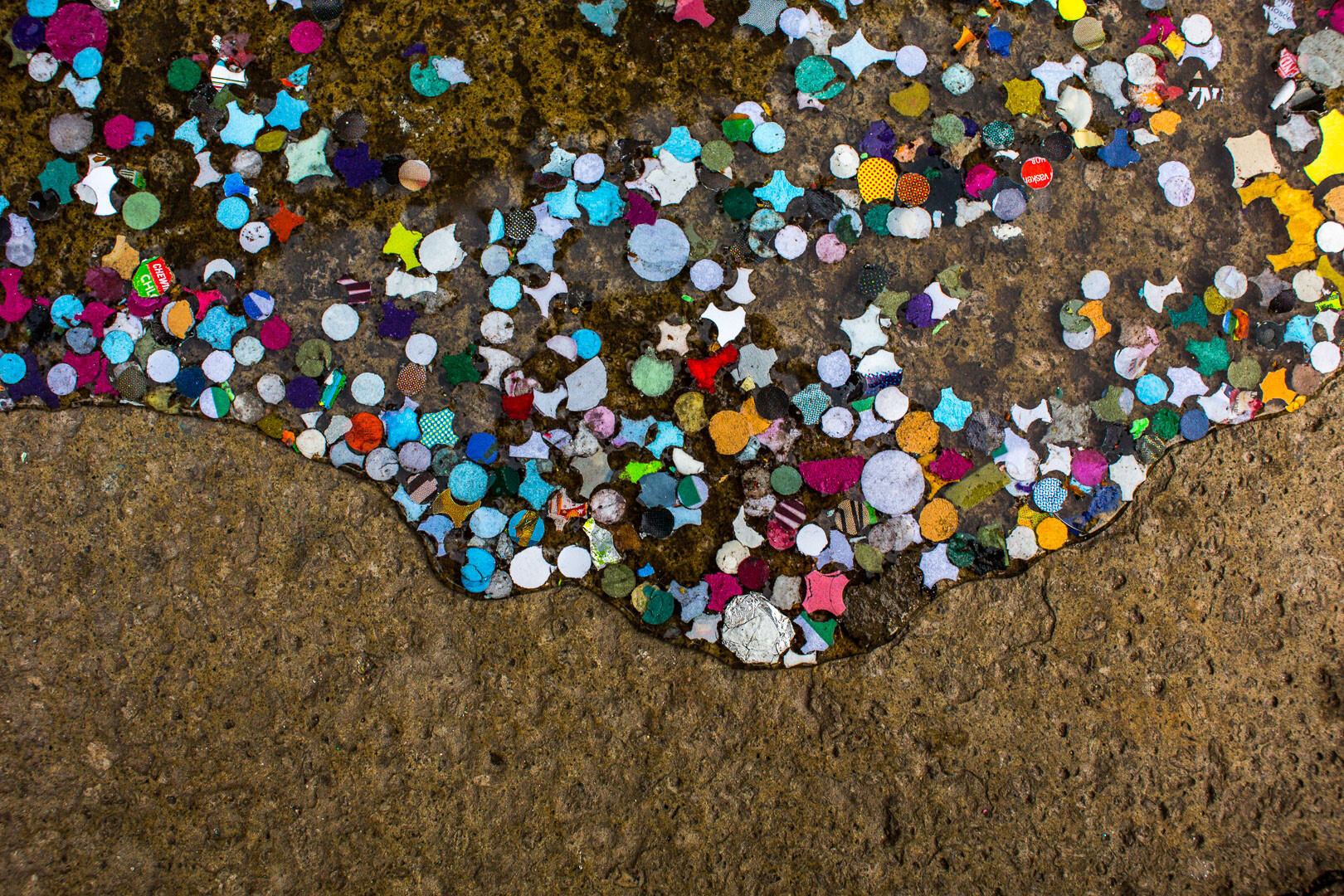
For instance, I am always on the lookout for torn posters on a wall – especially when they are bathed in beautiful light – as well as weird things I find on the street at my feet.
In fact, starting with what you find at your feet is a great way to do abstract photography!
Here’s why:
Everything, when you pay attention to it, can reveal different qualities than what we first notice. And our challenge as photographers- as artists, no less – is to find the most interesting way to shoot whatever catches our attention.
Maybe you need to take a different perspective – lying on the floor, getting up high, or changing angles. Or maybe, by using the quality of the light, you can turn the subject from ordinary to fascinating.
Or perhaps you could even use color to give boring, unoriginal subjects interest and depth:
4. Include mystery in your abstract photos
“Abstraction generally involves implication, suggestion and mystery, rather than obvious description.” – Robert Genn
The appeal of abstract photos for me is very much about mystery. Creating something that doesn’t look as it should, displacing your subject, mixing up reflections, creating contrasts and jarring juxtapositions – it’s all a fun part of making the world less real and more mysterious.
You can combine shapes together to create something that makes no real sense, but still sparks ideas and thoughts in the mind of the viewer.
In the photo below, I captured this reflection of a man on what I like to think is a moon landscape inhabited by interesting-looking creatures.
At least, that’s what I see when I look at the photo. What do you see? It might be completely different!
5. Aim to capture the feeling of your subject
“Of all the arts, abstract painting is the most difficult. It demands that you know how to draw well, that you have a heightened sensitivity for composition and for colors, and that you be a true poet. This last is essential.” – Wassily Kandinsky
In my photo teaching, I talk a lot about having a heightened awareness and sensitivity to the world.
Because if you want to find incredible photos wherever you go, you must have the ability to see more of what’s around you than you can when you are lost in your thoughts.
Now, with that heightened sensitivity comesincreased feelings and impressions of what you see.
And thinking about the feeling you have when you look at your subject is so important. If you aren’t feeling anything, you won’t be able to communicate anything in your photos.
But if you do feel something when you look at your subject…
…you can channel it into the photo for a beautiful result!
I like the sensations I get when I look at the texture photos above. It’s perhaps a sense of awe at the water and the beautiful colored stones. I can almost feel the water, and that feeling is translated through the photo.
In the photo below, perhaps I get a feeling of fun, thanks to some bright colors on what I remember to be a dull London day:
6. Find subjects that stop you in your tracks
I strongly urge you to cultivate a sense of wonder.
Why?
I think we often get so jaded by the world around us – that is, we are so busy with our lives and worries and things to do – that we stop finding things awe-inspiring. It takes more and more to make us stop in our tracks and say “Wow!”
But we photographers have a gift:
We are visual people.
We just have to make sure we’re always refreshing our vision and our sense of wonder at the world around us.
And we must go seek subjects that makes us feel awe.
I believe that we don’t always need new subjects and exotic locations. We can be impressed by things that are right on our doorstep. Therefore, going out with the intention of finding something that makes you go “Wow!” or “Cool” or “Interesting!” is a great thing to do.
Work on always trying refresh your eyes, so that you can be impressed by mundane subjects (this also refreshes the spirit!).
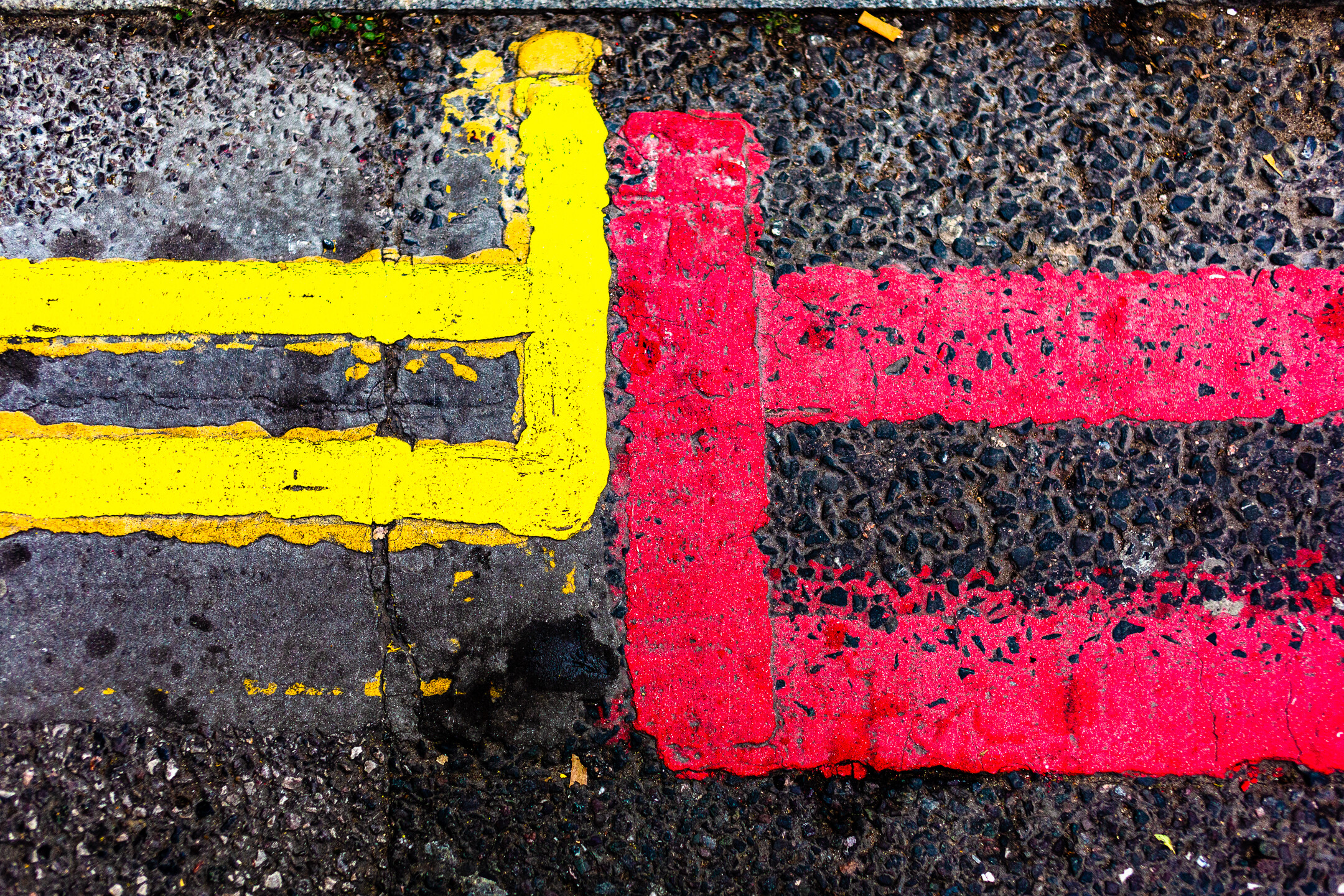
In the photo below, the faded street markings look like a sign in an unknown language. Maybe even a secret message.
I find that the easiest way to refresh your eyes is to go out with the goal of having fun in your photography. Try to find something that makes you laugh.
In this shot of gnarly wood below, I might have photographed a frog, or maybe an alien!
That, for me, is the essence of abstract photography:
Creating a new world, a new vision, and a new experience from this very familiar (yet still awe-inspiring!) world around us.
7. Use perspective for an unusual take on your subject
By changing perspective, you can create cool new images of otherwise dull subjects.
By shooting upward and not focusing on the entire scene, I captured this image:
So make sure you don’t always shoot using the same boring, eye-level perspective.
Instead, mix things up a bit! Experiment with changing your vantage point or your angle.
Make sense?
8. Break down the world into elements
In photography, you must learn how to see the world as a series of elements, and then learn to arrange these elements in pleasing and interesting ways.
Ultimately, you should be looking at the world as a series of elements, and not as a vast, interconnected whole.
This is relevant to all genres of photography. Gaining a sense of control over the elements you place in your scene, what elements you use to support your subject, and what elements you remove from the composition is a great way to improve your abstract photos.
This idea of breaking the world down into elements is particularly useful when doing abstract shooting, because you are looking at the world afresh and trying to use your imagination to create something that is super interesting – and also super unique!
Abstract photography ideas: Conclusion
Hopefully, you’ve found some exciting abstract photography ideas to try – and you’re ready to get out and start shooting!
So grab your camera and take some photos.
And make sure to have lots of fun while you’re at it!
Now over to you:
Have these abstract photography ideas helped you see what’s possible in your photography? Do you shoot abstracts, or will you now? Let me know in the comments below!
The post 8 Ideas for Awesome Abstract Photography appeared first on Digital Photography School. It was authored by Anthony Epes.
The post Beginner’s Guide to Light Painting appeared first on Digital Photography School. It was authored by Bruce Wunderlich.
Do you want to use light painting for stunning results? Do you want to discover all the ins-and-outs of light painting so you can create otherworldly images at night?
You’ve come to the right place.
In this article, I’m going to share everything you need to know about light-painting techniques.
And by the time you’re done, you’ll be able to light-paint your images with ease!
Let’s dive right in.
Mill Falls in Logan, Ohio. The main source of light for this scene was the street lights on the bridge over the river. The bridge was light-painted with a high-powered spotlight. I also added light to the rocks in the foreground. The exposure was 69 seconds, and I set the aperture to f/14 to maximize the starburst on the street lights. This image won me a Photographer’s Choice award in the 2014 Shoot the Hills photo contest.
What is light painting?
Light painting is a photography technique that uses a moving light source (e.g., a flashlight) to add light to a subject while taking a long-exposure photograph. A scene or object can be brought to life by painting with a beam of light.
When light painting, you, the photographer, become an entirely different kind of artist. Instead of just capturing an image as it’s presented, you create the image that the camera is capturing.
Now, light painting may take lots of patience and practice to perfect, but the results can be very rewarding.
And it’s important to recognize the simplicity of lighting painting – it’s a lot like any low-light photography, except you are putting an external light source in motion to enhance an image.
Let’s take a look at some of the basics for beautiful light painting photography.
Schoolhouse in the snow. This was a long, 170-second exposure, shot at f/8 (for depth of field) and ISO 100. Notice the light coming from inside the schoolhouse, added from the outside by shining a flashlight through windows at the back of the building.
Tools for light painting
Before you start doing light painting, you’ll need to make sure you have the proper tools:
Camera – Any digital camera capable of manual settings (including Bulb mode).
Tripod – One of the most important tools to produce light paintings. In most cases, your shutter is going to be open for several minutes, and it is very important that your camera does not move during the exposure.
Shutter release – Either use a cable release or a remote shutter release to begin your exposure. If you don’t have either of these, use your camera’s self-timer function to initiate the shot. It is very important that you never touch your camera or tripod during the exposure.
Stopwatch – A stopwatch or some other way of timing your exposures is helpful, since most light-painting exposures will use Bulb mode.
Light source – Many different types of lights can be used for light painting. These light sources are your “brushes” and may include flashlights, torch lights, lasers, glow sticks, flashes, cell phones, and even candles. Just about anything that can produce light can be used for light painting. Note that different light sources will produce different colors of light. For example, an LED light source will produce a cooler (blue) colored light, while a halogen source will produce a much warmer (orange) colored light.
Color gels – Color gels can be used to alter the tint of your light and add color to your painting.
30 seconds | f/8
Camera settings
Now let’s take a look at the best camera settings for light painting:
Mode – Shoot in Manual mode, which allows you to set your shutter speed and aperture.
Image quality – Set your image quality to RAW, which allows you to capture as much information as possible. (This is not a necessity, but it is an important recommendation.)
White balance – If you want to balance out your artificial light source, choose either the Incandescent or Tungsten white balance setting. However, sometimes experimenting with other white balance settings can produce some interesting light effects. Daylight white balance is a good starting point if you want to maintain the original colors of your artificial light sources. Auto White Balance is not recommended.
ISO – Use a low ISO, such as 100.
F-stop or aperture – Stop down to f/8 or f/10, which allows you to get more depth of field and enables you to use a longer shutter speed.
Shutter speed – Set your shutter speed to Bulb mode (your final shutter speed will be determined by the amount of ambient light in the scene).
LCD brightness – Lower the brightness of your LCD preview, because the normal setting is too bright at night and will make your image look bright when it’s actually underexposed.
Histogram – Use your histogram to check your exposure. If the histogram skews heavily to the left, your image is going to be too dark.
Blinkies – Turn on your blinkies (a highlight warning) to help you determine if your highlights are exposed properly. It is perfectly acceptable for your brightest highlights to be slightly clipped if the rest of your image is properly exposed.
Image stabilization – Set this to Off. With your camera on a tripod, having image stabilization turned on can actually fool your camera or lens and cause blurring in your image.
Long exposure noise reduction – The recommended setting is Off. This can be set to On, but it will cause your exposure time to double (because the camera takes a second black exposure to help remove noise). If your camera is set to a reasonable ISO, the noise level will be low enough in most cases that in-camera noise reduction is unnecessary. Still, it is a good idea to check your noise levels in advance, and some older cameras may require this setting to be On to get acceptable noise levels.
This vase was backlit with a candle and I painted the flowers with a small penlight. 30 seconds | f/16 | ISO 100.
Begin with ambient light
The first step – before the actual light painting – is to determine the correct exposure for any ambient light in your scene.
Unfortunately, determining base exposures can be time-consuming when you’re experimenting with three- to four-minute shutter speeds.
Here’s a little trick that can help expedite this process:
Set your ISO to six stops higher than the ISO you plan to ultimately use. For example, if you are planning to shoot at ISO 100, set your ISO to 6400.
With your camera set to ISO 6400, experiment to find out how many seconds you will need for a nice exposure. Every second of exposure at ISO 6400 is equal to one minute at ISO 100.
Once you’ve determined the proper shutter speed at ISO 6400, set your ISO back to 100 and prepare your exposure in minutes instead of seconds. (Many camera’s lowest ISO is 200, so 6 stops higher would be ISO 12800. And if your camera’s lowest ISO is 50, six stops higher would be ISO 3200.)
A 30-second exposure at ISO 800. For this image, I increased the ISO to shorten the exposure to 30 seconds, because a longer exposure would cause a noticeable blur on the stars. Light painting was applied from the front of the subject, without letting the light shine directly back at the camera.
Focusing
Correctly focusing your camera is an important step – and in the dark, it can sometimes be difficult to pull off. The simplest way to get perfect focus is to shine a light source at a spot in your scene that you’ve determined must be in focus.
Then, using autofocus, focus on the light.
Finally, switch your lens from autofocus to manual focus (so that your focus point won’t change).
But remember:
If you move the camera, you must turn your autofocus back on and refocus.
(Back button focusing is another great way to achieve focus when light painting.)
The exposure
At this point, you should have determined your exposure time, and your camera should be focused on your subject.
So now it’s time to begin your exposure and start painting!
Most cameras allow you to set exposures of up to 30 seconds. For exposures over 30 seconds, set your shutter speed to Bulb. Use your cable release or remote to trigger your shutter button. Your shutter will remain open until you press the release again. Use your stopwatch, or the timer on your phone, to time the exposure length.
This vintage 1971 bus was painted using one LED flashlight on the outside, with a second light inside to illuminate the bus interior.
Painting techniques
Light painting is subjective, so you’re free to approach it however you like.
But here is some advice for getting the most impressive results:
Paint from the sides – Don’t just stand behind your camera and wave the light across your image. Painting flat surfaces from the side will allow you to bring out textures.
Use lots of different angles – For instance, when painting the ground, hold the beam low and pan the light along the floor. This will keep the ground from appearing flat, and it’ll bring out all the details of the surface. Also, by adding light from many angles, the resulting image will have an interesting three-dimensional effect.
Don’t stand between the camera and your light source – If you do this, you will show up as a silhouetted ghost in the final photo!
Wear dark, non-reflective clothing and keep moving – Again, you do not want to appear as a ghost in your image!
Don’t shine the light source back at the camera – Otherwise, you’ll create a bright spot in the image.
Use a flashlight with a red filter when you check your camera to make adjustments. The red light will keep you from ruining your night vision.
Different surfaces are going to react to light differently – Wood surfaces may require more light than shiny surfaces such as metal or glass, because rougher surfaces absorb more light than smooth surfaces.
Keep your light moving – Move the beam in slow strokes to add lots of light and make faster strokes in areas where less light is needed.
Paint in up-and-down or side-to-side strokes, just like you’d work with real paint.
You probably won’t get the shot you want on the first try – It may take multiple attempts to get an image that you’re satisfied with. For this reason, try to keep track of how much light you add to each surface. Develop a plan so that you can make adjustments to each exposure until you get the image you’ve visualized.
A beginner’s guide to light painting: Conclusion
I’ve shared lots of tips and techniques to get you started with light painting, but there is so much more you can do with the medium! Be creative and fearless about trying new things.
Once you start to get the hang of light painting, there is no limit to the images you can create – all you need is a camera and a few creative light sources.
Now over to you:
Which of these light painting tips is your favorite? Have you tried light painting before? Do you have any additional tips or tricks for great light painted photos? Share your thoughts in the comments below!
The post Beginner’s Guide to Light Painting appeared first on Digital Photography School. It was authored by Bruce Wunderlich.