Blog

  • Steezy Marie for Marker Bindings

    The amazing folks at Whitney Advertising put together an idea for a national ad campaign that I fell in love with immediately!

    Marker USA has a line of ski bindings called ‘The Royal Family’ with product names like The Jester, The Duke and The Baron

    Their idea?

    What if we combined Marie Antoinette with a member of todays steezified-culture…  All the vintage styling but with a twist, ski hat and goggles.  The first character to populate this world would have to have a name… and why not call her Steezy Marie?

    There’s a bonus to this ad too!  A very high-tech bonus.  You see that colorful square icon near the bottom right?  Download the TagReader app (it’s free) on your iphone. Scan the icon (Yes, it will work on the screen – at least it does on mine) and you can watch some sweet behind the scenes video of the shoot!

    The Models!

    Credits

    Thank you so much to the entire team, especially the two photographer friends of mine that got suckered into modeling with ZERO notice from me!  I make no apologies for doing what I had to do to get a couple guy-extras. :-)

    Creative Director: Jim Whitney of Whitney Advertising
    Photographer: Jake Garn
    Hair: Steven Robertson
    Makeup: Paula Dahlberg
    Wardrobe Stylist: Michelle Boucher
    Models: Shelby Boven, Madeline Villano, Lauren Johnson, Steven Wood and Ryan Muirhead
    Location Scout: Mickelle Weber
    Photo Assistants: Ryan Muirhead, Steven Wood, and Dave Brewer
    Mr. Muirhead’s Assistant: Braxton Duncan

    Videographer: John Paul (Video viewable via the TagReader icon on the ad)

    Technical Details: 6-Lights*, lots of softboxes. Canon 5D Mark II, 50mm 1.2L

    *I should have kept better notes but we had a mini-disaster during setup when I realized that a much needed lens was not inside my photography bag.  The situation was fixed (thanks again Dave) without the clients even noticing… but the hiccup left little time for much note-taking on my part.  :-/

    Jake Garn Photography

  • IrfanView – Create Desktop Shortcut and Keyboard Hotkey if Missing

    Make IrfanView easier to access by creating desktop and keyboard shortcuts.

    If you often view and modify images with IrfanView you may find a Desktop shortcut convenient. When installing the application this shortcut may have been created; if missing, you can add it back. Plus, the Desktop shortcut can contain a keyboard hotkey to open IrfanView from anywhere – and this can be modified.

    1. Choose “Options” – “Properties/Settings”….

    Read more at MalekTips.
    New Computer and Technology Help and Tips – MalekTips.Com

  • Digital Image Resizers – Clone of Windows XP PowerToys Image Resizer

    The Image Resizer Powertoy Clone lets you resize images from Explorer in Windows 2000 and up.

    The Image Resizer Powertoy Clone is an open-source clone of the Image Resizer tool in the PowerToys for Windows XP suite. This version also runs on Windows 2000, Windows Vista, and Windows 7.

    To use, simply select one or multiple images from Explorer. Right-click a selected image and choose “Resize Pictures” from the pop-up menu. A “Resize Pictures” dialog box will then appear, allowing you to choose between making small, medium, or large images, or those optimized for mobile devices. …

    Read more at MalekTips.
    New Computer and Technology Help and Tips – MalekTips.Com

  • The Most Important Purchase

    What is the most important Purchase?

    Some sort of Data Backup, any sort!

    This is an educational announcement, no inspiration here just wisdom.  If you already have an automatic backup system in place skip this blog post and look at my gallery instead.  If you don’t have an automatic backup system then keep reading.

    I just purchased this one week ago after my 1TB version was all filled up.  This won’t be a technical review of hardware… so if you’re looking for that look elsewhere.

    So why is this the most important purchase?

    You will suffer a hard drive failure at some point in your life, unless you’re ridiculously lucky.  When it happens it will either be the biggest stress that you’ve faced in a long, long time or it will be a minor inconvenience… YOU get to decide what it will be RIGHT NOW!

    Common Types of Backup Available

    1. Online Backup Sites (like Carbonite or Intronus or Mozypro)
    2. Internal Raid (duplicate harddrives with mirrored data)
    3. External Harddrive (Using Apple Time Machine)
    4. Manual backup onto CD/DVD/Microdrive

    So of all those I opt for option 3. External Harddrive.  Is it as secure as other backup options?  Well it does not always protect data in the case of rare events like war, floods, hurricanes, or Dick Cheney hunting accidents… things like that, but it does protect against a much more common form of data loss – unexpected and unannounced harddrive failure.

    Backing up with a Mac is about the easiest thing you’ll do in your life.  To start automatic backups all you do is open your system preferences, click on time machine, select the backup drive, turn the BIG switch from Off to On.

    You’re finished.

    You can tweak the settings if you want but the backup starts immediately, once backed up it continually updates the backup file.  And it really does work like a time machine, you can open a folder and choose whatever version of a particular file you want to back up to within the last several days… distance of time in the past depends on the size of backup space available.

    Why do I Use G-Technology?

    I like these external hardrives from G-Technology for a couple reasons.  Not only do they look sleek they also run nearly silently, they are pretty durable (I haven’t broke one yet) and work right out of the box with Mac (and work well).

    I’m going to be honest, I don’t know a ton about hardware… but this is my third or fourth drive from G-Tech and I’ve had no problems with any of them.  They also get good reviews… if you find a better external harddrive I’d love to hear about it in the comments.

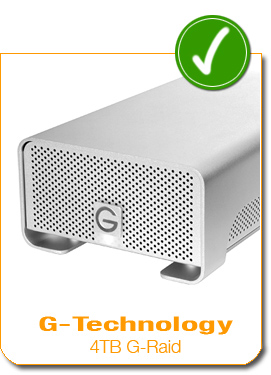
    In the mean-time do yourself a favor and pick one up… here’s the one I bought (August 2010), you may need much less or much more space than me… look around and find a solution that fits you!

    G-Technology 4TB G-Raid External Harddrive Array

    Whatever you do, don’t wait until you learn the hard way!

    Once the first backup of all your data finishes and you have two copies of everything you will sleep much better at night… trust me.


    Jake Garn Photography

  • Nik Software releases HDR Efex Pro Software

    Nik Software has announced HDR Efex Pro, an HDR processing plug-in for Adobe Photoshop, Lightroom and Apple Aperture compatible with both Windows and Mac. Based around its proprietary tone mapping technology, it offers number of presets and tools for selective fine-tuning, ghost removal and shadow/highlight recovery for both multiple and single images. The software installs as a 32-bit or 64-bit plug-in compatible with the applications as far back as Photoshop CS3, Lightroom 2.3 and Apple Aperture 2.1. HDR Efex Pro will be available from Autumn 2010 at a suggested retail price of 9.95.
    News: Digital Photography Review (dpreview.com)

  • Digital Camera Battery – Why Do Some AA Batteries Take Longer to Recharge?

    Here are four reasons why it may take longer to recharge certain sets of AA batteries.

    If you have a large collection of sets of AA rechargeable batteries (do not mix and match brand and battery mAHs of AA recharcheable batteries!), you may wonder why some batteries take longer to recharge than others. Here are a couple of reasons:

    1) Check the AA batteries’ mAh specifications. Batteries with a higher mAh level hold more power and can last longer between charges, but due to the added power capacity they may take longer to recharge….

    Read more at MalekTips.
    New Computer and Technology Help and Tips – MalekTips.Com

  • Microsoft PowerPoint 2007 – Equalize Text Height for a Cartoonish Effect

    Need another way for text to stand out in a PowerPoint 2007 slide show?

    Picture this scenario – you need to perform a quick calculation in Windows but your Desktop is full and you don’t want to open a new window. Plus, you can’t find a calculator anywhere next to your computer desk / table. What do you do?

    Desktop Calculator, an older application, may be what you need. This program adds a simple calculator directly on the Windows Taskbar that can perform basic math functions. It also handles percentages, square roots, inverses, flipping between negative and positive numbers, and can perform decimal to hexadecimal conversion….

    Read more at MalekTips.
    New Computer and Technology Help and Tips – MalekTips.Com

  • 15 August, 2010 – More Than 90 Minutes of New LR3 Training Videos Now Online

    We have just made available more than 90 minutes of new video segments to our new Lightroom 3 Video Tutorial.

    New topics which have changed dramatically since LR2 and which are now covered in depth, include Sharpening and Noise Reduction.

    If you’ve already purchased our LR3 tutorial, just log onto your account on the LuLa Store and download them.

    BUT FIRSTPlease Read the New Table of Contents PDF.

    You will learn that we have restructured the files and the ZIPs that they are found in. There are now multiple video files per ZIP. Also, if you’ve already downloaded ZIP #15, please do so again, because it now contains new material.

    THEREFOREPlease Read the New Table of Contents PDF.

    ___________________

    If you haven’t yet discovered the most comprehensive learning tool available for Adobe’s Lightroom, now’s the time to do so while it’s still priced at -10%.

    And remember, if you previously purchased the LuLa Guide to Lightroom 2 you can get an additional 10% off through the use of a special coupon code. More in formation can be found here.

    ___________________

    Earlier this year, Sean Reid of Reid Reviews surveyed photographers about they would like to see happen with the evolution of the Leica DRF (digital rangefinder) camera. Readers may recall that I looked at this same topic in an essay called An Open Letter to Leica and Mark Dubovoy also contributed ideas in an essay called Leica, A Different View.

    Sean has just published a summary and analysis of the survey results and the new article on his site titled Thoughts About a Future Leica DRF. It provides engaging reading for anyone who is interested in the future of the DRF camera. Reid Review is a paid subsciption web site and accepts no advertising.

    "These tutorials have made my understanding of much of the digital world so much easier.
    It is far easier to watch these two experts and learn than trying to understand from some of the ‘encyclopedias’ that are on the market, and at a price that is excellent value for money."


    The Luminous Landscape – What’s New

  • 19 August, 2010 – ID-Release, a Model Release Manager

    There are a vast number of useful apps for the iPhone, but one that pro photographers may find of use is ID-Release, a model release manager. Contributor Jim Martin today provides us with his review.

    ___________________

    I have been shooting near Jackson Hole, Wyoming and Yellowstone National Park this past week with the exciting new Sony VG-10 and 18-200mm lens. The VG-10 is the world’s first camcorder with a large sensor (APS-C) and interchangable lenses. It is also a still camera with a 14MP sensor as well as being a camcorder.

    How did it fare? Watch for my field report by the weekend.

    ___________________

    "These tutorials have made my understanding of much of the digital world so much easier.
    It is far easier to watch these two experts and learn than trying to understand from some of the ‘encyclopedias’ that are on the market, and at a price that is excellent value for money."


    The Luminous Landscape – What’s New

  • Adobe applies app-based approach to Photoshop.com

    Adobe has developed a set of three online tools as the primary way of interacting with its Photoshop.com online storage and editing site. The Photoshop Express Editor, Organizer and Uploader have been optimized to integrate with the company’s recently released Photoshop Express apps for iPad, iPhone, and Android devices and promise faster and ‘more intuitive’ uploading, editing, and organizing abilities.
    News: Digital Photography Review (dpreview.com)