Blog

  • Avatar Days – Full 1080p HD (World of Warcraft Machinima)

    www.youtube.com Click above to watch Patrick Jeans “Pixels” Avatar Days – Full 1080p HD (World of Warcraft Machinima) This is short film directed by Gavin Kelly ( www.piranhabar.ie ) I worked on a while ago called “Avatar Days”. What makes this one special is the fact that it was filmed, vfx’ed and comped all in just 4 days. It was made as part of the “4 day Film” catagory in the Darklight Film Festival. It follows 4 MMORPG players taking about their online persona’s. As they tell their stories we see them go about their everyday lives against the mundane backdrop of city life…but as their Avatars. There was a team of people on this with director Gavin Kelly leading the troupe. I worked on the 3d characters along with John O’ Connell and Will Sharkey. John O’ Connell was 3D Lead. CREDITS Directed by Gavin Kelly Produced by David Burke Production manager Marc Long Director Of Photography Fergal O’ Hanlon Editors Paul Giles, Damien O’ Connell 3D Animation Lead John O’ Connell 3D Animation Will Sharkey, Cormac Kelly RED Camera Kindly Supplied by “The Production Depot” Music by Steve Lynch at StellarSound Digital Transfer Technial Assistant Cathal McHugh Compositing Arron Ingles, Declan MacErlane Ex Piranhabarian Fabricio Lima features as a World of Warcraft obsessed interviewee on this one also! Work completed at Piranhabar. www.piranhabar.ie For more bits I worked on check out www.rightpsyche.com
    Video Rating: 4 / 5

  • Real D and blindness in one eye; Does it work?

    -UPDATE- Read the comments or click the annotation on the video. People (myself included) have experienced the depth effect in stereoscopic 3D movies (but, please note that some people say they still can’t see it) I want answers! If you have bad vision in one eye or know someone who has, have they been able to experience 3D cinema with the Real D technology Let me know!

  • Under (shot on Nikon D5000 with Nikkor 35mm F1,8)

    Airsoft in the woods of Idala. We were just 3 people showing up = yey.

  • How to: Track Ambient Automatically While Using Manual Flash

    Here’s a cool tip that some of you might not know about. If you are using manual flash (for consistency) you can still work in a quasi-auto mode in an environment where the ambient light level may be moving around on you.

    It works great for using manual flash against fast-dropping light after sunset, for instance. And you can control the flash and ambient very easily from your camera.
    __________

    First off: As always with manual flash, you’ll need to keep the flash-to-subject distance consistent. This either means shooting a relatively static set, or having an assistant track the subject with your flash.

    Use Aperture Priority

    In this mode, your aperture stays wherever you set it, and that means that your manual flash exposure will also remain constant. The shutter speed varies according to the ambient light. So it will track automatically.

    This also gives you a neat control function over both flash and ambient exposures.

    Let’s say that your flash is putting an exposure value of f/5.6 on your subject, and the ambient (say, for the sky in the background) is f/5.6 at 1/60th of a second.

    By setting the camera on AV f/5.6, it is going to choose a shutter speed at or very near 1/60th, which is just want you want. If you want to vary the sky value, simply do this with the exposure compensation dial. Your sky will track at your preferred lighting ratio — even as the ambient light drops down after the sunset.

    If you need to alter the exposure on your subject, simply adjust your aperture. Going to f/5.6 1/2 would drop the exposure on your (manually flashed) subject by half a stop. Going to f/4 1/2 would brighten them up. You get the idea.

    And all the while, the relative brightness of the ambient background would track at whatever ratio you previously chose. Which is pretty sweet when your ambient is dropping by the second as dusk turns to dark. Because that is when the color of the light can get really interesting (and fast moving) and you do not want to be wasting time getting exposure readings off the sky.

    And all the while you are keeping full control of your flash exposure, which is absolutely consistent.


    Strobist

  • Microsoft Outlook 2010 – Use Your Own Reminder Sound

    Configure Outlook 2010 to play a reminder sound of your choosing.

    As tasks / calendar items become due in Microsoft Outlook 2010, it warns you by displaying a “Reminder” dialog box and playing an alert sound.

    If you tire of this sound, why not insert your own? You can use virtually any sound file as long as it is in the WAV format….

    Read more at MalekTips.
    New Computer and Technology Help and Tips – MalekTips.Com

  • WATCH Paris Hilton and Boyfriend Runs Over A Photographer’s Leg (VIDEO)

    Please Visit best-tv-show.com , to see WATCH Paris Hilton and Boyfriend Runs Over A Photographer’s Leg (VIDEO) Cy Waits Hit And Run, Cy-Waits, Paris Hilton, Paris Hilton Boyfriend Hit And Run, Paris Hilton Cy Waits, Video, Entertainment News WATCH Paris Hilton and Boyfriend Runs Over…
    Video Rating: 0 / 5

  • Power of the Triangle

    Improve your photography

    with a simple triangle
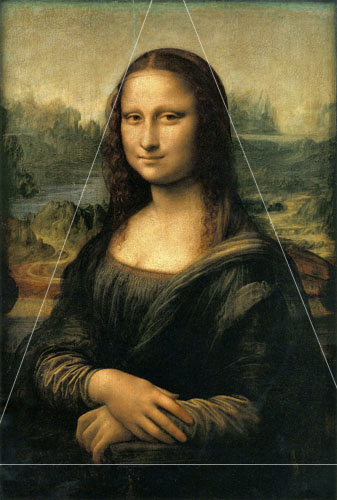
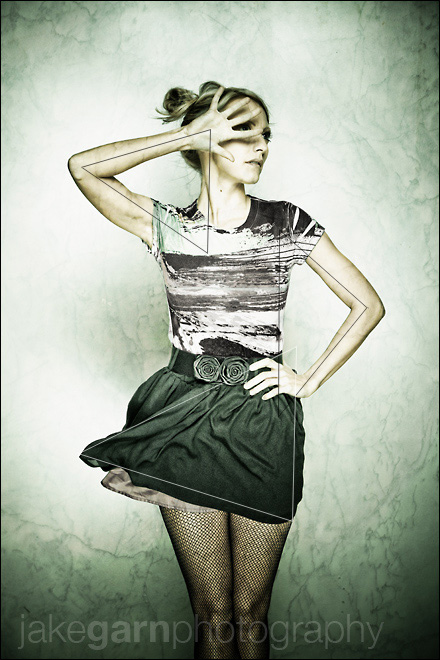
    Using Triangles in Composition & Posing

    This trick is no secret.  In fact it’s not even a trick.  This simple compositional principle is deep rooted in our subconsciousness’ desire for simplicity and completeness.  If something is too simple it’s not complete, if it’s too complex it’s not simple… the triangle has the envied position of being the simplest of all the polygons, after all it has the minimum number of lines required to ‘close’ the shape and promote it from a simple line to a polygon.  Simple and complete, all rolled into a single entity.

    The triangle has hypnotized artists for thousands of years. But you already know all that crap.

    In fact, if you have read just a tiny bit about art or paid a little attention as you look at paintings by the masters (you do go to museums right?) then you know what I’m talking about.

    So why read it again?  Because I’m more entertaining than your stupid art class, that’s why.

    It’s hard to believe that Leonardo Davinci painted the Mona Lisa over five HUNDRED years ago.  What better example of the brilliant use of a single, prominent triangle to create a stunning and simple composition.  But wait you say, “That’s not a triangle, all the corners are cropped out.”  Well, guess what, an implied triangle is just as strong as an actual triangle… and if that doesn’t satisfy your naysaying read the evidence which suggests (and I believe) Leonardo’s masterpiece was originally larger, and probably included the entire shape.

    So there.

    What does this have to do with photography?

    As the photographer you have ultimate control of what you show between the four edges of your frame, that is your kingdom to create whatever it is you want.  Do you need manipulate your whole photo-taking existence around worshiping the triangle and putting one into  every image?  Absolutely not, but if you spot the opportunity to invite the serendipitous triangle into your images when the opportunity presents itself then I think it will give your work that extra, subtle blend of simplicity and completeness.

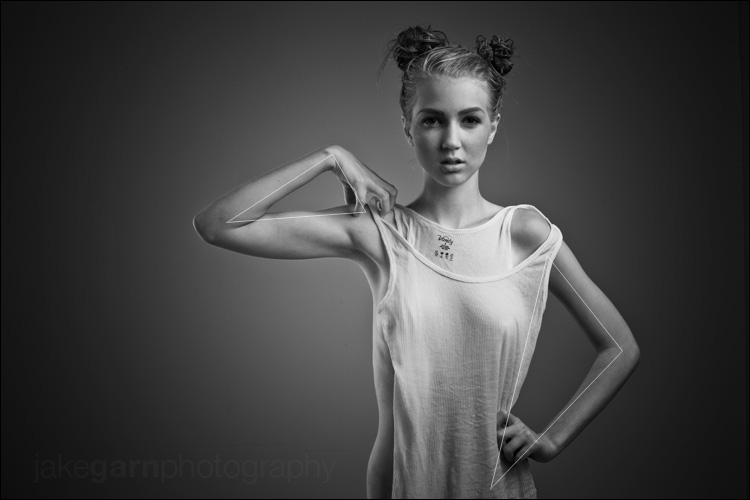
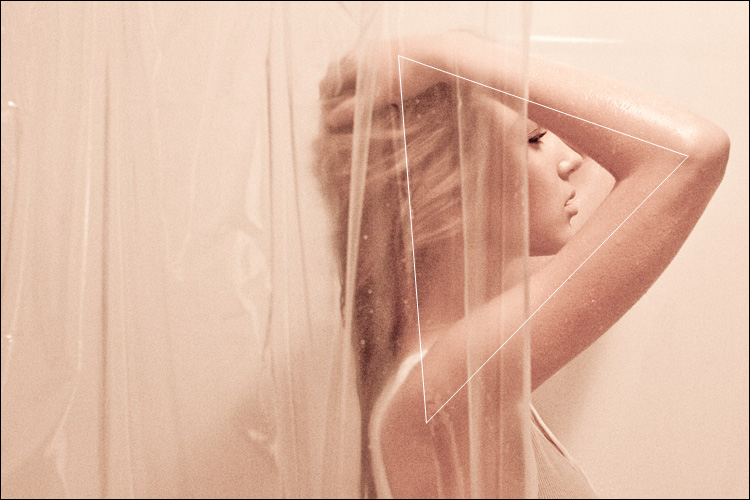
    Some Examples by Jake Garn

    I’m not really sure why these triangles exist, I didn’t really plan them.  I think they are just part of a sub-conscious preference towards arranging subjects into triangles, or maybe it’s a sub-conscious attraction I have towards selecting these types of ‘happy accidents’ in the editing process.  Whatever it is you’ve probably noticed that a lot of my images tend to feature prominent triangles, here are just a handful.  All shot within the last 10 months.

    I’d love to read your comments and thoughts about why YOU think triangles improve composition, or if you disagree completely.  Comment away!

    Equipment Links

    I used different equipment to achieve each of these images but here is a list of some of the items I used most. Links will take you directly to the B&H Photo Video product page for the individual item (the more you buy from them using my links the more encouraged they are to send me product to review for this blog, keep that in mind!) :-)

    • Camera: Canon 5D Mark II
    • Lens: Canon 70-200 f/2.8L IS USM
    • Tripod: Manfrotto 190XPROB
    • Tripod Grip: Manfrotto Ballhead (322RC2)
    • Memory Card: SanDisk Extreme 16GB
    • Strobes: Elinchrom 600RX Monolights and Elinchrom 300RX Monolight
    • Light Modifier: Large Photoflex Softbox with grid
    • Light Modifier: Medium Photoflex Softbox with grid
    • Light Modifier: Rotalux Midi Octa by Elinchrome (53″)
    • Software: Adobe Lightroom & Adobe Photoshop CS5


    Jake Garn Photography

  • Kingston releases 600x CompactFlash card

    Kingston has announced the Ultimate 600x (90MB/s) UDMA CompactFlash memory card in 32GB and 16GB capacities. The fastest CF card from the company to date, it complements HD movie recording capabilities and continuous shooting speeds of the latest UDMA-enabled DSLRs. Kingston joins the list of manufacturers making 600x cards including a 64GB version from Sandisk.
    News: Digital Photography Review (dpreview.com)

  • How Soften Skin Using Dust And Scratches Photoshop Lesson 22

    www.1stoptutorials.com – Time to get in to a filter, we are going to use dust and scratches to help soften the skin and at the same time removing blemishes. Another fun tutorial and well worth watching if you have never used the dust and scratches filter. Any problems let me know

  • Prostate Cancer Surgery

    www.nucleusinc.com This 3D medical animation on prostate cancer surgery shows the laparascopic removal of a cancerous prostate gland and its surrounding tissues. A prostatectomy is a surgery to remove an enlarged prostate gland due to benign prostatic hyperplasia or prostate cancer. Simple or radical prostatectomy can be done using open or laparoscopic techniques. ANCE00192

    3D animation of the house over the stream, from Arquitect, amancio williams, that we made in our studio in 2006 for a proyect of the “Buenos Aires Architects College” to restore the house to his original state. The full documentary animation(vimeo.com include real footage and explanations of the proyect and his history, this is a crop of the main 3d animation part. The music soundtrack is of the composer Amancio Williams, father of the architect and owner of the house. Casa sobre el arroyo, Amancio Williams, 1945 Animación 3D realizada para el Colegio de arquitectos de la Provincia de Buenos Aires, en el marco de un proyecto de restauracion de esta obra de patrimonio realizada por el Arq. Amancio Williams Version completa: vimeo.com Realizada por Estudio Sanzaro, arquitectura digital www.sanzaro.com.ar