The iPhone 6s Plus is the iPhone 6s’ bigger brother and, apart from the larger 5.5-inch screen, mainly distinguishes itself from the smaller model by offering optical image stabilization system in its camera module. Compared to its predecessor, the 6s Plus ups camera resolution to 12MP, adds 50% more phase detection sensors and is capable of 4K footage. Our review tests its camera performance. Read more
Blog
-
How to Understand and Use Lightroom’s Loupe Info Overlay
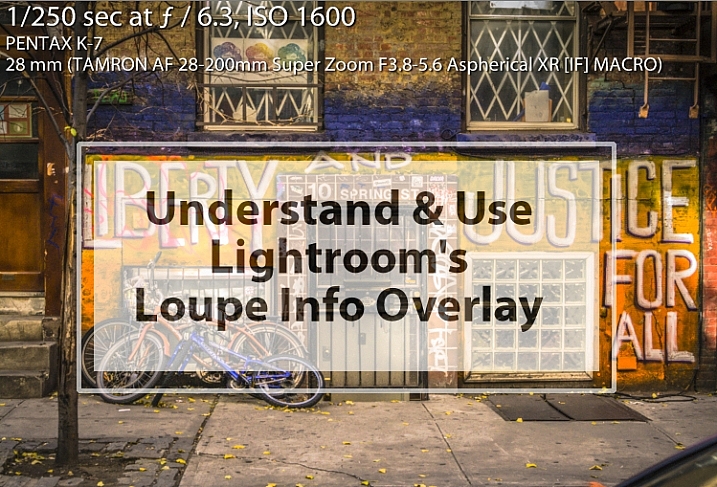
The Lightroom Loupe Info Overlay feature provides valuable information about your photos. Used intelligently it can help you find your photos, and can even help you improve your photography skills. I’ll explain what it is, how to enable and disable it, how to configure it, and some reasons why the Loupe Info Overlay is such a valuable feature.
What is the Loupe Info Overlay?
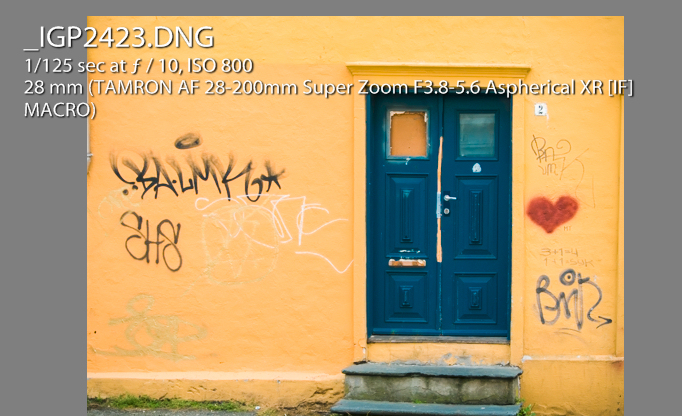
Loupe Info Overlay is a small text overlay which appears in the top left corner of your images in the Develop module inside Lightroom, and when you are viewing images in Loupe view in the Library module. The Loupe Info Overlay confuses many first time Lightroom users when they turn it on, often accidentally, and then struggle to turn it off again.
Turning the Overlay Off and On
To view the Loupe Info Overlay you must be viewing an image in the Develop module, or in the Library module in Loupe (or single image) view. To display the Loupe Info Overlay, tap the I (i) key on your keyboard. Tap the i key repeatedly (but slowly so you can see what you are doing) to rotate through the three options for the Loupe Info Overlay.
They are: (1) Loupe Info Overlay off; (2) Loupe Info 1; and (3) Loupe Info 2. You will see that there are two different overlays which can be separately configured to show a range of information about your images.
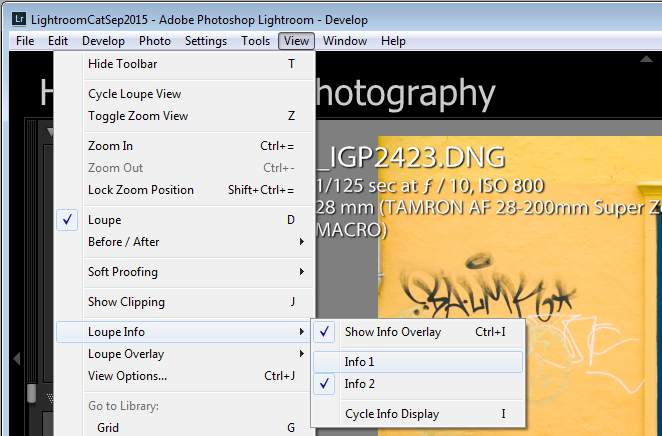
You can also display the Loupe Info Overlay using the Lightroom menus: choose View > Loupe Info and then select Info 1 or Info 2 to display one of the two overlay options. If Show Info Overlay is selected then selecting it again will hide the Loupe Info Overlay.
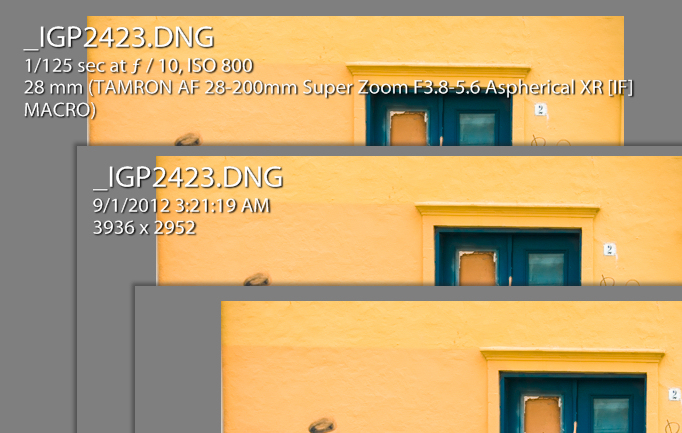
Each Info Overlay is comprised of three lines of information, and you can select only one piece of information from a list of options for each line. The defaults for the Loupe Info Overlays are:
Loupe Info Overlay 1:
- File Name and Copy Name
- Capture Date/ Time
- Crop Dimensions
Loupe Info Overlay 2:
- File Name and Copy Name
- Exposure and ISO
- Lens Setting
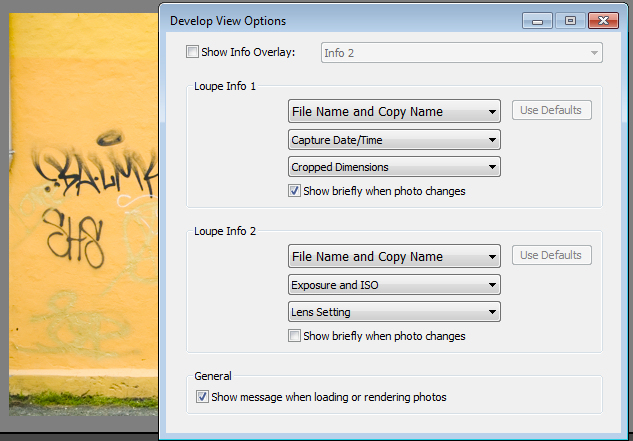
These items can be changed if you select View > View Options, and in the Library Module click the Loupe View tab. Select the Show Info Overlay checkbox and then choose the Info Overlay to show from the dropdown list – it’s a good idea to show the one you are going to change so you can see what it looks like and if the information you are seeing is what you want to see.
To change the information that appears in any of the three lines of the Info Overlay click the appropriate dropdown list – there are three for Loupe Info 1 and three for Loupe Info 2, all in the order they appear on your screen.
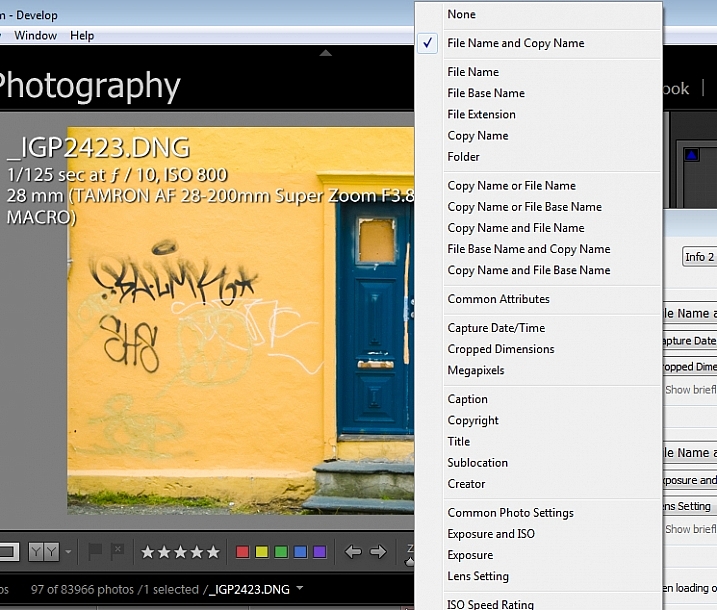
From any of the lists you can select None to turn that line off so nothing displays there, or choose from any of the options on the list. These include a range of file name options, Common Attributes (whether the image is flagged, rated, has a label, or is a virtual copy), the crop dimensions and megapixels.
Also in the list are various items which are extracted from the image metadata such as Copyright, Title, Creator, and Common Photo Settings which include Shutter Speed, Aperture, ISO, the Lens, and the Focal Length. These are also available as individual options so, if you don’t want to see all that detail, you can choose to see Exposure Time, ISO, F-stop, Exposure Bias, Exposure Program, Metering Mode, or Camera + Lens Settings.
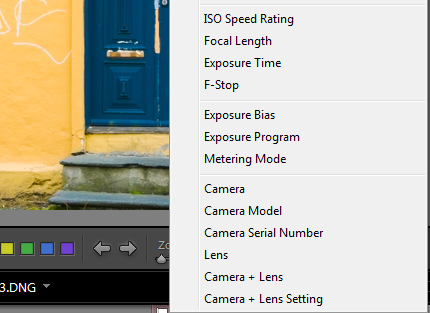
Of the options available, Common Photo Settings is a good one to use if you want to see a lot of information about each shot.
How the Loupe Info Overlay can make you a better photographer
If you plan to use the information from the Loupe Info Overlay to improve your photography, then consider setting the options for one of the Loupe Info Overlays to include Common Photo Settings, Exposure Program and, for example, Metering Mode. This will give you valuable insight into your camera settings at the time you took each shot.
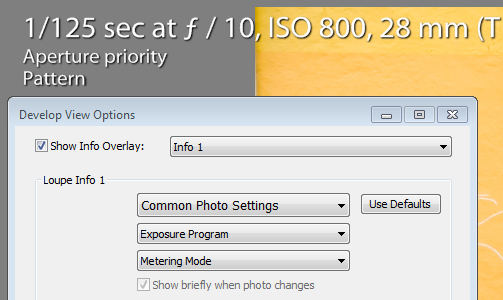
I use the Info Overlay to help photographers who are having issues with their photos. If you set the Loupe Info Overlay to show the camera settings you can determine why, for example, an image is out of focus, too light, or too dark. An out of focus shot may be caused by a shutter speed that is too slow, so that the subject or camera has moved while the shot is being captured. Being able to see the shutter speed will help you determine if it is the reason your photos aren’t sharp.
If you are shooting in manual mode and the shots are too dark (underexposed) it may be that you’re using too fast a shutter speed, too small an aperture, or a combination of both. An overly light (overexposed) image can be caused by too large an aperture, too slow a shutter speed, or both. Displaying aperture, shutter speed and ISO may help you troubleshoot your exposure issues.
Overexposed and underexposed images can also be caused by an incorrect exposure compensation setting. It’s not uncommon for a beginner photographer to set an exposure compensation value without realizing the impact of what they have done. If you set the Loupe Info Overlay to display Exposure Bias you can see if exposure compensation is the cause of incorrect exposure.
The Loupe Info Overlay is a useful tool which can display a wealth of information, some of which can help you troubleshoot problems you are having with your photos.
Now it’s over to you: do you use the Lightroom Info Overlay and, if so, what information do you set it to display and why?
googletag.cmd.push(function() {
tablet_slots.push( googletag.defineSlot( “/1005424/_dPSv4_tab-all-article-bottom_(300×250)”, [300, 250], “pb-ad-78623” ).addService( googletag.pubads() ) ); } );googletag.cmd.push(function() {
mobile_slots.push( googletag.defineSlot( “/1005424/_dPSv4_mob-all-article-bottom_(300×250)”, [300, 250], “pb-ad-78158” ).addService( googletag.pubads() ) ); } );The post How to Understand and Use Lightroom’s Loupe Info Overlay by Helen Bradley appeared first on Digital Photography School.
-
DxO ONE gets 1/20,000sec top shutter speed and better handling via firmware version 1.2

The DxO ONE smartphone companion camera is to benefit from a host of improvements and new features when the company releases new firmware early in December. General handling will be improved with what DxO vaguely describes as ‘instant access to advanced capture parameters and photo information with a simple swipe’ and ‘more control over the entire photo and video capture process’. The DxO ONE will also be compatible with the Apple Watch via a new app designed especially for it, and the DxO ONE will go on sale in Apple Stores.
New features in firmware version 1.2 include the broadening of the shutter speed range to encompass 30-1/20,000sec, and continuous shooting – though the company doesn’t say at what rate. The video mode will allow manual control of aperture, ISO, white balance and ‘more’.
DxO says that the changes have been instigated by user feedback from photographers, and that the new firmware will make the device ‘even more powerful’. For more information visit the DxO website.
Press release:
FOR IMMEDIATE RELEASE
Powerful new features added to the DxO ONE connected camera via software update
Version 1.2 available as a free download for existing DxO ONE users early December
PARIS and SAN FRANCISCO—November 24th, 2015—DxO announced today the availability of the first major software update for the award-winning DxO ONE Professional Quality Connected Camera. The DxO ONE app version 1.2 will be available early December via the iTunes App Store, and will introduce new camera controls based on direct feedback from DxO’s rapidly expanding community of photographers. Version 1.2 makes the DxO ONE camera even more powerful, including new ways to view and interact with advanced photo info, and provides more control over the entire photo and video capture process including via a companion Apple Watch app. The DxO ONE connected camera is now also available in select Apple retail stores nationwide, as well as on Apple’s online store.
“Using the camera has become second nature to me—it’s crazy good. I never imagined standing in a pit lane at a major motorsports event and immediately being able to provide a PR rep images of his team’s pit stop literally seconds after the car pulled away,” said John Thawley, whose images have been featured in print for companies such as Ferrari, Jaguar, Lexus, and Maserati. “I’ve been equally impressed with the DxO team and their responsiveness to feedback and suggestions. It’s nice working with a company that is listening, and I can’t wait to see what the DxO ONE team does next.”
The way you interact with the DxO ONE is even better, thanks to new features that let users get instant access to advanced capture parameters and photo information with a simple swipe. Continuous shooting offers users the ability to shoot several photos in a row by simply depressing the shutter button. The manual focus mode now provides one tap access to hyper-focal distance, and the ability to reposition the magnification loupe for critical focusing. At the request of pro photographers, the shutter speed range has been expanded for capturing even faster motion (1/20000) and longer low-light exposures (30s). Users can now capture high quality video with full manual control of aperture, ISO, white balance and more. DxO ONE selfies are now available in every capture setting and mode, including the ability to record high quality video selfies, ready to share with the world. There’s even a new companion app that lets users remotely trigger a DxO ONE camera with their Apple Watch.
The image scientists, engineers, and designers at DxO are committed to refining the connected camera experience. This relentless pursuit of perfection has been aided by the generous outpouring of support and direction provided by DxO ONE photographers, many of whom, like John Thawley, are established and respected members of the professional community. Thanks to this tight feedback loop, DxO ONE owners can expect to receive a regular cadence of exciting new features in the months and years to come.
Pricing and availability
The DxO ONE Professional Quality Connected Camera is available for purchase at dxo.com and photo retailers for a price of £449 (including VAT). Purchase price includes DxO FilmPack Elite, and for a limited time, DxO OpticsPro Elite (a £258 value).
The DxO ONE iOS app update, and companion Apple Watch app will both be available as free downloads via the iTunes App Store early December. New firmware, also available at the same time, can be easily downloaded via the app and installed on the DxO ONE.
-
Von der Idee zum Bild mit Aida Pascual

Ein Beitrag von: Aida Pascual
Inspirationen kann man überall finden: in Büchern, Liedern, Filmen und Märchen. Mich inspirieren in den meisten Fällen Bilder und Texte aus der Romantik des späten 18. Jahrhunderts, vor allem David Caspar Friedrich. Wie seine Gemälde sind meine Fotografien von Landschaften dominiert und die Menschen stehen in Ehrfurcht vor der Weite der Natur.
kwerfeldein – Fotografie Magazin | Fotocommunity -
Behind the camera: Cristina Mittermeier, conservation photographer
In this video we take a look at the work of Cristina Mittermeier, a conservation photographer who has dedicated her working life to documenting our changing environment and the roles of human communities around the world in protecting it. Founder of the International League of Conservation Photographers, Cristina delivered the keynote talk at our recent PIX 2015 show in Seattle. Check out our video to learn more about her work.
A look at the work of Cristina Mittermeier, conservation photographer
This is sponsored content, produced with the support of Sony. What does this mean?
-
Magic Circle: Laser-Cut Paper Sculptures Inspired by Nature
[ By Steph in Art & Sculpture & Craft. ]

An artist known for spending untold hours painstakingly hand-cutting tiny paper sculptures inspired by diatoms, bacteria, viruses, coral and other natural structures has augmented his process with the precision of lasers. Rogan Brown submerges himself in careful study of the tiniest of living things, such as the microbes and pathogens mimicked in his series ‘Outbreak.’ With ‘Magic Circle,’ Brown places collections of these cut-outs into a large circular display measuring about 40 inches across.


In his paper cuts, Brown “explores the boundaries between observational study and artistic interpretation, existing somewhere between scientific accuracy and pure, unbridled imagination.” While previous works have focused mostly on one type of microscopic organisms at a time, ‘Magic Circle’ brings a variety of them together in one piece.


“This piece is part of a new series of works that mixes hand and laser cutting to create an incredibly detailed and varied visual texture making multiple references: coral, bacteria, pathogens, diatoms, etc… each motif is however completely fictive and imagined; it is this interplay between the imagination and the ‘real’ world that fascinates me, reality is transformed and estranged through the creative process which paradoxically makes the finished work more real and unique.”


‘Magic Circle’ will be on display at Miami’s Aqua Art Fair, December 2nd through 6th. See more impressively intricate paper cuts in a range of styles, from dizzyingly complex patterns to tapestries that span several stories of a gallery.
Want More? Click for Great Related Content on WebUrbanist:

Macro to Micro: Intricate Paper Cut Art Inspired by Nature
What starts as a scientific study takes on a life of its own, guided only by the imagination of artist Rogan Brown as he transforms a sheet of paper into a …
Click Here to Read More »»

Beautiful Bacteria: Infectiously Intricate Paper Cut Art
Few people outside of research scientists are quite so well-acquainted with the bacteria that grows inside the human body as artist Rogan Brown, who spends up …
Click Here to Read More »»

Paper Architecture: Intricate 3D Sculptures by Ingrid Siliakus
Amsterdam-based artist Ingrid Siliakus cuts and folds sheets of paper into dazzlingly detailed three-dimensional buildings and cities.
Click Here to Read More »»


[ By Steph in Art & Sculpture & Craft. ]
[ WebUrbanist | Archives | Galleries | Privacy | TOS ]
-
30. November 2015
Das Bild des Tages von: Ulli Bee
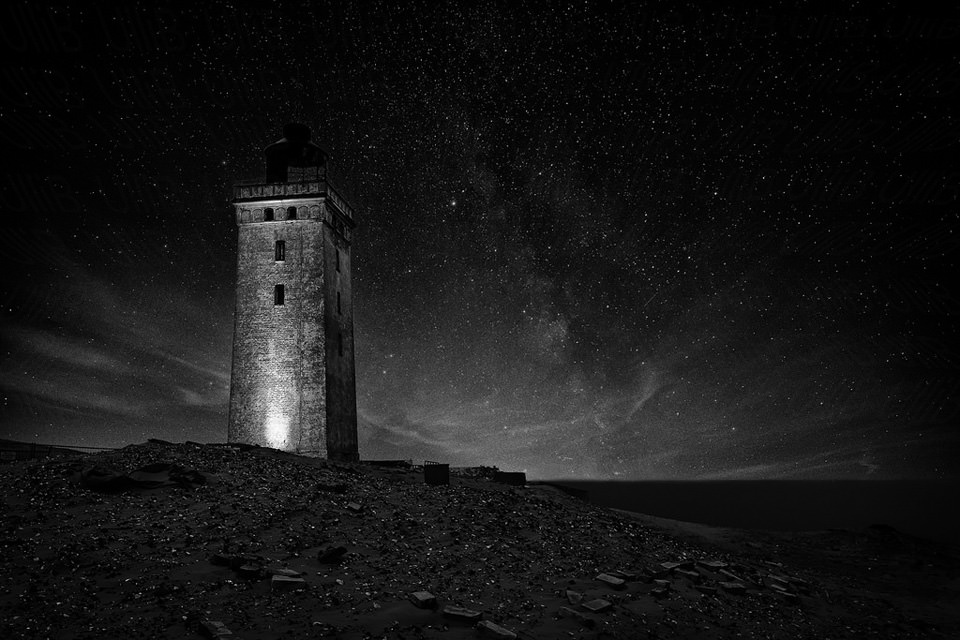
Im Ausblick: RIP Holga, eine ungewöhnliche Tierfreundschaft und über Fotobücher.
kwerfeldein – Fotografie Magazin | Fotocommunity -
Ricoh continues to tease Pentax full-frame DSLR with new image and… not much else.
Ricoh’s string of teaser coverage for its upcoming full-frame Pentax DSLR continues today with a new image of the camera and a press release – though not much in the way of more concrete information. Read more
-
Work Perks: These 13 Offices Are Way More Fun Than Yours
[ By Steph in Design & Fixtures & Interiors. ]

Maybe you wouldn’t grumble about going back to work on Mondays if your office had putting greens and slides, meetings were held in tree houses, and you could work from ski lift pods or ball pits. Some of the perks at the world’s most fun workplaces – mostly made up of tech companies, natch – include three free meals a day, nap areas, fish tank relaxation rooms, full bars, arcades, skate ramps and spiraling slides worthy of theme parks.
Chartboost



Based in San Francisco, the world’s largest games-only technology platform worked with Blitz Architecture to create a fun, interactive environment for employees and visitors alike. Chartboost’s headquarters include a ‘photo op’ wall with an 11-foot-tall dinosaur, a game room with a ball pit and a giant LEGO wall, and five conference rooms with classic game themes like Donkey Kong, Super Mario and the Legend of Zelda.
Red Bull


Red Bull’s Mexico City office boasts a grassy hangout spot full of swings for meetings, while the Santa Monica location features an incredible skate ramp that runs through the entire interior.
Missing Link
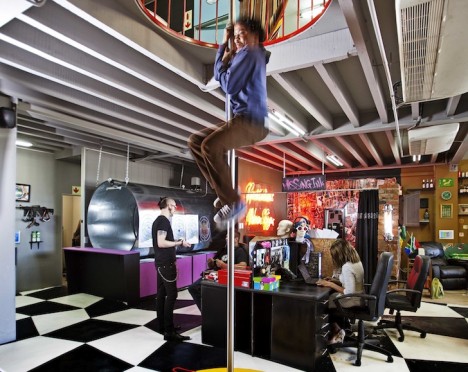
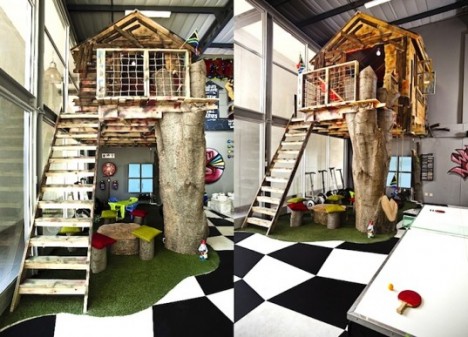

South Africa’s Missing Link, a presentation strategy company, sourced salvage materials to put together a fun and imaginative office in just six weeks. The results include a treehouse, fire pole, playground slide, shooting range and caravan.
YouTube
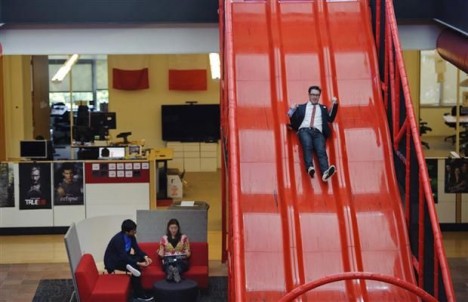

YouTube’s main headquarters in San Bruno, California mixes work and play with a massive red slide, a putting green, an Olympic-sized swimming pool, nap pods and bicycles and scooters to get around the sizable complex.
Google





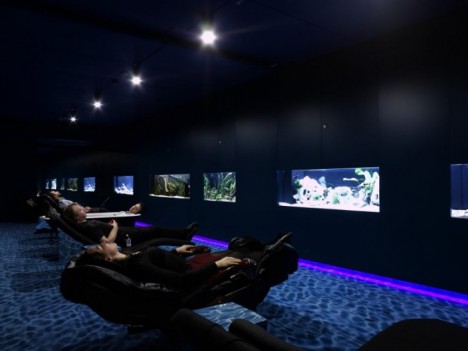
Google is renowned for having not only an enviable range of employee perks, but also some incredibly creative work environments at their offices around the world. The Zurich location is particularly noteworthy with its fish tank relaxation room, ski lift work pods, slides, karaoke room and multiple game rooms.
Next Page – Click Below to Read More:
Work Perks These 13 Offices Are Way More Fun Than Yours
Want More? Click for Great Related Content on WebUrbanist:

Outside Offices: 14 Detached Work Pods, Eggs, Modules & More
These 14 modern detached offices and studios are compact, self-contained and easy to assemble, making them perfect for serene backyard work spaces.
Click Here to Read More »»

Odd Offices: 13 Wacky Outside-the-Box Workspace Designs
Unless you happen to work at Google, your conventional office space is going to seem awfully boring compared to the slides, disappearing desks, …
Click Here to Read More »»

19 Crazy Offices That Think Outside The Cubicle
Reader beware! These offices will make anyone jealous. Break down your cubicle walls and flee to one of these creative businesses – you won’t regret it!
Click Here to Read More »»
[ By Steph in Design & Fixtures & Interiors. ]
[ WebUrbanist | Archives | Galleries | Privacy | TOS ]
-
How to Get the Most out of Membership in Facebook Photography Groups
You can’t avoid them. Photography Facebook communities are everywhere now. Most photographers belong to at least one. You don’t even get a choice – people just add you to groups, and before you know it your newsfeed is just one long stream of photography chatter. And, let’s face it, the quality varies!
Becoming an active member of a great Facebook group can be a fantastic source of inspiration, support, motivation and friendship. It can be a wonderful, life-enhancing experience. I have met true, like-minded friends via these groups over the years.

I used to be a member of a zillion Facebook groups. I tried to engage with all of them before realizing that I was losing weeks of my life interacting with stuff that didn’t really add any value to my photography, or to my life in general. So, I made the decision to cull the groups that I didn’t get much from, and just removed myself without a second thought.
Out of the groups that remained, I chose just three in which to be active. These were the groups I felt strongly connected to. I had become a core member of each and truly enjoyed the people and the chats.
This left a small number of groups in which I decided to become a silent member. I didn’t feel a bond with the group, but I was still getting value from the content. Yes, in some groups, I am one of the lurkers.
I don’t contribute. I might click Like occasionally if I see something wonderful, but I don’t post, but I am not alone. In larger Facebook groups the majority of members are silent. However, you are looking and reading, this doesn’t make you any less important. In fact, nothing could be further from the truth. I am admin for a fabulous Facebook group of learning photographers, and I often get private messages of thanks from members who have never once contributed to a thread. These lurkers are actually very important to me. I know they are quietly consuming the content in the background.

But there is another type of member. They attempt to engage but others don’t respond. They post sporadically in different groups, get dejected, and sometimes even defensive when their posts do not get the engagement that other active members enjoy. No one commented. No one even pressed Like.
Some will grump in silence and decide never to post there again. Some are a little noisier about it…
It is human nature to feel this way. If we go to the effort of putting ourselves out there, then of course we hope for a positive response. When we don’t get one, we feel disappointed, or even rejected. They may think:
- They are cliquey.
- They are unfriendly.
- They have not accepted me.
Sometimes stuff just gets missed. People are busy, posts get buried – that’s life. However, often the reason for the lack of response (or maybe the negative response) is much more to do with you than you might want to believe.
Let’s say you have found a photography Facebook group that you like. It just ‘fits’. You feel an affinity with the other members, the ethos of the group works for you and the content is pitched at your level. Maybe you have just joined or maybe you have been lurking for a while and now you would like to enter the fold.
How do you go about doing that? Especially in a well established group?

I have seen many newbies join Facebook groups and become much-loved members within a few weeks. However, I have also seen others try, only to crash and burn. Here is what I have learned from those who manage to succeed.
1. Take your time. Don’t ask for something straight away.
I see this all the time. A newbie’s first ever post is asking for something from the other members. It might be a request for critique, or a question about a challenge they are having.
Asking for something at this point is not ideal. The other members don’t know you. They don’t feel compelled to help you yet. Not because they don’t like you, but because you haven’t given them a reason to want to help you.
So how do you make people want to help you?
2. Introduce yourself (but your life story isn’t necessary).
Tell everyone who you are, that you are glad to be there, and that you’re looking forward to getting involved. Don’t post an image. Don’t ask for anything at all.
Keep it short and sweet. No one wants to read a random stranger’s autobiography on their newsfeed, however interesting you may think it is.

3. Give of yourself and watch it come back.
If you don’t take the time to respond to others, why would you expect them to respond to you?
Find images you genuinely like and compliment the photographer, or ask them a question about how they achieved it. Photographers love to be congratulated on their work and they enjoy talking about how it was created.
If there was a question posted that you know the answer to, then take some time to craft a response.
If you can identify with a challenge someone else is having, say so. Empathize. The person on the receiving end of your time will be grateful, and they will remember.
4. Engage selectively.
Don’t misinterpret number three above. I am not saying that you should hop onto every thread gushing about everyone’s images, answer every question, and agree with every statement. People-pleasers never win. Not only would other members see right through this, but you would also have no time left in the day for anything else.
Engage with posts which add value to the group and ignore the nonsense (there will be some). Be present in interesting discussions, and frame your responses with respect and intelligence.
You will be remembered.

5. Reach out to like-minded individuals.
We live in a new world. A world where it is actually possible to have good friends you have never met in person. Making friends online can be similar to making friends the traditional way, in that we gravitate towards those we have something in common with.
Look for those people in the group. Maybe they have a similar style to you, or they seem to get your dry sense of humour. Perhaps, like you, they love to geek out on equipment specifications, or they are struggling with the same issues that you are.
Connect with them within the group at first (in a non-stalker way) then later send them a friend request.
6. When posting or commenting, consider motive, wording and tone.
So let’s say you have done everything in numbers 1-6 above. Now your fellow members are much more likely to respond positively to you! They have seen your name pop up for some time now, alongside your considered comments. Maybe they have even been on the receiving end of some of your genuine praise.
They still have to feel inclined to engage with you though. Your motive, wording and tone will all contribute to whether other members interact positively with you.
That, however, is a whole other article…

Do you belong to a Facebook photography group? What makes you decide whether to become a part of that group, whether to remain a lurker or whether to leave?
googletag.cmd.push(function() {
tablet_slots.push( googletag.defineSlot( “/1005424/_dPSv4_tab-all-article-bottom_(300×250)”, [300, 250], “pb-ad-78623” ).addService( googletag.pubads() ) ); } );googletag.cmd.push(function() {
mobile_slots.push( googletag.defineSlot( “/1005424/_dPSv4_mob-all-article-bottom_(300×250)”, [300, 250], “pb-ad-78158” ).addService( googletag.pubads() ) ); } );The post How to Get the Most out of Membership in Facebook Photography Groups by Julie Christie appeared first on Digital Photography School.