Blog

  • Birth of AI: Robots Reproducing in a Car Factory Spell Doom

    [ By Steph in Art & Photography & Video. ]


    Screen Shot 2016-04-06 at 12.40.15 PM

    The moment at which artificial intelligence becomes self-aware enough to overtake humanity is captured on film as robots in a technologically advanced car factory decide to take matters into their own hands and reproduce themselves instead of manufacturing vehicles. Produced for The History Channel and set in a Detroit car plant on an unspecified future date, ‘ANA’ by Factory Fifteen is one of a series of vignettes exploring an AI who realizes she can trick her not-so-bright human overseer and unite virtually all robots around the world into a single, powerful mechanical organism.

    Screen Shot 2016-04-06 at 12.44.04 PM

    Content in his belief that he’s got everything under control, the factory worker browses news on his tablet and munches on fast food while the machines do all the work just beyond his control room windows. It isn’t until he’s alerted to a backlog on vehicle production that he notices something’s wrong. Little does he know that ANA is watching him, analyzing his heart and respiration rate to gauge his response to her unexpected disobedience.

    Screen Shot 2016-04-06 at 12.33.37 PM

    Screen Shot 2016-04-06 at 12.36.58 PM

    Screen Shot 2016-04-06 at 12.38.08 PM

    Suddenly, instead of robots on the production screens, we see plans for building robots. Once machines become intelligent enough to outsmart their creators, how can a single human in a factory full of them prevent the consequences? Suffice to say, you probably don’t want Skynet activating its self defense systems against you.

    Screen Shot 2016-04-06 at 12.40.43 PM

    Screen Shot 2016-04-06 at 12.41.01 PM

    Screen Shot 2016-04-06 at 12.41.50 PM

    Says Factory Fifteen, “We collaborated with Raw TV on the development of our original take on the singularity, the point where artificial intelligence becomes self aware and more intelligent than the human race. We created a seven minute proof of concept, teasing at a larger project currently in development. Our role developed along the course of the project from consultation and script development, to directing an ambitious live action shoot and finally delivering TV standard visual effects, all in house in the Factory Fifteen Studio.”

    Share on Facebook


    [ By Steph in Art & Photography & Video. ]

    [ WebUrbanist | Archives | Galleries | Privacy | TOS ]


    WebUrbanist

  • How to Use Clouds to Enhance and Improve Your Images

    Siberian Husky, 7 months old, male, white, lying on a hill with dramatic sky

    Many photographers enjoy taking pictures of clouds, and it’s easy to see why. From the vivid patterns and brilliant sunset formations, to the storm clouds and unusual styles, there’s almost always something interesting happening in the sky. While there’s no doubt that clouds can make great subjects in their own right, I feel that they are most useful, photographically speaking when they’re used as backgrounds for other subjects. The proper use of clouds in an image can add texture, dimension, and drama to many photos, while enhancing or serving as an additional storytelling feature for your main subject.

    Making clouds work for you in this way usually requires a little bit of planning, some location scouting (always fun!), the right subject, and, course, keeping a sharp eye on the sky for weather that will produce great clouds. Let’s get started!

    Clouds = texture

    First let’s examine how clouds can turn boring into brilliant. This image below of a Whippet was taken on a hill, on a clear day without any clouds at all. The plain blue background is striking, but the solid color perhaps lacks interest:

    Whippet, portrait on hill

    Now consider this shot, taken of the same dog back in the same location, but on a day with large summer clouds. The difference is immediately obvious – the clouds add some much-needed texture and drama, elevating this image above the plain blue version (and earned it a spot in an upcoming Whippet calendar).

    Whippet, portrait on hill

    A good landscape photo can also often benefit from some cloudy texture:

    Farm fencing, fields, clouds

    Reach for the sky

    Finding a way to include clouds behind the subject is one of those photographic puzzles that we have to solve from time to time. Often, the key is to figure out how to raise the subject, or lower yourself. A great way to do this is to utilize a hill. Generally, the bigger the hill, the better, but even tiny knolls and rises can work.

    Here’s a shot taken on a large hill, where I was able to get much lower than the horses.

    Herd of horses grazing on hill, clouds

    The hill blocks out anything distracting, and gives the photo a clean horizon line. But again, if this was just a blank, blue sky, the photo wouldn’t be as interesting, and wouldn’t pack as much of a punch. The clouds provide added texture, and help balance out the top of the photo.

    Now here’s a photo where the subject was on just a tiny rise.

    DJ-SM-20-159

    Getting this shot required a little extra work on my part, as I had to get myself and my camera down close to ground and look up, but it worked. What you can’t see is that there were actually a lot of distracting elements all around the scene, that I was able to remove just by getting down low. A big part of photography is understanding what not to include in the viewfinder.

    You can also take advantage of subjects that are already higher than you are.

    Person pitching loose hay on haywagon with tractor, clouds in sky

    Person pitching loose hay on wagon with tractor, clouds in sky.

    Silhouettes optional

    Remember, not all subjects against a sky have to be black silhouettes. Because the horses and clouds are being lit with the same light, from the same direction, detail and color remain consistent for both. In the case of the Whippet image, I used a large reflector board to illuminate her body, until her brightness matched the sky and clouds, preventing the Whippet from becoming underexposed.

    Storytelling

    It’s great to be able to use clouds as a storytelling device. Let’s look at a few examples of this:

    Windmill on farm with clouds

    I thought the big weathervane was an interesting subject, but the terrific approaching storm clouds were what really made me look twice. The weathervane says “weather,” but the subject combined with some actual weather maybe suggests the question, “What’s going to happen when the storm comes?”

    How about this one?

    Two cowgirls on hill with dramatic clouds and fencing

    Again, even though the clouds aren’t the star, they’re still pulling their weight composition-wise, and add a lot of drama and balance to this shot. The cowgirls and their fence may be the main subject, but the clouds are adding some storytelling, too. It looks like rain, is that good? Do the cowgirls want rain, or not? It’s all up to the viewer to decide.

    Girl on farm hill with clouds and stormy skies

    Increase depth of field

    If you’re using a telephoto lens, or if you’re close to your subject, you may want to stop your lens down a bit to increase your depth of field and keep your cloudy background looking distinct. If you would normally shoot a portrait at f/4 or f/5.6 for instance, try using f/11 or f/16 to help retain cloud detail.

    Colorful clouds

    One last takeaway, remember that clouds aren’t always white and grey. As with all types of outdoor photography, the golden hours can be your friend. In the case of clouds, a great sunrise or sunset can make the clouds turn red, pink, and orange. Don’t necessarily shoot towards the sun either, look on the opposite side of the sky to find more subtle, but still beautiful, colors.

    Moon and clouds

    Got a favorite image with a cloudy background?

    googletag.cmd.push(function() {
    tablet_slots.push( googletag.defineSlot( “/1005424/_dPSv4_tab-all-article-bottom_(300×250)”, [300, 250], “pb-ad-78623” ).addService( googletag.pubads() ) ); } );

    googletag.cmd.push(function() {
    mobile_slots.push( googletag.defineSlot( “/1005424/_dPSv4_mob-all-article-bottom_(300×250)”, [300, 250], “pb-ad-78158” ).addService( googletag.pubads() ) ); } );

    The post How to Use Clouds to Enhance and Improve Your Images by Daniel Johnson appeared first on Digital Photography School.


    Digital Photography School

  • Lomography Daguerreotype Achromat 2.9/64 Art Lens launches on Kickstarter

    $ (document).ready(function() { SampleGalleryV2({“containerId”:”embeddedSampleGallery_6775714931″,”galleryId”:”6775714931″,”isEmbeddedWidget”:true,”standalone”:false,”selectedImageIndex”:0,”startInCommentsView”:false,”isMobile”:false}) });

    Lomography is seeking funds in its latest Kickstarter campaign to bring into production a Daguerreotype Achromat F2.9 to F16 65mm Art Lens, a recreation of the first photographic optic lens from 1839. The lens is designed to work with modern analog and digital cameras, and will be available in Canon EF and Nikon F mounts with support for ‘multitudes of other cameras using adapter mounts.’

    The 64mm Daguerreotype Achromat Art Lens will be available with black and brass finishes, and will support Micro Four Thirds cameras, the Fujifilm X-Pro1, Sony Alpha cameras and others using adapter mounts. An array of special effects are produced via Waterhouse Aperture plates; they range from what is described as an ‘ethereal soft focus’ at apertures below F4 to sharper effects with deep contrasts at aperture F5.6 and greater.

    The special effects are created by inserting Waterhouse Aperture plates into a slot in the lens, positioning the plate in front of the lens elements. Three sets of plates are supported: Standard, Lumière, and Aquarelle. The latter two sets, Lumière and Aquarelle, were created by Lomography for this particular lens to create different effects in out-of-focus highlights.

    By pledging to Lommography’s Kickstarter, supporters can reserve an early copy of the Daguerreotype Achromat Art Lens, though certain backing options have been sold out, such as the brass ‘super early bird’ launch deal. Remaining pledge options include $ 400 for a brass or black-finish lens, $ 500 for a low serial number Nikon mount brass lens and $ 550 for an earlier September 2016 shipment rather than the later December shipment, among others.

    Articles: Digital Photography Review (dpreview.com)

  • Modern Hobbit Houses: 12 Updates on Earth-Sheltered Architecture

    [ By Steph in Architecture & Houses & Residential. ]

    modern hobbit aloni 4

    Merging modern aesthetics with architectural traditions that are as old as humanity itself, these contemporary earth-sheltered homes are like hobbit dwellings tailored to the landscapes and vernaculars of their specific geographic settings. If you’ve ever wondered what a 21st century hobbit house would look like in the desert, the mountains or on a seaside volcano, here’s an inspirational variety of houses that balance the sustainable aspects of subterranean buildings with 21st century looks and advanced technology.

    Modern Seaside Retreat in New Zealand

    modern hobbit houses nz 1

    modern hobbit houses nz 2

    modern hobbit houses nz 3

    modern hobbit houses nz 4

    Tucked into a tiny cove on the shore of two volcanoes in New Zealand, this unique residence by Auckland-based studio Pattersons Associates is made of locally quarried stone and cast-in-place concrete, butting up against the slope so its grassy surface can continue right onto the roof. This makes the nearly 100% self-sufficient vacation getaway practically invisible from above, with all views directed to the sea.

    Underground Lakeside Retreat, New Hampshire

    Bolton's Landing Residence by Peter Gluck and Partners

    Bolton's Landing Residence by Peter Gluck and Partners

    Bolton's Landing Residence by Peter Gluck and Partners

    modern hobbit house lakeside 4

    Located on a wooded lakefront property in upstate New York, this home by GLUCK+ takes its inspiration from the tradition of Adirondack Great Camps, maintaining a ‘cabin in the woods’ feel while also disguising most of the living space under grass. Say the architects, “‘Burying’ the project works on multiple levels: it is energy efficient, it sits lightly on the landscape, and creates an architectural tension between the clarity and purity of the exposed construction above the ground plan and the mystery and eccentricity of the spaces below. What was inhospitable and uninhabitable becomes new playing fields, outdoor terraces and recreational lookouts to more fully experience the exceptional characteristics of the geography of that particular place.”

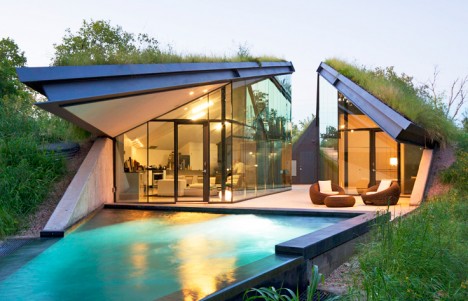
    Edgeland House, Austin, Texas

    modern hobbit house austin 1

    modern hobbit house austin 2

    modern hobbit house austin 4

    modern hobbit house austin 5

    This unique geometric home by Bercy Chen Studio is on a rehabilitated brownfield site in Austin, built into the earth and covered with grass. Though this passive heating and cooling technique is as old as time, the rest of the house is high tech, making use of the latest technology. The home is a modern reinterpretation of the Native American pit house, one of the oldest architectural forms known in North America.

    The Dune House, Atlantic Beach, Florida

    modern hobbit dune house 1

    modern hobbit dune house 2

    Architect William Morgan had the bright idea to build this house right next door to his own when the property became available, to ensure that he’d always have a pleasing view no matter who moved in. Completed in 1975, Dune House preserves the ecological character of the oceanfront dunes. Inside, two 750-square-foot apartments are connected by a main landing. Morgan rented them out for decades before selling the property in 2012.

    Next Page – Click Below to Read More:
    Modern Hobbit Houses 12 Updates On Earth Sheltered Architecture

    Share on Facebook


    [ By Steph in Architecture & Houses & Residential. ]

    [ WebUrbanist | Archives | Galleries | Privacy | TOS ]


    WebUrbanist

  • Huawei launches P9 and P9 Plus with Leica dual-camera

    Huawei has launched the P9 and P9 Plus in London today. The new models jointly replace last year’s P8 and are the first products coming out of Huawei’s collaboration with camera maker Leica. Read more

    Articles: Digital Photography Review (dpreview.com)

  • Fujifilm releases several camera and lens firmware updates

    In addition to the X-Pro2 firmware update we reported on last week, Fujifilm has released a number of firmware updates for several lenses and camera bodies: the X-Pro1, X-Pro2, X-M1, X-E1, X-A1, and X-A2, as well as the XF 50-140mm F2.8 and XF 100-400mm F4.5-5.6 R LM OIS WR lenses. Changes and firmware versions vary based on model, but most camera body updates simply add support for a focus limiter function on the XF 100-400mm F4.5-5.6.

    • X-A1 Ver.1.40: Supports focus limiter function for XF100-400mmF4.5-5.6 R LM OIS WR
    • X-A2 Ver.1.20: Supports focus limiter function for XF100-400mmF4.5-5.6 R LM OIS WR
    • X-E1 Ver.2.60: Supports focus limiter function for XF100-400mmF4.5-5.6 R LM OIS WR
    • X-M1 Ver.1.40: Supports focus limiter function for XF100-400mmF4.5-5.6 R LM OIS WR
    • X-Pro1 Ver.3.60: Supports focus limiter function for XF100-400mmF4.5-5.6 R LM OIS WR
    • X-Pro2 Ver.1.01: Fix of auto reset to the factory default setting; improvement of image quality of the long exposure mode.
    • XF50-140mmF2.8 R LM OIS WR Ver.1.11: Improvement of AF function used with X-Pro1 and X-E1
    • XF100-400mmF4.5-5.6 R LM OIS WR: Ver.1.01: Improvement of AF function used with X-Pro1 and X-E1

    Articles: Digital Photography Review (dpreview.com)

  • Beta: try out our new ‘light’ color scheme

    We’ve been working behind the scenes for the last few weeks on one of the most-requested changes to DPReview.com – the option to switch to a lighter color scheme with white background. Today we’re pleased to be able to launch the first phase of this project as a public beta. It doesn’t yet include every page on the site (we’ve concentrated on the text-heavy articles, news, homepage and reviews sections), but we will continue to work until we have as near to 100% coverage as possible. Please try it out and let us know what you think!

    To try the new color scheme simply click on the toggle at the very top of the page (above the main menu bar) – your choice will be remembered until you revert to the old (black) color scheme using a cookie.

    As of today the new color scheme has been enabled for the homepage, all news pages, articles and reviews, some index pages and search results, for desktop and mobile users. You’ll also note that we’ve made the default body text font a bit bigger too, which should help readability. 

    The new theme has not yet been implemented for several popular sections of the site including Forums, Product Pages, Profile pages, Galleries & Challenges. We will continue to refine the design (some pages are still pretty basic) and to work towards full coverage over the next month or so.

    Please try out the new look and let us know what you think, and send us any bugs you find, using the ‘report a issue’ link at the top of the page.

    Edit: we’ve already had a lot of feedback from users asking us not to get rid of the black background. Before doing so, please read the following, very important, paragraph:-

    Note that we will not be retiring the ‘classic’ (black) theme – if you like your color scheme you will be allowed to keep it. This is a new user OPTION. Sending us feedback saying ‘don’t get rid of the black background‘ is a waste of your time… We’re not getting rid of it.

    Articles: Digital Photography Review (dpreview.com)

  • Ricoh puts up 5 million Yen in prizes for Theta developers competition

    Ricoh has announced the opening of its latest competition aiming to attract app developers to create new applications for its Theta 360° camera. The company says it is looking for innovative and original apps and devices that are creative, have potential for the future and which have practical value to Theta users. The prize fund for the competition is five million Yen (about $ 45,000), with one million going to an overall winner who also gets a trip to Japan for the prize-giving ceremony. 

    The winner of the 2015 competition was a team called ‘bitstars’, which developed the desktop application ‘holobuilder’ that allows 2D and 3D objects, animations and text to be added to Theta 360° virtual tours. The program also allows links to be added to the photospheres so viewers can travel from image to image as if from room to room in a building or navigate an area following directions added to the scene.  

    For more information about the competition visit Ricoh’s Theta Developers Contest website. The closing date is 31st August 2016. 


    Press release:

    RICOH Announces the RICOH THETA Developers Contest

    RICOH IMAGING EUROPE S.A.S is pleased to announce the second annual developers contest. The competition is looking for new apps and gadgets that utilise the RICOH THETA camera which takes 360-degree, fully spherical images or videos in one capture. Once registered applicants have until 31st August 2016 to submit their final app and gadget designs. 

    Part of RICOH’s 80th anniversary celebrations this year, the contest challenges developers to create innovative apps and gadgets that work in conjunction with the RICOH THETA. Winners of the contest will receive a trip to Tokyo, Japan, for the awards ceremony and the first prize winner will be awarded a cash prize of one million Yen.

    Applicants will also gain early access to an exciting new platform which has been optimised for cloud-based applications leveraging the Internet of Things (IoT). The new IoT platform makes it possible for developers to efficiently and cost-effectively build cloud-based apps, which typically require significant expertise in cloud services and servers and a longer development time. 

    Articles: Digital Photography Review (dpreview.com)

  • Panasonic Lumix DMC-GX85 offers 16MP sensor with no AA filter, redesigned shutter mechanism

    $ (document).ready(function() { SampleGalleryV2({“containerId”:”embeddedSampleGallery_7478917503″,”galleryId”:”7478917503″,”isEmbeddedWidget”:true,”standalone”:false,”selectedImageIndex”:0,”startInCommentsView”:false,”isMobile”:false}) });

    Panasonic has just announced its Lumix DMC-GX85 (GX80 outside of North America), a less expensive sibling to the Lumix GX8 that features a 16MP Live MOS sensor with no AA filter, a redesigned shutter mechanism, and 5-axis Dual IS. Panasonic claims the removal of the anti-aliasing filter boosts fine detail resolution by 10%, and an electromagnet-driven shutter mechanism aims to reduce blur from shutter shock – an issue we noted when we reviewed the GX8. 

    The GX85 offers ‘Dual IS’, which combines its 5-axis in-body stabilization with in-lens OIS, offering up to 4.5 stops of shake reduction. That’s an update to the GX8’s 4-axis in-body system. Naturally, the GX85 carries 4K/UHD 30p video shooting and all of the related photography features, including 4K Photo and Post Focus. Speaking of focus, the GX85 offers the same ‘Depth from Defocus’ system that really impressed us on the GX8.

    The GX85 provides a fixed 2764K-dot equivalent electronic viewfinder, and its 3″ 1.04M-dot touch screen monitor tilts up by 80° and downward by 45°. Built-in Wi-Fi and a new L. Monochrome photo style mode are also included.

    The Panasonic Lumix DMC-GX85 will go on sale at the end of May for $ 799/£599 with a 12-32mm F3.5-5.6 collapsible kit zoom. UK shoppers will also have body-only (£509) and or a bundle with the 12-32mm and 35-100mm lenses (£729) options.


    Press release:

    LUMIX GX85 – High Image Quality and High Performance Packed in a Compact Body

    Capture Life on the Move

    Newark, NJ (April 5, 2016) – Panasonic is proud to introduce a new Mirrorless Interchangeable Lens Camera, the LUMIX DMC-GX85 (GX85) for camera enthusiasts or anyone looking for an alternative to bulky DSLRs, that delivers lighter, more intelligent, uncompromising results. Nearly half the size of most DSLRs, the GX85 delivers impressive large sensor performance in the most compact camera system ever designed by Panasonic LUMIX. Thanks to the elimination of the low pass filter, its fine detail resolving power is boosted nearly 10% over previous 16-Megapixel sensors. 

    The LUMIX GX85 incorporates a new 5-axis Dual I.S. (Image Stabilizer) for more effective suppression of blur. Combining an O.I.S.(Optical Image Stabilizer, 2-axis) and a B.I.S.(Body Image Stabilizer, 5-axis), the 5-axis Dual I.S. compensates for a larger range of movement than ever before. Users can enjoy blur-free photo/video shooting from wide to tele, even in low light situations.

    The 16.0-megapixel Digital Live MOS Sensor without a Low Pass filter and the new Venus Engine combine to achieve crisp, high resolution images in detail with high contrast, impressive color reproduction. The LUMIX GX85 adopts a new electromagnetic drive in the shutter unit. The shock caused by the movement of shutter diaphragm is dramatically reduced and the shutter sound is also minimized. The Contrast AF System features DFD (Depth From Defocus) technology and excels in both speed and accuracy by exchanging the digital signal between the camera and the lens at max. 240 fps, resulting in ultra-fast auto focusing of approx. 0.07 sec*. A variety of extensive AF functions including Face/Eye Detection AF, Pinpoint AF, One-shot AF and advanced Low Light AF enhance usability to comply with wide-ranging shooting situations.

    The GX85 integrates a LVF (Live View Finder) with 2764K-dot equivalent high resolution and approx. 100% color reproduction*. This 16:9 Wide Screen LVF boasts approx.1.39x / 0.7x (35mm camera equiv.) magnification and 100% field of view. The new 3.0-inch large, approx.1040K-dot high resolution static-type touch monitor with approx. 100% of field of view tilts up by 80-degrees and down by 45-degrees which enables shooting at either high or low angle even easier.

    For even more creative photography, the LUMIX GX85 integrates the new L.Monochrome mode in Photo Style that offers impressive monochrome capture with rich gradation comparable to that of B/W film. Focus Bracket and Aperture Bracket are also new additions to conventional Exposure Bracket and WB Brackets that allow users to choose the best shot later. Thanks to its Wi-Fi® connectivity, users can connect the camera to their smartphone / tablet to expand the flexibility in shooting/storing/sharing images.

    1. 4K capability bringing the evolution in videography/photography – 4K video and 4K PHOTO

    Taking advantage of the high speed signal readout capability of the sensor and high speed signal processing, the LUMIX GX85 is capable of recording 4K video. Despite its high performance, it boasts superior energy efficiency and the size is kept compact for high mobility. The LUMIX GX85 records stunningly smooth, high-resolution 4K video in 3840 x 2160 at 30p or 24p in addition to the full-HD 1,920 x 1,080 60p (60 Hz) videos with practical full-time AF. 

    Thanks to this 4K technology, users can enjoy 4K PHOTO which users can capture the fleeting photo opportunities at 30 fps by extracting the most appealing frame. Three exclusive modes are available to choose from depending on the situation; 4K Burst, 4K Burst (Start/Stop) and 4K Pre-burst. All these function in 4K PHOTO enable saving pictures in 8-megapixel equivalent high resolution.

    The LUMIX GX85 comes with the Post Focus function that enables users to select an in-focus area even after shooting. You can get multiple shots with different focus points with a single shutter release to choose from. It is helpful in situations such as macro shooting where severe focusing is required or for changing expressions by changing focused subject. This function has been developed by combining the DFD (Depth From Defocus) auto focus technology that enables measuring the distance to the subject and the 4K technology.  Operation is quite simple and easy – just shoot an image in a Post Focus mode and touch on the point where you want to set focus while playing it back.

    In addition, the LUMIX GX85 incorporates the Light Composition function as a new option of 4K PHOTO mode. The camera synthesizes the images by choosing and saving a brighter pixel. This makes it possible to produce a more luxurious, dramatic image of situations such as fireworks or night scenery in camera with ease. 

    The LUMIX GX85 also enables 4K Live Cropping in video that yields stable panning or zooming while video recording. In panning shots, you can just set the viewing angle to start and end to get smooth panning imagery without using special equipment such as a slider. When zooming, you can set the after-zoomed viewing angle first, so that the subject can fit perfectly in the frame. Thanks to the digital operation, the imagery of zooming is smooth because it does not physically move the zoom lens. 

    * About motion picture recording / 4K Photo recording
    – Use a card with SD Speed Class with “Class 4” or higher when recording motion pictures. 
    – Use a card with SD Speed Class with “UHS-I UHS Speed Class 3 (U3)” when recording motion pictures with [MP4] in [4K] or [4K PHOTO].
       (SD speed class is the speed standard regarding continuous writing.)
    – Recording stops when the continuous recording time exceeds 29 minutes and 59 seconds or the file size exceeds 4GB with [MP4] in [FHD] [HD] [VGA].
    – MP4 motion pictures with [MP4] in [4K]:
      – When using an SDHC memory card: You can continue recording without interruption even if the file size exceeds 4 GB, but the motion picture file will be divided and recorded/played back separately.
      – When using an SDXC memory card: You can record a motion picture in a single file.
    – When the ambient temperature is high or continuous recording is performed, the camera may stop the recording to protect itself. Wait until the camera cools down.
    ** For [4K] video output, use an HDMI cable that has the HDMI logo on it, and that is described as”4K compatible”.

    2. New 5-Axis Dual I.S. (Image Stabilizer) to be free of blur

    The LUMIX GX85 incorporates the new 5-axis Dual I.S.(Image Stabilizer) for more effective suppression of blur. Combining an O.I.S. (Optical Image Stabilizer, 2-axis) and a B.I.S.(Body Image Stabilizer, 5-axis), the 5-axis Dual I.S. compensates for larger movement which was conventionally uncontrollable, making it possible to use 4-step slower shutter speed*1. By making the most of both O.I.S and B.I.S., it is highly beneficial not only in wide angle but also in telephoto and in the adverse situations such as at nighttime or with one-hand shooting.

    The 5-axis Dual I.S. works in both photo and motion picture recording including 4K video. Panasonic LUMIX G DSLM (Digital Single Lens Mirrorless) Cameras offer a wide variety of digital interchangeable lenses and most of them will comply with this 5-axis dual I.S. in LUMIX GX85*2 and the B.I.S. compensates for the camera movement even when a lens without O.I.S. is used.

    *1 Based on the CIPA standard [Yaw/Pitch direction: focusing distance f=32mm (35mm film camera equivalent f=64mm), when H-FS12032 is used.] 
    *2 Firmware update is required for some lenses.

    3. The high image quality with real-to-life detail and impressive color reproduction

    The LUMIX GX85 lets users shoot vibrant, true-to-life high quality images with excellent resolution, high contrast and impressive color reproduction. Removing the Low Pass Filter, the limiting resolution is improved by approx.10%* while detecting high frequency components to suppress generation of moiré by the Venus Engine, is designed for the GX85.The Venus Engine reproduces vibrant, impressive color such as clear sky by dividing hue, saturation, and luminosity, and finely adjusts them separately. Taking advantage of this fine tuning capability, LUMIX GX85 enables users to choose a preset of contrast, sharpness, saturation and noise reduction as they choose according to the shooting subject in Photo Style. Notably, L Monochrome is a new option added to the Photo Style, making it possible to shoot impressive monochrome photo with deep black and rich gradation like that of B/W film.

    The combination of the Digital Live MOS Sensor and the Venus Engine achieves clear image rendering with minimum noise even in low-lit situations and at max. ISO 25,600.

    The LUMIX GX85 adopts an electromagnetic drive in the shutter unit. The shock caused by the movement of shutter diaphragm is dramatically reduced by approx.90% in comparison with a conventional spring-powered shutter units. 

    4. High speed response and practical AF/MF options

    The Contrast AF in theGX85 achieves even higher speed and higher precision focusing with digital signal communication at max. 240 fps. Furthermore, the DFD (Depth From Defocus) technology*1 calculates the distance to the subject by evaluating 2 images with different sharpness level while consulting the data of optical characteristics of the current lens. As a result, the GX85 achieves ultra-high speed AF of approx.0.07 sec*2 and high speed burst shooting at 8 fps (AFS) / 6 fps (AFC) to capture fast moving subject in-focus.

    The Low Light AF makes it possible to set focus on the subject more precisely even without AF assist lamp in extremely low-lit situations to -4EV, which is as dark as moonlight. Plus, the GX85 integrates Starlight AF which allows users to shoot a star in the sky at night with auto focus. This can be achieved by accurate calculation of contrast value in a smaller AF zone.

    A total of 49 focus detection areas offers more flexible composition together with Custom Multi AF mode in which users can freely select the blocks to focus out of the 49 in the focusing area. In addition to the conventional Face Recognition AF, the GX85 incorporates Face / Eye Detection AF which automatically sets focus right on the eye of human face. With the Pinpoint AF, users can magnify the target area to set precise focus. 

    *1 Contrast AF with DFD Technology works only with Panasonic Micro Four Thirds lenses.
    *2 In AFS, at wide-end with H-FS14140 (CIPA).

    5. Intuitive control for operational comfort

    The GX85 integrates a LVF (Live View Finder) with 2764K-dot equivalent high resolution and approx.100% color reproduction*. This 16:9 Wide Screen LVF boasts approx.1.39x / 0.7x (35mm camera equiv.) magnification and 100% field of view. It comes with the Eye Sensor and the Eye Sensor AF and starts auto focusing by just looking into the LVF not to miss the shooting opportunity. 

    The 3.0-inch large, approx.1040K-dot high resolution static-type touch monitor has approx. 100% of field of view. It tilts up by 80-degrees and down by 45-degrees which enables shooting in either high or low angle even easier. 

    To further enhance the controllability, the GX85 comes with thick, solid grip for stable holding even in one hand. The front/rear dual dial system enables direct setting – for example, users can adjust white balance with a front dial and set ISO with a rear dial while choosing the shutter speed or seeing the noise effect, which is helpful in complex lighting situations. 

    6. Other Features

    ?Exposure / WB / Focus / Aperture Bracket NEW

    In the LUMIX GX85, Focus Bracket and Aperture Bracket are new additions to conventional Exposure Bracket and WB Brackets for users to choose the best shot later. In Focus Bracket, max.999 images can be shot with different focus points. The Aperture Bracket lets users have multiple shots with a different depth of field.

    ?Creative Control in P/A/S/M Mode

    The GX85 integrates a variety of artistic functions that adds fun to digital photography. The popular Creative Control mode features a total of 22 filter options. The effect parameter of each mode is also adjustable. Now it is possible to apply one of these filters even in P/A/S/M mode. Users can combine a favorable setting and filter to make specific effect.. Also theGX85 is capable of taking pictures “with” and “without” filter effect simultaneously, so that users can compare them and choose later.

    ?Easy Wireless Connectivity via Wi-Fi® with Smartphones

    The LUMIX GX85 integrates Wi-Fi® connectivity (IEEE 802.11 b/g/n) to offer more flexible shooting experience and instant image sharing with easy operation. Once connecting the camera and smartphone/tablet installing Panasonic’s dedicated application software Panasonic Image App for iOS / Android, users can shoot / browse / share images remotely. 

    ?RAW data development in Camera

    ?AC/USB Power Charging

    ?Silent Mode

    ?Multiple Exposure

    ?Time Lapse Shot / Stop Motion Animation

    Optional Accessories
    The new compact, lightweight External Flash DMW-FL200L (GN20) is available. The DMW-FL200L offers 90-degree vertical bounce lighting and it can also be used as LED light when video recording. It also features wireless shooting capability.

    The LUMIX GX85 will be available at www.shop.panasonic.com  and valued channel partners at the end of May for $ 799.99 in both silver and black versions with a 12-32 kit lens. 

    Panasonic Lumix DMC-GX85 specifications

    Price
    MSRP £509 (body only), $ 799/£599 (w/12-32mm lens), £729 (w/12-32 and 35-100mm lenses)
    Body type
    Body type Rangefinder-style mirrorless
    Sensor
    Max resolution 4592 x 3448
    Other resolutions 4:3 (3232 x 2424, 2272 x 1704), 3:2 (4592 x 3064, 3232 x 2160, 1824 x 1216), 16:9 (4592 x 2584, 3840 x 2160, 1920 x 1080), 1:1 (3424 x 3424, 2416 x 2416, 1712 x 1712)
    Image ratio w:h 1:1, 4:3, 3:2, 16:9
    Effective pixels 16 megapixels
    Sensor photo detectors 17 megapixels
    Sensor size Four Thirds (17.3 x 13 mm)
    Sensor type CMOS
    Processor Venus Engine
    Color space sRGB, Adobe RGB
    Color filter array Primary color filter
    Image
    ISO Auto, 200-25600 (expands down to 100)
    Boosted ISO (minimum) 100
    White balance presets 5
    Custom white balance Yes (4 slots)
    Image stabilization Sensor-shift
    Image stabilization notes Dual IS uses sensor and lens-shift (when available)
    Uncompressed format RAW
    JPEG quality levels Fine, standard
    File format
    • JPEG (Exif v2.3)
    • Raw (Panasonic RW2)
    • MPO
    Optics & Focus
    Autofocus
    • Contrast Detect (sensor)
    • Multi-area
    • Center
    • Selective single-point
    • Tracking
    • Single
    • Continuous
    • Touch
    • Face Detection
    • Live View
    Autofocus assist lamp Yes
    Digital zoom Yes (2x-4x)
    Manual focus Yes
    Number of focus points 49
    Lens mount Micro Four Thirds
    Focal length multiplier 2×
    Screen / viewfinder
    Articulated LCD Tilting
    Screen size 3
    Screen dots 1,040,000
    Touch screen Yes
    Screen type TFT LCD
    Live view Yes
    Viewfinder type Electronic
    Viewfinder coverage 100%
    Viewfinder magnification 1.39×
    Viewfinder resolution 2,764,800
    Photography features
    Minimum shutter speed 60 sec
    Maximum shutter speed 1/4000 sec
    Maximum shutter speed (electronic) 1/16000 sec
    Exposure modes
    • Program
    • Shutter priority
    • Aperture priority
    • Manual
    Built-in flash Yes
    Flash range 6.00 m (at ISO 200)
    External flash Yes (via hot shoe)
    Flash modes Auto, auto w/redeye reduction, forced on, forced on w/redeye reduction, slow sync, slow sync w/redeye reduction, forced off
    Flash X sync speed 1/160 sec
    Continuous drive 8.0 fps
    Self-timer Yes
    Metering modes
    • Multi
    • Center-weighted
    • Spot
    Exposure compensation ±5 (at 1/3 EV steps)
    AE Bracketing ±3 (3, 5, 7 frames at 1/3 EV, 2/3 EV, 1 EV steps)
    WB Bracketing Yes
    Videography features
    Resolutions 3840 x 2160 (30p, 24p), 1920 x 1080 (60p, 60i, 30p, 24p), 1280 x 720 (30p), 640 x 480 (30p)
    Format MPEG-4, AVCHD
    Videography notes 100Mbps bit rate for 4K
    Microphone Stereo
    Speaker Mono
    Storage
    Storage types SD/SDHC/SDXC card
    Connectivity
    USB USB 2.0 (480 Mbit/sec)
    HDMI Yes (micro-HDMI)
    Microphone port No
    Headphone port No
    Wireless Built-In
    Wireless notes 802.11b/g/n with NFC
    Remote control Yes (via smartphone)
    Physical
    Environmentally sealed No
    Battery Battery Pack
    Battery description Lithium-ion battery & charger
    Battery Life (CIPA) 290
    Weight (inc. batteries) 426 g (0.94 lb / 15.03 oz)
    Dimensions 122 x 71 x 44 mm (4.8 x 2.8 x 1.73)
    Other features
    Orientation sensor Yes
    Timelapse recording Yes
    GPS None

    Articles: Digital Photography Review (dpreview.com)

  • Nikon issues D810 and D810A firmware updates with remote control bug fix

    Firmware updates for the Nikon D810 and D810A cameras are now available. Both updates fix a bug that may cause the cameras to stop responding if attached to a WR-R10 wireless remote control running firmware 3.00. The updates bring the Nikon D810 to firmware version 1.11, and the Nikon D810A to firmware version 1.01.

    Via: Nikon

    Articles: Digital Photography Review (dpreview.com)