Blog

  • Design Copyright Debate: Cheap Replica Eames Chairs Sold for 90% Less

    [ By WebUrbanist in Design & Furniture & Decor. ]

    discount famous chair design

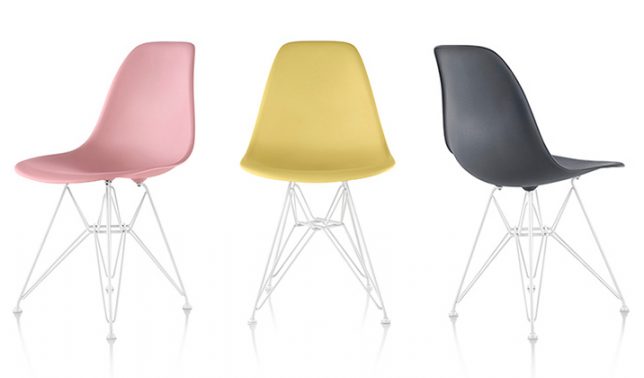
    Seated at the center of a new design-related copyright conversation, a series of Eiffel chairs sold by discount superstore Aldi has designers arguing on both sides.

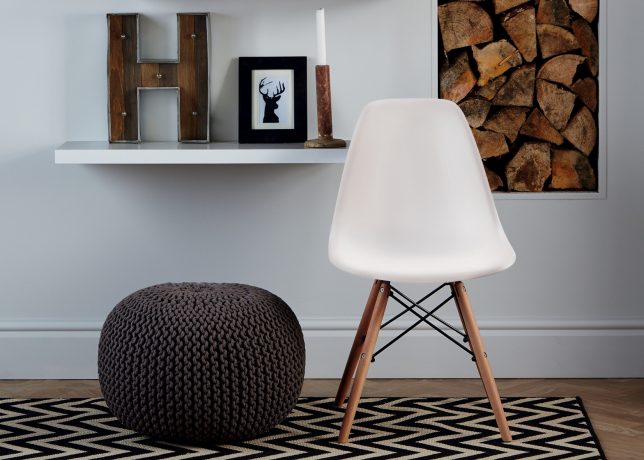
    The chairs in question look significantly like the DSW Eames Plastic Chair (designed by Charles and Ray Eames in 1950), currently made by copyright holders Vitra in Switzerland.

    eiffel eames chair copy

    Critics point out that Aldi has been caught doing this before, selling things like Mies van der Rohe’s Barcelona Chair on countries where it can avoid copyright entanglements, either because the copyrights have expired or replicas are permitted by law.

    Defenders of the discount retailer argue that the entire point of these plastic chairs was to create something cheap, comfortable and easy to mass produce. In other words: the fact that replicas sell for 40 GBP and licensed remakes sell for ten times that goes against the intent of the designers.

    Either way, Aldi seems to way to stay out of the fray, perhaps planning to hide behind slight design differences when it comes to the structure, materials and details of the seats.

    eamges moled chair original

    In some places, like the United Kingdom, changes to laws have been proposed or are in the works, which may provide additional protections for rights holders now and into the future.

    There is a larger question at work here though too: how close do designs have to be for them to risk creating intellectual property controversies? There are, after all, only so many ways to plan, design and construct a chair for a human occupant. These days, so many 3D models of seats have been uploaded to programs like SketchUp and it is easier than ever to simply cut, paste and print a copy of one’s own on a 3D printer.

    Share on Facebook


    [ By WebUrbanist in Design & Furniture & Decor. ]

    [ WebUrbanist | Archives | Galleries | Privacy | TOS ]


    WebUrbanist

  • OOWA smartphone lenses use ‘free-form’ tech for improved image quality

    DynaOptics, an optical engineering company that has previously looked at bringing zoom lenses to smartphones, has launched a Kickstarter campaign for its OOWA smartphone add-on lenses. 

    The lenses, a 2.5x tele-lens with an equivalent focal length of 75mm and a 15mm equivalent super-wide-angle, use DynaOptics’ patented free-form system design methodology which promises improved edge-to-edge sharpness, minimal distortion, no chromatic aberrations and no vignetting, compared to conventional optical designs. This is achieved through a rotationally asymmetric design that optimizes image quality in a rectangular shape (i.e, the shape of an imaging sensor). In contrast, conventional rotationally symmetric lenses optimize image quality in a circle.

    Both lenses attach to iPhone 6-series models via an included protective case. The tele-lens has 5 elements, one made from glass and 4 made out of plastic. The wide-angle has three plastic elements and one glass element. 

    You can currently secure either lens by pledging $ 65 on the OOWA Kickstarter page, or $ 120 for the kit. If you like the idea behind the lenses but don’t currently own an iPhone you can also help OOWA select the next devices that it will make lenses available for. Samples and comparison shots can be be found on the DynaOptics website.

    Press Release:

    Palo Alto, CA and Singapore – June 8, 2016 – DynaOptics, an innovator in optics technology, entered the mobile photography market today with OOWA, a suite of iPhone lens attachments powered by free-form lenses. OOWA’s high-quality wide-angle and telephoto lenses, together with protective phone cases, are available for pre-order on Kickstarter now.

    “The introduction of OOWA lenses marks a true innovation in the world of optics: for the first time, a free-form lens is incorporated into a camera lens,” said Li Han Chan, DynaOptics CEO and co-founder. “OOWA’s precision-crafted lens attachments are now available for the iPhone 6 series. Our technology empowers these users to see the world from a fresh perspective — with unprecedented clarity — zero chromatic aberration (no color bleeding) and zero vignetting (no dark corners).”

    Photographs taken by OOWA can be found on Instagram at #madewithoowa.

    OOWA’s suite of products includes:

    • a 2.5X zoom telephoto lens,
    • a 110 degree diagonal field-of-view wide-angle lens, and
    • a phone case that allows for lens attachment with ease and precision while protecting the phone

    A Single Lens Kit (telephoto or wide-angle lens) comes with the selected lens and a phone case, a lens cap, and a carrying pouch. The Pro Kit comes with both lenses, two lens caps, two carrying pouches, and a phone case. OOWA’s Kickstarter supporters can purchase lens kits at early-bird prices (Single Lens Kit at $ 65; Pro Kit at $ 120) during the first three days of the campaign. After which, the kits will be offered at regular reward levels of $ 79 and $ 139 respectively.

    As mobile phones capture an ever-increasing share of the world’s photos, the pressure is on for cell phone technology to compete with the image quality of DSLR cameras. Market research firm InfoTrends estimates that more than one trillion photos will be taken by mobile phone users in 2017, up from 0.14 trillion in 20101.

    OOWA’s products address this insatiable demand for ever-improving image quality and technology in today’s mobile camera world. Visit OOWA’s press page here for more information on OOWA’s free-form technology, product specifications, lab and field image quality results, and a prototype review by a professional photographer. 

    OOWA products are available today for pre-order on KICKSTARTER. OOWA lenses are compatible with the iPhone 6, 6S, 6+ and 6S+ (other phone users — watch this space!), and with screen protectors. The products are expected to ship in November 2016.

    Articles: Digital Photography Review (dpreview.com)

  • Yo Daddio:It’s a Father’s Day Gift Guide

    It’s time to celebrate all the Father’s out there.

    Say thanks for the life lessons, the games of catch, and most of all the jokes!

    Save 10% on your order with the code Dad10. Be sure to order by this Monday 6/13 with Priority Mail for Father’s Day delivery.

    Read along to see gifts your Pop really wants (hint: no ties).

    (…)
    Read the rest of Yo Daddio:
    It’s a Father’s Day Gift Guide (0 words)


    © laurel for Photojojo, 2016. |
    Permalink |
    No comment |
    Add to
    It’s a Father’s Day Gift Guide”>del.icio.us

    Post tags:


    Photojojo

  • Adobe Lightroom CC 2015.6, Lightroom 6.6, and Camera Raw 9.6 now available

    Adobe has released Lightroom CC 2015.6, Lightroom 6.6, and Camera Raw 9.6, primarily fixing bugs and adding camera profiles as well as Raw support. Lightroom CC and Camera Raw 9.6 users, however, also get a new feature called Guided Upright that reduces/eliminates keystone effects in buildings, straightens images and fixes horizons.

    Guided Upright adds a semi-automated function to an existing feature, using guides drawn by the user to apply perspective corrections. It’s found within a new ‘Transform’ panel, which also houses manual perspective correction sliders. Users manually draw 2 to 4 guide lines on the photo, which the software uses to transform the image via Upright. Those manual perspective correction sliders can be used to ‘fine tune’ the resulting image when necessary. 

    Lightroom CC 2015.6 / 6.6 and Camera Raw 9.6 have added support for the following cameras:

    • Canon PowerShot G7 X Mark II
    • Leica M-D (Typ 262)
    • Nikon COOLPIX B700
    • Panasonic DMC-GX85/GX80/GX7MK2

    The software has also added camera matching color profiles for the Pentax K-3 II, K-1, and 645Z cameras. Both versions of Lightroom also received tethered camera support for the Canon EOS-1D X Mark II, Canon EOS 80D, and Canon EOS 1300D / Canon Rebel T6.

    The full list of new lens profile support in Lightroom 2015.6 / 6.6 is available here, and the list for Camera Raw 9.6 lens profile support is available here.

    Articles: Digital Photography Review (dpreview.com)

  • Tokina AT-X 11-16 Pro DX II Review: Best Value from Wide Angle

    Tokina 11-16mm f2.8 is an ultra wide angle lens for crop sensor camera bodies (DX) with a moderately fast constant aperture of f2.8. It is Tokina’s top of the line lens (AT-X) with an internal focusing (IF) and Super-low Dispersion glass (SD). It is available in Canon, Nikon and Sony A mounts. Due to its focal length and fast aperture, Continue Reading

    The post Tokina AT-X 11-16 Pro DX II Review: Best Value from Wide Angle appeared first on Photodoto.


    Photodoto

  • 5 Tips to Help Get Yourself Out of a Photography Rut

    Shootthroughyourrut 01

    Are you in a photography rut?

    Tell me if this sounds familiar – you’re the person who almost always has a camera with you. Maybe it’s in a backpack or purse, in your trunk, or strapped right to your hip – you’re always seeking that next level. Yet on the flip side, you also find it excruciating when you hit a rut. You know that terrible feeling when you look at your recent work and feel like it’s the endless blip of a scratched record, when you don’t feel inspired, creative, or excited by your own work.

    Friend, when it gets to this point, you’ve officially hit a rut. Ruts are the curse of the artist. but fear not — if you handle this wisely, you’ll come out the other side on the next level. Here are a few tricks that have gotten me through my creative plateaus.

    Shootthroughyourrut 02

    Tip #1 – put the camera away for a while

    First, put that camera down. It’s unsettling, isn’t it? You see the world in a series of beautifully composed photos, and not having a camera feels like you’re missing a limb. Sit in that discomfort. Force yourself to look at your surroundings with a fresh eye — no lens between you and the world — and new frames, new light, new ways of capturing this crazy planet will all slowly unveil themselves to you.

    If you keep going in a rush to capture it all before it disappears, you’ll never see it properly. Start slow. Look carefully. Don’t take any photos. Keep things captured in your mind just for yourself. When you do pick up your camera again, it’ll feel like a whole new world of opportunity, because you’ve refreshed your own gaze. In the spirit of always keeping your gaze fresh, is the next point.

    Shootthroughyourrut 03

    Tip #2 – look for new inspiration close to home or online

    Find new sources of inspiration. During one of my “leave the camera at home” phases last month, I was hungrily soaking up inspiration from everywhere and everything BUT photography. I sat in slack-jawed wonder at Kehinde Wiley paintings, examined the brush strokes in Japanese calligraphy, studied ancient mapmaking techniques and short shadowy films, and the impeccable detail on the Manus x Machina gowns at the Met Museum.

    You don’t have to travel to new countries to find a street you’ve never walked down. This absorption of every art besides photography reminded me over and over that this world is rife with creativity that bursts from its very pores, in a hundred different manifestations. I felt so small, so unimportant, and so refreshed by the many ways of creativity that humans are capable of, that aren’t my piddly little photography efforts. It’s good to feel small, while also being inspired to be bigger. That being said, we come to the next tip.

    Shootthroughyourrut 04

    Tip #3 – stop comparing yourself to others

    Stop absorbing other people’s work. Seriously, give yourself a break from the comparison game, because no one wins. Either you end up in a fetal position in defeat, after a depressing Instagram session in which you realize you’re a talentless hack, or you’re left with that icky smug feeling when you look at someone’s work who isn’t as good as yours. Either way, the comparison game doesn’t improve your art, nor does it improve the world either. Take an Instagram break, stop looking at how other photographers are doing it, and keep working on your own vision. It’s a smarter use of your time, and will take you further (now if only I could figure out how to actually implement this one).

    Shootthroughyourrut 05

    Tip #4 – take advantage or your own strengths and skills

    Take the photo that only you can take. This is the crux of it. Instead of imitating other photographers’ techniques and subjects, have a good hard think about the photo that literally can only be taken by YOU. What communities are you a part of that others would kill to break into? What skill sets do you have, that will open doors that otherwise would stay latched shut? There are so many little components of you that make you unique — so don’t waste your time trying to recreate your current photography idol’s recent shoot.

    Shootthroughyourrut 06

    Tip #5 – just get some rest

    If all else fails – take a nap. Seriously, sometimes I’m just so damn tired that I can’t come up with a fresh idea to save my life. Have a good lie down, and know that the world will still be there, waiting to be captured when you wake up.

    In a rut? Leave your techniques for working through it in the comments section below, I can’t wait to hear how you handle it!

    googletag.cmd.push(function() {
    tablet_slots.push( googletag.defineSlot( “/1005424/_dPSv4_tab-all-article-bottom_(300×250)”, [300, 250], “pb-ad-78623” ).addService( googletag.pubads() ) ); } );

    googletag.cmd.push(function() {
    mobile_slots.push( googletag.defineSlot( “/1005424/_dPSv4_mob-all-article-bottom_(300×250)”, [300, 250], “pb-ad-78158” ).addService( googletag.pubads() ) ); } );

    The post 5 Tips to Help Get Yourself Out of a Photography Rut by Laura Sullivan appeared first on Digital Photography School.


    Digital Photography School

  • 2016 Roundup: $1200-2000 part 2: Full-Frame Interchangeable Lens Cameras

    For those wanting to step up from entry-level to midrange ILCs, there are many things to consider, including the choice between a DSLR or mirrorless camera, what sensor size suits you best, how important video is to you, and of course the lens system.

    While full-frame cameras typically offer superior low light image quality and more control over depth-of-field, crop-sensor cameras are extremely capable in their own right – and (usually) more compact and less costly.

    We’ve split the $ 1200-2000 ILC marketplace into two segments – full-frame sensor cameras (discussed in this roundup) and crop-sensor (APS-C/Four Thirds) covered here.

    This group of full-frame cameras is split right down the middle, with three DSLRs and three mirrorless models. Sony is, by far, the major player in the full-frame mirrorless market, with most of the other manufacturers sticking with DSLRs.

    Here are the cameras we’ll cover in this enthusiast full-frame roundup: 

    • Canon EOS 6D
    • Nikon D610
    • Pentax K-1
    • Sony Alpha a7
    • Sony Alpha a7 II
    • Sony Alpha a7R

    Articles: Digital Photography Review (dpreview.com)

  • Affordable reach: Ricoh announces Pentax 55-300mm F4.5-6.3 lens

    $ (document).ready(function() { SampleGalleryV2({“containerId”:”embeddedSampleGallery_5380945682″,”galleryId”:”5380945682″,”isEmbeddedWidget”:true,”standalone”:false,”selectedImageIndex”:0,”startInCommentsView”:false,”isMobile”:false}) });

    Ricoh Imaging has announced the HD Pentax-DA 55-300mm F4.5-6.3 ED PLM WR RE lens. The new version builds in some new features and sheds some weight compared to the company’s previous 55-300mm F4-5.8 ED WR lens, but at the expense of a slightly smaller maximum aperture range.

    Namely, this new lens features a pulse motor (PLM) and adopts a ‘rear-focus’ system – both of these changes result in faster autofocus acquisition times (8.3x at wide angle and 1.7x at telephoto), as well as quieter overall autofocus performance when compared to its predecessor. Ricoh also claims that, when the lens is mounted on the new K-70 DSLR, a new autofocus algorithm ensures greater precision and faster operation with dimly lit subjects.

    The lens is 10% lighter than the old 55-300mm, is fully weather-sealed and focuses down to 0.95m/3.1ft Rounding out the key specs and changes is an electromagnetic diaphragm control system, which, according to Ricoh, will provide smoother aperture control during video recording.

    The HD Pentax-DA 55-300mm F4.5-6.3 ED PLM WR RE lens will retail for $ 399.95/£399.99 when it becomes available – Ricoh will make an availability announcement in July.


    Press release:

    Ricoh Imaging announces compact, lightweight and weather-resistant HD PENTAX-DA 55-300mm F4.5-6.3ED PLM WR RE lens

    Advanced-design telephoto zoom lens delivers high-speed, quiet autofocus and outstanding optical performance in an extremely portable package

    DENVER, Colo. June 8, 2016 – Ricoh Imaging Americas Corporation today announced the
    HD PENTAX-DA 55-300mm F4.5-6.3ED PLM WR RE lens. Designed for use with PENTAX K-mount digital single-lens reflex (SLR) cameras, this new, weather-resistant 5.5X telephoto zoom lens provides enhanced autofocus (AF) and outstanding optical performance in a compact and lightweight package.

    The lens provides effective focal lengths between 84.5mm and 460mm when mounted on a PENTAX APS-C format digital SLR, including the new PENTAX K-70 announced today (see separate news release). Its design enables quiet, high-speed AF operation in still-image shooting, as well as smooth and quiet AF tracking operation during video recording, with minimal mechanical noise created by focus and aperture shifts.

    PENTAX HD (high-definition) coated optics deliver sharp, bright, high-contrast images free of flare and ghosting. The HD PENTAX-DA 55-300mm F4.5-6.3ED PLM WR RE lens offers a minimum focusing distance of 37.4 inches (0.95 meters) to further expand the range of photographic applications. With a fully retractable design, the lens measures only 3.5 inches (89 millimeters) long when retracted, and weighs less than one pound (442 grams), making it easy to carry around, even for casual shooting.

    Fully weather-sealed, this lens is a durable and dependable companion for outdoor shooting—even in rain, snow or other wet conditions—when used with any of the many weather-resistant PENTAX DSLRs, such as the new K-70.

    | Pricing and Availability |

    Availability of the HD PENTAX-DA 55-300mm F4.5-6.3ED PLM WR RE lens will be announced in early July. When available, it can be purchased at www.ricohimaging.com for $ 399.95, as well as at Ricoh Imaging-authorized retail outlets throughout North America.

    Main Features

    1. High-speed AF operation

    With the adoption of a rear-focus system, the lens is almost 10 percent lighter than the PENTAX’s previous 55-300m lens—the HD PENTAX-DA 55-300mm F4-5.8ED WR. By driving this focusing lens using a pulse motor (PLM), which is directly linked to a lead screw, this zoom lens also operates faster — approximately 8.3 times at its wide-angle end and approximately 1.7 times at its telephoto end —and quieter than its predecessor. When mounted on the new PENTAX K-70 digital SLR camera body (also announced today), it assures smoother, faster AF operation with dimly lit subjects, thanks to an improved AF algorithm that exchanges AF data between the camera body and the lens with greater precision. Operability of its power-assisted focus system during manual-focus operation has also been improved. Since its distance ring is designed to accurately detect the angle of rotation and swiftly react to a change of angle, this zoom lens can shift its focusing lens smoothly in response to distance ring operation.

    2. Quiet AF operation and electromagnetic diaphragm control, perfect for video recording

    This is the first K-mount lens to feature an electromagnetic diaphragm control system.* When mounted on the new PENTAX K-70 digital SLR or other compatible camera body, it assures smooth, high-precision aperture control during video recording. This state-of-the-art system shifts the aperture setting automatically and smoothly to result in more natural, true-to-life videos, even when the brightness level of the subject changes drastically, such as a live theater performance or a sunlight- streaked forest scene, or with active subjects such as athletes and animals. Coupled with the PLM mechanism, the system also assures smooth AF tracking operation and exposure control, while minimizing the intrusion of focus- and aperture-shift noises during video recording.

    * NOTE: This lens’ KAF4 mount is compatible with an electromagnetic diaphragm control system. In order to use this lens, the camera’s firmware must be upgraded to the latest version (except for the PENTAX K-70). Cameras compatible with this system are: K-1, K-3 II, K-S2 and K-S1. If this lens is mounted on a camera without proper firmware upgrade, its diaphragm control mechanism becomes inactive, making it impossible to obtain correct exposure.

    3. High-quality images, with a minimum focusing distance of 37.4 inches (0.95 meters)

    With focal lengths from 84.5mm to 460mm (in the 35mm format), this telephoto zoom lens provides approximately 5.5-times zoom coverage from medium- to super-telephoto ranges. Its 14-element, 11- group optics include an ED (Extra-low Dispersion) optical element to effectively minimize spherical and chromatic aberrations, while delivering high-resolution, finely detailed images with rich contrast from the image’s center to its edges and minimal color bleeding at any focal length setting. In addition to a short minimal focusing distance of 0.95 meters, made possible by the rear-focus system, the lens barrel has also been designed to be free of extension during AF operation.

    4. Compact telephoto zoom lens

    Thanks to its retractable structure, the lens is only 3.5 inches (89 millimeters) long and weighs less than one pound (442 grams).

    5. Weather-resistant construction

    The lens features dependable, weather-resistant construction with 11 sealed parts to effectively prevent the intrusion of water into the lens interior. When paired with a weather-resistant PENTAX digital SLR camera body, the result is a durable, dependable digital imaging system that performs superbly in demanding shooting settings.

    6. HD Coating to optimize image description

    The lens is treated with high-grade, multi-layer HD (high definition) Coating. Compared with conventional multi-layer coatings, this PENTAX-original coating assures higher light transmittance and less reflection to deliver bright, high-contrast images free of flare and ghost images, even under demanding lighting conditions.

    7. Other features

    ?Quick-Shift Focus System allows the user to instantly switch to manual-focus operation, even when the camera’s AF system is in operation.

    ?SP (Super Protect) Coating applied to the front surface of the lens to effectively repel water and grease.

    ?Rounded diaphragm with nine blades to produce a smooth, beautiful bokeh (defocus) effect. Designs and specifications are subject to change without notice.

    Pentax 55-300mm F4.5-6.3 ED PLM WR RE lens specifications

    Principal specifications
    Lens type Zoom lens
    Max Format size APS-C / DX
    Focal length 55–300 mm
    Image stabilisation No
    Lens mount Pentax KAF3
    Aperture
    Maximum aperture F4.5–6.3
    Minimum aperture F22–32
    Aperture ring No
    Number of diaphragm blades 9
    Aperture notes Rounded blades
    Optics
    Elements 14
    Groups 11
    Special elements / coatings ED elements + HD and SP coatings
    Focus
    Minimum focus 0.95 m (37.4)
    Maximum magnification 0.3×
    Autofocus Yes
    Motor type Stepper motor
    Full time manual Yes
    Focus method Extending front
    Distance scale No
    DoF scale No
    Focus distance limiter No
    Physical
    Weight 471 g (1.04 lb)
    Diameter 77 mm (3.01)
    Length 89 mm (3.5)
    Sealing Yes
    Colour Black
    Zoom method Rotary (extending)
    Power zoom No
    Filter thread 58.0 mm
    Hood supplied Yes
    Hood product code PH-RBK58
    Tripod collar No

    Articles: Digital Photography Review (dpreview.com)

  • 4 Batch Processing Techniques to Speed Up Your Workflow in Lightroom

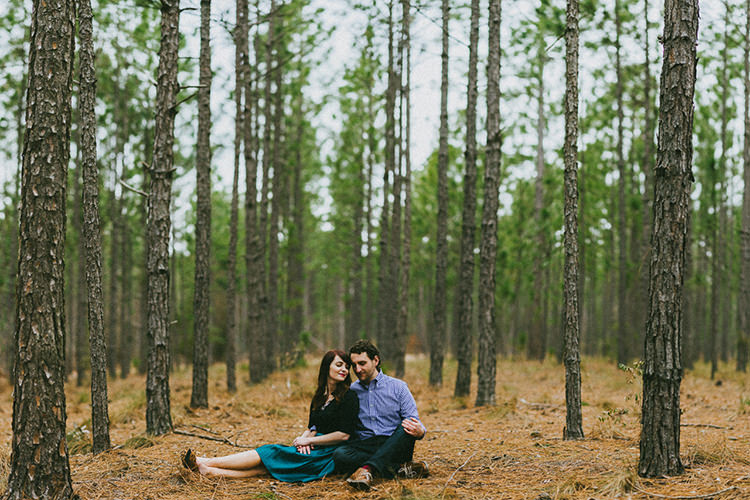
    0 copy

    Lightroom is a fantastic program for keeping your photos organized, but it also provides many tools to speed up your editing workflow. You can even process many photos at once with batch editing. These techniques are by far the biggest time savers Lightroom provides. Once you start using them you’ll wonder how you ever edited each image individually.

    Technique 1: Applying presets on import

    Presets are hugely popular, and for good reason. They allow you to apply frequently used edits and adjustments to photos, instead of having to manually adjust the settings for each new image. But did you know you can apply your favorite preset during import and cut out a lot of steps?
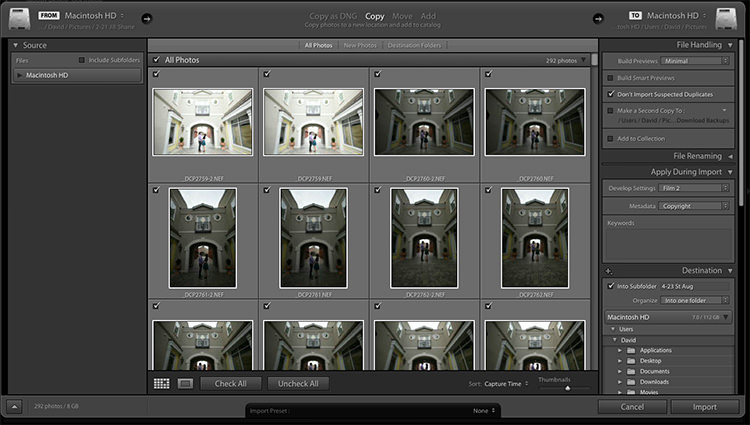
    1 copy

    Step 1: Start an import in the library module
    2 copy

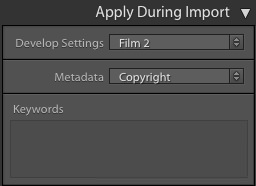
    Step 2: On the right panel in the import dialog you’ll see the “Apply During Import” module.

    Step 3: If you have a base preset, or a most commonly used one, select it here and click import to have it automatically applied to all of the photos as they are imported into Lightroom.

    This not only skips a lot of clicks for you, but it applies them faster than selecting them individually in the develop module later.

    Technique 2: Apply presets in the Library module

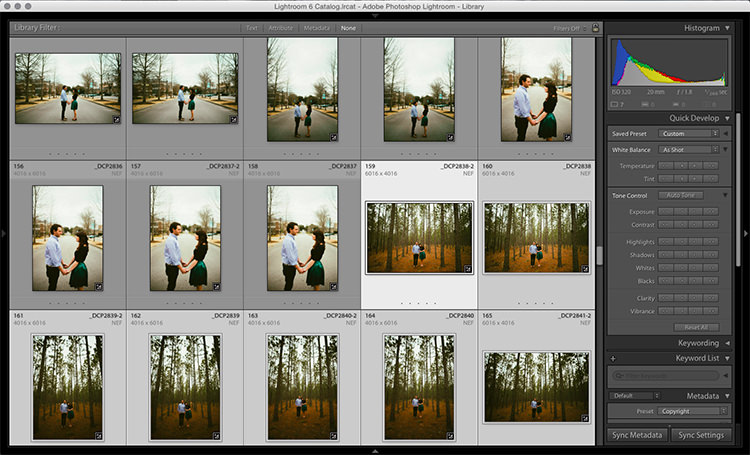
    Applying presets on import is great if all the photos are similar, but you may need to use different presets on varying scenes, poses, etc. Instead of applying these one image at a time, you can select them in the library module and apply them in a group. This trick is great for weddings, or similar shoots where you may be inside then outside, or have constantly changing light conditions.
    3 copy

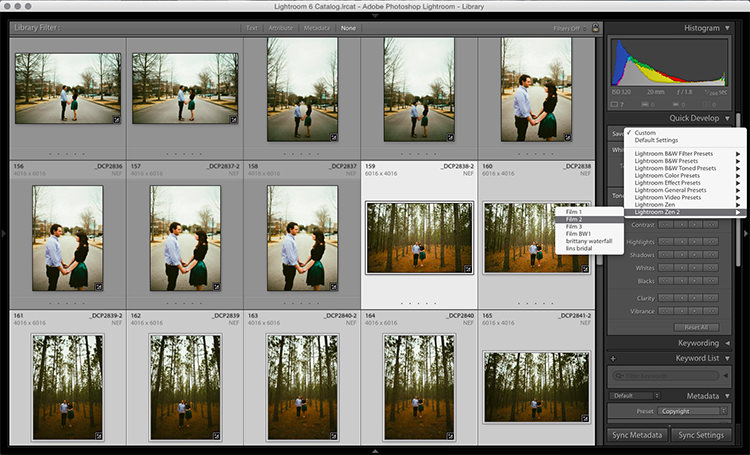
    Step 1: Click the first image in the set, then hold down the Control button and click any others to which you want to apply the same preset.
    4 copy

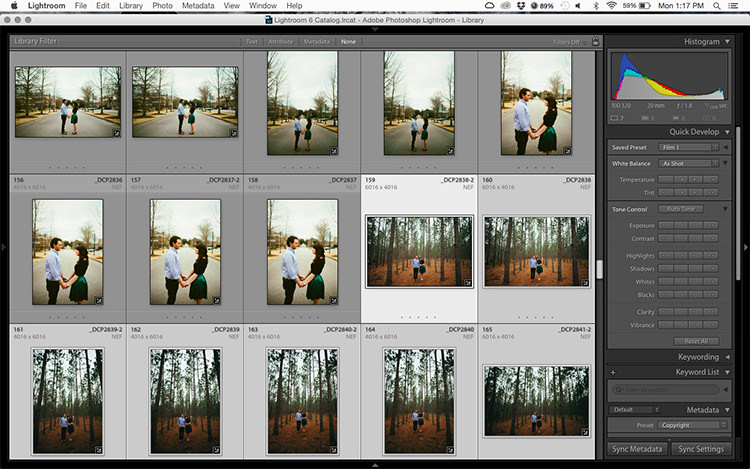
    Step 2: At the top of the Quick Develop panel, click the drop down menu under “Saved Preset” and select the new preset. It will update the settings from that preset to all the selected photos.
    5 copy

    Step 3: Repeat for each changing scene as needed.

    Technique 3: Edit in the Library module

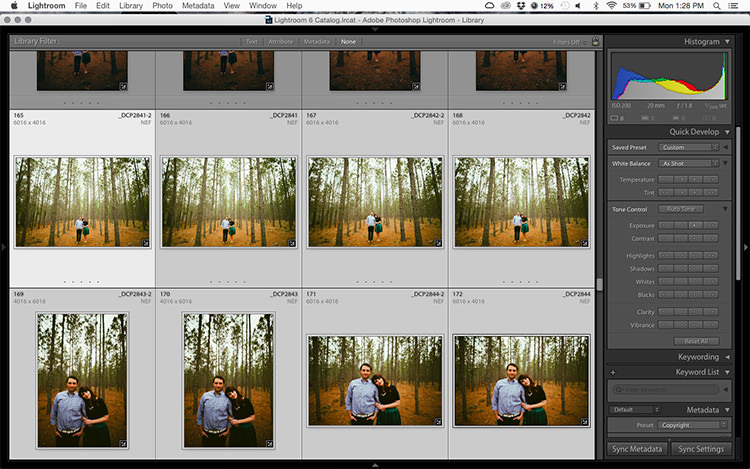
    The Library module runs much smoother, and processes changes faster than the Develop module. Since you have already applied your presets to the images, you will mostly need to make broad adjustments to your photos now. The Library module can edit the major adjustments like white balance, exposure, contrast, and more. Even better, you can apply these adjustments to multiple photos at once, making them more consistent, and saving you a lot of time.
    6 copy

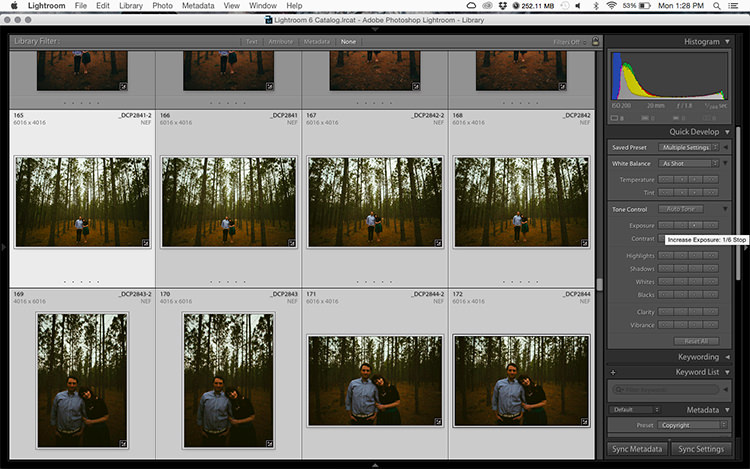
    Step 1: Select a group of images as above (CTRL + click to add to your selection) in the Library module.
    7 copy

    Step 2: In the Quick Develop panel on the right, click the arrows under Exposure, Contrast, and any other applicable options, to apply the changes to all selected photos at once.

    Step 3: You can use the + and – key to enlarge or minimize the library view, allowing you to get a better view of the adjustments you are applying.

    Technique 4: Sync adjustments across multiple photos in the Develop module

    After applying the broad adjustments, you may need to fine-tune a few things in your images. These may include changes like a curve adjustment, add a gradient filter to fine tune a bright sky, etc. These are changes you have to make in the Develop module, but you can still apply them in batches, instead of doing them one photo at a time.
    8 copy

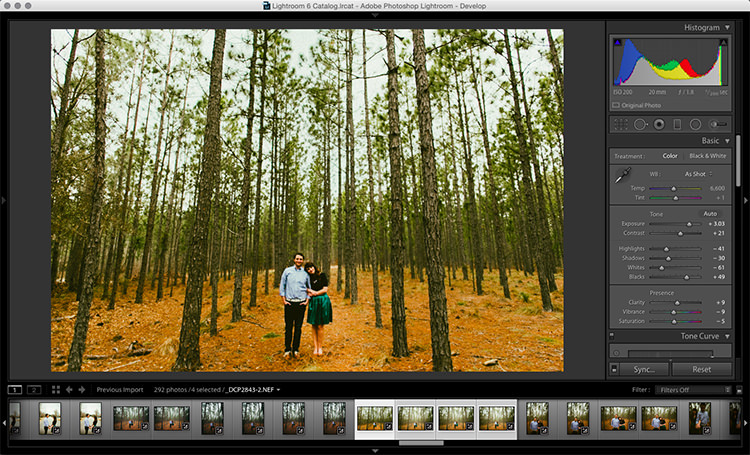
    Step 1: In the Develop module, apply the adjustments to a single photo.

    Step 2: In the Develop filmstrip or Library grid view, select multiple photos (CTRL + click).

    Step 3: At the bottom of the right hand panel, select “Sync”, it will be the left button beside “Reset”
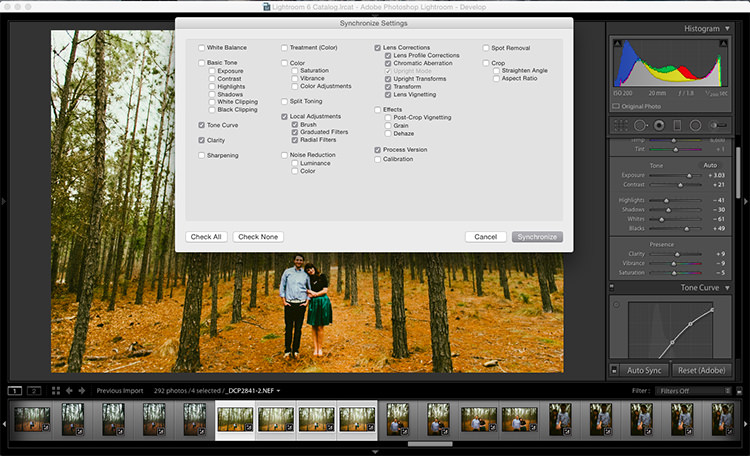
    9 copy

    Step 4: Check the options that you want to sync with all the selected photos. These should include any adjustments you just made in the Develop module.
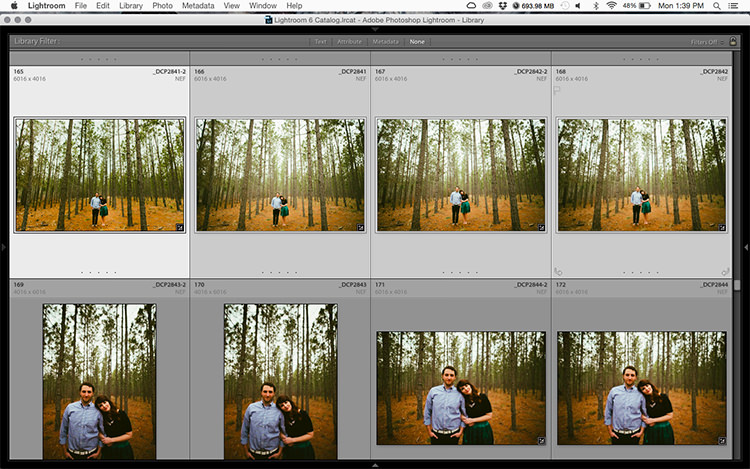
    10 copy

    Keep in mind

    When batch editing, be careful you don’t sync anything that you don’t want applied to all of the selected images. If you use the adjustment brush on skin in one photo and sync that to another photo, chances are that the subject has moved slightly, and the brush will be applied to the wrong part of the image.

    Stick with it!

    Do you think these batch editing techniques have a spot in your workflow? For me, learning to batch edit allowed me to cut my wedding editing time down to a fraction of what it was before. You can focus on the big picture and style of each shoot, and not get lost spending 10-15 minutes on every image. Batch editing lets you get more work done in less time, and that is fantastic!

    Do you have any additional tips to add? Please do so in the comments below.

    googletag.cmd.push(function() {
    tablet_slots.push( googletag.defineSlot( “/1005424/_dPSv4_tab-all-article-bottom_(300×250)”, [300, 250], “pb-ad-78623” ).addService( googletag.pubads() ) ); } );

    googletag.cmd.push(function() {
    mobile_slots.push( googletag.defineSlot( “/1005424/_dPSv4_mob-all-article-bottom_(300×250)”, [300, 250], “pb-ad-78158” ).addService( googletag.pubads() ) ); } );

    The post 4 Batch Processing Techniques to Speed Up Your Workflow in Lightroom by David Childers appeared first on Digital Photography School.


    Digital Photography School
  • Versailles Transformed: Palace Artificially Obscured by Fog and Mist

    [ By SA Rogers in Art & Installation & Sound. ]

    Screen Shot 2016-06-08 at 2.03.18 PM

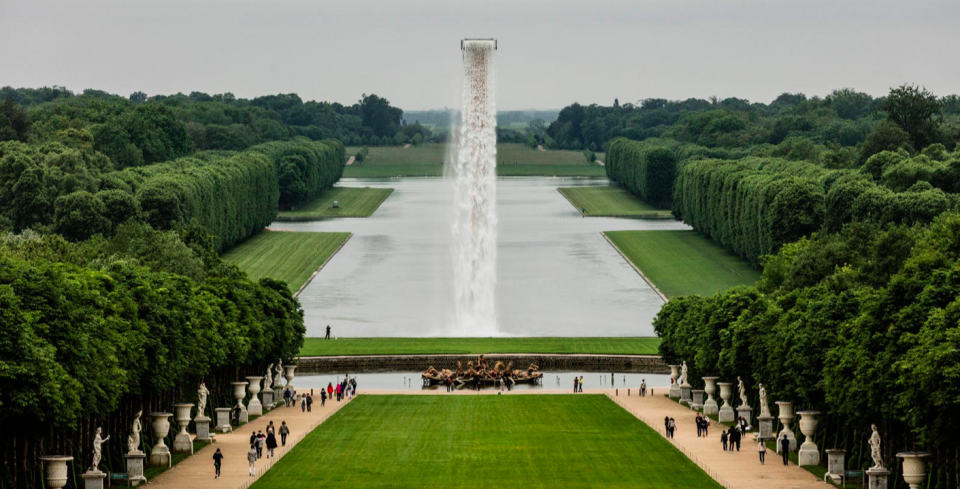
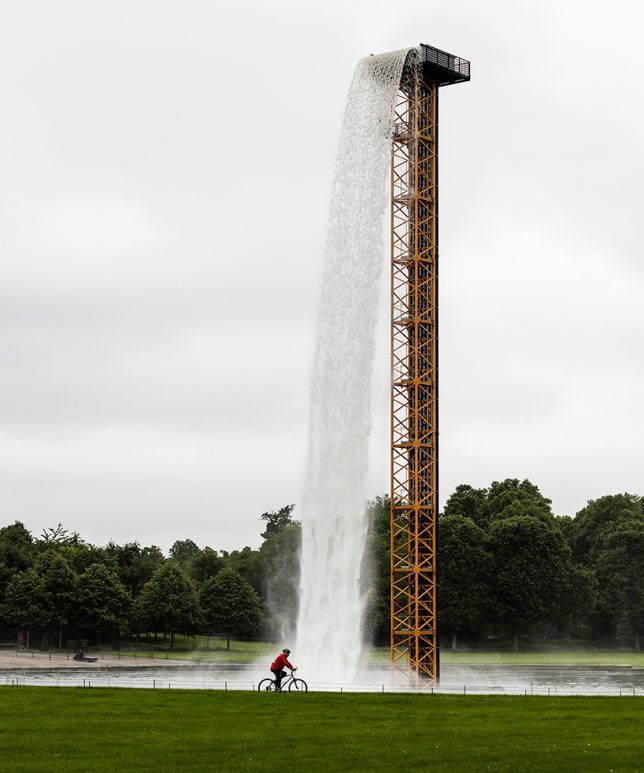
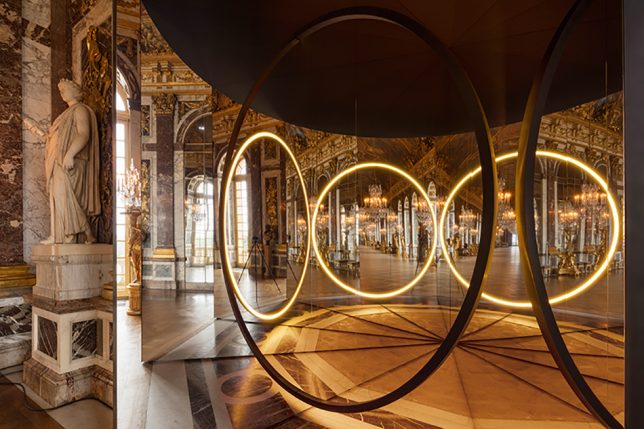
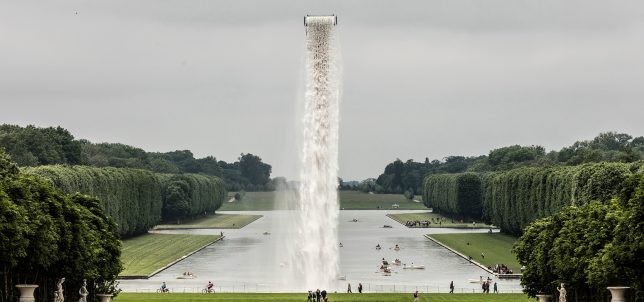
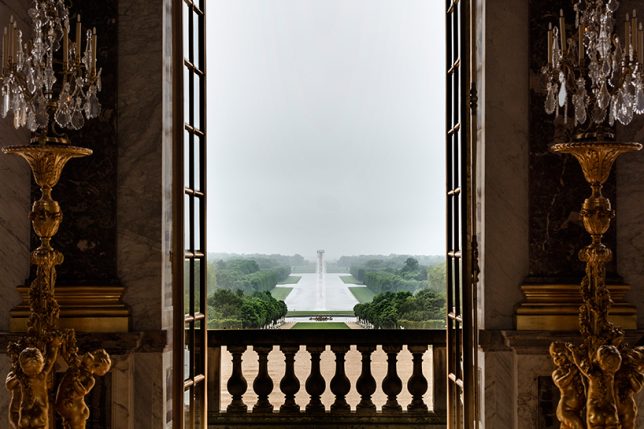
    Approaching the Grand Canal of Versailles from the palace, something seems off about the landscape: a tower of water pours from a seemingly invisible support, as if a hole has opened up in the sky. It’s only when you step to either side that you notice the steel structure that sends the waterfall crashing onto the glassy surface of the canal. This intervention is just one of nine that artist Olafur Eliasson has installed in the gardens and inside the Palace of Versailles, shifting visitors’ perception of their environment and themselves. ‘Olafur Versailles’ will be in place through October.

    versailles eliasson 4

    versailles eliasson 2

    versailles eliasson 13

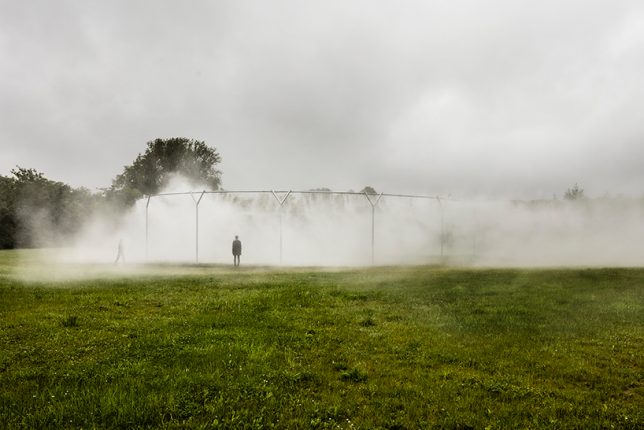
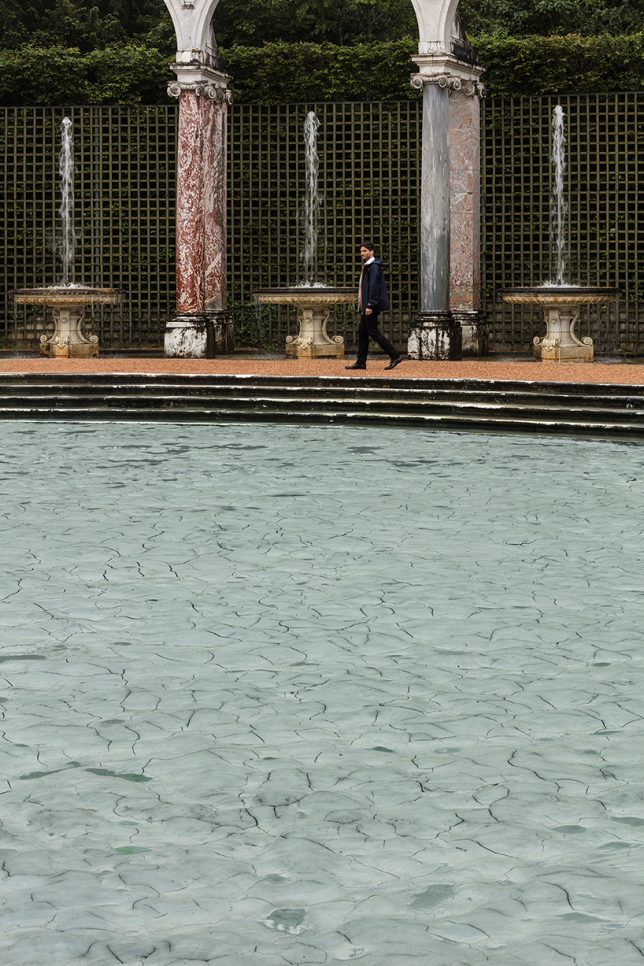
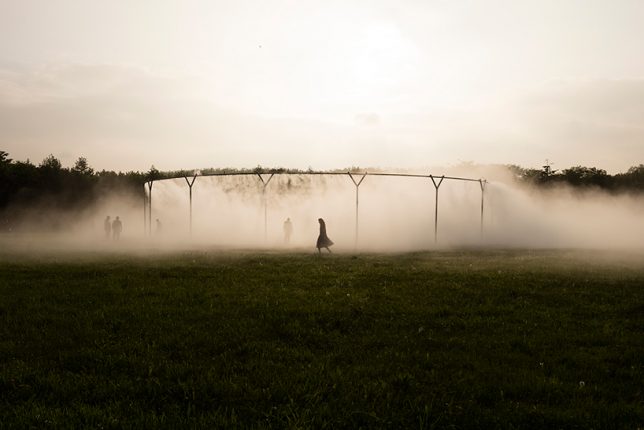
    Continuing an eight-year tradition of inviting artists to transform the Palace and its grounds with their work, the new installation seems to shift this French landmark slightly off the axis of reality, adding a dreamy sense of strangeness that changes the atmosphere of the entire château. In the gardens, three installations represent various states of water; the second is a circular arrangement of steel pipes pumping fog onto the lawn while the third fills the Bosquet de la Colonnade with ‘glacial rock flour.’

    versailles eliasson 8

    versailles eliasson 9

    versailles eliasson 10

    versailles eliasson 11

    Step inside to face illusions of light and reflection, using mirrors to make it unclear whether you are looking at your real surroundings or a mere facsimile of them at any given time. Perspectives of the interiors suddenly lose their sense of balance, and visitors catch glimpses of their own reflections in unexpected places, as if witnessing their own identical twins moving through the space.

    versailles eliasson 1

    versailles eliasson 5

    versailles eliasson 6

    “The Versailles that I have been dreaming up is a place that empowers everyone. It invites visitors to take control of the authorship of their experience instead of simply consuming and being dazzled by the grandeur. It asks them to exercise their senses, to embrace the unexpected, to drift through the gardens, and to feel the landscape take shape through their movement.”

    Share on Facebook


    [ By SA Rogers in Art & Installation & Sound. ]

    [ WebUrbanist | Archives | Galleries | Privacy | TOS ]


    WebUrbanist