Blog

  • Leica Boss: Hands-on with new Leica M10

    Hands-on with new Leica M10

    The new Leica M10 is slightly slimmer than its predecessor, a bit lighter, faster and (we think) a little more sensible. This 24MP full-frame rangefinder can’t shoot video and there’s not a even a USB jack, but for all that it’s surprisingly modern, thanks to built-in Wi-Fi and a very usable live view implementation, among other things.

    We’ve had access to a pre-production camera for a few days – click through for a quick tour.

    Hands-on with new Leica M10

    From the front, the Leica M10 looks a lot like the Typ 240 and Typ 262 that came before it. Unlike earlier M-series cameras though it lacks a frame-line illumination window. The frame-lines are illuminated with an internal LED. The small black lever allows you to preview the (approximate) frame coverage of other focal lengths, when you have a lens mounted. 

    Hands-on with new Leica M10

    The 24MP CMOS sensor in the M10 is ‘newly developed’, but we don’t know exactly what this means. Although we haven’t yet completed our full range of studio tests (we’ll have to wait for a final shipping camera before we do that) our initial impressions of image quality are extremely positive. Detail resolution is high across the M10’s standard ISO range of 100-6400, and noise is well-controlled even at high ISO sensitivity settings.

    The M10 also incorporates an upgraded processor, the ‘Maestro II’ (first seen on the Leica SL), along with 2GB of buffer memory. This allows the camera to shoot at up to 5 fps for 30 Raw files (~100 JPEGs).

    Hands-on with new Leica M10

    Physically, the M10 is slimmer than previous M-series digital cameras, and very slightly lighter. It’s slightly taller than the film-era M6 (and previous models) but has basically the same footprint. Although the size reduction is relatively subtle, the M10 definitely feels like a more compact camera than the Typ 240.

    Hands-on with new Leica M10

    New in the M10 is a physical button for ISO adjustment, which occupies previously wasted space on the upper left of the digital M-series. ISO can be adjusted in full stops from 100-6400, plus a user-assignable ‘M’ setting. A very practical Auto ISO setting is also available, which offers automatic maximum shutter duration options based on focal length (with 6-bit coded lenses) as well as user-assignable settings.

    Hands-on with new Leica M10

    The M10’s on/off switch is simpler than it was in previous digital M-series cameras, and no longer provides access to continuous and self-timer shooting modes. Whether this is a good thing depends on how much you use continuous and self-timer, but on balance we prefer it. These modes are now accessed via the M10’s menu system. 

    Hands-on with new Leica M10

    Speaking of which, the M10’s menu system has been simplified, and now includes a customizable ‘favorites’ menu, which appears by default on the first press of the ‘menu’ button. The full menu appears on the second press. The M10’s 3″ rear screen is coated in Corning ‘Gorilla Glass’ for scratch resistance and offers a resolution of 1.04 million dots. 

    Hands-on with new Leica M10

    An optional ($ 545) ‘Visoflex’ electronic viewfinder can be attached to the M10 for live view shooting. This isn’t as silly as it sounds – shooting in live view ensures accurate framing, and accurate critical focus, and also allows you to use spot and ‘multi-field’ metering. The Visoflex Typ 020 offers a resolution of ~2.4MP and includes a GPS module.

    Hands-on with new Leica M10

    The Visoflex can tilt up to 90 degrees, which is handy for close-up work and candid photography.

    Hands-on with new Leica M10

    Some things will never change though, and one of those things is Leica’s insistence on retaining the film-era removable baseplate. This made sense (sort of) a few decades ago, but does seem increasingly silly in the digital age. Supposedly it helps keep the camera dust and water-resistant (to some extent at least – Leica doesn’t say exactly how much) but removing the bottom of the camera to change a memory card is a bit of a pain – especially if you’re working on a tripod. 

    The slimmer body has necessitated a smaller battery, which offers a capacity of 8.2Wh, which carries a CIPA rating of ~210 shots – increasing to ~500 if the camera is used in rangefinder mode (i.e, not live view). This isn’t particularly impressive, but as usual, in normal use (with Wi-Fi turned off) we’ve found that a single charge can be expected to last for much longer, assuming minimal ‘chimping’.

    Hands-on with new Leica M10

    This view gives you a good idea of the M10’s generally uncluttered control layout, which will look familiar to anyone who has ever used an M-series camera at any point in the last 60 years.

    The Leica M10 is available now, for a body-only price of $ 6595. What do you think?

    Articles: Digital Photography Review (dpreview.com)

  • The M U want: Leica M10 First Impressions Review and Samples

    The Leica M10 is a 24MP, full-frame, manual focus camera with an archaic coupled rangefinder focusing system, a tunnel-type optical viewfinder, no video mode and not even so much as a USB socket. And it’s absolutely lovely.

    Leica M10: Key Features

    • ‘Newly developed’ 24MP full-frame CMOS sensor
    • 1.04 million-dot rear LCD (with Corning Gorilla glass)
    • 5 fps max continuous shooting for up to 30 Raw frames
    • ISO 100-6400 (extendable to 50,000)
    • Center-weighted (RF), spot and ‘multi-field’ (LV) metering modes
    • Revised menu system (including customizable ‘favorites’ menu)
    • Automatic lens corrections with 6-bit coded lenses
    • Compatible with ‘Visoflex’ 2.4m-dot EVF for eye-level live view shooting
    • ~210 shot battery life (CIPA)
    • Built-in WiFi

    Leica is a refreshingly unusual company in the modern camera industry – weird, wonderful, gleefully anachronistic but never, ever, boring. As such, Leica is one of those companies that I’ve always enjoyed writing about.

    This is the kind of picture that generally, I don’t take. But being handed a Leica to review spurred me to make a bit more effort to get ‘street’ shots on a recent trip to New York. I used live view to capture this waist-level image without drawing attention to myself.

    35mm F1.4 Summilux ASPH. F2.8 (ish), ISO 500. (Converted from Raw)

    In fact, the very first camera that I ever reviewed right at the beginning of my career was a Leica. This was more than ten years ago, around the same time that the M8 was released, but I wasn’t (yet) trusted with such a prestigious product. The camera that I was handed to review was one of those rebadged Panasonics that the German company still officially maintains in its lineup, but doesn’t really talk about anymore. I forget the exact model, but it wasn’t particularly good. I seem to remember high noise levels, lens aberrations and clumsy, detail-destroying noise reduction being the main areas of complaint, all of which were enough to take the (figurative) shine off what was physically a beautiful camera, and all of which I dutifully reported in my review.

    While the camera was forgettable, more than a decade on, that review still sticks in my mind. It was shortly after filing my draft that my editor at the time pulled me over, the printout in his hand, to explain that ‘there are certain words we do not use about Leica’. Apparently, ‘disappointing’ was one of those words, indicated (ironically) with large red rings of ink, wherever I had used it.

    My draft was massaged accordingly, and I didn’t review another Leica camera for a long time.

    For a great many years, there really was a kind of ‘reality distortion field’ around Leica, and to some extent there still is. With some exceptions (the Q being one of them), the company specializes in high-cost nouveau-classic products with few objective advantages over their competitors. It’s all about the look. It’s all about the feel. It’s all about the magic. It’s all about Das Wesentliche1.

    When on occasion Leica has tried something genuinely new, like the brushed-aluminum touch-sensitive experiment that was the Leica T2, it typically hasn’t made quite the same impact on the group psychology of photographers and photography writers as its M, R and (more recently) S-series.

    ‘The Leica Effect’

    I’m not immune to the ‘Leica effect’ myself. I owned and used an M3 for years, and wildly impractical as it was (considering I was attempting to make a career as a 21st Century music photographer3) I’ve always regretted selling it. There’s just something about the M series, some intangible magic when compared to the average mass-produced camera, regardless of whatever new and wonderful technologies they might lack by comparison.

    I still maintain that if you can accurately focus on a human subject with a fast Leica prime wide-open, you’ve earned the right to call yourself a photographer. It’s not easy – and that’s the point.

    It’s been a long time since I shot live music, too. I didn’t expect much when I took the M10 to a rock concert, but apparently my focusing gets better after a couple of beers. 

    35mm F1.4 Summilux ASPH. F2 (ish), ISO 3200. (Converted from Raw) 

    For all that, I’ve never really enjoyed the digital M-series models. The M8’s APS-H sensor felt like a compromise, and both that camera and the full-frame M9 always felt a little bloated, their shutters a bit too loud, their images a bit too noisy. Things got better – the Typ 240 and Typ 262 are very good cameras, and the Monochroms are fun – but neither they nor their predecessors ever really truly felt like a continuation of the classic film models. Leica claims that adding a movie mode to the Typ 240 was in response to demand from its customers, but the idea of shooting video on a rangefinder always seemed a bit silly to me.

    The M10 can’t shoot video – let’s just get that out of the way. If you really need video in an M-series body, the Typ 240 is still available.

    Personally, as you might be able to tell, I like the M10 a lot more than the Typ 240 and 262. There’s no single major change which makes all the difference, but rather a raft of little tweaks which add up to (in my opinion) a more attractive product than the the digital Ms which came before it. 

    First Look: Leica M10


    1. Which roughly translates as ‘The pure / the essential / the heart / the bits that really matter’.

    2. With original firmware, I should make that clear. It got better.

    3. Ask me how that worked out. 

    Articles: Digital Photography Review (dpreview.com)

  • Video: Leica M10 First Look

    The new Leica M10 is an attractive combination of classic styling and modern specifications. Check out our quick video overview for a rundown of some of its key features.

    Read our First Impressions Review

    Articles: Digital Photography Review (dpreview.com)

  • Public Wattway: France Activates World’s First Solar-Paneled Roadway

    [ By WebUrbanist in Architecture & Cities & Urbanism. ]

    solar-roadway

    Developed by Wattway and deployed on the streets of Tourouvre-au-Perche, a 1,000-meter-long solar-paneled roadway in France is the first stretch of a 1,000-kilometer endeavor.

    The technology along this initial pathway is designed to generate enough energy to light up the streets of a 3,400-person town, and it is just the first step in a five-year plan.

    wattway-paths

    France ultimately aims to pave 1,000 kilometers of solar roads over the next half-decade, supplying renewable energy to 5 million people (close to 10% of the population).

    The flat and smooth surfaces of existing streets are perfect places to serve a double function and harvest clean energy as long as the issue of durability is taken into account.

    The solar brick-like sheets are covered in multiple layers of silicon resign designed to allow light to pass through while protecting the panels from damage. The panels are engineered to withstand the weight of six-axle trucks and to stick directly onto existing road surfaces.

    wattway-panels

    The goal for this first phase is to produce 280 megwatt hours of power per year and to test the durability of the tech under real-world experimental conditions. Under controlled conditions, the panels survive a “cycle of one million vehicles, or 20 years of normal traffic a road, and the surface does not move.”

    solar-path

    “We are still on an experimental phase,” says the company. “Building a trial site of this scale is a real opportunity for our innovation. This trial site has enabled us to improve our photovoltaic panel installing process as well as their manufacturing, in order to keep on optimizing our innovation.”

    Share on Facebook


    [ By WebUrbanist in Architecture & Cities & Urbanism. ]

    [ WebUrbanist | Archives | Galleries | Privacy | TOS ]


    WebUrbanist

  • Flashing a peace sign in a photo could lead to identity theft

    The National Institute of Informatics (NII) in Japan claims that taking and publishing photos of subjects who are flashing the popular two-fingered ‘V’ or peace sign could lead to identify theft. It warns that fingerprint recognition technology is now so advanced that even casual snapshots can be used to retrieve fingerprint information. The report also says the technology is widely available and easy to use.

    According to the NII, the danger lies in a combination of widely available smartphones with high-resolution cameras and the rising popularity of posting images on social websites. In an experiment the researchers were able to copy fingerprints from photos that were captured 3 meters (9 feet) away from the subject. That said, the fingers in question have to be in focus and the scene has to be well illuminated as presumably noise reduction at higher ISOs would destroy the fine low-contrast fingerprint lines. We would also assume that the experiment only works with high-resolution out-of-camera images. Many social media websites reduce the size and increase compression of posted images which should, with current technology, make it pretty much impossible to extract any fingerprint information. 

    However, if you frequently flash a peace sign in photos and are worried about the possibility of identity theft, the NII also has a solution to the problem: it has developed a transparent film that can be attached to your fingers. It contains titanium oxide and makes it impossible to scan your fingerprints from a photo but doesn’t interfere with identity verification. Unfortunately, the technology won’t be ready for another two years. For now, think twice about showing your fingertips in a photograph.

    (Photo: ‘Comic Fiesta 2014’ by Vernon Chan / Wikimedia Commons. Used under CC license)

    Articles: Digital Photography Review (dpreview.com)

  • Capture One Pro 10.0.1 released with new lens support and bug fixes

    Phase One has released an update for its Capture One Pro software, bringing it up to version 10.0.1. The update implements numerous bug fixes for both Windows and macOS, as well as support for eleven new lenses, including eight Sony lenses, two aerial Schneider Kreuznach lenses, and the aerial Rodenstock RS 32mm The bug fixes are extensive and unique to each platform’s needs. The Windows update includes fixes for a couple crashing issues, a fix for the Tangent Knobs brush size issue, and more. The macOS update, meanwhile, fixes crash report issues, problems related to presets, and CMYK readouts troubles, among other things. The full list of bug fixes is below.

    Bug fixes, aside, Phase One has added support for the following lenses:

    • Schneider Kreuznach RS 110mm (Aerial)
    • Schneider Kreuznach RS 150mm (Aerial)
    • Rodenstock RS 32mm (Aerial)
    • Sony FE 50mm F2.8 Macro Lens profile
    • Sony 28–75mm F2.8 SAM Lens profile
    • Sony 135mm F2.8 [T4.5] STF Lens profile
    • Sony Ultra Wide Converter Lens profile
    • Sony Fisheye Converter Lens profile
    • Sony 300mm F2.8 G SSM II Lens profile
    • Sony 70–300mm F4.5–5.6 G SSM II Lens profile
    • Sony FE 24-240mm F3.5-6.3 OSS Lens profile

    10.0.1 Windows Bug Fixes

    • Changing brush size with Tangent Knobs does not work
    • Large TIFF crashes
    • Crash when .NET installation is older than 4.6.2
    • The readouts won’t show when the window is small
    • Cannot Click Between Thumbnails when Loupe Is Selected
    • Express and DB version can not check for software updates
    • Deactivating DB version thinks it is Express For Sony
    • Localization Issue: German. There is no Capture One 10 Engine, There are two Capture
    • One 9 Engines.
    • “Show Mask Always” doesn’t show adjustments when changing exposure
    • Delete file from session does not refocus browser window on next selection
    • Brush tool does not display right physical size in brush settings
    • Multiple Card readers not displayed in CO import window
    • Lens EF-S 18-55mm f/3.5-5.6 IS is not recognized automatically

    10.0.1 Mac Bug Fixes

    • Lagging while quickly browsing through images by holding the arrow key down
    • The Mac crash reporter does not find a crash report when Capture One is force quit
    • Crash if no collection selected and we select next collection
    • The Mac crash reporter often fails to find the correct crash report for Capture One
    • Decreasing Target Highlight Value via keyboard shortcut does not work
    • Wrong naming for custom ICC profiles that are not in library in catalogs
    • Crash when entering “/” in the Format field in the Next Capture Naming tool
    • Cannot apply preset/style with custom ICC if the ICC is not in the library
    • The “Applied Styles and Presets” section is missing in the “Styles and Presets” tool
    • Changing library in full screen mode causes CO to crash
    • Crash when closing the Import Window while it is populating with images
    • Crash when moving smart albums in a catalog
    • Magenta color cast before style applying
    • Loupe will not work on thumbnails
    • Iris GPU on new MBP causing artifact in fit-view
    • Crash when exporting variants with Open CL enabled on MBP2015
    • Crash when selecting an image in the browser on Mac Pro with non-OEM Nvidia card
    • CMYK readouts give wildly different values in Capture One 10

    Visit Phase One’s website to download Capture One Pro 10.

    Articles: Digital Photography Review (dpreview.com)

  • Charge your devices with a USB station shaped like a Sony mirrorless camera

    $ (document).ready(function() { SampleGalleryV2({“containerId”:”embeddedSampleGallery_6412910342″,”galleryId”:”6412910342″,”isEmbeddedWidget”:true,”standalone”:false,”selectedImageIndex”:0,”startInCommentsView”:false,”isMobile”:false}) });

    If you’ve searched high and low for the perfect USB charging station but come up empty handed, Fotodiox might have your number. It’s offering the Mirage Trio USB Charging Station, which is fashioned to look like a Sony a7-series mirrorless camera for no discernible reason. It offers charging for an Apple or Android phone, a USB port for another device and a compartment for an Apple Watch magnetic charging cable. 

    Here’s the kicker – the replica lens sold with the station can be removed and swapped out for any E-mount lens of your choice. And as Fotodiox points out, you can simply add an adapter (see what they did there?) to attach a beloved vintage lens so you can gaze upon it as you wait for your GoPro to charge. 

    Head to Fotodiox’s site to pick one up for $ 75.

    Articles: Digital Photography Review (dpreview.com)

  • Fixed-lens filmmaking: Panasonic Lumix DMC-FZ2500/FZ2000 Review

    Key Features

    • 20MP 1″-type BSI-CMOS sensor
    • 24-480mm equiv. F2.8-4.5 lens
    • Depth from Defocus AF
    • Large electronic viewfinder
    • Fully articulating LCD
    • Built-in variable ND filter
    • 4K video capture (DCI/UHD)
    • 10-bit, 4:2:2 output over HDMI

    At Photokina 2016, Panasonic released its high-end 1″-type superzoom, known as the DMC-FZ2500 (FZ2000 in some regions). It retains the same sensor as the excellent FZ1000 that came before it, while gaining a totally new lens, larger EVF, easy-to-adjust ND filter and even more customizable buttons.

    While offering several new stills-related features (such as focus stacking), the FZ2500 is really all about video. It shoots both Cinema and UHD 4K, can output 4:2:2 10-bit video over its HDMI port, supports V-Log L recording (for an extra $ 99) and much, much more. In essence, the FZ2500 is the little brother to the DMC-GH4 ILC, which is one of the most capable video capture cameras on the market.

    At this point in time, the only other fixed-lens cameras that truly competes with the FZ2500 is the Sony Cyber-shot RX10 III. The Sony has many features in common with the FZ2500, such as 4K capture, zebra pattern and a flat picture profile (S-Log2), but boasts a longer, faster lens and high speed recording at up to 960 fps.

    Compared to Panasonic DMC-FZ1000 and Sony DSC-RX10 III

    Speaking of specs, let’s take a look at how the FZ2500 compares to its predecessor as well as Sony’s Cyber-shot DSC-RX10 III, which we consider its closest competitor.

      Panasonic FZ2500 Panasonic FZ1000 Sony RX10 III
    MSRP $ 1199 $ 799 $ 1599
    Sensor 20MP 1″ BSI-CMOS 20MP 1″ BSI-CMOS 20MP 1″ Stacked CMOS
    Lens focal range 24-480mm equiv. 25-400mm equiv. 24-600mm equiv.
    Lens max aperture F2.8-4.5 F2.8-4.0 F2.4-4.0
    ND filter Variable No No
    ISO range (expanded) 80-25600 80-25600 64-25600
    Top shutter speed
    (mech/elec)
    1/4000 sec, 1/16000 sec 1/4000 sec, 1/16000 sec 1/2000 sec, 1/32000 sec
    LCD size/type 3″ 1.04M-dot fully articulating 3″ 921k-dot fully articulating 3″ 1.3M-dot tilting
    LCD touchscreen Yes Yes No
    EVF resolution/type 2.36M-dot OLED 2.36M-dot OLED 2.36M-dot OLED
    EVF magnification 0.74x 0.7x 0.7x
    Top burst speed (S-AF) 12 fps 12 fps 14 fps
    4K video capture Cine/UHD 4K @ 30p/24p UHD 4K @ 30p/24p UHD 4K @ 30p/24p
    High speed video 120 fps @ 1920 x 1080 120 fps @ 1920 x 1080 960 fps @ 800 x 270
    480 fps @ 1136 x 384
    240 fps @ 1824 x 1026
    120 fps @ 1920 x 1080
    Top bitrates 4K: 100MBps
    Full HD: 200Mbps

    4K: 100Mbps
    Full HD: 28Mbps

    4K: 100Mbps
    Full HD: 50Mbps
    Flat profile V-Log L ($ 99 extra) No S-Log2
    Live HDMI output 4:2:2, 10-bit 4:2:2, 8-bit 4:2:2, 8-bit
    Mic/phone jacks Yes / Yes Yes / No Yes / Yes
    Wi-Fi Yes, without NFC Yes, with NFC Yes, with NFC
    Battery life (CIPA) 350 shots 360 shots 420 shots
    Dimensions 138 x 102 x 135 mm  137 x 99 x 131 mm 133 x 94 x 127 mm
    Weight (CIPA) 966 g 831 g 1095 g

    In most respects, the FZ2500 comes out on top – and that’s without including the myriad of video features that just don’t fit in the table.  The RX10 III does have a longer, faster lens and the ability to shoot at very fast frame rates, but it also costs a lot more. It’s battery life is also considerably better. That said, it costs $ 400 more than the FZ2500, which is nothing to sneeze at.

    Lens Comparison

    The chart below breaks down the equivalent aperture for each camera, as you work your way through the zoom range. Our article here explains the concept of equivalence, but at a high level all you need to know is that the lower the line is on the graph below, the blurrier the backgrounds you’ll be able to get and, typically, the better the overall low-light performance.

    LensEquivalentApertures([“Equivalent focal length (mm)”,”Panasonic FZ1000″,”Sony RX10 II”,”Panasonic ZS100″,”Sony RX10 III”,”Panasonic FZ2500″], [[24,null,””,7.6363636363636367,”Sony RX10 II at 24mm: F7.6″,null,””,6.5454545454545459,”Sony RX10 III at 24mm: F6.5″,7.6363636363636367,”Panasonic FZ2500 at 24mm: F7.6″],[25,7.6363636363636367,”Panasonic FZ1000 at 25mm: F7.6″,null,””,7.6363636363636367,”Panasonic ZS100 at 25mm: F7.6″,6.8181818181818183,”Sony RX10 III at 25mm: F6.8″,7.9090909090909092,”Panasonic FZ2500 at 25mm: F7.9″],[26,7.9090909090909092,”Panasonic FZ1000 at 26mm: F7.9″,null,””,7.9090909090909092,”Panasonic ZS100 at 26mm: F7.9″,null,””,null,””],[27,null,””,null,””,8.1818181818181834,”Panasonic ZS100 at 27mm: F8.2″,null,””,null,””],[28,null,””,null,””,null,””,7.6363636363636367,”Sony RX10 III at 28mm: F7.6″,8.1818181818181834,”Panasonic FZ2500 at 28mm: F8.2″],[30,8.1818181818181834,”Panasonic FZ1000 at 30mm: F8.2″,null,””,8.7272727272727284,”Panasonic ZS100 at 30mm: F8.7″,null,””,8.454545454545455,”Panasonic FZ2500 at 30mm: F8.5″],[32,null,””,null,””,9.0,”Panasonic ZS100 at 32mm: F9.0″,null,””,8.7272727272727284,”Panasonic FZ2500 at 32mm: F8.7″],[34,8.454545454545455,”Panasonic FZ1000 at 34mm: F8.5″,null,””,9.2727272727272734,”Panasonic ZS100 at 34mm: F9.3″,null,””,null,””],[35,null,””,null,””,null,””,8.7272727272727284,”Sony RX10 III at 35mm: F8.7″,9.0,”Panasonic FZ2500 at 35mm: F9.0″],[36,null,””,null,””,9.5454545454545467,”Panasonic ZS100 at 36mm: F9.5″,null,””,null,””],[39,null,””,null,””,null,””,null,””,9.2727272727272734,”Panasonic FZ2500 at 39mm: F9.3″],[41,8.7272727272727284,”Panasonic FZ1000 at 41mm: F8.7″,null,””,null,””,null,””,null,””],[43,null,””,null,””,null,””,null,””,9.5454545454545467,”Panasonic FZ2500 at 43mm: F9.5″],[47,9.0,”Panasonic FZ1000 at 47mm: F9.0″,null,””,null,””,null,””,null,””],[49,null,””,null,””,null,””,null,””,9.81818181818182,”Panasonic FZ2500 at 49mm: F9.8″],[51,9.2727272727272734,”Panasonic FZ1000 at 51mm: F9.3″,null,””,null,””,null,””,null,””],[56,null,””,null,””,null,””,9.5454545454545467,”Sony RX10 III at 56mm: F9.5″,10.090909090909092,”Panasonic FZ2500 at 56mm: F10.1″],[58,9.5454545454545467,”Panasonic FZ1000 at 58mm: F9.5″,null,””,null,””,null,””,null,””],[63,9.81818181818182,”Panasonic FZ1000 at 63mm: F9.8″,null,””,null,””,null,””,null,””],[69,null,””,null,””,null,””,null,””,10.363636363636363,”Panasonic FZ2500 at 69mm: F10.4″],[70,10.090909090909092,”Panasonic FZ1000 at 70mm: F10.1″,null,””,null,””,null,””,10.636363636363637,”Panasonic FZ2500 at 70mm: F10.6″],[79,null,””,null,””,null,””,null,””,10.90909090909091,”Panasonic FZ2500 at 79mm: F10.9″],[84,10.363636363636363,”Panasonic FZ1000 at 84mm: F10.4″,null,””,null,””,null,””,null,””],[91,null,””,null,””,null,””,null,””,11.181818181818182,”Panasonic FZ2500 at 91mm: F11.2″],[100,null,””,null,””,null,””,10.90909090909091,”Sony RX10 III at 100mm: F10.9″,null,””],[102,null,””,null,””,null,””,null,””,11.454545454545457,”Panasonic FZ2500 at 102mm: F11.5″],[105,10.636363636363637,”Panasonic FZ1000 at 105mm: F10.6″,null,””,null,””,null,””,null,””],[144,null,””,null,””,15.818181818181818,”Panasonic ZS100 at 144mm: F15.8″,null,””,null,””],[151,null,””,null,””,null,””,null,””,11.727272727272728,”Panasonic FZ2500 at 151mm: F11.7″],[157,null,””,null,””,16.090909090909093,”Panasonic ZS100 at 157mm: F16.1″,null,””,null,””],[170,10.90909090909091,”Panasonic FZ1000 at 170mm: F10.9″,null,””,null,””,null,””,null,””],[200,null,””,7.6363636363636367,”Sony RX10 II at 200mm: F7.6″,null,””,null,””,null,””],[208,null,””,null,””,null,””,null,””,12.000000000000002,”Panasonic FZ2500 at 208mm: F12.0″],[250,null,””,null,””,16.090909090909093,”Panasonic ZS100 at 250mm: F16.1″,null,””,null,””],[262,null,””,null,””,null,””,null,””,12.272727272727273,”Panasonic FZ2500 at 262mm: F12.3″],[400,10.90909090909091,”Panasonic FZ1000 at 400mm: F10.9″,null,””,null,””,null,””,null,””],[480,null,””,null,””,null,””,null,””,12.272727272727273,”Panasonic FZ2500 at 480mm: F12.3″],[600,null,””,null,””,null,””,10.90909090909091,”Sony RX10 III at 600mm: F10.9″,null,””]])

    Focusing just on the FZ2500 vs RX10 III, you’ll see that the latter gets a headstart, as its max aperture starts at F2.4, versus F2.8. The RX10 III is always a tiny bit ahead, until it levels off at F4 for the rest of its focal length. When the FZ2500 reaches its maximum telephoto position it’s equivalent aperture is about 1/3-stop slower than the Sony. The camera with the fastest equivalent aperture in the group is the Sony RX10 II, which has a constant F2.8 aperture throughout its focal range (which ends at 200mm.)

    Articles: Digital Photography Review (dpreview.com)

  • Got focal range? Canon 24-105mm F4L II Sample Gallery

    We took the updated Canon 24-105mm F4L II out into the elements to put the lens to the test. With a wide focal range, this lens has the potential to be the ultimate walk-around workhorse for many photographers. With that said, the real question is does the update warrant an upgrade for current owners of the previous version? Check out our sample gallery to see for yourself.

    See our Canon 24-105mm F4L II
    sample gallery

    Articles: Digital Photography Review (dpreview.com)

  • Painting with Light on a Canvas of Night: Alien Blooms by Hannu Huhtamo

    [ By SA Rogers in Art & Photography & Video. ]

    light-painting-1

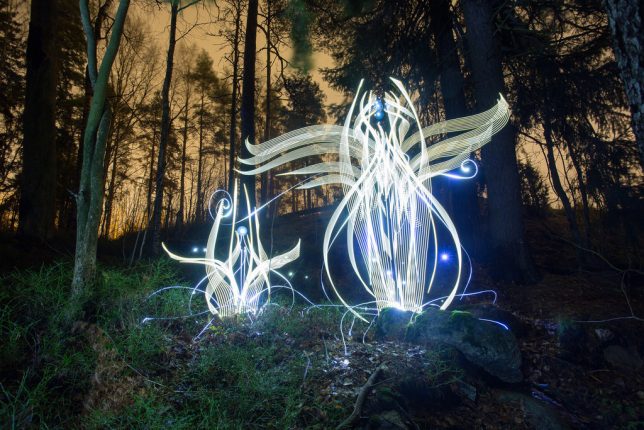
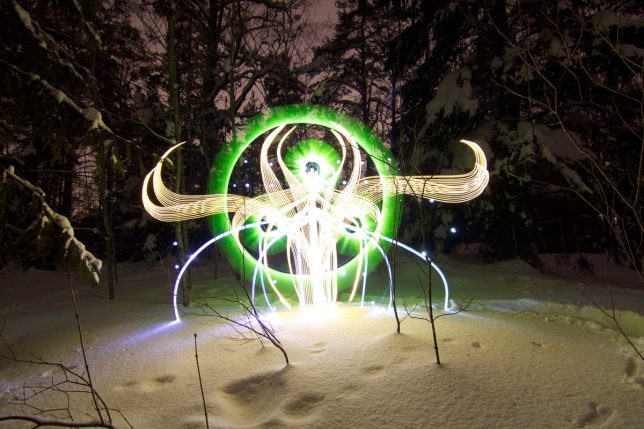
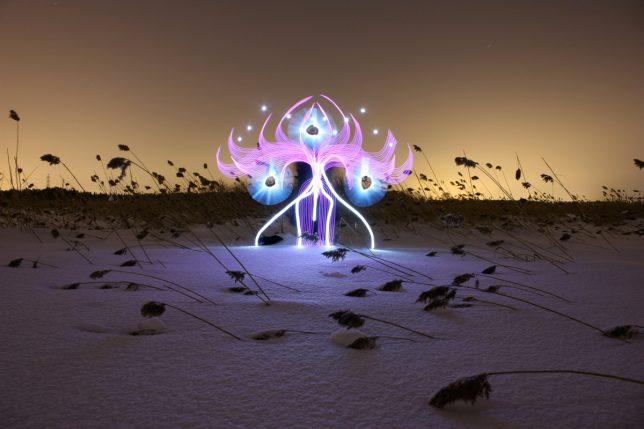
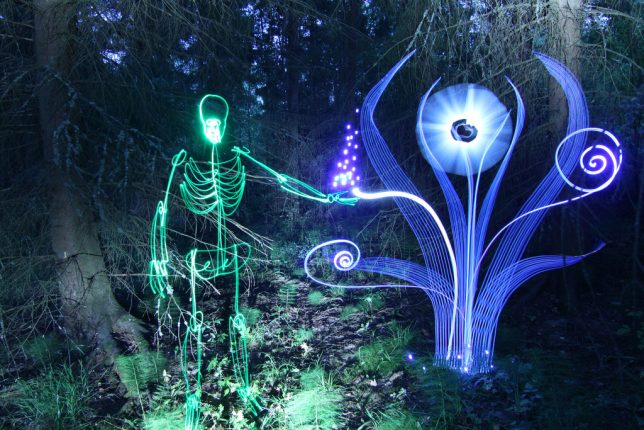
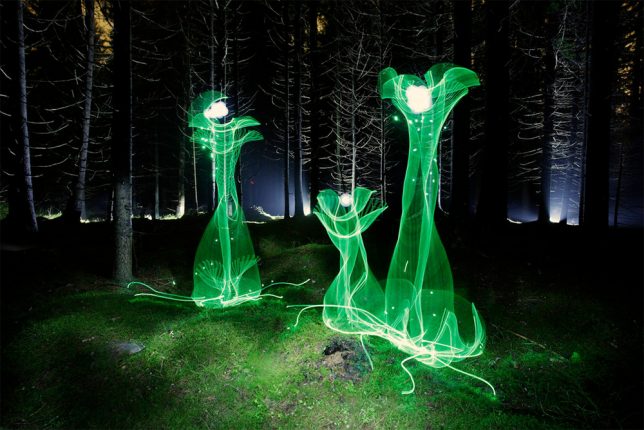
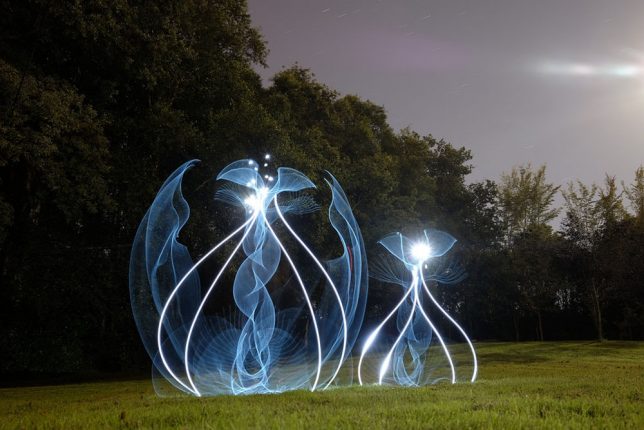
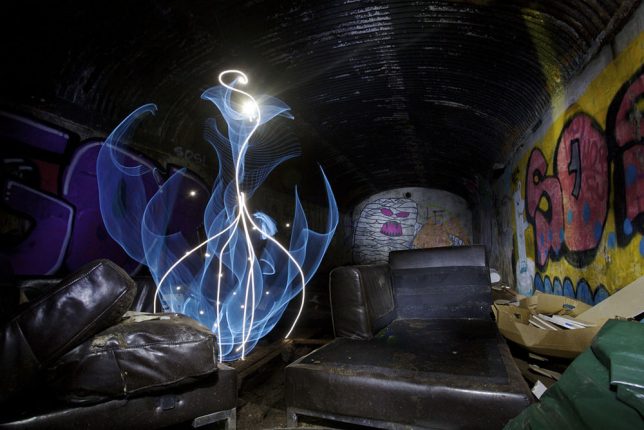
    The strange glowing figures in these images are so complex, you might think they’re screenshots from a digital animation, or created in Photoshop – but there’s no computer-based trickery here. Just the same long exposure techniques light artists have been using for decades to create and capture ethereal compositions, albeit applied in an unusually creative manner.

    light-painting-2

    light-painting-3

    light-painting-4

    Hannu Huhtamo’s bizarre shapes glow against twilight landscapes and abandoned interiors, often looking somewhere between a plant and an alien insect. They sprout up in snowy fields, appear from inside giant teacups at theme parks or take shape in darkened living rooms.

    light-painting-5

    light-painting-6

    light-painting-7

    A musician by training and hobbyist photographer, the Finnish artist first experimented with lighting techniques when taking promotional photos for a death metal band and deciding he wanted a long-exposure pentagram made with the flame of a lighter. Years later, when he met light artist Janne Parviainen and got a look at his work, Huhtamo decided to revisit the technique from a new angle.

    light-painting-8

    light-painting-9

    light-painting-10

    All of his work is created ‘SOOC’ or straight out of the camera, and he uses no special light equipment other than El-Wire (electroluminescent wire) and modified LED flash lights. “Darkness is my canvas and the light is my brush,” he says in this behind-the-scenes video produced by Great Big Story.

    Share on Facebook


    [ By SA Rogers in Art & Photography & Video. ]

    [ WebUrbanist | Archives | Galleries | Privacy | TOS ]


    WebUrbanist