Blog

  • Fujifilm X-T20 arrives with new 24MP sensor and 4K video capture

    $ (document).ready(function() { SampleGalleryV2({“containerId”:”embeddedSampleGallery_7292395470″,”galleryId”:”7292395470″,”isEmbeddedWidget”:true,”standalone”:false,”selectedImageIndex”:0,”startInCommentsView”:false,”isMobile”:false}) });

    Fujifilm has announced the X-T20, a mid-priced sister model to the enthusiast X-T2. The X-T20 gains many of the T2’s features, including the 24MP X-Trans sensor and its advanced autofocus system. The X-T20 can also shoot UHD 4K video at up to 30 fps.

    Much like its predecessor, the X-T20 has a 2.36M-dot OLED viewfinder with 0.62x magnification. It also retains Wi-Fi and the same level of external control as the X-T10.

    The X-T20 misses out on the X-T2’s weather sealing, AF point joystick, ISO dial, Log output and battery grip option but gains a touchscreen that works in stills, video and playback modes, along with a built-in pop-up flash.

    The X-T20 will be available from late February 2017 and will come body-only or with a choice of a 16-50mm F3.5-5.6 OIS lens or the more expensive 18-55mm F2.8-4 OIS. The body will cost around $ 900/£799, $ 1000/£899 with the basic zoom and $ 1200/£1099 with the premium zoom.


    Press Release:

    FUJIFILM X-T20 UPS PERFORMANCE AND ADDS TOUCH CONTROLS FOR ENTHUSIAST PHOTOGRAPHERS; NEW COMPACT FUJINON XF50MM F2 R WR PERFECT TRAVEL COMPANION LENS

    Valhalla, N.Y., January 19, 2017 – As the leader in innovation for photographers, FUJIFILM North America Corporation today announced the new FUJIFILM X-T20 interchangeable lens camera that joins the award-winning X Series digital camera lineup. The X-T20 is the successor to the FUJIFILM X-T10 and builds on its outstanding image quality, intuitive design, and versatility with a new APS-C sized 24.3MP X-Trans CMOS III sensor and X-Processor Pro image processing engine. The updated sensor and processor, along with an improved AF algorithm, boost the camera’s startup time and AF performance, dramatically improving its ability to track moving subjects for their best pictures to date. The X-T20 also has a large tilting touchscreen LCD monitor for multi-angle shooting and responds to quick gestures for a variety of efficient controls and picture review.

    Also announced today is the new FUJINON XF50mmF2 R WR, a compact, mid-telephoto lens adding to the X Series lineup of interchangeable lenses known for their outstanding image quality. The lens features a focal length equivalent to 76mm (in the 35mm film format) and a maximum aperture of F2.0 for beautiful bokeh. The compact and stylish optic also offers high speed AF and weighs just 200g.

    Advanced Imaging for the Discerning Enthusiast
    The FUJIFILM X-T20 improves on the X-T10 with a 24.3MP X-Trans CMOS III sensor and a new Video option to the Drive Dial to enable instantaneous switching from still photo shooting to the video recording mode. The Exposure Compensation Dial now has the C position for exposure compensation up to ±5 stops, while the LCD monitor uses a tilting touchscreen panel for intuitive operation at almost any angle. The X-T20 is also equipped with an Auto mode selector lever for selecting the fully-automatic Advanced SR Auto mode where the camera chooses the optimum settings for a given scene.

    The new sensor’s enhanced signal processing technology has even greater control over digital noise with an improved ISO sensitivity of ISO12800 available as a regular ISO option. At ultra-high ISO settings, the camera produces low-noise images, with deep blacks and smooth tones, delivering beautiful images even in low light conditions.

    The FUJIFILM X-T20 also has a Grain Effect function for reproducing distinctive graininess seen in photographs taken with film cameras. The function can be set to Strong or Weak, and can be combined with any of the Film Simulation modes. You can easily obtain the look of film-based photos, with the effect most obvious when the image is printed out.

    Photo enthusiasts will find the very best image results made possible by Fujifilm’s proprietary color reproduction technology, developed through producing photographic films, that helps to reproduce warm skin tones, bright blue skies and rich green foliage, just as you remember seeing in real life.

    Compact and Lightweight Body Makes Photography Fun and Easy
    With the FUJIFILM X-T20, users will find a compact body that is both strong and light and made from magnesium alloy. The top plate features three precision-milled aluminum dials which give the X-T20 a premium feel and allow users to easily adjust the aperture, shutter speed and shooting functions while concentrating on picture taking.

    The X-T20 features a 3.0 inch 1.04M-dot tilting TFT color LCD touchscreen monitor for both above head and close to the ground shooting. By combining the Touch Shot function with the tilt LCD monitor, you can get even more creative. Place the camera on the ground and use Touch Shot for a child’s face or a pet’s eye view, or hold it above a crowd of people or an obstacle for high-angle shooting.

    Easy Touch, Swipe and Pinch Controls
    The LCD monitor in the X-T20 uses a capacitive touchscreen panel to facilitate high-angle shots, taken from above a crowd of people or an obstacle, as well as low-angle shots simulating the ground level perspective.

    Users can also opt to use the LCD monitor as a touchscreen to easily access shooting and playback modes. When shooting with the X-T20, you can use the touchscreen to select the focus area, focus on a specific point, and combine the actions of focusing and shooting in succession.

    For playback, users can enjoy swipe to scroll through images, double-tap to enlarge, drag the image once enlarged, along with pinch-out and pinch-in sizing.

    Improved AF Performance for Moving Subjects
    The FUJIFILM X-T20 has an expanded number of focusing points, up from 49 in the previous model to 91 (up to 325 points). Approximately 40% of the imaging area (the center area containing 49 focusing points) is covered with phase detection AF pixels to form a fast and precise phase detection AF area that can be used in a variety of scenes.

    By redesigning the AF algorithm from the ground up, the X-T20 can now autofocus more accurately on points of light, low-contrast objects and subjects with fine details such as bird feathers and animal fur. The read speed of the Contrast AF system has been doubled compared to the previous model to enable faster and more accurate autofocusing. During video recording, the AF point transitions smoothly to track a moving subject to create natural looking footage.

    Users can choose from a Single Point mode, useful when accurate focusing on a subject is required, and a Zone mode that allows them to select a 3×3, 5×5 or 7×7 zone out of the 91-point AF area. The centrally positioned 3×3 and 5×5 zones, in particular, deliver fast focusing thanks to the on-sensor phase detection AF. The Wide/Tracking mode is a combination of the Wide mode (during AF-S), in which the camera automatically identifies and tracks the area in focus across the 91-point AF area, and the predictive Tracking mode (during AF-C), which uses the entire 91-point area to continue tracking a subject. This feature enables continuous focusing on a subject that is moving up and down, left and right or towards and away from the camera.

    The X-T20 features an AF-C Custom setting, which enhances focus tracking performance when shooting in the Continuous AF (AF-C) mode. In the AF-C Custom setting, users can choose from five AF presets, including:

    • Preset 1 (Standard Setting for Multi-Purpose) is a standard setting that can be applied when shooting moving subjects as a whole. It is similar to the conventional AF-C setting, and is selected by default when no AF-C Custom setting is specified.
    • Preset 2 (Ignore Obstacles & Continue to Track Subject) is suitable when obstacles are likely to come into a selected focus area, blocking a subject.
    • Preset 3 (For Accelerating / Decelerating Subjects) is best suited to situations such as motorsports, which involves a subject that makes major speed changes including rapid acceleration or deceleration. It is particularly effective when using linear motor-driven lenses capable of high-speed AF.
    • Preset 4 (For Suddenly Appearing Subjects) gives focusing priority to a subject closest to the camera in the selected focus area, so as to swiftly focus on a subject that suddenly comes into the frame.
    • Preset 5 (For Erratically Moving & Accelerating or Decelerating Subjects) is suitable for shooting field sports in which subjects accelerate or decelerate rapidly, and also move erratically.

    FUJIFILM X-T20 Key Features:

    • 24.3MP APS-C X-Trans CMOS III sensor
      – X-Processor Pro
      – Start-up time of 0.4sec
      – Ultra-fast AF speed of 0.06sec
      – Offers 5.0fps live-view shooting
      – Shutter time lag of 0.050sec
      – Shooting interval of 0.25sec
    • 3.0 inch 1.04M-dot tilting TFT color LCD touchscreen monitor
    • 0.39 inch 2,360K-dot OLED color viewfinder
    • Live View Display to preview pictures where you can
    • New ACROS Film Simulation mode
    • AF-C Custom Settings with five AF-C presets
    • 4K video can be recorded at [3840 x 2160] 29.97p, 25p, 24p, 23.98P, 100Mbps
      – Continuous recording: up to approximately 10min
    • Full HD video can be recorded at 59.94 fps, 50 fps, 29.97 fps, 25 fps, 24 fps and 23.98 fps, and with Film Simulation effects
      – Video can be outputted to external monitor via the HDMI port and input audio from an external microphone
      – Easily connect to external HDMI monitor and turn on HDMI Rec Control to automatically enable a clean HDMI output when the camera’s shutter release button is pressed
      – Touch AF to change the focus area and refocusing according to subject movement functions in video recording
    • 24 high-performance FUJINON X-mount lenses for ultimate versatility
    • Integrated pop-up flash with Super Intelligent Flash to automatically adjust light output
    • Unique Lens Modulation Optimizer (LMO) image processing technology to deliver the best possible image quality
      – LMO corrects optical defects such as diffraction to achieve edge-to-edge sharpness and a realistic three-dimensional effect
    • Nine Film Simulation modes (including ACROS) and Advanced Filter functions for eight different artistic effects
    • Multiple Exposure function combines two separate subjects into one photo
    • Interval timer shooting for time lapse photography
      – intervals of one second to 24 hours, and up to infinity frames
    • Completely silent electronic shutter capable of exposures up to 1/32000 seconds.
    • Digital Split Image for precise manual focusing and Focus Peaking to highlight high-contrast areas of the subject
    • Eye Detection AF function for automatically detecting and focusing on human eyes
    • Auto Macro function automatically activates the Macro mode while maintaining AF speed, eliminating any need to press the Macro button to capture a close-up
    • Built-in Wi-Fi for shooting from your smartphone or tablet devices
    • Free FUJIFILM Camera Remote app for Remote Control function
      – Photos can be sent directly from the camera to the Instax SHARE Smartphone Printer for instant Instax prints
    • Wi-Fi® Transfer is supported, enabling wireless backup of the data to a computer

    FUJINON XF50mmF2 R WR Lens
    The new XF50mmF2 R WR is a mid-telephoto lens that is designed to deliver the very best results from Fujifilm’s unique X-Trans CMOS sensor. The XF50mmF2 R WR, perfect for any type of travel photography, is compact and lightweight, and features 9 elements in 7 groups, including one aspherical ED lens, and has an inner focusing system, driven by a stepping motor for fast and silent autofocusing. The premium XF50mF2 R WR is made of metal and glass for a stylish, robust design with a premium feel, while the aperture and focusing rings have been designed to be comfortable and easy to use. The lens is also weather and dust resistant, and operates in temperatures as low as 14°F°C, making it ideal for shooting in a variety of weather conditions.

    FUJINON XF50mmF2 R WR Lens Key Features:

    • FUJIFILM X-Mount is compatible with all FUJIFILM X Series interchangeable system cameras
    • Weather-sealed at ten points around the barrel for weather and dust resistance; operates as low as 14 degrees Fahrenheit \ -10 degrees Celsius
    • 9 lens elements in 7 groups including one aspherical ED lens
    • Compact, lightweight lens weighs just 200g
    • Aperture and focusing rings feature precise click stops and smooth damping for easy operation
    • Inner focusing AF system uses a stepping motor to drive lightweight focusing elements for a fast, silent autofocus performance
    • Super EBC (Super Electron Beam Coating) ensures high performance by reducing both flare and ghosting

    Availability and Pricing
    The new FUJIFILM X-T20 Body (Black and Silver) will be available in February 2017 in the U.S. and Canada for USD $ 899.95 and CAD$ 1,199.99. The X-T20 Body with XF18-55mm Lens Kit will be available for USD $ 1,199.95 and CAD $ 1,599.99; the X-T20 Body with XC16-50mm Lens Kit will be available for USD $ 999.95 and CAD $ 1,299.99.

    The FUJIFILM XF50mmF2 R WR (Black and Silver) will be available in February 2017 in the U.S. and Canada for USD $ 449.95 and CAD$ 649.99.

    Fujifilm X-T20 specifications

    Price
    MSRP $ 899/£799 Body Only, $ 999/£899 w/16-50 F3.5-5.6, $ 1199/£1099 w/18-55 F2.8-4
    Body type
    Body type SLR-style mirrorless
    Body material Magnesium alloy
    Sensor
    Max resolution 6000 x 4000
    Image ratio w:h 1:1, 3:2, 16:9
    Effective pixels 24 megapixels
    Sensor size APS-C (23.6 x 15.6 mm)
    Sensor type CMOS
    Processor X-Processor Pro2
    Color space sRGB, AdobeRGB
    Color filter array X-Trans III CMOS with primary color filter
    Image
    ISO Auto, 200-12800 (expands to 100-51200)
    Boosted ISO (minimum) 100
    Boosted ISO (maximum) 51200
    White balance presets 7
    Custom white balance Yes
    Image stabilization No
    Uncompressed format RAW
    File format
    • JPEG (Exif 2.3)
    • Raw (RAF format, 14-bit)
    Optics & Focus
    Autofocus
    • Contrast Detect (sensor)
    • Phase Detect
    • Multi-area
    • Center
    • Selective single-point
    • Tracking
    • Single
    • Continuous
    • Touch
    • Face Detection
    • Live View
    Autofocus assist lamp Yes
    Manual focus Yes
    Number of focus points 325
    Lens mount Fujifilm X
    Focal length multiplier 1.5×
    Screen / viewfinder
    Articulated LCD Tilting
    Screen size 3
    Screen dots 920,000
    Touch screen Yes
    Screen type TFT LCD (RGBW)
    Live view Yes
    Viewfinder type Electronic
    Viewfinder coverage 100%
    Viewfinder magnification 0.62×
    Viewfinder resolution 2,360,000
    Photography features
    Minimum shutter speed 30 sec
    Maximum shutter speed 1/4000 sec
    Maximum shutter speed (electronic) 1/32000 sec
    Exposure modes
    • Program
    • Shutter priority
    • Aperture priority
    • Manual
    Built-in flash Yes
    Flash range 5.00 m (ISO 100)
    External flash Yes (via hot shoe or wireless)
    Flash modes Auto, forced flash, slow synchro, flash off, rear-curtain synchro, commander
    Flash X sync speed 1/180 sec
    Drive modes
    • Single
    • Continuous High
    • Continuous Low
    • Bracket 1
    • Bracket 2
    • Double Exposure
    • Panorama
    • Advanced Filter 1
    • Advanced Filter 2
    • Movie
    Continuous drive 8.0 fps
    Self-timer Yes (10sec. / 2sec. Delay)
    Metering modes
    • Multi
    • Center-weighted
    • Average
    • Spot
    Exposure compensation ±3 (at 1/3 EV steps)
    AE Bracketing (3 frames at 1/3 EV, 2/3 EV, 1 EV steps)
    WB Bracketing Yes (+/- 1 to +/- 3)
    Videography features
    Resolutions 3840 x 2160 (29.97p, 25p, 24p, 23.98p), 1920 x 1080 (59.94p, 50p, 29.97p, 25p, 24p, 23.98p), 1280 x 720 (60p, 50p, 30p, 25p, 24p)
    Format MPEG-4, H.264
    Modes
    • 3840 x 2160 @ 30p / 100 Mbps, MOV, H.264, Linear PCM
    • 3840 x 2160 @ 25p / 100 Mbps, MOV, H.264, Linear PCM
    • 3840 x 2160 @ 24p / 100 Mbps, MOV, H.264, Linear PCM
    • 3840 x 2160 @ 23.98p / 100 Mbps, MOV, H.264, Linear PCM
    • 1920 x 1080 @ 60p / 36 Mbps, MOV, H.264, Linear PCM
    • 1920 x 1080 @ 50p / 36 Mbps, MOV, H.264, Linear PCM
    • 1920 x 1080 @ 30p / 36 Mbps, MOV, H.264, Linear PCM
    • 1920 x 1080 @ 25p / 36 Mbps, MOV, H.264, Linear PCM
    • 1920 x 1080 @ 24p / 36 Mbps, MOV, H.264, Linear PCM
    • 1920 x 1080 @ 23.98p / 36 Mbps, MOV, H.264, Linear PCM
    • 1280 x 720 @ 60p / 36 Mbps, MOV, H.264, Linear PCM
    • 1280 x 720 @ 50p / 36 Mbps, MOV, H.264, Linear PCM
    • 1280 x 720 @ 30p / 36 Mbps, MOV, H.264, Linear PCM
    • 1280 x 720 @ 25p / 36 Mbps, MOV, H.264, Linear PCM
    • 1280 x 720 @ 24p / 36 Mbps, MOV, H.264, Linear PCM
    • 1280 x 720 @ 23.98p / 36 Mbps, MOV, H.264, Linear PCM
    Microphone Stereo
    Speaker Mono
    Storage
    Storage types SD / SDHC / SDXC (UHS-II compatible)
    Connectivity
    USB USB 2.0 (480 Mbit/sec)
    HDMI Yes (HDMI Micro (Type D))
    Microphone port Yes
    Headphone port No
    Wireless Built-In
    Wireless notes 802.11b/g/n
    Remote control Yes (via smartphone, cable release)
    Physical
    Environmentally sealed No
    Battery Battery Pack
    Battery description NP-W126s lithium-ion battery
    Battery Life (CIPA) 350
    Weight (inc. batteries) 383 g (0.84 lb / 13.51 oz)
    Dimensions 118 x 83 x 41 mm (4.65 x 3.27 x 1.61)
    Other features
    Orientation sensor Yes
    Timelapse recording Yes (Setting: Interval, Number of shots, Starting time)
    GPS Optional
    GPS notes via smartphone

    Articles: Digital Photography Review (dpreview.com)

  • 10 Tips to Help Photographers Avoid Back Problems

    Studies state that one time or another, about 80% of the world population experiences some kind of back problems or pain. This is either due to nerve and muscular problems, degenerative disc disease, arthritis or some kind of trauma. Age, poor physical fitness and being overweight may explain some causes of back pain, but the main reason responsible is for sure bad posture.

    A lot of jobs require physical efforts like lifting, pushing, or pulling while twisting your spine, but sitting at a desk all day may be just as bad, as a static posture increases stress in the back.

    Nick Haskins

    By Nick Haskins

    Photographers are for sure high-risk candidates to back pain, either for carrying heavy cameras or bags on their necks or shoulders or by spending a long time at their computers editing images. Every photographer I know always complains about how bad their back hurts after a long shooting session or many hours editing images.

    For many years I was one of those photographers with constant back pain. I was always trying to relieve it with pain medication or visits to a chiropractor until the day I woke up with my left arm completely numb. The doctor told me I had two really bad herniated discs in my cervical and that I needed surgery to fix it.

    It was not an easy surgery let me tell you; the recovery was long and painful and it all made me realize that I could have avoided reaching this point if I had paid more attention to my posture. So here are some tips I have learned along the way that can help you take better care of your back while doing your photography work, so you can avoid what I went through.

    #1 – Trade your shoulder bag for a backpack

    10 Tips to Help Photographers Avoid Back Problems

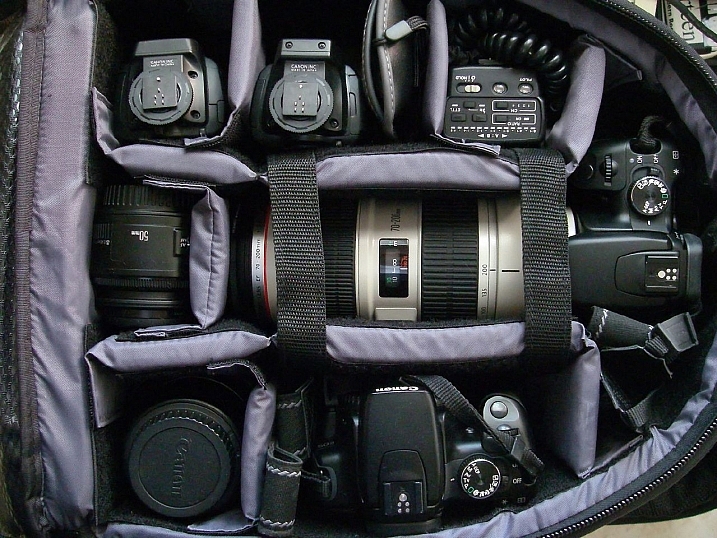
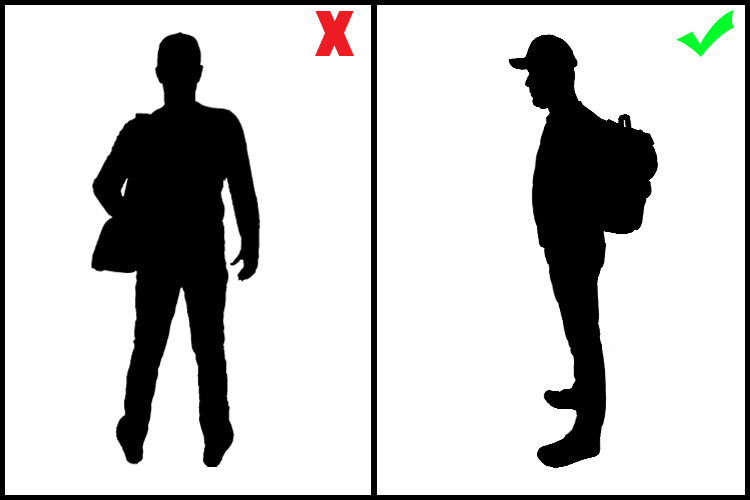
    A shoulder bag is a signature style for most photojournalists, and it is indeed practical when you need to have easy access to your equipment while on the move. But it is also a big enemy of your posture, as it puts all the weight in one of your shoulders making your spine curved and unbalanced.

    Backpacks distribute the weight equally on both shoulders, making it a much better solution for carrying your equipment. Rolling trolleys are an even better option, but they are not as practical if you need to move fast and don’t have smooth terrain.

    #2 – Trade the neck strap on your camera for a sling strap

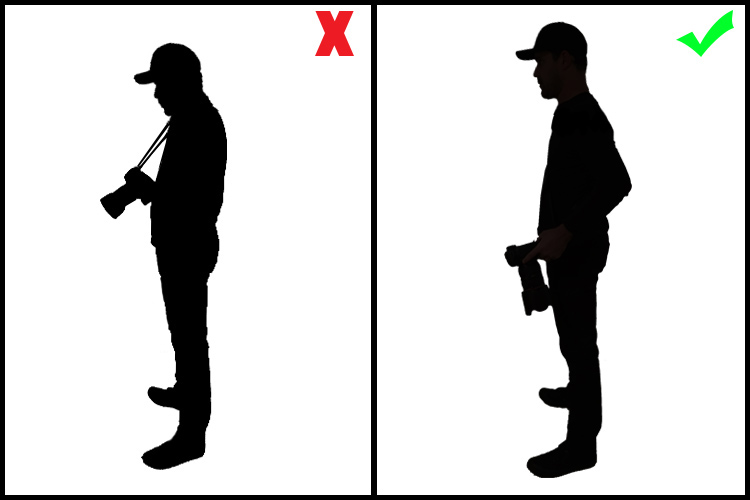
    Having a heavy camera and lens hanging from your neck by a strap is obviously a really bad idea. It causes a lot of stress on your neck, leading to issues with either the spinal discs or in the joints of the cervical spine. Sling straps minimize the impact of the camera’s weight, hanging it from the shoulder and across the torso. This makes it easier for you to move around and reach the camera, reducing the impact on your neck.

    10 Tips to Help Photographers Avoid Back Problems

    #3 – Get a good office chair

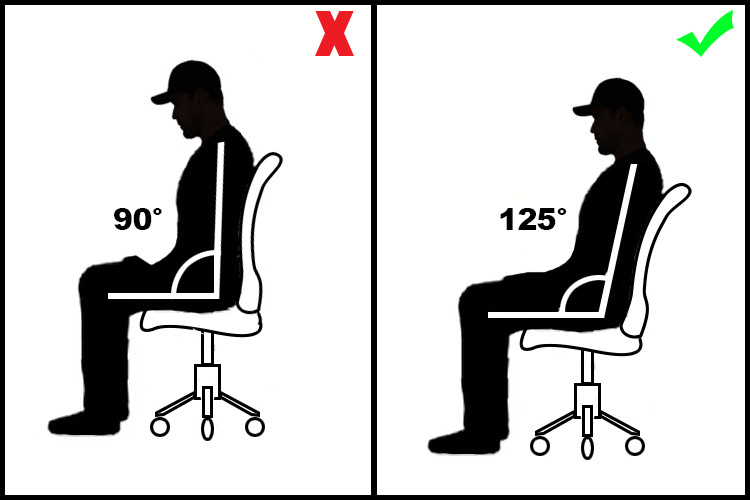
    If you spend a long time working on your computer, then a good office chair is something you must invest in. It is really important that your chair is adjustable, and can be regulated to your size, and the position you adopt in relation to the table and the computer you are working on.

    The optimal angle position between your legs and back is around 125 degrees.

    10 Tips to Help Photographers Avoid Back Problems

    Also avoid chairs with wheels that cannot be blocked, as they tend to move back and forward leading you to bad posture while seated. Also, avoid arm rests as they might cause pressure on the elbow tendons leading to tendinitis and ulnar nerve compression.

    #4 – Adapt the computer position to your body

    Almost everyone uses their computer in the worst possible position as they are most of the time located very low, especially if it is a laptop.

    Hunching over and looking down for a long time causes really bad stress on the cervical spine and neck muscles, This can lead to a stiff neck, headaches, and in a long run degenerative spinal problems. The correct thing to do is to place your computer monitor in a position that you can look straight ahead without having to curve your neck.

    10 Tips to Help Photographers Avoid Back Problems

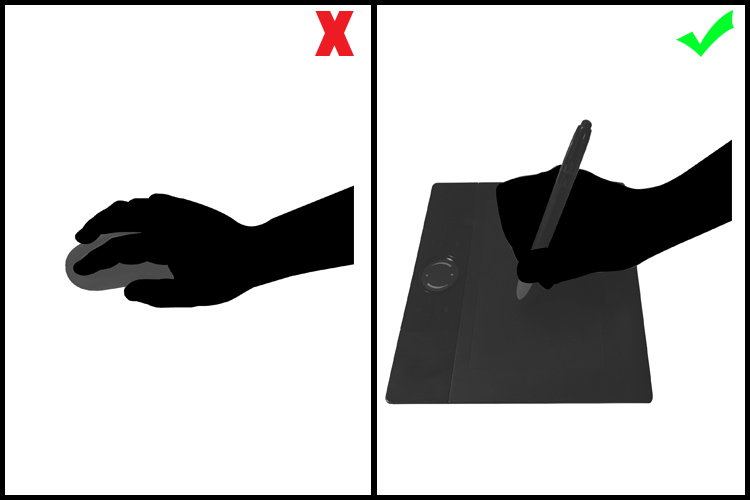
    #5 – Use a pen and tablet instead of a mouse

    A mouse is a fundamental piece of hardware for most people’s computer work, but at the same time, it is a bad ergonomic tool. It forces your hand to stay in an unnatural position, leading in the long run, to hand, wrist, shoulder and arm problems like tendinitis and arthritis.

    The use of a pen and tablet, besides giving you much better control of design functions in image editing software, allows a much more natural hand position, avoiding health problems.

    10 Tips to Help Photographers Avoid Back Problems

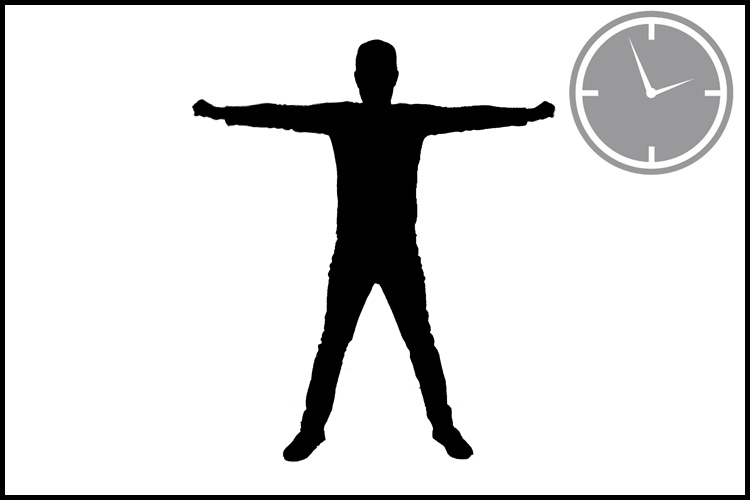
    #6 – Take regular breaks and stretch your body

    A common mistake we all make is to stand in the same position for long periods of time whether it is photographing, driving, standing at a desk, or simply just relaxing on the couch.

    It is fundamental to take small breaks in your daily activities and simply just stretch, allowing the fibers in your muscles to move and avoid cramps and contracting.

    10 Tips to Help Photographers Avoid Back Problems

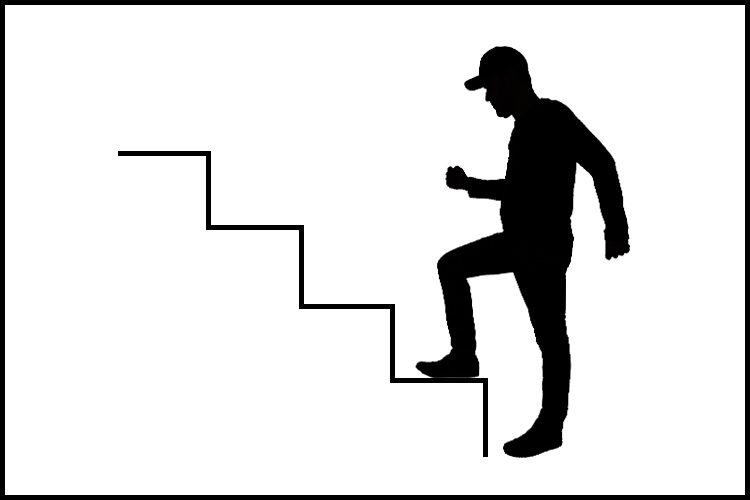
    #7 – Get your blood flowing

    Poor circulation is the starting point to a lot of really serious health problems. Of course, we would all like to have a healthier life, eat better, and exercise more, but the truth is that it takes a lot of time and discipline.

    A great way to overcome this is to turn your regular activities into small exercises.

    Simple things like taking the stairs instead of the elevator, or turn a walk down the street to the coffee shop into a power walk, just by adding more movement to your arms while you walk, can make a big difference in your overall physical condition.

    10 Tips to Help Photographers Avoid Back Problems

    #8 – Always lift with your knees, not your back

    Most severe back injuries come from trauma or heavy weight lifting. Trying to pick up something heavy from ground level, using just your back, is a true recipe for a disaster like a herniated disk.

    The trick here is to always keep you back straight and use your knees as a lever to lift up the weight. Your legs muscles are much stronger than your back, trust me.

    10 Tips to Help Photographers Avoid Back Problems

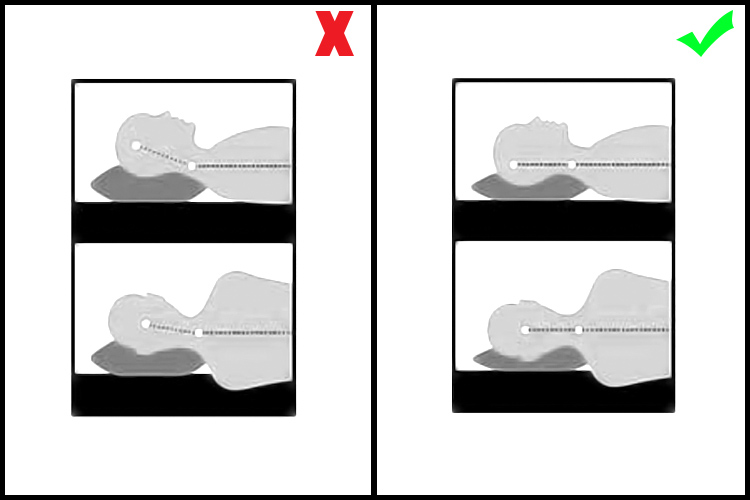
    #9 – Adjust your sleeping position

    We spend roughly one-third of our lives sleeping, so if we worry about our posture during the day, we should also worry about our posture while we sleep.

    Most hard working people I know are so tired when they get to bed, that they just lay down, close their eyes and get to sleep right away. Most of the time that’s in really awkward positions and they spend most of the night wrestling with their pillow or sinking in really bad mattresses.

    The best sleeping position is a really controversial discussion as it is a personal thing due to your body shape, weight, breathing difficulties, etc.

    We move a lot in our sleep, but whether you sleep most of the time on your back, side or stomach, always try to have a mattress and pillow that keep your spine as straight as possible. You will rest a lot better and wake up a lot more fresh.

    10 Tips to Help Photographers Avoid Back Problems

    #10 – Hydrate yourself properly

    Our body is 90% water, but yet we tend to forget how much we need to drink water just to be alive.

    If you are a busy person, it’s not easy to reach the 2 liters per day of optimal water intake. But if you just make an effort and carry a water bottle around with you and drink regularly during the day you will see that your internal organs will function a lot better, your skin will look younger and your joints and bones will not get old so fast.

    10 Tips to Help Photographers Avoid Back Problems

    Conclusion – over to you

    So there it is, a small list of simple tips that might make a significant change in your life.

    They may seem obvious for most people, but the fact is that we are all so busy with our daily life and work routines, that we seem just to forget to take care of ourselves and only realize when it is just too late.

    What about you, do you have some tips we could add to this list to help other photographers avoid back problems?

    googletag.cmd.push(function() {
    tablet_slots.push( googletag.defineSlot( “/1005424/_dPSv4_tab-all-article-bottom_(300×250)”, [300, 250], “pb-ad-78623” ).addService( googletag.pubads() ) ); } );

    googletag.cmd.push(function() {
    mobile_slots.push( googletag.defineSlot( “/1005424/_dPSv4_mob-all-article-bottom_(300×250)”, [300, 250], “pb-ad-78158” ).addService( googletag.pubads() ) ); } );

    The post 10 Tips to Help Photographers Avoid Back Problems by Ivo Guimaraes appeared first on Digital Photography School.


    Digital Photography School

  • Fujifilm X100F steps up to 24.3MP, adds AF joystick

    $ (document).ready(function() { SampleGalleryV2({“containerId”:”embeddedSampleGallery_7760545637″,”galleryId”:”7760545637″,”isEmbeddedWidget”:true,”standalone”:false,”selectedImageIndex”:0,”startInCommentsView”:false,”isMobile”:false}) });

    Fujifilm is taking the wraps off the X100F, the fourth generation of its popular enthusiast-focused compact series. It updates the house that the X100 built with a 24.3MP X-Trans III APS-C sensor and X-Processor Pro image processor borrowed from the X-T2.

    The number of autofocus points has been increased from 49 to 91, and Fujifilm claims an improved fastest AF acquisition time of 0.08 seconds. Fuji also claims faster overall performance for the X100F, quoting a startup time of 0.5 sec and 0.2 sec shutter release.

    Changes can also be seen on the top and rear panels of the camera – notably, an AF joystick makes its first appearance on the X100 series. Other controls have been shifted to the right of the LCD, and up top the shutter speed dial has been modified to include ISO controls. A front control dial has also been added. The hybrid viewfinder has also been updated, and now offers image magnification when using the electronic rangefinder mode.

    Other updates include the addition of a C setting on the exposure compensation dial, which enables adjustments using the command dial, expanding the range to +/- 5 stops. ACROS is can now be in the X100F’s roster of film simulation modes, as well. The WCL-X100 wide-angle and TCL-X100 tele-conversion lenses have also been updated to ‘Mark II’ versions. They offer electronic contacts so that the camera will automatically recognize the conversion lenses when they’re attached and apply distortion correction. 

    The Fujifilm X100F will be available February 16th in black or silver for $ 1299/£1249.

    Press release:

    FUJIFILM ANNOUNCES NEXT GENERATION X100F FROM THE SERIES THAT STARTED A REVOLUTION

    X100F features improved Advanced Hybrid Viewfinder and the latest 24.3MP sensor and processor

    Valhalla, N.Y., January 19, 2017 FUJIFILM North America Corporation today announced the FUJIFILM X100F, the new premium rangefinder style compact digital camera featuring a unique Advanced Hybrid Viewfinder that allows users to switch between an optical viewfinder and electronic viewfinder. The new X100F is the fourth generation release from the series that introduced the first hybrid viewfinder camera for ultimate flexibility, style and premium image quality.

    Featuring the latest 24.3MP X-Trans CMOS III APS-C image sensor, high-speed image processing engine and a high-performance FUJINON 23mm F2 lens, the X100F delivers outstanding color reproduction and gradation of tones in both stills and videos, while providing photographers with increased mobility and an unsurpassed user experience. 

    Advanced Hybrid Viewfinder with Quick Response and Enhanced AF Performance

    The FUJIFILM X100F uses an Advanced Hybrid Viewfinder that combines the features of an Optical Viewfinder (OVF) with an Electronic Viewfinder (EVF) for enhanced performance and convenience. While in Electronic Rangefinder mode, users can now change the magnification, shown as EVF in the optical viewfinder, for greater accuracy when checking focus. The small EVF window can display 100% field of view as well as 2.5x and 6x magnifications, and the EVF frame rate has been increased to 60 frames per second.

    To provide users with perfect framing and focus while using the Manual Focus mode, the Real Time Parallax Correction function is applied to the focus area in addition to the guide frame. Photographers can also now check exposure and white balance in the EVF window, making it the ultimate viewfinder while providing all the benefits of the EVF while shooting through the OVF.

    The new X100F has enhanced AF performance with improvements to basic response time specifications to ensure the camera operates exactly as the photographer intends. Making it perfect for quick snapshots, the X100F has a startup time of approximately 0.5 seconds, a shooting interval of 0.2 seconds, shutter release time lag of 0.01 seconds and AF speeds as fast as 0.08 seconds. The X100F gives users six AF modes including Single Point mode, Zone mode and Wide/Tracking mode for both AF-S for stationary subjects and AF-C for moving subjects. 

    The number of focus points in the X100F has been dramatically increased to 91 (up to 325 points), up from 49 in previous models, with approximately 40% of the imaging area covered with phase detection to form a fast and precise AF area that can be used in a variety of scenes. By combining these features with a greater ability to autofocus on points of light and low contrast objects, the X100F captures beautiful detail in pictures with fine and delicate textures, helping to reproduce images just as photographers remember.

    New ACROS Film Simulation

    The Film Simulation function now features ACROS mode for even more artistic photos. Using X-Processor Pro’s advanced processing capability, the mode offers smooth gradation, deep blacks and beautiful textures to create stunning monochrome images. The X100F also features the Grain Effect function for reproducing distinctive graininess seen in photographs taken with film cameras. The function is available in a Strong and Weak setting, and can be combined with any of the Film Simulation modes. Photographers can now easily achieve the creative effect of film-based photos, notable especially when the image is printed out.

    Sophisticated Camera Body with Intuitive Control and Superb Feel

    To provide photographers with an extraordinary experience, the rear face of the FUJIFILM X100F has been redesigned to concentrate most of the frequently used functions on the right-hand side. This allows users to change camera settings quickly while holding the camera firmly and without having to take an eye off the viewfinder.

    The Focus Lever positioned on the rear side of the camera allows users to use joystick-type operations in eight directions to easily select a focus area. The X100F also now features a built-in ISO Dial that is incorporated into the Shutter Speed Dial for further ease of use. This enables the user to easily check ISO and Shutter Speed, in addition to aperture and exposure compensation, from a glance without having to power on the camera. There is also a also features a Focus Lever on the rear of the camera body that to instantly move the focus area, and a completely silent electronic shutter capable of exposures up to 1/32000 seconds. The external surface of the X100F is finished with synthetic leather that provides high durability and excellent resistance to the elements while providing photographers with the benefit of slip resistance and a comfortable hold.

    FUJIFILM X100F Key Features:  

    • 24.3MP APS-C size X-Trans CMOS III sensor
    • Advanced Hybrid Viewfinder (OVF / EVF) equipped with an Electronic Rangefinder
      • Intelligent Hybrid AF in 0.08 seconds
      • Fast start-up time of 0.5 seconds
      • Shutter time lag of 0.01 seconds
      • Shooting interval of 0.2 seconds
    • FUJINON 23mm (35mm in 35mm format Equivalent) F2 lens in 8 glass elements in 6 groups with FUJINON’s proprietary HT-EBC coating
    • ND filter equivalent to 3 stops of aperture
    • High-definition 1.04M-dot 3” LCD
    • NEW ‘ACROS’ film simulation mode
    • Focus Peaking function and Digital Split Image display even in the OVF
    • Extended full HD Video Recording
    • Full HD video can be recorded at 59.94 fps, 50 fps, 29.97 fps, 25 fps, 24 fps and 23.98 fps, and with Film Simulation effects
    • Six AF Modes
      • Single Point, Zone and Wide/Tracking for both AF-S for stationary, and AF-C for moving subjects
    • Intelligent Hybrid AF: switches between Phase Detection AF and Contrast AF according to scene
    • Digital Teleconverter function
      • Choose angles of view equivalent to 50mm and 70mm in addition to built-in lens’ 35mm
    • Advanced Filter Functions
      • Pop Color, Toy Camera, Miniature, Dynamic Tone, Partial Color, Soft Focus, High Key and Low Key
    • Interval Timer Shooting: available in intervals of one second to 24 hours with no limit on frames, for time lapse photography
    • Manual focus available during video recording
    • Free FUJIFILM Camera Remote application and Wireless Communication function allows users to remotely shoot images from smartphones and tablets via WiFi
    • Photos can be sent to the INSTAX Share Printer using the free INSTAX Share App (iOS and Android) SHARE Smartphone Printer
    • Output for Stereo Microphone
    • Interval timer shooting (1 second to 24 hours up to 999 frames)

    FUJIFILM X100F Accessories:

    • Leather Case LC-X100F: user can change the battery and media card while the case is attached to the camera.
    • Wide Conversion Lens WCL-X100 II: dedicated wide conversion lens that multiplies the fixed focal length by approximately 0.8x, converting it to 23mm (35mm format equivalent) for capturing broader views when shooting in tight spots or landscapes.
    • Tele-Conversion Lens TCL-X100 II: dedicated tele-conversion lens for narrowing the field of view by multiplying the fixed focal length by approximately 1.4x, converting it to 50mm (35mm format equivalent) for shooting portraits or close-up photography from as close as approximately 5.5in / 14cm.

    Availability and Pricing

    The new FUJIFILM X100F Digital Camera (Black and Silver) will be available in February 2017 in the U.S. and Canada for USD $ 1,299.95 and CAD $ 1,699.99.

    Fujifilm X100F specifications

    Price
    MSRP £1249
    Body type
    Body type Large sensor compact
    Body material Magnesium alloy
    Sensor
    Max resolution 6000 x 4000
    Image ratio w:h 1:1, 3:2, 16:9
    Effective pixels 24 megapixels
    Sensor size APS-C (23.6 x 15.6 mm)
    Sensor type CMOS
    Processor X-Processor Pro
    Color space sRGB, Adobe RGB
    Color filter array X-Trans III
    Image
    ISO Auto, 200-12800 (expands to 100-51200)
    Boosted ISO (minimum) 100
    Boosted ISO (maximum) 51200
    White balance presets 7
    Custom white balance Yes
    Image stabilization No
    Uncompressed format RAW
    JPEG quality levels Fine, Normal
    File format
    • JPEG (Exif v2.3)
    • RAW (RAF format)
    Optics & Focus
    Focal length (equiv.) 35 mm
    Maximum aperture F2–16
    Autofocus
    • Contrast Detect (sensor)
    • Phase Detect
    • Multi-area
    • Center
    • Single
    • Continuous
    • Face Detection
    • Live View
    Autofocus assist lamp Yes
    Digital zoom Yes (Digital Tele-Converter: 50mm, 70mm)
    Manual focus Yes
    Normal focus range 10 cm (3.94)
    Number of focus points 325
    Screen / viewfinder
    Articulated LCD Fixed
    Screen size 3
    Screen dots 1,040,000
    Touch screen No
    Screen type TFT LCD
    Live view Yes
    Viewfinder type Electronic and Optical (tunnel)
    Viewfinder coverage 92%
    Viewfinder magnification 0.5×
    Viewfinder resolution 2,360,000
    Photography features
    Minimum shutter speed 4 sec
    Maximum shutter speed 1/4000 sec
    Maximum shutter speed (electronic) 1/32000 sec
    Exposure modes
    • Program AE
    • Shutter priority
    • Aperture priority
    • Manual exposure
    Built-in flash Yes
    Flash range 4.60 m (at ISO 100)
    External flash Yes (hot-shoe)
    Flash modes Auto, forced, suppressed, slow synchro, commander
    Continuous drive 8.0 fps
    Self-timer Yes (2 or 10 sec)
    Metering modes
    • Multi
    • Center-weighted
    • Average
    • Spot
    Exposure compensation ±3 (at 1/3 EV steps)
    AE Bracketing ±2 (at 1/3 EV, 2/3 EV, 1 EV steps)
    WB Bracketing Yes
    Videography features
    Resolutions 1920 x 1080 (60p, 50p, 30p, 25p, 24p)
    Format H.264
    Modes
    • 1920 x 1080 @ 60p / 36 Mbps, MOV, H.264, Linear PCM
    • 1920 x 1080 @ 50p / 36 Mbps, MOV, H.264, Linear PCM
    • 1920 x 1080 @ 30p / 36 Mbps, MOV, H.264, Linear PCM
    • 1920 x 1080 @ 25p / 36 Mbps, MOV, H.264, Linear PCM
    • 1920 x 1080 @ 23.98p / 36 Mbps, MOV, H.264, Linear PCM
    • 1280 x 720 @ 60p / 18 Mbps, MOV, H.264, Linear PCM
    • 1280 x 720 @ 50p / 18 Mbps, MOV, H.264, Linear PCM
    • 1280 x 720 @ 30p / 18 Mbps, MOV, H.264, Linear PCM
    • 1280 x 720 @ 25p / 18 Mbps, MOV, H.264, Linear PCM
    • 1280 x 720 @ 23.98p / 18 Mbps, MOV, H.264, Linear PCM
    Microphone Stereo
    Speaker Mono
    Storage
    Storage types SD/SDHC/SDXC
    Connectivity
    USB USB 2.0 (480 Mbit/sec)
    HDMI Yes (micro-HDMI)
    Microphone port Yes
    Headphone port No
    Wireless Built-In
    Wireless notes 802.11b/g/n with smartphone control
    Remote control Yes (via cable release or smartphone)
    Physical
    Environmentally sealed No
    Battery Battery Pack
    Battery description Lithium-Ion W126S rechargeable battery & charger
    Battery Life (CIPA) 390
    Weight (inc. batteries) 469 g (1.03 lb / 16.54 oz)
    Dimensions 127 x 75 x 52 mm (5 x 2.95 x 2.05)
    Other features
    Orientation sensor Yes
    Timelapse recording Yes
    GPS None

    Articles: Digital Photography Review (dpreview.com)

  • When is the Right Time to Upgrade Camera Gear?

    Knowing when to upgrade camera gear can be a little tricky. Picking the right time to upgrade is about knowing who you are as a photographer, and who you want to become.

    When is the Right Time to Upgrade Your Camera Gear?

    What makes upgrading tricky is the pace at which technology advances. New form factors, features, and capabilities will continue to be innovated over the years to come. It’s certainly possible that new trends could make traditional photography obsolete. For example, 360 degree photography is one new trend that has garnered a lot of interest.

    If that wasn’t enough, the amount of money that companies spend on marketing their innovations is continuing to increase. This means that there are more deals, more packages, and more attempts to convince you that it is the right time to upgrade your gear.

    So how do you know when you are actually ready to upgrade your photography gear?

    Five Signs you’re ready to upgrade your camera gear

    Your needs and wants will be different from mine and from that of your neighbor’s so it’s difficult to offer a blanket “This is when you should upgrade” statement. But, there are at least five key things to consider when upgrading your gear.

    When is the Right Time to Upgrade Your Camera Gear?

    1. Your current gear is struggling to keep up with your creative needs

    It’s a good sign that you are ready to upgrade your gear when your current gear fails to give you the results you are looking for.

    When this might be the case is if you are trying to take portraits of people with sharp focus in the foreground and creamy bokeh in the background. If you’re still using the kit lens that came with your camera, odds are the results you’re getting aren’t meeting your needs. In a case like this, buying a new lens might be worth considering.

    2. If you’ve decided to go to a more professional level of work

    When you decide to make the move from hobbyist to being a professional photographer, upgrading could become a viable option. Higher quality gear tends to be more durable and offers more flexibility, both of which are important in a professional setting.

    As an added bonus once you start working professionally you will be able to deduct the costs of your gear from your taxes making the cost of upgrading more bearable.

    3. Your gear is showing its age

    While tomorrow’s technology will always make today’s look old, and upgrading to stay current is not usually the right choice – there will come a time when you gear does get so dated, that upgrading is actually your best option.

    You may even be able to save some money by upgrading to generation body or lens that is a year or two old. This will still allow you to make a leap in terms of the technology that you are using, at a fraction of the cost of jumping to the current generation technologies.

    When is the Right Time to Upgrade Your Camera Gear?

    4. The manufacturer has dropped support

    Sometimes you’ll find out that the manufacturer has dropped support for the product you own. In cases like this, it might be time to consider upgrading. (Note: this means you ignored point #3 above and kept using your aging gear until it effectively died).

    5. Your current gear is “hacked” together to meet a need

    Finally, let’s say that your current gear does what it needs to do to achieve the photographs that you want, but it does so in a way that requires a cumbersome process or a jerry-rigged system. If there’s a solution available that would simplify your current process in a way that saves you time and frustration it’s certainly worth considering an upgrade.

    Two good reasons you are not ready to upgrade

    When is the Right Time to Upgrade Your Camera Gear?

    1. Upgrading when a new model is released

    New model releases are always going to tempt you into upgrading. Marketing teams do a fantastic job at showcasing the new improvements, and how they will enhance your photography. However, rarely will these improvements have a substantial impact on your overall photography. It’s not about whether the new features are better than the ones that you currently have, but will they actually impact the results that you can not achieve with your current camera.

    More concisely – does the new model help justify one or more of the reasons listed above? If not, then it’s probably not worth upgrading at this point in time.

    2. Keeping up with your friends

    As if you need another reason to upgrade – your best photography buddy just did – so now you have to as well. If the reason you’re buying something is because you’re trying to outdo, or one-up someone you know – it’s the wrong reason to upgrade your gear.

    What are other valid reasons to upgrade?

    Read more here:

    • 3 Valid Reasons it Might be Time to Upgrade Your Camera Equipment
    • Ready to Upgrade Your Kit Lens? Tips for Which Lens to Invest in Next
    • Do You Need to Upgrade to the Latest Camera?

    When have you felt the need to upgrade your camera gear? Let us know in the comments below.

    googletag.cmd.push(function() {
    tablet_slots.push( googletag.defineSlot( “/1005424/_dPSv4_tab-all-article-bottom_(300×250)”, [300, 250], “pb-ad-78623” ).addService( googletag.pubads() ) ); } );

    googletag.cmd.push(function() {
    mobile_slots.push( googletag.defineSlot( “/1005424/_dPSv4_mob-all-article-bottom_(300×250)”, [300, 250], “pb-ad-78158” ).addService( googletag.pubads() ) ); } );

    The post When is the Right Time to Upgrade Camera Gear? by John Davenport appeared first on Digital Photography School.


    Digital Photography School

  • Fujifilm releases first round of G-mount medium-format lenses

    $ (document).ready(function() { SampleGalleryV2({“containerId”:”embeddedSampleGallery_8672839365″,”galleryId”:”8672839365″,”isEmbeddedWidget”:true,”standalone”:false,”selectedImageIndex”:0,”startInCommentsView”:false,”isMobile”:false}) });

    You’re going to need some lenses to go along with that new Fujifilm GFX 50S, and the company announced a trio of them.

    First up is the GF 63mm F2.8 R WR, which is equivalent to 50mm when mounted on the medium-format GFX 50S. It’s small and lightweight, features nine rounded aperture blades and is sealed against dust and moisture (as are the other two lenses announced today). It will be available in February for $ 1499/£1399.

    For those seeking a zoom, there’s the GF 32-64mm F4 R LM WR. This lens is equivalent to 25-51mm and has aspherical, ED and Super ED elements and a linear motor-powered internal AF system. The zoom will set you back $ 2299/£2199.

    The final lens is a tele-macro model with optical image stabilization rated to 5 stops. The GF 120mm F4 R LM OIS WR Macro is equivalent to 95mm and has 3 ED elements, a linear AF motor and a minimum focus distance of 45cm/18in. The 120mm is priced at $ 2699/£2599.

    Three additional lenses will be released by the end of the year, including a 23mm F4, 45mm F2.8 and 110mm F2. 

    GROUNDBREAKING FUJIFILM GFX 50S MEDIUM FORMAT MIRRORLESS CAMERA DELIVERS ULTRA-HIGH IMAGE QUALITY

    FUJIFILM GFX 50S combines an extraordinary sensor, processor and design with FUJINON lenses to give users the ultimate photography experience

    Valhalla, N.Y., January 19, 2017 – As the leader in innovation for photographers, FUJIFILM North America Corporation today announces the FUJIFILM GFX 50S medium format mirrorless digital camera that will launch late February, 2017 with an initial selection of three FUJINON lenses – the GF63mmF2.8 R WR, the GF32-64mmF4 R LM WR, and the GF120mmF4 R LM OIS WR Macro. These lenses encapsulate the design philosophy of FUJINON lenses that are renowned by photographers around the world.

    The innovative GFX system utilizes a Fujifilm exclusive 43.8 x 32.9mm (FUJIFILM G Format) 51.4MP CMOS sensor. The GFX 50S combines the heritage of over 80 years of imaging and the innovative award-winning functional design of our X Series digital camera system in the relentless pursuit of image quality.

    The FUJIFILM GFX 50S Revealed

    The FUJIFILM GFX 50S mirrorless digital camera uses the new 51.4MP FUJIFILM G Format 43.8 x 32.9mm sensor with approximately 1.7x the area of a 35mm sensor. In addition to the camera are three new FUJINON GF Lenses that will be followed by three additional lenses later in 2017.

    The GFX 50S 51.4MP sensor shows its true potential when making large format prints, capturing majestic landscape photos or reproducing historical documents. Compared to a full size sensor with equivalent megapixels, both resolution and sensitivity are dramatically better due to the larger size of each pixel. As a result, the sensor captures great textures and subtlety of tone that is unique to large size sensors. The texture and tone combine to give a unique three-dimensional effect creating extremely high quality photography. Images captured can be reproduced down to the smallest detail, conveying the texture of the subject, a three-dimensional feeling, and the atmosphere of the scene.

    For flash photography in the studio or outdoors during the day, the GFX 50S sensor has a native ISO of 100. The sensor can also be adapted to various aspect ratios, including 4:3, 3:2, 16:9, 1:1, 65:24, 5:4, 7:6, all of which are available in large and medium format film cameras.

    The FUJIFILM GFX 50S uses the X Processor Pro (also used in the X-Pro2 and X-T2 cameras) and allows photographers to use Fujifilm’s proprietary Film Simulations with a Medium Format sensor. The camera supports Full HD recording at 29.97p/25p/24p/23.98p. Users can enjoy high quality video with no post-processing required by using Film Simulation modes just like they would with a still image. The GFX 50S introduces a new Color Chrome Effect feature that reproduces subtle tones in highly saturated subjects.

    Ultimate Performance in a Compact Body

    With a compact and lightweight body constructed from magnesium alloy, the FUJIFILM GFX 50S weighs approximately 43 ounces when paired with the FUJINON GF63mmF2.8 R WR, and weighs approximately 60% of a medium format DSLR camera equipped with a sensor of the same size. When compared to a full frame, the weight is almost identical. Overall camera body height and width have also been minimized for maximum flexibility, overturning the common perceptions regarding the mobility of medium format digital cameras.

    Bright, Crystal Clear Viewfinder and Large Touchscreen

    The FUJIFILM GFX 50S gives users a 3.69M dot organic EL electronic viewfinder and 2.36M dot touchscreen LCD back panel for easy viewing. The EVF is detachable to allow for flexible operation. Users can attach the accessory EVF-TL1 EVF tilt adapter (sold separately) to allow the finder to be tilted to 90° vertically and swung ±45°. A 3.2 inch, 2.36M dot touch panel is used for the rear monitor, with touch operation for the menu, focusing points and image playback. A three-directional tilting LCD screen improves operability and makes viewing images and checking focus even easier.

    FUJINON Lenses Guarantee Image Perfection

    As part of the GFX system, Fujifilm is launching newly developed, ultra-high resolution FUJINON GF lenses. Taking advantage of the mirrorless system’s structure, the G Mount has a short flange back distance of just 26.7mm that reduces the back focus distance as much as possible. This prevents vignetting and achieves edge-to-edge sharpness. All FUJINON GF Lenses have been designed to support sensors of over 100MP.

    GFX lens barrels feature an aperture ring in the same manner as FUJINON XF lenses, for intuitive operation. A new C (Command) Position has been added to the aperture ring, allowing users to change the aperture with the camera’s command dial. The A (Auto) Position and C Position feature a locking button installed on the aperture ring that must be disabled to implement changes.

    Built for the Professional, and the Enthusiast

    Just as with the flagship X Series models, the FUJIFILM GFX 50S features dedicated dials to independently set aperture, shutter speed, and ISO, the important factors in determining exposure.

    Aperture and ISO feature a C (Command) and the shutter speed dial has a T (Time) Position. Setting the dial to this position allows the user to change exposure settings using the command dials on the front and rear of the camera body. The user can choose between these two operation methods according to their preference, ease of use, and the shooting environment.

    The GFX 50S is equipped with a 1.28 inch LCD sub monitor on the top of the body. Important exposure data such as aperture and shutter speed is displayed on this screen. This display is extremely useful when shooting on a tripod or tethered to a computer.

    A 117-point (9 x 13 / maximum of 425 points when miniaturized) contrast AF system is used on the GFX 50S. High-precision AF on the imaging sensor dramatically improves focusing accuracy with the shallow depth of field produced by medium format lenses. First adopted in the FUJIFILM X-Pro2, focus point selection can be performed by using the Focus Lever, which allows intuitive movement of the focus point. Alternatively, users can select the focus point from the touch panel LCD screen.

    Initial Lens Lineup Will Include the Following Three FUJINON Options:

    1. GF63mmF2.8 R WR (equivalent to 50mm in 35mm format)
    2. GF32-64mmF4 R LM WR (equivalent to 25-51mm in 35mm format)
    3. GF120mmF4 Macro R LM OIS WR (equivalent to 95mm in 35mm format)

    FUJINON GF63mmF2.8 R WR

    The optical system features a construction of 8 groups and 10 elements, including 1 ED lens element. This lens construction is the most suitable for high resolution in compact and stylish design, the external form of this small and lightweight lens has a diameter of just 84.0 x 71.0mm with a weight of only 14.2 ounces \ 405 grams. Using the front group for the focus, aberrations due to focus distance are suppressed, achieving high resolution performance even when wide open from the center to the edges of the lens.

    FUJINON GF32-64mmF4 R LM WR

    The FUJINON GF32-64mmF4 R LM WR features a construction of 11 groups and 14 elements, 3 aspheric elements, 1 ED lens and 1 super ED lens, allowing this lens to achieve image quality rivalling prime lenses. As a result, the lens demonstrates extremely high performance from the center all the way to the edges. The lens uses internal focusing, reducing the weight of the focus lens and achieving fast and silent AF by driving focus using a linear motor.

    FUJINON GF120mmF4 R LM OIS WR Macro

    The FUJINON GF120mmF4 R LM OIS WR Macro has a construction of 9 groups and 14 elements, including 3 ED lens elements. By adopting a floating focus method using a linear motor, silent high-speed autofocusing is achieved while aberrations are corrected, dramatically increasing the resolution. Furthermore, by arranging the ED lenses properly, chromatic aberrations are also properly corrected, contributing to high quality images. In designing this lens the quality of the out of focus area both in front and behind the plane of focus were considered, giving this lens beautiful bokeh. This lens is equipped with optical image stabilization (OIS) effective up to 5.0-stops, making this lens perfect for handheld shooting in low-light situations.

    Three Additional FUJINON GF Lenses to be Announced Later in 2017:

    1. GF110mmF2 R LM WR (equivalent to 87mm in 35mm format)
    2. GF23mmF4 R LM WR (equivalent to 18mm in 35mm format)
    3. GF45mmF2.8 R WR (equivalent to 35mm in 35mm format)

    GFX 50S Accessories (sold separately)

    1. Vertical Battery Grip VG-GFX1 – high-performance battery grip is designed to place the release button, dials, and function buttons in the same positions when shooting vertically. The battery grip can be loaded with one NP-T125 dedicated battery, lowering the frequency that batteries need replacing. Also, by connecting the AC-15V accessory (sold separately), it is possible to charge the battery within the grip in approximately 2 hours.
    1. EVF Tilt Adapter EVF-TL1 – mounting this accessory between the camera body and EVF, the angle of the EVF can be changed to angles from 0°?90° vertically and from -45°?+45° horizontally. Doing this allows the user to shoot at various angles while using the viewfinder, greatly increasing the versatility of the finder for different subjects.
    1. H Mount Adapter G – allows you to use SUPER EBC FUJINON HC interchangeable lenses developed for the FUJIFILM GX645AF medium format film camera (discontinued). By attaching this adapter to the GFX 50S, a total of 9 SUPER EBC FUJINON HC interchangeable lenses and 1 tele-converter developed for the GX645AF can be used. While the focusing method will be limited to manual focusing, the lens aperture can be changed using the command dial on the camera body, and shooting with the leaf shutter built in to the lenses is also possible. Using this lens shutter will allow high speed flash synchronization up to a maximum speed of 1/800 sec.

      Also, the adapter is equipped with electrical contacts that can communicate with the camera body, independently creating, saving, and applying correctional data for each lens. The adapter supports Manual and Aperture Priority AE exposure modes.

    *A removable tripod foot is included to mount the camera with a heavy or long focal length lens.

    1. View Camera Adapter G – allows the GFX 50S to be used as a digital back. The view camera adapter allows the GFX 50S to be mounted to the standard universal-type back of a view camera. This allows the use of FUJINON large format camera lenses, such as the CM-W FUJINON lens series. The camera or lens shutter can be triggered, allowing the user to choose the optimum method. The large image circle and the bellows of the view camera can be used with tilt, shift and swing movements, effective for product and architectural photography.
      *There may be instances in which the adapter cannot be mounted depending on the shape of the view camera.
    1. Tethered Shooting Solutions – We have the following tethering solutions for photographers, including: X Acquire to transfer images from the camera to a hot folder on your computer for use with your preferred imaging software, Tether Shooting Plug-in PRO for Adobe® Photoshop® Lightroom® and HS-V5 for Windows (sold separately).

      By connecting the GFX 50S to a PC via USB cable and using this software, it is possible to transfer photographed images directly to the PC, as well as control the camera from the PC. Also, by using the Control Panel Window newly added to Tether Shooting Plug-in PRO for Adobe® Photoshop® Lightroom®, additional camera functions become available.

    1. RAW FILE CONVERTER EX2.0 – powered by SILKYPIX (free of charge) RAW development software and Adobe® Photoshop® Lightroom® / Adobe® Photoshop® CC (sold separately). RAW development software is used for detailed corrections and advanced image processing that isn’t supported by the in-camera RAW conversion. Both software support Fujifilm’s “Film Simulation” modes, allowing creation of image data that is extremely close to Fujifilm’s advanced color reproduction.

    FUJIFILM GFX 50S Key Features:

    • 51.4MP Medium Format 43.8 x 32.9mm sensor for superior sharpness and image quality for all photographers
      • Adaptable to various aspect ratios, including 4:3 (default), 3:2, 16:9, 1:1, 65:24, 5:4, 7:6
    • FUJIFILM G Mount with short flange back distance of just 26.7mm
    • X-Processor Pro imaging processor
    • Detachable electronic viewfinder
    • Weather and dust resistant; operation to as low as 14 degrees Fahrenheit \ -10 degrees Celsius
    • File formats include three different JPEG settings (SUPER FINE, FINE, NORMAL), as well as two different RAW settings (uncompressed, compressed). TIFF output is also possible with in-camera RAW development
    • Full HD for Movie Mode: 1920×1080 29.97p/25p/24p/23.98p 36Mbps, in Film Simulation modes
    • Light body weighs approximately 43oz. \ 825g (including battery and memory card)
    • Uses SD Cards (UHS-II recommended)
      • Equipped with dual slots
      • Supports three different types of recording methods, “Sequential,” in which recording can be continued according to shooting order, “Backup,” which records the same data on two cards simultaneously, and “Sorting,” which records RAW and JPEG data on separate cards
    • Uses newly developed NP-T125 high capacity battery for approximately 400 photos (with Auto Power Save ON)
    • All FUJINON GF Lenses are dust and weather resistant, built to withstand operation at temperatures as low as 14 degrees Fahrenheit \ -10 degrees Celsius allowing photographers to take them outdoors with confidence in challenging weather conditions.
    • The new FUJINON GF Lenses feature an aperture ring, a popular feature in the X Series, and have a new C (Command) Position on the ring to enable aperture adjustments with the Command Dial on the camera body
    • A Fluorine coating applied to the front lens element creates a hydrophobic coating that repels moisture.

    The GFX 50S and FUJINON GF lenses culminate to create a new camera system capable of creating the world’s highest level of photographic expressions by combining the thorough incorporation of knowledge regarding camera operation, optical design, image capture, and image processing.

    Availability and Pricing

    The new FUJIFILM GFX 50S Medium Format Camera Body will be available Late February, 2017 in the U.S. and Canada for USD $ 6,499.95 and CAD $ 8,499.99.

    Also available in February, 2017 will be the first three FUJINON GF lenses. GF63mmF2.8 R WR for USD $ 1,499.95 and CAD $ 1,899.99, GF32-64mmF4 R LM WR for USD $ 2,299.95 and CAD $ 2,999.99, and GF120mmF4 R LM OIS WR Macro for USD $ 2,699.95 and CAD $ 3,499.99.

    Fujifilm GF 63mm F2.8 R WR / 120mm F4 R LM OIS WR Macro specifications

      Fujifilm GF 63mm F2.8 R WR Fujifilm GF 120mm F4 R LM OIS WR Macro
    Principal specifications
    Lens type Prime lens
    Max Format size 645
    Focal length 63 mm
    Image stabilization No Yes (5 stops)
    Lens mount Fujifilm G
    Aperture
    Maximum aperture F2.8 F4
    Minimum aperture F32
    Aperture ring Yes
    Number of diaphragm blades 9
    Aperture notes Rounded blades
    Optics
    Elements 10 14
    Groups 8 9
    Special elements / coatings 1 ED element 3 ED elements
    Focus
    Minimum focus 0.50 m (19.69) 0.45 m (17.72)
    Maximum magnification 0.17× 0.5×
    Autofocus Yes
    Motor type Linear Motor
    Full time manual Yes
    Focus method Extending front Internal
    Distance scale No
    DoF scale No
    Physical
    Weight 405 g (0.89 lb) 980 g (2.16 lb)
    Diameter 84 mm (3.31) 89 mm (3.5)
    Length 71 mm (2.8) 153 mm (6.02)
    Sealing Yes
    Filter thread 62.0 mm 72.0 mm
    Hood supplied Yes
    Tripod collar No

    Fujifilm GF 32-64mm F4 R LM WR specifications

    Principal specifications
    Lens type Zoom lens
    Max Format size 645
    Focal length 32–64 mm
    Image stabilization No
    Lens mount Fujifilm G
    Aperture
    Maximum aperture F4
    Minimum aperture F32
    Aperture ring Yes
    Number of diaphragm blades 9
    Aperture notes Rounded blades
    Optics
    Elements 14
    Groups 11
    Special elements / coatings 3 aspheric lenses, 1 ED lens, 1 Super ED lens
    Focus
    Minimum focus 0.50 m (19.69)
    Maximum magnification 0.12×
    Autofocus Yes
    Motor type Linear Motor
    Full time manual Yes
    Focus method Internal
    Distance scale No
    DoF scale No
    Physical
    Weight 875 g (1.93 lb)
    Diameter 93 mm (3.66)
    Length 116 mm (4.57)
    Zoom method Rotary (extending)
    Power zoom No
    Zoom lock Unknown
    Filter thread 77.0 mm
    Hood supplied Yes
    Tripod collar No

    Articles: Digital Photography Review (dpreview.com)

  • Take flight over Australia: aerial photos by Scott McCook

    Take flight over Australia: Aerial photos by Scott McCook

    Originally a tailing pond image, I have created a fictional piece of work to convey a story about Australia riding the mining boom, Boddington Western Australia

    Scott McCook is a native Australian and an award winning landscape photographer with a serious passion for aerial photography. All of the images that you see in this article were shot from the skies high above remote areas of Australia and New Zealand. His goals are to not only highlight the beauty in areas that are remote and far removed from the public eye, but also to illustrate the impacts that industry can have on the world around us.

    To see more of his work, check him out on Facebook and Instagram.

    What inspired you to begin your aerial work?

    Big Lagoon Shark Bay, an isolated birrida, these birridas are gypsum clay pans that used to be saline lakes

    I have two main sources of inspiration, the first of which is my drive to photograph what hides in plain sight. This started many years ago with astrophotography, which was something I pursued in my earlier days of landscape photography. The idea of something so beautiful hiding above cities and street lights every night with many people never even seeing the Milky Way with their own eyes drove me to the dark spots of Western Australia (of which there are many) to capture the incredible beauty of the Milky Way and show people here in Western Australia what’s in their backyard every night.

    This concept of showing people, via my imagery, what hides just below the surface (or above your head) is what fanned my obsession for aerial photography. It’s the very same principals, the idea that these beautiful and sometimes abstract landscapes that we see every day from the ground can explode into life from the air.

    My second source of inspiration is to show people the impact of mankind on nature, as in the case of my mining aerial imagery. It’s showing people areas that they would never normally be able to see on that scale. It has the possibility to empower people to make their own opinion on these landscapes and how far man will go to chase our precious resources.

    I should also mention that there are a number of truly amazing landscape photographers based out of Australia that inspire me on a daily basis. The collective of landscape photographers from ND5 put life back into the aerial genre here in the last 10 or so years and their work sparked my interest in what our beautiful country has to offer from the air. Photographers like Tony Hewitt, Christian Fletcher and Peter Eastway have not only supplied inspiration over the years but have been great mentors for myself and many other budding landscape photographers here in Australia.

    What’s your favorite aspect of aerial photography?

    Shark Bay Western Australia, coastal floodplain

    It really comes down to two questions: Is it the unique photography? Or the thrill of being in a plane or chopper?

    I think it’s the pure thrill and enjoyment of flying that keeps bringing me back and then it’s the excitement of having no idea what incredibly unique moment or landscape you’ll capture from the air. Often with aerial photography, it feels like you’re an early explorer, going over uncharted territory, the feeling is quite amazing because often we are lucky enough to be the first people shooting a location from the air.

    This is often the case because you can travel to very remote locations in a short amount of time. You can really feel the excitement come over you when you know you’re shooting something completely new. So let’s go with 50% the thrill, 50% the photography, how’s that for a safe answer?

    What lenses and equipment do you normally shoot with?

    Perth, Western Australia. Alcoa Tailing Ponds

    Everything!!! Would be my short answer, but the slightly extended answer is as follows:

    My Full-frame Go to Kit:

    • Nikon D810
    • Nikon 24-70 F2.8
    • Nikon 70-200mm F2.8 VR2
    • Sigma 35mm F1.4 Art

    My Medium Format combo:

    • Phase XF + IQ150
    • 80mm blue ring Shnieder
    • Mamiya 35mm

    When it comes to aerial photography I have found shooting large sensor MF images really helps with not only print but the editing process, but the extra data can make all the difference to your creative vision and post processing.

    How do you go about composing a shot from that high up in the sky?

    Useless Loop salt farm, the different colors coming from varying stages of the process and product, Western Australia

    You often have a very small window space to shoot from and you’re traveling 160km an hour at around 1500 ft, so the ground is going fast, very fast! This means you need to be on your game, with the camera settings tuned into something you would possibly find in sports photography: high shutter speeds, high ISO and looking for that sweet spot aperture.

    Research using Google Maps is the key to this scenario – often I will know what is coming up, so I’m preparing myself physically (putting my arms in positions thought not humanly possible) and mentally as well, thinking ‘What orientation do I want this area in?’ Then in a matter of seconds your shooting window comes and before you know it, it’s gone. You can ask the pilot to lock into a loop pattern over the area, but time is money and I find if you can nail it first go, you can be onto the next location and maximize your shooting time and minimize your wallet taking a beating.

    How much planning goes into a single aerial photography trip?

    Southern Alps, New Zealand, this is an image of the ice that feeds the Fox Glacier in the South Island

    Weeks or months. I did two very different aerial expeditions last year which I’ll touch on because of the difference in planning. The first was to Shark Bay Western Australia, a World Heritage Listed area and a location that is totally mind-blowing from the air. I spent around four weeks using Google Maps (My Maps) to scan areas of Shark Bay to shoot. Once I found a potential location I would run a screen grabbed image through Lightroom and the de-haze filter, along with some minor color balance adjustments – this helps me envision what I will be shooting when I arrive to the location.

    The satellite images provided by Google are pretty good but with a little tweaking you can really get some detail from them and this helps me know what I’ll be coming across when we’re in the air. I would then save these screen grabs along with the location drawn onto a map, these will then be loaded onto my iPad and used when I’m discussing the flight plan with the pilot. This is extremely helpful because it allows our pilot to see exactly what we want to shoot and where it is, allowing him/her to be more precise.

    The other shoot I did was in the Southern Alps of New Zealand in May last year. This was from a Hughes 500 Helicopter with all the doors off. Now, this shoot was different because using Google Maps to do reconnaissance is very limited. Why? Well because it’s a mountainous region it’s a lot harder to use the aerial perspective for a gauge on what you’re going to see. Adding to the difficulty is the fact that the snow in such areas is highly reflective, meaning large areas of Google Maps data can be blown out.

    Being in a chopper allows us to hover and hold locations, so there’s no need to try and capture that one moment in a split second. We can now spot an amazing location and tell our awesome pilot (thanks Michael from Mountain Helicopters Fox Glacier, complete legend!) to head on over and bank the chopper in just the right spot. This type of aerial expedition feels far more like exploring on foot, just with the added bonus of a multi million dollar piece of machinery giving us the gift of flight wherever we want.

    Okay, so slightly different than traveling by foot but I have to admit it’s an incredibly beautiful experience when you fly with all the doors off in such a location.

    How do you think drones will impact aerial photography?

    Shark Bay, Western Australia

    How do I think drones will impact aerial photography? EVERYWHERE! That happened fast didn’t it? I’m still waiting on drone delivery of alcohol in bars, so I feel they haven’t quite achieved their full potential yet.

    On a more serious note it’s impacting photography right now, the whole aerial genre has exploded in the last few years. The effect I think is largely positive, if anything it’s sparking the passion of photography in more and more people. I notice many drone operators will start off just wanting to fly drones as their primary objective and in time they develop a love for photographing the world from above, and proceed to learn the photography side of things properly.

    On the not-so-positive side I’ve seen it very rapidly develop a bad name in some areas due to pilots breaking the rules and flying dangerously. This puts a bad spin on aerial photography, and in most cases the actions of very few are ruining the potential for some amazing shots for many people. But in general, I think drones are having a positive impact. Do I fly drones? Not yet, I still need my buzz! Looking at the world fly past via an iPad or iPhone just doesn’t quite do it for me yet, I like to be up there experiencing it.

    What’s your favorite aerial image to date and how did you go about getting the shot?

    Dirk Hartog Island, Western Australia. Coastal Sand Dunes, spot the Kangaroo tracks coming in from top of frame

    It’s really hard to pick just one image, but I’m going to have to go with an image I captured near Dirk Hartog Island Western Australia. It was around 7:30am in the morning on our 5th and last day of shooting the an area called Shark Bay. Paul Hoelen and I had decided that we would burn some fuel and head over to a remote strip of sand dunes. This particular area wasn’t shot often because you had to spend a fair bit of time and money to just get there so we were pretty excited about finding some untouched landscape.

    Upon our arrival we found what we were after, beautiful clean dunes, we shot the location and both nodded to each other in appreciation of our gamble paying off. We then spoke to our pilot Ryan and said lets head south then home, as we made our way down the coast something happened, Paul can barely contain himself, he’s just waving his arm and pointing down “Scott, Scott, Scott!!! Down, look down!”, I look over and this gorgeous half moon shaped sand dune just appears from nowhere. It was so out of place in relation to the rest of the landscape, like mother nature had just created the most stunning sand dune possible then placed it hidden away for Paul and I to find.

    I haven’t got to the really cool bit yet, so after shooting this mind blowing sand dune, we get back to our motel that night and load up the images, I go straight to the sequence of this stunning half moon dune and start looking at the images, I zoom in 50% and suddenly spot tracks, it’s kangaroo tracks! This perfect set of Kangaroo tracks is cutting into my composition and up the spine of the sand dune. I couldn’t believe it, the chances of all those things lining up were incredibly rare and it’s why I love photography so much. Yes it’s skill and creativity, but it has equal doses of luck.

    How do you keep yourself inspired?

    The Salt Farms of Useless Loop Shark Bay, Western Australia

    I get much of my inspiration from the amazing, kind-hearted and adventurous landscape photographers I’ve made friends with along the way. It’s so cool in this amazing field we’re in, the community is a place you can draw many things from and inspiration is available everywhere. Beyond that I gain much inspiration from the people who have come before me, I read a lot and attempt to piece together the past as it helps pave the road to my future in this craft.

    What are your aerial photography goals for 2017?

    Arteries of coastal floodplains pump across the land, Carnarvon, Western Australia

    Push the aerial genre to new heights, pardon the pun! I love aerial photography, I am well and truly hooked. I look at 2017 as my chance to challenge myself within this genre, I enjoy story telling via my aerial imagery and look forward to sharing that this year.

    Behind the Scenes

    This is the Hughes 500 Helicopter with all the doors taken off that was used for the flight over the Southern Alps of New Zealand. Huge thanks to Michael from Mountain Helicopters Fox Glacier!

    The below video was shot when I snagged my favorite image to date. It gives you a great idea of the feverish pace at which you are taking images while shooting aerials in a plane.  

    Articles: Digital Photography Review (dpreview.com)

  • Pete Souza captures Obama’s final day in the White House

    Pete Souza, the official photographer for now-Former President Obama, posted a series of photos on his Instagram account showing the Obama’s final departure from The White House. Like the Former President, Souza plans on taking some time off, sleep late and ‘do whatever the wife wants me to do.’

    All of the photos Souza took during his eight-year tenure as White House photographer are archived here.


    President Obama leaves the Oval Office this morning for the last time. What a great experience I’ve had the past eight years. Every photo I’ve posted to this account has been archived and locked at @petesouza44. This account (@petesouza) will now be my personal account so I hope you will continue to follow me. I expect to be very active on Instagram although I may not post that much initially as I try to take a little break, sleep late, do whatever my wife wants me to do, go the gym every day, see some concerts, watch some movies, read some books, drink some wine….you get idea.

    A photo posted by Pete Souza (@petesouza) on


    Another view of President Obama leaving the Oval Office for the last time this morning (taken with remote camera).

    A photo posted by Pete Souza (@petesouza) on


    President Obama waves from the steps of Executive One helicopter following the inauguration of Donald Trump at the U.S. Capitol.

    A photo posted by Pete Souza (@petesouza) on


    Farewell.

    A photo posted by Pete Souza (@petesouza) on

    Homepage photo by Susan Sterner

    Articles: Digital Photography Review (dpreview.com)

  • Fujifilm medium-format GFX 50S to ship in late February for $6500

    $ (document).ready(function() { SampleGalleryV2({“containerId”:”embeddedSampleGallery_9285245724″,”galleryId”:”9285245724″,”isEmbeddedWidget”:true,”standalone”:false,”selectedImageIndex”:0,”startInCommentsView”:false,”isMobile”:false}) });

    Back at Photokina in September, Fujifilm took the wraps off of its new mirrorless medium-format camera, the GFX 50S. Today they’re released all of the details, including price and ship date.

    The GFX 50S uses a 51.4MP ‘Fujifilm G Format’ medium-format sensor (43.8 x 32.9mm), which is 1.7x the area of a full-frame sensor. The lens mount is known as G-mount and, like all medium-format cameras, it has a ‘reverse’ crop factor of 0.79x, so that new 63mm F2.8 lens is equivalent to 50mm. The camera has a 117-point contrast-detect AF system, and users can set the focus point using the touchscreen or a joystick on the rear plate. Its NP-T125 lithium-ion battery is rated for 400 shots on a single charge (meaning you’ll probably get many more in most real-world usage).

    The weather-sealed body is made of a magnesium alloy and weighs just 825g/43oz with battery and memory card installed. It has a 3.2″ dual-tilt touchscreen LCD display and a 2.36M-dot OLED viewfinder, to which you can add a ’tilt adapter’ allowing it to tilt upward by 90° and rotated left or right by 45° (that’s a lot of tilting). On the top plate is a 1.28″ LCD which displays current shooting settings. There are two SD card slots, both of which support high-speed UHS-II media.

    The GFX 50S has Fujifilm’s Film Simulation modes, including a new Color Chrome Effect option. It can capture Full HD video at up to 30p, with a bit rate of 36 Mbps. As one would expect from a camera in this class, the GFX 50S supports tethered shooting from a PC. Optional accessories include a battery grip, H-Mount adapter for use with classic Fujinon HC lenses and a ‘View Camera Adapter G’ that lets you use the GFX as a digital back.

    Along with the GFX come three new lenses, with three more to follow by the end of the year. The initial trio of lenses including a 110mm F2 (equivalent to 87mm), 23mm F4 (18mm equiv.) and 45mm F2.8 (35mm equiv.).

    The GFX 50S will ship in late February at an MSRP of $ 6499/£6199.

    GROUNDBREAKING FUJIFILM GFX 50S MEDIUM FORMAT MIRRORLESS CAMERA DELIVERS ULTRA-HIGH IMAGE QUALITY

    FUJIFILM GFX 50S combines an extraordinary sensor, processor and design with FUJINON lenses to give users the ultimate photography experience

    Valhalla, N.Y., January 19, 2017 – As the leader in innovation for photographers, FUJIFILM North America Corporation today announces the FUJIFILM GFX 50S medium format mirrorless digital camera that will launch late February, 2017 with an initial selection of three FUJINON lenses – the GF63mmF2.8 R WR, the GF32-64mmF4 R LM WR, and the GF120mmF4 R LM OIS WR Macro. These lenses encapsulate the design philosophy of FUJINON lenses that are renowned by photographers around the world.

    The innovative GFX system utilizes a Fujifilm exclusive 43.8 x 32.9mm (FUJIFILM G Format) 51.4MP CMOS sensor. The GFX 50S combines the heritage of over 80 years of imaging and the innovative award-winning functional design of our X Series digital camera system in the relentless pursuit of image quality.

    The FUJIFILM GFX 50S Revealed

    The FUJIFILM GFX 50S mirrorless digital camera uses the new 51.4MP FUJIFILM G Format 43.8 x 32.9mm sensor with approximately 1.7x the area of a 35mm sensor. In addition to the camera are three new FUJINON GF Lenses that will be followed by three additional lenses later in 2017.

    The GFX 50S 51.4MP sensor shows its true potential when making large format prints, capturing majestic landscape photos or reproducing historical documents. Compared to a full size sensor with equivalent megapixels, both resolution and sensitivity are dramatically better due to the larger size of each pixel. As a result, the sensor captures great textures and subtlety of tone that is unique to large size sensors. The texture and tone combine to give a unique three-dimensional effect creating extremely high quality photography. Images captured can be reproduced down to the smallest detail, conveying the texture of the subject, a three-dimensional feeling, and the atmosphere of the scene.

    For flash photography in the studio or outdoors during the day, the GFX 50S sensor has a native ISO of 100. The sensor can also be adapted to various aspect ratios, including 4:3, 3:2, 16:9, 1:1, 65:24, 5:4, 7:6, all of which are available in large and medium format film cameras.

    The FUJIFILM GFX 50S uses the X Processor Pro (also used in the X-Pro2 and X-T2 cameras) and allows photographers to use Fujifilm’s proprietary Film Simulations with a Medium Format sensor. The camera supports Full HD recording at 29.97p/25p/24p/23.98p. Users can enjoy high quality video with no post-processing required by using Film Simulation modes just like they would with a still image. The GFX 50S introduces a new Color Chrome Effect feature that reproduces subtle tones in highly saturated subjects.

    Ultimate Performance in a Compact Body

    With a compact and lightweight body constructed from magnesium alloy, the FUJIFILM GFX 50S weighs approximately 43 ounces when paired with the FUJINON GF63mmF2.8 R WR, and weighs approximately 60% of a medium format DSLR camera equipped with a sensor of the same size. When compared to a full frame, the weight is almost identical. Overall camera body height and width have also been minimized for maximum flexibility, overturning the common perceptions regarding the mobility of medium format digital cameras.

    Bright, Crystal Clear Viewfinder and Large Touchscreen

    The FUJIFILM GFX 50S gives users a 3.69M dot organic EL electronic viewfinder and 2.36M dot touchscreen LCD back panel for easy viewing. The EVF is detachable to allow for flexible operation. Users can attach the accessory EVF-TL1 EVF tilt adapter (sold separately) to allow the finder to be tilted to 90° vertically and swung ±45°. A 3.2 inch, 2.36M dot touch panel is used for the rear monitor, with touch operation for the menu, focusing points and image playback. A three-directional tilting LCD screen improves operability and makes viewing images and checking focus even easier.

    FUJINON Lenses Guarantee Image Perfection

    As part of the GFX system, Fujifilm is launching newly developed, ultra-high resolution FUJINON GF lenses. Taking advantage of the mirrorless system’s structure, the G Mount has a short flange back distance of just 26.7mm that reduces the back focus distance as much as possible. This prevents vignetting and achieves edge-to-edge sharpness. All FUJINON GF Lenses have been designed to support sensors of over 100MP.

    GFX lens barrels feature an aperture ring in the same manner as FUJINON XF lenses, for intuitive operation. A new C (Command) Position has been added to the aperture ring, allowing users to change the aperture with the camera’s command dial. The A (Auto) Position and C Position feature a locking button installed on the aperture ring that must be disabled to implement changes.

    Built for the Professional, and the Enthusiast

    Just as with the flagship X Series models, the FUJIFILM GFX 50S features dedicated dials to independently set aperture, shutter speed, and ISO, the important factors in determining exposure.

    Aperture and ISO feature a C (Command) and the shutter speed dial has a T (Time) Position. Setting the dial to this position allows the user to change exposure settings using the command dials on the front and rear of the camera body. The user can choose between these two operation methods according to their preference, ease of use, and the shooting environment.

    The GFX 50S is equipped with a 1.28 inch LCD sub monitor on the top of the body. Important exposure data such as aperture and shutter speed is displayed on this screen. This display is extremely useful when shooting on a tripod or tethered to a computer.

    A 117-point (9 x 13 / maximum of 425 points when miniaturized) contrast AF system is used on the GFX 50S. High-precision AF on the imaging sensor dramatically improves focusing accuracy with the shallow depth of field produced by medium format lenses. First adopted in the FUJIFILM X-Pro2, focus point selection can be performed by using the Focus Lever, which allows intuitive movement of the focus point. Alternatively, users can select the focus point from the touch panel LCD screen.

    Initial Lens Lineup Will Include the Following Three FUJINON Options:

    1. GF63mmF2.8 R WR (equivalent to 50mm in 35mm format)
    2. GF32-64mmF4 R LM WR (equivalent to 25-51mm in 35mm format)
    3. GF120mmF4 Macro R LM OIS WR (equivalent to 95mm in 35mm format)

    FUJINON GF63mmF2.8 R WR

    The optical system features a construction of 8 groups and 10 elements, including 1 ED lens element. This lens construction is the most suitable for high resolution in compact and stylish design, the external form of this small and lightweight lens has a diameter of just 84.0 x 71.0mm with a weight of only 14.2 ounces \ 405 grams. Using the front group for the focus, aberrations due to focus distance are suppressed, achieving high resolution performance even when wide open from the center to the edges of the lens.

    FUJINON GF32-64mmF4 R LM WR

    The FUJINON GF32-64mmF4 R LM WR features a construction of 11 groups and 14 elements, 3 aspheric elements, 1 ED lens and 1 super ED lens, allowing this lens to achieve image quality rivalling prime lenses. As a result, the lens demonstrates extremely high performance from the center all the way to the edges. The lens uses internal focusing, reducing the weight of the focus lens and achieving fast and silent AF by driving focus using a linear motor.

    FUJINON GF120mmF4 R LM OIS WR Macro

    The FUJINON GF120mmF4 R LM OIS WR Macro has a construction of 9 groups and 14 elements, including 3 ED lens elements. By adopting a floating focus method using a linear motor, silent high-speed autofocusing is achieved while aberrations are corrected, dramatically increasing the resolution. Furthermore, by arranging the ED lenses properly, chromatic aberrations are also properly corrected, contributing to high quality images. In designing this lens the quality of the out of focus area both in front and behind the plane of focus were considered, giving this lens beautiful bokeh. This lens is equipped with optical image stabilization (OIS) effective up to 5.0-stops, making this lens perfect for handheld shooting in low-light situations.

    Three Additional FUJINON GF Lenses to be Announced Later in 2017:

    1. GF110mmF2 R LM WR (equivalent to 87mm in 35mm format)
    2. GF23mmF4 R LM WR (equivalent to 18mm in 35mm format)
    3. GF45mmF2.8 R WR (equivalent to 35mm in 35mm format)

    GFX 50S Accessories (sold separately)

    1. Vertical Battery Grip VG-GFX1 – high-performance battery grip is designed to place the release button, dials, and function buttons in the same positions when shooting vertically. The battery grip can be loaded with one NP-T125 dedicated battery, lowering the frequency that batteries need replacing. Also, by connecting the AC-15V accessory (sold separately), it is possible to charge the battery within the grip in approximately 2 hours.
    1. EVF Tilt Adapter EVF-TL1 – mounting this accessory between the camera body and EVF, the angle of the EVF can be changed to angles from 0°?90° vertically and from -45°?+45° horizontally. Doing this allows the user to shoot at various angles while using the viewfinder, greatly increasing the versatility of the finder for different subjects.
    1. H Mount Adapter G – allows you to use SUPER EBC FUJINON HC interchangeable lenses developed for the FUJIFILM GX645AF medium format film camera (discontinued). By attaching this adapter to the GFX 50S, a total of 9 SUPER EBC FUJINON HC interchangeable lenses and 1 tele-converter developed for the GX645AF can be used. While the focusing method will be limited to manual focusing, the lens aperture can be changed using the command dial on the camera body, and shooting with the leaf shutter built in to the lenses is also possible. Using this lens shutter will allow high speed flash synchronization up to a maximum speed of 1/800 sec.

      Also, the adapter is equipped with electrical contacts that can communicate with the camera body, independently creating, saving, and applying correctional data for each lens. The adapter supports Manual and Aperture Priority AE exposure modes.

    *A removable tripod foot is included to mount the camera with a heavy or long focal length lens.

    1. View Camera Adapter G – allows the GFX 50S to be used as a digital back. The view camera adapter allows the GFX 50S to be mounted to the standard universal-type back of a view camera. This allows the use of FUJINON large format camera lenses, such as the CM-W FUJINON lens series. The camera or lens shutter can be triggered, allowing the user to choose the optimum method. The large image circle and the bellows of the view camera can be used with tilt, shift and swing movements, effective for product and architectural photography.
      *There may be instances in which the adapter cannot be mounted depending on the shape of the view camera.
    1. Tethered Shooting Solutions – We have the following tethering solutions for photographers, including: X Acquire to transfer images from the camera to a hot folder on your computer for use with your preferred imaging software, Tether Shooting Plug-in PRO for Adobe® Photoshop® Lightroom® and HS-V5 for Windows (sold separately).

      By connecting the GFX 50S to a PC via USB cable and using this software, it is possible to transfer photographed images directly to the PC, as well as control the camera from the PC. Also, by using the Control Panel Window newly added to Tether Shooting Plug-in PRO for Adobe® Photoshop® Lightroom®, additional camera functions become available.

    1. RAW FILE CONVERTER EX2.0 – powered by SILKYPIX (free of charge) RAW development software and Adobe® Photoshop® Lightroom® / Adobe® Photoshop® CC (sold separately). RAW development software is used for detailed corrections and advanced image processing that isn’t supported by the in-camera RAW conversion. Both software support Fujifilm’s “Film Simulation” modes, allowing creation of image data that is extremely close to Fujifilm’s advanced color reproduction.

    FUJIFILM GFX 50S Key Features:

    • 51.4MP Medium Format 43.8 x 32.9mm sensor for superior sharpness and image quality for all photographers
      • Adaptable to various aspect ratios, including 4:3 (default), 3:2, 16:9, 1:1, 65:24, 5:4, 7:6
    • FUJIFILM G Mount with short flange back distance of just 26.7mm
    • X-Processor Pro imaging processor
    • Detachable electronic viewfinder
    • Weather and dust resistant; operation to as low as 14 degrees Fahrenheit \ -10 degrees Celsius
    • File formats include three different JPEG settings (SUPER FINE, FINE, NORMAL), as well as two different RAW settings (uncompressed, compressed). TIFF output is also possible with in-camera RAW development
    • Full HD for Movie Mode: 1920×1080 29.97p/25p/24p/23.98p 36Mbps, in Film Simulation modes
    • Light body weighs approximately 43oz. \ 825g (including battery and memory card)
    • Uses SD Cards (UHS-II recommended)
      • Equipped with dual slots
      • Supports three different types of recording methods, “Sequential,” in which recording can be continued according to shooting order, “Backup,” which records the same data on two cards simultaneously, and “Sorting,” which records RAW and JPEG data on separate cards
    • Uses newly developed NP-T125 high capacity battery for approximately 400 photos (with Auto Power Save ON)
    • All FUJINON GF Lenses are dust and weather resistant, built to withstand operation at temperatures as low as 14 degrees Fahrenheit \ -10 degrees Celsius allowing photographers to take them outdoors with confidence in challenging weather conditions.
    • The new FUJINON GF Lenses feature an aperture ring, a popular feature in the X Series, and have a new C (Command) Position on the ring to enable aperture adjustments with the Command Dial on the camera body
    • A Fluorine coating applied to the front lens element creates a hydrophobic coating that repels moisture.

    The GFX 50S and FUJINON GF lenses culminate to create a new camera system capable of creating the world’s highest level of photographic expressions by combining the thorough incorporation of knowledge regarding camera operation, optical design, image capture, and image processing.

    Availability and Pricing

    The new FUJIFILM GFX 50S Medium Format Camera Body will be available Late February, 2017 in the U.S. and Canada for USD $ 6,499.95 and CAD $ 8,499.99.

    Also available in February, 2017 will be the first three FUJINON GF lenses. GF63mmF2.8 R WR for USD $ 1,499.95 and CAD $ 1,899.99, GF32-64mmF4 R LM WR for USD $ 2,299.95 and CAD $ 2,999.99, and GF120mmF4 R LM OIS WR Macro for USD $ 2,699.95 and CAD $ 3,499.99.

    Fujifilm GFX 50S specifications

    Price
    MSRP $ 6499/£6199
    Body type
    Body type Mid-size SLR
    Body material Magnesium alloy
    Sensor
    Max resolution 8256 x 6192
    Image ratio w:h 1:1, 5:4, 4:3, 3:2
    Effective pixels 51 megapixels
    Sensor size Medium format (44 x 33 mm)
    Sensor type CMOS
    Processor X Processor Pro
    Color space sRGB, Adobe RGB
    Color filter array Primary color filter
    Image
    ISO Auto, 100-12800 (expands up to 102400)
    Boosted ISO (maximum) 102400
    White balance presets 7
    Custom white balance Yes
    Image stabilization No
    Uncompressed format RAW + TIFF
    JPEG quality levels Super fine, fine, normal
    File format
    • JPEG (Exif v2.3)
    • Raw (14-bit RAF)
    • TIFF (via Raw conversion)
    Optics & Focus
    Autofocus
    • Contrast Detect (sensor)
    • Multi-area
    • Center
    • Selective single-point
    • Tracking
    • Single
    • Continuous
    • Touch
    • Face Detection
    • Live View
    Manual focus Yes
    Number of focus points 117
    Focal length multiplier 0.79×
    Screen / viewfinder
    Articulated LCD Tilting
    Screen size 3.2
    Screen dots 2,360,000
    Touch screen Yes
    Screen type OLED
    Live view Yes
    Viewfinder type Electronic
    Viewfinder coverage 100%
    Viewfinder magnification 0.85×
    Viewfinder resolution 3,690,000
    Photography features
    Minimum shutter speed 360 sec
    Maximum shutter speed 1/4000 sec
    Maximum shutter speed (electronic) 1/16000 sec
    Exposure modes
    • Program
    • Aperture priority
    • Shutter priority
    • Manual
    Built-in flash No
    External flash Yes (via hot shoe or flash sync terminal)
    Flash modes Auto, standard, slow sync, manual, off
    Flash X sync speed 1/125 sec
    Drive modes
    • Single
    • Continuous
    • Self-timer
    • Remote
    Continuous drive 3.0 fps
    Self-timer Yes (2 or 10 sec)
    Metering modes
    • Multi
    • Center-weighted
    • Average
    • Spot
    Exposure compensation ±5 (at 1/3 EV steps)
    AE Bracketing ±5 (2, 3, 5, 7 frames at 1/3 EV, 1/2 EV, 2/3 EV, 1 EV, 2 EV steps)
    WB Bracketing Yes
    Videography features
    Format MPEG-4, H.264
    Modes
    • 1920 x 1080 @ 30p / Mbps, MP4, H.264, Linear PCM
    • 1920 x 1080 @ 25p / Mbps, MP4, H.264, Linear PCM
    • 1920 x 1080 @ 24p / Mbps, MP4, H.264, Linear PCM
    • 1920 x 1080 @ 23.98p / Mbps, MP4, H.264, Linear PCM
    Microphone Stereo
    Speaker Mono
    Storage
    Storage types SD/SDHC/SDXC (dual slots, UHS-II supported)
    Connectivity
    USB USB 3.0 (5 GBit/sec)
    HDMI Yes (micro-HDMI)
    Microphone port Yes
    Headphone port Yes
    Wireless Built-In
    Wireless notes 802.11b/g/n
    Remote control Yes (via cable or smartphone)
    Physical
    Environmentally sealed Yes
    Battery Battery Pack
    Battery description NP-T125 lithium-ion battery & charger
    Battery Life (CIPA) 400
    Weight (inc. batteries) 740 g (1.63 lb / 26.10 oz)
    Dimensions 148 x 94 x 91 mm (5.83 x 3.7 x 3.58)
    Other features
    Orientation sensor Yes
    Timelapse recording Yes
    GPS None

    Articles: Digital Photography Review (dpreview.com)

  • Meitu: harmless selfie app du jour or data mining scheme?

    Meitu is an Android and iOS app made by China-based developer Xiamen Meitu Technology Co., Ltd. The app adds cartoonish embellishments and facial feature distortion reminiscent of Japanese anime to selfies, and for some reason, became widely popular with Western users this week. Meitu is by no means new – it’s been around since 2008. But if you went to sleep last night blissfully unaware of its existence, chances are you saw someone’s Meitu selfie somewhere on the internet when you woke up.

    Meitu brings a couple of things to the table. First, you can use the app as it’s intended and apply effects to your own selfies. Take a selfie, add a silly filter, post to Facebook and everyone has a good laugh about it. But Meitu’s effects can also be applied to other photos – cue much merriment and silliness on the internet. You can even keep feeding it the same image and re-applying filters until it no longer recognizes a human in the picture, which raises all sorts of existential questions.

    But as quickly as it came into the spotlight, spoil sports put the brakes on when they looked closely at the app’s code. CNET published an article cautioning users against downloading the app, citing privacy concerns. Twitter user and self-described ‘security pessimist’ @FourOctets posted an alarming message that the app was sending each user’s unique phone identification number to a server in China. Jonathan Zdziarski, a security researcher, also tweeted some of his findings after combing through the iOS version of the app.

    It all sounds pretty alarming, but Zdziarski doesn’t actually see anything particularly malicious about Meitu. Or at least, nothing unique.

    Another Twitter user theorizes that the app’s maker is just complying with new Chinese laws.

    So what do you think? Is Meitu nothing more than a data-mining scam? Or are you comforted by the fact that all of your other apps are spying on you anyway, so what’s the difference? Let us know in the comments.

    Articles: Digital Photography Review (dpreview.com)

  • Ambassadorship and $24,000 of kit up for grabs in broncolor’s Gen Next contest

    Picture by David Sheldrick, one of the winners from last year’s contest

    Broncolor is looking for its next generation of young ambassadors and has opened the entry process for this year’s Gen Next contest. The competition is aimed at flash users between the ages of 18 and 30 who inspire the judges and who represent what they see as the next generation of photographers. Winners will receive $ 24,000 worth of broncolor flash equipment and will have their photography promoted for two years through broncolor’s activities around its ambassador program.

    The contest has been running for three years already and on each occasion the company has picked five young photographers to promote. Submissions should include three images that involve some use of flash, though the company doesn’t specify that its equipment has to have been used. As ambassadors the winners will be required to actively promote their use of the broncolor equipment that they won, and will be expected to produce posts for the broncolor blog – but they will also get 20% off purchases and free loans for approved projects.

    Entry closes on 6th March. For more information see the broncolor Gen Next website.

    Press release

    The Gen NEXT program from broncolor seeks young photographers with exceptional talent and creative vision to become Gen NEXT Ambassadors.

    For a chance to become a Gen NEXT ambassador, share three of your most inspiring images to the official contest website at gennext.broncolor.com. The contest is open to image makers worldwide, between the ages of 18 and 30, looking to push their career to the next level. Entries are accepted between January 16th and March 6th, 2017, with winners announced the following month by April 26th.

    Selected winners will be named as Gen NEXT ambassadors and outfitted with $ 24,000 (USD) of broncolor equipment. For the next two years, their work and journey as growing photographers will be featured on the Gen NEXT website. With stunning images, behind-the-scenes content, and insight on the photographer’s artistic decisions, Gen NEXT gives an inside look at the creative growth, while promoting the ambassadors’ work to broncolor’s global audience.

    First launched in 2014, Gen NEXT features 15 outstanding young photographers representing a wide range of interests in the world of image making. Through their impressive work, the current Gen NEXT ambassadors have already received considerable worldwide attention and continue to lead the way with inspiring images.

    First Generation
    Gen NEXT ambassadors from the inaugural 2014 group of five include Benjamin Von Wong (CAN), Dustin Snipes (USA), Jason Jia (CHN), Lara Jade (USA) and Manuel Mittelpunkt (GER).

    Second Generation
    Gen NEXT’s 2015 group features Anita Anti (UKR), Cristina Otero (ESP), Gonzaga Manso (ESP), Lauri Laukkanen (FIN), and Yulia Gorbachenko (UKR).

    Third Generation
    The latest group from 2016, adds five more ambassadors; David Sheldrick (UK), Jvdas Berra (MX), Justin Lister (USA), Lara Zankoul (LB), and Natalia Evelyn Bencicova (SK).

    To find out who will follow in their footsteps, stay tuned on gennext.broncolor.com and on our social media channels Facebook, Instagram, Twitter & YouTube.

    Welcome to the future of photography. Welcome to broncolor Gen NEXT.

    Articles: Digital Photography Review (dpreview.com)