Blog

  • These are the four cameras that won Oscars in 2017

    Four Oscar winning cameras of 2017 

    Before things got really confusing at the 89th Academy Awards last night, we got an overview of the Oscars given out earlier in the month at the Scientific and Technical Awards. Notably, four cameras earned recognition for helping to usher in the digital age of filmmaking. 

    So, which cameras were Oscar winners? And the award goes to…

     1. Arri Alexa 


    ARRI
     was honored ‘for the pioneering design and engineering of the Super 35 format Alexa digital camera system.’ 

    Arri Alexa cameras were used on the nominated and award winning films Arrival, Moonlight, Lion, Hell or High Water, and Manchester by the Sea.

    2. RED Epic


    RED Digital Cinema received an award for the the RED Epic thanks to its upgradeable full-frame sensors. The RED Epic Dragon was used on the award-nominated films Hacksaw Ridge and Hidden Figures.

    3. Sony F65 CineAlta

    The Academy recognized Sony for the development of the F65 CineAlta camera with its unique sensor design and ‘true’ Raw recording capability.

     4. Panavision Genesis

    Finally, Panavision and Sony were recognized for the design of the Genesis digital motion picture camera, which allowed for it to become one of the most widely adopted digital cameras for cinematography.

    Articles: Digital Photography Review (dpreview.com)

  • Weekly Photography Challenge – Pets

    As usual, start by reviewing the 18 images of our furry friends I shared earlier.

    Then it’s your turn to do the challenge.

    googletag.cmd.push(function() {
    ruleset_slots.push( googletag.defineSlot( “/1005424/_dPSv5topic-rhs(300×250)”, [300, 250], “pb-ad-0” ).addService( googletag.pubads() ) ); } );

    Weekly Photography Challenge – Pets

    By Yi-Chien Chang

    Need some help? Try these articles:

    • 9 Tips for Taking Better Photos of Cats
    • Why Taking Pictures of Your Pets Will Help Make You a Better Photographer
    • Pros and Cons of Photographing Dogs with a Prime Lens
    • 5 Good Reasons to Take Your Dog on Photography Walks
    • 6 Tips for Photographing Dogs in Action

    By Madeleine

    By Leandro Martinez

    By winston hudson

    Share your images below:

    Simply upload your shot into the comment field (look for the little camera icon in the Disqus comments section) and they’ll get embedded for us all to see or if you’d prefer, upload them to your favorite photo-sharing site and leave the link to them. Show me your best images in this week’s challenge. Sometimes it takes a while for an image to appear so be patient and try not to post the same image twice.

    Share in the dPS Facebook Group

    You can also share your images on the dPS Facebook group as the challenge is posted there each week as well.

    googletag.cmd.push(function() {
    ruleset_slots.push( googletag.defineSlot( “/1005424/_dPSv5topic-rhs(300×250)”, [300, 250], “pb-ad-1” ).addService( googletag.pubads() ) ); } );

    By out0fwave

    By Jonathan Kriz

    The post Weekly Photography Challenge – Pets by Darlene Hildebrandt appeared first on Digital Photography School.


    Digital Photography School

  • Hasselblad to introduce 120mm macro for the X1D with three more lenses to follow

    Medium-format camera manufacturer Hasselblad has announced that it will introduce four new lenses over the next twelve months for its X1D mirrorless model. The new lenses will be a 22mm wideangle, a 65mm moderate wide, a 120mm macro and the system’s first zoom – a 35-75mm.

    The first lens to arrive will be the XCD 120mm F3.5 macro that will have a maximum image scale of 1:2 and a closest focus distance of 0.43m from the camera sensor. The focal length on the X1D sensor will deliver the angle of view we’d expect from a lens of just longer than 90mm on a 135 format system. As you’d expect, the lens has an integrated shutter and will be able to achieve synchronisation with flash at shutter speeds of up to 1/2000sec. The lens uses 10 elements in 7 groups and an internal floating focusing mechanism. It will weigh 970g and will measure 150mmx81mm.

    Hasselblad says the flat field reproduction makes the lens ideal for accurate macro work, but that the moderate telephoto focal length will also suit portrait photographers. The autofocusing system is effective throughout the entire distance range, and the smallest aperture available will be F32.

    While the 120mm macro is due to arrive in June there is no date yet for the release of the other lenses, but the company expects to make them available within the next twelve months. No technical data has been provided other than their focal lengths. Pricing will also be released closer to the availability dates. For more information on the Hasselblad XCD lens range visit the Hasselblad website.

     Hasselblad XCD lenses  Approx equiv focal length
     Existing lenses  
     45mm F3.5  35mm 
     90mm F3.2  70mm
     30mm F3.5  24mm
     New lenses  
     22mm 18mm
     65mm  50mm
     120mm F3.5 Macro  95mm
     35-75mm  28-60mm

    Press Release

    Hasselblad announces four new XCD lenses for the X1D

    Combining Compact Format with the Highest Optical Quality

    Following the hugely successful launch of the ground-breaking X1D in 2016, Hasselblad is delighted to introduce four new XCD lenses. The XCD 120mm Macro lens is the first to complement the existing XCD lens family, and will be available at the end of June 2017.

    The exceptionally high performing 120mm F3.5 lens brings together the compact format of the XCD range with the maximum optical quality across the frame with a flat image field. Providing a new versatility to the X1D user, the lens is suitable for both close-up work up to a 1:2 image scale, and also as a mid-range telephoto lens for portrait or other photography requiring a longer focal length. Auto or manual focusing goes from infinity to 1:2 without the need for extension tubes.

    Like the other XCD lenses, XCD 120mm Macro lens has an integral central shutter offering a wide range of shutter speeds and full flash synchronisation up to 1/2000th second.

    Hasselblad Product Manager, Ove Bengtson commented: “The XCD 120mm Macro lens complements the existing XCD dedicated autofocus lenses which were developed to support optical quality and portability. This is the first addition to the X1D range of lenses in 2017 and we are excited to launch more lenses later in the year.”

    Over the next 12 months, Hasselblad will also launch the XCD 35-75mm Zoom*, XCD 65mm*, and XCD 22mm Wide Angle* lenses. By the beginning of 2018, the X1D will have access to seven dedicated XCD lenses and all twelve HC/HCD lenses using the XH lens adapter.

    XCD 3,5/120mm Macro Technical Specification 

    • 3.5/120 mm Macro
    • Focal length: 120 mm
    • Max aperture: F3.5
    • Min Aperture: F32
    • Image scale: 1:2
    • Angle of view: (diag/hor/ver): 26°/21°/16°
    • Integral central shutter
    • Full flash synchronisation up to 1/2000 sec
    • Size: diam 81 mm, length 150 mm
    • Filter diameter – 77mm
    • Weight: 970 g

    Specification subject to change without notice.

    Articles: Digital Photography Review (dpreview.com)

  • A Photographer’s Shutter Speed Cheat Sheet as a Handy Reference for You

    To take your photography to the next level and achieve perfectly exposed photos, it’s important to understand and master shutter speed and its relationship to Exposure. However, what’s even more exciting and challenging is using shutter speed as an artistic tool to achieve stunning effects.

    Whether you want to master shutter speed as part of Exposure Triangle or use it artistically, the Shutter Speed Cheat Sheet makes things much easier!

    Shutter Speed Cheat Sheet DPS 700px

    Full Stop, ½ Stop, 1/3 Stop

    The equation behind the relationship between Exposure and Shutter Speed is straightforward; by doubling or halving the shutter speed you are changing the exposure value by 1-stop. However, the introduction of digital cameras changed everything by no longer restricting how much we can change the shutter speed. Some cameras allow us to change the speed by half or even a third of a stop. Use the Shutter Speed Cheat Sheet to help you estimate and calculate your exposure.

    Safe Shutter Speed

    Using the right shutter speed is vital in photographing moving objects. Look at the Shutter Speed Cheat Sheet to see how speed directly affects image sharpness.

    googletag.cmd.push(function() {
    ruleset_slots.push( googletag.defineSlot( “/1005424/_dPSv5topic-rhs(300×250)”, [300, 250], “pb-ad-0” ).addService( googletag.pubads() ) ); } );

    Light

    The Cheat Sheet illustrates how a faster shutter speed means that less light reaches the camera sensor and a longer shutter speed means that more light reaches the sensor.

    Artistically Shooting with Shutter Speed Cheat Sheet

    Birds in Flight 1/2000

    Wildlife photographers typically use a 1/2000th of a second shutter speed to ensure birds in flight are sharp. Ultimately, you can reduce the speed to 1/400th to give the bird a sharp body and blurry wings.

    Action Sports

    Shutter speed is crucial in fast-moving sports like football and soccer where a shutter speed between 1/500th and 1/1000th freezes the action to create crisp and sharp images.

    Street Photography 1/250th – 1/500th

    googletag.cmd.push(function() {
    ruleset_slots.push( googletag.defineSlot( “/1005424/_dPSv5topic-rhs(300×250)”, [300, 250], “pb-ad-1” ).addService( googletag.pubads() ) ); } );

    Most streets are in constant movement with pedestrians and vehicles. That is why shutter speed is critical to produce the right exposure and to avoid soft or blurry images.

    Shutter Spped Cheat Sheet StreetPhotography

    Street Photography 1/250th, f/8, ISO 100.

    Landscapes 1/125th – ¼

    Shutter speed varies across landscapes and techniques. When using a tripod, a slower shutter speed of 1/8th or ¼ of a second is acceptable. However, to avoid blurry images when shooting hand held, you need to use a faster shutter speed.

    Shutter Spped Cheat Sheet Landscapes

    Landscape 1/125th, f/8, ISO 100.

    Panning Cars 1/15th – 1/60th

    Panning is an artistic effect created when a slower shutter speed of 1/15th to 1/60th is used to track a moving object like a car. This causes the car to stay in focus while its surroundings are completely blurred.

    Waterfalls 1/8th – 2 seconds

    Capturing fast-moving water with a longer shutter speed creates a visual effect of motion blur which does not exist in reality.

    Shutter Spped Cheat Sheet RunningWater

    Waterfall 1/6th, f/20, ISO 100.

    Blurring Water half – 5 seconds

    For slower moving water like ocean, lakes, and rivers you need to use a shutter speed slower than half a second to create dreamy landscapes and seascapes with silky, smooth water.

    googletag.cmd.push(function() {
    ruleset_slots.push( googletag.defineSlot( “/1005424/_dPSv5topic-rhs(300×250)”, [300, 250], “pb-ad-2” ).addService( googletag.pubads() ) ); } );

    Shutter Spped Cheat Sheet Water

    Slow Moving Water 4 seconds, f/6.3, ISO 100.

    Fireworks 2-8 seconds

    Capturing fireworks can be exceptionally difficult. A faster shutter speed yields a speck of light across a dark sky and a slower speed creates a blurry, overexposed image. Try using a 3-5 second shutter speed for optimal results.

    Stars 15–25 seconds

    Like fireworks, shooting the stars requires balance. A faster shutter speed produces tiny and dim stars, but a longer shutter speed (over 30 seconds) produces a trail effect. For the brightest and clearest stars, try a shutter speed between 15 and 25 seconds.

    Star Trails

    Take advantage of the earth spinning on its axis by opening the shutter speed long enough to capture the star trail. This is often done with a 15-minute (or longer) shutter speed (exposure time). However, you can create the same effect digitally by taking a series of photos (100+) with a 30 seconds exposure each. Later, blend the images together using editing software to create a gorgeous trail effect.

    googletag.cmd.push(function() {
    ruleset_slots.push( googletag.defineSlot( “/1005424/_dPSv5topic-rhs(300×250)”, [300, 250], “pb-ad-3” ).addService( googletag.pubads() ) ); } );

    The post A Photographer’s Shutter Speed Cheat Sheet as a Handy Reference for You by Viktor Elizarov appeared first on Digital Photography School.


    Digital Photography School

  • Nikon D3400 and D5600 firmware updates now available

    Nikon has released firmware updates for the Nikon D3400 and the Nikon D5600, both of which have received a very small improvement that addresses the same bug: “Fixed an issue that resulted in unreliable connections between the camera and the iOS 10.2 version of the SnapBridge app.

    The Nikon D3400 firmware is updated to version 1.11 and is available here; the Nikon D5600 firmware is updated to version 1.01 and is available here.

    Via: NikonRumors

    Articles: Digital Photography Review (dpreview.com)

  • Sigma 14mm F1.8 DG HSM Art pre-production sample gallery

    The newly announced Sigma 14mm F1.8 DG HSM Art has the low light shooters on our staff all excited. Super-wide lenses with such fast maximum apertures are rare, and we’ve got high hopes for one with Sigma’s ‘Art’ designation. We jumped all over the chance to take a pre-production version of the lens out for a spin in Yokohama, Japan during CP+ 2017. We’re looking forward to spending more time with the lens, but for now here are some initial samples. 

    See our Sigma 14mm F1.8 DG HSM Art
    pre-production samples

    $ (document).ready(function() { SampleGalleryStripV2({“galleryId”:”1628118141″}) })

    Sample photoSample photoSample photoSample photoSample photo

    Please note that all samples in this gallery were taken with a pre-production lens

    Articles: Digital Photography Review (dpreview.com)

  • The New Imagely NextGEN Lightroom Plugin Will Rock Your WordPress World

    The New Imagely NextGEN Lightroom Plugin Will Rock Your WordPress World

    It’s a new year and Imagely has released a great new Lightroom gallery plugin to make our lives easier. If you run your own photography website on WordPress, like countless other photographers, then you have probably come across Imagely and NextGEN Gallery.

    Imagely provides WordPress themes and hosting, focused specifically on photographers. They have terrific support, and will make your life much easier when it comes to hosting a website. They are a service that I consistently recommend to photographers looking to create new professional websites.

    The NextGEN Lightroom Plugin

    Even if you already have a theme or WordPress service that you enjoy, like me, Imagely provides a gallery plugin called NextGEN Gallery. This gives you a variety of options to display your photography. After a significant amount of research on the right gallery plugin, NextGEN Gallery won me over. Both the free and paid (NextGEN Pro) versions provide you with a wealth of visual options for your gallery and make the management, proofing, and selling of your work a breeze.

    The New Imagely NextGEN Lightroom Plugin Will Rock Your WordPress World

    The NextGEN Pro Thumbnail Grid Gallery

    But now they have added a new Lightroom plugin, which makes their offering even more enticing. Enter the Imagely NextGEN Lightroom plugin, which syncs your Lightroom catalog directly to your NextGEN Galleries. Suddenly, you can add or remove photographs and alter your albums without leaving Lightroom.

    The NextGEN Lightroom plugin allows you to create new galleries or albums directly in the plugin. You can upload images directly to these galleries, edit the filename and file information, which can help with SEO, as well as specify the image size, format, quality, color space, and sharpening. The convenience cannot be overstated. What used to take five steps, exporting the file to your computer, logging into your website, selecting the correct gallery, uploading the new version of the photo, and editing the photo information – now takes only one step.

    googletag.cmd.push(function() {
    ruleset_slots.push( googletag.defineSlot( “/1005424/_dPSv5topic-rhs(300×250)”, [300, 250], “pb-ad-0” ).addService( googletag.pubads() ) ); } );

    The New Imagely NextGEN Lightroom Plugin Will Rock Your WordPress World

    The plugin gives you a variety of export options.

    Installation

    The plugin can be downloaded here and is simple (5 minutes) to install. Here is the full documentation to get it up and running, but after installing it all you need to do are four steps.

    Step 1:

    Under the Library panel, navigate to Publish Services, then Imagely and select “Set Up”.

    The New Imagely NextGEN Lightroom Plugin Will Rock Your WordPress World

    Step 2:

    Add the description for the website you are uploading to and the WordPress settings (your website address, username, and password).

    googletag.cmd.push(function() {
    ruleset_slots.push( googletag.defineSlot( “/1005424/_dPSv5topic-rhs(300×250)”, [300, 250], “pb-ad-1” ).addService( googletag.pubads() ) ); } );

    The New Imagely NextGEN Lightroom Plugin Will Rock Your WordPress World

    Step 3:

    Under FTP Settings, navigate to edit under the preset menu, then enter your FTP or SFTP credentials given to you by your hosting company.

    Click the Browse button, navigate to your /wp-content/ folder, and save. Click OK to close the module an then click “Fetch from WordPress” under FTP Settings.

    Step 4:

    As you would regularly export your images using Lightroom, select the correct settings for the images that you would like to upload to the gallery. This includes color space, size and resolution, sharpening, metadata, and the watermark.

    The New Imagely NextGEN Lightroom Plugin Will Rock Your WordPress World

    Gallery and Album Creation

    googletag.cmd.push(function() {
    ruleset_slots.push( googletag.defineSlot( “/1005424/_dPSv5topic-rhs(300×250)”, [300, 250], “pb-ad-2” ).addService( googletag.pubads() ) ); } );

    Creating galleries and albums through the plugin is a breeze. The first step is to right click on Imagely under Publish Service and select Collection or Collection Set. Collection will create a new NextGen gallery while Collection Set will create a new NextGen album. Collection Sets can hold other Collection Sets and Collections, while Collections can only hold images.

    Add images to a Collection and select “Publish” to add the gallery or album and to add the new images into them. Already published photos will be displayed in the “Published Photos” section while new photos will be under the “New Photos to Publish” section. In addition to adding new photos, you can also modify and delete them through the plugin. Clicking publish after you make these changes will sync them with your website.

    Conclusion

    There is a lot to be said about how advances like this can make our lives easier as photographers. But the ability to see and alter our website galleries directly in Lightroom, where most photographers do most of their work, is an incredible advantage, both in helping us to figure out the correct sequencing of our portfolios as well as to make it as simple and streamlined as possible to edit these galleries.

    Have you tried out this plugin? If you have a WP site what’s your workflow? Please share your thoughts in the comments below.

    googletag.cmd.push(function() {
    ruleset_slots.push( googletag.defineSlot( “/1005424/_dPSv5topic-rhs(300×250)”, [300, 250], “pb-ad-3” ).addService( googletag.pubads() ) ); } );

    The post The New Imagely NextGEN Lightroom Plugin Will Rock Your WordPress World by James Maher appeared first on Digital Photography School.


    Digital Photography School

  • Golden Ratio in Action: Coloring Book & Animations of Geometric Illustrations

    [ By WebUrbanist in Art & Drawing & Digital. ]

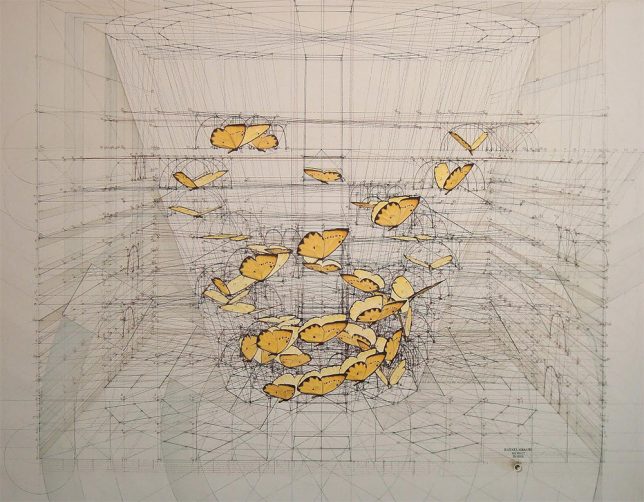
    butterflies

    The Golden Ratio has been a source of inspiration (and contention) for thousands of years, lurking behind great works of design. Venezuelan architect and illustrator Rafael Araujo is fascinated with patterns of nature and their applications to built environments, but as his artwork shows, is particularly interested in the Golden Ratio as found in natural settings.

    3d drawing

    hand drawn

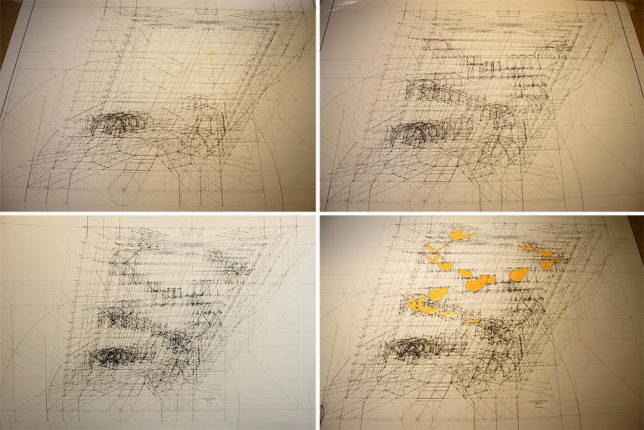
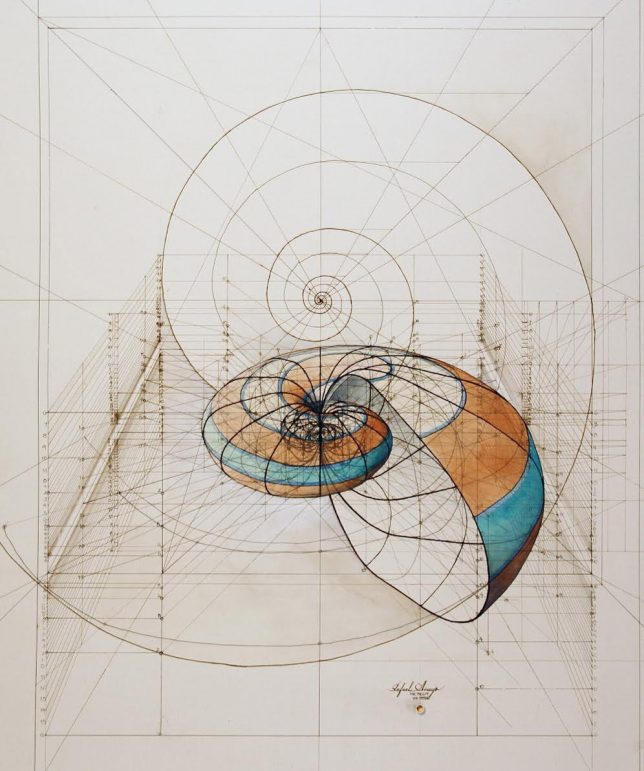
    These painstakingly created drawings trace this ratio into reality, animating everything from fluttering bird wings to the formation of seashells. Some of these sophisticated works take days or even weeks to complete — fans can also get in on the action with his recently created coloring book.

    coloring book

    coloring book interior

    coloing book back

    This coloring book provides a version of his pieces as frameworks for others to complete. The artist got the idea after fans started asking for prints, seeing it as a way to bring them into the process rather than simply giving them a framed product.

    process

    art

    Using pencils, rulers, compasses and protractors, he spends as much as 100 hours on a given illustration of these mathematical expressions. Leftover lines, like those found faded in architectural drawings, give extra depth to each piece while also highlighting the geometry that goes into it.

    3d drawing

    His work shows how the geometric formulas of the Golden Ratio can be found in spirals of plants as well as the delicate flights of butterflies, all through hand drawings of each phenomenon. And as fascinating as they are in their finished form, animated images and process videos of the works in progress are especially intriguing.

    shell

    Part of the challenge in his representations is their three-dimensional nature — showing complex organic curves accurately in 3D is an incredibly difficult feat of science applied to art. At the same time, something would be lost if these creations were simply done using computer programs (h/t Colossal).

    Share on Facebook


    [ By WebUrbanist in Art & Drawing & Digital. ]

    [ WebUrbanist | Archives | Galleries | Privacy | TOS ]


    WebUrbanist

  • Ricoh R Development Kit 360 degree camera will be available for pre-order in May

    Ricoh has released pricing and full specifications for the Ricoh R Development Kit 360 degree live streaming camera that was first shown to the public at CES earlier this year. The company has also announced it is starting to take pre-orders for the device on the Ricoh R website starting in May. The kit will be available at a price point of $ 499.

    The RICOH R Development Kit is capable of live-streaming fully spherical, 360-degree video in 2K resolution at 30 frames per second. The footage is stitched on the device in real time to fit the standard Equirectangular Projection Format. Streaming video can be output via HDMI or USB, and, when using a power adapter, continuously up to 24 hours. The camera can also record onto a micro SD card. 

    The kit consists of the camera, camera stand, a software development kit (SDK) as well as image-control tools and source code. Thanks to an open API the camera is controllable via USB. Ricoh says potential applications include live streaming of events, telepresence, computer vision and surveillance. Full specs are available on the Ricoh website. 

    Press Release:

    Announced at CES 2017, RICOH R Development Kit delivers up 24 hours of fully spherical live streams

    TOKYO and BARCELONA (Mobile World Congress 2017, Hall 8.0 J3), February 27, 2017?Ricoh today announced it is taking pre-orders of the RICOH R Development Kit, featuring the industry’s first camera capable of delivering up to 24 continuous hours of fully spherical, 360-degree live video streams. Showcased at Mobile World Congress 2017, the camera can be pre-ordered from http://ricohR.ricoh, with shipments scheduled to start in May 2017. The sales price will be $ 499.

    Using Ricoh’s fully spherical imaging technology, the RICOH R Development Kit can live-stream fully spherical, 360-degree images in 2K resolution at 30 frames per second. Unique to RICOH R technology is the stitching of video within the camera in real time to the Equirectangular Projection Format, which is the standard format for fully spherical images. Video is then output via HDMI® or USB, and—by using an AC power adapter– continuous, live streaming up to 24 hours is possible. The camera records onto a micro SD card, which enables the body to be extremely thin and lightweight.

    The RICOH R Development Kit consists of the camera, camera stand, downloadable software development kit (SDK), plus image-control tools and source code. Using the camera’s open API and the “RICOH R Console” image-control tool source code available through GitHub, the camera can be controlled via USB, which will enable its use in a variety of environments and industries such as telepresence and computer vision.

    Articles: Digital Photography Review (dpreview.com)

  • Sony FE 85mm F1.8 sample gallery and first impressions

    The Sony FE 85mm F1.8 joins Sony’s full-frame E-Mount lineup as the most affordable native lens that offers a short telephoto focal length. Other full-frame systems have had comparably low-cost 85mm lenses for quite a while, and it’s nice to see Sony filling in some of the gaps for budget conscious users.

    The FE 85mm balances superbly on Sony’s a7-series bodies, and though it’s no G Master lens, it feels solid enough. Focusing is silent and fairly quick (contrary to Sony’s ‘nifty fifty’ FE 50mm F1.8), and it has excellent sharpness wide open, even well off-center. It’s even sharper by F2.5, seemingly peaking by F4. There’s an awful lot of purple and green fringing wide open though, as you’ll see in our gallery, but this is to be expected, and is indeed common, in lightweight fast primes (they’re far less distracting by F4.5). Careful software corrections might be able to take care of most of it (remember: it’s lateral CA that’s easy to remove, not axial), albeit typically at a cost to other areas of the image – download a few of the Raw files to see for yourself.

    On an a7R II, this lens focuses wide open, quickly and accurately.

    Of particular interest is our observation that this lens, currently, focuses wide open* on an a7R II (or, technically, opens up to F2 if you’ve selected an aperture smaller than wide open). This addresses one of our largest complaints with recent Sony lens releases that focus stopped down, often slowing focus in low light or forcing otherwise capable phase-detect AF systems to revert to contrast detect-only. It appears that, at least for now, Sony’s recent 100mm STF and 85mm F1.8 lenses address this issue, and without an image cost to boot: take a look at our aperture series with our LensAlign target here (please choose the option to ‘Open Link in New Window’), and you’ll note no focus shift as we stop down (the lens was focused once wide open, then switched to MF for the series). You can also judge problematic apertures for axial CA in this series, as well as how circular out-of-focus highlights remain as you stop down the 9-bladed aperture.

    Oddly, the same doesn’t hold true on other Sony bodies: the lens focuses stopped down at the shooting aperture on an a7 II, a7S, and a6300/6500. Oddly, this sometimes leads to slight front-focus at smaller apertures on those cameras, though it’s not a huge deal as the focus shift is often masked by the increased depth-of-field. It’s interesting from an academic standpoint though – as focusing at the selected aperture should increase focus accuracy, not decrease it. We have our hypotheses, but for now, we’ve reached out to Sony for comment. 

    $ (document).ready(function() { SampleGalleryStripV2({“galleryId”:”5533586786″}) })

    Sample photoSample photoSample photoSample photoSample photo

    See our Sony FE 85mm F1.8 sample gallery


     *Note this only holds true for AF-S and for initial focus acquisition in AF-C, after which the lens stays stopped down, presumably to avoid having to constantly open and close the aperture during continuous drive. We still wish this weren’t the case, as (1) AF-C is often useful even in Single drive mode, and (2) DSLRs are fully capable of opening and closing the aperture in between shots, even at 14 fps. There may be other nuances we’re missing that explain why Sony chooses to focus stopped down, but the inconsistencies between bodies is confusing. Rest assured, we are in constant discussion with Sony engineers about this issue.

    Articles: Digital Photography Review (dpreview.com)