RSS
 

Posts Tagged ‘Right’

How to Choose the Right Tripod – Photography Lessons by Berger Bros Camera

24 Dec

www.Berger-Bros.com – Tripods provide great stability for your camera which will help prevent taking blurry photos. In addition, they give you the opportunity to get yourself into your photos. Yvonne Berger, an instructor with Berger Bros Camera in Amityville and Syosset Long Island, New York explains how to choose the right tripod. So, how to you choose the right tripod? The easiest answer is to choose the tripod that you will actually use. There are many different factors that go into buying a tripod and you really can’t buy a tripod just by looking at a picture. You should go into your camera store and physically hold the tripod so you can see and feel how it works. Things to Look For When Buying a Tripod: 1. What is it made of? 2. What are you using your tripod for? 3. What type of camera are you putting on the tripod? There are two different types of tripod legs to choose from: 1. A clip leg 2. A twist leg There are two types of tripod heads: 1. Ball Head 2. Hand Tilt Head Some tripods have what is known as a quick release plate which will enable you to quickly remove your camera from the tripod if the photography need arises. Carrying your tripod can sometimes be a pain. That’s why you need to have a bad for your tripod. The thing to remember is that you always want you tripod there when you need it. So, make sure carrying your tripod is not a problem that will keep you from using it. Tripods available at Berger Bros… Giottos Gitzo GorillaPod Manfrotto/Bogen Call


Exposing to the Right

13 Dec

Exposing to the right (often refferred to as ETTR) is a technique that seems to polarise opinions across the internet so you can find plenty of examples of people supporting its use and an equal number of people claiming it adds no value.  The principles of the technique however do hold value and are valid to consider when out taking images.  As it is a technique that I regularly employ when photographing landscapes I wanted to share the reasoning behind it, and show an example of the benefit it can bring.

The term ‘expose to the right’ refers to the histogram associated with an image.  Typically, for a shot to be well exposed, we are taught to aim for an even spread of tones across the histogram, peaking in the middle, and tapering off at the edges.  When ‘exposing to the right’, the idea is to push the peak of the histogram as far to the right hand side as possible, i.e. overexpose the image, without clipping any highlights.  The resulting file, when processed back to the correct exposure, will contain more tonal information and less noise in the shadow areas, maximising your image quality.
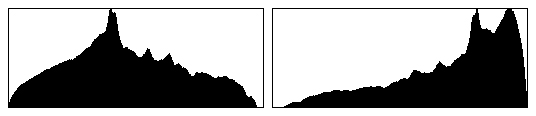
Expose to the right - histograms

Left: A histogram showing a 'correct' exposure. Right: An 'exposed to the right' histogram

Let’s consider the CCD or CMOS sensors found in most digital cameras.  Typical DSLR sensors can capture seven stops of dynamic range and produce 12-bit raw image files, capable of recording 4096 tonal levels in each red/green/blue channel.  The ability to record such a large number of tones should guarantee smooth transitions between the tones within the resulting image, however it is not quite that simple.

Whilst you might think that each of the seven stops in the range of the sensor record an even number of tones throughout the dynamic range, you would be mistaken.  F-stops are logarithmic in nature meaning that each stop records half of the light of the previous one.  Practically, this means that the brightest stop records half of the possible number of tones, i.e. 2048, the second stop records half again, i.e. 1024, and so on until the seventh stop that records only 32 tonal levels.  Therefore, if you underexpose an image and correct the exposure during in post processing, the tonal transitions in the darker areas will not be as smooth, and the risk of degrading your image quality is much higher.  If you overexpose your image, by pushing the histogram to the right, you will capture much more tonal information that results in much better image quality when correcting the exposure in post processing.

The diagram below tries to illustrate the distribution of tones for each stop of the dynamic range of the sensor.  The top image shows the seven different stops capturing different portions the dynamic range from the darkest through to the brightest tones, however the bottom diagram shows those stops but sizes them relative to the number of tonal levels that each stop captures.  As you can see, number of tonal levels captured by the brighter stops is significant compared to the stops at the lower end of the dynamic range.
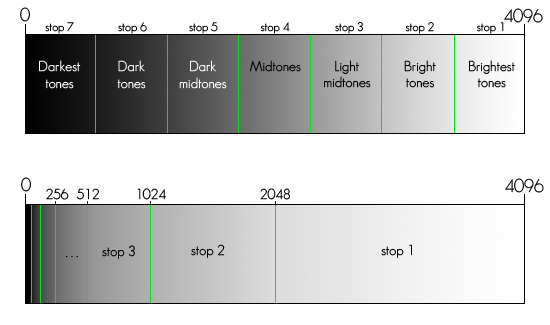
Expose to the right - tonal distribution

A tangible way of demonstrating the difference in the amount of tonal information recorded is to take two images of the same scene, one underexposed, one overexposed and compare the file sizes: the overexposed raw file will be larger that the underexposed shot as it contains more data.

Let’s look at an example.  The image below shows two unprocessed shots taken within seconds of one another, with their associated histograms.  The shot on the left is underexposed and the shot on the right is exposed so that the histogram is pushed up to the right hand side, as far as practically possible wihout losing any highlight detail.
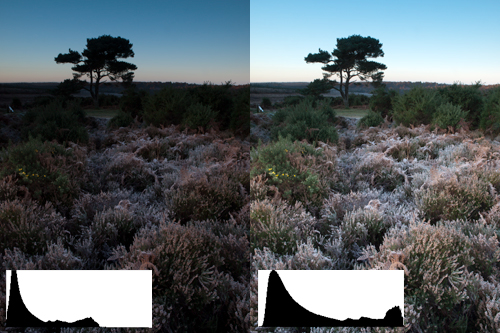
Expose to the right comparison image 1

Left: Underexposed image. Right: Exposed to push the histogram to the right

During processing, the exposure of each shot can be adjusted to give what seem to be two identical images.
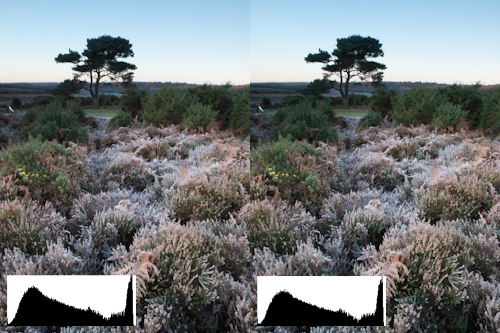
Expose to the right comparison image 2

Left: Underexposed image. Right: 'Exposed to the right' image. Both undergone exposure correction during post processing

However, when you look in detail at a 100% crop of an area of each image, you can see a huge difference in the quality of the final image.  The shot that was underexposed (i.e. exposed to the left) shows much less smooth transitions between tones and much more noise in the darker areas than the image that was exposed to the right.
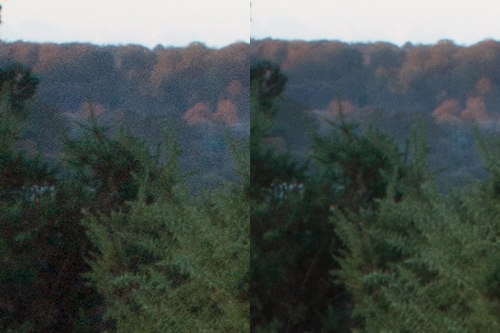
Expose to the right comparison image 3

Left: Underexposed image. Right: 'Exposed ot the right' image. 100% crops to demonstrate diference in image quality.

Images that have been exposed to the right will need some additional post processing to correct the exposure, but as you can see, a bit of extra thought when determining your exposure and some extra steps to correct it during post processing can result in image files with smoother tonal transitions and reduced image noise.

It is not a technique that is universally applicable to all types of photography, as there is a risk of clipping highlights if care is not taken when exposing your image.  Exposing to the right is most suited to when photographing in a controlled environment, for example, when shooting landscapes, using graduated filters to ensure that all highlights are contained within the dynamic range of the sensor.  The last thing you want to do is to lose highlight detail when trying to maximise your image quality.

So give it a go, take two images at different exposures (one exposed normally, one exposed to the right) and see if you can see a difference.  Understanding the performance of your individual sensor in such a way is a step further to knowing how to get the most out of your camera.

Post originally from: Digital Photography Tips.

Check out our more Photography Tips at Photography Tips for Beginners, Portrait Photography Tips and Wedding Photography Tips.

Exposing to the Right


Digital Photography School

 
Comments Off on Exposing to the Right

Posted in Photography


Nikon D800 vs D4 – Which One Is Right For You?

06 Dec

With the recent release of the awesome Nikon D800, why does one ever need to get a D4? In this video, we take a look at both cameras to see which one might be the right one for you. Nikon D4 pricing reference: www.digitalrev.com Nikon D800 pricing reference: www.digitalrev.com
Video Rating: 4 / 5

 
Comments Off on Nikon D800 vs D4 – Which One Is Right For You?

Posted in Nikon Videos


Wear 3D Glasses and Click 3D on the bottom right

21 Nov

Filmed some stuff with a 3D lens, just for fun, enjoy! Watch with the blue/red 3d glasses you can get from movies and stuff.
Video Rating: 4 / 5

 
Comments Off on Wear 3D Glasses and Click 3D on the bottom right

Posted in 3D Videos


How to manually Focus the lens to Infinity the RIGHT way. DSLR Photography tips

31 Oct

razzi.me www.facebook.com www.PhotographersOnUTube.com https This tutorial will teach you how to set the manual focus to infinity on any lens that can be manually focused.
Video Rating: 4 / 5

by aplus [Nikon D90+18-105 vr]

 
Comments Off on How to manually Focus the lens to Infinity the RIGHT way. DSLR Photography tips

Posted in Nikon Videos


Windows 7 – Send Files To Any Application via Right Click Menu

16 Oct

Modify Windows 7’s “Send To” menu to send files to other applications including Notepad.

Since many file types do not have associated programs and you may not want to set up associations for all of them, it may prove useful to try determining the contents by viewing or editing such files in Notepad or another text editor.

To aid with this, right-click on a file in Windows 7 and a “Send To” menu appears. Select this option and you can copy the file to the Desktop as a shortcut, compress the file, send it to an attached CD/DVD drive (if applicable), and other options may be present. Why not add Notepad or your desired text editor to this list for easy access?…

Read more at MalekTips.
New Computer and Technology Help and Tips – MalekTips.Com

 
Comments Off on Windows 7 – Send Files To Any Application via Right Click Menu

Posted in Technology


Microsoft Excel 2010 – Working on a Wide Worksheet? Make ENTER Move to the Right

20 May

If you’re editing a wide worksheet with the 10-key, you might find it more convenient to have the ENTER key move the cursor to the cell to the right.

By default, when editing a worksheet in Microsoft Excel 2010, you can press the Tab key to move the selection cursor to the cell to the right, and Enter moves to the below cell.

If you’re editing a wide worksheet with a 10-key, you might find it more convenient to have the Enter key move to the cell to the right, just like the Tab key. The following shows you how to make this change. In fact, you can have Enter move up or to the left, if desired:…

Read more at MalekTips.
New Computer and Technology Help and Tips – MalekTips.Com

 
Comments Off on Microsoft Excel 2010 – Working on a Wide Worksheet? Make ENTER Move to the Right

Posted in Technology


Microsoft Outlook 2010 – Show More Calendar Months in the Right Pane

30 Oct

Configure Outlook 2010 to show more calendar months in the To-Do Bar on the right side of the application window.

On the right side of the Microsoft Outlook 2010 window is the “To-Do Bar”. By default, this shows the current calendar month, upcoming appointments, and a list of Tasks.

If you would like to, at a glance, see the next calendar month as well in the To-Do Bar, perform the following tweak. You can add even more months, though this will require a higher resolution / window size to view them all. Also, simultaneously viewing more months may push the appointment and Task displays off the screen….

Read more at MalekTips.
New Computer and Technology Help and Tips – MalekTips.Com

 
Comments Off on Microsoft Outlook 2010 – Show More Calendar Months in the Right Pane

Posted in Technology


Canon XSi – Choosing the Right Exposure Mode

03 Oct

It’s one thing to enjoy the XSi’s advanced automatic shooting modes, but in order to take control of your camera, you’ve got to start shooting manually, with either shutter or aperture priority, or both in fully manual mode – from the Magic Lantern DVD Guide to the Canon XSi
Video Rating: 4 / 5

When the automatic settings cannot correctly expose your shot, try locking the Auto-Exposure on the most important part of the shot and then recomposing, from the Magic Lantern DVD Guide to the Canon XSi
Video Rating: 4 / 5


The Right Arm of Voltron

27 Mar

There are two things Sven has trouble with: pronouncing words that contain the letter “w” and fighting witches. The latter turns out to be his biggest problem when Haggar and her evil blue cat scheme to isolate a single member of The Voltron force. Watch hundreds of free full-length streaming movies and TV shows on www.crackle.com Want to see some more legends? Come check out the Animated Hall of Heroes, free at http TWITTER: twitter.com Tags: minisode voltron defender universe lion zarkon allua keith anime animation 80s cartoon saturday free tv japan Watch Free Video Online Now Streaming

How does Haggar keep her job as head witch of Planet Doom? Not one of her spells has succeeded to date, but Zarkon keeps listening to her with undiluted enthusiasm. This time, it?sa flood of red rain on planet Arus. You know Zarkon?s on board. Watch hundreds of free full-length streaming movies and TV shows on www.crackle.com Want to see some more legends? Come check out the Animated Hall of Heroes, free at http TWITTER: twitter.com Tags: minisode voltron defender universe lion zarkon allua keith anime animation 80s cartoon saturday free tv japan Watch Free Video Online Now Streaming
Video Rating: 4 / 5