Canon’s printer division has announced Canon Print Service, a software plug-in for your mobile device that allows you to print to compatible Canon printers via a Wi-Fi connection. The service is available for Android devices running version 4.4.2 or newer and select HP Slate devices. Read more
Tag: Print
-
Canon introduces mobile print solution for Android 4.4.2 and HP Slate
Canon’s printer division has announced Canon Print Service, a software plug-in for your mobile device that allows you to print to compatible Canon printers via a Wi-Fi connection. The service is available for Android devices running version 4.4.2 or newer and select HP Slate devices. Read more
-
Helping children one print at a time

National Geometric is a social enterprise that brings a personal touch to charitable giving. Through the sales of single-edition, 10×15 prints of a person with a specific need, National Geometric helps provide food, water, medical care, tuition for school, and other basic necessities. The cost of each photograph reflects the amount needed to help the person in the photograph. Learn more
-
Blossoming Technology: World’s First Inflatable 3D Print
[ By Steph in Gadgets & Geekery & Technology. ]

3D printers are now making it possible to quickly and economically ‘print’ everything from haute couture to full-scale architecture, medical prostheses to cars. Now, the technology has advanced enough to blend two different materials in a single print to make them stronger and more functional. ‘Blossom,’ a project by designer Richard Clarkson, not only produced 3D-printed flowers made from two materials with properties ranging from flexible to rigid, he also made them inflatable.

Believed to be the world’s first inflatable 3D print, Blossom is a series of flexible artificial flowers that can be inflated with air so they ‘bloom’ like real flowers. Completed in 2013 but just now released to the public, the project incorporates a rubbery black material called Tango Black for the petals and a clear, solid substance called Fullcure 720 for the center and stem.

While this project may not be as immediately practical as many other 3D printing demonstrations, it gives us an intriguing look at what might be possible in the future, pushing past limitations that have held innovation back in this field.

“As in nature, materials can be distributed seamlessly within objects for structural and functional advantage,” says Clarkson. “The variation offers an opportunity to generate complex forms and dynamic structures that are impossible to make by any other means.”
Want More? Click for Great Related Content on WebUrbanist:
3D Printing Goes Giant: Print Your Own Home?!
Imagine programming a large-scale, 3D-printing robot to simply print your entire home, from top to bottom, within a matter of hours.
Click Here to Read More »»

Blow-Up Building: Inflatable Concert Hall Tours Japan
A giant purple bubble will rise from a pile of plastic to bring music, workshops and performance to Japan’s northeastern coast, which was devastated by …
Click Here to Read More »»

Factory to Self-Fabrication: 14 3D-Printed Design Objects
Designers are creating everything from working guitars and records to puzzles and puppets with desktop 3D printers, bringing their digital concepts to life.
Click Here to Read More »»


[ By Steph in Gadgets & Geekery & Technology. ]
[ WebUrbanist | Archives | Galleries | Privacy | TOS ]
-
How to Harness the Power of Lightroom Print Collections
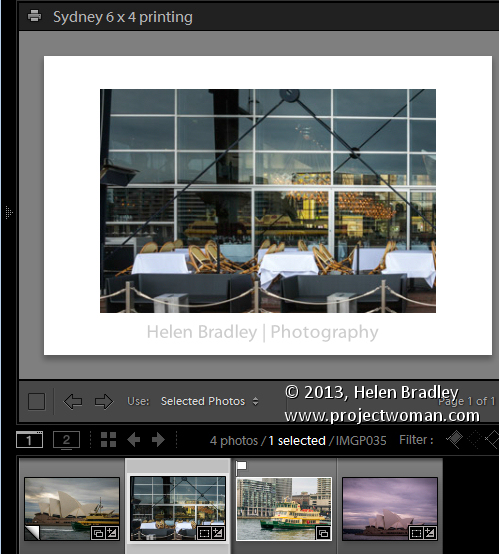
In a post last year I explained a process for exporting images from Lightroom (http://digital-photography-school.com/output-from-lightroom-to-your-blog) sized and all ready for posting to a blog. Since then I discovered a more robust solution to the problem of outputting images using a custom print layout from Lightroom. This can be used when printing images or saving them as jpeg files.
The process of preparing and outputting images can be simplified by taking advantage of the Single Image/Contact Sheet Layout in Photoshop and combining this with a print collection. The result is that printing to a specific layout is as easy as dropping the image into a collection and switching to the Print module and clicking to print – it’s a simple process once it is all setup.
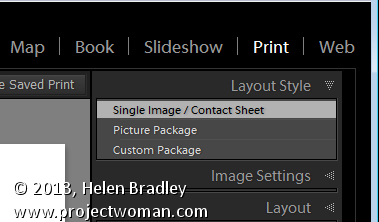
To do so, start out by selecting an image to use to configure your print layout and click to launch the Print module. In the top right panel select Layout Style: Single Image/Contact Sheet. The image which appears on the page is the one selected in the filmstrip.
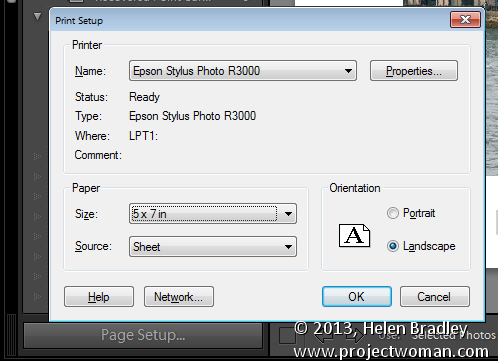
Set up this image so that it looks the way you want to print all images of this type. If you plan to print the image to paper, click Page Setup and select your printer and the page size and orientation.
To print to a file, open the Print Job panel and from the Print to dropdown list select JPEG file. Deselect the Draft Mode Printing checkbox, select Custom File Dimension and set the output dimensions and file resolution.
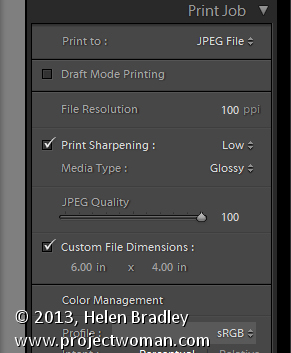
Adjust the image size and placement on the page using the Image Settings and Layout panel options. You can also add an Identity Plate and/or Watermark as desired.
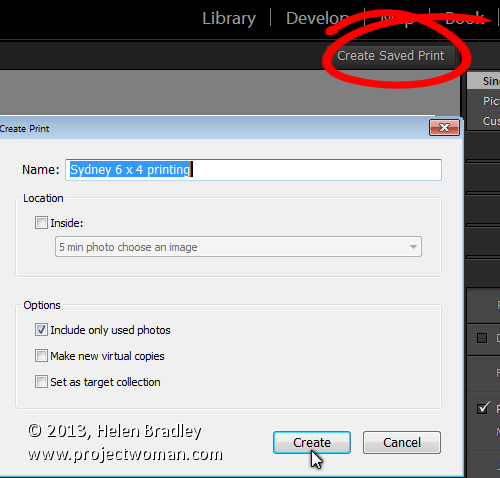
Once you are done, click the Create Saved Print button at the top right of the screen above the print layout and type a name for your new collection. This saves the image and the layout as a special Print collection in the Collections panel.
In future to set up images ready to print them, add them to this collection in the Library module, double click the collection in the Collections panel and it will automatically launch the Print module.
Click on any image in the filmstrip and the image will be assembled ready to print or save to a jpeg file.
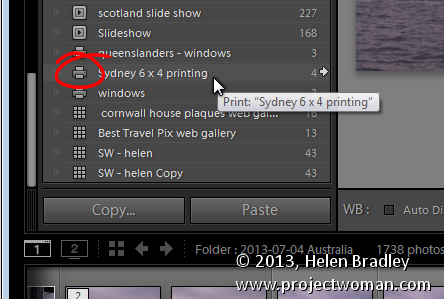
A number of readers have asked me for solutions to outputting images with watermarks in different positions and using different text colors from Lightroom. If you’re outputting to jpeg files or printing images you can do this using this process. Set up a print collection for each of the watermark options. You can then drop the images into the appropriate collection and they’ll be automatically laid out ready for printing. The layouts are saved in the collection so simply selecting the collection automatically recreates your layout.
Post originally from: Digital Photography Tips.
Check out our more Photography Tips at Photography Tips for Beginners, Portrait Photography Tips and Wedding Photography Tips.
How to Harness the Power of Lightroom Print Collections
The post How to Harness the Power of Lightroom Print Collections by Helen Bradley appeared first on Digital Photography School.
-
Kodak API to help app developers take photos from phone to print

One of the remaining arms of the Kodak legacy, Kodak Alaris, is working to remain relevant by focusing its efforts on moving photos from smartphone to print, via one of its 105,000 photo printing kiosks worldwide. The company recently released its API to lure developers into adding Kodak kiosk printing capabilities directly into their mobile photography apps. Learn more at connect.dpreview.com.
-
31 July, 2013 – The Digital Print – a review and video interview
Our friend and colleague Jeff Schewe has written a new book titled The Digital Print. It has just been published and is available as of today from leading book sellers.
We now have a review of the book online. The page also includes a ten minute long streaming video interview with Jeff conducted by Kevin Raber.
"Having been to Antarctica with Michael and Kevin, I would say after having traveled the world and shot nearly my entire life as an exhibiting photographer, it was one of my highlights in my life and I talk about it, all the time. The images and experience of seeing something visionary and nearly extinct from the world, to see and experience the wildlife and scenery that does not fear humans is amazing. The images I shot there won me two Smithsonian awards and nearly 18 other international awards". – Tim Wolcott

Find Out More Now
These Expeditions Will Sell Out Quickly. They Always Do.
-
Choosing Paper To Print Your Photography
If you recently searched for a suitable printed media on which to print your photography, you must have felt quite overwhelmed. Printing media in the form of photo paper is gaining from improvement in chemicals, ink and paper production, that makes the decision as to the best photo paper for the job harder than it used to be. These improvements Continue Reading
The post Choosing Paper To Print Your Photography appeared first on Photodoto.
-
Jaws 3-D Work Print
Work print from Jaws 3-D the vid is bad but im working on restoring the widescreen
Video Rating: 4 / 5
