RSS
 

Posts Tagged ‘into’

Abandoned Cement Factory & Silos Transformed into Offices

07 Feb

[ By Steph in Architecture & Offices & Commercial. ]

Abandoned Cement Factory Office 1

An incredible abandoned cement factory, covered with ivy and partially in ruins, has been transformed into a massive office complex that preserves both the original architectural integrity of the structures and honors the factory’s period of disuse. Architect Ricardo Bofill discovered the property in Spain in 1973 and claimed it for the head office of his firm, Taller de Arquitectura.

Abandoned Cement Factory Office 2

Abandoned Cement Factory 3

When the property was discovered, it was full of staircases to nowhere, exposed pipes and half-fallen structures. The industrial complex consisted of over 30 silos, subterranean galleries and machine rooms. The transformation of the space started with knocking down some of the unsalvageable structures, which left behind curious concrete forms that give the impression of a modern abstract sculpture park.

Abandoned Cement Factory Office 4

Abandoned Cement Factory Office 5

The eight silos that remained became the offices, archives, a library, a projection room, a lab for architectural models and sleeping spaces. A massive space known as ‘The Cathedral’ hosts exhibitions, concerts and other cultural functions.

Abandoned Cement Factory Office 6

While the interior spaces have been cleaned up, much of the machinery has been left behind, and the grounds have been restored to a balance between intentional landscape design and the chaos of greenery that proliferates when buildings are not maintained.

Share on Facebook


[ By Steph in Architecture & Offices & Commercial. ]

[ WebUrbanist | Archives | Galleries | Privacy | TOS ]


WebUrbanist

 
Comments Off on Abandoned Cement Factory & Silos Transformed into Offices

Posted in Creativity


E-Ink Keyboard: Letter Keys Morph into Custom Symbols

07 Feb

[ By WebUrbanist in Gaming & Computing & Technology. ]

e ink custom keyboard

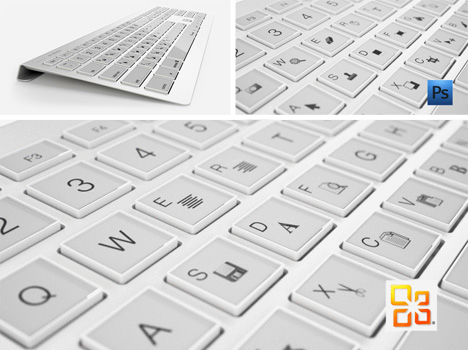
Electronic ink is energy efficient and easy on the eyes, so why not adapt it to the keyboard? It is, after all, one of the few components of everyday technology that still has printed type in a screen-dominated world.

e_inky

electronic ink keyboard concept

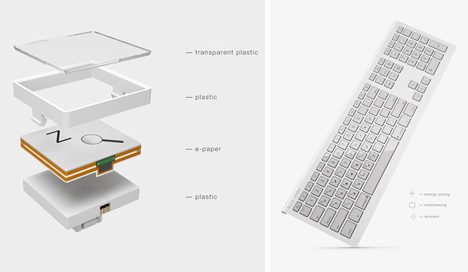
Designed by Maxim Mezentsev & Aleksander Suhih the E-inkey keyboard for Pixel Studio (p1x.ru), the concept is simple: e-ink key displays that can shift to gaming keys, shortcuts or program-specific icons smoothly on demand, just like turning the digital page in your favorite e-book reader.

electronic oled color keyboard

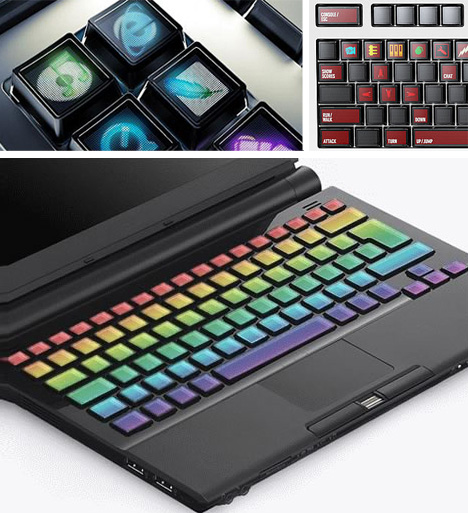
There is already a working precursor to this, and it is more than a prototype – the Optimus Maximus keyboard has configuration software for full customization (letters, images, icons, colors), but uses power-sapping and heavy-touch OLED technology (making it harder to go wireless or even push buttons).

eink customizable multitasking keyboard

While this is not yet in production, the specs give some hope that it might make its way to Kickstarter or an equivalent soon – it definitely falls under the “please take my money!” category for tech geeks and design professionals alike.

Share on Facebook


[ By WebUrbanist in Gaming & Computing & Technology. ]

[ WebUrbanist | Archives | Galleries | Privacy | TOS ]


WebUrbanist

 
Comments Off on E-Ink Keyboard: Letter Keys Morph into Custom Symbols

Posted in Creativity


How to Turn Your Phone Into a DIY Photo Projector for $1

31 Jan

Extra photos for bloggers: 1, 2, 3

Slide projectors are great but outdated. And digital projectors cost a bundle. What’s a photographer to do when they’re looking for a bigger picture?

We’ll show you how to turn your phone into a photo projector for just $ 1.

Yep, for a buck you can have Instagram on overdrive and Flickr living large.

The project is so easy, you might even have time to sneak in a cat video or two.

Make a DIY Projector for $ 1

Why it’s Cool:

paint-smA phone based projector is a great way to show off your mobile photos and your phone hack savvy.

Just picture laying in bed browsing your feed or watching a movie on a ginormous screen.

A projector provides a new way of looking at your shots, and for $ 1, who can afford not to try this project?

The Ingredients:

paint-sm

  • Shoebox
  • Paperclip
  • Smartphone
  • Magnifying glass (get it for $ 1 at Dollar Tree), or a large aperture lens
  • X-acto knife or similar
  • Electrical or black duct tape

Optional:

  • Matte black spray paint or black paper


Step 1: Trace a Hole on the Box

paint-smA shoebox or similar will work great for your new projector.

If the inside walls of your box are a bright color, you may want to spray paint them black or tape up some black paper for best image quality.

Once your box is ready, trace the outer edge of your lens or magnifying glass onto one of the short sides of the box.

Step 2: Cut a Hole in That Box

paint-smCut out the inside of the circle you just traced.

You don’t want light leaking around your lens so try not to cut too much.

At the back of your box, cut a small hole for your phone’s power cord.

Step 3: Attach Your Lens

paint-smNow you’ve got a porthole cut in your shoebox its time to stick on that lens.

If your magnifying glass has a handle, you may want to remove it first.

Line up your lens with the hole and apply tape around the entire edge of your lens.

Make sure your lens is held securely and there are no holes between the tape for light to escape.

Step 4: Take a Stand

paint-smWe used this very helpful tutorial to make a stand for our phone out of a paper clip.

Other stand ideas include this ultra-portable Tiltpod, this hand dandy Gorillapod, or this super creative lego stand from this cool tutorial.

Step 5: Flip Your Screen

paint-sm When light passes though a lens (including the lenses in your eyes), it gets flipped, which means the picture from your projector will come out upsidown.

No fear though, we have a fix!

For the iPhone go to Settings > General > Accessibility and turn on AssistiveTouch.

Once activated, a little white orb will pop that you can drag around the screen.

Click on the orb and go to Device > Rotate Screen.

This will allow you to flip applications like the Photos app which would normally rotate itself right side up.

Andriod users can download the app Ultimate Rotation Control.

Or if all else fails you can just stand on your head.

Step 6: Finding Focus

paint-smIf your walls are plastered with pics you will need to clear out a little space for your projection.

For a screen you could use a white bed sheet, turn a poster around, project onto a shower or window curtain, or just use the bare wall.

Without a focus ring on your magnifying glass you’re going to have to foot focus.

Position your phone in its stand near the back of the box and walk forwards or backwards until your image starts to come into focus.

Once you’ve found a good range you can fine tune focus by moving your phone forwards or backwards in the box.

If you used a camera lens for your projector, you get the bonus of a focus ring that gives you some extra flexibility in terms of screen size and focus distance.

Step 7: Don’t Fight the Light

paint-smIt’s not the power of your projector. It’s how you use it!

For best viewing, turn the screen brightness of your phone all the way up and turn the room lights down.

Set your phone’s photo app to slide show mode for a hands free experience.

Your power cord can go through the hole you cut in the back of the box and a little tape will seal the deal.

Taking it Further

  • Use your magnifying glass to get an up-close perspective on your phones pixels.
  • Try using your computer screen instead of your phone as the display in a new projector project.
  • Check out this crazy sophisticated DIY digital projector that can create a 120″ HD screen!
  • This mini film projector fits in the palm of your hand and was made from an Altoids tin!
  • Leave it to the Japanese to do something this awesome with a projector. Hint: Samurai swords, shadow battles.

Related posts:

  1. DIY: Turn Phone Photos into Mural-Sized Prints! Extra photos for bloggers: 1, 2, 3 What’s on every…
  2. How To Make Your Cell Phone Look Like Your Favorite Camera! Extra photos for bloggers: 1, 2, 3 Photographers. We’re a…
  3. The Polaroid iPhone Decal: Turn Your Phone into a OneStep! Your iPhone4 is the Swiss army knife of the mobile…


Photojojo

 
Comments Off on How to Turn Your Phone Into a DIY Photo Projector for $1

Posted in Equipment


Mirrored Street Facade Art Turns Pedestrians into Acrobats

28 Jan

[ By WebUrbanist in Art & Installation & Sound. ]

facade artwork mirrored illusion

At first: vertigo. You are moving along the sidewalk, when suddenly you see the front of a structure, only on its side, extruded from the ground below you. But then you look up, and realize you are part of some surreal and magical.

facade illusion street installation

Via TIC, “Bâtiment (Building) is a mirrored installation by artist Leandro Erlichcurrently on display at Le 104 in Paris as part of their In_Perceptions exhibition. The piece is clever in its simplicity: a massive building facade is constructed on the floor near a towering mirror giving anyone reflected the uncanny appearance of being weightless.

swimming pool illusion installation

His similarly-stunning pool installation is another great optical illusion for those above or below the faux surface of the water, either looking down on participants who, by rights, should be swimming (if not drowning), or looking up through the shimmering reflective surface.

Share on Facebook


[ By WebUrbanist in Art & Installation & Sound. ]

[ WebUrbanist | Archives | Galleries | Privacy | TOS ]


WebUrbanist

 
Comments Off on Mirrored Street Facade Art Turns Pedestrians into Acrobats

Posted in Creativity


Legally Blonde the Musical Part 11 – Whipped Into Shape

23 Jan

No Copyright Infringement Intended MTV Presents Legally Blonde the Musical Starring Laura Bel Bundy & Christian Borle
Video Rating: 4 / 5


Touchy Instrument Turns Literal Beets Into Figurative Beats

02 Jan

[ By Delana in Gadgets & Geekery & Technology. ]

beetbox

The BeetBox from designer Scott Garner explores user expectations and creates a delightful visual pun. Its wooden enclosure holds six actual beets that, when touched by human hands, create actual beats.

beetbox musical vegetables

Garner’s BeetBox consists of a poplar frame housing a few simple electronic components, a half dozen fresh beets, and a capacitive touch sensor. When someone touches one of the beets, a unique sound emanates from the audio amplifier.

Touching a number of the beets in sequence creates a totally fresh mix. Users are limited only by the number of hands they have available for tapping the vegetables.

beet box

The designer’s goal was to create a unique user experience in which the electronics are invisible – both physically and in terms of the interaction being very simple.

musical vegetables beetbox

He accomplished this goal quite neatly with the BeetBox, turning beets into beats and allowing even those without any musical experience to create their own totally personal music.

Share on Facebook


[ By Delana in Gadgets & Geekery & Technology. ]

[ WebUrbanist | Archives | Galleries | Privacy | TOS ]


WebUrbanist

 
Comments Off on Touchy Instrument Turns Literal Beets Into Figurative Beats

Posted in Creativity


Sunken Memorial Garden Sliced into Submerged Cruise Ship

27 Dec

[ By WebUrbanist in Architecture & Public & Institutional. ]

Submerged sea vessels have long been destinations for diving tourists or (intentional or accidental) marine life habitats, but what if they could serve some function still visible on the surface of the water, like a memorial to those lost when the ship sunk?

The New Concordia Island Contest winners, Alexander Laing and Francesco Matteo Belfiore, propose slicing the section of the Italian cruise ship that crashed in January of 2012 and planting a garden in the resulting voids, leaving the lower, still-submerged areas as habitat zones.

The contest itself “aims to rethink the disaster of the ship Costa Concordia as exceptional opportunity to imagine the future of the wreck and that of the Island of Giglio. It is also a chance to wonder about needs for architecture to build new landscapes on traces and remains of a traumatic event …. The jury has selected the projects that have responded in a more comprehensive way to the questions raised by the contest, interweaving visionaries contents to pragmatic and real solutions.”

The clean and simple solution of the winning proposal defers to both nature and humans, a tribute to the disaster as well as the lives lost. Other intervention propositions of runner-up submissions trended toward either extreme: leaving the wreck mainly as-is and building around it, or, at the opposite end of the spectrum, creating underwater passageways and making the remaining structure physically accessible to people.

Share on Facebook


[ By WebUrbanist in Architecture & Public & Institutional. ]

[ WebUrbanist | Archives | Galleries | Privacy | TOS ]


WebUrbanist

 
Comments Off on Sunken Memorial Garden Sliced into Submerged Cruise Ship

Posted in Creativity


5 Ways to Turn Your Photos Into Gifts

11 Dec

Photos for bloggers: 1, 2, 3; Pictured: Instabook

Maybe it’s your mom that’s always asking for prints to hang up in the family room. Or your high school friends who want copies of all the great photos you shot at your last party.

The point? Peeps want your pix!

The best gift you could give your family and friends has been right under your nose this whole time. Here are a few ideas for giving your photos in gifty ways.

1. USBs – Tiny & Reusable

This one’s perfect if you’re sharing lots of photos. If you don’t have photos to share from a particular get together, pile together photos of the two of you. Ahhh, memories! It’ll hit ‘em right in the heart.

We recommend something a step up from a plain USB drive, like the USB Film Roll or the Camera USB Drive. They’ll appreciate the thought, and they can reuse it!

2. Mailable Photos

Snail mail is the best. You totally get that rush when you find a letter with your name on it. You can give your friend 2x that rush by not only mailing them something, but making it a photo they’ll love, too.

You can always slap a stamp on a print, but to go the extra mile (it’s the holidays, afterall!), try something like Mailable Frames or Polaroid Postcards.

3. A Camera with Your Photos on It

This one gets brownie points because it’ll give them a chance to take their own photos! You can go two routes with this one: digital or film.

Since you can’t just plop any photo onto a film camera, you’ll need to get a little craftier. You can shoot a roll that spells out a message or photograph places you’ve been together.

We like the Ultra Wide & Slim 35mm camera for this because it’s affordable and super lightweight.

Digital’s a goodie, too, because you can fill up a memory card with photos of the two of you and put it in the camera for your friend to find.

These three mini digital cameras are affordable options if you’re not looking to get your friend a DSLR or a point-and-shoot: the Classic Mini Digital Camera, the Nanoblock Camera (rad for Lego lovers), and the Zumi Triple Plus.

4. Prints, Delivered in an Album or Photo Box

We love the idea of curating a small gallery of your favorite photos as a gift. Instead of simply handing them over, place your bundle of prints in a photo box or album.

The box itself doesn’t have to be exclusively for photos. You can hand pick one or break out your DIY chops. You could even place the photos inside a rad camera case.

5. Hang-Ready Prints

You can have your prints made at a local lab or through an app like PostalPix, Prinstagram, Hipstamatic’s PrintLab along with others.

If you print your own at home or have some prints made and want to frame them, go for something fun and simple like the Woodnetic Frames or the Instant Photo Picture Frames.

Related posts:

  1. Two Awesome & Creative Ways to Turn Your Photos into Sculpture Paint and clay are some artist’s medium of choice. Yours?…
  2. Black and White Conversion: The Best Ways to Turn Color Digital Photos Into Beautiful B&W ~Have a cool photo product or site? Reach 270,000 photo…
  3. Four Fun and Easy Ways to Make Your Photos Look Vintage Extra photos for bloggers: 1, 2, 3 Recently we asked…


Photojojo

 
Comments Off on 5 Ways to Turn Your Photos Into Gifts

Posted in Equipment


DIY: Turn Your Own Photos into Insta-Holiday Cards

29 Nov

Extra photos for bloggers: 1, 2, 3

Holiday Cards + Instagram = HoliGram?!

No, not like Tupac’s hologram, silly.

We’re talking about Holiday-grams. Real life cards from your favorite ‘grams.

Make and send holiday cards from your favorite Instagram pics or pretty much any photo on your phone.

This guide has a card-making style for everyone, from the super app-savvy to the DIY-ers.

Making holiday cards has never been so instant … and awesome!

Make DIY Instagram Cards!

p.s. Come on a photo walk with us! We’ll be meeting this Sunday 12/2 at the Photojojo Secret Store in San Francisco with cider and cameras.(…)
Read the rest of DIY: Turn Your Own Photos into Insta-Holiday Cards (1,067 words)


© Margo for Photojojo, 2012. |
Permalink |
No comment |
Add to
del.icio.us

Post tags:


Photojojo

 
Comments Off on DIY: Turn Your Own Photos into Insta-Holiday Cards

Posted in Equipment


The days blur into one.

05 Nov

I am actually really happy with how this video turned out, all clips of Alfie. He is going great, he has such a great attitude and just takes everything in his stride. Clips range from 6-8ish ride, first canter, first jump etc. I upload a lot of normal riding videos to this channel so go check them out 🙂 – www.youtube.com Alfie – 16.1/2 3YO Selle Francais X Irish Sport Horse gelding. Breed lines here – www.sporthorse-data.com Twitter – twitter.com Camera – Nikon D3100 – Kit Lens, Nikkor 55-200 & Tamron 70-300 Song – Radical Face – Welcome home
Video Rating: 4 / 5

 
Comments Off on The days blur into one.

Posted in Nikon Videos