Month: October 2017

  • Hello Lightroom CC: Embracing the future

    Disclaimer: I’m an avid Lightroom user who uses a NAS with 12 TB of local storage. Yet I agree with Adobe’s decisions. Am I crazy? Read on…

    It’s an inevitable truth that Adobe, like any other company, can’t please everyone. Today’s news of a new, all-cloud Lightroom CC has definitely ruffled some feathers among loyal users. But it might just be time to embrace the future – consider some important points here:

    • The current version of Lightroom is not going away. It’s just going from CC to Classic CC. Oh, and it got much faster.
    • The standalone version of Lightroom is entering sunset. That doesn’t mean you won’t be able to keep using it for new cameras in the future: you’ll just have to use DNG Converter to first convert your files to DNG format.*
    • To continue to benefit from updates to Lightroom, though, you’ll have to go CC (Classic or not).
    • To benefit from consistent access of your entire library from every device, as well as AI features to help you manage, search, curate and more (a la Google/Apple Photos), you’ll want to go with Lightroom CC.

    Whether or not you like the subscription based model, either way you pay for software updates, whether it’s when you buy a new version (upgrading from 5 to 6) or continually via a subscription method. Some would even argue the latter is a better user experience, as you don’t have to worry about ‘versions’.

    Who is Lightroom CC for?

    Good question. If you’re a staunch NAS user or have a hard drive for each of your shoots, it’s not for you. But there’s a reason that Director of Product Management is calling this new release a bigger deal than even the inception of Lightroom. According to TechCrunch’s conversation with Hogarty, “The new reality of photography [is one] where users tend to take a lot of their photos on their phones – and take a lot more images in general. [Many of them want] a powerful tool that allows them to communicate but doesn’t require them to spend a lot of time to learn.”

    In other words, Adobe is trying to find a way to be Google or Apple Photos for the both the masses, and the enthusiasts/pros. Time will tell if it’ll succeed, but it’s an approach that is certainly future-focused.

    In fact, we expect the cloud-based version will quickly improve and gain features beyond what Classic CC will offer. The AI features will help you organize, search, curate, and maybe even edit faster by learning your tastes. With storage getting progressively cheaper, internet (upload) speeds increasing, and the decreased sales of PC/laptop and the increased expectation to be able to access your files from anywhere, this is Adobe looking to the future, while still offering the present for the foreseeable future.

    This is Adobe looking to the future, while still offering the present for the foreseeable future.

    Inevitably, there will be some teething pains, for which Adobe is still offering Classic CC. But we expect that in the not-too-distant future, even pros will appreciate the instant access and AI features that will ease workflows. And I, for one, will be happy to say goodbye to my hard drives (though I won’t be forced to).

    Understandably though, many of you have questions…

    We’re a studio and need multiple licenses across many computers

    That’s what CC business is meant for. You can have 10+ licenses with the same account across all your computers (each license serves up to 2 computers, and you can dynamically switch which two computers whenever you want). And if you’re installing a standalone on more than 2 computers today, you’re breaking the law. Multiple licenses are simply not an issue with CC.

    I need multiple libraries, though

    Do you really? Back in the days of physically limited hard-drives, many would assign one drive or another to one shoot. You can still work that way with Classic CC.

    But in the future, with increased cloud storage at lower prices, and hopefully decreased internet service provider (ISP) bandwidths, that segmentation won’t be necessary.** Everything will live on the cloud, and you can still organize by albums if you wish. Better yet, you’ll have access to increasingly intelligent AI that will allow you to find the photos you’re looking for simply by searching for the content in it (in text form). Segment as you wish, or just search.

    In that world – you may not find multiple libraries as useful anymore. It’s already a headache – I’ve gone to work on days where I needed the library on one drive that was, you guessed it, at home.

    What if Adobe pulls the plug on Classic CC?

    Certainly a valid suspicion. But one you may not have to be so worried about. First, we’ll likely see CC rapidly catch up to Classic CC. That raises the concern if Classic CC is itself at risk of being pulled.

    Maybe. But likely not for quite some time. More importantly, if Classic CC were to run off into the sunset, do you really think Adobe would only offer a cloud-based version of Lightroom?

    I don’t think so.

    Much more likely – and this is just my opinion (and suggestion to Adobe) – would be CC simply offering an option to ‘Disable cloud storage. I don’t need access to my files on any device.’ Done. Problem solved. Remember that CC already has an option to keep all files locally (as well as in the cloud), so retiring Classic CC would almost undoubtedly see CC gain an option to not work in the cloud. Until ISP limits are definitively not an issue and privacy concerns are completely addressed, I can’t see Adobe offering no option to only work with files locally.

    You can’t always get what you want… but you might get what you need

    This is Adobe modernizing and considering the future. And the current masses of Google and Apple Photos users that are surprised and delighted daily at the auto search and curation functionalities, or the auto-generation of collages, video clips, and sharing of shots of your kid with your immediate family. This all depends on cloud-storage and AI. It’s the future, and whether or not you like it this future has a lot of potential benefits that you loathe the idea of today, but might come to rely on, nigh even need, in the future. Imagine AI learning your editing tastes and doing them for you as a starting point so you have less work to do. It’s not that unreasonable to imagine, and is something even pros would appreciate.

    And as long as privacy issues are considered, sharing – both with family or with clients or collaborators – becomes far easier in a cloud-only approach.

    Accessing your library on multiple devices has been clunky up until now – with manual selection of images that are synced, and a different user experience of LR based on what device you’re on. Lightroom CC’s promise is a consistent experience across all devices, and the removal of the headache of selecting images you wish access to. Not to mention the issues with editing ‘Smart Previews’.

    And you might even find the perks of AI on top of this irresistible one day. But until that day, you still have options that allow you to continue working exactly as you did yesterday.


    Footnotes:

    * That’s actually probably a good thing. DNG can take a 96MB Nikon D850 NEF and make it into a 49MB Raw with no visual loss in quality (LZW and gamma curve compression done right provide visually lossless compression). DNG Converter is even scriptable if you want to automate the process. And if you need to save the original Raw (say because you want to access Dual Pixel Raw for some Canon files in the future), you can always embed, then later export, the original Raw. The only concern I see here is if future OS versions don’t support the final version of LR.

    ** ISP bandwidths are a valid concern. My current Comcast bandwidth per month is capped at 1TB/month, with a two months grace period if I run over in one year (I’ll pay on the third month I run over). That will likely still serve most users and even enthusiasts but may be an issue for pros shooting enormous amounts of images monthly. We’ll be following up with Adobe about their views on this issue, but for now we do expect the growth of cloud-based services to force ISPs to offer solutions.

    Articles: Digital Photography Review (dpreview.com)

  • RIP Lightroom 6: Death by subscription model

    In all the fanfare of the launch of its more cloud integrated, edit-anywhere Lightroom CC software, Adobe has made a lot of noise about ease-of-use and faster speeds, but it also quietly made reference to the death of the standalone desktop version, Lightroom 6.

    With it, it feels like Adobe is turning its back on a certain type of enthusiast photographers: those users who enjoy and care about their photography enough to buy Adobe’s products, but don’t need to edit ‘in the field’ or have clients to justify the ongoing cost of subscription software.

    What’s that, Granddad, software in a box? How do you get it onto your phone, then?

    With the company stressing ease of use of the latest version, they probably don’t see it that way, but it’s clear that the user who upgrades their camera and their software only occasionally has no place in Adobe’s shiny new future in the cloud.

    In my look back at my excitement surrounding the development and launch of Lightroom v1.0, I said I felt that the subscription model “runs counter to the longevity benefit of building a database around my images”. I stand by that.

    The tension at the heart of Lightroom

    As I understood it, Lightroom was almost two pieces of software in one. In part it was an attempt to provide all the tools a broad range of photographers needed, without the cost and complexity of buying Photoshop. Photoshop’s success and name recognition had meant that lots of users who didn’t really need most of its capabilities, felt they had to buy it. Lightroom gave them an affordable alternative, and allowed Adobe to focus on their professional users (in both photo and non-photographic fields), with Photoshop.

    archiving: the creation of a long-term library of work that you might want to refer back to and perhaps update

    But, equally, Lightroom was Adobe’s attempt to bring an asset management tool to a wide range of photographers who suddenly found themselves generating and needing to process and store many more images than they had done before. Part of that management is archiving: the creation of a long-term library of work that you might want to refer back to and perhaps update.

    The move to subscription only for Lightroom undermines both the idea of an affordable alternative also, significantly, the idea of an usable archive. While it’s true that most households readily spend $ 10 per month for online streaming services, and many times that for mobile phone and data services, there will be a lot of users who object to the idea of having to pay, in perpetuity, for the continued ability to edit their own archives. Especially if their needs haven’t necessarily changed and where there isn’t necessarily an ongoing cost to the company.

    most households readily spend $ 10 per month for online streaming services, and many times that for mobile phone and data services

    Adobe seemed to recognize this when it chose to continue Lightroom 5 and then 6 as a standalone products alongside its CC software, and said it had no plans to move to subscription only. But it probably should’ve been obvious that this position had changed as the company buried the link to the standalone version in ever more obscure corners of its website.

    Change vs long-term plans

    Of course, there’ll be plenty of users who are quite happy to pay for online storage and the access-and-edit-anywhere capability of the new system. Given how many attempts Adobe has made at solving this problem (I’m looking at you, Carousel/Revel), it’ll probably be pretty good, despite my reservations about the effect on quality/stability that the move to constant updates has had on Photoshop. Overall, it’s just unfortunate for people who don’t particularly want that product.

    The idea that your existing work becomes less controllable, less dynamic, is uncomfortable.

    At the risk of sounding older and more curmudgeonly than I really am: it’s the principle of the thing. I’ve never had much sympathy for people expecting perpetual upgrades from Adobe, for free: if you spend hundreds of dollars on a new camera, it seems unrealistic to expect a corporation to accommodate that choice, unpaid. After all, you still had exactly what you’d paid for.

    With a subscription model, that’s no longer true. Instead you end up paying for support for ever more cameras you don’t have and features you don’t necessarily want, in the knowledge that you’ll lose most of the software’s capability if, for whatever reason, you don’t choose to continue your subscription. The idea that your existing work becomes less controllable, less dynamic, is uncomfortable.

    Why I’ll be looking for other options

    The idea of losing the ability to edit my existing files, even though my needs haven’t changed is obnoxious enough that I don’t want to further commit myself and my images to a Lightroom database.

    That means foregoing the temptation to squeeze the last life out of Lightroom 6 by using the DNG Converter that Adobe, to its credit, updates for free to retain compatibility. Because one day there’ll come an operating system that LR 6 won’t work with, and my supposedly long-term solution will be reduced in utility.

    All purchases are ultimately a balance between what the customer wants and the company is willing to give them, for the money. With this latest move, it feels to me like that balance has been lost: the move favors Adobe much more than it benefits me. The Lightroom I loved is dead, because apparently it’s not a product Adobe wants to make anymore.

    Articles: Digital Photography Review (dpreview.com)

  • Where to Place a Horizon in Your Paddling Pictures?

    7 examples with a commentary from paddling and shooting around a lake …
    paddling with a camera

  • 7 Photography Myths Exposed

    Photographers, of all people, should know that the world is not black and white. There are many shades of grey between black and white, between good and bad, and between right and wrong. It’s all a matter of perspective and circumstance. Yet photography is full of blanket statements about what you should and shouldn’t do. In this article, I expose (pun intended!) a few of the most common photography myths every photographer should know.

    North Algodones Sand Dunes, California - 7 Photography Myths Exposed

    1. Full frame cameras are better

    A full frame camera has a larger sensor than a crop sensor camera. That means you might get more megapixels or you might get larger megapixels or even both. But there are many more important factors to consider when choosing a camera than megapixels.

    First, crop sensor cameras are generally smaller, lighter and much less expensive. Second, if you like to shoot wildlife, you’ll get extra reach with your telephoto lens on a crop sensor camera. A 400mm lens on a full frame camera is equivalent to over 600mm on a crop sensor camera. Also, if you like to photograph wildlife, a more important factor to consider above megapixels is frames per second.

    A few years ago I went to Africa to photograph wildlife and took two cameras: a full frame Canon 6D and a crop sensor Canon 7D. I learned that the 7D was much better for my purposes because of the frames per second rate it was capable of shooting. The 6D (at the time) did 4.5 fps and the 7D did 8. That was a huge difference in the field.

    Lion and cub at Ngorongoro Crater, Tanzania - 7 Photography Myths Exposed

    2. Always use a tripod

    A tripod is an essential piece of gear for any photographer and usually, you will notice a huge improvement in image quality when you start using one. However, “always” is one of those blanket statements that doesn’t always make sense (see what I did there?). I often notice photographers arrive on a scene, set up their tripod, and then try to find a composition they like. That tends to limit their possibilities since they are already stuck on the tripod.

    A better approach is to go free hand until you find your composition. Then, when you find it, try to make your tripod fit in the exact position necessary. Sometimes you’ll find it won’t fit. Either the angle is lower than your tripod will allow you to go, or the tripod is not tall enough, or the position isn’t stable. When that is the case, ditch the tripod in favor of getting the composition.

    Plateau lizard by Anne McKinnell - 7 Photography Myths Exposed

    3. To make better photos, you need better gear

    Undoubtedly, you will reach a point in time when you need better gear to carry out your vision for what you are trying to achieve with your photography. But the most important thing is to have that vision. Before getting new gear, make sure you exhaust your current gear. Use every single function and feature it has and know exactly what it is you need that your current gear doesn’t have before you move on. Blaming crappy gear is just a crutch. A really good photographer can make great images with pretty much any camera.

    4. Never put your subject in the middle

    Ah, the rule of thirds. The golden ratio. The fibonacci spiral. All good tools when it comes to learning composition. But don’t forget about the beauty to be found in simple symmetry.

    When you think about a person’s face, the most beautiful face is the most symmetrical face. It’s all about balance, equality of proportion, and harmony. The key to making a compelling symmetrical composition is in the perfection of the symmetry. A composition that is almost symmetrical will seem off, but one that is perfect will seem awe inspiring.

    Baobab tree in Tarangire National Park, Tanzania - 7 Photography Myths Exposed

    5. Manual is the best shooting mode

    It’s beneficial to all aspiring photographers to learn to shoot in manual mode so you have independent control over every factor in making your exposure including aperture, shutter speed and ISO. It’s no doubt that it’s one of the best ways to learn how your camera works. However, once you’ve learned how to use manual mode, why not let your camera do what it’s good at? Cameras these days are smart and the fewer things you have to do manually, the quicker you will be at responding to a changing scene.

    When you are on a scene, decide which factors are important to you before you select your shooting mode. For example, if you are trying to intentionally blur a subject, shutter speed is important. You can use shutter priority mode and let the camera choose the aperture and ISO. That way when you want to shorten or lengthen the shutter speed, you only have one thing to change and the camera will figure out the rest. Similarly you might decide that depth of field is most important, and if you’re using a tripod, shutter speed might not matter at all. In that case, aperture priority mode is most convenient.

    Summer flower in Butchart Gardens, Victoria, British Columbia - 7 Photography Myths Exposed

    6. RAW format is better than JPEG

    This refers to the image quality you select in your camera’s settings. You can choose to have your images saved as either RAW files, JPEGs, or both.

    RAW is better than JPEG only if you are planning on post-processing your photos, which most people do. A RAW file contains more data and therefore you have more leeway in your post-processing. However, if you are just starting out and you haven’t gotten to the point where you’re processing your photos yet, it’s probably better to shoot JPEGs.

    In JPEG mode, your camera will make some decisions for you when it comes to color and contrast and your photos will look better straight out of the camera. Ultimately you’ll likely come to the point where you want to make those decisions yourself. That’s when it is time to make the switch to RAW.

    7. Good photography requires good light

    All light is good light. The trick is to know what kind of images to make under the lighting conditions that are available. Do you have harsh (hard) light? Look for interesting shadows or photograph in the shade. Soft light? Perfect for macro shots. Looking into the sun? Find subjects with interesting shapes for silhouettes.

    Saguaro in silhouette at Tucson Mountain State Park, Arizona by Anne McKinnell

    Conclusion

    Remember, as an artist, you are free to go about making your art any way you like. You can use your tools any way you see fit. The most important thing is to have a vision and then use your tools and techniques to help you achieve it.

    Do you know of any other photography myths you want to expose here? Please share in the comments below.

    The post 7 Photography Myths Exposed by Anne McKinnell appeared first on Digital Photography School.


    Digital Photography School

  • Preserving Architectural Gems: 8 Beijing Hutong Plug-Ins Update Historic Shells

    [ By SA Rogers in Architecture & Houses & Residential. ]

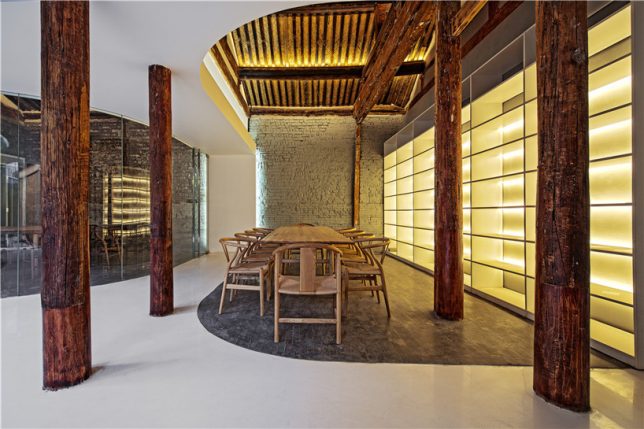
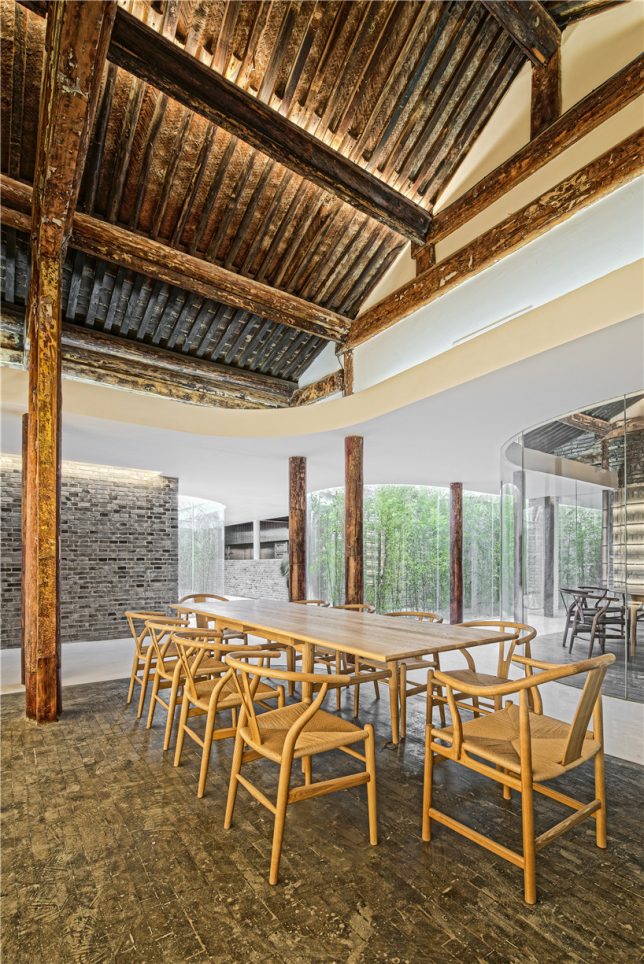
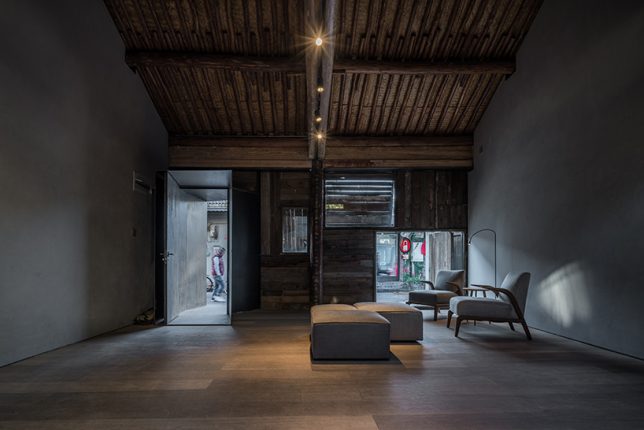
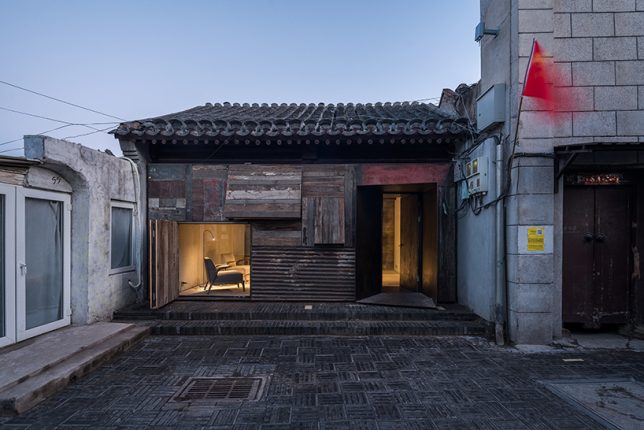
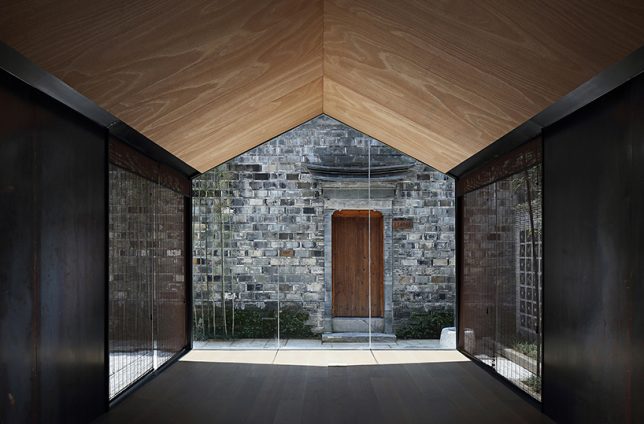
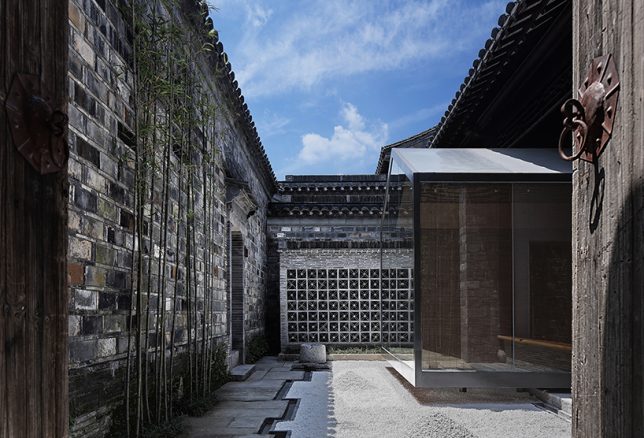
    Passing through historic Beijing neighborhoods, seeing only the preserved street-facing facade, you’d never know that surprisingly modern structures contrast with aging surfaces within the courtyards just out of sight. Instead of just demolishing the ‘hutong’ courtyard houses found only in this Chinese city, architects are adapting them to modern life, slotting houses, hostels, museums, tea houses, cinemas and more under the existing roofs.

    Tea House by Archstudio

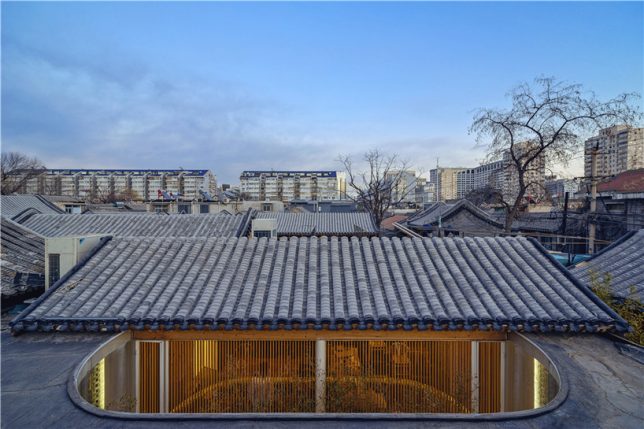
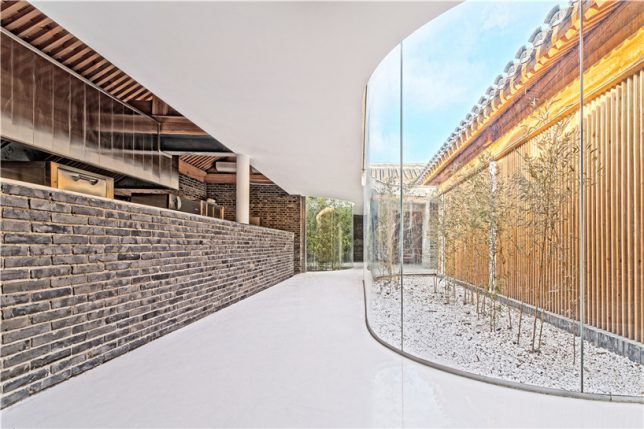
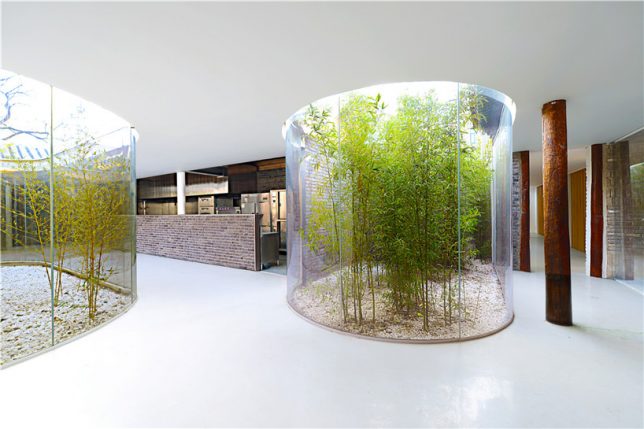
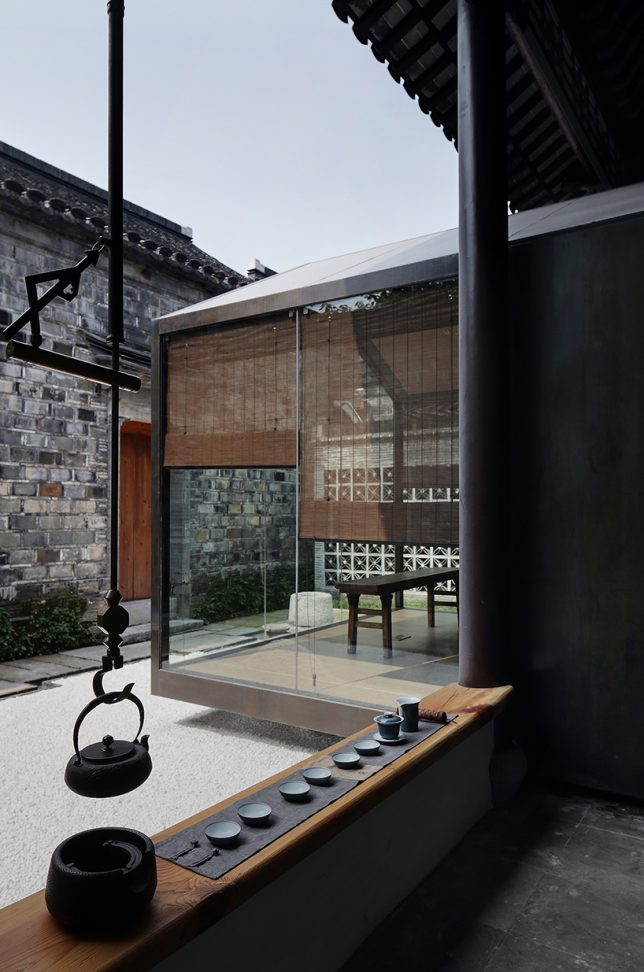
    In a truly stunning adaptation, Archstudio has completed a tea house and cafe within an existing hutong house, enclosing it from above with new roofs while leaving atriums open for bamboo and other greenery. The intervention connects the site’s five existing structures with a glazed corridor following the path of the original courtyard, forming three tea houses with their own unique views.

    Twisting Courtyard by Archstudio

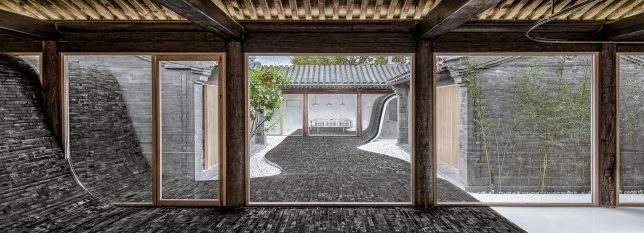
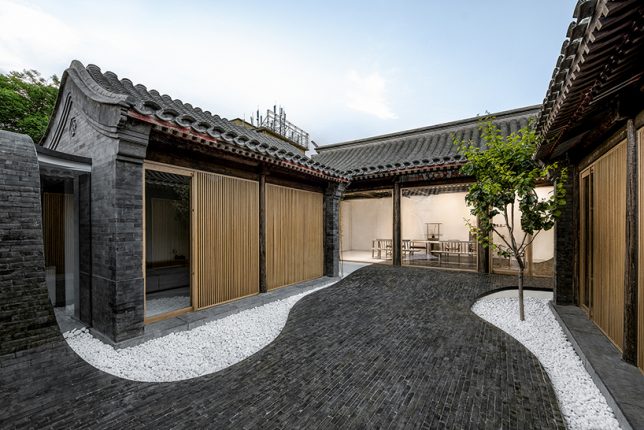
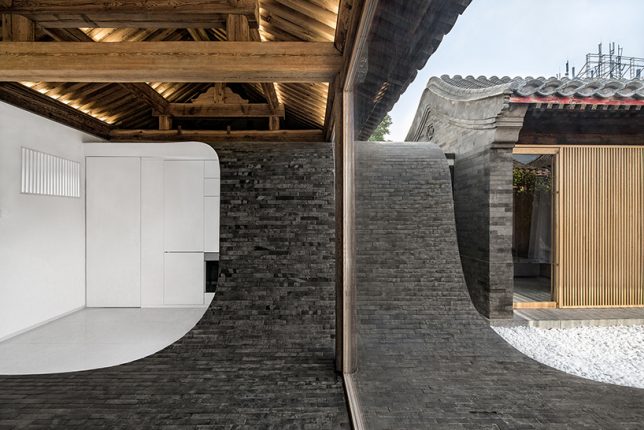
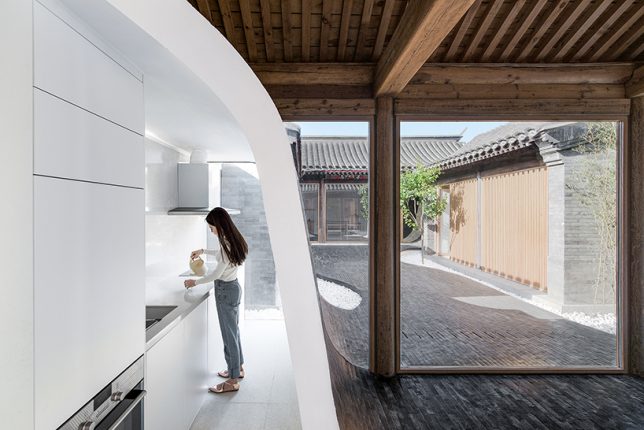
    A river of glossy grey bricks streams through the courtyard of a Siheyuan house in the Paizihutong area of Beijing, upgrading the historic architecture with spaces that meet modern requirements of living. Archstudio‘s stunning pathway arches over the new volumes and even continues right into the dining room as part of the floor.

    Mini Hostel Inside Hutong by ZAO / standardarchitecture

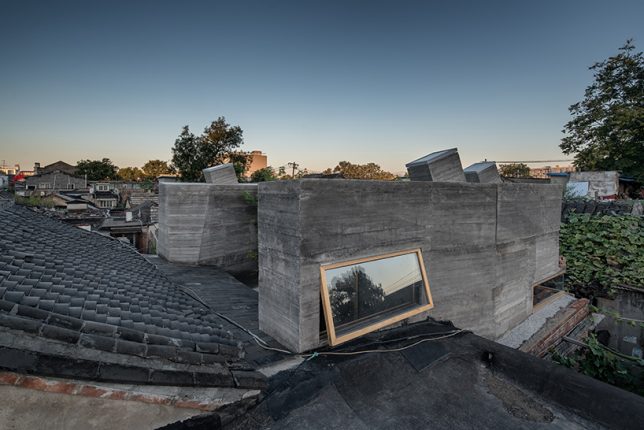
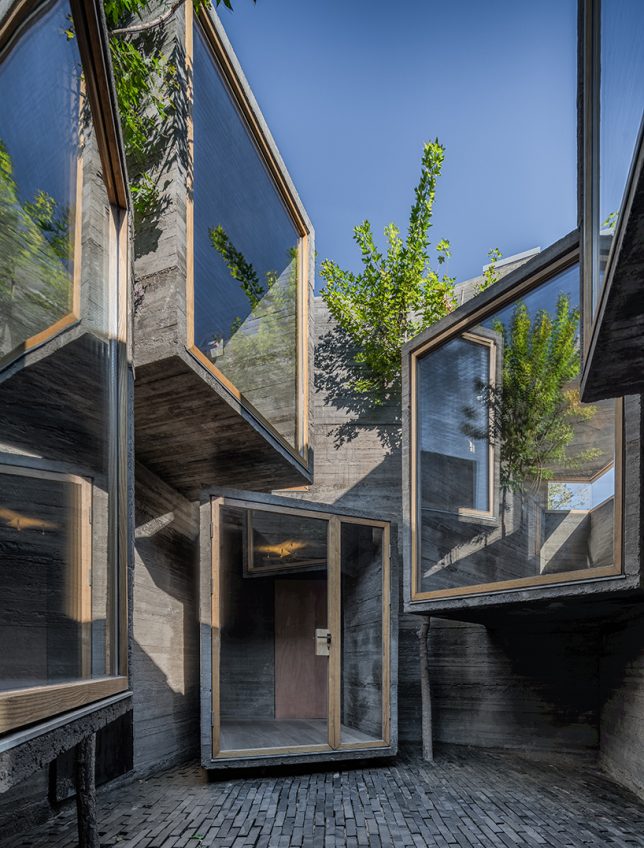
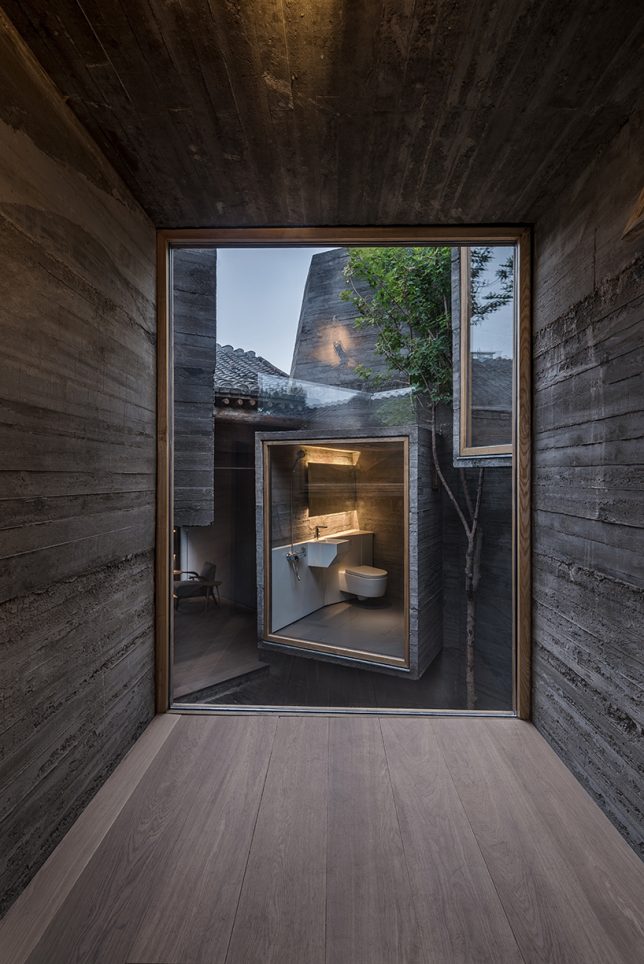
    The firm ZAO / standard architecture inserted a small hostel inside a renovated Beijing hutong, exploring the potential of small-scale accommodations that slot right into the city’s existing architecture instead of displacing it. The glazed facades of volumes made of board-formed concrete project into the courtyard, facing each other (in some cases, with views of toilets, much to the horror of many Westerners looking at these images.) “The result is an architectural operation that brings back the courtyard as generator of the program, as it activates the building by creating a direct relationship with its urban context.”

    Lai Yard House by Minggu Design

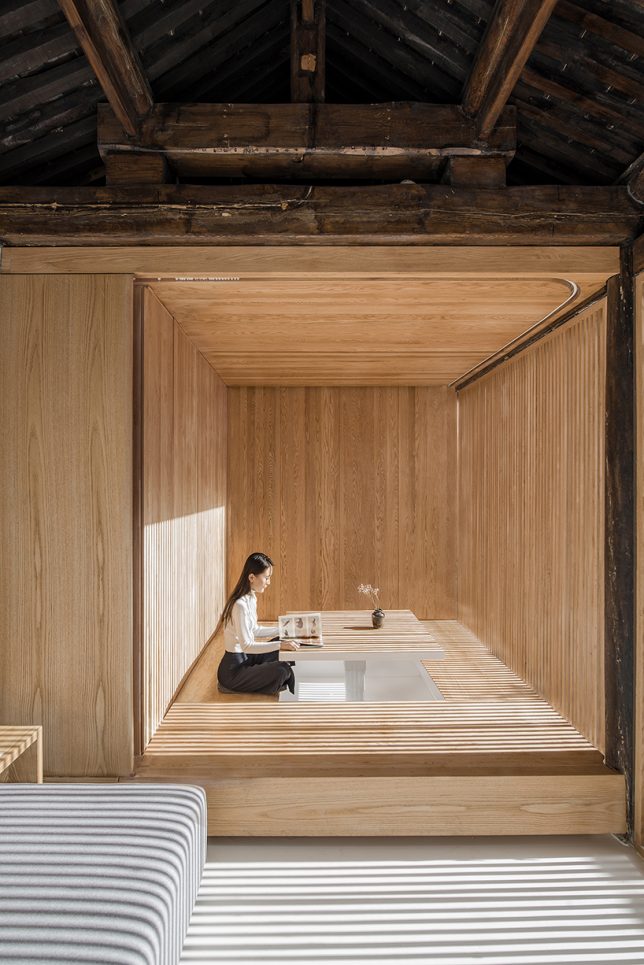
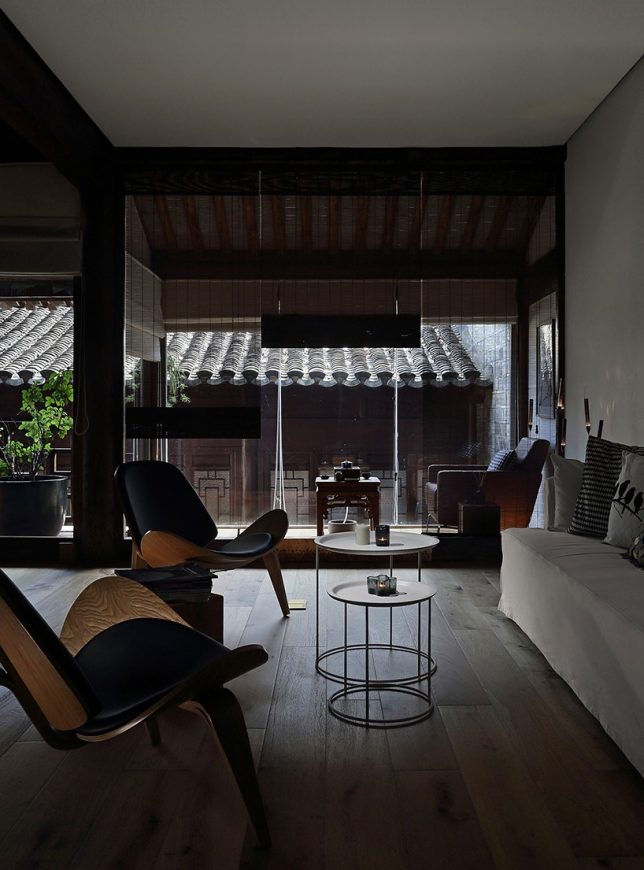
    Tucked away behind weathered brick facades near the ancient city wall of Beijing, this courtyard home was crumbling. Minggu Design protects and preserves the original Chinese architecture while enhancing and adapting it for the 21st century, inserting volumes made of wood and glass to complement the surroundings without overpowering them. They used the new volumes to intentionally block and filter light to the original interior, creating a tranquil cave-like feel.

    Next Page – Click Below to Read More:
    Preserving Architectural Gems 8 Beijing Hutong Plug Ins Update Historic Shells

    Share on Facebook


    [ By SA Rogers in Architecture & Houses & Residential. ]

    [ WebUrbanist | Archives | Galleries | Privacy | TOS ]


    WebUrbanist

  • Godox XPro-N wireless flash trigger for Nikon boasts TTL, HSS and more for just $70

    Godox has launched a Nikon version of the XPro-C 2.4GHz wireless flash trigger it announced for Canon last month. The new model—aptly titled the XPro-N—is equipped to control Godox’s X1 system, and is currently listed by online retailers as available for pre-order with shipping planned to start on October 31st.

    This Nikon version will be joined by models for Sony, Fujifilm, and MFT throughout the remainder of the year.

    As with the Canon version, the new XPro-N model sports a large dot-matrix LCD alongside five physical buttons. The display shows five groups, one group per physical button, as well as data pertaining to each group. The trigger supports HSS (up to 1/8000), TTL, and manual (1/1 – 1/256) control. There’s also support for TTL-Convert-Manual (TCM) functionality, which allows you to meter flashes in TTL, then switching to manual mode with the settings automatically adjusting to keep an equivalent output.

    The XPro-N is listed for pre-order at $ 70 on Amazon.

    Articles: Digital Photography Review (dpreview.com)

  • 4 Tips for the Minimalist Photographer

    Tips for the Minimalist Photographer

    I’ve photographed countless sessions in the past nine years. Weddings, families, children, newborns, seniors, huge extended family groups, community events, products for companies, bike races, fine art, birth stories. . . You name it, I have probably photographed it. Knowing that you might be a little bit surprised when I tell you what equipment I have in my bag:

    • Nikon D700 body
    • 50mm f/1.4G  lens
    • 85mm f/1.4D lens

    That’s everything, besides two 8GB Compact Flash cards, two 4GB Compact Flash cards, three camera batteries, a couple of business cards, and some lip balm. All of this fits inside one Kelly Moore Westminster Camera Bag. I use Photoshop CS6 with Adobe Camera Raw to edit my photos on a 27″ iMac. That’s it!

    Tips for the Minimalist Photographer

    I started nine years ago with a Nikon D90, the kit lens, and a 50mm f/1.8 lens. A couple of years later I upgraded to my full-frame body, better lenses, and haven’t felt a need for anything different, or anything more since that day. I’d say I’m very much a minimalist photographer, and it works well for me.

    Could it also work well for you? Is it possible to have so few pieces of equipment and be satisfied? I’d like to share some thoughts with you, and maybe you’ll find that it’s a system that could work for you. You also might think I’m just insane, and add an additional lens to your collection just to spite me. Don’t worry! I won’t judge you harshly either way.

    Tips for the Minimalist Photographer

    #1 – Let Go of Keeping Up

    All too often in life, we get caught up in what everyone around us has, and what they are doing. We feel that in order to be good enough, we have to have and do all of that stuff too. Photography is no different.

    Your best photographer friends are telling you about the latest and greatest lens they just purchased. Your photography competition just switched to a different brand and bought entirely new everything. The blogger you follow online just ordered the most life-changing new camera bag and is urging you to buy it too. You are surrounded by it every day, but you don’t have to keep up. You don’t have to do what everyone else is doing to be your best self. Likewise, you don’t need to have everything they have to compete.

    Tips for the Minimalist Photographer

    If it’s hard for you to see what others have and be satisfied with your own life, then stop looking at what they have. Stay away from social media for awhile, and quit looking at the blogs that are trying to sell you things. Get out and photograph something real with the equipment you have, and you might just forget that other photographers even exist. Eventually, you will be able to congratulate a friend on a new acquisition without feeling even a bit of jealousy.

    #2 – Quit Thinking “Stuff” Will Change Everything

    Have you ever told yourself that if only you had a certain camera, if only you had a few more lenses, you would be an amazing photographer? While equipment does make a difference, it doesn’t make the photographer. Great photographers can make beautiful photos with anything they have, and a not-so-great photographer could have the highest-end equipment with every lens imaginable and still come up with nothing.

    Tips for the Minimalist Photographer

    That said, it’s great to work towards purchasing quality equipment because if you’re only going to have very few things, you might as well make sure they’re very nice. You can get a nicer camera body and lens if you know that you’re going to use it all the time, and you won’t be spending your money on a lot of other “stuff”.

    Practicing your photography, getting out there and actually taking photos, reading articles and books from the library about photography, and talking with other photographers will help you become a better photographer. And those things don’t cost you anything. Work on yourself instead of your stuff.

    Tips for the Minimalist Photographer

    #3 – Try Before You Buy

    At some point in your life, I’m betting that you thought you had to have something, you got it, then realized that it wasn’t what you really needed or wanted after all. I’m pretty sure it’s happened to you, because I know it’s happened to me, more than once.

    So before you buy another piece of photography equipment, see if you can borrow it from someone (or rent it), or at least watch it in action before you take the plunge and put down your hard-earned money for it. I’m very careful about what I purchase, but even I have had a few misses throughout the years.

    I bought a reflector that I’ve used exactly two times in my entire career. UV lens protectors were purchased for peace of mind, then I decided that I liked my photos better without them, and I am a cautious person. I trust myself, so I don’t need them. A camera bag that sounded great in theory but lifting a flap every time I wanted to get my camera didn’t work for me. I bought a lens cleaner that the cap never stayed on. These are little purchases, but they’re just money and space wasters to me.

    Tips for the Minimalist Photographer

    Test Drive

    I heard so often that Lightroom was amazing, and that there were so many things that you could do with it, and that I needed it along with Photoshop. I sat down one day with a sweet photographer friend and asked her to show me everything she loved about it, and why I needed it. Every single thing that she showed me could be done with Adobe Camera Raw and Photoshop. I felt content with my workflow, and I went home satisfied that I didn’t need to buy another program.

    The great thing about trying something out, or watching it in action, is that you can see if it will truly work for you or not. You can read or listen to lots of other photographer’s opinions, but they aren’t you. The things that are important to them may not be important to you. You ultimately have to make that decision if it’s something you truly need and if it’s a good fit for you.

    Tips for the Minimalist Photographer

    #4 – Let Your Limited Resources Expand Your Abilities

    It’s strange to me that someone like me, with such limited equipment, could be so much more content than the photographer who owns suitcases full of equipment and still wants more. Some types of photography truly require more than what I have, and more equipment could be necessary, but you’d be surprised how innovative you can be when you need to make do with what you have.

    There is a certain freedom that comes when you have everything you need in your hands and in your head. You don’t need to carry around rolling luggage full to the brim with equipment because you use everything available to you to create something beautiful. If you can’t shoot something that comes to mind because you don’t have the right lens, you either find another way to shoot it, or you find something else to shoot. That something else might be even better than the first thing that came to mind.

    You won’t be wasting time, or risking dust and dirt in your sensor, by changing lenses constantly. You won’t be weighed down by multiple camera bodies swinging from your neck. No more worrying about where you put that third bag full of your lighting equipment. Your mind is freer to capture real life.

    Tips for the Minimalist Photographer

    Decide What Works for YOU

    Please don’t read this article as a criticism of photographers who own a lot of equipment. I like things simple in my life, inside and outside of photography. I don’t like to have more than I need, and an excess of anything makes me feel uncomfortable. Being a minimalist photographer works for me, and whether your reasons are that you like simplicity too, or your budget requires simplicity, you might find a few things to think about after reading this.

    Tips for the Minimalist Photographer

    Are there other photographers out there like me? I’d love to know what equipment you find most essential. And, for all of you who have everything, I’d love to know if you had to cut your equipment down to five or fewer items, what would you keep? What could you give up?

    The post 4 Tips for the Minimalist Photographer by Melinda Smith appeared first on Digital Photography School.


    Digital Photography School

  • Video Tutorial: How to Make Realistic Images Faster with Aurora HDR 2018

    As a landscape photographer who relies heavily on HDR to pull off much of my work, I’m always keen to learn about better ways of doing what I do. Most of the time my art tends to run towards natural looking images in contrast to the wild and crazy stuff of HDR’s reputation. The HDR software I use matters when I’m going for a more natural looking photo in my post-processing.

    Going natural with Aurora HDR 2018

    Aurora hdr 2018 cactus before after

    You can see several examples of the natural-looking results I’m getting in from Aurora HDR in the accompanying video and the several before and after images included here in the article.

    Aurora HDR 2018 delivers, even more, natural-looking photos than before

    The latest version of Aurora HDR is fresh out of the factory and I’ve been in a tire-kicking session with it for a few days making several photos. As expected, it’s a worthy upgrade. Do you want to see what’s new and how it helps when you want to keep the look of your HDR photos on the natural side?

    Before

    After processing with Aurora HDR 2018.

    Under the Hood of Aurora HDR 2018

    The Macphun engineers have been very busy for many months re-building Aurora HDR from scratch. It’s like Walter White always says in Breaking Bad, “It had to be done.” In order to create a cross-platform Windows/Mac application, all new code was required. Big job.

    The resulting product is something they can be proud of. The new HDR algorithm in Aurora HDR 2018 churns out very natural looking HDR images when it’s used correctly and with natural HDR being the goal. Of course, Aurora HDR 2018 is a perfect fit for my landscape photography work. It uses the most modern tone-mapping technology and an advanced image-processing engine, which makes very clean images, as you’ll notice in my examples.

    Before

    After processing with Aurora HDR.


    Video tutorial: Keeping it natural and real in Aurora HDR 2018

    All the new features, just added to Aurora HDR 2018 in this release, bring it ever closer to becoming the only app you’ll need to process your HDR images and keep them as natural looking as you want. When you watch the video you’ll see how I use some of the new major features packed into Aurora HDR 2018 when creating my natural looking HDR landscapes. Watch the demo video:

    Embracing the faster workflow using Aurora HDR 2018

    You probably love photography as much as I do. Getting new tools that really help me get to my intended vision faster, or easier, or just better in any aspect, are quite welcome. They make it even easier to love what I do.

    Kudos to the completely rewritten HDR algorithm and the advanced image-processing engine in Aurora HDR 2018. I’m finding that it’s speeding up my workflow significantly. That’s because of how good my photos usually look immediately after tone mapping even without even doing anything else in Aurora.

    If I were brand new to photography, I’d be totally happy leaving my photos in that initial tone-mapped state with no further processing. They are that clean!

    Before

    After

    Back in the day (before Aurora HDR), it could take me up to a couple of hours to finish an HDR photo. Even then, it wasn’t all that natural looking much of the time. Thankfully, things are always evolving in exciting ways.

    Ever since my foray into HDR photography eight years ago, my skills have improved. But I honestly have to credit the improvements in software, like Aurora HDR 2018, for dramatically reducing the time it takes me to finish a photo to just a few minutes while getting better, more realistic, results.


    My intention is keeping my post-processing time to five minutes per image and striving for consistently higher quality photography. Aurora HDR 2018 is a big piece in my HDR workflow making that happen so it’s now a permanent tool in my HDR arsenal.

    Be sure to watch the video, then I invite you to check out more Aurora HDR images in my SmugMug gallery.

    Disclaimer: Macphun is a paid partner of dPS.

    The post Video Tutorial: How to Make Realistic Images Faster with Aurora HDR 2018 by Keith Cuddeback appeared first on Digital Photography School.


    Digital Photography School

  • Canon hit two milestones today: 90 million cameras and 130 million lenses

    Canon has hit two couple major production milestones today. Specifically, Canon says it has now produced 130 million EF-series interchangeable lenses and 90 million EOS cameras. And in case you’re curious, the camera maker revealed that an EOS 5D Mark IV was its 90 millionth EOS camera to go through production, while the 130 millionth interchangeable lens distinction goes to an EF 16-35mm f/2.8L III USM.

    Both the EOS and EF series made their debut in March 1987, eventually picking up production speed in the early 2000s as DSLRs became more popular.

    The company boasts a 14-year consecutive No. 1 share of the global interchangeable lens digital camera market, as well as the distinction of being first to bring certain features to the market with its EF lenses, including image stabilizer tech and an ultrasonic motor. Canon’s EOS Series also has some notable distinctions in its past, including being the first to offer an electronic lens mounting system and fully digitized communication between the lens and camera body.

    Articles: Digital Photography Review (dpreview.com)

  • HP reveals the ZBook x2: The ‘world’s most powerful detachable PC workstation’

    $ (document).ready(function() { SampleGalleryV2({“containerId”:”embeddedSampleGallery_9365668628″,”galleryId”:”9365668628″,”isEmbeddedWidget”:true,”standalone”:false,”selectedImageIndex”:0,”startInCommentsView”:false,”isMobile”:false}) });

    Step aside Microsoft, because HP just released a monstrous ‘detachable PC workstation’ that can compete with powerful laptops like the Surface Book 2 released yesterday… but in a form factor that looks more like a Surface Pro. Meet the HP ZBook x2: the so-called “world’s most powerful and first detachable PC workstation.”

    In HP’s own words, this computer “was designed to solve the performance and mobility needs of artists, designers and digital imaging professionals who need to push Adobe Creative Cloud and other professional applications to the limit.” So what makes this computer more capable than HPs other two-in one solutions: the HP Spectre x2 and HP Elite x2. In a word: performance.

    While previous two-in-one iterations with these kinds of specs put most of the components—the main CPU, GPU, etc—into the base unit, the HP ZBook x2 flips the script. The bluetooth keyboard is basically just that: a bluetooth keyboard; even when the tablet is detached completely it maintains the full performance from its CPU and GPUs. Think of it like a Surface Pro dressed up to star in the next Iron Man movie.

    Spec-wise, the HP ZBook x2 can be configured with 8th Gen Intel Core i7 graphics, a discreet NVIDIA Quadro M620 graphics card with 2GB of dedicated GDDR5 memory, up to 2TB of local PCIe SSD storage, and up to 32GB of RAM. All of this sits behind a 14-inch 4K multi-touch screen with optional 10- bit, one-billion color HP DreamColor display that’s been calibrated 100 percent of Adobe RGB.

    The computer can be used in four different modes:

    • Laptop Mode: attached to the bluetooth keyboard.

    • Detached Mode: Use the tablet with the new HP pen, while still having full access to your Bluetooth keyboard shortcuts off to the side.

    • Docked Mode: Using the ZBook Dock, the x2 can power two additional 4K displays or five total displays.

    • Tablet Mode: totally detached and disconnected from the keyboard, the x2 maintains full graphics performance.

    In most modes, you’ll want to use the ZBook x2 with the new battery-free HP pen, which is based on Wacom EMR technology and offers 4,096 levels of pressure sensitivity with multi-directional tilt capabilities and a dedicated eraser. And when it’s docked and powering two 4K displays, the setup can look pretty … intense:

    In short, the ZBook x2 is trying to be all things to professional creatives and designers. Instead of using some combination of laptop, iPad, and Wacom tablet, you can replace all of them (ostensibly) with one ZBook x2. And since it was designed in collaboration with Adobe, you can bet Photoshop, Lightroom, Illustrator, Premiere, and other powerful CC apps will work exceptionally well.

    To learn more about the HP ZBook x2, head over to HP’s website. The new ‘detachable workstation’ will go on sale in December and starts at $ 1,750 for the base model with a dual core 7th generation Intel Core i7 CPU—no word yet on how much more expensive it’ll be to fully spec out one of these.

    Press Release

    HP Unveils World’s Most Powerful and First Detachable PC Workstation

    HP ZBook x2 PC Allows Designers to Unleash the Power of Adobe Creative Cloud and Other Professional Applications

    LAS VEGAS, NV – October 18, 2017 — Today at Adobe® MAX, HP will showcase the world’s most powerful detachable PC1 designed to solve the performance and mobility needs of artists, designers and digital imaging professionals who need to push Adobe Creative Cloud® and other professional applications to the limit. The performance of the HP ZBook x2, the world’s first detachable workstation,15 increases productivity and allows digital creators and storytellers the freedom to work when and where inspiration strikes.

    HP’s reinvention of detachable PCs began earlier this year with the introduction of the HP Spectre x2 and the HP Elite x2. Today’s introduction of the HP ZBook x2 completes HP’s trifecta with its most powerful detachable solution targeted for the creative community. With this new offering, HP is extending its PC leadership by pioneering a new era for detachable PCs that offer superb performance, elegance and efficiency.

    “As the world’s most powerful and first detachable PC workstation, there is no device better suited to turn the vision of artists and designers into reality,” said Xavier Garcia, vice president and general manager, HP Z Workstations, HP Inc. “With the HP ZBook x2, we are delivering the perfect tool to accelerate the creative process – with unprecedented power, performance and natural ease-of-use. This device will make it easier than ever for creators to do what they do best – bring inspiring new ideas to life and enrich the world around us.”

    Liberating Digital Creativity

    The HP ZBook x2 allows designers to effortlessly create with quad-core Intel® CoreTM processors2, twice the memory of any other detachable PC3 and NVIDIA® Quadro® Graphics that deliver 73 percent higher graphics performance compared to the Surface Pro4. A quiet, dual-fan active cooling system is designed to dissipate heat from the powerful graphics card and processor. To better meet the needs of the creative community, including Adobe users, HP also developed customizable, application-aware HP Quick Keys, to provide artists with 18 time-saving shortcuts.

    “At Adobe, our goal is to accelerate creativity. Creative Cloud is the platform that enables us to deliver powerful innovation in our apps and cloud-based services supported by Adobe Sensei with artificial intelligence at the heart of every customer experience,” said Mala Sharma, vice president and general manager, Creative Cloud Product, Marketing and Community. “Adobe is thrilled with our collaboration with HP, which we know will further fuel creativity and give Creative Cloud members more power and freedom to create wherever inspiration strikes.”

    Today, many creative professionals use multiple devices such as a MacBook Pro plus an iPad to accomplish the same tasks that can be done on the HP ZBook x2. Knowing that ultimate mobility is important, HP created a single device that delivers the same performance capabilities from inking to docked mode.

    HP’s most versatile detachable to date, the HP ZBook x2 operates in four modes: laptop, detached, docked and tablet.

    • In laptop mode, the HP ZBook x2 is a powerful mobile workstation with a keyboard leveraged from the HP ZBook Studio.

    • In detached mode, it allows users to create on the tablet with HP’s most accurate and expressive pen while still having full access to all of their shortcut keys with the Bluetooth®-enabled keyboard off to the side.

    • In docked mode, the HP ZBook x2 can power two additional 4K displays or five total displays.

    • In tablet mode, it maintains full graphics performance allowing users to capture ideas with powerful NVIDIA 3D graphics.

    Using HP’s most natural pen with the HP ZBook x2, users can create without interruption as the pen never needs to be charged. The battery-less, HP-designed pen based on Wacom EMR technology, responds instantly to every nuance of the artist’s hand for natural motion. The HP ZBook x2 offers 4,096 levels of pressure sensitivity with multi-directional tilt capabilities and includes a dedicated eraser.

    As a member of the world’s most secure and manageable mobile workstation family10, the HP ZBook x2 features HP Sure Start Gen311 for BIOS protection, TPM 2.0 for hardware-based encryption to secure credentials, secure authentication methods through the Smart Card Reader and HP’s Client Security Suite Gen312 to protect data, device and identity, including facial recognition and fingerprint reader.

    HP ZBook x2 Highlights

    The HP ZBook x2 embodies the intersection of mobility and performance in a fully-machined, aluminum and die-cast magnesium body starting at just 3.64 pounds5 and 14.6 mm thin when in tablet mode, and 4.78 pounds5 and 20.3 mm in laptop mode. The HP ZBook x2 has a stunning 14-inch diagonal, 4K multi-touch display with an optional 10- bit, one-billion color6 HP DreamColor display calibrated to 100 percent of Adobe RGB. The HP ZBook x2 has the world’s most advanced detachable PC display16 and includes an anti-glare touchscreen allowing users to immerse themselves while working in any lighting condition. At the desk, it can power dual 4K displays from the HP ZBook Dock with ThunderboltTM 37.

    This detachable PC has up to 10 hours of battery life13 for maximum productivity and ultra-fast recharge (50 percent in just 30 minutes8). The HP ZBook x2 offers up to 4.2 GHz of Intel®Turbo Boost, 32 GB RAM over dual channels for more responsiveness under heavier workloads like complex layering in Photoshop. The model’s HP Z Turbo Drive storage is up to 6X faster than SATA SSD and up to 21X faster than traditional HDD storage. The HP ZBook x2 offers up to 2 TB9 of local PCIe storage and incorporates a full-sized SD card slot, perfect for professional photographers. Using the dock or Thunderbolt 3 ports on the HP ZBook x2, it can transfer large files from cameras, external storage, phones and other peripherals.

    Designed to go anywhere and handle the toughest workloads, the HP ZBook x2 mobile workstation is designed to pass MIL-STD 810G testing14. The HP ZBook x2 also undergoes dozens of tests for certification and optimized performance with the industry’s leading software providers like Adobe and Autodesk.

    HP ZBook x2 Pricing and Availability

    HP ZBook x2 is scheduled for availability in December starting at $ 1,749. The datasheet is available here.

    Articles: Digital Photography Review (dpreview.com)