RSS
 

Archive for August, 2012

Flickr responds to ‘Dear Marissa Mayer’ appeal with an appeal of its own

01 Aug

Screen_Shot_2012-07-19_at_4.35.27_PM.png

When Marissa Mayer was named new CEO of Yahoo recently, Los Angeles-based journalist Sean Bonner posted an appeal for her to ‘please make Flickr awesome again’, signing it ‘the Internet’. On his blog, Bonner commented that Flickr, which was acquired by Yahoo in 2005, needs someone to ‘put some support behind it, bring it up to date, give it an actually functional mobile app and commit to keeping it alive’. That appeal went viral, and today Flickr posted a response. Click through to read Bonner’s appeal and Flickr’s humorous reply. (via wired.com)

News: Digital Photography Review (dpreview.com)

 
Comments Off on Flickr responds to ‘Dear Marissa Mayer’ appeal with an appeal of its own

Posted in Uncategorized


Rob Galbraith puts Digital Photography Insights website on hiatus

01 Aug

rg_site_logo.jpg

Photography expert Rob Galbraith has said he is putting his well-respected ‘Digital Photography Insights’ website into ‘deep hibernation mode,’ as he accepts a photojournalism teaching role. Galbraith has become known as an engaging and knowledgeable writer, particularly from the sports and photojournalism perspective, and was one of the first people to identify and begin to characterise the autofocus problems with the Canon EOS-1D Mark III. The site will remain accessible but will no longer be updated. We would like to wish him every success in his new role at Southern Alberta Institute of Technology.

News: Digital Photography Review (dpreview.com)

 
Comments Off on Rob Galbraith puts Digital Photography Insights website on hiatus

Posted in Uncategorized


Just posted: Quick Pentax K-30 samples gallery

01 Aug

pentax_k30.png

We’ve prepared a quick samples gallery using the Pentax K-30 – Pentax’ latest mid-level DSLR with a 16.3MP CMOS sensor. We’re working on a review but recently technical writer Lars Rehm had the chance to take the camera and the 18-135mm F3.5-5.6 lens on a road trip down the coast on Highway 101 and to Crater Lake in Oregon, taking a lot of pictures along the way. The review is in the pipeline, but in the meantime we hope you enjoy these pictures, which should give you a taste of what the camera can do. 

News: Digital Photography Review (dpreview.com)

 
Comments Off on Just posted: Quick Pentax K-30 samples gallery

Posted in Uncategorized


7 Cool Photoshop Layer Tricks

01 Aug

When you’re using layers in Photoshop for photo editing and composting you can speed up the process of working with them if you know these cool layer tricks.

1. Unlock the Background
Layer1

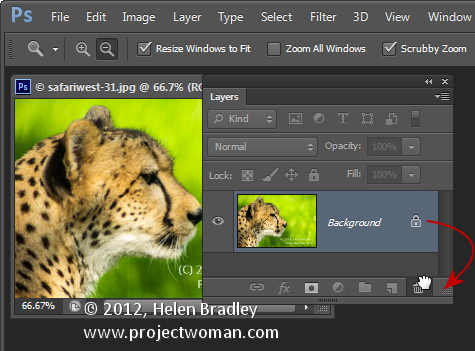
You will already know the Background of any photo is locked and you can’t do anything much with it until you unlock it. The quickest way to unlock a background layer is from inside the Layers palette. Drag the lock icon to its right and drop it in the Trash and the Background layer will be automatically converted to a regular layer.

2. One click add a Layer
Layer2

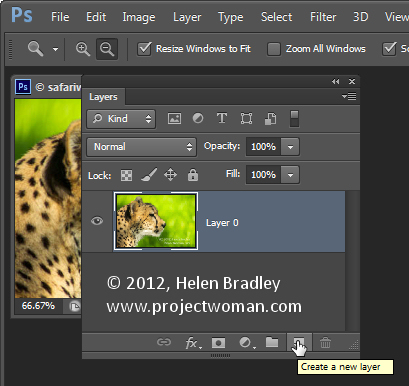
To create a new layer above the current layer click the Add New Layer icon at the foot of the Layer palette. 

To add a new layer directly below the current layer Ctrl or Command Click on that icon. Both options add a layer but without displaying the Layer dialog. 

3. Merge Everything to One Layer but Keep the Layers too
Layer3

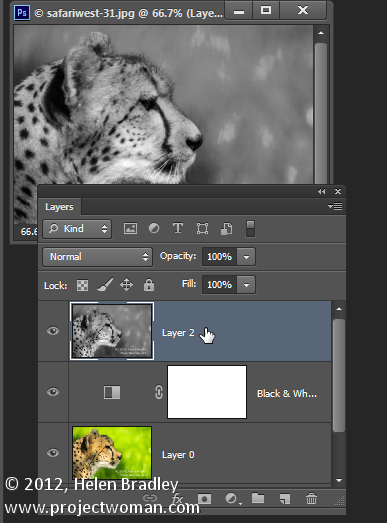
To merge all the current layers in the document to a single layer and at the same time to keep all the layers intact below it, click the topmost layer of the document and press Ctrl + Shift + Alt + E (Command + Option + Shift + E on the Mac). In case you are curious – it’s called Stamp Visible. 

4. Select the Content on the Current Layer
Layer4

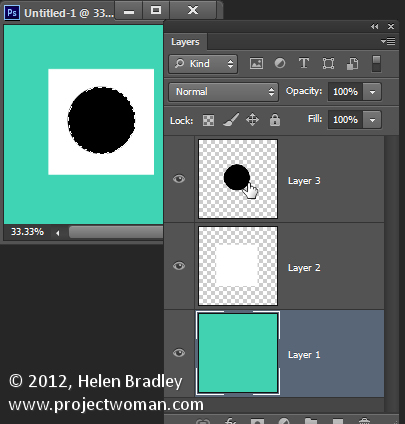
To select everything on the current layer Ctrl + Click on the layer thumbnail in the Layers palette. 

5. Copy a Layer to Another Document

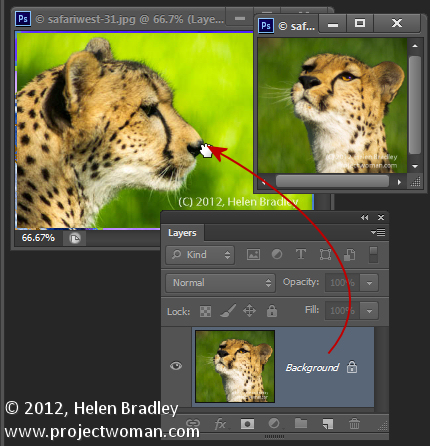
To copy a layer from one document to another drag the layer from the Layers palette in one document and drop it into the other document. If you hold Shift as you drag the layer will be centered in the middle of the second document.
Layer5

6. Quick Layer Moves

To quickly move a layer up the layer stack press Command + ] and to move it down, press Command + [.

7. Instant Delete a Layer

To instantly delete a layer, click the layer and press Delete. 

Bonus Layer tip

To fill a layer or a selection with the foreground color press Alt + Backspace (Option + Delete on the Mac). Use Control + Backspace (Command + Delete on the Mac to fill the layer or selection with the Background color.

So, over to you now… what are your favorite Layer tips and tricks?

Post originally from: Digital Photography Tips.

Check out our more Photography Tips at Photography Tips for Beginners, Portrait Photography Tips and Wedding Photography Tips.

7 Cool Photoshop Layer Tricks


Digital Photography School

 
Comments Off on 7 Cool Photoshop Layer Tricks

Posted in Uncategorized


Canon announces two EF-M lenses to accompany EOS M mirrorless camera

01 Aug

EF-M-18-55mm-F3-5-5-6.png

Canon has announced two lenses for the EF-M mount used for the first time by its EOS M mirrorless camera. The first lenses will be a EF-M 22mm F2.0 STM ‘pancake’ prime and an EF-M 18-55mm F3.5-5.6 IS STM standard zoom lens. Both are built around a STM linear stepping motors to drive focus. The EF-M 22mm F2.0 offers a field-of-view equivalent to a 35mm lens on a 135 film camera, while the 18-55mm offers around 29-88mm equivalent coverage. Both feature metal lens barrels and focus-by-wire manual focus.

News: Digital Photography Review (dpreview.com)

 
Comments Off on Canon announces two EF-M lenses to accompany EOS M mirrorless camera

Posted in Uncategorized


Kipon develops electronic adapters for Canon lenses on mirrorless bodies

01 Aug

kipon.png

Chinese accessory manufacturer Kipon says it has developed mount adapters to use Canon EOS lenses on Micro Four Thirds and Sony NEX bodies with full electronic control of the aperture setting. There’s no word on whether other functions such as image stabilization or autofocus have any chance of working, and as yet Kipon is only showing unfinished-looking examples on its website. There’s also no information on availabililty or pricing, but we’d expect it to be very competitive. 

News: Digital Photography Review (dpreview.com)

 
Comments Off on Kipon develops electronic adapters for Canon lenses on mirrorless bodies

Posted in Uncategorized


Sigma UK launches Olympics-themed photo competition

01 Aug

logo_2x.png

Sigma UK has launched a ‘Spirit of the Games’ photographic competition, with the chance to win an SD1 Merrill SLR with 17-50mm F2.8 lens, or a DP2 Merrill large-sensor compact. Running from the start of the Olympic Games on the 28th July to the 31st August, photographers are invited to submit up to five of their images capturing the Spirit of the Games. The overall winner will be selected by Sigma’s own judges, while 20 runners-up will be entered into a publicly-judged Facebook competition to win the DP2 Merrill. Click through for a link on how to enter. 

News: Digital Photography Review (dpreview.com)

 
Comments Off on Sigma UK launches Olympics-themed photo competition

Posted in Uncategorized


Lytro Light Field Camera now works with Windows

01 Aug

lytro_lfc8gb.png

Lytro, the maker of the Lytro Lightfield Camera, has today announced that its ‘Lytro Desktop Application’ – the software that allows you to ‘refocus’ light-field images after they have been taken, is now available for Microsoft Windows. You’ll need to run the 64bit version of Windows Home, Professional or Ultimate on a computer with an Intel Core 2 Duo or better processor and at least 2GB RAM. At the same time the company announced two new accessories – a USB wall charger and a tripod mount, which are available for around $ 20 each.

News: Digital Photography Review (dpreview.com)

 
Comments Off on Lytro Light Field Camera now works with Windows

Posted in Uncategorized


Updated: our Canon EOS M hands-on preview

01 Aug

canon_eosm.png

We’ve updated our initial preview of the Canon EOS M with lots more information, including our own hands-on pictures of the camera and a video illustrating the shutter sound. So if you’re interested in finding out more about Canon’s first mirrorless offering, it’s worth having a glance through to see if there’s anything you missed first time around. Click through for the link.

News: Digital Photography Review (dpreview.com)

 
Comments Off on Updated: our Canon EOS M hands-on preview

Posted in Uncategorized


Build a DIY Portable North Light Photo Studio

01 Aug

Six years ago, I wrote on Strobist about how to build a $ 10 macro studio. Since then over a million photographers have seen how they could easily take control of light—any light—to easily produce professional quality product photos.

Four years later while brainstorming with my friend Mohamed Somji about how to light an upcoming photo project, I started thinking about how to reproduce this type of studio on a human-sized scale.

Turns out, it's not so hard. Read more »


Strobist

 
Comments Off on Build a DIY Portable North Light Photo Studio

Posted in Uncategorized