Blog

  • PocketWizard releases MultiMAX II trigger with 20 ControlTL channels and more

    Radio flash trigger manufacturer PocketWizard has reintroduced its much-loved MultiMAX transceiver, having added more control options and improved handling. The MultiMAX ll offers a total of 52 channels, including 20 dedicated to ControlTL devices, as well as improved features for time-lapse and sequential triggering.

    The new version of the MultiMAX features a PowerControl function that allows the user to manually control the output of up to three groups of flashes compatible with the ControlTL system from the MultiMAX display panel. The screen is now illuminated by a blue LCD backlight, which the company says improves contrast and legibility, and the keypad is said to be brighter than that of the previous model.

    The system’s intervalometer has had the burst limit lifted so users can set it for any number of flashes for as long as they like, making the mode useful for timelapse photography, and the SpeedCycler mode is now equipped to perform sequential firing of up to sixteen cameras or flashguns in sequence. That last part is useful in fast moving situations, when you can’t wait for an individual flash to recharge, so the MultiMAX just fires the next one in line.

    The PocketWizard MultiMAX ll costs $ 230 and is available now. For more information, watch the video below or head over to the PocketWizard website.

    Press Release:

    The Best is Back –Introducing the MultiMAX II

    More timing features, same great reliability, all at a lower price.

    LPA Design, manufacturers of PocketWizard Photo Products, the global leader in reliable wireless control of cameras, flash lighting and light meters, announces the MultiMAX II and the return of unique timing features that only PocketWizard technology provides. Whether you are a sports, wildlife or wedding photographer, you will be happy to learn that the most powerfully-featured wireless radio on the planet, the PocketWizard MultiMAX, is back and fully compatible with all other PocketWizard radios.

    Building on the legendary MultiMAX, the MultiMAX II takes its place as the most versatile, reliable and predictably compatible radio on the market. For the past 16 years, the MultiMAX has helped capture amazing images, many of which have landed on magazine covers throughout the world. MultiMAX Transceivers continue to be found in frequency crowded environments triggering arena flashes or remote cameras behind soccer goals, hockey nets, basketball nets, horse jumps, bull chutes, and the finish line of major International Track and Field events.

    After a brief hiatus, the MultiMAX II returns with new features including 20 ControlTL channels, Manual Power Control and an improved blue backlit LCD which provides better contrast for improved viewing in dimly lit studios or on-site locations. The key pad is brighter too, allowing photographers to easily change settings on the fly. Its 344 MHz frequency sets it apart from 2.4 GHz noise in crowded venues.

    “The MultiMAX II continues to provide incredible features that professional photographers have come to rely on. It has a whole suite of built-in tools designed for the demanding sports shooter like Patterns, programmable delays, and a settable contact time. The MultiMAX II is also Custom ID ready. Photographers can create incredible depth of field or stroboscopic effects with Multi-pop, give rear curtain sync to any camera, and even synchronize multiple cameras together, states Patrick Clow, Technical Support and Customer Service Manager.

    The MultiMAX II has a total of 52 channels: 32 Standard Channels and 20 ControlTL Channels. Photographers can creatively control groups of lights or cameras allowing them to work in crowded venues or with multiple flash set-ups. And now with Power Control, photographers can remotely adjust the manual power settings of ControlTL compatible radios and flashes in up to three zones with as many flashes in each group as you want.

    “Professional photographers have clamored for years to bring back the MultiMAX. We listened and we responded by making a great radio even better and offering it at a lower price. The MultiMAX II Transceiver is and remains the only radio on the market that performs special PocketWizard features including Infinite Intervalometer, SpeedCycler and Ultra Long Range. It is the most reliable Transceiver on the market for capturing life’s most amazing moments, states Karen Marshall, CEO of LPA Design

    The MultiMAX II will be available at retail and on line in the US and Canada starting July 17, 2017. The retail price will be $ 229.00 USD in the US and $ 309.00 CAD in Canada.

    Articles: Digital Photography Review (dpreview.com)

  • 6 Tips for Posing Hands in Wedding and Portrait Photography

    One of the most challenging and misunderstood elements in posing hands and how to use them correctly. Hands are so important in an image because they can say so much. They can convey masculinity, femininity, strength, softness and between couples, they can show love and affection.

    6 Tips for Posing Hands in Wedding and Portrait Photography

    So the big question is what can we do with hands? How can we make them look elegant and soft? Where should they be placed to convey the most realistic emotion and feeling? Here are a few helpful tips and ideas to keep in mind for your next wedding, portrait, or fashion shoot that may help correct the most common hand posing issues.

    #1 – Avoid showing the widest part of the hand

    To help make hands look elegant, simply avoid having the back of the hand facing towards the camera as that is the widest part of the hand. This is important because the hands in proportion to the subject’s face can make the hands look larger than they actually are, or can make feminine hands look quite masculine. A simple twist of the wrist, so the smallest part of the hand is showing, is all it takes to change the look and feel of an image from average to wow.

    Tips for Posing Hands in Wedding and Portrait Photography

    #2 – Soft hands

    Female hands need to appear soft, delicate, and elegant. To achieve this, it’s a matter of conveying to your bride or model to relax or soften their hands. A simple way of demonstrating how to do this is to hold your hand out then fully tense it up and then allow it to drop and relax slightly even wiggle the fingers so they are loose. Think of it like a big balloon, you’re just letting out a little air so they don’t look so hard and stiff.

    Tips for Posing Hands in Wedding and Portrait Photography

    #3- Bend the wrist

    Bending the wrist (a slight bend so it’s not straight) is such a simple method to break a straight line and create more shape and texture in a shot. Remember the female form looks best when we can see beautiful natural curves, this includes the wrists.

    Tips for Posing Hands in Wedding and Portrait Photography

    #4 – Have the hands doing something that appears natural

    People often ask, “What can I get my model or bride to do with her hands? I’m stuck for ideas.” This one is one of the simplest issues to address. You could have her holding the flowers, her veil, her dress, fixing her headpiece, adjusting her engagement ring, putting on perfume, touching her man softly, the list goes on. Just make sure it’s something she would normally do so it appears natural, otherwise, it may look a little posed and stuffy.

    Tips for Posing Hands in Wedding and Portrait Photography

    #5 – Posing hands with couples

    When photographing the bride and groom, think about where you would place your hands if you were cuddling your wife, husband, boyfriend, or girlfriend. Have the bride’s hands touching the groom’s hand, forearm, chest, or face in a way that says, “I love you”.

    Have the groom’s hands on the bride’s waist or on her hands while saying, “I love where your hands are”. This can really change the feel and emotion of your photos.

    Tips for Posing Hands in Wedding and Portrait Photography

    #6 – Don’t amputate hands or fingers

    When you have two hands overlapping each other it can appear that a hand is missing due to your angle and/or crop. This can happen when the bride has her hands around the back of the groom’s neck or you’re shooting a portrait side-on (as pictured below). The hand closest to the camera is on the other hand making her look like she has no hands or the fingers are amputated. To avoid this just switch hands over so you can see finger tips from one of the hands.

    Tips for Posing Hands in Wedding and Portrait Photography

    Conclusion

    With all these tips in mind, the most important thing to remember is that hands should be placed in a natural realistic location doing something they would naturally do. So I suggest getting a friend or model and going out and just practicing for an hour or so to see what works and what doesn’t. This way you’ll have confidence on your next the wedding day or portrait shoot.

    6 Tips for Posing Hands in Wedding and Portrait Photography

    The post 6 Tips for Posing Hands in Wedding and Portrait Photography by Andrew Szopory appeared first on Digital Photography School.


    Digital Photography School

  • Five reasons to choose a PC over a Mac for photo and video editing

    Photographer Manny Ortiz uses both Windows and Mac computers to edit his photos and video work, so when it came time to choose his next laptop he had a choice: 15-inch MacBook Pro or spec-ed out Dell XPS 15. He chose the PC, and in this video he offers the top 5 reasons why he made that choice.

    Most Mac vs PC opinions are put out there by people who are heavily invested on one side, which is what makes Ortiz’ point of view refreshing. He has no loyalty. He uses both systems regularly, and spends the last part of the video praising the Mac for its various strengths. Still, when it came time to plunk down a couple grand on a new machine, he chose the PC.

    Here’s why:

    1. Money – The spec-ed out Dell cost $ 1,000 less than an equivalent MacBook Pro
    2. Ports – The new MacBook Pros have been lambasted for their lack of ports, and Manny doesn’t hold back either. The dongle life is not for him.
    3. Ability to Upgrade – With the MacBook, what you buy is what you get. If you’re thinking of upgrading the RAM, or swapping out the SSD, forget about it. With the latest builds, it’s all but impossible.
    4. Touchscreen – This one is very subjective, but for Manny, the touchscreen on the XPS is a big win.
    5. Nvidia GTX 1050 GPU – Manny isn’t implying the Radeon Pro chips in the MacBook Pros aren’t great, but he’s had nothing but good experiences with the Nvidia GTX 1050 inside the Dell.

    And that’s it. Obviously, there are a lot of other factors you could mention here—wins for both the PC and the Mac—but for Manny the decision was simple. The hardware on the PC was better, and he was getting it for $ 1,000 less.

    Ever since the new MacBook Pros with their lack of ports came out, many photographers have been talking about switching to PC for their mobile editing needs. Have you considered it? And why would you choose one over the other? Let us know in the comments.

    Articles: Digital Photography Review (dpreview.com)

  • 10 Subterranean Museums Reclaiming Abandoned Mines, Tunnels, Cellars & Docks

    [ By SA Rogers in Destinations & Sights & Travel. ]

    Disused subterranean spaces like former mines, quarries, tunnels, bunkers and catacombs can offer just the right combination of spaciousness, moodiness, natural drama and a sense of gravity to house museums and other places of learning. Often making use of raw, rocky walls, cavernous proportions and the temperature-regulating insulation of the earth, these underground museums give us opportunities to explore spaces that are typically closed to the public.

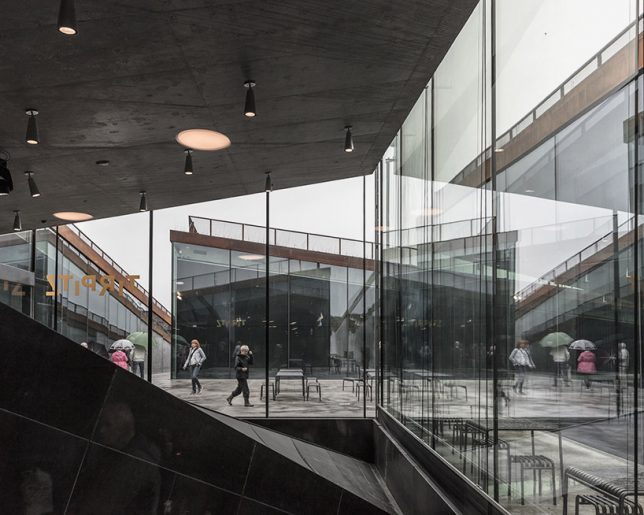
    TIRPITZ Museum in Denmark by BIG

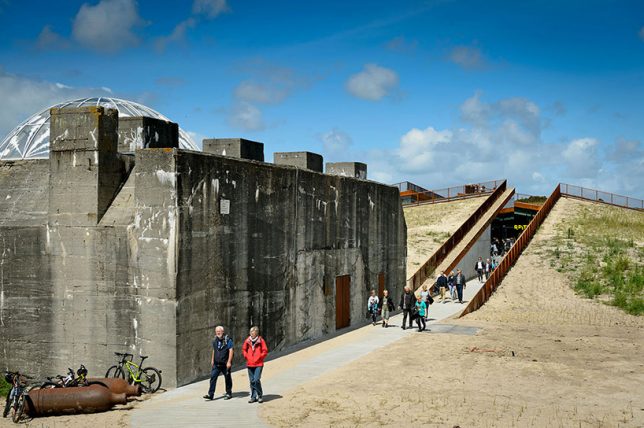
    Tucked into the sandy shorelines of Blåvand, Denmark, TIRPITZ Museum by Bjarke Ingels Group (BIG) transforms a former German WWII bunker into a cultural complex housing a venue, exhibits and galleries. “The heavy hermetic object is countered by the inviting lightness and openness of the new museum,” say the architects. “The galleries are integrated into the dunes like an open oasis in the sand – a sharp contrast to the nazi fortress’ concrete monolith.”

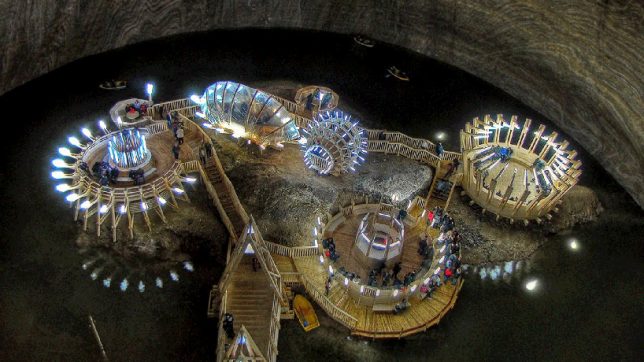
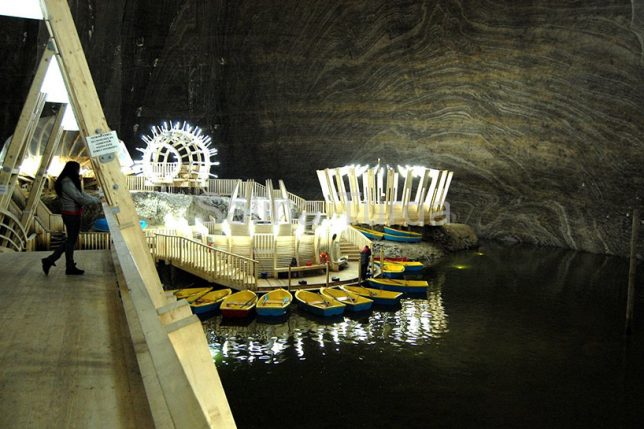
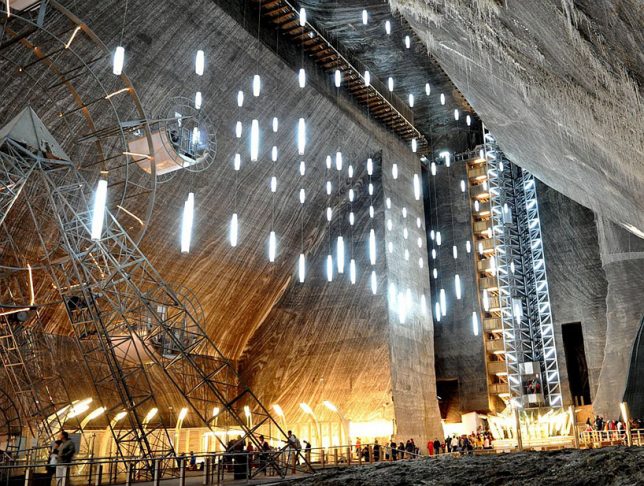
    Salina Turda Salt Mines Turned Museum, Romania

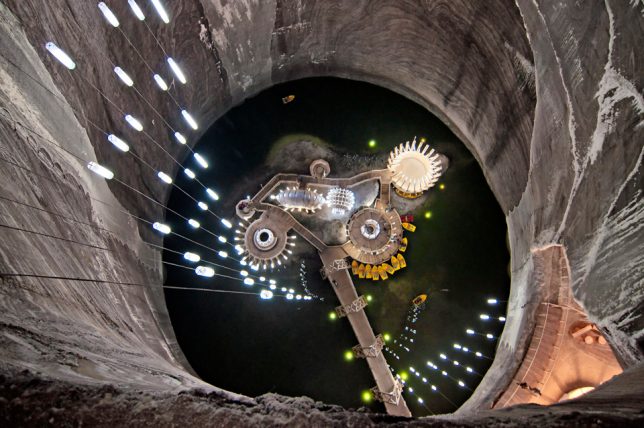
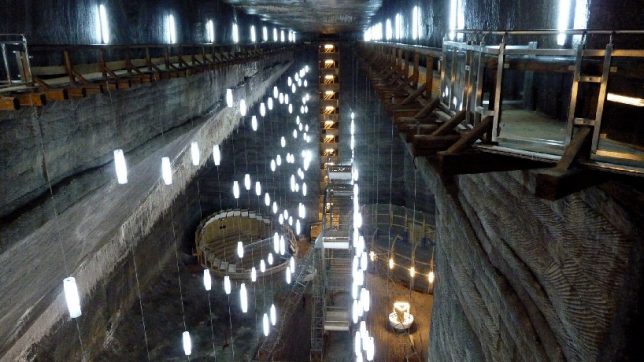
    A cavernous salt mine deep beneath Transylvania, built in the 17th century, is now the world’s largest salt mining history museum. The alien-like quality of the unusual timber structures built within it, along with the suspended tube lights, augment the sense of being in an otherworldly place. These structures offer recreational attractions like a mini golf course, bowling lanes and a ferris wheel. The museum is completely free of allergens and most bacteria and maintains 80% humidity naturally.

    Centre for International Light in an Old Storage Cellar, Germany

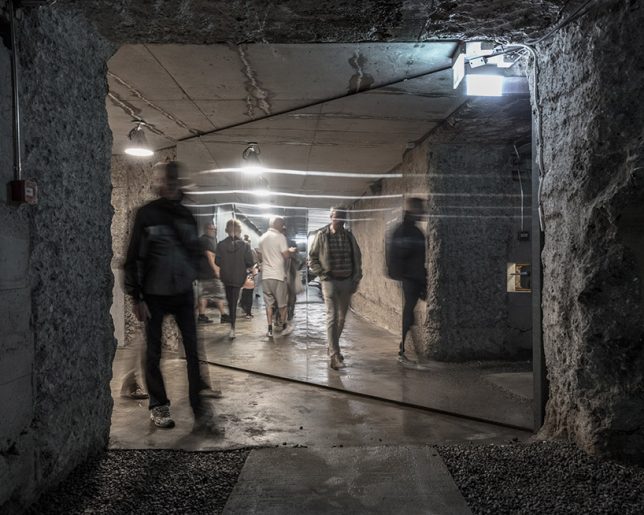
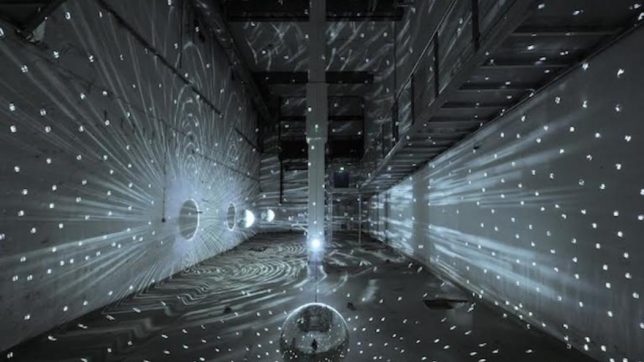
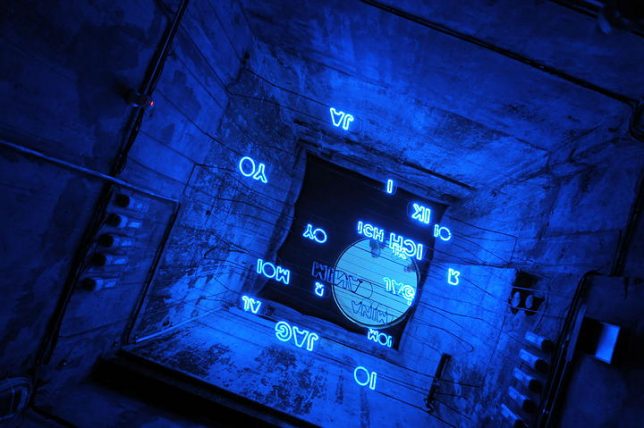
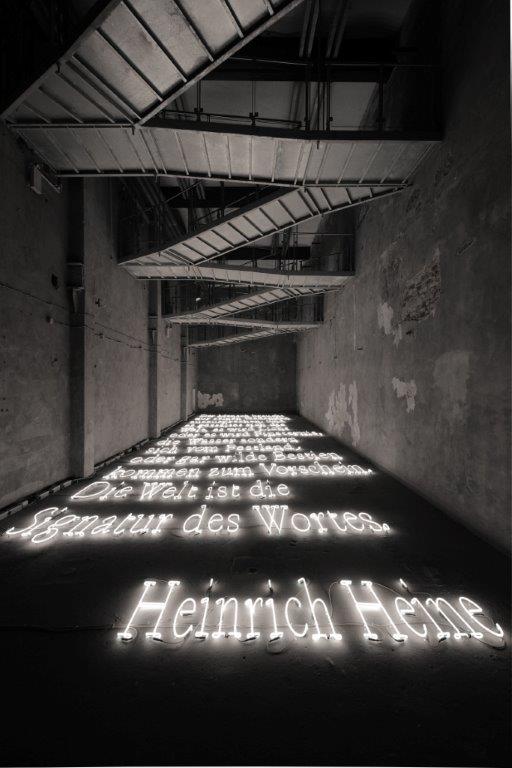
    The world’s one and only light art museum resides beneath the German city of Unna in former brewery storage cellars, hosting site-specific exhibitions by artists like Olafur Eliasson, James Turrell and Joseph Kosuth. The Centre for International Light Art is definitely a hidden gem, attracting just 25,000 visitors per year, partially due to the fact that local laws require limited capacity tours for safety reasons in case of the need for evacuation.

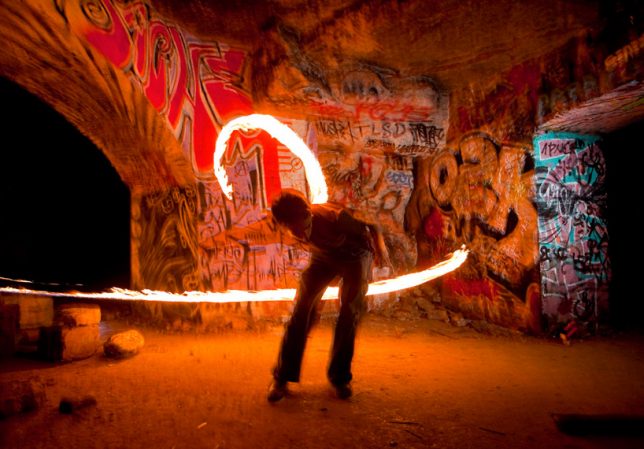
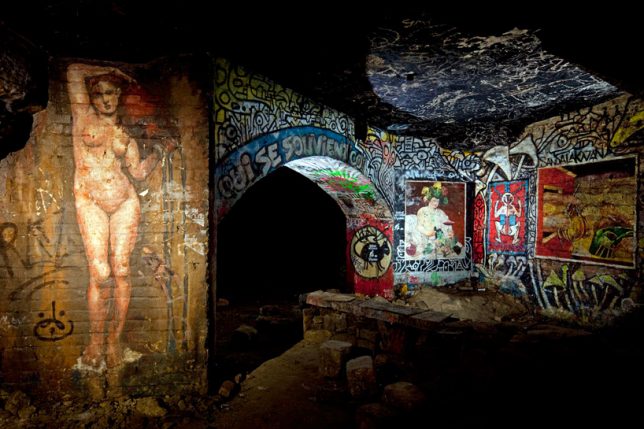
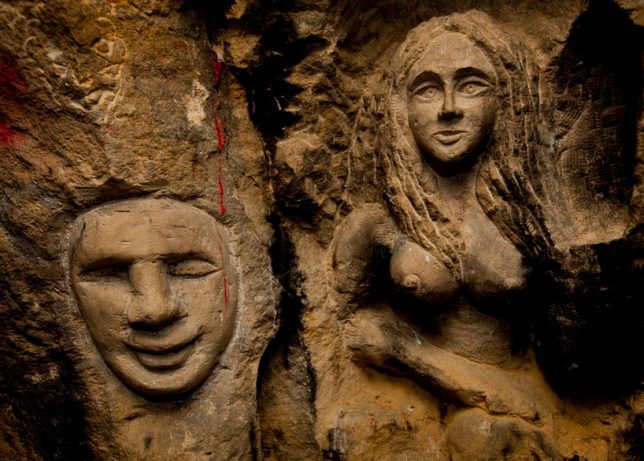
    Paris Underground: Catacombs, Tunnels and Unofficial Arts Spaces

    Perhaps one of the world’s best-known subterranean historical spaces, the Catacombs hold an estimated 6 million bodies from the Cimetieres des Saints-Innocents as well as a vast network of underground tunnels and rooms, most of which are closed to the public. In addition to officially sanctioned attractions (which also include a museum documenting the history of the French sewer system and the ancient ruins beneath Notre Dame) the tunnels and quarries hold countless works of street art and are often used as settings for informal and often illegal events – and as housing. These images were captured by photojornalist Stephen Alvarez for National Geographic.

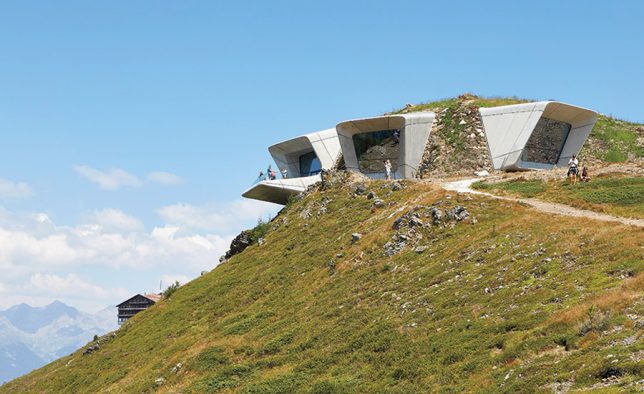
    Messner Mountain Museum Corones by Zaha Hadid, italy

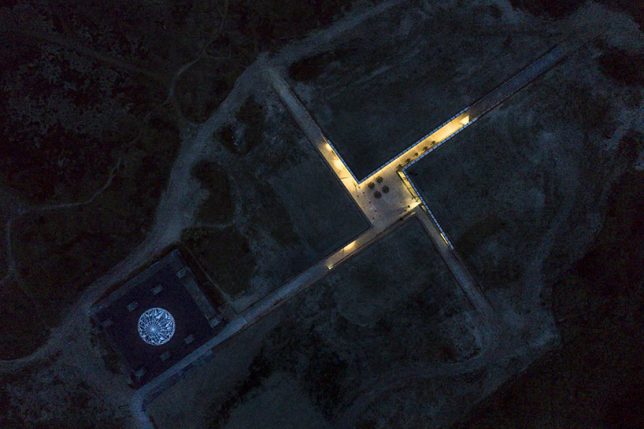
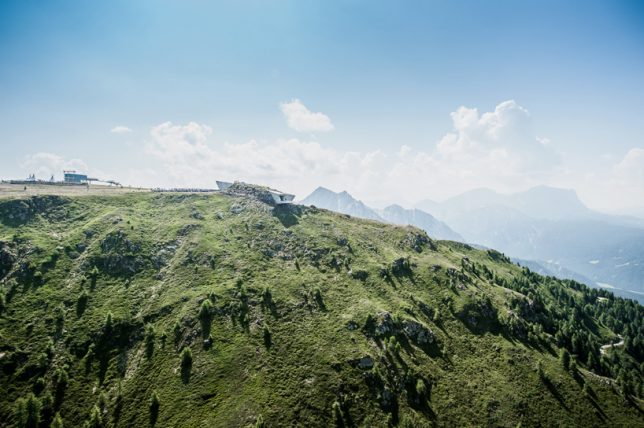
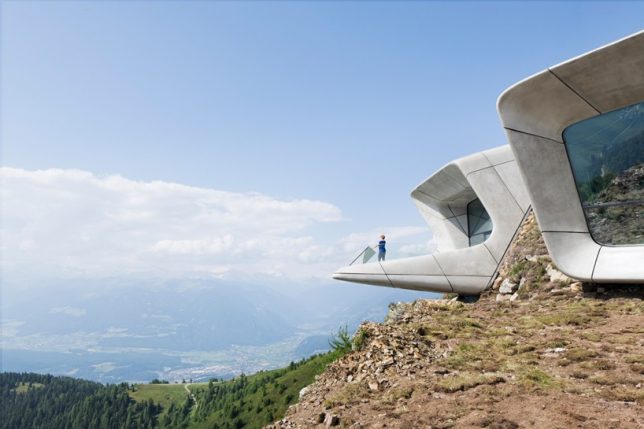
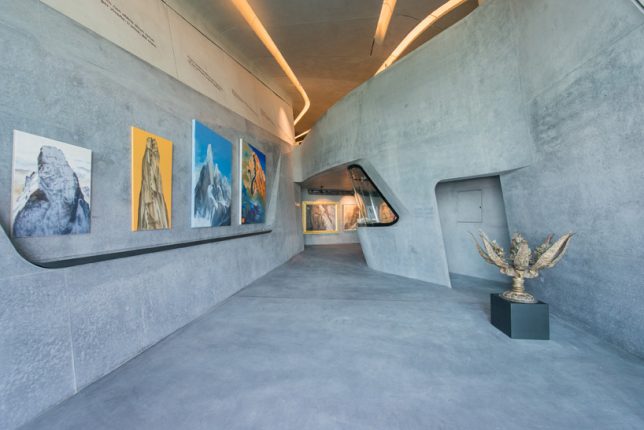
    Telescoping out of the summit plateau of Plan de Corones in the Italian Alps, the Messner Mountain Museum by Zaha Hadid Architects celebrates the career of climber Reinhold Messner – the first to make it to the top of Mount Everest without supplemental oxygen — and explores the sport of mountain climbing. Underground gallery spaces contain photographs of the climber’s life and adventures while the three protruding volumes offer views of the alpine landscape. Messner himself designed much of the structure.

    Next Page – Click Below to Read More:
    10 Subterranean Museums Reclaiming Abandoned Mines Tunnels Cellars Docks

    Share on Facebook


    [ By SA Rogers in Destinations & Sights & Travel. ]

    [ WebUrbanist | Archives | Galleries | Privacy | TOS ]


    WebUrbanist

  • 7Artisans teases 50mm F1.0 lens, in case the 50mm F1.1 isn’t quite fast enough

    Look closely on the 7Artisans website, and you’ll see an as-yet unannounced 50mm F1.0 lens front and center.

    Chinese lens manufacturer 7Artisans made some waves two weeks ago when they quietly revealed four affordable and fast lenses for various mirrorless mounts. Those lenses are available on Amazon and eBay, but one lens is being shown off on the 7Artisans website that doesn’t appear anywhere else online: a super-fast 50mm F1.0.

    Unfortunately, all we have is this photograph. The lens looks a lot like the company’s 50mm F1.1, but you can see that lens next to the F1.0 in the lineup, so it’s not some CGI typo. The lens diameter is even different—55mm vs 52mm for the F1.1.

    No, this is its own lens, we just don’t know what mount it will be made for or, just as importantly, why the heck a company would choose to make both a 50mm F1.1 and 50mm F1.0—seems a bit silly. Here’s a close look at the lens:

    Admittedly, the 50mm F1.1 lens announced a few weeks back is only available in Leica M mount. People would no doubt be thrilled by an equally affordable ($ 370 USD) lens available for the Sony E, Fuji X, or MFT mounts.

    As soon as this lens becomes official or pops up on Amazon alongside the other 7Artisan lenses, we’ll let you know.

    Articles: Digital Photography Review (dpreview.com)

  • Bye bye Bowens: The 94-year-old lighting company is going into liquidation

    Lighting giant Bowens, a company with 94 years of history and millions of customers under its belt, has entered liquidation. The news has not been officially confirmed by Bowens or Aurelius, the investment firm that acquired the company one year ago, but several independent sources have corroborated the story.

    Initial reports of Bowens’ downfall appeared on DIYPhotography, who heard from one inside source and confirmed with two others on Friday that the company has indeed entered liquidation. On Sunday, photography blog PetaPixel confirmed the news a fourth time, after they received an email from another “source familiar with the situation.”

    “All UK staff (including China factory) were informed that the company is going into liquidation,” the source told PetaPixel. “We were aware the company was facing problems and have all been working long days to pull company through a hard time, but we never thought it would end.”

    With pressure from fast-growing lighting brands like Godox, and big-name brands in the photo world going out of business at regular intervals, the disappointing news is not, alas, surprising. But no amount of regularity ever makes this kind of news easier to report on or read. If anything, it only gets harder.


    At the time of this writing, Bowens International’s contact form is no longer accepting submissions. We will update this post if and when we are able to reach someone at Bowens for official confirmation.

    Articles: Digital Photography Review (dpreview.com)

  • Slow-Motion Demolition: Expanding Agent Cracks Concrete from Within

    [ By WebUrbanist in Abandoned Places & Architecture. ]

    Going forward, buildings may not need to go out with a bang if this “non-explosive cracking agent” takes off. The destructive action is quieter and potentially cleaner way to take out structures, break down old infrastructure or excavate building sites.

    Betonamit is boasted to be a non-toxic powder that, when mixed with water and poured in to drilled holes, much like TNT, but instead of exploding, it “hardens and expands, exerting pressures of 12,000 psi. Reinforced concrete, boulders, and ledge are fractured overnight with no noise, vibration, or flyrock.” It’s not the only such stuff, but claims to be the first (other brands include the cleverly-named Crackamite).

    Like some kind of anti-concrete, the dry powder is mixed with water — thus activated, it is poured into place. It is advertised for indoor use, as well as bridges, dams, limestone, boulders and concrete slabs. Seems like great stuff for large-scale artwork of some kind, but there don’t appear to be many such applications as yet.

    Geoff Manaugh of BldgBlog wonders, though, what happens when something goes wrong. He writes: “I’m imagining a truck full of this stuff overturning on a crack-laden bridge somewhere, just an hour before a rainstorm begins, or a storage yard filled with crates of this stuff being ripped apart in the summer wind; a seemingly innocuous grey powder drifts out across an entire neighborhood for the next few hours, settling down into cracks on brick rooftops and stone facades, in sidewalks and roadbeds. Then the rains begin. The city crumbles. Weaponized demolition powder.”

    Share on Facebook


    [ By WebUrbanist in Abandoned Places & Architecture. ]

    [ WebUrbanist | Archives | Galleries | Privacy | TOS ]


    WebUrbanist

  • Tutorial: How to photograph wine on clear plexiglass

    Photographer Dustin Dolby of the YouTube channel workphlo is used to doing a lot with a little. In this tutorial, he uses a couple of flashes, a piece of clear plexiglass, and his know-how as a product photographer to capture a classic wine look, taking you along every step of the way. He even shares a neat trick for capturing a perfect masking frame for use in post.

    The tutorial is a little over 19 minutes long, so we wouldn’t call this “quick and easy,” but Dolby does show you the entire process, sharing a ton of great techniques along the way.

    The first part of the tutorial covers all of the frames Dolby needs to shoot to put together the perfect wine shot later. That includes a main shot, a brighter photo to bring out details in the label, and three frames with a stripbox placed directly behind his bottle to create a perfect high-contrast black-on-white masking frame to use in Photoshop later.

    Then, starting at the 6:25 mark, he jumps into Photoshop to show you how to create that perfect mask and then run you through the many cleanup, correction and compositing steps that turned these two photos:

    Left: Main lighting setup | Right: Label detail shot

    Into this final shot:

    The final photograph after cleanup and compositing in Photoshop. © Dustin Dolby

    Watch the full tutorial above to see how this shot came together from start to finish, and then leave Dustin a comment or question either on this post, or on his YouTube videos.

    Articles: Digital Photography Review (dpreview.com)

  • No Quarter: Parking Meters Pimped To Perfection

    [ By Steve in Culture & History & Travel. ]

    It’s time to pay tribute to parking meters, those metal “trees” of the concrete jungle that have collected billions of coins over eight decades of service.

    Parking meters have been fixtures of the urban street scene since the first of 150 “Black Maria” meters was installed on the corner of First Street and Robinson Avenue in Oklahoma City exactly 82 years ago today. The so-called “curbstone parking automats” (see photo caption above) were quickly embraced by retailers who watched their sales increase as day-long street parkers vacated choice parking spaces in favor of actual shoppers.

    Park Hair

    Space reserved for Jayne Mansfield? OK, that was in poor taste but still – Flickr member Lulu Vision thought this “only in S.F. moment” was worth capturing and we must agree. Parking meters have evolved over the decades but they don’t get much respect. Even so, you don’t have to be one of those “that cloud looks like Elvis” types to see the winking blonde plying her trade on the streets of San Francisco.

    Wait, so putting wigs on parking meters is a thing now? Flickr member Tofu (tofuart) snapped the black-wigged meter above in September of 2013 while strolling along South of Market, San Francisc… aha, now we get it: wigging out the parking meters is a ‘Frisco thing. Whew!

    Don’t Be Carless, Help The Homeless

    The turnover from analog to digital parking meters left many municipalities with hundreds of obsolete meters. What to do? Well, if you’re the city of Montreal you re-install those meters with a new purpose: collecting donations to support the homeless.

    Dubbed “ParcoDon” and instituted in 2007, the program saw 70 obsolete parking meters dolled-up and decorated by local celebrities and organizations. The artwork helped members of the public discern the difference between an actual parking meter and a ParcoDon meter, with roughly $ 23,000 being collected over the program’s first three years.

    Never mind the irony of meters once used to charge drivers to park now helping to support citizens who can’t afford a home, much less a car. Oh hey, looks like the idea’s catching on – the images above hail from Miami, Florida and Pasadena, California, respectively.

    Next Page – Click Below to Read More:
    No Quarter Parking Meters Pimped To Perfection

    Share on Facebook


    [ By Steve in Culture & History & Travel. ]

    [ WebUrbanist | Archives | Galleries | Privacy | TOS ]


    WebUrbanist

  • Photographer duo captures incredibly creative architecture portraits

    $ (document).ready(function() { SampleGalleryV2({“containerId”:”embeddedSampleGallery_7260825413″,”galleryId”:”7260825413″,”isEmbeddedWidget”:true,”standalone”:false,”selectedImageIndex”:0,”startInCommentsView”:false,”isMobile”:false}) });

    Artist duo Daniel Rueda and Anna Devis have one of the most creative, fun, not to mention OCD-friendly Instagram partnerships you’ll ever stumble across. They travel the world finding creative, strange and colorful architecture, and then come up with creative, strange and colorful ways to interact with it.

    Surprisingly (or maybe not) Devis and Rueda are not photographers who love architecture, but architects who love photography. The architectural education gives them a better understanding and appreciation of the spaces they’re working with, while the photographer’s need to tell a story is what inspires them to insert themselves into each pictures as ‘characters.’

    As Rueda explained in an interview with design website More with Less, in addition to lending a sense of scale, “the role of these characters in my pictures is to tell a story that goes beyond aesthetics. That is, it is not enough to just have an image that looks more or less beautiful; it has to tell something without the need of putting it into words.”

    Devis and Rueda’s work is, plain and simple, a treat for the eyes. You can find many more creative shots like the ones above on Instagram at @drcuerda and @anniset.

    Articles: Digital Photography Review (dpreview.com)