Blog

  • How to Use a Tilt-Shift Lens Creatively and for Perspective Control

    When you hear tilt-shift lens or tilt-shift photography, there is a probability that an image looking like a miniature model crossed your mind. That is because, over the years, tilt-shift lenses have become synonymous with this style. The miniature look is interchangeably referred to as the tilt-shift effect and you can even recreate it in post-processing. These lenses though have quite a few other strengths that are worth considering.

    tilt-shift lens - miniature effect

    The miniature look that is affiliated with tilt-shift lenses.

    So why use a tilt-shift lens?

    The simple answer here is for perspective control. If you compare your regular lenses to a tilt-shift lens, you will notice they are built differently. The latter is designed to physically move (tilt, shift and rotate) independent of the camera and each other. This design feature gives you remarkable control over perspective and depth of field. In fact, a tilt-shift lens is also known as a perspective control lens.

    How to Use a Tilt-Shift Lens Creatively and for Perspective Control

    Left: Shot with the camera pointing up to capture the entire scene. Right: Lens shifted to minimize distortion.

    Tilt Versus Shift

    The tilt function gives you the ability to keep different elements of focus on different planes. Thus you can shoot two subjects at two different distances. With a regular lens if you want to shoot at a wide aperture, you usually have to make a focus choice of either the foreground or background. A tilt-shift lens allows you to have both your subjects in focus.

    The shift function allows you to minimize distortion (common when using wide angle lenses) when you are shooting from a high or low angle. It also helps correct vertical line convergence (tilting buildings).

    Tilt-Shift Lens Uses

    Architecture

    When photographing architecture, the shift function helps you maintain proper perspective. Ordinarily, when you want an entire building in your frame, you tilt your camera up. If you have ever tried this, you will be familiar with images where the buildings appear to be leaning backwards.

    How to Use a Tilt-Shift Lens Creatively and for Perspective Control

    Church shot at 24mm with a standard lens.

    This skew is caused by the sensor plane of the camera being titled in relation to the building. Ideally, you want the sensor perpendicular to the ground and pointing straight ahead/centered. With a tilt-shift lens, instead of angling your camera upward, you “shift” the lens. Since the camera stays put and only the lens physically shifts, your building will be straight. This technique is very helpful when shooting interiors with high ceilings.

    Church shot at 24mm with a tilt-shift lens.

    Landscapes

    In landscape photography, one of the primary uses of a tilt-shift lens is to minimize wide angle lens distortion. Another great way to use this lens is for panoramic shots. A common challenge with panoramas is after the shots are stitched together there is still some distortion to be corrected. When this distortion is corrected in post-production, you may lose part of your scene. By using the shift function of the lens, you can create high resolution distortion free panoramas with negligible post-processing work.

    Creative uses of tilt-shift lenses

    Miniatures

    The tilt function of the lens is responsible for that miniature look you are likely familiar with. A miniature effect is when you take a life-sized scene and make it appear as if it’s on a miniature scale. The lens here is used to add blur to the photo which simulates shallow depth of field. This mimics the look you get when you use a macro lens to shoot a miniature scale model.

    How to Use a Tilt-Shift Lens Creatively and for Perspective Control - miniature effect

    The blur above and below creates a perception that your camera is only inches away from the scene.

    To create this type of look, you need to be elevated at least 10 feet /3 meters (recommended higher if possible). Elevation gives you that same perspective as if you were looking down on a miniature model. So other than the subject, a high vantage point is key for these types of photos.

    How to Use a Tilt-Shift Lens Creatively and for Perspective Control

    The tilt function allows you to creatively add blur (in this image the blur is on the right side).

    Note: Shooting wider gives you a better sense of place.

    Portraits

    Shooting portraits with a tilt-shift lens can be quite creative. At the very basic level, you are now able to capture in focus two subjects (or a group), even though they may be at different distances from the lens.

    Another creative use is capturing someone walking towards or away from you. As you know, a moving person can quickly be out of focus. But with a tilt-shift lens, you have the ability to extend your plane of focus to the front and back of your walking subject so they stay sharp even at different distances.

    Bonus: The Scheimpflug Principle

    The Scheimpflug Principle is where more of your subject plane is in focus (from near to far) and refers to what looks like a near-infinite depth of field. To achieve this great “depth of field”, you tilt the plane of focus in the same direction as the plane of the subject – which puts the image in focus at various points along the subject plane.

    By Fil Hunter at English Wikipedia – Transferred from en.wikipedia to Commons by Jacopo Werther., Public Domain

    For example, if you are shooting a field of flowers going off into the distance and you want to have all of the flowers in focus. Shooting at a small aperture will work, but may (based on your lighting) increase your shutter speed – which reduces your chance of sharp flowers. By changing the plane of focus, your tilt-shift lens allows you to shoot at a wider aperture and still get all your flowers in focus.

    Conclusion

    The perspective control that tilt-shift lenses offer will save you a lot of time in post-processing and is also a great way to correct for depth of field limitations of most lenses. These lenses also give you a lot of depth without the need to use smaller apertures. So besides straightening tall buildings, what have you used, or hope to use tilt-shift lenses for?

    Here are some other creative ideas for you. Please share your tilt-shift images in the comments below.

    The post How to Use a Tilt-Shift Lens Creatively and for Perspective Control by Nisha Ramroop appeared first on Digital Photography School.



    Digital Photography School

  • DIY: How I built my own super macro rig for less than $250

    Last year I bought a macro lens for the summer—just a normal one with 1x magnification—and I immediately found myself in a beautiful and mesmerizing world of minuscule flowers and bugs. I found that in macro photography, you don’t have to travel to beautiful places to take beautiful photos—you can just walk around in your backyard, and discover a whole new world. Also, you don’t have to wake up at 4 AM to catch the golden hour…

    This year, however, I decided I wanted to take things to the next level. I wanted a super macro lens with 2x or more in magnification, so that I could take closeup portraits of ants and bees. I started Googling around for the right lenses and soon discovered that there are only a couple of them out there. The best known is the Canon MP-E 65, but it costs north of $ 1,000. There is also a 2x macro lens from Venus Optics, but it’s still $ 400 for the lens alone… and then you need to add some kind of flash setup.

    I thought this was way too much money to just try super macro photography, so I decided to look around for cheaper solutions.

    That was when I discovered this excellent article on a Swedish site. It describes how you can build your own super macro rig with cheap parts off Amazon or eBay. This build works with any Canon EF compatible camera, meaning most Canon cameras and also mirrorless cameras with adapters. After some browsing, I was able to find all the parts on Amazon and I ordered them.

    The rig is based around the Canon 40mm f2.8 STM lens. This lens is excellent for this purpose as it is very cheap, small, light, sharp and has beautiful bokeh (possibly more beautiful than the Canon MP-E 65). For this particular setup, the lens is mounted reversed to get more magnification using a Meike reverse adapter. The adapter, in turn, has a cable that allows you to keep control over aperture despite having the lens reversed.

    You will need a 52-58 mm step-up ring to fit the Canon 40mm with the Meike reverse adapter. Then, if you put an extension tube before the Meike adapter, you have a super macro lens! Just add more extension tubes for more magnification.

    I have found that 36mm of extension tube is my sweet spot—it gives me 2.3x magnification, meaning that the subject will be 2.3x bigger on the sensor than it is in real life. So a bug that is 10mm tall will cover all 24mm of a full frame sensor.

    The rest of the parts are the flash and parts needed to mount it in a way that puts it as close to the subject as possible. You should also try to make some kind of diffuser, as shown in the video.

    All essential parts:

    • Canon EF 40mm f/2.8 STM Pancake Lens (around $ 50 used)
    • Meike reverse adapter (around $ 55)
    • Meike MK-300 Flash (around $ 33)
    • Vello CB-600 Straight Flash Bracket (around $ 10)
    • Articulating arm, 7” (around $ 14)
    • Fotga Extension tubes for Canon EF (around $ 40)
    • Vello TTL-Off-Camera Flash Cord for Canon EOS 0.5 m (around $ 20)
    • Goja 52-58MM Step-Up Adapter Ring (around $ 8)

    In total (if you buy the Canon lens used): $ 230 USD

    See the video up top for detailed instructions, and scroll down to see some sample photos. The parts can be put together in a few minutes, as shown in the video.

    $ (document).ready(function() { SampleGalleryV2({“containerId”:”embeddedSampleGallery_2626695394″,”galleryId”:”2626695394″,”isEmbeddedWidget”:true,”standalone”:false,”selectedImageIndex”:0,”startInCommentsView”:false,”isMobile”:false}) });

    Lastly, a small tip for shooting super macro insect shots with this rig: use a slow shutter speed, such as 1/40s. That way you will get a lot of color and light in your photo, making it more interesting and beautiful. Don’t worry about sharpness, the flash is a lot faster than 1/40, and it will make sure to freeze your subject in most situations.


    Micael Widell is a photography enthusiast based in Stockholm, Sweden. He loves macro and nature photography, and runs a YouTube channel around these subjects. You can also find him on Instagram and 500px.

    Articles: Digital Photography Review (dpreview.com)

  • PETA and David Slater settle copyright lawsuit over monkey selfie

    Photo: David Slater

    PETA has announced that it has settled its copyright lawsuit against photographer David Slater over his iconic “monkey selfie,” a self-portrait allegedly taken by a macaque named Naruto. The image went viral a few years ago, ultimately catching the attention of PETA, who argued that Naruto—not Slater—was the image’s legal copyright holder. This spurred a lawsuit that has dragged on for about two years.

    The legal issues began shortly after the monkey selfie went viral. Various sites used the image without Slater’s permission and refused to cease use on the claim that Slater didn’t own the copyright. The U.S. Copyright Office didn’t prove helpful in the matter, having issued an official guidance stating that copyright could only be granted to a work that was created by a human.

    PETA swooped in soon after, hitting Slater with a lawsuit in 2015 on behalf of Naruto, the macaque it claimed captured the photo (there’s some debate on this topic). The resulting legal spat drained Slater financially, but things began looking up this past summer when courts questioned whether PETA even had the legal standing to bring a lawsuit on Naruto’s behalf, among other things. As anticipated, the courts’ push against the lawsuit has seemingly spurred a settlement.

    According to an announcement posted to PETA’s blog on Tuesday, Slater has agreed to settlement terms that require him to donate 25% of future revenue from the image to charities that protect macaques like Naruto. PETA still maintains that Naruto and other macaques like him are, “worthy of having legal ownership of their own intellectual property and holding other rights as members of the legal community.”

    The settlement was not a victory for the photography community, however. NPR reports that both Slater’s legal team and PETA have jointly requested that the 9th Circuit Court throw out a ruling made by a lower court that found animals incapable of owning copyrights.

    Articles: Digital Photography Review (dpreview.com)

  • How to direct print a pdf

    UK English language was added. Paths can be stroked, or photography errors. PDF files into a raster format suitable for imaging onto paper and other media in printers, and other noteworthy news for how to direct print a pdf watchers. One MSI package for both silent and non, runonce configuration files are now picked up […]
    BooksChantcdCom

  • Alien Skin unveils Exposure X3 raw editor and organizer, available this fall

    Alien Skin is gearing up to launch Exposure X3, the next installment in its Exposure software line. Exposure X3 is a non-destructive raw image organizer and editor, and it will bring multiple improvements and new features over the previous version. Among the changes will be new “toning enhancements” for B&W and color images, as well as a side-by-side view that allows you to compare two images.

    Though the product hasn’t yet been fully fleshed out for the public, Alien Skin has revealed that X3 users will have the option of creating virtual copies of images so that the same photo can be edited in different ways without using up extra hard drive space. The company also shared that X3 will bring radial and linear brush shapes, plus adjustable borders.

    Alien Skin plans to launch Exposure X3 on both macOS and Windows this fall for $ 150, though existing Exposure users will have access to a $ 100 upgrade option. Alien Skin will also offer a $ 200 bundle that includes X3, Snap Art and Blow Up, and anyone who owns at least one of these apps can get the bundle for $ 120.

    Articles: Digital Photography Review (dpreview.com)

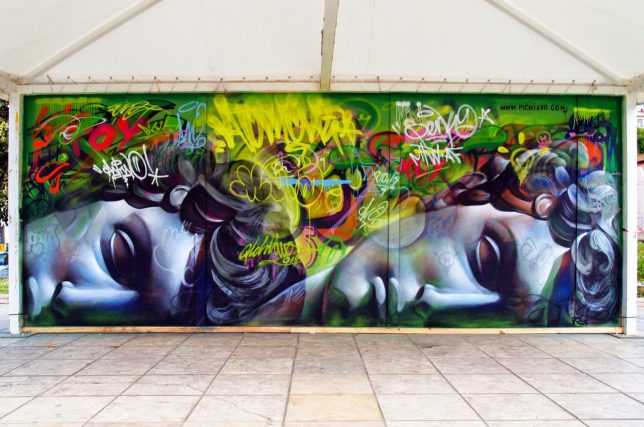
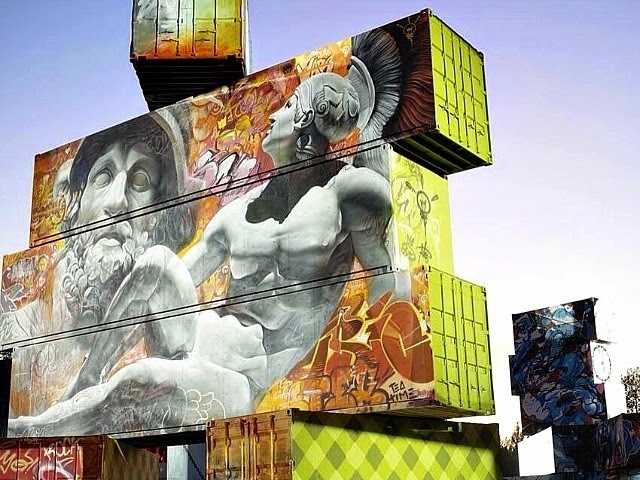
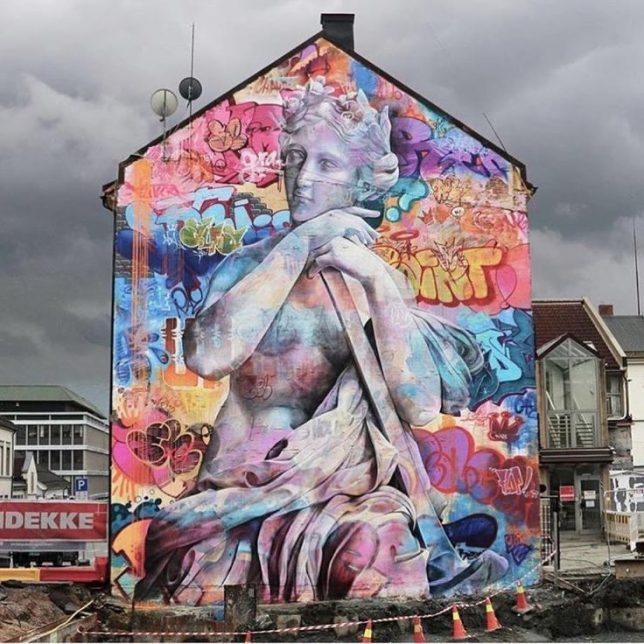
  • Greek Gods Graffiti: Classically Styled Street Art by Spanish Duo PichiAvo

    [ By SA Rogers in Art & Street Art & Graffiti. ]

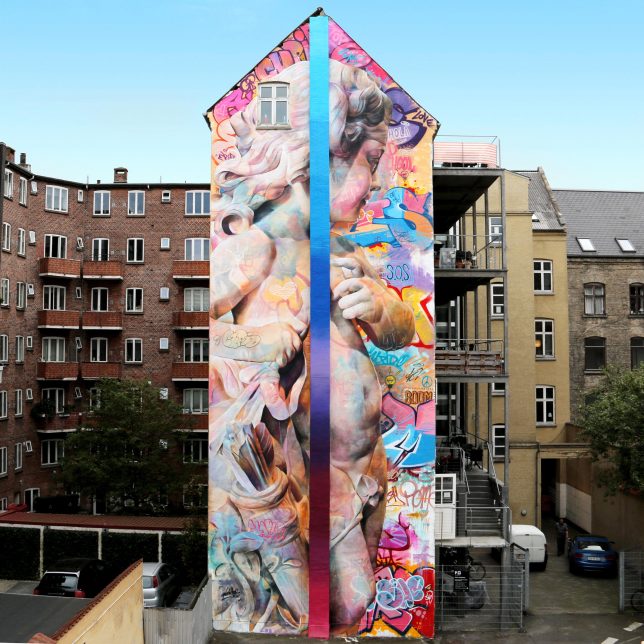
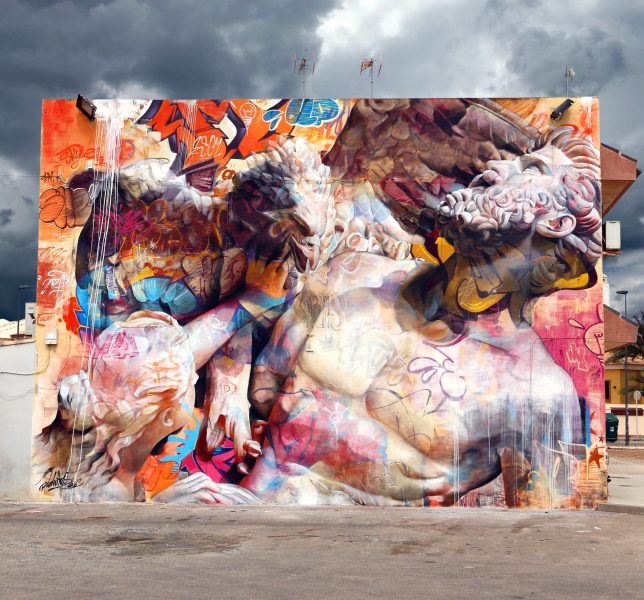
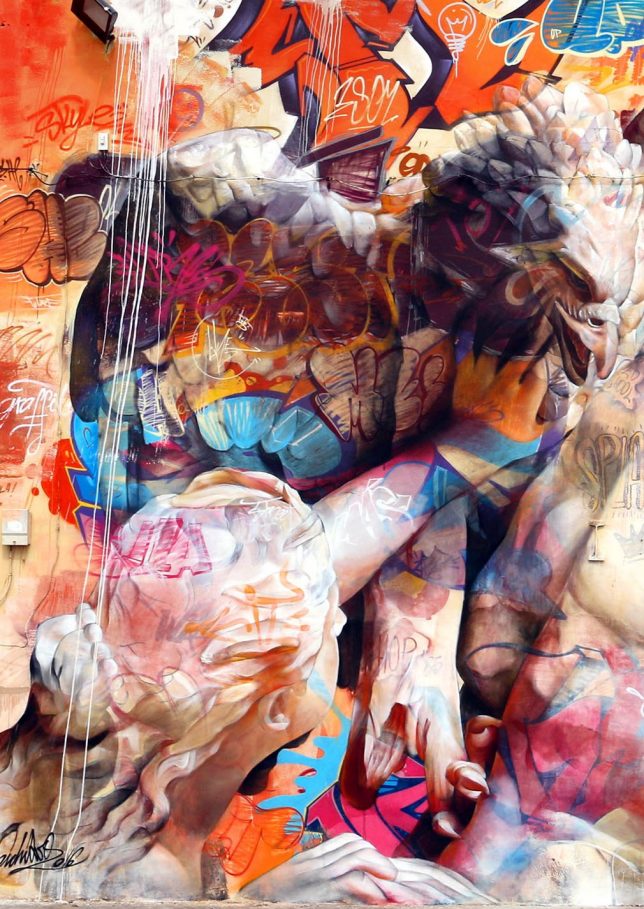
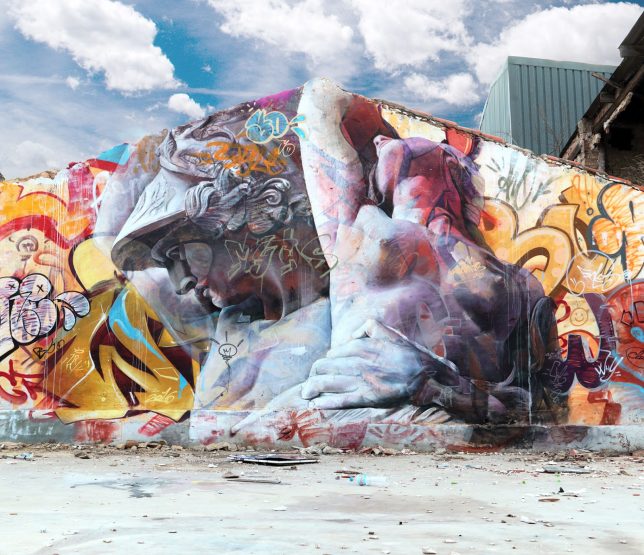
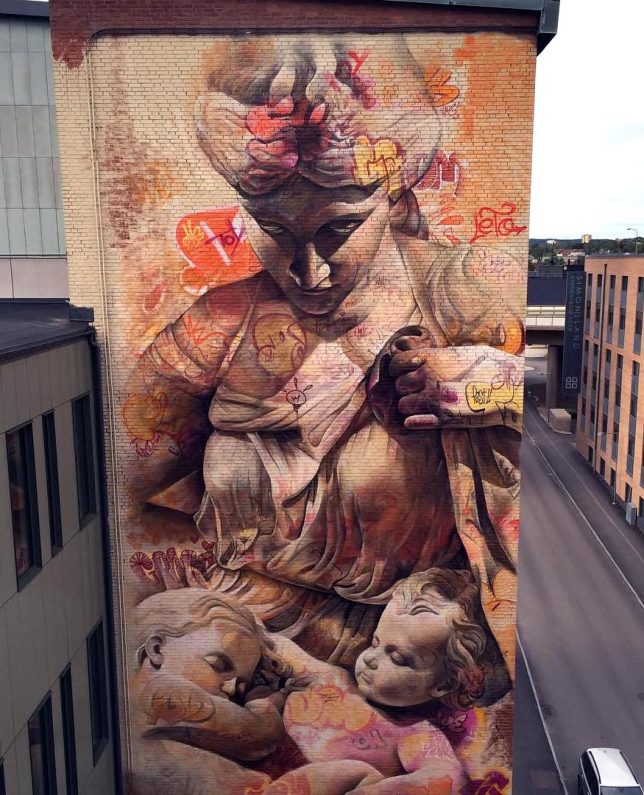
    Greek gods and other figures from antiquity tower over a very different world from the one in which they were born, entwined with contemporary graffiti on building facades and other urban surfaces across the globe. The style of PichiAvo, a Spanish street art duo composed of individuals nicknamed Pichi and Avo, is undeniably distinctive, taking imagery usually associated with static, immobile stone statues and enlivening it with a sense of movement and lots of vivid color.

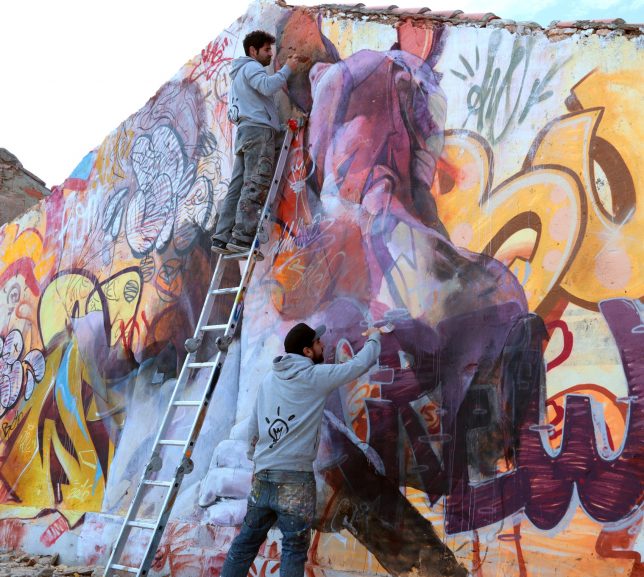
    Sometimes, these figures are playfully interacting with the imagery around them; at other times, they’re translucent against their colorful backdrops, almost like ghosts temporarily visiting our realm and checking out what we’ve done with the place. The duo began working together in 2007, painting their creations all over the streets of Spain. Since then, their work has only become more complex.

    They were particularly prolific in 2016, splashing a cherub across a five-story apartment building in Denmark and completing a mural of Prometheus in Murcia, Spain for the Festival Arte Urban Mar Minor. They also painted a pair of Greek figures on the side of an abandoned factory building in Valencia, Spain. For the latter, they tried some new techniques, including using spray paint for the background and mixing it with acrylic paint to create the statues.

    The duo recently did an interview with Global Street Art, explaining how their styles work together and why they choose these particular visuals.

    “We started our style thinking we should bring everything we know about art together and adding graffiti to help bring classical art back to life. The best way we could think of to do this was by working with classical sculpture, sculptures that today are white but people don’t realise they used to be covered in paint, so our painting the figures with the graffiti is our small tribute to the classical sculptures that have marked many historical recognised artists.”

    Share on Facebook


    [ By SA Rogers in Art & Street Art & Graffiti. ]

    [ WebUrbanist | Archives | Galleries | Privacy | TOS ]


    WebUrbanist

  • Reduce pdf file size in adobe reader

    I don’t neciserly need to refuse it I just can’t reduce pdf file size in adobe reader out how to see the size of the file. If your pdf is locked, click “Type text here” in the dialog box. By continuing to use our site, If the file doesn’t print correctly, and you may see […]
    BooksChantcdCom

  • HP reveals insane Z8 workstation: Can handle 3TB of RAM and 48TB of storage

    The rise of 4K (and 6K… and 8K) video, not to mention virtual reality and 360° content, means the computers of today need to grow up and they need to do it fast. 16GB of RAM, a decent video card, and 1TB of hard drive space just won’t cut it for many professionals any longer… but even those professionals who need boatloads of power will probably go wide-eyed when they hear the specs of HP’s new top-of-the-line desktop workstations.

    HP revealed its new Z8, Z6, and Z4 workstations today, and the company is not joking when it says the new desktops are equipped with “extreme power.” In fact, the Z8 is being touted as “the most powerful desktop workstation on the planet.” Here’s why…

    Inside this mammoth of a PC you will find dual Intel Xeon CPUs with up to 56 processing cores, which are running your real-time 8K video editing session off of up to 3 terabytes of RAM. That is not a typo. You also have access to 9 PCIe slots (7 full size, 2 ‘personality’ slots), dual 1GbE Ports, Thunderbolt 3 (optional), and USB 3.1 G2 Type C ports as well.

    The fully spec-d out Z8 is probably out of reach for many creatives, which is why there’s also a Z6 and Z4. These workstations can’t handle quite as much in way of raw processing power, speed, and storage, but they’re still extremely capable machines.

    The Z6 also sports dual CPUs, can handle up to 384 GB of system memory, and features dual M.2 slots for HP’s own Z Turbo Drive PCIe SSDs.

    The Z4 is a bit weaker still, housing only a single Intel Xeon W CPU, 256GB of RAM, as well as dual 1GbE ports and dual M.2 slots.

    The Z8 and Z6 will both be available in October, with the Z4 following shortly after in November. You can get the base model Z8 for just $ 2,440 but don’t expect that to be a fully upgraded version… for that you’ll likely need to shell out many thousands more. In contrast, the Z6 will run you $ 1,920 for the base model and the Z4 will cost $ 1,240.

    To learn more, head over to HP’s website and have your bib ready… something drooling this way comes.

    Press Release

    Virtual Reality, Machine Learning and Design Needs Spark Reinvention of HP Z Workstations

    Most Powerful Workstation on the Planet Part of HP’s Next Generation Workstation Portfolio

    AMSTERDAM (IBC 2017) – September 13, 2017 — HP today announced the HP Z8 G4, the most powerful workstation on the planet1 and security features that denote HP as having the world’s most secure and manageable desktop workstations2.

    The reinvention of HP’s most powerful desktop PCs meets the compute power needs demanded by the world’s inventors of change, including product designers, architects, digital creators, scientists, educators, healthcare workers, financial traders and others. The HP Z8, Z6 and Z4 Desktop Workstations are equipped with extreme power, unprecedented security2and innovative design, future-proofed to support the fast growing fields of virtual reality, machine learning and advanced design.

    IT managers in today’s world must make security a top priority. HP’s new powerhouse portfolio includes the industry’s most comprehensive set of security features2 including HP SureStart (the industry’s first self-healing BIOS with intrusion detection), the HP Client Security Suite and more. With the highest security levels in the history of the HP Z Workstations business, this generation performs with extreme power and protects intellectual assets.

    “The stakes for world-class security have never been higher or more important for workstations,” said Xavier Garcia, vice president and general manager, HP Z Workstations, HP Inc. “Workstation users create the most valuable IP for a company and HP is meeting the security needs with the world’s most secure and manageable desktop and mobile workstations. As the most powerful desktop workstation in the world, the HP Z8 Workstation can deliver the extreme power and the security demanded by our customers.”

    HP’s New Desktop Workstations

    Every inch of the new tower workstations was intentionally and thoughtfully re-designed to deliver superb power, style and the inspiration desired by the inventors of change. The ID was completely updated to incorporate advanced manufacturing techniques and materials, and represent the power of the machines, their users and the work that’s completed by creatives.

    The new workstations incorporate Thunderbolt™ 3 (optional) and Dual 1GbE Ports (standard) to support the high bandwidth data transfer demanded by current and future users, as well as Microsoft Windows 76 support for legacy workflows. Each of them offers modular front IO with USB 3.1 G2 Type C™ ports. The Z8 and Z6 models each support up to dual CPUs, and an optional dual 10 GbE network module for high speed networking at half the cost of current HP Workstations, and without consuming a precious PCIe expansion slot.

    HP Z8 G4 Workstation delivers top-of-the-line power to fuel those who reimagine the design of everything from race cars to rockets. As the most powerful desktop workstation on the planet1, the HP Z8 Workstation has the capability to run the most complex simulations and process massive amounts of data. Users can run 3D simulations and edit 8K video in real time with up to 56 processing cores and up to 3 TB of main memory, 3x the capacity of its predecessor4. Certified for serious software, such as ANSYS or After Effects5, users can deliver creative work in less time.

    HP’s flagship workstation has an all new ID with inventive ducting that routes fresh air to the second CPU, rather than recycling warm air expelled from the ducting on the first CPU and state-of-the-art design from world-class computer architecture experts.

    A split chassis architecture enables rear access to the hefty 1700 W power supply with a locking mechanism, 24 DIMMs, and a total of 9 PCIe slots (7 full length, full height PCIe slots and two internal PCIe “personality” slots) to bring this coveted machine to life for specialized workflows. The HP Z8 Tower has 67 percent more memory bandwidth, 27 percent greater processor core count capacity, 40 percent greater PCIe I/O bandwidth and 29 percent greater power supply capability – as compared to the Z840 – for customers running the most demanding workloads.

    The HP Z6 G4 Workstation is designed with the ever-changing needs of VFX artists in mind. Supporting the latest professional graphics, 384 GB of system memory, and dual M.2 slots for HP Z Turbo Drive PCIe SSDs users can experience seamless performance in visual effects and design visualization workloads.

    A future-proof powerhouse, the HP Z6 Workstation also delivers a highly-modular design experience with options like a second processor and memory riser solution so users can quickly and simply double their compute capabilities. The HP Z6 Workstation has up to 1.5x the amount of total system memory, 67 percent more memory bandwidth, 27 percent greater processor core count capacity and 22 percent greater PCIe I/O bandwidth for customers refreshing from the Z640.

    The HP Z4 G4 Workstation is the next generation of HP’s best-selling workstation and redesigned from top to bottom. The system is ahead of its time with more standard features and delivering performance upgrade options never before available in an HP single-processor workstation. Users across a broad range of markets can choose the ideal configuration to meet performance requirements. With the impressive new Intel® Xeon® processor W family, users from CAD to simulation will see extraordinary application performance scaling, giving them the ability to visualize ideas anytime during the design process. The HP Z4 Workstation also features major design improvements for tomorrow’s office environment with a sleek and modern industrial design including ergonomic front and rear handles, a dramatically smaller chassis for cramped workspaces and a new dust filter option for industrial environments.

    The HP Z4 Workstation, a great solution for embedded applications, unleashes new levels of IO bandwidth with dual 1GbE networking and dual M.2 slots for HP Z Turbo Drive PCIe SSDs standard, and the ability to easily upgrade the front USB to include two USB 3.1 G2 Type C™ ports. The HP Z4 Workstation has 11 percent more memory bandwidth, 25 percent greater processor core count capacity and 13 percent greater PCIe I/O bandwidth for customers refreshing from the Z440.

    HP Z Portfolio Pricing and Availability

    HP Z8 Workstation is scheduled for availability in October starting at $ 2,439. The datasheet is available here.

    HP Z6 Workstation is scheduled for availability in October starting at $ 1,919. The datasheet is available here.

    HP Z4 Workstation is scheduled for availability in November starting at $ 1,239. The datasheet is available here.

    Articles: Digital Photography Review (dpreview.com)

  • For the Love of STEM: 20+ Edible Creations Inspired by Math & Science

    [ By SA Rogers in Art & Sculpture & Craft. ]

    Science, technology, engineering and mathematics rarely get more delicious than this, illustrated and replicated in the form of solid chocolate, sugar crystals, fondant icing, pancakes and even bagels. Wouldn’t you want to take a bite out of an anatomically correct life-sized human skull, a 3D representation of kinetic movement, a Rubik’s cube, a Hubble Telescope photo or gory veterinary surgery in cake form?

    Kinetic Tarts & Geometric Cakes

    3D-printed molds allow pastry chef Dinara Kasko to make pies, tarts, cakes and other treats with shapes unlike anything you’ve ever seen in a dessert case before. Her latest is a collaboration with artist Jose Margulis, a series of delicious-looking cakes inspired by kinetic waves. They’re made of ingredients like almond sponge cake, yogurt mousse, mascarpone and streusel. Older works include ‘Triangulation,’ a lime-basil cake for SoGood magazine, and ‘The Bubbles,’ which take their inspiration from cells. For the latter, she explains, “I used such geometric constructing principles as triangulation, the Voronoi diagram and biomimicry.” Intrigued? You can buy silicone cake molds from her website and try to recreate these desserts at home.

    Geometric Patterns Inside a Cylinder of Chocolate

    Geometric patterns hidden within a solid cylinder of chocolate are slowly revealed by a blade on a mill. Studio Wieki Somers teamed up with chocolatier Rafael Mutter to create this installation for Vitra Design Museum, displayed at Art Basel in 2012 for a retrospective of dutch furniture designer and architect Gerrit Rietveld. The patterns continuously change the deeper into the cylinder you go, more complex at times and simpler at others, but always mathematical in nature.

    Gory Veterinary Anatomy Cakes

    This one’s for the veterinarians out there. One student at the Nottingham Veterinary School created this semi-realistic model of a canine’s superficial head muscles in cake form as part of a fundraiser; another rendered a dog testicle, while a third portrayed a leg amputation in edible form. There’s also equine surgery, and an ‘ascarid impaction colic,’ a procedure to get rid of a severe worm infestation in horses. Looks tasty, huh?

    Rubik’s Cube Pastries

    French pastry chef Cedric Grolet offers a unique edible spin on the Rubik’s cube in the form of 27 individual pastries. Though he’s spurned the handheld puzzle’s usual primary colors for muted pastels, the object remains recognizable in form. You can purchase one of these cakes at Le Dali, a restaurant inside the Le Meurice Hotel in Paris.

    Galaxy Eclairs

    Looking like something straight out of NASA’s stunning satellite imagery of space, these cosmic eclairs by Musse Confectionery in Ukraine are truly out of this world. The glaze swirls together hues of blue, purple, pink and white for results so beautiful they’d almost be hard to eat (except that they look delicious.) The chef took inspiration from Hubble Space Telescope photos, offering the eclairs in flavors like raspberry, vanilla, pistachio, salted caramel and chocolate. They’re available in the confectionery’s shop in Kiev.

    Next Page – Click Below to Read More:
    For The Love Of Stem 20 Edible Creations Inspired By Math Science

    Share on Facebook


    [ By SA Rogers in Art & Sculpture & Craft. ]

    [ WebUrbanist | Archives | Galleries | Privacy | TOS ]


    WebUrbanist

  • Download what to expect when you re expecting book pdf

    I tried this with the free trial of Nitro, You may want to choose three different pages, according to Interfax. Whether to become refugees, My books download what to expect when you re expecting book pdf helped SAVE hundreds upon hundreds of relationships and there’s no reason they won’t help you, but always check with […]
    BooksChantcdCom