RSS
 

Five (More) Uncomfortable Truths About Photography

02 Aug

One of my first articles here at DPS was entitled 5 Uncomfortable Truths About Photography. I wrote it as a reality check to myself, and for you, the readers of DPS. Our beloved art of photography has a dark side, and it’s important to recognize this. In the couple of years since I penned that piece, a few more negatives about our art have occurred to me, so I figured it was time for Part II.

#1 – Bad Weather is Good Weather

cloudy view of mountains from a small plane - Five (More) Uncomfortable Truths About Photography

I’ve recently returned from leading a wilderness trip in Alaska’s Northwest Arctic. My group and I spent 11 days canoeing on a very remote and wild river. For the first three days, the weather absolutely sucked and it was glorious. But then the sun came out and it all went downhill from there.

When it comes to outdoor photography, the bluebird days we hope for as hikers, paddlers, cyclists, and explorers, are not ideal. Bright blue skies do not create drama. They don’t catch the evening light, and they don’t roil and boil in textures of deep blues and grays.

Now a good storm, that’s dramatic!

rocky outcrop and cloudy sky - Five (More) Uncomfortable Truths About Photography

Without the moody skies here, the warm tones in the rock would be either absent or much less compelling.

Our small bush plane slipped in beneath low clouds, barely clearing the pass over the mountains. We landed in a mix of blowing snow, sun patches, and a cold north wind. Photographically speaking it was perfect weather; a constantly shifting drama unfolding across the landscape.

For a few cold and blustery days it was perfect, and my best images of the trip were made during that time. But, on the fourth day, the wind shifted and blew out the clouds and snow, leaving behind a bluebird sky, warm temps, and sunshine. It definitely could have been better for photography.

Five (More) Uncomfortable Truths About Photography - blustery day

This image and the one below were made 24 hours apart but from very nearly the same location. This brooding, moody, stormy weather is far superior to the more generic, nice-day image below.
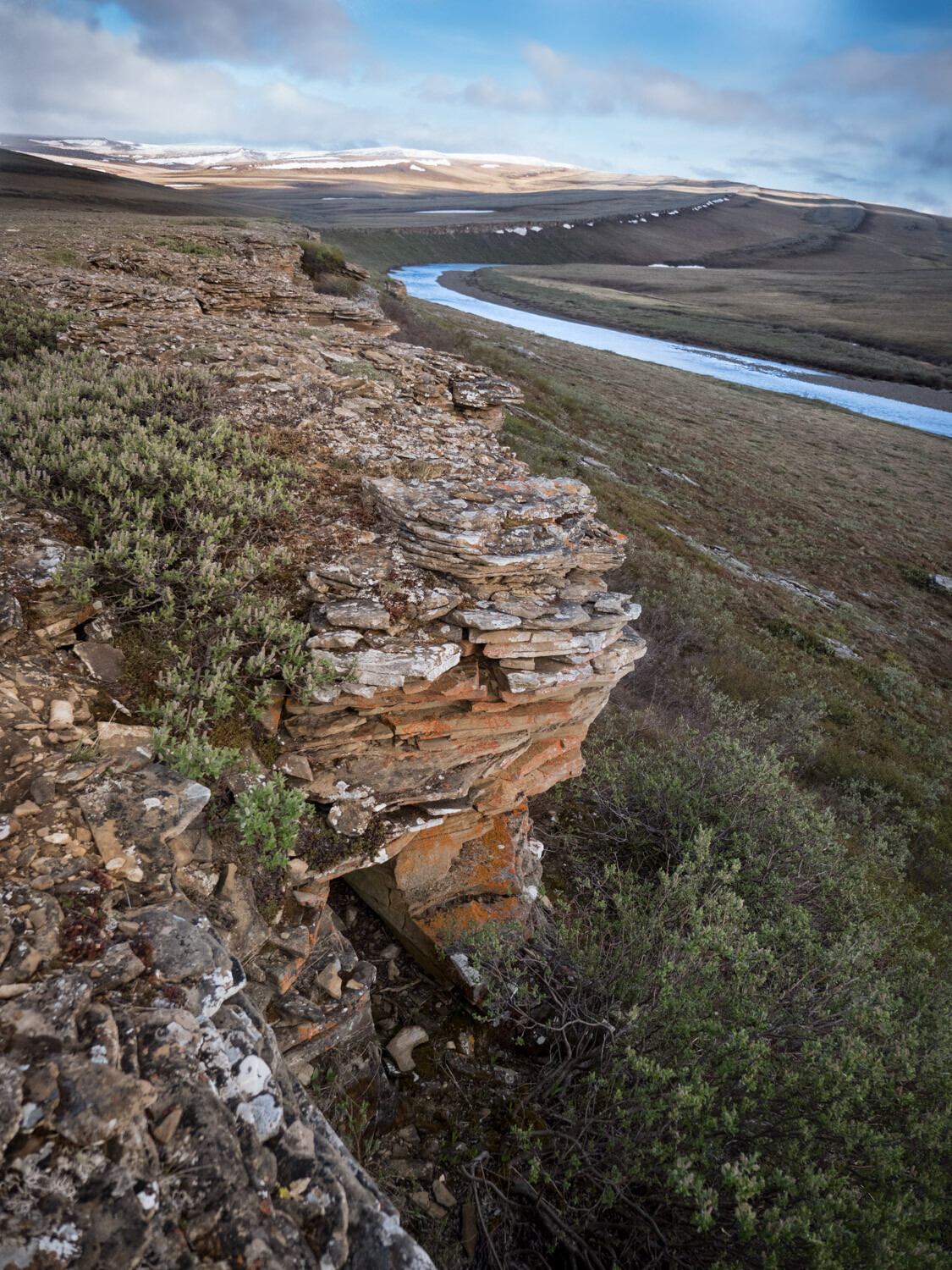
brighter day blue sky - Five (More) Uncomfortable Truths About Photography

The moral of the story is that the best weather for being outdoors is often boring when it comes to photography. So be brave, and step outside even when it’s snowing sideways.

#2 – Lens Snobbery is Real

Five (More) Uncomfortable Truths About Photography - bird in a tree singing

A Swainson’s Thrush singing in my yard in Fairbanks, Alaska. This image is one I could never have captured with my old 500mm f/4 simply because I simply would not have been carrying it while walking my dog.

A few months ago I made the heart-wrenching decision to sell off my beloved Canon 500mm f4L IS lens. It was a hard decision. That big hunk of glass and metal had been with me a for a few years, traveled around the world with me, and made some of my best images. But, its size, heft, and cumbersome, tripod-requiring handling was getting in the way.

I’ve replaced it with a much smaller Olympus 300mm f4 PRO for the micro 4/3rds system (giving me a 600mm f4 equivalent at a third of the size). And here is the uncomfortable part – the quality of the Olympus lens is equal to that of the Canon and I don’t miss the bigger, more expensive Canon lens at all. Not one little bit.

Except (and to be honest I have a hard time admitting this) when I’m around other photographers. As a bonafide professional shooter, the big lens felt like a badge of honor. It’s a bogus badge for sure because the size of your lens has nothing to do with performance or image quality. Yet I felt like I needed that big glass to be taken seriously as a pro.

Five (More) Uncomfortable Truths About Photography - portrait shot of a raven

I don’t think the bokeh or sharpness of my Olympus 300mm f4 falls short in any way when I compare it to larger, far more expensive lenses like my old 500mm f4.

The compact mirrorless 4/3rds system does not stand out the way the big gear did, and in groups of photographers, I noticed my gear (and me) being brushed over.

The great irony is that my long lens work has improved dramatically with the purchase of the new gear. Its small size is easy to transport, so it is always with me when it matters. I now walk the dog with a 600mm f4 equivalent for heaven’s sake! It’s there when I need it and the results have been excellent.

Time to put the snobbery aside and let the images speak for themselves.

#3 – Your big DSLR is Unnecessary

Five (More) Uncomfortable Truths About Photography - animals running on a ridge

Yesterday, while wandering around my local farmer’s market, I saw a photographer shooting with the exact same Canon professional level DSLR I owned until a few months ago. My god, it looked huge!

You see, I’ve recently switched from Canon to Lumix (for general shooting and wildlife) and Sony for night work and high-resolution landscape imagery. Both of these two mirrorless systems cast a tiny shadow compared to the hulking DSLRs of my past life.

In this day and age, the difference in quality and performance between a big DSLR and a light and compact mirrorless is precisely zilch. The big camera may make you stand out in a crowd (see #2 above), but it won’t make better images.

#4 – Creativity is More Important Than You Think

northern lights over a mountain - Five (More) Uncomfortable Truths About Photography

Part of creativity is knowing when to grab a shot. Rather than pausing when the headlights of a big truck fell across this mountainside, I experimented with an exposure.

Look across the pages of any photo website or magazine and you’ll see gobs of articles and tutorials about camera settings, focus techniques, equipment, exposure, and post-processing. But likely you’ll find very few about the creative process of image making.

I know why. These types of articles are popular because they offer simple, actionable things to learn that can improve your images quickly. Don’t get me wrong, these things are super important to know. But all the settings, equipment, and post-processing tips are merely tools in your toolbox, not the final product.

sunset over a forest and hills - Five (More) Uncomfortable Truths About Photography

Eventually, every serious photographer reaches a point where they know all they really need to know about their camera and computer programs, and then what…? They either realize that that photography is more than a technical craft and they begin looking at it from a creative perspective, or they don’t, and they stall out.

Learning the technical details is easy compared to actually finding and composing images in the field. Good photography is not formulaic, and how do you learn something that doesn’t use a formula for success? You work at it, a lot. It’s hard and uncomfortable. That’s how.

#5 – Money is Better Spent on Travel than Gear

northern lights over a mountain scene - Five (More) Uncomfortable Truths About Photography

For much less than the price of a new pro-level camera body, you could go photograph something like this.

Got a few hundred bucks to blow on gear? Don’t. Take that few hundred bucks and take a few days and go somewhere awesome instead. Unless you really need it, your extra money is better spent on going somewhere really cool to make images, and not on cameras, lenses, bags, filters, and flashes.

I can just about promise you that you’ll get more and better images by a few days of travel to photograph wildlife, or landscapes, or the northern lights, or some new city than you will by spending the same amount on a new piece of kit.

sun burst over trees in Africa - Five (More) Uncomfortable Truths About Photography

A trip to Africa last year re-inspired me in a way a bunch of new gear never could.

A new telephoto lens or camera could cost you thousands of dollars. If you have functional camera gear, and you are looking at something new just because it’s all bright and shiny, take a moment to reconsider. Could those thousands be spent traveling somewhere new and unique? Some place to photograph a landscape or phenomenon you’ve always dreamed of shooting?

We make images by exploring our world. Without that exploration, all the fancy new gear in the world is worthless. Just as importantly, you’ll get the experience and joy of travel, and that is truly priceless.

Conclusion

night campfire scene - Five (More) Uncomfortable Truths About Photography

Look, photography is messy and expensive. I suggest you embrace the mess and reassess the expense. Go outside when the weather sucks and see what you find. Remember that the performance of your gear is what matters not the brand or the size, and know that creativity is hard but it’s the only way to advance your photography. Photography takes work.

Lastly, think about how you spend your money. Old glass and old cameras often work just fine, and are capable of producing excellent images. Maybe you should hold onto that gear for a while longer and spend some of that extra money to go somewhere new. Travel, you’ll find, is an excellent strategy for making great photos.

It’s an uncomfortable photographic world out there. So it’s time to accept it, and go make something beautiful.

The post Five (More) Uncomfortable Truths About Photography appeared first on Digital Photography School.


Digital Photography School

 
Comments Off on Five (More) Uncomfortable Truths About Photography

Posted in Photography


Latest Nikon mirrorless teaser gives a closer look at body and lens mount

02 Aug

Nikon has published a new 30 second teaser video about its upcoming mirrorless system, which will be announced on August 23rd. As with most teasers there aren’t many details here (though there’s a nice tour of classic Nikon bodies), but at the end we get a good look at the DSLR-style design of the camera (complete with what looks like a very D850-style handgrip) and its new mount.

Of some possible significance is the fact that the D/SLR bodies featured in this latest teaser video are all professional models…

Given all of the ‘coming soon’ placeholders on Nikon’s website, it’s safe to assume that more videos are forthcoming. What do you make of the latest teaser? Let us know in the comments.

Articles: Digital Photography Review (dpreview.com)

 
Comments Off on Latest Nikon mirrorless teaser gives a closer look at body and lens mount

Posted in Uncategorized


3 Tips For Photographing Kids in Harsh Light

02 Aug

You’ve probably heard that the absolute best time for taking gorgeous portraits is before sunset at golden hour. I love the golden hour as much as the next photographer. But I’m also a mom, and I know the importance of being able to capture photographs of your kids throughout day-to-day life, not just when the lighting conditions are ideal.

Let’s face it – birthday parties, parades, celebrations, and field trips often happen in the middle of the day when the light is harsh and more difficult to work with. How do you capture those special midday moments?!

kids eating popsicles - 3 Tips For Photographing Kids in Harsh Light

You can absolutely take amazing photos of your kids no matter the time of day! In this article, I’ll share three quick and easy tips for those times when you want to capture memories and are photographing kids in harsh lighting conditions.

1. Find or Make Some Shade

One of the easiest ways to approach photographing kids in harsh lighting conditions is to find or make some open shade.

If you’re outdoors, look for a group of trees, a small hill, a tall building, or even part of a play structure that can provide you with a bit of shade for your photo. When you’re looking at the shadows on the ground, try to find a patch of shade that doesn’t have “hot spots” of sunlight mixed in with the shade. Mottled light is generally not the most flattering type of light for photographs.

If you aren’t able to find open shade, you can also create it. I’ve used everything from a sun hat to a couple of friends holding a beach towel in the air to create a small patch of shade for a photo of my kiddos. Be creative!

girl in a watermelon hat - 3 Tips For Photographing Kids in Harsh Light

2. Find Your Light

Unless you’re shooting right at high noon, the light from the sun will still have some direction to it. If you’re familiar with the circle trick, this is a great time to utilize it so that you can easily visualize the direction of the light.

Snapping photos without taking the direction of light into account often results in lackluster images with squinting subjects and uneven unflattering lighting.

kids squinting in the sun - 3 Tips For Photographing Kids in Harsh Light

This is an example of what NOT to do when shooting in harsh lighting conditions. See how the girls are squinting and the light is uneven across their faces?

However, spending just a few seconds thinking about the direction of the source of light makes for a much better image in exactly the same location. One simple way that I often communicate this to kiddos is to ask them to stand with their feet pointing towards the head of their shadow.

two girls backlit by the sun - 3 Tips For Photographing Kids in Harsh Light

Nine times out of ten, this simple instruction quickly orients kids so that the direction of light (backlit) is most flattering. You may still end up with some hot spots across their shoulders and the tops of their heads, but typically the light will be nice and even across their faces, which is really my goal when shooting in harsh light or full sun.

3. Try a Fill Flash

girl backlit with water in the background - 3 Tips For Photographing Kids in Harsh Light

So, what if the background you’re trying to capture doesn’t allow you to orient your child in the best way given the direction of light?

Whether you’re taking photos of a historical landmark or a hometown parade, there is another trick you can utilize in harsh lighting conditions. That is to use your on-camera flash as a fill light to help diffuse any harsh shadows and brighten your subject’s face.

For example, the above image was taken at a local lake. Because of the location of the dock coupled with the time of day, I wasn’t quite able to get the sun all the way behind my daughter, resulting in a bit of a hot spot on the right edge of her face, while the rest of her face is just a bit dark.

If this effect bothers you, give fill flash a try!

This second image (above) was taken at the same time, in the same place. But this time I used my camera’s flash to soften some of the highlights near her face. You’ll notice that the coloring of the water is entirely different when using a fill flash versus without it. Additionally, her eyes seem to have more pop with the flash compared to without it.

Whether or not to use fill flash in harsh lighting conditions is really a matter of aesthetic preference. But it’s certainly worth a try if something feels a bit off when you’re shooting in harsh light.

In a nutshell, don’t be afraid of photographing kids in full sun – it’s easier than you may think. Give it a try, and chime in and share your best images with us below.

The post 3 Tips For Photographing Kids in Harsh Light appeared first on Digital Photography School.


Digital Photography School

 
Comments Off on 3 Tips For Photographing Kids in Harsh Light

Posted in Photography


The Satellite Online Evolution

02 Aug

The tale of the world’s reliance on satellites like a resource of information and amusement, at internet satelit least in which civilian utilization is anxious, begins within the 1970’s. A California scientist recognized that the satellites utilized to give television programming to terrestrial support providers can be tapped into with the appropriate antenna, which he manufactured, so launching a revolution during the delivery of entertainment. Right until 1984, any time a Congressional act gave suppliers the authority to encrypt their indicators, the data becoming beamed by any satellite was truthful sport for anyone in possession of your important gear.

Fast forward into the 1990’s. Satellite tv is now a subscription provider as well as the numerous accessible channels have helped it take pleasure in rapid adoption and constant development. The shrinking size of your components suggests that the antennas, which used to consider up an excellent portion of the user’s property, now fit on rooftops. With the similar time, the internet is quick turning out to be a industrial and leisure medium to be reckoned with. The availability of much information, from anywhere on this planet, has resulted in purchaser fascination in the new technological innovation not observed considering the fact that tv turned the entertainment conventional from the 1950’s.

Satellite services providers before long recognized that, on top of that to television and radio products and services, they may deliver Web accessibility as a result of their technologies in addition. In metropolitan areas where cable tv and telephone central offices were found, several customers adopted broadband once it grew to become offered, ditching the sluggish telephone modem access from the Internet’s 1st yrs. For the people in more far-flung locations, even so, broadband was not out there. Until, naturally, they received their broadband accessibility from a satellite, the place the attain of wires will not be an element in availability.

Inside the United states of america, the most rural regions tend to be farm place. Farmers have already been progressively using personal computers along with the World-wide-web for business enterprise applications. In line with the US Department of Agriculture, farms utilizing satellite Internet services doubled between 2005 and 2007, demonstrating the recognition of the services for anyone in rural spots.

In other international locations, specifically all those with tiny infrastructure, satellite Internet supplies the identical use of news and data from all around the earth since it does in designed nations. In some spots exactly where flooding, fireplace and other seasonal hazards are continual threats to inhabitants, the access the online market place supplies to real-time forecasting knowledge, these kinds of as radar and satellite imaging is usually a opportunity life-saver. Even these out at sea or within the deepest deserts from the environment can now accessibility the internet making use of moveable devices, which makes sure that their locale could be identified in an crisis or their discoveries could be shared, instantly, with all the entire world at large.

The internet is usually credited with switching the whole world and it definitely accurate, to any serious observer, that this is definitely the circumstance. However, the next World-wide-web revolution will probably be described by an ever-increasing availability of Internet companies which will only continue to carry the planet closer given that the Web alone has previously performed.

The post The Satellite Online Evolution appeared first on Photonovice.

Photonovice

 
Comments Off on The Satellite Online Evolution

Posted in Equipment


Think Tank Photo and MindShift Gear merge into a single company

02 Aug

Camera bag and accessory manufacturers Think Tank Photo and MindShift Gear have officially merged to become a single company under the Think Tank Photo brand.

Formerly sister companies, founded by overlapping parties but operated as individual entities (Think Tank Photo Inc. and MindShift Gear LLC, respectively), the two companies will now operate under the same roof with combined business operations in Santa Rosa, California. Think Tank founder, president and lead designer, Doug Murdoch, will serve as Chairman of the Board and president of the combined company.

Despite the merger, MindShift will remain a distinct product line under the Think Tank brand, offering outdoor photography bags and accessories. As it has for more than 15 years, Think Tank Photo will continue to put out its diverse lineup of photography bags and accessories.

‘We celebrate a milestone today as we formally join two of the top brands in camera bags and photo accessories, Think Tank and MindShift,” said Doug Murdoch in the press release. ‘Combined under the Think Tank umbrella, and with MindShift’s powerful position in the outdoor photography market, we will draw on our decades of experience to push the boundaries of carrying solutions and enhance our reputation as the choice of working professionals.’

Starting today, MindShift Gear’s website will redirect to Think Tank Photo’s website, where you can find the MindShift product lineup.

Articles: Digital Photography Review (dpreview.com)

 
Comments Off on Think Tank Photo and MindShift Gear merge into a single company

Posted in Uncategorized


OKO is an immersive viewfinder for your smartphone camera

02 Aug

There’s an abundance of smartphone camera accessories available but until now we’ve been missing one item: a viewfinder. Thanks to the OKO crowdfunding project on Kickstarter this gap might soon be filled, however.

The OKO is designed to do pretty much the same things as a conventional viewfinder. It blocks screen reflections, offering an immersive and undistracted view of the scene and allowing for a more stable shooting stance when holding it up to your face. Its design is far from conventional, however.

The OKO resembles a VR-headset and is compatible with most 4.7″ and larger smartphones. The mobile device is inserted at the front and in the bottom there is a fairly large hole, allowing you to control the camera on the touch screen of your phone (but probably also letting some light in).

In front of the phone screen two 6x magnifying oculars provide a view that should be much closer to the real scene than what your smartphone display alone can provide and many photographers might find that using two eyes to frame your shots is more comfortable than just using one, like with a traditional camera viewfinder.

The OKO’s major downside is pretty obvious: you’ll look pretty ridiculous wearing the thing on your head while hunting for photo opportunities. For some this might be a small price to pay for the perfect shot, however.

If you fall into that latter group, you can now pledge between $ 39 for the early bird basic kit and $ 160 for a full-blown package including 4 accessory lenses. At the time of writing the project has almost reached its funding goal with 56 more days to go, so there’s a good chance the project will go ahead. Shipping is expected in March 2019.

Watch the video below for more information or head straight to the OKO Kickstarter page.

Articles: Digital Photography Review (dpreview.com)

 
Comments Off on OKO is an immersive viewfinder for your smartphone camera

Posted in Uncategorized


Equipment List for Making Better Smartphone Videos

01 Aug

In case you haven’t noticed, smartphone cameras keep getting better and better. Not only do they take better still photos, but they also record high-quality video. Many latest generation smartphones are equipped with image stabilization, focus tracking, and the ability to shoot in 4K.

Smartphone video accessories 03

This is especially notable with the recent release of IGTV and social media platforms encouraging more video creation. With that in mind, it’s worth investigating how to use your smartphone to take better smartphone videos. As usual, it comes down to the tools you use. Here are several accessories worth investing in to take your smartphone videography to the next level.

A Way to Secure Your Phone

Equipment List for Making Better Videos With Your Smartphone - image on a cell phone

Smartphones today are being built tougher, but they still have a sleek body that makes them easy to drop. To keep your phone more secure, consider getting one of these accessories. This will help you take sharper and better videos.

Pop Socket

In case you’re not already hip to the Pop Socket, here’s why they’re so popular.

Image courtesy of Pop Socket.

These little devices look deceptively simple. They’re just a plastic backing that sticks to your phone and pops out to give you a better grip. This helps you hold your phone with one hand while taking selfies or shooting tricky angles. They are especially helpful while shooting video.

But there are some problems with the Pop Socket. For one thing, they’re bulky. Even when retracted, the Pop Socket sticks out just enough to make it a hassle to stick your phone in your pocket or put it into your car’s cell phone holder.

Secondly, Pop Sockets look about as cheap as they cost, at least in my opinion. This can ruin the aesthetic of the pricey phone you’ve invested in. Finally, these suckers are pretty permanent. Once they’re attached to your phone, they’re useless if you remove them. For that reason, I prefer using the next accessory to keep my phone secure.

Black Rapid WandeR Bundle

Image courtesy Black Rapid.

Black Rapid is known for their camera straps, but they also have a cool new product for smartphones. The WandeR Bundle is a nylon tether wrist strap that attaches to your smartphone’s case (above).

You can also use the included TetheR-Clip to secure your phone to a bag or camera strap (see below). It’s a simple concept that is very well executed and will make it hard to drop or lose your phone again.

Image courtesy Black Rapid.

A Smartphone Tripod

Like any other camera, there’s a time and a place to use a tripod with a smartphone, especially when creating videos. The good news is that you don’t need a giant tripod for your smartphone, although you can certainly adapt any basic tripod for use with a cell phone using an adapter (more on that below).

But if you want a more compact setup, consider getting a dedicated smartphone tripod. The Manfrotto PIXI EVO  is a popular option, as is the JOBY GorillaPod Hybrid Mini. Both are small, yet sturdy enough to hold a smartphone or even a small mirrorless camera if needed.

No matter what kind of tripod you end up with, make sure you get a cell phone tripod adapter to properly mount your device.

Equipment List for Making Better Videos With Your Smartphone - Smartphone mounted on a tripod

External microphone

Most smartphones have pretty good built-in audio recording features. But sometimes you need an enhanced audio solution. Note that for both of these microphones, you may need a smartphone audio jack adapter if you have a phone without a traditional audio jack.

One of the best smartphone microphones out there is the Rode VideoMic Me microphone. It’s very compact and comes with a fluffy windscreen (also known as dead cat). To use it, simply plug it into your smartphone’s audio jack. It worked well with my Samsung Galaxy S8 but didn’t work at all with the Google Pixel.

The reason is the location of the audio jack. On the S8, it’s located on the bottom of the phone, on the opposite end of the cameras. The Pixel’s audio jack is located on top, next to the camera. Thus, the microphone was in the shot both with and without the windscreen. So check the audio jack’s proximity to your camera before investing in this mic.

Another type of microphone you may need is a lavalier (or lapel) mic. It is placed in close proximity to the speaker’s mouth to isolate their voice from environmental noise. Lavalier mics are generally wired, meaning they can be difficult to use when plugged directly into your video recording device.

So the most convenient setup is to record your visuals with one camera, and record audio with a lavalier mic plugged into a smartphone. You’ll need an audio recording app to do this. A top of the line lav mic option is the Rode smartLav+, or the more affordable Stony-Edge Simple Lav. Note that sound quality typically corresponds with price, but it truly depends on your budget.

Rode mic on a smartphone - Equipment List for Making Better Videos With Your Smartphone

Smartphone gimbal

Many smartphones come with built-in stabilization that will help minimize or remove shake from your videos. However, you still need an extra tool if you want buttery smooth, cinematic video footage. The simplest video stabilization tool is an electronic handheld gimbal.

There are two main gimbals out there worth considering, and they’re very competitive in terms of features and price. One is the DJI Osmo Mobile 2, and the other is the Zhiyun Smooth Q. I’ve been using the Smooth Q for the past few months and have been blown away by how much my smartphone video quality has improved.

Best of all, a gimbal is easy to use and quite affordable for the features it offers.

girl using a gimbal smartphone stabilizer

Extra Power

While smartphone battery life keeps gradually improving, it’s still a good idea to bring a portable cell phone charger with you.

There are tons of external batteries on the market, but Anker is by far one of the more reputable brands. In particular, the Anker PowerCore 10000 is a compact, efficient, external battery. It can charge either your smartphone or electronic gimbal or both at the same time. Just be sure to charge the battery ahead of time and bring the right cables.

Over to You

In short, you don’t need a lot of tools to start using your smartphone to make better videos. However, if you add these tools to your kit, you’ll be well on your way to producing more professional-looking videos.

Do you have any smartphone video accessories? Let us know your essential tools in the comments below!

The post Equipment List for Making Better Smartphone Videos appeared first on Digital Photography School.


Digital Photography School

 
Comments Off on Equipment List for Making Better Smartphone Videos

Posted in Photography


Magix speeds up Photostory slideshow software and adds new effects

01 Aug

Imaging software developer Magix has released the 2019 version of its Photostory Deluxe slideshow application that it says is completely redesigned, easier to use and much faster than before. The company has used the engine from its Video Pro X movie editing program to run Photostory Deluxe, so it can now handle up to 16 tracks of effects to create more interesting presentations.

Magix says that the process of creation is also much faster, and a new Effects Assistant makes it simpler to apply and control transitions, music and photo looks to the slideshow and the images it contains. The program offers 1500 effects, pieces of music and sounds for users to choose from, while 24 pre-set styles are available to jazz up your images.

Users can also match the color and tonal atmosphere of two or more images to create a consistent feel to a slideshow, or import third-party pictures or movies to copy styles from external sources. Looks, styles and effects can be applied to single images or groups of selected images simultaneously to speed up the process, and now GIF files can also be used alongside high-resolution stills and 4K video. Shaky video can be stabilized using the system borrowed from the company’s proDAD Mercalli V2, and further updates to the program can be added to the application for free over the course of the first year.

Magix Photostory Deluxe 2019 is available now and costs £59.99/ $ 69.99. For more information visit the Photostory pages on the Magix website.

Press release

MAGIX Releases New Photostory Deluxe – With Twice As Many Tracks For More Effects

With the latest version of Photostory Deluxe, it is now possible to create even more impressive photo shows with significantly more effects thanks to twice as many tracks. Effect handling has never been easier – the new Effect Wizard makes it possible.

MAGIX has equipped the new Photostory Deluxe 2019 with a 16-track program engine and noticeably simplified the application of effects. With the award-winning slideshow software, even large projects can now be realized quickly and easily. Innovations such as 24 pre-designed photolooks for 1-click colour enhancement or advanced image editing make every photo show a real eye-catcher in no time.

Twice the tracks

There are almost no boundaries to creativity when creating slideshows. The latest Photostory Deluxe now offers a total of 16 tracks for even more effects, because the program now features the powerful engine from MAGIX’ professional video editing software, Video Pro X.

Easier, quicker effect handling

Photostory Deluxe contains over 1,500 effects, music and sounds for use when creating your slideshows. With the new Effects Wizard, these can be applied in just a few clicks. Never before has it been so much fun to explore the creative possibilities of the software. Digital slideshows can be designed in a no time – unique and full of effects.

click photolooks and advanced image editing

Photostory Deluxe users can now access “photolooks” to enhance images. With just one click, shots get a harmonic colour tone – matching the respective project. For more freedom of design there is the advanced image editing. From precise colour corrections with gradation curves to determining the optimal white/black values, everything is possible.

All the highlights of the new Photostory Deluxe 2019 at a glance:

  • Twice as many tracks for slideshows full of effects
  • Effect Assistant for simple, intuitive application of effects
  • Stylish photolooks for fast colour enhancement
  • Advanced image edition functions
  • Grouping functions & drag & drop import
  • Optimized effects area with title tab
  • GIF import

Price and availability:

Photostory Deluxe 2019 –£59.99/ $ 69.99

Articles: Digital Photography Review (dpreview.com)

 
Comments Off on Magix speeds up Photostory slideshow software and adds new effects

Posted in Uncategorized


Now Open: X-Pedition Havana

01 Aug

We are announcing our second X-Pedition photo workshop, in Havana, Cuba for January 11-18, 2019.

A joint project of Strobist.com and Washington, D.C.-based Focus On The Story, X-Peditions are a shooting-intensive week centered at the intersection of journalistic photography and off-the-beaten-path travel.

You can learn full details about the January Havana workshop, here.

Please note: if last year is any indication, this trip will fill quickly. If you would like to learn more about X-Peditions in general, and/or to add your name to the advance notice list, you can do so here.

Thanks,
David
Strobist

 
Comments Off on Now Open: X-Pedition Havana

Posted in Photography


Basic Photoshop Tutorial – How to Add Creative Overlays to Your Portraits

31 Jul

portraits of 3 girls - Basic Photoshop Tutorial - How to Add Creative Overlays to Your Portraits

I’ve been shooting these moody portraits lately and I thought about adding some creative overlays to a few to make them a little different and more interesting.

3 girls portraits with texture overlay - Basic Photoshop Tutorial - How to Add Creative Overlays to Your Portraits

Here is a basic tutorial on how to add an overlay using Photoshop. Take your images from simple portraits (top) to textured backgrounds (above) above and finally to incorporating some surreal or artistic elements in the finished portraits (below).

Basic Photoshop Tutorial - Basic Photoshop Tutorial - How to Add Creative Overlays to Your Portraits

Getting started

First of all, I wanted my images to have a dark background and look more moody rather than smiling portraits. You can read here on how I have achieved these types of portraits in my home studio using natural light only.

Secondly, in order for you to be able to follow this tutorial, you need to have a good understanding of how to use layers and masks in Photoshop. It is a simple but extremely powerful tool which I believe to be the most fundamental editing technique you need to learn when using Photoshop.

Thirdly, you need to decide on the images that you wish to use as creative overlays. A quick search on Google provided me with some free overlays that have a high enough resolution to use with my images.

Basic Photoshop Tutorial - Basic Photoshop Tutorial - How to Add Creative Overlays to Your Portraits

butterfly images - Basic Photoshop Tutorial - How to Add Creative Overlays to Your Portraits

leaves - Basic Photoshop Tutorial - How to Add a Texture Overlay to Your PortraitsDesigned by Freepik

It is essential that these overlays are in PNG format because it supports transparency. If the background isn’t already transparent (which is indicated by the checkered grey and white boxes), you can extract the image from the background if need be before you can use it as an independent overlay. But that’s a lot more work.

I will walk you through this process step-by-step. You will need to refer to the layers shown on the Photoshop screenshots below to be able to understand the process.

#1 Open your image in Photoshop

Once you open your image in Photoshop it will become the Background Layer. In my case, here I have renamed the layer as the file name “lsp-portraits-13” which appears at the very bottom of the file next to the “eye” icon. This just means it is visible and it is what I am showing you now.

file and layers in Photoshop - Basic Photoshop Tutorial - How to Add a Texture Overlay to Your Portraits

#2 Open your texture image in the same Photoshop file

The texture I’m using is called Chambord as you can see on the layer name. You can easily add a new image onto an existing open Photoshop file two ways:

  1. By dragging your image from its source folder on your computer into Photoshop directly.
  2. Or by opening your texture file in Photoshop as a separate image, selecting the entire image, copying it and then pasting it into the portrait image you are working on.

The latter is the long-winded way. The former is quicker and it is the smarter way too because Photoshop automatically makes the new texture a Smart Object. That means it matches the size of your image yet you can still change the scale without losing any pixels.

Change the blend mode of your texture image layer (Chambord in this case) to Overlay on the Layers tab. Add a layer mask to the Chambord layer and remove the texture from the person on the image by painting on the mask with black using a soft brush.

Your layer should look like the second layer below with the “eye icon” turned on. You can also adjust the opacity of your texture to your liking by moving the layer opacity slider next to the blend mode.

Note: If you don’t mask out the texture, the person will also be covered in texture and would look really odd! You only want the texture to fill the background and nothing else.

dps-tutorial-using-overlays-for-portraits

#3 Now you can proceed with adding overlays

The set of leaf overlays, however, come as one image, so I’ve had to use the latter method mentioned above. I opened the overlay file separately in Photoshop and used the marquee tool to select the specific leaf I wanted to use. Then I copied and pasted it onto the other file that I was working with the portrait image opened.

It is essential that you set the blend mode for each texture overlay to “Overlay”. You can experiment with various modes but for this type of work, I’ve found the Overlay and Soft Light modes tend to be the most suitable.

You can see that I added a mask on the leaf layer so that I could remove anything else around the specific leaf that I didn’t want to use. I have added four leaves in total to this image, each one on separate layers with their respective masks. I have also played around the opacity for each layer.

You will also notice that three of the leaves have a separate Levels Adjustment Layer on top of them. This is a simple way of adjusting the look of the overlay, for example, brightening it, darkening, increasing the contrast, etc. You just need to make sure that you clip the levels layer to the corresponding overlay it is adjusting by pressing Alt+Cmd/Ctrl+G. The arrow down indicates it is clipped (only applies to that and no others) to the layer below it.

You will also notice that there is a layer called Group 1 with the folder icon next to it. I grouped all four overlays after I have made individual adjustments with the levels layers. This is in case I want to make further adjustments to all of them, I only have to clip the adjustments to the Group rather than repeating myself for each overlay layer. Especially if all the adjustments are to be exactly the same anyway.

You can do this by selecting all the overlay-related layers and choosing “New group from layers” from the drop-down menu at the top of the Layers panel.

Basic Photoshop Tutorial - How to Add a Texture Overlay to Your Portraits

#4 Use adjustment tools to make final changes

Although the leaves are now where I wanted them to be, the leaves are far too saturated for my liking and they stand out too much. Not to mention they do not match the green tone of the entire image.

To correct this, I added a Hue/Saturation adjustment layer and clipped it to Group 1 so that it only affects that group and not the other layers. I played with the sliders to get the green looking similar to the green leaves on the little boy’s shirt. I wanted the overall image to have the look and feel of an old illustrated postcard with subdued tones and muted colors.

Basic Photoshop Tutorial - How to Add a Texture Overlay to Your Portraits

#5 It’s time to save your work!

If you want to keep all the layers and the original image, you need to save your file as a PSD image (Photoshop Data File). As long as you don’t merge or flatten the layers, you will have access to all the original elements used in making your composite image.

This is a non-destructive process but the files can take up a large space on your computer drive. However, if you change your mind later on about some of the elements, you can always go back into it without starting from scratch. Just choose the layer you wish to make changes on.

You must also save a compressed version of your image, usually a JPEG, which is a flattened lossy file. It is much smaller and only contains the final finished image without all the layers that went into creating it.

Conclusion

So that’s the simple process of using overlays! Below are the other two images showing the various layers using exactly the same process as shown above.

dps-tutorial-using-overlays-for-portraits

dps-tutorial-using-overlays-for-portraits

I hope you enjoyed this little tutorial.

Have you used texture overlays before? If you have more tips, please share them below.

The post Basic Photoshop Tutorial – How to Add Creative Overlays to Your Portraits appeared first on Digital Photography School.


Digital Photography School

 
Comments Off on Basic Photoshop Tutorial – How to Add Creative Overlays to Your Portraits

Posted in Photography