Today, I’m going just a little bit out on a limb, making the first-ever detailed recommendations from this site. And we’ll be jumping right into the deep end, into the crowded and somewhat murky waters of remote syncing devices.
Recommendations for three budgets — and why — after the jump.
__________
Guidelines
First, this stuff is not carved in stone. It is one person’s opinion, based largely on personal experience. Think of it as if we were sitting at a bar, you were about to buy some remotes and you asked me for some friendly advice.
And since you asked me, you would of course be buying the beer. Because as long as I am imagining scenarios, I may as well imagine a free drink out of it. Or two.
Second (and much like the nice, foreign beer I would be enjoying) you don’t ride first class on a third class budget. That said, all of these recommended sync methods get triple aces in one key area — and that is sync reliability.
That’s kind of a no-brainer for a desirable quality in a remote, and suffice to say that not all remotes are reliable. That is a deal breaker for just about any photographer — or should be, at least.
The second quality is longevity. Which is to say that the remote system you buy this year should be expandable next year, and hopefully for several years after that. Additionally, there are other issues (sync speed, battery availability, etc.) But reliability and longevity are the biggies.
High End
For those of you looking to build a long-term system with an unmatched reliability record (and who are willing to reach deep into your pockets to do so) the following should come as no surprise. I recommend the PocketWizard Plus II Transceiver.
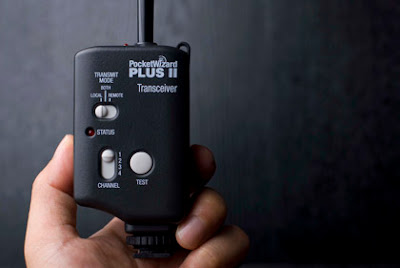 (Pocket Wizard Photo by Krazewerks)
Why? Several reasons.
I have used them (and their predecessors) for the majority of my professional life. And I have counted on them day in and day out, for thousands upon thousands of off-camera flash exposures.
And as for range, suffice to say that they give me all of the range I need. And I tend to push the envelope even on PW’s occasionally.
 Case in point, this air-to-ground shoot of a police helicopter at night. You can see more on that in a two-part, On Assignment post starting here. And it is a great example of what a PW can do when the boundaries are pushed.
PocketWizard or no, you gotta remember that radio is not perfect. Which is to say that there will be environments in which, for some reason, a given wireless remote will not work. The folks who are really serious about lighting sports arenas, for example, will usually opt for hard-corded sync options when possible just for this reason.
But I will say that I have rarely met the environment that will best a PocketWizard. If one won’t fire, it generally comes down to a bad battery or a bad cord between the PW receiver and the flash. And I have very occasionally had issues when they were being used illegally in other countries with different RF spectrum allocations in, um, atypical environments.
But, back to the batteries, they run on AA’s.
Dear God, why can’t all remotes run on AA’s? I always have spare AA’s in my bag, and you could probably get AA’s on the moon if you ran low. Sadly, that is not the case with many remotes. And it is yet another reason why I love my PWs.
So, why PW+ II’s and not the new Flex/Mini platform? Coupla reasons, for now.
One, I am not a TTL guy. So I do not need most of the extra features. Two, the Flex/Mini platform is only out for one camera brand. But that is changing pretty soon. (They are pretty complex, and it’s basically like a run-thru of the Star Trek episode “Spock’s Brain” to integrate a Flex/Mini into a camera brand.
That said, I am a beta tester of the upcoming Nikon model and I am very excited. In the end, I will probably get one or two.
That is as compared to my 12 copies of various standard PW’s. (I have +’s, +II’s, standards, etc.)
With a Flex unit (runs on AA’s, so Flex will get my nod over the Mini) on camera, I can get the most important upgrade — a higher full-sync speed. And it will transmit that capability to all of my older PW’s being used as receivers, thus making every single flash I have nearly twice as powerful. Relatively speaking, at least.
But, that’s down the road. Short version: When it absolutely, positively has to be there overnight: Fedex.
When it absolutely has to sync: PocketWizard. And the PW+ II’s are the gold standard.
Midrange
This is where it gets a little complex, because there are variables that will determine what may be a better choice for you. Plus, by talking you through those variables, I could probably stretch this into another beer.
In my experience (and that of friends) I would not hesitate to recommend any of the following, midrange remotes: RadioPopper JrX, Paul Buff CyberSyncs or Elinchrom Skyports.
For those of you using Einsteins, for instance, PCB’s CyberSyncs offer significant advantages — the receivers even drop right into sockets in the top of the Einsteins. A specialized transmitter allows you pretty much full remote access to the flash’s controls. Ditto with the Skyports and many Elinchrom lights — including the punch-above-their-weight Ranger Quadras.
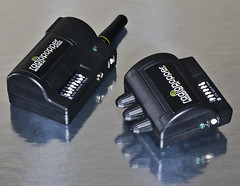 For generic, manual shooters either one will work well. But you may well also consider the RadioPopper JrX’s. Since you are on a budget if you have read this far, I would suggest you skip the studio version and go straight for the bare-bones JrX. It’s a great, albeit imperfect, little system.
So what’s the difference between the PW’s and the midrange stuff? Coupla things.
First, the range will not quite be the same. And while you may never need to sync something 1500′ away and/or way up in the air, that extra range equals extra robustness at lesser distances.
Other little quirks, too. Just niggling stuff, really. But worth considering, as it may guide you to different models in this range.
First, batteries. CyberSyncs take AA’s on the receivers, but button cells on the transmitters. Skyports take button cells, too.
RP JrX’s take CR123a batts — more capacity than a button cell, but hard to find in a pinch. If you go JrX, then I strongly suggest going with rechargeable NiMH CR123s. You can read more here, and my rechargeables have performed flawlessly.
Other stuff: Design, oddly enough. The Skyports have a swivel antenna that is small enough to scare me a little. (Purely psychological, maybe, as I have not heard reports of them breaking off.)
And the CyberSyncs have raised buttons (including the on/off switch, on older models) that you need to mod to keep from being pushed accidentally in your bag. You also have to mod them if you want a lanyard. Else your sync cord becomes your lanyard (not good.)
But What About the Brand X Units?
I hear you already: What about Phottix / Yong Nuo / Gadget Infinity / eBay / etc. remotes?
To be sure, there are some very good remotes being made by the above companies — at some very good prices, too.
Just a couple of years ago, the so-called “eBay remotes” were somewhat of a joke. A “newb tax,” as it were, to be paid by the light of wallet. You buy them, they kinda work, you stay into it, you move up to a better remote within a few months. So you buy twice.
Not any more. The various oriental manufacturers are coming on strong. None are perfect, but many are very good — and very cheap. But among their flaws is a deal breaker for me at this point, and the reason I would not recommend them to most people.
All of the remotes recommend above have either a demonstrated or presumed commitment to backwards compatibility. Which is to say that next year’s remotes will work with last year’s remotes. One of the problems with the constant improvements of the various oriental brands is that they have also been (for the most part) jerking us around with model-year-to-model-year incompatibility.
By comparison, I have 15-year old PWs in my bag that I can trigger with my beta Flex units. Even the RP’s JrX system was designed to be compatible with their previous, higher-end system. That is, I think, because they are photographers themselves and know how important the continuity thing is. Choosing remotes that will let you painlessly expand your bag in a few years is essentially making a bet on your future commitment.
I expect that the Chinese/etc. remote manufacturers will get this soon enough. And when they do, I will be happy to recommend them providing they have good performance. And to any manufacturer reading this, if you are dedicated to backwards compatibility you should proclaim it on your product page and give yourself an advantage over your competitors.
Bargain Basement
Hello, poor-but-honest starving artists who have read this far. So, you may be long on talent and sincerity, but are presently short on cash. What, for you?
I do not recommend a remote at all. I recommend going hard core, or, rather hard cord.
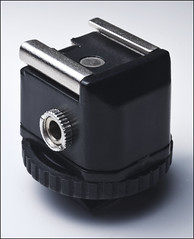 Specifically, get on the 1/8″ sync bus with a set of Universal Translators (only one if you are using, say, an LP160, or AlienBees, for example, as they already rock the 1/8″ jack.
So, if you spend less than a sawbuck and get your camera onto the 1/8″ standard with a Universal Translator, you do some pretty cool things for yourself. First, you are kinda making a down payment on future remotes, which also work on the 1/8″ jack system. In fact, all of the ones I recommend above do just that. That is to say, you are standardizing on a cheap sync cord right from the get-go.
Second, you are into a system that is for the most part rock-solid. RF interference? No prob. Batteries? Don’t need ’em.
Only issues are with range (limited to your sync cord length) and multi flash (I recommend flashes with built-in slaves.) You cord one flash, slave the others, and you are set. You can also move to a remote relatively painlessly later, starting with just two units. Slave your other flashes until you wallet recovers and then grab some more receivers.
And the cord itself? That’s the beauty of the 1/8″ system.
It gets you out of the grips of the PC Cord Mafia and into the promised land of nearly free, 1/8″ sync cords. Seriously, 25-foot sync cord for .94, anyone?
You want backups, and reliability? Get five at a time at that price. (Cheaper, actually, if you get 5.) But still, create a little strain relief by rubber banding your sync cords to the light stand to keep them from jiggling and they will last far longer.
And you will always have a backup in the future when your fancy remotes crap out on you because you are shooting too close to Area 51 or something.
But that non-syncing PW may not be your biggest problem problem at that point. I’d concentrate more on the very serious gentlemen in the rapidly approaching green jeep with the .50-cal machine gun mounted up top.
__________
Dang, that was a pretty long post for a Thursday. (I like to coast into the weekend with a short post and a single malt…)
And as I said, this is my opinion alone — worth what it cost ya. And naturally I got everything wrong, as I am sure many of you are about to tell me in the comments.
But that’s okay. And did I mention earlier that I had switched to single malts? Nothing too pricey — let’s call it a 12-year old Jura. (I was educated this spring in Edinburgh.)
But they have been going on your tab for the last 15 minutes.

Strobist