Blog

  • 7 Cool Photoshop Layer Tricks

    When you’re using layers in Photoshop for photo editing and composting you can speed up the process of working with them if you know these cool layer tricks.

    1. Unlock the Background
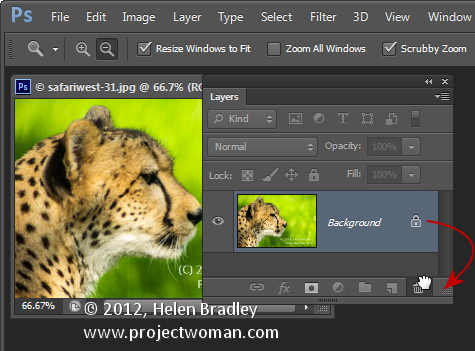
    Layer1

    You will already know the Background of any photo is locked and you can’t do anything much with it until you unlock it. The quickest way to unlock a background layer is from inside the Layers palette. Drag the lock icon to its right and drop it in the Trash and the Background layer will be automatically converted to a regular layer.

    2. One click add a Layer
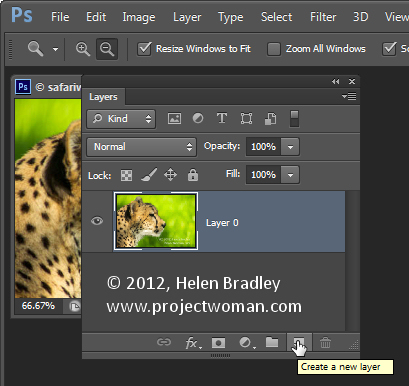
    Layer2

    To create a new layer above the current layer click the Add New Layer icon at the foot of the Layer palette. 

    To add a new layer directly below the current layer Ctrl or Command Click on that icon. Both options add a layer but without displaying the Layer dialog. 

    3. Merge Everything to One Layer but Keep the Layers too
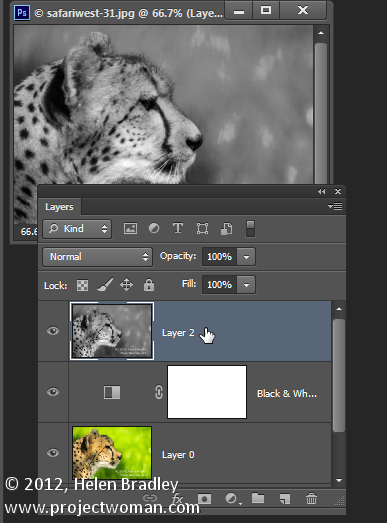
    Layer3

    To merge all the current layers in the document to a single layer and at the same time to keep all the layers intact below it, click the topmost layer of the document and press Ctrl + Shift + Alt + E (Command + Option + Shift + E on the Mac). In case you are curious – it’s called Stamp Visible. 

    4. Select the Content on the Current Layer
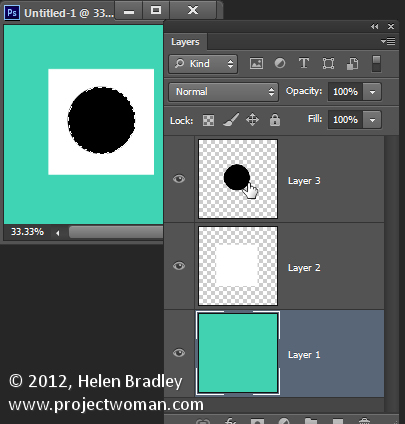
    Layer4

    To select everything on the current layer Ctrl + Click on the layer thumbnail in the Layers palette. 

    5. Copy a Layer to Another Document

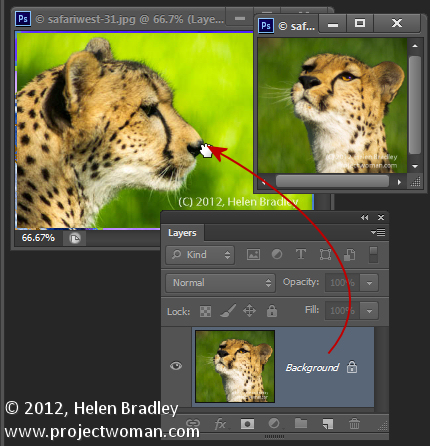
    To copy a layer from one document to another drag the layer from the Layers palette in one document and drop it into the other document. If you hold Shift as you drag the layer will be centered in the middle of the second document.
    Layer5

    6. Quick Layer Moves

    To quickly move a layer up the layer stack press Command + ] and to move it down, press Command + [.

    7. Instant Delete a Layer

    To instantly delete a layer, click the layer and press Delete. 

    Bonus Layer tip

    To fill a layer or a selection with the foreground color press Alt + Backspace (Option + Delete on the Mac). Use Control + Backspace (Command + Delete on the Mac to fill the layer or selection with the Background color.

    So, over to you now… what are your favorite Layer tips and tricks?

    Post originally from: Digital Photography Tips.

    Check out our more Photography Tips at Photography Tips for Beginners, Portrait Photography Tips and Wedding Photography Tips.

    7 Cool Photoshop Layer Tricks


    Digital Photography School

  • Canon announces two EF-M lenses to accompany EOS M mirrorless camera

    EF-M-18-55mm-F3-5-5-6.png

    Canon has announced two lenses for the EF-M mount used for the first time by its EOS M mirrorless camera. The first lenses will be a EF-M 22mm F2.0 STM ‘pancake’ prime and an EF-M 18-55mm F3.5-5.6 IS STM standard zoom lens. Both are built around a STM linear stepping motors to drive focus. The EF-M 22mm F2.0 offers a field-of-view equivalent to a 35mm lens on a 135 film camera, while the 18-55mm offers around 29-88mm equivalent coverage. Both feature metal lens barrels and focus-by-wire manual focus.

    News: Digital Photography Review (dpreview.com)

  • Kipon develops electronic adapters for Canon lenses on mirrorless bodies

    kipon.png

    Chinese accessory manufacturer Kipon says it has developed mount adapters to use Canon EOS lenses on Micro Four Thirds and Sony NEX bodies with full electronic control of the aperture setting. There’s no word on whether other functions such as image stabilization or autofocus have any chance of working, and as yet Kipon is only showing unfinished-looking examples on its website. There’s also no information on availabililty or pricing, but we’d expect it to be very competitive. 

    News: Digital Photography Review (dpreview.com)

  • Sigma UK launches Olympics-themed photo competition

    logo_2x.png

    Sigma UK has launched a ‘Spirit of the Games’ photographic competition, with the chance to win an SD1 Merrill SLR with 17-50mm F2.8 lens, or a DP2 Merrill large-sensor compact. Running from the start of the Olympic Games on the 28th July to the 31st August, photographers are invited to submit up to five of their images capturing the Spirit of the Games. The overall winner will be selected by Sigma’s own judges, while 20 runners-up will be entered into a publicly-judged Facebook competition to win the DP2 Merrill. Click through for a link on how to enter. 

    News: Digital Photography Review (dpreview.com)

  • Lytro Light Field Camera now works with Windows

    lytro_lfc8gb.png

    Lytro, the maker of the Lytro Lightfield Camera, has today announced that its ‘Lytro Desktop Application’ – the software that allows you to ‘refocus’ light-field images after they have been taken, is now available for Microsoft Windows. You’ll need to run the 64bit version of Windows Home, Professional or Ultimate on a computer with an Intel Core 2 Duo or better processor and at least 2GB RAM. At the same time the company announced two new accessories – a USB wall charger and a tripod mount, which are available for around $ 20 each.

    News: Digital Photography Review (dpreview.com)

  • Updated: our Canon EOS M hands-on preview

    canon_eosm.png

    We’ve updated our initial preview of the Canon EOS M with lots more information, including our own hands-on pictures of the camera and a video illustrating the shutter sound. So if you’re interested in finding out more about Canon’s first mirrorless offering, it’s worth having a glance through to see if there’s anything you missed first time around. Click through for the link.

    News: Digital Photography Review (dpreview.com)

  • Build a DIY Portable North Light Photo Studio

    Six years ago, I wrote on Strobist about how to build a $ 10 macro studio. Since then over a million photographers have seen how they could easily take control of light—any light—to easily produce professional quality product photos.

    Four years later while brainstorming with my friend Mohamed Somji about how to light an upcoming photo project, I started thinking about how to reproduce this type of studio on a human-sized scale.

    Turns out, it's not so hard. Read more »


    Strobist

  • [MODIFIED] Digital Fireworks Photography – Equipment Preparation Before the Shoot

    Make sure your digital camera and accessories are ready to take plenty of great fireworks photos.

    Preparation is the key to any successful digital photo shoot. Before you go out to a celebration to shoot photos of fireworks, whether it is the US Fourth of July, Boomsday on Labor Day, New Year’s Day, or other special occasion, make sure your equipment is ready:

    * Obviously if it is legal and feasible (due to large crowds) to bring one along to where you are shooting photos, a tripod is crucial to getting the best, clearest photos. Otherwise you will need to hand-hold your digital camera very steady and do tricks such as increasing the ISO level to take quicker photos due to the low amount of available light. If you are using a dSLR, bring and attach any image stabilization lenses you may own to help offset the inevitable camera shake….

    Read more at MalekTips.
    New Computer and Technology Help and Tips – MalekTips.Com

  • Site Updates and New Features

    shared:DPRlogo.png

    Eagle-eyed visitors will have already noticed we’ve made a few changes to the homepage and added a couple of new features (both of which are still very much at the beta stage). First (and most obvious) is the new menu bar, which we hope will make finding what you’re looking for easier and more logical – and allows us the horizontal space we need for some exciting forthcoming features. We’ve also added a comprehensive selection of software to our database and introduced a completely new feature, the Link Database. More after the jump…

    News: Digital Photography Review (dpreview.com)

  • Sony releases DT 55-300mm F4.5-5.6 SAL Telephoto Zoom for Alpha

    sony_dt_55-300_4p5-5p6_sam.png

    Sony has announced the DT 55-300mm F4.5-5.6 SAM, a budget telephoto zoom designed to complement the 18-55mm ‘kit’ lens. It’s optimized for Sony’s APS-C Alpha SLTs and DSLRs, and features the company’s Smooth Autofocus Motor (SAM) for fast, quiet focussing. Billed as an ideal lens for capturing stills and video of distant subjects, it features an ED (Extra-Low Dispersion) element, which should reduce aberrations and increase sharpness. It will be available in September for around $ 300.

    News: Digital Photography Review (dpreview.com)