Blog

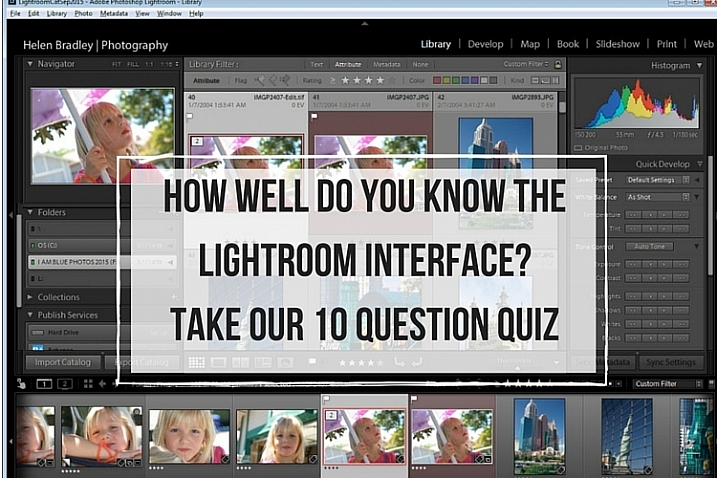
  • How well do you know the Lightroom interface? Take this quiz and find out

    lightroom interface quiz lead image

    When you’re new to Lightroom there are lots of things about the Lightroom interface that contribute to its steep learning curve. Most Lightroom users can tell you a story or two of being caught by items appearing, or disappearing, without warning. With experience these are minor inconveniences, but when you are new to Lightroom, they can be overwhelming. So, just how much do you know about the Lightroom interface? Take this quiz and find out:

    Question #1

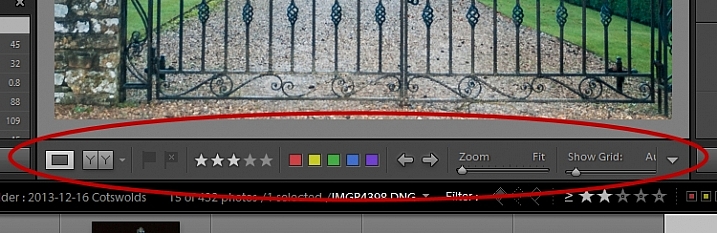
    What is this and how do you get it back if it disappears?
    Lightroom Interface Quiz - image for question 1

    Answer:

    That is the Toolbar, and you can display or hide it by pressing the letter T on your keyboard. You can also choose View > Hide Toolbar or View > Show Toolbar depending on whether it is currently visible or not. There is a toolbar in every module in Lightroom.

    Question #2

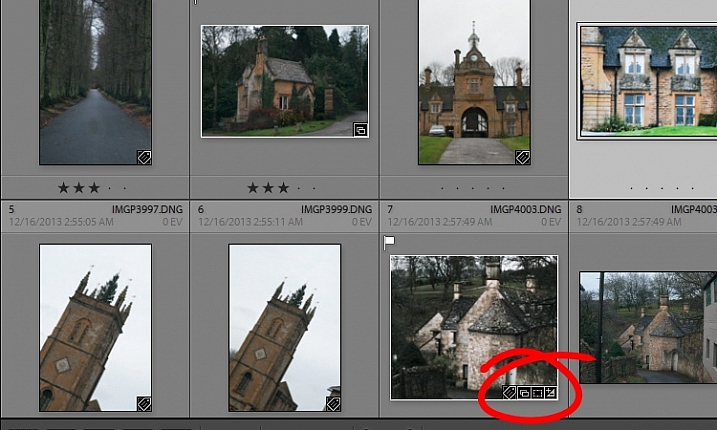
    When you used Lightroom recently, you recall seeing small indicators like this in the bottom right corner of some of your images. What are they and how do you get them back if they’re not showing in grid view?
    Lightroom Interface Quiz - image for question 2

    Answer:

    These are Thumbnail Badges, and they indicate whether or not an image has been cropped, has develop presets, keywords added, and so on. In the Library module pressing the letter J will toggle through a number of options for your grid view, two of which include thumbnail badges.

    Question #3

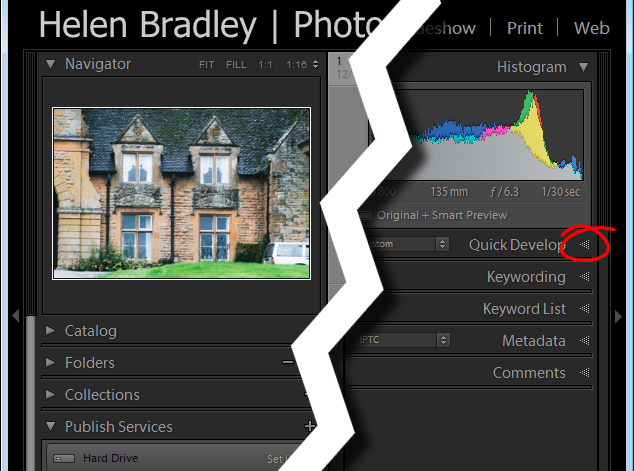
    Most panels show filled in triangles like the one on the left (below), but one of the panels has a triangles like the one on the right (also below). Why is it different?
    Lightroom interface quiz - image for question 3

    Answer:

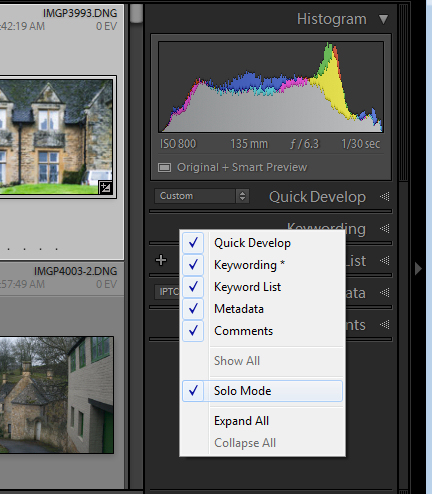
    The second panel on the right is set to what is called Solo Mode. When this option is enabled, and you click to open any of the panels, all other panels will close automatically (essentially leaving only one opened at a time). The Navigator and the Histogram are exceptions to this rule and they operate independently of Solo Mode. To enable or disable Solo Mode, right click on the name of any panel (the actual word not the triangle) and choose Solo Mode from the options given (see below).
    Lightroom interface quiz - image for question 3

    Question #4

    This is the Develop module and the Basic panel is missing. What has happened and how do you get it back?
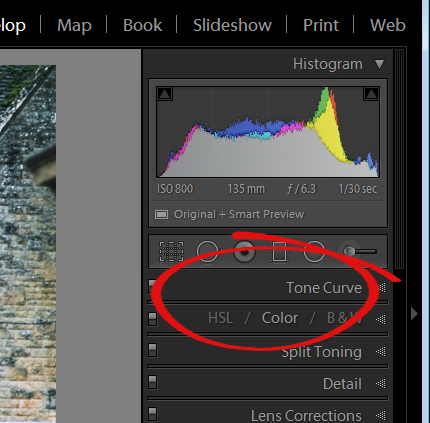
    Lightroom interface quiz - image for question 4

    Answer:

    Any panel can be enabled or disabled in Lightroom. If you’re missing a panel, right click another panel in that same sidebar to display the panel list. Any panel name without a checkmark isn’t visible, so to make it visible, just click the panel name.
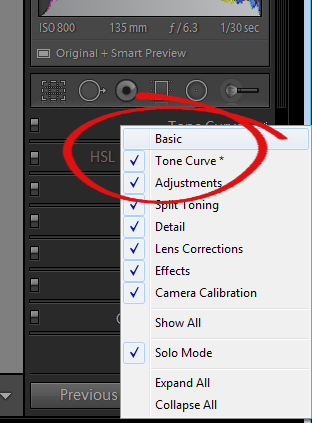
    Lightroom interface quiz - image for question 4

    Question #5

    This is the list of Lightroom modules. A module is missing, what is it and how do you get it back?
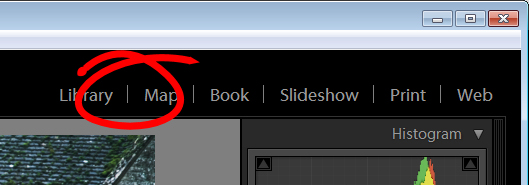
    Lightroom interface quiz - image for question 5

    Answer:

    The Develop module is missing. You get it back the same way as you would a missing panel, right click any of the module names to show a list of modules. Any that do not have checkmarks beside them are not visible. Select that one to display it.
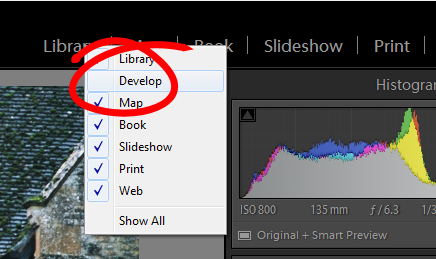
    Lightroom interface quiz - image for question 5

    Question #6

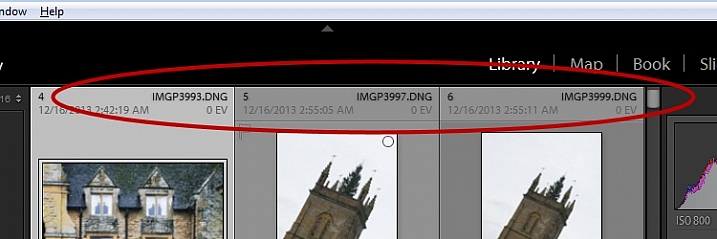
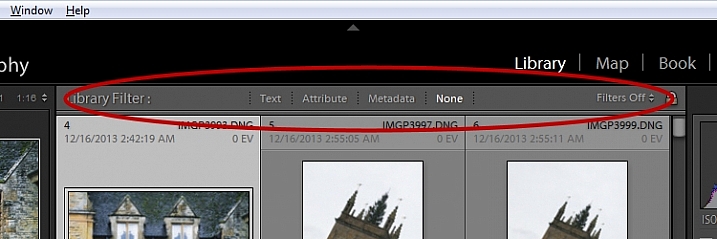
    There used to be a panel here in Lightroom just above the thumbnails in grid view in the Library module. It’s disappeared. What is it, and how would you get it back?
    Lightroom interface quiz - image for question 6

    Answer:

    This is the Filter bar, and you can display or hide it by pressing the Backslash key (\). You can also display or hide it by choosing View > Show Filter Bar.
    Lightroom interface quiz - image for question 6

    Question #7

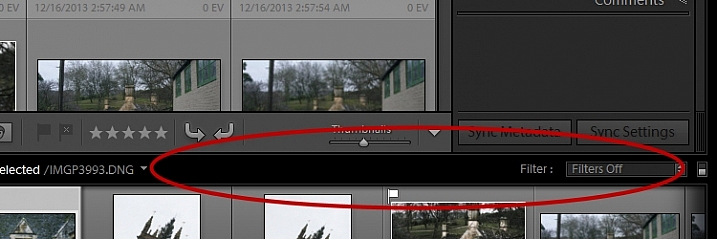
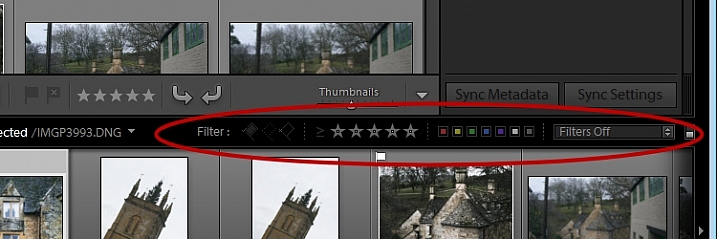
    Here just above the filmstrip you recall that at one stage you saw Star, Flag and Color options, but they now seem to be missing. How do you get them back?
    Lightroom interface quiz - image for question 7

    Answer:

    Click the word Filter and the filters will reappear. Click Filter again and they will disappear.
    Lightroom interface quiz - image for question 7

    Question #8

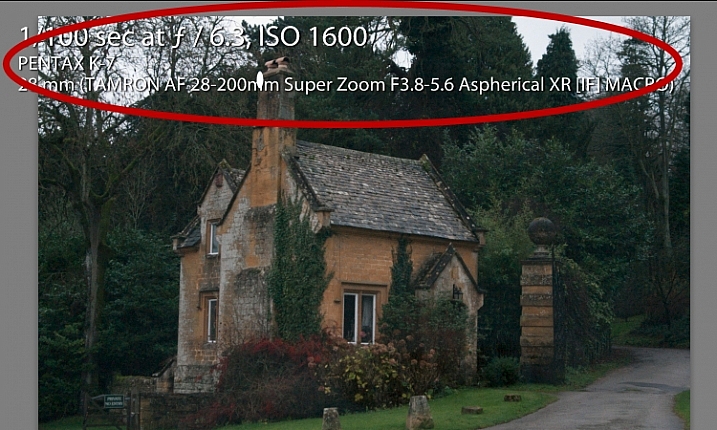
    What is this called and how can you get rid of it or choose what information is showing?
    Lightroom interface quiz - image for question 8

    Answer:

    This is the Loupe Info Overlay and you can display and hide it by pressing the I key on your keyboard. There are three states for this: Info Overlay 1, Info Overlay 2, and turning it off entirely. To edit what information is displayed click CMD+J (Control+J on a PC) or go to:  View > View Options.

    Question #9

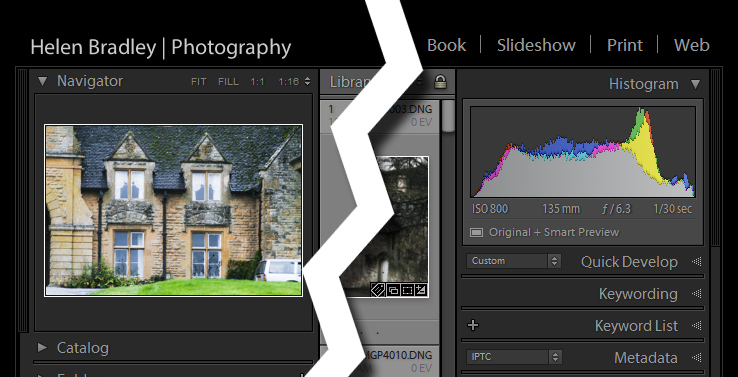
    This is the right hand corner of the Lightroom screen and the controls for Maximize, Minimize and Close are all missing, as are all the Lightroom menus on the left of the window. How do you get them back?
    Lightroom interface quiz - image for question 9

    Answer:

    To redisplay the Lightroom menu and the Windows controls press Shift + F. This is a toggle switch which displays and hides full screen mode. There are three states for full screen mode so press Shift + F repeatedly until the Lightroom menu and the Window controls reappear.

    Question #10

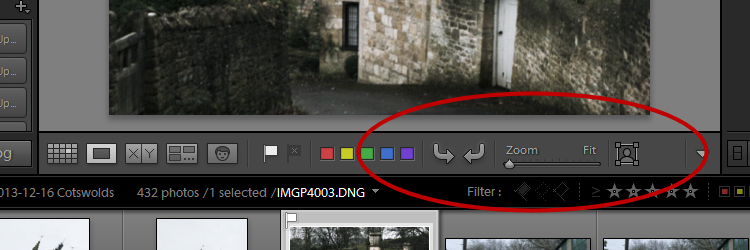
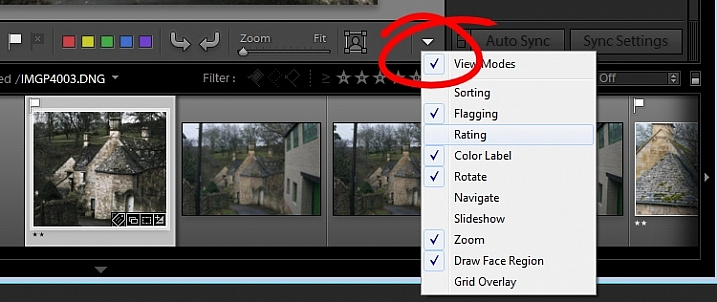
    Here, in the Develop module, you don’t see any stars on the toolbar when you are viewing this image at full size. The stars only appear on the toolbar when you are in Grid view. Where did they go and how can you get them back?
    Lightroom interface quiz - image for question 10

    Answer:

    The toolbar in the Develop module has two states, one for the Grid View, and one for the Loupe (single image) View. To display and hide the various options on either toolbar, switch to that view, and click the arrow in the far right of the toolbar to display the options available in that view. Click any unchecked option to display it on that toolbar, likewise you can click any checked options that you want to hide.
    Lightroom interface quiz - image for question 10

    If you got 10 out of 10 on this quiz, well done! You have a good understanding of the basics of the Lightroom interface.

    If you missed any of these questions, hopefully you’ve learned something about using Lightroom that you did not know before.

    googletag.cmd.push(function() {
    tablet_slots.push( googletag.defineSlot( “/1005424/_dPSv4_tab-all-article-bottom_(300×250)”, [300, 250], “pb-ad-78623” ).addService( googletag.pubads() ) ); } );

    googletag.cmd.push(function() {
    mobile_slots.push( googletag.defineSlot( “/1005424/_dPSv4_mob-all-article-bottom_(300×250)”, [300, 250], “pb-ad-78158” ).addService( googletag.pubads() ) ); } );

    The post How well do you know the Lightroom interface? Take this quiz and find out by Helen Bradley appeared first on Digital Photography School.

    Digital Photography School

  • PIX 2015: A conversation with Devin Allen

    When Devin Allen says that photography saved his life, he means it in a very real sense. He describes himself as ‘the oddball walking around with a camera’ in his home of West Baltimore. A 26-year-old amateur photographer with aspirations to make a career out of his work, he has become a viral sensation. His images of protests in Baltimore have amassed thousands of likes and have been shared by international media organizations around the world, including landing the cover of Time magazine.

    With some serious credentials on his resume, he’s hoping to in turn inspire young artists in his community to find their own paths away from the streets. Watch his inspiring conversation with filmmaker Eric Becker and learn more about his perspective shooting the events in Baltimore.

    $ (document).ready(function() { SampleGalleryV2({“targetContainerClass”:”sampleGalleryImageViewerContainer”,”galleryId”:”4538818991″,”isEmbeddedWidget”:true,”selectedImageIndex”:0,”startInCommentsView”:false,”isMobile”:false}) });
    Articles: Digital Photography Review (dpreview.com)

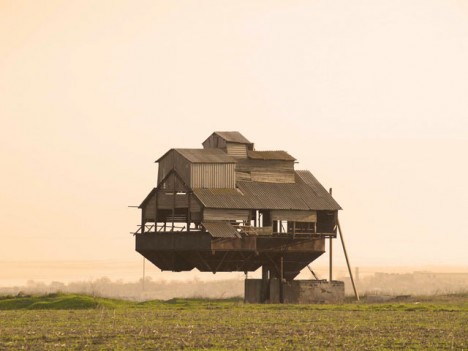
  • Ghostly Floating Farms: Abandoned Rural Buildings of Russia

    [ By Steph in Abandoned Places & Architecture. ]

    abandoned farm building ukraine

    The former USSR boasts some of the world’s weirdest and most hauntingly beautiful abandoned structures, from sci-fi monuments to prison camps and military facilities. Many of Russia’s abandoned wonders are byproducts of the Soviet collapse, including remote stretches of countryside that are no longer feasible to live in due to ill-kept or destroyed roads and infrastructure. Some of the structures that can be found there include intricate hand-carved wooden farmhouses and agricultural buildings that seem to hover in midair.

    19th Century Farmhouses in Kostroma
    abandoned farmhouse russia 1

    abandoned farmhouse russia 5

    abandoned farmhouse russia 2

    abandoned farmhouse russia 3

    abandoned farmhouse russia 4

    abandoned wooden farmhouse

    abandoned wooden farmhouse 2

    These stunning examples of 19th century Russian architectural craftsmanship have sadly fallen into disrepair on the inside, but the exteriors generally look as cool as ever. Some are in better condition than others, looking as if they’re just waiting for their owners to return. Located deep within the forests of Kostroma, the abandoned family homes are likely too far from civilization to support most present-day occupants. Photographer Andrew Qzmn travels through the countryside documenting these forgotten structures, as well as those that are still kept up.

    Floating Farm Building, Ukraine
    abandoned farm building ukraine
    floating potato 2

    floating potato

    Reportedly located in Ukraine rather than Russia, this farm building might seem like a Photoshop job at first, but a few pictures sent into the blog Curious Places confirm it to be part of a potato sorting facility, with speculation that part of it may have been dismantled since it was actively in use.

    Next Page – Click Below to Read More:
    Ghostly Floating Farms Abandoned Rural Buildings Of Russia

    Share on Facebook


    [ By Steph in Abandoned Places & Architecture. ]

    [ WebUrbanist | Archives | Galleries | Privacy | TOS ]


    WebUrbanist

  • Cream of the Crop of Specialty Photography Genres in 2015

    In the past week I’ve rounded up some of the most popular and most read articles on various topics here on dPS over the last year including:

    • Most Popular Landscape Photography Articles on dPS in 2015
    • The Top Gear Related Articles from 2015
    • 12 of the Best Portrait Articles of 2015
    • Beginners Photography Tips – Best of 2015
    • Post-Processing Tips of the Year 2015 on dPS
    • The Tip Top Travel Topics of 2015

    But there are many more narrow focused topics that slip between those cracks. Let’s take a look at a few that you might be interested in and see what we can learn from these.

    Philippe Rouzet

    By Philippe Rouzet

    Macro Photography

    • 5 Tips for Getting Fresh Ideas for Macro Photography
    • 5 Macro Photography Tricks to Make Your Images Stand Out
    • 5 Creative Macro Photography Ideas that Really Work
    • How to Give Your Macro Photography a Fine Art Touch in Post-Processing
    • Macro Photography Tips – Video Tutorials
    • Lighting for Macro Photography

    Street Photography

    street-photography-tips-02

    From my own trip to Cuba January 2014 (by the time you read this I’ll be preparing to head there for my third time)

    • 39 Street Photography Images That Have Common Threads
    • 7 Tips for a More Anonymous Approach to Street Photography
    • 7 Street Photography Rules That Should Be Broken
    • There is No Bad Light for Street Photography
    • The Importance of Capturing Gesture and Emotion in Street Photography
    • 7 Steps to Create Street Photography Silhouettes

    Night and Long Exposure Photography

    Andi Campbell-Jones

    By Andi Campbell-Jones

    • Tips for Getting Proper Exposure for Night Photography
    • 10 Items You Need for Your Night Photography Kit
    • 13 Great Subjects for Urban Night Photography
    • Tips for Enhancing Night Sky Photography in Photoshop
    • 5 Tips for Geting Sharper Images When Doing Long Exposures
    • 10 Common Mistakes in Long Exposure photography
    • Long Exposure Photography Without a Tripod
    • 5 Reasons You Should Learn Long Exposure Photography
    • How to Improve Your Long Exposure Photography with Photo Stacking
    • How to Shoot a Star Trails Selfie
    • Two Methods for Shooting Star Trails Made Easy
    Howard Ignatius

    By Howard Ignatius

    Business of Photography

    1. 10 Quick Photography Business Tips to Kickstart 2015
    2. 10 Low-Cost Marketing Strategies for Your Photography Business
    3. How to Break Into the Photography Business with dPS Writer Gina Milicia
    4. 3 Questions to Ask Yourself When Starting a Photography Business
    5. 5 Trends to Take Your Photography Business to the Future
    6. 8 Creative Ways to Make Money with Your Photography
    7. The Top 5 Sales Mistakes Costing You Money Right Now

    googletag.cmd.push(function() {
    tablet_slots.push( googletag.defineSlot( “/1005424/_dPSv4_tab-all-article-bottom_(300×250)”, [300, 250], “pb-ad-78623” ).addService( googletag.pubads() ) ); } );

    googletag.cmd.push(function() {
    mobile_slots.push( googletag.defineSlot( “/1005424/_dPSv4_mob-all-article-bottom_(300×250)”, [300, 250], “pb-ad-78158” ).addService( googletag.pubads() ) ); } );

    The post Cream of the Crop of Specialty Photography Genres in 2015 by Darlene Hildebrandt appeared first on Digital Photography School.


    Digital Photography School

  • Mountaintop Viewing Walkway Culminates in 300-Foot-Long Slide

    [ By WebUrbanist in Destinations & Sights & Travel. ]

    mountaintop spiral

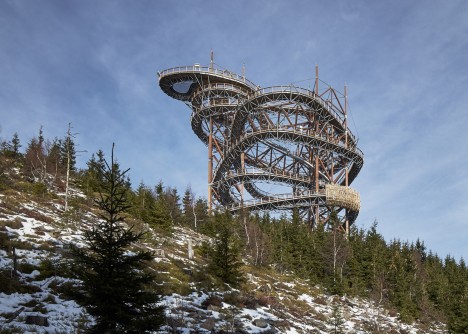
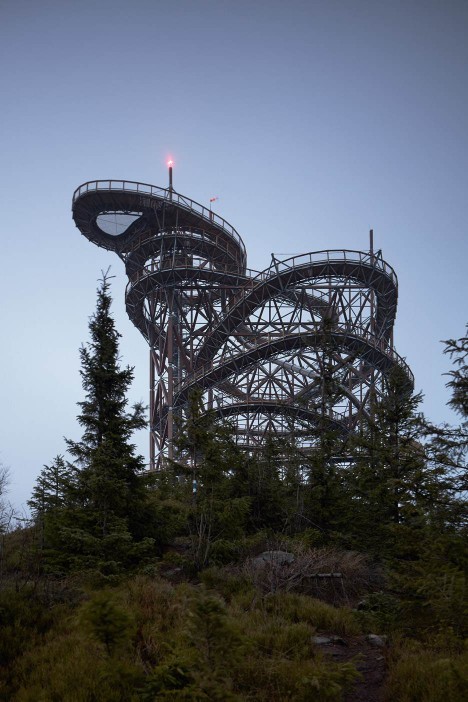
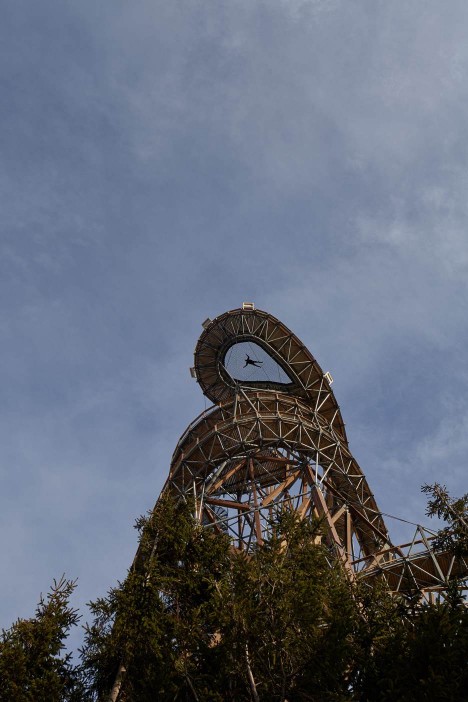
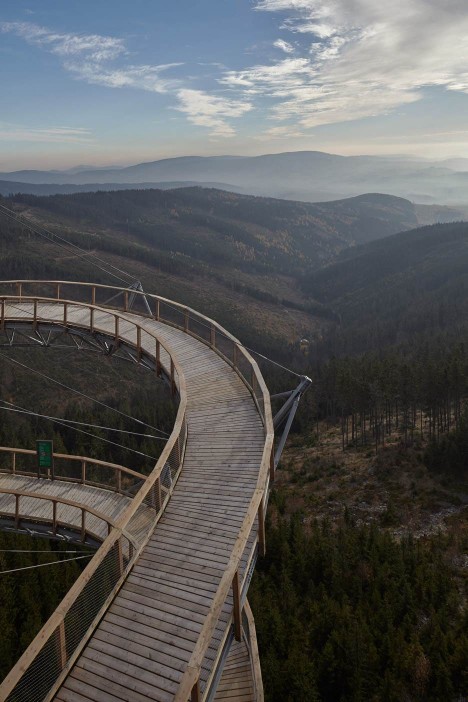
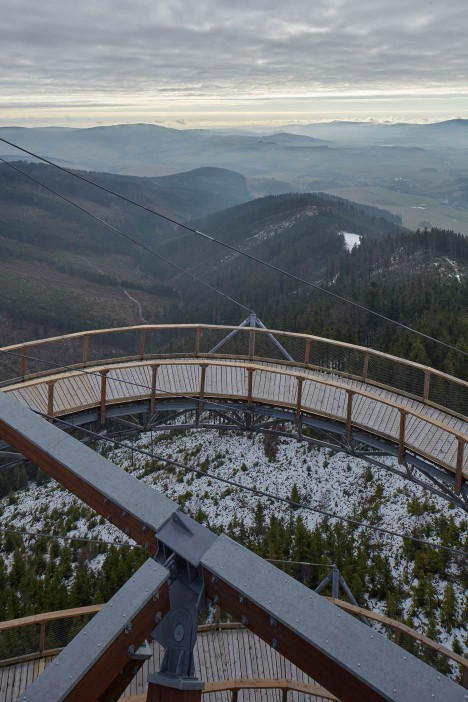
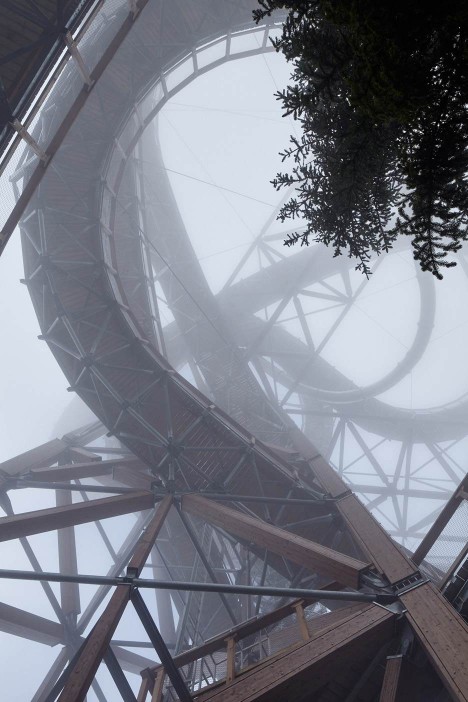
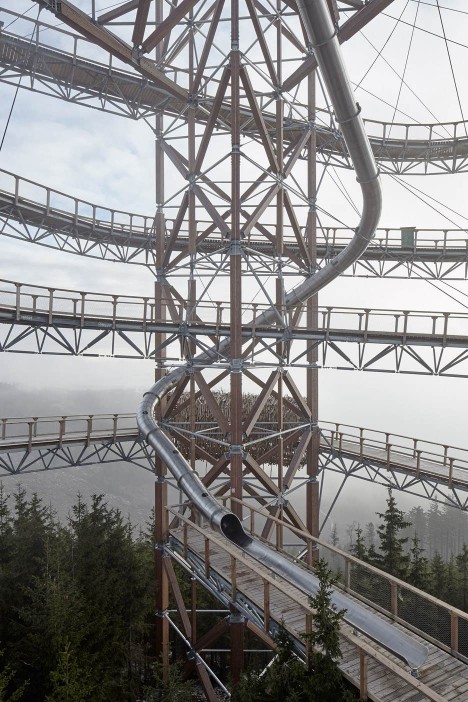
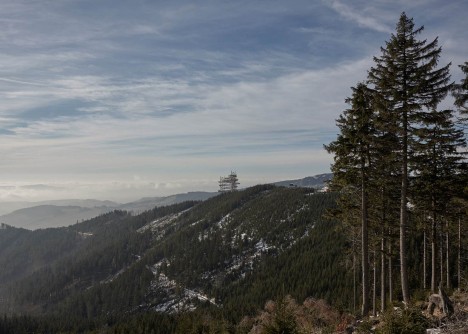
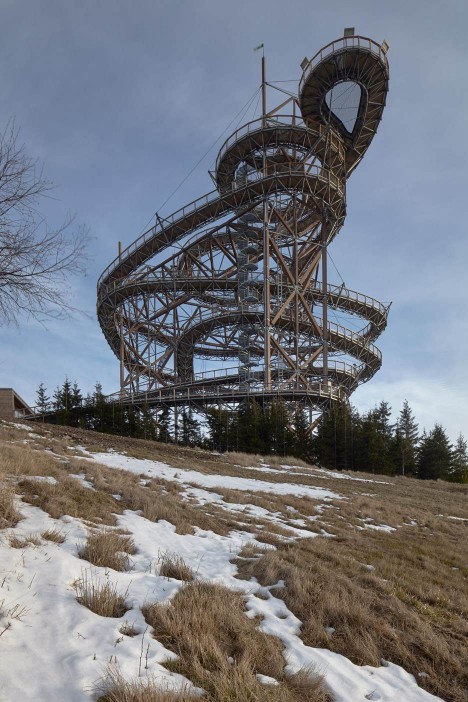
    After winding their way up a hundred-foot-tall pathway in the Czech Republic set atop a mountain peak (itself located over 3,000 feet above sea level), visitors are presented with two options: walk all the way back down, or take a ride on the slide that shoots back down through the center of the spiralling walkways on all sides.

    mountain spiral walkway

    mountain viewing net platform

    Another feature for daredevils comes in the form of netting suspended from a section along the top. Those who wish to can walk and lay on this mesh, experiencing whatever level of terror they can tolerate.

    mountain steel suspended wood

    mountain in fog

    Fránek Architects designed this massive wooden structure, dubbed Sky Walk and aimed at giving viewers a number of twists, turns and chances to find the perfect vista while they work their way up.

    mountain views below

    mountain path brave

    “It offers an endless amount of views, situations and moments where an indiscernible human being enters the depth and emerges on the outskirts of this natural structure,” said Fránek.

    mountain emergency exit

    mountain structural supports

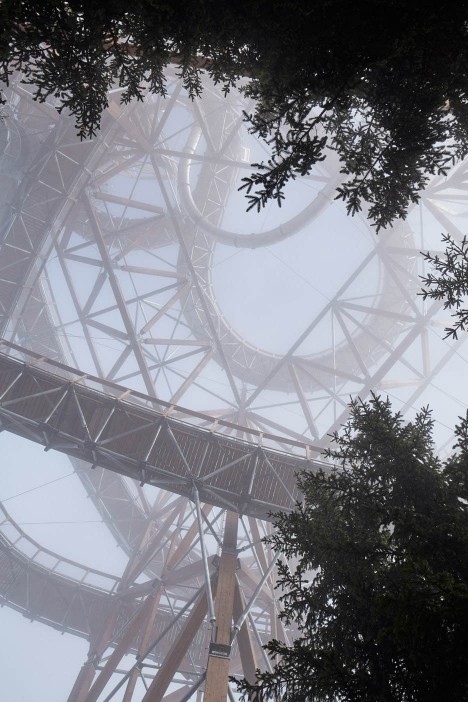
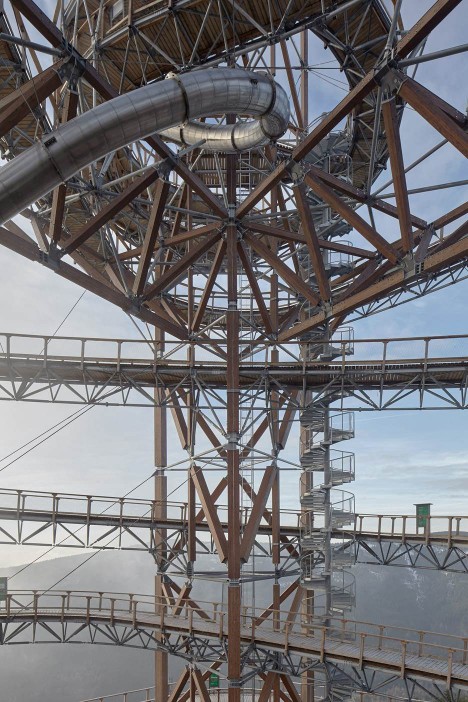
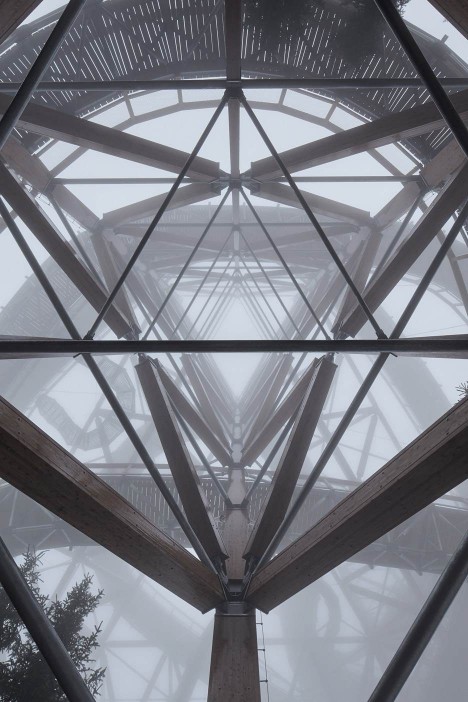
    The pathways are suspended from a central structural core made up of metal-joined wood trusses, forming a space frame that also supports the stainless steel slide more brave guests will opt to take for their return trip.

    mountain central truss frame

    Located as it is on top of a tall and exposed mountain, the structure is heavily reinforced throughout and tied to concrete footings buried deep in the ground. It also features an emergency spiral staircase down its center. Travelers can get to this wheel-accessible pedestrian viewing spiral via a chairlift at the foot of the mountain, near Dolni Morava.

    mountain architecture distance

    mountain side view

    “I don’t know of any other timber construction with steel elements of a similar size and purpose,” Fránek said. “There are constructions of a similar size but ours takes on an abstract form that suggests the flight of a nocturnal butterfly whose path is seemingly chaotic.”

    Share on Facebook


    [ By WebUrbanist in Destinations & Sights & Travel. ]

    [ WebUrbanist | Archives | Galleries | Privacy | TOS ]


    WebUrbanist

  • Happy Paddling in 2016 New Year!

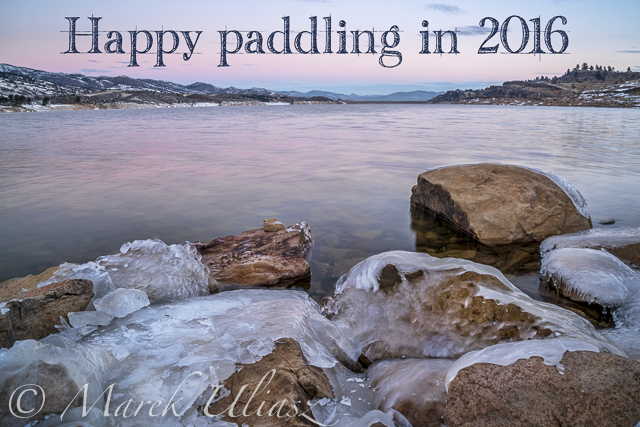
    Horsetooth Reservoir in winter

    Happy Paddling in New Year 2016!

    Happy New Year everybody! In the picture above: partially frozen Horsetooth Reservoir just before sunrise on December 29, 2015. Camera: Sony Alpha II with Sony/Zeiss FE 24-70mm lens on a tripod. That was a cold morning! During recent winter days in Colorado I am doing more hiking than paddling.


    paddling with a camera

  • The Tip Top Travel Topics of 2015

    Travel and photography often go hand in hand. We get bored shooting in our own neighborhood, city or even country, and we’re more likely to shoot more photos when we head out to a new place. The grass is always greener on the other side of the fence right?

    Caroline

    By Caroline

    Here are some of the top travel topics we had on dPS in the last 12 months:

    1. Video Share – Travel Photography Hacks and Gear Tips
    2. 10 Ways to Improve Your Travel Photography
    3. 7 Travel Photography Tips Your Tour Guide Won’t Tell You
    4. Travel Photography Tips – Photographing the Coast
    5. How to Tell Better Visual Stories with Travel Photography
    6. Safety Tips for Travel Photographers (Particularly Women)
    7. 8 Tips to Help You Come Home with Great Travel Photos
    8. 5 Reasons to Use Flash to Improve Your Travel Photography
    9. Simple Tips for Photographing Waterfalls
    10. 15 Tips for Protecting Your Images While Traveling
    11. The Camera Bag of a Professional Traveler
    12. Simple Tips to Improve Your Travel PortraitsHow to Become a Professional Travel Photographer – Two Paths
    13. Travel Photographers Workflow – At Home and on the Road

    Of course, remember that if travel isn’t in your plans or isn’t feasible for you right now – you can still apply many of the tips in the articles to photography you can do near home too! Check out these articles too:

    • How to Find Inspiration Photographing Locations Near Home
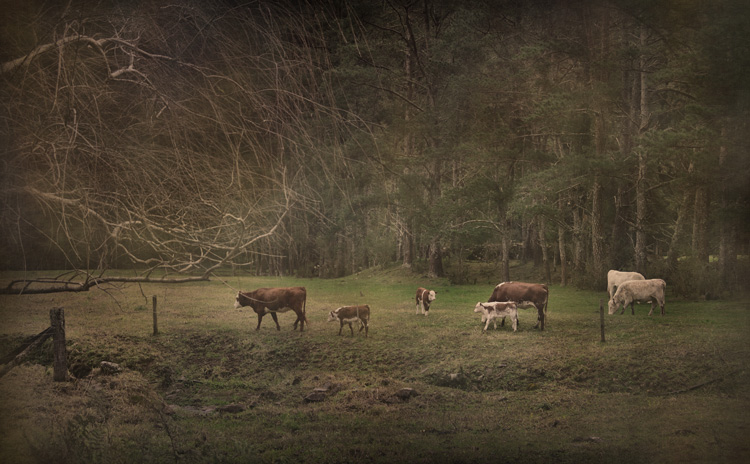
    • Put the Fun Back into Your Photography with a Cow Safari

    Fun-photography-safari-01


    googletag.cmd.push(function() {
    tablet_slots.push( googletag.defineSlot( “/1005424/_dPSv4_tab-all-article-bottom_(300×250)”, [300, 250], “pb-ad-78623” ).addService( googletag.pubads() ) ); } );

    googletag.cmd.push(function() {
    mobile_slots.push( googletag.defineSlot( “/1005424/_dPSv4_mob-all-article-bottom_(300×250)”, [300, 250], “pb-ad-78158” ).addService( googletag.pubads() ) ); } );

    The post The Tip Top Travel Topics of 2015 by Darlene Hildebrandt appeared first on Digital Photography School.


    Digital Photography School

  • Tokina announces ultra-wide 14-20mm F2 lens for Canon and Nikon crop sensor DSLRs

    Kenko Tokina has launched the Tokina AT-X 14-20mm F2 Pro DX lens for Canon and Nikon DSLRs with APS-C sensors. That’s equivalent to 21-30mm on Nikon bodies and 22-32mm on Canons.

    This ultra-wide zoom has a pair of super low dispersion elements in the back and a plastic aperhical element in the second group that promise to reduce flare and ghosting. It also sports nine aperture blades, a one-touch focus clutch mechanism and internal focusing.

    Pricing and availability have yet to be announced.


    Press release:

    Kenko Tokina Co., Ltd. is pleased to announce the new AT-X 14-20 F2 PRO DX

    Characteristics 

    The fast F2.0 Zoom lens of Tokina
    Since the maximum aperture of F2.0 is given this lens, it’s possible to support the low sensitivity photography used ISO64 and ISO100 setting. The maximum aperture of F2.0 shows its power for the photography using the blur feeling and photography with the low brightness (In the room, In the night). 

    Adopt highly precise Plastic Aspherical lens
    The 2nd lens group in this lens is adopted the plastic aspherical lens which improved surface accuracy, and is given antireflection coat. This lens is designed tough against ghost flare. 

    Arrange highly precise Glass molded Aspherical lens
    2 pieces of super low dispersion glass molded aspherical lens is located in the back goup of the lens, and various aberration are corrected by these lenses. 

    Compact Body and Excellent Operability
    Tokina’s exclusive One-touch Focus Clutch Mechanism allows the photographer to switch between AF/MF simply by sliding the focus ring, forward side for AF and back toward the camera for MF. This lens is designed as the fast aperture F2.0 in all focal range, but it is a compact body. This lens has a thread in the front frame, so it’s possible to attach filters of 82mm size. 

    The new Tokina AT-X 14-20 F2 PRO DX is an ultra-wide-angle zoom lens for the DX(APS-C) size, and has the maximum aperture of F2.0. 

    In low brightness situation, use it demonstrates its preeminent power. 

    Specifications 

    • Focus distance: 14 – 20 mm 
    • Brightness: F2.0 Canon 
    • Format : APS-C 
    • Minimum aperture: F22 
    • Lens configuration: 13 elements in 11 group 
    • Coating: Multilayer film coating 
    • Angle of view: 91.68° ~ 71.78° 
    • Filter size: 82mm 
    • Shortest Object Distance: 0.28m 
    • Macro maximum magnification: 1:8.36 
    • Focus method: Internal focus 
    • Number of Aperture blades: 9 
    • Maximum diameter: 89.0 mm 
    • Full length: 106.0 mm 
    • Weight: 725 g 
    • Hood (Attached) : BH-823 

    Above mentioned specifications are for a Nikon mount. 


    Tokina AT-X 14-20mm F2 Pro DX specifications

    Principal specifications
    Lens type Zoom lens
    Max Format size APS-C / DX
    Focal length 14–20 mm
    Image stabilisation No
    Lens mount Canon EF, Nikon F (DX)
    Aperture
    Maximum aperture F2.0
    Minimum aperture F22.0
    Aperture ring No
    Number of diaphragm blades 9
    Optics
    Elements 13
    Groups 11
    Special elements / coatings 2 super low dispersion + multilayer film coating
    Focus
    Minimum focus 0.28 m (11.02″)
    Maximum magnification 0.12×
    Autofocus Yes
    Full time manual Yes
    Focus method Internal
    Distance scale Yes
    DoF scale No
    Physical
    Weight 725 g (1.60 lb)
    Diameter 89 mm (3.5″)
    Length 106 mm (4.17″)
    Sealing No
    Colour Black
    Zoom method Rotary (internal)
    Zoom lock No
    Filter thread 82.0 mm
    Hood supplied Yes
    Hood product code BH-823
    Tripod collar No

    Articles: Digital Photography Review (dpreview.com)

  • PIX 2015: Josh Trujillo on the power of photography

    Professional photojournalist Josh Trujillo has been published in almost every major US newspaper and magazine, including the front page of the New York Times and full-page features in People Magazine and Sports Illustrated. Join him for an insightful look at the world through the eyes of a photojournalist.

    Articles: Digital Photography Review (dpreview.com)

  • Happy New Year 2016 from dPS

    Randy Tan Travelogue

    By Randy Tan Travelogue

    Well it’s been a fantastic year here at dPS, we hope you’ve had a good one too.

    The New Year is upon us and it’s a time to reflect on the past 12 months, and look forward to the next 12.

    So I’m curious, do you make goals for the new year? I’m not into making resolutions myself, I think they’re often too shallow, and most people make rash ones, that they don’t keep more than a few days. The reason is they don’t have a plan to go with them.

    Goal + A plan of Action = Success

    So tell me, in the comments below:

    • What are your photography goals for 2016?
    • What will you do (action plan) to move yourself closer to achieving them?

    My own personal goals this year are around balance and fitness/health. So I’ve already joined a gym and have started going three times a week or more. For my photography goals, my big one is (I’m putting this out there so I actually do it and you guys can hold me to it):

    • GOAL: Make a book of my Grandmother’s images (have had the photos for two years) to give to her and my family members (she’s 96 and want to do this while she’s still here and has eyesight, which is failing her).
    • ACTION PLAN: Take 30 minutes each week to work on this project (cull images, edit them in Lightroom, and design and order the Blurb book).

    Okay, it’s your turn. What is your one big goal and your action plan?

    William Cho

    By William Cho

    PS – a future goal is to spend New Year’s in Singapore (I’ve been there over Christmas but didn’t quite make it to the 31st). Sure looks like they have an amazing fireworks display based on the two images above!

    googletag.cmd.push(function() {
    tablet_slots.push( googletag.defineSlot( “/1005424/_dPSv4_tab-all-article-bottom_(300×250)”, [300, 250], “pb-ad-78623” ).addService( googletag.pubads() ) ); } );

    googletag.cmd.push(function() {
    mobile_slots.push( googletag.defineSlot( “/1005424/_dPSv4_mob-all-article-bottom_(300×250)”, [300, 250], “pb-ad-78158” ).addService( googletag.pubads() ) ); } );

    The post Happy New Year 2016 from dPS by Darlene Hildebrandt appeared first on Digital Photography School.


    Digital Photography School