Blog

  • Extremely dramatic video touts Canon’s CMOS technology

    No doubt, Canon’s CMOS sensors are capable of capturing some amazing low light video footage. And it’s true that Canon cameras can create usable footage in literal darkness. But this new video from Canon… maybe takes it all a bit too seriously. Here’s a glance at what the script (probably) looks like:

    [Title: Moonbow / a rainbow born of moonlight]

    [Scene opens with a dramatic time-lapse sunset over a mountain. Cue the strings.]

    [Narrator, in very Movie Trailer Guy voice]: Have you ever seen a rainbow… in the light of the moon?

    That’s just the first ten seconds. Do yourself a favor and watch the full 4+ minutes to enjoy the full effect of the soaring music, dramatic CGI models and lines like ‘By uncovering an unseen world, Canon CMOS sensors contribute to the creation of a prosperous society.’

    In all seriousness, the CMOS technology Canon references does push the envelop for extreme low light shooters. Take a look at how one filmmaker uses the ME20F-SH to record video of a meteor shower.

    Articles: Digital Photography Review (dpreview.com)

  • 6 Tips for Shooting Long Exposure Night Photographs

    In this article I am going to share with you six tips that I have found to produce amazing long exposure night photographs. I have learned the hard way by making every mistake possible and through that finding what really does work.

    So here are the 6 tips to make your long exposure photographs at night:

    6 Tips for Shooting Long Exposures at Night

    Tip #1: Try to avoid using a Neutral Density filter

    On this photo (below) I did a 25 second exposure. That is quite a long exposure and to help prevent it from blowing out, I took the photo right at the end of sunset. There was less light, so that I didn’t have to put an ND Filter on.

    6 Tips for Shooting Long Exposures at Night

    If you put an ND filter on it is going to give you a color cast during long exposures. Yes you can use a polarizer, but avoid Neutral Density filters. Shoot when the sun is going down and keep your camera at a low ISO like 100 or 200. Don’t get me wrong, I love ND filters but not at night.

    Tip #2: The best time for long exposures is 25 seconds

    I know that’s a bold statement. Not as bold as stating that French food is the best in the world, but still a bold statement. Here is why I recommend this; I’ve found that when I shoot at 25 seconds it makes the water silky and the clouds stretchy and this has a beautiful look that sells well. Obviously it’s also an artistic choice, but as a photographer you likely want people to buy your photos. The best indicator that people like your photos is that they buy them.

    Here is an example:

    6 Tips for Shooting Long Exposures at Night

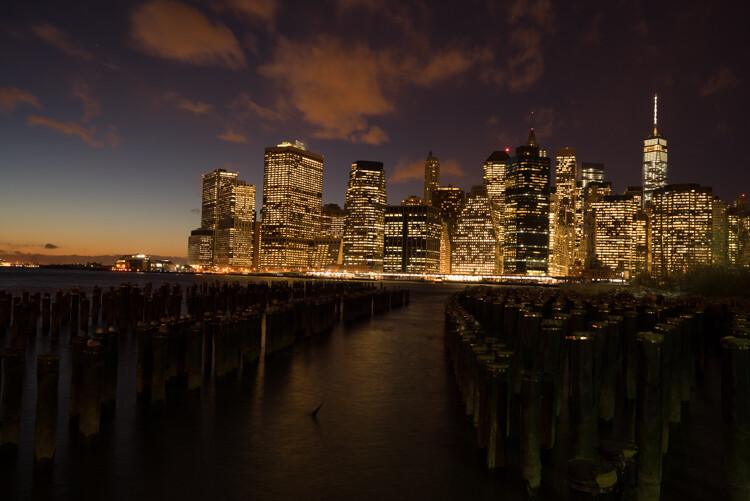
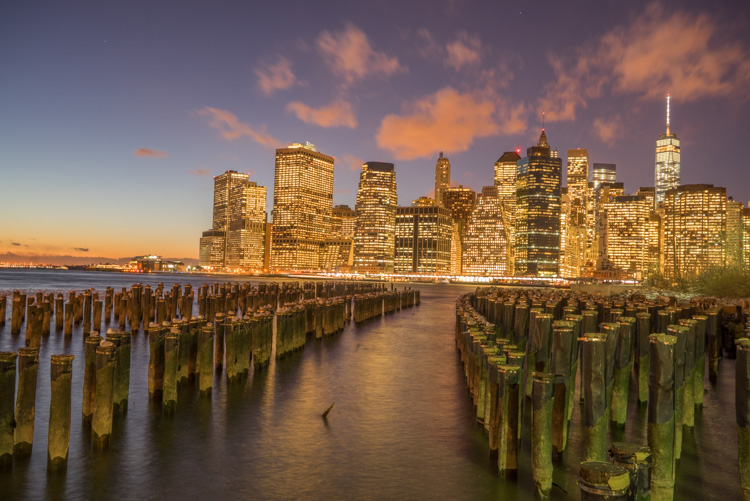
    First I started with a 6 second exposure.

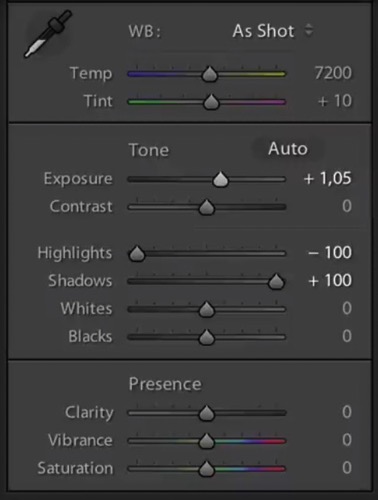
    Now, in taking the photo I exposed the image for the highlights. So when you open up the shadows, bring down the highlights, and boost the exposure a little bit like so:

    6 Tips for Shooting Long Exposure Night Photographs

    I do have all the details of the photo, but the only problem is that the clouds were not moving and the water is not silky.

    6 Tips for Shooting Long Exposure Night Photographs

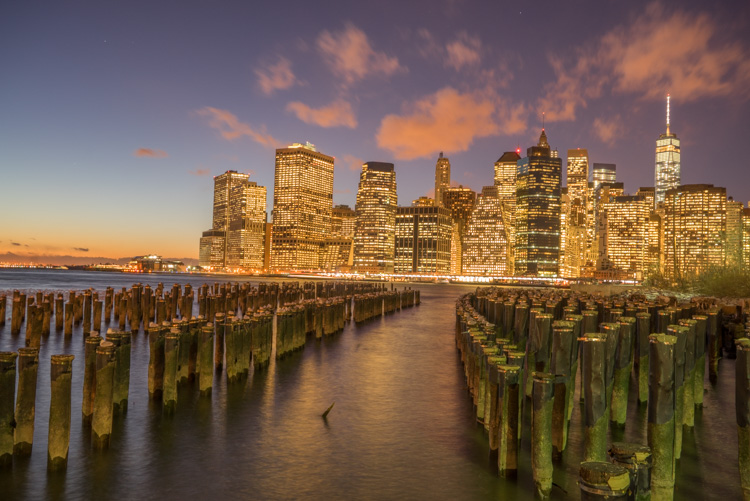
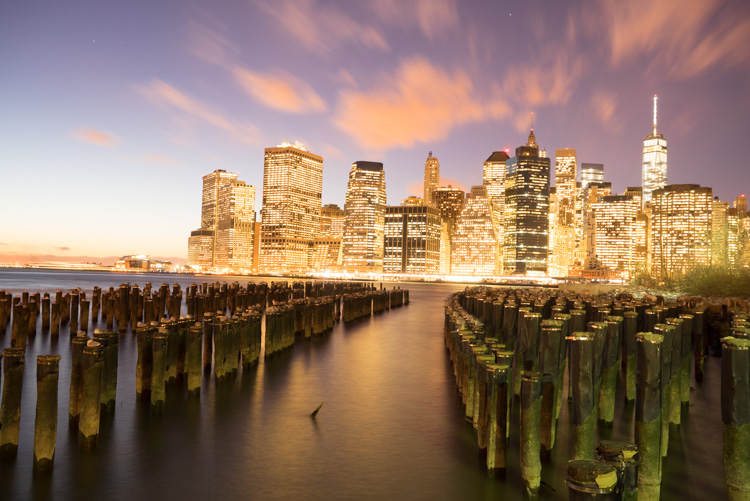
    So I went ahead and put the exposure time to 25 seconds. Now it does seem like the highlights in the photos are a little burnt, but I have found that on city lights it doesn’t really matter that much because it still works great on a print.

    To conclude; 25 seconds is the best long exposure, you don’t even need a remote, you just need to put your camera on the 2-second timer and go into manual shooting mode, use a low ISO, and an aperture that is going to work like f/7 or f/8.

    If your photo is too bright you can adjust the aperture to f/14 and if it is too dark you can even put your aperture to f/4. Just make sure you check your focus to ensure the background is sharp.

    Tip #3: Try different exposures of the same scene

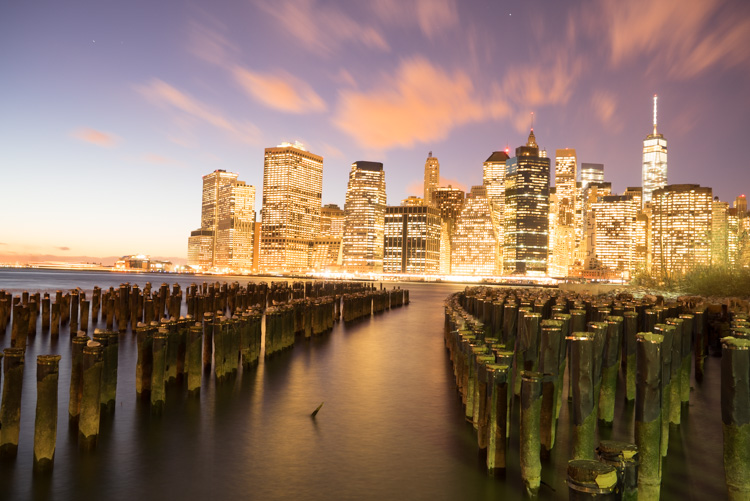
    Even though I said that 25 seconds exposure is the best, it’s always good to shoot different exposures because this may be different for your situation. For example, I thought that this first image was my go-to photo.

    6 Tips for Shooting Long Exposure Night Photographs

    But in the end the one that I am going to retouch and going to send to the gallery is this one.

    6 Tips for Shooting Long Exposure Night Photographs

    So you already have your camera setup and on a tripod. Go ahead and try 8 seconds, 15 seconds, 25 seconds all without touching the tripod and then when you are evaluating your photos for retouching you will have several options.

    Tip #4: Shoot towards the sun

    When you are doing a long exposure without an ND filter (so as to avoid the color cast, tip #1), a good thing to do is to shoot toward the sun. When it is behind the horizon line it will always give you a nice sky with lots of color and gradations.

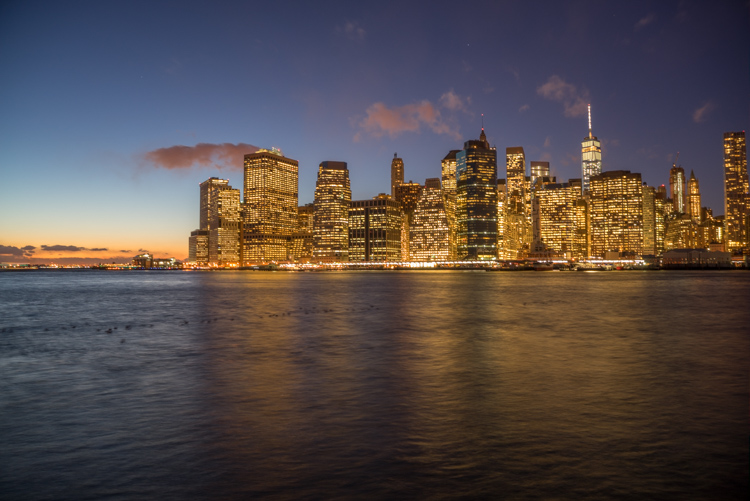
    You can see on this photo that the sun is setting on the left.

    6 Tips for Shooting Long Exposure Night Photographs

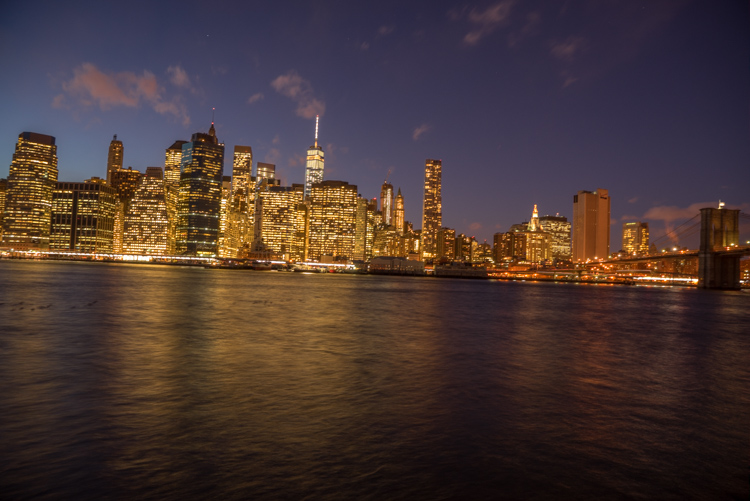
    And as I turn the camera more away from the sun and back towards the city you get this view.

    6 Tips for Shooting Long Exposure Night Photographs

    You can see that we get less and less details in the sky. But if you shoot where the sun sets you will always have great details even after sunset, and it is the right time for these type of photos.

    Tip #5: Make sure you have water and the sky in your photo

    Those are two important things for a long exposure which help to really elevate your photos into what I like to call miracle photos.

    Tip #6: Try to get the clouds coming towards you

    You can study meteorological information to get a sense of which direction the clouds are moving and try to position your shot accordingly. There are even a few apps which great for this.

    As I said, this is not always easy but I got lucky on this one. The clouds are going to be stretchy and create leading lines and that help make this photo really interesting.

    6 Tips for Shooting Long Exposure Night Photographs

    I hope this helped you and you will be able to capture beautiful places at the perfect time. Please share your long exposure night photos in the comments below.

    ** NOTE ** If you’d like to know more about this subject, learn more about my brand new course on night photography here, so you can take stunning night photos too!

    googletag.cmd.push(function() {
    tablet_slots.push( googletag.defineSlot( “/1005424/_dPSv4_tab-all-article-bottom_(300×250)”, [300, 250], “pb-ad-78623” ).addService( googletag.pubads() ) ); } );

    googletag.cmd.push(function() {
    mobile_slots.push( googletag.defineSlot( “/1005424/_dPSv4_mob-all-article-bottom_(300×250)”, [300, 250], “pb-ad-78158” ).addService( googletag.pubads() ) ); } );

    The post 6 Tips for Shooting Long Exposure Night Photographs by Serge Ramelli appeared first on Digital Photography School.


    Digital Photography School

  • 5 Simple Techniques for Leading the Viewer’s Eye in Your Images

    As photographers, it’s easy for us to make conscious composition choices that allow us to balance our photographs or to create harmony within them. It’s is more difficult however to try and lead viewers through your photographs. We rarely consider how to influence the viewers of our photographs. When composing images, we don’t think about the different elements in our images and the order by which we want viewers to see those elements.

    This is a common tactic in classic painting, but not used readily by photographers. The reality is it’s hard to influence viewers and to dictate the ways in which they view our photographs.

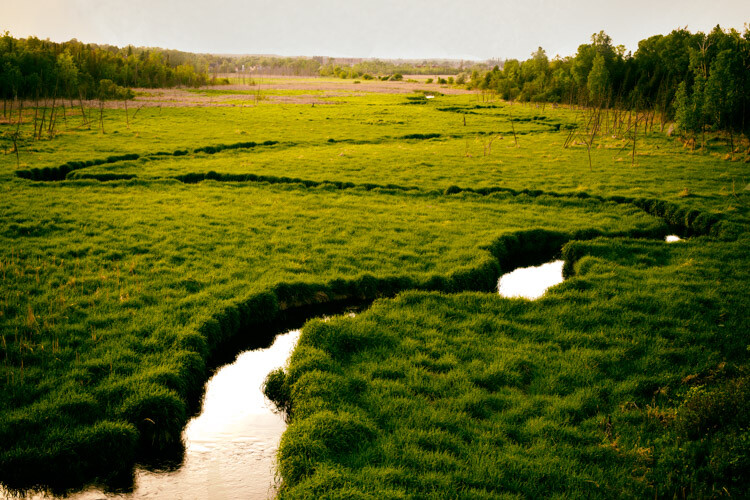
    The lines of the creek lead the viewer’s eye through and into the image.

    In many cases, the subject matter we are shooting just happens too fast for us to consciously compose images with the intention of leading the viewer through our photographs. It’s much easier to lead the eye through images we construct like still life or landscape photos. In the case of sports photography, this would only happen by sheer luck or happy accident. But when you have the opportunity, think about using techniques that lead viewers to specific parts of your images.

    #1 – Use a brightness gradient

    One of my favorite techniques for leading the eye is to use a brightness gradient. The human eye is drawn to the brighter elements, and if you position an area of brightness within your image, the eye will be drawn to that location.

    It is important, however, to remember that the key to this technique is to use a gradient of brightness. Small bright areas amidst darker tones will not achieve the same kind of effect. The idea is to make the progression of highlights subtle, like a path through your image. Of course, this technique will not be possible in all situations but if it’s available considering using this method.

    5 Simple Techniques for Leading the Viewer's Eye in Your Images

    Shot from a kayak during sunrise I wasn’t intending to shoot this image with a brightness gradient. Instead, it’s a happy accident.

    #2 – Linear perspective

    When using a wide angle lens, you can consciously create linear perspective within images. This technique might be one of the more easily attainable methods of leading the eye. The wide angle lens will exaggerate lines and lead the eye fairly directly through the photograph. You can compose your photographs in such a way that buildings or other architectural features draw viewers through your photograph.

    5 Simple Techniques for Leading the Viewer's Eye in Your Images

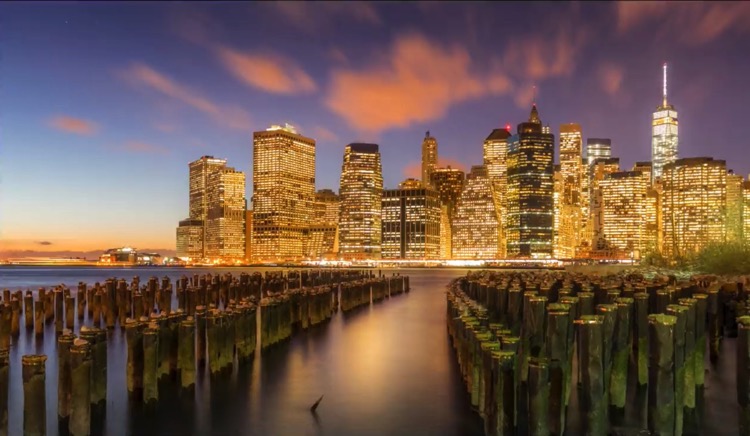
    The line of lights and the line of buildings lead the eye through the photo. The viewer should be stopped by the bright spots of light within the image but then continue on through the rest of the photograph.

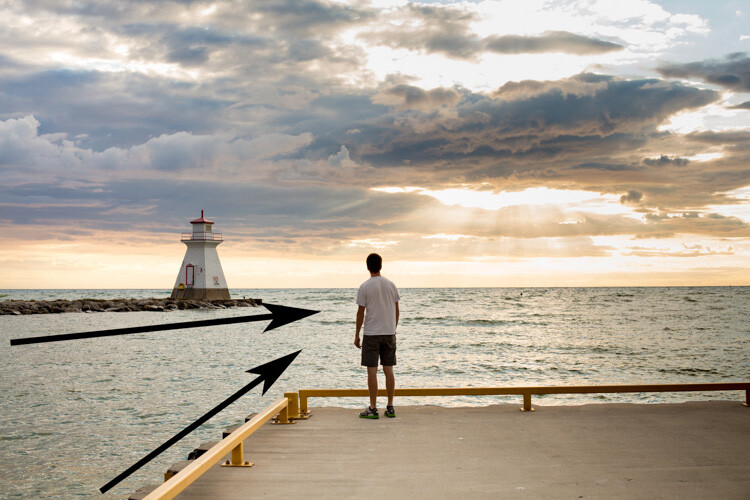
    I’ve added some arrows to this image so you can see how the lines of the pier point the viewer into the photograph. The teenager in the image is a second way of directing the eye as he stops to view the sunset.


    #3 – Use shafts of light

    Using shafts of light is another technique for pointing viewers in the right direction. The conditions are very specific, and shafts of light are not always readily available, but they can be a useful tool for pointing out specific directions or objects within a photograph.

    The photograph below was taken by my son. His plan when composing was to have the ray of light point towards the people. I must admit I didn’t think of composing in such a manner and when I asked him later he said it was “the natural choice”. Since that time I’ve made conscious decisions to look for and incorporate rays of light into my images.

    5 Simple Techniques for Leading the Viewer's Eye in Your Images

    There’s a fairly strong lens flare in this image but my son made a conscious choice in how he composed his photograph and I’m proud of him for his decisions.

    #4 – Use a blur gradient

    Using a blur gradient (shallow depth of field) is another method of leading the eye. I will admit that I don’t use this technique much. I even struggled to find images to use as examples for the article. Part of my reasoning is that I hope I will now be forced to experiment more with this technique.

    Using a focus gradient can lead the eye to the important elements of the photograph. Setting up a shot in which the foreground is blurred and slowly recedes through the image to the point of sharp focus will draw viewers to specific objects within the frame.

    I used a fairly large aperture here and while the blur gradient isn’t as obvious it is still present in the image.

    #5 – Use more than one technique

    You can also combine these techniques to help influence eye movement throughout your images. In these two images, the eye moves through the image the light gradient is the most obvious technique but lines of architecture within the building help to draw the viewer down the tunnel. The lights hanging at the top of the image are an obvious line that directs the eye.

    Similarly, this image of the couple walking through the image adds to the movement within the photograph. The lines of the path reinforce the direction the viewer should take within the image.

    Shot at a provincial park this image combines elements like linear perspective and vectors.

    Conclusion

    Leading the eye through a photograph is not an exact science. You can’t force viewers to follow the path you set for them. Each person approaches the artwork in different ways. If your use some of the techniques outlined here, it will help you to create compelling compositions. The more thought and purpose we put into creating our images the better they will be. While there may not always be time to use these techniques, it’s always handy to keep them in the back of your mind and use them when the time is right.

    The more thought and purpose you put into creating your images the better they will be. While there may not always be time to use these techniques, it’s handy to keep them in the back of your mind and use them when the time is right.

    The eye-leading techniques used in this image are a little harder to spot. I used the lines of the barrels and rays of light to direct the viewer’s eye into the center of the image.

    googletag.cmd.push(function() {
    tablet_slots.push( googletag.defineSlot( “/1005424/_dPSv4_tab-all-article-bottom_(300×250)”, [300, 250], “pb-ad-78623” ).addService( googletag.pubads() ) ); } );

    googletag.cmd.push(function() {
    mobile_slots.push( googletag.defineSlot( “/1005424/_dPSv4_mob-all-article-bottom_(300×250)”, [300, 250], “pb-ad-78158” ).addService( googletag.pubads() ) ); } );

    The post 5 Simple Techniques for Leading the Viewer’s Eye in Your Images by Erin Fitzgibbon appeared first on Digital Photography School.


    Digital Photography School

  • The People’s Fridge: Free Excess Food for Anyone Who Needs It

    [ By SA Rogers in Destinations & Sights & Travel. ]

    people's fridge

    Considering that the United Kingdom leads the European Union in food waste at over 15 million tons per year, spreading the concept of free community refrigerators could make a huge impact. Households in the UK toss out an average of 24 edible meals every month, and those figures are even worse in the United States, where about 40 percent of all food goes to waste. One project in London aims to prove just how powerful diverting that waste could be with ‘The People’s Fridge,’ where anyone can donate food or take what they need.

    people's fridge 2

    Located in Brixton, South London and open to the public, The People’s Fridge is run by a group of volunteers aiming to help tackle food poverty and cut food waste all at once. The crowdfunded project joins similar campaigns launched in Spain, Germany and India as well as other cities in the UK.

    The folks running the project have a few simple rules to keep things fresh and manageable: offer prepared and cooked foods from certified businesses only as well as fruits, vegetables, bread and unopened packaged foods. Homemade foods, raw meat and seafood and opened milk are not allowed to prevent issues with spoilage and ensure that all ingredients are known.

    So far, photos of the fridge on the project’s Twitter show the shelves brimming with fresh produce, beverages, sandwiches, cake and other treats. Employees at Pop Brixton, the venue where the fridge is located, clean and organize the contents daily.

    “We want more people to be talking about cutting food waste!” says Olivia Haughton, a member of The People’s Fridge team. “In the process of saving food from the bin we provide a source of fresh food for anyone who needs it. The fridge works really simply. People with food to donate can bring it at any time during the day. All they have to do is fill in a quick register of what they’re donating and when, then anyone can come and help themselves. There is no policing of who benefits from the fridge, all we ask is that people don’t take food if they suffer from any food allergies and that they sign the food out of the fridge when they take it.”

    Share on Facebook


    [ By SA Rogers in Destinations & Sights & Travel. ]

    [ WebUrbanist | Archives | Galleries | Privacy | TOS ]


    WebUrbanist

  • Fancy is a pocketable smartphone gimbal

    Smartphone stabilizers are a great tool for capturing professional-looking video footage on your mobile device and are getting more powerful with every new generation. However, most current models have one thing in common: they are not really pocketable, making them more of a dedicated tool for serious video shooters rather than an everyday item for the average consumer. 

    The Fancy Stabilizer is now out to change this. It is an electronic smartphone gimbal that takes up less space than the smartphone it is attached to. The makers of the Fancy, Chinese company Wewow, is currently running an Indiegogo campaign to fund the production of the device and claims it is the currently smallest and lightest smartphone gimbal on the market.

    With just 43.5mm (1.7 in) wide, about 118mm (4.4 in) tall and 23mm (0.9 in) thick in its folded state, the Fancy Stabilizer easily fits in any small bag or even jacket pocket when not in use. It weighs just 180 grams. The phone is attached via an adjustable clip and an electronic stabilization system keeps your smartphone steady while walking or otherwise moving. Thanks to a standard tripod mount the device can also be attached to selfie sticks or most other types of camera support. 

    In addition, Fancy comes with a LED light for added illumination and a small selfie mirror on the back. The built-in battery provides energy for eight hours of stabilization or alternatively can charge your smartphone. If this all sounds interesting to you, you can now reserve a Fancy Stabilizer for $ 89 on Indiegogo. The retail price is expected to be $ 128.

    Articles: Digital Photography Review (dpreview.com)

  • Canon EOS-1D X Mark II firmware updated to version 1.1.3

    Canon has released firmware version 1.1.3 for the Canon EOS-1D X Mark II DSLR. The latest firmware version is a relatively small update, bringing a bug fix that corrects an issue displaying the drive mode icon, as well as improving USB communication reliability with a function in EOS Utility 3 and increasing the maximum ‘release cycles’ number displayed in the ‘Camera system information’ menu.

    The latest firmware is available to download for macOS and Windows via Canon’s support website.  The full change log is below.

    Changes in the Firmware

    Firmware Version 1.1.3 incorporates the following improvements to enhance functions.

    • Corrects a phenomenon in which the drive mode icon is not correctly displayed when using custom shooting modes (C1/C2/C3).
    • Changes the maximum number of “Release cycles” displayed from 1,000,000 cycles to 9,999,000 cycles. This value can be checked under the “Camera system information” menu.
    • Improves the reliability of communication via USB cable when using the Lens Data Registration function within EOS Utility 3 software.

    The Version 1.1.3 firmware being released at this time is for cameras with Firmware Version 1.1.2 or earlier. If the camera’s firmware is already Version 1.1.3, it is not necessary to update the firmware.

    When updating the firmware of your camera, please first go over the instructions thoroughly before you download the firmware. The firmware update takes approximately six minutes.

    Note:

    • (1) Once the EOS-1D X Mark II is updated to Version 1.1.2 (or later), it cannot be restored to a previous firmware version (Version 1.0.0 to 1.0.2).
    • (2) Camera settings files created using a camera running Firmware Version 1.0.2 (or earlier) cannot be used on a camera running Firmware Version 1.1.2 (or later).
    • (3) Please use the latest EOS Utility version with the EOS-1D X Mark II after the camera has been updated to Firmware Version 1.1.2 (or later). The latest version of EOS Utility can be downloaded from Canon’s Web site.
    • (4) Accompanying functional improvements of Firmware Version 1.1.2 (or later), the instructional manual has been revised. The latest version of the instruction manual can be downloaded from Canon’s Web site, so please download the instruction manual together with the new firmware.

    Via: Canon Rumors

    Articles: Digital Photography Review (dpreview.com)

  • Leica tweaks handling of its new M10 with firmware 1.3.4.0

    Leica has introduced new firmware for its latest M series digital rangefinder that aims to improve a number of aspects of the camera’s handling and operation. Firmware version 1.3.4.0 is said to reduce the duration of the black-out time between frames when using the M10 in Live View mode so the camera is ready to shoot again more quickly.

    The new firmware also makes scrolling through the menu system quicker as users can now press the Menu button again to shift from page to page. The Favourites Menu has been expanded by one item to allow up to 15 oft-used features to sit there, and this menu will now divided into two pages when more than seven items are consigned to it.

    Photographers making use of the optional Visoflex EVF can now have the camera automatically preview just-captured images there instead of only on the rear screen, and the battery and SD card status bars are now color-coded – from green to yellow to red – to give users an idea of remaining capacity.

    For more information see the Leica website and the support download section.

    Press release

    Firmware update now available for the Leica M10

    Leica Camera has released a firmware update for the Leica M10, downloadable from the Leica web site from today.

    Firmware version 1.3.4.0 adds numerous improvements to the camera’s handling. These include optimised colour-coding of the status bar for SD memory cards and battery level, which now change from green to yellow to red as the battery charge level reduces or the card becomes full.

    The ‘Favourites Menu’ has also been revised: up to 15 menu entries can now be created and a second Favourites page opens after adding more than seven entries. Furthermore, with this update, M10 owners have even faster access to the main menu – it can now be opened by pressing the Menu button in the Favourites Menu. The same button can also be used for page-by-page scrolling.

    An additional new feature enables the selection of the target display for automatic review on the monitor screen. The menu entry now offers the alternatives ‘Auto’, ‘EVF’ or ‘Display’ as target options, while ‘Edit Favourites’ allows the activation of direct access to ‘M-ISO’ as a Favourites Menu item. The firmware update also brings a further significant reduction in the lag (dark screen) between exposure and display when taking pictures in Live View mode.

    Articles: Digital Photography Review (dpreview.com)

  • Worlds Under Glass: 33 Miniature Cities & Architectural Sculptures

    [ By SA Rogers in Art & Sculpture & Craft. ]

    thomas doyle 7

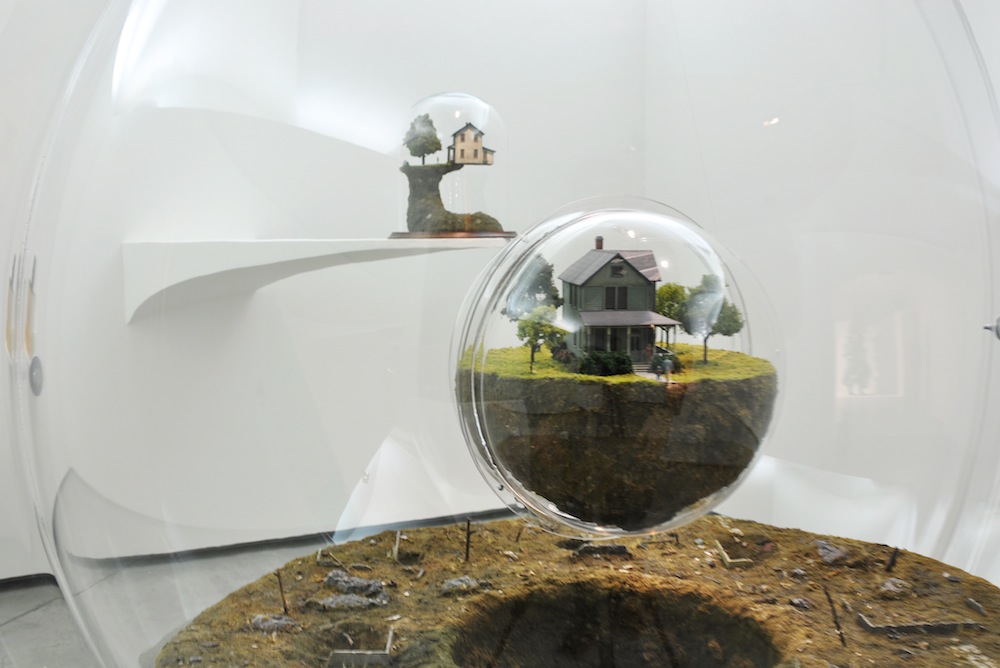
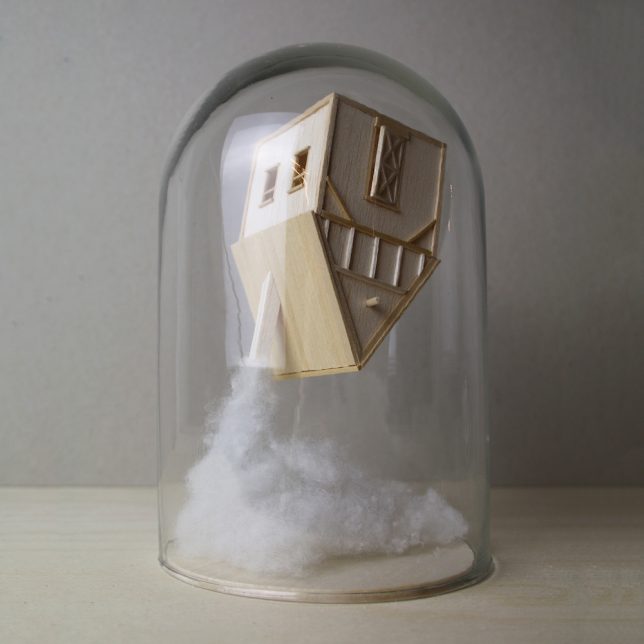
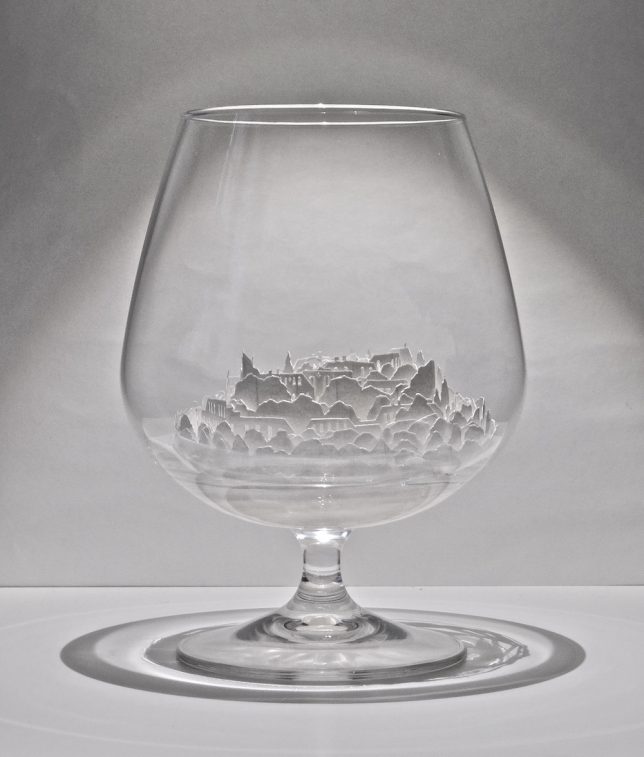
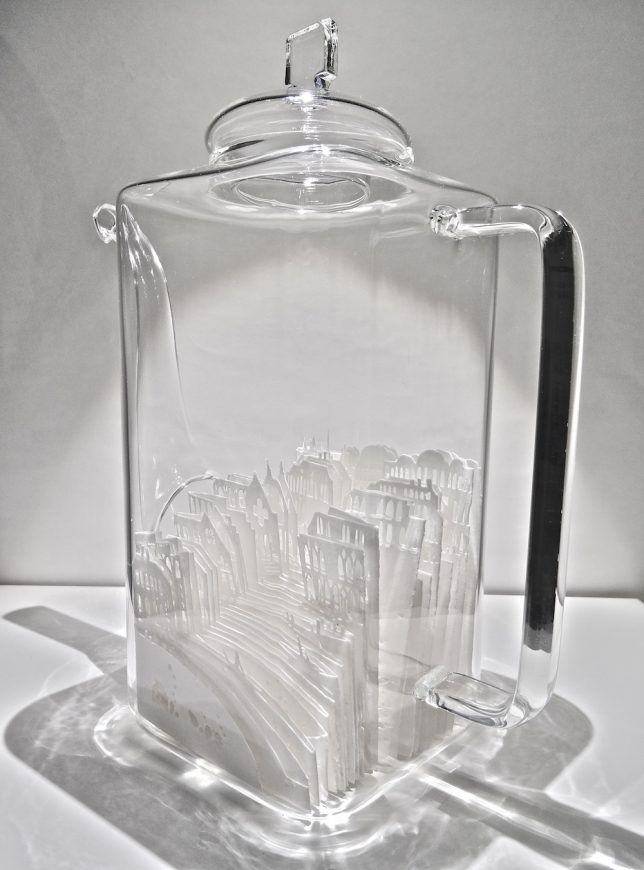
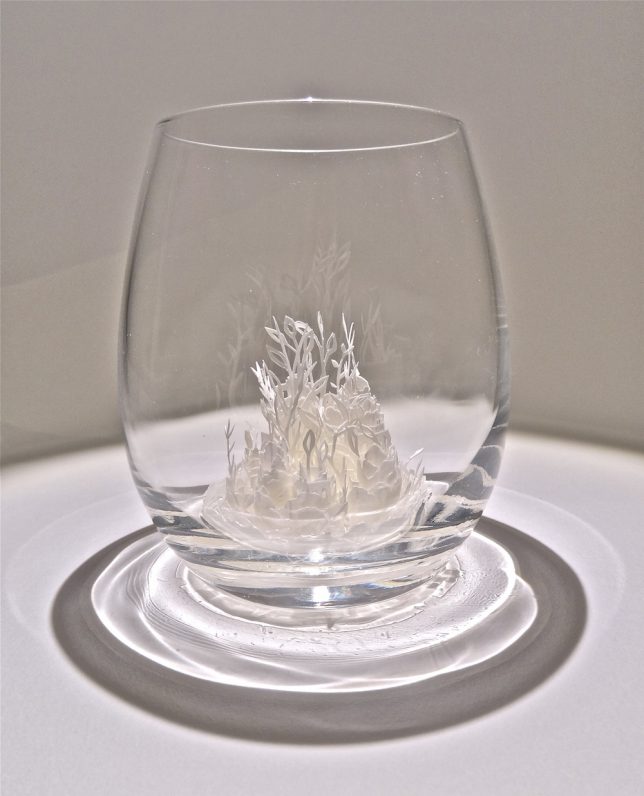
    Sheltered by glass vessels like tiny self-contained biomes, these miniature buildings and cities seem to have their own atmospheres and variable gravity, with houses teetering on the edges of cliffs or springing out of clouds in the sky. Artists craft small-scale structures from balsa wood, paper, cardboard and other materials and house them under domes, bottles, teapots and Victorian terrariums.

    Balsa Wood Architecture by Vera van Wolferen

    wolferen 1

    wolferen 2

    wolferen 3

    wolferen 4

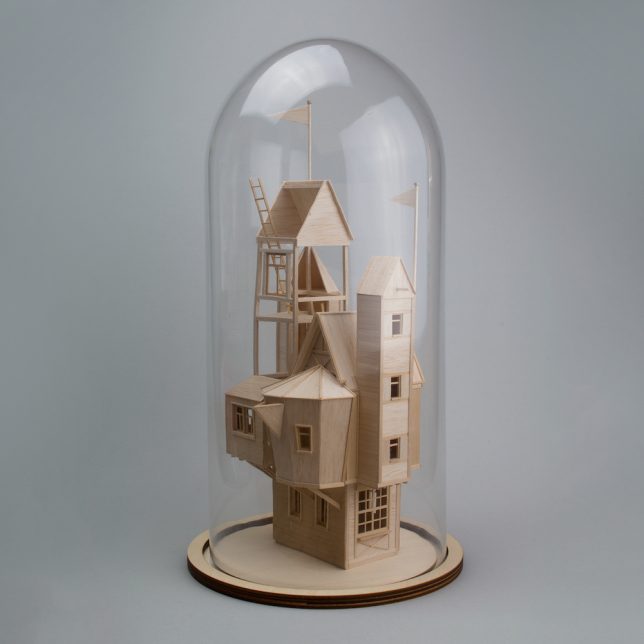
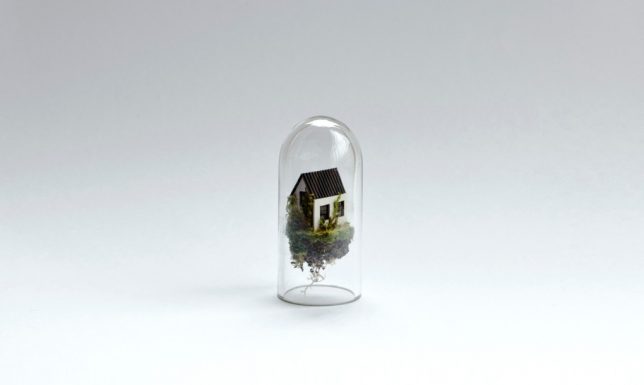
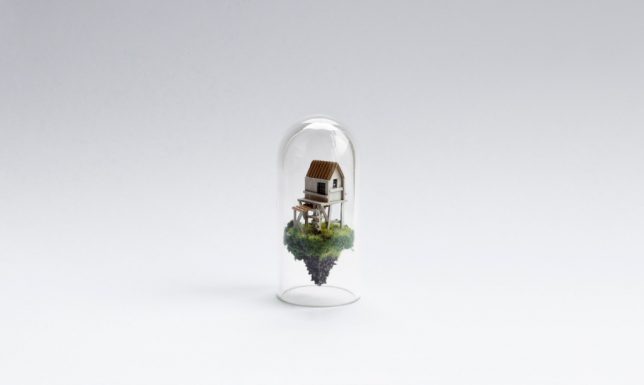
    Often incorporated into animations, Vera van Wolferen’s tiny balsa wood structures can also be structures telling their own stories. A recent series of structures perches tiny dwellings on stilts or stretches them several stories into the ‘sky’ beneath a glass dome, often emerging from cotton ‘clouds.’

    Paper Cities by Ayumi Shibata

    ayumi shibata 1

    ayumi shibata 2

    ayumi shibata 3

    ayumi shibata 4

    Slivers of two-dimensional cities and landscapes curl around each other within glass vessels in rosebud-like arrangements or stack up into faux hillsides to create a three-dimensional whole in these works by Ayumi Shibata. The artist uses traditional Japanese paper cutting techniques, noting that the Japanese word for ‘paper’ is ‘Kami,’ which can also mean ‘god,’ ‘spirit’ or ‘divinity.’

    “Kami move freely beyond time, universe and places, appearing during events, as well as in our houses and our bodies,” she says. “These spirits also dwell in paper. In the religion of Shinto, white paper is considered a sacred material.”

    Micro Matter by Rosa de Jong

    rosa de jong 1

    rosa de jong 2

    rosa de jong 3

    rosa de jong 4

    rosa de jong 5

    rosa de jong 6

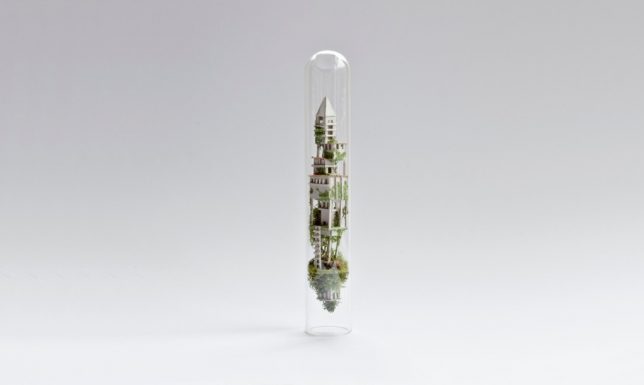
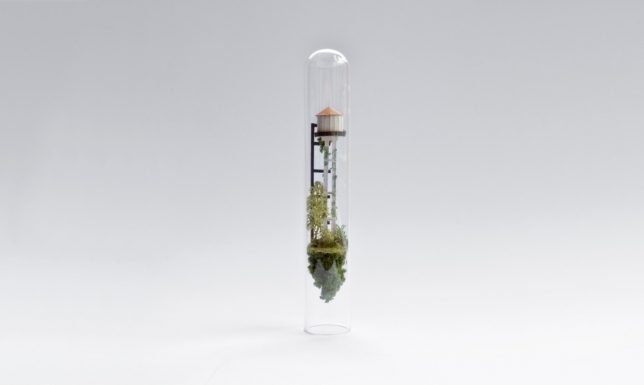
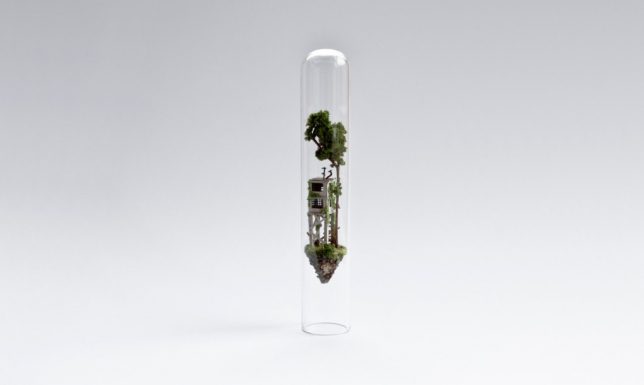
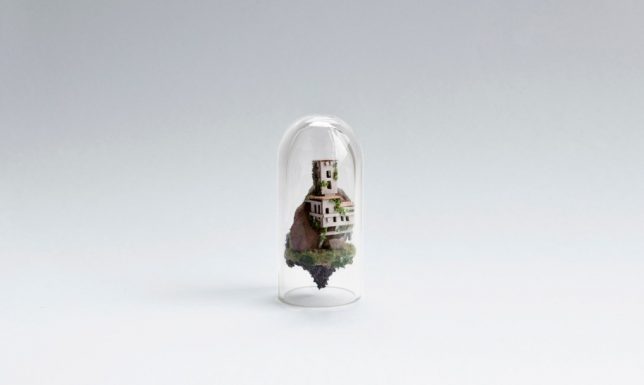
    Enclosed within glass domes or test tubes, Rosa de Jong’s ‘Micro Matter’ sculptures bring unfathomably small worlds to life, each one seemingly floating in its own low-gravity atmosphere. The works often feature dilapidated homes, farm buildings, mines and construction sites, exploring the ways in which built environments interact with nature. The sculptures are created in a way that’s similar to building a ship in a bottle, snugly inserting the pieces to fit their vessels just right.

    Next Page – Click Below to Read More:
    Worlds Under Glass 33 Miniature Cities Architectural Sculptures

    Share on Facebook


    [ By SA Rogers in Art & Sculpture & Craft. ]

    [ WebUrbanist | Archives | Galleries | Privacy | TOS ]


    WebUrbanist

  • Canon announces Bluetooth remote and 20% smaller EF-S 18-55mm F4-5.6 kit zoom

    $ (document).ready(function() { SampleGalleryV2({“containerId”:”embeddedSampleGallery_0950359575″,”galleryId”:”0950359575″,”isEmbeddedWidget”:true,”standalone”:false,”selectedImageIndex”:0,”startInCommentsView”:false,”isMobile”:false}) });

    Alongside its updated DSLRs, Canon is offering a new, smaller kit zoom lens and a Bluetooth wireless remote control. The EF-S 18-55mm F4-5.6 IS STM is nearly 20% smaller than the 18-55mm F3.5-5.6 IS STM currently offered by Canon, but sacrifices 1/3-stop of light. Like its predecessor, it offers four stops of shake correction and a minimum focusing distance of 0.25m/9.8in. It will go on sale in April for $ 250. 

    Also new is the Wireless Remote Control BR-E1, Canon’s first Bluetooth-enabled remote. It will work up to 16 feet (~5 meters) away from a connected camera. At launch it will only be compatible with the EOS Rebel T7i and EOS 77D; it will go on sale in April for $ 50.

    NEW CANON EOS REBEL T7i AND EOS 77D CAMERAS POSSESS STUNNING AUTOFOCUS CAPABILITIES

    New DSLR Additions are Joined by New Compact EF-S Lens and Canon’s First-Ever Remote Utilizing Bluetooth® Technology3

    MELVILLE, N.Y., February 14, 2017 – Developed and designed to meet the varying needs of entry-level and advanced amateur photographers, Canon U.S.A., Inc., a leader in digital imaging solutions, today announced two new additions to the celebrated EOS system – the EOS Rebel T7i DSLR camera, which adds to the popular Rebel series of entry-level DSLR cameras, and the EOS 77D DLSR camera, which represents a new category of cameras for advanced amateur photographers. Canon also introduced today the new EF-S 18-55mm f/4-5.6 IS STM lens and Wireless Remote Control BR-E1, as well as added functionality for the Canon Connect Station CS100. “In what marks the 30th year since the introduction of the Canon EOS System, the announcement today of these two new DSLR cameras exhibits Canon’s commitment to providing our customers with the tools they need to grow their passion for capturing the best possible pictures of the moments in time that mean the most to them, or inspire them to one day shoot professionally,” said Yuichi Ishizuka, president and COO, Canon U.S.A.

    Focused on Innovation

    The EOS Rebel T7i and EOS 77D both feature an optical viewfinder with a 45-point All Cross-type AF system* to help enable more precise focusing. In live view mode, both cameras utilize Canon’s Dual Pixel CMOS AF to deliver the world’s fastest AF focusing speed of 0.03 seconds.1 This technical achievement allows users to find their subject, focus accurately, and capture the shot more quickly than ever before. Both models also have built-in Wi-Fi®2, NFC3 and Bluetooth®4 technology for easy transfer of images.

    In addition to the focusing enhancements, common features of the EOS Rebel T7i and EOS 77D cameras include:

    • Optical Viewfinder with a 45-point All Cross-type AF System*
    • Fast and accurate Dual Pixel CMOS AF with Phase-detection
    • 24.2 Megapixel CMOS (APS-C) Sensor
    • DIGIC 7 Image Processor, ISO 100–25600
    • Built-in Wi-Fi®2, NFC3 and Bluetooth®4 technology
    • Vari-angle Touch Screen, 3.0-inch LCD
    • Movie Electronic IS
    • HDR Movie & Time-Lapse Movie
    • High-speed Continuous Shooting at up to 6.0 frames per second (fps)

    Canon EOS Rebel T7i Camera

    The EOS Rebel T7i is the first camera in the EOS Rebel series with a 45-point, all cross-type AF system* within the Optical Viewfinder. It is also the first in the series with Dual Pixel CMOS AF with Phase-detection and the first with a DIGIC 7 Image Processor. Creative filters for both still images and video will allow users to customize the look and feel of their content in new and imaginative ways.

    When designing the new EOS Rebel T7i, Canon took into consideration feedback from entry-level photographers who expressed interest in learning to go beyond the program mode of a DSLR camera. Users will now be able to see on-screen how switching modes on the mode dial or tweaking settings can alter the image they are about to capture, guiding photographers on their way to capturing more compelling images, such as ones with a shallower depth-of-field or being able to give moving-subjects a frozen or flowing look.

    The Canon EOS Rebel T7i is scheduled to be available in April 2017 for an estimated retail price $ 749.99** for the body only, $ 899.99** with the new EF-S 18-55mm f/4-5.6 IS STM lens and $ 1,299.00** with the EF-S 18-135mm f/3.5-5.6 IS STM lens respectively. For more information please visit, usa.canon.com/eosrebelt7i.

    Canon EOS 77D Camera

    For advanced amateur photographers looking to expand their knowledge and experience with DSLR cameras, Canon’s new EOS 77D is the ideal next step camera for them. The EOS 77D represents a new category of advanced amateur EOS cameras, a step above the Rebel series. Users of the EOS 77D DSLR camera will benefit from features like the 7650-pixel RBG+IR Metering Sensor, similar to the one found in the EOS 80D camera and Anti-Flicker shooting mode to help combat the on-and-off repetitive flickering from artificial lights found in high-school gyms or auditoriums. The EOS 77D also features a top LCD panel and quick control dial for photographers who desire quicker and easier access to changing and controlling settings on the camera.

    The Canon EOS 77D is scheduled to be available in April 2017 for an estimated retail price $ 899.99** for the body only, $ 1,049.00** with the new EF-S 18-55mm f/4-5.6 IS STM lens and $ 1,499.00** with the EF-S 18-135mm f/3.5-5.6 IS USM lens respectively. For more information please visit, usa.canon.com/eos77d.

    EF-S Lens and Remote Accessory Utilizing Bluetooth® Technology

    The new Canon EF-S 18-55mm f/4-5.6 IS STM lens is nearly 20 percent smaller than the EF-S 18-55mm f/3.5-5.6 IS STM lens, without sacrificing image quality. Features of the lens include:

    • Compact-size, Standard Zoom Lens with High Image Quality
    • Lead Screw-type STM
    • Image Stabilization at up to 45 Stops of Shake Correction
    • Stylish Design

    The Canon EF-S 18-55mm f/4-5.6 IS STM lens is scheduled to be available in early April 2017 for an estimated retail price of $ 249.99**. For more information please visit, usa.canon.com/efs1855stm.

    In addition, Canon is introducing it’s first-ever remote utilizing Bluetooth® technology3, the Wireless Remote Control BR-E1. This new remote allows photographers to capture images from within a 16-foot radius of the camera. This camera accessory is useful for photographers who are looking to capture images remotely in situations where there could be issues with signal reception or line-of-sight to the camera. The Canon Wireless Remote Control BR-E1 will be compatible with both the EOS Rebel T7i and EOS 77D cameras. The Canon BR-E1 is schedule to be available in April 2017 for an estimated retail price of $ 50.00**.

    CS100 Firmware Update
    Both the EOS Rebel T7i and EOS 77D cameras are compatible with the Canon Connect Station CS100 device, a go-to-photo and video hub that allows family and friends a way to quickly and easily store, manage view and share unforgettable memorable moment’s wirelessly6. Canon is also announcing today a firmware update to the Canon Connect Station CS100 device and mobile application. The firmware update includes the following improvements:

    • Compatibility for select Canon and non-Canon cameras, with a wider range of supported file formats7
    • Support for video playback of computer-edited movies8
    • Improved smartphone connectivity and compatibility

    For more information about the Canon Connect Station firmware update, please visit usa.canon.com/cs100mobile.

    * The number of AF points, cross-type AF points and Dual cross-type AF points vary depending on the lens used

    ** Availability, prices and specifications subject to change without notice. Actual prices are set be individual dealers and may vary.

    1 Among all the interchangeable lens digital cameras incorporating the APS-C size image sensors with phase-difference detection AF on the image plane As of February 14th, 2017 (Researched by Canon). Calculated based on the resulting AF speed measured according to the CIPA guidelines. (Varies depending on the shooting conditions and the lenses used.) Internal measurement method. [Measurement conditions] Focusing brightness: EV 12 (room temperature, ISO 100) Shooting mode: M Lens used: EF-S18-55mm f/4-5.6 IS STM (at focal length of 55mm) Live View shooting AF method: Live 1-point AF (with Center AF point) AF operation: One-Shot AF

    2 Compatible with iOS® versions 8.0/8.1/8.2/8.3/8.4/9.0/9.1/9.2/9.3/10.0, Android™ smartphone and tablet versions 4.1/4.2/4.3/4.4/5.0/5.1/6.0/7.0. Data charges may apply with the download of the free Canon Camera Connect app. This app helps enable you to upload images to social media services. Please note that image files may contain personally identifiable information that may implicate privacy laws. Canon disclaims and has no responsibility for your use of such images. Canon does not obtain, collect or use such images or any information included in such images through this app.

    3 Compatible with Android™ smartphone and tablet versions 4.0/4.1/4.2/4.3/4.4/5.0/5.1/6.0/7.0. 4Compatible with select smartphone and tablet devices (AndroidTM version 5.0 or later and the following iOS® devices: iPhone 4s or later, iPad 3rd gen. or later, iPod Touch 5th gen. or later) equipped with Bluetooth® version 4.0 or later and the Camera Connect App Ver. 1.3.20 or above. This application is not guaranteed to operate on all listed devices, even if minimum requirements are met.

    5 Based on CIPA (Camera & Imaging Products Association) standards. Testing performed using the EOS 7D Mark II digital SLR camera at a focal length of 55mm, 35mm-equivalent 88mm. The number of stops may vary based on the camera model used.

    6 Compatible with iOS® versions 8.4x/9.2.x, Android™ Smartphone and tablet versions 4.4.x, 5.0.x/5.1.x, 6.0.x. Data charges may apply with the download of the free Canon Connect Station app. The application is available in the apple app store or google play store.

    7 Support for playback of all images on this device cannot be guaranteed.

    8 JPEG and RAW (CR2) still images, and MOV/MP4 and AVCHD movies are supported.

    Canon EF-S 18-55mm F4-5.6 IS STM specifications

    Principal specifications
    Lens type Zoom lens
    Max Format size APS-C / DX
    Focal length 18–55 mm
    Lens mount Canon EF-S
    Aperture
    Maximum aperture F4–5.6
    Aperture ring No
    Optics
    Elements 12
    Groups 10
    Focus
    Minimum focus 0.25 m (9.84)
    Autofocus Yes
    Motor type Stepper motor
    Full time manual Yes
    Distance scale No
    DoF scale No
    Physical
    Weight 215 g (0.47 lb)
    Diameter 67 mm (2.64)
    Length 62 mm (2.44)
    Sealing No
    Zoom method Rotary (extending)
    Filter thread 58.0 mm

    Articles: Digital Photography Review (dpreview.com)

  • Canon EOS Rebel T7i / 800D bring Dual Pixel AF to entry-level series

    $ (document).ready(function() { SampleGalleryV2({“containerId”:”embeddedSampleGallery_0880699806″,”galleryId”:”0880699806″,”isEmbeddedWidget”:true,”standalone”:false,”selectedImageIndex”:0,”startInCommentsView”:false,”isMobile”:false}) });

    Canon is taking the wraps off its latest entry-level DSLR, the EOS Rebel T7i (known as the EOS 800D in most regions and the Kiss X9i in Japan). It’s the highest specified of the beginner-friendly line and maintains the same 24.4MP resolution CMOS sensor as its T6i predecessor. What is new is a 45-point all cross-type autofocus system used for viewfinder shooting, and Dual Pixel AF in live view, a pretty serious upgrade over the T6i’s 19-point system. 

    The T7i is the first Rebel to use Canon’s Digic 7 image processor, and provides a slightly faster 6 fps burst rate. Wi-Fi and NFC are now complemented by Bluetooth, making it compatible with Canon’s first-ever Bluetooth wireless remote as well as smartphones. A 3″ 1.04 million-dot touchscreen is offered, as is a new interface designed to guide beginning photographers and help them get the shots they want.

    The Canon EOS Rebel T7i will go on sale in April for $ 750 body-only, $ 900 with the new EF-S 18-55mm F4-5.6 IS STM and $ 1300 with EF-S 18-135mm F3.5-5.6 IS STM. 

    NEW CANON EOS REBEL T7i AND EOS 77D CAMERAS POSSESS STUNNING AUTOFOCUS CAPABILITIES

    New DSLR Additions are Joined by New Compact EF-S Lens and Canon’s First-Ever Remote Utilizing Bluetooth® Technology3

    MELVILLE, N.Y., February 14, 2017 – Developed and designed to meet the varying needs of entry-level and advanced amateur photographers, Canon U.S.A., Inc., a leader in digital imaging solutions, today announced two new additions to the celebrated EOS system – the EOS Rebel T7i DSLR camera, which adds to the popular Rebel series of entry-level DSLR cameras, and the EOS 77D DLSR camera, which represents a new category of cameras for advanced amateur photographers. Canon also introduced today the new EF-S 18-55mm f/4-5.6 IS STM lens and Wireless Remote Control BR-E1, as well as added functionality for the Canon Connect Station CS100. “In what marks the 30th year since the introduction of the Canon EOS System, the announcement today of these two new DSLR cameras exhibits Canon’s commitment to providing our customers with the tools they need to grow their passion for capturing the best possible pictures of the moments in time that mean the most to them, or inspire them to one day shoot professionally,” said Yuichi Ishizuka, president and COO, Canon U.S.A.

    Focused on Innovation

    The EOS Rebel T7i and EOS 77D both feature an optical viewfinder with a 45-point All Cross-type AF system* to help enable more precise focusing. In live view mode, both cameras utilize Canon’s Dual Pixel CMOS AF to deliver the world’s fastest AF focusing speed of 0.03 seconds.1 This technical achievement allows users to find their subject, focus accurately, and capture the shot more quickly than ever before. Both models also have built-in Wi-Fi®2, NFC3 and Bluetooth®4 technology for easy transfer of images.

    In addition to the focusing enhancements, common features of the EOS Rebel T7i and EOS 77D cameras include:

    • Optical Viewfinder with a 45-point All Cross-type AF System*
    • Fast and accurate Dual Pixel CMOS AF with Phase-detection
    • 24.2 Megapixel CMOS (APS-C) Sensor
    • DIGIC 7 Image Processor, ISO 100–25600
    • Built-in Wi-Fi®2, NFC3 and Bluetooth®4 technology
    • Vari-angle Touch Screen, 3.0-inch LCD
    • Movie Electronic IS
    • HDR Movie & Time-Lapse Movie
    • High-speed Continuous Shooting at up to 6.0 frames per second (fps)

    Canon EOS Rebel T7i Camera

    The EOS Rebel T7i is the first camera in the EOS Rebel series with a 45-point, all cross-type AF system* within the Optical Viewfinder. It is also the first in the series with Dual Pixel CMOS AF with Phase-detection and the first with a DIGIC 7 Image Processor. Creative filters for both still images and video will allow users to customize the look and feel of their content in new and imaginative ways.

    When designing the new EOS Rebel T7i, Canon took into consideration feedback from entry-level photographers who expressed interest in learning to go beyond the program mode of a DSLR camera. Users will now be able to see on-screen how switching modes on the mode dial or tweaking settings can alter the image they are about to capture, guiding photographers on their way to capturing more compelling images, such as ones with a shallower depth-of-field or being able to give moving-subjects a frozen or flowing look.

    The Canon EOS Rebel T7i is scheduled to be available in April 2017 for an estimated retail price $ 749.99** for the body only, $ 899.99** with the new EF-S 18-55mm f/4-5.6 IS STM lens and $ 1,299.00** with the EF-S 18-135mm f/3.5-5.6 IS STM lens respectively. For more information please visit, usa.canon.com/eosrebelt7i.

    Canon EOS 77D Camera

    For advanced amateur photographers looking to expand their knowledge and experience with DSLR cameras, Canon’s new EOS 77D is the ideal next step camera for them. The EOS 77D represents a new category of advanced amateur EOS cameras, a step above the Rebel series. Users of the EOS 77D DSLR camera will benefit from features like the 7650-pixel RBG+IR Metering Sensor, similar to the one found in the EOS 80D camera and Anti-Flicker shooting mode to help combat the on-and-off repetitive flickering from artificial lights found in high-school gyms or auditoriums. The EOS 77D also features a top LCD panel and quick control dial for photographers who desire quicker and easier access to changing and controlling settings on the camera.

    The Canon EOS 77D is scheduled to be available in April 2017 for an estimated retail price $ 899.99** for the body only, $ 1,049.00** with the new EF-S 18-55mm f/4-5.6 IS STM lens and $ 1,499.00** with the EF-S 18-135mm f/3.5-5.6 IS USM lens respectively. For more information please visit, usa.canon.com/eos77d.

    EF-S Lens and Remote Accessory Utilizing Bluetooth® Technology

    The new Canon EF-S 18-55mm f/4-5.6 IS STM lens is nearly 20 percent smaller than the EF-S 18-55mm f/3.5-5.6 IS STM lens, without sacrificing image quality. Features of the lens include:

    • Compact-size, Standard Zoom Lens with High Image Quality
    • Lead Screw-type STM
    • Image Stabilization at up to 45 Stops of Shake Correction
    • Stylish Design

    The Canon EF-S 18-55mm f/4-5.6 IS STM lens is scheduled to be available in early April 2017 for an estimated retail price of $ 249.99**. For more information please visit, usa.canon.com/efs1855stm.

    In addition, Canon is introducing it’s first-ever remote utilizing Bluetooth® technology3, the Wireless Remote Control BR-E1. This new remote allows photographers to capture images from within a 16-foot radius of the camera. This camera accessory is useful for photographers who are looking to capture images remotely in situations where there could be issues with signal reception or line-of-sight to the camera. The Canon Wireless Remote Control BR-E1 will be compatible with both the EOS Rebel T7i and EOS 77D cameras. The Canon BR-E1 is schedule to be available in April 2017 for an estimated retail price of $ 50.00**.

    CS100 Firmware Update
    Both the EOS Rebel T7i and EOS 77D cameras are compatible with the Canon Connect Station CS100 device, a go-to-photo and video hub that allows family and friends a way to quickly and easily store, manage view and share unforgettable memorable moment’s wirelessly6. Canon is also announcing today a firmware update to the Canon Connect Station CS100 device and mobile application. The firmware update includes the following improvements:

    • Compatibility for select Canon and non-Canon cameras, with a wider range of supported file formats7
    • Support for video playback of computer-edited movies8
    • Improved smartphone connectivity and compatibility

    For more information about the Canon Connect Station firmware update, please visit usa.canon.com/cs100mobile.

    * The number of AF points, cross-type AF points and Dual cross-type AF points vary depending on the lens used

    ** Availability, prices and specifications subject to change without notice. Actual prices are set be individual dealers and may vary.

    1 Among all the interchangeable lens digital cameras incorporating the APS-C size image sensors with phase-difference detection AF on the image plane As of February 14th, 2017 (Researched by Canon). Calculated based on the resulting AF speed measured according to the CIPA guidelines. (Varies depending on the shooting conditions and the lenses used.) Internal measurement method. [Measurement conditions] Focusing brightness: EV 12 (room temperature, ISO 100) Shooting mode: M Lens used: EF-S18-55mm f/4-5.6 IS STM (at focal length of 55mm) Live View shooting AF method: Live 1-point AF (with Center AF point) AF operation: One-Shot AF

    2 Compatible with iOS® versions 8.0/8.1/8.2/8.3/8.4/9.0/9.1/9.2/9.3/10.0, Android™ smartphone and tablet versions 4.1/4.2/4.3/4.4/5.0/5.1/6.0/7.0. Data charges may apply with the download of the free Canon Camera Connect app. This app helps enable you to upload images to social media services. Please note that image files may contain personally identifiable information that may implicate privacy laws. Canon disclaims and has no responsibility for your use of such images. Canon does not obtain, collect or use such images or any information included in such images through this app.

    3 Compatible with Android™ smartphone and tablet versions 4.0/4.1/4.2/4.3/4.4/5.0/5.1/6.0/7.0. 4Compatible with select smartphone and tablet devices (AndroidTM version 5.0 or later and the following iOS® devices: iPhone 4s or later, iPad 3rd gen. or later, iPod Touch 5th gen. or later) equipped with Bluetooth® version 4.0 or later and the Camera Connect App Ver. 1.3.20 or above. This application is not guaranteed to operate on all listed devices, even if minimum requirements are met.

    5 Based on CIPA (Camera & Imaging Products Association) standards. Testing performed using the EOS 7D Mark II digital SLR camera at a focal length of 55mm, 35mm-equivalent 88mm. The number of stops may vary based on the camera model used.

    6 Compatible with iOS® versions 8.4x/9.2.x, Android™ Smartphone and tablet versions 4.4.x, 5.0.x/5.1.x, 6.0.x. Data charges may apply with the download of the free Canon Connect Station app. The application is available in the apple app store or google play store.

    7 Support for playback of all images on this device cannot be guaranteed.

    8 JPEG and RAW (CR2) still images, and MOV/MP4 and AVCHD movies are supported.
    Canon EOS Rebel T7i / 800D / Kiss X9i specifications

    Price
    MSRP $ 749 (body only), $ 899 (w/18-55 F4-5.6 IS STM lens), $ 1299 (w/18-135mm F3.5-5.6 IS STM lens)
    Body type
    Body type Mid-size SLR
    Body material Composite
    Sensor
    Max resolution 6000 x 4000
    Image ratio w:h 1:1, 4:3, 3:2, 16:9
    Effective pixels 24 megapixels
    Sensor photo detectors 26 megapixels
    Sensor size APS-C (22.3 x 14.9 mm)
    Sensor type CMOS
    Processor DIGIC 7
    Color space sRGB, Adobe RGB
    Color filter array Primary color filter
    Image
    ISO Auto, 100-25600 (expands to 51200)
    Boosted ISO (maximum) 51200
    White balance presets 6
    Custom white balance Yes
    Image stabilization No
    Uncompressed format RAW
    JPEG quality levels Fine, normal
    File format
    • JPEG (Exif v2.3)
    • Raw (14-bit Canon CR2)
    Optics & Focus
    Autofocus
    • Contrast Detect (sensor)
    • Phase Detect
    • Multi-area
    • Center
    • Selective single-point
    • Tracking
    • Single
    • Continuous
    • Touch
    • Face Detection
    • Live View
    Autofocus assist lamp Yes (flash)
    Digital zoom No
    Manual focus Yes
    Number of focus points 45
    Lens mount Canon EF/EF-S
    Focal length multiplier 1.6×
    Screen / viewfinder
    Articulated LCD Fully articulated
    Screen size 3
    Screen dots 1,040,000
    Touch screen Yes
    Screen type TFT LCD
    Live view Yes
    Viewfinder type Optical (pentamirror)
    Viewfinder coverage 95%
    Viewfinder magnification 0.82×
    Photography features
    Minimum shutter speed 30 sec
    Maximum shutter speed 1/4000 sec
    Exposure modes
    • Program
    • Shutter priority
    • Aperture priority
    • Manual
    Scene modes
    • Group Photo
    • Kids
    • Food
    • Candlelight
    • Night Portrait
    • Handheld Night Scene
    • HDR Backlight Control
    • Portrait
    • Landscape
    • Close-up
    • Sports
    Built-in flash Yes
    External flash Yes (via hot shoe)
    Flash X sync speed 1/200 sec
    Drive modes
    • Single
    • High-speed continuous
    • Low-speed continuous
    • Self-timer
    • Self-timer + continuous
    Continuous drive 6.0 fps
    Self-timer Yes (2 or 10 sec)
    Metering modes
    • Multi
    • Average
    • Spot
    • Partial
    Exposure compensation ±5 (at 1/3 EV, 1/2 EV steps)
    AE Bracketing ±3 (3 frames at 1/3 EV, 1/2 EV steps)
    Videography features
    Format MPEG-4, H.264
    Modes
    • 1920 x 1080 @ 60p / 60 Mbps, MOV, H.264, Linear PCM
    • 1920 x 1080 @ 30p / 30 Mbps, MOV, H.264, Linear PCM
    • 1920 x 1080 @ 30p / 12 Mbps, MOV, H.264, Linear PCM
    • 1920 x 1080 @ 23.98p / 30 Mbps, MOV, H.264, Linear PCM
    • 1280 x 720 @ 60p / 26 Mbps, MOV, H.264, Linear PCM
    • 1280 x 720 @ 30p / 4 Mbps, MOV, H.264, Linear PCM
    Microphone Stereo
    Speaker Mono
    Storage
    Storage types SD/SDHC/SDXC (UHS-I compatible)
    Connectivity
    USB USB 2.0 (480 Mbit/sec)
    HDMI Yes
    Microphone port Yes
    Headphone port No
    Wireless Built-In
    Wireless notes Includes Bluetooth LE and NFC
    Remote control Yes (via smartphone or Bluetooth remote)
    Physical
    Environmentally sealed No
    Battery Battery Pack
    Battery description LP-E17 lithium-ion battery & charger
    Battery Life (CIPA) 600
    Weight (inc. batteries) 532 g (1.17 lb / 18.77 oz)

    Dimensions 131 x 100 x 76 mm (5.16 x 3.94 x 2.99)
    Other features
    Orientation sensor Yes
    Timelapse recording Yes
    GPS Optional

    Articles: Digital Photography Review (dpreview.com)