RSS
 

Posts Tagged ‘Tips’

Connect: White balance tips for smartphone photographers

30 Oct

whitebalance.jpg

Connect: Creative white balance tips for smartphone photographers. White balance can make the difference between a bland image and an engaging photograph. Smartphones are increasingly giving control over this important tool for getting color ‘right’ in your photos – we give some tips about how it’s used.

News: Digital Photography Review (dpreview.com)

 
Comments Off on Connect: White balance tips for smartphone photographers

Posted in Uncategorized


Landscape Photography Composition Tips from Joseph Holmes

30 Oct

www.silberstudios.tv Joseph Holmes, a Berkeley-born landscape photographer who’s been publishing fine art prints since the late 1960’s, joins us today on Advancing Your Photography to share his photo composition tips! Joseph’s goal is to take pictures that change people’s outlook on the world, and composition is the most important tool a photographer has, especially in landscape photography as it is one of the few factors you can control. So how does one take a life-changing photo? Holmes says that you need to work very hard and explore every photography technique so you can recognize “the shot” when you see it. His composition tip is one that many beginners forget don’t ignore the edges of your photos! Watch the full interview for these tips and more on taking landscape photos!
Video Rating: 4 / 5

 
Comments Off on Landscape Photography Composition Tips from Joseph Holmes

Posted in Photography Videos


New Camera Setup Tips – Super Secret Project

29 Oct

froknowsphoto.com It is really exciting when you get a new camera whether it is a new Nikon D3100 or D7000 or Canon T2i or 60D. But as soon as you take it out of the box what are the 7 things I suggest you set first in the menu? 1. Set the Camera to RAW and never take it out (or RAW + JPEG if you are new to RAW) 2. Set the card Lock – make sure that the camera will not fire without a memory card in it. 3. Set your date and time – make sure you do not let it write the date and time on the picture. 4. Set your White Balance to Auto – You are shooting RAW and will tweak it if needed later. 5. Turn off AUTO ISO if it is on – You will make better selections than the camera 6. Picture Review Off – This will keep you from looking at every single picture you take 7. Image Rotation On – This will orient the vertical shots properly when you bring the files into LightRoom There are a lot more settings in the camera I could talk about but I find these 7 will help you get off to a great start. To follow the super secret project please go here froknowsphoto.com
Video Rating: 4 / 5

 
Comments Off on New Camera Setup Tips – Super Secret Project

Posted in Nikon Videos


5 Tips for Great Landscapes

28 Oct

In this video Kai goes back to his photographic roots and the whole team goes out for a nice and early sunrise shoot to give some top tips on how to shoot landscapes. Pricing Reference: Nikon D700 – www.digitalrev.com Nikon PC-E 24mm f/3.5D – www.digitalrev.com
Video Rating: 4 / 5

 
Comments Off on 5 Tips for Great Landscapes

Posted in Nikon Videos


6 Tips on Photographing Lightning During the Day

27 Oct

A Guest Post by Deidra Wilson.
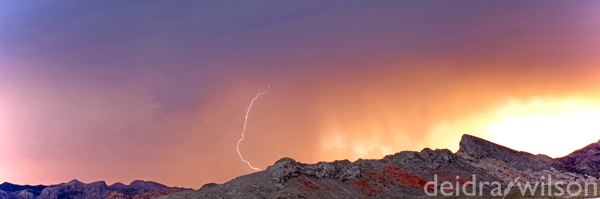
Deidra Wilson Photographer Las Vegas DPS

Perhaps you’ve begun to master photographing lightning at night, but you’ve noticed that there are tons of great storms during the day that produce some pretty great lightning strikes, too. How do you transfer your knowledge over and capture some of those images to add to your collection?

1. Find a Safe Vantage Point

This one should go without saying, but if you’re going to be strapping your gear onto a metal tripod and standing outside in stormy weather for an extended period of time, you should be safe while doing so. You can try being further away from the storm, which will actually give you a better view of any strikes, or you can shoot from a sheltered area. You can even photograph from inside your car if needed.

2. Use a Tripod

When shooting lightning, you’ll be shooting long exposures and shooting handheld simply isn’t an option that will produce a quality image.

3. Close Down your Aperture and Drop your ISO

Both of these techniques will allow you to shoot at longer shutter speeds during the day without blowing out your image. You don’t want to close down to the smallest aperture as you may lose some of your image quality. Say your lens goes from f/2.8 – f/22 – try shooting around f/11 or f/14. Depending on your camera, you can probably safely drop your ISO without degrading image quality.

4. Use a Neutral Density Filter if Needed

If your aperture and ISO combination still isn’t allowing you to shoot long enough for each frame, you can add a neutral density filter to the front of your lens, effectively removing stops from the exposure, depending on what level filter you’re using.

5. Shoot Long Exposures

I usually like to shoot for at least ten seconds when trying to capture lightning strikes. You’ll need to check a sample image to make sure the backgrounds aren’t blown out or underexposed based on your settings.

6. Be Patient

Capturing lightning strikes can be a challenge, but can be incredibly rewarding. Once you dial your settings in, you can also try using a remote and setting the camera to shoot continuously. Then you can sit back and see what you capture over the course of the storm.

For the image above, I used the bed of my pickup truck as a tripod, and the image metadata is as follows:

  • f/18.0
  • ISO 100
  • Shutter speed: 4.0 seconds

Deidra Wilson is a Las Vegas Boudoir Photographer who has a wicked obsession for capturing elusive weather through her lens. You can follow her on Twitter at @deidraphoto

Post originally from: Digital Photography Tips.

Check out our more Photography Tips at Photography Tips for Beginners, Portrait Photography Tips and Wedding Photography Tips.

6 Tips on Photographing Lightning During the Day


Digital Photography School

 
Comments Off on 6 Tips on Photographing Lightning During the Day

Posted in Photography


Canon EOS – Chris Bray Creative Tutorial: Low Light Photography Tips

26 Oct

Discover the creative possibilities of experimenting with high ISO settings in low light situations using your Canon EOS. Join in, find the inspiration for your photography and share at www.canon.com.au/worldofeos

 
Comments Off on Canon EOS – Chris Bray Creative Tutorial: Low Light Photography Tips

Posted in Photography Videos


A Few Tips on Getting Awesome Halloween Photos

25 Oct

Autumn is a perfect time for taking pictures. And when it comes to celebrations, it becomes twice as attractive for photographers, because there are so many things worth our attention – the joyful people, the traditions, and the beauty of nature. All this we can find in Halloween celebrations – a cocktail of inspiration for making creative photos! Jack-o’-Lanterns Halloween Continue Reading
Photodoto

 
Comments Off on A Few Tips on Getting Awesome Halloween Photos

Posted in Photography


5 Photoshop Setup Tips

24 Oct

Photoshop setup opener

When you install a new version of Photoshop the first thing you’ll need to do is to set things up so that they work properly for you. Here are settings I make in the Preferences panel every time I upgrade.

1. Set your History States

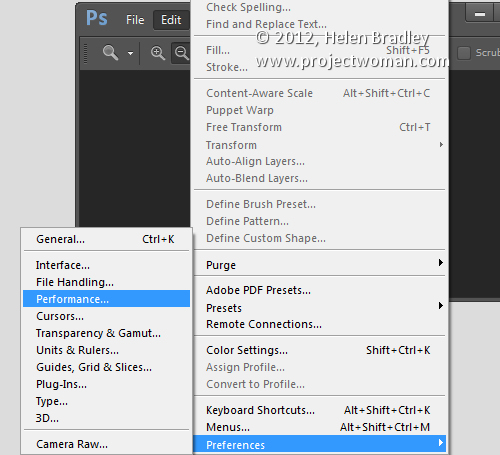
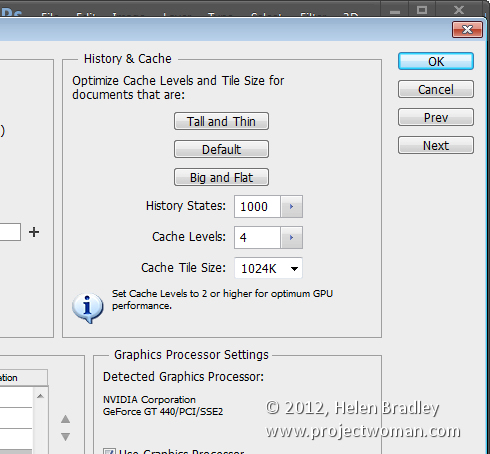
Choose Edit > Preferences > Performance or Photoshop Preferences > Performance on a Mac and set the number of History States. Having a high setting for History States ensures that you can undo changes that you make to your image. By default it’s set to a paltry 20 so this is the first change to make.

I set my History States to the maximum value 1,000 – but even a quarter of this would be a good setting.

Photoshop setup preferences1

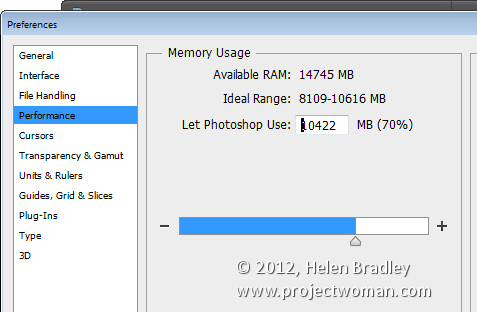
Here too I ensure that Photoshop can use plenty of the available RAM so I’ll crank that up to a large value – what you use will be dependent on the amount of memory you have installed.

Photoshop setup preferences2

2. Set Cursor Shape and Size

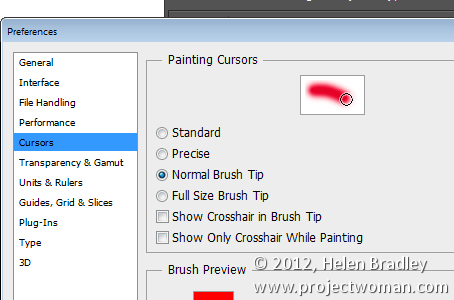
Still in the Preferences panel I like to use a Normal Brush Tip for my Painting Cursor and Precise for my Other Cursors. This can be set in the Cursors area.

You may want to use something different but it pays to look at these options and decide how you want your cursors to look as you work with them.

Photoshop setup preferences3

3. Opening Files My Way!

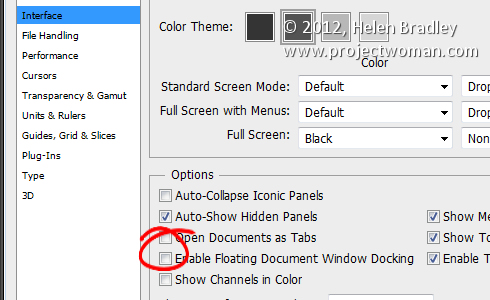
I dislike that Photoshop opens documents as tabs and that they are docked to the toolbar. This behavior really grates on me. If you’re like me and you prefer your documents to float you can set this in the Preferences Panel.

Choose Interface and disable Enable Floating Document Window Docking and disable Open Documents as Tabs.

Photoshop setup preferences4

In this panel you will also find the new Photoshop Color Themes in Photoshop CS6 so if the dark gray look is not to your liking you can return to a more “CS5″ look by selecting the lighter gray color.

4. Control Where Files are Saved to

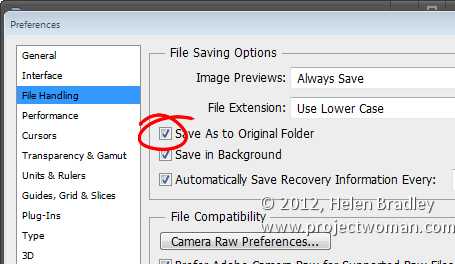
Photoshop can be set either to save images back into the original folder when you choose File, Save As or to the folder that was last used for saving files. You can choose which of these behaviors you prefer Photoshop to default to in the File Handling area of the Preferences panel.

To save back to the original folder, enable the Save As to Original Folder option. To default to the last folder you saved to disable this checkbox.

Photoshop setup preferences5

5. Write your own History

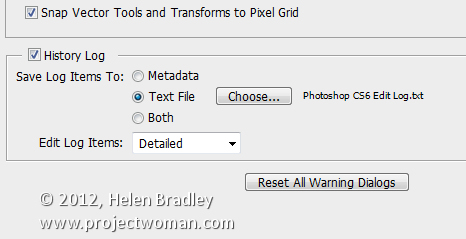
So I can go back and retrace my steps in a large project I like to store a History of all that I do in Photoshop. To do this, click the General tab and enable the History Log checkbox. I save to a Text file (rather than inside the file itself) and I save a Detailed history as that stores the richest data. Choose a filename and place to save it and Photoshop will keep a log file of everything you do to every file.

Photoshop setup preferences6

So, now it is over to you. What preferences do you set up when you first install a new version of Photoshop?

Post originally from: Digital Photography Tips.

Check out our more Photography Tips at Photography Tips for Beginners, Portrait Photography Tips and Wedding Photography Tips.

5 Photoshop Setup Tips


Digital Photography School

 
Comments Off on 5 Photoshop Setup Tips

Posted in Photography


Bobs Burning Bunny Holes (Nikon CLS off camera flash tips)

23 Oct

www.dombowerphoto.blogspot.com In This video Bob gets stuck down his bunny hole and I use some creative flash with coloured gels to make it look like a dangerouse bunnyhole. photos taken with the nikon sb900 tamron 28-75mm lens and the nikon d300 www.dombower.com

 
Comments Off on Bobs Burning Bunny Holes (Nikon CLS off camera flash tips)

Posted in Nikon Videos


BF3 101 – Tips For Winning Firefights (Gameplay/Commentary)

22 Oct

www.youtube.com Click here to watch BF3 101: Chopper Pilot Badass School with Wrath (Battlefield 3 Gameplay/Commentary) BF3 101: Tips For Winning Firefights (Battlefield 3 Gameplay/Commentary) Sometimes you can learn more from a loss than a win. DIRECTOR’S CHANNEL: www.youtube.com Visit the NEW Inside Gaming Blog bit.ly – – – – – – – – – – – – – – – – – – – – – – – – – – – – – – – – – – – – – – This Respawn video will show you: How to shoot faces How to be ready like a ninja at all times How to cover your bro How to love Wrath How to play Battlefield 3 – – – – – – – – – – – – – – – – – – – – – – – – – – – – – – – – – – – – – – FOR MORE MACHINIMA, GO TO: www.youtube.com FOR MORE GAMEPLAY, GO TO: www.youtube.com FOR MORE SPORTS GAMEPLAY, GO TO: www.youtube.com FOR MORE MMO & RPG GAMEPLAY, GO TO: www.youtube.com FOR MORE ANIMATIONS & SHORTS, GO TO: www.youtube.com FOR MORE TRAILERS, GO TO: www.youtube.com
Video Rating: 4 / 5

A heart felt goodbye. Oh and Dead to Rights: Retribution along with Saturn Apartments, the first volume! One last dose of Manga Minutes! Manga Entertainment, a Starz Company, is the premiere entertainment source for anime enthusiasts worldwide. We specialize in the production and distribution of state-of-the-art animation for theatrical, television, Internet, DVD and home video release. For video channels, contests, up-to-date release information, trailers, and breaking anime news, visit www.manga.com today! Manga,Anime,OVA,Games,Japanime,Mecha,Monster,Samurai,Otaku,Saturn Apartments,Dead To Rights Retribution

 
Comments Off on BF3 101 – Tips For Winning Firefights (Gameplay/Commentary)

Posted in Animation Videos