Tag: small

  • How to Use a Small Softbox With Your Flash to Transform Your Portraits

    Typically I prefer to carry minimal photographic equipment when I am out to make a series of photos or portraits. If I’m on assignment for a client or creating new stock photos I will take more gear with me so as to better cover any challenging situations that may arise. One of my favorite accessories I have come to rely on is a small collapsible softbox for my flash.

    How to Use a Small Softbox With Your Flash to Transform Your Portraits

    Day time use of a small softbox can help to even out shadows on your model’s face.

    Unmodified flash tends to be pretty harsh. A strong burst from a small light source produces some ugly shadows and extreme highlights. Whether your flash is on or off camera if the light is direct and unfiltered the results you see will be unnatural looking. I’ve experimented some with various small flash modifiers and not found any that produce pleasing light, mostly because of their size. They are too small to produce a reasonably even, soft light.

    Pop-up Softbox

    My pop-up softbox is just 60cm (about 2 feet) square, lightweight, and very portable. Having someone to assist with it is helpful, so it can be easily positioned just where you want, but I have often used it on location mounted on a light stand. Placing the flash in the mouth of the softbox effectively increases the output size of the light and softens it with two nylon diffusers. The light from your flash will be scattered, resulting in softer shadows and reduced highlights.

    Night Portraits

    How to Use a Small Softbox With Your Flash to Transform Your Portraits

    Adding a soft light to night time portraits can create evenly lit photographs.

    Photographing portraits at night can be challenging, especially if you have to rely on available light. Adding a light source you have some control over, will make night portraiture a much more enjoyable experience. Often at night, available light sources will not provide a pleasant, even light for your subject and direct flash will produce unflattering results. Using a softbox to spread and soften the light will avoid hard edged shadows and blown out highlights.

    Often at night, available light sources will not provide a pleasant, even light for your subject and direct flash will produce unflattering results. Using a softbox to spread and soften the light will avoid hard edged shadows and blown out highlights.

    Indoor Portraits

    Looking down at a woman standing next to traditional northern Thai sausages at a market. How To Use A Small Soft Box With Your Flash To Transform Your Portraiture

    Adding a soft light to one side of my model has helped brighten up the scene.

    Likewise, when photographing indoors and relying on available light, it can be challenging to achieve pleasing results. By adding a soft light to your subject you are able to create natural looking images.

    The slightly larger surface of the softbox throws light over a wider area so more of your subject is affected and also some of the surroundings will benefit from a little more illumination.

    How to Use a Small Softbox With Your Flash to Transform Your Portraits

    Careful flash output and exposure setting have enabled me to capture this traditional Thai new year blessing activity effectively.

    Outdoor Daytime Portraits

    Outdoors, during the day, is when I enjoy using this softbox the most. Having an additional light source that’s powerful enough without being too harsh can help you make portraits that look natural. Being able to reduce shadows by adding a soft fill light will produce a much more flattering result than if you are using an unmodified flash or relying only on available light.

    Balance is the Key

    I have found manually setting my flash output gives more consistent results than setting it on TTL or other automatic settings. Being in control of the output will allow you to balance the nice soft light from the softbox with the available light. This is important if you want to produce natural looking photos. If your flash produces too much or too little light it will overpower the ambient light or have little to no effect.

    I used to use an external light meter to measure the ambient light and then set my flash so it was producing an equivalent output. Now it’s easy enough to just use the information your digital camera provides on the screen, the histogram and blinkies. With a little trial and error, it does not take long to find a setting that gives you a good exposure.

    Asian woman taking a photograph - How To Use A Small Soft Box With Your Flash To Transform Your Portraiture

    Using the flash and softbox to balance the back lit subject with just the right amount of filtered light.

    Light Position and Background

    At times you might want to balance the flash so that the background remains very bright and your subject is still pleasantly lit. Dialing in the flash output to slightly less than the value of the background illumination will achieve this when your camera’s exposure is set for your model’s skin, (which is being lit by your flash).

    Think of your softened flash as a second light source. Position your model so the brightest ambient light source is behind them and place your softbox to one side in front of them. This can result in studio-like portraits. Again, in this situation, balance is the key. Too much or too little output from your flash will create an unbalanced light and an unnatural looking photograph.

    How to Use a Small Softbox With Your Flash to Transform Your Portraits

    Filling in with a strong, soft light when the light behind your subject is strong can provide very natural looking portraits.

    The softbox was positioned to camera left for this shot.

    Modify for Success!

    Many of our students avoid using their flash, mostly because they have failed to achieve good results in the past. A small, direct light source is rarely going to provide pleasing light. Using a small softbox to modify the light from your flash and learning to balance that with the ambient light, will help transform your portraits.

    As always, when you are trying some new technique with unfamiliar equipment make sure you can afford to make mistakes. Making mistakes is a great way to learn, but you don’t want to do that when you have someone relying on you for the photos. Practice when the only consequence of messing up is that you’ll learn from your experience and not let someone else down.

    The post How to Use a Small Softbox With Your Flash to Transform Your Portraits by Kevin Landwer-Johan appeared first on Digital Photography School.


    Digital Photography School

  • Canon’s PowerShot SX730 HS travel zoom offers 40x lens in a very small package

    $ (document).ready(function() { SampleGalleryV2({“containerId”:”embeddedSampleGallery_8818688137″,”galleryId”:”8818688137″,”isEmbeddedWidget”:true,”standalone”:false,”selectedImageIndex”:0,”startInCommentsView”:false,”isMobile”:false}) });

    Canon has announced its PowerShot SX730 HS, the follow-up to the SX720. The SX730 has a 20.3MP BSI CMOS sensor, stabilized 24-960mm equivalent lens, a 3″ (non-touch) LCD that flips upward 180 degrees, as well as Wi-Fi, NFC and Bluetooth.

    The SX730 HS comes in silver and black and will ship in June for $ 399.

    Press Release

    Capture high-quality memories with the new Canon PowerShot SX730 HS digital camera

    Latest PowerShot Digital Camera Provides Impressive Image Quality, Zoom Range and Tilting LCD screen in a Compact Size

    MELVILLE, N.Y., April 6, 2017 – Ideal for families on vacation or parents at their kids’ sporting event looking for a convenient, easy-to- carry compact digital camera capable of producing high quality photos and videos at long distances, Canon U.S.A., Inc., a leader in digital imaging solutions, introduced today the new PowerShot SX730 HS digital camera. This new digital camera boasts a 20.3 Megapixel* CMOS imaging sensor and a powerful 40x Optical Zoom lens (equivalent to 24-960mm) in a form factor that easily fits in a pocket, making it an outstanding camera for budding photographers to capture gorgeous imagery no matter where they are.

    With new features such as a convenient Self-Portrait and Smooth Skin mode, 3.0-inch LCD screen that rotates up 180 degrees and built-in connectivity capabilities like Wi-Fi®1, NFC2 and Bluetooth®3 technology, it’s now easier and more convenient than ever to use Canon digital cameras to share images and videos on the go, making the PowerShot SX730 HS digital camera a great transitional camera for those looking to use something other or move from a smartphone. 

    “We live in a very connected world and want to give people the power to zoom in from far away to capture amazing scenes from a distance, while also being able to share those images in real time,” said Yuichi Ishizuka, president and COO, Canon U.S.A., Inc. “The new Canon PowerShot SX730 HS digital camera will help photographers effortlessly capture memories, even from great distances and conveniently share their fun with friends and family.”

    As the successor to Canon’s PowerShot SX720 HS digital compact camera, the PowerShot SX730 HS digital camera also features: 

    • Powerful 40x Optical Zoom with Zoom Framing Assist
    • Sleek, Lightweight and Pocket-size Design
    • Built-in Wi-Fi®1, NFC2 and Bluetooth®3 technology
    • 3 Megapixel* CMOS sensor
    • DIGIC 6 Image Processor
    • 0-inch Tilt-type (180° up) LCD
    • 1080p Full HD Video at 60p
    • Self Portrait Mode
    • Story Highlights
    • Geotag4 & Date Stamp Options

    Canon’s PowerShot SX730 HS digital camera is scheduled to be available in June 2017 for an estimated retail price of $ 399.99.

    Canon PowerShot SX730 HS specifications

    Price
    MSRP $ 399
    Body type
    Body type Ultracompact
    Sensor
    Max resolution 5184 x 3888
    Image ratio w:h 1:1, 4:3, 3:2, 16:9
    Effective pixels 21 megapixels
    Sensor photo detectors 20 megapixels
    Sensor size 1/2.3" (6.17 x 4.55 mm)
    Sensor type BSI-CMOS
    Processor Digic 6
    Color space sRGB
    Color filter array Primary color filter
    Image
    ISO Auto, ISO 80-1600
    White balance presets 5
    Custom white balance Yes
    Image stabilization Optical
    Uncompressed format No
    JPEG quality levels Super fine, fine
    File format
    • JPEG (Exif v2.3)
    Optics & Focus
    Focal length (equiv.) 24–960 mm
    Optical zoom 40×
    Maximum aperture F3.3–6.9
    Autofocus
    • Contrast Detect (sensor)
    • Multi-area
    • Center
    • Tracking
    • Single
    • Continuous
    • Face Detection
    • Live View
    Autofocus assist lamp Yes
    Digital zoom Yes
    Manual focus Yes
    Normal focus range 2 cm (0.79)
    Macro focus range 1 cm (0.39)
    Screen / viewfinder
    Articulated LCD Tilting
    Screen size 3
    Screen dots 922,000
    Touch screen No
    Screen type TFT LCD
    Live view Yes
    Viewfinder type None
    Photography features
    Minimum shutter speed 15 sec
    Maximum shutter speed 1/3200 sec
    Exposure modes
    • Program
    • Hybrid Auto
    • Auto
    Scene modes
    • Creative Shot
    • Portrait
    • Smile
    • Wink Self-timer
    • Face Self-timer
    • High-speed Burst
    • Handheld Night Scene
    • Low Light
    • Fireworks
    • Long Shutter
    Built-in flash Yes
    Flash range 4.00 m (with Auto ISO)
    External flash No
    Flash modes Auto, on, slow synchro, off
    Drive modes
    • Single
    • Continuous
    Continuous drive 5.9 fps
    Self-timer Yes (2 or 10 secs, self-timer)
    Metering modes
    • Multi
    • Center-weighted
    • Spot
    Exposure compensation ±2 (at 1/3 EV steps)
    Videography features
    Format MPEG-4, H.264
    Modes
    • 1920 x 1080 @ 60p / 35 Mbps, MP4, H.264, AAC
    • 1920 x 1080 @ 30p / 24 Mbps, MP4, H.264, AAC
    • 1280 x 720 @ 30p / 8 Mbps, MP4, H.264, AAC
    Microphone Stereo
    Speaker Mono
    Storage
    Storage types SD/SDHC/SDXC card
    Connectivity
    USB USB 2.0 (480 Mbit/sec)
    HDMI Yes (micro HDMI)
    Microphone port No
    Headphone port No
    Wireless Built-In
    Wireless notes 802.11b/g/n + NFC + Bluetooth
    Remote control Yes (via smartphone)
    Physical
    Environmentally sealed No
    Battery Battery Pack
    Battery description NB-13L lithium-ion battery & charger
    Battery Life (CIPA) 250
    Weight (inc. batteries) 300 g (0.66 lb / 10.58 oz)
    Dimensions 110 x 64 x 40 mm (4.33 x 2.52 x 1.57)
    Other features
    Orientation sensor Yes
    GPS None

    Articles: Digital Photography Review (dpreview.com)

  • Hawkesmill launches new line of small luxury camera bags

    $ (document).ready(function() { SampleGalleryV2({“containerId”:”embeddedSampleGallery_2812556367″,”galleryId”:”2812556367″,”isEmbeddedWidget”:true,”standalone”:false,”selectedImageIndex”:0,”startInCommentsView”:false,”isMobile”:false}) });

    Hawkesmill England, a maker of luxury camera bags and accessories, has launched its new line of smaller bags designed to be used with mirrorless cameras, or smaller DSLRs with an attached lens. Like Hawkesmill’s larger models the new line comes with a removable camera insert and a rear sleeve for memory cards, documents and other smaller items and valuables. 

    The bags come in various styles and are made from premium materials, such as Scottish Harris Tweed and triple-layered waterproof canvas. A dual D-ring closing system allows for quick access to your gear while holding it safely. It also lets you slightly expand the bag’s capacity when some extra space is needed. All models of the new line come with the same overall dimensions of 10 x 8 x 5in (25.4 x 20.3 x 12.7cm). However, weight varies slightly between 2.5lb and 3.5lb (1.13kg to 1.58kg).

    All canvas models of the small bag are available now for £329 (approximately $ 420), the Regent Street model, which is made from leather, will set you back £469 (approximately $ 595). All Hawkesmill bags are handmade in England and come with a lifetime warranty.

    Press Release:

    Hawkesmill England Launches New Small Range of Luxury Camera Bags 

    West Sussex, England (December 5th 2016) – Today, Hawkesmill England, one of the leading high-end camera accessories brands, announced it is rolling out a line of smaller luxury camera bags. Currently, Hawkesmill makes a stylish large camera messenger bag, suitable for needed gear and a 15” MacBook Pro. These new bags are designed to be used with smaller cameras, i.e., mirrorless, Leica, or a DSLR and single lens attached.

    Hawkesmill utilizes superbly luxurious materials, such as Scottish Harris Tweed and triple-layered waterproof canvas, while the firm’s innovative dual-d ring closure and trigger hook system ensures that all of the gear it holds is safe and secure, while also being quick to access. A second d-ring acts as an overflow ring, for those occasions when a little too much has been packed.

    Similar to the large bags, the small line also includes a removable insert that is replaceable, ensuring a lifetime of use, as well as a rear sleeve that keeps valuables, such as passports, tickets, memory cards and money, against your body and safe.

    There are five models currently available: the classic all-black Bond Street; the olive Jermyn Street, sporting a traditional Harris Tweed design; the distinctive 18oz canvas Marlborough with English vegetable tanned leather; the black body with charcoal Harris Tweed flap Sloane Street; and, in a first for camera bags, the Regent Street, an all-Horween Chromexcel version, known as one of the finest leathers in the world.

    The overall dimensions of each of the new Hawkesmill bags are 10? wide x 8? high x 5? deep (25.4cm x 20.3cm x 12.7cm), while the weight varies slightly by model, from 2.5lbs to 3.5lbs (1.13kg to 1.58kg).

    All of the small canvas bags sell for £329.00, while the small leather Regent Street is £469.00. Along with the large bags, these are all handmade in England with a lifetime warranty against defects.

    The company also makes luxurious leather camera neck straps, card holders and passport holders.

    For further information about Hawkesmill England handcrafted bags and accessories, please visit www.hawkesmill.com.

    Articles: Digital Photography Review (dpreview.com)

  • Nikon Small World 2016 winners announced

    Nikon Small World 2016 winners announced

    Four-day-old zebrafish embryo (10x). 1st place 2016 Photomicrography Competition. Photo by Dr. Oscar Ruiz

    For over 40 years Nikon’s Small World photomicrography competition has celebrated imagery of the hidden world right under our noses. This year, an image of a four-day-old Zebrafish embryo has taken the top prize. But that’s just scratching the surface – take a look at the top ten winners here and head over to the competition website to see even more.

    Nikon Small World 2016 winners announced

    2nd place 2016 Photomicrography Competition. Photo by Douglas L. Moore

    Polished slab of Teepee Canyon agate (90x).

    Nikon Small World 2016 winners announced

    3rd place 2016 Photomicrography Competition. Photo by Rebecca Nutbrown

    Brain cells from skin cells : Specifically, this is a culture of neurons (stained green) derived from human skin cells, and Schwann cells, a second type of brain cell (stained red), which have started to cover the neuron in the same way these cells interact in the brain. (20x)

    Nikon Small World 2016 winners announced

    4th place 2016 Photomicrography Competition. Photo by Jochen Schroeder

    Butterfly proboscis (6.3x). 

    Nikon Small World 2016 winners announced

    5th place 2016 Photomicrography Competition. Photo by Dr. Igor Siwanowicz

    Front foot (tarsus) of a male diving beetle (100x).

    Nikon Small World 2016 winners announced

    6th place 2016 Photomicrography Competition. Photo by Marek Mi?

    Air bubbles formed from melted ascorbic acid (vitamin C) crystals (50x).

    Nikon Small World 2016 winners announced

    7th place 2016 Photomicrography Competition. Photo by Dr. David Maitland

    Leaves of Selaginella (lesser club moss) (40x).

    Nikon Small World 2016 winners announced

    8th place 2016 Photomicrography Competition. Photo by Samuel Silberman

    Wildflower stamens (40x).

    Nikon Small World 2016 winners announced

    9th place 2016 Photomicrography Competition. Photo by Vin Kitayama & Sanae Kitayama

    Espresso coffee crystals.

    Nikon Small World 2016 winners announced

    10th place 2016 Photomicrography Competition. Photo by Rogelio Moreno Gill

    Frontonia (showing ingested food, cilia, mouth and trichocysts) (200x).

    Articles: Digital Photography Review (dpreview.com)

  • Vote now for your favorite Nikon Small World 2016 entries

    Nikon Small World 2016 Finalists

    Mouse retinal ganglion cells. Photo by Dr. Keunyoung Kim

    Nikon’s Small World Microphotography competition continues to celebrate all things tiny, fanged and gross. This year they’re inviting you to participate in the judging by picking your favorite finalists in the Popular Vote competition. Head over to the Popular Vote page to cast your ballot, and flip through the slides above to see some of our favorite entries.

    Nikon Small World 2016 Finalists

    Leg of a water boatman (Corixidae). Photo by Marek Mis

    Nikon Small World 2016 Finalists

    Actin (pink), mitochondria (black), and DNA (red) in a bovine pulmonary artery endothelial cell. Photo by Talley Lambert

    Nikon Small World 2016 Finalists

    Parts of wing-cover (elytron), abdominal segments and hind leg of a broad-shouldered leaf beetle (Oreina cacaliae). By Pia Scanlon

    Nikon Small World 2016 Finalists

    Egg of a Gulf Fritillary butterfly, Agraulis vanillae. Photo by David Millard

    Nikon Small World 2016 Finalists

    Wildflower stamens. Photo by Samuel Silberman

    Nikon Small World 2016 Finalists

    Scales of a butterfly wing underside (Vanessa atalanta). Photo by Francis Sneyers

    Nikon Small World 2016 Finalists

    Slime mold (Mixomicete). Photo by Jose Almodovar

    Nikon Small World 2016 Finalists

    Beta-alanine and taurine crystals. Photo by Matt Inman

    Nikon Small World 2016 Finalists

    Poison fangs of a centipede (Lithobius erythrocephalus). Photo by Walter Piorkowski

    We told you there were fangs.

    Articles: Digital Photography Review (dpreview.com)

  • Small in Japan: Tokyo’s Unique Museum of Miniature Architectural Models

    [ By WebUrbanist in Architecture & Public & Institutional. ]

    archidepot storage

    The first of its kind, this Japanese museum focuses exclusively on showcasing architectural models through rotating displays of miniatures, treating these crafted works as their own subset of art. The Archi-Depot in Tokyo is a huge warehouse space with 17-foot ceilings and a dazzling array of models from everyday architects as well as famous designers alike.

    model warehouse

    architectural models

    Each model comes with a QR code that provides information about the work, including blueprints, renderings and photographs of finished works as well as details about the architects.

    model shelves

    model storage

    Special lighting and climate control features help preserve and protect the models, just like art in an ordinary museum. The institution is as much oriented toward maintaining these works as it is toward displaying them.

    model mini

    model space japan

    These miniature buildings can be fantastic in their details and visual expression, but are often only seen behind closed doors in architecture firms. This museum takes these carefully-constructed works and puts them on public display.

    model city

    model figure gound

    Featured architects include Kengo Kuma, the designer selected to create the 2020 World Olympics Stadium, as well as Shigeru Ban, famous for his work with paper and cardboard.

    model visitor

    model racks

    Not all of the models represent buildings either under construction or already completed. Some feature conceptual pieces or draft works that for financial or other reasons will never be built. Shelf space is also rented out to architectural firms needing a place to store their models (and, of course, wanting to advertise their skills to a broader audience).

    model neat

    model making

    “Most architects have a store room full of lovely models that no one gets to see. But the situation is worse in offices in Japan, where space is really at a premium,” explained Klein Dytham co-founder Mark Dytham. “So this initiative is really brilliant – it’s a win-win for the architect and Archi-Depot. You rent a set of tall shelves, display your models on the lower shelves, and store the boxes and cases on the upper shelves. Hey presto, an instant architectural model museum with works by most of Japan’s leading architects.”

    Share on Facebook


    [ By WebUrbanist in Architecture & Public & Institutional. ]

    [ WebUrbanist | Archives | Galleries | Privacy | TOS ]


    WebUrbanist

  • The Lantern: Dementia Villages Replicate Small Towns Inside Big Boxes

    [ By WebUrbanist in Architecture & Houses & Residential. ]

    main street usa

    Complete with a Main Street, a barber shop and hardware store, this town-in-a-box is designed to make elderly patients with memory loss feel at home in a surrealistic interior setting.

    natural square

    The Lantern operates a series of such “villages” in Ohio, each looking as much like a movie set as a walkable small town or historic suburb, complete with fake grass, cafe tables and street lamps.

    main street

    the village

    Cute homes are accented with porches and rocking chairs while a high-tech ceiling overhead projects bird sounds and features a high-tech sky display that shifts over the course of the day (and night).

    front porch

    village interior

    The dwellings and other buildings are draw inspiration from the 1940s – in other words: they are made to look like the same places the people living here grew up in.

    dining hall

    side hall

    CEO Jean Makesh got his idea to develop this set of facilities while working as an occupational therapists in less-inviting facilities. His core vision involved using biophilic design to support normal and active lifestyles that would minimize habit disruption and transition anxiety for incoming residents.

    It would be too easy to draw comparisons between this place and science-fictional film dystopias, but the reality is that for most residents this assisted-living facility is much homier than a stark white hospital-style complex.

    no exit

    dimentia town

    A similar-but-outdoor complex in Holland has also been developed along the same lines, containing residents with controlled exits and disguised staff while providing the illusion of an open town through shops and streets.

    Share on Facebook


    [ By WebUrbanist in Architecture & Houses & Residential. ]

    [ WebUrbanist | Archives | Galleries | Privacy | TOS ]


    WebUrbanist

  • Photographers to Get (Small) Reward for Their Creative Commons Images

    dotspin

    Image courtesy: Dotspin

    Someone is benefitting from your Creative Commons-licensed images, and it probably isn’t you. Sure, you might get a little thrill out of knowing that you’re helping a designer with a small budget (or a blogger with no budget) to use an attractive image. And if you’re able to see your pictures in use, the validation can be a fun boost. But that’s a big ‘if’ and it’s pretty much where the benefits end. One new company, though, believes that photographers willing to give away their pictures should receive more for their efforts. Dotspin is trying to line up gifts for photographers who apply Creative Commons licenses to their pictures and give them away on social media sites.

    The company has been online since the beginning of May and is still in beta. Its aim, says co-founder Gastón Paladini, is to reward photographers for their contributions to the Internet.

    “The idea come from a vision to have a more fair web for all. We think that social media users should be recognized for good content (photos) shared and to be protected in a legal way (copyrights).”

    Dotspin is connected to both Instagram and Twitter. Having signed in using an account on either one of those services, Dotspin’s users can take a picture, apply their filters and upload it to their account, tagging the image with the hashtag #dotspin.

    The hashtag ensures that the photo is also submitted to Dotspin where, by default, it is licensed as Creative Commons. A settings page, however, allows photographers to change the type of license applied. Rather than selecting one of the various Creative Commons licenses in use, they’re asked whether they’re willing to allow modifications and commercial usage in addition to personal use.

    The image will appear in Dotspin’s galleries watermarked with a colored dot, but not before the community has voted on it. Users are presented with two random pictures and asked which they prefer. Images that receive a large number of votes receive “dotcredits,” points which they can redeem for rewards.

    At the moment those rewards come from Dotspin, based on “some agreements with Amazon.”

    “But we think that soon the suppliers and brands will come to us to offer their products on the Dotspin catalogue,” says Gastón.

    Put Your Ads in Front of… Picture-Takers

    He may be right.  Instagram currently has more than 100 million users, offering a massive potential market for sellers looking to promote their goods. It’s likely that Dotspin will be able to find some companies who are willing to offer vouchers or freebies in the hope of turning the winners, as well as the site’s users, into future customers.

    But the site will face a number of challenges too.

    The first is the lack of demographic data. Awarding points that users can redeem means that suppliers can’t target their advertising. They’ll have to settle for offering their products to a demographic made up of roughly of people who like taking pictures. That’s a broad category.

    The voting system, too, leaves much to be desired. At the moment, two images are placed against each other at random, forcing users to choose between a picturesque sunset and a mirror-shot selfie, for example. A voting system that pitched two images showing similar topics or that were shot in similar styles against each other might be a more serious way of judging talent.

    But a bigger problem is the site’s goal itself. Gastón’s aim to reward people willing to give away their images may be fair and reasonable, but the lack of rewards on offer so far hasn’t stopped people from sharing their pictures. Flickr alone has more than a quarter of a billion photos available under one form of Creative Commons license or another. Donors of those images have made them available with no hope of reward. Gastón wouldn’t say how many photographers have signed up since the site’s beta launch but he did indicate that the numbers are “much more than we thought.”

    That could be a good sign but it will be interesting to see whether Dotspin is able to capture a good chunk of the photographers willing to allow people to use their images.

    Creative Commons Users Want Tracking for Their Photos, Not Thanks

    The most likely outcome is that some photographers currently sharing their images through Instagram and Twitter will sign up to Dotspin and start adding the hashtag. They’ll enjoy the extra feedback provided by the voting system, especially if it’s enhanced. And if the site is able to bring in donors, they might feel a rush if they’re able to win enough credits to pick up a free app download or a discount from a printing service.

    But none of those rewards is likely to have an impact on photo-sharing as a whole. They aren’t likely to encourage it and the odd prize isn’t going to come close to rewarding photographers for giving away for free an asset that costs other photographers a great deal to produce.

    That’s because when photographers add a Creative Commons license they aren’t doing it for the reward. They’re doing it because they want people to use their images — even the images that few people are ever likely to use. And most of all they want to see their pictures in use.

    That would have been a much more powerful reward than goodies redeemable against voted credits. If a platform were produced that highlighted the best of the most recent Creative Commons-licensed images, helped publishers, bloggers and editors to find them, and informed the photographers each time an image was downloaded and told them where it was going to be used, that would be much more rewarding.

    And if that service also gave the photographers a share of the page’s revenues, then photographers who applied Creative Commons licenses to their images would really start to feel the benefits.


    Photopreneur – Make Money Selling Your Photos

  • Small Space Shape Shifters: 13 Transforming Furniture Designs

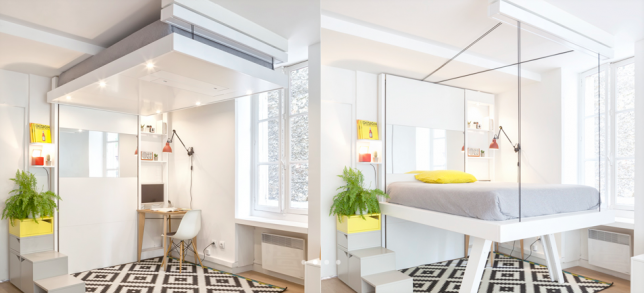
    Bed-Up Space-Saving Furniture


    Almost no space is too small to live in when you’ve got furniture that lowers from the ceiling, pulls out of the walls, transforms for multiple functions or even folds up flat to hang in the closet like clothing. These smart space-saving furniture designs cram maximum use into the most compact packages, often with beautiful, modern results. You’ll never look at a metal storage trunk the same way again.

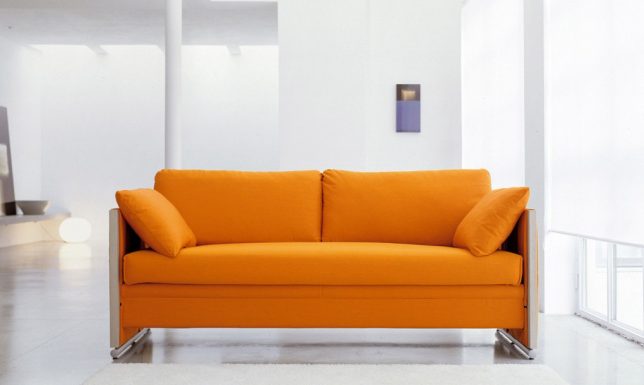
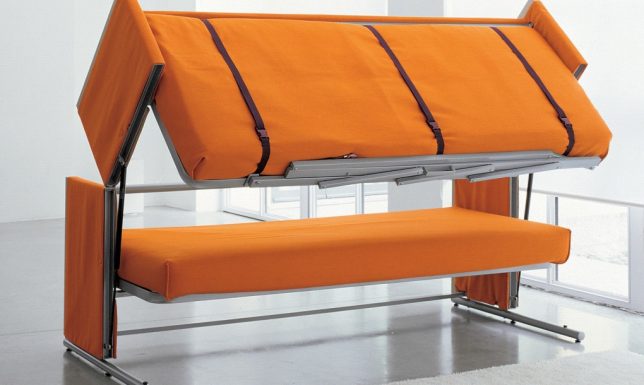
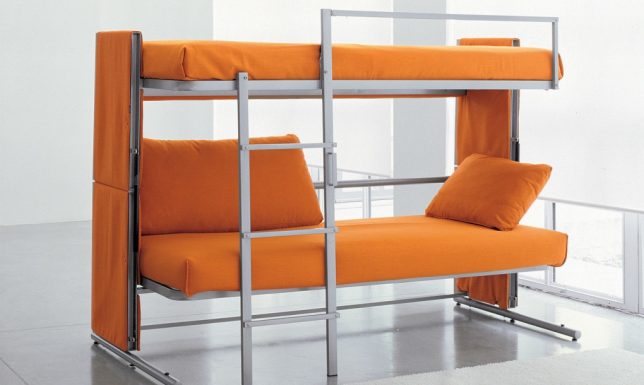
    Bunk Bed Sofa

    space saving bunk bed sofa 1

    space saving bunk bed sofa 3

    space saving bunk bed sofa 2


    This is more than just a sofa bed – there are actually two beds hiding within its sleek contours thanks to a brilliant folding design. The Doc is a sofa by day, bunk bed by night, creating sleeping space for two guests in seconds.

    Furniture Functions Hidden in Metal Crates

    transforming furniture metal crates

    transforming furniture metal crates 2

    transforming furniture metal crates 3

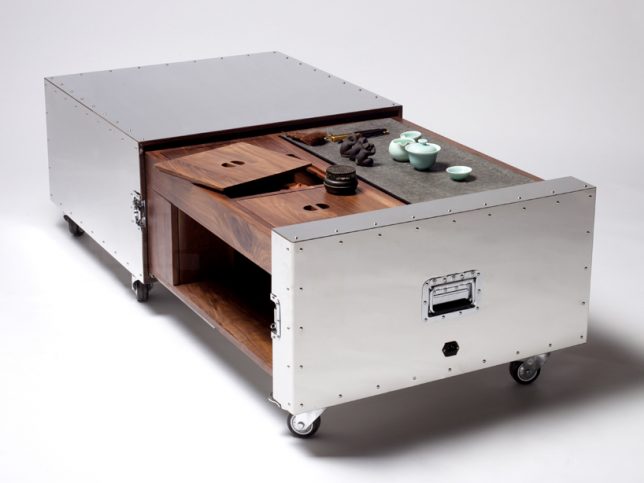
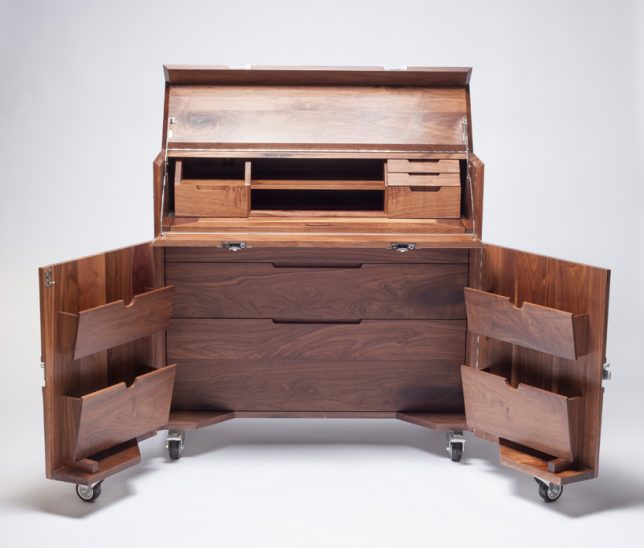
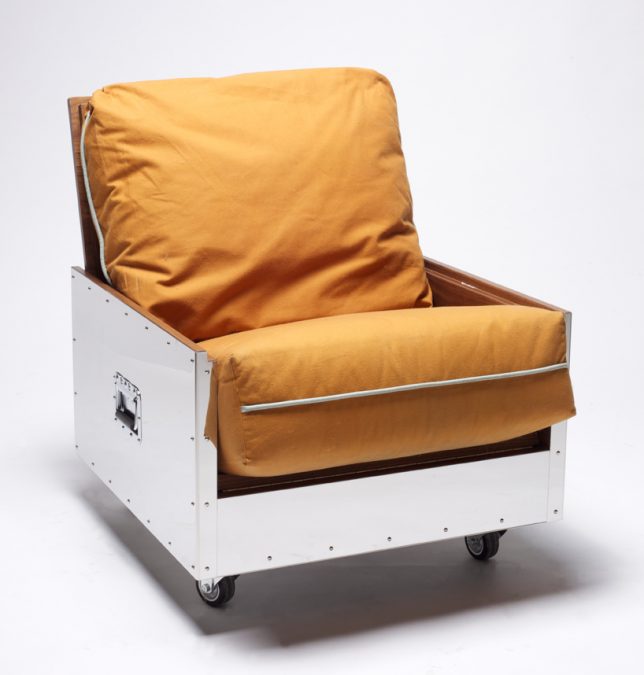
    Traveling artists and other restless types can tote an entire studio apartment full of furniture with them quickly and easily with these mobile objects that transform into rugged metal crates on wheels. Designer Naihan Lee, an artist who has had to move often while living in Beijing, created the ‘Crates’ series to ensure that she would have beautiful, high quality furniture no matter where she ends up. The portable units include a bookshelf, single sofa, tea table, mobile bar, entertainment center, kitchen unit and writing desk.

    Shape-Shifting Chair

    space saving exocet chair

    space saving exocet chair 2

    space saving exocet chair 3

    space saving exocet chair 4

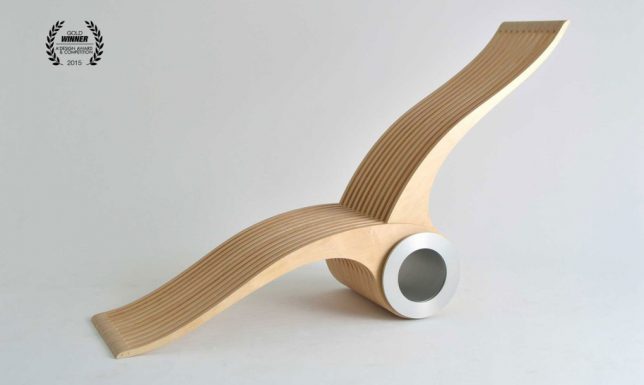
    Better at conforming to the human body in any single position than the traditionally-shaped chairs humans have been using for thousands of years, the Exocet features two wooden ‘wings’ on a rotating steel axis that interlace to create virtually limitless sitting and lounging possibilities. Use it as a stool, a lounge chair, a high-back chair, a floor mat, a recliner, a seat for two or whatever else you can come up with.

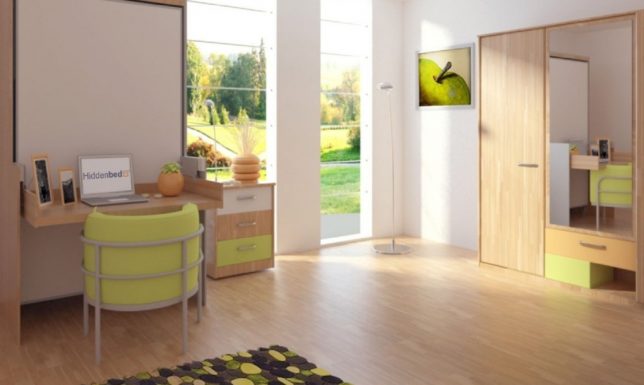
    Bed Hidden in a Desk

    space saving bed in a desk

    space saving bed in a desk 2

    Even once you learned that this desk isn’t what it appears, you might imagine that it would be a pain to remove everything from its surfaces before transforming it into a bed. But the Hiddenbed system unfolds in a way that rests the desk surface on the floor beneath the mattress, leaving everything intact, including power cords. When you decide you want to lay down, it takes just a few seconds to pull out a couple pins and unfold it. Pillows even stay in place when you put the bed back up.

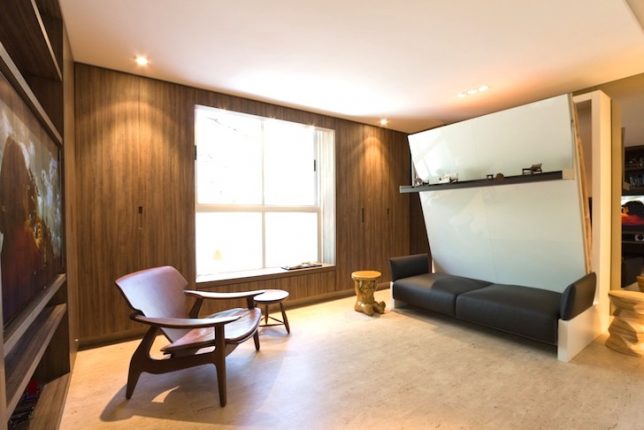
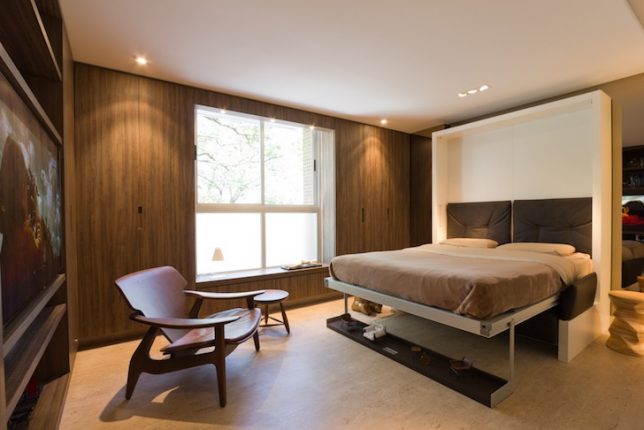
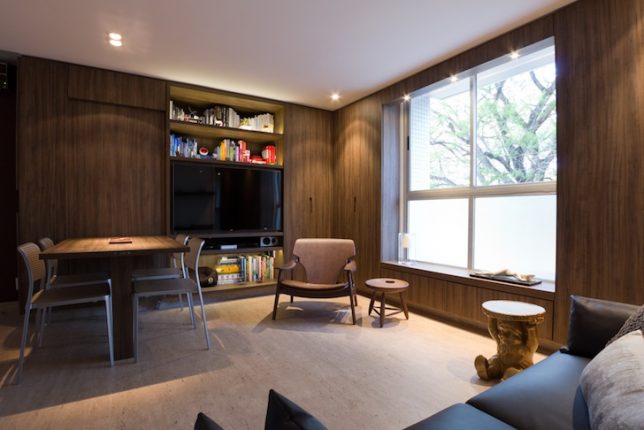
    Transforming Tiny Apartment

    space saving tiny apartment 1

    space saving tiny apartment 2

    space saving tiny apartment 3

    space saving tiny apartment 4

    space saving tiny apartment 5

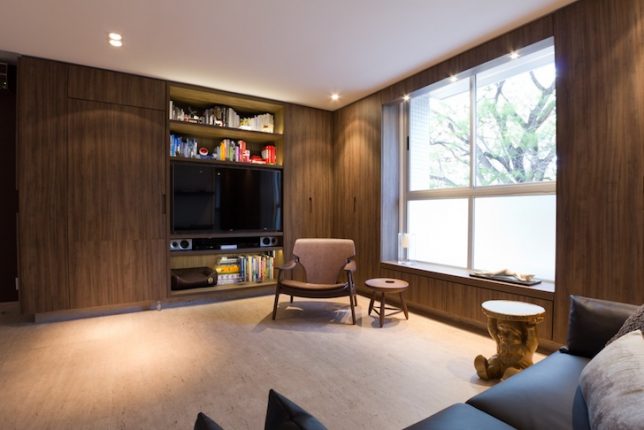
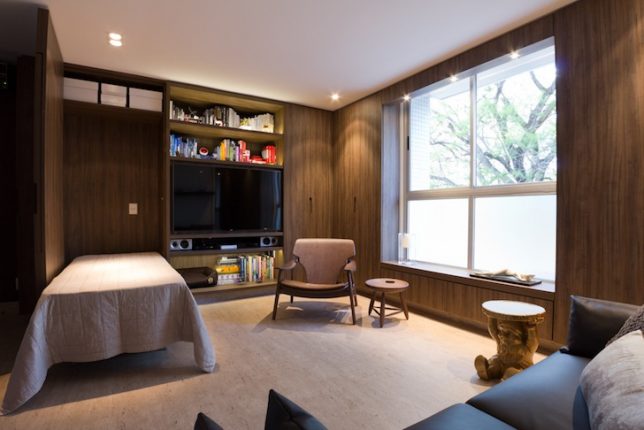
    All sorts of tricks hide behind the surfaces of this 290-square-foot apartment in Brazil, custom-made by architect Fabio Cherman for his own use. Features include a compact sofa bed that uses a wall shelf as support (again, leaving your displayed objects intact), and on the other side of the room, there’s a wall panel that folds down to become a tabletop or a guest bed.


    WebUrbanist

  • Two Photographers Go Head to Head in the Small Studio Challenge

    I found these videos on the Adorama TV channel and thought this is a great idea to learn how photographers work.

    Wallace vs Hoey : Small Studio Challenge

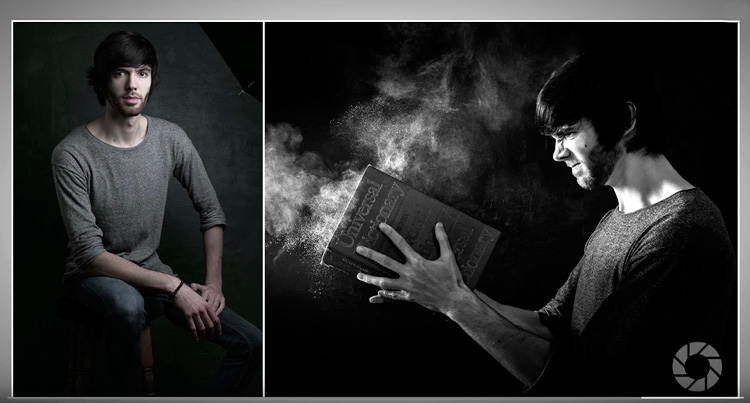
    In these two videos Mark Wallace and Gavin Hoey go head to head in a small studio challenge to see what they can do with the same gear, in the same small space, with the same model – in 20 minutes or less. Let’s see what they each come up with.

    Mark goes first:

    Then it’s Gavin’s turn:

    Which final image do you prefer? What did you learn by watching how they each approach the subject and make decisions? What would you have done?

    small-studio-shootout

    googletag.cmd.push(function() {
    tablet_slots.push( googletag.defineSlot( “/1005424/_dPSv4_tab-all-article-bottom_(300×250)”, [300, 250], “pb-ad-78623” ).addService( googletag.pubads() ) ); } );

    googletag.cmd.push(function() {
    mobile_slots.push( googletag.defineSlot( “/1005424/_dPSv4_mob-all-article-bottom_(300×250)”, [300, 250], “pb-ad-78158” ).addService( googletag.pubads() ) ); } );

    The post Two Photographers Go Head to Head in the Small Studio Challenge by Darlene Hildebrandt appeared first on Digital Photography School.


    Digital Photography School